TDC280B - Cd player/recorder DENVER - Free user manual and instructions
Find the device manual for free TDC280B DENVER in PDF.



| Product Type | CD player/recorder with FM/DAB radio, cassette and USB |
| Brand | Denver |
| Model | TDC280B |
| Power Supply | Mains 100-240 V~50/60 Hz or 4 C-type batteries (not included) |
| Playback Media | Audio CD, CD-R/RW, cassette, USB, FM/DAB radio, AUX input |
| FM Radio | 87,5 – 108 MHz |
| DAB+ Radio | 174,928 – 239,200 MHz |
| Max Output Power | 8 W |
| Display | LCD |
| Main Functions | CD, cassette, USB, radio playback; CD/cassette recording, alarm (not specified), preset EQ, auto station search |
| Inputs | Auxiliary (3.5 mm), USB (music files) |
| Outputs | Headphones (3.5 mm) |
| Dimensions (approx.) | Approximately 40 x 25 x 15 cm (estimate) |
| Weight (approx.) | Approximately 2,5 kg (estimate) |
| Operating Temperature | 0°C to 40°C |
| Safety | Do not open, avoid humidity and heat, use official accessories |
| Cleaning | Dry cloth, do not use abrasive products |
| Repairability | Repairs by qualified personnel only |
| Included Accessories | Power cable (not mentioned, assumed included) |
| Warranty | Standard 2 years (according to distributor) |
Frequently Asked Questions - TDC280B DENVER
User questions about TDC280B DENVER
0 question about this device. Answer the ones you know or ask your own.
Ask a new question about this device
Download the instructions for your Cd player/recorder in PDF format for free! Find your manual TDC280B - DENVER and take your electronic device back in hand. On this page are published all the documents necessary for the use of your device. TDC280B by DENVER.
USER MANUAL TDC280B DENVER
natural_image
Abstract geometric logo with a stylized letter 'D' inside a hexagonal shape (no text or symbols)denver
TDC-280
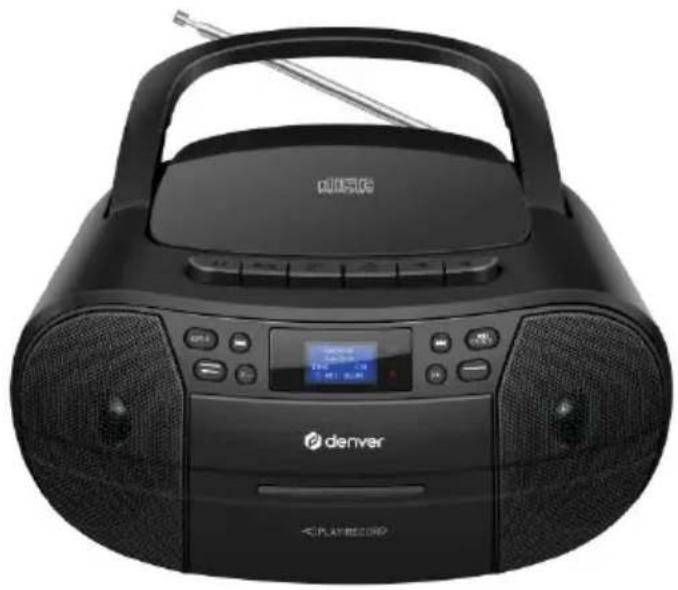
natural_image
Black portable electronic device with CD and earbuds, no visible text or symbols on the device body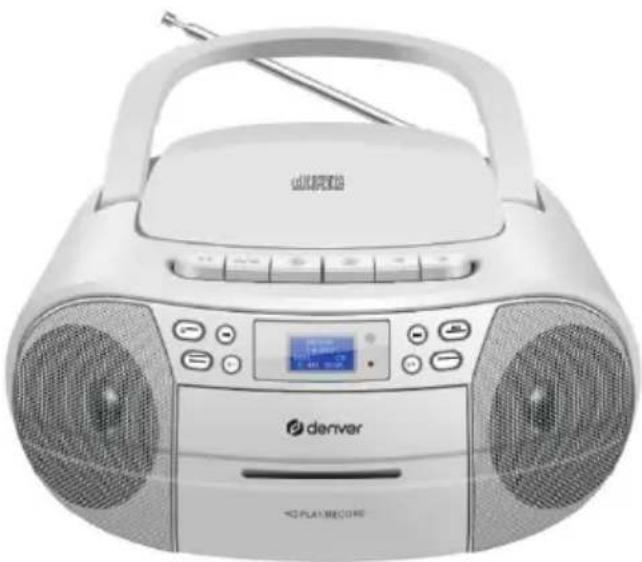
natural_image
White portable electronic device with two speakers and a digital display, no visible text or symbols on the device body.denver-eu
Safety information
Please read the safety instructions carefully before using the product for the first time and keep the instructions for future reference.
- This product is not a toy. Keep it out of reach of children.
- Keep product out of the reach of children and pets to avoid chewing and swallowing.
- Never use old and new batteries or different types of batteries together. Remove the batteries when you are not using the system for a longer period of time. Check the polarity (+/-) of the batteries when inserting them in the product. Wrong positioning can cause an explosion. Batteries are not included.
- Product operating and storage temperature is from 0 degree Celsius to 40 degree Celsius. Under and over this temperature might affect the function.
- Never open the product. Touching the inside electrics can cause electric shock. Repairs or service should only be performed by qualified personnel.
- Do not expose to heat, water, moisture, direct sunlight!
- Please protect your ears against loud volume. Loud volume can damage your ears and risk in hearing loss.
- The unit is not waterproof. If water or foreign objects enter the unit, it may result in fire or electric shock. If water or a foreign object enters the unit, stop use immediately.
- The direct plug-in cable is used as disconnect device, the disconnect device shall remain readily operable. So, make sure there is space around the power outlet for easy access.
- Do not use non original accessories together with the product as this can make the product functionality abnormal.
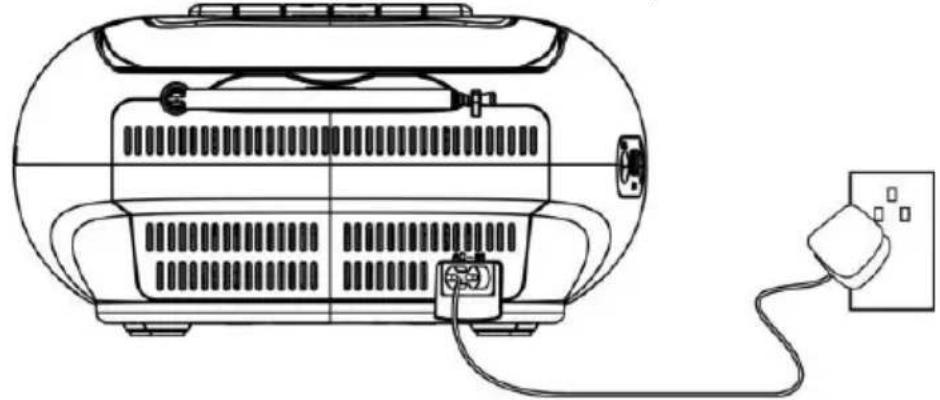
Plug the detachable AC cord into a standard AC outlet (100-240V\~50/60Hz)
natural_image
Line drawing of a portable electric heater with attached power outlet (no text or symbols)Battery power
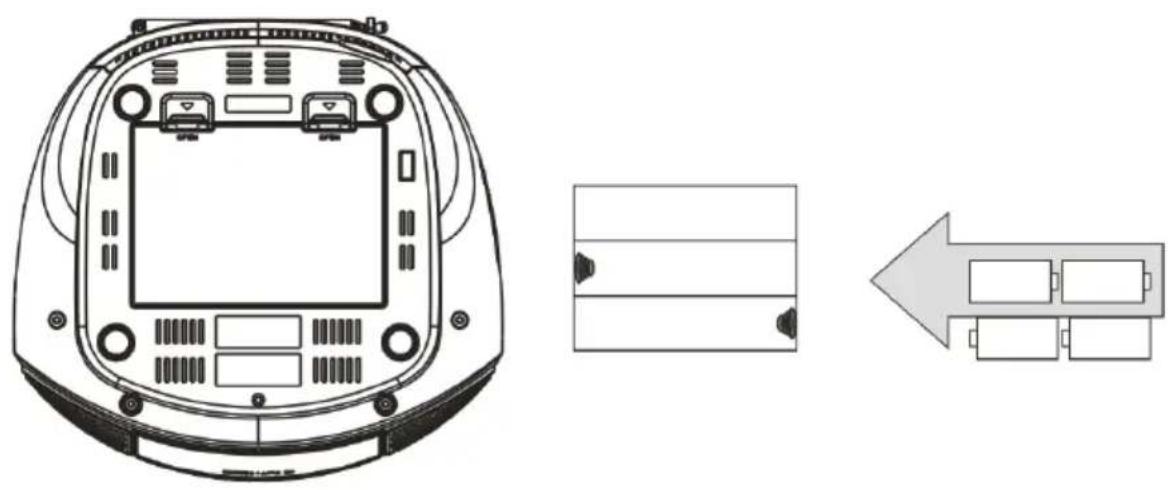
Requires 4 C batteries; not included.
natural_image
Technical line drawing of a device rear panel with internal components and an arrow indicating left-side layout (no text or symbols)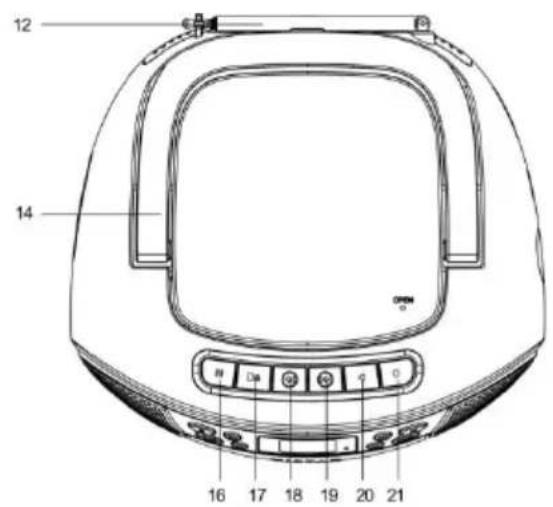
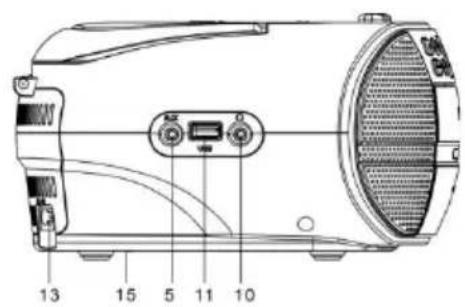
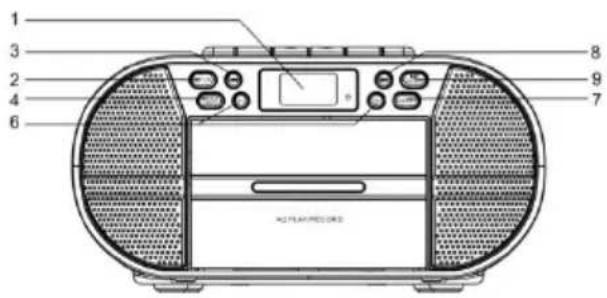
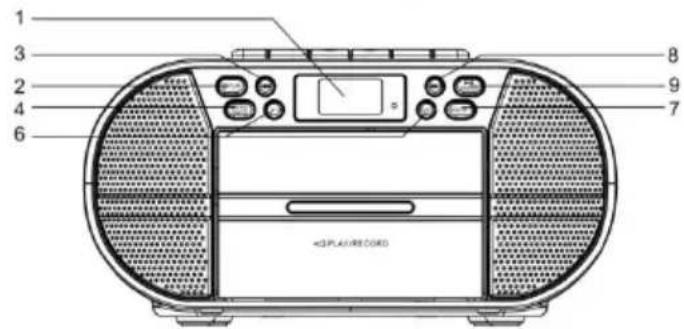
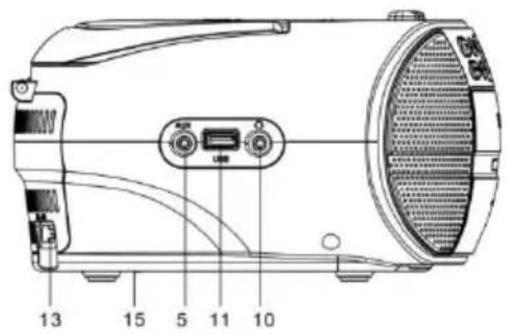
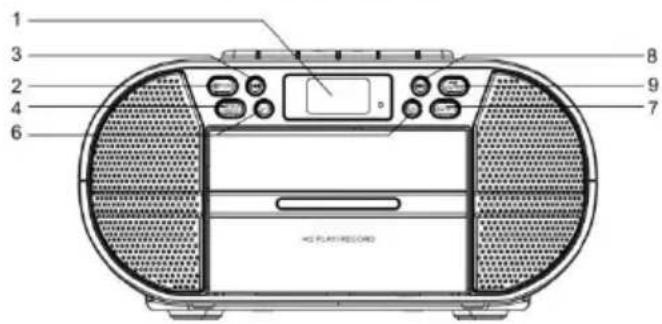
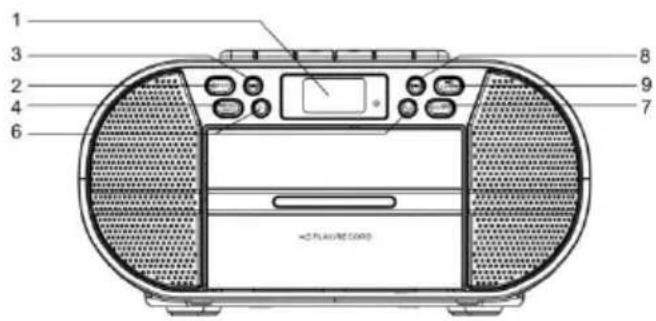
- LCD display
- /FUN button
- button, Previous file/Station
- MENU/INFO button
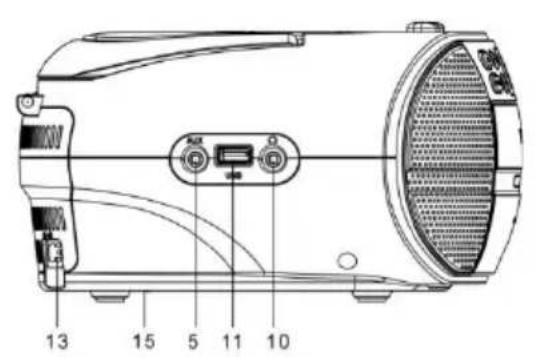
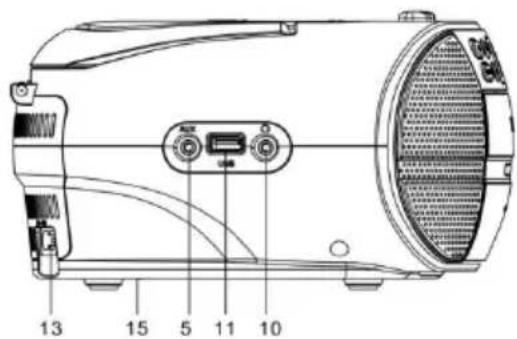
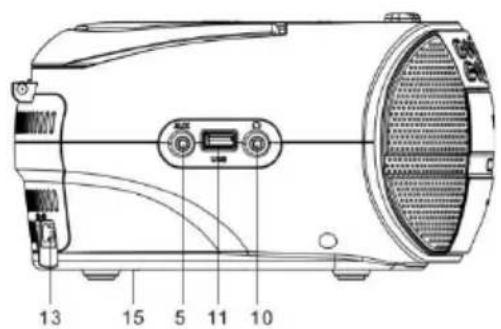
- AUX IN input
- VOLUME buttons
- EQ/RPT button
- button, Next file/Station
- Enter/ button
- Headphone output socket
- USB input
- Antenna
- AC input, mains power supply
- CD door
- Battery compartment
- Pause (cassette)
- Stop/open (cassette)
- Fast Forward (cassette)
- Fast Rewind (cassette)
- Play (cassette)
-
Record (cassette)
-
Insert USB stick with music files.
- Press FUNCTION button to select USB play mode.
- Press PREV/NEXT button to select music.
AUX Playback
- Connect the external source to AUX IN via 3.5 mm cable.
- Press FUNCTION button to select AUX IN mode.
Earphones
Insert the earphones with straight 3.5 mm connector in earphones jack and adjust the volume.
Listening to FM Radio
- Set the function to FM mode by pressing the FUN button.
- Extend the FM antenna to improve FM radio reception.
- Press the PREV or NEXT button to tune into the previous or next available station.
- Press and hold the PREV or NEXT button to auto search the previous or next radio station.
-
Press and hold the PLAY/PAUSE button to automatically search and save radio stations. Up to 30 radio stations can be saved.
-
Set the function to DAB mode by pressing the FUN button.
- Press and hold the PLAY/PAUSE button to automatically search and save DAB radio stations.
- Press the PREV/NEXT button to highlight a sub-station and press the ENTER button to select.
- Press the INFO button to display station details.
Listening to Cassette
-
When the boombox is in the CASSETTE mode: press the STOP/OPEN (cassette) button (■/▲), open the cassette door and insert the music tape. Close the cassette door and press the Play button ( ) to start playing the tape. Press the Fast Forward button/ ( ) to fast forward through the tape and press the Fast Rewind button ( ) to fast reverse through the tape. Press the Pause button (II) to pause playback.
-
To record CD, USB, FM audio, set the function to the corresponding mode (e.g. CD mode), and insert a blank tape into the cassette drive. Press the RECORD (●) button for the CD to be recorded on the blank tape (record other audio the same way).
Please notice - All products are subject to change without any notice. We take reservations for errors and omissions in the manual.
ALL RIGHTS RESERVED, COPYRIGHT DENVER A/S

denver.eu
Electric and electronic equipment contains materials, components and substances that can be hazardous to your health and the environment, if the waste material (discarded electric and electronic equipment) is not handled correctly.
Electric and electronic equipment is marked with the crossed-out trash can symbol, seen above. This symbol signifies that electric and electronic equipment should not be disposed of with other household waste but should be disposed of separately.
All cities have established collection points, where electric and electronic equipment can either be submitted free of charge at recycling stations and other collection sites or be collected from the households. Additional information is available at the technical department of your city.
Hereby, Denver A/S declares that the radio equipment type TDC-280 is in compliance with Directive 2014/53/EU. The full text of the EU declaration of conformity is available at the following internet address: denver-eu and then click the search ICON on topline of website. Write model number: TDC-280. Now enter product page, and RED directive is found under downloads/other downloads.
Operating Frequency Range: FM: 87.5 - 108 MHz
DAB: 174.928 - 239.200 MHz
Max Output Power: 8W
Denver A/S
Omega 5A, Soeften
DK-8382 Hinnerup
Denmark
facebook.com/denver.eu
natural_image
Line drawing of a portable electric heater with attached power outlet (no text or symbols)Akkuleistung
natural_image
Technical line drawing of a device rear panel with internal components and an arrow indicating left-side layout (no text or symbols)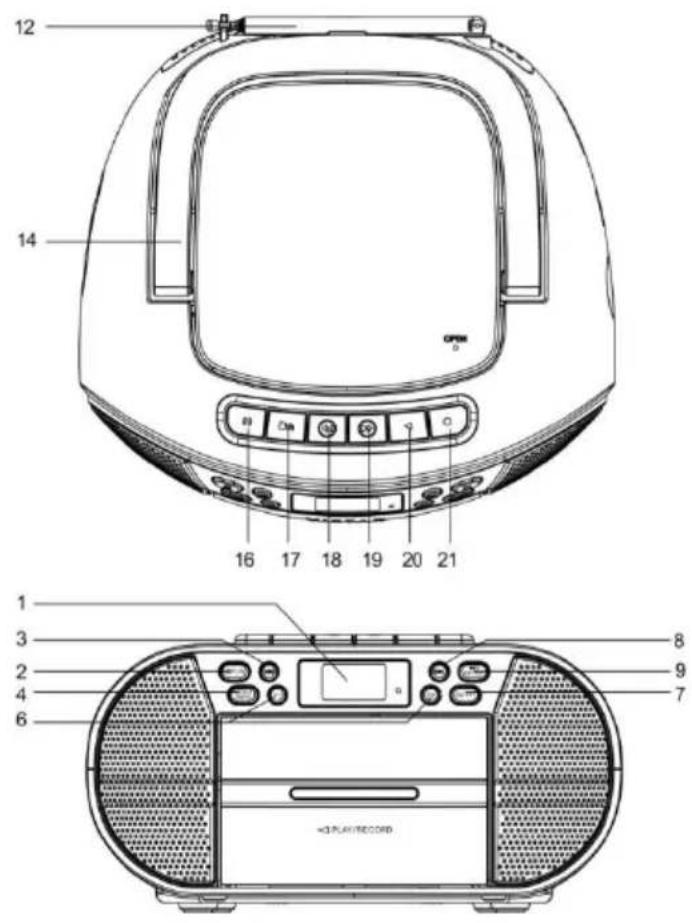
natural_image
Line drawing of a portable electric heater with attached power outlet (no text or symbols)Batteridrift
natural_image
Technical line drawing of a device rear panel with internal components and an arrow indicating left-side layout (no text or symbols)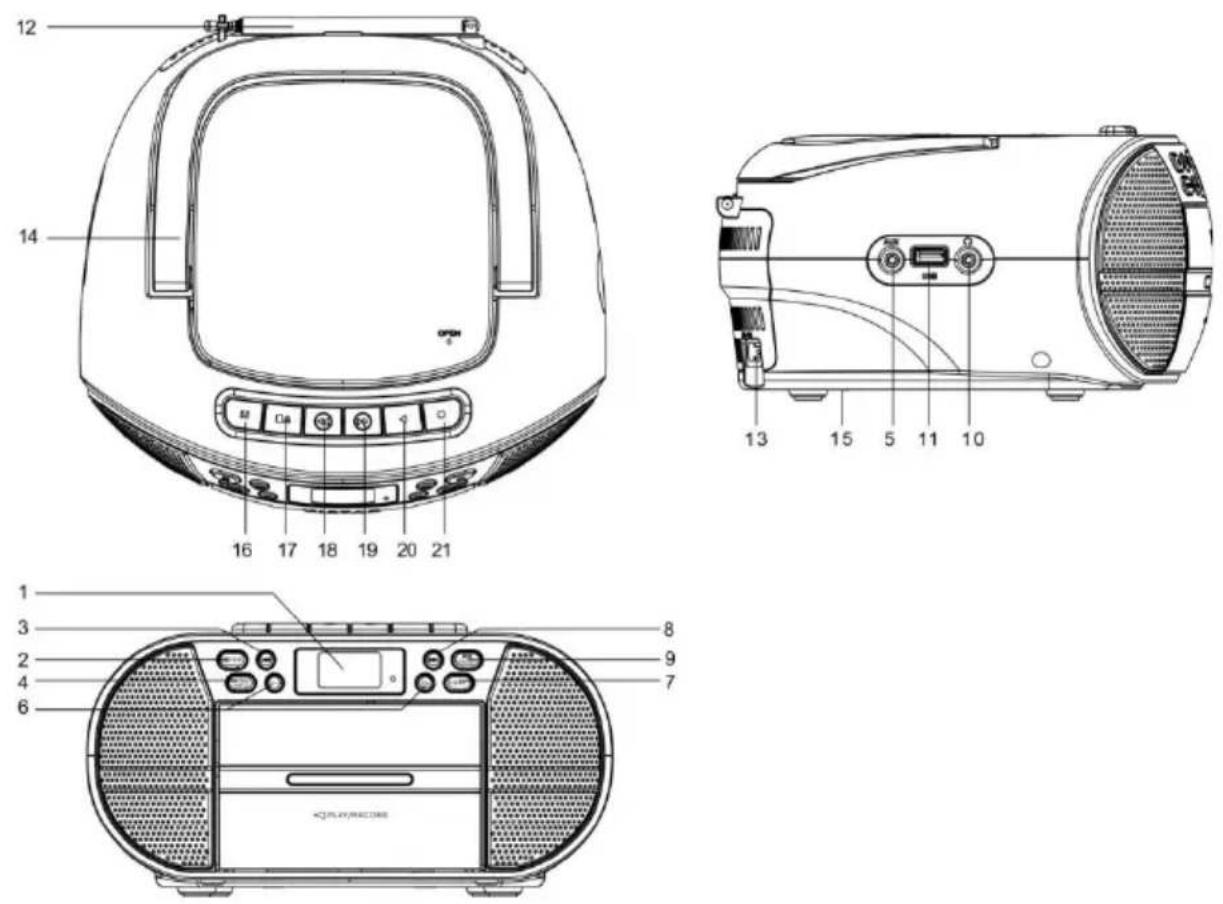
- LCD-display
- /knappen FUN
- Knappen 🏠, Forrige fil/Station
- Knappen MENU/INFO
- AUX IN-indgang
- Knapperne VOLUME
- Knappen EQ/RPT
- Knappen, Naeste fil/Station
- Knappen Enter/
- Udgangsstik til hovedtelefoner
- USB-indgang
- Antenne
- Indgang til vekselstrøm, strømforsyning
- Dæksel til CD-rum
- Batterirum
- Knappen Pause (Kassette)
- Knappen Stop/open (Kassette)
- Knappen Fast Forward (Kassette)
- Knappen Fast Rewind (Kassette)
- Knappen Play (Kassette)
- Knappen Record (Kassette)
USB-afspilning
DAB: 174,928-239,200 MHz
natural_image
Line drawing of a portable electric heater with attached power outlet (no text or symbols)Batterijvoeding
natural_image
Technical line drawing of a device rear panel with internal components and an arrow indicating left-side layout (no text or symbols)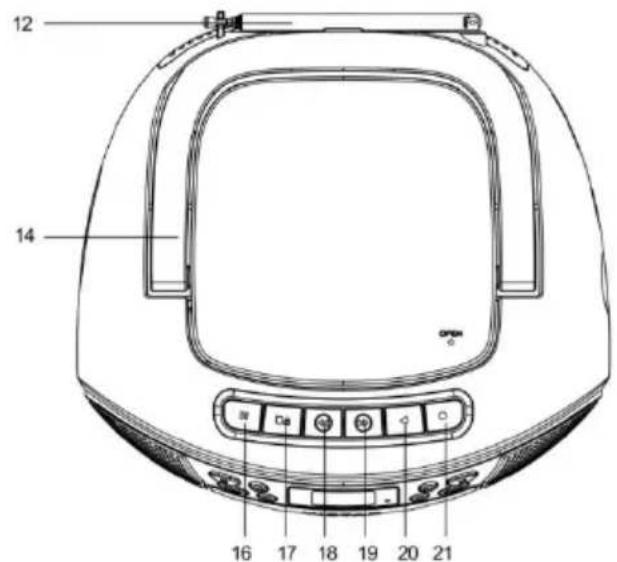
natural_image
Symbol of a trash bin crossed with a diagonal line, representing no waste or discharge (no text or labels)
natural_image
Line drawing of a portable air conditioner unit with attached electrical outlet (no text or symbols)natural_image
Technical line drawing of a device rear panel with internal components and an arrow indicating left-side layout (no text or symbols)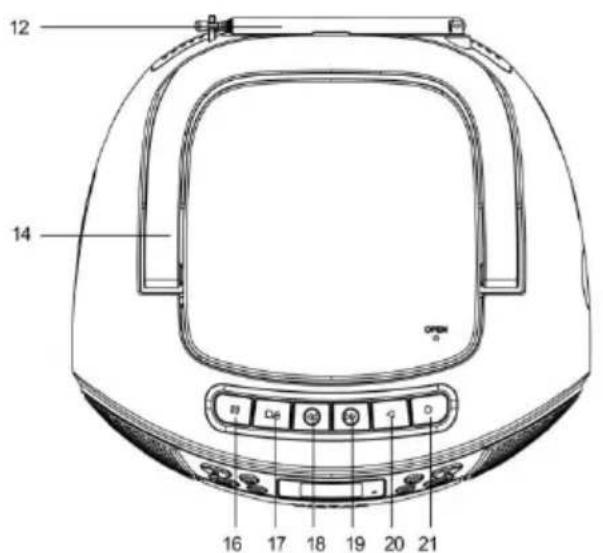
natural_image
Line drawing of a portable electric heater with attached power outlet (no text or symbols)natural_image
Technical line drawing of a device rear panel with internal components and an arrow indicating left-side layout (no text or symbols)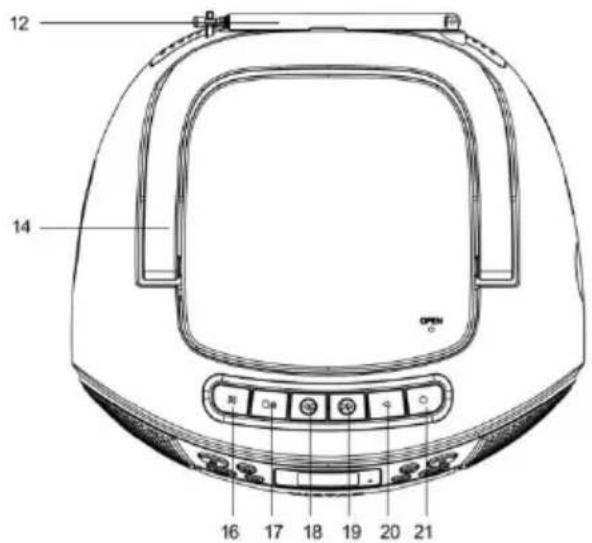
natural_image
Symbol of a trash bin crossed with a diagonal line, representing waste sorting or restriction (no text present)
natural_image
Line drawing of a portable electric heater with attached power outlet (no text or symbols)natural_image
Technical line drawing of a device rear panel with internal components and an arrow indicating left-side layout (no text or symbols)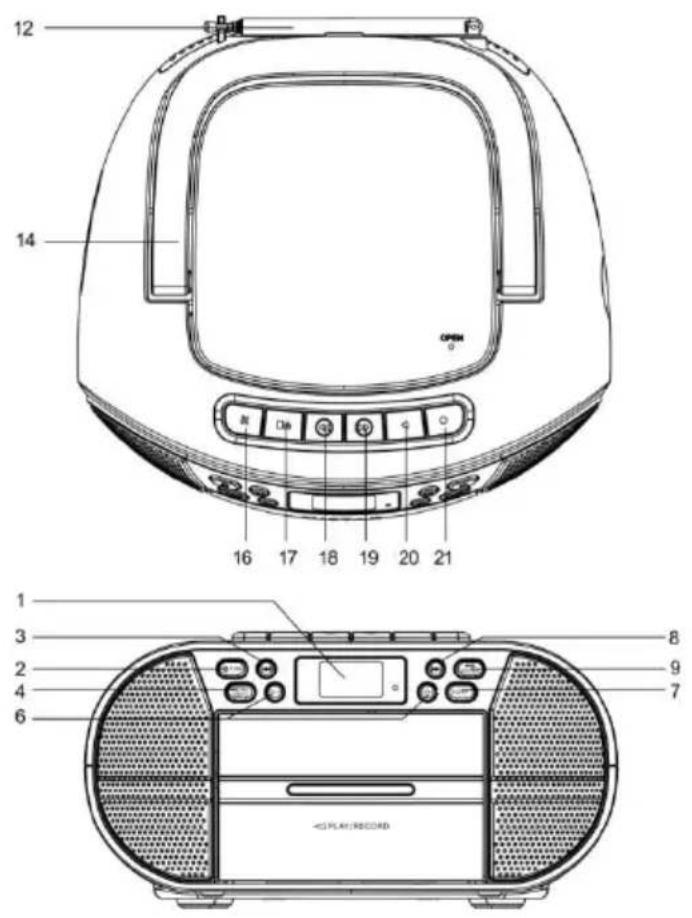
Riproduzione USB
1. Inserisci la chiavetta USB con i file musicali. 2. Premere il pulsante FUNCTION per selezionare la modalità di riproduzione USB. 3. Premere il pulsante PREV/NEXT per selezionare la musica.Riproduzione AUX
1. Collegare la sorgente esterna ad AUX IN tramite cavo da 3,5 mm. 2. Premere il pulsante FUNCTION per selezionare la modalità AUX IN.Auricolari
Inserire gli auricolari con connettore dritto da 3,5 mm nel jack degli auricolari e regolare il volume.Ascoltare la radio FM.
1. Impostare la funzione sulla modalità FM premendo il pulsante FUN. • Estendere l'antenna FM per migliorare la ricezione della radio FM. 2. Premere brevemente il pulsante PREV o NEXT per sintonizzarsi sulla stazione precedente o successiva. 3. Premere e tenere premuto il pulsante PREV o NEXT per eseguire la ricerca automatica della stazione radio precedente o successiva. 4. Premere il pulsante PLAY/PAUSE per eseguire la ricerca e salvare le stazioni radio automaticamente. Possono essere salvate fino a 30 stazioni radio. 1. Impostare la funzione sulla modalità DAB premendo il pulsante FUN. 2. Premere il pulsante PLAY/PAUSE per eseguire la ricerca e salvare le stazioni radio DAB automaticamente. 3. Premere brevemente il pulsante PREV/NEXT per evidenziare una sottostazione e premere il pulsante ENTER per selezionarla. 4. Premere il pulsante INFO per visualizzare i dettagli della stazione.Ascolto di cassetta
1. Quando il boombox è in modalità CASSETTA: Premere il pulsante STOP/OPEN (cassette) (■/▲, aprire lo sportello della cassetta e inserire il nastro. Chiudere lo sportello della cassetta e premere il pulsante Play (◀) per avviare la riproduzione del nastro. Premi il pulsante Fast Forward/ (◀) per avanzare velocemente attraverso il nastro e premere il pulsante Fast Rewind (▶) per riavvolgere velocemente il nastro. Premere il pulsante Pause (II) per mettere in pausa la riproduzione. 2. Per registrare CD, USB, audio FM, impostare la funzione sulla modalità corrispondente (ad es. modalità CD) e inserire un nastro vuoto nell'unità a cassetta. Premere il pulsante RECORD (●per registrare il CD sul nastro vuoto (registrare altro audio allo stesso modo). Nota: tutti i prodotti sono soggetti a modifiche senza preavviso. Ci riserviamo il diritto di correggere errori e omissioni nel manuale.TUTTI I DIRITTI RISERVATI, COPYRIGHT DENVER A/S
 denver.eu  natural_image
Simple line drawing of a trash bin with crossed lines indicating no waste or discharge (no text or symbols)Informação de Segurança
Leia atentamente as instruções de segurança antes de utilizar o produto pela primeira vez e guarde-as para referência futura. 1. Este produto não é um brinquedo. Mantenha-o afastado do alcance das crianças. 2. Mantenha o produto fora do alcance das crianças e de animais de estimação, para evitar ingestão ou que roam. 3. Nunca utilize pilhas usadas e novas ou de tipos diferentes em simultâneo. Remova as pilhas quando não for utilizar o sistema durante um período prolongado. Verifique a polaridade (+/-) das pilhas quando as inserir no produto. A posição incorreta poderá causar uma explosão. Pilhas não incluídas. 4. A temperatura de funcionamento e de armazenamento é entre 0 graus Celsius e 40 graus Celsius. Abaixo e acima destas temperaturas poderá afetar a função. 5. Nunca abra o produto. Tocar nas partes elétricas no interior poderá causar choque elétrico. As reparações ou manutenções apenas devem ser realizadas por pessoal qualificado. 6. Não expor a calor, água, humidade ou luz solar direta! 7. Proteja os seus ouvidos de volumes elevados. Volumes elevados podem danificar os seus ouvidos e apresentam risco de perda auditiva. 8. A unidade não é à prova de água. Se entrar água ou objetos estranhos na unidade, poderá resultar em fogo ou choque elétrico. Se entrar água ou um objeto estranho na unidade, pare imediatamente de a usar. 9. O cabo de ligação direta é utilizado como um dispositivo de desconexão, o qual deverá manter-se sempre operacional. Por isso, certifique-se de que existe espaço ao redor da tomada elétrica para um acesso facilitado. 10. Não utilize acessórios não originais com o produto, pois poderá afetar o funcionamento normal do produto. Ligar o cabo CA amovível a uma tomada CA normal (100-240 V\~50/60 Hz) natural_image
Line drawing of a portable electric heater with attached power outlet (no text or symbols)Potência da bateria
Necessita de 4 pilhas C, não incluídas. natural_image
Technical line drawing of a device rear panel with display and control buttons (no text or symbols)natural_image
Simple diagram with three horizontal lines and two small dark triangular shapes on the left side (no text or symbols)flowchart
graph TD
    A[" "] --> B[" "]
    B --> C[" "]
    C --> D[" "]
    D --> E[" "]
    E --> F[" "]
Reprodução USB
1. Inserir a unidade de memória USB com ficheiros de música. 2. Premir o botão FUNCTION para selecionar o modo de reprodução USB. 3. Premir o botão PREV/NEXT para selecionar a música.Reprodução AUX
1. Ligar a fonte externa à AUX IN através do cabo 3,5 mm. 2. Premir o botão FUNCTION para selecionar o modo AUX IN.Auriculares
Inserir os auriculares com um conetor reto de 3,5 mm n tomada dos auriculares e ajustar o volume.Ouvir o Rádio FM
1. Definir a função para o modo FM premindo o botão FUN. - Estique a antena FM para melhorar a receção de rádio FM. 2. Premir o botão PREV ou NEXT para sintonizar a estação anterior ou seguinte disponível. 3. Premir e manter premido o botão PREV ou NEXT para procurar automaticamente a estação de rádio anterior ou seguinte. 4. Premir e manter premido o botão PLAY/PAUSE para procurar automaticamente e guardar estações de rádio. Podem ser guardadas até 30 estações de rádio. 1. Definir a função para o modo DAB premindo o botão FUN. 2. Premir e manter premido o botão PLAY/PAUSE para procurar automaticamente e guardar estações de rádio DAB. 3. Premir o botão PREV/NEXT para destacar uma estação secundária e premir o botão ENTER para selecionar. 4. Premir o botão INFO para exibir os detalhes da estação.Ouvir uma cassete
1. Quando a boombox está no modo CASSETTE: premir o botão STOP/OPEN (cassete) (■/▲), abrir a porta da cassete e inserir a cassete de música. Fechar a porta da cassete e premir o botão Play (◀) para iniciar a reprodução da cassete. Premir o botão Fast Forward/ ( ) para avançar rapidamente na cassete e premir o botão Fast Rewind (▶) para retroceder ao longo da cassete. Premir o botão Pause (II) para pausar a reprodução. 2. Para gravar um CD, USB, áudio FM, definir a função para o modo correspondente (por exemplo modo CD) e inserir uma cassete em branco na unidade da cassete. Premir o botão RECORD (para que o CD seja gravado na cassete em branco (gravar o áudio da mesma forma). Ter em atenção - Todos os produtos estão sujeitos a alteração sem aviso prévio. Aceitamos com reserva erros e omissões no manual.TODOS OS DIREITOS RESERVADOS, COPYRIGHT DENVER A/S
 denver.eu  O equipamento elétrico e eletrónico contém materiais, componentes e substâncias que podem ser perigosas para a sua saúde e para o ambiente, se o material usado (equipamentos elétricos e eletrónicos eliminados) não for processado corretamente. Equipamento eléctrico e electrónico está marcado com um caixote do lixo com uma cruz por cima, como mostrado acima. Este símbolo significa que o equipamento elétrico e eletrónico não deve ser eliminado em conjunto com outros resíduos domésticos, mas deve ser eliminado separadamente. Todas as cidades têm pontos de recolha instalados, nos quais o equipamento elétrico e eletrónico tanto pode ser submetido sem custos a estações de reciclagem e outros locais de recolha, como ser recolhido na própria residência. O departamento técnico da sua cidade disponibiliza informações adicionais em relação a isto. Pelo presente, a Denver A/S declara que o tipo de equipamento de rádio TDC-280 está em conformidade com a Diretiva 2014/53/UE. O texto integral da declaração de conformidade UE está disponível no seguinte endereço de Internet: denver-eue, em seguida, clicar no ÍCONE de pesquisa na linha superior do sítio web. Escrever o número do modelo: TDC-280. Agora, entrar na página do produto e a diretiva relativa aos equipamentos de rádio encontra-se em transferências/outras transferências. Alcance da frequência de funcionamento: FM: 87.5 - 108 MHz DAB: 174.928 - 239.200 MHz Potência de saída máxima: 8 W Denver A/S Omega 5A, Soeften DK-8382 Hinnerup Dinamarca facebook.com/denver.euSäkerhetsanvisningar
Läs igenom säkerhetsanvisningarna noggrant innan du använder produkten för första gången och behåll anvisningarna för framtida referens. 1. Produkten är inte en leksak. Håll den utom räckhåll för barn. 2. Håll produkten utom räckhåll för barn. Se även till att husdjur inte kan tugga på eller svälja produkten. 3. Använd aldrig gamla och nya batterier, eller olika typer av batterier tillsammans. Ta ur batterierna när du inte tänker använda systemet under en längre tid. Kontrollera batteriernas polaritet (+/-) när du sätter i dem i produkten. Felaktig montering kan orsaka en explosion. Batterier medföljer inte. 4. Produktens drift- och förvaringstemperatur är från 0 grader Celsius till 40 grader Celsius. Temperaturer över och under dessa temperaturer kan påverka funktionen. 5. Öppna aldrig produkten. Om du vidrör elektroniken på insidan av produkten kan du få en elektrisk stöt. Reparationer och service får endast utföras av kvalificerad personal. 6. Får inte utsättas för hög temperatur, vatten, fukt eller direkt solljus! 7. Skydda dina öron mot för hög volym. Hög volym kan skada öronen och riskera hörselskador. 8. Enheten är inte vattentät. Om vatten eller främmande föremål tränger in i enheten kan det leda till brand eller elektrisk chock. Om vatten eller främmande föremål tränger in i enheten ska du omedelbart sluta använda den. 9. Snabbanslutningskabeln används som en frånkopplingsanordning. Frånkopplingsanordningen ska vara lätt att använda. Så se till att det finns utrymme kring eluttaget så att det är lätt åtkomligt. 10. Använd inte tillbehör som ej är original tillsammans med produkten eftersom produktens funktionalitet kan äventyras. Anslut den borttagbar nätsladden till ett vanligt vägguttag (100–240 VAC, 50/60 Hz) natural_image
Line drawing of a portable electric heater with attached power outlet (no text or symbols)Batteristyrka
Kräver 4 C-batterier, medföljer ej. natural_image
Technical line drawing of a device rear panel with internal components and an arrow indicating left-side layout (no text or symbols)Kontrollernas placering
   1. LCD-skärm 2. /FUN-knapp 3. -Knapp, Föregående fil/station 4. MENU/INFO-knapp 5. AUX IN-ingång 6. VOLUME-knapparna 7. EQ/RPT-knapp 8. -knapp, Nästa fil/station 9. Enter/ -knapp 10. Hörlursutgång 11. USB-ingång 12. Antenn 13. AC-ingång, nätaggregat 14. CD-lucka 15. Batterifack 16. Pause (cassette)-knapp 17. Stop/open (cassette)-knapp 18. Fast Forward (cassette)-knapp 19. Fast Rewind (cassette)-knapp 20. Play (cassette)-knapp 21. Record (cassette)-knappUSB-uppspelning
1. Sätt i ett USB-minne med musikfiler. 2. Tryck på knappen FUNCTION för att välja USB-uppspelningsläge. 3. Tryck på knappen PREV/NEXT för att välja musik.AUX-uppspelning
1. Anslut den externa källan till AUX IN via en 3,5 mm kabel. 2. Tryck på knappen FUNCTION för att välja AUX IN-läge.Hörlurar
Sätt i hörlurarna med rak 3,5 mm kontakt i hörlursuttaget och justera volymen.Lyssna på FM radio
1. Ställ funktionen på FM-läge genom att trycka på knappen FUN. • Förläng FM-antennen för att förbättra FM-mottagningen. 2. Tryck kort på knappen PREV eller NEXT för att ställa in föregående eller nästa tillgängliga radiostation. 3. Tryck på och håll knappen PREV eller NEXT nedtryckt för att automatiskt söka efter föregående eller nästa radiostation. 4. Tryck på och håll knappen PLAY/PAUSE nedtryckt för att automatiskt söka efter och spara -radiostationer. Upp till 30 radiostationer kan sparas. 1. Ställ funktionen på DAB-läge genom att trycka på knappen FUN. 2. Tryck på och håll knappen PLAY/PAUSE nedtryckt för att automatiskt söka efter och spara DAB-radiostationer. 3. Tryck på knappen PREV/NEXT för att markera en understation och tryck på knappen ENTER för att välja. 4. Tryck på knappen INFO för att visa stationsinformation.Lyssnar på en kassett
1. När bergsprängaren är i läget CASSETTE: tryck på knappen STOP/OPEN (kassett) (■/▲, öppna kassettluckan och sätt in kassetten. Stäng kassettluckan och tryck på knappen Play ( ) för att börja spela upp kassetten. Tryck på knappen Fast Forward /( ) för att spola framåt genom kassetten och tryck på knappen Fast Rewind ( ) för att spola bakåt genom kassetten. Tryck på knappen Pause (II) för att pausa uppspelningen. 2. För att spela in CD-, USB- eller FM-ljud ska du ställa funktionen på motsvarande läge (t.ex. CD-läge) och sätt in ett tomt band i kassettenheten. Tryck på knappen RECORD (●för att CD-skivan ska spelas in på den tomma kassetten (spela in annat ljud på samma sätt). Observera - Alla produkter är föremål för ändringar utan föregående meddelande. Vi reserverar oss för eventuella fel och utelämnanden i handboken.ALLA RÄTTIGHETER RESERVERADE, UPPHOVSRÄTT DENVER A/S
 denver. eu  natural_image
Symbol of a trash bin crossed with a diagonal line, representing no waste or discharge (no text or labels)Turvallisuustiedot
Lue turvallisuusohjeet huolellisesti ennen tuotteen ensimmäistä käyttökertaa ja säilytä ohjeet myöhempiä tarpeita varten. 1. Tämä tuote ei ole lelu. Pidä se poissa lasten ulottuvilta. 2. Pidä laite poissa lasten ja lemmikkieläinten ulottuvilta, jotta vältät niiden pureskelun ja nielemisen. 3. Älä käytä sekaisin uusia ja vanhoja paristoja tai erityyppisiä paristoja. Poista paristot, jos et aio käyttää järjestelmää pitkään aikaan. Tarkista paristojen napaisuus (+/-), kun laitat ne tuotteeseen. Väärin asettaminen voi aiheuttaa räjähdyksen. Paristot eivät sisälly. 4. Tuotteen käyttö- ja varastointilämpötila on 0 celsiusasteen ja 40 celsiusasteen välillä. Tämän lämpötila-alueen alittaminen tai ylittäminen voi vaikuttaa toimintaan. 5. Älä koskaan avaa tuotetta. Sisällä olevien sähköosien koskettaminen voi aiheuttaa sähköiskun. Vain pätevät henkilöt saavat korjata tai huoltaa laitetta. 6. Älä altista lämmölle, vedelle, kosteudelle, suoralle auringonpaisteelle! 7. Suojaa korvasi kovalta äänenvoimakkuudelta. Kova äänenvoimakkuus voi vahingoittaa korviasi ja vaarana on kuulonmenetys. 8. Laite ei ole vedenpitävä. Jos laitteeseen pääsee vettä tai vieraita esineitä, seurauksena voi olla tulipalo tai sähköisku. Jos laitteeseen pääsee vettä tai vieraita esineitä, lopeta käyttö välittömästi. 9. Liitäntäjohtoa käytetään suoraan irrotuslaitteena ja irrotuslaite on pidettävä helposti käytettävissä. Varmista, että pistorasian ympärillä on vapaata tilaa helpon käytettävyyden takaamiseksi. 10. Älä käytä muita kuin alkuperäisiä lisävarusteita tuotteen kanssa, koska muutoin tuote voi toimia epänormaalisti. Kytke irrotettava virtajohto tavalliseen seinäpistorasiaan (100–240 V\~ 50/60 Hz) natural_image
Line drawing of a portable electric heater with attached power outlet (no text or symbols)Akkuvirta
Tarvitaan 4 kpl C-paristoja, eivät sisälly pakkaukseen. natural_image
Technical line drawing of a device rear panel with internal components and an arrow indicating left-side layout (no text or symbols)AUX-toisto
1. Liitä ulkoinen lähde AUX IN -liitäntään 3,5 mm:n kaapelilla. 2. Valitse AUX IN -tila painamalla FUNCTION-painiketta.Kuulokkeet
Aseta kuulokkeet, joissa on suora 3,5 mm:n liitin, kuulokeliitäntään ja säädä äänenvoimakkuutta.FM-radion kuunteleminen
1. Aseta toiminnoksi FM-tila painamalla FUN-painiketta. • Vedä FM-antenni auki FM-radiovastaanoton parantamiseksi. 2. Painamalla lyhyesti PREV- tai NEXT-painiketta laite virittää edelliselle tai seuraavalle saatavilla olevalle asemalle. 3. Pitämällä PREV- tai NEXT-painiketta painettuna laite hakee automaattisesti edellisen tai seuraavan radioaseman. 4. Pitämällä PLAY/PAUSE-painiketta painettuna laite hakee ja tallentaa radioasemat automaattisesti. Enintään 30 radioasemaa voidaan tallentaa. 1. Aseta toiminnoksi DAB-tila painamalla FUN-painiketta. 2. Pitämällä PLAY/PAUSE-painiketta painettuna laite hakee ja tallentaa DAB-radioasemat automaattisesti. 3. Painamalla lyhyesti PREV/NEXT-painiketta voit korostaa aliaseman ja valita sen painamalla ENTER-painiketta. 4. Näytä aseman tiedot painamalla INFO-painiketta.Kasetin kuuntelu
1. Kun boombox on CASSETTE-tilassa, toimi seuraavasti: Paina STOP/OPEN (cassette) -painiketta (■/▲, avaa kasettiluukku ja aseta kasetti. Sulje kasettiluukku ja aloita kasetin toistaminen painamalla Play-painiketta ( ). Pikakelaa kasettia eteenpäin Fast Forward -painikkeella ( ) tai taaksepäin Fast Rewind -painikkeella ( ). ▶▶Tauota toisto Pause-painikkeella (II). 2. Jos haluat äänittää CD-, USB- tai FM-ääntä, aseta toiminto kyseiseen tilaan (esim. CD-tila) ja aseta tyhjä kasetti kasettilokeroon. Paina RECORD (●)-painiketta, niin CD:n sisältö tallennetaan tyhjälle kasetille (äänitä muut äänet samalla tavalla). Ota huomioon – kaikkia tuotteita voidaan muuttaa ilman erillistä ilmoitusta. Emme vastaa tämän käyttöoppaan virheistä tai puutteista.KAIKKI OIKEUDET PIDÄTETÄÄN, COPYRIGHT DENVER A/S
 denver.eu  Sähkö- ja elektroniikkalaitteet sisältävät materiaaleja, komponentteja ja aineita, jotka voivat olla vahingollisia terveydelle ja ympäristölle, jos jätemateriaalia (pois heitettävät sähkö- ja elektroniikkalaitteet) ei käsitellä asianmukaisesti. Sähkö- ja elektroniikkalaitteet on merkitty yläpuolella näkyvällä rastitun jäteastian symbolilla. Symboli kertoo, ettei sähkö- ja elektroniikkalaitteita tai paristoja saa hävittää kotitalousjätteen mukana vaan ne on hävitettävä erikseen. Kaikissa kaupungeissa on keräilypisteitä, joihin vanhat sähkö- ja elektroniikkalaitteet voidaan toimittaa maksutta edelleen toimitettaviksi kierrätysasemille ja muihin keräilypisteisiin tai niille voidaan järjestää keräily kodeista. Lisätietoja saat kuntasi tekniseltä osastolta. Denver A/S vakuuttaa, että radiolaitetyyppi TDC-280 on direktiivin 2014/53/EU mukainen. EU-vaatimustenmukaisuusvakuutuksen täysimittainen teksti on saatavilla seuraavassa osoitteessa: denver-eu, napsauta hakukuvaketta verkkosivuston yläreunassa. Kirjoita mallinumero: TDC-280. Siirry nyt tuotesivulle, RED-direktiivi näkyy latausten/muiden latausten alla. Käyttötaajuusalue: FM: 87,5-108 MHz DAB: 174,928–239,200 MHz Maks. lähtöteho: 8 W Denver A/S Omega 5A, SPairing oeften DK-8382 Hinnerup Tanska facebook.com/denver.eu Les sikkerhetsinstruksjonene grundig før produktet brukes for første gang. Behold instruksjonene for fremtidig referanse. 1. Produktet er ikke et leketøy. Oppbevares utilgjengelig for barn. 2. Hold produktet utenfor rekkevidden til barn og dyr, for å unngå tygging og svelging. 3. Bruk aldri gamle og nye batterier eller batterier av forskjellige typer sammen. Fjern batteriene dersom du ikke skal bruke systemet i en lengre periode. Kontroller batterienes polaritet (+/-) når du setter dem inn i produktet. Feil plassering kan forårsake en eksplosjon. Batterier følger ikke med. 4. Produktets betjenings- og oppbevaringstemperatur er fra 0 grader celsius til 40 grader celsius. Bruk under og over denne temperaturen kan påvirke funksjonaliteten. 5. Produktet skal aldri åpnes. Berøring av elektronikken på innsiden kan forårsake elektrisk støt. Reparasjon eller service må kun utføres av kvalifisert personell. 6. Ikke utsett produktet for varme, vann, fuktighet eller direkte sollys! 7. Beskytt ørene dine mot høyt volum. Høye volum kan skade ørene dine og forårsake risiko for hørselsskade. 8. Enheten er ikke vanntett. Dersom vann eller fremmedobjekter kommer inn i enheten, kan dette forårsake brann eller elektrisk støt. Stopp bruken umiddelbart dersom vann eller fremmedobjekter kommer inn i enheten. 9. Den direkte tilkoblingskabelen brukes som frakoblingsenhet, frakoblingsenheten skal være enkel å betjene. Sørg derfor for at det er tilstrekkelig med plass rundt stikkontakten for enkelt tilgang. 10. Ikke bruk uoriginalt tilbehør sammen med produktet, siden dette kan føre til at produktet fungerer unormalt. Sett strømledningen inn i en standard strømkontakt (100-240V\~ 50/60Hz) natural_image
Line drawing of a portable electric heater with attached power outlet (no text or symbols)Med batterier
Fungerer med 4 C batterier, ikke inkludert. natural_image
Technical line drawing of a device rear panel with internal components and an arrow indicating left-side layout (no text or symbols)USB-avspilling
1. Sett inn USB-pinne med musikkfiler. 2. Trykk på FUNCTION-knappen for å velge USB-spillemodus. 3. Trykk på PREV/NEXT-knappen for å velge musikk.AUX-avspilling
1. Koble den eksterne kilden til AUX-INN via 3,5 mm kabel. 2. Trykk på FUNCTION-knappen for å velge AUX-INN-modus.Hodetelefoner
Sett inn hodetelefoner med en rett 3,5 mm tilkobling i øretelefonkontakten og juster volumet.Lytte til FM-radio
1. Sett funksjonen til FM-modus ved å trykke på FUN-knappen. - Trekk ut FM antennen for å få bedre FM-mottak. 2. Kort trykk på knappene PREV eller NEXT for å stille forrige eller neste tilgjengelige stasjon. 3. Trykk og hold nede knappene PREV eller NEXT for å søke automatisk etter forrige eller neste stasjon. 4. Trykk på PLAY/PAUSE knappen og hold den nede for å søke automatisk etter -radiostasjoner og for å lagre dem. Du kan lagre opp til 30 radiostasjoner. 1. Sett funksjonen til DAB-modus ved å trykke på FUN-knappen. 2. Trykk på PLAY/PAUSE-knappen og hold den nede for å søke automatisk etter DAB-radiostasjoner og for å lagre dem. 3. Trykk kort på knappene PREV/NEXT for å markere en understasjon, og trykk på ENTER-knappen for å velge. 4. Trykk på INFO-knappen for å vise stasjonsdetaljene.Lytte på kassetter
1. Når Boombox er i KASSETT-modus: trykk på STOP/OPEN (kassett)-knappen (■/▲), åpne kassettdøren og sett inn musikkassetten. Lukk kassettdøren og trykk på Play-knappen ( ) for å starte spilling av kassetten. Trykk på Fast Forward-knappen/ ( ) for å spole raskt gjennom kassetten og trykk på Fast Rewind-knappen ( ) for rask reversering gjennom kassetten. Trykk på Pause-knappen (II) for å pause avspillingen. 2. For å gjøre opptak av lyd fra CD, USB og FM, settes funksjonen til den korresponderende modusen (f.eks. CD-modus). Sett inn en tom kassett i kassettspilleren. Trykk på RECORD (●knappen for å gjøre opptak av CD-en til en tom kassett (gjør opptak av andre kilder på samme måte). Vennligst merk at vi kan gjøre endringer på alle våre produkter uten forvarsel. Vi tar forbehold om eventuelle feil og mangler i denne manualen.ALLE RETTIGHETER FORBEHOLDT, COPYRIGHT DENVER A/S
 denver.eu  Elektrisk og elektronisk utstyr inneholder materialer, komponenter og stoffer som kan være farlig for din helse og for miljøet, hvis materialet (kassert elektrisk og elektronisk utstyr) ikke håndteres riktig. Elektrisk og elektronisk utstyr er merket med en søppelbøtte med kryss over, som vist ovenfor. Dette symbolet betyr at elektrisk og elektronisk utstyr ikke må kastes sammen med annet husholdningsavfall, men skal avhendes separat. Alle byer har opprettet innsamlingspunkter, hvor elektrisk og elektronisk utstyr kan enten leveres inn gratis på resirkuleringsstasjoner og innsamlingspunkter, eller samles inn fra husholdninger. Du kan få mer informasjon fra de lokale myndighetene i byen din. Hermed erklærer Denver A/S at radioutstyrstypen TDC-280 er i overenstemmelse med direktiv 2014/53/EU. EU-overensstemmelseserklæringens fulle tekst kan man finne på følgende internettadresse: denver-eu og klikk deretter på søkeikonet øverst på nettsiden. Tast inn modellnummeret: TDC-280. Gå deretter til produktsiden, så finner du RED-direktivet under nedlastinger/andre nedlastinger. Operativt frekvensområde: FM: 87,5 - 108 MHz DAB: 174,928 - 239,200 MHz Maks. utgangseffekt: 8 W Denver A/S Omega 5A, Soeften DK-8382 Hinnerup Danmark facebook.com/denver.eu Przed pierwszym użyciem produktu należy przeczytać uważnie instrukcje dot. bezpieczeństwa i zachować je do wykorzystania w przyszłości. 1. Produkt nie jest zabawką. Przechowywać w miejscu niedostępnym dla dzieci. 2. Przechowywać produkt z dala od dzieci i zwierząt, aby zapobiec pogryzieniu i połknięciu. 3. Nigdy nie używać razem nowych i starych baterii ani baterii różnego typu. Jeżeli urządzenie nie będzie używane przez dłuższy czas, należy wyjąć z niego baterie. Podczas wkładania baterii do produktu należy zachować prawidłową biegunowość (+/-). Niewłaściwe włożenie baterii może spowodować wybuch. Brak baterii w zestawie. 4. Temperatura pracy i przechowywania produktu wynosi od 0 stopni do 40 stopni Celsjusza. Temperatury niższe lub wyższe niż powyższe mogą wpływać na działanie urządzenia. 5. Nigdy nie otwierać produktu. Dotknięcie podzespołów wewnętrznych może spowodować porażenie prądem. Naprawy lub czynności serwisowe powinny być wykonywane tylko przez wykwalifikowany personel. 6. Nie narażać na działanie wysokich temperatur, wody, wilgoci i promieni słonecznych! 7. Chronić słuch przed głośnym dźwiękiem. Głośne dźwięki mogą uszkodzić uszy i grożą utratą słuchu. 8. Urządzenie nie jest wodoodporne. W przypadku kontaktu urządzenia z wodą lub ciałami obcymi może dojść do powstania pożaru lub porażenia prądem. W przypadku kontaktu urządzenia z wodą lub ciałami obcymi natychmiast zaprzestać korzystania z urządzenia. 9. Bezpośredni przewód zasilający spełnia funkcję urządzenia odłączającego i jako takie urządzenie musi być stale dostępny. Upewnić się, że gniazdko sieciowe jest łatwo dostępne i wokół niego jest wolna przestrzeń. 10. Nie używać z produktem nieoryginalnych akcesoriów, ponieważ może to spowodować nieprawidłowe działanie produktu. Podłącz odłączany kabel zasilania AC do standardowego gniazda AC (100–240 V, 50/60 Hz) natural_image
Line drawing of a portable electric heater with attached power outlet (no text or symbols)Zasilanie akumulatorowe
Wymaga czterech baterii typu C (brak w zestawie). natural_image
Technical line drawing of a device rear panel with internal components and an arrow indicating left-side layout (no text or symbols)Odtwarzanie USB
1. Podłącz kartę pamięci USB z plikami muzycznymi. 2. Naciśnij przycisk FUNCTION, aby wybrać tryb odtwarzania z USB. 3. Naciśnij przycisk PREV/NEXT, aby wybrać plik do odtworzenia.Odtwarzanie AUX
1. Podłącz urządzenie zewnętrzne do gniazda AUX IN za pomocą przewodu z wtykiem 3,5 mm. 2. Naciśnij przycisk FUNCTION, aby wybrać tryb AUX IN.Słuchawki
Podłącz słuchawki do gniazda słuchawkowego przewodem z wtykiem 3,5 mm i dostosuj głośność.Słuchanie radia FM
1. Wybierz funkcję trybu radia FM, naciskając przycisk FUN. - Rozłoż antenę FM, by poprawić odbiór radia FM. 2. Naciśnij przycisk PREV lub NEXT, aby wybrać poprzednią lub następną dostępną stację. 3. Naciśnij przycisk PREV lub NEXT i przytrzymaj go, aby automatycznie wyszukać poprzednią lub następną stację radiową. 4. Naciśnij przycisk PLAY/PAUSE i przytrzymaj go, aby automatycznie wyszukać stacje radiowe i je zapisać. Można zapisać do 30 stacji radiowych. 1. Wybierz funkcję trybu radia DAB, naciskając przycisk FUN. 2. Naciśnij przycisk PLAY/PAUSE i przytrzymaj go, aby automatycznie wyszukać stacje radiowe DAB i je zapisać. 3. Naciśnij przycisk PREV/NEXT, aby zaznaczyć podstację, i naciśnij przycisk ENTER, aby ją wybrać. 4. Naciśnij przycisk INFO, aby wyświetlić szczegóły stacji.Słuchanie muzyki z kaset
1. Kiedy urządzenie jest w trybie CASSETTE: Naciśnij przycisk STOP/OPEN (magnetofon) (■/▲, otwórz komorę na kasety i włóż kasetę. Zamknij komorę na kasety i naciśnij przycisk odtwarzania (), aby rozpocząć odtwarzanie kasety. Naciśnij przycisk Fast Forward (), aby przewinąć kasetę do przodu, lub przycisk przewijania do tyłu (), aby przewinąć kasetę do tyłu. Naciśnij przycisk Pause (II), aby wstrzymać odtwarzanie. 2. Aby nagrać dźwięk z dysku CD, karty pamięci USB, radia FM, ustaw funkcję na odpowiedni tryb (np. tryb CD), a następnie włóż pustą kasetę do komory na kasety. Naciśnij przycisk RECORD (●), aby nagrać dźwięk z dysku CD na pustą kasetę (inne dźwięki nagrywa się w ten sam sposób). Uwaga: wszystkie produkty mogą zostać zmienione bez uprzedzenia. Zastrzegamy sobie prawo do błędów i pomyłek w tym podręczniku.WSZELKIE PRAWA ZASTRZEŻONE. COPYRIGHT DENVER A/S
 denver.eu  Sprzęt elektryczny i elektroniczny zawiera materiały, elementy oraz substancje, które mogą być niebezpieczne dla zdrowia i środowiska, jeśli materiał odpadowy (wyrzucony sprzęt elektryczny, elektroniczny) nie są właściwie potraktowane. Sprzęt elektryczny i elektroniczny i baterie oznaczone są przekreślonym symbolem śmietnika, patrz wyżej. Ten symbol oznacza, że sprzęt elektryczny i elektroniczny nie powinien być wyrzucany z innymi odpadami domowymi, ale powinien być usuwany oddzielnie. Wszystkie miasta mają ustalone miejsca zbiórki sprzętu elektrycznego i elektronicznego, gdzie można go bezpłatnie oddać w stacjach recyklingu i innych miejscach zbiórki lub zlecić jego odbiór z gospodarstw domowych. Dodatkowe informacje dostępne są w urzędzie odpowiedzialnym za usuwanie odpadów. Denver A/S niniejszym oświadcza, że typ urządzenia TDC-280 jest zgodny z dyrektywą 2014/53/EU. Pełny tekst deklaracji zgodności UE jest dostępny pod następującym adresem internetowym: denver-eu. Kliknij IKONE wyszukiwania na górze strony. Należy wprowadzić numer modelu: TDC-280. Następnie należy wyświetlić stronę produktu. Dyrektywa dotycząca sprzętu radiowego powinna znajdować się w sekcji plików do pobrania. Zakres częstotliwości pracy: FM: 87,5 - 108 MHz DAB: 174,928 - 239,200 MHz Maks. moc wyjściowa: 8 W Denver A/S Omega 5A, Soeften DK-8382 Hinnerup Dania facebook.com/denver.euContact
Nordics
Headquarter
Denver A/S
Omega 5A, Soeften DK-8382 Hinnerup Denmark Phone: +45 86 22 51 00 (Push "2" for support) E-Mail For technical questions, please write to: support@denver.eu For all other questions please write to: denver@denver.euBenelux/France
Denver Benelux BV
Barwoutswaarder 13C+D 3449 HE Woerden The Netherlands Phone: +31 348 420 029 E-Mail: support-nl@denver.euSpain/Portugal
Denver AS Spain S.A.
C/ Moscú, 1 Pol.Ind.Mas de Tous 46185 La Pobla de Vallbona Valencia (Spain)Spain
Phone: +34 960 046 883 Mail: serviciotecnico.denver@denver.euPortugal:
Phone: +35 1255 240 294 E-Mail: denver.service@satfiel.comGermany
Denver Germany GmbH Service
Gutenbergstrasse 1 94036 Passau Phone: +49 851 379 369 40 E-Mail repair-germany@denver.euFairfixx GmbH
Repair and service Rudolf-Diesel-Str. 3 TOR 2 53859 Niederkassel (for TV, E-Mobility/Hoverboards/Balanceboards, Smartphones & Tablets) Tel.: +49 851 379 369 69 E-Mail: denver@fairfixx.deAustria
Lurf Premium Service GmbH
Deutschstrasse 1 1230 Wien Phone: +43 1 904 3085 E-Mail: denver@lurfservice.at If your country is not listed above, please write an email to support@denver.eu denver
Denver A/S Omega 5A, Soeften DK-8382 Hinnerup Denmark denver.eu facebook.com/denver.eu
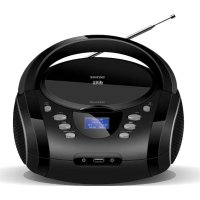
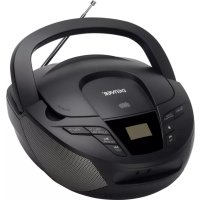
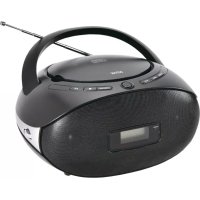
- denver
- Safety information
- Battery power
- AUX Playback
- Earphones
- Listening to FM Radio
- Listening to Cassette
- ALL RIGHTS RESERVED, COPYRIGHT DENVER A/S
- Akkuleistung
- Batteridrift
- USB-afspilning
- Batterijvoeding
- Riproduzione USB
- Riproduzione AUX
- Auricolari
- Ascoltare la radio FM.
- Ascolto di cassetta
- TUTTI I DIRITTI RISERVATI, COPYRIGHT DENVER A/S
- Informação de Segurança
- Potência da bateria
- Reprodução USB
- Reprodução AUX
- Auriculares
- Ouvir o Rádio FM
- Ouvir uma cassete
- TODOS OS DIREITOS RESERVADOS, COPYRIGHT DENVER A/S
- Säkerhetsanvisningar
- Batteristyrka
- Kontrollernas placering
- USB-uppspelning
- AUX-uppspelning
- Hörlurar
- Lyssna på FM radio
- Lyssnar på en kassett
- ALLA RÄTTIGHETER RESERVERADE, UPPHOVSRÄTT DENVER A/S
- Turvallisuustiedot
- Akkuvirta
- AUX-toisto
- Kuulokkeet
- FM-radion kuunteleminen
- Kasetin kuuntelu
- KAIKKI OIKEUDET PIDÄTETÄÄN, COPYRIGHT DENVER A/S
- Med batterier
- USB-avspilling
- AUX-avspilling
- Hodetelefoner
- Lytte til FM-radio
- Lytte på kassetter
- ALLE RETTIGHETER FORBEHOLDT, COPYRIGHT DENVER A/S
- Zasilanie akumulatorowe
- Odtwarzanie USB
- Odtwarzanie AUX
- Słuchawki
- Słuchanie radia FM
- Słuchanie muzyki z kaset
- WSZELKIE PRAWA ZASTRZEŻONE. COPYRIGHT DENVER A/S
- Contact
- Nordics
- Headquarter
- Denver A/S
- Benelux/France
- Denver Benelux BV
- Spain/Portugal
- Denver AS Spain S.A.
- Spain
- Portugal:
- Germany
- Denver Germany GmbH Service
- Fairfixx GmbH
- Austria
- Lurf Premium Service GmbH
Brand : DENVER
Model : TDC280B
Category : Cd player/recorder