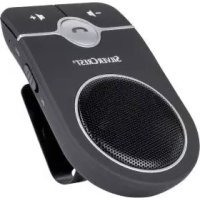
SBTF 10 F2 - Car Bluetooth handsfree kit SILVERCREST - Free user manual and instructions
Find the device manual for free SBTF 10 F2 SILVERCREST in PDF.


| Product type | Bluetooth hands-free car kit |
| Brand | SilverCrest |
| Model | SBTF 10 F2 |
| Dimensions (with clip) | 45 x 67 x 109 mm |
| Weight | Approx. 100 g |
| Built-in battery | Lithium-ion 3.7 V / 800 mAh / 2.96 Wh |
| Talk time | Up to 10 hours |
| Standby time | Up to 600 hours |
| Charging time | Max 3 hours |
| Bluetooth version | V5.0 + BR + EDR |
| Bluetooth range | Approx. 10 meters |
| Supported Bluetooth profiles | HSP, A2DP, HFP |
| Power supply | 5 V / 500 mA via car charger or USB port |
| Car charger (input/output) | 12/24 V input, 5 V / 500 mA output |
| Main functions | Hands-free calls, music playback, voice assistant, last number redial, microphone mute |
| Mounting | Sun visor clip, magnetic mount |
| Voice prompt languages | Dutch, Czech, Polish, Slovak, Hungarian |
| Package contents | Hands-free kit, car charger, micro-USB cable, mounting clip, user manual, quick start guide |
| Maintenance and cleaning | Dry cloth, no solvents, do not open the casing |
| Safety | Do not expose to heat, water, or fire |
| Warranty | 3 years, valid upon presentation of receipt |
| Customer service | Phone: 0800 919270 (France), Email: targa@lidl.fr |
| Spare parts | Essential parts available during the warranty period |
Frequently Asked Questions - SBTF 10 F2 SILVERCREST
User questions about SBTF 10 F2 SILVERCREST
0 question about this device. Answer the ones you know or ask your own.
Ask a new question about this device
Download the instructions for your Car Bluetooth handsfree kit in PDF format for free! Find your manual SBTF 10 F2 - SILVERCREST and take your electronic device back in hand. On this page are published all the documents necessary for the use of your device. SBTF 10 F2 by SILVERCREST.
USER MANUAL SBTF 10 F2 SILVERCREST
GB IE) Operating instructions and safety instructions
https://www.targa.gmbh/downloads/conformity/351525_2007.pdf
9.1 Charging the lithium ion battery 43
9.2 Switching the hands-free kit on/off 43
9.2.1 Language selection 44
9.3 Establishing connection with compatible mobile phones 45
9.4 Making calls 48
32 - English
9.5 Accepting/rejecting calls 48
9.6 Volume setting 49
9.7 Muting microphone 49
9.8 End calls 49
9.9 Redialling 49
9.10 Activating voice assistants of the smartphone (language selection) 50
9.11 Music playback 50
9.12 Mounting on the sun visor 51
9.13 LED indicators 53
9.14 Storing the device when not in use 53
9.15 Restore factory settings 54
10. Maintenance/cleaning 54
10.1 Maintenance 54
10.2 Cleaning 55
11. Troubleshooting 55
12. Environmental and waste disposal information.... 56
13. Marks of conformity 57
14. Notes on guarantee and service 57
Congratulations!
By purchasing the SilverCrest Bluetooth® 5.0 Hands-Free Kit SBTF 10 F2, referred to in the following as the hands-free kit, you have opted for a high-quality product.
Familiarise yourself with the hands-free kit before using it for the first time and read these operating instructions carefully. Observe the safety instructions and only use the hands-free kit in the manner described in these operating instructions and for the indicated fields of application.
Keep these operating instructions in a safe place. If you sell the hands-free kit or pass it on, always ensure that you also include the manual. It is part of the product.
1. Information on trademarks
The Bluetooth® word mark and logos are registered trademarks of Bluetooth SIG, Inc. (Special Interest Group). Any use of these marks by TARGA GmbH is under license.
The SilverCrest trademark and SilverCrest store brands are the property of their respective owners.
USB is a registered trademark of USB Implementers Forum, Inc.
Other names and products may be trademarks or registered trademarks of their respective owners.
2. Intended use
This hands-free kit is an electronic communication device. It enables you to make calls on your mobile phone while driving without having to hold the phone in your hand. This hands-free kit is not intended for business or commercial use. Use the hands-free kit solely for private purposes; any other use is deemed improper. This hands-free kit meets all relevant standards and directives specified in the EU Declaration of Conformity. Compliance with these standards is no longer guaranteed if a change is made to the hands-free kit without the authorisation of the manufacturer. The manufacturer shall not be liable for any damages or faults arising as a result.
Please observe the national regulations and/or laws of the country in which the device is used.
3. Package contents
Unpack the device and all accessories. Remove all packaging materials and check all of the parts for completeness and signs of damage. If any parts are missing or damaged, please contact the manufacturer.
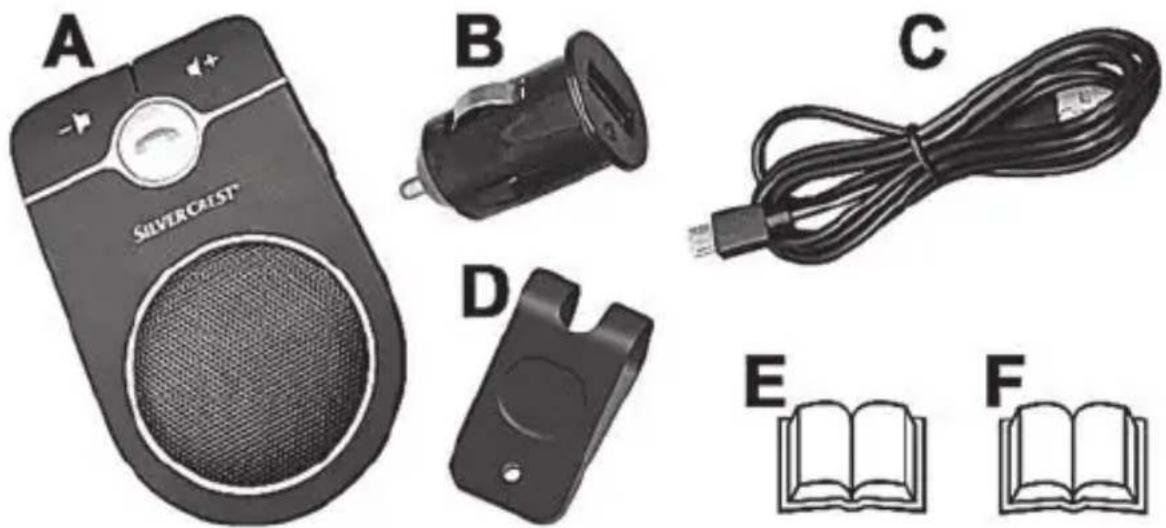
| A | SilverCrest Bluetootho Hands-Free Kit SBTF 10 F2 |
| B | Car charger adapter |
| C | Charging cable (Micro USB to USB-A) |
| D | Mounting clip |
| E | These instructions (picture symbol) |
| F | Quick start guide (symbolic representation) |
4. Controls
These instructions contain a cover that can be unfolded. The inside of the cover provides a schematic of the hands-free kit and a number legend. The numbers identify the following parts/functions:
1 Mounting clip
2 + button (volume up)
3 Microphone
4 Phone button (accept/end call) with integrated LED
5 Standby button (switch on/off, establish connection)
6 Speaker
7 Micro-USB charging port
8 Mute/language selection button
9 - button (volume down)
5. Technical data
5.1 Hands-free kit
| Operating voltage: 5V | ∞ |
| Nominal current consumption: Max. | 500 mA |
| Battery: 3.7 V/800 mAh/2.96 Wh |
SilverCrest SBTF 10 F2
| Bluetooth® specification: V5.0 + BR + EDR | |
| Supported profiles: HSP / A2DP / HFP | |
| Bluetooth® transmitting capacity: Max. 1.68 mW | |
| Bluetooth® frequency band: 2.402 - 2.480GHz, 2.4G ISM band | |
| Bluetooth® range: Approx. 10 metres | |
| Charging time: Max. 3 hours | |
| Talk time: Up to 10 hours | |
| Standby time: Up to 600 hours | |
| Dimensions: Approx. 45 x 67 x 109 mm (with mounting clip) | |
| Weight: Approx. 100 g | |
| Operating environment: 0°C to +45°C, max. 85% relative humidity | |
| Storage temperature: -20°C to +60°C | |
5.2 Car charger adapter
| Input voltage: 12/24 V | ∞ |
| Output voltage: 5 V | ∞ |
| Input current: | Max. 370 mA |
| Output current: | 500 mA |
| Dimensions: Approx. 49 x 25 mm | |
| Weight: | Approx. 12 g |
| Operating environment: 0°C to +45 | 5°C, max. 85% relative humidity |
| Storage temperature: -20°C to +60 | 0°C |
The specifications and design are subject to change without notice.
6. Safety instructions
Before using the hands-free kit for the first time, read the following instructions carefully and observe all warnings, even if you are familiar with using electronic devices. Keep these operating instructions in a safe place for future reference.
Warnings and symbols used and their meaning

DANGER! This signal word indicates danger involving a high level of risk, which if not avoided, may result in severe injury or even death.
WARNING! This signal word indicates danger involving a medium level of risk, which if not avoided, may result in severe injury or even death.
CAUTION! This signal word indicates danger involving a low level of risk, which if not avoided, may result in minor or moderate injury.
ATTENTION! This signal word indicates important information for protection against damage to property.
This icon indicates that further information on the topic is available.
DC voltage

DANGER! Personal safety
This hands-free kit can be used by children aged eight and over, as well as by people with reduced physical, sensory or mental abilities or who lack experience and knowledge, providing they are supervised or have been instructed in the safe use of the hands-free kit and understand the resulting dangers. Children must not play with the hands-free kit. Cleaning and user maintenance must not be carried out by children unless they are supervised.
Therefore, also keep the packaging film away from children. The packaging material is not a toy. There is a risk of suffocation!

WARNING!
- If you notice any smoke, unusual noises or smells, disconnect the hands-free kit from the power supply immediately. In such cases, the hands-free kit must not be used until it has been inspected by authorised service personnel. Do not inhale smoke possibly caused by a burning device. If you have inhaled smoke, consult a physician. Inhaling smoke can be harmful to your health.
- In order to avoid hazards, the hands-free kit and its accessories must not become damaged. If the hands-free kit is damaged, it must not be used.
-
Ensure no open flames (such as burning candles) are placed on or near the hands-free kit. There is a risk of fire!
-
Please note that permissible operating and storage conditions may be exceeded or not achieved inside a car. The device may be damaged.
- The hands-free kit must not be exposed to direct heat sources (for example, heaters), direct sunlight or artificial light. Also avoid contact with splashing and dripping water as well as aggressive liquids. Do not use the hands-free kit near water. In particular, the hands-free kit should never be immersed in water. Do not place any objects filled with liquids, for example vases or drinks, on the hands-free kit. Also ensure that the hands-free kit is not exposed to excessive shocks and vibrations. Furthermore, no foreign bodies should penetrate into the device. This could damage the hands-free kit.
- Road safety is paramount! The current road situation should always take priority over operation of the hands-free kit. Position the hands-free kit in your vehicle so that it does not hinder driving, ideally on the sun visor. The hands-free kit should never be mounted in an airbag deployment zone.
- The hands-free kit must not be thrown into a fire, as the integrated battery may explode. There is a risk of explosion.
The hands-free kit must not be covered during charging. - All repair work should only be carried out by qualified specialists.
- The connecting cable should be placed so as not to prevent operation of the vehicle. The connecting cable should not be placed in an airbag deployment zone as serious injuries could result if the airbag inflates.
If the connection cable is damaged, it must be replaced to avoid hazards.

ATTENTION!
- Please note that radio-transmitted data may be heard by unauthorised third parties.
- Do not place any items of furniture or other heavy objects on the connecting cable.
Make sure the cable is not bent.
7. Copyright
All contents of these instructions are subject to copyright law, and are provided to the users solely as a source of information. Any form of copying or reproduction information without the express written permission of the author is prohibited. This also concerns commercial use of the content and data. The text and illustrations correspond to the technical standards at the time of printing. Subject to alterations.
8. Before initial use
Check the hands-free kit and accessories for signs of damage. If the hands-free kit is damaged, it must not be used.

WARNING! Familiarise yourself with the basic functions of the hands-free kit before installing it in your vehicle to prevent distraction while driving. This could result in a serious accident.
9. Initial use

The phone button (4) is backlit and gives you visual feedback depending on the function used. This may occur in conjunction with a beep or voice signal.
9.1 Charging the lithium ion battery
Charge the lithium ion battery fully before its first use. To do this, connect the large USB plug of the charging cable to the car charger adapter and the small plug to the micro USB charging port (7) of the hands-free kit. Then insert the car charger adapter into an appropriate in-car socket. The LED of the car charger adapter lights up green. The standby button (4) lights up green while charging. A full charge cycle takes approximately 3 hours. The LED will go out when charging is complete. Disconnect the car charger adapter from the in-car socket and the hands-free kit.

CAUTION! Charge the battery only when the engine is running to save your vehicle's battery.
The battery can also be charged on a PC or using an external mains adapter. The charging cable (C) can be used for this purpose.
9.2 Switching the hands-free kit on/off
Switch the ON/OFF switch (5) to the ON position. The phone button (4) alternates between flashing blue and orange. The device is in pairing mode. An announcement will sound that the device has been turned on and is ready to connect. If a connected device is
within range, another voice message confirms the connection. The phone button (4) turns blue every approximately 5 seconds. If no connected device is in range, the device goes into search/pairing mode.
To turn off the hands-free kit, slide the ON/OFF switch to the OFF position.
9.2.1 Language selection
The hands-free kit is equipped with an announcement function that makes appropriate voice announcements for five different events.
Events:
Device switching on
Device switching off
Connected
- Pairing mode
- Battery level low
You can choose between the following languages to announce these events:
German
Dutch
Czech
Polish
Slovak
Hungarian
To set the desired language, proceed as follows:
In standby mode, press the mute/language selection button (8) for about one second to go to the first language announcement. If it is your desired language, you do not have to do anything else, the language is adopted directly.
However, if you want a different language, press the mute/language selection button (8) again for about a second to hear the next selection. Continue in the same way until you have set the desired language.
9.3 Establishing connection with compatible mobile phones Pairing/Connecting
Only on first use and following a reset to factory settings, the hands-free kit will start directly in pairing mode after turning it on with the ON/OFF button. The phone button (4) flashes alternately orange and blue. In addition, the announcement is made that the device is ready for connection.
Activate the Bluetooth® function of your mobile phone and let it search for Bluetooth® devices nearby. To do so, refer to your mobile phone manual. Select the device 'SBTF 10 F2' from the list of detected devices.

Enter '0000' if you are asked for a PIN during the pairing process.
The name of the hands-free kit 'SBTF 10 F2' will now appear in the list of devices connected to your mobile phone. A corresponding announcement indicates that pairing was successful. The hands-free kit is now in standby mode and the phone button (4) lights up blue about once every five seconds. The device goes into search/pairing mode again and the phone button (4) flashes alternately blue and orange as soon as the connection is severed. In addition, a voice announcement sounds.
If the connection to the smartphone is interrupted, the hands-free kit goes into search/pairing mode for about five minutes. When this time has elapsed, a voice message will sound and the hands-free kit will automatically switch to energy-saving mode. The hands-free kit is fitted with a shock sensor. As soon as the hands-free kit detects a shock, for example when closing the car door, it switches automatically from energy saving mode back to standby mode (Bluetooth connection is reactivated).
You can pair or connect other devices to the hands-free kit in a similar manner. The pairing begins for each device with the hands-free kit switched off as described above.
Once you have connected a device to the hands-free kit, switch the hands-free kit off and then on again. The pairing process is now complete.
The hands-free kit then has several 'known' devices. This status is a prerequisite for an active connection between the hands-free kit and other devices. A maximum of 8 devices can be stored as 'known devices'. As soon as a ninth device is added, the oldest device is removed.
The number of devices that can establish an active connection with the hands-free kit is limited to two. The second device must be connected within 5 minutes of the first device. A connection can then be re-established automatically with the second device when the hands-free kit is switched off and on again. If one or two of the known devices enter the vicinity of the hands-free kit within approx. 5 minutes, a connection to these devices will be established automatically. You may need to confirm the connection on your mobile phone. If a third known device enters the vicinity of the hands-free kit, the connection with this device will be blocked as long as there are two active connections or until one of the two devices goes out of range. If one of the two actively connected devices disconnects, pairing is possible for the third (waiting) device once the hands-free kit is restarted.

The pairing process can take up to 30 seconds depending on the mobile phone you are using.

If two devices are connected to the hands-free kit, the ring tone of the respective mobile phone will be used for incoming calls. If the mobile phone does not support this function, an internal ringing tone of the hands-free kit is alternatively used. A call to a second paired phone will be signalled by the hands-free kit if you are on another call.
9.4 Making calls
To make a call, select the phone number on your mobile phone in the normal way. With the connection is being established, the phone button (4) flashes blue about once every second. As soon as the telephone connection is established, the phone button (4) flashes blue about once every five seconds.
9.5 Accepting/rejecting calls
- When the call comes in, the phone button (4) flashes blue about once every second. You can accept the call by pressing the phone button (4). As soon as the telephone connection is established, the phone button (4) flashes blue about once every five seconds.
To reject the call, hold down the phone button (4) for about two seconds.

If two of a user's phones are connected to the hands-free kit at the same time and a call is already in progress via the hands-free kit, a call on the second phone is handled as follows:
If the second call is accepted using the hands-free kit, the first call is disconnected from the hands-free kit at that moment. The connection is still active on the smartphone.
When the second call is ended, the first call is automatically routed back to hands-free kit.
9.6 Volume setting
You can increase the volume as needed during a call using the + button (2). A beep will sound when the maximum volume is reached. You can also reduce the volume using the - button (9).
9.7 Muting microphone
You can use the mute/language selection button (8) to temporarily switch off the microphone during a call so that the other person can no longer hear you. To do this, briefly press the mute/language selection button (8). A beep sounds and the microphone is now muted. If you want to end muting, briefly press the mute/language selection button (8) again. A beep sounds and you are now back in normal talk mode in which the other person can hear you.
9.8 End calls
To end a call, press the phone button (4) once.
9.9 Redalling
You can redial the last number that was called via the hands-free kit. To do this, press the phone button (4) twice in rapid succession in standby mode.
9.10 Activating voice assistants of the smartphone (language selection)
The hands-free kit allows you to make calls via voice dialling if your mobile phone supports this function and it is enabled. To establish a connection via voice dialling, press the phone button (4) of the hands-free kit for about two seconds in standby mode to start the voice assistant system of your smartphone and then clearly say the name of the desired contact. For more detailed information on the voice dialling function of your mobile phone, refer to the instructions for your mobile phone.
9.11 Music playback
If you have an existing Bluetooth connection, you can play music from your smartphone on the hands-free kit and control various functions of the music player using the hands-free kit.
- Short press the + (2) or - (9) button to increase or decrease the playback volume.
- Long press the + (2) to skip to the next track in your playlist.
- Long press the - button (9) to skip to the start of the track currently playing. Long press the - button (9) again to skip to the previous track in your playlist.
- Briefly press the phone button (4) to pause playback. To resume playback, press the phone button (4) again.
9.12 Mounting on the sun visor
You can mount the hands-free kit on the sun visor of your vehicle using the mounting clip (1). Pull the mounting clip (1) apart slightly to easily affix it to the sun visor. Ensure that the clip does not damage the sun visor as it is being slid on.
Now you can attach the hands-free kit with its back on the mounting clip (1). The direction in which you want to set up the hands-free kit is up to you (see the following figure).
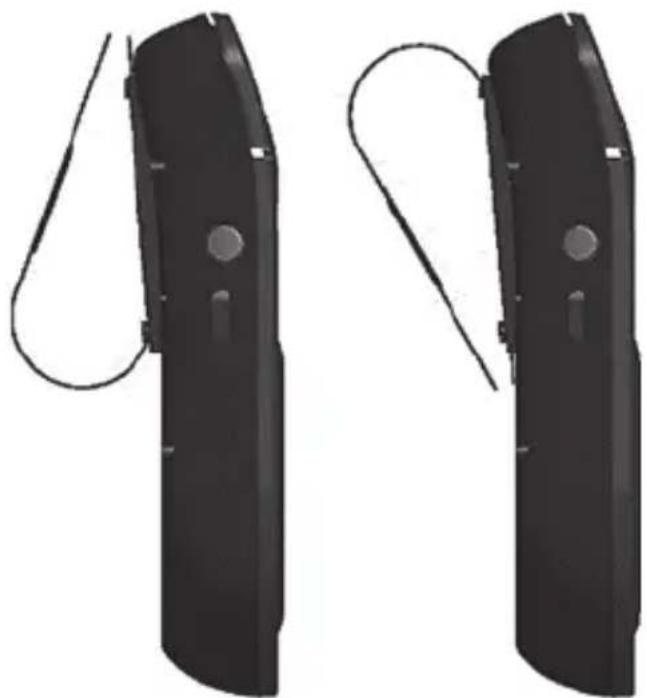
The assembly direction primarily depends on the selected mounting location in your vehicle. Proceed as follows.
There is a strong magnet (arrow) on the back of the hands-free kit. Place this magnet flat on the mounting clip (1) so that it lies between the plastic side guides on the hands-free kit. Please make sure that each of the two plastic lugs engages in the corresponding hole in the mounting clip. This is the only way of guaranteeing that it remains secure.
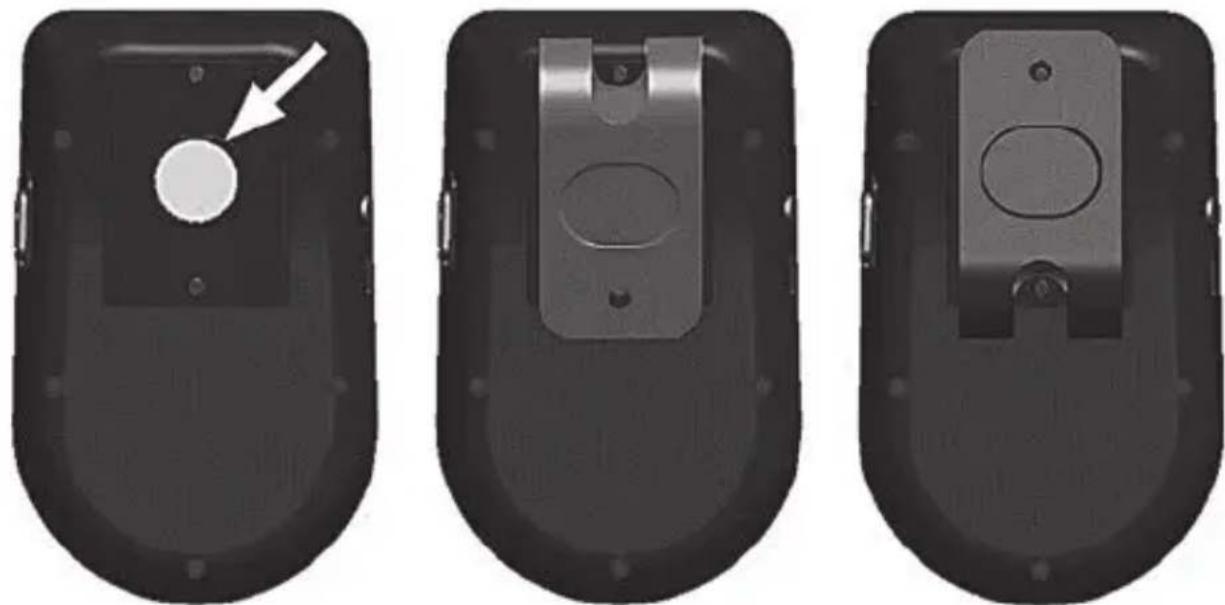

WARNING! The hands-free kit must be mounted so as not to adversely affect visibility.
9.13 LED indicators
Refer to the table below for the meaning of the different LED indicators:
| LED display Meaning | |
| LED alternates between flashing blue and orange Paired mode (Bluetooth®connection not established) | |
| LED flashes blue once every five seconds Standby mode (Bluetooth®connection established) | |
| LED flashes blue once every five seconds Active call | |
| LED flashes blue once every second (when ringing, an additional ring tone sounds) | Incoming or outgoing call |
| LED lights up green continuously Charging process active | |
| LED does not light up (when car charger is connected) | Charging completed |
| LED does not light up or does not flash when the device is switched on | Energy saving mode active |
9.14 Storing the device when not in use

If the device is not going to be used for a long period of time, recharge the battery on a regular basis. This helps maintain battery performance. Keep the device in a dry, clean and cool place.
9.15 Restore factory settings
You can restore the hands-free kit to its factory settings. Doing so will delete the list of connected devices in the hands-free kit.
Proceed as follows:
- With the hands-free kit switched on, hold down the + button (2) and - button (9) simultaneously for about five seconds until a signal tone sounds and the announcement 'Device switching off' is made.
- Now switch off the hands-free kit at the ON/OFF switch (5) to complete the process. The next time you switch on the hands-free kit, it starts directly in pairing mode and the phone button (4) alternates between flashing blue and orange.
10. Maintenance/cleaning
10.1 Maintenance

WARNING! Repair work is required if the hands-free kit has been damaged, for example if the device housing is damaged, liquids or objects have got inside the device, or if the device has been exposed to rain or moisture. Repairs are also required if the device does not work properly or has been dropped. Never open the housing of the hands-free kit. Furthermore, opening the hands-free kit could damage it and void your guarantee.
10.2 Cleaning

WARNING! Disconnect the hands-free kit from the power supply before cleaning in order to avoid hazards. Use a dry cloth for cleaning and never use solvents or cleaning agents that react with plastics. Ensure that no liquids enter the housing. If the hands-free kit is heavily soiled, use a very slightly moistened cloth.
11. Troubleshooting

All the functions described depend on the range of functions available on the mobile phone you are using. Not all functions may be supported.
The hands-free kit doesn't seem to be working
- Check whether the lithium ion battery is charged. Charge the battery if necessary.
- Check whether the hands-free kit is switched on and connected to your mobile phone.
The lithium-ion battery won't charge
- Check whether the car charger adapter (B) is plugged into your in-car socket correctly.
- Check that the large USB plug of the charging cable (C) is correctly inserted in the car charger adapter and the small plug of the charging cable (C) is correctly inserted in the micro USB charging port (7) of the hands-free kit.
- Turn on the ignition, as some vehicles will only power the in-car socket when the ignition is on.
- Check whether the LED of the car charger adapter (B) lights up green. If this is not the case, the car charger adapter (B) may be defective.
12. Environmental and waste disposal information
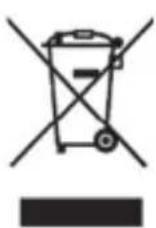
The product bears a symbol of a crossed-through waste bin. It is therefore subject to European Directive 2012/19/EU. Electrical and electronic equipment must not be put in the household waste, but must be disposed of via designated public disposal centres. Further information can be obtained from your local authority or the shop where you purchased the product.
The built-in battery cannot be removed for disposal.
Make sure the packaging is disposed of in an environmentally friendly manner. Cardboard packaging can be put out for waste-paper collection or taken to public collection points for recycling. The plastic packaging used for your device is collected by your local waste management company and disposed of in an environmentally friendly manner.
Please pay attention to the labels on packaging materials when you separate waste; these are marked with abbreviations (a) and numbers (b) that mean the following:
1-7: Plastics/20-22: Paper and cardboard/80-98: Composite materials.


The product can be recycled, is subject to an extended producer responsibility and is collected separately.
13. Marks of conformity

This hands-free kit conforms to the fundamental requirements and other relevant regulations of the RE Directive 2014/53/EU and the RoHS Directive 2011/65/EU.
This product fulfils the requirements specified in the applicable national policies for the Republic of Serbia.
You can download the full EU declaration of conformity at the following link:
https://www.targa.gmbh/downloads/conformity/351525_2007.pdf
14. Notes on guarantee and service
Warranty of TARGA GmbH
This device is sold with three years warranty from the date of purchase. Please keep the original receipt in a safe place as proof of purchase. Before using your product for the first time, please read the enclosed documentation. Should any problems arise which cannot be solved in this way, please call our hotline. Please have the article number and, if available, the serial number to hand for all enquiries. If it is not possible to solve the problem on the phone, our hotline support staff will initiate further servicing procedures depending on the fault. Within the warranty period the product will be repaired or replaced free of charge as we deem appropriate. No new warranty period commences if the product is repaired or replaced. Consumables such as batteries, rechargeable batteries and lamps are not covered by the warranty.
Your statutory rights towards the seller are not affected or restricted by this warranty.

Service

Phone: 0800 404 7657
E-Mail: targa@lidl.co.uk

Phone: 1890 930 034
E-Mail: targa@lidl.ie

Phone: 800 62230
E-Mail: targa@lidl.com.mt

Phone: 8009 4409
E-Mail: targa@lidl.com.cy
IAN: 351525_2007

Manufacturer
TARGA GmbH
Coesterweg 45
59494 Soest
GERMANY
Contenu
https://www.targa.gmbh/downloads/conformity/351525_2007.pdf
https://www.targa.gmbh/downloads/conformity/351525_2007.pdf
https://www.targa.gmbh/downloads/conformity/351525_2007.pdf
https://www.targa.gmbh/downloads/conformity/351525_2007.pdf
https://www.targa.gmbh/downloads/conformity/351525_2007.pdf
https://www.targa.gmbh/downloads/conformity/351525_2007.pdf
- Maintenance/cleaning 54
- Troubleshooting 55
- Environmental and waste disposal information.... 56
- Marks of conformity 57
- Notes on guarantee and service 57
- Congratulations!
- Information on trademarks
- Intended use
- Package contents
- Controls
- Technical data
- Safety instructions
- Warnings and symbols used and their meaning
- DANGER! Personal safety
- WARNING!
- ATTENTION!
- Copyright
- Before initial use
- Initial use
- Charging the lithium ion battery
- Switching the hands-free kit on/off
- Language selection
- Events:
- Establishing connection with compatible mobile phones Pairing/Connecting
- Making calls
- Accepting/rejecting calls
- Volume setting
- Muting microphone
- End calls
- Redalling
- Activating voice assistants of the smartphone (language selection)
- Music playback
- Mounting on the sun visor
- LED indicators
- Storing the device when not in use
- Restore factory settings
- Maintenance/cleaning
- Maintenance
- Cleaning
- Troubleshooting
- The hands-free kit doesn't seem to be working
- The lithium-ion battery won't charge
- Environmental and waste disposal information
- The built-in battery cannot be removed for disposal.
- Marks of conformity
- Notes on guarantee and service
- Warranty of TARGA GmbH
- Service
- IAN: 351525_2007
- Manufacturer
- Contenu
Brand : SILVERCREST
Model : SBTF 10 F2
Category : Car Bluetooth handsfree kit