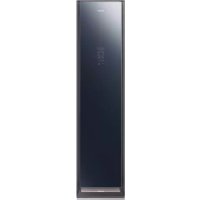
DF60R8600CG - Steam cleaner SAMSUNG - Free user manual and instructions
Find the device manual for free DF60R8600CG SAMSUNG in PDF.


| Product type | Garment care device (AIRDRESSER) |
| Brand | Samsung |
| Model | DF60R8600CG |
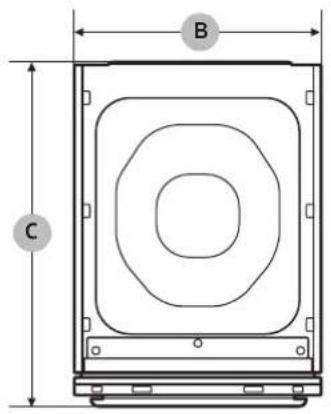
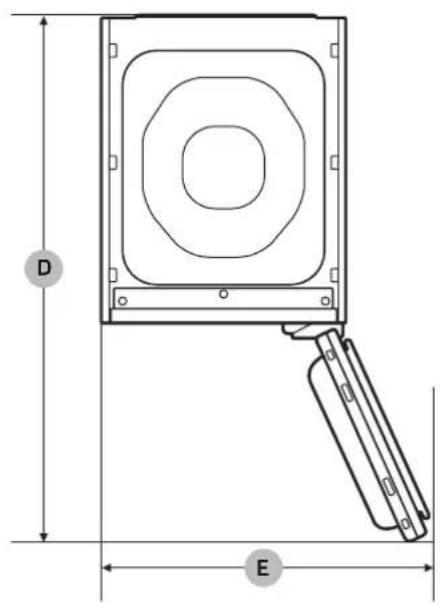
| Dimensions (H x W x D) | 1850 x 445 x 615 mm |
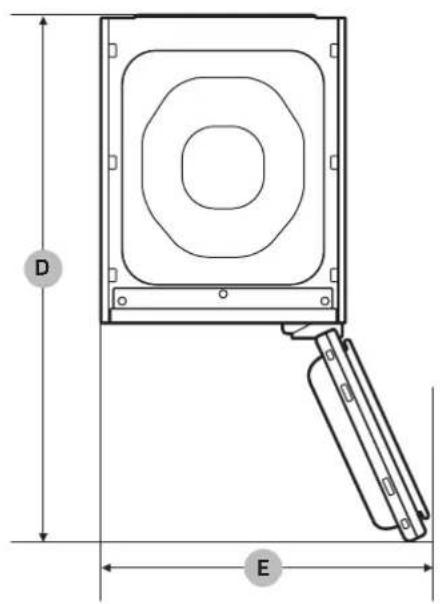
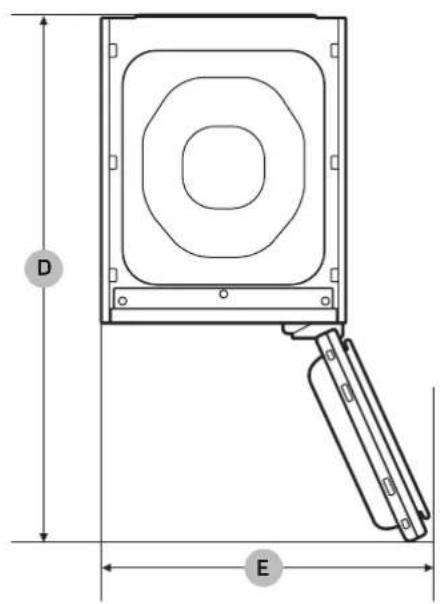
| Dimensions door open (W x D) | 618 x 1001 mm |
| Net weight | 89.0 kg |
| Power supply | 220-240 V / 50 Hz, 1700-1900 W |
| Water tank capacity | Approx. 4 cycles |
| Main cycles | Normal, Delicates, Quick, Sanitize, Auto Dry, Time Dry, Room Care |
| Special cycles | Suits, School uniform, Wool/knit, Outdoor, Down jackets, Fur/Leather, Heavy duty, Self clean, Winter coat |
| Connectivity | Wi-Fi (SmartThings) |
| Safety | Child lock (key lock), Anti-tilt strap |
| Maintenance | Lint filter, Air filter, Descaling, Tank cleaning |
| Included accessories | Air hangers, Kit for regular hangers, Weight kit, Shelf, Cleaning cloth, Anti-tilt strap, Adjustable feet |
| Refrigerant | R-134a (0.15 kg, GWP 1430) |
| Wi-Fi transmitter power | 20 dBm (2.4 GHz) |
Frequently Asked Questions - DF60R8600CG SAMSUNG
User questions about DF60R8600CG SAMSUNG
0 question about this device. Answer the ones you know or ask your own.
Ask a new question about this device
Download the instructions for your Steam cleaner in PDF format for free! Find your manual DF60R8600CG - SAMSUNG and take your electronic device back in hand. On this page are published all the documents necessary for the use of your device. DF60R8600CG by SAMSUNG.
USER MANUAL DF60R8600CG SAMSUNG
Clothing Care System (AIRDRESSER)
User manual
DF60*8****G
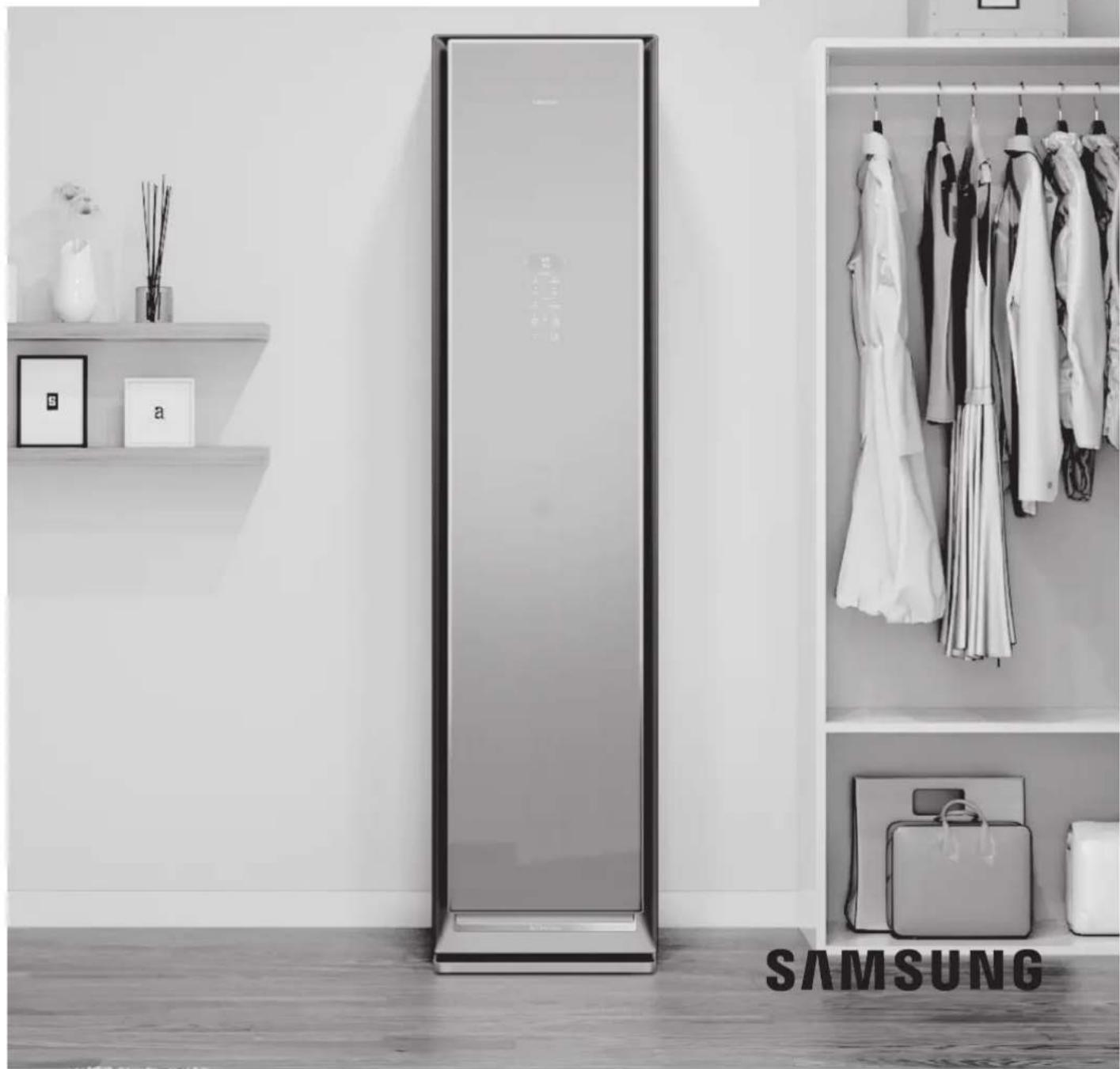
natural_image
Black-and-white photo of a Samsung air conditioner in a modern closet with hanging clothes and a wall display (no text or symbols on main objects)Contents
Safety information 4
What you need to know about the safety instructions 4
Important safety symbols 4
Important safety precautions 5
General warnings 6
Electrical warnings 8
Installation warnings 9
Cleaning warnings 10
Instructions about the WEEE 11
Before you start 12
Installation 12
Product overview 15
Control panel 17
Cycle overview 19
Fabric care guide 23
Fabric care labels 27
Smart control 28
Product and accessory use 32
Using a cycle 32
Using the accessories 34
Cleaning and maintenance 42
Exterior 42
Water tanks 43
Water tray 44
Air Filter 45
Lint filter 47
Lamp (Light source) 48
Descaling 48
Moving the product to another location 49
Troubleshooting 50
Notification messages 50
Checkpoint 51
English2
Specifications 53
Safety information
Congratulations on your new Samsung product. This manual contains important information on the installation, use and care of your product. Please take some time to read this manual to take full advantage of your product's many benefits and features.
What you need to know about the safety instructions
Please read this manual thoroughly to ensure that you know how to safely and efficiently operate the extensive features and functions of your new product. Please store the manual in a safe location close to the product for future reference. Use this product only for its intended purpose as described in this instruction manual. Warnings and Important Safety Instructions in this manual do not cover all possible conditions and situations that may occur. It is your responsibility to use common sense, caution and care when installing, maintaining and operating your product. Because the following operating instructions cover various models, the characteristics of your product may differ slightly from those described in this manual and not all warning signs may be applicable. If you have any questions or concerns, contact your nearest service centre or find help and information online at www.samsung.com.
Important safety symbols
What the icons and signs in this user manual mean:
WARNING
Hazards or unsafe practises that may result in severe personal injury, death and/or property damage.
CAUTION
Hazards or unsafe practises that may result in personal injury and/or property damage.
CAUTION, Hot surface
NOTE
Indicates that a risk of personal injury or material damage exists.
These warning signs are here to prevent injury to yourself and others.
Please follow them explicitly.
After reading this manual, store it in a safe place for future reference.
Read all instructions before using the product.
As with any equipment that uses electricity and moving parts, potential hazards exist. To safely operate this product, familiarise yourself with its operation and exercise care when using it.
English4
Important safety precautions
⚠ WARNING
To reduce the risk of fire, electric shock, or injury to persons when using your appliance, follow basic precautions, including the following:
- This appliance is not intended for use by persons (including children) with reduced physical, sensory or mental capabilities, or lack of experience and knowledge, unless they have been given supervision or instruction concerning use of the appliance by a person responsible for their safety.
- This appliance can be used by children aged from 8 years and above and persons with reduced physical, sensory or mental capabilities or lack of experience and knowledge if they have been given supervision or instruction concerning use of the appliance in a safe way and understand the hazards involved. Children shall not play with the appliance. Cleaning and user maintenance shall not be made by children without supervision.
- Children should be supervised to ensure that they do not play with the appliance.
- If the supply cord is damaged, it must be replaced by the manufacturer, its service agent or similarly qualified persons in order to avoid a hazard.
- CAUTION: In order to avoid a hazard due to inadvertent resetting of the thermal cut-out, this appliance must not be supplied through an external switching device, such as a timer, or connected to a circuit that is regularly switched on and off by the utility.
English 5
Safety information
-
This appliance is intended to be used in household and similar applications such as:
-
staff kitchen areas in shops, offices and other working environments;
- farm houses;
- by clients in hotels, motels and other residential type environments;
-
bed and breakfast type environments.
-
WARNING: This appliance is intended only for drying textiles washed in water.
General warnings
WARNING
- To avoid electric shock, fire, and/or death, make sure the product is properly installed and grounded as described in this manual before using the product.
- Only use the product for its intended purposes. Damage incurred from using the product for purposes other than those specified in this manual are not covered by the warranty.
- To avoid physical injury and/or product damage, do not climb, stand, or hang on the product.
- Do not disassemble or modify the product in any way.
- Do not allow children to play in, on, or around the product. Close supervision of children is necessary at all times.
- To avoid fire, physical injury, and/or death, keep all packaging material away from children and properly remove and dispose all packaging material.
- Do not touch or operate the product with wet hands.
- To avoid electric shock and/or fire, keep all animals or other foreign objects out of the product.
- If you hear strange noises, smell strange odours, and/or detect smoke from the product, immediately unplug the product.
- Do not place heavy or dangerous objects in, on, or around the product.
- To avoid electric shock, fire, and/or death, do not repair or replace any part of the product or attempt any servicing unless specifically recommended in the user manual or in published user-repair instructions that you understand and have the skills to carry out.
English6
• Take out all personal belongings (electric devices, lighters, matchboxes, and so on) from pockets.
- To avoid fire and/or explosions, do not dry items that have been previously cleaned in, washed in, soaked in, or spotted with gasoline, dry-cleaning solvents, cooking oils, or other flammable or explosive substances.
- The product is not intended for use by persons (including children) with reduced physical, sensory, or mental capabilities, or lack of experience and knowledge, unless they have been given supervision or instruction concerning the use of the product by a person responsible for their safety.
- Before disposing of the product, remove the door to the drying compartment, and cut off the power plug to prevent reuse.
- Do not touch or disassemble the electrical outlet of the product. In the event of a gas leak, make sure to ventilate the location and immediately contact a Samsung service centre.
- To avoid damaging the glass panel, make sure to protect the front at all times.
- To avoid physical injury and/or product damage, do not step on the tank doors.
- Do not put hands, feet, other body parts, or metal objects under the product.
- Do not use other products to dry the interior. Do not use candles to remove interior odours.
- Do not open the door while the product is operating. Opening the door while the product is operating will affect product performance and may cause condensation to damage flooring.
- Do not drink the water from the Refill Tank or the Drain Tank.
- Clean the lint filter before or after each load.
- Do not use fabric softeners or other products to eliminate static unless recommended by the manufacturer of the fabric softeners or products.
- Keep fingers out of pinch point areas. Use caution when closing the door when children are nearby.
- Do not use the product to dry items containing foam rubber or other rubber-textured items.
- To avoid product damage, excessive noise, or fire, do not insert objects into the steam nozzle.
- Do not place your hands or body near the steam nozzle during operation. The hot steam can cause an injury.
- Do not open the door during operation. The high internal temperature can cause an injury.
- If a problem occurs during steam process, stop the product immediately and remove all items from the product. If items are not removed immediately, they will stay damp, causing damage to the fabric or smell.
- Before placing the clothing into the product, make sure to empty all pockets.
English 7
Safety information
- Contains fluorinated greenhouse gases.
Hermetically sealed equipment.
Do not vent gases into the atmosphere. - Refrigerant (Type): R-134a (GWP = 1430)
- Refrigerant (Charging): 0.15 kg, 0.214 tCO _2 e
Electrical warnings
WARNING
- Regularly remove all foreign substances such as dust or water from the power plug terminals and contact points using a dry cloth.
- Unplug the power plug and clean it with a dry cloth.
• To avoid risk of electric shock, always unplug the product before disassembly or repair. - Do not pull the power cord when unplugging the power plug. To unplug the power plug, firmly pull the power plug straight out.
- To avoid electric shock, do not use an extension cord.
- Do not use a damaged power cord or power plug. Do not attempt to repair, disassemble, or modify the power cord or power plug. For any repairs, contact your nearest Samsung service centre.
- Plug the power cord into a wall socket that meets local electrical specifications. Use the socket for this appliance only, and do not use an extension cord.
- When moving the product, make sure to keep the power cord protected at all times.
- To avoid electric shock, fire, serious injury, product damage, and/or death, the product must be plugged into a properly grounded outlet. Make sure the wall outlet and circuit are checked by a qualified electrician.
- The product must be equipped with a cord having an equipment-grounding conductor and a grounding plug. The plug must be plugged into an appropriate outlet that is properly installed and grounded in accordance with all local codes and ordinances.
- The product must be grounded. In the event of malfunction or breakdown, grounding will reduce the risk of electric shock by providing a path of least resistance for electric current.
- Before using, make sure there is dedicated, grounded electrical-outlet rated for use with this product. It is the owner's responsibility to replace a standard 2-prong wall outlet with a standard 3-prong outlet.
- To avoid electric shock, properly ground the product that conforms to all governing codes and ordinances. Follow the instructions in the user manual.
English8
- The product must be plugged into its own individual electrical outlet which has a voltage rating that matches the rating plate. This provides the best performance and also prevents overloading house wiring circuits which could cause a fire hazard from overheated wires.
- Connect to a properly rated, protected, and sized power circuit to avoid electrical overload. Improper power circuits can melt, creating electric shock or fire.
- Do not, under any circumstances, cut or remove the ground prong from the power cord. To prevent personal injury or product damage, the electrical power cord must be plugged into a properly grounded outlet.
- Do not use a multi socket outlet which is not properly grounded (portable). Upon using a properly-grounded multi socket outlet (portable), use a product with the current capacity of 15 A or higher alone. Failure to do so may result in electric shock or fire due to the heat of multi socket outlet. The power may be shut off when the circuit breaker is operated.
- The product must be connected to a grounded metal, permanent wiring system or an equipment-grounding conductor must be run with the circuit conductors and connected to the equipment-grounding terminal or lead on the appliance. Electric shock can result if the product is not properly grounded.
- Improper connection of the equipment grounding conductor can result in electric shock. Check with a qualified electrician or service person if you are in doubt that the product is properly grounded.
Installation warnings
WARNING
- Only install the product in a stable, well-floored location. Do not install the product in locations prone to vibrations or where the product may tip over, such as ships or airplanes. Contact a Samsung service centre if you are unsure of the installation location.
- Do not install the product in locations exposed to the weather or temperatures below freezing. If the product was shipped in or at temperatures below freezing, allow the product to warm before installing.
- To avoid electric shock, fire, serious injury, product damage, and/or death, do not install the product in humid locations (such as a bathroom or sauna).
- To avoid fire, smoke, and/or product damage, do not install the product near other heat sources (such as a stove or heater).
- To avoid fire or smoke and/or product damage, do not place candles or other flammables on, in, or around the product.
English 9
Safety information
- To avoid physical injury and/or product damage, contact a Samsung service centre before moving the product.
- Install the product where the power plug is easily accessible. To avoid electric shock and/or fire, unplug the product when not in use.
- If the installation location has been flooded, do not go near the product and immediately contact a Samsung service centre.
- To avoid fire, smoke, and/or product damage, remove all protective film from the product.
- To prevent product damage and/or physical injury, have at least two people move the product.
Cleaning warnings
WARNING
- To avoid electric shock, do not use sharp objects to operate or clean the product.
- Do not spray water directly onto the product when cleaning it.
- Do not use bleaching agents on the exterior of the product. Bleaching agents may discolour the exterior.
- Wipe the interior with a dry cloth after use.
• After using the product, wipe its inner side with a dry cloth.
- The product could be stained by contamination such as long hair or due to dust and water drops that may form inside.
- If contamination (detergent, dirt, food residue, etc.) has accumulated in the product or any accessories, unplug the power cable and then wipe the contaminated area with a soft, wet cloth.
- Do not expose the product or the accessory to cleaning or bleaching agents or apply these to the product or accessory.
- Otherwise, this may result in discoloration, deformation, damage, or rust.
English10
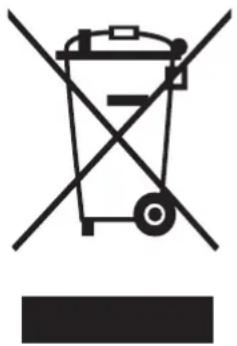
Instructions about the WEEE
natural_image
Symbol of a trash bin crossed with a diagonal line, no text or numbers presentCorrect Disposal of This Product (Waste Electrical & Electronic Equipment)
(Applicable in countries with separate collection systems)
This marking on the product, accessories or literature indicates that the product and its electronic accessories (e.g. charger, headset, USB cable) should not be disposed of with other household waste at the end of their working life. To prevent possible harm to the environment or human health from uncontrolled waste disposal, please separate these items from other types of waste and recycle them responsibly to promote the sustainable reuse of material resources.
Household users should contact either the retailer where they purchased this product, or their local government office, for details of where and how they can take these items for environmentally safe recycling.
Business users should contact their supplier and check the terms and conditions of the purchase contract. This product and its electronic accessories should not be mixed with other commercial wastes for disposal.
For information on Samsung's environmental commitments and product regulatory obligations, e.g. REACH, WEEE or Batteries, visit our sustainability page available via www.samsung.com
Before you start
Installation
Install the product according to the instructions in this manual and local codes.
Installing the product
- Select a solid, level location with adequate space for the following clearances.
| Top 25 mm | |
| Sides 5 mm | |
| Rear 15 mm |
- If the minimum clearances are not met, performance will decrease due poor ventilation and condensation may occur on the product exterior.
-
Do not install the product in direct sunlight or hot and cold places. The ambient temperature must be between 10 °C-35 °C. If the ambient temperature is too high or too low, the product may not operate normally, or performance may decrease.
-
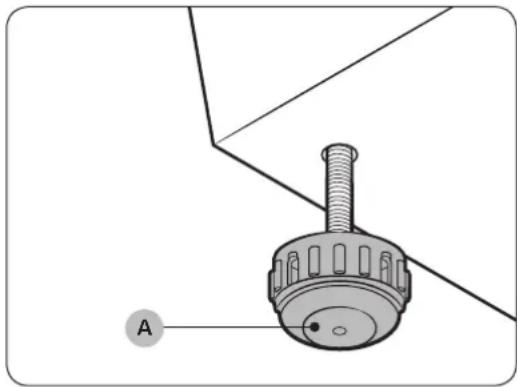
Turn the leveling feet (A) clockwise or counterclockwise to adjust the height until the product is level.
natural_image
Technical diagram of a mechanical component with labeled section A (no text or symbols beyond label)NOTE
If the product wobbles or if you want to raise the height of the rear side, assemble the provided rear levelling feet on the bottom-rear sides of the product.
English12
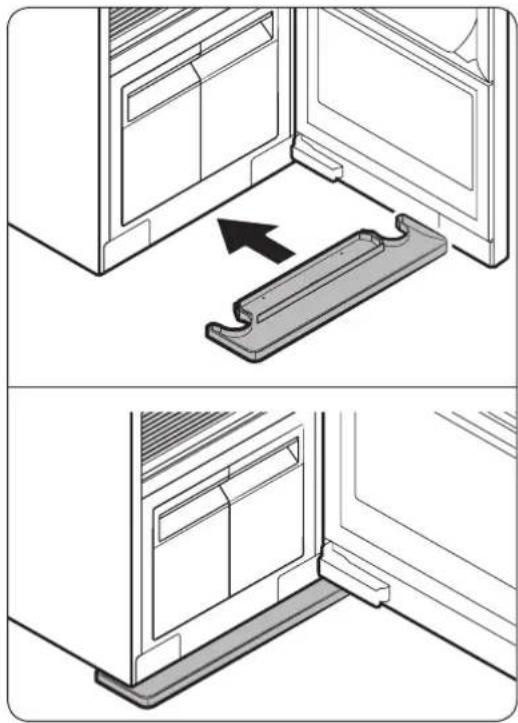
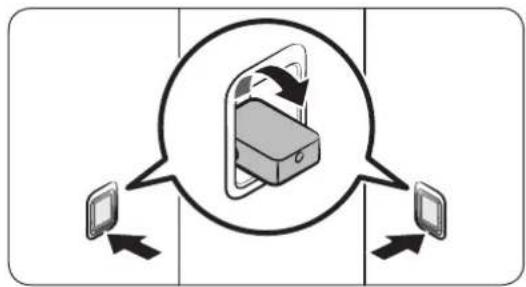
- Insert the water tray as shown in the figures.
- Make sure the side marked 'TOP' is facing upward.
natural_image
Two-panel diagram showing a door opening and a metal bracket with an arrow indicating direction (no text or symbols)- Plug in the product to a 230 V / 50 Hz grounded outlet.
- If you do not have grounded outlets, contact a Samsung service centre for alternative methods to ground the product.
NOTE
• After installing the product, you must wait at least 2 hours before using it.
- The product consumes more water the first time the product is used. You may have to fill the Refill Tank more than one time.
Before you start
Securing AIRDRESSER with the anti-tip strap (optional)
AIRDRESSER may tip-over by external force or children. If necessary, use the anti-tip strap to secure AIRDRESSER and prevent tip-over. (Refer to the figure.)


CAUTION
You must unplug the product before securing AIRDRESSER with the anti-tip strap.

NOTE
- Use the provided screw to fasten the anti-strap to a wall.
- Use the screws fastened on top of AIRDRESSER to fasten the anti-strap to AIRDRESSER.
Setting the language
When you turn on the product for the first time after the installation, the language selection screen appears on the control panel display. Follow the instructions to select the language.
- Tap < or > to select a language.
- Tap and hold Start/Pause ▷ to save the selected language.

NOTE
• Language setting may not be applicable in some countries.
- To change the language afterward, tap and hold Normal and Delicates for 3 seconds, and then follow the above instructions.
English14
Product overview
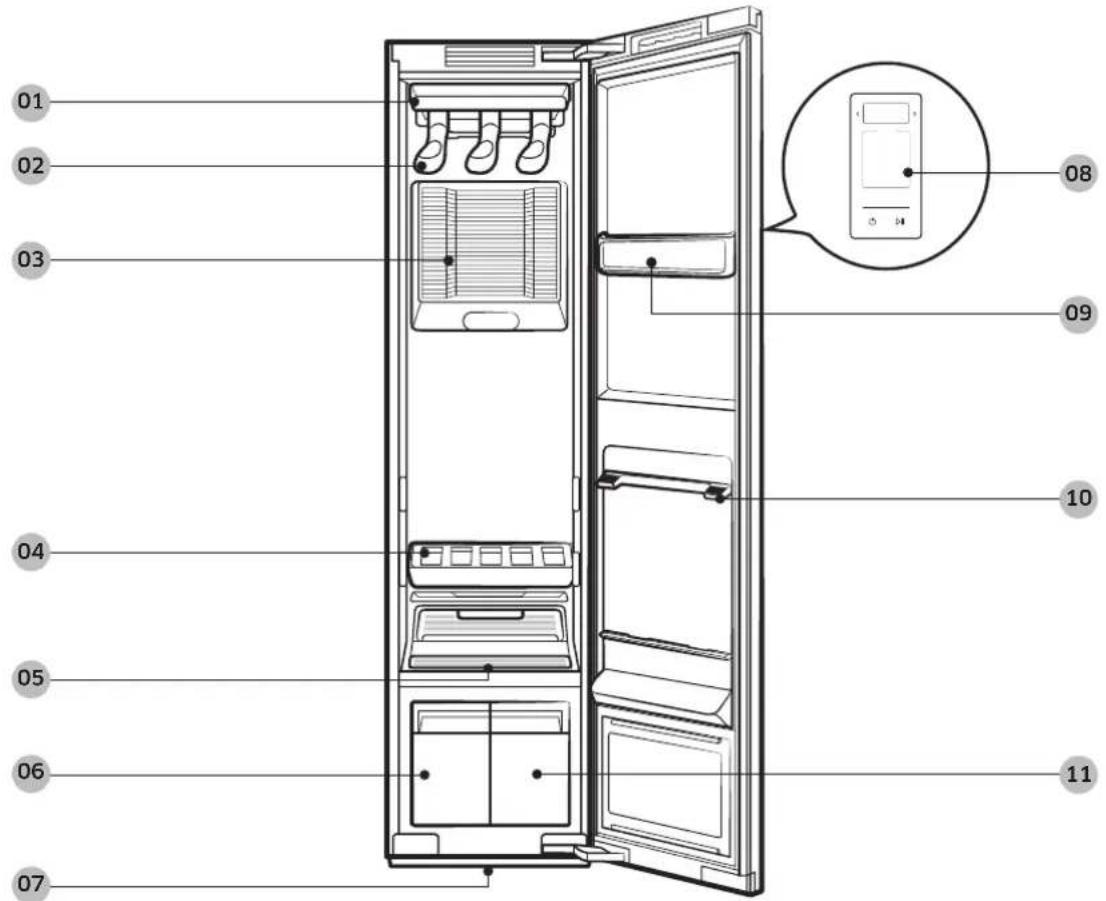
01 Air hole
02 Air hanger
03 Air Filter
04 Shelf
05 Lint filter
06 Drain Tank
07 Water tray
08 Control panel
09 Accessory care zone
10 Shelf holder 11 Refill Tank
Before you start
Accessories
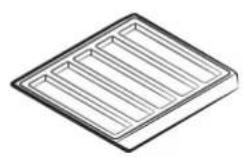
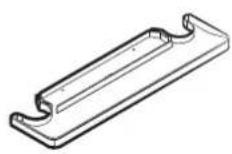
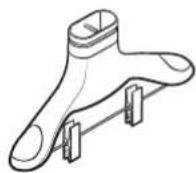
Shelf Water tray Air hanger
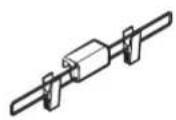
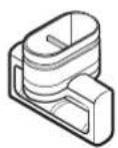
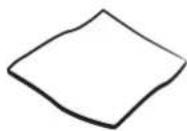
Weight kit Regular hanger kit Cleaning cloth
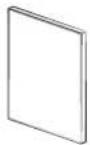
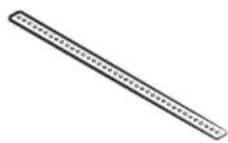
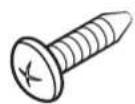
User manual Anti-tip strap Screw (for anti-tip strap)

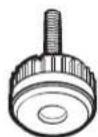
Screw anchor (for anti-tip strap)
English16
Control panel
flowchart
graph TD
    A["01"] --> B[" "]
    B --> C[" "]

06

07
01 Display
Displays the selected cycle and estimated time remaining, notifications, and Wi-Fi connectivity.
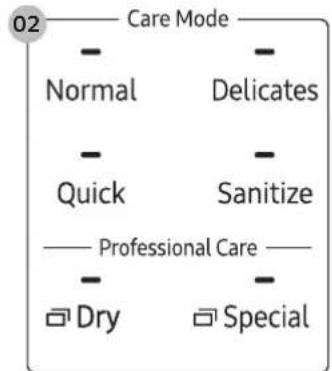
02 Cycles
Tap a cycle to select. For more information about cycles, see page 19.
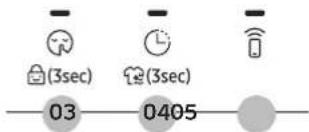
03 Silent / Child Lock (3 sec)
| Silent 🔒 | Tap to turn Silent on or off. Silent reduces operating noise. ⏻ NOTE Silent will increase cycle time. |
English 17
Before you start
| Child Lock | Tap and hold for 3 seconds to turn Child Lock on or off. Child Lock deactivates all buttons except PowerNOTEWhen Child Lock is on, it will remain on until you turn it off. |
04 Delay End / Keep Fresh (3 sec)
| Delay End ⏻ | Tap to turn Delay End on, and then tap to increase the end time (from 1-24 hours).NOTEYou cannot use Delay End with Sensor Dry.When Delay End is on, the display will turn off to save energy.Some end times may not be available depending on the selected cycle.Depending on the items and environment, the actual end time may be different than the set time. |
| Keep Fresh ⏻ | Tap and hold for 3 seconds to turn Keep Fresh on or off. You can keep items fresh if you will not be able to immediately take items out after a cycle has finished.NOTEKeep Fresh stays on up to 24 hours after a cycle has finished.Turning off the power or opening the door turns Keep Fresh off.When Keep Fresh is on, the display will turn off to save energy. |
05 Smart Control
Tap to turn Smart Control on or off. For more information about Smart control, see page 28.
06 Power ⏻
Tap to turn the power on or off.
07 Start/Pause ▷||
Tap and hold to start the product. Tap to pause the product.
English18
Cycle overview
Daily cycles
| Cycle Description | |
| Normal • For freshening your everyday wear. | |
| Delicates | • For delicate items such as chiffon, lace, and items with decorations.• For rayon, you must use this cycle. |
| Quick • To quickly care for items with light odours and wrinkles. | |
| Sanitize | • To sanitize your clothes with steam.[IMAGE]NOTE• Do not put more than one large or bulky item. Large or bulky items may block the steam and airflow.• If you stop or change the cycle when the Sanitizing message appears on the display, items may get damaged or not dry completely. |
Before you start
Dry cycles
CAUTION
Do not use any of the following items for Dry cycles.
• Leather, fur, feather, velvet, silk.
- Any items containing rubber or sponge.
- Items made of wool blended fabrics, water-repellent fabrics, silk-blended, or hemp-blended fabric.
- Fur blankets with fur length exceeding 1 cm, wool blankets, carpets, mattresses.
- Lingerie with laces, pantyhose, stockings.
NOTE
Drying results may vary depending on thickness of the items.
| Cycle Description | |
| Sensor Dry | AIRDRESSER automatically sets the time to dry items. Ⓐ NOTE• Using Sensor Dry causes the Drain Tank to fill quickly.• Sensor Dry may not dry excessively wet items and large or bulky items well. If items are not dry, run the cycle again. |
| Time Dry | Manually set the time (1-3 hours) to dry items. Ⓐ NOTE• Time Dry may not dry excessively wet items and large or bulky items well. If items are not dry, run the cycle again. |
| Room Care | For dehumidifying the surrounding area. You can select 2 or 4 hours. Ⓐ NOTE• Make sure the product is empty when using Room Care.• The indoor temperature may increase. |
English20
Special cycles
| Cycle Description | |
| Suits | For sharpening creases in trousers.NOTEPut the jacket in the middle air hole and trousers on the right air hole.For best results, use with the weight kit. |
| School uniform For school uniforms that cannot be washed or dried daily. | |
| Wool/Knit | For woollen or knit items.NOTETo avoid deforming items, neatly fold items and lay on the shelf. |
| Outdoor For outdoor or active wear. | |
| Down Jackets | To fluff heavy, down-filled jackets that have been stored for a long time.NOTETo prevent blocking air circulation, hang only one item in the middle air hole. |
| Fur/Leather | Eliminates moisture and dust from fur and leather items.NOTEOperating noise may be louder during this cycle.Follow all item care labels.For best results, use for only one item.Make sure fur items are dry before using this cycle. |
| Heavy Duty For caring for thick fabric items such as sweaters. | |
| Self Clean | Automatically cleans the product.NOTEMake sure the product is empty.For best results and optimal cleaning, do not stop the cycle or open the door before Self Clean is complete.This cycle does not eliminate mould. |
| Winter Coat | For the coats made of wool blended fabrics.NOTEFollow all item care labels.For best result, use for only one item. |
Before you start
Download cycles
You can download more cycles from the SmartThings app.
- Tap Power ⏻
- Tap Special repeatedly to select Download.
- On your smartphone, follow the onscreen instructions to download available cycles.
- You can download up to 10 cycles.
- You can download the following cycles.
- Denim, Down dry, Babywear, Bedding, Toys, Accessories.
English22
Fabric care guide
- Fabrics have different care management depending on how they were processed and finished. This fabric care guide does not cover all materials and therefore use it for just a reference. Make sure to check the care label on your clothing before using with AIRDRESSER to prevent any damage.
- Do not put items that are not colourfast, are heat-sensitive, or are not suitable for washing with water in the General, Special, or Sanitize cycles. Do a water blot test on a small, inconspicuous spot (an inside seam) to determine if the fabric is colourfast. For further assistance, consult the clothing manufacturer, a dry-cleaning professional, or a more detailed fabric care guide.
Cycle category
Refer to the following table to check specific cycles included in each category stated in the Fabric care guide table.
| Category Cycles | |
| General cycles Normal, Quick, Delicates | |
| Special cycles | Suits, School uniform, Wool/Knit, Outdoor, Down Jackets, Fur/Leather, Heavy Duty, Winter Coat, Denim**, Accessories*, Self Clean |
| Sanitize cycles Sanitize, Babywear**, Bedding**, Toys** | |
| Dry cycles Sensor Dry, Time | Dry, Down Dry** |
* = Special cycles / ** = Download cycles
Before you start
Fabric care guide table
Natural fibres - vegetable fibres
| Fabric | Cycles | Clothes / Remarks | ||||
| General | Special Sanitize Dry | |||||
| Reducing wrinkles | Deodorising | |||||
| Cotton ● | ● ● ● | Towels, socks, underwear, jeans, sportswear, t-shirts, blanketsWrinkles on 100 % cotton fabrics may remain. Iron after cycle if desired. | ||||
| Linen, hemp, ramie | ● ● ● ● | Summer clothes, tableclothsSome wrinkles may remain.Make sure fabrics are washable/hand washable before using the General, Special, or Sanitize cycles. Lay delicate clothes on shelf. Do not use starched clothes. | ||||
| Rayon ● | ● ● ● | Suit lining, blouses, neckties, pyjamas | ||||
● = Possible / ✗ = Check care label
Natural fibres - animal fibres
| Fabric | Cycles | Clothes / Remarks | ||||
| General | Special Sanitize Dry | |||||
| Reducing wrinkles | Deodorising | |||||
| Alpaca, camel hair, cashmere | ※※● | Coats, suitsLay knitwears on the shelf.Alpaca and camel hair shrink in hot water. | ||||
| ※ | ● | Scarves, knitwearLay knitwears on the shelf.Alpaca and camel hair shrink in hot water. | ||||
| Fur, leather | ●* | Coats, scarves* Only use Fur/Leather cycle.Leather must be 100 % natural leather (No artificial leather) | ||||
| Silk | Silk neckties, ribbons, scarves, blousesSilk fabrics are not suitable for AIRDRESSER. | |||||
English24
| Fabric | Cycles | Clothes / Remarks | ||||
| General | Special Sanitize Dry | |||||
| Reducing wrinkles | Deodorising | |||||
| Wool | ※ ●* ● | Sweaters, knitwearLay knitwears on the shelf. Some wool shrinks when washed in hot water. Make sure fabrics are washable/ hand washable before using the General or Special cycles.* Wool/Knit cycle is recommended. | ||||
| ● ● | ●* ※ ● | Winter coat, suitsLay knitwears on the shelf. Some wool shrinks when washed in hot water. Make sure fabrics are washable/ hand washable before using the General, Special, or Sanitize cycles.* Winter Coat or Suits cycle is recommended. | ||||
● = Possible / ✗ = Check care label
Before you start
Artificial fibres
| Fabric | Cycles | Clothes / Remarks | ||||
| General | Special Sanitize Dry | |||||
| Reducing wrinkles | Deodorising | |||||
| Acetate ● | ● ● ● ● | Suit lining, blouses, neckties, pyjamas | ||||
| Acrylic ● | ● ● ● ● | Thermal underwear, knitwearLay clothes on shelf. | ||||
| Nylon | ● ● | ● ● ● | Stockings, lingerieLay clothes on shelf. | |||
| ● ● | ● ● ● Sportswear | |||||
| Polyurethane | ● ● ● ● | ● | Stretchable clothing (containing less than 5 %)If the item contains more then 5 % polyurethane (ex.Swimwear), check the care label. | |||
| Polyester ● | ● ● ● ● | Outdoor wear, sports wear,T-shirts, shirts, blouses | ||||
● = Possible / ✗ = Check care label
English26
Fabric care labels
Most clothing includes fabric care labels which contain instruction for proper care. The following table contains some of the symbols that may help you choose appropriate items for AIRDRESSER.
Fabric care labels that can be used with AIRDRESSER
| Category Label | Meaning Use with AIRDRESSER | ||
| Washing labels | Normal O | ||
| Permanent press O | |||
| Delicate O | |||
| Do not wash O^* | |||
| Hand wash O | |||
| Tumble dryer labels | No heat X | ||
| Low O | |||
| Medium O | |||
| High O | |||
| Normal O | |||
| Permanent press O | |||
| Delicate O | |||
| Do not tumble dry O | |||
| Drying labels | Hang dry O | ||
| Drip dry O | |||
| Dry Flat O^** | |||
| Dry in shade | O | ||
| Do not dry | X | ||
* Some clothing that does not recommend washing (such as fur or leather fabrics) can be used with AIRDRESSER. Please refer to the fabric care guide.
** Use the rack for items with this symbol on the fabric care label.
Before you start
Smart control
Wi-Fi connection
- Recommended encryption methods are WPA/TKIP and WPA2/AES. Newly developed Wi-Fi protocols or unapproved Wi-Fi protocols are not supported.
- The reception sensitivity of a wireless network may be affected by surrounding wireless environments.
- If your Internet provider has registered the MAC address of your PC or the modem module for permanent use, your Samsung AIRDRESSER may fail to connect to the Internet. If this is the case, contact your Internet provider
- The Internet firewall may interrupt your Internet connection. If this happens, contact your Internet provider.
- If Internet failure continues after following the measurement of your Internet provider, contact a local Samsung retailer or service centre.
Downloading the app
On an app market (Google Play Store, Apple App Store, Samsung Galaxy Apps), search for the SmartThings app, and then download and install the app on your device.

NOTE
- SmartThings may not be compatible on some tablets or smartphones.
- The recommended Android OS is 6.0 or higher (with minimum 2 GB or RAM).
- The supported display resolutions for Android are 1280 x 720 (HD), 1920 X 1080 (FHD), 2560 x 1440 (WQHD).
- The recommended iOS is 10.0 or higher (iPhones must be iPhone 6 or higher).
- The supported display resolutions for apple devices are 1334 X 750, 1920 x 1080.
- The app is subject to change without notice for improved performance.
Log in
You must first log into SmartThings with your Samsung account. To create a new Samsung account, follow the instructions on the app. You don't need a separate app to create your account.

NOTE
If you have a Samsung account, use the account to log in. A registered Samsung smartphone user automatically logs in.
English28
Registering your appliance to SmartThings
- Make sure your smartphone is connected to a wireless network. If not, go to Settings, turn on the wireless connection, and then select an AP (Access Point).
- Open SmartThings on your smartphone.
- If a message of "A new device is found.", select Add.
- If no message appears, select + and select your appliance in a list of devices available. If your appliance is not listed, select Device Type > Specific Device Model, and then add your appliance manually.
- Follow the onscreen instructions to complete registration.
SmartThings overview
| Category Function Description | ||
| Monitoring | Cycle Status | You can check the current cycle and options, and the remaining cycle time. |
| Smart Control | The Smart Control status is shown for AIRDRESSER. | |
| Energy Monitoring | You can monitor the energy consumption status. | |
| Control Start / Pause / Cancel | Select a cycle and necessary options, and then select Start / Pause / Cancel to start and operation, to stop temporarily, or to cancel the current operation. | |
| Notification Cycle Completed | Notifies you the current cycle is complete. | |
Before you start
| Category Function Description | ||
| AIRDRESSER functions | Care Recipe | Select the fabric type and options and get recommendations for the most suitable cycle. |
| My Closet | By inputting clothing information (such as fabric material), you can add your clothes to the app and get recommended cycles and a care history. | |
| Special Cycle Management | You can save up to 9 cycles and you can delete or change the order of the cycles. | |
| HomeCare Manager | Get advice to help you keep your AIRDRESSER in perfect condition. Check your cycle usage patterns, energy consumption, and get alerts for product maintenance. | |
English30
Open Source Announcement
The software included in this product contains open source software. You may obtain the complete corresponding source code for a period of three years after the last shipment of this product by sending an email to mailto:oss.request@samsung.com.
It is also possible to obtain the complete corresponding source code in a physical medium such as a CD-ROM; a minimal charge will be required.
The following URL http://opensource.samsung.com/opensource/SMART_AT_051/seq/0 leads to the download page of the source code made available and open source license information as related to this product. This offer is valid to anyone in receipt of this information.

NOTE
Hereby, Samsung declares that this radio equipment is in compliance with Directive 2014/53/EU and with the relevant statutory requirements in the UK. The full text of the EU declaration of conformity and the UK declaration of conformity is available at the following internet address: The official Declaration of conformity may be found at http://www.samsung.com, go to Support > Support Home and enter the model name.
Wi-Fi max transmitter power : 20 dBm at 2.412 GHz - 2.472 GHz
Product and accessory use
Using a cycle
natural_image
Diagram of a refrigerator interior showing the door and side panel, with no text or symbols present.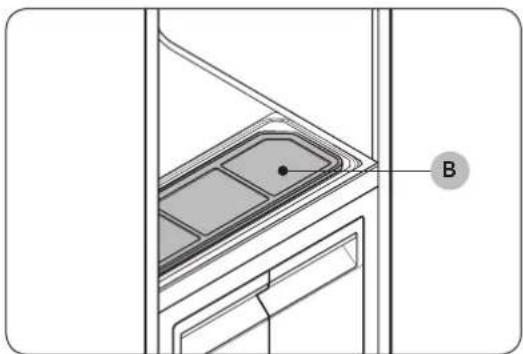
natural_image
Technical line drawing of a door frame with a labeled component 'B' (no text or symbols beyond label)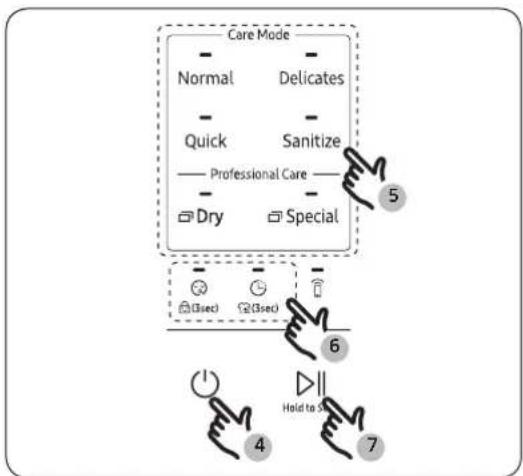
flowchart
graph TD
    A["Care Mode"] --> B["Normal"]
    A --> C["Delicates"]
    A --> D["Quick"]
    A --> E["Sanitize"]
    A --> F["Professional Care"]
    A --> G["Dry"]
    A --> H["Special"]
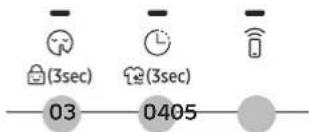
    I["Step 4: Hold to 5"] --> J["Step 6: (3sec)"]
    J --> K["Step 7: (3sec)"]
    style A fill:#f9f,stroke:#333
    style I fill:#ccf,stroke:#333
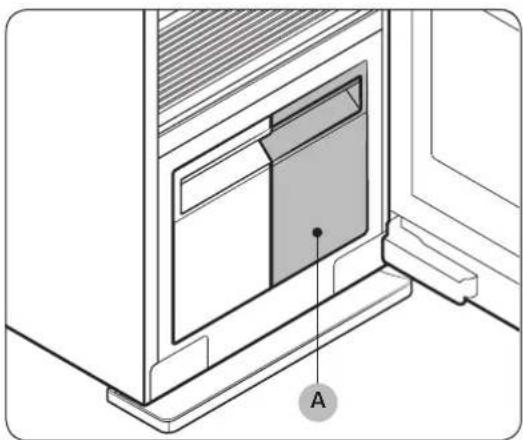
- Make sure the Refill Tank (A) is filled with water.
- Make sure the lint filter (B) is clean.
- Input clothes as instructed in the Using the accessories section.
- Tap Power ⏻
-
Select a cycle.
-
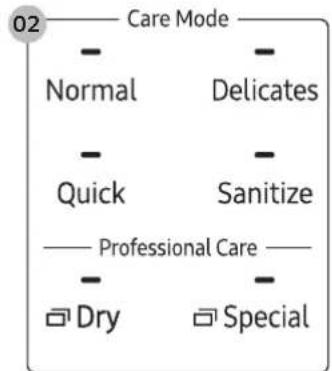
Tap Normal, Delicates, Quick or Sanitize.
- For Dry cycles, tap Dry repeatedly to select a desired dry cycle.
-
For Special cycles, tap Special repeatedly to select a desired special cycle.
-
Select options if necessary.
- Silent 😊, Child Lock 🔒, Delay End ⏰, Keep Fresh 🌐
- Tap and hold Start/Pause ▷ for 3 seconds.
English32
Usage guidelines
Before use
- This product cannot be used to clean items. For best results, wash and dry all items before using the product.
- Before using the product, we recommend washing items with strong odours or items that have been stored for a long time.
- Separate items by odour strength.
- Check all clothing or item labels before using the product.
- Before placing the clothing into the product, make sure to empty all pockets.
- Do not use the product as a storage closet.
• The product may not remove pet hair.
During use
- Make sure items are not touching the bottom of the product. If necessary, use the shelf to stop items that are hung from touching the bottom of the product.
- Hissing noises may occur during a steam process.
- If you need to stop a cycle before it will finish, make sure to run the Dry cycle.
- Operating time depends on the environment and type of items.
- If used consecutively, the product may display a different operating time than what will occur.
- Do not open the door while the product is operating.
After use
- The amount of wrinkles removed may vary depending on the fabric type.
- Remove items immediately after a cycle has finished. If you cannot remove items immediately, use Delay End or Keep Fresh.
- When removing items, hold both the items and the hanger.
Product and accessory use
Using the accessories
Air hangers
Use the provided Air hangers for items such as jackets, sportscoats, and blazers.

NOTE
• Make sure the interior and exterior of the hangers are clean and free of foreign matter.
- Do not use hangers for knits, wools, lingerie.
- The maximum lengths of items must be 110 cm for tops and 100 cm for bottoms.
- Depending on the type or size of the fabric, unwanted wrinkles may form on the neck of your clothing.
natural_image
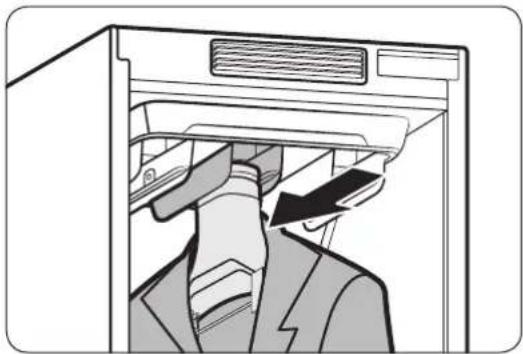
Illustration of a person in a suit hanging from a computer tower, with an arrow indicating the motion (no text or symbols present)To use the Air hangers
-
Hang items on hangers in the same direction.
-
To prevent items from falling off the hangers, make sure to button all buttons and zip all zippers.
-
Make sure all items are hung flatly. Make sure the hanger clips do not protrude outward.
-
Slide the hangers into the air holes until you hear a clicking sound.
-
Make sure hangers are facing the same direction.
- If the Air hangers are not properly inserted into the air hole, vibrations and noises may occur.

NOTE
For best results, avoid hanging longer items from the middle hole.
English34
Regular hanger kit
You can use the regular hanger kit to use regular hangers to hang your items. However, for best results, we recommend using the Air hangers.

NOTE
- Use hangers that will not be deformed by heat.
• Make sure the interior and exterior of the hangers are clean and free of foreign matter. - Do not use plastic/silicone/wooden hanger and hangers with adhesive.
- Do not use hangers from laundry that may become rusty.

natural_image
Diagram of a refrigerator interior showing drawer arrangement and a hanging device (no text or symbols)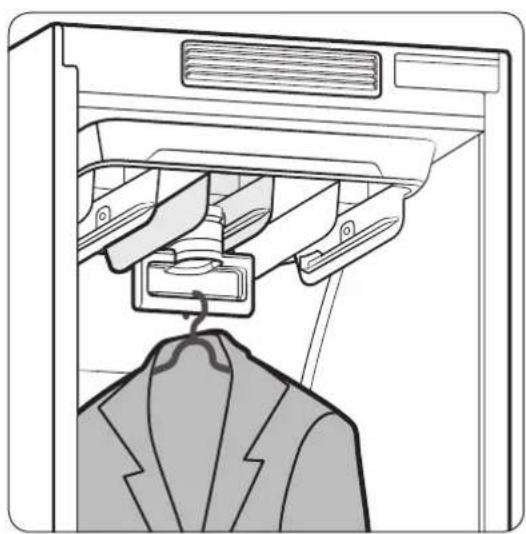
natural_image
Line drawing of a garment jacket hanging from a rack, with no text or symbols present.To use the regular hanger kit
-
Hang items on hangers in the same direction.
-
To prevent items from falling off the hangers, make sure to button all buttons and zip all zippers.
-
Make sure all items are hung flatly. Make sure the hanger clips do not protrude outward.
-
Slide the regular-hanger kit into the air holes until you hear a clicking sound, and then hang the hangers on the regular-hanger kit.
-
Make sure hangers are facing the same direction.
- If the regular-hanger kit is not properly inserted into the air hole, vibrations and noises may occur.

NOTE
For best results, avoid hanging longer items from the middle hole.
Product and accessory use
Weight kit
NOTE
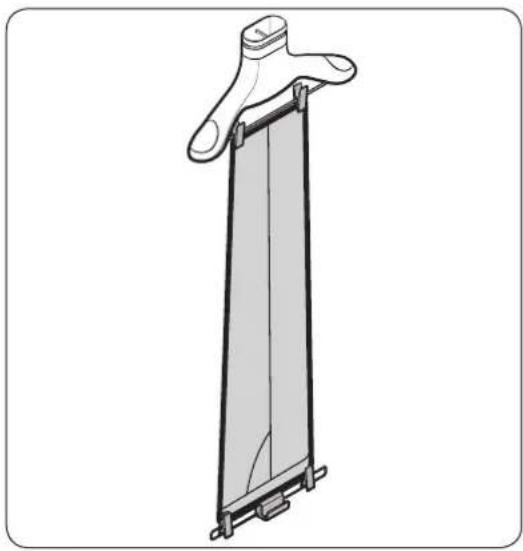
• Make sure the trousers or weight kit does not touch the bottom of the product.
- The maximum length of trousers must be 100 cm.
natural_image
Technical line drawing of a vertical mechanical component with mounting brackets (no text or symbols)To use the weight kit
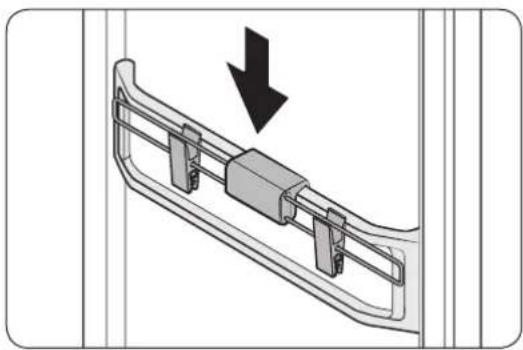
- Clip the bottom of the trousers to the Air hanger.
- Clip the other end of the trousers to the weight kit.
- Slide the Air hanger into the air holes until you hear a clicking sound.
NOTE
For sharper creases, spread out the trousers by moving the clips outward.
natural_image
Technical diagram of a mechanical component with a downward arrow indicating motion (no text or symbols present)Store the weight kit on the accessory care zone when not in use.
English36
Shelf
Use the provided shelf for items that cannot be used with hangers.

NOTE
- Only place clothes or clothing accessories. Do not put heavy items or use the shelf to store any other objects
• Make sure children do not sit or climb on the shelf. - Make sure items do not hang off the front, back, or sides of the shelf, or hang through the shelf grates.
- Do not stack items on top of other items.
flowchart
graph TD
    A["Device 1"] -->|Data Transfer| B["Device 2"]
    C["Device 3"] -->|Data Transfer| D["Device 4"]
    E["Device 5"] -->|Data Transfer| F["Device 6"]
    G["Device 7"] -->|Data Transfer| H["Device 8"]
    I["Device 9"] -->|Data Transfer| J["Device 10"]
    K["Device 11"] -->|Data Transfer| L["Device 12"]
    M["Device 13"] -->|Data Transfer| N["Device 14"]
    O["Device 15"] -->|Data Transfer| P["Device 16"]
    Q["Device 17"] -->|Data Transfer| R["Device 18"]
    S["Device 19"] -->|Data Transfer| T["Device 20"]
    U["Device 21"] -->|Data Transfer| V["Device 22"]
    W["Device 23"] -->|Data Transfer| X["Device 24"]
    Y["Device 25"] -->|Data Transfer| Z["Device 26"]
    AA["Device 27"] -->|Data Transfer| AB["Device 28"]
    AC["Device 29"] -->|Data Transfer| AD["Device 30"]
    AE["Device 31"] -->|Data Transfer| AF["Device 32"]
    AG["Device 33"] -->|Data Transfer| AH["Device 34"]
    AI["Device 35"] -->|Data Transfer| AJ["Device 36"]
    AK["Device 37"] -->|Data Transfer| AL["Device 38"]
    AM["Device 39"] -->|Data Transfer| AN["Device 40"]
    AO["Device 41"] -->|Data Transfer| AP["Device 42"]
    AQ["Device 43"] -->|Data Transfer| AR["Device 44"]
    AS["Device 45"] -->|Data Transfer| AT["Device 46"]
    AU["Device 47"] -->|Data Transfer| AV["Device 48"]
    AW["Device 49"] -->|Data Transfer| AX["Device 50"]
natural_image
Diagram showing a tray with internal compartments and two hands holding small objects, no text or symbols present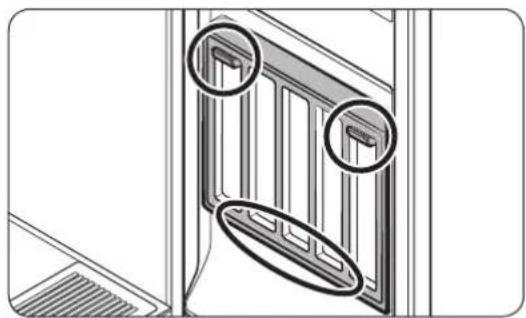
natural_image
Technical line drawing of a door frame with two circular annotations highlighting features (no text or symbols present)To use the shelf
-
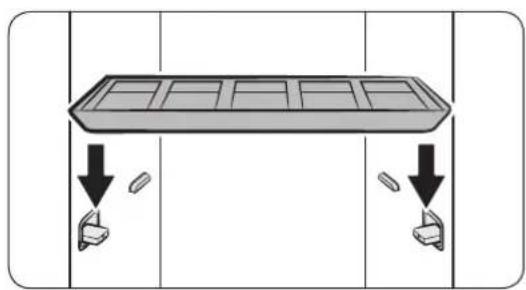
On the side walls, press the bottom part of the shelf holders to turn them out.
-
Place the shelf on the shelf holders. Make sure the grooves on the shelf are firmly sitting on the holder.

NOTE
A gap between the sides of shelf and the side walls is normal.
Store the shelf on the door when not in use. Place the shelf on the bottom holder, and then hang it on the top holders.
Product and accessory use
Accessory care zone
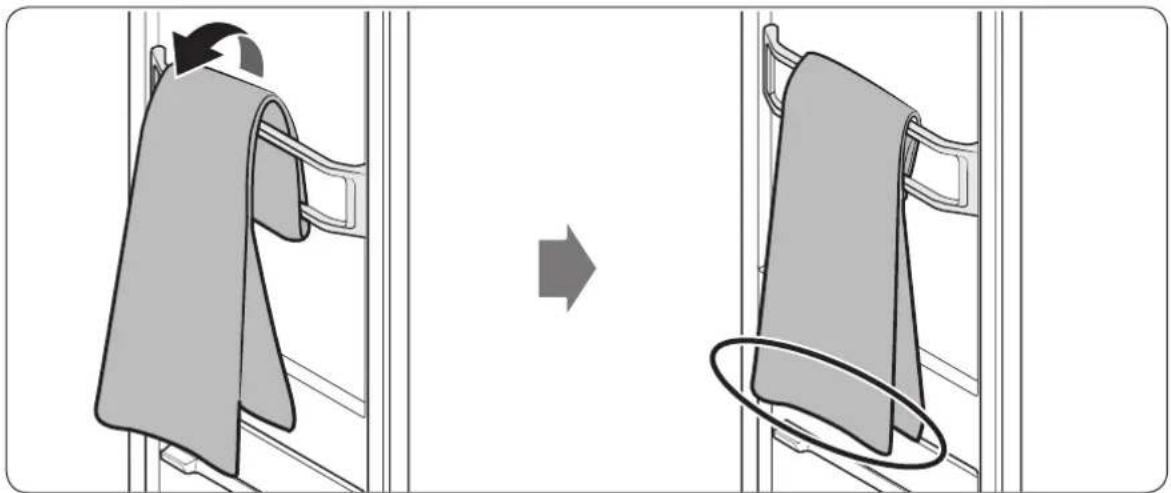
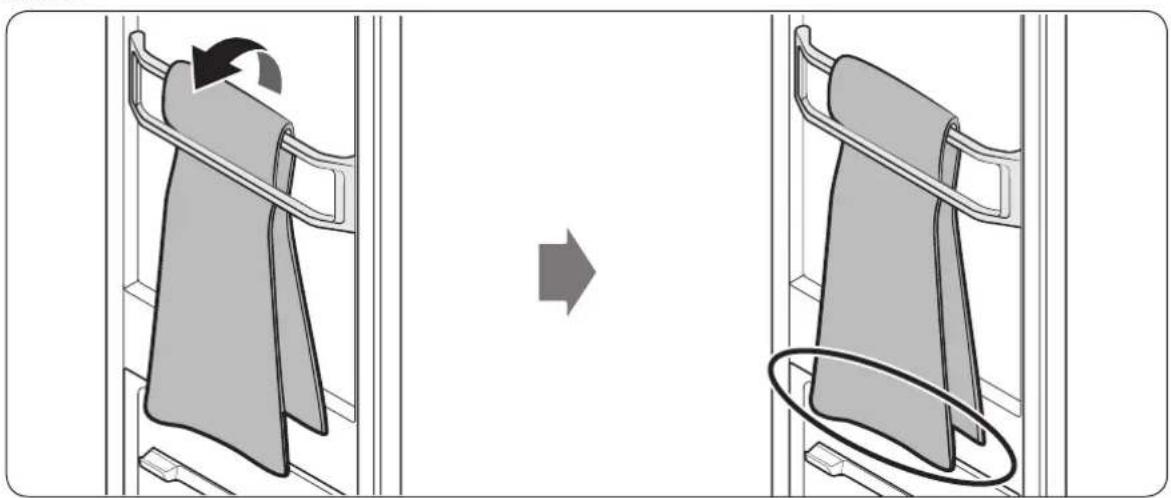
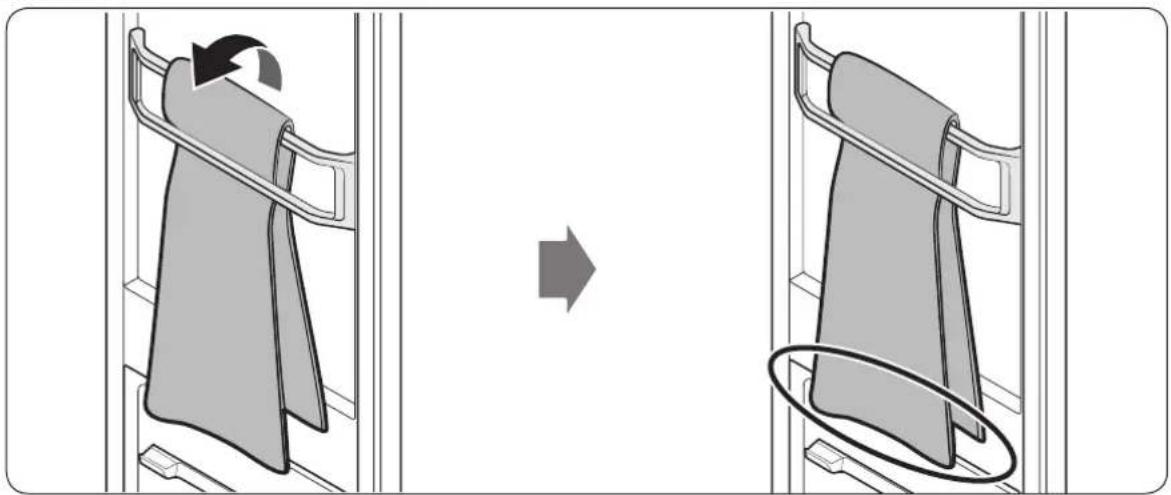
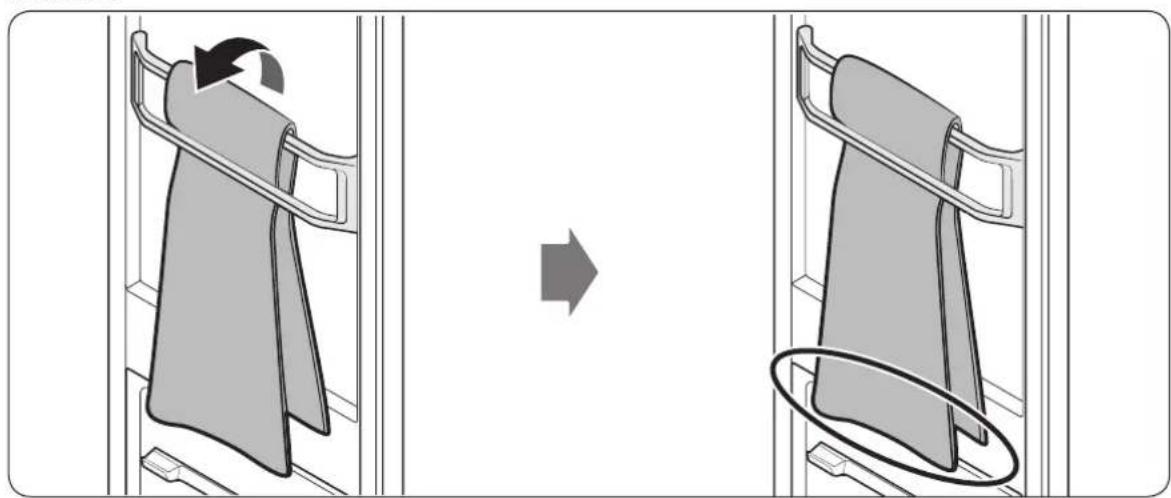
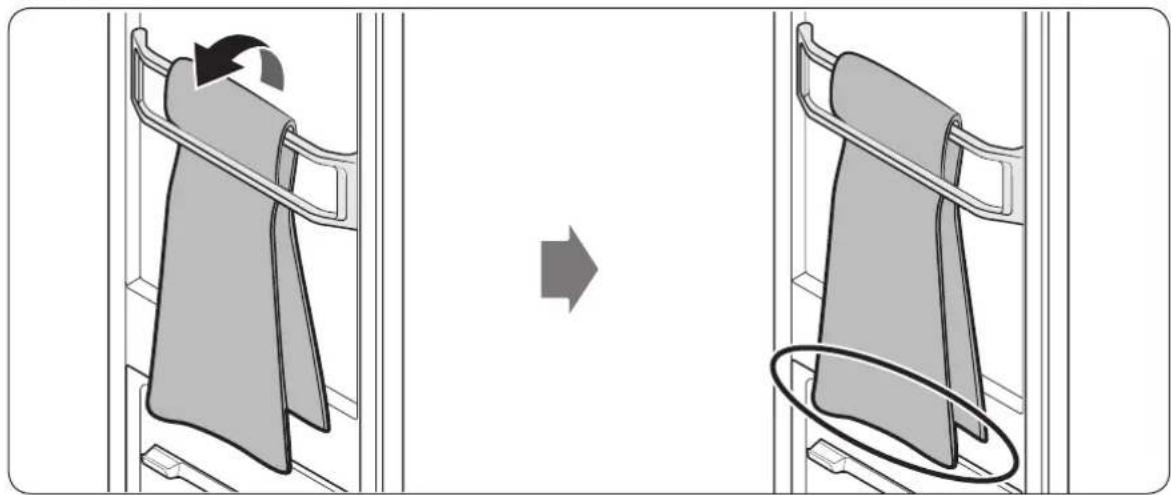
Use the accessory care zone for scarves.
To securely hang the scarf, refer to the figures below.
Method 1
natural_image
Diagram showing a clothing rack being folded, with an arrow indicating the process (no text or symbols present)Method 2
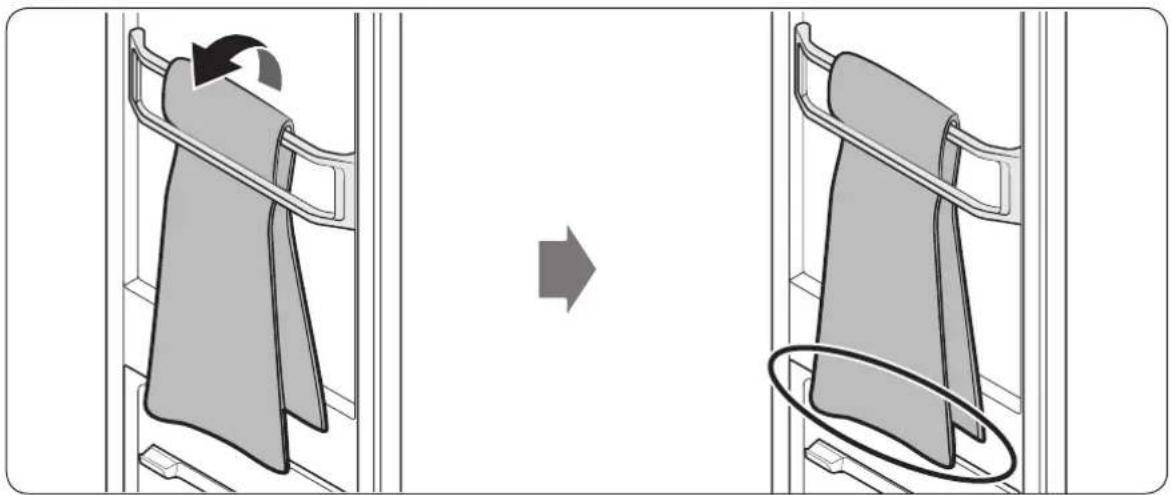
natural_image
Diagram showing a clothing rack being folded, with an arrow indicating the process (no text or symbols present)• Make sure the lengths of both ends are even.
- Depending on the fabric type, wrinkles may not be removed.
English38
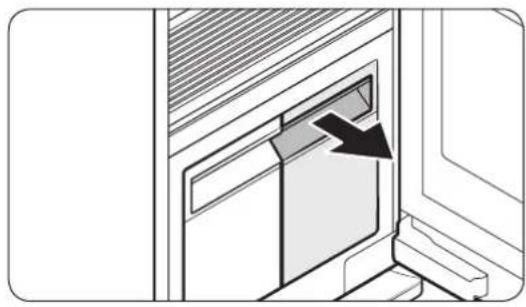
Refill Tank
NOTE
• Before using the product, make sure there is water in the Refill Tank.
- The product consumes more water the first time the product is used.
• It is recommended to use filtered water.
- If you are not going to use the product for a long time, empty the Refill Tank.
• A full Refill Tank lasts approximately 4 cycles.
- Fill the Refill Tank with water only. Putting any other liquids, such as detergent or fabric softener, may cause a problem.
- Do not use the water in the Drain Tank to fill the Refill Tank.
natural_image
Diagram of a door opening with a black arrow indicating direction (no text or symbols)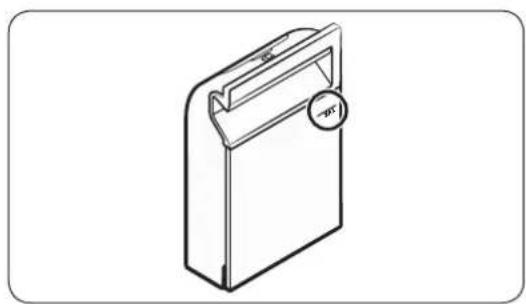
natural_image
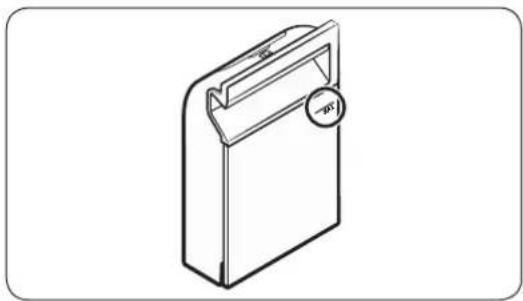
Line drawing of a rectangular device with a handle and circular button, no text or symbols present-
Pull out the Refill Tank.
-
Open the back cover, fill to the MAX line.
- Reinsert the Refill Tank.
Product and accessory use
Drain Tank
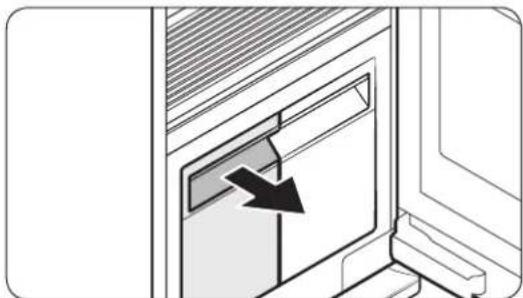
Before using the product or if you are not going to use the product for a long time, make sure to empty the Drain Tank.
natural_image
Diagram showing a door with a black arrow pointing to the glass panel (no text or symbols present)To empty the Drain Tank
- Pull out the Drain Tank.
- Empty the tank.
- Reinsert the Drain Tank.
Samsung Fresh Finish
Samsung Fresh Finish gives items a pleasant fragrance.

NOTE
- Spray your desired perfume 4-5 times on a cotton pad, and then place the pad in Samsung Fresh Finish. The strength of the scent diffused through Samsung Fresh Finish may differ depending on the perfume used, and the scent may remain inside the AIRDRESSER even after the cycle is complete.
- Mold may grow if you leave the cotton pad in Samsung Fresh Finish for too long.
To change the cotton pad
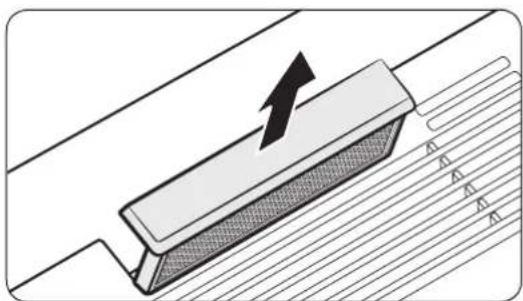
natural_image
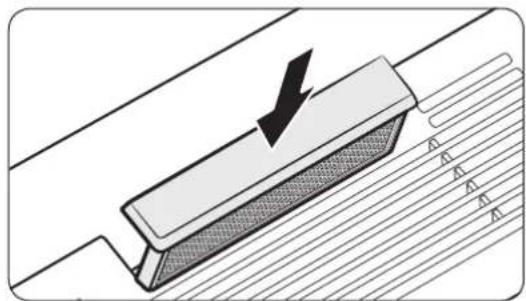
Diagram of a mechanical component with an arrow indicating upward motion, showing layered structure (no text or symbols)- Remove Samsung Fresh Finish.
English40
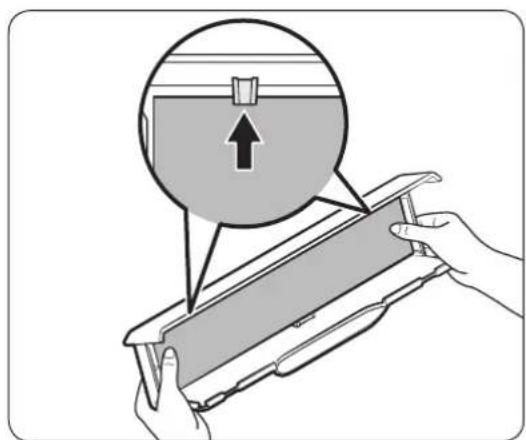
- Spray a desired perfume 4-5 times on a cotton pad, and then place the pad in Samsung Fresh Finish.
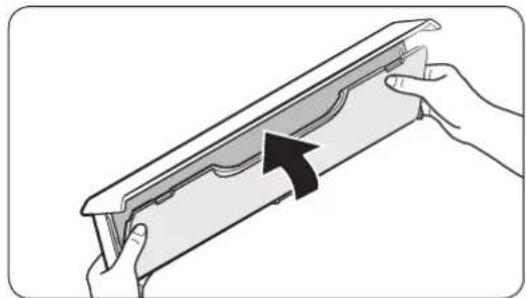
natural_image
Illustration of hands holding a decorative frame with an arrow indicating direction (no text or symbols)- Close the cover of Samsung Fresh Finish until you hear it click into place.
natural_image
Diagram of a mechanical component with a downward arrow indicating force or direction, no text or symbols present- Reinsert Samsung Fresh Finish.
NOTE
- If you use a perfume with Samsung Fresh Finish, the scent of the perfume may remain inside AIRDRESSER even after the cycle is complete.
- The cotton pad is not provided with the product.
- The effectiveness of Samsung Fresh Finish cannot be guaranteed since it depends on the perfume used.
Cleaning and maintenance

CAUTION
- Unplug the product before cleaning it.
- Do not use abrasive or flammable cleaners.
- Do not spray water directly onto the product when cleaning it.
Exterior
natural_image
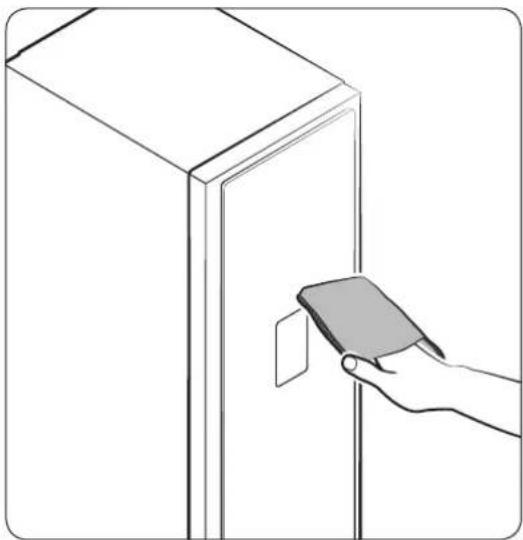
Line drawing of a hand holding a smartphone next to a cabinet (no text or symbols)Use the cleaning cloth to clean the exterior. For stubborn stains, use a damp cloth and then wipe dry.
English42
Water tanks
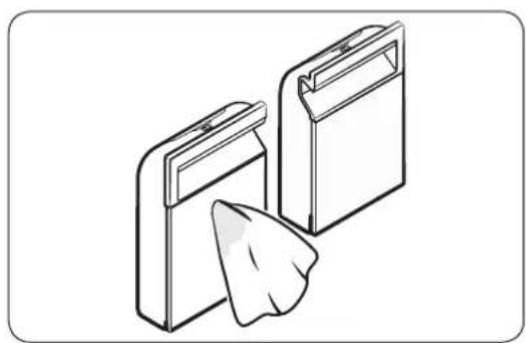
Clean both tanks on a regular basis. Completely dry before reinserting.
natural_image
Illustration of two rectangular storage units with a folded paper or plastic sheet emerging from them (no text or symbols)Use a damp cloth to clean the exterior.
natural_image
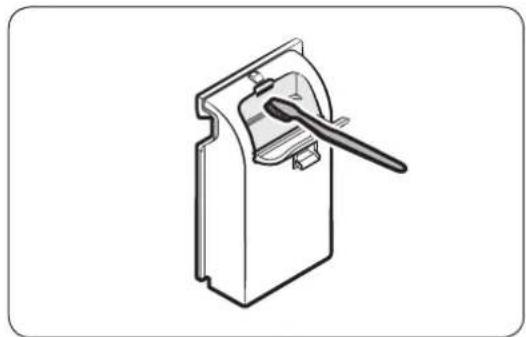
Technical line drawing of a mechanical component with a lever handle (no text or symbols)Use a soft brush to clean the interior.
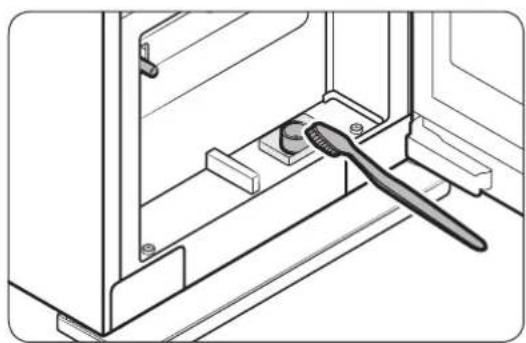
natural_image
Technical line drawing of a door handle assembly with a brush applying material to a central component (no text or symbols)Use a soft brush to clean the tanks' inlet and outlet.
Cleaning and maintenance
Water tray

NOTE
• Empty the water tray on a regular basis.
• Make sure to reinsert the water tray after emptying the water.
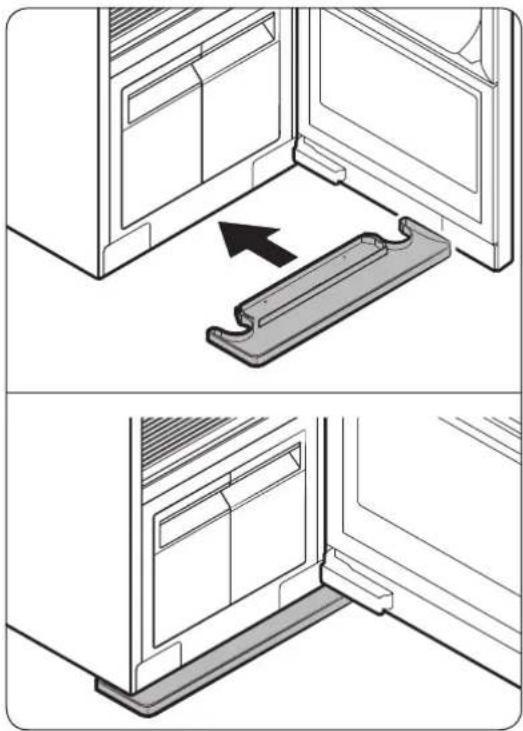
natural_image
Technical illustration showing two views of a door frame with a metal bracket and an arrow indicating direction (no text or symbols)Correctly insert the water tray as shown in the figures.
- Make sure the side with TOP is facing up.
English44
Air Filter
If you frequently use the product for heavy items or items that accumulate a large amount of dust, we recommend cleaning the Air Filter frequently.

natural_image
Diagram showing a magnified screen with a black arrow pointing to it, no text or symbols present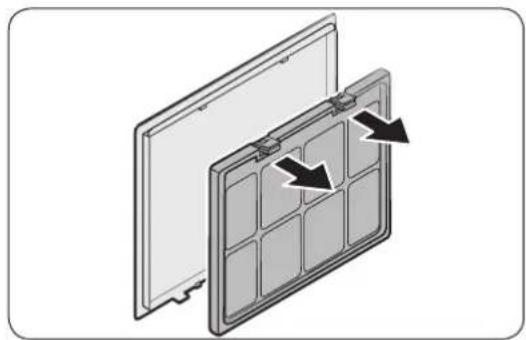
natural_image
Diagram of a solar panel with two panels and directional arrows indicating assembly or movement (no text or symbols)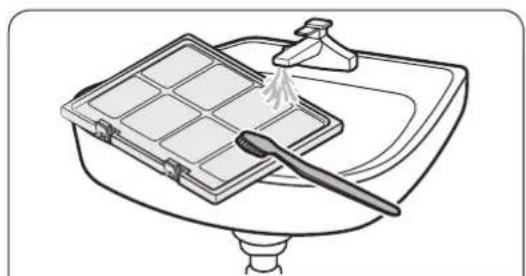
natural_image
Line drawing of a kitchen sink with a tray holding a baking pan and a spatula (no text or symbols)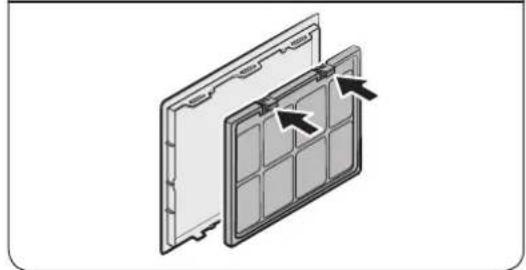
natural_image
Diagram of a solar panel with arrows indicating assembly or movement (no text or symbols)To replace the Air Filter
- Hold the bottom of the cover and pull out.
- While pressing the two hooks on the upper part of the filter, pull to remove.
- Use a brush and running water to clean the filter.
- Completely dry the filter in a shaded area and reinsert the filter.
Cleaning and maintenance

natural_image
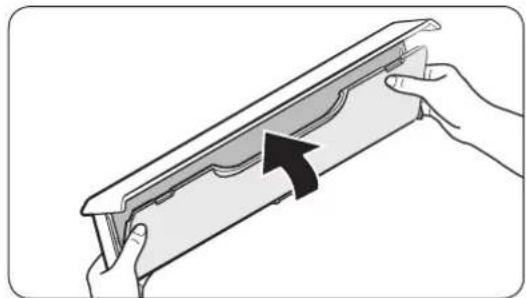
Diagram showing a folded document with a cursor arrow pointing to it (no text or symbols present)- Insert the top of the cover into the product, and then push the cover.
English46
Lint filter
- For best results, clean the lint filter before or after using the product.
- Replace a damaged lint filter with a new lint filter.
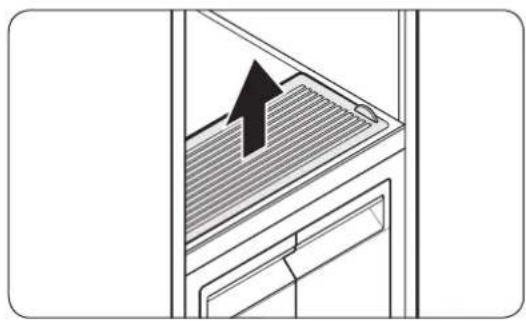
natural_image
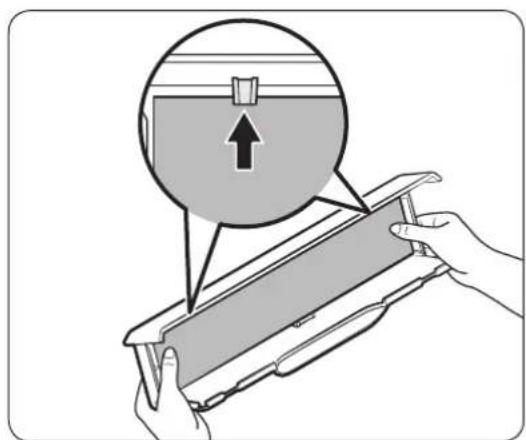
Diagram of a door with a black arrow pointing upward through a slatted panel (no text or symbols)To clean the lint filter
- Open the cover.
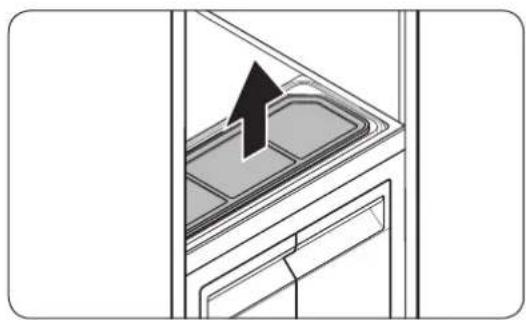
natural_image
Diagram of a kitchen appliance with a black arrow pointing to a lid (no text or symbols)- Remove the lint filter.
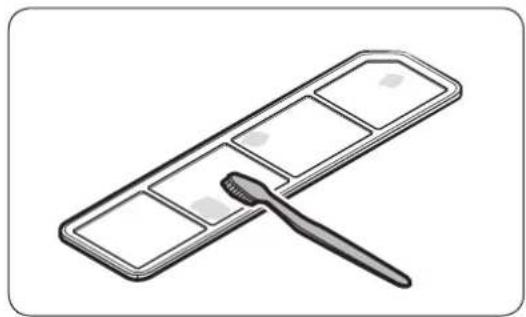
natural_image
Illustration of a cleaning tool applying paint to a grid-patterned surface (no text or symbols)- Use a brush and running water to clean the lint filter. Completely dry the lint filter in a shaded area.
- Reinsert the lint filter, and then close the cover.
Cleaning and maintenance
Lamp (Light source)
This product contains a light source of energy efficiency class
The lamp(s) and/or control gear(s) are not user-serviceable. To replace the lamp(s) and/or control gear(s) in the product, contact a local Samsung service centre. For detailed instructions on replacing lamp(s) or control gear(s) in your product, visit the Samsung website (http://www.samsung.com), go to Support > Support home, and then enter the model name.
For detailed instructions on dismantling lamp(s) and/or control gear(s), simply follow the replacement instruction reached as described above.
Descaling
Perform descaling regularly to increase the performance and lengthen the lifespan of the product. If you do not perform descaling immediately after getting the notification message, some functions may be restricted for use and may cause performance decrease or even shortens the lifespan of the product.
- When the Descaling Required message appears on the display, remove all items from the product and then tap and hold Sanitize and Dry for 3 seconds.
- Empty the Refill Tank and the Drain Tank.
- Dilute a descaling agent with water as recommended by the manufacturer.
- Fill the Refill Tank with the diluted descaling agent up to the MAX line.
- Tap and hold Start/Pause ▷ to start descaling.
- If the Drain the tank message appears on the display during descaling, empty the Drain Tank.
- When the Refill/Drain the tank message appears on the display, empty both the Refill Tank and the Drain Tank, and then rinse them thoroughly.
- Fill the Refill Tank with clean water up to the MAX line, and then insert the Refill Tank and the Drain Tank.
- When Supply/Drainage Complete message appears on the display, tap and hold Start/Pause ▷II
- If the Drain the tank message appears on the display during descaling, empty the Drain Tank.
- When descaling is complete, empty the Drain Tank and fill the Refill Tank with water.
- You can use AIRDRESSER once you finish all these steps.
NOTE
- Vibration and noise may occur during the descaling process; this is normal, and there is no problem with the product.
English48
- You may see the Refill the tank message when you use the product the first time after descaling. This is normal. Fill the Refill Tank with water and press Start/Pause ▷ to resume.
- Bubbles may form if the descaling agent is not rinsed thoroughly. Make sure to rinse the Refill Tank and the Drain Tank thoroughly after descaling.
Moving the product to another location
- There are two wheels underneath the product to assist moving it.
- To prevent the product from tipping over when moving the product, we recommend pushing the middle of the product. Do not push the top or the bottom.
- Empty the Refill Tank and the Drain Tank before moving the product to another location. If the tanks are not emptied, water can spill while moving the product.
Troubleshooting
Notification messages
| Message Action | |
| Refill the tankRefill the tank with water | Check if the Refill Tank has enough waterFill the water up to the MAX line, reinsert the Refill Tank, and then tap Start/Pause ▷to start.Check if the Refill Tank is properly inserted.Properly insert the Refill Tank, and then tap Start/Pause ▷to start. |
| Drain the tankDrain water from the tank | Check if the Drain Tank is full.Empty the Drain Tank, reinsert the Drain Tank, and then tap Start/Pause ▷to start.Check if the Drain Tank is properly inserted.Properly insert the Drain Tank, and then tap Start/Pause ▷to start. |
| Door OpenClose the door & Start again | Check if the door is open.Make sure the door is closed, and then tap Start/Pause ▷to start. |
| Abnormality AlertOpen the Door & Check Inside | Check if the door is open and if Child Lock is on.Make sure the door is closed, and then tap Start/Pause ▷to start. Make sure children or pets are not in the product. |
| WIFI Not ConnectedCheck the router | Check if the router is off.Turn the router on, and then connect to the Internet. |

NOTE
If a problem persists, contact a local Samsung service centre.
English50
Checkpoint
| Problem Action | |
| The product does not turn on. | Tap Power to turn the product on.Make sure the power cord is properly plugged in.Make sure the circuit breaker is on.Make sure the power cord is plugged into a power outlet rated for this product. |
| The product does not operate. | Make sure the door is closed, and then tap Start/Pause ▷If you hear water flowing or boiling sounds, the product is preparing for a steam process. This is normal.Make sure Child Lock is off.The product may not operate if you have used any liquid other than water. Please contact a Samsung service centre. |
| The product makes sounds. | The product may generate sounds when the compressor operates. This is normal.The product may generate sounds when it circulates air. This is normal.The product may generate sounds before and during a steam process. This is normal.The product may generate sounds to pump out and drain the water. This is normal.When opening the door, sounds may come from the Refill Tank when the water is flowing through the pipe. This is normal.If noises become louder, contact a Samsung service centre. |
| The control panel does not work. | After plugging in the product, wait for a moment and try again. The control panel will respond 10 seconds after the power cord has been plugged in.Clean the control panel and try again. If the problem continues, contact a Samsung service centre. |
| The product vibrates. | Make sure the product is installed on a solid, level surface.Make sure the product is level. |
| The Refill Tank is empty after one use. | The product consumes more water the first time it is used.This is normal. |
| Steam or air is coming out from the door. | Make sure there are no items caught in the door.Make sure the door is properly closed. |
English 51
Troubleshooting
| Problem Action | |
| Operation time continues to increase. | Wet items may take longer to dry. Operation time can increase depending on the quantity and moisture level of the items. |
| Items are wet after a cycle. | Make sure the lint filter is clean and properly inserted.Make sure the door gasket is not damaged or items are not caught on the door. If the door gasket is damaged, unplug the power cord and contact a Samsung service centre. |
| Items are not deodorised. | Wash items with strong odours or items that have been stored for a long time.Wash items contaminated by oils.Large items such as down-filled jackets may not be deodorised well. Put large items by themselves and run an additional cycle if necessary.Do not put items with strong odour with other items. Separate items by odour strength.Make sure the lint filter and both tanks are clean. |
| Wrinkles are not removed. | Iron items that have been stored for a long time. |
| Smoke comes out from the product when the door is opened. | Some cycles generate steam that may appear to be smoke.This is normal. |
English52
Specifications

natural_image
Line drawing of a refrigerator with a vertical dimension labeled 'A' (no text or symbols on the diagram itself)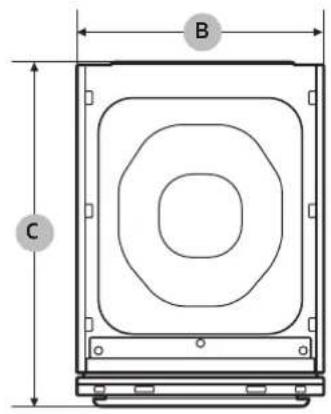
| Type | Clothing Care System (AIRDRESSER) | ||
| DF60*8****G | |||
| Dimensions(mm) | A. Height 1850 | ||
| B. Width 445 | |||
| C. Depth 615 | |||
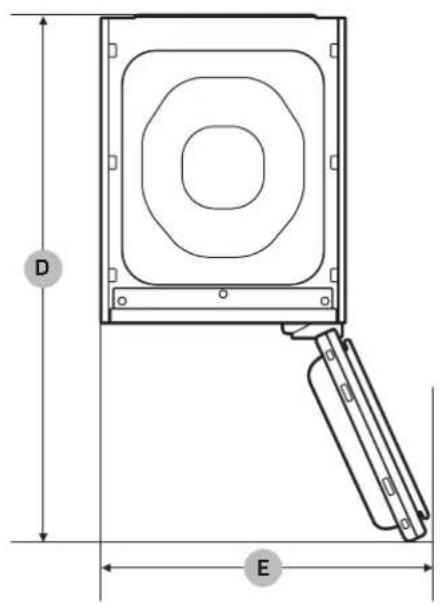
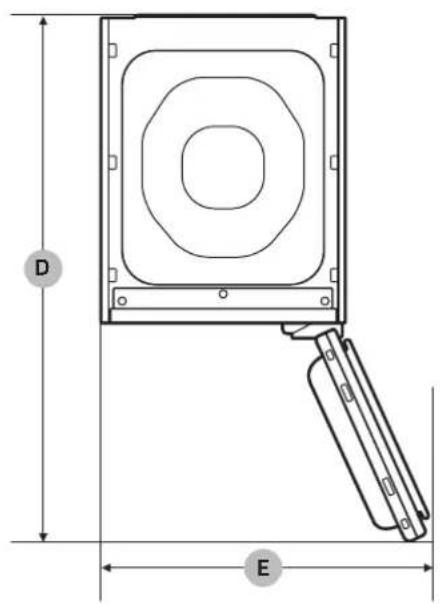
| D. Depth with door open 1001 | |||
| E. Width with door open 618 | |||
| Rated power | 220-240 V / 50 Hz1700-1900 W | ||
| Fuse (Fixed fuse in main PBA) | 250 V / 12 A | ||
| Tube type H | gh breaking capacity type | ||
| Weight (kg) 89.0 | |||
Memo


Memo


SAMSUNG
QUESTIONS OR COMMENTS?
| COUNTRY CALL OR VISIT US ONLINE AT | ||
| ITALIA 800-S | AMSUNG (800.7267864) www.samsung.com/it/support | |
| NETHERLANDS | 088 90 90 100 www.samsung.com/nl/support | |
| LATVIA 8000 | -7267 www.samsung.com/lv/support | |
| LITHUANIA 8-8 | 00-77777 www.samsung.com/lt/support | |
| ESTONIA 800 | -7267 www.samsung.com/ee/support | |
| POLAND | 801-172-678* lub +48 22 607-93-33** (opłata według taryfy operatora) | http://www.samsung.com/pl/support/ |
natural_image
Black-and-white photo of a Samsung air conditioner in a modern closet with hanging clothes and a wall display (no text or symbols on main objects)Indice
natural_image
Symbol of a trash bin crossed with a diagonal line, no text or numbers presentnatural_image
Technical diagram of a mechanical component with labeled point A (no text or symbols beyond label)
NOTA
natural_image
Technical illustration showing two views of a door frame with a metal bracket and an arrow indicating direction (no text or symbols)NOTA
natural_image
Diagram of a refrigerator interior showing the door and side panel, with no text or symbols present.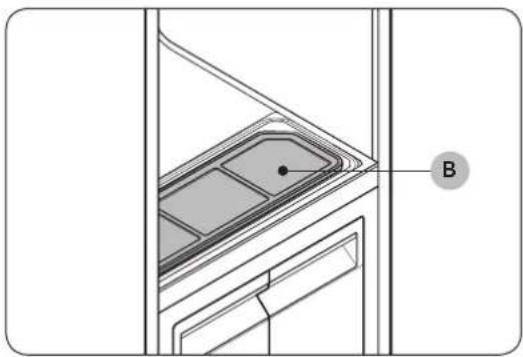
natural_image
Technical diagram of a door frame with labeled component B (no text or symbols beyond label)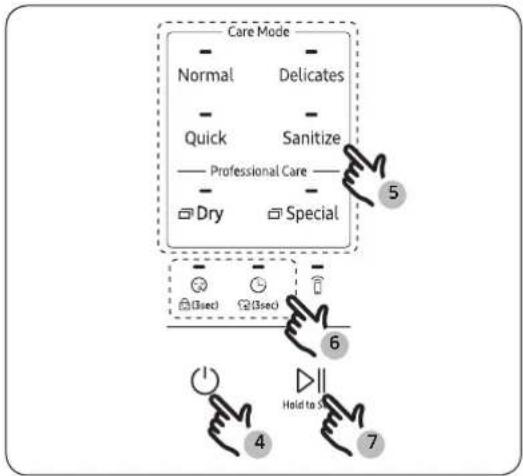
flowchart
graph TD
    A["Care Mode"] --> B["Normal"]
    A --> C["Delicates"]
    A --> D["Quick"]
    A --> E["Sanitize"]
    A --> F["Professional Care"]
    A --> G["Dry"]
    A --> H["Special"]
    I["Step 4: Hold to S"] --> J["Step 6: (3sec)"]
    J --> K["Step 5: (3sec)"]
    K --> L["Step 7: Hold to S"]
natural_image
Illustration of a person in a suit hanging from a computer tower, with an arrow indicating the motion (no text or symbols present)natural_image
Diagram of a refrigerator interior showing drawer arrangement and a hanging device (no text or symbols)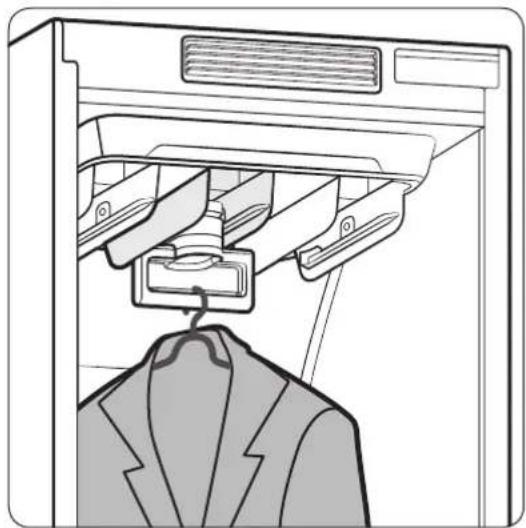
natural_image
Line drawing of a garment hanging from a rack, showing the jacket and coat (no text or symbols)natural_image
Technical line drawing of a vertical mechanical component with mounting brackets (no text or symbols)natural_image
Diagram of a mechanical component with a downward arrow indicating direction (no text or symbols present)natural_image
Diagram showing a tray with internal compartments and two hands holding small objects, with arrows indicating downward motion (no text or symbols)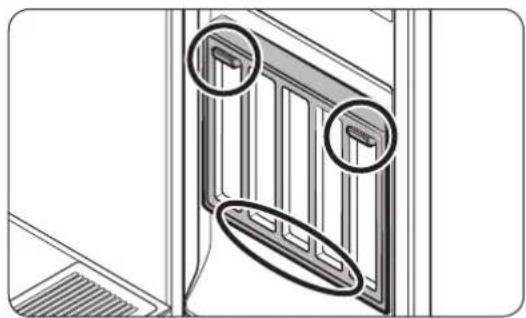
natural_image
Technical line drawing of a door frame structure with two circular annotations highlighting features (no text or symbols present)natural_image
Diagram showing a clothing rack being folded, with an arrow indicating the process (no text or symbols present)Metodo 2
natural_image
Diagram showing a folding or lifting process of a folded garment, with no visible text or symbols.natural_image
Diagram of a door opening with a black arrow pointing to the door panel (no text or symbols present)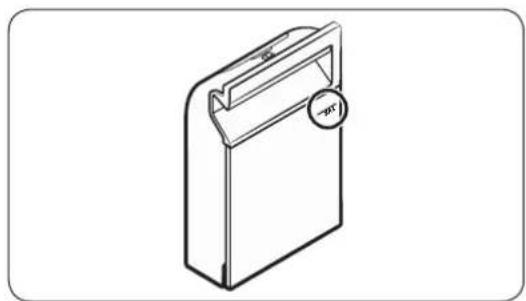
natural_image
Isometric line drawing of a rectangular device with a handle and circular button labeled 'p*1' (no text or symbols on the device itself)natural_image
Diagram showing a door with a black arrow pointing to the glass door (no text or symbols present)Samsung Fresh Finish
natural_image
Diagram of a mechanical component with an arrow indicating upward motion, showing a stepped surface (no text or symbols)- Rimuovere Samsung Fresh Finish.
Italiano40
natural_image
Illustration of hands holding a decorative frame with an arrow indicating direction (no text or symbols)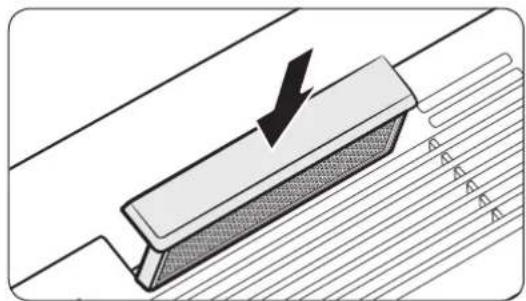
natural_image
Diagram of a mechanical component with a downward arrow indicating force or direction, no text or symbols presentnatural_image
Line drawing of a hand holding a smartphone next to a cabinet (no text or symbols)natural_image
Illustration of two rectangular storage compartments with a magnifying glass placed between them (no text or symbols)natural_image
Technical line drawing of a mechanical device with a lever handle (no text or symbols)natural_image
Technical line drawing of a door handle assembly with a toothbrush resting on the base (no text or symbols)natural_image
Technical illustration showing two views of a door frame with a metal bracket and an arrow indicating direction (no text or symbols)natural_image
Diagram showing a grid-patterned panel with an arrow pointing to it, no text or symbols present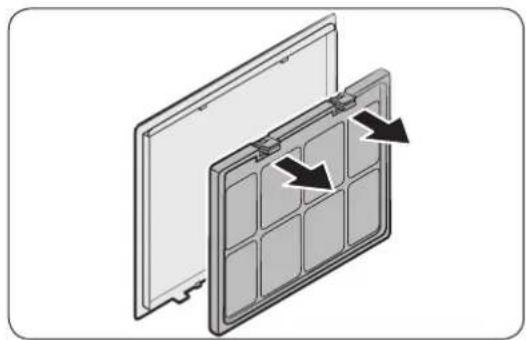
natural_image
Diagram of a solar panel with two panels and directional arrows indicating assembly or movement (no text or symbols)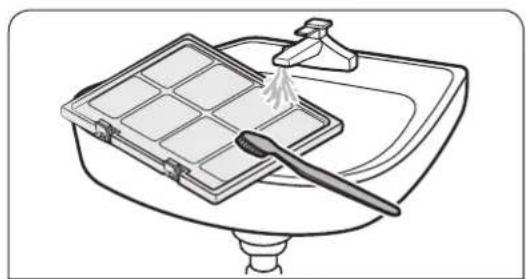
natural_image
Line drawing of a kitchen sink with a grater and a drain, no text or symbols present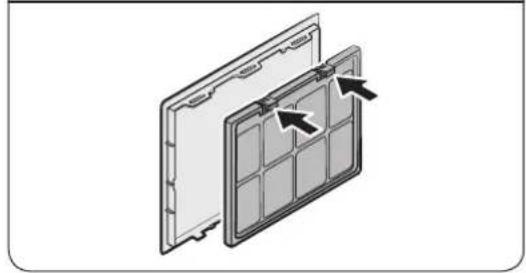
natural_image
Diagram of a solar panel with internal grid structure and directional arrows indicating components (no text or symbols)natural_image
Diagram showing a folded document with a cursor arrow pointing to it (no text or symbols present)natural_image
Diagram of a door with a black arrow pointing upward through a slatted panel (no text or symbols)natural_image
Diagram of a kitchen appliance with a black arrow pointing to a lid (no text or symbols)natural_image
Illustration of a cleaning tool applying paint to a grid-patterned surface (no text or symbols)natural_image
Line drawing of a refrigerator with a vertical dimension labeled 'A' (no text or symbols on the diagram itself)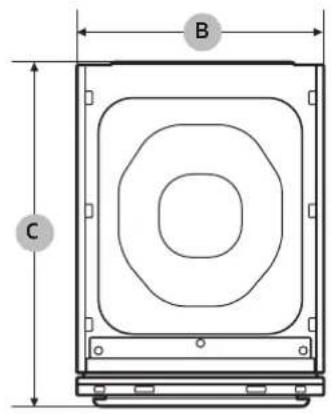
natural_image
Black-and-white photo of a Samsung air conditioner in a modern living room with hanging clothes and a wall display (no text or symbols on main objects)Inhoud
natural_image
Symbol of a trash bin crossed with a diagonal line, no text or numbers presentnatural_image
Technical diagram of a mechanical component with labeled section A (no text or symbols beyond label)OPMERKING
natural_image
Two-panel diagram showing a door opening and a metal bracket with an arrow indicating direction (no text or symbols)flowchart
graph TD
    A["01"] --> B[" "]
    B --> C[">"]

06

07
01 Display
Download programma's
U kunt meer programma's downloaden vanuit de SmartThings app.
* = Speciale programma's / ** = Download programma's
Voordat u begint

OPMERKING
natural_image
Technical line drawing of a door panel with labeled component A (no text or symbols beyond label)natural_image
Technical diagram of a door frame with labeled component B (no text or symbols beyond label)natural_image
Illustration of a person inserting a device into a machine (no text or symbols visible)natural_image
Diagram of a refrigerator interior showing drawer arrangement and a hanging device (no text or symbols)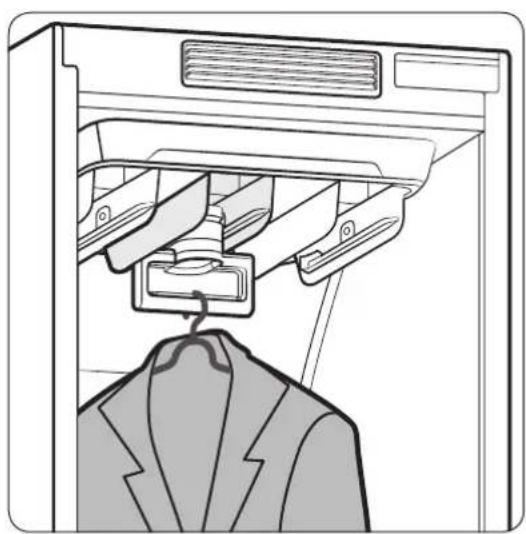
natural_image
Line drawing of a garment jacket hanging from a rack, with no text or symbols present.natural_image
Technical line drawing of a vertical mechanical component with mounting brackets (no text or symbols)natural_image
Technical diagram of a mechanical component with a downward arrow indicating motion (no text or symbols present)natural_image
Diagram showing a tray with six compartments and two hands holding small objects, with arrows indicating downward motion (no text or symbols)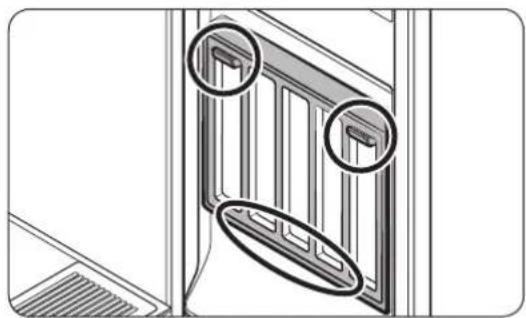
natural_image
Technical line drawing of a door frame with two circular annotations highlighting features (no text or symbols present)De plank gebruiken
natural_image
Diagram showing a clothing rack being folded, with an arrow indicating the process (no text or symbols present)Methode 2
natural_image
Diagram showing a clothing rack being folded, with an arrow indicating the process (no text or symbols present)natural_image
Diagram of a door opening with a black arrow indicating direction (no text or symbols)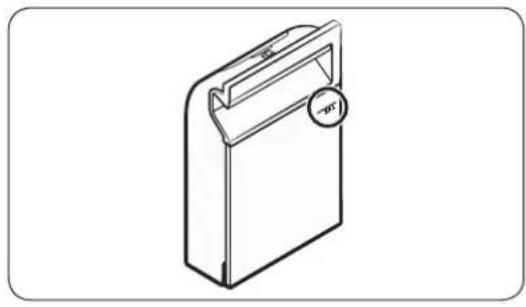
natural_image
Line drawing of a rectangular device with a handle and circular button labeled 'opt' (no text or symbols on the device itself)natural_image
Diagram showing a door with a black arrow pointing to the interior panel (no text or symbols)De afvoertank legen
Samsung Fresh Finish
natural_image
Diagram of a mechanical component with an arrow indicating direction, showing a stepped surface and a rectangular block (no text or symbols)natural_image
Illustration of hands holding a decorative frame with an arrow indicating direction (no text or symbols)natural_image
Diagram of a mechanical component with a downward arrow indicating force or direction, no text or symbols presentnatural_image
Line drawing of a hand holding a smartphone next to a cabinet (no text or symbols)natural_image
Illustration of two rectangular storage units with a magnifying glass placed on one, no text or symbols present.natural_image
Technical line drawing of a mechanical device with a lever handle (no text or symbols)natural_image
Technical line drawing of a door handle assembly with a toothbrush resting on the base (no text or symbols)natural_image
Two-panel diagram showing a door opening with a plastic tray and an arrow indicating direction (no text or symbols)natural_image
Diagram showing a grid-patterned panel with an arrow pointing to it, no text or symbols present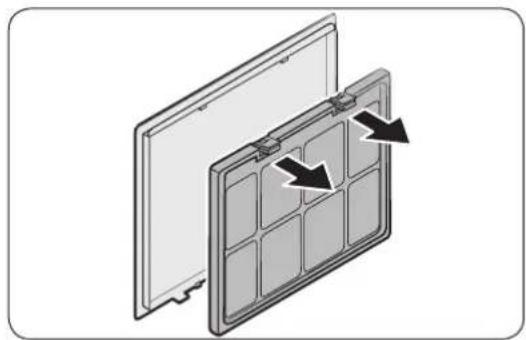
natural_image
Diagram of a solar panel with two panels and directional arrows indicating assembly or movement (no text or symbols)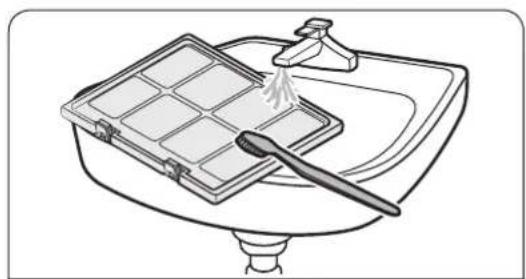
natural_image
Line drawing of a kitchen sink with a grater and a drain, no text or symbols present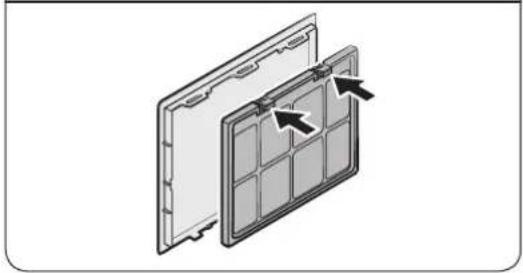
natural_image
Diagram of a solar panel with internal grid structure and directional arrows indicating components (no text or symbols)natural_image
Diagram showing a folded document with a cursor arrow pointing to it, no text or symbols presentnatural_image
Diagram of a door with a black arrow pointing upward through a slatted panel (no text or symbols)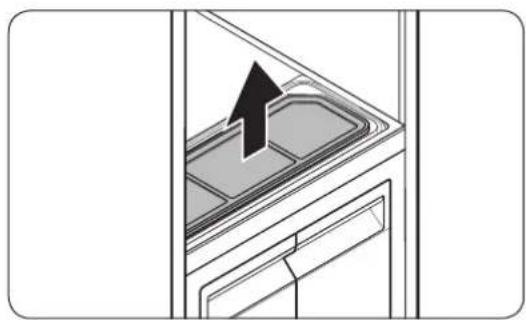
natural_image
Diagram of a kitchen appliance with a black arrow pointing to a lid (no text or symbols)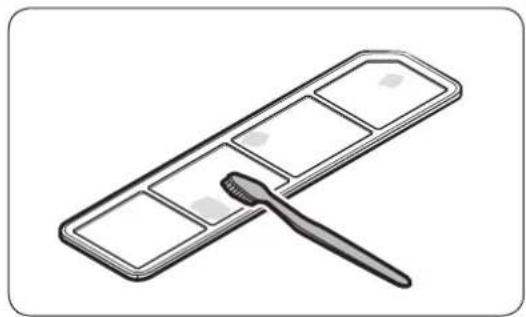
natural_image
Illustration of a cleaning tool applying paint to a grid-patterned surface (no text or symbols)natural_image
Line drawing of a refrigerator with a vertical height dimension labeled 'A' (no text or symbols on the diagram itself)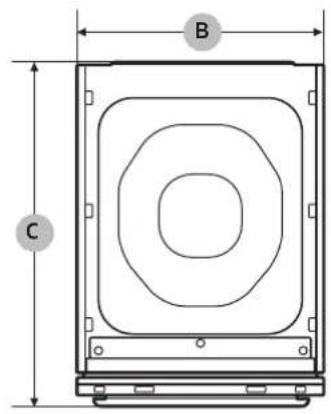
natural_image
Black-and-white photo of a Samsung air conditioner in a modern living room with hanging clothes and a wall display (no text or symbols on main objects)Sommaire
ATTENTION, surface chaude

REMARQUE
natural_image
Symbol of a trash bin crossed with a diagonal line, no text or numbers presentnatural_image
Technical diagram of a mechanical component with labeled point A (no text or symbols beyond label)REMARQUE
natural_image
Two-panel diagram showing a door opening and a metal bracket being inserted, with an arrow indicating the direction of movement (no text or symbols present)REMARQUE
natural_image
Diagram of a door panel with labeled component A, showing interior layout and mounting base (no text or symbols beyond label)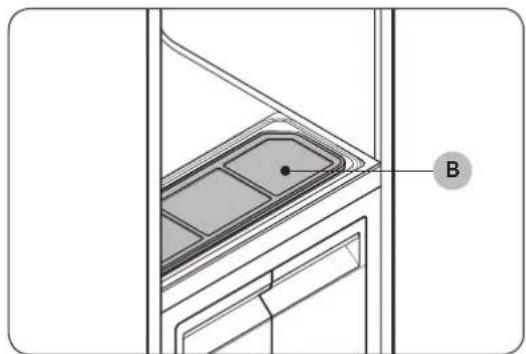
natural_image
Architectural detail drawing of a window frame with labeled component B (no text or symbols beyond label)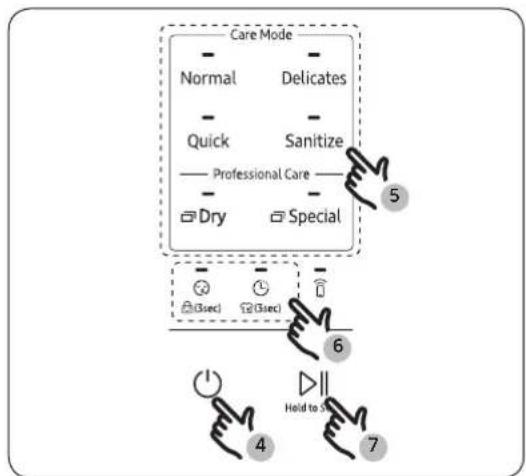
flowchart
graph TD
    A["Care Mode"] --> B["Normal"]
    A --> C["Delicates"]
    A --> D["Quick"]
    A --> E["Sanitize"]
    A --> F["Professional Care"]
    A --> G["Dry"]
    A --> H["Special"]
    I["(3sec)"] --> J["(3sec)"]
    K["Hold to 5"] --> L["4"]
    M["7"] --> N["6"]
natural_image
Illustration of a person inserting a device into a machine (no text or symbols visible)natural_image
Diagram of a refrigerator interior showing drawer arrangement and air vent (no text or symbols)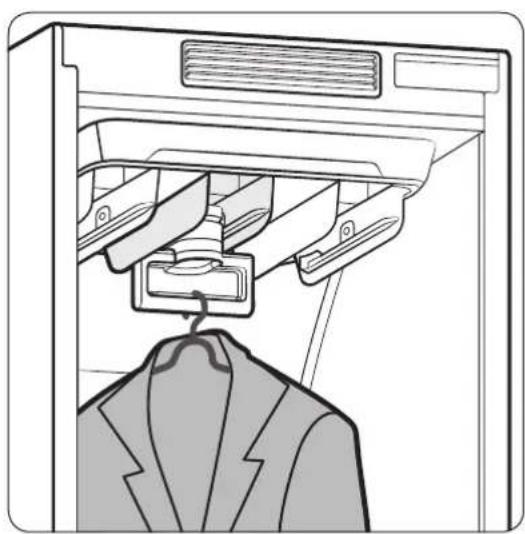
natural_image
Line drawing of a garment hanger hanging from a rack, with no text or symbols presentnatural_image
Technical line drawing of a vertical mechanical component with mounting brackets (no text or symbols)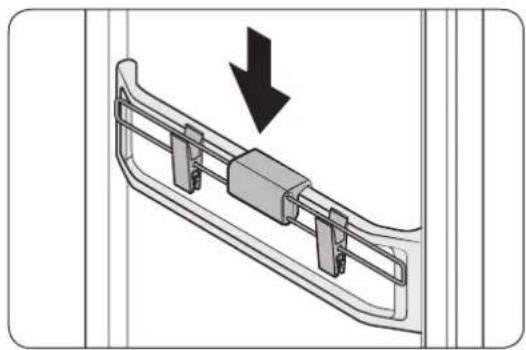
natural_image
Diagram of a mechanical component with a downward arrow indicating direction (no text or symbols present)natural_image
Diagram showing a tray with six compartments and two hands holding small objects, with arrows indicating downward motion (no text or symbols)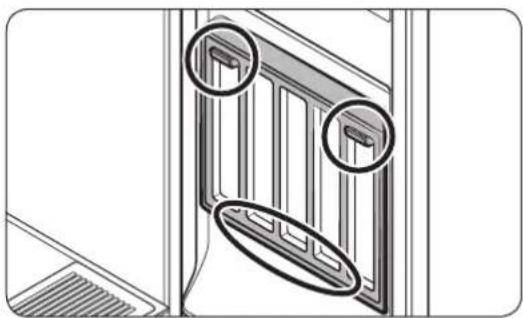
natural_image
Technical line drawing of a door frame with two circular annotations highlighting features (no text or symbols present)natural_image
Diagram showing a clothing rack being folded, with an arrow indicating the process (no text or symbols present)Méthode 2
natural_image
Diagram showing a clothing rack being folded, with an arrow indicating the process (no text or symbols present)natural_image
Diagram of a door opening with a black arrow indicating direction (no text or symbols)natural_image
Isometric line drawing of a rectangular device with a handle and circular button labeled 'p21' (no text or symbols on the device itself)natural_image
Diagram showing a door with a black arrow pointing to the glass door (no text or symbols present)Samsung Fresh Finish
Le Samsung Fresh Finish donne aux articles un parfum agréable.

REMARQUE
natural_image
Diagram of a mechanical component with an arrow indicating upward motion, showing layered structure (no text or symbols)- Retirez le Samsung Fresh Finish.
natural_image
Illustration of hands holding a decorative frame with an arrow indicating direction (no text or symbols)natural_image
Diagram of a mechanical component with a downward arrow indicating force or direction, no text or symbols present- Réinsérez le Samsung Fresh Finish.

REMARQUE
natural_image
Line drawing of a hand holding a smartphone next to a cabinet (no text or symbols)natural_image
Illustration of two rectangular storage units with a paper clip emerging from one (no text or symbols)natural_image
Technical line drawing of a mechanical component with a lever handle (no text or symbols)natural_image
Technical line drawing of a door handle assembly with a toothbrush resting on the base (no text or symbols)natural_image
Technical illustration showing two views of a door frame with a metal bracket and an arrow indicating direction (no text or symbols)natural_image
Diagram showing a grid-patterned panel being tilted with a black arrow indicating direction (no text or symbols)natural_image
Diagram of a solar panel with two panels and directional arrows indicating assembly or movement (no text or symbols)natural_image
Line drawing of a kitchen sink with a tray holding a grater and a spatula (no text or symbols)natural_image
Diagram of a solar panel with arrows indicating internal components (no text or symbols)Français44-

natural_image
Diagram showing a folded document with a cursor arrow pointing to it (no text or symbols present)natural_image
Diagram of a door with a black arrow pointing upward through the window (no text or symbols)natural_image
Diagram of a kitchen appliance with a black arrow pointing to a lid (no text or symbols)natural_image
Illustration of a paintbrush applying paint to a grid-patterned surface (no text or symbols)natural_image
Line drawing of a refrigerator with a vertical dimension labeled 'A' (no text or symbols on the diagram itself)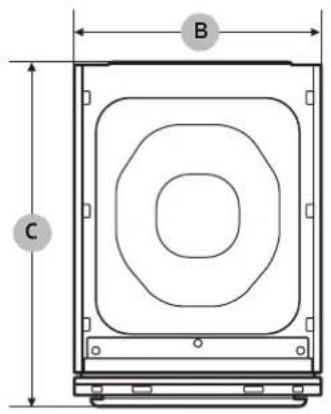
natural_image
Black-and-white photo of a Samsung air conditioner in a modern closet with hanging clothes and a wall display (no text or symbols on main objects)Saturs
natural_image
Symbol of a trash bin crossed with a diagonal line, no text or numbers presentnatural_image
Technical diagram of a mechanical component with labeled section A (no text or symbols beyond label)PIEZIME
natural_image
Technical illustration showing two views of a door frame with a metal bracket and an arrow indicating direction (no text or symbols)
PIEZIME
natural_image
Technical line drawing of a door panel with labeled component A (no text or symbols beyond label)natural_image
Technical diagram of a door frame with labeled component B (no text or symbols beyond label)natural_image
Illustration of a person in a suit hanging from a computer tower, with an arrow indicating the direction (no text or symbols present)natural_image
Diagram of a refrigerator interior showing internal compartments and a hanging device (no text or symbols)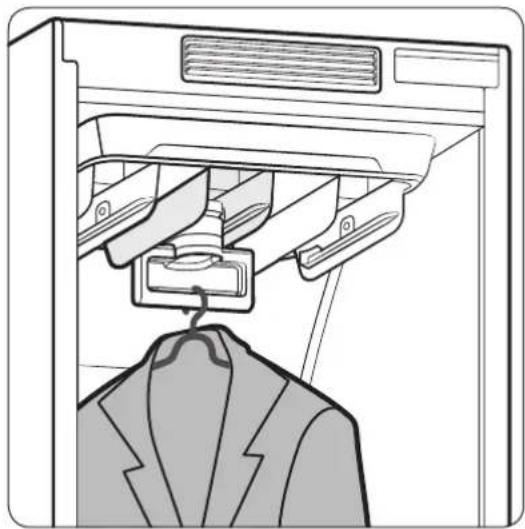
natural_image
Line drawing of a garment hanger hanging from a rack, showing internal compartments and a jacket (no text or symbols)natural_image
Technical line drawing of a vertical mechanical component with mounting brackets (no text or symbols)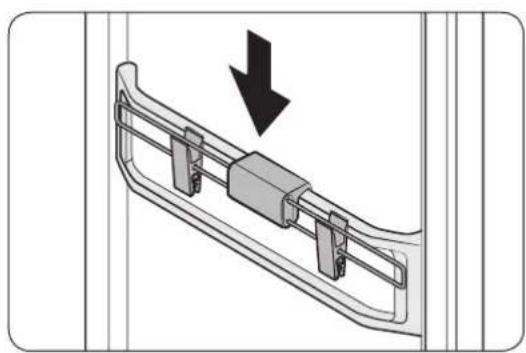
natural_image
Diagram of a mechanical component with a downward arrow indicating direction (no text or symbols present)natural_image
Diagram showing a tray with internal compartments and two hands holding small objects, no text or symbols present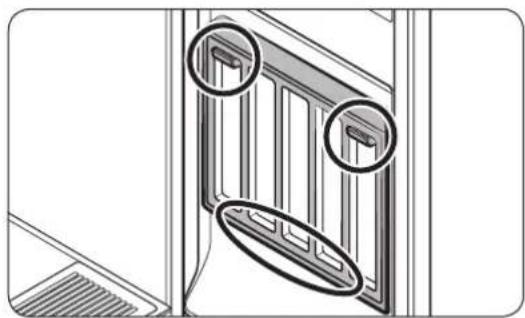
natural_image
Technical line drawing of a balcony with two circular annotations highlighting structural details (no text or symbols present)Plaukta izmantošana
natural_image
Diagram showing a clothing rack being folded, with an arrow indicating the process (no text or symbols present)2. metode
natural_image
Diagram showing a clothing rack being folded, with an arrow indicating the process (no text or symbols present)natural_image
Diagram of a door opening with a black arrow indicating direction (no text or symbols)Uzpildes tvertnes piepildišana
- Izvelciet uzpildes tvertni.
natural_image
Isometric line drawing of a rectangular device with a handle and circular button labeled 'p2' (no text or symbols on the device itself)natural_image
Diagram showing a door with a black arrow pointing to the glass door (no text or symbols present)Samsung Fresh Finish
natural_image
Diagram of a mechanical component with an arrow indicating direction, showing a stepped profile (no text or symbols)- Iznemiet Samsung Fresh Finish.
natural_image
Illustration of hands holding a tray with an arrow pointing to a component, no text or symbols presentnatural_image
Illustration of hands holding a decorative frame with an arrow indicating direction (no text or symbols)natural_image
Diagram of a mechanical component with a downward arrow indicating force or direction, no text or symbols presentnatural_image
Line drawing of a hand holding a smartphone next to a cabinet (no text or symbols)natural_image
Illustration of two rectangular storage units with a paper clip emerging from one (no text or symbols)natural_image
Technical line drawing of a mechanical component with a lever handle (no text or symbols)natural_image
Line drawing of a door handle assembly with a toothbrush inserted (no text or symbols)natural_image
Technical illustration showing two views of a door frame with a metal bracket and an arrow indicating direction (no text or symbols)natural_image
Diagram showing a grid-patterned panel being tilted with a black arrow indicating direction (no text or symbols)Gaisa filtra nomaina
natural_image
Diagram of a solar panel with two panels and directional arrows indicating assembly or movement (no text or symbols)natural_image
Line drawing of a kitchen sink with a tray holding a grater and a spatula (no text or symbols)natural_image
Diagram of a solar panel with arrows indicating internal components (no text or symbols)Latviešu46
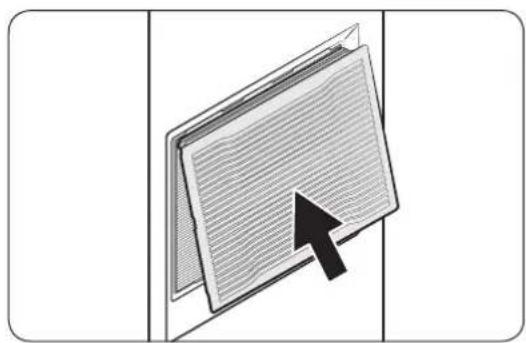
natural_image
Diagram showing a folded document with a cursor arrow pointing to it (no text or symbols present)natural_image
Diagram of a door with a black arrow pointing upward through the window (no text or symbols)natural_image
Diagram of a kitchen appliance with an upward arrow indicating a component (no text or symbols present)- Iznemiet plüksnu filtru.
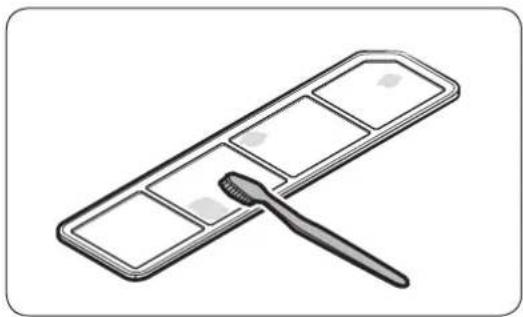
natural_image
Illustration of a paintbrush applying paint to a grid-patterned surface (no text or symbols)natural_image
Line drawing of a refrigerator with height dimension labeled 'A' (no text or symbols on the diagram itself)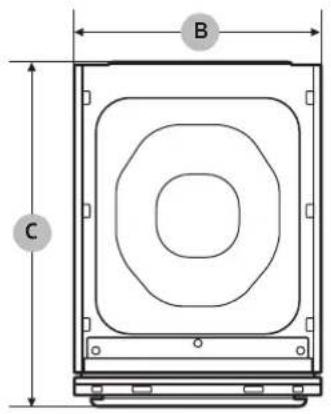
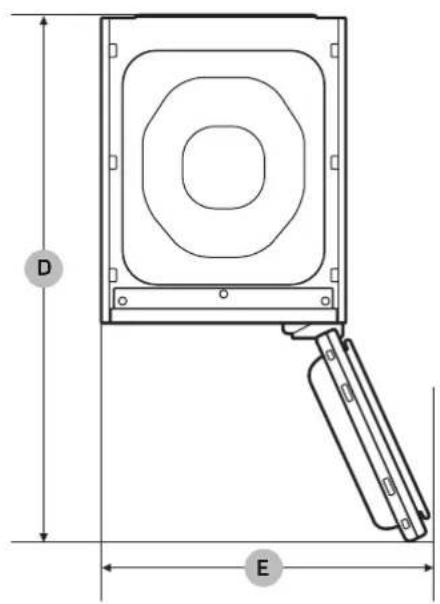
natural_image
Black-and-white photo of a Samsung air conditioner in a modern living room with hanging clothes and a wall display (no text or symbols on main objects)Turinys
Saugos informacija 4
natural_image
Symbol of a trash bin crossed with no text or numbers, representing waste sorting or restriction (no text present)natural_image
Technical diagram of a mechanical component with labeled point A (no text or symbols beyond label)
PASTABA
natural_image
Two-panel diagram showing a door opening and a metal bracket being inserted, with an arrow indicating the direction of movement (no text or symbols present)- Prijunkite gamini prie 230 V / 50 Hz jžeminto elektros lizdo.

PASTABA
natural_image
Technical line drawing of a door panel with labeled component A (no text or symbols beyond label)natural_image
Technical diagram of a door frame with labeled component B (no text or symbols beyond label)natural_image
Illustration of a person inserting a device into a machine (no text or symbols visible)natural_image
Diagram of a refrigerator interior showing drawer arrangement and a hanging device (no text or symbols)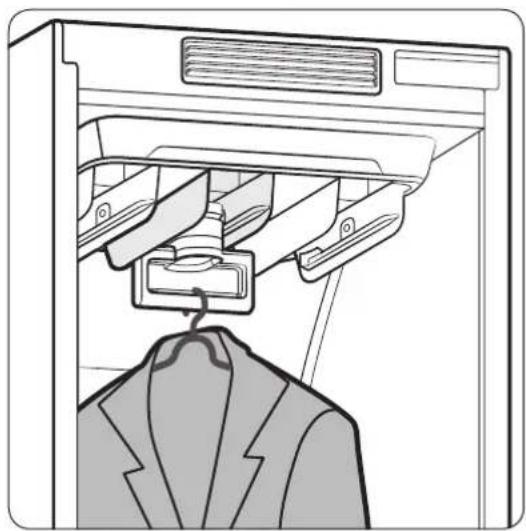
natural_image
Line drawing of a garment hanger hanging from a rack, with no text or symbols presentnatural_image
Technical line drawing of a vertical mechanical component with mounting brackets (no text or symbols)natural_image
Diagram of a mechanical component with a downward arrow indicating direction (no text or symbols present)natural_image
Diagram showing a tray with six compartments and two hands holding small objects, with arrows indicating downward motion (no text or symbols)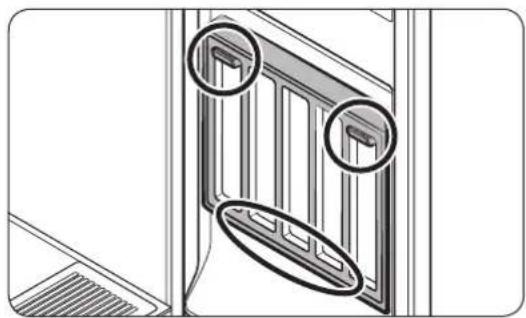
natural_image
Technical line drawing of a door frame with two circular annotations highlighting features (no text or symbols present)natural_image
Diagram showing a clothing rack being folded, with an arrow indicating the process (no text or symbols present)2 būdas
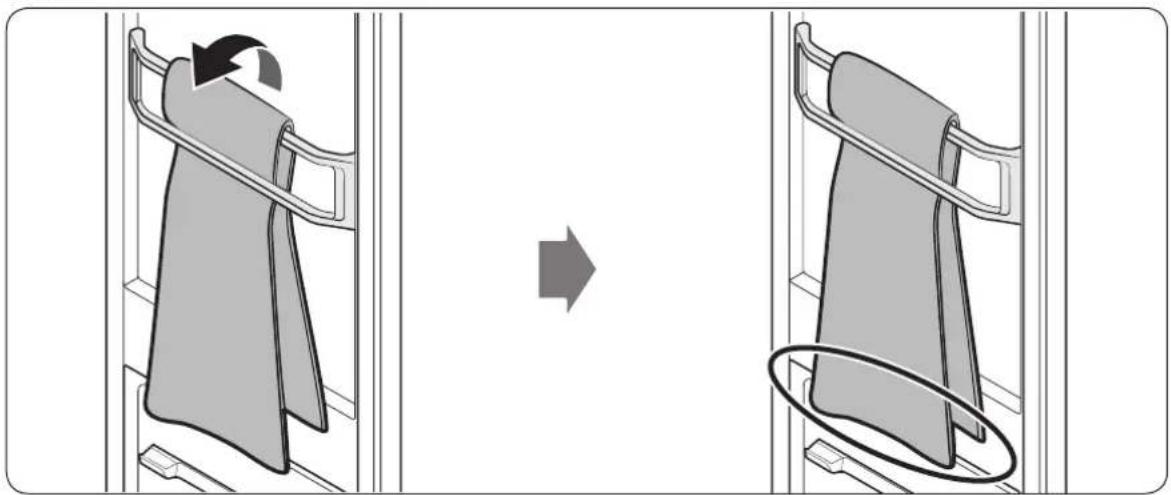
natural_image
Diagram showing a folding or lifting process of a folded garment, with no text or symbols present.natural_image
Diagram of a door opening with a black arrow indicating direction (no text or symbols)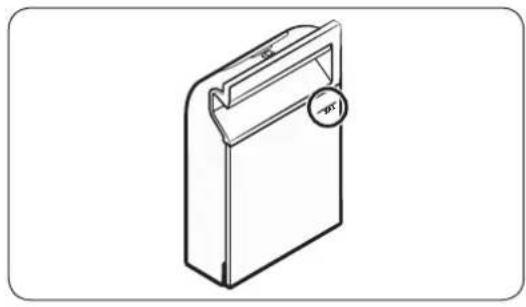
natural_image
Line drawing of a rectangular device with a handle and circular button labeled 'opt' (no text or symbols on the device itself)natural_image
Diagram showing a door with a black arrow pointing to the window (no text or symbols)natural_image
Diagram of a mechanical component with an arrow indicating direction, showing a stepped surface and layered structure (no text or symbols)- Nuimkite „Samsung Fresh Finish“.
Lietuvių kalba38-
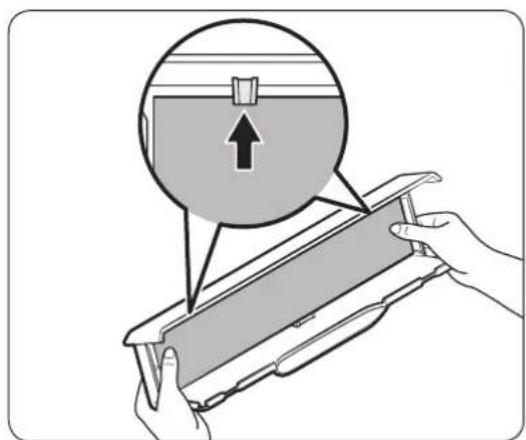
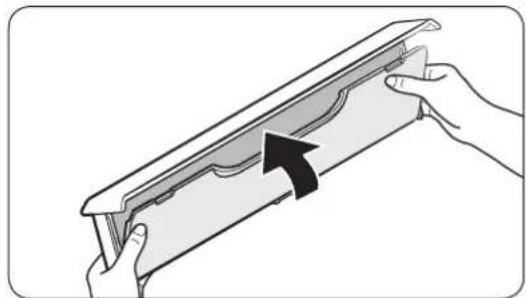
natural_image
Illustration of hands holding a decorative frame with an arrow indicating direction (no text or symbols)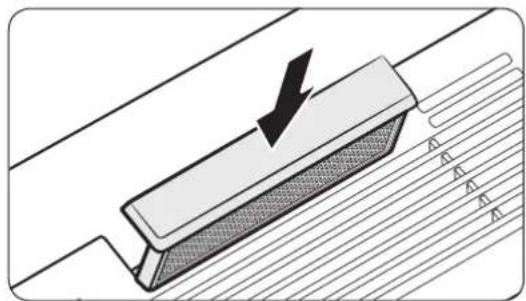
natural_image
Diagram of a mechanical component with a downward arrow indicating force or direction, no text or symbols presentnatural_image
Line drawing of a hand holding a smartphone next to a cabinet (no text or symbols)natural_image
Illustration of two rectangular storage compartments with a magnifying glass placed between them (no text or symbols)natural_image
Technical line drawing of a mechanical device with a lever handle (no text or symbols)natural_image
Technical line drawing of a door handle assembly with a toothbrush resting on the base (no text or symbols)natural_image
Technical illustration showing two views of a door frame with a metal bracket and an arrow indicating direction (no text or symbols)natural_image
Diagram showing a grid-patterned panel with an arrow pointing to it, no text or symbols present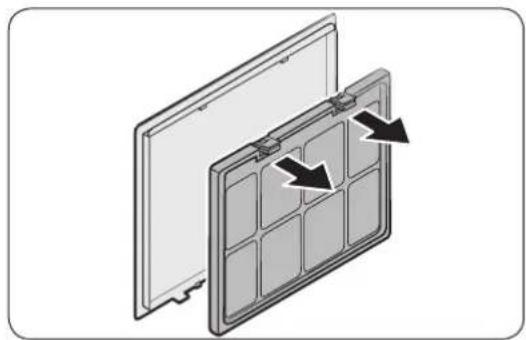
natural_image
Diagram of a solar panel with two panels and directional arrows indicating assembly or movement (no text or symbols)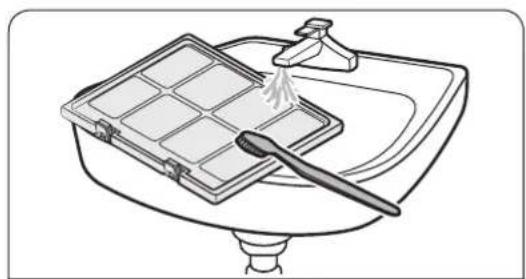
natural_image
Line drawing of a kitchen sink with a grater and water spray (no text or symbols)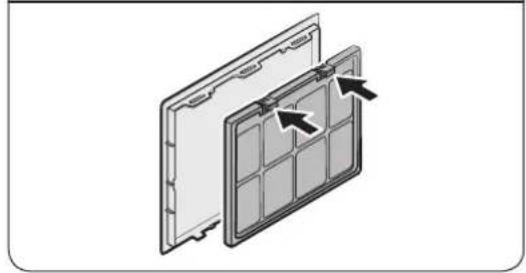
natural_image
Diagram of a solar panel with internal grid structure and directional arrows indicating components (no text or symbols)natural_image
Diagram showing a folded document with a cursor arrow pointing to it (no text or symbols present)natural_image
Diagram of a door with a black arrow pointing upward through the grille (no text or symbols)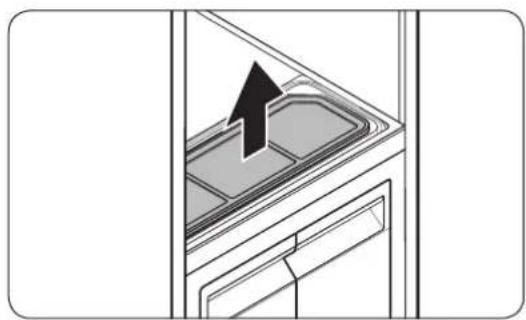
natural_image
Diagram of a kitchen appliance interior showing a tray with a black arrow pointing to the lid area (no text or symbols)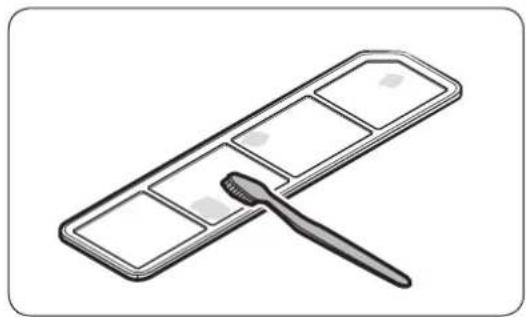
natural_image
Illustration of a paintbrush applying paint to a grid-patterned surface (no text or symbols)natural_image
Line drawing of a refrigerator with height dimension labeled 'A' (no text or symbols on the diagram itself)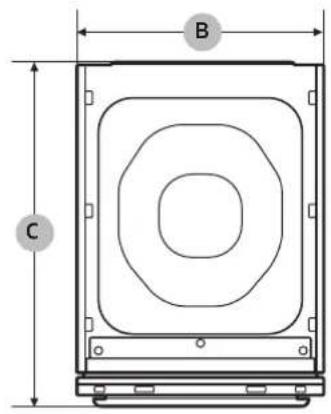
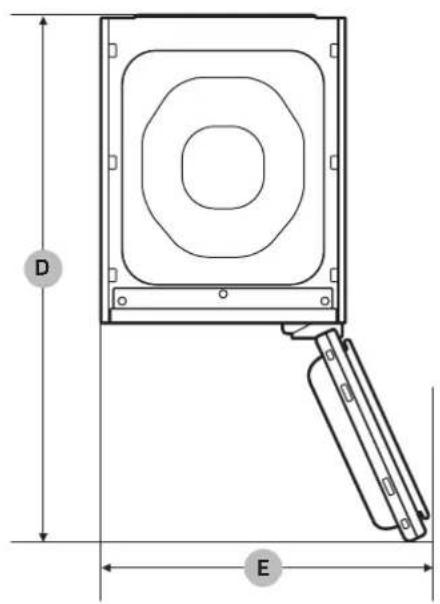
natural_image
Black-and-white photo of a Samsung air conditioner in a modern closet with hanging clothes and a wall display (no text or symbols on main objects)Sisukord
Ohutusteave 4
natural_image
Symbol of a trash bin crossed with no text or numbers, representing waste sorting or restriction (no text present)natural_image
Technical diagram of a mechanical component with labeled point A (no text or symbols beyond label)MÄRKUS.
natural_image
Two-panel diagram showing a door opening and a plastic tray being inserted, with an arrow indicating the direction of movement (no text or symbols present)
MÄRKUS.
natural_image
Technical line drawing of a cabinet or enclosure with a labeled component (A), showing internal panel and door structure (no text or symbols beyond label)natural_image
Technical diagram of a door frame with labeled component B (no text or symbols beyond label)natural_image
Illustration of a person in a suit opening a computer drawer with an arrow indicating the process (no text or symbols present)natural_image
Diagram of a refrigerator interior showing drawer arrangement and a hanging device (no text or symbols)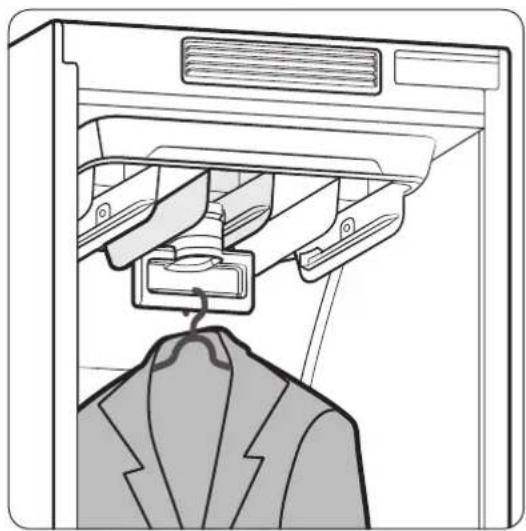
natural_image
Line drawing of a garment hanger hanging from a rack, with no text or symbols presentnatural_image
Technical line drawing of a vertical mechanical component with mounting brackets (no text or symbols)natural_image
Technical diagram of a mechanical component with a downward arrow indicating motion (no text or symbols present)natural_image
Diagram showing a tray with six compartments and two hands holding small objects, with arrows indicating downward motion (no text or symbols)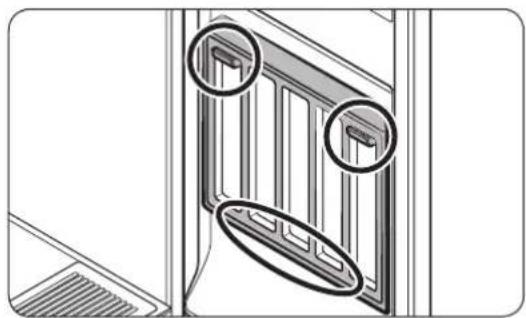
natural_image
Technical line drawing of a door frame with two circular annotations highlighting features (no text or symbols present)Riiuli kasutamine
natural_image
Diagram showing a clothing rack being folded, with an arrow indicating the process (no text or symbols present)Meetod 2
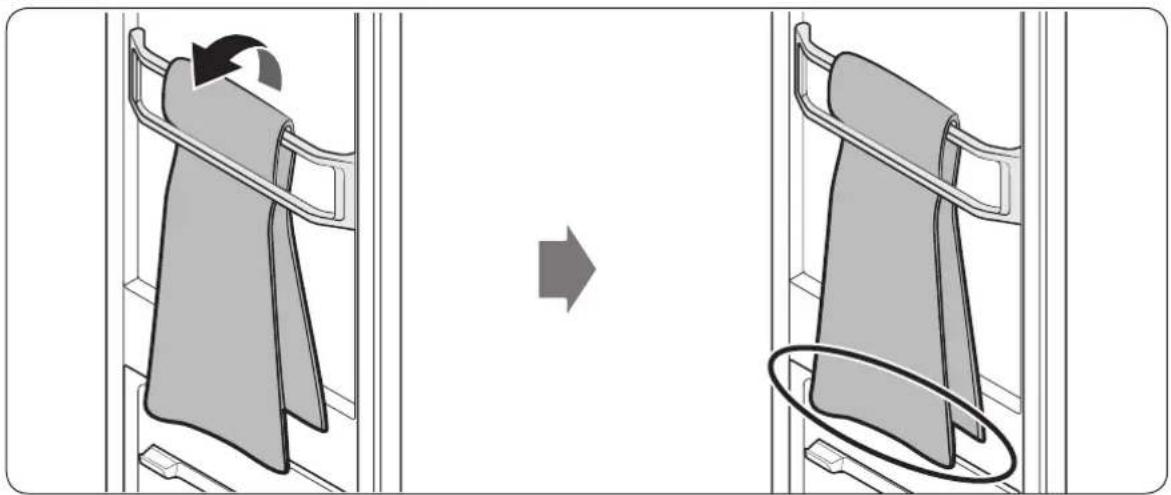
natural_image
Diagram showing a folding or lifting process of a folded garment, with no text or symbols present.natural_image
Diagram of a door opening with a black arrow indicating direction (no text or symbols)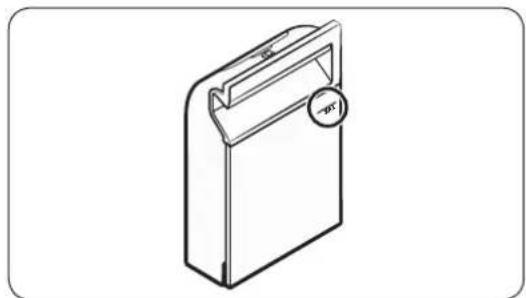
natural_image
Isometric line drawing of a rectangular device with a handle and circular button labeled 'pc' (no text or symbols beyond the label)Täitepaagi täitmine
natural_image
Diagram showing a door with a black arrow pointing to the window, no text or symbols presentSamsung Fresh Finish
Samsung Fresh Finish annab esemetele meeldiva löhna.

MÄRKUS.
natural_image
Diagram of a mechanical component with an arrow indicating direction, showing a stepped profile (no text or symbols)- Eemaldage Samsung Fresh Finish.
Eesti38
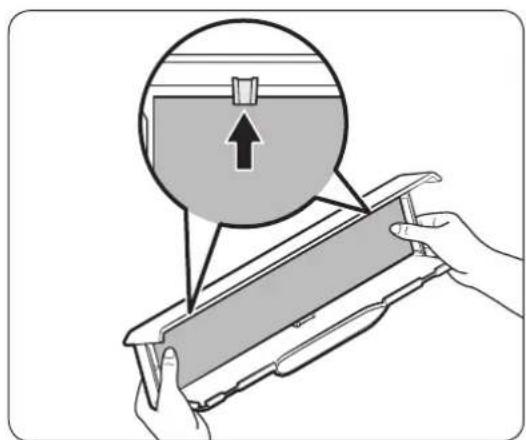
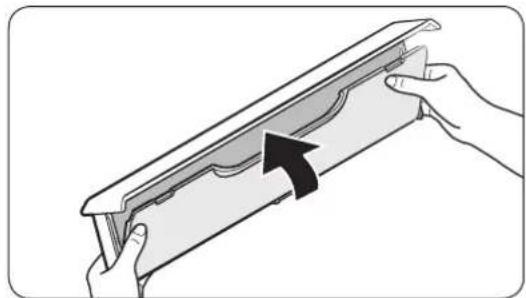
natural_image
Illustration of hands holding a decorative frame with an arrow indicating direction (no text or symbols)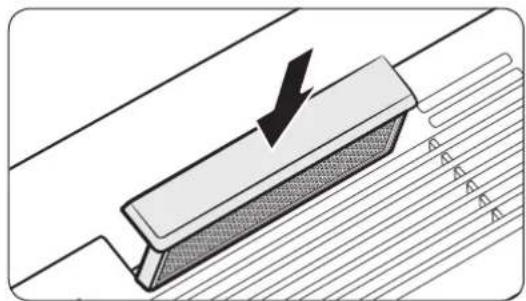
natural_image
Diagram of a mechanical component with a downward arrow indicating force or direction, no text or symbols presentnatural_image
Line drawing of a hand holding a smartphone next to a cabinet (no text or symbols)natural_image
Illustration of two rectangular storage compartments with a folded paper or plastic bag attached (no text or symbols)natural_image
Technical line drawing of a mechanical device with a lever handle (no text or symbols)natural_image
Technical line drawing of a door handle assembly with a toothbrush resting on the base (no text or symbols)natural_image
Technical illustration showing two views of a door frame with a metal bracket and an arrow indicating direction (no text or symbols)natural_image
Diagram showing a grid-patterned panel with an arrow pointing to it, no text or symbols present
natural_image
Diagram of a solar panel with two panels and directional arrows indicating assembly or movement (no text or symbols)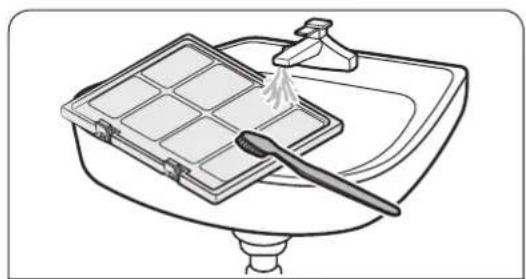
natural_image
Line drawing of a kitchen sink with a tray holding a grater and a spatula (no text or symbols)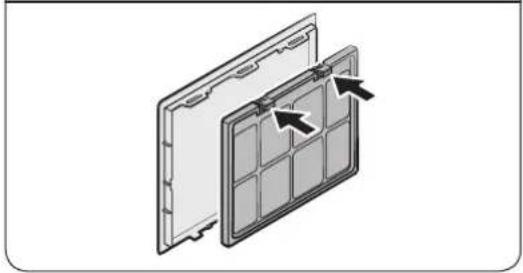
natural_image
Diagram of a panel with arrows indicating directional movement or force, no text or symbols presentnatural_image
Diagram showing a folded document with a cursor arrow pointing to it (no text or symbols present)natural_image
Diagram of a door with a black arrow pointing upward through the window (no text or symbols)natural_image
Diagram of a kitchen appliance interior showing a tray with a black arrow pointing to the lid area (no text or symbols)- Eemaldage ebemefilter.
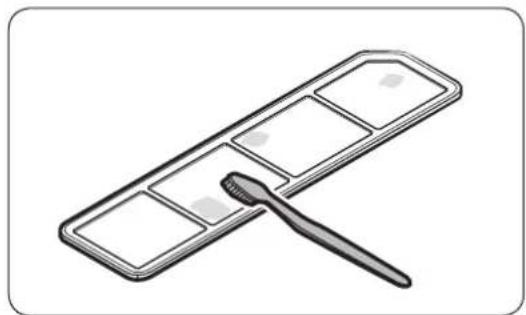
natural_image
Illustration of a paintbrush applying paint to a grid-patterned surface (no text or symbols)natural_image
Line drawing of a refrigerator with height dimension labeled 'A' (no text or symbols on the diagram itself)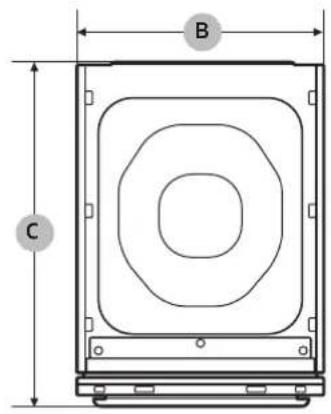
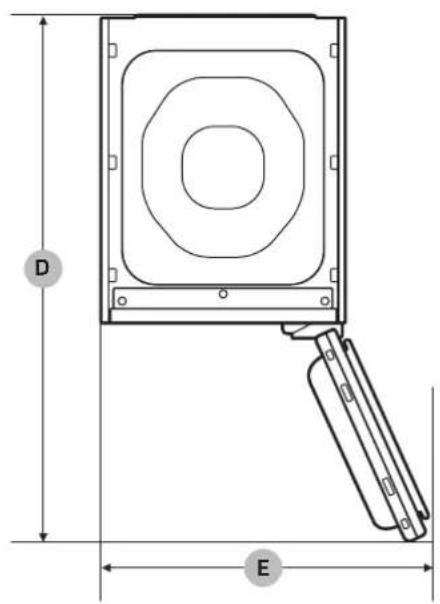
natural_image
Black-and-white photo of a Samsung air conditioner in a modern closet with hanging clothes and a wall display (no text or symbols on main objects)Spis treści
natural_image
Symbol of a trash bin crossed with a diagonal line, no text or numbers presentnatural_image
Technical diagram of a mechanical component with labeled section A (no text or symbols beyond label)UWAGA
natural_image
Technical illustration showing two views of a door frame with a metal bracket and an arrow indicating direction (no text or symbols)
UWAGA
natural_image
Technical line drawing of a door panel with labeled component A (no text or symbols beyond label)natural_image
Technical diagram of a door frame with labeled component B (no text or symbols beyond label)natural_image
Illustration of a person in a suit opening a door with an arrow indicating the handle (no text or symbols present)natural_image
Diagram of a refrigerator interior showing drawer arrangement and air vent (no text or symbols)
natural_image
Line drawing of a garment hanger hanging from a rack, showing structural components (no text or symbols)natural_image
Technical line drawing of a vertical mechanical component with mounting brackets (no text or symbols)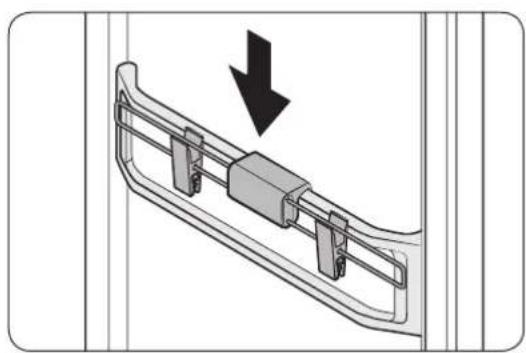
natural_image
Diagram of a mechanical component with a downward arrow indicating direction (no text or symbols present)natural_image
Diagram showing a tray with internal compartments and two hands holding small objects, no text or symbols present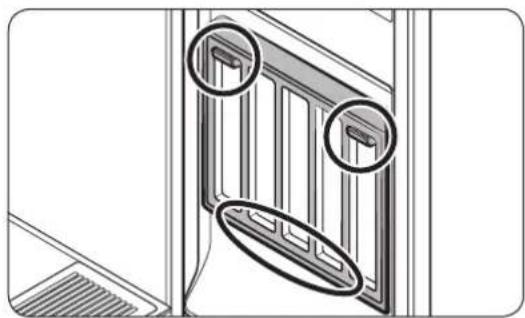
natural_image
Technical line drawing of a balcony with two circular annotations highlighting structural details (no text or symbols present)Korzystanie z półki
natural_image
Diagram showing a clothing rack being folded, with an arrow indicating the process (no text or symbols present)Metoda 2
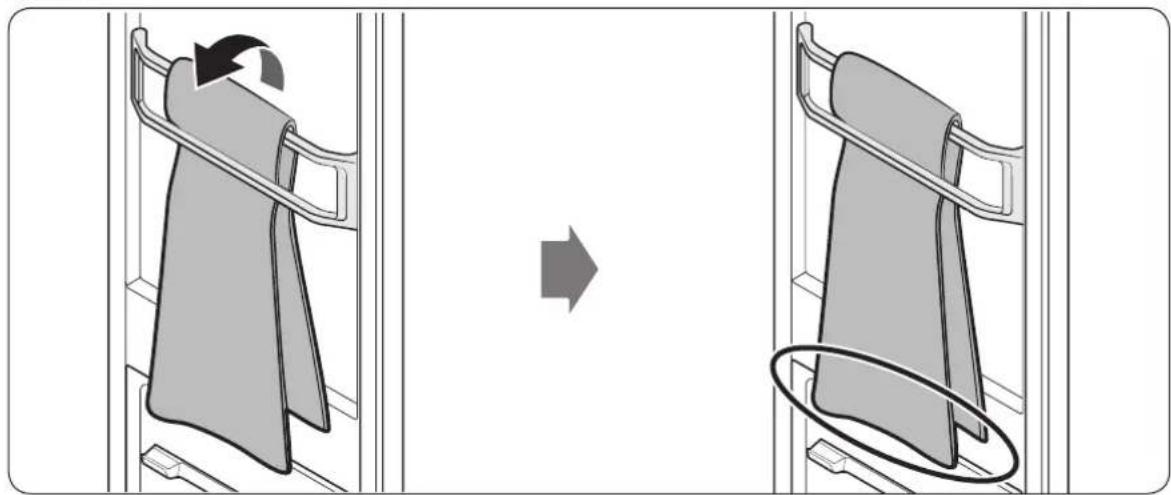
natural_image
Diagram showing clothing folding process with arrow indicating rotation (no text or symbols)natural_image
Diagram of a door opening with a black arrow indicating direction (no text or symbols)natural_image
Line drawing of a rectangular electronic device with a handle and circular button (no text or symbols)natural_image
Diagram showing a door with a black arrow pointing to the glass door (no text or symbols present)Samsung Fresh Finish
natural_image
Diagram of a mechanical component with an arrow indicating upward motion, showing layered structure (no text or symbols)natural_image
Illustration of hands holding a decorative frame with an arrow indicating direction (no text or symbols)natural_image
Diagram of a mechanical component with a downward arrow indicating force or direction, no text or symbols presentnatural_image
Line drawing of a hand holding a smartphone next to a cabinet (no text or symbols)natural_image
Illustration of two rectangular storage units with a paper clip emerging from one (no text or symbols)natural_image
Technical line drawing of a mechanical device with a lever handle (no text or symbols)natural_image
Technical line drawing of a door handle assembly with a toothbrush inserted (no text or symbols)natural_image
Technical illustration showing two views of a door frame with a metal bracket and an arrow indicating direction (no text or symbols)natural_image
Diagram showing a grid-patterned panel being tilted with a black arrow indicating direction (no text or symbols)natural_image
Diagram of a solar panel with two panels and directional arrows indicating assembly or movement (no text or symbols)natural_image
Line drawing of a kitchen sink with a tray holding a grater and a spatula (no text or symbols)natural_image
Diagram of a solar panel with arrows indicating internal components (no text or symbols)Polski46
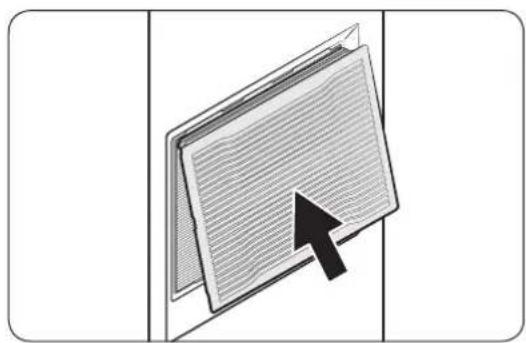
natural_image
Diagram showing a folded document with a cursor arrow pointing to it (no text or symbols present)natural_image
Diagram of a door with a black arrow pointing upward through the window (no text or symbols)natural_image
Diagram of a kitchen appliance with a black arrow pointing to a lid (no text or symbols)natural_image
Illustration of a paintbrush applying paint to a grid-patterned palette (no text or symbols)natural_image
Line drawing of a refrigerator with a vertical dimension labeled 'A' (no text or symbols on the diagram itself)