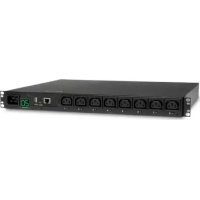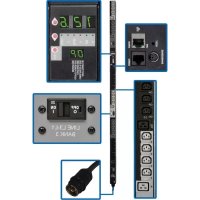
PDU3VS6H50 - Power strip Tripp Lite - Free user manual and instructions
Find the device manual for free PDU3VS6H50 Tripp Lite in PDF.


User questions about PDU3VS6H50 Tripp Lite
0 question about this device. Answer the ones you know or ask your own.
Ask a new question about this device
Download the instructions for your Power strip in PDF format for free! Find your manual PDU3VS6H50 - Tripp Lite and take your electronic device back in hand. On this page are published all the documents necessary for the use of your device. PDU3VS6H50 by Tripp Lite.
USER MANUAL PDU3VS6H50 Tripp Lite
3-Phase Switched 0U Power Distribution Units
(Phase and Bank Measurements)
208V MODELS
PDU3VS6L2120
PDU3VS6L2130
PDU3VS6H50
(Series Number: AG-00BC)
(Series Number: AG-00BA)
(Series Number: AG-00BA)
400V MODELS
PDU3XVS6G20
(Series Number: AG-00BD)
Important Safety Instructions 2
Service 16
Installation 3
3 Warranty and Warranty 17
Digital Display 6
Registration
Using the Digital Display 8
Español 18
Features 14
Français 35
Configuration and Operation 16
Русский 52
PROTECT YOUR INVESTMENT!
Register your product for quicker service and ultimate peace of mind.
You could also win an ISOBAR6ULTRA surge protector— a \$50 value!
text_image
QR code image containing encoded data, no visible human-readable textwww.tripplite.com/warranty

text_image
TRIPP·LITE
Manufacturing Excellence.
1111 W. 35th Street, Chicago, IL 60609 USA • www.tripplite.com/support
Copyright © 2014 Tripp Lite. All rights reserved.
Important Safety Instructions

SAVE THESE INSTRUCTIONS
This manual contains instructions and warnings that should be followed during the installation, operation, and storage of this product. Failure to heed these instructions and warnings may affect the product warranty.
- The PDU provides convenient multiple outlets, but it DOES NOT provide surge or line noise protection for connected equipment.
- The PDU is designed for indoor use only in a controlled environment away from excess moisture, temperature extremes, conductive contaminants, dust or direct sunlight.
- Do not connect the PDU to an ungrounded outlet or to extension cords or adapters that eliminate the connection to ground.
- The power requirement for each piece of equipment connected to the PDU must not exceed the individual outlet's load rating.
- The total power requirement for equipment connected to the PDU must not exceed the maximum load rating for the PDU.
- Do not drill into or attempt to open any part of the PDU housing. There are no user-serviceable parts inside.
- Do not attempt to modify the PDU, including the input plugs and power cables.
- Do not attempt to use the PDU if any part of it becomes damaged.
- Do not attempt to mount the PDU to an insecure or unstable surface.
- Use of this equipment in life support applications where failure of this equipment can reasonably be expected to cause the failure of the life support equipment or to significantly affect its safety or effectiveness is not recommended. Do not use this equipment in the presence of a flammable anesthetic mixture with air, oxygen or nitrous oxide.
- Never attempt to install electrical equipment during a thunderstorm.
- Keep indoor ambient temperature between 32^ and 122^ (0°C and 50°C).
- Connect the PDU to an outlet that is in accordance with your local building codes and that is adequately protected against excess currents, short circuits and earth faults.
- The PDU must be installed by a qualified technician only.
- Install in accordance with your local electrical codes. Be sure to use the proper over current protection for the installation, in accordance with the plug rating/equipment rating.
- The electrical sockets supplying power to the equipment shall be installed near the equipment and be easily accessible.
- Be sure to provide a local disconnect device on any models that are permanently installed without a plug that is easily accessible.
Installation
Mounting the PDU
Note: The illustrations may differ somewhat from your PDU model. Regardless of configuration, the user must determine the fitness of hardware and procedures before mounting. The PDU and included hardware are designed for common rack and rack enclosure types and may not be appropriate for all applications. Exact mounting configurations may vary. Screws for attaching the mounting brackets to the PDU are included. Use only the screws supplied by the manufacturer or their exact equivalent.
Note: Mounting buttons come preinstalled to the PDU for toolless mounting.

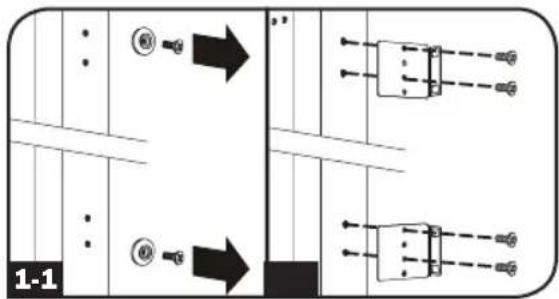
To attach the mounting brackets to the PDU, remove the mounting buttons.

Attach the mounting brackets to the PDU with the included screws.

Attach the PDU to a vertical rail in your rack or rack enclosure. (Use the mounting hardware that came with your rack or rack enclosure to attach the mounting brackets to the rail.)

To reinstall the mounting buttons for toolless mounting, remove the mounting brackets, then install the mounting buttons onto the PDU. Position the PDU as desired in the rack enclosure, align the buttons with the rack mounting slots, and slide the PDU into position.
Note: Be sure to insert the 2 buttons into either the upper hole at each end of the PDU or into the lower hole at each end of the PDU.

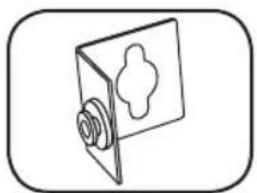
To install the PDU with its outlets facing the rear of the rack, use the included PDUMVROTATEBRKT accessory. First, attach the mounting button A to the V-shaped bracket B using the included screw and washer. Then, use the button-mount slot to attach the bracket to the PDU and the mounting button to attach the PDU to the rack. The bracket effectively repositions the mounting brackets, allowing for the PDU outlets to face the rear of the rack.
text_image
1-1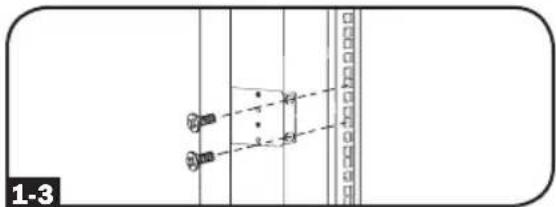
text_image
1-3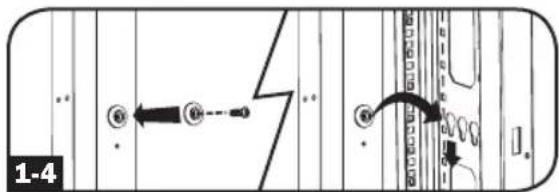
text_image
1-4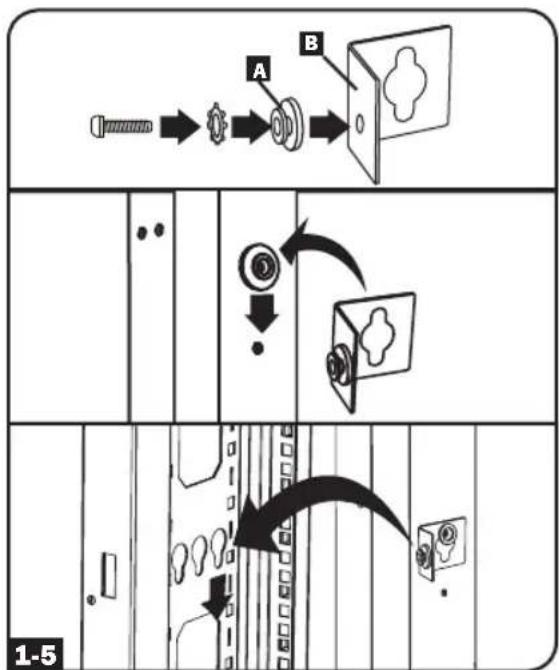
flowchart
graph TD
    A["Start"] --> B["Reinact"]
    B --> C["Close"]
    C --> D["Shipped Cart"]
    D --> E["Shipped Box"]
    E --> F["Shipped Cover"]
    F --> G["Shipped Door"]
    G --> H["Shipped Seat"]
    H --> I["Shipped Lock"]
    I --> J["Shipped Jacket"]
    J --> K["Shipped Jacket"]
    style A fill:#f9f,stroke:#333
    style K fill:#f9f,stroke:#333
Installation
Connecting the PDU
2-1 Each model is equipped with 1 of 4 different input plugs.

L21-20P

L21-30P
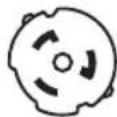
16A RMBIE309
CS8365C
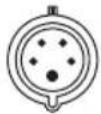
3P + N + E
| Model Name Input Plug | Max Input Amps (Limited by Input Cord and Plug) | Input Voltage Range | Output Voltage Range | Breakers | Cord Length | Outlets | |
| PDU3VS6L2120 L21-20P 16A | 200-240V | 200-240V | N/A | 6 ft. (1.8M) | 30 Total; 3 Banks of (2) C19 and (8) C13 | ||
| PDU3VS6L2130 L21-30P 24A | 3 x Double Pole, 20A Branch-Rated | 6 ft. (1.8M) | 30 Total; 3 Banks of (2) C19 and (8) C13 | ||||
| PDU3VS6H50 | HUBBLE CS8365C | 35A | 30 Total; 3 Banks of (2) C19 and (8) C13 | ||||
| PDU3XVS6G20 | 16A Red IEC 309 3P + N + E | 16A | 360-415V | 208-240V | N/A | 6 ft. (1.8M) | 30 Total; 3 Banks of (2) C19 and (8) C13 |
Installation

Connect the input plug to your facility's compatible AC power source.

Connect your equipment's input plugs to the appropriate outlets on the PDU. The LED near each outlet illuminates when the outlet is ready to distribute live AC power.
Note: It is recommended that you do not connect a live load to the PDU. If the load you intend to connect has an ON/OFF switch, please turn the switch to OFF prior to connection.

Optional Cord Retention Procedure
Option 1: Use the bridge lances located near each receptacle to retain power cords. Tie each equipment power cord to a bridge lance by looping the cord and securing it with one of the included cable ties A. Make sure each cord can be unplugged from the PDU without removing the cable tie.
Option 2: Use the included C14 and C20 plastic sleeves to secure plugs to receptacles. Attach the sleeve to the plug, making sure that the pull tabs B remain outside the plug and that the fit is secure. To unplug equipment properly, use the pull tabs to remove the plug and sleeve from the receptacle.
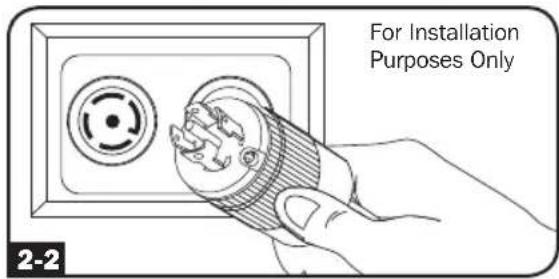
text_image
For Installation Purposes Only 2-2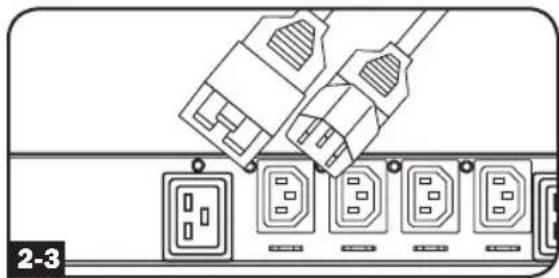
natural_image
Diagram of a power connector with multiple socket ports and connectors (no text or symbols)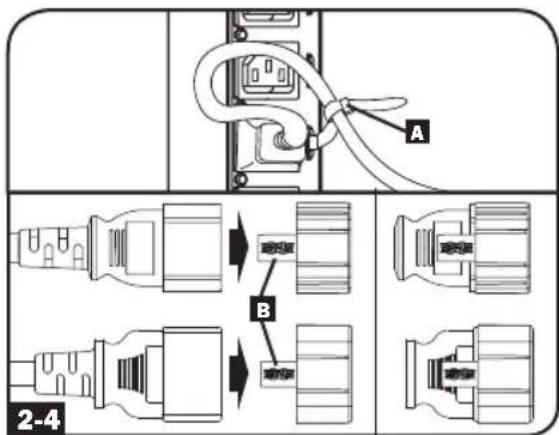
text_image
A B 2-4Networking the PDU
Your PDU can receive IP address assignments via DHCP server (dynamic) or static (manual) addressing methods. See the SNMPWEBCARD installation guide for an explanation of these methods. You can find the guide by going to www.tripplite.com/support and typing "SNMPWEBCARD" in the search field. If you are uncertain which method to use, contact your network administrator for assistance before continuing the configuration process.
Note: The MAC address of the PDU (12-digit string in this format: 000667xxxxx) is printed on a label attached to the PDU enclosure. For static IP address assignments, use the RJ-45 to DB9 configuration cable (part number 73-1243) included with the PDU.
Digital Display
text_image
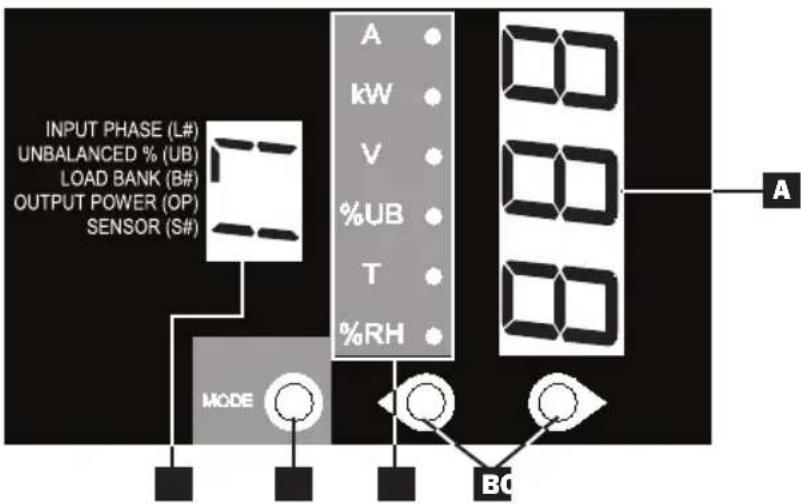
INPUT PHASE (L#) UNBALANCED % (UB) LOAD BANK (B#) OUTPUT POWER (OP) SENSOR (S#) MODE A kW V %UB T %RH BC AA 3-Digit Display: Shows measured or calculated values such as Amperage, Kilowatts, Voltage, Power Unbalance Percentage, Temperature and Humidity.
B Arrow Buttons: Scroll through indicated Input, Bank, Power, Load Balance, Sensor and Display Brightness options using these buttons. A long press of the up or down arrow buttons allows the user to skip to the next sequential measurement category.
C Mode Button: When a menu option is selected using the Arrow Buttons, the Mode Button scrolls through the sub-options within each category. Sub-options are shown by the Indicator LEDs.
D Indicator LEDs: Lit LED indicates which value is being displayed on the 3-digit screen.
Amps (A): When selected, the load on the selected Input Phase (L#) or Load Bank (B#) is displayed in amps.
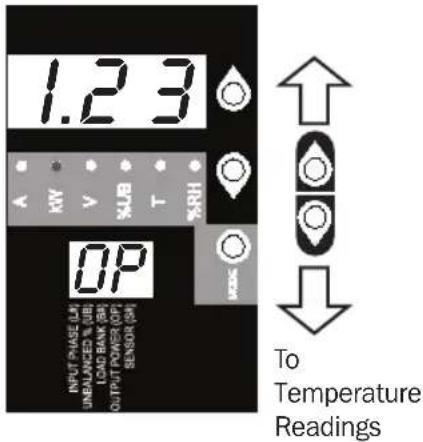
Wattage (kW): When selected, the load on the selected Load Bank (B#) or Total Output Power (OP) is displayed in kW.
Voltage (V): Input Phase (L#) or Load Bank (B#) voltage is displayed.
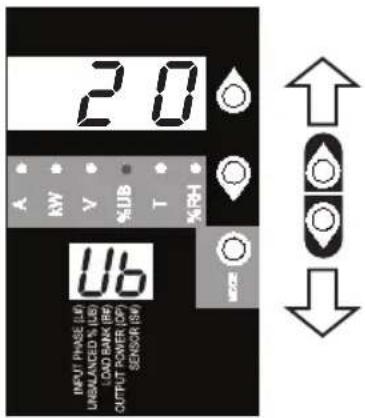
Unbalanced Load (%UB): When lit, the display shows the unbalanced load percentage deviance from the average measured value. A value that is zero or closest to zero is desirable.
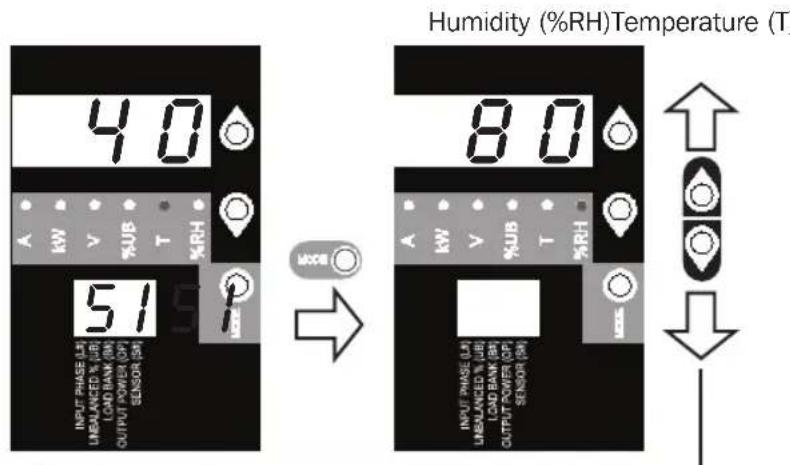
Temperature (T): If Tripp Lite ENVIROSENSE is connected, the ambient temperature will be displayed when this option is selected. The temperature is displayed in Celsius by default, but can be switched to Fahrenheit.
Relative Humidity (%RH): If Tripp Lite ENVIROSENSE is connected, the relative humidity percentage will be displayed when this option is selected.
E 2-Digit Display: This display indicates which Input Phase (L#), Load Unbalance (UB), Load Bank (B#), Output Power (OP) or Sensor (S#) option is selected.
Digital Display
Button Response Definitions:
| Configuration^1 | Switch Action Control Function | ||
| Standard | Up Pushbutton | Depress 1/2 sec | Sequentially moves up one selection in the menu. |
| Depress 3 sec | Advances up to the next measurement category. | ||
| Down Pushbutton | Depress 1/2 sec | Sequentially moves down one selection in the menu. | |
| Depress 3 sec | Advances down to the next measurement category. | ||
| Mode Pushbutton | Depress 1/2 sec | Displays available options for a given measurement category. | |
| Depress 3 sec | Selects the chosen available option for a given configuration category. | ||
| Alternate | Up Pushbutton | Depress 1/2 sec | Sequentially moves down one selection in the menu. |
| Depress 3 sec | Advances down to the next measurement category. | ||
| Down Pushbutton | Depress 1/2 sec | Sequentially moves up one selection in the menu. | |
| Depress 3 sec | Advances up to the next measurement category. | ||
| Mode Pushbutton | Depress 1/2 sec | Displays available options for a given measurement category. | |
| Depress 3 sec | Selects the chosen available option for a given configuration category. | ||
1 Configured via Configuration Category item "Outlet Indicator LED Color Code Options".
Load Bank Receptacle Location

text_image
208V Models: L1-L2 L2-L3 L3-L1 L1-L2 L2-L3 L3-L1 400V Models: L1-N L2-N L3-N L1-N L2-N L3-NDisplay References
LOAD BANKS REFERENCE
| SILKSCREEN LABEL DESCRIPTION 2-DIGIT DISPLAY REFERENCE | ||
| 208V Models 400V Models 208V and 400V Models | ||
| L1-L2 L1-N B1 | ||
| L2-L3 L2-N B2 | ||
| L3-L1 L3-N B3 | ||
INPUT PHASE REFERENCE
| INPUT PHASE REPORTED 2-DIGIT DISPLAY | REFERENCE | |
| 208V Models 400V Models 208V and 400V Models | ||
| L1 – L2 L1-N L1 | ||
| L2 – L3 L2-N L2 | ||
| L3 – L1 L3-N L3 | ||
Using the Digital Display
Scrolling Through Input Phases and Options
(Measurement Category)
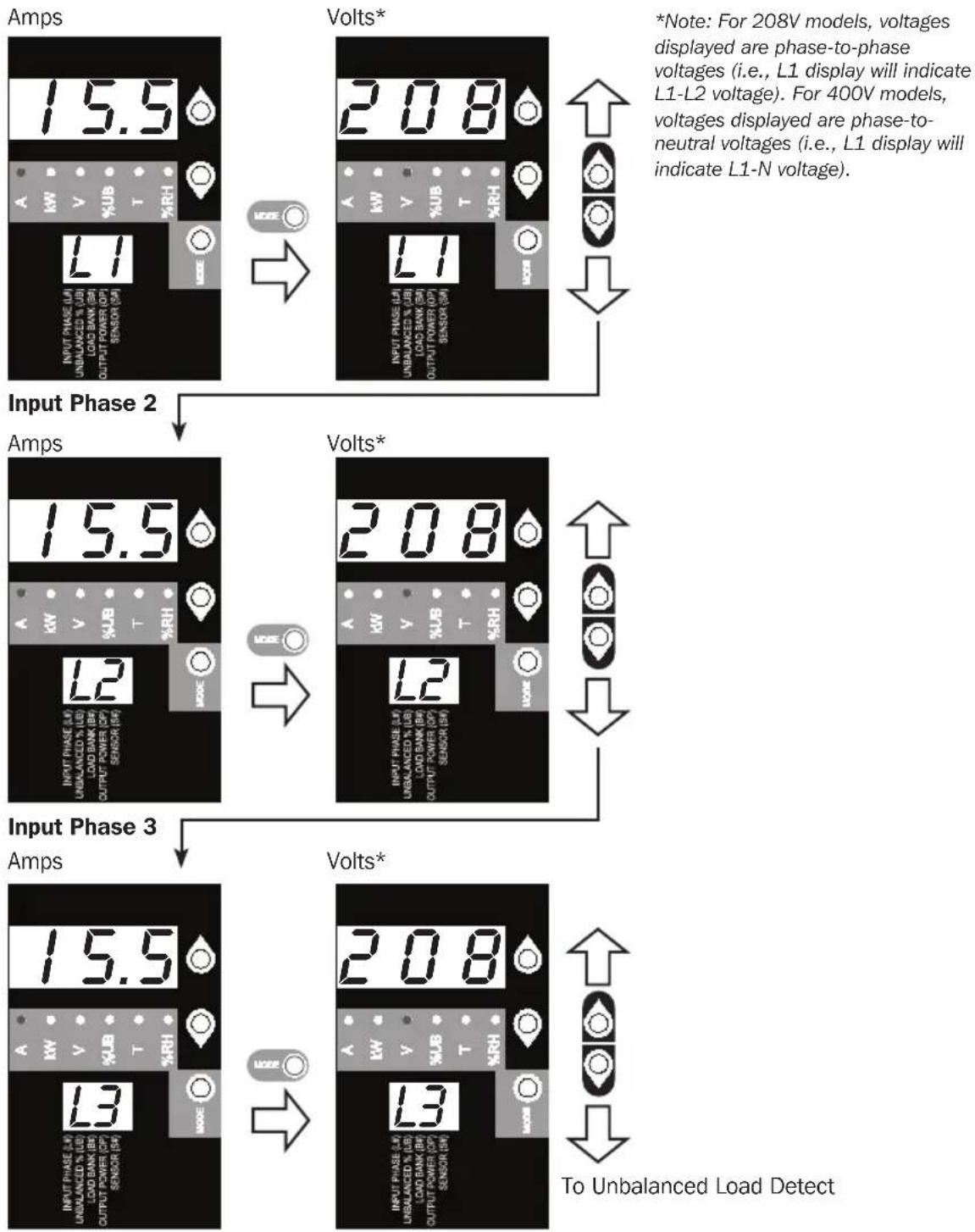
Press Mode button to toggle between options and data within a menu. A momentary press of the arrow buttons switches between menus. A long press skips between measurement categories.
The scrolling pattern of the display is outlined below. Note: Three dashes will be shown in the 3-digit display when the input phase voltage is unknown, due to abnormal tripped breaker conditions.
Input Phase 1
flowchart
graph TD
    A["Input Phase 2"] --> B["Input Phase 3"]
    B --> C["Output Phase 2"]
    C --> D["Output Phase 3"]
    style A fill:#f9f,stroke:#333
    style B fill:#f9f,stroke:#333
    style C fill:#f9f,stroke:#333
    style D fill:#f9f,stroke:#333
Using the Digital Display
Press Mode button to toggle between options and data within a menu. A momentary press of the arrow buttons switches between menus. A long press skips between measurement categories. The scrolling pattern of the display is outlined below.
Unbalanced Load Detect (Measurement Category)
Phase Imbalance %
text_image
2.0 A RW V %UB T %RH INPUT PHASE (L1) UNBALANCED % UB (LAD BANK (R6) OUTPUT POWER (OP) SENSOR (SW) USScrolling Through Load Banks and Options (Measurement Category)
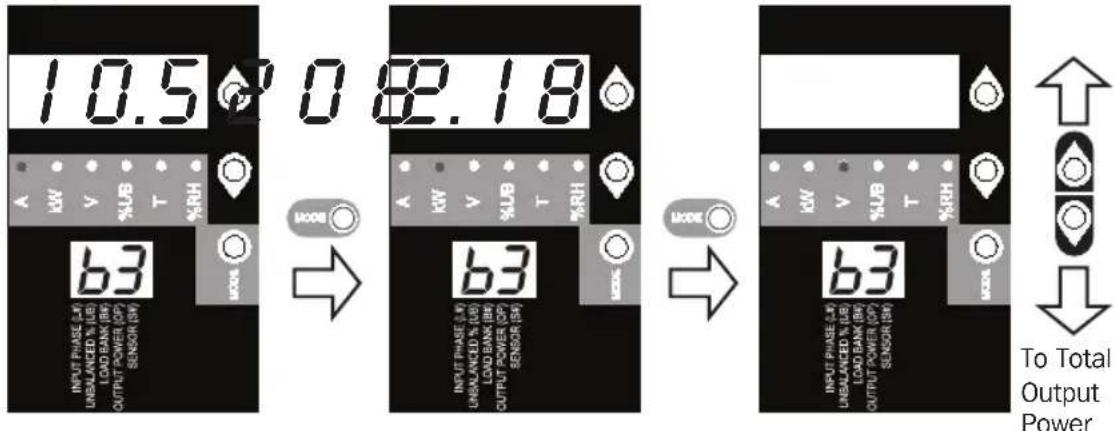
Scroll through Load Banks 1-3 using the Mode and ↓ buttons.
*Note: For 208V models, voltages displayed are phase-to-phase voltages (i.e., b1 display will indicate L1-L2 voltage). For 400V models, voltages displayed are phase-to-neutral voltages (i.e., b1 display will indicate L1-N voltage).
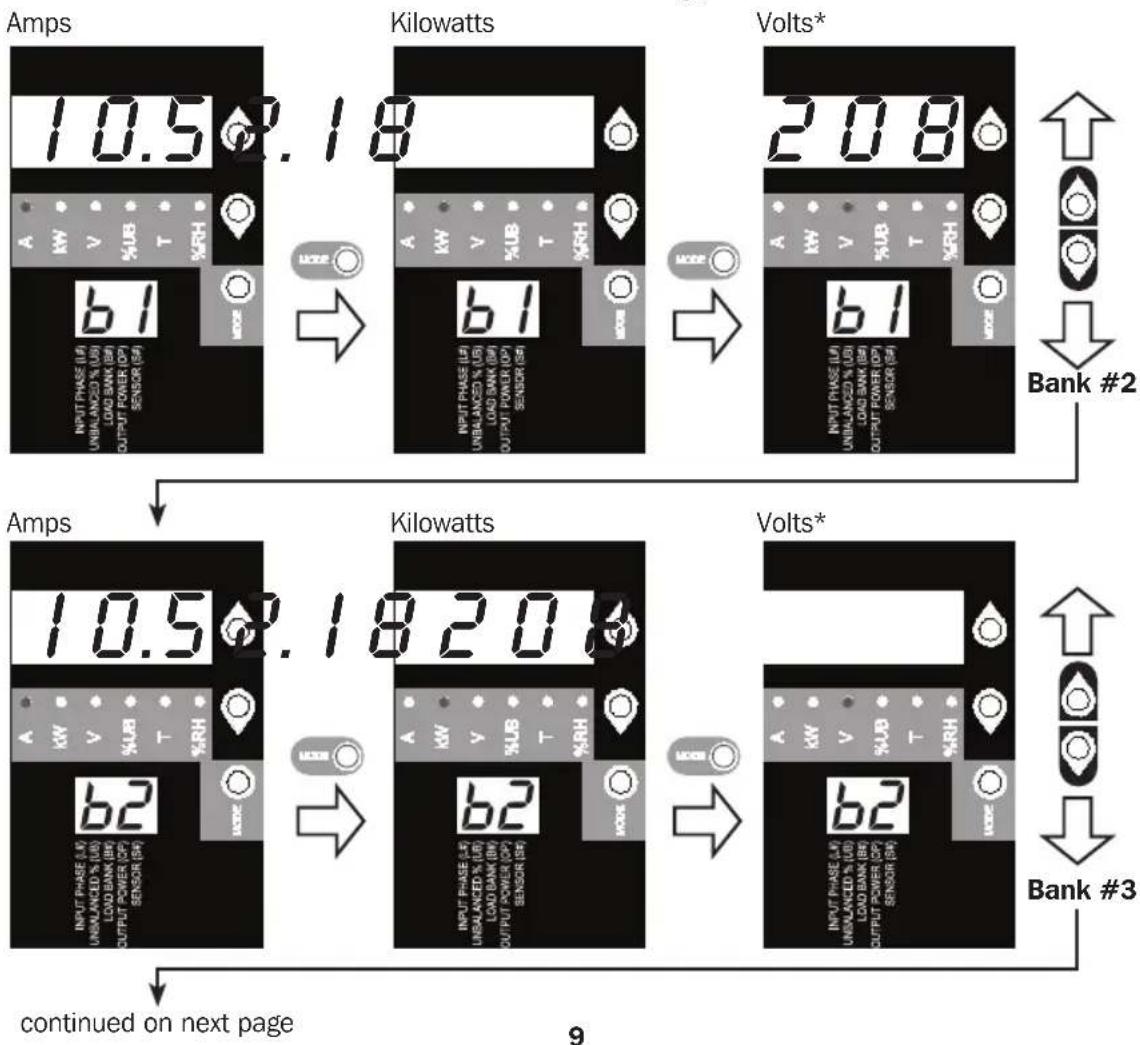
flowchart
graph TD
    A["Amps"] --> B["Kilowatts"]
    B --> C["Volts*"]
    C --> D["Bank #2"]
    D --> E["Amps"]
    E --> F["Kilowatts"]
    F --> G["Volts*"]
    G --> H["Bank #3"]
    H --> I["continued on next page"]
Using the Digital Display
Amps Kilowatts Volts*
text_image
10.5 0 82.18 63 INPUT PHASE (L) UNBEALANCED % (L) LOAD BANK (R) OUTPUT POWER (OP) SENSOR (R) MODE 63 INPUT PHASE (L) UNBEALANCED % (L) LOAD BANK (R) OUTPUT POWER (OP) SENSOR (R) MODE 63 INPUT PHASE (L) UNBEALANCED % (L) LOAD BANK (R) OUTPUT POWER (OP) SENSOR (R) To Total Output PowerPress Mode button to toggle between options and data within a menu. A momentary press of the arrow buttons switches between menus. A long press skips between measurement categories. The scrolling pattern of the display is outlined below.
Total Output Power (Measurement Category)
Kilowatts
text_image
1.23 HV V BAS T HR% OP INPUT PHASE LTR UNRALANCED & VIE LOAD BANK SH OUTPUT POWER OFF SENSOR ISH To Temperature ReadingsUsing the Digital Display
These options are only available when a sensor such as Tripp Lite's ENVIROSENSE is attached (sold separately). Press Mode button to toggle between options and data within a menu. A momentary press of the arrow buttons switches between menus. A long press skips between measurement categories. The scrolling pattern of the display is outlined below.
Scrolling Through Temperature Readings (Measurement Category)
text_image
40 INPUT PHASE (LH) UNBALANCED % UB LOAD BANK (BH) OUTPUT POWER (OP) SENSOR (SH) 51 A KW V %UB T %RH MODE Humidity (%RH)Temperature (T) 80 INPUT PHASE (LH) UNBALANCED % UB LOAD BANK (BH) OUTPUT POWER (OP) SENSOR (SH) A KW V %UB T %RH MODE ↑ ↓Temperature Unit Options (Configuration Category)
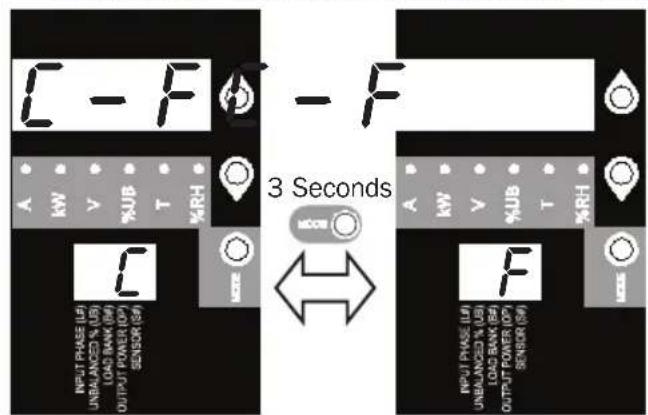
text_image
C - F A KW V %JB T %RH C INPUT PHASE (L/I) UNBALANCED % UB LOAD BANK (W) OUTPUT POWER (OP) SENSOR (S) 3 Seconds F INPUT PHASE (L/I) UNBALANCED % UB LOAD BANK (W) OUTPUT POWER (OP) SENSOR (S) %RH A KW V %JB T %RHHold Mode button for 3 seconds to switch between options. The letter in the 2-digit display indicates the selected unit, C for Celsius and F for Fahrenheit.
Press Mode button to toggle between options and data within a menu. A momentary press of the arrow buttons switches between menus. A long press skips between measurement categories. The scrolling pattern of the display is outlined below.
Scroll Function Options (Configuration Category)
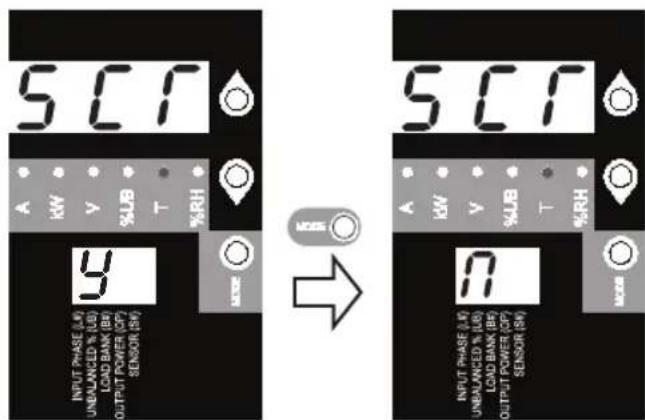
text_image
SC1 A kW V %JB T %RH 9 INPUT PHASE (M) UNBALANCED % (LB) LOAD BANK (B6) OUTPUT POWER (CP) SENSOR (SW) → SC1 A kW V %JB T %RH 80 INPUT PHASE (M) UNBALANCED % (LB) LOAD BANK (B6) OUTPUT POWER (CP) SENSOR (SW)
To LED
Brightness
When enabled, the Auto Scroll function displays data for Input Phases, Load Unbalance and Load Banks in 4-second intervals. Y indicates the function is enabled; N indicates that it is disabled. Pressing any button interrupts the Auto Scroll function, allowing the user to navigate between menu options. If no button is pressed, there is a 10 second timeout.
Note: Hold Mode button for 3 seconds to switch between options. The letter in the 2-digit display indicates the selected option.
Using the Digital Display
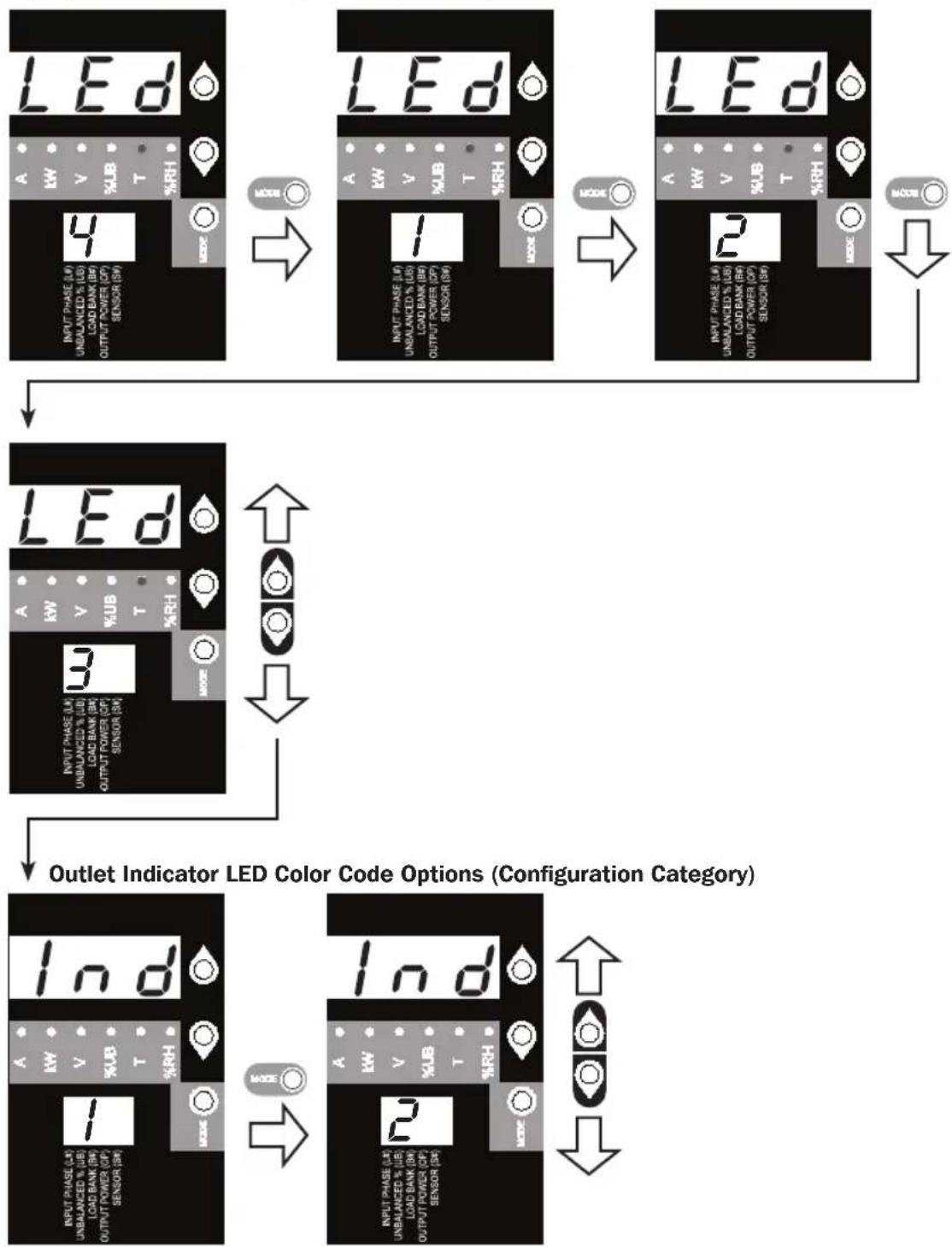
LED Brightness and Color Scheme (Configuration Category)
Hold the Mode button for 3 seconds to scroll through each option. The number in the 2-digit display is defined as: 1=25%; 2=50%; 3=75%; 4=100%
flowchart
graph TD
    A["LED"] --> B["MODE"]
    B --> C["LED"]
    C --> D["MODE"]
    D --> E["LED"]
    E --> F["MODE"]
    F --> G["LED"]
    G --> H["MODE"]
    H --> I["LED"]
    I --> J["MODE"]
    J --> K["LED"]
    K --> L["MODE"]
    L --> M["LED"]
    M --> N["MODE"]
    N --> O["LED"]
    O --> P["MODE"]
    P --> Q["LED"]
    Q --> R["MODE"]
    R --> S["LED"]
    S --> T["MODE"]
    T --> U["LED"]
    U --> V["MODE"]
    V --> W["LED"]
    W --> X["MODE"]
    X --> Y["LED"]
    Y --> Z["MODE"]
    Z --> AA["LED"]
    AA --> AB["MODE"]
    AB --> AC["LED"]
    AC --> AD["MODE"]
    AD --> AE["LED"]
    AE --> AF["MODE"]
    AF --> AG["LED"]
    AG --> AH["MODE"]
    AH --> AI["LED"]
    AI --> AJ["MODE"]
    AJ --> AK["LED"]
    AK --> AL["MODE"]
    AL --> AM["LED"]
    AM --> AN["MODE"]
    AN --> AO["LED"]
    AO --> AP["MODE"]
    AP --> AQ["LED"]
    AQ --> AR["MODE"]
    AR --> AS["LED"]
    AS --> AT["MODE"]
    AT --> AU["LED"]
    AU --> AV["MODE"]
    AV --> AW["LED"]
    AW --> AX["MODE"]
    AX --> AY["LED"]
    AY --> AZ["MODE"]
    AZ --> BA["LED"]
    BA --> BB["MODE"]
    BB --> BC["LED"]
    BC --> BD["MODE"]
    BD --> BE["LED"]
    BE --> BF["MODE"]
    BF --> BG["LED"]
    BG --> BH["MODE"]
    BH --> BI["LED"]
    BI --> BJ["MODE"]
    BJ --> BK["LED"]
    BK --> BL["MODE"]
    BL --> BM["LED"]
    BM --> BN["MODE"]
    BN --> BO["LED"]
    BO --> BP["MODE"]
    BP --> BQ["LED"]
Hold the Mode button for 3 seconds to switch between options. The number in the 2-digit display indicates the selected scheme. 1=Standard, 2=Alternate
Using the Digital Display
OUTLET INDICATOR LED DEFINITIONS:
| LED Configuration | LED Color Outlet Status | Description | |
| Standard^1 | Off Off Outlet power is absent | ||
| Green On Circuit breaker is on – Outlet power is present | |||
| Yellow On | Bank has exceed 80% of its current rating – Bank power is present | ||
| Red Off | Bank is below the Low Voltage threshold – Bank power is absent | ||
| Red Flashing Off | Circuit breaker | has tripped – Bank power is absent | |
| Alternate | Off Off Outlet power is absent | ||
| Red On Circuit breaker is on – Outlet power is present | |||
| Red Flashing On | Outlet's bank has exceeded 80% of the outlet current rating – Outlet power is present | ||
| Green Off | Bank is below the low voltage threshold – Bank power is absent | ||
| Green Flashing Off | Circuit breaker | has tripped – Bank power is absent | |
^1 This is the default configuration.
Display Options
LED Test
Hold the Mode button for 3 seconds to test the display. For 5 seconds, all LEDs and display segments will light green, while all Load Indicator LEDs will light yellow. Please visit www.tripplite.com/support for issues with display segment or Indicator LED functionality.
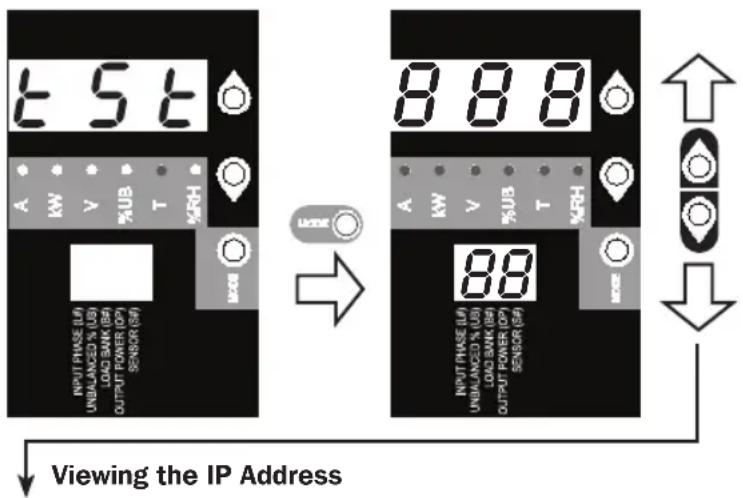
text_image
t 5 t A KW V %UB T KRH INPUT PHASE (U) UNIBALANCED % (UB) LOAD BANK (BA) OUTPUT POWER (OP) SENSOR (GA) Viewing the IP Address 888 A KW V %UB T KRH 88 INPUT PHASE (U) UNIBALANCED % (UB) LOAD BANK (BA) OUTPUT POWER (OP) SENSOR (GA)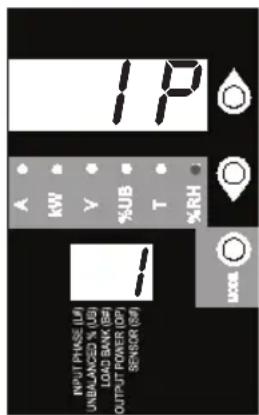
text_image
IP A KW Y %JB T %RH INPUT PHASE (L) UNI/ANZUCO % (U) LOAD BANK (B) OUTPUT POWER (OP) SENSOR (S) LOOSAt any point, pressing both of the arrow buttons simultaneously for 1/2 second displays the unit's IP address in the 2-digit display.

To Rotating the Display
Using the Digital Display
Rotating the Display
text_image
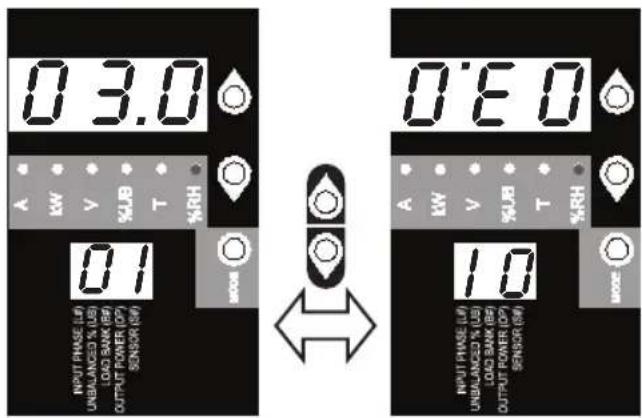
0.3.0 A kW V %JB T %RH OUTPUT PHASE (L/P) UNBALANCED % (LB) LOAD SAW (R) OUTPUT POWER (OP) SENSOR (SW) 0.1 MODE OUTPUT PHASE (L/P) UNBALANCED % (LB) LOAD SAW (R) OUTPUT POWER (OP) SENSOR (SW) 0.6.0 A kW V %JB T %RH OUTPUT PHASE (L/P) UNBALANCED % (LB) LOAD SAW (R) OUTPUT POWER (OP) SENSOR (SW) 1.0 MODEAt any point, pressing both of the arrow buttons simultaneously and holding for 3 seconds rotates the 2-digit and 3-digit displays.
Features
natural_image
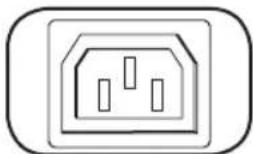
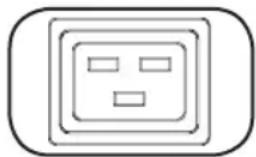
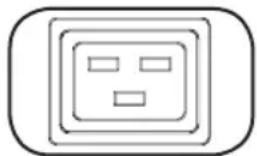
Simple line drawing of an electrical outlet with three slots (no text or symbols)C13 C19
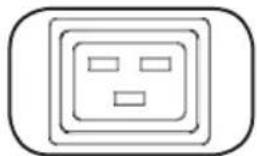
natural_image
Simple line drawing of a wall socket with three slots and two rectangular buttons (no text or symbols)Outlets: During normal operation, the outlets distribute AC power to connected equipment.
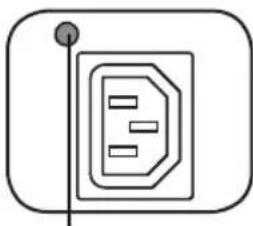
natural_image
Simple line drawing of a document icon with a pointer and circular base (no text or symbols)Outlet Status LED
Outlet Status LED: Once the unit is powered on, each outlet individually ramps up and each Outlet Status LED will illuminate when the associated outlet is ready to distribute live AC power.
| LED Color Outlet | Status Comments/Notes |
| Green On Normal operation. | |
| Yellow On Outlet bank's current | has exceeded 80% of its current rating. |
| Red Off Outlet bank's voltage is below the Low Voltage threshold. | |
| Flashing Red Off Circuit breaker for this bank has tripped. | |
| Off Off Outlet is powered off. | |
Push-to-Reset Guard
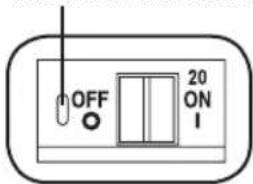
text_image
OFF 20 ON INote: Colors noted here reflect standard LED configuration. See chart on page 13 for full LED color definitions.
Circuit Breaker (Select Models): There are 3 Load Banks, each protected by a circuit breaker. If the connected equipment load exceeds the Maximum Load Rating for those banks of the PDU, the circuit breaker will trip. Disconnect excess load and reset the breaker.
Note: Each breaker comes equipped with a push-to-reset guard to prevent accidental breaker tripping. To turn off the breaker, insert a flathead screwdriver into the reset slot.
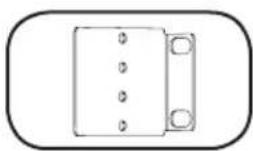
Mounting Brackets: Use these brackets as an alternate PDU mounting method.
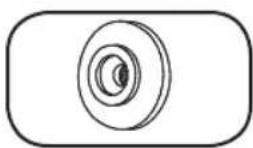
Mounting Buttons: Come pre-installed on the back side of the PDU and are used for toolless mounting. Note: Four additional mounting buttons are included for alternate rack styles.
Features
natural_image
Simple line drawing of a door with a handle and screw base (no text or symbols)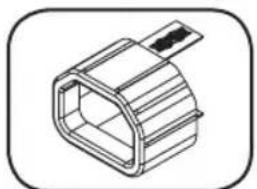
natural_image
Isometric line drawing of a hexagonal mechanical component with a handle (no text or symbols)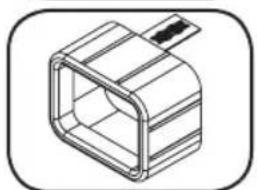
natural_image
Isometric line drawing of a rectangular mechanical component with internal cavity (no text or symbols)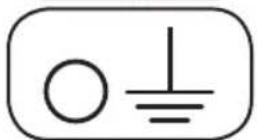
text_image
RESET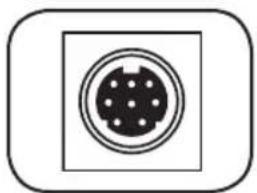
natural_image
Simple diagram of a circular connector or socket with dot pattern inside a square frame (no text or symbols)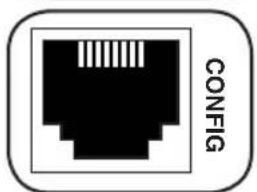
natural_image
Black and white icon of an Ethernet ports with 'CONFIG' text on the side (no other symbols or text)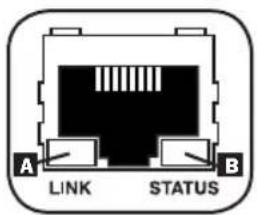
text_image
A LINK STATUS BPDUMVROTATEBRKT Mounting Accessory: Use these V-shaped brackets to mount the PDU with its outlets facing the rear of the rack.
C14 Plug Sleeve: (Optional) Use the included C14 plastic sleeves to secure plugs to receptacles. Attach the sleeve to the plug, making sure that the pull tabs remain outside the plug and that the fit is secure. To unplug equipment properly, use the pull tabs to remove the plug and sleeve from the receptacle.
C20 Plug Sleeve: (Optional) Use the included C20 plastic sleeves to secure plugs to receptacles. Attach the sleeve to the plug, making sure that the pull tabs remain outside the plug and that the fit is secure. To unplug equipment properly, use the pull tabs to remove the plug and sleeve from the receptacle.
Ground Screw: Use this to connect any equipment that requires a chassis ground.
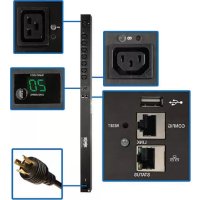
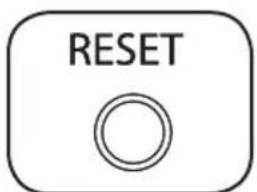
SNMP Reset Button: Press the reset button for 3 seconds to reboot the PDU's network card. Rebooting the network card will not erase network settings or interrupt AC power. The reset button is recessed. Use a paper clip or other suitable object to press it.
PS/2 Port: Use this port to connect a Tripp Lite ENVIROSENSE environmental sensor to provide remote temperature/humidity monitoring and a dry contact interface to control and monitor alarm, security and telecom devices. Visit www.tripplite.com for ordering information. Note: Do not connect a keyboard or mouse to this port.
RJ-45 Configuration Port: Use this port to provide a direct terminal connection to a computer with a terminal emulation program. An RJ-45 to DB9 cable (part number 73-1243) is included with the PDU. If you need a replacement cable, visit www.tripplite.com for ordering information. Note: Configuration options can found in the SNMPWEBCARD installation guide. You can find the guide by going to www.tripplite.com/support and typing "SNMPWEBCARD" in the search field.
Ethernet Port: Use this RJ-45 jack to connect the PDU to the network with a standard Ethernet patch cable. The Link LED A and Status LED B indicate several operating conditions, as shown in the table below. This port is not compatible with PoE (Power Over Ethernet) applications.
| Network Operating Conditions | |
| A Link LED Color | |
| Off No Network Connection | |
| Flashing Amber 100 Mbps Network Connection | |
| Flashing Green 10 Mbps Network Connection | |
| B Status LED Color | |
| Off Card Not Initialized | |
| Steady or Flashing Green Card Initialized and Operational | |
| Steady Amber Error - Card Not Initialized | |
Configuration and Operation
Remote Monitoring and Control
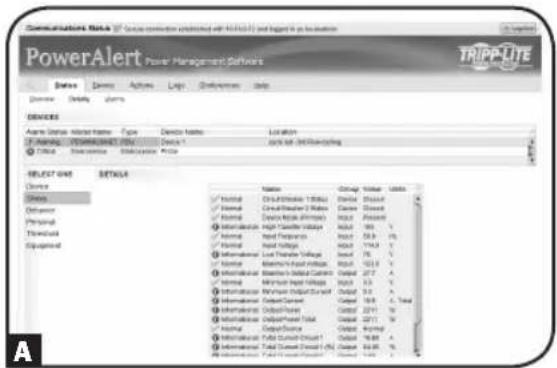
The PDU provides remote monitoring A, outlet control B and more via Web browser, telnet and SNMP-based Network Management Systems. For more information about configuration and operation of the PDU via the PowerAlert Web browser interface, refer to the SNMPWEBCARD User's Guide. You can find the guide by going to www.triplite.com/support and typing "SNMPWEBCARD" in the search field.
text_image
Communications Data Service connection validated with 10.0kV/12 and logit in the location PowerAlert Power Management Software TRIPPLE Status Actions Tags Conference Help Device Active Status Active Name Type Device Name: Location Active Status Active Name (10.0kV) Device 1 Click out: Digital Commanding Device 2 Device 3 Device 4 Device 5 Device 6 Device 7 Device 8 Device 9 Device 10 Device 11 Device 12 Device 13 Device 14 Device 15 Device 16 Device 17 Device 18 Device 19 Device 20 Device 21 Device 22 Device 23 Device 24 Device 25 Device 26 Device 27 Device 28 Device 29 Device 30 Device 31 Device 32 Device 33 Device 34 Device 35 Device 36 Device 37 Device 38 Device 39 Device 40 Device 41 Device 42 Device 43 Device 44 Device 45 Device 46 Device 47 Device 48 Device 49 Device 50 Device 51 Device 52 Device 53 Device 54 Device 55 Device 56 Device 57 Device 58 Device 59 Device 60 Device 61 Device 62 Device 63 Device 64 Device 65 Device 66 Device 67 Device 68 Device 69 Device 70 Device 71 Device 72 Device 73 Device 74 Device 75 Device 76 Device 77 Device 78 Device 79 Device 80 Device 81 Device 82 Device 83 Device 84 Device 85 Device 86 Device 87 Device 88 Device 89 Device 90 Device 91 Device 92 Device 93 Device 94 Device 95 Device 96 Device 97 Device 98 Device 99 Device 100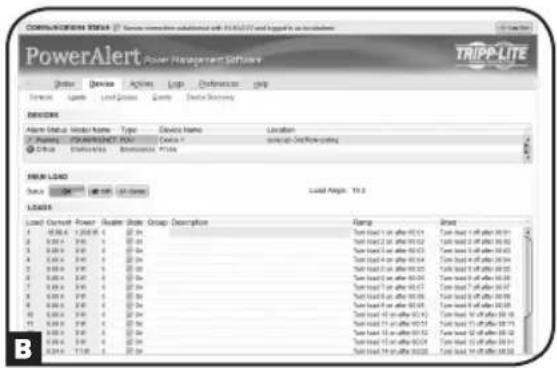
text_image
COMMUNICATIONS SOFTWARE PowerAlert Power Management Software TRIPP-LITE Status: Device Actions Help Preferences Help Forward: Zoom Load/Down Tools Switch Settings DESIGN Alarm Status: Audio Name Type Device Name Location F:\Program\POWERLIGHT.PAT\ Costa 1\ support-Off-Row Citing C:\Group\Discretion\Remainable_Please MAIN LOAD Load Current Power Output State Group Description Load: 0.00A 1.200W 25 Ps 3.00A 2.00A 35 Ps 4.00A 3.00A 45 Ps 5.00A 4.00A 55 Ps 6.00A 5.00A 65 Ps 7.00A 6.00A 75 Ps 8.00A 7.00A 85 Ps 9.00A 8.00A 95 Ps 10.00A 9.00A 105 Ps 11.00A 10.00A 115 Ps 12.00A 11.00A 125 Ps Load: 125 ps after 125 ps Load: 125 ps after 125 ps Load: 125 ps after 125 ps Load: 125 ps after 125 ps Load: 125 ps after 125 ps Load: 125 ps after 125 ps Load: 125 ps after 125 ps Load: 125 ps after 125 ps BService
Your Tripp Lite product is covered by the warranty described in this manual. A variety of Extended Warranty and On-Site Service Programs are also available from Tripp Lite. For more information on service, visit www.triplite.com/support. Before returning your product for service, follow these steps:
- Review the installation and operation procedures in this manual to ensure that the service problem does not originate from a misreading of the instructions.
- If the problem continues, do not contact or return the product to the dealer. Instead, visit www.tripplite.com/support.
- If the problem requires service, visit www.triplite.com/support and click the Product Returns link. From here you can request a Returned Material Authorization (RMA) number, which is required for service. This simple on-line form will ask for your unit's model and serial numbers, along with other general purchaser information. The RMA number, along with shipping instructions will be emailed to you. Any damages (direct, indirect, special or consequential) to the product incurred during shipment to Tripp Lite or an authorized Tripp Lite service center is not covered under warranty. Products shipped to Tripp Lite or an authorized Tripp Lite service center must have transportation charges prepaid. Mark the RMA number on the outside of the package. If the product is within its warranty period, enclose a copy of your sales receipt. Return the product for service using an insured carrier to the address given to you when you request the RMA.
Warranty and Warranty Registration
2- YEAR LIMITED WARRANTY
Seller warrants this product, if used in accordance with all applicable instructions, to be free from original defects in material and workmanship for a period of 2 years from the date of initial purchase. If the product should prove defective in material or workmanship within that period, Seller will repair or replace the product, in its sole discretion. Service under this Warranty can only be obtained by your delivering or shipping the product (with all shipping or delivery charges prepaid) to: Tripp Lite, 1111 W. 35th Street, Chicago, IL 60609 USA. Seller will pay return shipping charges. Visit www.triplite.com/support before sending any equipment back for repair.
THIS WARRANTY DOES NOT APPLY TO NORMAL WEAR OR TO DAMAGE RESULTING FROM ACCIDENT, MISUSE, ABUSE OR NEGLECT. SELLER MAKES NO EXPRESS WARRANTIES OTHER THAN THE WARRANTY EXPRESSLY SET FORTH HEREIN. EXCEPT TO THE EXTENT PROHIBITED BY APPLICABLE LAW, ALL IMPLIED WARRANTIES, INCLUDING ALL WARRANTIES OF MERCHANTABILITY OR FITNESS, ARE LIMITED IN DURATION TO THE WARRANTY PERIOD SET FORTH ABOVE; AND THIS WARRANTY EXPRESSLY EXCLUDES ALL INCIDENTAL AND CONSEQUENTIAL DAMAGES. (Some states do not allow limitations on how long an implied warranty lasts, and some states do not allow the exclusion or limitation of incidental or consequential damages, so the above limitations or exclusions may not apply to you. This Warranty gives you specific legal rights, and you may have other rights which vary from jurisdiction to jurisdiction).
WARNING: The individual user should take care to determine prior to use whether this device is suitable, adequate or safe for the use intended. Since individual applications are subject to great variation, the manufacturer makes no representation or warranty as to the suitability or fitness of these devices for any specific application.
WARRANTY REGISTRATION
Visit www.triplite.com/warranty today to register the warranty for your new Tripp Lite product.You'll be automatically entered into a drawing for a chance to win a FREE Tripp Lite product!*
* No purchase necessary. Void where prohibited. Some restrictions apply. See website for details.
FCC Notice, Class A
This device complies with part 15 of the FCC Rules. Operation is subject to the following two conditions: (1) This device may not cause harmful interference, and (2) this device must accept any interference received, including interference that may cause undesired operation.
Note: This equipment has been tested and found to comply with the limits for a Class A digital device, pursuant to part 15 of the FCC Rules. These limits are designed to provide reasonable protection against harmful interference when the equipment is operated in a commercial environment. This equipment generates, uses, and can radiate radio frequency energy and, if not installed and used in accordance with the instruction manual, may cause harmful interference to radio communications. Operation of this equipment in a residential area is likely to cause harmful interference in which case the user will be required to correct the interference at his own expense. The user must use shielded cables and connectors with this equipment. Any changes or modifications to this equipment not expressly approved by Tripp Lite could void the user's authority to operate this equipment.
Regulatory Compliance Identification Numbers
For the purpose of regulatory compliance certifications and identification, your Tripp Lite product has been assigned a unique series number. The series number can be found on the product nameplate label, along with all required approval markings and information. When requesting compliance information for this product, always refer to the series number. The series number should not be confused with the marking name or model number of the product.
WEEE Compliance Information for Tripp Lite Customers and Recyclers (European Union)
Under the Waste Electrical and Electronic Equipment (WEEE) Directive and implementing regulations, when customers buy new electrical and electronic equipment from Tripp Lite they are entitled to:
- Send old equipment for recycling on a one-for-one, like-for-like basis (this varies depending on the country)
- Send the new equipment back for recycling when this ultimately becomes waste
The policy of Tripp Lite is one of continuous improvement. Specifications are subject to change without notice.

text_image
TRIPP·LITE
Manufacturing Excellence.
1111 W. 35th Street, Chicago, IL 60609 USA • www.tripplite.com/support
1111 W. 35th Street, Chicago, IL 60609 USA • www.tripplite.com/support
natural_image
Pure technical diagram showing a mechanical assembly with no text, numbers, or symbols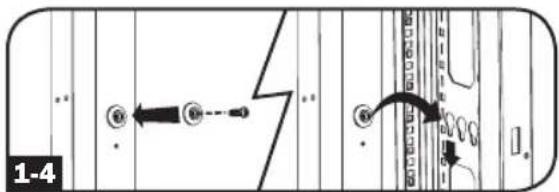
text_image
1-4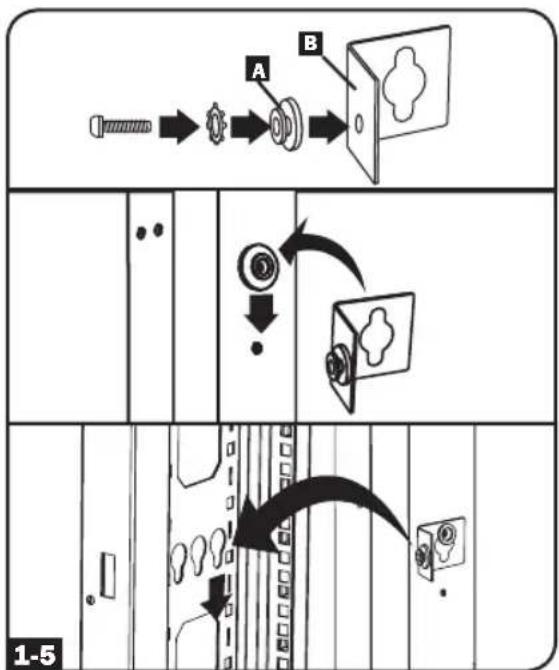
flowchart
graph TD
    A["Pinning Pin"] --> B["Assembly"]
    B --> C["Car Window"]
    C --> D["Door Opening"]
    D --> E["Back Cover"]
    style A fill:#f9f,stroke:#333
    style B fill:#ccf,stroke:#333
    style C fill:#cfc,stroke:#333
    style D fill:#fcc,stroke:#333
    style E fill:#ffc,stroke:#333
Instalación
Conexión del PDU
natural_image
Diagram of a hand inserting an electrical plug into a rack of four socket connectors (no text or symbols present)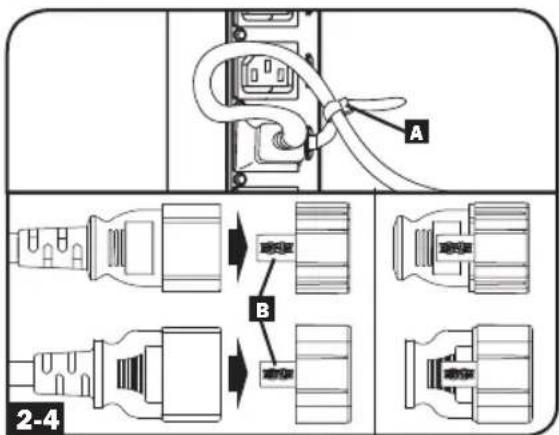
text_image
A B 2-4text_image
2.0 A RW V %JB T %RH u6 INPUT PHASE (LW) UNBALANCED % (LB) LOAD BANK (BW) OUTPUT POWER (OP) SENSOR (SW) MOSOtext_image
5 C1 A KW V %JB T %RH INPUT PHASE (LW) UNBALANCED % UB LOAD BANK (BW) OUTPUT POWER (OP) SENSOR (SW) 9 MOSB → 5 C1 A KW V %JB T %RH INPUT PHASE (LW) UNBALANCED % UB LOAD BANK (BW) OUTPUT POWER (OP) SENSOR (SW) 7 MOSB Para Brillo del LEDnatural_image
Simple line drawing of an electrical outlet with three slots (no text or symbols)C13 C19
natural_image
Simple line drawing of a square electrical outlet with three slots (no text or symbols)natural_image
Simple line drawing of a document icon with a vertical line and circular element (no text or symbols)LED de Estado del Tomacorriente
text_image
OFF 20 ON Inatural_image
Simple line drawing of a door with a handle and screw base (no text or symbols)natural_image
Technical line drawing of a mechanical component with no visible text or symbolsnatural_image
Isometric line drawing of a 3D rectangular component with a protruding rod (no text or symbols)natural_image
Simple diagram of a circular connector or socket with dot pattern inside, enclosed in a rounded square border (no text or symbols)natural_image
Black and white icon of an Ethernet ports with 'CONFIG' text label (no additional symbols or text)text_image
Communications Note PowerAlert Former Management Software TRIPP.LITE Details Actions Tags Conditions Help Details Details DISEORS ASM Digital Interface Name: Type Device Name Location Parameters: 3000000000000000000000000000000000000000000000000000000000000000000000000000000000000000000000 Critical Assessment Adjustable Price SELECT ONE DETAILS Device Internal Control Panel (Control Panel) Internal Control Panel (Control Panel) Internal Control Panel (Control Panel) Internal Control Panel (Control Panel) Internal Control Panel (Control Panel) Internal Control Panel (Control Panel) Internal Control Panel (Control Panel) Internal Control Panel (Control Panel) Internal Control Panel (Control Panel) Internal Control Panel (Control Panel) Internal Control Panel (Control Panel) Internal Control Panel (Control Panel) Internal Control Panel (Control Panel) Internal Control Panel (Control Panel) Internal Control Panel (Control Panel) Internal Hold Internal Hold Internal Hold Internal Hold Internal Hold Internal Hold Internal Hold Internal Hold Internal Hold Internal Hold Internal Hold Internal Hold Internal Hold Internal Hold Internal Hold Internal Hold Internal Hold Internal Hold Internal Hold Internal Hold Internal Hold Internal Hold Internal Hold Internal Hold Internal Hold Internal Hold Internal Hold Internal Hold Internal Hold Internal Hold Internal Hold Internal Hold Internal Hold Internal Hold External Release External Release External Release External Release External Release External Release External Release External Release External Release External Release External Release External Release External Release External Release External Release External Release External Release External Release External Release External Release External Release External Release External Release External Release External Release External Release External Release External Release External Release External Release External Release External Release External Release External Release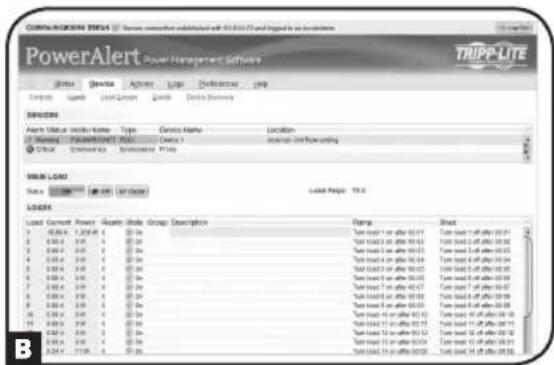
text_image
COMPLEXIONEER 2014 / Service connection substituted with 63.8.2017 and logged in a business PowerAlert Power Management Software TRIPP-LITE Status Device Actions Log Defecture Help Controls Load Load Clean Check Data Summary ERRORS Alarm Event Header Name: Type Document Name Location Name: Supercharger: https://www.tripp-lite.com/ C:\Control\Control\Control\PNote LOAD NAME: TRIPP-LITE Load Current Power - Load State Group Description Frame Sheet 1 000k A 1.20k A 00-00 2 000k A 00-00 A 00-00 3 000k A 00-00 A 00-00 4 000k A 00-00 A 00-00 5 000k A 00-00 A 00-00 6 000k A 00-00 A 00-00 7 000k A 00-00 A 00-00 8 000k A 00-00 A 00-00 9 000k A 00-00 A 00-00 10 000k A 00-00 A 00-00 11 000k A 00-00 A 00-00 12 000k A 1.25k A 1.25k 13 1.25k A 1.25k 14 1.25k A 1.25k 15 1.25k A 1.25k 16 1.25k A 1.25k 17 1.25k A 1.25k 18 1.25k A 1.25k 19 1.25k A 1.25k 20 1.25k A 1.25k 21 1.25k A 1.25k 22 1.25k A 1.25k 23 1.25k A 1.25k 24 1.25k A 1.25k 25 1.25k A 1.25k 26 1.25k A 1.25k 27 1.25k A 1.25k 28 1.25k A 1.25k 29 1.25k A 1.25k 30 1.25k A 1.25k 31 1.25k A 1.25k 32 1.25k A 1.25k 33 1.25k A 1.25k 34 1.25k A 1.25k 35 1.25k A 1.25k 36 1.25k A 1.25k 37 1.25k A 1.25k 38 1.25k A 1.25k 39 1.25k A 1.25k 40 1.25k A 1.25k 41 1.25k A 1.25k 42 1.25k A 1.25k 43 1.25k A 1.25k 44 1.25k A 1.25k 45 1.25k A 1.25k 46 1.25k A 1.25k 47 1.25k A 1.25k 48 1.25k A 1.25k 49 1.25k A 1.25k 50 1.25k A 1.25k 51 1.25k A 1.25k 52 1.25k A 1.25k 53 1.25k A 1.25k 54 1.25k A 1.25k 55 1.25k A 1.25k 56 1.25k A 1.25k 57 1.25k A 1.25k 58 1.25k A 1.25k 59 1.25k A 1.25k 60 1.25k A 1.25k 61 1.25k A 1.25k 62 1.25k A 1.25k 63 1.25k A 1.25k 64 1.25k A 1.25k 65 1.25k A 1.25k 66 1.25k A 1.25k 67 1.25k A 1.25k 68 1.25k A 1.25k 69 1.25k A 1.25k 70 1.25k A 1.25k 71 1.25k A 1.25k 72 1.25k A 1.25k 73 1.25k A 1.25k 74 1.25k A 1.25k 75 1.25k A 1.25k 76 1.25k A 1.25k 77 1.25k A 1.25k 78 1.25k A 1.25k 79 1.25k A 1.25k 80 1.25k A 1.25k 81 1.25k A 1.25k 82 1.25k A 1.25k 83 1.25k A 1.25k 84 1.25k A 1.25k 85 1.25k A 1.25k 86 1.25k A 1.25k 87 1.25k A 1.25k 88 1.25k A 1.25k 89 1.25k A 1.25k 90 1.25k A 1.25k 91 1.25k A 1.25k 92 1.25k A 1.25k 93 1.25k A 1.25k 94 1.25k A 1.25k 95 1.25k A 1.25k 96 1.25k A 1.25k 97 1.25k A 1.25k 98 1.25k A 1.25k 99 1.25k A 1.25kServicio
1111 W. 35th Street, Chicago, IL 60609 USA • www.tripplite.com/support
1111 W. 35th Street, Chicago, IL 60609 USA • www.tripplite.com/support
natural_image
Pure technical diagram showing a mechanical assembly with no text, numbers, or symbols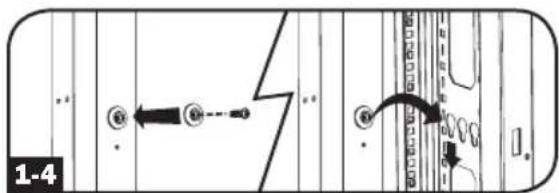
text_image
1-4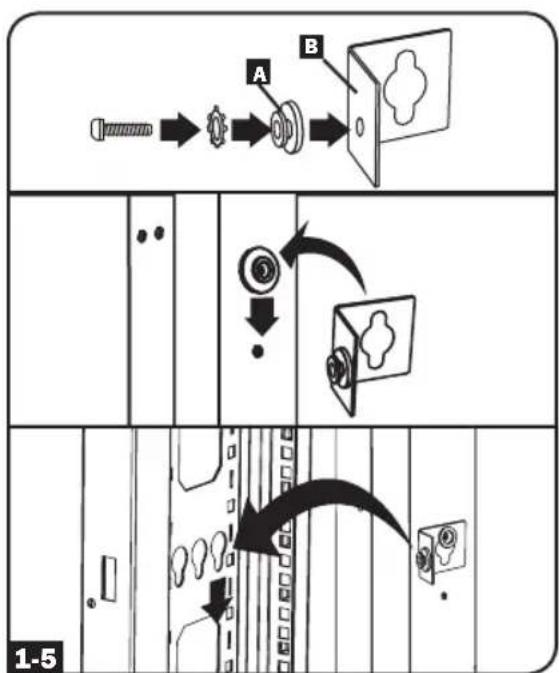
flowchart
graph TD
    A["Start"] --> B["Arrow to Screw"]
    B --> C["Arrow to Gear"]
    C --> D["Arrow to Screw"]
    D --> E["Arrow to Door switch"]
    E --> F["Arrow to Door switch"]
    F --> G["Arrow to Door switch"]
    G --> H["Arrow to Door switch"]
    H --> I["Arrow to Door switch"]
    I --> J["Arrow to Door switch"]
    J --> K["Arrow to Door switch"]
    K --> L["Arrow to Door switch"]
    L --> M["Arrow to Door switch"]
    M --> N["Arrow to Door switch"]
    N --> O["Arrow to Door switch"]
    O --> P["Arrow to Door switch"]
    P --> Q["Arrow to Door switch"]
    Q --> R["Arrow to Door switch"]
    R --> S["Arrow to Door switch"]
    S --> T["Arrow to Door switch"]
    T --> U["Arrow to Door switch"]
    U --> V["Arrow to Door switch"]
    V --> W["Arrow to Door switch"]
    W --> X["Arrow to Door switch"]
    X --> Y["Arrow to Door switch"]
    Y --> Z["Arrow to Door switch"]
Installation
natural_image
Diagram of a hand inserting into an Ethernet cable connector (no text or symbols visible)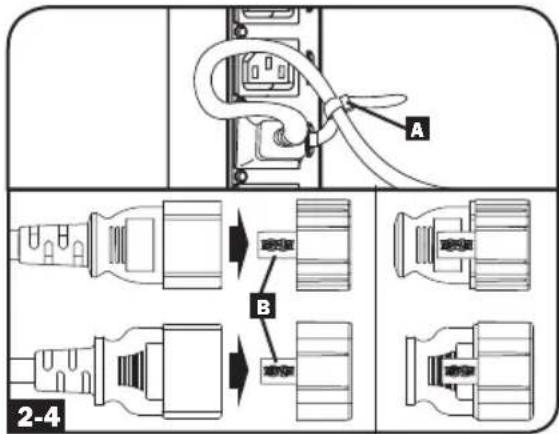
text_image
A B 2-4flowchart
graph TD
    A["Input Phase (L) / UNBALANCED % (LB) / LOAD BANK (BW) / OUTPUT POWER (DV) / SENSOR (SW)"] --> B["MODE 4"]
    B --> C["INPUT PHASE (L) / UNBALANCED % (LB) / LOAD BANK (BW) / OUTPUT POWER (DV) / SENSOR (SW)"]
    C --> D["MODE 1"]
    D --> E["INPUT PHASE (L) / UNBALANCED % (LB) / LOAD BANK (BW) / OUTPUT POWER (DV) / SENSOR (SW)"]
    E --> F["MODE 2"]
    F --> G["INPUT PHASE (L) / UNBALANCED % (LB) / LOAD BANK (BW) / OUTPUT POWER (DV) / SENSOR (SW)"]
    G --> H["MODE 3"]
    H --> I["INPUT PHASE (L) / UNBALANCED % (LB) / LOAD BANK (BW) / OUTPUT POWER (DV) / SENSOR (SW)"]
    I --> J["MODE 4"]
    J --> K["INPUT PHASE (L) / UNBALANCED % (LB) / LOAD BANK (BW) / OUTPUT POWER (DV) / SENSOR (SW)"]
    K --> L["MODE 5"]
    L --> M["INPUT PHASE (L) / UNBALANCED % (LB) / LOAD BANK (BW) / OUTPUT POWER (DV) / SENSOR (SW)"]
    M --> N["MODE 6"]
    N --> O["INPUT PHASE (L) / UNBALANCED % (LB) / LOAD BANK (BW) / OUTPUT POWER (DV) / SENSOR (SW)"]
    O --> P["MODE 7"]
    P --> Q["INPUT PHASE (L) / UNBALANCED % (LB) / LOAD BANK (BW) / OUTPUT POWER (DV) / SENSOR (SW)"]
    Q --> R["MODE 8"]
    R --> S["INPUT PHASE (L) / UNBALANCED % (LB) / LOAD BANK (BW) / OUTPUT POWER (DV) / SENSOR (SW)"]
    S --> T["MODE 9"]
    T --> U["INPUT PHASE (L) / UNBALANCED % (LB) / LOAD BANK (BW) / OUTPUT POWER (DV) / SENSOR (SW)"]
    U --> V["MODE 10"]
    V --> W["INPUT PHASE (L) / UNBALANCED % (LB) / LOAD BANK (BW) / OUTPUT POWER (DV) / SENSOR (SW)"]
    W --> X["MODE 11"]
    X --> Y["INPUT PHASE (L) / UNBALANCED % (LB) / LOAD BANK (BW) / OUTPUT POWER (DV) / SENSOR (SW)"]
    Y --> Z["MODE 12"]
    Z --> AA["INPUT PHASE (L) / UNBALANCED % (LB) / LOAD BANK (BW) / OUTPUT POWER (DV) / SENSOR (SW)"]
    AA --> AB["MODE 13"]
    AB --> AC["INPUT PHASE (L) / UNBALANCED % (LB) / LOAD BANK (BW) / OUTPUT POWER (DV) / SENSOR (SW)"]
    AC --> AD["MODE 14"]
    AD --> AE["INPUT PHASE (L) / UNBALANCED % (LB) / LOAD BANK (BW) / OUTPUT POWER (DV) / SENSOR (SW)"]
    AE --> AF["MODE 15"]
    AF --> AG["INPUT PHASE (L) / UNBALANCED % (LB) / LOAD BANK (BW) / OUTPUT POWER (DV) / SENSOR (SW)"]
    AG --> AH["MODE 16"]
    AH --> AI["INPUT PHASE (L) / UNBALANCED % (LB) / LOAD BANK (BW) / OUTPUT POWER (DV) / SENSOR (SW)"]
    AI --> AJ["MODE 17"]
    AJ --> AK["INPUT PHASE (L) / UNBALANCED % (LB) / LOAD BANK (BW) / OUTPUT POWER (DV) / SENSOR (SW)"]
    AK --> AL["MODE 18"]
    AL --> AM["INPUT PHASE (L) / UNBALANCED % (LB) / LOAD BANK (BW) / OUTPUT POWER (DV) / SENSOR (SW)"]
    AM --> AN["MODE 19"]
    AN --> AO["INPUT PHASE (L) / UNBALANCED % (LB) / LOAD BANK (BW) / OUTPUT POWER (DV) / SENSOR (SW)"]
    AO --> AP["MODE 20"]
    AP --> AQ["INPUT PHASE (L) / UNBALANCED % (LB) / LOAD BANK (BW) / OUTPUT POWER (DV) / SENSOR (SW)"]
    AQ --> AR["MODE 21"]
    AR --> AS["INPUT PHASE (L) / UNBALANCED % (LB) / LOAD BANK (BW) / OUTPUT POWER (DV) / SENSOR (SW)"]
    AS --> AT["MODE 22"]
    AT --> AU["INPUT PHASE (L) / UNBALANCED % (LB) / LOAD BANK (BW) / OUTPUT POWER (DV) / SENSOR (SW)"]
    AU --> AV["MODE 23"]
    AV --> AW["INPUT PHASE (L) / UNBALANCED % (LB) / LOAD BANK (BW) / OUTPUT POWER (DV) / SENSOR (SW)"]
    AW --> AX["MODE 24"]
    AX --> AY["INPUT PHASE (L) / UNBALANCED % (LB) / LOAD BANK (BW) / OUTPUT POWER (DV) / SENSOR (SW)"]
    AY --> AZ["MODE 25"]
    AZ --> BA["INPUT PHASE (L) / UNBALANCED % (LB) / LOAD BANK (BW) / OUTPUT POWER (DV) / SENSOR (SW)"]
    BA --> BB["MODE 26"]
    BB --> BC["INPUT PHASE (L) / UNBALANCED % (LB) / LOAD BANK (BW) / OUTPUT POWER (DV) / SENSOR (SW)"]
    BC --> BD["MODE 27"]
    BD --> BE["INPUT PHASE (L) / UNBALANCED % (LB) / LOAD BANK (BW) / OUTPUT POWER (DV) / SENSOR (SW)"]
    BE --> BF["MODE 28"]
    BF --> BG["INPUT PHASE (L) / UNBALANCED % (LB) / LOAD BANK (BW) / OUTPUT POWER (DV) / SENSOR (SW)"]
    BG --> BH["MODE 29"]
    BH --> BI["INPUT PHASE (L) / UNBALANCED % (LB) / LOAD BANK (BW) / OUTPUT POWER (DV) / SENSOR (SW)"]
    BI --> BJ["MODE 30"]
    BJ --> BK["INPUT PHASE (L) / UNBALANCED % (LB) / LOAD BANK (BW) / OUTPUT POWER (DV) / SENSOR (SW)"]
text_image
t s t INPUT PHASE (LW) UNI/LAWID'S (LW) LOAD SIN (IN) OUTPUT POWER (OP) SENSOR (SH) 88 INPUT PHASE (LW) UNI/LAWID'S (LW) LOAD SIN (IN) OUTPUT POWER (OP) SENSOR (SH) 88 MAX MAX MAX MAX MAX MAX MAX MAX MAX MAX MAX MAX MAX MAX MAX MAX MAX MAX MAX MAX MAX MAX MAX MAX MAX MAX MAX MAX MAX MAX MAX MAX MAX MAX MAX MAX MAX MAX MAX MAX MAX MAX MAX MAX MAX MAX MAX MAX MAX MAX Max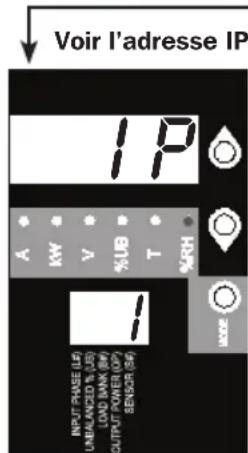
text_image
Voir l'adresse IP IP A KW V %UB T %RH INPUT RASE (L) UNBANZED % (L) LOAD INN (W) OUTPUT POWER (W) SENSOR (S) I MODE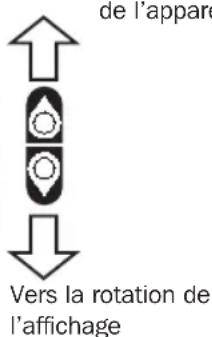
natural_image
Simple line drawing of an electrical outlet with three slots (no text or symbols)C13 C19
natural_image
Simple line drawing of a square electrical outlet with three slots (no text or symbols)natural_image
Simple line drawing of a document icon with a vertical line and circular border (no text or symbols)text_image
OFF 20 ON Inatural_image
Simple line drawing of a door with a handle and screw base (no text or symbols)natural_image
Isometric line drawing of a hexagonal mechanical component with a slot (no text or symbols)natural_image
Isometric line drawing of a rectangular mechanical component with internal cavity (no text or symbols)natural_image
Simple diagram of a circular connector with pins, enclosed in a rounded square frame (no text or symbols)natural_image
Black and white icon of a Ethernet ports with 'CONFIG' text beside it (no additional symbols or text)text_image
Communications Data: 2P Service connection grounded in H10.0.13 and lograr to be installed PowerAlert Power Management Software Status Actions Actions Logic Disconnection Data Details Details Access Access Name Type Device Name: Location Active/Inactive Disconnection Device 1 Critical Unsuccessful Disconnection Price SELECT ONE DETAILS Churns Normal Central Channel 10 MHz Normal Central Channel 2 MHz Normal Device Mobile Interface Normal Power Control Information High Channel Interface Normal Signal Response Normal Signal Voltage Normal Local Channel Voltage Normal Maximum Signal Voltage Information Maximum Signal Control Normal Minimum Signal Voltage Information Minimum Signal Control Normal Signal Response Information Total Channel Control 1 MHz Information Total Channel Control 2 MHz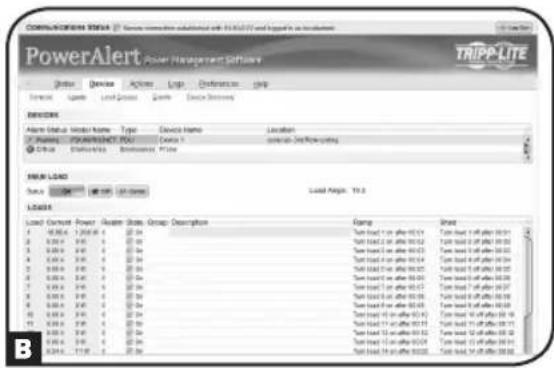
text_image
COMMUNICATIONS SOFTWARE Service: Service software substituted with TRIPP-LITE and logo as transactional PowerAlert Power Management Software TRIPP-LITE Status: Device Actions Log Preferences Help Resource: Tools Load Group Tools Load Settings ERROR Alarm Status: Model Name: Type: Devices Name Location P: Windows POWERLIGHT POST 2001 C:\Office Transaction\Performance\Price LOAD LOAD Load Current Power Heater State Group Description Rating Band 1 0.00k A 1.200k A 20-34 Time load 5 or after 00:04 Time load 6 or after 00:03 Time load 7 or after 00:02 Time load 8 or after 00:01 Time load 9 or after 00:00 Time load 10 or after 00:08 Time load 11 or after 00:06 Time load 12 or after 00:04 Time load 13 or after 00:02 Time load 14 or after 00:01 Time load 15 or after 00:00 Time load 16 or after 00:08 Time load 17 or after 00:06 Time load 18 or after 00:04 Time load 19 or after 00:02 Time load 20 or after 00:01 Time load 21 or after 00:00 Time load 22 or after 00:08 Time load 23 or after 00:06 Time load 24 or after 00:04 Time load 25 or after 00:02 Time load 26 or after 00:01 Time load 27 or after 00:00 Time load 28 or after 00:08 Time load 29 or after 00:06 Time load 30 or after 00:04 Time load 31 or after 00:02 Time load 32 or after 00:01 Time load 33 or after 00:00 Time load 34 or after 00:08 Time load 35 or after 00:06 Time load 36 or after 00:04 Time load 37 or after 00:02 Time load 38 or after 00:01 Time load 39 or after 00:00 Time load 40 or after 00:08 Time load 41 or after 00:06 Time load 42 or after 00:04 Time load 43 or after 00:02 Time load 44 or after 00:01 Time load 45 or after 00:08 Time load 46 or after 00:06 Time load 47 or after 00:04 Time load 48 or after 00:02 Time load 49 or after 00:01 Time load 50 or after 00:08 Time load 51 or after 00:06 Time load 52 or after 00:04 Time load 53 or after 00:02 Time load 54 or after 00:01 Time load 55 or after 00:08 Time load 56 or after 00:06 Time load 57 or after 00:04 Time load 58 or after 00:02 Time load 59 or after 00:01 Time load 60 or after 00:08 Time load 61 or after 00:06 Time load 62 or after 00:04 Time load 63 or after 00:02 Time load 64 or after 00:01 Time load 65 or after 00:08 Time load 66 or after 00:06 Time load 67 or after 01:18 BEntretien
1111 W. 35th Street, Chicago, IL 60609 USA • www.tripplite.com/support

Manufacturing Excellence.
1111 W. 35th Street, Chicago, IL 60609 USA • www.tripplite.com/support
natural_image
Pure architectural line drawing of a room with vertical supports and horizontal beams, no text or symbols present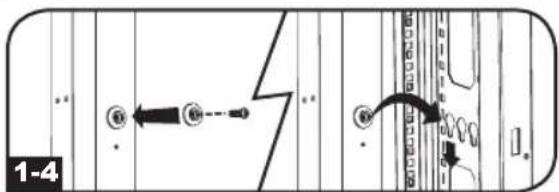
text_image
1-4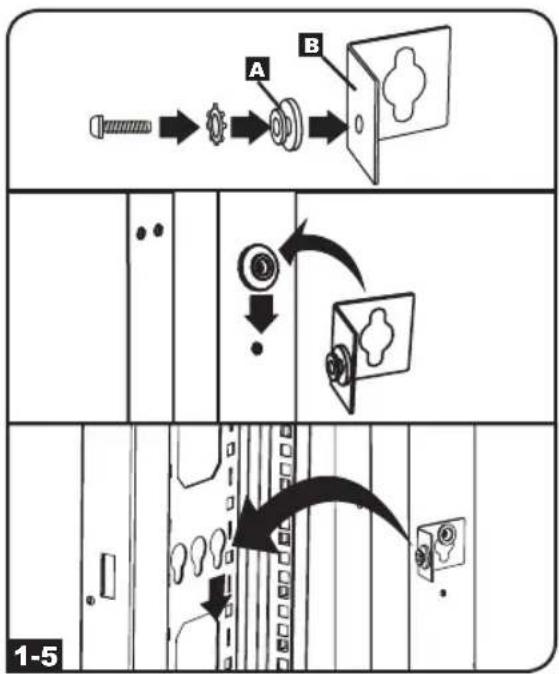
flowchart
graph TD
    A["Start"] --> B["Arrow to screw"]
    B --> C["Arrow to gear"]
    C --> D["Arrow to button"]
    D --> E["Arrow to door"]
    E --> F["Arrow to door panel"]
    F --> G["Arrow to door panel with label 'A'"]
    F --> H["Arrow to door panel with label 'B'"]
    G --> I["Arrow to door panel with label 'C'"]
    H --> J["Arrow to door panel with label 'D'"]
    I --> K["Arrow to door panel with label 'E'"]
    J --> L["Arrow to door panel with label 'F'"]
    K --> M["Arrow to door panel with label 'G'"]
    L --> N["Arrow to door panel with label 'H'"]
    M --> O["Arrow to door panel with label 'I'"]
    N --> P["Arrow to door panel with label 'J'"]
    O --> Q["Arrow to door panel with label 'K'"]
    P --> R["Arrow to door panel with label 'L'"]
    Q --> S["Arrow to door panel with label 'M'"]
    R --> T["Arrow to door panel with label 'N'"]
    S --> U["Arrow to door panel with label 'O'"]
    T --> V["Arrow to door panel with label 'P'"]
    U --> W["Arrow to door panel with label 'Q'"]
    V --> X["Arrow to door panel with label 'R'"]
    W --> Y["Arrow to door panel with label 'S'"]
    X --> Z["Arrow to door panel with label 'T'"]
    Y --> AA["Arrow to door panel with label 'U'"]
    Z --> AB["Arrow to door panel with label 'V'"]
    AA --> AC["Arrow to door panel with label 'W'"]
    AB --> AD["Arrow to door panel with label 'X'"]
    AC --> AE["Arrow to door panel with label 'Y'"]
    AD --> AF["Arrow to door panel with label 'Z'"]
    AE --> AG["Arrow to door panel with label 'O'"]
    AF --> AH["Arrow to door panel with label 'P'"]
    AG --> AI["Arrow to door panel with label 'Q'"]
    AH --> AJ["Arrow to door panel with label 'R'"]
    AI --> AK["Arrow to door panel with label 'S'"]
    AJ --> AL["Arrow to door panel with label 'T'"]
    AK --> AM["Arrow to door panel with label 'U'"]
    AL --> AN["Arrow to door panel with label 'V'"]
    AM --> AO["Arrow to door panel with label 'W'"]
    AN --> AP["Arrow to door panel with label 'X'"]
    AO --> AQ["Arrow to door panel with label 'Y'"]
    AP --> AR["Arrow to door panel with label 'Z'"]
    AQ --> AS["Arrow to door panel with label 'O'"]
    AR --> AT["Arrow to door panel with label 'P'"]
    AS --> AU["Arrow to door panel with label 'Q'"]
    AT --> AV["Arrow to door panel with label 'R'"]
    AU --> AW["Arrow to door panel with label 'S'"]
    AV --> AX["Arrow to door panel with label 'T'"]
    AW --> AY["Arrow to door panel with label 'U'"]
    AX --> AZ["Arrow to door panel with label 'V'"]
    AY --> BA["Arrow to door panel with label 'W'"]
    AZ --> BB["Arrow to door panel with label 'X'"]
    BA --> BC["Arrow to door panel with label 'Y'"]
    BB --> BD["Arrow to door panel with label 'Q'"]
    BC --> BE["Arrow to door panel with label 'R'"]
    BD --> BF["Arrow to door panel with label 'S'"]
    BE --> BG["Arrow to door panel with label 'T'"]
    BF --> BH["Arrow to door panel with label 'U'"]
    BG --> BI["Arrow to door panel with label 'V'"]
    BH --> BJ["Arrow to door panel with label 'W'"]
    BI --> BK["Arrow to door panel with label 'X'"]
    BJ --> BL["Arrow to door panel with label 'Y'"]
    BK --> BM["Arrow to door panel with label 'Q'"]
    BL --> BN["Arrow to door panel with label 'R'"]
    BM --> BO["Arrow to door panel with label 'S'"]
    BN --> BP["Arrow to door panel with label 'T'"]
    BO --> BQ["Arrow to door panel with label 'U'"]
    BP --> BR["Arrow to door panel with label 'V'"]
    BQ --> BS["Arrow to door panel with label 'W'"]
    BR --> BT["Arrow to door panel with label 'X'"]
    BS --> BU["Arrow to door panel with label 'Y'"]
    BT --> BV["Arrow to door panel with label 'Q'"]
    BV --> BW["Arrow to door panel with label 'S'"]
    BW --> BX["Arrow to door panel with label 'U'"]
    BX --> BY["Arrow to door panel with label 'V'"]
    BY --> BZ["Arrow to door panel with label 'W'"]
    BX --> CA["Arrow to door panel with label 'X'"]
    CA --> CB["Arrow to door panel with label 'Y'"]
    CA --> CC["Arrow to door panel with label 'Q'"]
    CA --> DC["Arrow to door panel with label 'S'"]
    CA --> DD["Arrow to door panel with label 'T'"]
    CA --> DE["Arrow to door panel with label 'U'"]
    CE["1-5"] --> AD
    CE --> AE
    CE --> AF
    CE --> AG
    CE --> AH
    CE --> AI
    CE --> AJ
    CE --> AK
    CE --> AL
    CE --> AM
    CE --> AN
    CE --> AO
    CE --> AP
    CE --> AQ
    CE --> AR
    CE --> AS
    CE --> AT
    CE --> AU
    CE --> AV
    CE --> AW
    CE --> AX
Установка
Подключение PDU
natural_image
Diagram of a network switch connected to multiple ports (no text or symbols visible)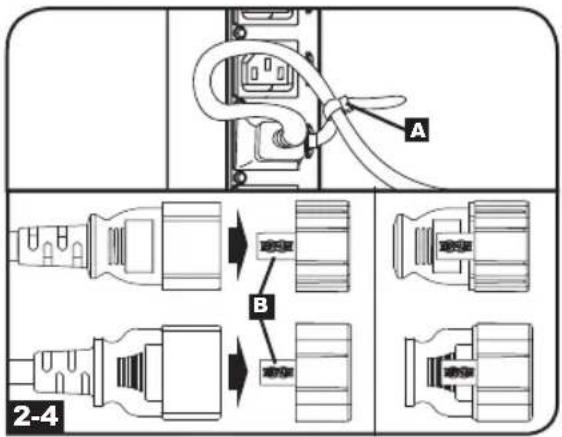
text_image
A B 2-4text_image
10.5 0 82.18 INPUT PHASE (L) UNBLANDED % (UB) LOAD BANK (BH) OUTPUT POWER (CP) SENSOR (SM) 63 INPUT PHASE (L) UNBLANDED % (UB) LOAD BANK (BH) OUTPUT POWER (CP) SENSOR (SM) 63 INPUT PHASE (L) UNBLANDED % (UB) LOAD BANK (BH) OUTPUT POWER (CP) SENSOR (SM) 63 K K K K K K K K K K K K K K K K K K K K K K K K K K K K K K K K K K K K K K K K K K K K K K K K K K MUMMARHOBY BEXHODHOBY MOCHNOCTNtext_image
SCLT INPUT PHASE L1 UNMAXICED % UB LOAD BANK SH OUTPUT POWER OF SENSOR SH 9 SCLT INPUT PHASE L2 UNMAXICED % UB LOAD BANK SH OUTPUT POWER OF SENSOR SH 7 NUR V XUR T %RH MOSR NUR V XUR T %RHnatural_image
Electrical outlet symbol with three slots inside a rounded rectangle, labeled C13 and C19 below (no additional text or symbols)
natural_image
Simple line drawing of a square electrical outlet with three slots (no text or symbols)text_image
OFF 20 ON Inatural_image
Simple line drawing of a door with a cloud symbol on the lid (no text or labels)natural_image
Technical line drawing of a mechanical component with no visible text or symbolsnatural_image
Isometric line drawing of a 3D rectangular component with internal structure and a protruding rod (no text or symbols)natural_image
Simple diagram of a circular connector with pins, enclosed in a rounded square (no text or symbols)natural_image
Black and white icon of a router with 'CONFIG' text on the side (no other symbols or text)text_image
PowerAlert Power Alert System TRIPOLITE System Status: Active, Active, Active, Continuous, Continuous Control: Active, Active, Continuous MOUNT Power Alert System: Active, Active, Continuous Control: Active, Active, Continuous MOUNT System Status: Active, Active, Continuous MOUNT System Status: Active, Active, Continuous MOUNT System Status: Active, Active, Continuous MOUNT System Status: Active, Active, Continuous MOUNT System Status: Active, Active, Continuous MOUNT System Status: Active, Active, Continuous MOUNT System Status: Active, Active, Continuous MOUNT System Status: Active, Active, Continuous MOUNT System Status: Active, Passive, Passive, Passive MOUNT System Status: Active, Active, Passive, Passive MOUNT System Status: Active, Active, Passive, Passive MOUNT System Status: Active, Active, Passive, Passive MOUNT System Status: Active, Active, Passive, Passive MOUNT System Status: Active, Active, Passive, Passive MOUNT System Status: Active, Active, Passive, Passive MOUNT System Status: Active, Active, Passive, Passive MOUNT System Status: Active, Active, Active, Passive, Passive MOUNT System Status: Active, Active, Passive, Passive MOUNT System Status: Active, Active, Passive, Passive MOUNT System Status: Active, Active, Passive, Passive MOUNT System Status: Active, Active, Passive, Passive MOUNT System Status: Active, Active, Passive, Passive MOUNT System Status: Active, Active, Passive, Passive MOUNT System Status: Active, Active, Active, Active, Passive, Active, Passive, Active, Passive, Active, Passive, Active, Passive, Active, Passive, Active, Passive, Active, Passive, Active, Passive, Active, Passive, Active, Passive, Active, Passive, Active, Passive, Active, Passive, Active, Passive, Active, Passive, Active, Passive, Active, Passive, Active, Passive, Active, Passive, Active, Passive, Active, Passive, Active, Passive, Active, Passive, Active, Passive, Active, Multiple
Manufacturing Excellence.
1111 W. 35th Street, Chicago, IL 60609 USA • www.tripplite.com/support
14-01-022 93-32D2 RevA