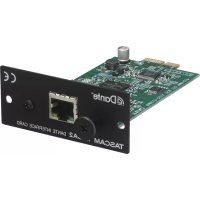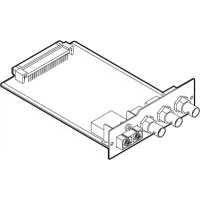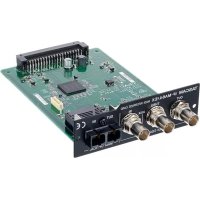
IFMA64Ex - Electronic board TASCAM - Free user manual and instructions
Find the device manual for free IFMA64Ex TASCAM in PDF.



| Brand | Tascam |
| Model | IF-MA64/EX |
| Product type | MADI interface card |
| Digital audio channels | 64 channels (44.1/48 kHz) or 32 channels (88.2/96 kHz) at 24 bits |
| Input connectors | 1 x MADI coaxial BNC 75Ω, 1 x MADI optical SC (IF-MA64/EX only) |
| Output connectors | 1 x MADI coaxial BNC 75Ω OUT, 1 x MADI optical SC OUT (IF-MA64/EX only) |
| Thru connector | 1 x MADI coaxial BNC 75Ω THRU (IF-MA64/EX only) |
| Digital audio format | AES10-2008 (MADI) |
| Dimensions (W × H × D) | 107 × 34 × 164.4 mm (including protruding parts) |
| Weight | Approx. 200 g (estimate) |
| Power supply | Via host unit bus (not standalone) |
| Power consumption | Not specified, drawn from host unit |
| Operating temperature | Not specified, indoor use |
| Compatibility | See TEAC website for compatible host unit models |
| Box contents | Main card, instruction manual (with warranty) |
| Electromagnetic compatibility class | Class A (may cause interference in domestic environments) |
| Certifications | Complies with Canadian NMB-003 standard (class A) |
| Maintenance and cleaning | Disconnect host unit before cleaning; use a soft dry cloth; do not use solvents |
| Safety | Disconnect power before installation/removal; tighten side screws; do not use if problem occurs without prior repair |
| Spare parts and repairability | No replaceable parts supplied; contact TEAC for technical assistance |
| Warranty | Subject to legal regulations of country of purchase |
Frequently Asked Questions - IFMA64Ex TASCAM
User questions about IFMA64Ex TASCAM
0 question about this device. Answer the ones you know or ask your own.
Ask a new question about this device
Download the instructions for your Electronic board in PDF format for free! Find your manual IFMA64Ex - TASCAM and take your electronic device back in hand. On this page are published all the documents necessary for the use of your device. IFMA64Ex by TASCAM.
USER MANUAL IFMA64Ex TASCAM
- TASCAM is a trademark of TEAC CORPORATION, registered in the U.S. and other countries.
- Other company names, product names and logos in this document are the trademarks or registered trademarks of their respective owners.
テイアック株式会社
http://tascam.jp/
1834 Gage Road, Montebello, California 90640 USA
2 TASCAM IF-MA64/EX / IF-MA64/BN
TEAC MEXICO, S.A. de C.V.
http://teacmexico.net/
Phone: +52-55-5010-6000
2 Huxley Road, Surrey Research Park, Guildford,
GU2 7RE, United Kingdom
TEAC EUROPE GmbH
http://tascam.eu/
Phone: +49-611-71580
Room 817, Block A, Hailrun Complex, 6021 Shennan Blvd., Futian District, Shenzhen 518040, China
OWNER'S MANUAL
IMPORTANT SAFETY PRECAUTIONS
For U.S.A.
This device complies with Part 15 of the FCC Rules. Operation is subject to the following two conditions: (1) this device may not cause harmful interference, and (2) this device must accept any interference received, including interference that may cause undesired operation.
INFORMATION TO THE USER
This equipment has been tested and found to comply with the limits for a Class A digital device, pursuant to Part 15 of the FCC Rules. These limits are designed to provide reasonable protection against harmful interference when the equipment is operated in a commercial environment. This equipment generates, uses, and can radiate radio frequency energy and, if not installed and used in accordance with the instruction manual, may cause harmful interference to radio communications.
Operation of this equipment in a residential area is likely to cause harmful interference in which case the user will be required to correct the interference at his own expense.
CAUTION
Changes or modifications to this equipment not expressly approved by TEAC CORPORATION for compliance could void the user's authority to operate this equipment.
For the customers in Europe
WARNING
This is a Class A product. In a domestic environment, this product may cause radio interference in which case the user may be required to take adequate measures.
THIS CLASS A DIGITAL APPARATUS COMPLIES WITH CANADIAN ICES-003.CET
APPAREL NUMERIQUE DE LA CLASSE A EST CONFORME A LA NORME NMB-003 DU CANADA.
DECLARATION OF CONFORMITY
We, TEAC EUROPE GmbH. Bahnstrasse 12, 65205 Wiesbaden-Erbenheim, Germany declare in own responsibility, the TEAC product described in this manual is in compliance with the corresponding technical standards.

CE Marking Information
EN55103-1/2
a) Applicable electromagnetic environment: E4
IMPORTANT SAFETY INSTRUCTIONS
- If you are experiencing problems with this product, contact TEAC for a service referral. Do not use the product until it has been repaired.
r European Customers
Disposal of electrical and electronic equipment
(a) All electrical and electronic equipment should be disposed of separately from the municipal waste stream via designated collection facilities appointed by the government or the local authorities.
(b) By disposing of the electrical and electronic equipment correctly, you will help save valuable resources and prevent any potential negative effects on human health and the environment.
4 TASCAM IF-MA64/EX & IF-MA64/BN
(c) Improper disposal of waste equipment can have serious effects on the environment and human health as a result of the presence of hazardous substances in electrical and electronic equipment.
(d) The crossed out wheeled dust bin symbol indicates that electrical and electronic equipment must be collected and disposed of separately from household waste.
(e) The return and collection systems are available to the end users. For more detailed information about disposal of old electrical and electronic equipment, please contact your city office, waste disposal service or the shop where you purchased the equipment.
Contents
IMPORTANT SAFETY PRECAUTIONS 3
IMPORTANT SAFETY INSTRUCTIONS. 4
Introduction 6
Features of these cards. 6
Models compatible for installation. 6
Installation procedure overview 6
Included items. 6
Using the TEAC Global Site 7
User registration 7
Names of parts 7
Rear panel. 7
Specifications. 9
Ratings 9
Digital audio input/output ratings 9
Other. 9
Dimensional drawings 10
Introduction
Thank you very much for purchasing a TASCAM IF-MA64 series MADI interface.
Before connecting and using this unit, please take time to read this manual thoroughly to ensure you understand how to properly set it up and connect it, as well as how to use its many useful and convenient functions. After you have finished reading this manual, please keep it in a safe place for future reference.
You can also download this Owner's Manual from the TEAC Global Site (http://teac-global.com/).
Features of these cards
- Receive and send uncompressed digital audio signals—up to 64 channels at 44.1/48kHz 24-bit or 32 channels at 88.2/96kHz 24-bit
- 75Ω COAXIAL input and output connectors (IF-MA64/EX, IF-MA64/BN)
- 75Ω COAXIAL THRU connector (IF-MA64/EX)
Optical input and output connectors (IF-MA64/EX)
Models compatible for installation
Before installing this card, check the TEAC Global Site (http://teac-global.com/) for the latest information about models in which it can be installed.
Installation procedure overview
- For installation procedures, see the Owner's Manual for the unit in which you will install the card.
- Always disconnect the AC cord(s) from the main unit before installing or removing a card.
- Securely tighten the screws on the left and right sides of the card before use.
Included items
This product includes the following items.
Keep the box and packing materials for transportation in the future.
Please contact TASCAM Customer Support (see back cover) if any of these items are missing or have been damaged during transportation.
- Main unit.
Owner's Manual (this document) including warranty.....X 1
Using the TEAC Global Site
You can download this Owner's Manual and the Reference Manual necessary for this unit from the TEAC Global Site (http://teac-global.com/).
Open the TEAC Global Site (http://teac-global.com/).
2. In the TASCAM Downloads section, click the desired language to open the Downloads website page for that language.
NOTE
If the desired language does not appear, click Other Languages.
- Click the product name in the "Search by Model Name" section to open the Downloads page for that product.
- Select and download the Owner's Manual and the Reference Manual that are needed.
User registration
Customers in the USA, please visit the TASCAM website (http://tascam.com/) to register as a user online.
Names of parts
Rear panel
IF-MA64/EX
IF-MA64/BN
TASCAM IF-MA64/EX & IF-MA64/BN
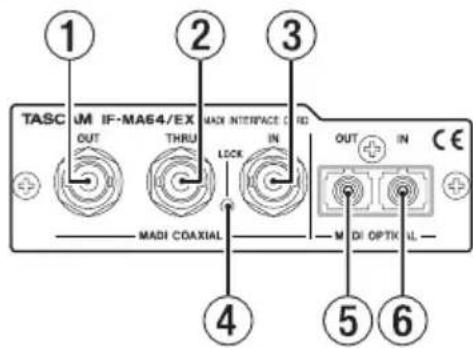
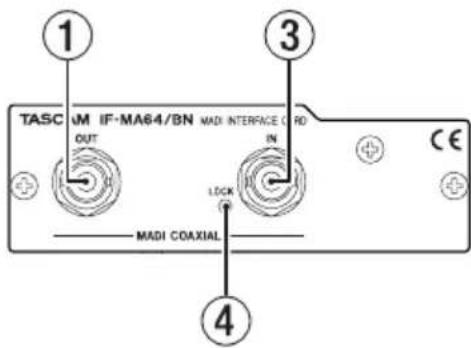
① MADI COAXIAL OUT connector
This is a BNC connector for digital audio output in AES10-2008 format.
Use a 75 coaxial cable to connect an external MADI device and transmit digital audio and control signals.
② MADI COAXIAL THRU connector (IF-MA64/EX only)
This is a BNC connector for digital audio output in AES10-2008 format.
The MADI COAXIAL IN connector signal is thru output.
Use a 75 coaxial cable to connect an external MADI device and transmit digital audio and control signals.
NOTE
The signal from the MADI COAXIAL IN connector is output through the MADI COAXIAL THRU connector whether the unit is on or off.
When the unit is turned on/off, however, the signal output from the MADI COAXIAL THRU connector will be momentarily interrupted. For this reason, time turning the unit on/off carefully when the signal output from the MADI COAXIAL THRU connector is being used by a connected device.
③ MADI COAXIAL IN connector
This is a BNC connector for digital audio input in AES10-2008 format.
Use a 75 coaxial cable to connect an external MADI device and receive digital audio and control signals.
④ LOCKindicator
This indicator lights when a valid signal is being input through the connector selected in the card setting menu (MADI INPUT SELECT item COAXIAL or OPTICAL setting).
NOTE
This will not light when receiving signals with sampling frequencies that are different from the main unit's setting.
5 MADI OPTICAL OUT connector (IF-MA64/EX only)
This is an SC connector for digital audio output in AES10-2008 format.
Use a multi-mode optical fiber cable to connect an external MADI device and transmit digital audio and control signals.
Attach the included rubber cap when not in use to prevent dust from entering.
7 MADI OPTICAL IN connector (IF-MA64/EX only)
This is an SC connector for digital audio input in AES10-2008 format.
Use a multi-mode optical fiber cable to connect an external MADI device and receive digital audio and control signals.
Attach the included rubber cap when not in use to prevent dust from entering.
Specifications
Ratings
Channels and formats
Sampling Frequency
44.1/48 kHz: 48k frame, 56/64 channels
88.2/96 kHz: 48k frame, 28/32 channels
96k frame, 28/32 channels
Digital audio input/output ratings
ADI COAXIAL IN connector
Connector: BNC coaxial 75Ω
Format: AES10-2008
ADI OPTICAL IN connector (IF-MA64/EX only)
Connector: FDDI duplex SC connector (62.5μm core diameter/125μm clad diameter or 50μm/125μm multi-mode optical fiber cable)
Format: AES10-2008
ADI COAXIAL OUT connector
Connector: BNC coaxial 75Ω
Format: AES10-2008
ADI COAXIAL THRU connector (IF-MA64/EX only)
Connector: BNC coaxial 75Ω
Format: AES10-2008
ADI OPTICAL OUT connector (IF-MA64/EX only)
Connector: FDDI duplex SC connector (62.5μm core diameter/125μm clad diameter or 50μm/125μm multi-mode optical fiber cable)
Format: AES10-2008
Other
■mensions
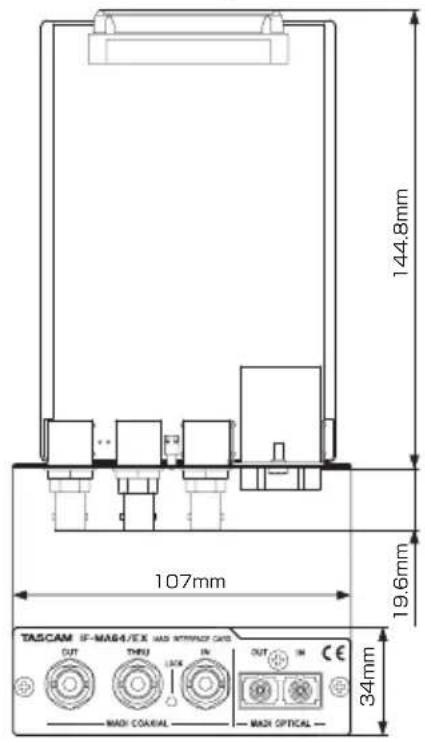
107× 34× 164.4mm width × height × depth, including protrusions)
Weight
166 g (IF-MA64/EX), 137 g (IF-MA64/BN)
Dimensional drawings
IF-MA64/EX
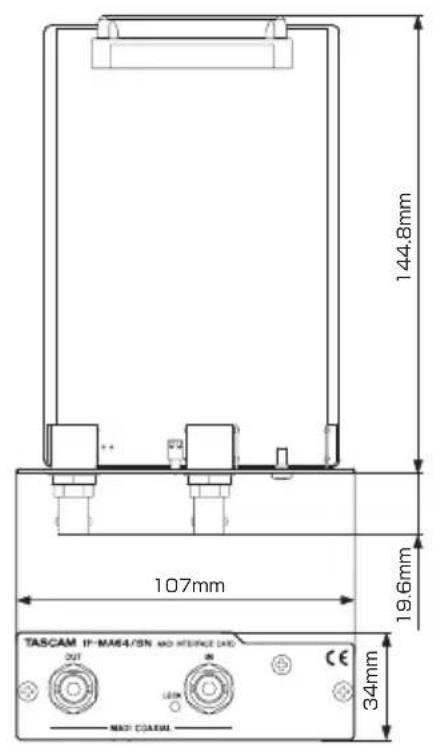
IF-MA64/BN
- Illustrations in this manual might differ in part from the actual product.
- Specifications and external appearance might be changed without notification to improve the product.
MODE D'EMPLOI
PRECAUTIONS DE SECURITE IMPORTANTES
166 g (IF-MA64/EX), 137 g (IF-MA64/BN)
Dessins avec cotes
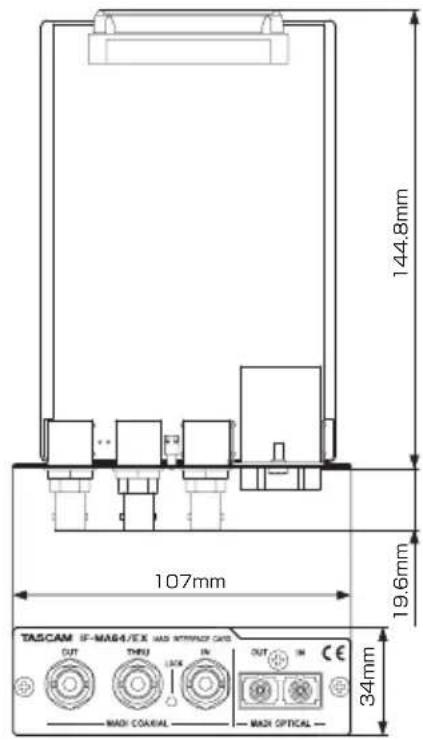
IF-MA64/EX
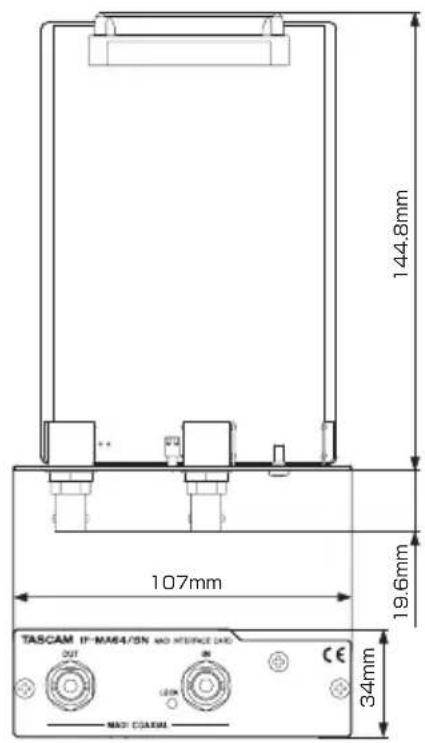
IF-MA64/BN
Alternatively, you can use the following instructions to run the web server.
① Conector MADI COAXIAL OUT
Conector MADI COAXIAL THRU (solo IF-MA64/EX)
③ Conector MADI COAXIAL IN
⑤ Conector MADI OPTICAL OUT (solo IF-MA64/EX)
⑦ Conector MADI OPTICAL IN (solo IF-MA64/EX)
Obnector MADI COAXIAL IN
Conector: BNC coaxial 75 Ω
Formato: AES10-2008
Nector MADI OPTICAL IN (solo IF-MA64/EX)
Conector: FDDI duplex SC (diámetro de filamento 62.5 m/ diámetro de blindaje 125 m o cable de fibra optica multimodal 50 m / 125 m)
Formato: AES10-2008
nector MADI COAXIAL OUT
Conector: BNC coaxial 75 Ω
Formato: AES10-2008
Obnector MADI COAXIAL THRU (solo IF-MA64/EX)
Conector: BNC coaxial 75Ω
Formato: AES10-2008
Obnector MADI OPTICAL OUT (solo IF-MA64/EX)
Conector: FDDI duplex SC (diámetro de filamento 62.5 m/ diámetro de blindaje 125 m o cable de fibra optica multimodal 50 m / 125 m)
Formato: AES10-2008
Otros
■mensiones
166 g (IF-MA64/EX), 137 g (IF-MA64/BN)
This device complies with Part 15 of the FCC Rules. Operation is subject to the following two conditions: (1) this device may not cause harmful interference, and (2) this device must accept any interference received, including interference that may cause undesired operation.
INFORMATION TO THE USER
This equipment has been tested and found to comply with the limits for a Class A digital device, pursuant to Part 15 of the FCC Rules. These limits are designed to provide reasonable protection against harmful interference when the equipment is operated in a commercial environment. This equipment generates, uses, and can radiate radio frequency energy and, if not installed and used in accordance with the instruction manual, may cause harmful interference to radio communications.
Operation of this equipment in a residential area is likely to cause harmful interference in which case the user will be required to correct the interference at his own expense.
CAUTION
Changes or modifications to this equipment not expressly approved by TEAC CORPORATION for compliance could void the user's authority to operate this equipment.
THIS CLASS A DIGITAL APPARATUS COMPLIES WITH CANADIAN ICES-003.CET
Bnnette MADI COAXIAL THRU (solo IF-MA64/EX)
Bnnette MADI OPTICAL OUT (solo IF-MA64/EX)
166 g (IF-MA64/EX), 137 g (IF-MA64/BN)
Dimensioni
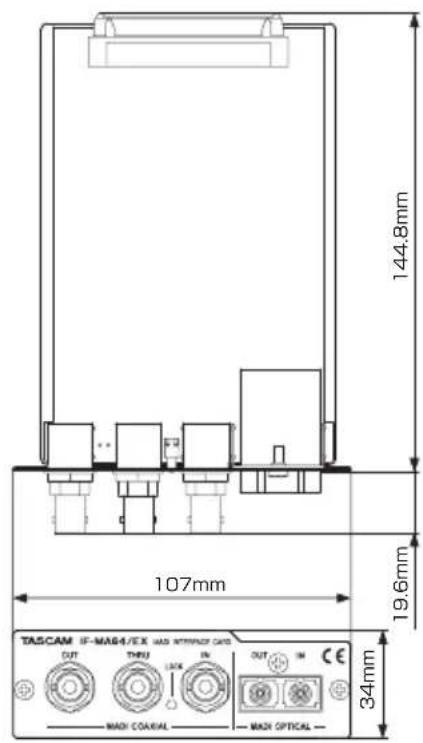
IF-MA64/EX
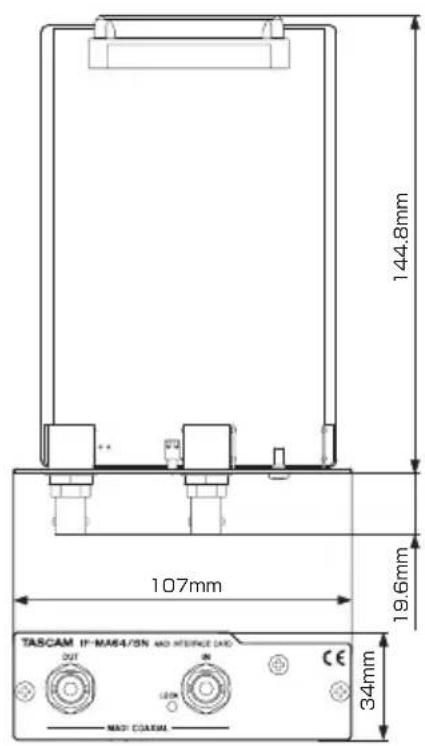
IF-MA64/BN
This warranty gives you specific legal rights and you may also have other rights which vary from state to state. This warranty is only valid within the country the unit was originally purchased.
WHAT IS AND IS NOT COVERED
Except as specified below, this warranty covers all defects in materials and workmanship in this product. The following are not covered by the warranty:
- Damage to or deterioration of the external cabinet.
- Damages resulting from accident, misuse, abuse or neglect.
- Damage resulting from failure to perform basic daily maintenance and/or calibration or otherwise resulting from failure to follow instructions contained in your owner's manual.
- Damage occurring during shipment of the product. (Claims must be presented to the carrier)
- Damage resulting from repair or attempted repair by anyone other than TEAC or an authorized TASCAM service station.
- Damage resulting from causes other than product defects, including lack of technical skill, competence, or experience of the user.
- Damage to any unit which has been altered or on which the serial number has been defaced, modified or is missing.
WHO MAY ENFORCE THE WARRANTY
This warranty may be enforced only by the original purchaser.
LENGTH OF WARRANTY
All parts except heads and disk drives are warranted for one (1) year from the date of original purchase. Heads and disk drives are warranted to ninety (90) days from date of original purchase. Labor is warranted for ninety (90) days from date of original purchase.
WHAT WE WILL PAY FOR
We will pay all labor and material expenses for items covered by the warranty. Payment of shipping charges is discussed in the next section of this warranty.
HOW YOU CAN GET WARRANTY SERVICE
Your unit must be serviced by an authorized TASCAM service station in the United States. (This warranty is not enforceable outside the U.S.) If you are unable to locate an authorized
TASCAM service station in your area, please contact us. We either will refer you to an authorized service station or instruct you to return the unit to the factory. Whenever warranty service is required, you must present a copy of the original dated sales receipt from an Authorized TASCAM Dealer.
You must pay any shipping charges if it is necessary to ship the product to service. However, if the necessary repairs are covered by the warranty, we will pay return surface shipping charges to any destination within the United States.
LIMITATION OF IMPLIED WARRANTYIS
Any implied warranties, INCLUDING WARRANTYS OF MERCHANTABILITY AND FITNESS FOR A PARTICULAR PURPOSE, are limited in duration to the length of this warranty.
EXCLUSION OF DAMAGES
TEAC's liability for any defective product is limited to repair or replacement of the product, at TEAC's option. TEAC shall not be liable for:
-
Damages based upon inconvenience, loss of use of the product, loss of time interrupted operation or commercial loss; or
-
Any other damages, whether incidental, consequential or otherwise.
Some states do not allow limitations on how long an implied warranty lasts and/or do not allow the exclusion or limitation of incidental or consequential damages, so the above limitations and exclusions may not apply to you.
To locate an Authorized Service Center in Your Area
CALL 1-800-447-8322
< Europe >
This product is subject to the legal warranty regulations of the country of purchase. In case of a defect or a problem, please contact the dealer where you bought the product.
This warranty gives you specific legal rights, and you may also have other rights that vary by country, state or province.
If you have a warranty claim or request, please contact the dealer where you bought the product.
If you require repair services for your TASCAM equipment, please contact the dealer where the product was purchased from or the TASCAM Distributor in your country. A list of TASCAM Distributors can be found on our website at: http://teac-global.com/
WARRANTY/保証書
Model/型名
Owner's name/ 有名前
IF-MA64/EX / IF-MA64/BN

Address/乙住所
Dealer's name/ 贩壳店
TASCAM
http://teac-global.com/