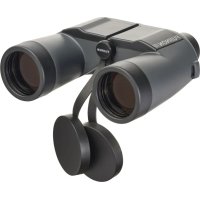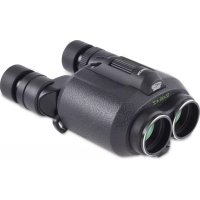
TechnoStabi - Binoculars Fujinon - Free user manual and instructions
Find the device manual for free TechnoStabi Fujinon in PDF.



User questions about TechnoStabi Fujinon
0 question about this device. Answer the ones you know or ask your own.
Ask a new question about this device
Download the instructions for your Binoculars in PDF format for free! Find your manual TechnoStabi - Fujinon and take your electronic device back in hand. On this page are published all the documents necessary for the use of your device. TechnoStabi by Fujinon.
USER MANUAL TechnoStabi Fujinon
Read these instructions thoroughly before using the product and then them store in a safe place.
① Check that the package contains all the supplied accessories listed below.
2 Read "For Your Safety" to ensure safe operation.
③ Read this manual thoroughly before using the product.
Supplied Accessories
- Strap
- Lens cap
- Eyepiece cap
AA alkaline batteries (× 4) - Cleaning cloth
Case - Instruction manual
Specifications
| Magnification | 14× |
| Effective objective lens diameter | 40 mm (1.6 in.) |
| Actual field of view 4° | |
| Field of view at 1000 m (1094 yds) | 70 m (230 ft) |
| Minimum focusing distance | 5 m (16 ft) |
| Exit pupil diameter 2.86 mm | (0.11 in.) |
| Eye relief 13 mm (0.5 in.) | |
| Image stabilization ± 6° | |
| Diopter adjustment (right eyepiece) | ± 2 m-1 |
| Eye width adjustment 60–70 mm | mm (2.4 – 2.8 in.) |
| Dimensions (L × W × H) 187 × 165 × 81 mm (7.4 × 6.5 × 3.2 in.) | |
| Weight (binoculars only, excluding batteries) | 1300 g (2.9 lb.) |
| Battery endurance1 | AA alkaline batteries: Approximately 18 hours AA NiMH batteries: Approximately 22 hours |
| Operating temperature2 | -10 °C to +55 °C (14 to 131 °F) |
| Filter diameter | ø 48 mm (1.9 in.) |
1 In-house measurements. Battery endurance varies with the conditions of use.
2 Observe any battery operating temperature restrictions listed by the manufacturer.

CAUTION
Improvements may result in unannounced changes to product specifications.
For Your Safety
- Although this product is designed with safety in mind, we ask that you read and observe the following safety precautions.
- Keep this manual where it will be seen by all who use the product.

WARNING
Failure to observe warnings could result in death or serious injury.

CAUTIONS
Failure to observe cautions could result in injury or property damage.

WARNING
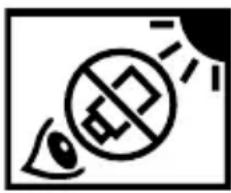
- Never use the binoculars to look at the sun. Doing so could cause blindness.
- Should you notice anything unusual about the product, such as overheating, smoke, or a burning smell, turn it off and remove the batteries immediately. Failure to observe this precaution could result in fire or burns. When removing the batteries, take care to avoid burns.
- Remove the batteries immediately should water, metal, or other foreign matter find their way inside the product. Failure to observe this precaution could result in fire or in the product overheating.
- Do not use the product in the presence of flammable gases or liquids such as gasoline, benzine (petroleum ether), or paint thinner. Failure to observe this precaution could result in explosions, fire, or burns.
- Do not drop or strike the product or expose it to flame or heat. Failure to observe this precaution could cause the casing to rupture.
- Do not place the product on unstable surfaces. Injury could result if the product tips or falls.
-
Do not use the product while walking. Failure to observe this precaution could result in collisions, falls, or injury.
-
Operators could pinch their fingers when adjusting eye width. Observe caution when allowing small children to use the product.
- Do not leave the product in direct sunlight. Failure to observe this precaution could result in fire.
- Deterioration of the rubber eyecups as the result of prolonged use could cause infl ammation of the skin. Consult a physician should experience symptoms that could be the result of infl ammation.
- Consult a physician immediately should a child swallow a cap.
- Plastic bags and wrapping are a suffocation hazard. Keep them out of reach of children.
- Under no circumstances should you attempt to disassemble the product. Failure to observe this precaution could result in injury. Disassembling the product also voids the warranty.
WARNINGs (Batteries)
-
To prevent serious accidents caused by the batteries overheating or leaking, never:
-
Use batteries if the casing is damaged or peeling
- Use batteries if the nominal voltage cannot be determined or exceeds 1.5V
- Mix batteries of different types and makes
-
Mix fresh and used batteries
-
AA lithium, manganese, and NiCad batteries are not supported, and to ensure customer safety should not be used.
- Do not use the product if the batteries are not inserted with the "+" and "-" contacts in the correct orientation.
- Do not short or disassemble batteries or expose them to heat or flame. Failure to observe this precaution could result in the batteries rupturing or cause fire or injury.
- Refer to the documentation provided by the manufacturer for information on the use and storage of, and operating conditions for, AA alkaline and NiMH batteries.
CAUTIONS
- In the event of product malfunction, do not attempt to repair the product yourself. Consult the original retailer.
- Should the product break open as the result of a fall or other accident, do not touch the exposed parts. Failure to observe this precaution could result in injury.
- Do not touch the interior of the battery chamber with metal objects. Failure to observe this precaution could result in injury or product malfunction.
- Remove the batteries if the product will not be used for an extended period. After removing the batteries, reinsert the battery chamber to protect the product during storage.
- Keep the product out of reach of children. Failure to observe this precaution could result in injury.
- Do not place the product under blankets, cloths, cushions, or the like. The buildup of heat could deform the casing or cause fire.
- Should liquid from the batteries come into contact with skin or clothing, fl ush the affected area with water. Should battery liquid enter the eyes or mouth, flush the affected area with water and consult a physician immediately.
For Customers in the U. S. A.
Tested To Comply With FCC Standards FOR HOME OR OFFICE USE

FCC Statement: This device complies with Part 15 of the FCC Rules. Ope is subject to the following two conditions: (1) This device may not cause harmful interference, and (2) this device must accept any interference received, including interference that may cause undesired operation.
CAUTION: This equipment has been tested and found to comply with the limits for a Class B digital device, pursuant to Part 15 of the FCC Rules. These limits are designed to provide reasonable protection against harmful interference in a residential installation. This equipment generates, uses, and can radiate radio frequency energy and, if not installed and used in accordance with the instructions, may cause harmful interference to radio communications. However, there is no guarantee that interference will not occur in a particular installation. If this equipment does cause harmful interference to radio or television reception, which can be determined by turning the equipment off and on, the user is encouraged to try to correct the interference by one or more of the following measures:
- Beorient or relocate the receiving antenna.
- Increase the separation between the equipment and receiver.
- Connect the equipment into an outlet on a circuit different from that to which the receiver is connected.
- Consult the dealer or an experienced radio/TV technician for help.
For Customers in Canada
CANICES-3 (B)/NMB-3(B)
CAUTION: This Class B digital apparatus complies with Canadian ICES-003.
Disposal of Electrical and Electronic Equipment in Private Households
In the European Union, Norway, Iceland and Liechtenstein: This symbol on the product, or in the manual and in the warranty, and/or on its packaging indicates that this product shall not be treated as household waste. Instead it should be taken to an applicable collection point for the recycling of electrical and electronic equipment.
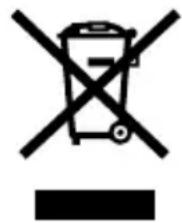
By ensuring this product is disposed of correctly, you will help prevent potential negative consequences to the environment and human health, which could otherwise be caused by inappropriate waste handling of this product.
This symbol on the batteries or accumulators indicates that those batteries shall not be treated as household waste.

If your equipment contains easy removable batteries or accumulators please dispose these separately according to your local requirements.
The recycling of materials will help to conserve natural resources. For more detailed information about recycling this product, please contact your local city office, your household waste disposal service or the shop where you purchased the product.
In Countries Outside the European Union, Norway, Iceland and Liechtenstein: If you wish to discard this product, including the batteries or accumulators, please contact your local authorities and ask for the correct way of disposal.
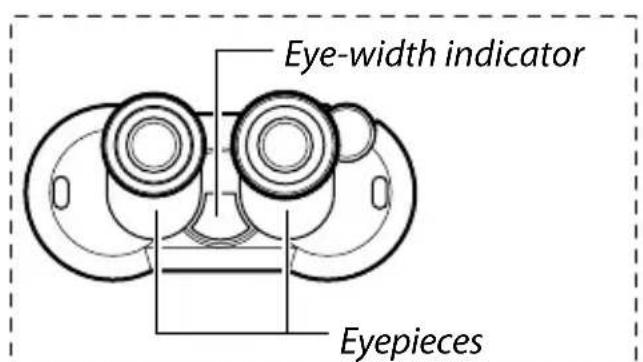
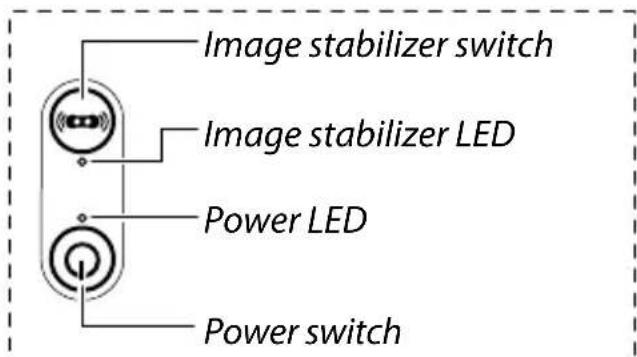
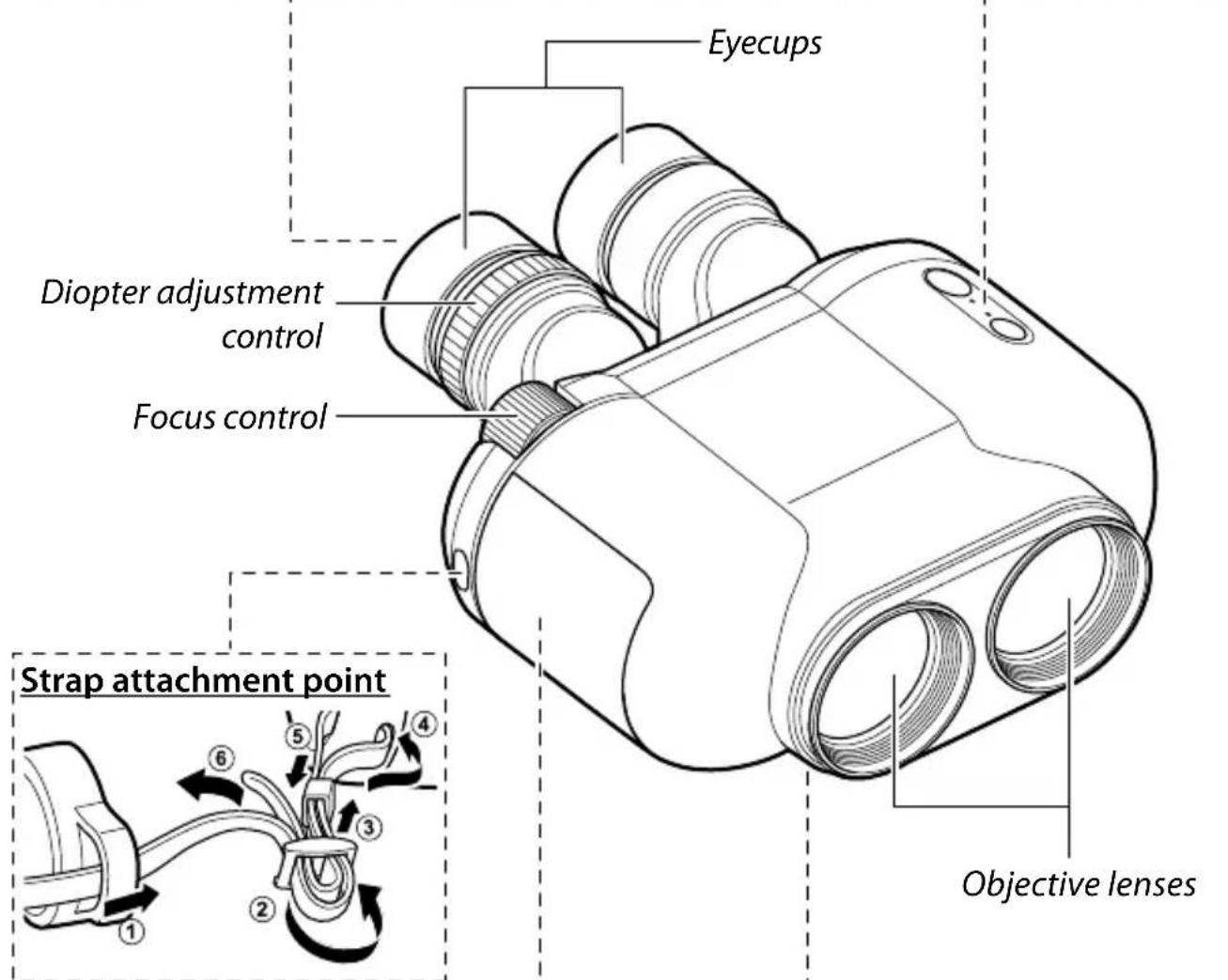
Parts of the Binoculars
Using the Binoculars
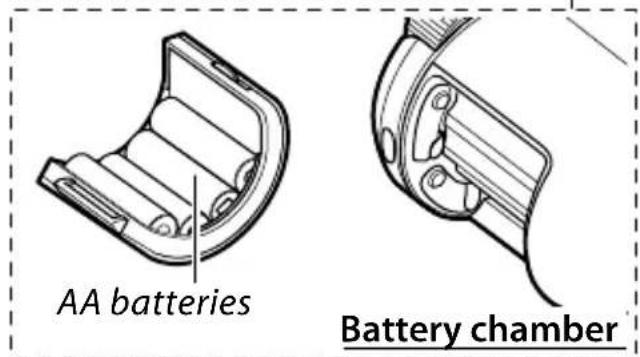
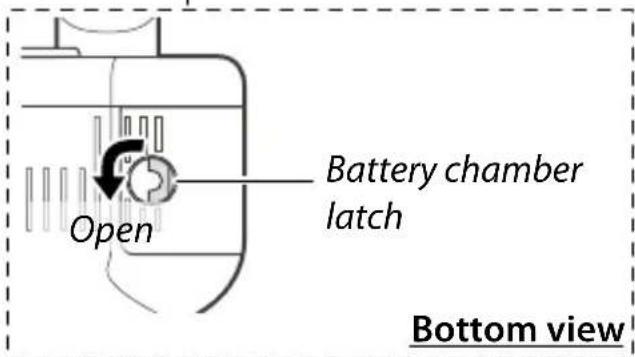
1 Rotate the battery-chamber latch to the left, remove the battery chamber, and load the batteries. Reinsert the battery chamber and latch it by rotating the latch to the right.
2 Adjust the eye height by rotating the eyecups. Retract the eyecups if you wear glasses and extend them if you do not.
3 Press the power switch. The system will start up and the power LED will light. If the power LED flashes, the batteries are low and must be replaced.
4 Press the image stabilizer switch. The image stabilizer will turn on and the image stabilizer LED will light.
5 With your eyes to the binoculars, adjust the eyepiece width until the views in the right and left eyepieces overlap in a single circle.
6 Looking through the left eyepiece with your left eye, rotate the focus control until your target is in focus. Then, looking through the right eyepiece with your right eye but without rotating the focus control, rotate the diopter adjustment control until your target is in focus. Finally, confirm that your target is still in focus when you look through the eyepiece with both eyes.
7 When you have finished using the binoculars, press the image stabilizer switch to deactivate the image stabilizer and then press the power switch to turn the product off.

CAUTION
If the LEDs flash alternately, a system error has occurred. Turn the product off, remove and replace the battery chamber, and turn the product on; if this does not resolve the issue, contact the original retailer.
Other Precautions for Use
- Although the product is water resistant, leaving water, dust, sand, or other foreign matter on the product could cause it to malfunction. To remove seawater or dirt, first check that the battery chamber is securely latched, then rinse the product under a slow trickle of water from a tap or wash it gently in a basin of fresh water. After washing the product, remove any water droplets with a soft, dry cloth, and then leave the product to dry in a shady, well-ventilated area.
- Do not open the battery chamber in locations that are extremely dusty or damp, as moisture and dust on the battery contacts could interrupt the supply of power. Do not exchange batteries in such locations, as this could cause product malfunction.
- Confirm that the battery chamber is in the correct position and securely latched.
- Avoid sudden changes in temperature, as these could cause condensation on the lens or prism. Particular caution is required when taking the product from cold to warm environments.
Europe, Middle East, & Africa (EMEA)
FUJIFILM Optical Devices Europe GmbH
Fujistraße 1, 47533 Kleve, Germany
TEL: +49-2821-7115-255 FAX: +49-2821-7115-200
https://www.fujifilm.eu/eu/products/optical-devices/
FUJIFILM UK Ltd.
Optical Devices Division
88 Bushy Road (c/o Racetech), Raynes Park, Merton, London SW20 0JH, UK
TEL: +44(0)208-944-4246
https://www.fujifilm.eu/uk/
FUJIFILM France S.A.S.
Optical Devices Division
5 avenue des CHAUMES - CS 40760 MONTIGNY
78066 SAINT QUENTIN EN YVELINES
CEDEX-FRANCE
TEL: +33(0)1 30 14 34 56 FAX: +33(0)1 34 60 57 45
Optical Devices Division
1st Magistralnyi tupik, 5A Business Centre
"Magistral Plaza" 4th floor 123290, Moscow, Russia
TEL: +7-495-797-3512 FAX: +7-495-797-3513
https://www.fujifilm.eu/ru/productky/opticheskie-astroistva/
FUJIFILM Middle East (FZE)
Optical Devices Division
Jafza view 19 building, 23rd floor, Downtown Jebel Ali
P.O Box: 17212, Dubai, UAE TEL: +971-4-887-8722
http://www.fujifilm-mea.com/products/optical-devices/
China
FUJIFILM (China) Investment Co., Ltd.
Optical Devices Division (Headquarters)
28F, ONE LUJIAZUI, No.68 YinCheng Zhong Road,
Pudong New Area, Shanghai 200120, China
TEL: +86-21-5010-6000 FAX: +86-21-5010-6750
http://www.fujifilm.com.cn/products/opticalDevices/
FUJIFILM (China) Investment Co., Ltd.
Optical Devices Division (Beijing Branch)
Room 506, LianMei Building, No.1 Building
Compound 17, GuangQu Road, Chaoyang District,
Beijing, China
FUJIFILM (China) Investment Co., Ltd.
Suzhou Service Center
M-2F, 138 Changgjiang Road, New District,
Suzhou, Jiangsu Province 215011, China
TEL: +86-512-68251693
FUJIFILM Hong Kong Ltd.
Optical Devices Division
Unit 1001-1007, 10/F., Metroplaza Tower 2, 233
Hing Fong Road, Kwai Fong, N.T., Hong Kong
TEL: +852-2376-0998 FAX: +852-2724-1118
http://www.fujifilm.com.hk/
North & Latin America
FUJIFILM North America Corporation
Optical Devices Division
10 High Point Drive Wayne, New Jersey, 07470-7434
United States
TEL:+1-973-633-5600 FAX:+1-973-633-5216
http://www.fujifilmusa.com/products/optical Devices/
Asia Pacific
FUJIFILM Asia Pacific Pte. Ltd.
Optical Devices Division
10 New Industrial Road Fujifi Im Building
Singapore 536201
TEL: +65-6380-5318 FAX: +65-6383-5666
FUJIFILM Australia Pty Ltd.
Optical Devices Division
114 Old Pittwater Rd Brookvale NSW 2100 Australia
TEL: +61-2-9466-2600 FAX: +61-2-9466-2854
http://www.fujifilm.com.au/products/opticalDevices/
Japan (World Wide Headquarters)
FUJIFILM Corporation
Optical Device & Electoric Imaging Product Division
1-324 Uetake, Kita-Ku, Saitama City, Saitama
331-9624, Japan
TEL: +81-48-668-2143
FAX: +81-48-667-7924
https://fujifilm.jp/personal/binocular/
MEMO
MEMO
MEMO
FUJIFILM
富士菲尔夫株式会社