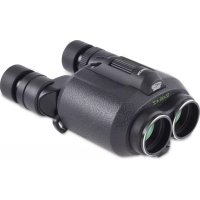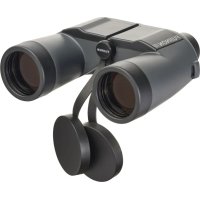
Mariner 7x50 WPXL - Binoculars Fujinon - Free user manual and instructions
Find the device manual for free Mariner 7x50 WPXL Fujinon in PDF.



User questions about Mariner 7x50 WPXL Fujinon
0 question about this device. Answer the ones you know or ask your own.
Ask a new question about this device
Download the instructions for your Binoculars in PDF format for free! Find your manual Mariner 7x50 WPXL - Fujinon and take your electronic device back in hand. On this page are published all the documents necessary for the use of your device. Mariner 7x50 WPXL by Fujinon.
USER MANUAL Mariner 7x50 WPXL Fujinon
Read these instructions thoroughly before using the product and then store these in a safe place.
natural_image
Simple line drawing of a light bulb with an eye and rays, no text or symbols present.natural_image
Illustration of hands using binoculars to interact with a camera (no text or symbols present)natural_image
Illustration of hands holding binoculars with a circular button, showing rotational motion (no text or symbols)三脚の取り付け方
$$ 2 7 0 = \text {西} $$
$$ 3 6 0 = \text { 北 } $$
スケールの読み方
距離を測るには
text_image
210° 240° 30° 210natural_image
Line drawing of a hand holding a mounted optical device with multiple lenses and a small component, no text or symbols present.電池の入れ方
natural_image
Line drawing of hands using a tool to move a coin with a curved arrow indicating rotation (no text or symbols)利用できる電池
- 型番: LR43 (2個)
手入れと保存
レンズ面の汚れ
① Check that the package contains all the supplied accessories listed below.
② Read "For Your Safety" to ensure safe operation.
③ Read this manual thoroughly before using the product.
Supplied Accessories
- Neck Strap • Eyepiece cap • Lens cap
- Cleaning cloth
- Case
- Instruction manual
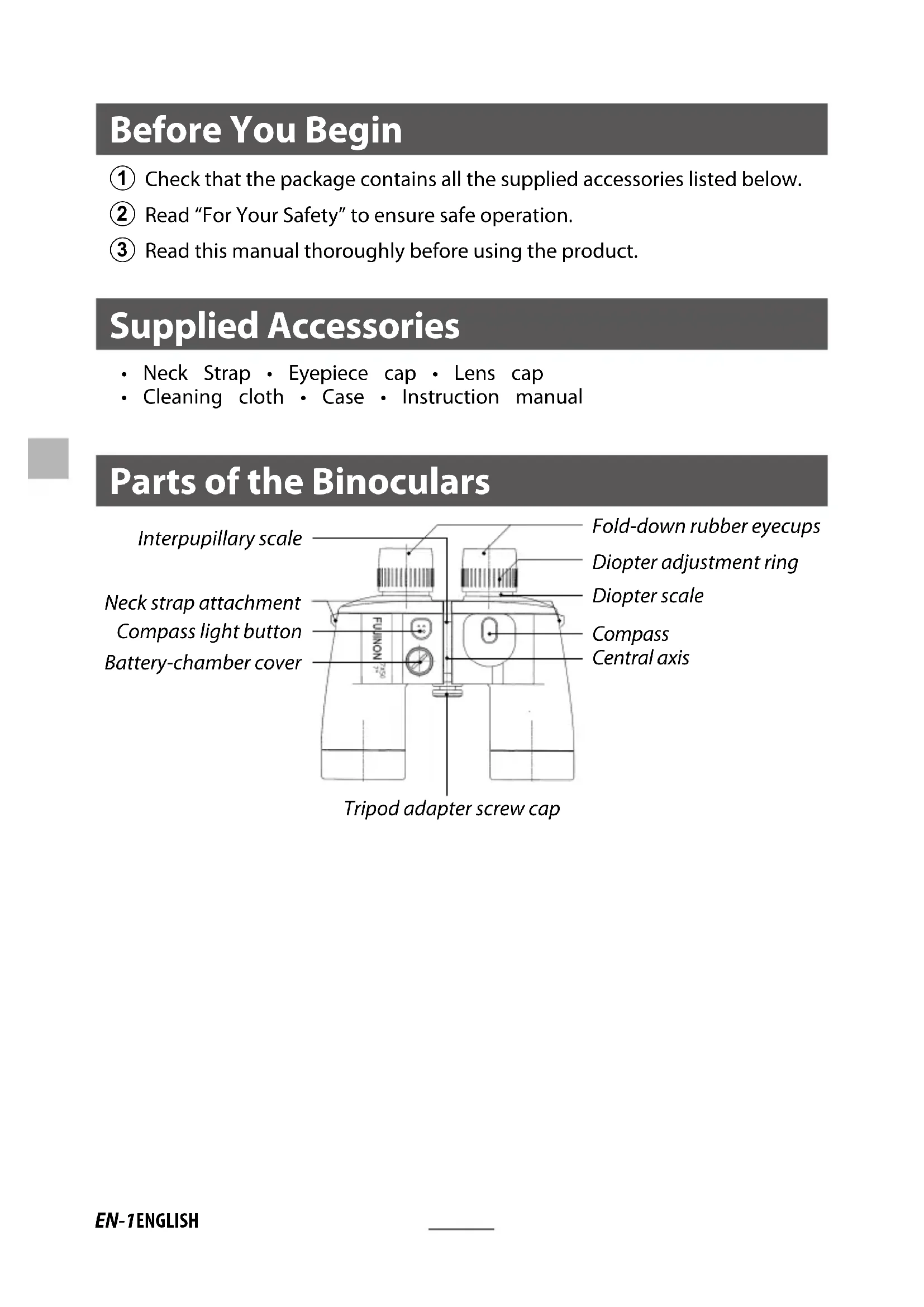
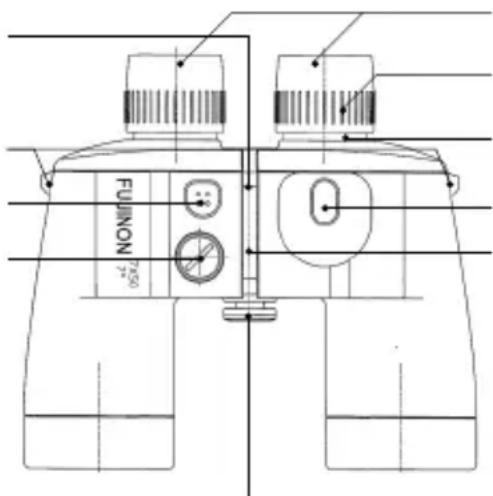
Parts of the Binoculars
Interpupillary scale
Neck strap attachment
Compass light button
Battery-chamber cover
text_image
FUJINON 7500Tripod adapter screw cap
Fold-down rubber eyecups
Diopter adjustment ring
Diopter scale
Compass
Central axis
Specifications
| Item\Model | 7X50 WP-XL | 7X50 WPC-XL(With Compas) |
| Magnifi cation 7X 7X | ||
| Objective lens diameter | 50 mm 50 mm | |
| Exit pupil 7.1 mm 7.1 mm | ||
| Relative brightness 50.4 | 50.4 | |
| Apparent fi eld of view 7°30' 7° | ||
| Field of view at 1000m | 131 m | 122.4 m |
| Maximum width | 201 mm | 201 mm |
| Minimum width | 183 mm | 183 mm |
| Height | 180 mm | 180 mm |
| Weight | 31 oz./885 g | 32 oz./910 g |
Improvements may result in unannounced changes to product specifications.
For Your Safety
- Although this product is designed with safety in mind, we ask that you read and observe the following safety precautions.
- Keep this manual where it will be seen by all who use the product.

WARNINGS
Failure to observe warnings could result in death or serious injury.

CAUTIONS
Failure to observe cautions could result in injury or property damage.

WARNINGS
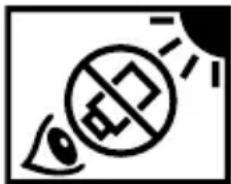
- Never use the binoculars to look at the sun. Doing so could cause blindness.
natural_image
Simple line drawing of an eye with a prohibition symbol and sun rays (no text or labels)- Should you notice anything unusual about the product, such as overheating, smoke, or a burning smell, turn it off and remove the batteries immediately. Failure to observe this precaution could result in fire or burns. When removing the batteries, take care to avoid burns.
- Remove the batteries immediately should water, metal, or other foreign matter find their way inside the product. Failure to observe this precaution could result in fire or in the product overheating.
- Do not use the product in the presence of fl ammable gases or liquids such as gasoline, benzine (petroleum ether), or paint thinner. Failure to observe this precaution could result in explosions, fi re, or burns.
- Do not drop or strike the product or expose it to flame or heat. Failure to observe this precaution could cause the casing to rupture.
- Do not place the product on unstable surfaces. Injury could result if the product tips or falls.
-
Do not use the product while walking. Failure to observe this precaution could result in collisions, falls, or injury.
-
Operators could pinch their fingers when adjusting eye width. Observe caution when allowing small children to use the product.
- Do not leave the product in direct sunlight. Failure to observe this precaution could result in fire.
- Deterioration of the rubber eyecups as the result of prolonged use could cause infl ammation of the skin. Consult a physician should experience symptoms that could be the result of infl ammation.
- Consult a physician immediately should a child swallow a cap.
- Plastic bags and wrapping are a suff ocation hazard. Keep them out of reach of children.
- Under no circumstances should you attempt to disassemble the product. Failure to observe this precaution could result in injury. Disassembling the product also voids the warranty.

WARNINGS (Batteries)
- To prevent serious accidents caused by the batteries overheating or leaking, never:
- Use batteries if the nominal voltage cannot be determined or exceeds 1.5 V
- Mix batteries of different types and makes
-
Mix fresh and used batteries
-
Do not use the product if the batteries are not inserted with the “+” and “−” contacts in the correct orientation.
- Do not short or disassemble batteries or expose them to heat or flame. Failure to observe this precaution could result in the batteries rupturing or cause fire or injury.
- Refer to the documentation provided by the manufacturer for information on the use and storage of, and operating conditions for, (LR43) batteries.

CAUTIONS
- In the event of product malfunction, do not attempt to repair the product yourself. Consult the original retailer.
- Should the product break open as the result of a fall or other accident, do not touch the exposed parts. Failure to observe this precaution could result in injury.
- Do not touch the interior of the battery chamber with metal objects. Failure to observe this precaution could result in injury or product malfunction.
- Remove the batteries if the product will not be used for an extended period. After removing the batteries, reinsert the battery cover to protect the product during storage.
- Keep the product out of reach of children. Failure to observe this precaution could result in injury.
- Do not place the product under blankets, cloths, cushions, or the like. The buildup of heat could deform the casing or cause fi re.
- Should liquid from the batteries come into contact with skin or clothing, fl ush the aff ected area with water. Should battery liquid enter the eyes or mouth, flush the affected area with water and consult a physician immediately.
For Customers in the U. S. A.
Tested To Comply With FCC Standards FOR HOME OR OFFICE USE

FCC Statement: This device complies with Part 15 of the FCC Rules. Ope is subject to the following two conditions: (1) This device may not cause harmful interference, and (2) this device must accept any interference received, including interference that may cause undesired operation.
CAUTION: This equipment has been tested and found to comply with the limits for a Class B digital device, pursuant to Part 15 of the FCC Rules. These limits are designed to provide reasonable protection against harmful interference in a residential installation. This equipment generates, uses, and can radiate radio frequency energy and, if not installed and used in accordance with the instructions, may cause harmful interference to radio communications. However, there is no guarantee that interference will not occur in a particular installation. If this equipment does cause harmful interference to radio or television reception, which can be determined by turning the equipment off and on, the user is encouraged to try to correct the interference by one or more of the following measures:
- Reorient or relocate the receiving antenna.
- Increase the separation between the equipment and receiver.
- Connect the equipment into an outlet on a circuit different from that to which the receiver is connected.
- Consult the dealer or an experienced radio/TV technician for help.
For Customers in Canada
CAN ICES-3 (B)/NMB-3(B)
CAUTION: This Class B digital apparatus complies with Canadian ICES-003.
Disposal of Electrical and Electronic Equipment in Private Households
In the European Union, Norway, Iceland and Liechtenstein: This symbol on the product, or in the manual and in the warranty, and/or on its packaging indicates that this product shall not be treated as household waste. Instead it should be taken to an applicable collection point for the recycling of electrical and electronic equipment.
text_image
Prohibition sign with crossed-out trash bin and prohibition symbolBy ensuring this product is disposed of correctly, you will help prevent potential negative consequences to the environment and human health, which could otherwise be caused by inappropriate waste handling of this product.
This symbol on the batteries or accumulators indicates that those batteries shall not be treated as household waste.
If your equipment contains easy removable batteries or accumulators please dispose these separately according to your local requirements.
The recycling of materials will help to conserve natural resources. For more detailed information about recycling this product, please contact your local city office, your household waste disposal service or the shop where you purchased the product.
In Countries Outside the European Union, Norway, Iceland and Liechtenstein: If you wish to discard this product, including the batteries or accumulators, please contact your local authorities and ask for the correct way of disposal.
Using the Binoculars
Adjusting the Interpupillary Distance
① Look through the binoculars with the rubber eyecups resting lightly against both eyes. If you wear glasses, fold the eyecups back toward the binoculars.
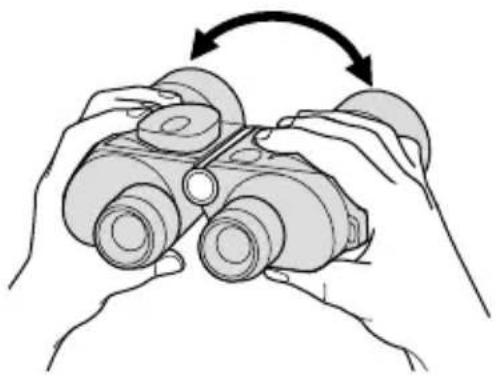
② Adjust the interpupillary distance (the distance between the two eyepieces) by slowly moving the barrels together or apart around the central hinge until you see a single, perfectly round image.
natural_image
Illustration of hands using binoculars to interact with a camera (no text or symbols present)Noting the distance shown on the interpupillary scale lets you quickly restore the binoculars to the desired position the next time you use them.
Note: Never use excessive force when adjusting the interpupillary distance.
Adjusting Focus
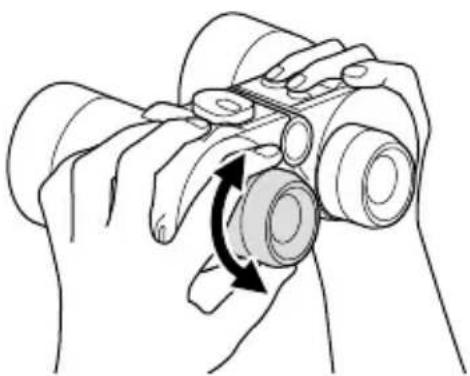
① If you are far- or near-sighted in one or both eyes, look through the binoculars with each eye and adjust diopter until distant objects are in clear focus.
② If you are neither far- nor near-sighted in either eye, distant objects should appear in focus when the diopter adjustment rings for both eyepieces are set to 0.
natural_image
Illustration of hands holding binoculars with a circular arrow indicating rotation (no text or symbols)③ Adjust focus for each eye separately as the working distance (the distance to the object being observed) changes.
Attaching Tripod
① Before mounting the binoculars on a tripod, remove the cap from the tripod attachment screw by rotating it to the left.
② Attach a tripod adapter to the tripod attachment screw hole and mount the assembly on the tripod.
Using the Compass
(7X50 WPC-XL only)
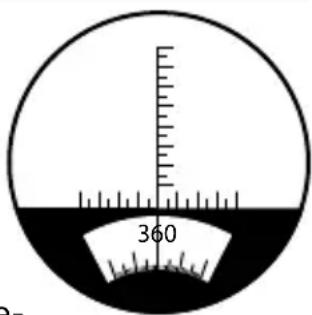
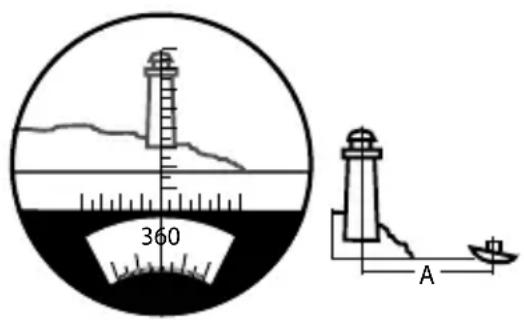
The left side of the visual fi eld for the compass-equipped 7X50 WPC-XL incorporates a scale like that shown in the il- lustration. The upper portion is used to determine the dis- tance to or size of an object, while the bearing to the object is shown in the lower portion. The scale uses a unit known as a "mil", which is the angle between the ends of object one meter long viewed at a distance of 1000 meters. Each increment is equal to 5 mils.
text_image
360Direction
$$ 9 0 = e a s t $$
$$ 1 8 0 = \text { south } $$
$$ 2 7 0 = \text { w e s t } $$
$$ 3 6 0 = n o r t h $$
Reading the Scale
Measuring Distance
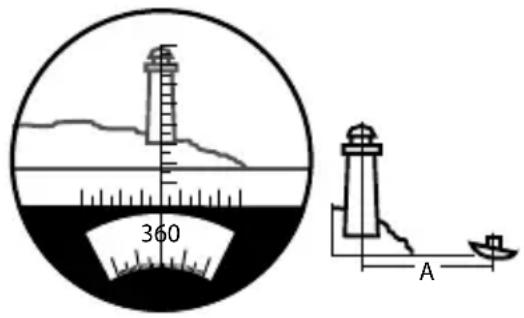
In order to measure distances, it is necessary to know the size of the object.
$$ \text { Distance } = \frac {\text { Object size }}{\text { Scale reading }} \times 1 0 0 0 $$
Example:
Object size: 10 m
Scale reading: 50 mils
Distance A = 10 ÷ 50 × 1000 = 200 m
text_image
360 ACalculating Object Size
In order to measure size, it is necessary to know the distance to the object.
$$ \text { Object size } = \frac {\text { Distance } \times \text { Scale reading }}{1 0 0 0} $$
Example:
Distance: 200 m
Scale reading: 50 mils
Object size = 200 × 50 ÷ 1000 = 10 m
Calculating Object Direction
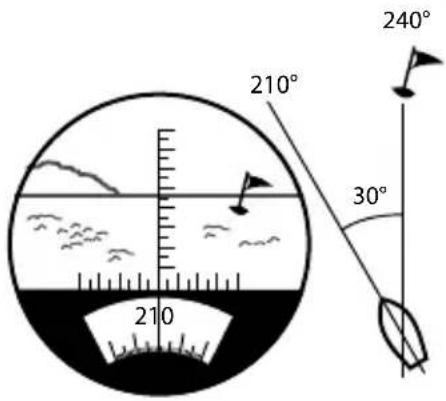
First, read the number displayed when looking in the direction of the bow, then the number when looking in the direction of the object; this gives the direction of travel in relation to the object.
(Keep the binoculars horizontal and adjust the object to the vertical scale).
text_image
210° 240° 30° 210Example:
When looking in direction of bow: 210^
When looking at buoy: 240°
Direction of travel: 30° in relation to the buoy
Note: The binoculars may fail to measure the heading correctly while tilted.
Using the Built-in Compass Light
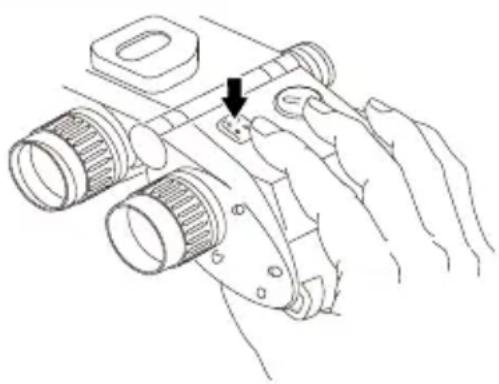
The 7X50 WPC-XL features a compass light. When using the compass at before dawn, at dusk, or after dark, press the button as shown by the arrow in the illustration. The compass light will turn on so that you can see the compass while the button is pressed and turn off when you release the button. If the light is too dim or does not turn on when you press the button, replace the battery. If the light still does not turn on, consult your retailer, as this may indicate a loose connection.
natural_image
Line drawing of a hand holding a camera lens with a handle, showing mechanical components and a small inset detail (no text or symbols)Replacing the Battery
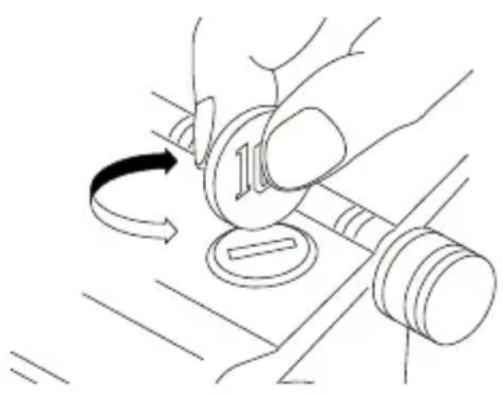
① Open the battery-chamber cover by rotating it counterclockwise using a coin or the like.
② Insert two (LR43) batteries with the "+" sides facing the battery-chamber cover.
③ After inserting the battery, replace the battery-chamber cover and rotate it clockwise to latch it.
natural_image
Line drawing of hands using a tool to adjust a coin with a curved arrow indicating rotation (no text or symbols)- Battery type: LR43 (×2)
The following battery is compatible with it.
186, D186A, RW84, V12GA, L1142, GP186, AG12, G12A
Maintenance and Storage
Cleaning the Lenses
Dirt and fingerprints on the surface of the lenses diminish visibility considerably, and, in the event that they are “baked on” by sunlight and left for days without treatment, can become permanent. When the lenses are soiled, remove dust with a soft, dry brush, and wipe dirt and fingerprints off with a small amount of alcohol soaked into a soft, clean cloth. Wipe using a circular motion, from the center outwards.
Cleaning the Body
If the outer surface of the binocular becomes soiled or wet, wipe with a dry cloth, be sure the binoculars are completely dry before replacing them in the case. When the binoculars are used in a salt-air/ocean environment, they should be rinsed in fresh water before being stowed away.
Storage
The binocular can be used in temperatures between -20 °C and +50 °C. However, never leave the binocular in particularly hot or cold places, such as cars, summer or winter. When not using the binocular for any considerable length of time, store it in a cool dry place.
Other Precautions for Use
Do not store in a location with drastic temperature irregularities.
- Store in a well ventilated location, avoiding high temperature & high moisture locations.
- Do not store near an electronic device that heats up. It may cause the product to fail.
- Remove dirt and dust from the lens with a low powered air compression device, and wipe gently with a cleaning cloth.
natural_image
Simple line drawing of a light bulb with a cross symbol and an eye, no text or symbols present.text_image
Prohibition sign with crossed-out trash bin and no text or symbolsnatural_image
Illustration of hands using binoculars to adjust the screen (no text or symbols present)natural_image
Illustration of hands using binoculars to interact with a camera lens (no text or symbols)$$ 2 7 0 = W e s t $$
$$ 3 6 0 = \text { Nord } $$
Ablesung der Skalen
text_image
210° 240° 30° 210Beispiel:
natural_image
Line drawing of a hand holding a mounted optical device with two lenses and a handle, no text or symbols present.natural_image
Line drawing of hands using a tool to adjust a coin with a curved arrow indicating rotation (no text or symbols)- Batterietyp : LR43 (×2)
natural_image
Simple line drawing of a light bulb with an eye and rays, no text or symbols present.text_image
Prohibition sign with crossed-out trash bin and no text or symbolsnatural_image
Illustration of hands using binoculars to adjust a device (no text or symbols present)natural_image
Line drawing of hands holding binoculars with a circular arrow indicating rotation (no text or symbols)$$ 2 7 0 = O U E S T $$
$$ 3 6 0 = N O R D $$
Distance calculée A = 10 ÷ 50 × 1000 = 200 m
text_image
360 Atext_image
210° 240° 30° 210natural_image
Line drawing of a hand holding a handheld device with two lenses and a handle, no text or symbols presentnatural_image
Line drawing of hands using a tool to adjust a coin with a curved arrow indicating rotation (no text or symbols)natural_image
Simple line drawing of a light bulb with a cross symbol and an eye, no text or symbols present.PARA USO DOMÉSTICO O EN OFICINAS

text_image
Prohibition sign with crossed-out trash bin and no text or symbolsnatural_image
Illustration of hands using binoculars to interact with a camera (no text or symbols present)natural_image
Illustration of hands holding binoculars with a circular button, showing rotational motion (no text or symbols)text_image
210° 240° 30° 210Ejemplo:
natural_image
Line drawing of a hand holding a camera lens with a small inset component, no text or symbols presentnatural_image
Line drawing of hands using a tool to adjust a coin with a curved arrow indicating rotation (no text or symbols)natural_image
Simple line drawing of a light bulb with a cross symbol and an eye, no text or symbols present.natural_image
Illustration of hands using binoculars to interact with a camera (no text or symbols present)natural_image
Illustration of hands using binoculars to interact with a camera lens (no text or symbols present)的变化,分别调整每只眼
安装三脚架
text_image
210° 210° 30° 240° 210使用内置指南针灯
natural_image
Line drawing of a hand holding a camera lens with a small inset component, no text or symbols present更换电池
natural_image
Line drawing of hands using a tool to rotate a coin into a gavel (no text or symbols)- 电池类型:LR43 (2节)
以下电池与其兼容。
186, D186A, RW84, V12GA, L1142, GP186, AG12, G12A
维护和存放
清洁镜片
Fujifi Im House, Whitbread Way, Bedford, Bedfordshire, MK42 0ZE, United Kingdom
EU Importer:
FUJIFILM Electronic Imaging Europe GmbH
Fujistrasse 1 47533 Kleve, Germany