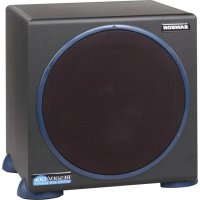
Resolv 120a - Subwoofer SAMSON - Free user manual and instructions
Find the device manual for free Resolv 120a SAMSON in PDF.



| Product type | Active subwoofer |
| Brand | Samson |
| Model | Resolv 120a |
| Speaker | 254 mm (10") long excursion (25 mm) woofer with Butyl Copolymer surround |
| Amplifier power | 120 Watts |
| Frequency response | 40 Hz - 180 Hz (variable) |
| Active filter | Linkwitz-Riley 12 dB/octave, adjustable from 40 to 180 Hz |
| Phase inverter | Yes, 180° switch |
| Auto standby | Yes, after 10 minutes without signal |
| Mute function | Yes, via jack for external footswitch |
| Line inputs | Stereo RCA connectors (unbalanced) |
| Line outputs (high-pass) | Stereo RCA connectors |
| Speaker inputs | Spring-loaded binding posts (5-way) for amplified signal |
| Speaker outputs (high-pass) | Spring-loaded binding posts for passive satellites |
| Volume control | Rear panel potentiometer |
| LED indicator | Power/Protect: green (on), red (protect) |
| Construction | MDF particle board, black vinyl finish |
| Feet | Non-slip rubber |
| Protective grille | Yes, cloth and PVC |
| Power supply | Mains (power cord included) |
| Dimensions (H x W x D) | 432 mm x 356 mm x 413 mm |
| Weight | 17.75 kg |
| Safety | Clipping and overload protection (Protect mode) |
| Warranty | 3 years (extended) |
Frequently Asked Questions - Resolv 120a SAMSON
User questions about Resolv 120a SAMSON
0 question about this device. Answer the ones you know or ask your own.
Ask a new question about this device
Download the instructions for your Subwoofer in PDF format for free! Find your manual Resolv 120a - SAMSON and take your electronic device back in hand. On this page are published all the documents necessary for the use of your device. Resolv 120a by SAMSON.
USER MANUAL Resolv 120a SAMSON
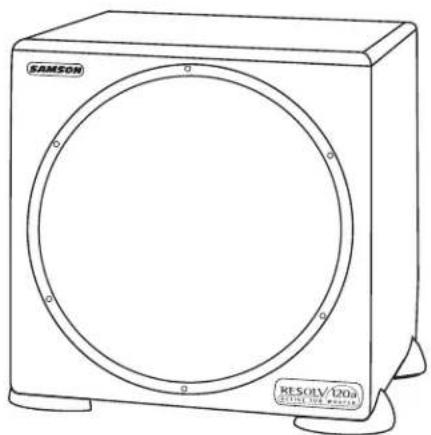
10" 120 WATT ACTIVE SUBWOOFER
Owners Manual
Safety Instructions/Consignes de sécurité/Sicherheitsvorkehrungen
WARNING
DO NOT EXPOSE THIS EQUIPMENT
TO RAIN OR MOISTURE
AVIS
RISQUE DE CHOC ELECTRONIQUE
NE PAS OUVRIR
CAUTION
FOR CONTINUED PROTECTION AGAINST RISK
PLACE ONLY WITH SAME TYPE
ATTENTION
UTILISER UN FUSIBLE DE
RECHANGE DE MÉME TYPE
CAUTION
RISK OF ELECTRIC SHOCK
DO NOT OPEN

WARNING: To reduce the risk of fire or electric shock, do not expose this unit to rain or moisture. To reduce the hazard of electrical shock, do not remove cover or back. No user serviceable parts inside. Please refer all servicing to qualified personnel. The lightning flash with an arrowhead symbol within an equilateral triangle, is intended to alert the user to the presence of uninsulated "dangerous voltage" within the products enclosure that may be of sufficient magnitude to constitute a risk of electric shock to persons. The exclamation point within an equilateral triangle is intended to alert the user to the presence of important operating and maintenance (servicing) instructions in the literature accompanying the product.
Important Safety Instructions
- Please read all instructions before operating the unit.
- Keep these instructions for future reference.
- Please heed all safety warnings.
- Follow manufacturers instructions.
- Do not use this unit near water or moisture.
- Clean only with a damp cloth.
- Do not block any of the ventilation openings. Install in accordance with the manufacturers instructions.
- Do not install near any heat sources such as radiators, heat registers, stoves, or other apparatus (including amplifiers) that produce heat.
- Do not defeat the safety purpose of the polarized or grounding-type plug. A polarized plug has two blades with one wider than the other. A grounding type plug has two blades and a third grounding prong. The wide blade or third prong is provided for your safety. When the provided plug does not fit your outlet, consult an electrician for replacement of the obsolete outlet.
- Protect the power cord from being walked on and pinched particularly at plugs, convenience receptacles and at the point at which they exit from the unit.
- Unplug this unit during lightning storms or when unused for long periods of time.
- Refer all servicing to qualified personnel. Servicing is required when the unit has been damaged in any way, such as power supply cord or plug damage, or if liquid has been spilled or objects have fallen into the unit, the unit has been exposed to rain or moisture, does not operate normally, or has been dropped.
Printed November, 2005 v5.3
Phone: 1-800-3-SAMSON (1-800-372-6766)
Fax: 516-364-3888
www.samsontech.com
Contents
Introduction 6
RESOLV 120a Features
RESOLV 120a Layout
Front View Layout
Rear Panel Layout
Setting up the RESOLV 120a 1
Operating the RESOLV 120a 1
RESOLV 120a Control Panel 1
Control Functions and Indicators 1
The Ins and The Outs 1
Connecting the RESOLV 120a 1
Mono Sub With Passive Satellites Using Speaker Inputs 1
Mono Sub With Passive Satellites Using Line Inputs 1
Mono Sub With Active Satellites 1
Stereo Sub With Passive Satellites 1
Using the RESOLV 120a with the Samson DMS80 Monitor System 1
Using The DMS80's SUB OUT 1
Using The DMS80's LINE OUTs 1
RESOLV 120a Connections 1
Specifications
Table des matieres
Thank you for purchasing the Samson RESOLV 120a Reference Subwoofer. Taking care of the low end in any near-field monitor or multi-media system, a powerful 120 watt low frequency amplifier drives a heavy-duty 10^ transducer, reproducing tones between 40 - 180Hz . The RESOLV 120a has a built-in active crossover with a phase switch, an auto sleep mode, and a convenient mute switch jack allowing the user to easily switch on and off the subwoofer on the fly. The RESOLV 120a's low frequency driver is a 10^ , 25mm excursion transducer with a Butyl surround providing extended range and tight low frequency response. The RESOLV 120a is a perfect add-on to your Resolv 65, Resolv 65a, for your Samson DMS80 monitor system, or for any near field monitor system where extended low end is desired.
In these pages, you'll find a detailed description of the features of the RESOLV 120a subwoofer, as well as a guided tour through its control panel, step-by-step instructions for its setup and use, and full specifications. You'll also find a warranty card enclosed—please don't forget to fill it out and mail it in so that you can receive online technical support and so we can send you updated information about these and other Samson products in the future.
With proper care and adequate air circulation, your RESOLV 120a will operate trouble free for many years. We recommend you record your serial number in the space provided below for future reference.
Serial number:
Date of purchase:
Should your unit ever require servicing, a Return Authorization number (RA) must be obtained before shipping your unit to Samson. Without this number, the unit will not be accepted. Please call Samson at 1-800-3SAMSON (1-800-372-6766) for a Return Authorization number prior to shipping your unit. Please retain the original packing materials and if possible, return the unit in the original carton and packing materials.
RESOLV 120a Features
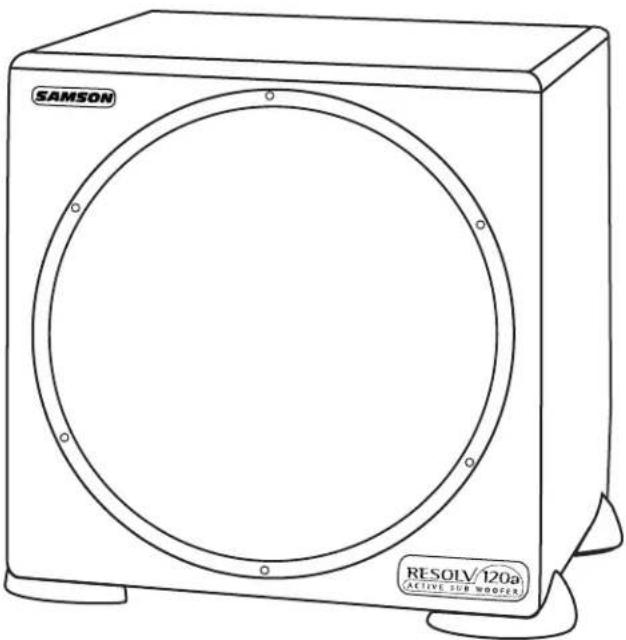
The Samson RESOLV 120a reference subwoofer compliments any nearfeild or multi-media monitor system. Here are some of its main features:
- Heavy-duty, 10^ Long Excursion (25mm) Transducer With Butyl Surround
120 Watt Power Amplifier - Tuned Port Enclosure
High Pass Outputs for Satellite Speakers
Variable Crossover 40 - 180 Hz
Mute Switch Jack
Phase Switch - Line Inputs and Outputs on RCA jacks
- Speaker Terminal Inputs and Outputs
- Auto Sleep Switch
Volume Control - Black Satin Finish
- Three-year extended warranty
RESOLV 120a Layout
Front View Layout
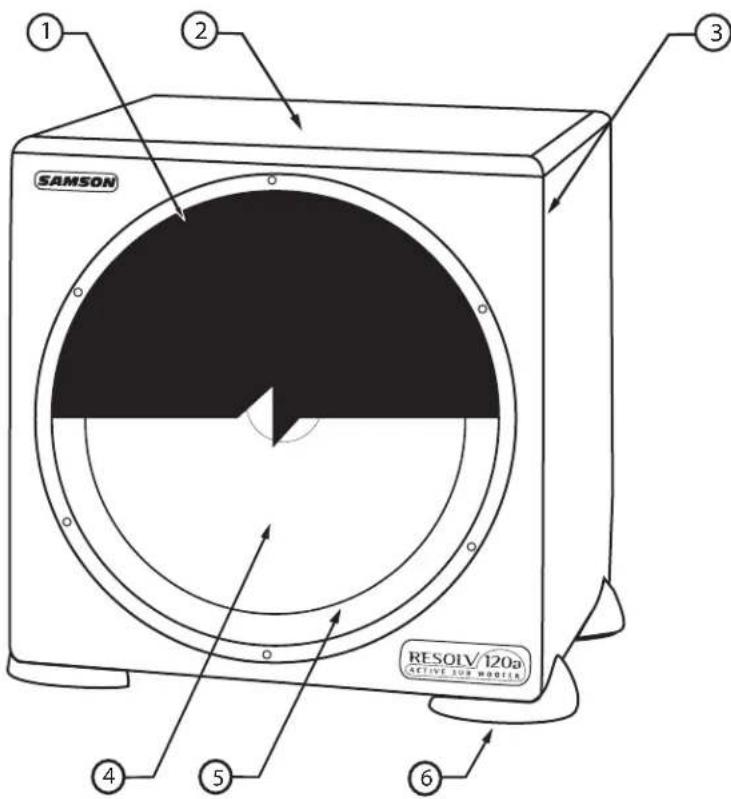
1 GRILL SCREEN - Tough cloth and PVC frame construction provides durable and stylish protection for the speaker.
2 ENCLOSURE - Rigid MDF Construction.
3 FINISH -Sleek black oak vinyl finish.
4 TRANSDUCER - Heavy Duty 10, long excursion (25mm) extended range low frequency transducer.
5 BUTYL SURROUND - Provides maximum excursion while maintaining tight bass response.
6 NON-SKID FEET - Large rubber feet keep enclosure in place even at high sound pressure levels.
7 TUNED PORT - Quiet port design offering linear extended low frequency response. (Rear of unit.)
RESOLV 120a Layout
Rear Panel Layout
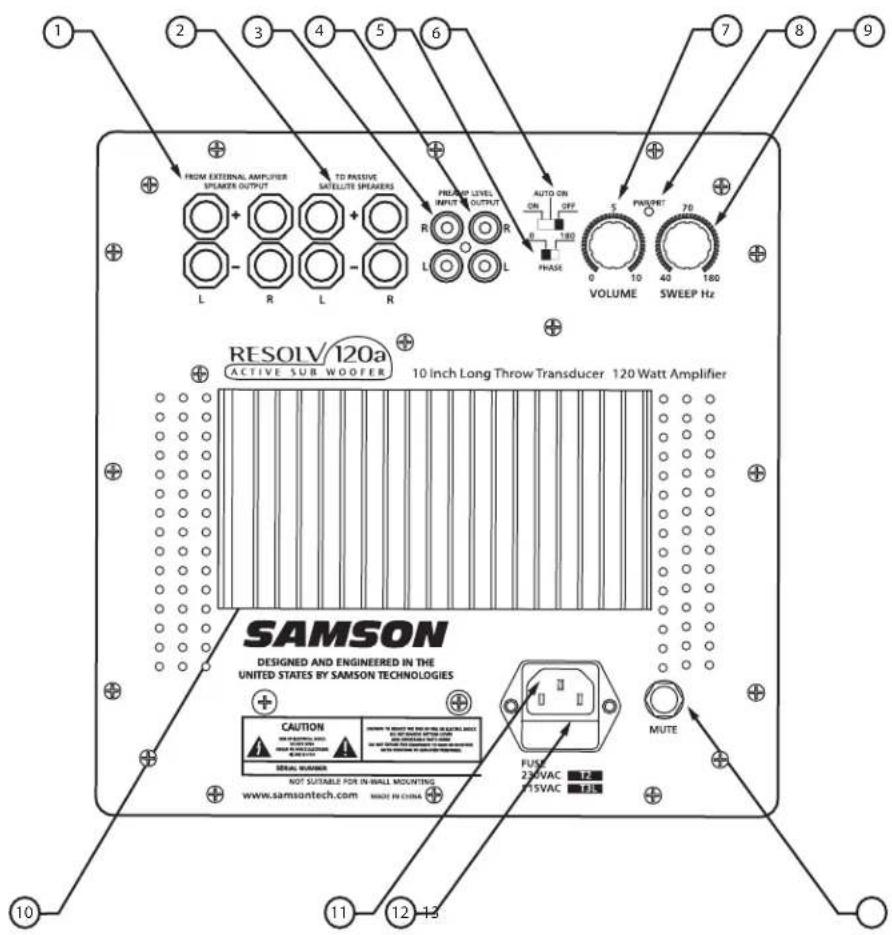
1 SPEAKER OUTPUT (INPUT)- Accepts full range signals from power amplifier.
2 SATELITE SPEAKERS (OUTPUT)-Sends full range signals to satellite speakers.
3 PREAMP LEVEL INPUTS - Accepts Line Level input signals from mixer.
4 PREAMP LEVEL OUTPUTS- Sends Low Level Output signal.
5 PHASE SWITCH - Allows for 180 degrees out-of-phase operation.
6 AUTO SLEEP SWITCH - When activated, Sleep Mode conserves power by automatically turning unit into standby mode after 10 minutes of non-use.
7 VOLUME - Controls the amount of output level.
8 POWER/PROTECT LED - Indicates power is on and if amplifier is in Protect mode.
9 SWEEP HZ - Adjusts the low frequency end range of the High-Pass outputs.
10 HEAT SINK - Provides cooling of internal power amplifier.
11 AC INLET - Connect the supplied standard IEC power cable here.
12 FUSE - User accessible fuse.
13 MUTE SWITCH- Used to connect an external switch to activate the internal mute function.
Setting up the RESOLV 120a
CONFIGURING YOUR SPEAKER SYSTEM
Before you start plugging in cables, you should take a minute and decide how you want to interface your new subwoofer. There are several ways you can interface the RESOLV 120a and two specific categories should be considered. First, Stereo vs Mono operation, and second, whether High (powered) or Low (line) level inputs and outputs will be used.
Common Sub Operation
In most cases, a common sub (mono) bass operation is desired. This is true for several reasons, but mostly because low frequencies produced by a subwoofer tend to be non-directional. Since low frequency sound waves take so much space to develop, you can't tell if the sub-bass is coming from the left or right side, unless of course you're in a very large room. Because of this phenomenon, just about all sub-bass material is mixed in mono.
Stereo Sub Operation
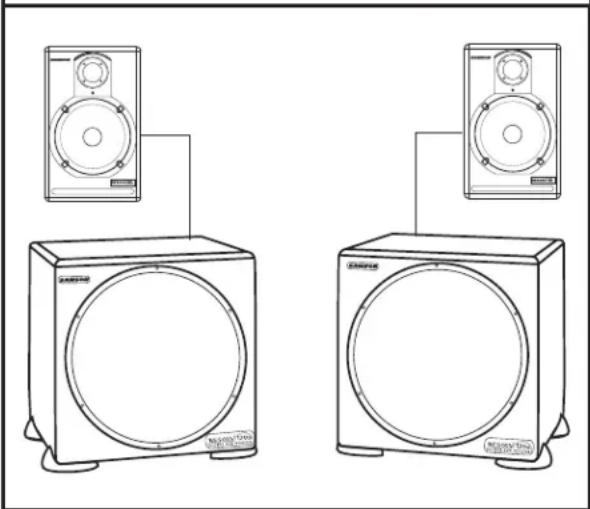
Two RESOLV 120a's can be used in stereo in larger control rooms for increased low end. In addition, two RESOLV 120a's can be used in stereo, even in smaller control rooms, to help minimize standing waves. By using two subwoofoers at lower power, you can achieve a more even response throughout the room.
Placing the RESOLV 120a
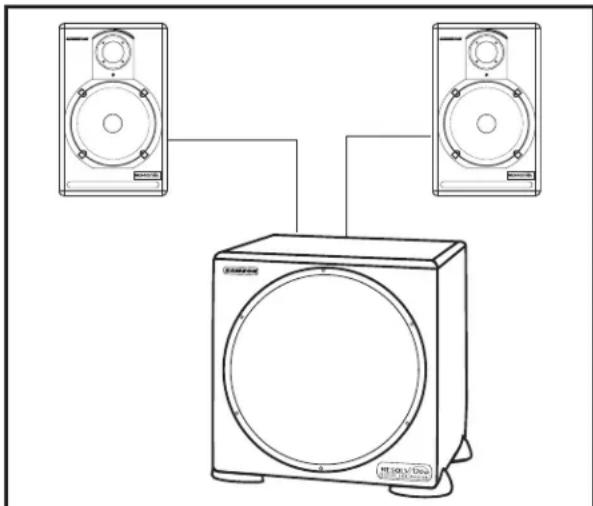
Because the low frequencies reproduced by the RESOLV 120a are non-directional, you can position the unit almost anywhere. It is however, a good idea to keep the RESOLV 120a away from corners. Ideally the RESOLV 120a should be positioned in the middle, and up close to, the wall you are facing in the mixing position.
Operating the RESOLV 120a
RESOLV 120a Control Panel
The RESOLV 120a's control panel provides the connections and user interface to the RESOLV 120a's internal electronic crossover and power amplifier section. The internal amplifier is a 120 Watt power amplifier capable of producing incredible bass output. The RESOLV 120a employs an electronic crossover that adjusts the high frequency cutoff point for the subwoofer, and also a high-pass output for your satellite speakers. You will achieve a tremendous benefit in sound quality by running your satellites speakers from the RESOLV 120a's High-Pass outputs. The reason for this is that when your satellite speaker receives the filtered output from the RESOLV 120a, it will no longer be looking at the frequencies below the crossover point. Let's say your satellite speaker has a natural frequency roll-off at 70Hz , and you are sending full range signal (as low as 20Hz ) to the satellite amplifier and speaker. Even though the speaker can only reproduce 70Hz and up, the amplifier is still outputting 20 - 70Hz , which is wasted power and ultimately turns into heat. By using the RESOLV 120a's High-Pass output, the satellite amplifier and speaker never see the frequencies lower than what's set by the Sweep frequency. This means you'll have more power dedicated to the frequencies you want the satellites to reproduce, resulting in a much cleaner sound with more headroom.
Operating the RESOLV 120a
Control Functions and Indicators
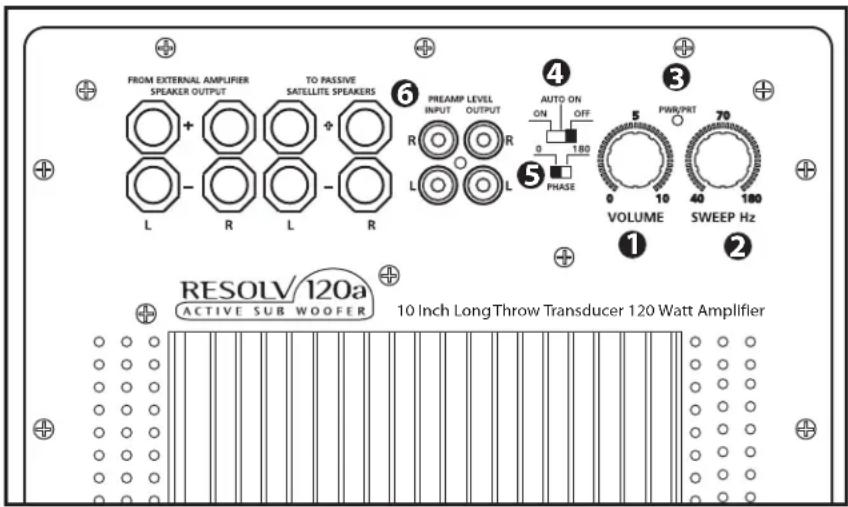
Volume Control
The volume control is used to adjust the amount of level to the RESOLV 120a subwoofer. In addition, the volume control will also control the output level of the high-pass outputs. Therefore, if you are using the RESOLV 120a without using the high-pass outputs (for example, when the RESOLV 120a is connected to an external crossover) the volume control adjusts the low frequency output of the RESOLV 120a. If you are using the RESOLV 120a's internal electronic crossover to run satellite speakers, then the volume control will adjust the overall system level.
Sweep Hz
The Sweep Hz control selects the upper range cutoff frequency of the RESOLV 120a's internal electronic crossover. The RESOLV 120a's crossover provides a 12dB per octave Linkwitz Riley filter curve. The Sweep adjusts the highest frequency that the RESOLV 120a will reproduce, and at the same time, the high-pass outputs track the selected crossover frequency as the lower limit frequency to the satellite speakers.
Power/Protect LED
The POWER/PROTECT LED is a dual color LED which has three states; OFF, GREEN AND RED. The following chart shows the POWER/PROTECT LED and the different operating conditions it represents.
AUTO ON SWITCH LED-OFF LED-GREEN LED-RED
ON Not Applicable RESOLV 120a - ON
PROTECT
AUTO
OFF
SLEEP
RESOLV 120a-OFF
RESOLV 120a - ON
Not Applicable
PROTECT
Not Applicable
If the RESOLV 120a receives a clipped signal for a long duration of time the unit will shut down and enter PROTECT mode. When the RESOLV 120a is in Protect, you will see the POWER /PROTECT LED is lit up in red. If this happens simply turn the unit off, wait a minute and then re-power up the unit. The LED should return to a green color again indicating normal operation. At this point, readjust the level you're sending to the RESOLV 120a so that the signal is not clipped and the unit will operate properly.
4 Auto On Switch
The AUTO ON switch is used to select the RESOLV 120a's power operating mode. When the switch is set to OFF the unit is not operational. When the AUTO ON switch is set to the ON position, the unit is always on. To engage the RESOLV 120a's SLEEP function, slide the AUTO ON switch to the AUTO position. In this mode, the RESOLV 120a enters a stand-by, or "SLEEP" condition after no input signal is sensed for a period of approximately 10 minutes. The RESOLV 120a will return to the normal operating mode as soon as it senses a signal present at the inputs.
5 Phase Switch
The RESOLV 120a can be switched for inverted phase operation by setting the PHASE SWITCH to the 180^ (degree) position. Experiment with this switch to provide the best blend between the subwoofer and satellite speakers.
Operating the RESOLV 120a
The Ins and The Outs
The RESOLV 120a features both line level and speaker level inputs and outputs so that connection with passive or active satellites is easy. The PREAMP LEVEL INPUTS simply pass the line level signal through to the PREAMP LEVEL OUTPUTS. You can use the line inputs and outputs to interface the RESOLV 120a with active monitors like the Resolve 65a's. The SPEAKER LEVEL INPUTS can be connected from the speaker outputs of a power amplifier, and then the signal is sent from the SPEAKER OUTPUTS, which are high-passed, to passive satellite speakers. The following section details both the line level and speaker level connections. The subsequent sections detail the set-ups for many typical configurations with both passive and active monitors. In addition, there is a detailed cable wiring diagram on page 16.
6 SPEAKER OUTPUT- The
SPEAKER OUTPUT connectors are made via 5-way binding posts.
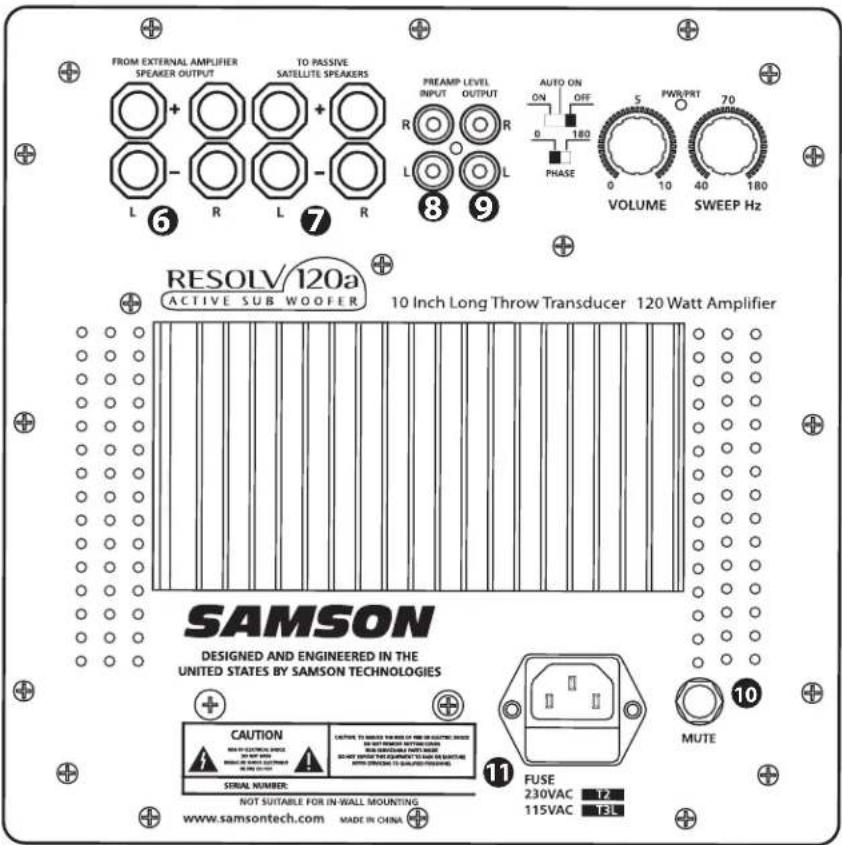
Use these connectors to connect from your external power amplifier speaker output. So, although the connector is labeled FROM EXTERNAL AMPLIFIER SPEAKER OUTPUT, when using this configuration the connection here is used as the input signal to the Resolv 120a.
SATELLITE SPEAKER - The SPEAKER OUTPUT connectors are 5-way binding posts. Connect here from your external power amplifier. Use these connectors to connect to any passive satellite monitors like the Resolv 65's.
INPUT (PREAMP LEVEL) - The left and right PREAMP INPUT connectors are made via standard RCA connectors. They can be used to connect from any line level device such as a mixer.
OUTPUT (PREAMP LEVEL) - The left and right PREAMP OUTPUT connectors are made via standard RCA connectors. They can be used to connect from any active studio monitors such as the Resolv 65a's.
10 MUTE JACK - The MUTE jack provides a switch closure to activate Resolv 120a's internal mute circuit. By using a standard footswitch that you can buy at your local music store or by making a cable with a switch, or even by wiring a switch permanently in the mix area, the Resolv120a can be easily turned on and off.
AC INLET - Connect the supplied IEC power cable here. Be sure that the power switch is in the off position when connecting the AC cord.
Connecting the RESOLV 120a
Mono Sub With Passive Satellites Using Speaker Inputs
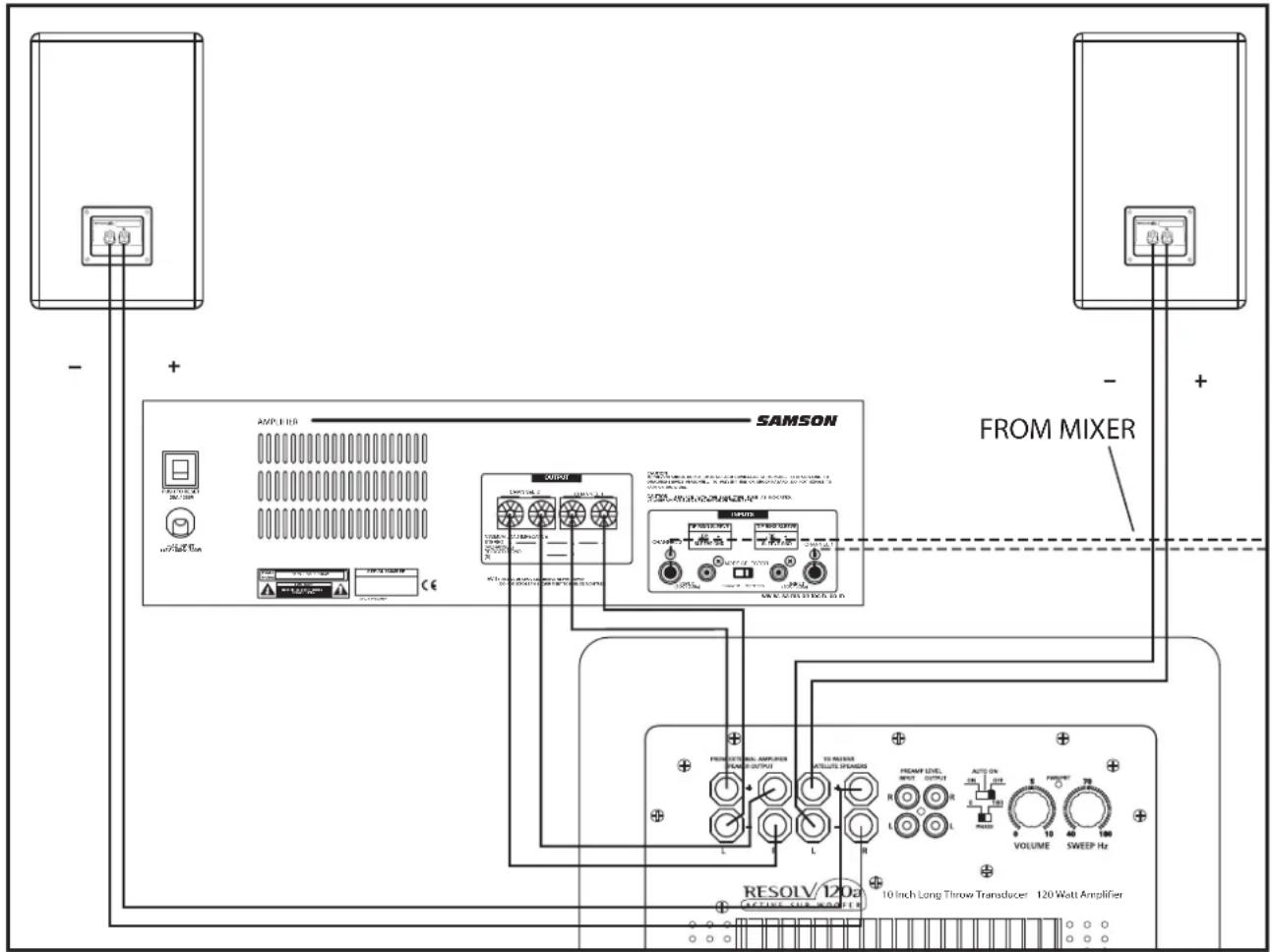
The RESOLV 120a is a perfect addition to any near-field monitoring system where enhanced low-end is desired. Below is a typical system set-up using the RESOLV 120a with a mixer, amplifier and a pair of passive satellite speakers. In this mode, the signal sent to the satellite is high-passed at 100Hz . The RESOLV 120a's inputs and outputs utilize industry standard speaker connectors. Follow the steps in the diagram below to set up your system.
- Lower your mixer's master outputs to all the way off.
- Connect the mixer's left output to the left input of your power amp and the mixer's right output to the right input of your power amp. Now, using standard speaker cable, connect the power amp's left speaker output to the RESOLV 120a's LEFT SPEAKER INPUT and the power amp's right speaker output to the RESOLV 120a's RIGHT SPEAKER INPUT. To complete the connections, run a cable from the RESOLV 120a's LEFT SPEAKER OUTPUT to the left satellite and from the RIGHT SPEAKER OUTPUT to the right satellite speaker.
- Now adjust the SWEEP control to the desired frequency. Consult your studio monitors owner's manual for a recom mended crossover point. You can also use your ears by adjusting the SWEEP control to the frequency that sounds good to you. A good place to start is about 70Hz .
- Now set the level of your power amp up to the normal operating level. Run an audio signal (like some music from a CD) through your mixer and raise the level to a comfortable listening level. Now slowly raise the RESOLV 120a Volume control and listen to the low frequency output. Adjust the RESOLV 120a to the level of low frequency output that you like. Now, when you raise and lower your mixer's output, the RESOLV 120a and satellites will track at the same relative volume.
Connecting the RESOLV 120a
Mono Sub With Passive Satellites Using Line Inputs
The RESOLV 120a can be operated using line level inputs and outputs. When using the RESOLV 120a at line level, the full range signal is maintained at the outputs. Below is a typical system set-up using the RESOLV 120a with a mixer, stereo power amp and a pair of passive satellite loudspeakers. The RESOLV 120a's inputs and outputs utilize industry standard RCA connectors. For a detailed wiring diagram, see the section "RESOLV 120a Connections" on page 17. Follow the steps in the diagram below to set up your system.
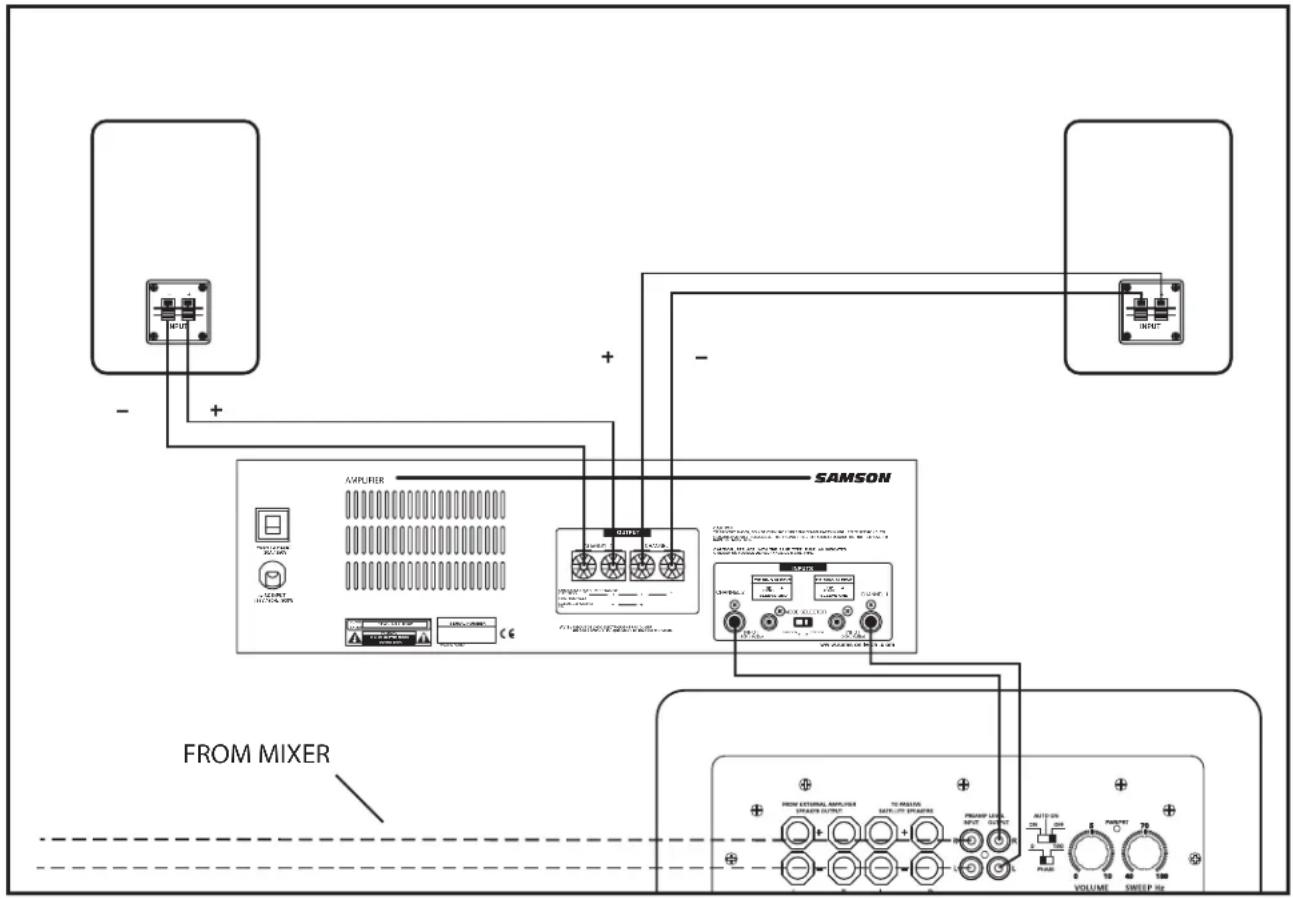
- Lower your mixer's master outputs to all the way off.
- Connect the mixer's left output to the RESOLV 120a's LEFT PREAMP LEVEL INPUT and the mixer's right output to the RESOLV 120a's RIGHT PREAMP LEVEL INPUT. Now connect the RESOLV 120a's LEFT PREAMP LEVEL OUTPUT to the left side input of the power amp, and the RESOLV 120a's RIGHT PREAMP LEVEL OUTPUT to the right side input of the power amp. Connect a speaker wire from the left output of your power amp to your left satellite, and then, connect a speaker wire from the right output of your power amp to your right satellite.
- Now adjust the SWEEP control to the desired frequency. Consult your studio monitors owner's manual for a recommended crossover point. You can also use your ears by adjusting the SWEEP control to the frequency that sounds good to you. A good place to start is about 70Hz .
- Now set the level of your power amp up to the normal operating level. Run an audio signal (like some music from a CD) through your mixer and raise the level to a comfortable listening level. Now slowly raise the RESOLV 120a volume control and listen to the low frequency output. Adjust the RESOLV 120a to the level of low frequency output that you like. Now, when you raise and lower your mixer's output, the RESOLV 120a and satellites will track at the same relative volume.
Connecting the RESOLV 120a
Mono Sub With Active Satellites
If you have active studio monitors, installation is easy through the RESOLV 120a's LINE LEVEL inputs and outputs. Below is a typical system set-up using the RESOLV 120a with a mixer and a pair of active satellite speakers. The RESOLV 120a's inputs and outputs utilize industry standard RCA connectors. For a detailed wiring diagram, see the section "RESOLV 120a Connections" on page 19. Follow the steps in the diagram below to set up your system.
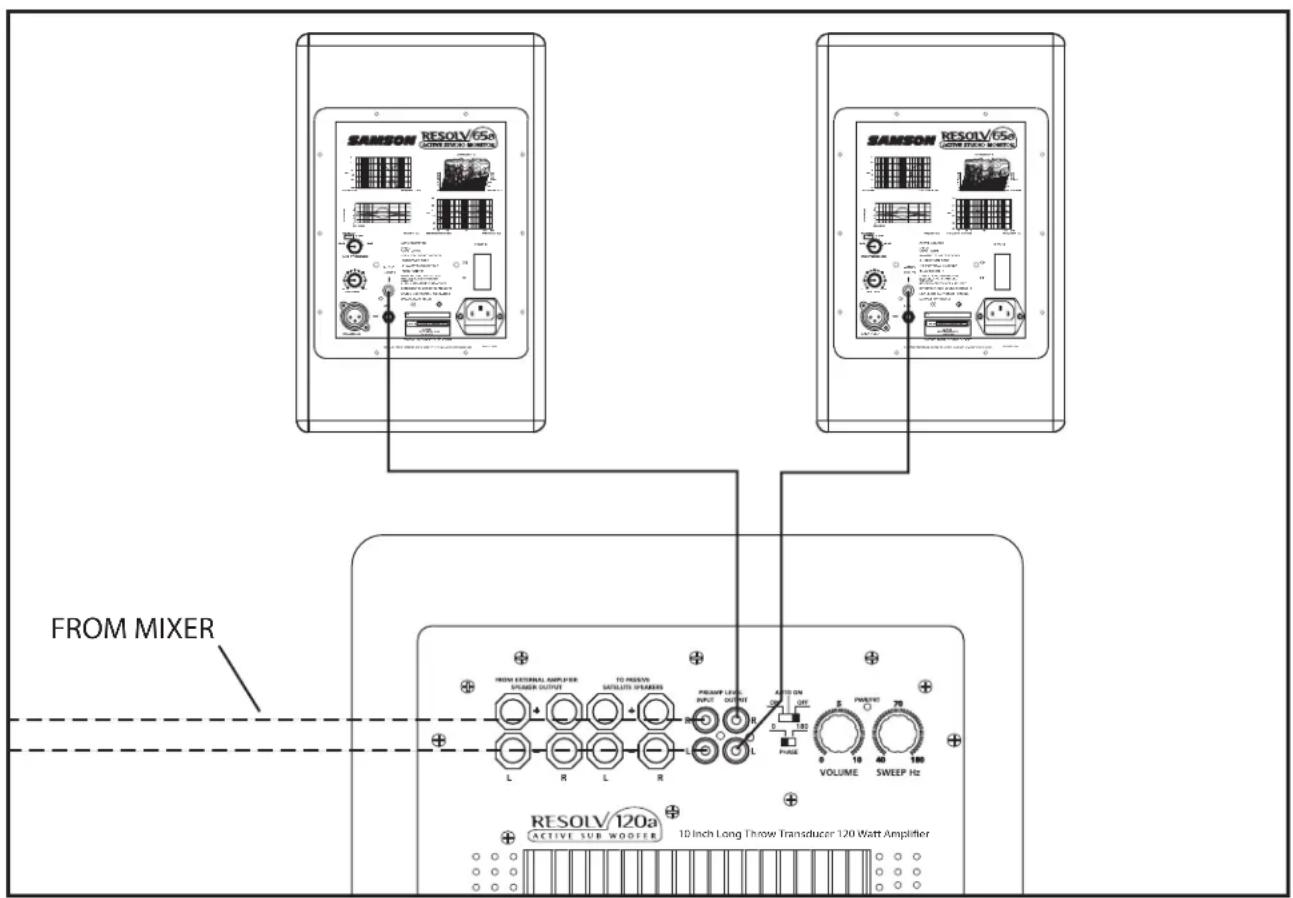
- Lower your mixer's master outputs to all the way off.
- Connect the mixer's left output to the RESOLV 120a's LEFT LINE INPUT and the mixer's right output to the RESOLV 120a's RIGHT LINE INPUT. Now connect the RESOLV 120a's LEFT LINE OUTPUT to the input of the left powered satellite, and the RESOLV 120a's RIGHT LINE OUTPUT to the input of the right powered satellite.
- Now adjust the SWEEP control to the desired frequency. Consult your studio monitors owner's manual for a recom mended crossover point. You can also use your ears by adjusting the SWEEP control to the frequency that sounds good to you. A good place to start is about 70Hz .
Now set the level of your active satellite speakers up to the normal operating level. Run an audio signal (like some music from a CD) through your mixer and raise the level to a comfortable listening level. Now slowly raise the RESOLV 120a VOLUME control and listen to the low frequency output. Adjust the RESOLV 120a to the level of low frequency output that you like. Now, when you raise and lower your mixer's output, the RESOLV 120a and satellites will track at the same relative volume.
Connecting the RESOLV 120a
Stereo Sub With Passive Satellites
Two RESOLV 120a's can be used with any pair of passive or active monitors. Below is a typical system set-up using two RESOLV 120a's with a mixer, stereo power amp and a pair of passive satellite loud speakers. The RESOLV 120a's inputs and outputs utilize industry standard RCA connectors. For a detailed wiring diagram, see the section "RESOLV 120a Connections" on page 19. Follow the steps in the diagram below to set up your system.
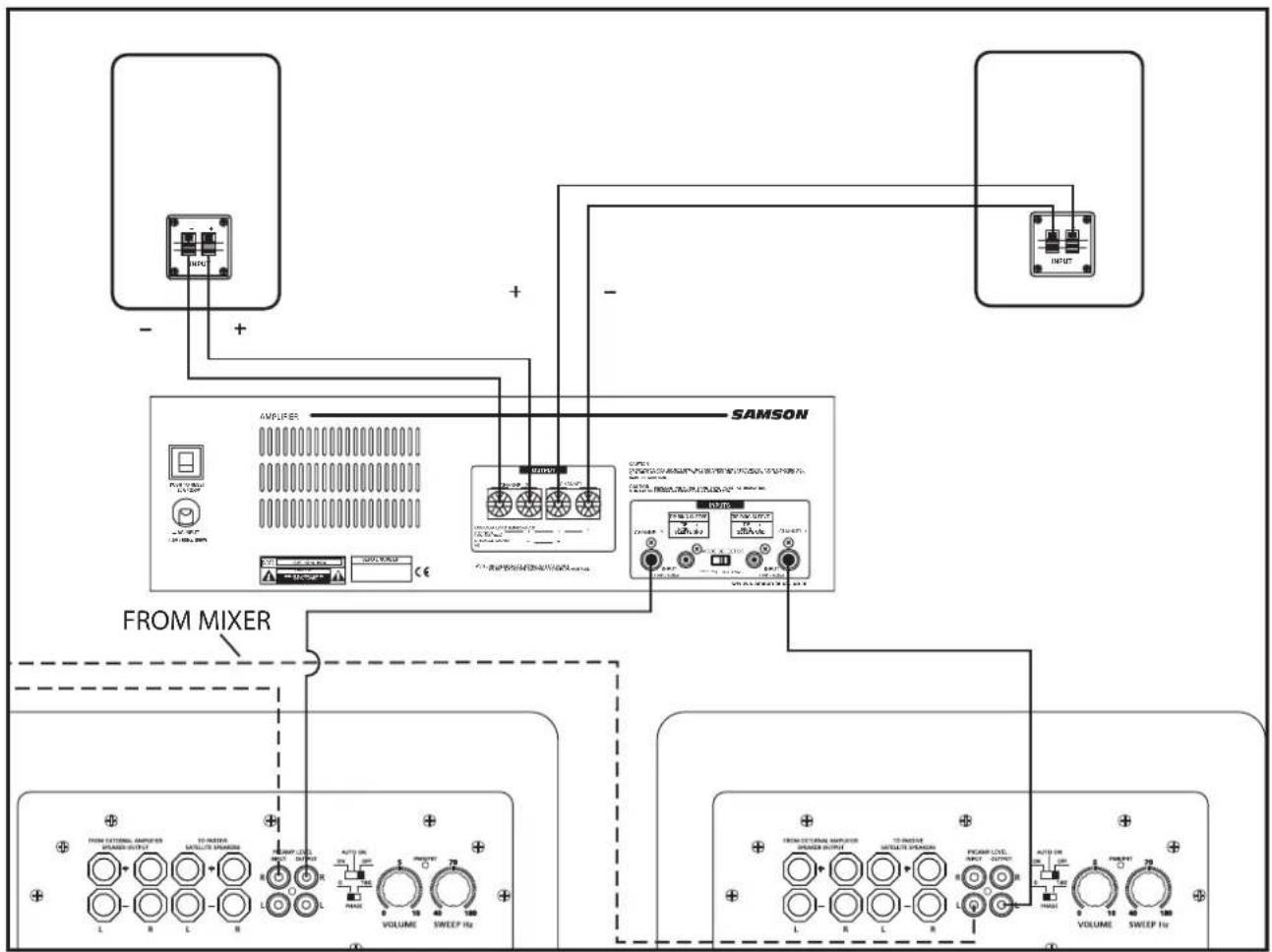
- Lower your mixer's master outputs to all the way off.
- Connect the mixer's left output to the left side RESOLV 120a's LEFT PREAMP INPUT and the mixer's right output to the right side RESOLV 120a's RIGHT PREAMP LEVEL INPUT. Now connect the left RESOLV 120a's LEFT PREAMP OUTPUT to the left side input of the power amp, and the right RESOLV 120a's RIGHT PREAMP LEVEL OUTPUT to the right side input of the power amp. Connect a speaker wire from the left output of your power amp to your left satellite, and then, connect a speaker wire from the right output of your power amp to your right satellite.
- Now adjust the SWEEP control to the desired frequency. Consult your studio monitors owner's manual for a recommended crossover point. You can also use your ears by adjusting the SWEEP control to the frequency that sounds good to you. A good place to start is about 70Hz .
- Now set the level of your power amp up to the normal operating level. Run an audio signal (like some music from a CD) through your mixer and raise the level to a comfortable listening level. Now slowly raise the RESOLV 120a Volume control and listen to the low frequency output. Adjust the RESOLV 120a to the level of low frequency output that you like. Now, when you raise and lower your mixer's output, the RESOLV 120a and satellites will track at the same relative volume.
Connecting the RESOLV 120a
Using the RESOLV 120a with the Samson DMS80 Monitor System
Using The DMS80's SUB OUT
The RESOLV 120a is a great add on to your DMS monitor system providing extended low frequency output. There are several ways you can interface your new subwoofer to the DMS80, including using the DMS80's mono SUB OUT, or by using the DMS 80's LINE OUTs. The following examples outline the connections and operation for the RESOLV 120a working with the DMS80 system.
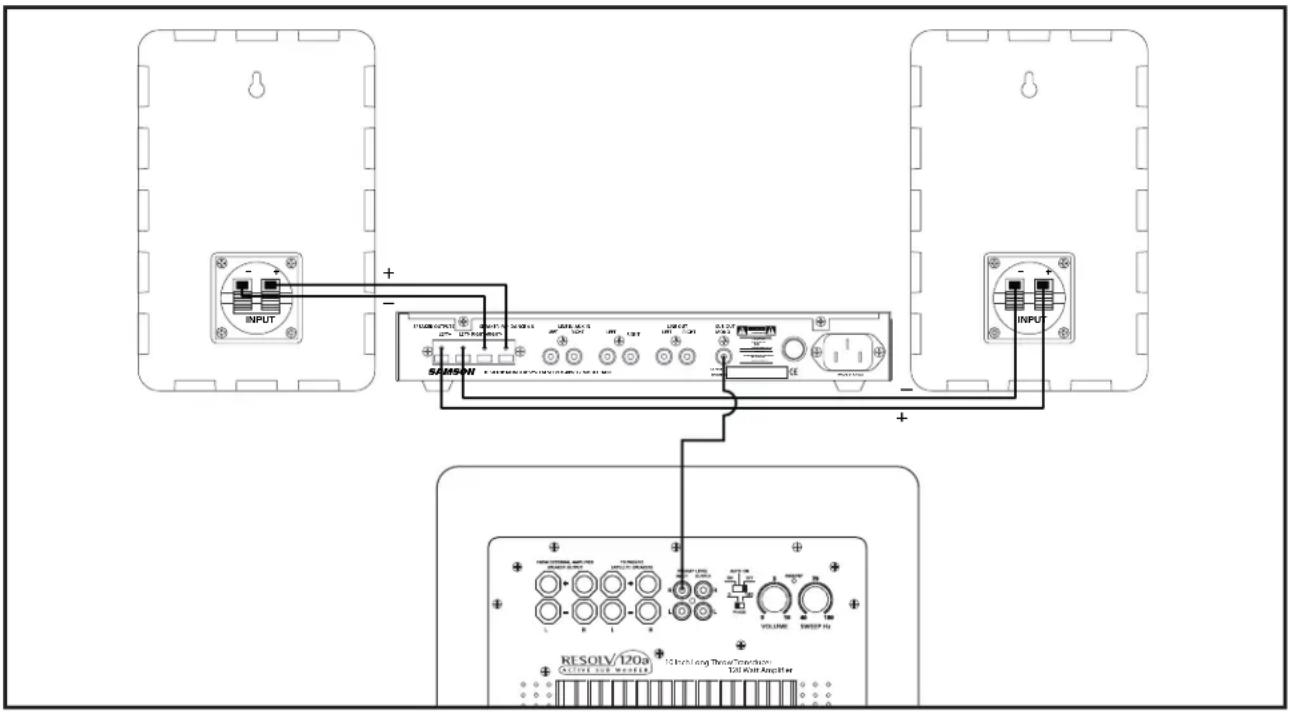
- Make the connections between your mixer and your DMS80 monitor system as described in the DMS80's users manual and make sure that you turn your mixer all the way down.
- Connect the SUBWOOFER OUTPUT located on the rear panel of the DMS80 to the RIGHT PREAMP INPUT on the RESOLV 120a.
- Set the RESOLV 120a's Volume control to about 6, and since the DMS80's SUBWOOFER OUTPUT is High-passed at 100 Hz, set the SWEEP control to 180Hz .
- Now run some audio, like music on a CD, through your mixer and raise the level that controls the output connected to the DMS80 monitor system until you reach a comfortable listening level.
- Now slowly raise the SUBWOOFER LEVEL control located on the DMS80 front control panel and adjust the low fre quency output to your taste. You can experiment with the balance between the RESOLV 120a and the DMS satellite speakers by adjusting the SUBWOOFER LEVEL control. Once you find the balance you like, the RESOLV 120a will track the satellites when you raise or lower your mixer's output.
Connecting the RESOLV 120a
USING THE RESOLV 120A WITH THE SAMSON DMS80 MONITOR SYSTEM Using The DMS80's LINE OUTs
The RESOLV 120a can be connected to the DMS80 by using the LINE OUTS located on the DMS80's rear panel. When using the DMS80's LINE outputs you will utilize the RESOLV 120a internal electronic crossover, which will allow you to experiment and fine-tune your monitor system. Follow the diagram and instructions below to interface your new subwoofer.
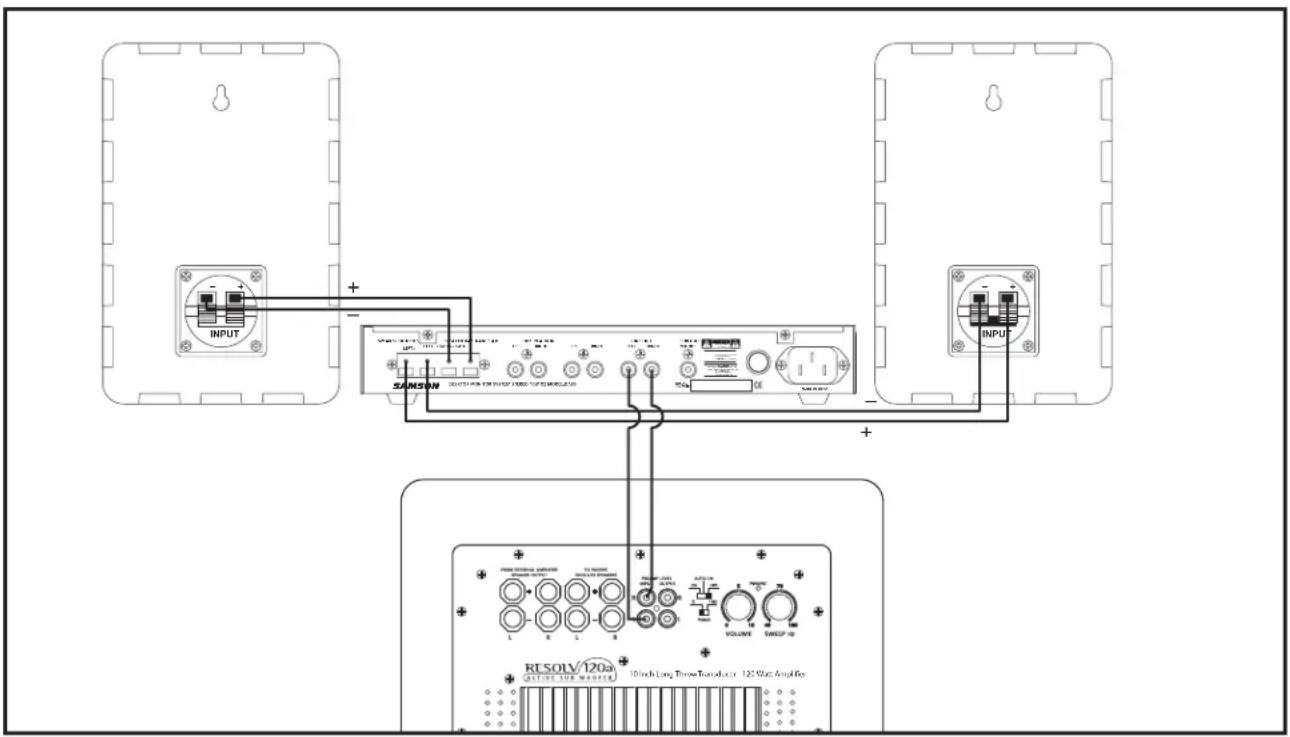
- Make the connections between your mixer and your DMS80 monitor system as described in the DMS80's users manual and make sure that you turn your mixer all the way down.
- Connect the RIGHT and LEFT LINE OUTPUTS located on the rear panel of the DMS80 to the RIGHT and LEFT PREAMP INPUTS on the RESOLV 120a.
- Turn the RESOLV 120a's Volume all the way off, and set the SWEEP control to 100Hz .
- Now run some audio, like music on a CD, through your mixer and raise the output to the DMS80 monitor system to a comfortable listening level.
- Now, slowly raise the RESOLV 120a's LEVEL control and adjust the low frequency output to your taste. You can experiment by listening to the difference when adjusting the crossover point with the SWEEP control. Also, listen as you adjust the balance between the RESOLV 120a and the DMS satellite speakers by changing the RESOLV 120a's LEVEL control. Once you find the balance you like, the RESOLV 120a will track the satellites when you raise or lower your mixer's output.
RESOLV 120a Connections
RESOLV 120a Wiring Guide
There are several ways to interface the RESOLV 120a depending on your exact monitoring set-up. The RESOLV 120a features both Preamp Level and Speaker Level inputs and outputs, so connecting to any active or passive satellite speakers is easy. Follow the cable diagrams below for connecting your monitor system.
Speaker Cable (Un-Shielded)
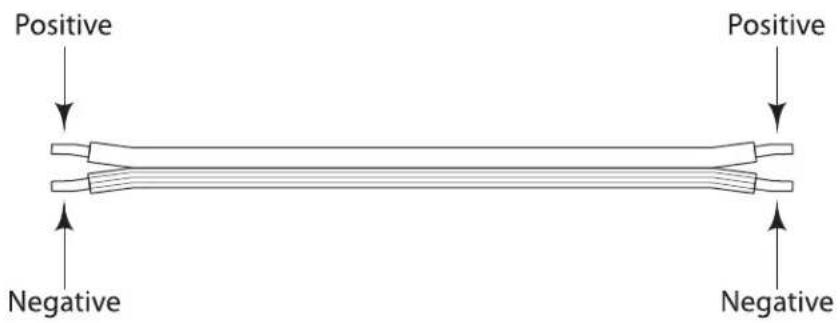
Note: Just about all un-shielded speaker wire will have a marking indicating the negative side. To avoid phase cancelation problems, be sure to maintain the correct connection for the positive and negative sides throughout your system.
Unbalanced 1/4'' to RCA Cable
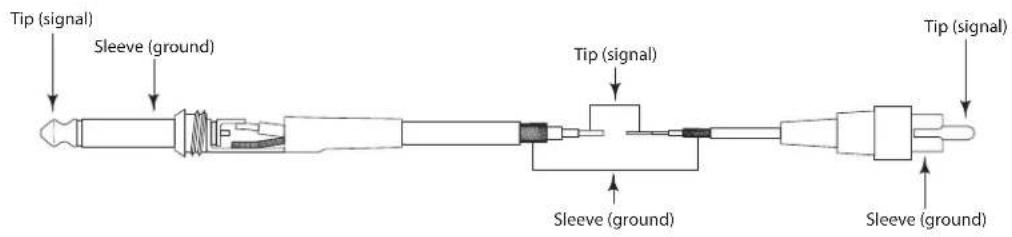
Un-Balanced XLR to RCA Cable

Introduction
Two RESOLV 120a's can be used in stereo in larger control rooms for increased low end. In addition, two RESOLV 120a's can be used in stereo, even in smaller control rooms, to help minimize standing waves. By using two subwoofoers at lower power, you can achieve a more even response throughout the room.
DISATTIVATO (in "SLEEP")
Transducer: 10", Long Excursion (25mm) Transducer
Amplifier:
Power Rating: 120 Watts RMS
Frequency response: 30Hz - 300Hz + / - 3 dB
Sensitivity: 94dB SPL @ 1 W/1m
Speaker Input
Connector: Push Terminal
Speaker Output High-passed
Connector: Push Terminal
Line Input Un-Balanced
Connector: RCA-FEMALE
Line Output Un-Balanced
Connector: RCA - FEMALE
Crossover Frequency: Variable 40Hz - 180Hz
Enclosure:
Construction: MDF (Medium Density Fiberboard)
Finish: Black Vinyl
Feet: Large Rubber
Weight: 39 lbs., 7.75 kg.
\section*{Caracteristiques techniques}
Puissance: 120 Watts efficace
Bande passante: 30Hz - 300Hz + / - 3dB
Finition: Vinyl noir
Transducer: Transducer de 10^ de large recorrodo de excursion (25 mm)
Amplificador:
Declaration of Conformity
Date of issue: 06/01/2004
Equipment: Powered Subwoofer
Model #:Samson Resolv120a
Class:
Manufacturer:
SAMSON TECHNOLOGIES CORPORATION
Address: 575 Underhill Boulevard, Syosset, New York 11791 USA
This is to certify that the aforementioned equipment fully conforms to the protection record of the following EC Council Directives:
Directives Applicable Standards Title
| 73/23/EEC | EN 60065:2002 Audio, video and similar electronic apparatus - Safety requirement | |
| 89/336/EEC | EN 50081-1:1992 | Electromagnetic compatibility - Generic emission standard - Residential, commercial and light industry |
| EN 50082-1:1997 | Electromagnetic compatibility - Generic immunity standard - Residential, commercial and light industry | |
Part
Part
Signed on behalf of the
Name: Douglas Bryant
Title: President
Signed on behalf of the representative:
Name:
Title:
Address:
Address:
Samson Technologies Corp.
Phone: 1-800-3-SAMSON (1-800-372-6766)
Fax: 516-364-3888
www.samsontech.com


- Owners Manual
- Safety Instructions/Consignes de sécurité/Sicherheitsvorkehrungen
- WARNING
- AVIS
- CAUTION
- PLACE ONLY WITH SAME TYPE
- ATTENTION
- Important Safety Instructions
- Contents
- Table des matieres
- RESOLV 120a Features
- RESOLV 120a Layout
- Rear Panel Layout
- Setting up the RESOLV 120a
- CONFIGURING YOUR SPEAKER SYSTEM
- Common Sub Operation
- Stereo Sub Operation
- Placing the RESOLV 120a
- Operating the RESOLV 120a
- RESOLV 120a Control Panel
- Control Functions and Indicators
- Volume Control
- Sweep Hz
- Power/Protect LED
- AUTO ON SWITCH LED-OFF LED-GREEN LED-RED
- Auto On Switch
- Phase Switch
- The Ins and The Outs
- SPEAKER OUTPUT- The
- Connecting the RESOLV 120a
- Mono Sub With Passive Satellites Using Speaker Inputs
- Mono Sub With Passive Satellites Using Line Inputs
- Mono Sub With Active Satellites
- Stereo Sub With Passive Satellites
- Using the RESOLV 120a with the Samson DMS80 Monitor System
- Using The DMS80's SUB OUT
- USING THE RESOLV 120A WITH THE SAMSON DMS80 MONITOR SYSTEM Using The DMS80's LINE OUTs
- RESOLV 120a Connections
- RESOLV 120a Wiring Guide
- Speaker Cable (Un-Shielded)
- Unbalanced 1/4'' to RCA Cable
- Un-Balanced XLR to RCA Cable
- Introduction
- \section*{Caracteristiques techniques}
- Declaration of Conformity
Brand : SAMSON
Model : Resolv 120a
Category : Subwoofer