
MediaOne 10S - Subwoofer SAMSON - Free user manual and instructions
Find the device manual for free MediaOne 10S SAMSON in PDF.


| Product type | Active subwoofer |
| Brand | Samson |
| Model | MediaOne 10S |
| Speaker | 25 cm (10") long-throw transducer with butyl surround |
| Enclosure type | Downward-firing bass reflex |
| Enclosure material | Vinyl-wrapped MDF (medium-density fiberboard) |
| Output power | 100 Watts RMS |
| Frequency response | 35 Hz - 300 Hz ± 3 dB |
| Crossover frequency (low-pass filter) | Variable from 80 Hz to 160 Hz |
| Crossover filter | 100 Hz, 12 dB/octave Linkwitz-Riley |
| Controls | Volume, Low Pass, Phase (0°/180°), Auto Power (On/Auto/Off) |
| Line inputs | 2 x unbalanced RCA (left/right), line level (-10 dBV) |
| Line outputs | 2 x unbalanced RCA (left/right) for satellite speakers |
| Speaker-level inputs | Screw terminals (left/right) for amplified signals |
| Speaker-level outputs | Screw terminals (left/right) for passive satellite speakers |
| Power supply | 100-120V~ or 220-240V~ (selectable), 50/60 Hz |
| Fuse | 100-120V: T1.6A/250V; 220-240V: T800mA/250V |
| Power consumption | 100 W |
| Dimensions (W x D x H) | 360 x 324 x 409 mm |
| Weight | 12.4 kg |
| Maintenance | Clean with a dry cloth only. Do not use liquids. |
| Safety | Do not open. No user-serviceable parts. Disconnect before cleaning or during thunderstorms. |
| Warranty | Visit samsontech.com for details. Return authorization number required for repair. |
Frequently Asked Questions - MediaOne 10S SAMSON
User questions about MediaOne 10S SAMSON
0 question about this device. Answer the ones you know or ask your own.
Ask a new question about this device
Download the instructions for your Subwoofer in PDF format for free! Find your manual MediaOne 10S - SAMSON and take your electronic device back in hand. On this page are published all the documents necessary for the use of your device. MediaOne 10S by SAMSON.
USER MANUAL MediaOne 10S SAMSON
Copyright 2021, Samson Technologies Corp. v3
Samson Technologies Corp.
278-B Duffy Ave
Hicksville, New York 11801
www.samsontech.com

AVIS RISQUE DE CHOC ÉLECTRONIQUE - NE PAS OUVRIR
WARNING: To Reduce the risk of the electric shock. Do not remove cover (or back) as there are no user-serviceable parts inside. Refer servicing to qualified service personnel.
CAUTION: To prevent electric shock hazard, do not connect to mains power supply while grille is removed.

This lightning flash with arrowhead symbol within an equilateral triangle is intended to alert the user to the presence of non-insulated “dangerous voltage” within the product’s enclosure that may be of sufficient magnitude to constitute a risk of electric shock.

The exclamation point within an equilateral triangle is intended to alert the user to the presence of important operating and maintenance instructions in the literature accompanying the appliance.
WARNING: Do Not Open! Rick of Electrical Shock. Voltages in this equipment are hazardous to life. No user-serviceable parts inside. Refer all servicing to qualified service personnel.
Place the equipment near a main power supply outlet and make sure that you can easily access the power breaker switch.
WARNING: This product is intended to be operated ONLY from the AC Voltages listed on the back panel or included power supply of the product. Operation from other voltages other than those indicated may cause irreversible damage to the product and void the products warranty. The use of AC Plug Adapters is cautioned because it can allow the product to be plugged into voltages in which the product was not designed to operate. If the product is equipped with a detachable power cord, use on the type provided with your product or by your local distributor and/or retailer. If you are unsure of the correct operational voltage, please contact your local distributor and/or retailer.

If you want to dispose this product, do not mix it with general household waste. There is a separate collection system for used electronic products in accordance with legislation that requires proper treatment, recovery and recycling.
Private household in the 28 member states of the EU, in Switzerland and Norway may
return their used electronic products free of charge to designated collection facilities or to a retailer (if you purchase a similar new one).
For Countries not mentioned above, please contact your local authorities for a correct method of disposal.
By doing so you will ensure that your disposed product undergoes the necessary treatment, recovery and recycling and thus prevent potential negative effects on the environment and human health.
Important Safety Information
- Read these instructions.
- Keep these instructions.
- Heed all warnings.
- Follow all instructions.
- Do not use this apparatus near water.
-
Clean only with dry cloth.
-
Do not block any ventilation openings. Install in accordance with the manufacturer's instructions.
-
Do not install near any heat sources such as radiators, heat registers, stoves, or other apparatus (including amplifiers) that produce heat.
-
Do not defeat the safety purpose of the polarized or grounding type plug. A polarized plug has two blades with one wider than the other. A grounding type plug has two blades and a third grounding prong. The wide blade or the third prong are provided for your safety. If the provided plug does not fit into your outlet, consult an electrician for replacement of the obsolete outlet.
-
Protect the power cord from being walked on or pinched particularly at the plugs, convenience receptacles, and at the point where they exit from the apparatus.
-
Only use attachments/accessories specified by the manufacturer.
-
Use only with the cart, stand, tripod, bracket, or table specified by the manufacturer, or sold with the apparatus.
When a cart is used, use caution when moving the cart/ apparatus combination to avoid injury from tip-over.

- Unplug the apparatus during lightening, sort or when unused for long periods of time.
- Refer all servicing to qualified personnel. Service is required when the apparatus has been damaged in any way, such as power supply cord or plug is damaged, liquid has been spilled or objects have fallen into the apparatus has been exposed to rain or moisture, does not operate normally, or has been dropped.
- This appliance shall not be exposed to dripping or splashing water and that no object filled with liquid such as vases shall be placed on the apparatus.
- Caution-to prevent electrical shock, match wide blade plug wide slot fully insert.
- Please keep a good ventilation environment around the entire unit.
- POWER ON/OFF SWITCH: For products with a power switch, the power switch DOES NOT break the connection from the mains.
- MAINS DISCONNECT: The plug should remain readily operable. For rack-mount or installation where plug is not accessible, an all-pole mains switch with a contact separation of at least 3mm in each pole shall be incorporated into the electrical installation of the rack or building.
- Avoid exposure to extreme heat or cold.
Introduction
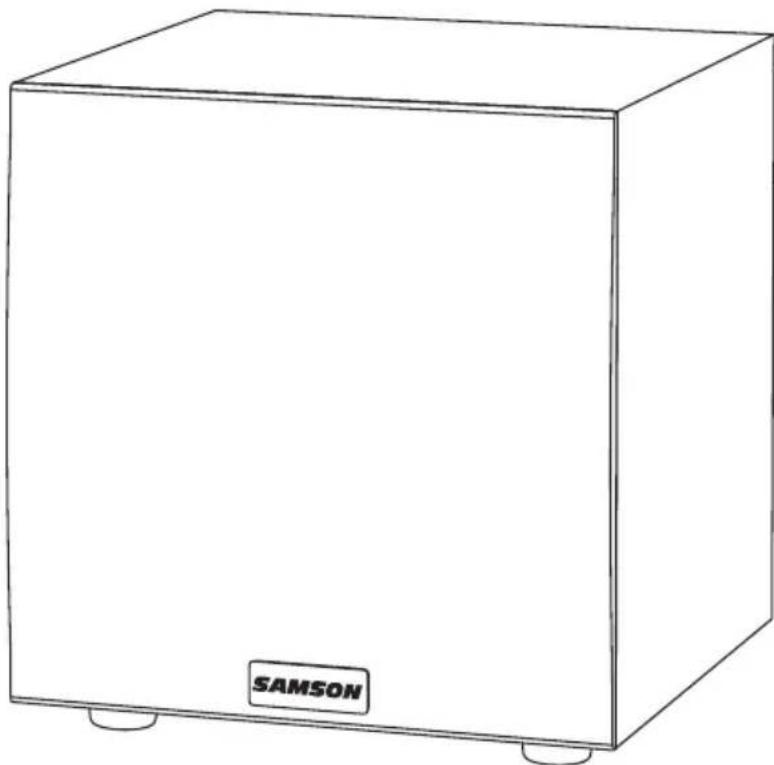
Thank you for purchasing the Samson MediaOne 10S Active Studio Subwoofer. Taking care of the low end in any near-field monitor or multi-media system, a powerful 100 watt low frequency amplifier drives a heavy-duty 10" transducer, reproducing deep bass frequencies. The MediaOne 10S has a built-in active crossover with a phase switch, variable low pass filter control, and a selectable auto sleep mode. The subwoofer also has speaker level terminals to connect to your home theater receiver.
The MediaOne 10S's low frequency driver is a 10" woofer with a Butyl surround providing extended range and tight low frequency response. The enclosure is constructed of rigid MDF (Medium Density Fiberboard) to insure maximum sound pressure level, which makes the MediaOne 10S a perfect addition to any near field monitor system where extended low end is desired.
In these pages, you'll find a detailed description of the features of the MediaOne 10S active subwoofer, as well as a guided tour through the control panel, and instructions for setup and use. You'll also find a registration card enclosed—please follow the instructions so that you can receive online technical support, and so that we can send you updated information about these and other Samson products, in the future.
We recommend you record your serial number in the space provided below for future reference.
Serial number: ____
Date of purchase: ____
With proper care and maintenance, your MediaOne 10S Active Subwoofer will operate trouble-free for many years. Should your speaker ever require servicing, a Return Authorization (RA) number must be obtained before shipping your unit to Samson. Without this number, the unit will not be accepted. Please visit samsontech.com/ra or contact us at support@samsontech.com for an RA number prior to shipping your unit. Please retain the original packing materials and, if possible, return the unit in its original carton. If your subwoofer was purchased outside of the United States, contact your local distributor for warranty details and service information. Also, be sure to check out our website (www.samsontech.com) for information about our full product line.
MediaOne 10S Features
natural_image
Line drawing of a simple rectangular box labeled 'SAMSON' at the bottom, with no other text or symbols on the body.The Samson MediaOne 10S subwoofer provide deep, tight bass and is the perfect compliment to any studio monitor system. Here are some of their main features:
- 10" copolymer woofer with butyl surround
- Down firing tuned bass reflex port
• 100 watts of power
• Variable Low Pass frequency control - Subwoofer Volume control
• RCA inputs and outputs - Speaker Level inputs and outputs for stereo system connections
- Phase switch
- Selectable Auto Sleep mode
- Protective mesh grill
- Extremely rigid, MDF (medium density fiberboard) construction, delivering maximum SPL
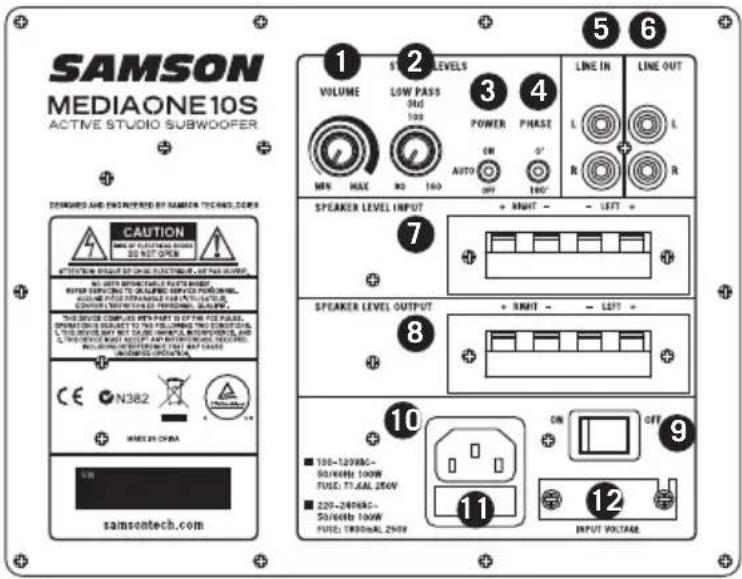
- VOLUME – Controls the overall output level for the MediaOne 10S subwoofer.
- LOW PASS (Hz) – Adjusts the low frequency filter end range of the subwoofer from 80Hz-160Hz. This setting does not affect the signal sent to the LINE OUT jacks.
- POWER AUTO Sleep Switch – When activated, Sleep Mode conserves power by automatically turn-ing unit into standby mode after 10 minutes of non-use.
- PHASE Switch – Use this switch to set the polarity of the amplified signal. In the 0 setting, there is no change to the signal. When the switch is set to the in 180 setting, the signal's polarity is changed by 180^ .
- LINE IN - Connect an unbalanced RCA (-10dBV), line level signal here.
- LINE OUT – Unbalanced RCA stereo line outputs to connect to satellite speakers.
- SPEAKER LEVEL INPUT Terminals – Accepts full range signals from power amplifier.
- SPEAKER LEVEL OUTPUT Terminals – Sends full range signals to satellite speakers.
- POWER Switch – Use this switch to turn the speakers on and off. When powered on, the front panel LED will light.
- AC Inlet – Connect the supplied IEC power cable here.
- Fuse - The fuse is located behind the fuse cover. Always replace fuses with the same type of fuse.
- Voltage Switch – Used to select the operating voltage. NOTE: Be sure to check that the voltage setting and fuse rating are correct for your country.
Adding the MediaOne 10S to a Monitor System
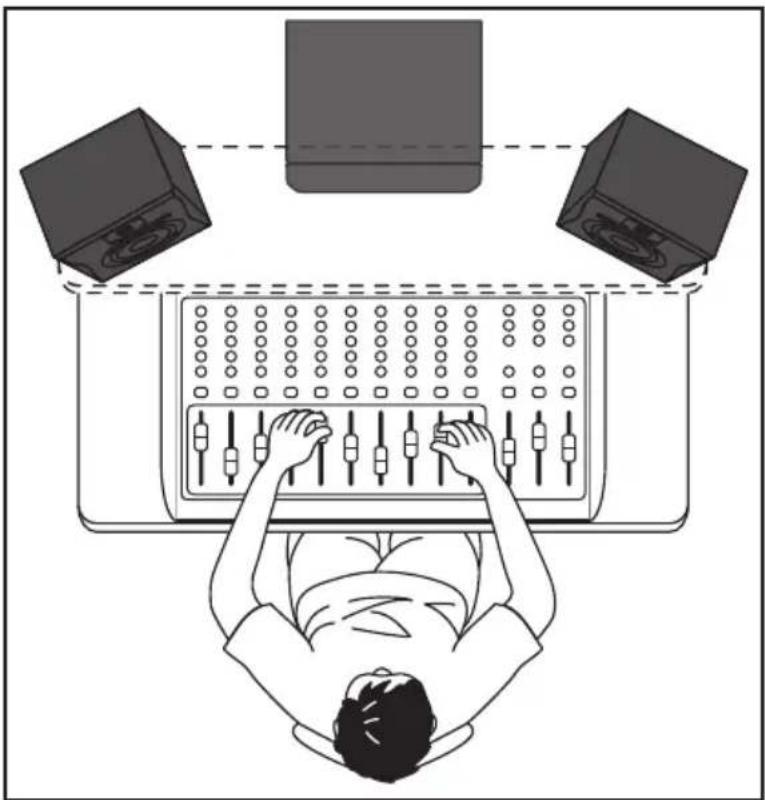
Adding a MediaOne 10S subwoofer to extend the low frequency response of your monitor system can be beneficial when mixing your music. Typically, it is best to set the subwoofer level to be equal to that of the main speakers.
Because deep-bass frequencies are non-directional, it is difficult for our ears to locate the sound source, and the precise placement of the subwoofer is not as critical as the main speakers. The ideal location is between the two main speakers. If you notice there are frequencies that sound quieter than others, move the subwoofer slightly to the left or right. You can also try setting the PHASE switch to the 180° phase setting to see if this provides an improved low frequency response.
If you have active monitors, installation is easy using the MediaOne 10S LINE OUT jacks. Below is a typical system set-up using the MediaOne 10S with a mixer and a pair of active satellite loudspeakers.
To incorporate a subwoofer into your monitor system, connect Left and Right Control Room outputs of your mixer to the MediaOne 10S line inputs. Then connect the subwoofer's LINE Outputs to the left and right satellite speakers. Run an audio signal (such as music from an MP3 player) through your mixer and raise the level to a comfortable listening volume. Now adjust the LPF control to the desired frequency.
natural_image
Top-down line drawing of a person using a computer with two speakers on top (no text or symbols)Connection the Media One - Line Level Input
If you have active studio monitors, adding the MediaOne 10S is easy using the LINE LEVEL inputs and outputs. Below is a typical system set-up using the MediaOne 10S with a mixer and a pair of Samson MediaOne BT active studio monitors.
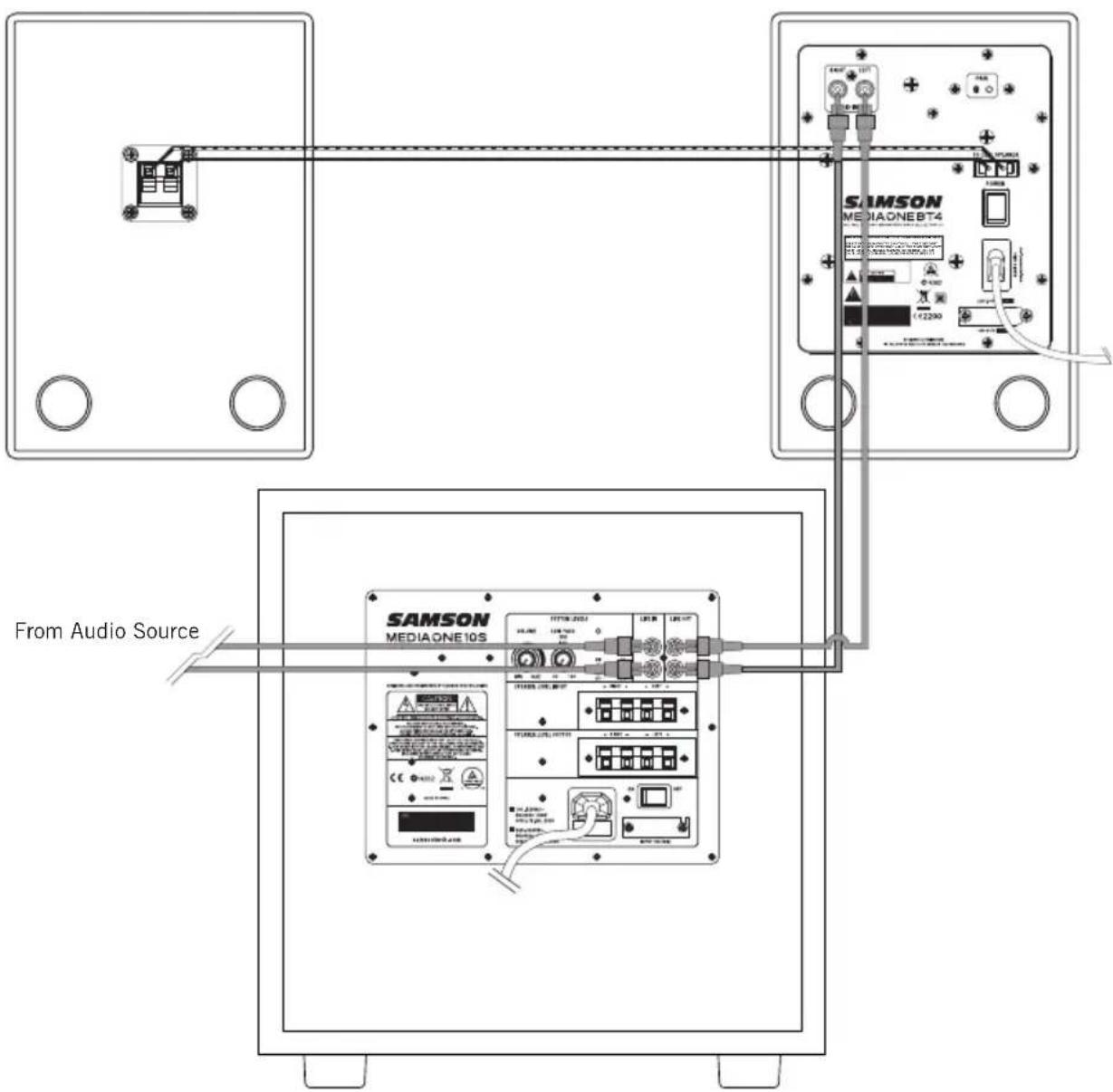
- Connect your audio source to the left and right RCA Line Inputs of the MediaOne 10S.
- Connect the left and right RCA outputs to the inputs of your active speakers.
- Note: Do not use the line Speaker Level terminal outputs in this configuration.
Connection the Media One 10S - Speaker Level Input
The MediaOne 10S can be operated using speaker level inputs and outputs. When using the MediaOne 10S at speaker level, the full range powered signal is maintained at the outputs. Below is a typical system set-up using the MediaOne 10S with a home stereo receiver and passive satellite loudspeakers. Follow the steps in the diagram below to set up your system.
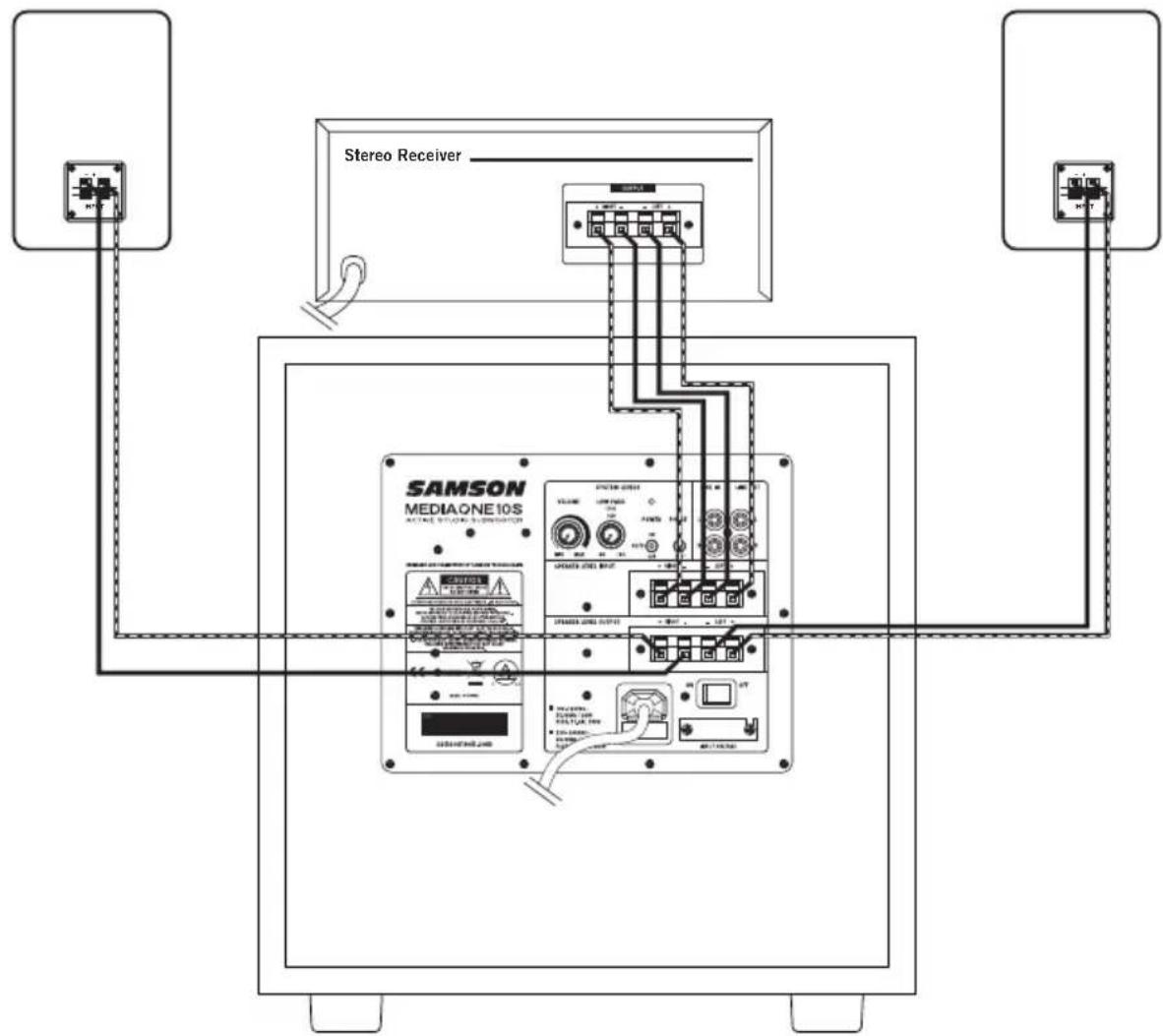
- Connect the left and right speaker outputs of your receiver to the speaker level inputs of the MediaOne 10S using speaker wire.
- Make sure to connect the positive (+) terminals of the receiver to the positive terminals of the MediaOne 10S, and the negative terminals of the receiver to the negative terminal of the MediaOne 10S.
- Then, connect the left and right front speakers using speaker wire from the speaker level outputs from the powered subwoofer.
- Make sure to connect the positive (+) terminals of MediaOne 10S to the positive terminals of the satellite speakers and the negative (-) terminals of the MediaOne 10S to the negative (-) terminals of the satellite speakers.
- Note: Speaker terminals are typically color coded red for the positive (+) terminal and black for the negative (-) terminal. Speaker wires are usually color coded to help maintain consistency when wiring your speakers. If one of the connections is wired incorrectly, you will notice sound quality problems.
- Note: Do not use the line RCA Line Inputs in this configuration.
Specifications
| Woofer 10", Long Excursion Transducer | |
| Enclosure Type Bass Reflex System | |
| Enclosure Vinyl wrapped MDF | cabinet with mesh grille |
| Frequency Response 35Hz - 300Hz ±3dB | |
| Crossover Frequency 100Hz 12db/oct Linkwitz Riley | |
| Low Pass Filter 80-160Hz | |
| Output Power 100 Watts RMS | <1% |
| Line Input Connectors Unbalanced RCA | |
| Speaker Input Connectors | Push Terminal |
| Line Output Connectors | Unbalanced RCA |
| Speaker Output Connectors | Push Terminal |
| Controls | VOLUME, LOW PASS, AUTO ON POWER, PHASE |
| Power Consumption 100W | |
| Fuse | AC 100V-120V T1.6A/250VAC 220V-240V T800mA/250V |
| Dimensions (L x W x H) | 14.17" x 12.75" x 16.1"360mm x 324mm x 409mm |
| Weight | 27.33 lb12.4 kg |
natural_image
Line drawing of a rectangular box labeled 'SAMSON' at the bottom, with no other text or symbols on the body.natural_image
Top-down line drawing of a person using a computer with two speakers on top (no text or symbols)natural_image
Line drawing of a rectangular box labeled 'SAMSON' at the bottom, with no other text or symbols on the body.natural_image
Top-down line drawing of a person using a computer with two speakers on top (no text or symbols)natural_image
Line drawing of a rectangular box labeled 'SAMSON' at the bottom, with no other text or symbols on the body.natural_image
Top-down line drawing of a person using a computer with two speakers on top (no text or symbols)Conexión de Media One - Line Level Input
natural_image
Line drawing of a rectangular box labeled 'SAMSON' at the bottom, with no other text or symbols on the body.natural_image
Top-down line drawing of a person working on a computer with two speakers, no text or symbols presentDo you have any questions about your MediaOne 10S? We can help!

CONTACT OUR SUPPORT TEAM: support@samsontech.com Our experts can help you resolve any issues.
Follow us:



@samson @samsontech @samson_technologies

- Important Safety Information
- Introduction
- MediaOne 10S Features
- Adding the MediaOne 10S to a Monitor System
- Connection the Media One - Line Level Input
- Connection the Media One 10S - Speaker Level Input
- Specifications
- Conexión de Media One - Line Level Input
- Do you have any questions about your MediaOne 10S? We can help!
Brand : SAMSON
Model : MediaOne 10S
Category : Subwoofer