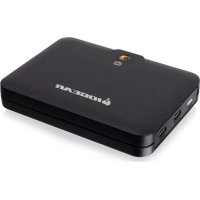
UpStream - Computer accessory IOGEAR - Free user manual and instructions
Find the device manual for free UpStream IOGEAR in PDF.



| Product Type | Mobile Capture Adapter |
| Brand | IOGEAR |
| Model | UpStream |
| Usage | Capture and live stream HDMI video |
| Supported Video Standards | 480p, 720p, 1080p, 4K at 60 Hz |
| UVC Output | USB-C (USB Video Class) |
| HDMI Loop | Yes (loop-out output) |
| Power | USB-C PD Passthrough (external power via DC-in port) |
| Mode Switch | PC / Phone |
| Camera Mount | Yes (1/4-inch adapter) |
| Supported Operating Systems | Windows 10+, macOS 10.13+, Android V5.x+ (with UVC support) |
| Minimum Configuration | Intel Core i3 2.8 GHz CPU, 4 GB RAM |
| Required Port | USB 3.2 Type-C or Type-A |
| Package Contents | Adapter, USB-C to USB-C cable, USB-C to USB-A cable, adapter screw, quick start guide |
| Supported Software | OBS, CameraFi, etc. |
| HDCP Protection | Cannot display or capture HDCP content |
| Warranty | 1-year limited |
| Compliance | FCC Class B, CE |
| Care and Cleaning | Wipe with a soft, dry cloth |
Frequently Asked Questions - UpStream IOGEAR
User questions about UpStream IOGEAR
0 question about this device. Answer the ones you know or ask your own.
Ask a new question about this device
Download the instructions for your Computer accessory in PDF format for free! Find your manual UpStream - IOGEAR and take your electronic device back in hand. On this page are published all the documents necessary for the use of your device. UpStream by IOGEAR.
USER MANUAL UpStream IOGEAR
- Windows® 10 and above
- Mac OS X® 10.13
- Android V5.x and above with UVC support
- One available USB 3.2 Type-C or Type-A port
- CPU: Intel® Core™ i3 Dual Core Processor 2.8Ghz or higher
- RAM: 4GB or higher
- Stream software with UVC device support**
Product Overview
2
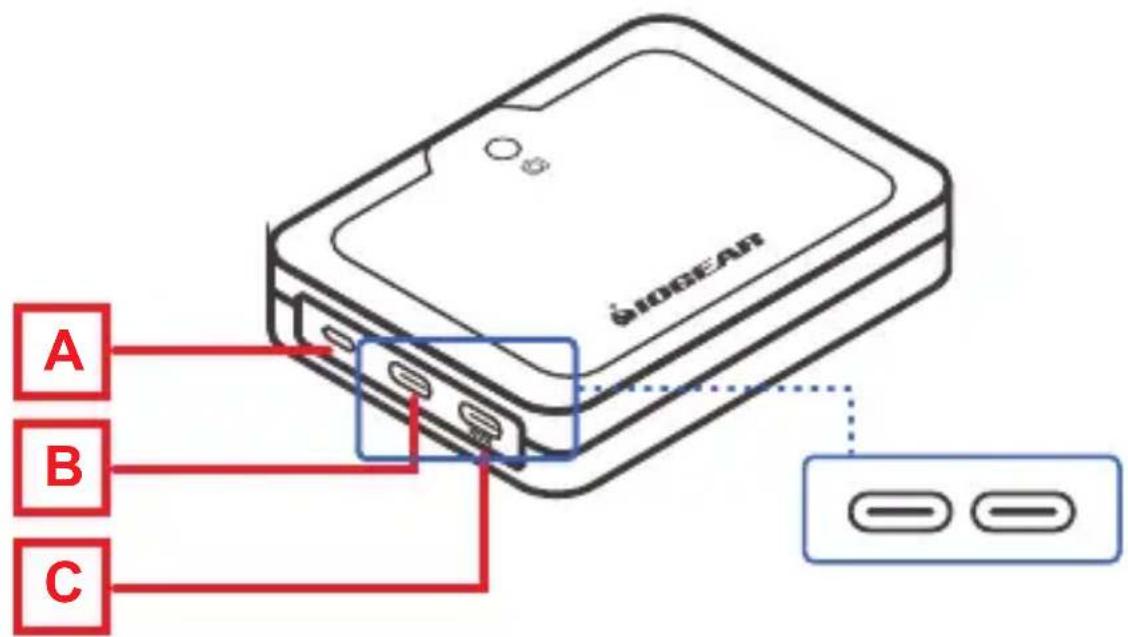
A. Mode Switch (PC/Phone Mode)
B. USB-C UVC Output Port
C. USB-C PD Passthrough Port
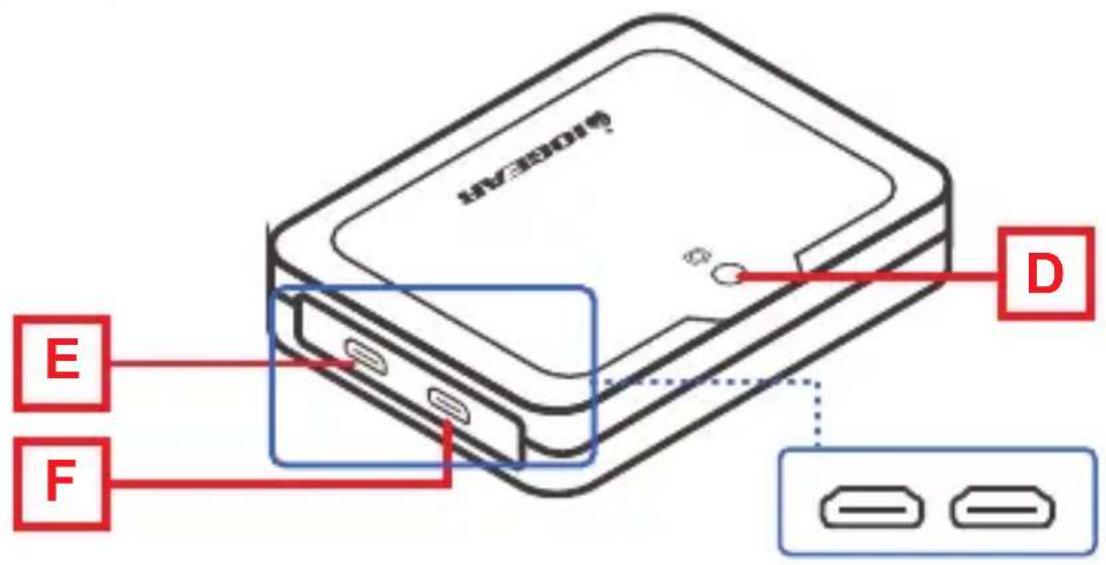
D. 1/4" Camera Mount Adapter
E. HDMI® Loop-out Port
F. HDMI ^® Input Port
Hardware Installation
-
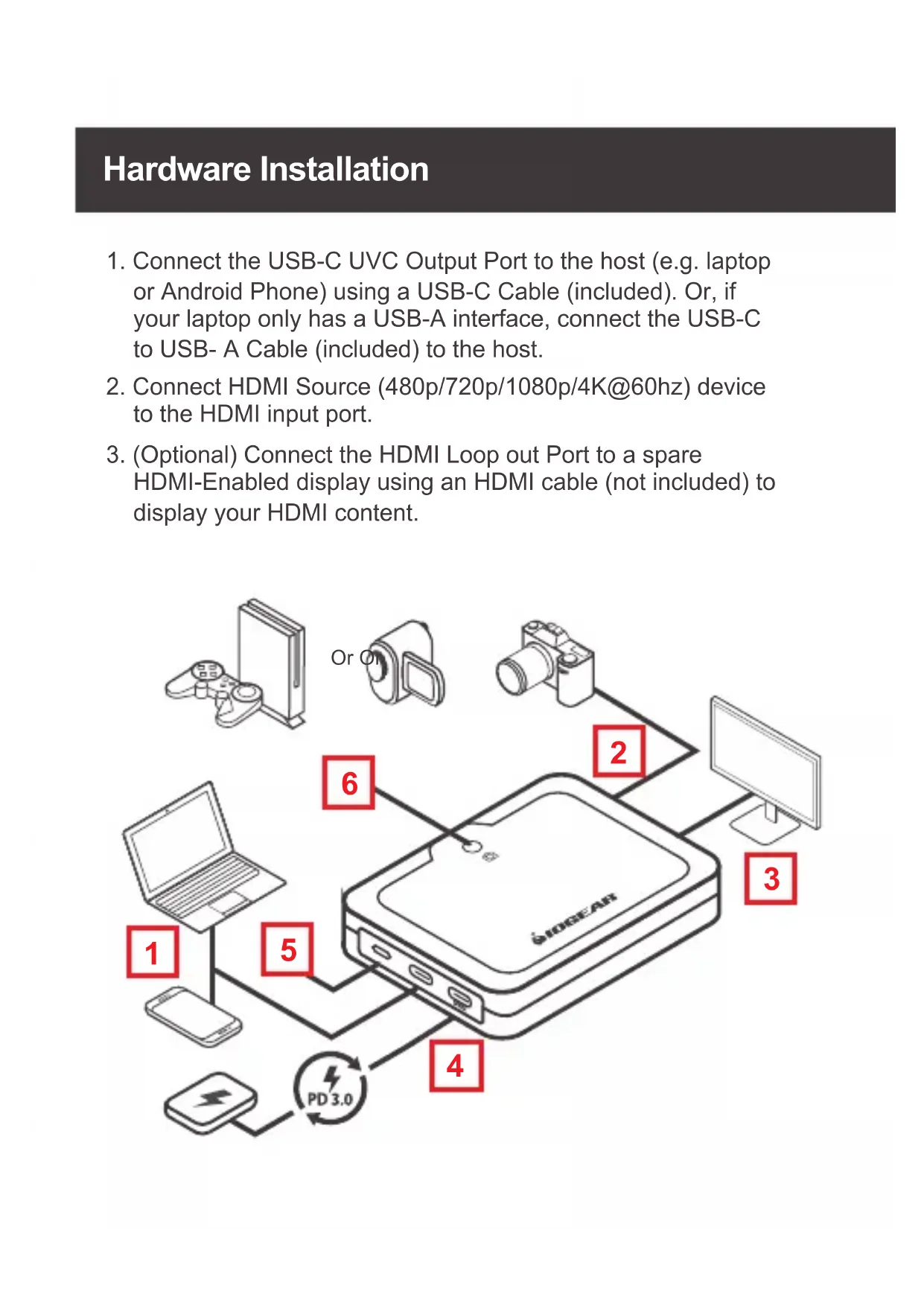
Connect the USB-C UVC Output Port to the host (e.g. laptop or Android Phone) using a USB-C Cable (included). Or, if your laptop only has a USB-A interface, connect the USB-C to USB-A Cable (included) to the host.
-
Connect HDMI Source (480p/720p/1080p/4K@60hz) device to the HDMI input port.
-
(Optional) Connect the HDMI Loop out Port to a spare HDMI-Enabled display using an HDMI cable (not included) to display your HDMI content.
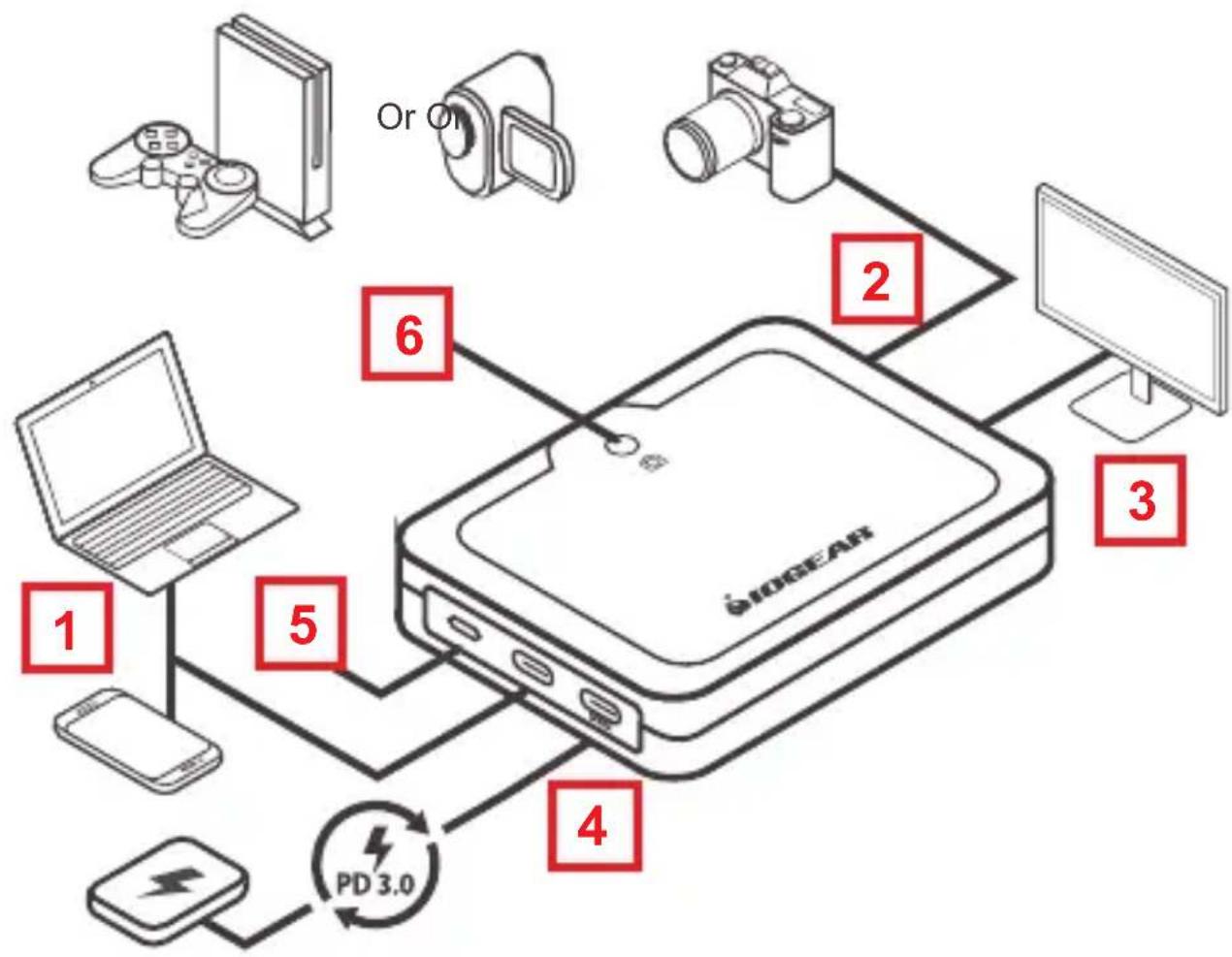
flowchart
graph TD
    A["GE OMEAN Device"] -->|1| B["Laptop"]
    A -->|2| C["Computer"]
    A -->|3| D["Monitor"]
    A -->|4| E["Mobile Phone"]
    A -->|5| F["Laptop"]
    A -->|6| G["Camera"]
    H["Or On"] --> A
    I["PD 3.0"] --> E
- (Optional) Connect a USB power source to the USB-C DC-in port for additional power to the GUV302P.
- (Optional) The LED will light up when the GUV302P is in phone mode.
- (Optional) Attach the GUV302P to the camera with appropriate camera accessories.
*GUV302P cannot display or capture HDCP protected content.
**Below lists some examples of supported video recording / live streaming software. All trademarks are property of their respective owners.
OBS: https://obsproject.com
CameraFi: https://www.camerafi.com
Xsplit: https://www.xsplit.com
https://www.youtube.com
https://www.facebook.com
© 2020 IOGEAR. All rights reserved. UpStream is a trademark of IOGEAR LLC. IOGEAR and the IOGEAR logo are registered trademarks of Aten Technology, Inc. USB Type-C and USB-C are registered trademarks of USB Implementers Forum. The terms HDMI, HDMI High-Definition Multimedia Interface, and the HDMI Logo are trademarks or registered trademarks of HDMI Licensing Administrator, Inc. Windows is either a registered trademark or trademark of Microsoft Corporation in the United States and/or other countries. Mac, macOS, iPadOS, and iPad Pro are trademarks of Apple Inc., registered in the U.S. and other countries. Android is a trademark of Google LLC. Intel and Intel Core are trademarks of Intel Corporation or its subsidiaries. All other trademarks are the properties of their respective owners.
Limited Warranty
Warranty Information
This product carries a 1 Year Limited Warranty.
For the terms and conditions of this warranty, please go to
https://www.iogear.com/support/warranty
Register online at https://www.iogear.com/register
Important Product Information
Product Model ____
Serial Number ____
Contact
WE'RE HERE TO HELP YOU!
NEED ASSISTANCE SETTING UP THIS PRODUCT?
Make sure you:
- Visit www.iogear.com for more product information
- Visit www.iogear.com/support for live help and product support
IOGEAR
https://iogear.custhelp.com
support@iogear.com
www.iogear.com
Compliance Information
This equipment has been tested and found to comply with the limits for a Class B digital service, pursuant to Part 15 of the FCC rules. These limits are designed to provide reasonable protection against harmful interference in a residential installation. Any changes or modifications made to this equipment may void the user's authority to operate this equipment. This equipment generates, uses, and can radiate radio frequency energy. If not installed and used in accordance with the instructions, may cause harmful interference to radio communications. However, there is no guarantee that interference will not occur in a particular installation. If this equipment does cause harmful interference to radio or television reception, which can be determined by turning the equipment off and on, the user is encouraged to try to correct the interference by one or more of the following measures:
- Reorient or relocate the receiving antenna
- Increase the separation between the equipment and receiver
- Connect the equipment into an outlet on a circuit different from that to which the receiver is connected
- Consult the dealer or an experienced radio/TV technician for help
FCC Caution: Any changes or modifications not expressly approved by the party responsible for compliance could void the user's authority to operate this equipment.
This device complies with Part 15 of the FCC Rules. Operation is subject to the following two conditions:
(1) this device may not cause harmful interference, and
(2) this device must accept any interference received, including interference that may cause undesired operation.
CE Statement: This device has been tested and found to comply with the following European Union directives: Electromagnetic Capability (2004/108/EC), Low Voltage (2006/95/EC) and R&TTED (1999/5/EC).
Xsplit: https://www.xsplit.com
https://www.youtube.com
https://www.facebook.com
https://www.iogear.com/support/warranty
https://iogear.custhelp.com
support@iogear.com
www.iogear.com
Information de conformité
Xsplit: https://www.xsplit.com
https://www.youtube.com
https://www.facebook.com
https://www.iogear.com/support/warranty
https://iogear.custhelp.com
support@iogear.com
www.iogear.com

Brand : IOGEAR
Model : UpStream
Category : Computer accessory