Sportstar Zoom - Binoculars NIKON - Free user manual and instructions
Find the device manual for free Sportstar Zoom NIKON in PDF.



| Product Type | Roof prism (Dach) binoculars with central focus |
| Model | Nikon Sportstar Zoom 8-24x25 |
| Magnification | 8x to 24x (zoom) |
| Objective lens effective diameter | 25 mm |
| Exit pupil | 3.1 mm (at 8x) |
| Brightness | 9.6 (at 8x) |
| Eye relief | 13.0 mm (at 8x) |
| Real field of view | 4.6° (at 8x) |
| Apparent field of view | 35.6° (at 8x) |
| Minimum focusing distance | 4.0 m |
| Interpupillary distance adjustment | 56 to 72 mm |
| Dimensions (L x W) | 123 x 109 mm |
| Weight | 305 g |
| Power supply | None (pure optical) |
| Zoom function | Zoom lever for continuous magnification adjustment |
| Diopter adjustment | Diopter ring on right eyepiece |
| Eyecups | Foldable for eyeglass wearers |
| Supplied accessories | Soft case, strap, eyepiece caps, additional eyecups |
| Maintenance and cleaning | Remove dust with a blower and soft brush; clean lenses with a soft cloth and pure alcohol |
| Safety precautions | Never look directly at the sun; do not use while walking; store in a cool, dry place |
| Spare parts and repairability | Repairs only by an authorized Nikon representative; no disassembly by user |
| General information | User manual included; specifications subject to change without notice |
Frequently Asked Questions - Sportstar Zoom NIKON
User questions about Sportstar Zoom NIKON
0 question about this device. Answer the ones you know or ask your own.
Ask a new question about this device
Download the instructions for your Binoculars in PDF format for free! Find your manual Sportstar Zoom - NIKON and take your electronic device back in hand. On this page are published all the documents necessary for the use of your device. Sportstar Zoom by NIKON.
USER MANUAL Sportstar Zoom NIKON
natural_image
Black binoculars with adjustable straps and a strap, labeled 'A' in the top-left corner (no other text or symbols visible)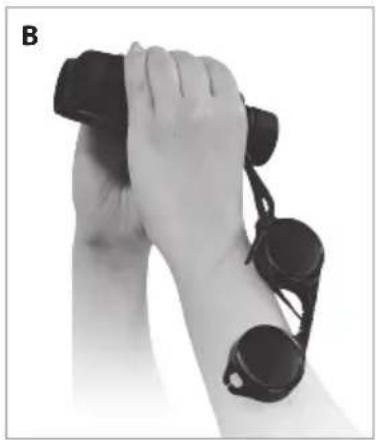
natural_image
Close-up of hands holding binoculars and a wrist (no text or symbols visible)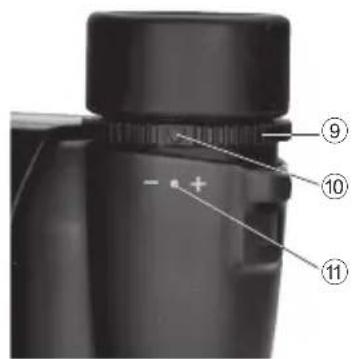
はじめに
Thank you for purchasing these Nikon binoculars.
Strictly observe the following guidelines in order to use the equipment properly and avoid potentially dangerous accidents.
1 Before using the product, thoroughly read the "SAFETY PRECAUTIONS", "OPERATION PRECAUTIONS" and the instructions accompanying the product on correct use.
2 Keep these instructions within easy reach for reference.
In order to protect you and third parties from possible injury and/or property damage or loss, you are kindly requested to pay close attention to all instructions, warnings and cautions regarding the use and care of this product.
WARNING
This indication alerts you to the fact that any improper use ignoring the contents described herein can result in potential death or serious injury.
CAUTION
This indication alerts you to the fact that any improper use ignoring the contents described herein can result in potential injury or may cause only physical damage.
OPERATION PRECAUTIONS
The items contained in this section alert you to the fact that any improper use ignoring the contents described herein may negatively affect product performance and functionality.
SAFETY PRECAUTIONS
WARNING
Never look at the sun directly while using binoculars/monocular.
Looking directly at the sun or intense light may seriously damage the eyes or cause blindness.
CAUTION
- Do not leave the binoculars/monocular in an unstable place. They may fall and cause injury.
- Do not look through the binoculars/monocular while walking. You may walk into unexpected objects and get hurt.
- Do not swing the binoculars/monocular by their straps. They may hit someone and cause injury.
- The soft case, strap, and external materials utilized on binoculars/monocular and eyecups may deteriorate due to aging and stain clothes. To prevent this, check their condition before each use, and consult with a Nikon authorized service representative if such deterioration is found.
- If you use the eyecups for a long period of time, you may suffer skin inflammation. If you develop any symptoms, stop use and consult a doctor immediately.
- Be careful not to pinch your finger when adjusting interpupillary distance or diopter. Be particularly careful if you let small children use the binoculars.
- Do not leave the polyethylene bag used for packaging within small children's reach. Children may put it on their mouths and suffocate.
- Be careful that small children do not inadvertently swallow the cap or eyecup. If it does happen, consult a doctor immediately.
- Do not disassemble the binoculars/monocular. Repair should be referred to a Nikon authorized service representative.
OPERATION PRECAUTIONS
- Do not open the right and left binocular tubes beyond their limits. Also be careful not to rotate the diopter ring and focusing ring beyond their limits.
- Avoid rain, water splashes, sand and mud.
- Always protect binoculars/monocular from shock. If you cannot obtain a normal image after dropping or getting the binoculars/monocular wet, take them immediately to a Nikon authorized service representative.
- When exposed to sudden temperature changes, water condensation may occur on lens surfaces. In this case, thoroughly dry the binoculars/ monocular at room temperature.
STORAGE
- Water condensation or mold may occur on lens surfaces because of high humidity. Therefore, store the binoculars/monocular in a cool, dry place. After use on a rainy day or at night, thoroughly dry them at room temperature, then store in a cool, dry place.
- For long term storage, keep binoculars/ monocular in a plastic bag or an airtight container with a desiccant. If this is not possible, store in a clean, well-ventilated place, separate from the case, as they are easily affected by moisture.
- Do not leave the binoculars/monocular in a car on a hot or sunny day, or near heat generating equipment. This may damage or negatively affect them.
- Remove dust trapped in the focusing ring, diopter ring, or other rotating parts with a soft brush.
- After having removed dust with a blower, clean the body surface using a soft, clean cloth. After use at the seaside, lightly soak a soft, clean cloth with water and wipe off salt that may be on the body surface. Then wipe the body surface with a dry cloth. Do not use benzene, thinner, or other organic solvent.
- When removing dust on the lens surface, use a soft oil-free brush.
- When removing stains or smudges like fingerprints from the lens surfaces, wipe the lenses very gently with a soft clean cotton cloth. Use a small quantity of pure alcohol (ethanol) or lens cleaner available in stores to wipe stubborn smudges, from the center of the lens to the outside in a circular motion. Do not use anything hard as it may scratch the lens surface.
Nomenclature
Please refer to the numbered images on page 3.
① Eyepieces
⑦ Objective lens
② Eyecup
⑧ Interpupillary distance
③ Neck strap eyelet
⑨ Dioptre ring
④ Magnification indication
⑩ Dioptre index
⑤ Zoom lever
⑪ 0 (zero) dioptre position
⑥ Focusing ring
ITEMS SUPPLIED
Binoculars
Eyepiece lens cap
Soft case
Neck strap
Eyecups
For directions in which to turn the eyecups, please refer to the image on page 3.
- For eyeglass wearers, use fully retracted.
- For non-eyeglass wearers, use fully extended.
OPERATION
1) Adjusting interpupillary distance
While looking at a subject through the ① Eyepieces, gently rotate the binocular body until the two images of the subject become one.
2) Diopter adjustment
(Balancing right and left eyesight)
1 Rotate the ⑥ Focusing ring until you obtain a sharp image of your subject in the left eye.
2 Rotate the ⑨ Diopter ring of the right eyepiece until you obtain a sharp image of the same subject in the right eye.
* For focusing with the ⑨ Diopter ring or ⑥ Focusing ring, rotate counterclockwise to focus on a nearby subject, or clockwise for a distant subject.
* With the focus correctly adjusted, record the ⑨ Diopter ring index position for easier future diopter adjustment.
3) Focusing
When you view a different subject, adjust the ⑥ Focusing ring until you obtain a sharp image.
Zoom lever
Magnification can be changed by moving the zoom lever.
When viewing the subject at a different magnification, first correctly adjust focusing at a higher magnification.
This minimizes blurring, which may occur when you change magnification.
- This product is not waterproof. Therefore, avoid getting it wet from rain, water splashes, etc.
- To keep your binoculars in excellent condition, Nikon Vision recommends regular servicing by an authorized dealer.
- Specifications and design are subject to change without notice.
- No reproduction in any form of this "Instruction Manual," in whole or in part (except for brief quotation in critical articles or reviews), may be made without written authorization from NIKON VISION CO., LTD.
Neck strap and caps during observation
Please refer to images A, B and C on page 3.
Neck strap
Attach the neck strap as illustrated (A), taking care to avoid twisting the strap.
Eyepiece cap
There are two ways you can position the eyepiece cap as you observe your subject.
- Remove the eyepiece cap from the eyepieces and allow it to hang from the neck strap.
- Remove the eyepiece cap from the eyepieces, then detach the right strap from the cap and allow it to hang from the left neck strap (B).
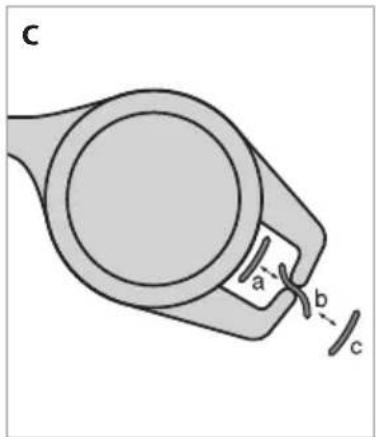
To attach/detach the eyepiece cap, pull the neck strap through the slits as shown in image (C) in the following order:
- Attaching: c b a
- Detaching: a b c
Specifications
| Type: Porro prism zoom binoculars | |||
| Model | 8-24x25 | Relative brightness | 9.6* |
| Magnification (x) | 8-24 | Eye relief (mm) | 13.0* |
| Effective diameter of objective lens (mm) | 25 | Close focusing distance, approx. (m/ft.) | 4.0/13.1 |
| Angular field of view (real) (°) | 4.6* | Interpupillary distance adjustment (mm) | 56-72 |
| Angular field of view (apparent) (°)** | 35.6* | Length (mm/in.) | 123/4.8 |
| Field of view at 1,000m/yds. (m/ft.) | 80/241* | Width (mm/in.) | 109/4.3 |
| Exit pupil (mm) | 3.1* | Weight (g/oz.) | 305/10.8 |
* When minimum magnification (8x) is selected
** The number calculated by the formula [ ' = x ] : Apparent field of view: 2' , Magnification: , Real field of view: 2
PRECAUCIONES
Printed in China 907C_1_1906

Brand : NIKON
Model : Sportstar Zoom
Category : Binoculars