Coolshot 20 - Laser pointer NIKON - Free user manual and instructions
Find the device manual for free Coolshot 20 NIKON in PDF.



| Product type | Laser rangefinder |
| Brand | Nikon |
| Model | Coolshot 20 |
| Measurement range | 5–500 m / 6–550 yd |
| Magnification | 6x |
| Effective objective diameter | 20 mm |
| Real field of view | 6.0° |
| Eye relief | 16.7 mm |
| Exit pupil | 3.3 mm |
| Diopter adjustment | ±4 m⁻¹ |
| Power supply | 1 CR2 lithium battery, 3 V DC |
| Dimensions (L × H × W) | 91 × 73 × 37 mm |
| Weight (without battery) | Approx. 125 g |
| Water resistance | IPX4 (equivalent to JIS/IEC) |
| Laser class | Class 1M (EN/IEC 60825-1), Class I (FDA) |
| Laser wavelength | 905 nm |
| Pulse duration | 20 ns |
| Output power | 10 W |
| Beam divergence | Vertical 3.8 mrad, Horizontal 0.17 mrad |
| Operating temperature | −10 °C to +50 °C |
| Ambient humidity | 80% RH max (non-condensing) |
| Measurement mode | First target priority, continuous measurement (approx. 8 s) |
| Auto power off | After approx. 8 s of inactivity |
| Internal display | Distance, unit, battery indicator, target mark, laser irradiation |
| Available units | Meters (m) or yards (yd) |
| Lens care | Soft brush, clean cloth, pure alcohol for stubborn stains |
| Body cleaning | Soft, dry cloth, avoid benzene/thinner |
| Storage | Cool, dry place; after use in wet conditions, air dry |
| Safety | Do not look into the objective during measurement, do not disassemble, keep out of reach of children |
| Standards | FCC Part 15 Class B, EMC Directive, RoHS, WEEE |
Frequently Asked Questions - Coolshot 20 NIKON
User questions about Coolshot 20 NIKON
0 question about this device. Answer the ones you know or ask your own.
Ask a new question about this device
Download the instructions for your Laser pointer in PDF format for free! Find your manual Coolshot 20 - NIKON and take your electronic device back in hand. On this page are published all the documents necessary for the use of your device. Coolshot 20 by NIKON.
USER MANUAL Coolshot 20 NIKON
natural_image
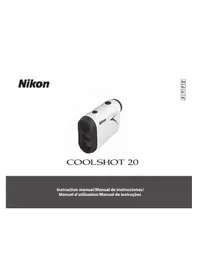
White Nikon CAGR45873 precision scanner with black casing and black ports (no visible text or symbols on body)COOLSHOT 20
Instruction manual/Manual de instrucciones/Manuel d'utilisation/Manual de instruções
English ...... p. 4-18
Cautions before use 5-8
Key features 9
Nomenclature/Composition 10
Inserting and Changing battery 11
Internal display 12
Measurement 13
Target priority mode/Disance display units/
Others....14
Specifications 15-16
Troubleshooting/Repair 17-18
Cautions before use
Thank you for purchasing the Nikon Laser Rangefinder COOLSHOT 20.
Before using this product, read thoroughly the "Cautions before use" and instructions on correct usage in this instruction manual (this manual).
○ Keep this manual within reach for easy reference.
☐ Do not disassemble or repair this product by yourself, this may result in a serious problem. A product that has been disassembled or repaired is not guaranteed by the manufacturer.
- Specifications and design are subject to change without notice.
- No reproduction in any form of this manual, in whole or in part (except for brief quotation in critical articles or reviews), may be made without written authorization from NIKON VISION CO., LTD.
- NIKON VISION CO., LTD. reserves the right to change the contents described in these manuals at any time and without prior notice.
Cautions before use
Please observe the following guidelines strictly so you can use the equipment properly and avoid potentially hazardous problems. Before using this product, read thoroughly the "Cautions before use" and instructions on correct usage accompanying the product. Keep this manual within reach for easy reference.

WARNING
This indication alerts you to the fact that any improper use ignoring the contents described herein can result in potential death or serious injury.

CAUTION
This indication alerts you to the fact that any improper use ignoring the contents described herein can result in potential injury or material loss.
SAFETY PRECAUTIONS (Laser)
The Nikon Laser Rangefinder uses an invisible laser beam. Be sure to observe the following:
⚠ Warning
- Do not depress the POWER ON/ Measurement button while looking into the optics from the objective side. Failure to do this may negatively affect or damage your eyes.
- Do not aim at the eye.
- Do not point the laser at people.
- Do not look at the laser with another optical instrument such as through lenses or binoculars, nor with the naked eye. This may result in damage to the eyes.
- When not measuring, please keep your fingers away from the POWER ON/Measurement button to avoid accidentally emitting the laser beam.
- When not in use for an extended period, please remove the battery from the body.
-
Do not disassemble/remodel/repair the Nikon Laser Rangefinder. The emitting laser may be harmful to your health. A product that has been disassembled/remodeled/ repaired is not guaranteed by the manufacturer.
-
Keep the Nikon Laser Rangefinder out of reach of children when stored.
- If the Nikon Laser Rangefinder's body cover is damaged, or if it emits a strange sound due to dropping or some other cause, remove the battery immediately and stop using.
SAFETY PRECAUTIONS (Monocular)
The Nikon Laser Rangefinder employs a monocular in its optical system in order to aim at the target. Be sure to observe the following:
Warning
- Never look directly at the sun, an intense light or the laser beam when using the Nikon Laser Rangefinder.
⚠️ Cautions
- When not using the Nikon Laser Rangefinder, do not push the POWER ON/Measurement button.
- Do not use this product while walking. Failure to observe this may cause injury or malfunction as a result of walking into something, hitting others, falling or other accidents.
- Do not swing around by the strap. This may result in hitting others and cause injury.
- Do not place this product in an unstable place. Failure to observe this may result in falling or dropping and cause injury or malfunction.
-
Keep the plastic bag used to wrap this product or other small parts out of reach of children.
-
Prevent children from putting rubber eyecup or small parts, etc. into their mouths. If children swallow such parts, consult a doctor immediately.
- If using the rubber eyecup for a long period of time, some people may suffer skin inflammation. If any symptoms occur, stop using it and consult a doctor immediately.
- When carrying the Nikon Laser Rangefinder, store it in the case.
- If your Nikon Laser Rangefinder should fail to operate correctly, discontinue use immediately and consult with your local dealer for instructions on where to send it for repair.
SAFETY PRECAUTIONS (lithium battery)
If handled incorrectly, the battery may rupture and leak, corroding equipment and staining clothing. Be sure to observe the following:
- Install the battery with the + and – poles positioned correctly.
- The battery should be removed when exhausted or during extended periods of non-use.
- Do not short the end terminal of the battery chamber.
- Do not carry together with keys or coins in a pocket or bag, it may short and cause overheating.
- Do not expose the battery to water, or a flame. Never disassemble the battery.
- Do not charge the lithium battery.
- If liquid from a damaged battery comes into contact with clothing or skin, rinse immediately with plenty of water. If liquid from a damaged battery enters the eyes, rinse immediately with clean water, then consult a doctor.
- When disposing of the battery, follow your local area regulations.
Cautions before use
SAFETY PRECAUTIONS
Cautions
- The Nikon Laser Rangefinder is not designed for use underwater.
- Rain, water, sand and mud should be removed from the rangefinder body surface as soon as possible, using a soft, clean cloth.
- Do not leave the Nikon Laser Rangefinder in a car on a hot or sunny day, or near heat-generating equipment. This may damage or negatively affect it.
- Do not leave the Nikon Laser Rangefinder in direct sunlight. Ultraviolet rays and excessive heat may negatively affect or even damage the unit.
- If the Nikon Laser Rangefinder is exposed to sudden changes in temperature, water condensation may occur on lens surfaces. Do not use the product until the condensation has evaporated.
CARE AND MAINTENANCE Lenses
- When removing dust on the lens surface, use a soft oil-free brush.
- When removing stains or smudges like fingerprints from the lens surface, wipe the lenses very gently with a soft clean cotton cloth or quality oil-free lens tissue. Use a small quantity of pure alcohol (not denatured) to wipe stubborn smudges. Do not use velvet cloth or ordinary tissue, as it may scratch the lens surface. Once the cloth has been used for cleaning the body, it should not be used again for the lens surface.
Main body
- Clean the body surface with a soft, clean cloth after blowing away dust with a blower* lightly. Do not use benzene, thinner, or other cleaners containing organic solvents.
* A blower is rubber cleaning equipment that blows air from a nozzle.
Storage
- Water condensation or mold may occur on the lens surface because of high humidity. Therefore, store the Nikon Laser Rangefinder in a cool, dry place. After use on a rainy day or at night, thoroughly dry it at room temperature, then store in a cool, dry place.

Symbol for separate collection applicable in European countries
This symbol indicates that this battery is to be collected separately.
The following apply only to users in European countries.
- This battery is designated for separate collection at an appropriate collection point. Do not dispose of as household waste.
- For more information, contact the retailer or the local authorities in charge of waste management.

Symbol for separate collection applicable in European countries
This symbol indicates that this product is to be collected separately.
The following apply only to users in European countries.
- This product is designated for separate collection at an appropriate collection point. Do not dispose of as household waste.
- For more information, contact the retailer or the local authorities in charge of waste management.
Key Features
• Measurement range: 5-500 meters/6-550 yards
• High-quality 6x finder with multilayer coating
- First Target Priority mode is employed
- Single press of button enables approx. 8-second continuous measurement
• Automatic power shut-off (after approx. 8 seconds unoperated)
- Default to "Last Use" settings
- Rainproof — JIS/IEC protection class 4 (IPX4) equivalent (under our testing conditions)
- Invisible/Eyesafe EN/IEC Class 1M Laser
The Nikon Laser Rangefinder uses an invisible laser beam for measuring. It measures the time the laser beam takes to travel from the rangefinder to the target and back. Laser reflectivity and measurement results may vary according to climatic and environmental conditions, as well as the color, surface finish, size, shape and other characteristics of the target.
The following conditions makes measuring easier:
- Cloudy weather
• Bright-colored target
• Target with highly reflective surface - Large-size target
- When laser incident angle to the target is close to 90 degrees
Measurement may result in inaccuracy or failure in the following cases:
- Target has small or slender reflective surface
• Target has diffusing reflective surface - Target does not reflect the laser beam to the rangefinder
- Target has totally reflective surface (glass, mirror, etc.)
- Black target
• Target has stepped surface
• In snow, rain or fog
• Target measured through glass
• Reflective surface measured from diagonal direction - Moving or vibrating target
- Obstacle cutting across in front of the target
- When measuring the surface of water
Nomenclature/Composition
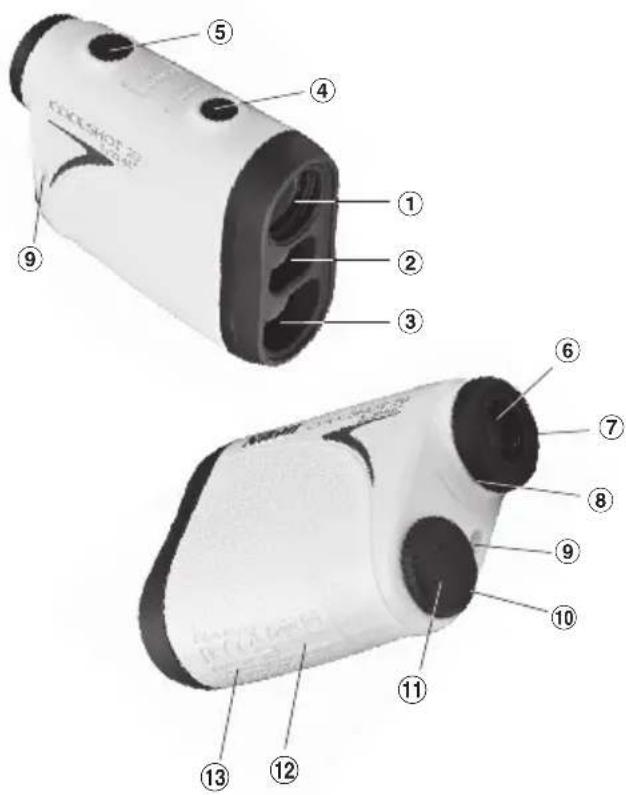
① Monocular objective lens
② Laser emission aperture
③ Laser detector aperture
④ MODE button
⑤ POWER ON/Measurement button
⑥ 6x monocular eyepiece
⑦ Eyecup/diopter adjustment ring
⑧ Diopter index
⑨ Strap eyelet
⑩ Battery chamber cover "Open" indication
⑪ Battery chamber cover
⑫ Product number label
⑬ FDA information indication
3-25, Futaba 1-chome, Shinagawa-ku, Tokyo, Japan CLASS I LASER PRODUCT
THIS PRODUCT COMPLIES WITH 21CFR
1040.10 AND 1040.11 Made in China
Composition
Body ....x1 Strap ....x1
Soft case ....x1 Lithium battery (CR2) ..x1
Inserting and Changing battery
• Type of battery: 3V CR2 lithium battery
- Battery remaining amount indicators
* Battery condition mark in the internal display warns when the battery needs to be replaced.

: Battery has enough power for use.

: Battery level is getting low. Prepare to replace the battery.

: Battery level is low. Battery should be replaced with a new one.
- -flashing : Battery is exhausted. After the indicator flashes three times, the laser rangefinder automatically powers off. Please replace the battery.
- Open the battery chamber cover
Rotate the battery chamber cover counterclockwise and remove it. It may not open easily due to its rubber packing for water resistance.
- Insert the battery/Replace the old battery with a new one
Insert a new battery correctly positioned following the indication seal inside the chamber. The [-] pole should be positioned toward the inside of the chamber. If the battery is not inserted correctly, the Nikon Laser Rangefinder will not operate.
When replacing the battery, take the old battery out first. Then insert a new one.
- Close the battery chamber cover
Rotate the battery chamber cover clockwise to screw it into the body. It may not close easily due to the rubber packing for water resistance, but continue to turn it all the way until it stops. Confirm that the cover is securely closed.
- Battery life
Continuous operation: Approx. 2,000 times (at approx. 20°C)
This figure may differ according to condition, temperature, and other factors such as target shape, color, etc. Use only as a guide.
* The battery supplied with this Laser Rangefinder is for operation checking. Due to natural electrical discharge, the life of this battery will likely be shorter than that noted above.
* If water enters the battery chamber due to submersion, dry the battery chamber well, then replace the battery.
Internal display
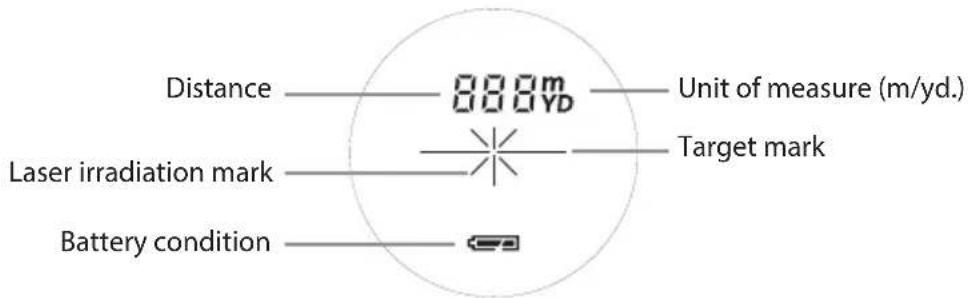
— : Aim at the target you want to measure. Position the target at the center of the target mark.
: Appears while the laser is being irradiated for a measurement. Do not look towards the objective lens side while this mark is shown.
: Now measuring --- : "Failure to measure" or "Unable to measure"
* Usually, an LCD employs equal or lower magnification. However the LCD of this product is magnified by the high magnification of the eyepiece. Although this LCD was produced using the most advanced technology, it is impossible to eliminate dust completely. As a result, dust may be seen. It will not, however, affect measurement accuracy or safety during use.
Measurement
Caution — use of controls or adjustments or performance of procedures other than those specified herein may result in hazardous radiation exposure.
1. Install a battery in the battery chamber. (See "Inserting and Changing Battery")
2. Diopter adjustment
Adjust diopter to obtain a clear LCD indication in the viewfinder.
First, rotate the diopter adjustment ring counterclockwise until it comes to a complete stop. Next, press the POWER ON/Measurement button to turn on the power (Confirm the internal display is on). While looking through the eyepiece, rotate the diopter adjustment ring clockwise until the LCD comes into focus.
If you rotate the ring too much, rotate it counterclockwise substantially then adjust it again.
If the diopter is not adjusted to correspond to your eyesight, you may not be able to correctly aim at your subject.
3. Measuring
Before measuring, be sure to confirm unit setting.
-
Press the POWER ON/Measurement button for power-on.
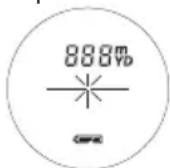
Immediately after power-on. (Initializing) -
Aim at the target.

Stand-by. Target aiming.

- Press POWER ON/Measurement button once to start continuous measurement for approx. 8 seconds. (Single measurement mode is not available with this laser rangefinder.)

Measuring.
- For approx. 8 seconds, the internal display shows "distance" and "fail to measure" indicator alternately. (Laser irradiation mark is blinking.)
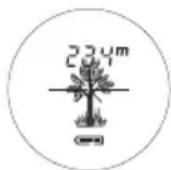
Displays the measured figure. (Target 1)
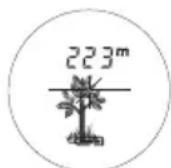
Displays the measured figure. (Target 2)

Failure to measure or unable to measure distance.
- After continuous measurement, the measured results are displayed for approx. 8 seconds, then power turns off. If you press the POWER ON/Measurement button during power-on (while the internal display is active), another approx. 8-second measurement starts.
Target priority mode
This Laser Rangefinder has a First Target Priority System. When measuring overlapping subjects, this equipment displays the distance to the closest subject.
Distance display units
Measurement results are displayed in yards/meters. (Factory default setting is yard.)

- Turn on the power (Confirm the internal display is on).
- Press and hold the MODE button for more than two seconds. When the display unit has been switched, release the button.
- After the unit is set, results will be converted and displayed in the selected distance display unit.
Others
This device complies with Part 15 of the FCC Rules. Operation is subject to the following two conditions:
(1) This device may not cause harmful interference, and
(2) This device must accept any interference received, including interference that may cause undesired operation.
This equipment has been tested and found to comply with the limits for a Class B digital device, pursuant to Part 15 of the FCC Rules and to EU EMC directive. These limits are designed to provide reasonable protection against harmful interference in a residential installation. This equipment generates, uses and can radiate radio frequency energy and, if not installed and used in accordance with the instructions, may cause harmful interference to radio communications. However, there is no guarantee that interference will not occur in a particular installation. If this equipment does cause harmful interference to radio or television reception, which can be determined by turning the equipment off and on, the user is encouraged to try to correct the interference by one or more of the following measures:
- Reorient or relocate the receiving antenna.
- Increase the separation between the equipment and receiver.
- Consult the dealer or an experienced radio/TV technician for help.
This Class B digital apparatus meets all requirements of the Canadian Interference-Causing Equipment Regulations.
This Nikon Laser Rangefinder is a basic rangefinder. Its results cannot be used as official evidence.
Specifications
| Measurement system | |
| Measurement range 5-500 m/6-550 yds. | |
| Distance display (increment) Every 1 m/yd. | |
| Optical system | |
| Magnification (x) 6 | |
| Effective diameter of objective lens (mm) | 20 |
| Angular field of view (real) (°) 6.0 | |
| Eye relief (mm) 16.7 | |
| Exit pupil (mm) 3.3 | |
| Diopter adjustment ±4m | -1 |
| Others | |
| Operating temperature (°C) -10 — +50 | |
| Power source CR2 lithium battery x 1 (DC 3V) | |
| Dimensions (L x H x W) (mm) 91 x 73 x 37 | |
| Weight (g) Approx. 125 (without battery) | |
| Structure | JIS/IEC protection class 4 (IPX4) equivalent (under our testing conditions)* |
| Safety | Class 1M Laser Product (EN/IEC60825-1:2007)Class I Laser Product (FDA/21 CFR Part 1040.10:1985) |
| EMC | FCC Part15 SubPartB class B, EU:EMC directive, AS/NZS, VCCI classB |
| Environment RoHS, WEEE | |
Specifications
| Laser | |
| Class EN/IEC Class 1M | |
| Wavelength (nm) 905 | |
| Pulse duration (ns) 20 | |
| Output (W) 10 | |
| Beam divergence (mrad) Vertical: 3.8, Horizontal: 0.17 | |
| Operating humidity (%RH) 80 or less (without dew condensation) | |
\* Water resistance performance
This Nikon Laser Rangefinder is equivalent to JIS/IEC protection class 4 (IPX4) (under our testing conditions). This rating does not guarantee the water resistance performance of the unit or that it will be free from damage or problems under all conditions. Please observe the following when using:
- The unit is not a sealed structure, so it should not be operated nor held in running water.
- If any moisture is found on movable parts of the unit, stop using it and wipe it off.
Troubleshooting/Repair
If your Nikon Laser Rangefinder should require repair, please contact your local dealer for details regarding where to send it. Before doing so, you are advised to consult the Troubleshooting Table below.
| Symptom Check Points | ||
| Unit does not turn on — LCD fails to illuminate | ·Depress POWER ON/Measurement button.·Check battery insertion.·Replace the battery if necessary. | |
| Target range cannot be obtained | ·Be sure that nothing, such as your hand or finger, is blocking the laser emission aperture and laser detector.·Be sure that the laser emission aperture and laser detector are clean. Clean them if necessary.·Be sure that the target shape and condition are appropriate to reflect the laser beam.·Replace the battery. | |
| [---] ("Cannot measure") appears | ||
| Closer target cannot be measured | ||
| Target beyond a certain distance cannot be measured | ||
Troubleshooting/Repair
| Symptom Check Points | |
| Measurement result is unstable | Replace the battery.Be sure that the target shape and condition are appropriate to reflect the laser beam.Be sure to hold the unit steady while measuring.Be sure that nothing, such as leaves or grass, is between the Nikon Laser Rangefinder and the target. |
| Incorrect result is displayed | Replace battery.Be sure that the target shape and condition are appropriate to reflect the laser beam.Be sure that nothing, such as leaves or grass, is between the Nikon Laser Rangefinder and the target. |
If problems persist after consulting the Troubleshooting Table, please contact your local dealer to check/repair the Nikon Laser Rangefinder. Never let anyone other than the official representative of the product manufacturer check or repair the Nikon Laser Rangefinder. Failure to follow this instruction could result in injury, or damage to the product.
Español
CONTENIDO
3-25, Futaba 1-chome, Shinagawa-ku, Tokyo, Japan CLASS I LASER PRODUCT
THIS PRODUCT COMPLIES WITH 21CFR
1040.10 AND 1040.11 Made in China
Componentes
Cuerpo .....x1 Correa .....x1
NIKON VISION CO., LTD. 3-25, Futaba 1-chome, Shinagawa-ku, Tokyo, Japan CLASS I LASER PRODUCT THIS PRODUCT COMPLIES WITH 21CFR 1040.10 AND 1040.11 Made in China
Composition
Boîtier .....x1 Lanière .....x1
Housse ....x1 Pile au lithium (CR2) ....x1
CLASS I LASER PRODUCT
THIS PRODUCT COMPLIES WITH 21CFR
1040.10 AND 1040.11 Made in China
Composição
Printed in China (268K)1E/1406