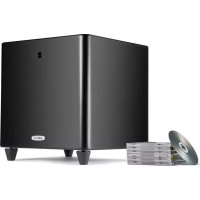
PSWi225 - Subwoofer POLK - Free user manual and instructions
Find the device manual for free PSWi225 POLK in PDF.




User questions about PSWi225 POLK
0 question about this device. Answer the ones you know or ask your own.
Ask a new question about this device
Download the instructions for your Subwoofer in PDF format for free! Find your manual PSWi225 - POLK and take your electronic device back in hand. On this page are published all the documents necessary for the use of your device. PSWi225 by POLK.
USER MANUAL PSWi225 POLK
- Read these instructions.
- Keep these instructions.
- Hed all warnings.
- Follow all instructions.
- Do not use this apparatus near water.
- Clean only with dry cloth.
- Do not block any ventilation openings. Install in accordance with the manufacturer's instructions.
- Do not install near any heat sources such as radiators, heat registers, stoves, or other apparatus (including amplifiers) that produce heat.
- Do not defeat the safety purpose of the polarized or grounding-type plug. A polarized plug has two blades with one wider than the other. A grounding type plug has two blades and a third grounding prong. The wide blade or the third prong are provided for your safety. If the provided plug does not fit into your outlet, consult an electrician for replacement of the obsolete outlet.
-
Protect the power cord from being walked on or pinched particularly at plugs, convenience receptacles, and the point where they exit from the apparatus.
-
Only use attachments/accessories specified by the manufacturer
-
Use only with the cart, stand, tripod, bracket, or table specified by the manufacturer, or sold with the apparatus. When a cart is used, use caution when moving the cart/apparatus combination to avoid injury from tip-over.
- Unplug this apparatus during lightning storms or when unused for long periods of time.
- Refer all servicing to qualified service personnel. Servicing is required when the apparatus has been damaged in any way, such as power-supply cord or plug is damaged, liquid has been spilled or objects have fallen into the apparatus, the apparatus has been exposed to rain or moisture, does not operate normally, or has been dropped.
- WARNING: To reduce the risk of fire or electric shock, this apparatus should not be exposed to rain or moisture and objects filled with liquids, such as vases, should not be placed on this apparatus.
- To completely disconnect this equipment from the mains, disconnect the power supply cord plug from the receptacle.
- The main plug of the power supply cord shall remain readily operable.
WARNING: Listen Carefully
Polk Audio loudspeakers and subwoofores are capable of playing at extremely high volume levels, which could cause serious or permanent hearing damage. Polk Audio, Inc. accepts no liability for hearing loss, bodily injury or property damage resulting from the misuse of its products. Keep these guidelines in mind and always use your own good judgment when controlling volume: You should limit prolonged exposure to volumes that exceed 85 decibels[dB].
For more about safe volume levels, go to www.polkaudio.com/education/article/SPI/, or refer to the Occupational Health and Safety Administration (OSHA) guidelines at www.osha.gov/dts/osta/atm/noise/standards_more.html.
The CAUTION marks shown here are located on the back of your PSWi225.

CAUTION: To prevent electric shock, match wide blade of plug to wide slot, insert fully. CAUTION: No naked flame sources, such as candles, should be placed on the apparatus.
Class B Emissions Limits
This Class B digital apparatus meets all requirements of the Canadian Interference-Caising Equipment Regulations.

Product Disposal
Certain international, national and/or local laws and/or regulations may apply regarding the disposal of this product. For further detailed information, please contact the retailer where you purchased this product or the Polk Audio Importer/Distributor in your country. A listing of Polk Audio Importer/ Distributors can be found on the Polk Audio website www.polkaudio.com or by contacting Polk Audio at: 5601 Metro Drive, Baltimore, Maryland 21215, USA. Phone: +1-410-358-3600; in California: 1-800-377-7655.
NOTE:
This equipment has been tested and found to comply with the limits for a Class B digital device, pursuant to part 15 of the FCC Rules. These limits are designed to provide reasonable protection against harmful interference in a residential installation. This equipment generates, uses and can radiate radio frequency energy, and, if not installed and used in accordance with the instructions, may cause harmful interference to radio communications. However, there is no guarantee that interference will not occur in a particular installation. If this equipment does cause harmful interference to radio or television reception, which can be determined by turning the equipment off and on, the user is encouraged to try to correct the interference by one or more of the following measures:
Reorient or relocate the receiving antenna.
Increase the separation between the equipment and receiver. Connect the equipment into an outlet on a circuit different from that to which the receiver is connected. Consult the dealer or an experienced radio/TV technician for
FCC WARNING STATEMENT
FCC NOTE:
THE MANUFACTURER IS NOT RESPONSIBLE FOR ANY RADIO OR TV INTERFERENCE CAUSED BY UNAUTHORIZED MODIFICATIONS TO THIS EQUIPMENT.
SUCH MODIFICATIONS COULD VOID THE USER'S AUTHORITY TO OPERATE THE EQUIPMENT.
FIRST THINGS FIRST
Caution: Subwoofer are heavy. Exercise caution when unpacking your subwoofer.
Please check to ensure you have everything in your Polk Audio
PSWi225 Wireless Subwoofer carton. Inside, you should find:
Take Inventory
- PSWi225 Wireless Subwoofer
Transmitter - 5' RCA Cable
Power Supply For Transmitter - Owners Manual
- Transmitter Wall Mount Template
Online Registration Card
If anything is missing or damaged, or if your Polk Audio PSWi225 fails to operate, please notify your dealer immediately. We recommend keeping your original carton and packing materials in case you need to ship the unit in the future.
WHERE TO LOCATE YOUR WIRELESS SUBWOOFER FOR THE BEST SOUND
The PSWi225 Wireless subwoofer can be placed anywhere in the room, up to 30' (10 meters) from its transmitter. Your Wireless Subwoofer is really easy to place and can go just about anywhere in the room. Plus you don't have to worry about connecting wires, because the only wire you have to plug in is the power cord to an AC outlet and the transmitter wires to your receiver or pre-amp.
Note: Placing your subwoofer in a corner of your room will reinforce the subwoofer's output, making it sound louder.
We do recommend placing your subwoofer in different locations within your room to learn what produces the best sound quality based upon your listening preferences.
Specifications
Dimensions 12~1/2^ W x 12 1/2 D x 13 H
(31.75cm×31.75cm×33.02cm)
System Power 100 Watts
Subwoofer Weight 21 lbs (9.53kg)
For more information on subwoofer placement, go to: www.polkaudio.com/education/article.php?id=20.
HOW TO CONNECT YOUR WIRELESS SUBWOOFER
Wireless ID Switches—The Wireless ID Switches, found on both the subwoofer and the transmitter, select the channel for the wireless signal. The switch settings change the frequency of the wireless signal the transmitter sends to the Wireless Subwoofer. The Switch provides four possible settings in the event there is interference from other devices in your home. The two switches must be set to the same position for the subwoofer to receive a signal.
Transmitter Inputs


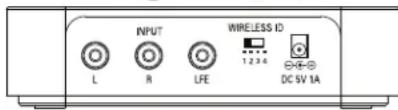

Audio Inputs—Where you connect your transmitter to your receiver. Use the 5' analog L/R or LFE audio cable provided.
Wireless ID Switch—Selects the "channel" for the Wireless Subwoofer signal. Don't forget to select the same "channel" on the Wireless Subwoofer itself.
3 Power Connection—The transmitter power supply is connected here.
4 LED-Indicates transmitter is active.
Wireless Subwoofer Controls
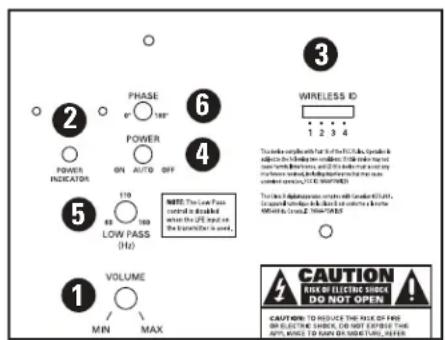
Volume-Adjusts the volume of the Wireless Subwoofer.
Power Mode LED—Shines green when the Wireless Subwoofer is on and red when it's in standby mode or off.
3 Wireless ID Switch—Selects the "channel" for the Wireless Subwoofer signal.
4 Power Switch—Turns the Wireless Subwoofer on and off, but you can leave it on all the time if you wish.
Low Pass-Adjusts the frequency range over which the subwoofer operates.
6 Phase Switch—See page 5.
AC POWER CONNECTION AND AUTO ON/OFF
Off/Auto/On Switch
Your PSWi225 Subwoofer uses a 3-position power switch, which selects your subwoofer's operational mode. The three modes are:
Off, Auto and On.

Off
With the switch in this position, the subwoofer is inactive.

Auto
In the "Auto" position, your subwoofer automatically turns on when it senses an audio signal and the LED located on the back of the subwoofer will turn green.
We recommend the "Auto" mode if your subwoofer is always receiving power (i.e., if it's plugged into a wall outlet). When no signal is present, the subwoofer will enter a "waiting" state after 15 minutes and the LED will turn red.

On
The subwoofer is always on and fully active in this mode. The LED on the back of the subwoofer will be green. This mode is best if the subwoofer is plugged into a switched power outlet.
Note: You may want to leave your subwoofer unplugged during extended periods of non use, such as during a vacation.
CONNECTING THE SUBWOOFER TO THE SYSTEM-HOOKUP OPTIONS
IMPORTANT NOTE: USE ONLY ONE OF THESE OPTIONS.
NEVER COMBINE HOOKUP OPTIONS.
OPTION #1 Receivers that include a "SUB OUT" feature the most common hookup method with Dolby Digital and DTS receivers.
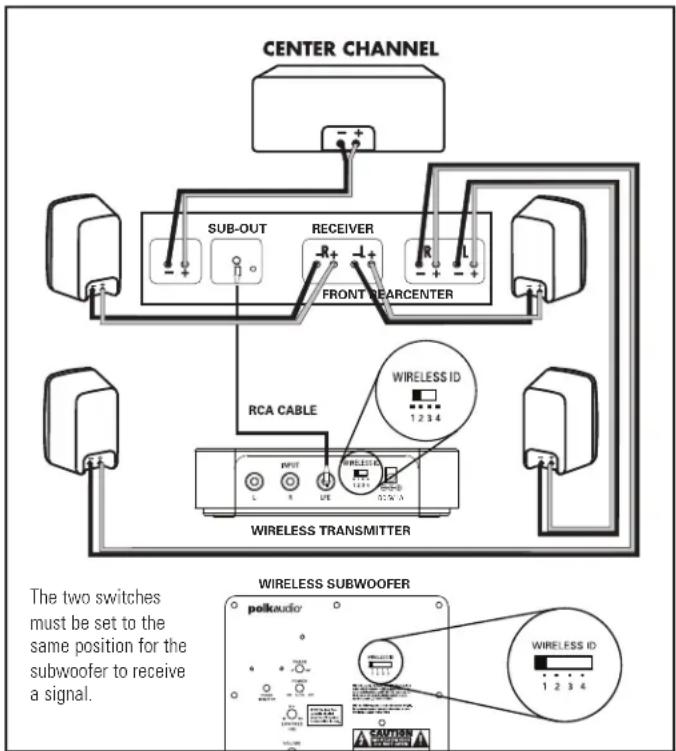
- Connect a single RCA cable from the "SUB OUT" of your receiver to the LFE input of the transmitter.
- Connect all other speakers directly to the receiver.
- Adjust your receiver's speaker configurations as follows: Front Speakers = SMALL Center and Surrounds = SMALL Subwoofer = ON, YES, or PRESENT
- Depending on your front speakers' bass output capabilities, set the crossover frequency on the receiver to 80Hz for tower and bookshelf speakers (speakers with a woofer 51/4 in diameter or larger) and 100 - 120Hz for satellite speakers. Consult your receiver's owner's manual for instructions.
OPTION #2 Receivers with full-range (unfiltered) left and right "PRE OUT" jacks (this is the least commonly used hookup).

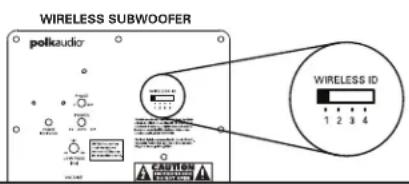
The two switches must be set to the same position for the subwoofer to receive a signal.
- Connect the left and right front preamp outputs to the left and right inputs of the transmitter.
- Adjust the settings on your receiver as follows: Front Speakers = LARGE Subwoofer = OFF or NO
ADJUSTING YOUR SUBWOOFER
Note: When you set up your subwoofer for the first time, you will probably have to make adjustments several times before you hear what you personally like.
FINE TUNING YOUR SUBWOOFER
Volume: Adjust by ear using a wide variety of CDs and video sources. Adjust for deep, powerful bass without "boominess."
- Low Pass Filter Control: NOTE: This control does not operate when the subwoofer is connected with Option #1 (LFE Input). This control, which is located on the back of the amplifier, adjusts the frequency range over which the subwoofer operates. When using smaller main speakers the upper range of the control will probably yield the best results. With larger speakers the lower end of the control range will probably sound best, but always let your ear be the final judge. If male vocals sound "thin," turn this control up until the voice sounds rich but not "boomy." If male vocals sound too "thick" or chesty, turn this control down until the voice sounds natural.
- Phase Switch: Playing music and sitting in your listening position, carefully listen for the point at which the subwoofer transitions to your main speakers. This is the crossover point, and this point should be below the frequency of a male human voice. Whichever phase setting sounds louder or fuller at the subwoofer's crossover point is the optimum setting. Sometimes no difference will be heard.
TROUBLESHOOTING
Subwoofer does - Ensure the subwoofer is plugged not power on, into a live wall outlet.
- Ensure the rear panel power switch is in the "On" or "Auto" position.
No sound from -Turn up the volume control.
subwoofer. - Ensure the channel ID switches on the
transmitter and Wireless Subwoofer are set to the same number.
Bass output not loud enough. -Turn up the Wireless Subwoofer's volume control.
- Place the Wireless Subwoofer closer to a corner of the room.
The Subwoofer's sound - Turn off both the transmitter and the is intermittent, sounds Wireless Subwoofer. Then turn them back weak or is distorted on to re-establish communication.
Try changing settings of the Channel ID switches on both the transmitter and the Wireless Subwoofer.
- The Wireless Subwoofer could be too far away from the transmitter to receive a sufficiently strong signal. Try moving it closer.
A Note Regarding Wireless Performance:
Like all wireless devices, your PSWi225 may be susceptible to RF interference from such sources as microwave ovens, WiFi computer systems, video game systems, cordless telephones, blue tooth systems, baby monitors and other devices. In particular, any devices operating in the 2.4GHz band may cause intermittent wireless connections between the PSWi225. It is also possible that your PSWi225 may affect other wireless systems. For the most part, you can avoid wireless performance problems by physically separating these devices from your PSWi225. Maintaining a distance of several feet or more between your PSWi225 speaker and any wireless device should prevent any mutual interference effects. If you do notice any subwoofer signal dropouts take care to identify the root cause (most commonly having other wireless devices too close) and resolve accordingly. Any interference effects from a microwave oven will cease once the oven stops operating and may be resolved on a long-term basis by increasing the physical distance between your PSWi225 and the microwave oven.
TECHNICAL ASSISTANCE AND SERVICE
If, after following these hookup directions, you experience difficulty, please double-check all wire connections. Should you isolate the problem to the subwoofer, contact the authorized Polk Audio dealer where you made your purchase, or call Polk Audio's friendly Customer Service Department at 1-800-377-7655 (calls from US or CAN only), 410-358-3600 9am to 6pm EST, Monday through Friday.
You may also contact us via email: polkcs@polkaudio.com. For more detailed hookup information and manual updates, visit: www.polkaudio.com.
Specifications can be found on the PSWi225 web pages. Go to www.polkaudio.com.
FRANCAIS
CONSIGNES DE SECURITE IMPORTANTES À LIRE AVANT D'UTILISER L'ÉQUIPEMENT
(31.75cm×31.75cm×33.02cm)
(31.75cm×31.75cm×33.02cm)
A Note Regarding Wireless Performance:
(31.75cm x 31.75cm x 33.02cm)
CAUTION: To prevent electric shock, match wide blade of plug to wide slot, insert fully.
CAUTION: No naked flame sources, such as candles, should be placed on the apparatus.
(31.75cm×31.75cm×33.02cm)
(31.75cm×31.75cm×33.02cm)
Polk Audio, Inc., warrants to the original retail purchaser only. This warranty will terminate automatically prior to its stated expiration if the original retail purchaser sells or transfers the Product to any other party.
Polk Audio, Inc., warrants, to the original retail purchaser only, that the LOUDSPEAKER(S), PASSIVE CROSSOVER COMPONENT(S) and ENCLOSURE on this Polk Audio Loudspeaker Product will be free from defects in material and workmanship for a period of five 5 years from the date of original retail purchase from a Polk Audio Authorized Dealer.
Furthermore, Polk Audio, Inc., warrants, to the original retail purchaser only, that any AMPLIFIER OR OTHER ELECTRONIC COMPONENT that may be included in this Polk Audio Loudspeaker Product will be free from defects in material and workmanship for a period of three (3) years from the date of original retail purchase from a Polk Audio Authorized Dealer.
To allow Polk Audio to offer the best possible warranty service, please register your new product online at: www.polkaudio.com/registration or call Polk customer service 800-377-7655 in the USA and Canada (outside the USA: 410-358-3600) within ten 10 days of the date of original purchase. Be sure to keep your original purchase receipt.
Defective Products must be shipped, together with proof of purchase, prepaid insured to the Polk Audio Authorized Dealer from whom you purchased the Product, or to the Factory at 2550 Britannia Boulevard, Suite A, San Diego, California 92154. Products must be shipped in the original shipping container or its equivalent; in any case the risk of loss or damage in transit is to be borne by you. If upon examination at the Factory or Polk Audio Authorized Dealer it is determined that the unit was defective in materials or workmanship at any time during this Warranty period, Polk Audio or the Polk Audio Authorized Dealer will, at its option, repair or replace this Product at no additional charge, except as set forth below. All replaced parts and Products become the property of Polk Audio. Products replaced or repaired under this warranty will be returned to you, within a reasonable time, freight prepaid.
This warranty does not include service or parts to repair damage caused by accident, disaster, misuse, abuse, negligence, inadequate packing or shipping procedures, commercial use, voltage inputs in excess of the rated maximum of the unit, cosmetic appearance of cabinetry not directly attributable to defect in materials or workmanship, or service, repair, or modification of the Product which has not been authorized or approved by Polk Audio. This warranty shall terminate if the Serial number on the Product has been removed, tampered with or defaced.
This warranty is in lieu of all other expressed warranties. All implied warranties on this Product are limited to the duration of this expressed Warranty. Some states do not allow limitation on how long an implied Warranty lasts, so the above limitations may not apply to you. This Warranty gives you specific legal rights, and you also may have other rights which vary from state to state.
If this Product is defective in materials or workmanship as warranted above, your sole remedy shall be repair or replacement as provided above. This warranty does not cover service, parts, or supplies to repair damage to property other than the Product. In no event will Polk Audio, Inc. be liable to you for any incidental or consequential damages arising out of the use or in-ability to use the Product, even if Polk Audio, Inc. or a Polk Audio Authorized Dealer has been advised of the possibility of such damages, or for any claim by any other party. Same states do not allow the exclusion or limitation of incidental or consequential damages, so the above limitation and exclusion may not apply to you.
This Warranty applies only to Products purchased in Canada, the United States of America, its possessions, and U.S. and NATO armed forces exchanges and audio clubs. The Warranty terms and conditions applicable to Products purchased in other countries are available from the Polk Audio Authorized Distributors in such countries.