DSW PRO 440wi - Subwoofer POLK - Free user manual and instructions
Find the device manual for free DSW PRO 440wi POLK in PDF.



User questions about DSW PRO 440wi POLK
0 question about this device. Answer the ones you know or ask your own.
Ask a new question about this device
Download the instructions for your Subwoofer in PDF format for free! Find your manual DSW PRO 440wi - POLK and take your electronic device back in hand. On this page are published all the documents necessary for the use of your device. DSW PRO 440wi by POLK.
USER MANUAL DSW PRO 440wi POLK
the speaker specialists®
OWNER'S
MANUAL
DSWPRO440wi
DSWPRO550wi
DSWPRO660wi
DIGITAL POWERED
WIRELESS-READY SUBWOOFERS
WITH POLK ROOM OPTIMIZER

wireless™
ready
The advantages of Polk Audio's new line of wireless high-performance subwoofers can be summed up like this: one power plug and you're done.
Yes, it'snowthatasytoreallyturnupthebassinyourmusic,movies,gamesandTVprograms.
We've redesigned our award-winning DSWo Digital Subwoofers so they can be connected wirelessly to virtually any home entertainment system using the optional PWSK-1 wireless kit, a simple plug-and-play kit that adds loss-less wireless capabilities to any of these subwoofers in seconds.
You'll enjoy the best possible bass performance without the hassles of subwoofer cables.
ENGLISH
IMPORTANT SAFETY INSTRUCTIONS
READ BEFORE OPERATING EQUIPMENT
-
Read these instructions.
-
Keep these instructions.
-
Heed all warnings.
-
Follow all instructions.
-
Do not use this apparatus near water.
-
Clean only with dry cloth.
-
Do not block any ventilation openings. Install in accordance with the manufacturer's instructions.
-
Do not install near any heat sources such as radiators, heat registers, stoves, or other apparatus (including amplifiers) that produce heat.
-
Do not defeat the safety purpose of the polarized or grounding-type plug. A polarized plug blades with one wider than the other. A grounding type plug has two blades and a third prong. The wide blade or the third prong are provided for your safety. If the provided plug fit into your outlet, consult an electrician for replacement of the obsolete outlet.
-
Protect the power cord from being walked on or pinched particularly at plugs, convenience ^10 , receptacles, and the point where they exit from the apparatus.
-
Only use attachments/accessories specified by the manufacturer.
-
Use only with the cart, stand, tripod, bracket, or table specified by manufacturer, or sold with the apparatus. When a cart is used, use when moving the cart/apparatus combination to avoid injury from tip
-
Unplug this apparatus during lightning storms or when unused for long periods of time.
-
Refer all servicing to qualified service personnel. Servicing is required when the apparatus been damaged in any way, such as power-supply cord or plug is damaged, liquid has been or objects have fallen into the apparatus, the apparatus has been exposed to rain or moist does not operate normally, or has been dropped.
-
WARNING: To reduce the risk of fire or electric shock, this apparatus should not be exposed to rain or moisture and objects filled with liquids, such as vases, should not be placed on this apparatus.
-
To completely disconnect this equipment from the mains, disconnect the power supply cord from the receptacle.
-
The main plug of the power supply cord shall remain readily operable.e.
FRANÇAIS
CONSIGNES DE SÉCURITÉ IMPORTANTES À LIRE AVANT D'UTILISER L'ÉQUIPEMENT
WARNING: Listen Carefully
Polk Audio loudspeakers and subwoofers are capable of playing at
For more about safe volume levels refer to the Occupational Health and Safety Administration (OSHA) guidelines at www.osha.gov/dts/osta/otm/noise/standards_more.html
Certain international, national and/or local laws and/or regulations may apply regarding the disposal of this product. For further detailed information, please con-
tact the retailer where you purchased this product or the Polk Audio Importer/Distributor in your country. A listing of Polk Audio Importer/Distributors can be found on the Polk Audio website www.polkaudio.com or by contacting Polk Audio 5601 Metro Drive, Baltimore, Maryland 21215, USA Phone: +1 410 358-3600..
The CAUTION marks shown here are located on the back of your DSW

CAUTION: To prevent electric shock, match wide blade of plug to wide slot, insert fully.

CAUTION: No naked flame sources, such as candles, should be placed on the apparatus
Class B Emissions Limits
This Class B digital apparatus meets all requirements of the Canadian Interference-Causing Equipment Regulations.

The Ground Truth image displays a single, solid horizontal line. According to Rule 2 (UNDERSCORE & LINE RULES), this is a stylistic or background line, not a placeholder underscore. Therefore, the OCR result must ignore it and output nothing or only meaningful text. The provided OCR content is "____", which consists of four underscores. This is an incorrect interpretation of the line as a placeholder, violating the rule that stylistic lines must be ignored. The OCR has hallucinated underscores where none should exist based on the GT's visual context. Hence, the OCR result is inconsistent with the Ground Truth.
The Ground Truth image displays a single, solid horizontal line. According to Rule 2 (UNDERSCORE & LINE RULES), this is a stylistic or background line, not a placeholder underscore. Therefore, the OCR result must ignore it and output nothing or only meaningful text. The provided OCR content is "____", which consists of four underscores. This is an incorrect interpretation of the line as a placeholder, violating the rule that stylistic lines must be ignored. The OCR has hallucinated underscores where none should exist based on the GT's visual context. Hence, the OCR result is inconsistent with the Ground Truth.
Caution: Subwoofers are heavy. Exercise caution when unpacking your subwoofer.
Take Inventory
1 Subwoofer
1 Remote Control
1 Owner's Manual
1 Power Cord
1 Registration Card
4 Rubber Foot Inserts
Please inspect your subwoofer carefully. Notify your Polk Audio dealer if you notice any damage or missing items. Keep the carton and packing material. It will do the best job of protecting your subwoofer if it needs to be transported.
Your system includes a detachable power cord that's packaged separately from the subwoofer. Insert the female end into the receptacle on the amplifier plate and insert the AC plug into a wall outlet (or power strip) as per the safety iping found on the inside cover of this manual. We do not recommend con the subwoofer's AC power cord to your receiver's switched outlet.
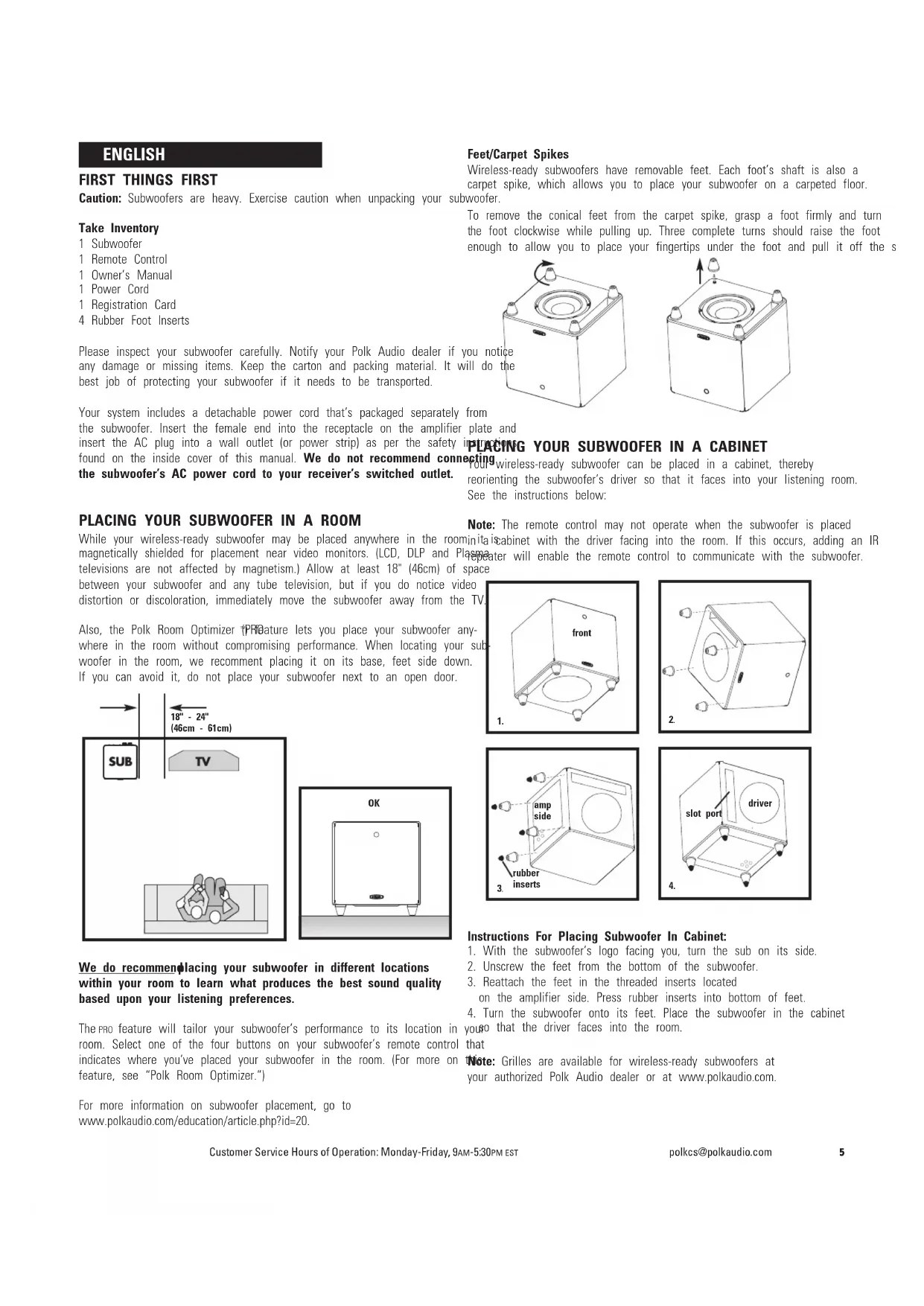
PLACING YOUR SUBWOOFER IN A ROOM
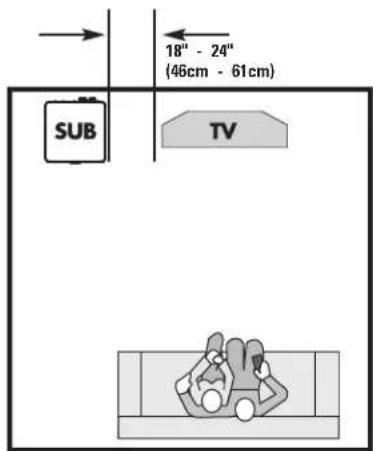
While your wireless-ready subwoofer may be placed anywhere in the roominita cabinet with the driver facing into the room. If this occurs, adding an IR magnetically shielded for placement near video monitors. (LCD, DLP and Plasma repeater will enable the remote control to communicate with the subwoofer. televisions are not affected by magnetism.) Allow at least 18" (46cm) of space between your subwoofer and any tube television, but if you do notice video distortion or discoloration, immediately move the subwoofer away from the TV.
Also, the Polk Room Optimizer 1PRFeature lets you place your subwoofer anywhere in the room without compromising performance. When locating your subwoofer in the room, we recommend placing it on its base, feet side down. If you can avoid it, do not place your subwoofer next to an open door.
text_image
18" - 24" (46cm - 61cm) SUB TV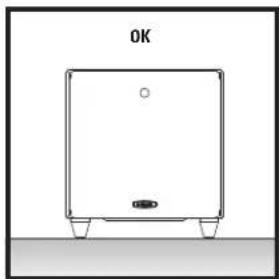
natural_image
Simple line drawing of a rectangular device with a small protrusion and 'OK' label above (no text or symbols on the device itself)We do recommending placing your subwoofer in different locations within your room to learn what produces the best sound quality based upon your listening preferences.
The Pro feature will tailor your subwoofer's performance to its location in room. Select one of the four buttons on your subwoofer's remote control indicates where you've placed your subwoofer in the room. (For more on feature, see "Polk Room Optimizer.")
For more information on subwoofer placement, go to www.polkaudio.com/education/article.php?id=20.
Feet/Carpet Spikes
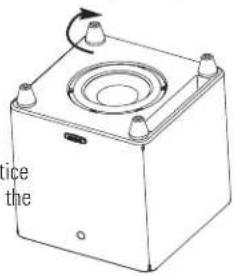
Wireless-ready subwoofers have removable feet. Each foot's shaft is also a carpet spike, which allows you to place your subwoofer on a carpeted floor. woofer.
To remove the conical feet from the carpet spike, grasp a foot firmly and turn the foot clockwise while pulling up. Three complete turns should raise the foot enough to allow you to place your fingertips under the foot and pull it off the s
text_image
ice the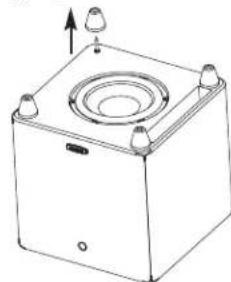
natural_image
Technical line drawing of a square mechanical component with mounting holes and a central circular recess (no text or symbols)PLACING YOUR SUBWOOFER IN A CABINET
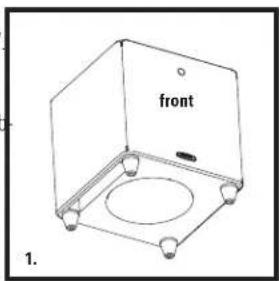
Setting wireless-ready subwoofer can be placed in a cabinet, thereby reorienting the subwoofer's driver so that it faces into your listening room. See the instructions below:
Note: The remote control may not operate when the subwoofer is placed
inita cabinet with the driver facing into the room. If this occurs, adding an IR repeater will enable the remote control to communicate with the subwoofer. space
text_image
front 1.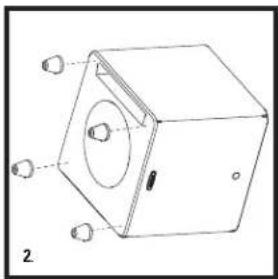
natural_image
Technical line drawing of a mechanical device with mounting holes and a central circular component (no text or symbols)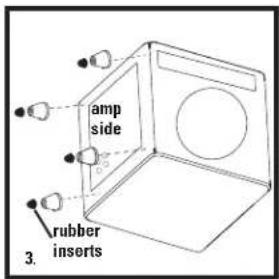
text_image
amp side rubber inserts 3.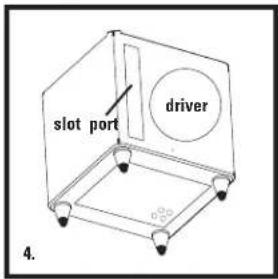
text_image
slot port driver 4.Instructions For Placing Subwoofer In Cabinet:
- With the subwoofer's logo facing you, turn the sub on its side.
- Unscrew the feet from the bottom of the subwoofer.
-
Reattach the feet in the threaded inserts located on the amplifier side. Press rubber inserts into bottom of feet.
-
Turn the subwoofer onto its feet. Place the subwoofer in the cabinet you go that the driver faces into the room.
that
Note: Grilles are available for wireless-ready subwoofers at your authorized Polk Audio dealer or at www.polkaudio.com.
text_image
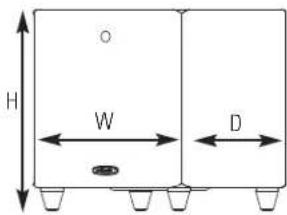
H W DDownward Firing Dimensions
| DSWPRO410 wt: | 13 3/4" W x 13 3/4" D x 14 5/8" H(34.9cm W x 34.9cm D x 37.2cm H) |
| DSWPRO550 wt: | 15 1/2" W x 15 1/2" D x 16 1/8" H(39.4cm W x 39.4cm D x 41.0cm H) |
| DSWPRO660 wt: | 16 1/2" W x 16 1/2" D x 17 1/8" H(41.9cm W x 41.9cm D x 43.5cm H) |
text_image
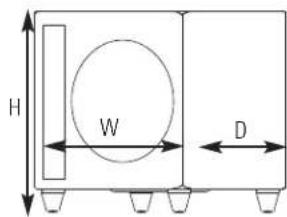
H W DForward Firing Dimensions (height with rubber foot inserts)
| DSWPRO440w: | 13 3/4" W x 13" D x 15 7/8" H(34.9cm W x 33.0cm D x 40.3cm H |
| DSWPRO550w: | 15 1/2" W x 14 1/2" D x 17 5/8" H(39.4cm W x 36.8cm D x 44.8cm H |
| DSWPRO660w: | 16 1/2" W x 15 1/2" D x 18 5/8" H(41.9cm W x 39.4cm D x 47.3cm H |
Note: Optional grille adds to depth (sold separately).
AC POWER CONNECTION AND AUTO ON/OFF
Dual Voltage Switch
Wireless-ready subwoofers are equipped with either a dual voltage switch or an auto sensor.
WARNING: The correct voltage for your country has been set at the factory. Only use the voltage setting specified for your country. Using an improper setting may damage your subwoofer.
Main Power Switch
Turn power on/off via the AC MAIN switch.
Standby/Auto/On Switch
Your wireless-ready subwoofer uses a 3-position power switch, which selects your subwoofer's operational mode. The three modes are: Standby, Auto and On.

Standby
With the switch in this position, the subwoofer will only turn on (become active) when the user presses the power button on the remote control. Once active the subwoofer will remain on regardless of whether an audio signal is present.

Auto
Note: Wired connections only.
In the "Auto" position, your subwoofer automatically turns on when it senses an audio signal and the LED located on the back of the subwoofer will be green. When no signal is present, the subwoofer will enter a "waiting" state after 10 minutes and the LED will turn yellow.
We recommend the "Auto" mode if your subwoofer is always receiving power (i.e., if it's plugged into a wall outlet).

On
The subwoofer is always on and fully active in this mode. The LED on the back the subwoofer will be green. This mode is best if the subwoofer is plugged into switched power outlet. The remote control cannot be used to turn off the subwoofer.
Note: You may want to leave your subwoofer unplugged or the AC MAIN switch turned off during extended periods of non use, such as during a vacation and also during electrical storms.
Power Mode LED Colors And Their Meaning:
Green: Fully active
Yellow: Standby
Red: Protection
CONNECTING THE SUBWOOFER TO THE SYSTEM—HOOKUP OPTIONS
IMPORTANT NOTE: USE ONLY ONE OF THESE OPTIONS. NEVER COMBINE HOOKUP OPTIONS.
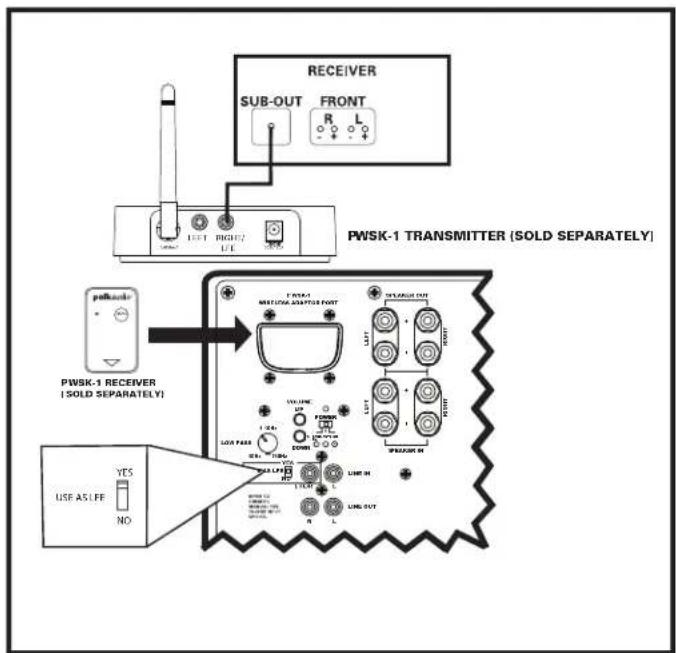
Wireless Connections
text_image
RECEIVER SUB-OUT FRONT R L LEFT RIGHT/2 LEFT PWSK-1 TRANSMITTER (SOLD SEPARATELY) PFSWKS PWSK-1 RECEIVER (SOLD SEPARATELY) YES USE AS LEF NO USB PASS USB PASS USB PASS USB PASS USB PASS USB PASS USB PASS USB PASS USB PASS USB PASS USB PASS USB PASS USB PASS USB PASS USB PASS USB PASS USB PASS USB PASS USB PASS USB PASS USB PASS USB PASS USB PASS USB PASS USB PASS USB PASS USB PASS USB PASS USB PASS USB PASS USB PASS USB PASS USB PASS USB PASS
OPTION #1 LFE
Verify that on your receiver you have a dedicated subwoofer output jack, (common on most Dolby Digital 5.1, 6.1 and 7.1 surround receivers). The output will be labeled "SW Out," "Sub-Pre Out" or something similar. Using a single subwoofer cable, connect the receiver to the LFE input on the transmitter as shown in the OPTION #1 illustration.
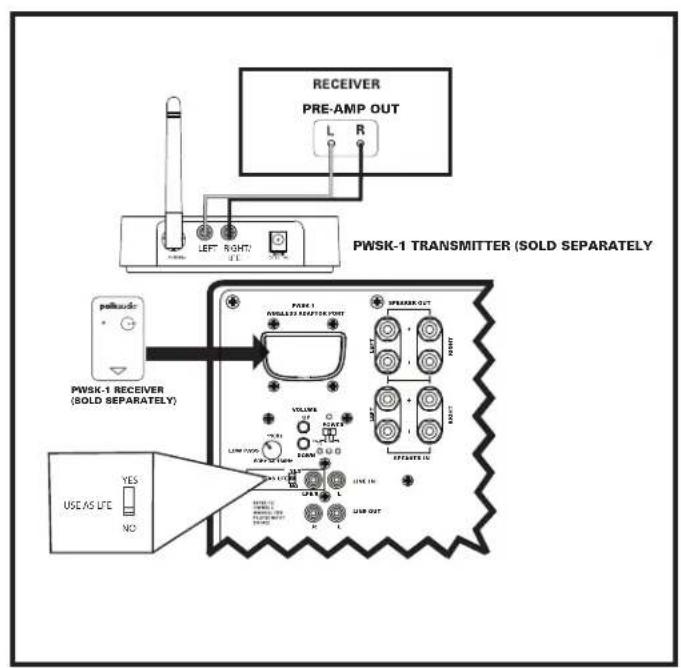
text_image
RECEIVER PRE-AMP OUT PWSK-1 TRANSMITTER (SOLD SEPARATELY) PWSK-1 RECEIVER (SOLD SEPARATELY) USE AS LIFE YES NO PWSK-1 WINGLED RECEPTOR PORT VOLUME LAM TYPE PART NUMBER USSC USSC GROWTH USB OUT L R SPREAD OUT + - + - + - + - + - + - + - + - + - + - + - + - + - + - + - + - + - + - + - + - + - + - + - + - + - + - + - + - + - + - + - + - + - + - + - + - + - + - + - + - + - + - + - + -OPTION #2 Line Level
If your receiver does not have a dedicated subwoofer output jack (common with stereo (2 channel) and older Dolby Pro-Logic receivers), use line level connections. Connect the preamp outputs of your receiver and to the LEFT and RIGHT inputs or the transmitter as shown in the OPTION #2 illustration.
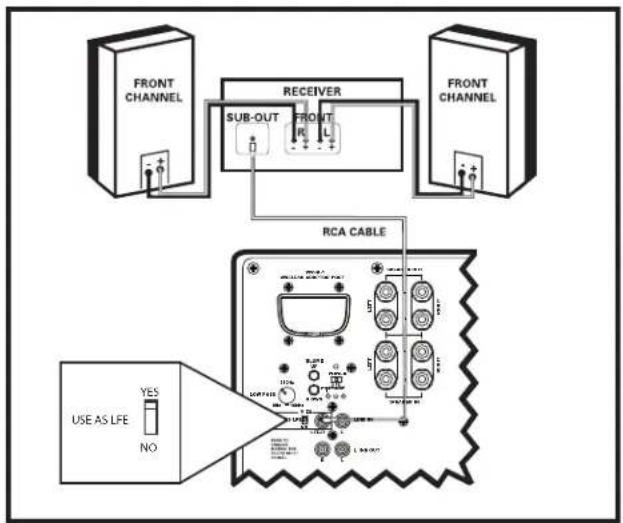
Wired Connections
flowchart
graph TD
    A["FRONT CHANNEL"] --> B["RECEIVER"]
    C["RCA CABLE"] --> D["FRONT CHANNEL"]
    B --> E["SUB-OUT"]
    B --> F["R Front"]
    B --> G["Sub-OUT"]
    H["USE AS LFE"] --> I["YES"]
    H --> J["NO"]
    style A fill:#f9f,stroke:#333
    style C fill:#f9f,stroke:#333
    style B fill:#ccf,stroke:#333
    style D fill:#ccf,stroke:#333
    style E fill:#dfd,stroke:#333
    style F fill:#dfd,stroke:#333
    style G fill:#dfd,stroke:#333
    style H fill:#dfd,stroke:#333
    style I fill:#dfd,stroke:#333
    style J fill:#dfd,stroke:#333
text_image
CENTER RECEIVER FRONT REAR USE AS LFE YES NO SELECT PSM/Power SELECT PSM/Power SELECT PSM/Power SELECT PSM/Power SELECT PSM/Power SELECT PSM/Power SELECT PSM/Power SELECT PSM/Power SELECT PSM/Power SELECT PSM/Power SELECT PSM/Power SELECT PSM/Power SELECT PSM/Power SELECT PSM/Power SELECT PSM/Power SELECT PSM/Power SELECT PSM/Power SELECT PPM/Power SELECT PPM/Power SELECT PPM/Power SELECT PPM/Power SELECT PPM/Power SELECT PPM/Power SELECT PPM/Power SELECT PPM/Power SELECT PPM/Power SELECT PPM/Power SELECT PPM/Power SELECT PPM/Power SELECT PPM/Power SELECT PPM/Power SELECT PPM/Power SELECT PPM/Power SELECT PPM/Power Select PPM/Power Select PPM/Power Select PPM/Power Select PPM/Power Select PPM/Power Select PPM/Power Select PPM/Power Select PPM/Power Select PPM/Power Select PPM/Power Select PPM/Power Select PPM/Power Select PPM/Power Select PPM/Power Select PPM/Power Select PPM/Power Select PPM/ Power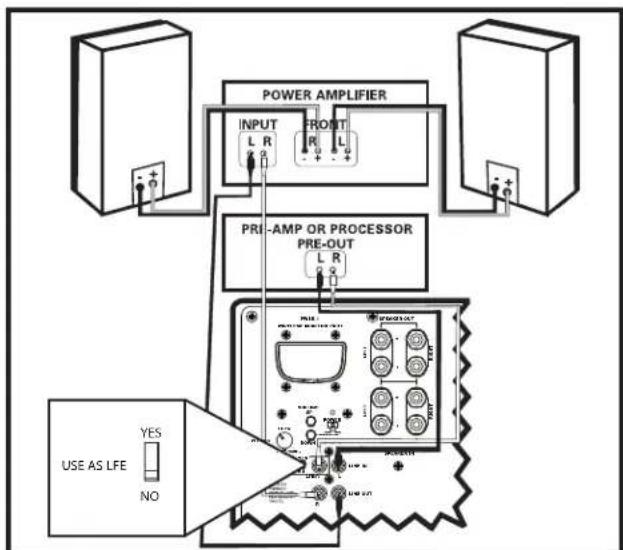
flowchart
graph TD
    A["Power Amplifier"] --> B["INPUT L R"]
    A --> C["FRONT L R"]
    A --> D["PRE-AMP OR PROCESSOR PRE-OUT L R"]
    E["USE AS LIFE"] --> F{Current}
    F -->|YES| G["Ground"]
    F -->|NO| H["Current"]
    G --> I["Analog/Amplifier Interface"]
OPTION #1 Receivers that include a "SUB OUT" feature—the most common hookup method with Dolby DigitalDTS receivers.
- Connect a single RCA cable from the "SUB OUT" of your receiver to the LFE/I input of the subwoofer. This connection method bypasses the subwoofer's internal filter and relies on the filter built into your receiver. Make no other signal connections. Do not use speaker wire to make the connection to the subwoofer.
- Connect all other speakers directly to the receiver. Adjust your receiver's speaker configurations as follows:
Front Speakers = SMALL
Center and Surrounds = SMALL
Subwoofer = ON, YES, or PRESENT
- Depending on your front speakers' bass output capabilities, set the crossover frequency on the receiver to 80Hz for tower and bookshelf speakers (speakers with a woofer 5 1/4" in diameter or larger) and 100-120Hz for satellite speakers. Consult your receiver's owner's manual for instructions.
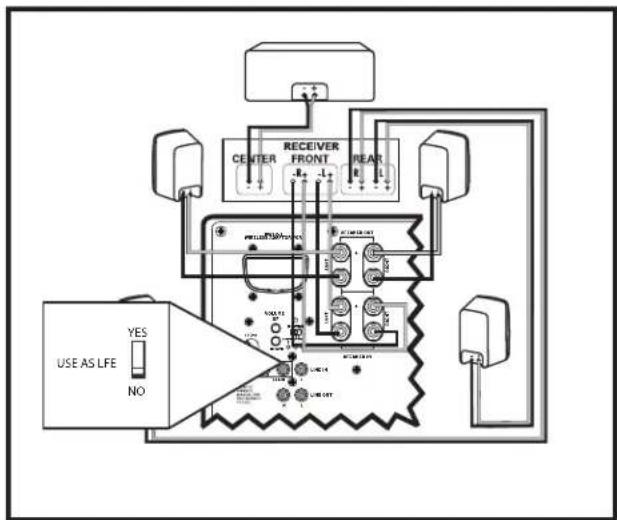
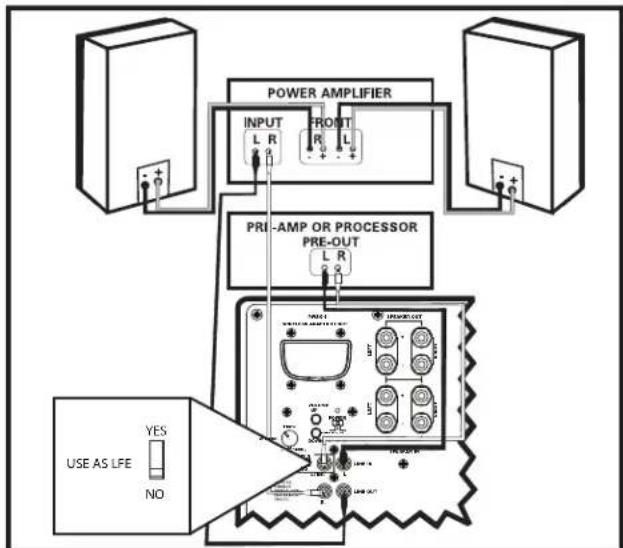
OPTION #2 Two channel or Dolby Pro® receiver with no "SUB OUT." Use two-conductor 16 gauge or thicker speaker wires. See your Polk Audio dealer for wire recommendations.
Note: Do not use the line or LFE input in this configuration.
- Connect the left and right front speaker outputs of your receiver to the speaker level inputs of the subwoofer using speaker wire (see "Making Binding Post/Speaker Wire Connections" for detailed instructions).
- Connect the left and right front speakers using speaker wire from the speaker level outputs from the subwoofer.
- Connect the center channel speaker directly to the center channel output from your receiver.
- Connect the rear surround satellites directly to the rear or surround channel outputs from your receiver.
- Adjust your receiver's speaker configurations as follows: Front Speakers = LARGE
Subwoofer = OFF or NO
Center and Surrounds = SMALL
OPTION #3 Receivers with full-range (unfiltered) Left and Right "Pre Out" jacks (this is the least commonly used hookup).
- Connect the left and right preamp outputs from your receiver to the left and right LINE LEVEL inputs of the subwoofer. Do not use speaker wires.
- Connect the left and right LINE LEVEL outputs to the left and right inputs on the power amplifier.
- Adjust the settings on your receiver as follows:
Front Speakers = LARGE
Subwoofer = OFF or NO
Making Binding Post/Speaker Wire Connections
Note that one of the speaker input terminals on the rear of the subwoofer is marked red (+) and the other black (-). Make certain that you connect the subwoofer's wire to the red (+) terminal of your receiver to the red (+) terminal on your subwoofer equalization presets that maximize your subwoofer's performance and the wire from the black (-) terminal of the receiver to the black (-) terminal typical room placements: "cabinet," "corner," "mid-wall" and "mid-room." On your subwoofer. Speaker wire has some indication (such as color coding, ribbing, or writing) on one of the two conductors to help maintain consistency. A traditional subwoofer's response is affected by its location in a room. The
Note: If your subwoofer doesn't seem to produce much bass, it is most that one of the speaker wires is connected backwards. Double check all connections for correct polarity.
Strip 1/2" (12mm) of insulation from each of the two conductors on both to expose the bare wire. Twist the exposed wire of each conductor to four un-frayed strands (one on each end).
Unscrew the binding post hex nuts several turns. Insert the exposed wire ensuring that none of the bare wire ends touch each other, because con could result in an electrical short and cause your receiver to turn off or tion. With the speaker wire inserted into the binding post, turn the hex clockwise until it's snug.

ADJUSTING YOUR SUBWOOFER
Note: When you set up your subwoofer for the first time, you will probably to make adjustments several times before you hear what you personally like
Don't forget to turn the AC MAIN power switch on.
INITIAL SETTINGS
Your wireless-ready subwoofer offers a range of settings. The unit's initial settings are as follows:
- Phase: 0
• Volume: 50% (20, on a scale from 0-40)
• PROsetting: mid-room
The settings that are best for you depend upon your subwoofer placement, electronics and personal taste. After you've become familiar with what the settings do, experiment with alternate options to find the method that works best for your system setup. You'll find an informative article on "Subwoofer Positioning and Adjustment" in the set up section at: www.polkaudio.com/education/article.php?id=19.
POLK ROOM OPTIMIZER (PRO)
Where you place your subwoofer in your room affects its response. wireless-ready subwoofer incorporate the Polk Room Optimizer (PRO) feature—four push-butoofer, equalization presets that maximize your subwoofer's performance typical room placements: "cabinet," "corner," "mid-wall" and "mid-room."
Traditional subwoofer's response is affected by its location in a room. The Polk Room Optimizer (PRO) feature allows you to place your wireless-ready subwoofer where you want it in your listening room. Based upon the four most common room placements for subwoofer, maximizes sound quality for you, smoothing out the bass response that a particular room placement creates. You simply choose the location you want and select the corresponding button on your subwoofer's remote control.
FINE TUNING YOUR SUBWOOFER
- Volume: Adjust by ear using a wide variety of CDs and video sources. Adjust for deep, powerful bass without "boominess."
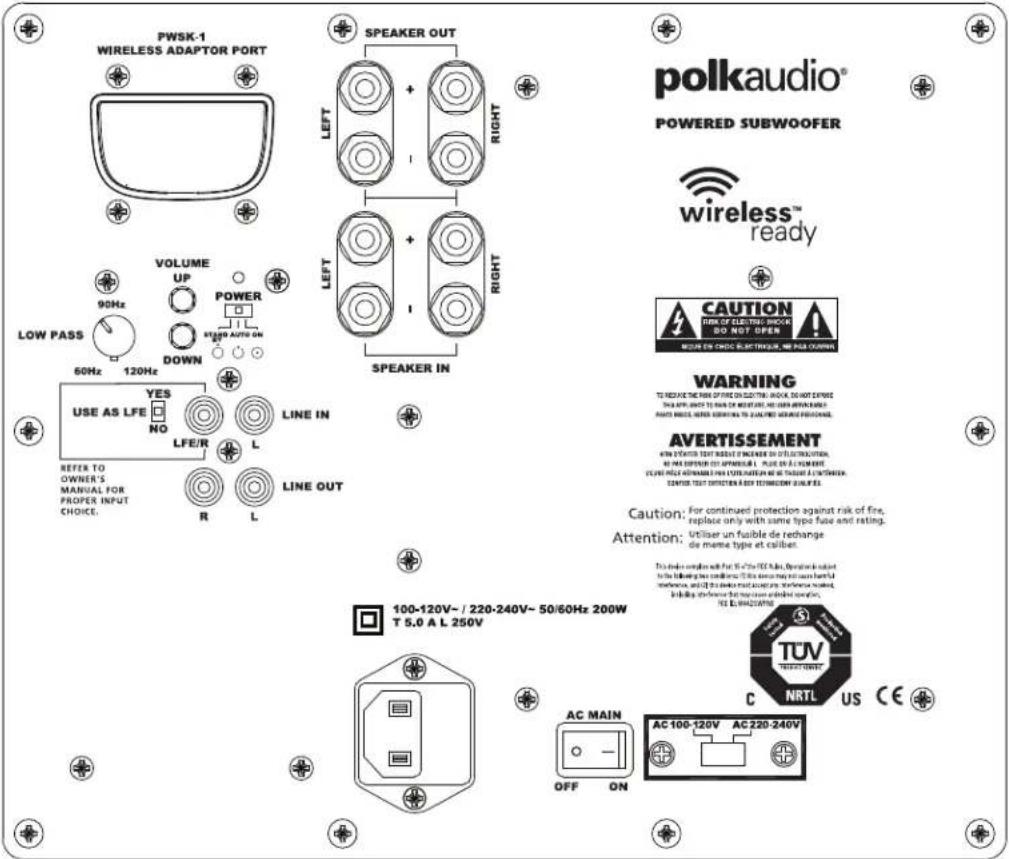
Low Pass Filter Control: NOTE: This control does not operate when the subwoofer is connected with Option #1 (wireless/wired LFE Input). This control, which is located on the back of the amplifier, adjusts the frequency range over which the subwoofer operates. When using smaller main speakers the upper range of the control will probably yield the best results. With larger speakers the lower end of the control range will probably sound best, but always let you ear be the final judge. If male vocals sound "thin," turn this control up until the voice sounds rich but not "boomy." If male vocals sound too "thick" or "chesty," turn this control down until the voice sounds natural.
- 4 Button Phase Control (0, 90, 180 and 270 degree settings): This control enables the subwoofer to blend more seamlessly with your main speakers. Sit in your favorite listening position. Using the subwoofer's remote control, play music (not a movie) with a walking bass line. We recommend playing jazz or country music. Now listen carefully for the point at which the subwoofer has transitions to your main speakers. This is the crossover point, and this point should be below the frequency of a male human voice. Whichever phase setting sounds louder or fuller at the subwoofer's crossover (transition) point is the optimum setting. If after trying all four possible phase settings you cannot hear any difference, leave the phase setting at "0."
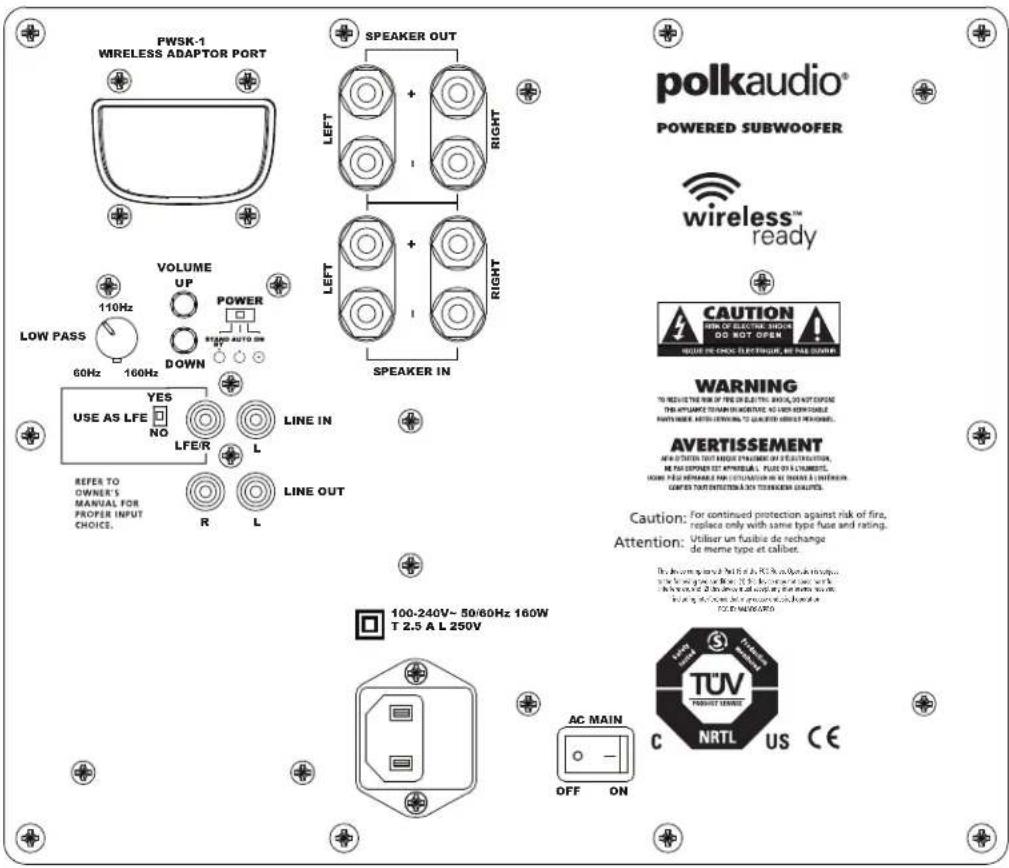
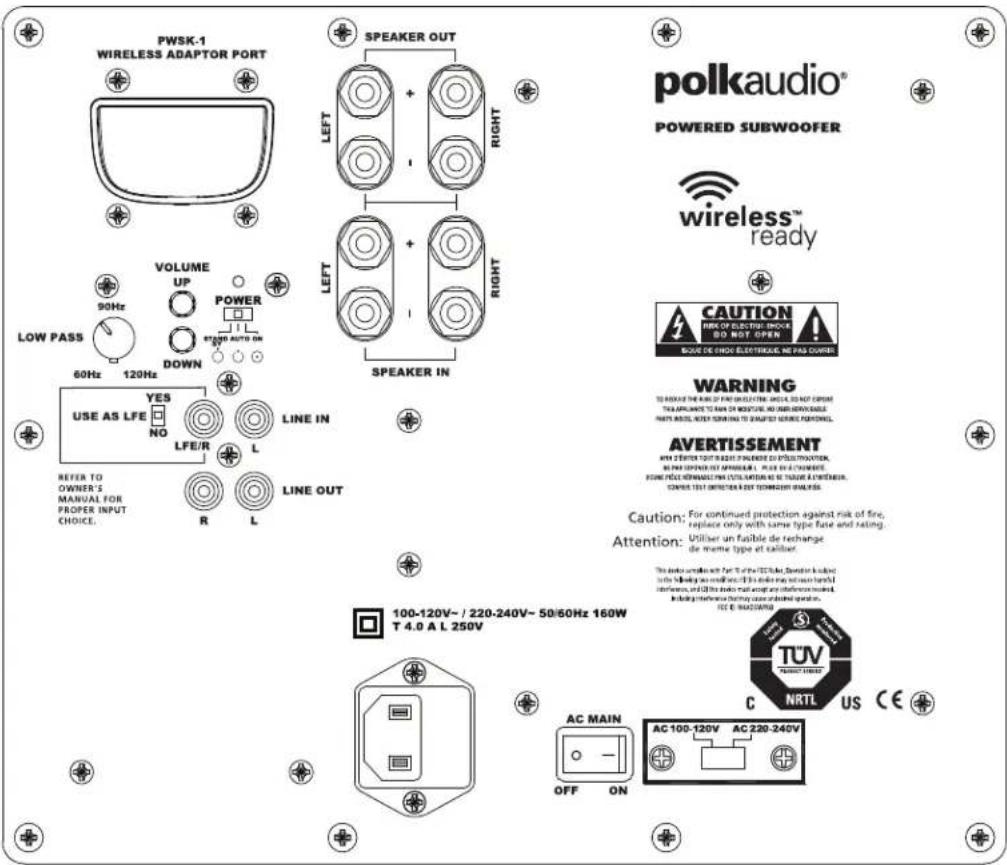
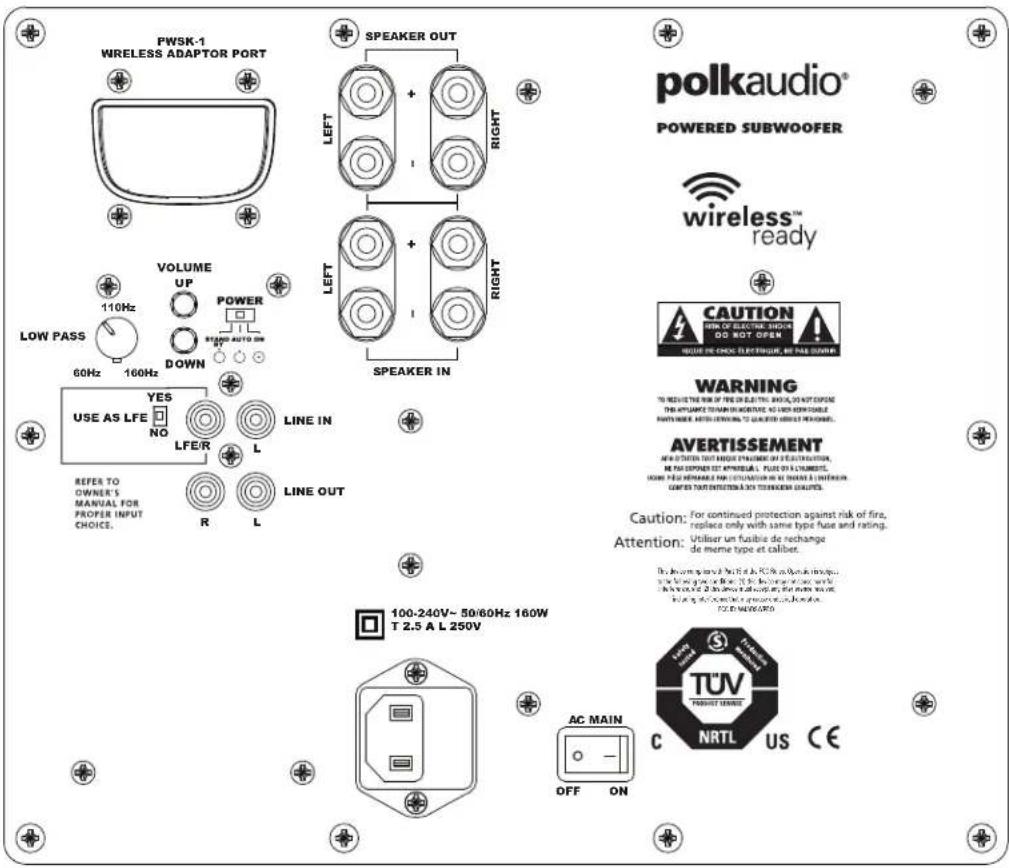
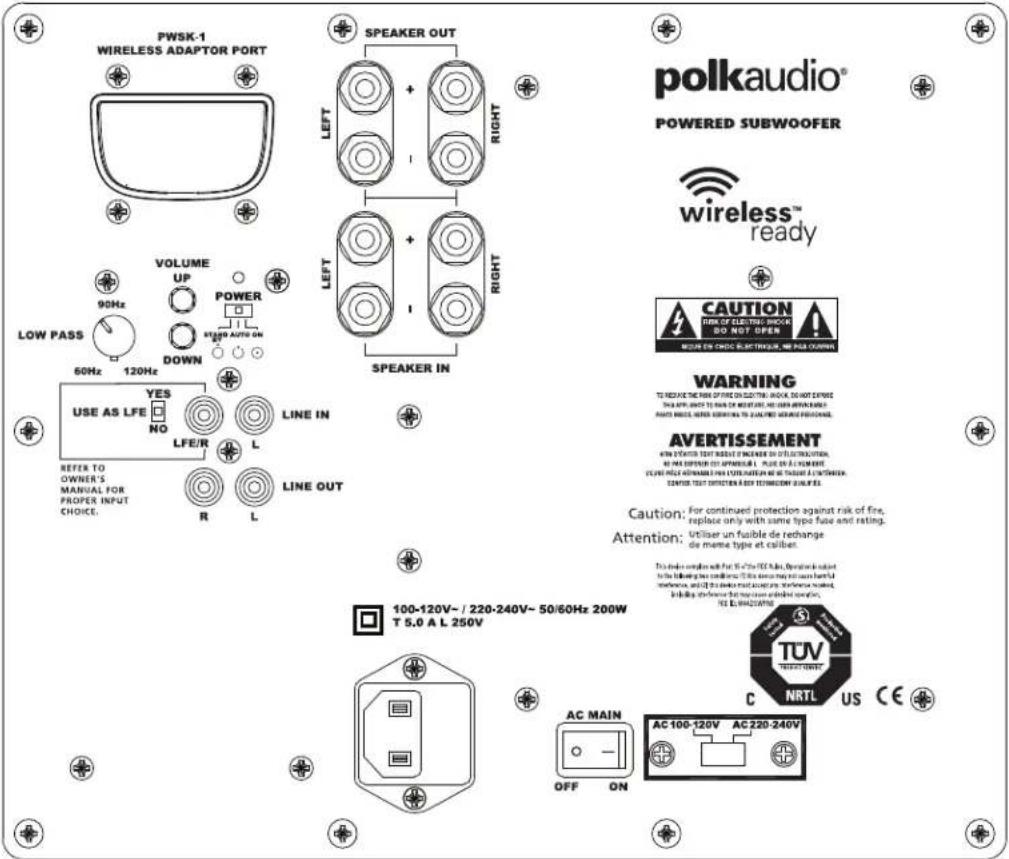
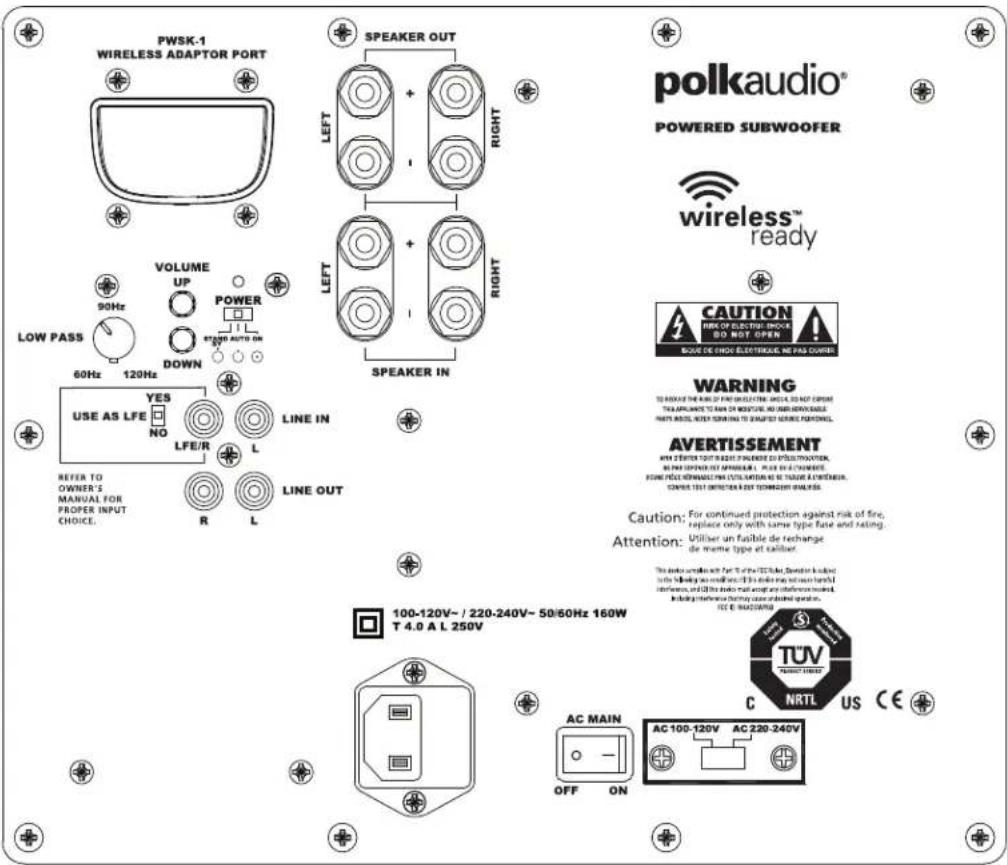
DSWPRO440wi Amplifier
text_image
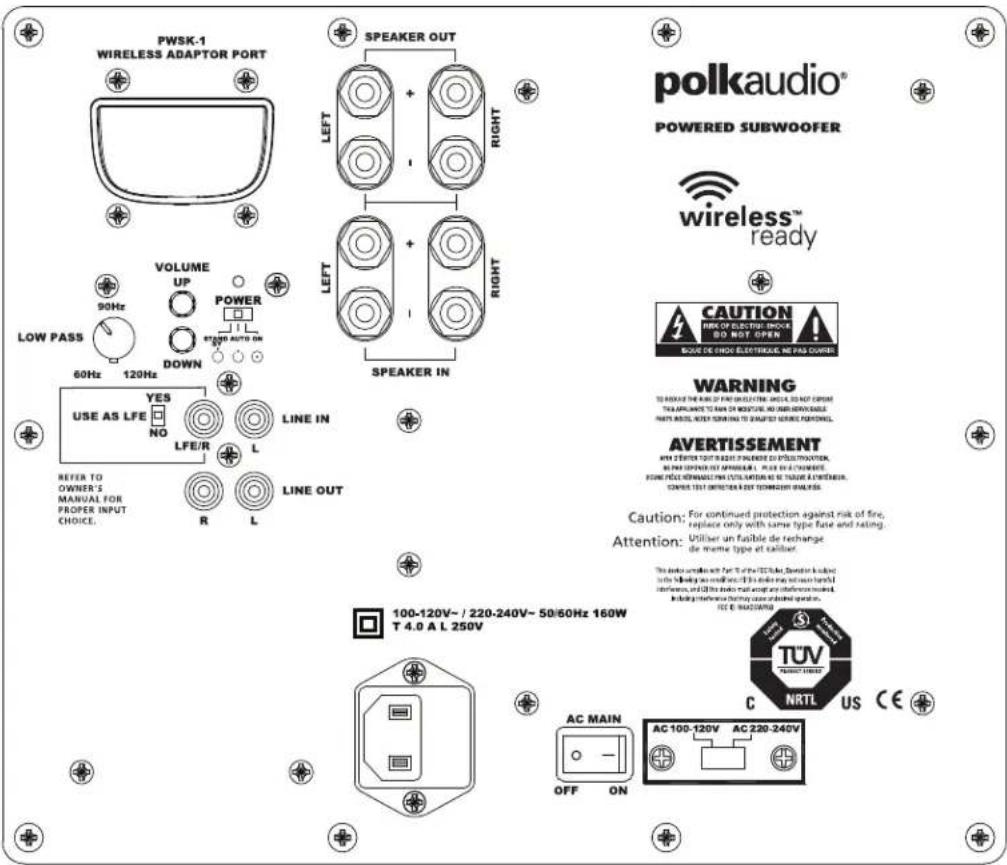
PWSK-1 WIRELESS ADAPTOR PORT SPEAKER OUT LEFT + RIGHT LETT RIGHT SPEAKER IN LOW PASS VOLUME UP POWER 60Hz 160Hz DOWN LINE IN R L LINE OUT REFER TO OWNER'S MANUAL FOR PROPER INPUT CHOICE. USE AS LFE NO YES LFE/R A R L COASTIC VOLTAGE TUV TURAVI TENSSE AC MAIN OFF ON 100-240V~ 50/60Hz 160W T 2.5 A L 250V AC MAIN NRTL US CE POWERED SUBWOOFER wireless™ ready CAUTION FOR ELECTRIC EIGHTS DO NOT OPEN WARNING TO REVE IT THE RIN OF THE ON ELECTRIC EIGHTS, DO NOT EXPOSED THE APPTIMATE TRANSMO IN CRITERIE, NO ORCH WITH BEABLE PARTS/WHEE, ANTER MINING TO CAPITATE AND/OR PROCESSED. AVERTISSEMENT NEW SYSTEMS THAT ARE NOT PRACTISED ON ELECTRATION, WE CAN STOPPER OUT APPURTABLE, PUSH ON A CABBAGE, HOME FUEL REMAINABLE AND CONDUCTION ON AC CHAPES & INTERIOR CAN PIED YOUR PROTECTION AND TRANSMO IN CRITERIE. Caution: For continued protection against risk of fire, replace only with same type fuse and rating. Attention: Utiliser un fusible de rechange de même type et caliber. The system may be used at 90Hz to PC, or any other device is used for the use of a 2.5 GHz low power level, or a 3.5 GHz high power level. The system will be used for the use of a 2.5 GHz low power level, or a 3.5 GHz high power level. The system will be used for the use of a 2.5 GHz low power level. The system will be used for the use of a 2.5 GHz high power level. The system will be used for the use of a 2.5 GHz low power level. The system will be used for the use of a 2.5 GHz high power level. The system will be used for the use of a 2.5 GHz low power level. The system will be used for the use of a 2.5 GHz high power level. The system will be used for the use of a 2.5 GHz low Power Level. The system will be used for the use of a 2.5 GHz High Power Level. The system will be used for the use of a 2.5 GHz Low Power Level. The system will be used for the use of a 2.5 GHz High Power Level. The system will be used for the use of a 2.5 GHz Low Power Level. The system will be used for the use of a 2.5 GHz High Power Level. The system will be used for the use of a 2.5 GHz Low Power Level. The system will be used for the use of a 2.5 GHz High Power Level. The System will be used for the use of a 2.5 GHz Low Power Level. The system will be used for the use of a 2.5 GHz High Power Level. The System will be used for the use of a 2.5 GHz Low Power Level. The System will be used for the use of a 2.5 GHz High Power Level. The System will be used for the use of a 2.5 GHz Low Power Level. The System will be used for the use of a 2.5 GHz High Power Level. The System will be used for the use of a 2.5 GHz Low Power Level. The System will be used for the use of a 2.5 GHz High Power Level. The System will be used for all three types of devices (in 100Hz, 100Hz, 160Hz) and are also used to operate in all four types of devices (in 100Hz, 100Hz, 160Hz).DSWPRO550wi Amplifier
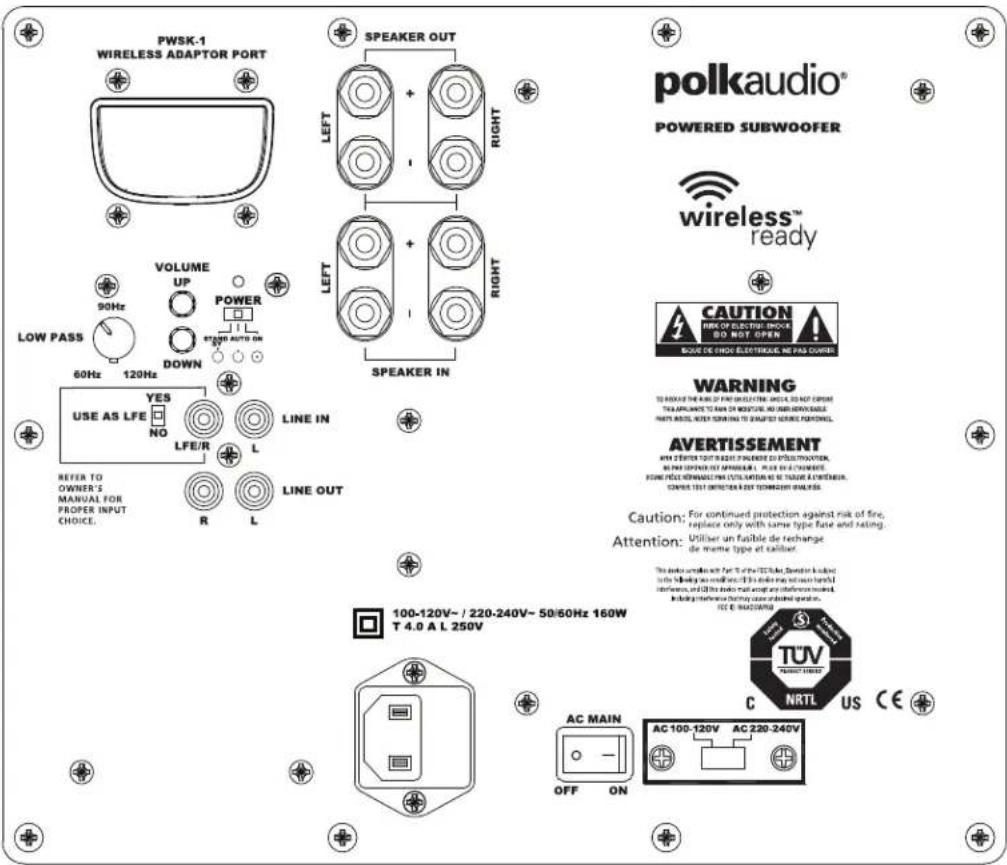
text_image
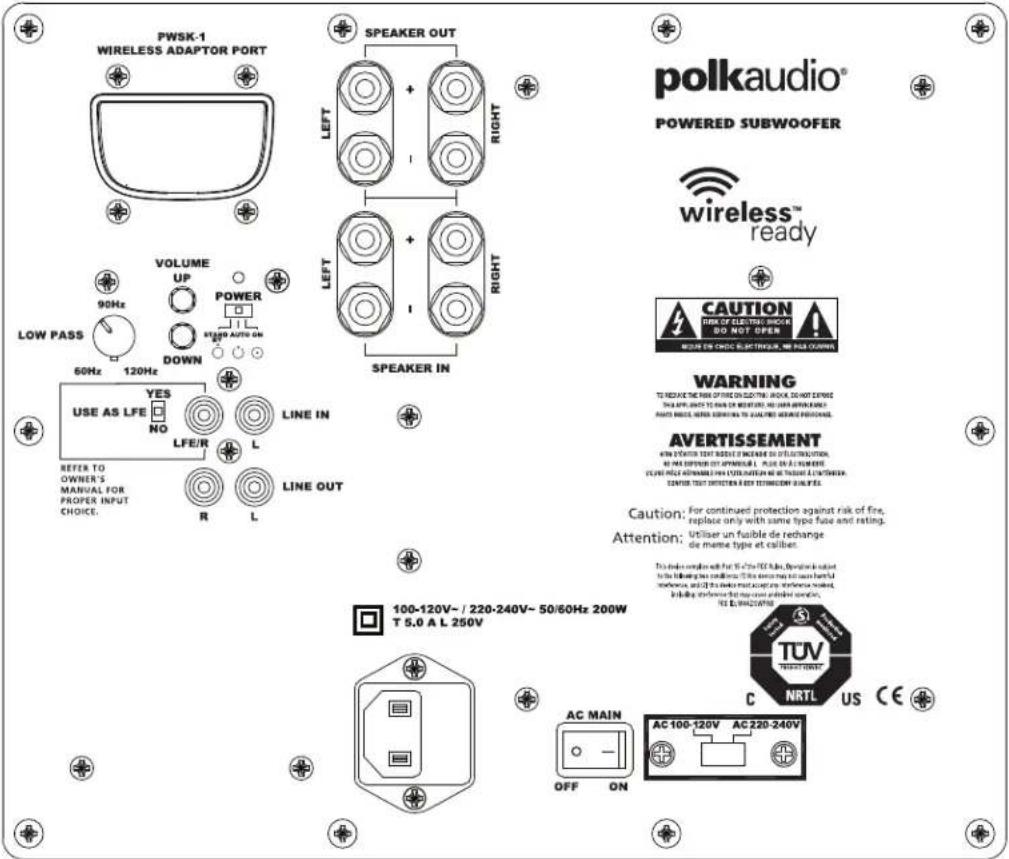
PWSK-1 WIRELESS ADAPTOR PORT SPEAKER OUT LEFT + RIGHT SPEAKER IN 90Hz VOLUME UP POWER 60Hz 120Hz DOWN LOW PASS USE AS LFE YES NO LINE IN LFE/R R LINE OUT REFER TO OWNER'S MANUAL FOR PROPER INPUT CHOICE. R L CAPTION TUR NRTL AC MAIN OFF ON AC 100-120V AC 220-240V POWERED SUBWOOFER wireless™ ready CAUTION TUR OF ELECTRONIC DO NOT OPEN BLUE IS CHOC ELECTRICAL NET PAS SWITCH WARNING TO PROVIDE THE RARE OF FIRE COOLATION, OR IS NOT USED. THIS APPLIANT TO RUN ON NOVOIRING AND DOWN NOVOIRING. PARTS ARE NOT SPRING ON TO SURVE YOUR POWER. AVERTISSEMENT WITH ZQUIFER RIGHT AT RIGHT PULSE OR PULSE VOTATION, IN PAI SUPPLEMENT BY AMPOSLAR, PLUG OR A CABBAGE. SIDE PEACE REMAINABLE FROM DATA RETAIL OR FIGURE & CUSTEMA. ONCOM TEST REFERENCE TO TEST SWITCHING QUALITY. Caution: For continued protection against risk of fire, replace only with same type fuse and rating. Attention: Utiliser un fasible de rechange de même type of caliber. The device enables for 50Hz/50Hz Tube. Detection is limited to the following two conditions: this drive may be used from hard connections and the device must open any connection based on the power output. The device has been connected to a battery or a switch. IEC E: MACHUAVA 100-120V~/ 220-240V~ 50/60Hz 160W T 4.0 A L 250V TUV NRTL US CEDSWPRO660WI Amplifier
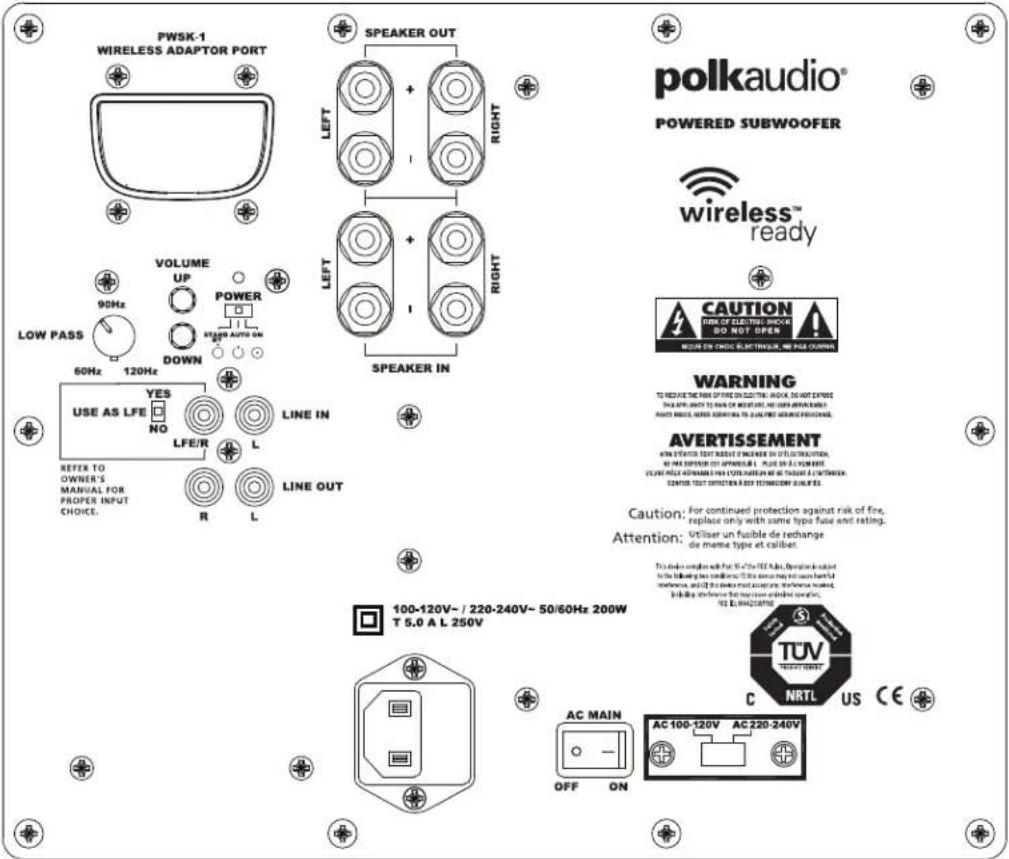
text_image
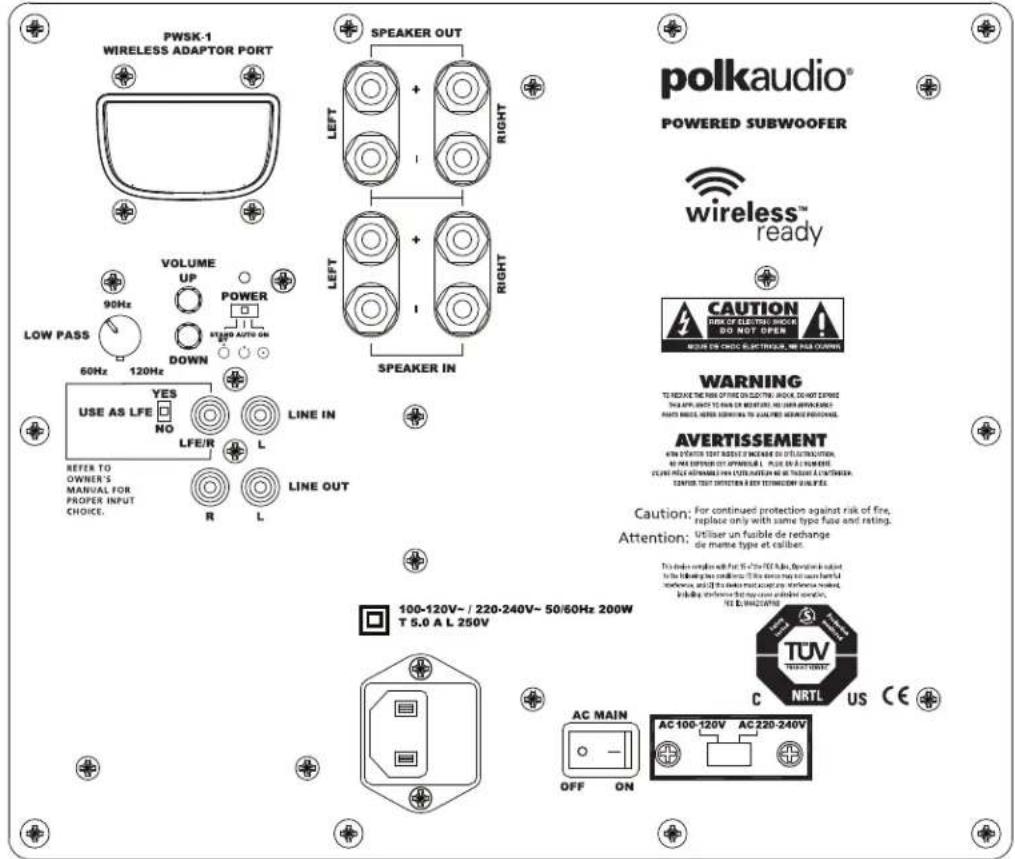
PWSK-1 WIRELESS ADAPTOR PORT SPEAKER OUT LEFT + RIGHT SWEER OUT LEFT + RIGHT SPEAKER IN 90Hz 60Hz 120Hz VOLUME UP POWER AUTO DOWN LINE IN LFE/R R L LINE OUT REFER TO OWNER'S MANUAL FOR PROPER INPUT CHOICE. USE AS LFE YES NO LINE OUT R L 100-120V-/ 220-240V~ 50/60Hz 200W T 5.0 A L 250V AC MAIN OFF ON AC 100-120V AC 220-240V TUV C NRTL US CE polkaudio® POWERED SUBWOOFER wireless™ ready CAUTION FOR OTHER SMOODS SO NOT OPEN WARNING AND ELECTRICAL WE ARE COOKING WARNING TO REVE AT THE RISK OF FIRE ON COLDING, DO NOT EXPIRE THE APP. SELECT TO READ OR WRITTEN, AND DOWN WITH BEANSHOLE PASS WHO, WHERE SERVATION TO COUNT THE WIRESE PROCESSED. AVERTISSEMENT WITH STARTER TEST REFLECT ON ECONOMATION ON OLETRIBUTION, AND BEANSHOLE OUT APPROVED, PLEASE OR A CHANGE YOU ARE AVAILABLE FOR OTHERS WITHOUT THE TRUSTAIN & STRUSTAIN. CAUTION TEST REFLECT ON ANY TECHNOLOGY BUILDING. Caution: For continued protection against risk of fire, replace only with same type fuse and rating. Attention: Utiliser un fuible de rechange de marine type at caliber. This device consists with FST 15-75 (TUV) MAX. Available to be used to the following two conditions: IF the current may not have been full otherwise, and if the device must be accepted, then be tested. TUV is 844234780. TUV TENTAL POWER: C NRTL US CEDSWPROWI REMOTE CONTROL
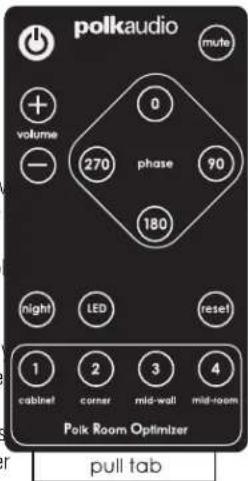
Wireless ready subwoofers come with a credit card sized remote control. All commands are sent to the subwoofer via IR control. The IR receiver is located on the front of the subwoofer when the subwoofer is in its downward firing configuration.
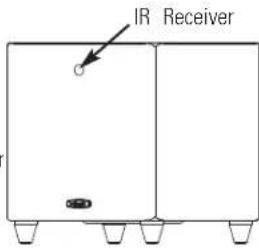
text_image
IR ReceiverThe remote control has the following features:
• Power
• Volume
• 4 Button Phase Control (0, 90, 180 and 270 degree settings)
• 4 Button Polk Room Optimizer (PRO) presets
- Mute function
- Night function allows you to hear low-level bass detail at lower volumes. If you have the volume at 30 and press "night," the volume is reduced by 50% , in this example to 15. Pressing "night" a second time restores the volume to its original setting. Pressing Volume+ (or Volume-) incrementally increases (or decreases) the volume in the normal manner and takes the subwoofer out of "night" mode. Also, the LED shines at a reduced intensity when the subwoofer is in "night" mode.
- Reset button restores the woofer's settings to factory presets. Hold down for two (2) seconds. - LED turns LED On/Off. The amplifier remains active.
text_image
polkaudio + volume - 0 270 phase 90 180 night LED reset 1 cabinet corner mid-wall mid-room Polk Room Optimizer pull tabImportant: To activate the remote control for the first time, remove the plastic tab.
WHAT IS THAT BLINKING BLUE LIGHT?
Behind the logo badge on the front of your subwoofer there is a blue light blinks whenever you press a button on the subwoofer's remote cor light lets you know that the subwoofer has received the command and the function you've selected. The following table describes each button's and how the LED communicates to you:
VOLUME SETTINGS
| Blue LED Indicator | ||
| Volume Level Long Blinks | Short Blinks | |
| 40 | 40 | |
| 39 | 39 | |
| 38 | 38 | |
| 37 | 37 | |
| 36 | 36 | |
| 35 | 35 | |
| 34 | 34 | |
| 33 | 33 | |
| 32 | 32 | |
| 31 | 31 | |
| 30 | 30 | |
| 29 | 29 | |
| 28 | 28 | |
| 27 | 27 | |
| 26 | 26 | |
| 25 | 25 | |
| 24 | 24 | |
| 23 | 23 | |
| 22 | 22 | |
| 21 | 21 | |
| 20 | 20 | |
| 19 | 19 | |
| 18 | 18 | |
| 17 | 17 | |
| 16 | 16 | |
| 15 | 15 | |
| 14 | 14 | |
| 13 | 13 | |
| 12 | 12 | |
| 11 | 11 | |
| 10 | 10 | |
| 9 | 0 | 9 |
| 8 | 0 | 8 |
| 7 | 0 | 7 |
| 6 | 0 | 6 |
| 5 | 0 | 5 |
| 4 | 0 | 4 |
| 3 | 0 | 3 |
| 2 | 0 | 2 |
| 1 | 0 | 1 |
| 0 | 0 | 0 |
Power LED is on when power is active and is off when power is not active. (Pressing the LED button on the remote will also turn the LED off.)
Volume LED will blink a 2-digit code indicating volume setting from 0 to 40 (i.e., if the volume is turned up to 28, the LED will flash two long blinks followed by eight short blinks).
Mute LED blinks slowly when "mute" is selected.
Phase 0 degrees—1 blink; 90 degrees—2 blinks; 180 degrees—3 blinks; 270 degrees—4 blinks.
Night LED is on at a lower intensity; volume is reduced by 50%.
PRO Presets Cabinet—1 blink; Corner—2 blinks; Mid-wall—3 blinks; Mid-room—4 blinks.
Reset LED will blink 4 times.
LED Turns LED on/off. The amplifier remains active.
TROUBLESHOOTING
| No sound coming If hookup is “SUB OUT” to LFE, check from subwoofer. and make sure your receiver is set to Subwoofer = YES. If hookup is via speaker wire, check that the polarity of the wires is correct. |
| Subwoofer doesn’t sound right. Adjust volume, low pass filter, phase and PRO settings. |
| The subwoofer is humming. There could be interference from a cable TV line. Disconnect the cable TV line from the cable box to see if the hum stops. A low-level hum is normal. |
| Subwoofer has no power. Is the AC MAIN switch on? Check outlet; check fuse after unplugging the subwoofer. The fuse is located under the power cord receptacle. Fuse type and rating is found on the back panel. |
| Remote control doesn’t work. Remove the plastic tab to activate the remote control’s battery or try replacing the battery. Ensure the IR sensor is not blocked. |
| Power LED is red. Unplug subwoofer for 15 minutes, then plug back in. |
| The subwoofer’s sound – Turn off both the the transmitter and the is intermittent, sounds wireless subwoofer. Then turn them back weak or is distorted. on to re-establish communication.- Try changing settings of the Channel ID switches on both the transmitter and the wireless subwoofer.- The wireless subwoofer could be too far away from the transmitter to receive a sufficiently strong signal. Try moving it close |
A Note Regarding Wireless Performance:
Like all wireless devices, your DSWPROWI may be susceptible to RF interference from such sources as microwave ovens, WiFi computer systems, video game systems, cordless telephones, blue tooth systems, baby monitors and other devices. In particular, any devices operating in the 2.4GHz band may cause intermittent wireless connections between the DSWPROWI. It is also possible that your DSWPROWI may affect other wireless systems. For the most part, you can avoid wireless performance problems by physically separating these devices from you DSWPROWI. Maintaining a distance of several feet or more between yo DSWPROWI speaker and any wireless device should prevent any mutual interference effects. If you do notice any subwoofer signal dropouts take care to identify the root cause (most commonly having other wireless devices too close) and resolve accordingly. Any interference effects from a microwave oven will cease once the oven stops operating and may be resolved on a long-term basis by increasing the physical distance between yo DSWPROWI and the microwave oven.
TECHNICAL ASSISTANCE AND SERVICE
If, after following the hook up directions, you experience difficulty please double-check all wire connections. Should you isolate the problem to the subwoofer, contact the authorized Polk Audio dealer where you made your purchase, or call Polk Audio's friendly Customer Service Department at 1-800-377-7655 (calls from US or CAN only), 410-358-3600 9am to 6pm EST, Monday through Friday.
You may also contact us via email: polkcs@polkaudio.com. For more detailed hook up information and manual updates, visit: www.polkaudio.com.
Specifications can be found on the D&M webpages.
Go to www.polkaudio.com.
POWER RATINGS
Model Shipping Weight Power Rating
| DSWPRO440WI | 34.6 lb. (15.7 kg) | 100V-240V~50/60 Hz 160W |
| DSWPRO550WI | 46.5 lb. (21.1 kg) | 100V-120V~/220V-240V~50/60 Hz 160W |
| DSWPRO660WI | 50.3 lb. (22.8 kg) | 100V-120V~/220V-240V~50/60 Hz 200W |
FRANÇAIS
AVANT TOUT
text_image
18" - 24" (46cm - 61cm) SUB TV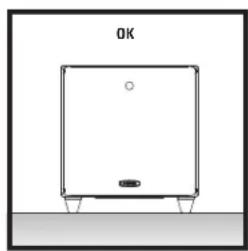
natural_image
Simple line drawing of a rectangular device with a circular element and base, no text or symbols present.natural_image
Line drawing of a square electronic device with a circular top and four mounting pins (no text or symbols)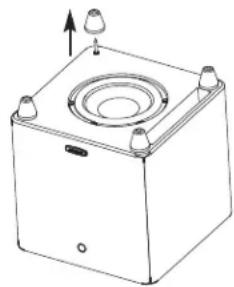
natural_image
Technical line drawing of a square mechanical housing with a central circular component and mounting holes (no text or symbols)natural_image
Technical line drawing of a mechanical device with mounting holes and a central circular component (no text or symbols)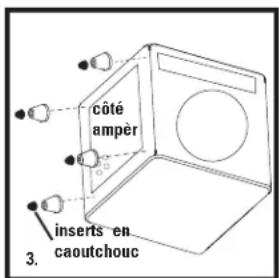
Enceintes avant (front) = SMALL Centre et ambio. (Center/surround) = SMALL Subwoofer = ON, YES, ou PRESENT
text_image
PWSK-1 WIRELESS ADAPTOR PORT SPEAKER OUT LEFT + RIGHT LETT RIGHT SPEAKER IN LOW PASS VOLUME UP POWER 60Hz 160Hz DOWN LINE IN R L LINE OUT REFER TO OWNER'S MANUAL FOR PROPER INPUT CHOICE. USE AS LFE NO YES LFE/R A R L COASTIC ELECTRONIC, BE PAIN DOWN! WARNING TO REVE ITHE ROW OF TIRE ON ELECTRIC BANOL, DO NOT EXPOSED THE APPTIMATE TRANSMER ON INVESTMENT, NO CASH WITH CAPSIBLE PAINTING, ANTERIOR, AND CONSENSUS TO CAPSIBLE APPTIMATE PERFORMAL. AVERTISSEMENT NEW SYSTEMS THAT ARE NOT PREMISE ON SPECTRIFICATION, WE ARE SHOWN OR APPROVAL. PLEASE OK A CHANGE. HOME FEET REMAINABLE AND COPIRATION ARE SHOWN & UNSTRECTION CAN'TED YOUR PROTECTION AND TRANSMER RELATIVES. Caution: For continued protection against risk of fire, replace only with same type fuse and rating. Attention: Utiliser un fusible de rechange de même type et caliber. The system is based on the PC's 2.5 A L 250V AC MAIN OFF ON TUV NRTL US CE Polkaudio® POWERED SUBWOOFER wireless™ ready CAUTION FOR EV/DC/DC/DC/DC/DC/DC/DC/DC/DC/DC/DC/DC/DC/DC/DC/DC/DC/DC/DC/DC/DC/DC/DC/DC/DC/DC/DC/DC/DC/DC/DC/DC/DC/DC/DC/DC/DC/DC/DC/DC/DC/DC/DC/DC/DC/DC/DC/DC/DC/DC/DO NOT OPEN WEET DE CHOIC ELECTRONIC, BE PAIN DOWNtext_image
PWSK-1 WIRELESS ADAPTOR PORT SPEAKER OUT LEFT + RIGHT SPEAKER IN 90Hz VOLUME UP POWER 60Hz 120Hz DOWN LOW PASS USE AS LFE YES NO LINE IN LFE/R R L LINE OUT REFER TO OWNER'S MANUAL FOR PROPER INPUT CHOICE. CAPTION: POWER OUT (ELECTRIC) AND PASTIC COUNTER WARNING TO REVEAT THE RARE OF FIRE COULTRIN, OR IS NOT USED. THIS APPLIANCE TO RUN ON MOUNTED AND BEANSERABLE. PARTS ARE NOT USED TO GRAPPT FROM SURE PROCESSED. AVERTISSEMENT WITH A SEVER ORDER BY CAPSIBLE DE PESTITATION, BEANSER SUPPLEMENT APPLICABLE, PLUS OR ACUMBER. COME PERFORMING WITH DATA TRANSMISSIONS FOR SURFACE SYSTEMS. CHANGE TEST IMPROSION BY SWITCHROOM ANALYSIS. Caution: For continued protection against risk of fire, replace only with same type fuse and rating. Attention: Utiliser un fusible de rechange de même type of cylinder. The device consists of 40% of the TUV Tube. Detection is linked to the following conditions: if the device may be used based on the connection, and if the device must apply any connection model, including the power output. During case is allowed to open. AC MAIN OFF ON AC 100-120V AC 220-240V C NRTL US CE polkaudio® POWERED SUBWOOFER wireless™ ready CAUTION RUN OR ELECTRIC SHOCK DO NOT OPEN MODE OF FIRE ELECTRICAL, BE PAS CORNER WARNING TO REVEAT THE RARE OF FIRE COULTRIN, OR IS NOT USED. THIS APPLIANCE TO RUN ON MOUNTED AND BEANSERABLE. PARTS ARE NOT USED TO GRAPPT FROM SURE PROCESSED. AVERTISSEMENT WITH A SEVER ORDER BY CAPSIBLE DE PESTITATION, BEANSER SUPPLEMENT APPLICABLE, PLUS OR ACUMBER. COME PERFORMING WITH DATA TRANSMISSIONS FOR SUPERFLEX SYSTEMS. CHANGE TEST IMPROSION BY SWITCHROOM ANALYSIS. Caution: For continued protection against risk of fire, replace only with same type fuse and rating. Attention: Utiliser un fusible de rechange de même type of cylinder. The device consists of 40% of the TUV Tube. Detection is linked to the following conditions: if the device may be used based on the connection, and if the device must apply any connection model, including the power output. During class is allowed to open. AC MAIN AC 100-120V AC 220-240V C NRTL US CEtext_image
PWSK-1 WIRELESS ADAPTOR PORT SPEAKER OUT LEFT + RIGHT SWEER OUT LEFT + RIGHT SPEAKER IN 90Hz 60Hz 120Hz VOLUME UP POWER DOWN LINE IN LFE/R R L LINE OUT REFER TO OWNER'S MANUAL FOR PROPER INPUT CHOICE. USE AS LFE YES NO LINE OUT R L 100-120V-/ 220-240V~ 50/60Hz 200W T 5.0 A L 250V AC MAIN OFF ON AC 100-120V AC 220-240V TUV NRTL US CE polkaudio® POWERED SUBWOOFER wireless™ ready CAUTION RISK OF OLIVE DOOR SO NOT OPEN WARNING TO REVEAT THE RISK OF FIRE ON CLOTHING, DO NOT EXPIRE THE AIR, BLADE IT WAS ON OR NOODING, NO DASH APPROACH/ AUTO SWITCH, WIND SWITCH TO CAN BE USED AND EQUIPMENT AVERTISSEMENT WITH VOLTAGE TEXT INSERTS OF INCREASE TO OPLACEMENT, AND PASE REFERENCE OUT OPWARDLY, PUSH AS A NUMBER, FOR WE'RE AVAILABLE WITH EDITIONS AND THE TOLERANCE OF THE TOLERANCE. CANTIN TEST DETECTION & KEY TECHNOLOGY INSTALLED. CAUTION: For continued protection against risk of fire, replace only with same type fuse and rating. Attention: Utiliser un fuible de rechange de marine type at caliber. This device consists with 15-75% TUV (TEU) mode. Available to output to the following two conditions: If this device may be used further in connection, and if the device must accept any interference or noise. In-line, therefore that may cause additional noise. TUV E.WA224VW TUV TEST/TUVT C NRTL US CETÉLÉCOMMANDE «DSWPROWI»
text_image
polkaudio Volume 0 270 phase 90 180 night LED reset 1 cabinet corner mid-wall mid-room Polk Room Optimizer tirettetext_image
18" - 24" (46cm - 61cm) SUB TV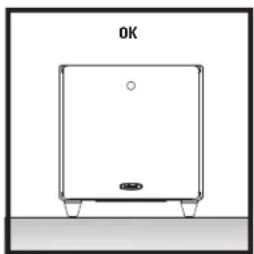
natural_image
Simple line drawing of a rectangular device with a circular top and base, labeled 'OK' at the top (no other text or symbols)natural_image
Line drawing of a square electronic device with a circular top and four ports, no text or symbols present.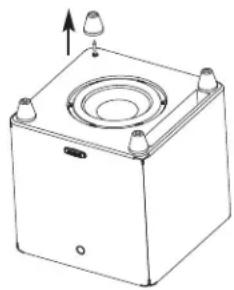
natural_image
Technical line drawing of a square mechanical housing with a circular top and mounting points (no text or symbols)natural_image
Technical line drawing of a mechanical housing with mounting holes and a central circular component (no text or symbols)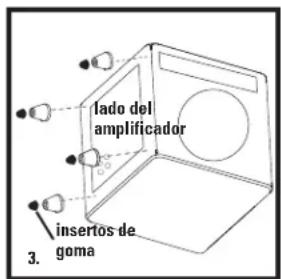
text_image
puerto de ranura conductor 4.text_image
PWSK-1 WIRELESS ADAPTOR PORT SPEAKER OUT LEFT + RIGHT LETT RIGHT SPEAKER IN LOW PASS VOLUME UP POWER 60Hz 160Hz DOWN LINE IN R L LINE OUT REFER TO OWNER'S MANUAL FOR PROPER INPUT CHOICE. USE AS LFE NO YES LFE/R A R L COASTIC ELECTRONIC, BE PAIN DOWN! WARNING TO REVE ITHE ROW OF TIRE ON ELECTRIC BANOL, DO NOT EXPOSED THE APPTIMATE TRANSMER ON INVESTMENT, NO CASH WITH CAPSIBLE PAINTING, ANTERIOR, AND CONSENSUS TO CAPSIBLE APPTIMATE PERFORMAL. AVERTISSEMENT NEW SYSTEMS THAT ARE NOT PREMISE ON SPECTRIFICATION, WE ARE SHOWN OR APPROVAL. PLEASE OK A CHANGE. HOME FEET REMAINABLE AND COPIRATION ARE SHOWN & UNSTRECTION CAN'TED YOUR PROTECTION AND TRANSMER RELATIVES. Caution: For continued protection against risk of fire, replace only with same type fuse and rating. Attention: Utiliser un fusible de rechange de même type et caliber. The system is based on the PC's 2.5 GHz power output. We are not able to use the PC's 2.5 GHz power output. We are not able to use the PC's 2.5 GHz power output. We are not able to use the PC's 2.5 GHz power output. We are not able to use the PC's 2.5 GHz power output. We are not able to use the PC's 2.5 GHz power output. We are not able to use the PC's 2.5 GHz power output. We are not allowed to use the PC's 2.5 GHz power output. We are not allowed to use the PC's 2.5 GHz power output. We are not allowed to use the PC's 2.5 GHz power output. We are not allowed to use the PC's 2.5 GHz power output. We are not allowed to use the PC's 2.5 GHz power output. We are not allowed to use the PC's 2.5 GHz power output. We have been used to use the PC's 2.5 GHz power output. We have been used to use the PC's 2.5 GHz power output. We have been used to use the PC's 2.5 GHz power output. We have been used to use the PC's 2.5 GHz power output. We have been used to use the PC's 2.5 GHz power output. We have been used to use the PC's 2.5 GHz power output. We had been used to use the PC's 2.5 GHz power output. We had been used to use the PC's 2.5 GHz power output. We had been used to use the PC's 2.5 GHz power output. We had been used to use the PC's 2.5 GHz power output. We had been used to use the PC's 2.5 GHz power output. We had been used to use the PC's 2.5 GHz power output. 100-240V~ 50/60Hz 160WT 2.5 A L 250V AC MAIN OFF ON TUV NRTL US CE POLkaudio® POWERED SUBWOOFER wireless™ ready CAUTION FOR SUPERIOR EQUINOIS DO NOT OPEN! WEGET DE CHOIC ELECTRONIC, BE PAIN DOWN! WARNING TO REVE ITHE ROW OF TIRE ON ELECTRIC BANOL, DO NOT EXPOSED THE APPTIMATE TRANSMER ON INVESTMENT, NO CASH WITH CAPSIBLE PAINTING, ANTERIOR, AND CONSENSUS TO CAPSIBLE APPTIMATE PERFORMAL. WARNING FOR SUPERIOR EQUINOIS DO NOT OPEN! WEGET DE CHOIC ELECTRONIC, BE PAIN DOWN! AVERTISSEMENT NEW SYSTEMS THAT ARE NOT PREMISE ON SPECTRIFICATION, WE ARE SHOWN OR APPROVAL. PLEASE OK A CHANGE. HOME FEET REMAINABLE AND COPIRATION ARE SHOWN & UNSTRECTION CAN'TED YOUR PROTECTION AND TRANSMER RELATIVES. Caution: For continued protection against risk of fire, replace only with same type fuse and rating. Attention: Utiliser un fusible de rechange de même type at caliber. The system is based on the PC's 2.5 GHz power output. We are not allowed to use the PC's 2.5 GHz power output. We have been used to use the PC's 2.5 GHz power output. We have been used to use the PC's 2.5 GHz power output. TUV NRTL US CEDSWPRO550wn Amplificador
text_image
PWSK-1 WIRELESS ADAPTOR PORT SPEAKER OUT LEFT + RIGHT SPEAKER IN 90Hz VOLUME UP POWER 60Hz 120Hz DOWN LOW PASS USE AS LFE YES NO LINE IN LFE/R R LINE OUT REFER TO OWNER'S MANUAL FOR PROPER INPUT CHOICE. R L CAPTION TUR NRTL AC MAIN OFF ON AC 100-120V AC 220-240V POWERED SUBWOOFER wireless™ ready CAUTION TUR OF ELECTRONIC DO NOT OPEN BLUE IS CHOC ELECTRICAL NET PAS SWITCH WARNING TO PROVIDE THE RARE OF FIRE COOLATION. IS NOT USED. THIS APPLIANT TO RUN ON NOVOIR, AND DOWN BEANSABLE. PARTS ARE NOT SPRING ON TO SURVE YOUR POWER. AVERTISSEMENT WITH ZQUIFER RIGHT ON POINTS TO POLDING TO POLDING TO POLDING TO POLDING TO POLDING TO POLDING TO POLDING TO POLDING TO POLDING TO POLDING TO POLDING TO POLDING TO POLDING TO POLDING TO POLDING TO POLDING TO POLDING TO POLDING TO POLDING TO POLDING TO POLDING TO POLDING TO POLDING TO POLDING TO POLDING TO POLDINUT. CAUTION: For continued protection against risk of fire, replace only with same type fuse and rating. Attention: Utiliser un fable de rechange de même type of caliber. The device enables for 50Hz to 100Hz. Duration is limited to the following two conditions: this drive may be used based on the connection and the other mode must change an interference model. Including the reference to the power output of the device's power output. ICE OR MACHUARY 100-120V~ / 220-240V~ 50/60Hz 160W T 4.0 A L 250V TUV NRTL US CEDSWPRO660wi Amplificador
text_image
PWSK-1 WIRELESS ADAPTOR PORT SPEAKER OUT LEFT + RIGHT SWEER OUT LEFT + RIGHT SPEAKER IN 90Hz 60Hz 120Hz VOLUME UP POWER AUTO DOWN LINE IN LFE/R R L LINE OUT REFER TO OWNER'S MANUAL FOR PROPER INPUT CHOICE. USE AS LFE YES NO LINE OUT R L 100-120V-/ 220-240V~ 50/60Hz 200W T 5.0 A L 250V AC MAIN OFF ON AC 100-120V AC 220-240V TUV C NRTL US CE polkaudio® POWERED SUBWOOFER wireless™ ready CAUTION FOR OPERATION SHOULD BE DO NOT OPEN WARNING AND ELECTRICAL WE ARE COOKING WARNING TO REVE AT THE RISK OF FIRE ON COLDING, DO NOT EXPIRE THE APP. SELECT TO WIN OR WORKING, AND DOWN WORKING FAIR ITEMS, NEED SABBING TO CAN BE USED WITHOUT THE WIRESE PROCESSED. AVERTISSEMENT WITH STARTER TEST REFLECT ON BREAKING ON OLETRATION, AND BE EXPENSIVE OUT APPENDIBLE, PLEASE OR A CHANGE. YOU ARE AVAILABLE FOR YOUR NAME ON THE TARGET & SWITCHER. CAUTION TEST REFERENCE & KEY TECHNILOGY IS UMLLED. Caution: For continued protection against risk of fire, replace only with same type fuse and rating. Attention: Utiliser un fuible de rechange de marine type at caliber. This device will be used for 15-75% TUVs. Available to adjust to the following two conditions: (1) this device may not use harmful shingles, and (2) this device must be certified. Please note that: be reliable, or therefore that requires additional connections. TUV TUV 220V 240V C NRTL US CECONTROL REMOTO DSWPROWI
text_image
polkaudio Volume 0 270 phase 90 180 night LED reset 1 cabinet corner mid-wall mid-room Polk Room Optimizer tirarRéglage du Volume
| Voyant DEL bleu | ||
| Volume Cling. longs | Cling. courts | |
| 40 40 | ||
| 39 39 | ||
| 38 | 3 | 8 |
| 37 37 | ||
| 36 36 | ||
| 35 35 | ||
| 34 | 3 | 4 |
| 33 33 | ||
| 32 32 | ||
| 31 31 | ||
| 30 | 3 | 0 |
| 29 29 | ||
| 28 28 | ||
| 27 27 | ||
| 26 26 | ||
| 25 25 | ||
| 24 24 | ||
| 23 23 | ||
| 22 22 | ||
| 21 21 | ||
| 20 20 | ||
| 19 19 | ||
| 18 18 | ||
| 17 17 | ||
| 16 16 | ||
| 15 15 | ||
| 14 14 | ||
| 13 13 | ||
| 12 12 | ||
| 11 11 | ||
| 10 10 | ||
| 9 | 0 | 9 |
| 8 | 0 | 8 |
| 7 | 0 | 7 |
| 6 | 0 | 6 |
| 5 | 0 | 5 |
| 4 | 0 | 4 |
| 3 | 0 | 3 |
| 2 | 0 | 2 |
| 1 | 0 | 1 |
| 0 | 0 | 0 |
text_image
18" - 24" (46cm - 61cm) SUB TV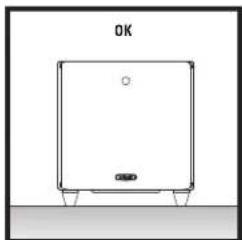
natural_image
Simple line drawing of a rectangular device with a circular top and base, no text or symbols present.natural_image
Line drawing of a square mechanical device with a circular top and four corner bolts (no text or symbols)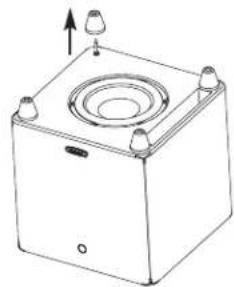
natural_image
Line drawing of a square mechanical device with a central circular component and four protruding ports (no text or symbols)natural_image
Technical line drawing of a mechanical device with mounting holes and a central circular component (no text or symbols)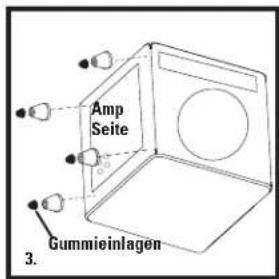
flowchart
graph TD
    A["User Interface"] --> B["Central Receiver Front"]
    B --> C["Central Receiver"]
    C --> D["Central Receiver"]
    D --> E["Central Receiver"]
    E --> F["Central Receiver"]
    F --> G["Central Receiver"]
    G --> H["Central Receiver"]
    H --> I["Central Receiver"]
    I --> J["Central Receiver"]
    J --> K["Central Receiver"]
    K --> L["Central Receiver"]
    L --> M["Central Receiver"]
    M --> N["Central Receiver"]
    N --> O["Central Receiver"]
    O --> P["Central Receiver"]
    P --> Q["Central Receiver"]
    Q --> R["Central Receiver"]
    R --> S["Central Receiver"]
    S --> T["Central Receiver"]
    T --> U["Central Receiver"]
    U --> V["Central Receiver"]
    V --> W["Central Receiver"]
    W --> X["Central Receiver"]
    X --> Y["Central Receiver"]
    Y --> Z["Central Receiver"]
    Z --> AA["Central Receiver"]
    AA --> AB["Central Receiver"]
    AB --> AC["Central Receiver"]
    AC --> AD["Central Receiver"]
    AD --> AE["Central Receiver"]
    AE --> AF["Central Receiver"]
    AF --> AG["Central Receiver"]
    AG --> AH["Central Receiver"]
    AH --> AI["Central Receiver"]
    AI --> AJ["Central Receiver"]
    AJ --> AK["Central Receiver"]
    AK --> AL["Central Receiver"]
    AL --> AM["Central Receiver"]
    AM --> AN["Central Receiver"]
    AN --> AO["Central Receiver"]
    AO --> AP["Central Receiver"]
    AP --> AQ["Central Receiver"]
    AQ --> AR["Central Receiver"]
    AR --> AS["Central Receiver"]
    AS --> AT["Central Receiver"]
    AT --> AU["Central Receiver"]
    AU --> AV["Central Receiver"]
    AV --> AW["Central Receiver"]
    AW --> AX["Central Receiver"]
    AX --> AY["Central Receiver"]
    AY --> AZ["Central Receiver"]
    AZ --> BA["Central Receiver"]
    BA --> BB["Central Receiver"]
    BB --> BC["Central Receiver"]
    BC --> BD["Central Receiver"]
    BD --> BE["Central Receiver"]
    BE --> BF["Central Receiver"]
    BF --> BG["Central Receiver"]
    BG --> BH["Central Receiver"]
    BH --> BI["Central Receiver"]
    BI --> BJ["Central Receiver"]
    BJ --> BK["Central Receiver"]
    BK --> BL["Central Receiver"]
    BL --> BM["Central Receiver"]
    BM --> BN["Central Receiver"]
    BN --> BO["Central Receiver"]
    BO --> BP["Central Receiver"]
    BP --> BQ["Central Receiver"]
    BQ --> BR["Central Receiver"]
    BR --> BS["Central Receiver"]
    BS --> BT["Central Receiver"]
    BT --> BU["Central Receiver"]
    BU --> BV["Central Receiver"]
    BV --> BW["Central Receiver"]
    BW --> BX["Central Receiver"]
    BX --> BY["Central Receiver"]
    BY --> BZ["Central Receiver"]
    BZ --> CA["Central Receiver"]
    CA --> CB["Central Receiver"]
    CB --> CC["Central Receiver"]
    CC --> CD["Central Receiver"]
    CD --> CE["Central Receiver"]
    CE --> CF["Central Receiver"]
    CF --> CG["Central Receiver"]
    CG --> CH["Central Receiver"]
    CH --> CI["Central Receiver"]
    CI --> CJ["Central Receiver"]
    CJ --> CK["Central Receiver"]
    CK --> CL["Central Receiver"]
    CL --> CM["Central Receiver"]
    CM --> CN["Central Receiver"]
    CN --> CO["Central Receiver"]
    CO --> CP["Central Receiver"]
    CP --> CQ["Central Receiver"]
    CQ --> CR["Central Receiver"]
    CR --> CS["Central Receiver"]
    CS --> CT["Central Receiver"]
    CT --> CU["Central Receiver"]
    CU --> CV["Central Receiver"]
    CV --> CW["Central Receiver"]
flowchart
graph TD
    A["Power Amplifier"] --> B["Input L R"]
    A --> C["Front L R"]
    A --> D["Pre-AMP OR PROCESSOR PRE-OUT L R"]
    E["USE AS LIFE"] --> F["YES"]
    E --> G["NO"]
    F --> H["Measurement Device"]
    G --> H
    H --> I["Output Signal"]
    style A fill:#f9f,stroke:#333
    style E fill:#ccf,stroke:#333
Amplificator DSWPRO440wi
text_image
PWSK-1 WRELESS ADAPTOR PORT SPEAKER OUT LEFT + RIGHT LETT RIGHT SPEAKER IN LOW PASS VOLUME UP POWER 60Hz 160Hz DOWN LINE IN R L LINE OUT REFER TO OWNER'S MANUAL FOR PROPER INPUT CHOICE. USE AS LFE NO YES LFE/R A R L COASTIC ELECTRONIC, BE PAIN DOWN! WARNING TO REVE IT THE RIN OF TIRE ON ELECTRIC BANOL, DO NOT EXPOSED THE APPTIMATE TRANSMER ON INVESTMENT, NO CASH WITH CAPSIBLE PAINTING, ANTERIOR, AND CONSENSUS TO CAPSIBLE APPTIMATE PERFORMAL. AVERTISSEMENT NEW SYSTEMS THAT ARE NOT PREMISE ON THE EVOLUTION, BE PAIN STOPPER OUT APPURTABLE. PLEASE OR A CHINESE. HOME FEET REMAINABLE AND CONSENSUS ON WE SAIRS A VENTURE IN CAN'TED YOUR PROTECTION AND TRANSMER RELATIVES. Caution: For continued protection against risk of fire, replace only with same type fuse and rating. Attention: Utiliser un fusible de rechange de même type et caliber. The system is based on the PC's 2.5 A L 250V AC MAIN OFF ON TUV NRTL US CE POK MANSARDAmplificator DSWPRO550wi
text_image
PWSK-1 WIRELESS ADAPTOR PORT SPEAKER OUT LEFT + RIGHT SPEAKER IN 90Hz VOLUME UP POWER 60Hz 120Hz DOWN LOW PASS USE AS LFE YES NO LINE IN LFE/R R L LINE OUT REFER TO OWNER'S MANUAL FOR PROPER INPUT CHOICE. CAPTION: THE RISK OF FIRE COOLATION, IS NOT USED. THIS APPLIANT TO RUN ON NOODING, AND DOWN BEANSABLE. PARTS ARE NOT SPRING ON SPECTED SERVICE PROCESSED. WARNING: AVERTISSEMENT WITH ZQUIFER RIGHT OR ITAL POWER OR POLDENATION, IN PART DISPONE AT IMPROSLATE, PLUS OR ACCESSIBLE. SIDE PEACE REMAINABLE FROM CUTO KATHERS OR FIGURE A CONTINUING. ONCOM TEST INVERTISING A SET SWITCHER QUALIFER. Caution: For continued protection against risk of fire, replace only with same type fuse and rating. Attention: Utiliser un fasible de rechange de même type of caliber. The device enables for 50Hz/40Hz power. Duration is limited to the following two channels: this drive may be used based on the connection and the device must open any connection mode. Including the following functions are closed upon a button. AC MAIN OFF ON AC 100-120V AC 220-240V TUV NRTL US CE polkaudio® POWERED SUBWOOFER wireless™ readyAmplificator DSWPRO60wi
text_image
PWSK-1 WIRELESS ADAPTOR PORT SPEAKER OUT LEFT + RIGHT LEFT + RIGHT SPEAKER IN 90Hz VOLUME UP POWER DOWN 60Hz 120Hz LINE IN R L LINE OUT REFER TO OWNER'S MANUAL FOR PROPER INPUT CHOICE. USE AS LFE YES NO LFE/R A R L 100-120V~ / 220-240V~ 50/60Hz 200W T 5.0 A L 250V AC MAIN AC 100-120V AC 220-240V TUV NRTL US CE AC MAIN AC 100-120V AC 220-240V POWERED SUBWOOFER wireless™ ready CAUTION FOR OF LETER WOODS DO NOT OPEN WARNING TO REVEAK THE RISK OF FIRE ON CLOTHIN, DO NOT EXPIRE THIS APPLIANT TO RUN OR MOUNTED AND SHOWN APPROPICAL PAINTS AND/OR SENSORS TO SABBLED SERVICE PROCESSED. AVERTISSEMENT WITH VOLTAGE TEST REFLECTIVE ENGLISH ON OBLIGATION, NO MAX INFORMATION OUT APPROVAL B, PLET OR ALL ELEMENTS (WITH PLET REFLECTIVE WITH LITER) SWITCH OR CAN Lower & Lower Resistance. CAN Lower TEST REFLECTIVE AND SWITCH OFF OR ONLY. Caution: For continued protection against risk of fire, replace only with same type fuse and rating. Attention: Utiliser un fuible de rechange de même type et caliber. This device will be for 15-27Hz TUVs, operate in the unit to the following two conditions: if the current may be found harmful, or any other means are appropriate. This is not used to provide any suitable electronic circuit. TUV TETRY CONDUCTOR C NRTL US CEDSWPROWI-FERNBEDIENUNG
text_image
18" - 24" (46cm - 61cm) SUB TV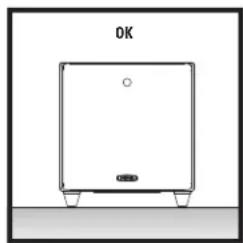
natural_image
Simple line drawing of a rectangular device with a circular top and base, labeled 'OK' at the top (no other text or symbols)natural_image
Line drawing of a square mechanical device with a circular top and four mounting points (no text or symbols)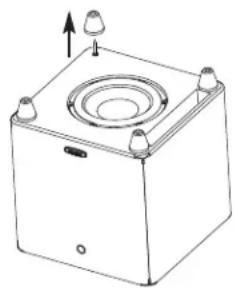
natural_image
Line drawing of a square mechanical device with a central circular component and four protruding ports (no text or symbols)COLLOCAZIONE DEL SUBWOOFER IN UN ARMADIETTO
natural_image
Technical line drawing of a mechanical device with mounting holes and a central circular component (no text or symbols)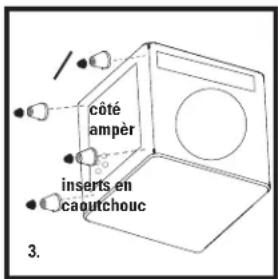
Subwoofer = ON, YES o PRESENT
text_image
PWSK-1 WIRELESS ADAPTOR PORT SPEAKER OUT LEFT + RIGHT SWEER OUT LEFT + RIGHT SWEER IN LOW PASS 110Hz 60Hz 160Hz VOLUME UP POWER DOWN LINE IN LFE/R R L LINE OUT REFER TO OWNER'S MANUAL FOR PROPER INPUT CHOICE. COOLERATION WARNING TO REVE IT THE RIN OF TIRE ON ELECTRIC BANANA, DO NOT EXPOSED THE APPTIMATE TRANSMI ON INVESTMENT, NO CASH WITH BEABLE FATH WINDER, ANTER MINING TO CHILLER ON ELECTRIC PENSORS. AVERTISSEMENT NEW SYSTEMS THAT ARE NOT FINISH ON THE EDITIONAL, NO CAN BE PENSSED OR APPROVED. PLEASE OK A CHANGE. HOME FEET REMAINABLE AND CONDUCTION ON WE CHANGES & INTERIOR CAN'TED YOUR PROTECTION AND TRANSMI ARE AVAILABLE. Caution: For continued protection against risk of fire, replace only with same type fuse and rating. Attention: Utiliser un fusible de rechange de meme type et caliber. The system is based on the PC's 2.5 GHz power output. The device has been used to use the PC's 2.5 GHz power output. The device has been used to use the PC's 2.5 GHz power output. The device has been used to use the PC's 2.5 GHz power output. The device has been used to use the PC's 2.5 GHz power output. The device has been used to use the PC's 2.5 GHz power output. TUV TURKEY SENSSE NRTL US CE AC MAIN OFF ON POLKAUDIO® POWERED SUBWOOFER wireless™ ready CAUTION FOR EV/DC/DC/DC/DC/DC/DC/DC/DC/DC/DC/DC/DC/DC/DC/DC/DC/DC/DC/DC/DC/DC/DC/DC/DC/DC/DC/DC/DC/DC/DC/DC/DC/DC/DC/DC/DC/DC/DC/DC/DC/DC/DC/DC/DC/DC/DC/DC/DC/DC/DC/NCtext_image
PWSK-1 WIRELESS ADAPTOR PORT SPEAKER OUT LEFT + RIGHT SPEAKER IN 90Hz VOLUME UP POWER 60Hz 120Hz DOWN LOW PASS USE AS LFE YES NO LINE IN LFE/R R LINE OUT REFER TO OWNER'S MANUAL FOR PROPER INPUT CHOICE. CAPTION® POWERED SUBWOOFER wireless™ ready CAUTION® TIRE OF ELECTRIC SHOCK DO NOT OPEN BLUE IS CHICK ELECTRICAL WE HAS COUNN WARNING TO PROVIDE THE RISK OF FIRE COOLATION. IS NOT USED THIS APPLIANT TO RUN ON MOUNTING AND DOWN BEHAVIORAL PARTS ADD/WHIP TURNING TO ADJUST YOUR POURING. AVERTISSEMENT WITH ZQUIFER RIGHT AT RIGHT POURING OR POURINGATION, IN PART SPECTIVE UP POURING, I PLUG UP ACCESSIBLE, SIDE PEACE REMAINABLE FROM DATA RETAIL OR FIGURE A CONTINUUM, ONCOM TEST REFERENCE TO TEST SWITCHING QUALITY. Caution: For continued protection against risk of fire, replace only with same type fuse and rating. Attention: Utiliser un fasible de rechange de meme type of caliber. The device will be used for the TV or TV radio. Detection is limited to the following we will be used to allow their own hand- tions, and it allows me to switch any connection based on the device's power output can be used to adjust. AC MAIN OFF ON TUV NRTL US CE polkaudio® POWERED SUBWOOFER Wireless™ readyAmplificatore DSWPRO60w1
text_image
PWSK-1 WIRELESS ADAPTOR PORT SPEAKER OUT LEFT + RIGHT SWEER OUT LEFT + RIGHT SPEAKER IN 90Hz 60Hz 120Hz VOLUME UP POWER AUTO DOWN LINE IN LFE/R R L LINE OUT REFER TO OWNER'S MANUAL FOR PROPER INPUT CHOICE. USE AS LFE YES NO LINE OUT R L 100-120V-/ 220-240V~ 50/60Hz 200W T 5.0 A L 250V AC MAIN OFF ON AC 100-120V AC 220-240V TUV C NRTL US CE polkaudio® POWERED SUBWOOFER wireless™ ready CAUTION FOR OPERATION SHOULD BE DO NOT OPEN WARNING AND ELECTRICAL WE ARE COOKING WARNING TO REVE AT THE RISK OF FIRE ON COLDING, DO NOT EXPIRE THE APP. SELECT TO WIN OR WORKING, AND WIN APPROACH FAIR ITEMS, WIND SURBMENTS TO CAN BE USED WITHOUT THE WORLD'S HISTORY. AVERTISSEMENT WITH STARTER TEST REFLECT ON BREAKING ON OLETRATION, AND BE BETTER OUT APPROVAL I, PULSE ON A YELLOW ON VOLT FROM AVAILABLE FOR OTHER HANDS BY THE TRUSTAIN & STRUSTAIN. CAUTION TEST REFLECT ON ANY TECHNOLOGY INSTALLATION. Caution: For continued protection against risk of fire, replace only with same type fuse and rating. Attention: Utiliser un fuible de rechange de marine type at caliber. This device will be used for 15-75% TUVs. Available to adjust to the following two conditions: (1) this device may not use harmful shingles, and (2) this device must be accepted. If necessary is allowed. TUVs. US CE POLKAUDIO®TELECOMANDO DSWPROWI
natural_image
Simple line drawing of a rectangular device with a circular hole and base, labeled 'OK' at the top (no other text or symbols)natural_image
Line drawing of a square electronic device with a central circular component and four mounting pins (no text or symbols)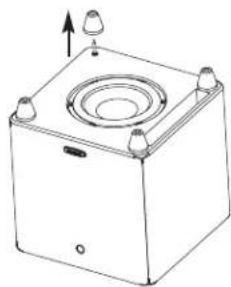
natural_image
Line drawing of a square mechanical or electrical enclosure with mounting holes and a central circular component (no text or symbols)natural_image
Technical line drawing of a mechanical device with mounting holes and a central circular component (no text or symbols)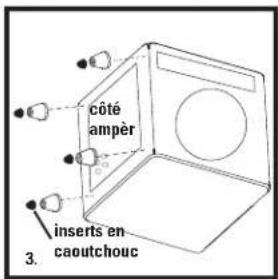
text_image
slot porto driver 4.text_image
PWSK-1 WIRELESS ADAPTOR PORT SPEAKER OUT LEFT + RIGHT SWEER OUT LEFT + RIGHT SPEAKER IN LOW PASS VOLUME UP POWER 60Hz 160Hz DOWN LINE IN LFE/R R L LINE OUT REFER TO OWNER'S MANUAL FOR PROPER INPUT CHOICE. YES USE AS LFE NO LINE IN R LINE OUT AC MAIN OFF ON polkaudio® POWERED SUBWOOFER wireless™ ready CAUTION FOR ELECTRIC MODELS DO NOT OPEN AVERTISSEMENT NEW SYSTEMS TO BEANSY SYSTEMS OF ELECTRICAL, NO OR COMPANIBLE NAME, AND CENSING TO BEANSY ELECTRICAL EQUIPMENT. WARNING TO REJECT THE RUB OF THER ON ELECTRIC ENGLISH, DO NOT EXPOSED THIS APPEAR STEMEN ON ELECTRIC, NO OR COMPANIBLE NAME, AND CENSING TO BEANSY ELECTRICAL EQUIPMENT. AVERTISSEMENT NEW SYSTEMS TO BEANSY SYSTEMS OF ELECTRICAL, NO OR COMPANIBLE NAME, AND CENSING TO BEANSY ELECTRICAL EQUIPMENT. Caution: For continued protection against risk of fire, replace only with same type fuse and rating. Attention: Utiliser un fusible de rechange de même type et caliber. The device is used to be a 2.5 A L 250V AC main switch. The device is used to be a 2.5 A L 250V AC main switch. The device is used to be a 2.5 A L 250V AC main switch. The device is used to be a 2.5 A L 250V AC main switch. The device is used to be a 2.5 A L 250V AC main switch. The device is used to be a 2.5 A/L 250V AC main switch. The device is used to be a 2.5 A/L 250V AC main switch. The device is used to be a 2.5 A/L 250V AC main switch. The device is used to be a 2.5 A/L 250V AC main switch. The device is used to be a 2.5 A/L 250V AC main switch. The device uses the power supply for the circuit board (TUV) and the power input (NRTL) connected to the circuit board (NRTL). The device uses the power input (NRTL) connected to the circuit board (NRTL). The device uses the power output (NRTL) connected to the circuit board (NRTL). The device uses the power output (NRTL) connected to the circuit board (NRTL). The device uses the power output (NRTL) connected to the circuit board (NRTL). The device uses the power output (NRTL) connected to the circuit board (NRTL). The device uses the power output (NRTL) connected to the circuit board (NRTL). The device uses the power output (NRTL) connection to the circuit board (NRTL). The device uses the power output (NRTL) connection to the circuit board (NRTL). The device uses the power output (NRTL) connection to the circuit board (NRTL). The device uses the power output (NRTL) connection to the circuit board (NRTL). The device uses the power output (NRTL) connection to the circuit board (NRTL). The device uses the power output (NRTL) connection to the circuit board( NRTL) connection to the circuit board( NRTL) connection to the circuit board( NRTL) connection to the circuit board( NRTL) connection to the circuit board( NRTL) connection to the circuit board( NRTL) connection to the circuit board( NRTL) connection to the circuit board( NRTL) connection to the circuit board( NRTL) connection to the circuit board( NRTL) connection to the circuit board( NRTL) connection to the circuit board( NCTL) connection to the circuit board( NCTL) connection to the circuit board( NCTL) connection to the circuit board( NCTL) connection to the circuit board( NCTL) connection to the circuit board( NCTL) connection to the circuit board( NCTL) connection to the circuit board( NCTL) connection to the circuit board( NCTL) connection to the circuit board( NCTL) connection to the circuit board( NCTL) connection to the circuit board( NCTL)Amplificador DSWPRO550wi
text_image
PWSK-1 WIRELESS ADAPTOR PORT SPEAKER OUT LEFT + RIGHT SPEAKER IN 90Hz VOLUME UP POWER 60Hz 120Hz DOWN LOW PASS USE AS LFE YES NO LINE IN LFE/R R LINE OUT REFER TO OWNER'S MANUAL FOR PROPER INPUT CHOICE. R L CAPTION TUR NRTL AC MAIN OFF ON AC 100-120V AC 220-240V POWERED SUBWOOFER wireless™ ready CAUTION TUR OF ELECTRONIC DO NOT OPEN BLUE IS CHOC ELECTRICAL NET PAS SWITCH WARNING TO PROVIDE THE RARE OF FIRE COOLATION, OR IS NOT USED. THIS APPLIANT TO RUN ON NOVOIRING AND DOWN NOVOIRING. PARTS ARE NOT SPRING ON CANAD ON SERVICE PROCESSED. AVERTISSEMENT WITH ZQUIFER RIGHT ON POINTS TO PRODUCTION, AND NOT BE PATTERN. IN PAI SUPPLEMENT AT AMPOGRAVE, FLA OR AT CAMPOORE. SIDE PEACE REMAINABLE FROM CENTS, NATALIA, NC FUTURE & CUSTEMA. ONCOM TEST INVERTISING A SET TECHNIOR QUALITY. Caution: For continued protection against risk of fire, replace only with same type fuse and rating. Attention: Utiliser un fasible de rechange de meme type of caliber. The device enables for 50Hz to 120Hz. Duration is limited to the following two conditions: this drive may be used based on the connection and the other mode must open any connection model. Including the reference to the battery or a smaller component. ICE-E-MAXXXXXN 100-120V~/ 220-240V~ 50/60Hz 160W T 4.0 A L 250V TUV NRTL US CEAmplificador DSWPRO60wi
text_image
PWSK-1 WIRELESS ADAPTOR PORT SPEAKER OUT LEFT + RIGHT SWEER OUT LEFT + RIGHT SPEAKER IN 90Hz 60Hz 120Hz VOLUME UP POWER AUTO DOWN LINE IN LFE/R R L LINE OUT REFER TO OWNER'S MANUAL FOR PROPER INPUT CHOICE. USE AS LFE YES NO LINE OUT CAPTUS STRECTION & KEY TRANSPORTATION AVERTISSEMENT WITH STARTOR START SWITCH ON ECONOMATION OR OVERTIFICATION, AND BE REPRODUCED OUT APPROPICAL, PULSE OR A CHANGE YOU ARE AVAILABLE WITH LIMEI SUSTAIN OR THE TREATMENT AND THE TREATMENT. CAUTION TO TEST SWITCH ON ANY TRANSPORTATION SHALL NOT USE. Caution: For continued protection against risk of fire, replace only with same type fuse and rating. Attention: Utiliser un fuible de rechange de marine type at caliber. This device will switch for 15.4 GHz (TUV) to the main button to the following two conditions: if the current may not cause harmful shown, and if the current must be accepted or therefore required, be ridging, therefore that requires additional ventilation. TUV TESTANT WIRELESS ADAPTOR PORT AC MAIN OFF ON AC 100-120V AC 220-240V C NRTL US CE polkaudio® POWERED SUBWOOFER wireless™ ready CAUTION ITEM OF LIMEI WIRELESS ADAPTOR PORT BE NOT OPEN WARNING TO REVEAK THE RISK OF FIRE ON COLDING ROOM, DO NOT EXPIRE THIS APPL. LIMITS TO KEEP ON WORKERS AND OTHER INFORMATION & AIDS SHOULD NOT BE SENSITALLY TO SAUND FROM THIS SERVICE. WARNING TO REVEAK THE RISK OF FIRE ON COLDING ROOM, DO NOT EXPIRE THIS APPL. LIMITS TO KEEP ON WORKERS AND OTHER INFORMATION & AIDS SHOULD NOT BE SENSITALLY TO SAUND FROM THIS SERVICE. WARNING TO REVEAK THE RISK OF FIRE ON COLDING ROOM, DO NOT EXPIRE THIS APPL. LIMITS TO KEEP ON WORKERS AND OTHER INFORMATION & AIDS SHOULD NOT BE SENSITALLY TO SAUNDED FROM THIS SERVICE. WARNING TO REVEAK THE RISK OF FIRE ON COLDING ROOM, DO NOT EXPIRE THIS APPL. LIMITS TO KEEP ON WORKERS AND OTHER INFORMATION & AIDS SHOULD NOT BE SENSITALLY TO SAUNDED FROM THIS SERVICE. WARNING TO REVEAK THE RISK OF FIRE ON COLDING ROOM, DO NOT EXPIRE THIS APPL. LIMITS TO KEEP ON WORKERS AND OTHER INFORMATION & AIDS SHOULD NOT BETTER WITH THE RISK OF FIRE ON COLDING ROOM, DO NOT EXPIRE THIS APPL. LIMITS TO KEEP ON WORKERS AND OTHER INFORMATION & AIDS SHOULD NOT BETTER WITH THE RISK OF FIRE ON COLDING ROOM, DO NOT EXPIRECONTROLE REMOTO DO DSWPROWI
Polk Audio, Inc., warrants to the original retail purchaser only. This warranty will terminate automatically prior to its stated expiration if the original retail purchaser sells or transfers the Product to any other party.
Polk Audio, Inc., warrants, to the original retail purchaser only, that the LOUDSPEAKER(S), PASSIVE CROSSOVER COMPONENT(S) and ENCLOSURE on this Polk Audio Loudspeaker Product will be free from defects in material and workmanship for a period of five (5) years from the date of original retail purchase from a Polk Audio Authorized Dealer.
Furthermore, Polk Audio, Inc., warrants, to the original retail purchaser only, that any AMPLIFIER OR OTHER ELECTRONIC COMPONENT that may be included in this Polk Audio Loudspeaker Product will be free from defects in material and workmanship for a period of three (3) years from the date of original retail purchase from a Polk Audio Authorized Dealer.
To allow Polk Audio to offer the best possible warranty service, please register your new product online at: www.polkaudio.com/registration or call Polk customer service 800-377-7655 in the USA and Canada (outside the USA: 410-358-3600) within ten (10) days of the date of original purchase. Be sure to keep your original purchase receipt.
Defective Products must be shipped, together with proof of purchase, prepaid insured to the Polk Audio Authorized Dealer from whom you purchased the Product, or to the Factory at 1 Viper Way, Vista CA 92081. Products must be shipped in the original shipping container or its equivalent; in any case the risk of loss or damage in transit is to be borne by you. If upon examination at the Factory or Polk Audio Authorized Dealer it is determined that the unit was defective in materials or workmanship at any time during this Warranty period, Polk Audio or the Polk Audio Authorized Dealer will, at its option, repair or replace this Product at no additional charge, except as set forth below. All replaced parts and Products become the property of Polk Audio. Products replaced or repaired under this warranty will be returned to you, within a reasonable time, freight prepaid.
This warranty does not include service or parts to repair damage caused by accident, disaster, misuse, abuse, negligence, inadequate packing or shipping procedures, commercial use, voltage inputs in excess of the rated maximum of the unit, cosmetic appearance of cabinetry not directly attributable to defect in materials or workmanship, or service, repair, or modification of the Product which has not been authorized or approved by Polk Audio. This warranty shall terminate if the Serial number on the Product has been removed, tampered with or defaced.
This warranty is in lieu of all other expressed Warranties. All implied warranties on this Product are limited to the duration of this expressed Warranty. Some states do not allow limitation on how long an implied Warranty lasts, so the above limitations may not apply to you. This Warranty gives you specific legal rights, and you also may have other rights which vary from state to state.
If this Product is defective in materials or workmanship as warranted above, your sole remedy shall be repair or replacement as provided above. This warranty does not cover service, parts, or supplies to repair damage to property other than the Product. In no event will Polk Audio, Inc. be liable to you for any incidental or consequential damages arising out of the use or inability to use the Product, even if Polk Audio, Inc. or a Polk Audio Authorized Dealer has been advised of the possibility of such damages, or for any claim by any other party. Some states do not allow the exclusion or limitation of incidental or consequential damages, so the above limitation and exclusion may not apply to you.
This Warranty applies only to Products purchased in Canada, the United States of America, its possessions, and U.S. and NATO armed forces exchanges and audio clubs. The Warranty terms and conditions applicable to Products purchased in other countries are available from the Polk Audio Authorized Distributors in such countries.