KTCHR200 - Radio KENWOOD - Free user manual and instructions
Find the device manual for free KTCHR200 KENWOOD in PDF.



| Brand | Kenwood |
| Model | KTCHR200 |
| Product Type | HD Radio (HD Radio receiver) |
| Dimensions (W x H x D) | 164 x 34 x 109 mm |
| Weight | 520 g (1.2 lb) |
| Operating Voltage | 14.4 V (11 - 16 V allowable) |
| Current Consumption | 500 mA |
| Analog FM Frequency Bands | 87.5 - 107.9 MHz (200 kHz step) |
| Digital FM Frequency Bands | 87.5 - 107.9 MHz (200 kHz step) |
| Analog AM Frequency Bands | 530 - 1710 kHz (10 kHz step) |
| Digital AM Frequency Bands | 530 - 1710 kHz (10 kHz step) |
| FM Sensitivity (S/N 30 dB) | 11.2 dBf (1.0 μV/75 Ω) |
| FM Selectivity (±400 kHz) | 65 dB |
| FM Stereo Separation (1 kHz) | 40 dB |
| Digital FM Frequency Response | 20 Hz - 20 kHz |
| Digital AM Frequency Response | 30 Hz - 15 kHz |
| Preset Memory | 6 stations per band (3 FM + 1 AM) |
| Reception Modes | Auto, digital only, analog only |
| Tuning Modes | Auto1, Auto2, Manual |
| Supplied Accessories | Connection cable, Velcro straps (2), installation guide |
| Maintenance and Cleaning | Dry soft cloth (silicone); for stubborn stains, cloth moistened with neutral cleaner |
| Safety | Do not insert metal objects; installation by professional; disconnect battery before installation |
| General Information | HD Radio™ Technology manufactured under license from iBiquity Digital Corp.; operating temperature 0°C to +40°C |
Frequently Asked Questions - KTCHR200 KENWOOD
User questions about KTCHR200 KENWOOD
0 question about this device. Answer the ones you know or ask your own.
Ask a new question about this device
Download the instructions for your Radio in PDF format for free! Find your manual KTCHR200 - KENWOOD and take your electronic device back in hand. On this page are published all the documents necessary for the use of your device. KTCHR200 by KENWOOD.
USER MANUAL KTCHR200 KENWOOD
Take the time to read through this instruction manual.
Familiarity with installation and operation procedures will help you obtain the best performance from your new HD Radio tuner unit.
For your records
Record the serial number, found on the back of the unit, in the spaces designated on the warranty card, and in the space provided below. Refer to the model and serial numbers whenever you call upon your Kenwood dealer for information or service on the product.
Model KTC-HR200 Serial number ____
US Residence Only
Register Online
Register your Kenwood product at
www.Kenwoodusa.com
Contents What is HD Radio Technology?
What is HD Radio Technology? En-2
Before use En-3
Operations -CD Receiver- En-4
Tuning
Tuning Mode
Receive Mode
Preset Memory
Preset Tuning
Auto Memory Entry
Switching Display
Text Scroll
In HD Radio source
Operations -DVD monitor 1- En-8
Functions While Displaying the Control Screen
Seek Mode
Auto Memory
Manual Memory
Receive mode
Operations -DVD monitor 2- En-11
Functions While Displaying the Control Screen
Seek Mode
Auto Memory
Manual Memory
Receive mode
Accessories/ Installation Procedure
En-14
Installation
En-15
Troubleshooting Guide En-16
Specifications
En-17
HD Radio technology enables broadcasters to transmit a digital signal with its analog signal using existing frequency allocations for FM and AM stations. Quality of broadcast is improved to the level of music CD in digital FM and that of analog FM in digital AM. Moreover, if receiving condition is good, you can listen to programs in stereo with the digital AM broadcast. Digital FM of Supplemental Audio Services can send up to 7 channels of the Supplemental Program Audio other than the Main Program Audio.

- Main Program Audio (hereafter called Main channel)
• Supplemental Program Audio (hereafter called Sub channel)
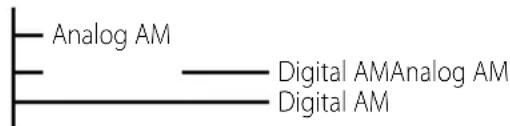
(HD AM band)
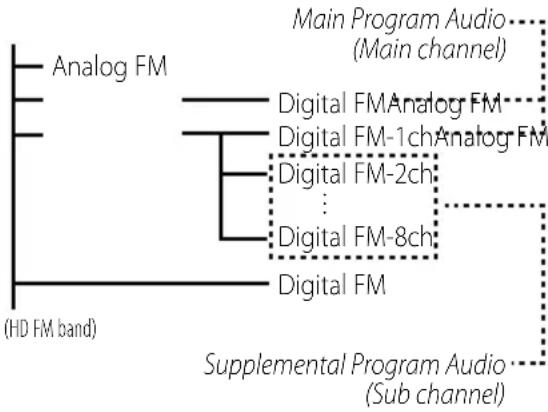
flowchart
graph TD
    A["Analog FM"] --> B["Main Program Audio (Main channel)"]
    C["Digital FM Analog FM"] --> D["Main Program Audio (Main channel)"]
    E["Digital FM-1ch Analog FM"] --> F["Main Program Audio (Main channel)"]
    G["Digital FM-2ch"] --> H["Main Program Audio (Main channel)"]
    I["Digital FM-8ch"] --> J["Main Program Audio (Main channel)"]
    K["Digital FM"] --> L["Supplemental Program Audio (Sub channel)"]
Digital broadcasting can send other information than audio, so you can display data such as title of music.
Before use
▲WARNING
To prevent injury or fire, take the following precautions:
- To prevent a short circuit, never put or leave any metallic objects (such as coins or metal tools) inside the unit.
Cleaning the Unit
If the faceplate of this unit is stained, wipe it with a dry soft cloth such as a silicon cloth. If the faceplate is stained badly, wipe the stain off with a cloth moistened with neutral cleaner, then wipe it again with a clean soft dry cloth.
Notes
- If you experience problems during installation, consult your Kenwood dealer.
- The illustrations of the display and the panel appearing in this manual are examples used to explain more clearly how the controls are used. Therefore, what appears on the display in the illustrations may differ from what appears on the display on the actual equipment, and some of the illustrations on the display may be inapplicable.
Control Units that can be Connected
For the models to which this unit can be connected, consult your Kenwood dealer.
Note that the following restrictions may occur depending on a control unit to be used.
- The HD Radio cannot be selected as a dual zone source.
How to operate the unit
Operations of this unit are described in the instruction manual of a control unit. For those not described in it, refer to the following
- CD Receiver:
page En-4 - KVT-512, DDX512, DNX5120, DNX512EX :
page En-8 - DDX812, DDX712, DNX8120, DNX7120 :
page En-11

- Following models are Multi key system models. Operations different from those of a standard model may be described in the
section. KDC-MP728, KDC-MP828, KDC-X789, KDC-X889 - The display of the capital and small letters may be differed depending on the model.
Operations -CD Receiver-
Tuning
Selecting the station.
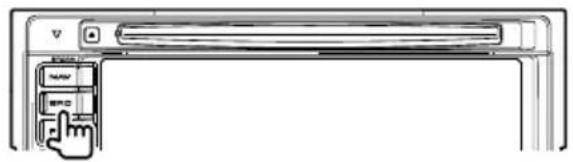
1 Select HD Radio source
Press the [SRC] button.
Select the "HD Radio"/"HD RADIO" display.
2 Select the HD FM band
Press the [FM] button.
Each time the [FM] button is pressed it switches between the HF1, HF2, and HF3 bands.
Select the HD AM band
Press the [AM] button.
3 Tune up or down program
Press the [I◄◄] or [►►I] button.
If the sub channel is available in Digital FM broadcast when
Example:

flowchart
graph TD
    A["Analog FM ①"] --> B["Digital FM ② Analog FM ②"]
    A --> C["Digital FM-1ch ③ Analog FM ③"]
    A --> D["Digital FM-2ch ④"]
    A --> E["..."]
    A --> F["Digital FM-8ch ⑩"]
    A --> G["Digital FM ⑪"]
    H["(HD FM band)"] --> I["<Tuning Mode>: Auto seek or Manual"]
    H --> J["<Receive Mode>: Auto mode"]
• During the reception of ①, tune up:
②→③→④...
- During the reception of ⑪, tune down: ⑪→⑩...

- Using
- When "Digital" has been set with
- It will take few seconds to receive the digital broadcasting after selecting the frequency.
- When Tune up button is pressed, it will switch to the next frequency if is it switched before receiving the Digital broadcasting. (2→3)
- When Tune down button is pressed, it will be received from Analog broadcasting if the Digital broadcasting has never been received. (⑪→③)
- When
- Some of the models have the following displays when the Main channel and Sub channel are switched.
- "Main"/"Primary"/"PRI": When it is switched to the Main channel
- "Sub"/"Secondary"/"SEC": When it is switched to Sub channel
Tuning Mode
Sets the tuning mode.
Press the [AUTO] button.
Each time the button is pressed the Tuning mode switches as shown below.
Receive Mode
Sets the receive mode.
1 Select menu mode using the control unit. Select the menu item.
Select the "Receive Mode"/ "HDR mode" display.
2 Open Receive mode
Press the setting button of the menu items in the control unit for at least 1 second.
3 Set the Receive mode
Switching the setting of menu items.
Each time the button is pressed the Receive mode switches as shown below.
Receive mode Display Operation
| Auto mode "Auto" Automatically tunes to analog broadcast when there is no digital broadcast. |
Digital "Digital" Digital broadcasts only.
Analog "Analog" Analog broadcasts only.
4 Exit Receive mode
Press the [MENU] button.
5 Exit Menu mode
Preset Memory
Putting the frequency and channel in the memory.
1 Select the band
Press the [FM] or [AM] button.
2 Select the frequency to put in the memory
Press the [I◄◄] or [►►I] button.
3 Put the frequency and channel in the memory Press the desired [1] — [6] button for at least 2 seconds.
The preset number display blinks 1 time.
On each band, 1 station can be put in the memory on each [1] — [6] button.
Preset Tuning
Calling up the frequency and channel in the memory.
1 Select the band
Press the [FM] or [AM] button.
2 Call up the frequency and channel
Press the desired [1] — [6] button.

- "Linking" will be displayed for few seconds until it is received.
- If the Sub channel is not available, the main channel will be received.
- When
(page En-5) is set to Digital or Analog, it cannot be received if the setting is differed from the preset.
Operations -CD Receiver-
Auto Memory Entry
Putting a station with good reception in the memory automatically.
1 Select the band for Auto Memory Entry Press the [FM] or [AM] button.
2 Open Auto Memory Entry
Press the [AME] button for at least 2 seconds.
Save six stations with the best reception in the memory and close Auto Memory Entry.

- Sub channel of Digital FM cannot be registered.
Switching Display
When you are listening to an HD Radio station, you can switch over the display information as follows.
For operations, see the

- What is displayed may partly depend on control unit to be connected.
HD Radio mode
InformationDisplay
| Station Name (8) "Station Name"/ "NAME"/"ST NAME" |
| Song title/ Artist name/ Album name/ Genre/ Detailed station name (128) | "Title"/ "TITLE" |
| Receive Frequency "Frequency"/ "FREQ" |
The number in the () indicates the maximum number of displayed characters.
When a current receiving station dose not send text information, the frequency is displayed.
The Station name or Song title during reception of the Digital FM broadcasting displays the channel information as follows.
—①Digital AM "(Station name) HD"
"(Song title/ Artist name /...)"
—①Digital FM "(Station name) HD" "(Song title/ Artist name /...)"
T②Digital FM-1 "(Station name) HD1" "(Song title/ Artist name /...)"
③Digital FM-2 "(Station name) HD2"
: "(Song title/ Artist name /...)"
• ①: When the Main channel is received
• ②: The sub channel is available in Main channel which is received.
• ③: When the Sub channel is received
- When listening by the Analog sound, "HD" display switches to "FM" or "AM".

- In HD Radio mode, the display of Station Name or Song title should be set up. The channel information cannot be displayed in the Frequency display.
- Though some models have two or more lines in the display, you cannot display the same information in both the Upper Part and the Lower Part.
-
In the control unit with P/S indicator, the indicator will be turned ON or OFF as described below.
-
①: M/S, P/S indicator is OFF.
- ②: M/S, P/S indicator is ON.
- ③: M/S, P/S indicator blinks.
Text Scroll
Scrolls the display title.
For operations, see the CD features of
Function of remote
In HD Radio source
[FM] button
Select the HD FM band.
Each time the [FM] button is pressed, it switches between the HF1, HF2, and HF3 bands.
[AM] button
Select the HD AM band.
[◀◀] / [▶▶] buttons
Tune up or down program.
[0] — [9] buttons
Press buttons [1] — [6] to recall preset stations.
Operations –DVD monitor 1-
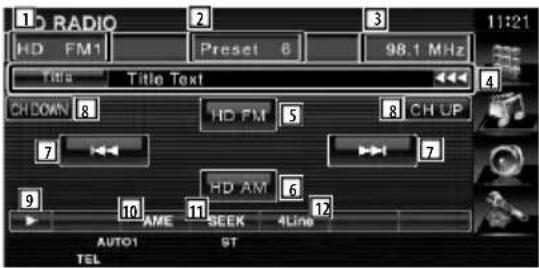
Functions While Displaying the Control Screen
Switches to the source control screen to use various functions.

[HD Radio] button on the "Source Select" screen

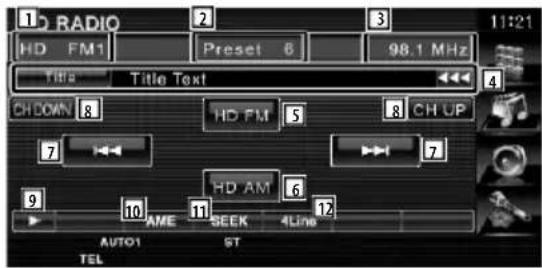
1 Band display
2 Preset number
3 Frequency display
4 Displays information concerning music being played.
Changes the display Call letter (8), Station Name (56), Song Title (60), Artist Name (60), Album Name (60), to Genre Name (8).
The number in the () indicates the maximum number of displayed characters.
5 Switches to the HD FM1/2/3 band.
6 Switches to the HD AM band.
7 Tunes in a station.
Use the
8 Switches the channel.
9 Switches the button display.
10 Selects the Auto Memory mode.
Refer to
11 Switches the Seek mode.
See
12 Switches the number of lines displayed in the Information Display.

13 Selects the channel on memory.


14 The Receive mode switches in the following order.
See
15 Displays the tuned in music information.
Seek Mode
Sets a station selection mode.
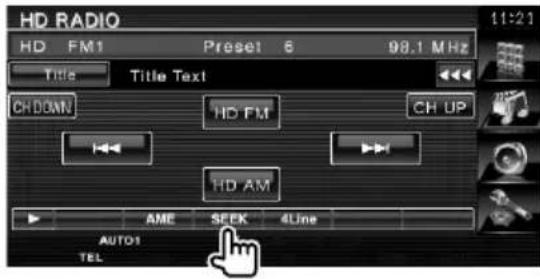
The mode is switched in following order each time you touch the button.
Display Setting
"AUTO1" Tunes in a station with good reception automatically.
"AUTO2" Tunes in stations in memory one after another.
"MANU" Switches to the next frequency manually.
Auto Memory
Stores stations with good reception in memory automatically.
1 Select a band you wish to store in memory
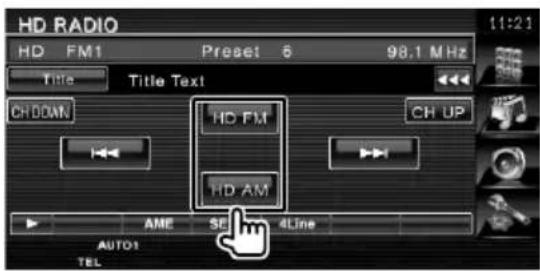
2 Select the Auto Memory mode
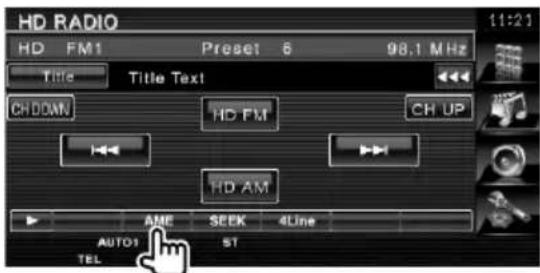
3 Start Auto Memory
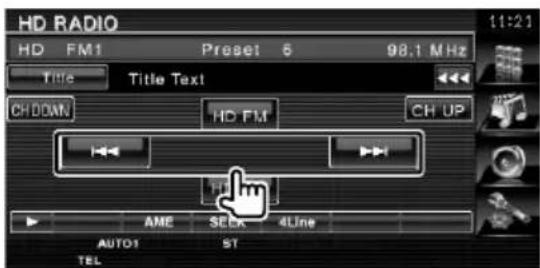
Save six stations with the best reception in the memory and close Auto Memory Entry.
Operations -DVD monitor 1-
Manual Memory
Stores the current receiving station in memory.
1 Select a station you wish to store in memory
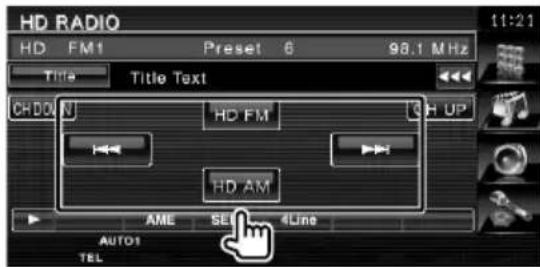
2 Store in memory
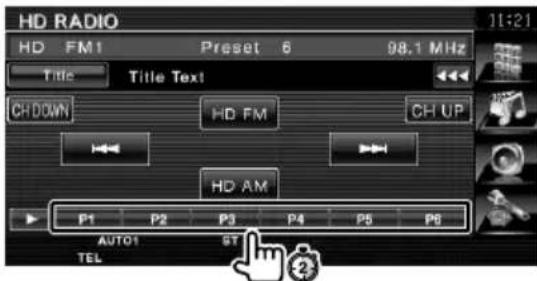
Continue to touch until the memory number appears.
Receive mode
Sets the radio broadcasts receive mode.
1 Display the Receive mode screen
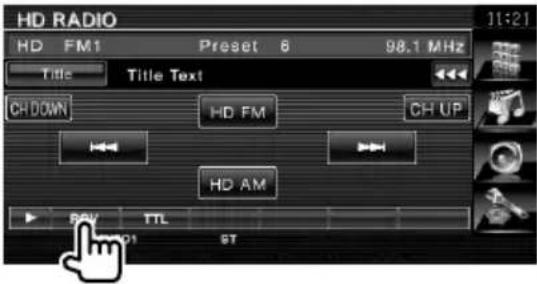
2 Select the receive mode
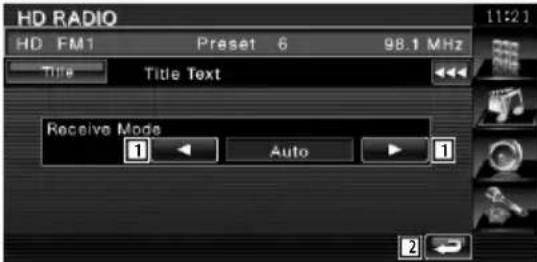
1 The Receive mode switches in the following order.
Auto: Automatically tunes to analog broadcast when there is no digital broadcast.
Digital: Digital broadcasts only.
Analog: Analog broadcasts only.
2 Returns to the HD Radio control screen.
Operations -DVD monitor 2-
Functions While Displaying the Control Screen
Switches to the source control screen to use various functions.
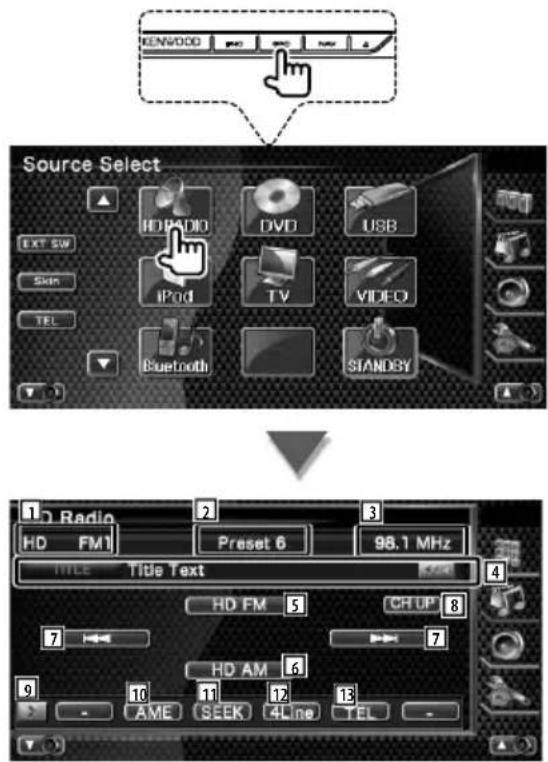
1 Band display
2 Preset number
3 Frequency display
4 Radio station information display.
Selects the Call Letter (8), Title (32), Artist (32), Album (32), Genre (8), or Station Name (32).
The number in the () indicates the maximum number of displayed characters.
5 Switches to the HD FM1/2/3 band.
6 Switches to the HD AM band.
7 Tunes in a station.
Use the
8 Switches the channel.
9 Switches the button display.
10 Selects the Auto Memory mode. (Refer to page En-12 for the
11 Switches the Seek mode.
(Refer to page En-12 for the
12 Switches the number of lines displayed in the Information Display.
13 Displays the Hands Free screen.


14 When P1 to P6 buttons appear, you can recall the stations on memory. For memory of broadcasting stations, refer to

15 The Receive mode switches in the following order.
See
16 Displays the tuned in music information.
17 Displays the external device control screen. See
Operations -DVD monitor 2-
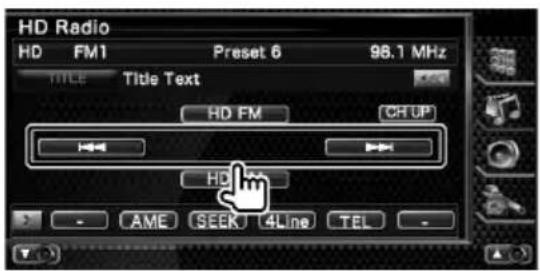
Seek Mode
Sets a station selection mode.
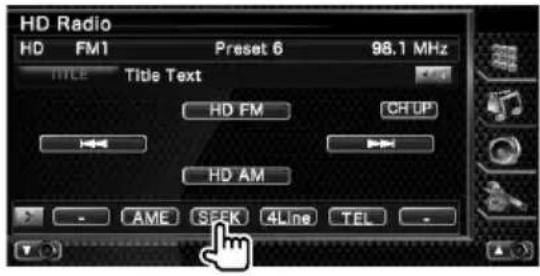
The mode is switched in following order each time you touch the button.
Display Setting
"AUTO1" Tunes in a station with good reception automatically.
"AUTO2" Tunes in stations in memory one after another.
"MANU" Switches to the next frequency manually.
Auto Memory
Stores stations with good reception in memory automatically.
1 Select a band you wish to store in memory
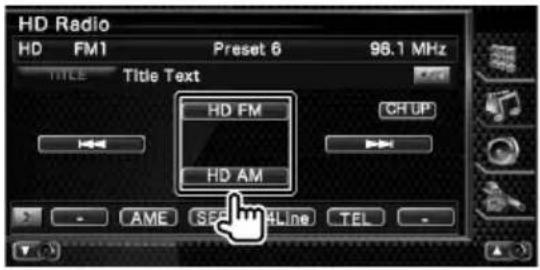
2 Select the Auto Memory mode
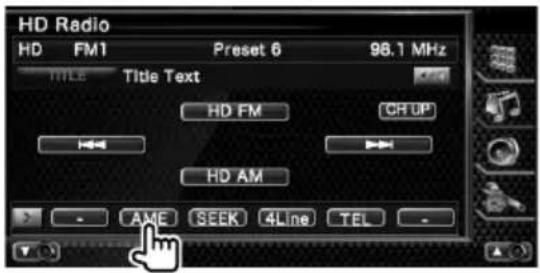
3 Start Auto Memory
Save six stations with the best reception in the memory and close Auto Memory Entry.
Manual Memory
Stores the current receiving station in memory.
1 Select a station you wish to store in memory
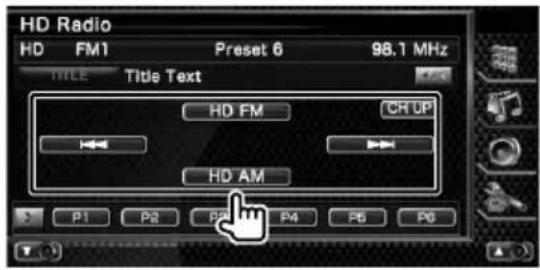
2 Store in memory
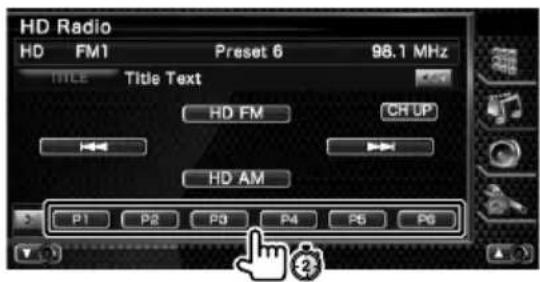
Continue to touch until the memory number appears.
Receive mode
Sets the radio broadcasts receive mode.
1 Display the Receive mode screen
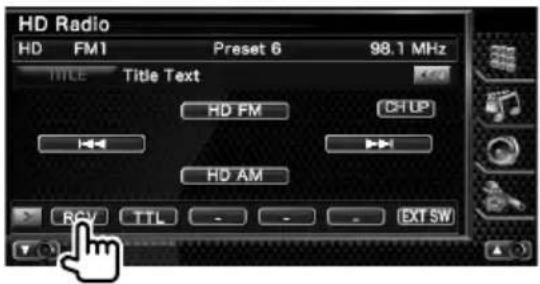
2 Select the receive mode
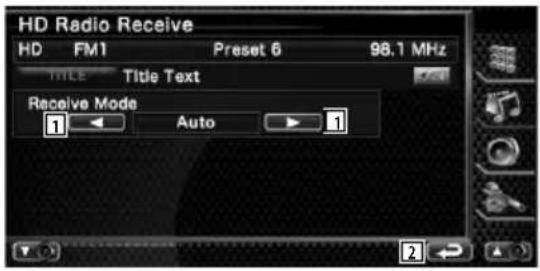
1 The Receive mode switches in the following order.
Auto: Automatically tunes to analog broadcast when there is no digital broadcast.
Digital: Digital broadcasts only.
Analog: Analog broadcasts only.
2 Returns to the HD Radio control screen.
Accessories/ Installation Procedure
Accessories
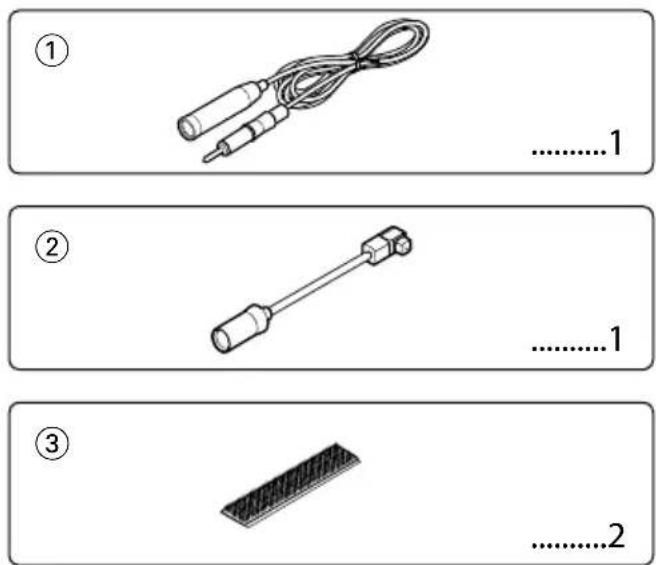
Installation Procedure
- To prevent short circuits, remove the key from the ignition and disconnect the ⊖ terminal of the battery.
- Install the FM/AM antenna and connect the antenna wire to the HD Radio tuner.
- Connect the HD Radio tuner and the control unit using the provided connection wire.
- Make the proper input and output wire connections for each unit.
- Install the unit in your car.
- Reconnect the terminal of the battery.
- Press the reset button on the control unit.

- Mounting and wiring this product requires skills and experience. For safety's sake, leave the mounting and wiring work to professionals.
- Do not install the unit in a spot exposed to direct sunlight or excessive heat or humidity. Also avoid places with too much dust or the possibility of water splashing.
- Do not use your own screws. Use only the screws provided. If you use the wrong screws, you could damage the unit.
• After the unit is installed, check whether the brake lamps, blinkers, wipers, etc. on the car are working properly.
Connecting Wires to Terminals
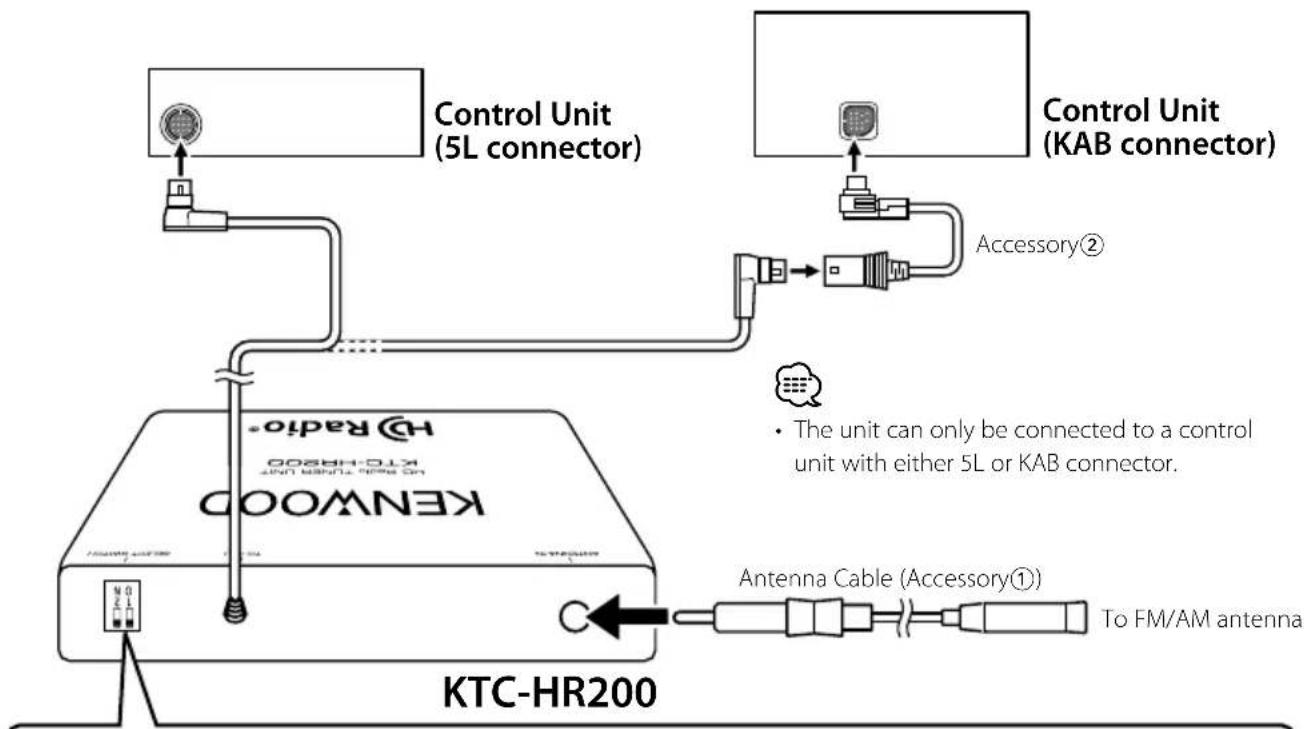
flowchart
graph TD
    A["KEWOOO"] -->|Control Unit (5L connector)| B["Control Unit (KAB connector)"]
    B --> C["Accessory②"]
    C --> D["Antenna Cable (Accessory①)"]
    D --> E["To FM/AM antenna"]
    F["KTC-HR200"] --> G["Control Unit (5L connector)"]
    G --> H["Control Unit (KAB connector)"]
    H --> I["Accessory②"]
    I --> J["Antenna Cable (Accessory①)"]
    J --> K["To FM/AM antenna"]
SELECT SWITCH
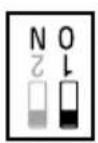
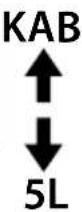
Set "SELECT SWITCH" 1 depending on a connector type of a control unit to be used.
When connecting to the control unit with 5L connector, set this switch down, and when KAB connector set the switch up (ON).

- Keep "SELECT SWITCH" 2 down.
If you set the switch up (ON), the unit does not operate normally.
• KAB Connector units KVT-512, DDX512, DNX5120, DNX512EX, DDX812, DDX712, DNX8120, DNX7120 (As of April, 2008)
Installation
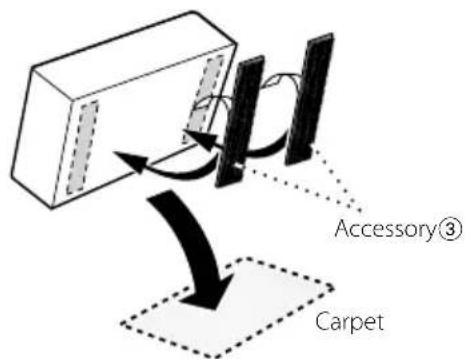
Remove the backing from the velcro strips (Accessory③) and attach it to the bottom of the unit. Install the switching unit on the carpet.

- Please do not install the unit near the dashboard, the rear tray, or other important components. Doing so could lead to injury or accident should the unit come off due to a shock and strike a person or an important component.

- Do not stick the velcro tape over the serial number.
Troubleshooting Guide
What might appear to be a malfunction in your unit may just be the result of slight misoperation or miswiring. Before calling service, first check the following table for possible problems.
? The HD Radio mode cannot be selected.
√ The connection wire is not connected.
Use the connection wire to connect the control unit and the HD Radio tuner.
? Nothing happens when the buttons are pressed.
√ The computer chip in the unit is not functioning normally.
Press the reset button on the Control/Controller unit.
? No sound can be heard, or the volume is low.
√ The input/output wires or wiring harness are connected incorrectly.
Reconnect the input/output wires and/or the wiring harness correctly. See the section on
√ The preset broadcast station is not transmitting in the mode that was set with
Please set
√ It switches between the Digital broadcasting and Analog broadcasting too often.
If the receiving condition is bad,
√ In digital AM broadcasting, receive mode switches between stereo and monaural too often.
Receiving condition is bad or unstable. Stereo is chosen when receiving condition is good, and it switches to monaural when the condition becomes bad.
√ The source mode was changed or the power switch was turned on.
The monaural signals are received several seconds after power-on or after FM tuning to an HD Radio station.
? Radio reception is poor.
√ The car antenna is not extended.
Pull the antenna out all the way.
√ The antenna control wire is not connected.
Connect the wire correctly, referring to the section on
? The tuner cannot be used by the Dual Zone System.
√ The HD Radio source cannot be selected by the Dual Zone System.
An internal source other than Tuner can be selected.
The messages shown below display your systems condition.
Linking: Although the Sub channel was selected, it is under reading or has not been received.
HD# Off/#CH Off/OFF:
- The Sub channel, which cannot be used, was selected.
-
Set

- In HD Radio mode, the display of Station Name or Song title should be set up. The channel information cannot be displayed in the Frequency display. (page En-6/8/11)
Specifications
Analog FM tuner section
Frequency range (200 kHz space) : 87.5 MHz - 107.9 MHz
Usable sensitivity (S/N: 30 dB) : 11.2 dBf (1.0 μV/75 Ω)
Selectivity ( ± 400 kHz) : 65 dB
Quieting Sensitivity (S/N: 50 dB) : 16.3 dBf (1.8 μV/75 Ω)
Frequency response : 40 Hz - 15 kHz
Stereo separation (1 kHz) : 40 dB
Digital FM tuner section
Frequency range (200 kHz space) : 87.5 MHz – 107.9 MHz
Frequency response : 20 Hz - 20 kHz
Analog AM tuner section
Frequency range (10 kHz space) : 530 kHz - 1710 kHz
Usable sensitivity (S/N: 20dB) : 20 μV
Digital AM tuner section
Frequency range (10 kHz space) : 530 kHz - 1710 kHz
Frequency response : 30 Hz – 15 kHz
General
Operating voltage : 14.4 V (11 - 16 V allowable)
Current consumption : 500 mA
Operating Environment : 0 °C - +40 °C
Installation size (W × H × D) : 164 × 34 × 109 mm 6-1/2 × 1-3/8 × 4-5/16 inch
Weight : 1.2 lbs (520 g)
| Nom de la station (8) "Station Name"/ "NAME"/"ST NAME" |


Botón [HD Radio] en la pantalla "Source Select"

HD# Off/#CH Off/OFF:
: 11,2 dBf (1,0 μV/75 Ω)
This equipment may generate or use radio frequency energy. Changes or modifications to this equipment may cause harmful interference unless the modifications are expressly approved in the instruction manual. The user could lose the authority to operate this equipment if an unauthorized change or modification is made.
NOTE
This equipment has been tested and found to comply with the limits for a Class B digital device, pursuant to Part 15 of the FCC Rules. These limits are designed to provide reasonable protection against harmful interference in a residential installation. This equipment may cause harmful interference to radio communications, if it is not installed and used in accordance with the instructions. However, there is no guarantee that interference will not occur in a particular installation. If this equipment does cause harmful interference to radio or television reception, which can be determined by turning the equipment off and on, the user is encouraged to try to correct the interference by one or more of the following measures:
- Reorient or relocate the receiving antenna.
- Increase the separation between the equipment and receiver.
- Connect the equipment into an outlet on a circuit different from that to which the receiver is connected.
- Consult the dealer or an experienced radio/TV technician for help.
HD Radio™ Technology Manufactured Under License From iBiquity Digital Corp. U.S. and Foreign Patents. HD Radio™ and the HD Radio logo are proprietary trademarks of iBiquity Digital Corp.
