
PowerTank PMC1000 - Power bank LG - Free user manual and instructions
Find the device manual for free PowerTank PMC1000 LG in PDF.
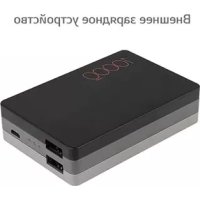



| Product Type | Portable Battery (Power Bank) |
| Brand | LG |
| Model | PowerTank PMC1000 |
| Battery Capacity | 10,000 mAh (Lithium-ion, 3.63 V) |
| Input | Micro USB: 5 V DC, 2 A max |
| Output | 2 USB ports: 5 V DC, 3 A max (combined total) |
| Charging Time | Approximately 6.5 h (with 2 A charger) |
| Operating Temperature | 5 °C to 35 °C |
| Dimensions (L x W x H) | 91 x 61 x 22.4 mm |
| Weight | 192 g |
| LED Indicator | 4 capacity levels (≤30%, 30-70%, 70-100%) |
| Main Functions | Charging mobile devices, sequential charging (charger then device) |
| Maintenance and Cleaning | Clean with a soft, dry cloth; do not use chemicals |
| Safety | Protection against short circuits, overheating, overcurrent; do not disassemble |
| Spare Parts and Repairability | No user-serviceable parts; replace by an LG authorized professional |
| Warranty | 1 year (limited), subject to conditions |
| General Information | Mandatory recycling; do not dispose of with household waste |
Frequently Asked Questions - PowerTank PMC1000 LG
User questions about PowerTank PMC1000 LG
0 question about this device. Answer the ones you know or ask your own.
Ask a new question about this device
Download the instructions for your Power bank in PDF format for free! Find your manual PowerTank PMC1000 - LG and take your electronic device back in hand. On this page are published all the documents necessary for the use of your device. PowerTank PMC1000 by LG.
USER MANUAL PowerTank PMC1000 LG
Disassembling the product may cause malfunction of the product.
Please do not disassemble the product.
LG Electronics is not responsible for problems caused by disassembling the product by users or non-authorized personnel.
Please read the safety information carefully before using the product.
After reading this manual, make sure to keep it in a place where you can easily access while using the product.
- Please don't use the portable charger in a place which often produces static electricity and heat. It can cause breakdown and failure.
- Please don't use the portable charger in a place which is really damp and/or dusty. It can cause breakdown and failure.
- Please don't disassemble, convert, and/or repair. It can cause breakdown and failure and will void warranty.
- Please don't spill water, oil and/or chemicals on product. It can cause breakdown and failure.
- Please check that device's voltage is compatible with your product.
- To prevent failure, malfunction and danger of an explosion, please do not leave your product around a heat source or combustible material.
- Do not shake or throw the product.
- When the product has damage, don't turn on.
- When not in use, please charge the product once a month.
- If internal fluids of the product come into contact with skin, rinse with clean water immediately. This can cause irritation to your skin.
- Please do not press or bend the charging cable. This can cause failure or malfunction.
- Do not leave the product in or around heating appliances, car interiors, or high temperature environments. May cause overheating and/or explosion.
- If the product emits smoke or a strange smell, stop use immediately. It may cause fire or electric shock.
- Keep the product out of the reach of children or babies.
- Do not put the product in the microwave or oven. Rapidly heating the product can cause damage, overheating, fire, or explosion.
- Immediately discontinue use if there is a strange odor, heating, discoloration, or other unusual phenomenon while using the product. The product may overheat, combust, or explode.
- Do not subject the product to strong impact or drop it. The product may overheat, combust, or explode.
- Do not apply pressure or puncture the portable charger. The product may overheat, combust, or explode.
- Do not expose to high temperatures over 60 °C. This can cause overheating, fire, or explosion.
- Do not leave or use in high temperature and humidity such as a bathroom. The product may overheat, combust, or explode.
- Do not step on or press cables. If the cable is broken, do not use it. It may cause electrical shock or fire.
- Do not use near flame or flammable material. The product may overheat, combust, or explode.
- Do not insert metal objects into the body. The product may overheat, combust, or explode.
- Do not use the product for a long time on a blanket, quilt, electric blanket, or carpet. The product may overheat, combust, or explode.
- Li-ion Battery is a hazardous component which can cause injury.
- If you need to replace the battery, take it to the nearest authorized LG Electronics service point or dealer for assistance.
- Battery replacement by non-qualified professional can cause damage to your device. ※ Recycling / disposal: Product must be disposed of properly. Do not throw it in the trash or incinerator.
Device Layout
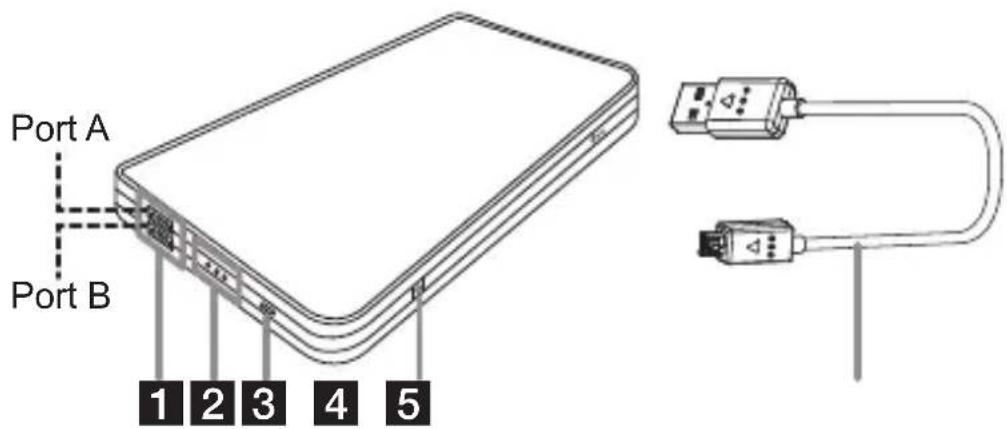
1 USB port for charging mobile device (5 V Output) 2 LED indicator
You can check the remaining battery capacity when you press the LED button (4). The current battery capacity will be represented by the LED indicator light (see the table below).
3 Micro USB port for charging the portable charger (Input) 4 LED button (Check battery capacity status) 5 USB Cable
PMC-1000
| LED indicator O O O O O O | ||
| Capacity ≤ 30 % 30 ~ 70 % | 70 ~ 100 % |
CAUTION
- Please charge the portable charger at least once a month because it consumes a small amount of battery even when not in use.
NOTE
• Actual product design may differ from images shown in this manual.
Operation
Charging the Portable Charger
CAUTION
Charge the portable charger completely before using it for the first time. Before connecting the USB cable, check the voltage/current of the adapter. If you use an unsuitable device, it may cause malfunction of the portable charger or charger.
![graph LR A["Device"] --> B["Battery"] B --> C["Switch"] C --> D["Computer"]](/content/2026/03/526645/images/a88085ddf6112ca52813d527137e2cf6a4e6a1f8b548d3114e797e6ab7c41177.jpg)
- Using the USB cable, connect the PC's USB port and the portable charger's Micro USB input port (3).
- The LED indicator light (2) will blink during the charging process.
- The LED indicator light (2) will turn on when charging is finished. You can now remove the USB cable.
NOTE
• LED lights display charging conditions and capacity indications. For more details, refer to LED conditions on page 5. - When you press the LED button while charging the battery, the portable charger mode changes to discharging mode for the portable device and stops charging for 20 seconds. After 20 seconds, the portable charger will be charged normally.
Sequential Charging
![graph LR A["Smartphone"] --> B["Switch"] B --> C["Device Pack"] C --> D["Charging Unit"] D --> E["Power Hub"]](/content/2026/03/526645/images/2b5d75bf1efc8241f927cdf434b9e6bc74dc2d8528556ddc2615bd1fa65411c9.jpg)
- Connect the charger adapter to the USB cable, and plug it into a wall outlet. Connect the cable to the portable charger's Micro USB input port (3).
- Using the USB cable, connect the portable charger's USB output port (1, Port A) to your mobile device's USB port.
- Once the portable charger is fully charged, charging of your mobile device will begin.
- When your mobile device is finished charging, press the LED button (4) to resume charging the portable charger.
※ Depending on the portable device, the charging process might not stop even though the battery is fully charged (100% charged). In this case, it will not switch to charging the portable charger. In order to change the sequence for charging the portable charger, please wait for some time (it may differ depending on the device's manufacturer) or disconnect the portable device from the portable charger.
- When your mobile device is finished charging, remove the USB cable connecting it to the portable charger.
* If simultaneously charging the mobile device and portable charger, connect the portable charger's USB output port (1, Port B) to your mobile device's USB port.
NOTE
- When sequential charging function is operated, charging current will be limited. Thus, it may take longer to charge.
- This function is recommended to use genuine charger. If you charge by using USB port in PC, it may not be charged.
- If disconnecting the charger while charging portable device (product to be charged) by using sequential charging, the portable device will be charged.
- If disconnecting a portable device while charging portable device (product to be charged) by using sequential charging, the portable charger will be charged about 20 seconds later.
- If doing sequential charging within 20 seconds since the LED button has been pressed, the portable charger will be charged after the portable device is charged completely.
- If connecting the charger to the portable charger while charging a portable device, the portable charger will be charged after the portable device is charged completely.
Charging Mobile Devices
CAUTION
Check the voltage/current specification with your portable device before charging the portable device.
Check manual or charger specification that you purchased portable device or check manufacturer of portable device before you charge the portable device.
![graph LR A["Device"] --> B["USB"] B --> C["Failure Point"] C --> D["Smartphone"]](/content/2026/03/526645/images/44c5e1d9fbcecf70745cc187863834d363b94172e840f9dc6127ff435d61cb32.jpg)
- Using the USB cable, connect the portable charger's USB output port (1) to your mobile device's USB port.
- Press the LED button (4).
- The mobile device's current battery capacity will be represented by the flashing LED light (2).
- When the mobile device is finished charging, remove the USB cable.
NOTE
• You can use the supplied USB cable with your portable device to charge. - If not connecting a portable device to the portable charger after pressing the LED button, the portable charger output is to be turned off about 20 seconds later. Charging mode for portable device will maintain during 20 seconds. • Available accessories may vary by region, country, or service provider.
Troubleshooting
Please check the following contents if portable charger does not work. If the problem is not solved, please stop use and contact manufacturer.
| Problem Cause & Correction | |
| Portable charger cannot charge the portable device. | ·Please check the Voltage specification between Portable charger and the portable device.·Please check that the cable is properly connected.·Please start charging the portable device by pressing the LED indicator button. |
| There is no LED flashing after connecting the portable charger to the portable device. | ·The charging status will start with LED flashing after pressing the LED indicator button.·LED doesn’t flash while the portable charger charges the portable device. |
| LED is not blinking, while portable charger is charging using a laptop or desktop. | ·Please check that the PC is in power off or sleep mode.·The USB port may lack power. Please disconnect all other devices using USB ports. |
| There is no LED lighting when the LED indicator button is pressed.The portable charger is not charging the portable device. | ·The portable charger is almost empty. Please charge it.·It can appear when safety-circuit was operated by a short-circuit. For normal operation, disconnect the portable charger with the cable first and then charge the portable charger again. |
| The charging time is too long. | ·The charging time may vary due to environmental temperature. (Please charge in 5 °C to 35 °C (41 °F to 95 °F))·The charging time may vary when the portable charger is connected to PC USB ports. (USB specification: 5 V 500 mA)·The USB port may lack power. Please disconnect all other devices using USB ports.·May occur when using a USB Hub. Please connect portable charger to PC USB port directly. |
| The portable charger is overheating. | ·The portable charger may emit heat while charging or during use, if there is too much heat or smoke, please stop use. |
| All LED keeps blinking fast.• In case of abnormal circumstance- Using the unit at too much low degree(below 5 °C (41 °F)) or too much high degree(above 35 °C (95 °F)).- An operation of a short circuit by external environment.- Input or output to an overcurrent or overvoltage. | • That means it is an abnormal circumstance or a short circuit of the unit occurs. Stop using the unit immediately. If you make the normal circumstance, it will work properly again.• If the unit does not work properly even under the normal circumstance for long, press the LED button once.• If the LED Lights keep blinking fast under the normal circumstance, contact the service center.• It will work properly that you should disconnect the charger from the portable charger first and then re-connect them. |
Appendix
Specifications
| Model PMC-1000 | |
| Rated input | Max. DC 5V = 2A |
| Rated output | Max. DC 5V = 3A (the total current of 2 ports) |
| Battery capacity | DC 3.63V = 10,000mAh (Li-Ion) |
| Battery type Lithium-ion | |
| Charging time 6.5 | Hrs (Using 2 A charger) |
| Operating temperature | 5 °C to 35 °C |
| Size (L x W x H) | 91 x 61 x 22.4 mm |
| Weight 192g | |
- Depending on the remained capacity of the portable charger, the temperature and charging circumstance, the charging time could be different.
- Design and specifications are subject to change without notice.
FCC NOTICE TO USERS:
This device complies with part 15 of FCC rules.
Operation is subject to the following two conditions:
(1) this device may not cause interference, and (2) this device must accept any interference, including interference that may cause undesired operation of the device.
Conditions
- The warranty is valid only if the original receipt issued to the original purchaser by the dealer, specifying the date of purchase and serial number, is presented with the product to be repaired or replaced. LG Electronics reserves the right to refuse warranty service if this information has been removed or changed after the original purchase of the product from the dealer.
- If LG Electronics repairs or replaces the product, the repaired or replaced product shall be warranted for the remaining time of the original warranty period or for ninety (90) days from the date of repair, whichever is longer. Repair or replacement may involve the use of functionally equivalent reconditioned units. Replaced parts or components will become the property of LG Electronics.
- This Warranty does not cover any failure of the product due to normal wear and tear, or due to misuse, including but not limited to use in other than the normal and customary manner, in accordance with instructions for use and maintenance of the product. Nor does this warranty cover any failure of the product due to accident, modification or adjustment, acts of God or damage resulting from liquid.
- This warranty does not cover product failures due to improper repair, installations, modifications or service performed by a non-LG Electronics authorized person. Tampering with any of the seals on the product will void the warranty.
Limited Warranty
SUBJECT TO THE CONDITIONS OF THIS LIMITED WARRANTY, LG ELECTRONICS WARRANTS THIS PRODUCT TO BE FREE FROM DEFECTS IN DESIGN, MATERIAL AND WORKMANSHIP AT THE TIME OF ITS ORIGINAL PURCHASE BY A CONSUMER, AND FOR A SUBSEQUENT PERIOD OF ONE (1) YEAR. SHOULD YOUR PRODUCT NEED WARRANTY SERVICE, PLEASE RETURN IT TO THE DEALER FROM WHOM IT WAS PURCHASED OR CONTACT YOUR LOCAL LG ELECTRONICS CONTACT CENTER TO GET FURTHER INFORMATION.
User Guide
LG PowerTank™
Portable Charger
Getting Started
USER'S GUIDE
LG PowerTank™
Portable Charger
Input: 5 V --- 2.0 A
Output: 5 V === total 3.0 A
IMPORTER:
LG Electronics México, S.A. de C.V.
Sor Juana Inés de la Cruz No. 555
Col. San Lorenzo Industrial,
LG Electronics European Shared Service Center B.V.
Krijgsman 1, 1186 DM Amstelveen, The Netherlands
LG Electronics European Shared Service Center B.V.
Krijgsman 1, 1186 DM Amstelveen, The Netherlands
User Guide
LG PowerTank™
Portable Charger
Getting Started
Safety Instructions

Brand : LG
Model : PowerTank PMC1000
Category : Power bank