
PowerTank PMC-610 - Power bank LG - Free user manual and instructions
Find the device manual for free PowerTank PMC-610 LG in PDF.


| Product Type | Portable Power Bank |
| Model | PowerTank PMC-610 |
| Brand | LG |
| Battery Capacity | 6000 mAh |
| Input | 5V / 2A |
| Output | 5V / 2.1A (single port), 5V / 3.1A (total) |
| Number of USB Ports | 2 |
| Dimensions (W x H x D) | 70 mm x 130 mm x 15 mm |
| Weight | 180 g |
| Material | Plastic |
| Charging Time | Approximately 5 hours |
| LED Indicators | 4 LEDs for battery level |
| Protection Features | Overcharge, over-discharge, short circuit, overcurrent |
| Operating Temperature | 0°C to 45°C |
| Storage Temperature | -20°C to 60°C |
| Compatibility | Smartphones, tablets, and other USB devices |
| Accessories | Micro USB cable, user manual |
| Warranty | 1 year |
| Cleaning Instructions | Wipe with a dry cloth. Do not use liquids. |
| Safety Precautions | Do not disassemble, expose to water, or heat above 60°C. |
| Disposal | Recycle according to local regulations for electronic waste. |
Frequently Asked Questions - PowerTank PMC-610 LG
User questions about PowerTank PMC-610 LG
0 question about this device. Answer the ones you know or ask your own.
Ask a new question about this device
Download the instructions for your Power bank in PDF format for free! Find your manual PowerTank PMC-610 - LG and take your electronic device back in hand. On this page are published all the documents necessary for the use of your device. PowerTank PMC-610 by LG.
USER MANUAL PowerTank PMC-610 LG
Copyright © 2017 LG Electronics. All Rights Reserved
Safety Precautions....1
Device Layout....4
Operation 5
Charging the Portable Charger ....5
Simultaneous Charging 6
Charging Mobile Devices....7
Troubleshooting....8
Appendix....11
Specifications....11
Declaration of Confirmation.... 12
Additional Information.... 12
Getting Started
Safety Precautions
Disassembling the product may cause malfunction of the product. Please do not disassemble the product.
LG Electronics is not responsible for problems caused by disassembling the product by users or non-authorized personnel.
Please read the safety information carefully before using the product. After reading this manual, make sure to keep it in a place where you can easily access it while using the product.
- Please don't use the portable charger in a place which often produces static electricity and heat. It can cause breakdown and failure.
- Please don't use the portable charger in a place which is really damp and/or dusty. It can cause breakdown and failure.
- Please don't disassemble, convert, and/or repair. It can cause breakdown and failure and will void warranty.
- Please don't spill water, oil and/or chemicals on the product. It can cause breakdown and failure.
- Please check that the device's voltage is compatible with your product. • To prevent failure, malfunction and danger of an explosion, please do not leave your product around a heat source or combustible material.
- Do not shake or throw the product.
- When the product has damage, don't turn it on.
- When not in use, please charge the product once a month.
- If internal fluids of the product come into contact with skin, rinse with clean water immediately. This can cause irritation to your skin.
- Please do not press or bend the charging cable. This can cause failure or malfunction.
- Do not leave the product in/around heating appliances, car interiors, or high temperature environments. May cause overheating and/or explosion.
- If the product emits smoke or a strange smell, stop use immediately. It may cause fire or electric shock.
- Please keep the product out of the reach of children or babies.
- Do not put the product in the microwave or oven. Rapidly heating the product can cause damage, overheating, fire, or explosion.
- Please immediately discontinue use if there is a strange odor, heating, discoloration, or other unusual phenomenon while using the product. The product may overheat, combust, or explode.
- Please do not subject the product to strong impact or drop it. The product may overheat, combust, or explode.
- Do not apply pressure or puncture the portable charger. The product may overheat, combust, or explode.
- Do not expose to high temperatures over 60 °C. This can cause overheating, fire, or explosion.
- Do not leave or use in high temperature and humidity such as in a bathroom. The product may overheat, combust, or explode.
- Please do not step on or press cables. If the cable is broken, do not use it. It may cause electrical shock or fire.
- Do not use near flame or flammable material. The product may overheat, combust, or explode.
- Do not insert metal objects into the body. The product may overheat, combust, or explode.
- Do not use the product for a long time on a blanket, quilt, electric blanket, or carpet. The product may overheat, combust, or explode.
- Li-ion Battery is a hazardous component which can cause injury.
- Battery replacement by a non-qualified professional can cause damage to your device.
- Do not replace the battery by yourself. The battery can be damaged, which can cause overheating and injury. The battery must be replaced by the authorized service provider. The battery should be recycled or disposed of separately from household waste.
- Do not place fingers or hands inside the product.
- Do not expose the power bank to rain or snow.
- Use of a power supply or charger that is not recommended or sold by the manufacturer of the power pack may cause fire or injury to persons.
- Do not use the power bank in excess of its output rating. Overloading outputs above the rating may cause fire or injury to persons.
- Do not use the power bank if it is damaged or modified. Damaged or modified batteries may exhibit unpredictable behaviour, which can result in fire, explosion or injury.
※ Recycling / disposal: Product must be disposed of properly. Do not throw it in the trash or incinerator.
Device Layout

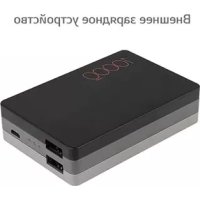
1 LED button (Check battery capacity status) 2 LED indicator
You can check the remaining battery capacity by pressing the LED button (1). The current battery capacity will be represented by the LED indicator light (see the table below).
3 Micro USB port for charging the portable charger (Input) 4 USB port for charging mobile device (QC 3.0 Output) 5 USB Cable
NOTE
Charging adapter is not included with the product.
PMC-610
| LED indicator | ●○○ | ●●○ | ●●● |
| Capacity ≤ 30% | 30 ~ 70% 70 ~ 100% |
CAUTION
Please charge the portable charger at least once a month because it consumes a small amount of current even when not in use.
NOTE
Actual product design may differ from images shown in this manual.
Operation
Charging the Portable Charger
CAUTION
Charge the portable charger completely before using it for the first time. Before connecting the USB cable, check that the voltage/current of the adapter is compatible with your device. If you use a charging device with inadequate voltage/current, it may cause the charging device or the portable charger to malfunction.

- Using the USB cable, connect the charging adapter or the PC's USB port to the portable charger's Micro USB input port (3).
- The LED indicator light (2) will blink during the charging process.
- All of the LED indicator lights (2) will stay on when charging is complete. You can now disconnect the USB cable.
NOTE
LED lights display charging conditions and capacity indications. For more details, refer to LED conditions on page 4.
Simultaneous Charging
![graph LR A["Smartphone"] --> B["USB"] B --> C["Power Supply"] C --> D["USB"] D --> E["Charging"] E --> F["Power Supply"]](/content/2026/06/1363116/images/897a76b27e640e686155ca2664d21c3a4590c7de2972324b84c6c8eb8a8c3877.jpg)
- Connect the charger adapter to the USB cable, and plug it into a wall outlet. Connect the cable to the portable charger's Micro USB input port (3).
- Using a second USB cable (not included), connect the portable charger's USB output port (4) to your mobile device's micro USB port.
- When your mobile device is finished charging, remove the USB cable connecting it to the portable charger.
NOTE
- During simultaneous charging, the charging current will be limited; therefore, charging may take longer than usual, or charging of the mobile device may stop. Once the portable charger is fully charged, charging of your mobile device will begin.
- It is recommended that you use the charger adapter plugged into a wall outlet during simultaneous charging. Simultaneous charging via USB port to PC may not charge.
- If the charger adapter is disconnected during simultaneous charging of the portable charger and a mobile device, the mobile device will be charged via the portable charger.
Charging Mobile Devices
CAUTION
To ensure voltage/current compatibility, before charging your mobile device, check with the manufacturer or manual for the voltage/current charger specifications of your mobile device.
![graph LR A["Device 1"] --> B["Switch"] B --> C["Mobile Device"] style A fill:#f9f,stroke:#333 style C fill:#ccf,stroke:#333](/content/2026/06/1363116/images/98c46d9c6854aecd122c4b035b7338c95ff14c4a5c3f87099456d19d11b63c5c.jpg)
- Using the USB cable, connect the portable charger's USB output port (4) to your mobile device's USB port.
- Press the LED button (1).
- The portable charger's current battery capacity will be represented by the LED indicator lights (2).
- When the mobile device is finished charging, remove the USB cable.
NOTE
• You can use the supplied USB cable to charge your mobile device. • Available accessories may vary by region, country or service provider. - Connecting a mobile device that supports Quick Charge™ 3.0 to the portable charger's USB output port (4) enables the Quick Charge feature.
Troubleshooting
Please check the following contents if portable charger does not work. If the problem is not resolved, please stop use and contact the manufacturer.
| Problem Cause & Correction | |
| The portable charger cannot charge the mobile device. | ·Please check compatibility of the voltage/ current specification between the portable charger and the mobile device. ·Please check that the cable is connected properly. ·Start charging the mobile device by pressing the LED button (1) for one second. |
| The LED indicator doesn't flash after connecting the portable charger to the mobile device. | ·After pressing the LED button (1) for one second, the LED will flash to indicate that the charging process has begun. |
| The LED is not blinking while the portable charger is being charged using a laptop or desktop computer. | ·Please check that the PC is not powered off or in Sleep mode. If it is, power it on or wake it up. ·The USB port may lack power. Please disconnect all other devices using USB ports. |
| There is no LED light when the LED button (1) is pressed. The portable charger is not charging the mobile device. | ·The portable charger is almost empty. Please charge it. ·This may happen when short circuit protection is active. For normal operation, disconnect the portable charger with the cable first and then charge the portable charger again. |
| The charging time is unusually long. | · The charging time may vary according to the environmental temperature. Please charge in 5 °C to 35 °C (41 °F to 95 °F).· The charging time may vary when the portable charger is connected to PC USB ports (USB specification: 5 V 500 mA).· The USB port may lack power. Please disconnect all other devices using USB ports.· This may occur when using a USB hub to charge the portable charger; please directly connect it to a PC USB port to charge. |
| The portable charger is overheating. | · The portable charger may emit heat while charging or during use; if there is too much heat or smoke, please stop use. |
| All LED indicator lights keep blinking fast. | This may occur due to undesirable environmental temperatures or if the outlet/port it is plugged into short circuits.The portable charger does not operate optimally in environments with temperatures that are too low (below 5 °C [41 °F]) or too high (above 35 °C [95 °F]).The portable charger will not operate optimally to inputs or outputs with an overcurrent or overvoltage.First disconnect the charger from the portable charger and then reconnect them.If that doesn’t work:Remove the portable charger from the undesirable environment or outlet/port. The unit should now perform correctly.If the LED indicator lights keep blinking fast under normal conditions, please contact the service centre. |
Appendix
Specifications
| Model PMC-610 | |
| Rated input | Max. 5 V —— 2 A |
| Rated output | 5 V ~ 6.5 V —— 3 A,6.5 V ~ 9 V —— 2 A,9 ~ 12 V —— 1.5 A Max |
| Battery capacity | 3.63 V —— 6,500 mAh (Li-Ion) |
| Battery type Lithium-ion | |
| Charging time Within 4.5 | Hrs (Using 2 A charger) |
| Operating temperature 5 °C to 35 °C | |
| Size (L x W x H) 93 x 60 x 22.5 mm | |
| Weight Approx. 143g | |
- Depending on the remaining capacity of the portable charger, the temperature and charging circumstances, the charging time may vary.
- Design and specifications are subject to change without notice.
Declaration of Conformity
DECLARATION OF CONFORMITY
Hereby, LG Electronics declares that this PMC-610 is in compliance with the essential requirements and other relevant provisions of Directive 2014/30/EU. A copy of the Declaration of Conformity can be found at http://www.lg.com/global/declaration
Additional Information
Conditions
- The warranty is valid only if the original receipt issued to the original purchaser by the dealer, specifying the date of purchase and serial number, is presented with the product to be repaired or replaced. LG Electronics reserves the right to refuse warranty service if this information has been removed or changed after the original purchase of the product from the dealer.
- If LG Electronics repairs or replaces the product, the repaired or replaced product shall be warranted for the remaining time of the original warranty period or for ninety (90) days from the date of repair, whichever is longer. Repair or replacement may involve the use of functionally equivalent reconditioned units. Replaced parts or components will become the property of LG Electronics.
repair, whichever is longer. Repair or replacement may involve the use of functionally equivalent reconditioned units. Replaced parts or components will become the property of LG Electronics.
- This Warranty does not cover any failure of the product due to normal wear and tear, or due to misuse, including but not limited to use in other than the normal and customary manner, in accordance with instructions for use and maintenance of the product. Nor does this warranty cover any failure of the product due to accident, modification or adjustment, acts of God or damage resulting from liquid.
- This warranty does not cover product failures due to improper repair, installations, modifications or service performed by a non-LG Electronics authorized person. Tampering with any of the seals on the product will void the warranty.
Limited Warranty
SUBJECT TO THE CONDITIONS OF THIS LIMITED WARRANTY, LG ELECTRONICS WARRANTS THIS PRODUCT TO BE FREE FROM DEFECTS IN DESIGN, MATERIAL AND WORKMANSHIP AT THE TIME OF ITS ORIGINAL PURCHASE BY A CONSUMER, AND FOR A SUBSEQUENT PERIOD OF ONE (1) YEAR. SHOULD YOUR PRODUCT NEED WARRANTY SERVICE, PLEASE RETURN IT TO THE DEALER FROM WHOM IT WAS PURCHASED OR CONTACT YOUR LOCAL LG ELECTRONICS CONTACT CENTER TO GET FURTHER INFORMATION.
Removal of waste batteries and accumulators (Product with embedded battery ONLY)
- In case this product contains a battery incorporated within the product which cannot be readily removed by end-users, LG recommends that only qualified professionals remove the battery, either for replacement or for recycling at the end of this product's working life. To prevent damage to the product, and for their own safety, users should not attempt to remove the battery and should contact LG Service Helpline, or other independent service providers for advice.
- Removal of the battery will involve dismantling of the product case, disconnection of the electrical cables/contacts, and careful extraction of the battery cell using specialized tools. If you need the instructions for qualified professionals on how to remove the battery safely, please visit http://www.lge.com/global/sustainability/environment/take-back-recycling.

Disposal of waste batteries/accumulators
1 This symbol may be combined with chemical symbols for mercury (Hg), cadmium (Cd) or lead (Pb) if the battery contains more than 0.0005% of mercury, 0.002% of cadmium or 0.004% of lead.
2 All batteries/accumulators should be disposed separately from the municipal waste stream via designated collection facilities appointed by the government or the local authorities.
3 The correct disposal of your old batteries/accumulators will help to prevent potential negative consequences for the environment, animal and human health.
4 For more detailed information about disposal of your old batteries/accumulators, please contact your city office, waste disposal service or the shop where you purchased the product.
Disposal of your old appliance
1 This crossed-out wheeled bin symbol indicates that waste electrical and electronic products (WEEE) should be disposed of separately from the municipal waste stream. 2 Old electrical products can contain hazardous substances so correct disposal of your old appliance will help prevent potential negative consequences for the environment and human health. Your old appliance may contain reusable parts that could be used to repair other products, and other valuable materials that can be recycled to conserve limited resources. 3 You can take your appliance either to the shop where you purchased the product, or contact your local government waste office for details of your nearest authorised WEEE collection point. For the most up to date information for your country please see www.lg.com/global/recycling
Contact office for compliance of this product
LG Electronics European Shared Service Center B.V. Krijgsman 1, 1186 DM Amstelveen, The Netherlands

Manufacturer Info
LG ELECTRONICS INC
128, YEOUI-DAERO, YEONGDUNGPO-GU, SEOUL, KOREA
Production Plants
LEUNG'S COMMUNICATION & ELECTRIC PRODUCTS (GUANGZHOU) LTD.
No. 39 Nanyunsan Road, Science Park, Hi-Tech Industrial Development Zone, Guangzhou, Guangdong Province, China
Production Date
Production date indicated on the box
Additional information
(1) Storage
Do not install or store the appliance outdoors or in places exposed to direct weather conditions (direct sunlight, wind, rain, or temperatures below zero degrees).
(2) Transportation
The product is transported by any means of transport in accordance with the rules of transportation of goods operating for this type of transportation.
- Transportation must be carried out under conditions excluding damage.
- Do not expose the product to impact loads during loading and unloading.
(3) Realization
- The sale of products is performed in accordance with the rules established by the current legislation of the country in which it is realized.
(4) Recycling
- Old electrical products can contain hazardous substances, so correct disposal of your old appliance will help prevent potential negative consequences for the environment and human health. Your old appliance may contain reusable parts that could be used to repair other products, and other valuable materials that can be recycled to conserve limited resources.
- For more detailed information about disposal of your old appliance, please contact your city office, waste disposal service or the shop where you purchased the product.
LG Electronics European Shared Service Center B.V.
Krijgsman 1, 1186 DM Amstelveen, The Netherlands
LG Electronics European Shared Service Center B.V.
Krijgsman 1, 1186 DM Amstelveen, The Netherlands


LG
Life's Good
- DEVICE LAYOUT
- OPERATION
- TROUBLESHOOTING
- APPENDIX
- DECLARATION OF CONFIRMATION
- ADDITIONAL INFORMATION
- GETTING STARTED
- SAFETY PRECAUTIONS
- NOTE
- CAUTION
- CHARGING THE PORTABLE CHARGER
- SIMULTANEOUS CHARGING
- CHARGING MOBILE DEVICES
- DECLARATION OF CONFORMITY
- CONDITIONS
- LIMITED WARRANTY
- REMOVAL OF WASTE BATTERIES AND ACCUMULATORS (PRODUCT WITH EMBEDDED BATTERY ONLY)
- DISPOSAL OF WASTE BATTERIES/ACCUMULATORS
- DISPOSAL OF YOUR OLD APPLIANCE
- CONTACT OFFICE FOR COMPLIANCE OF THIS PRODUCT
- MANUFACTURER INFO
- PRODUCTION PLANTS
- PRODUCTION DATE
- STORAGE
- TRANSPORTATION
- REALIZATION
- RECYCLING
Brand : LG
Model : PowerTank PMC-610
Category : Power bank