29130 - Model making Märklin - Free user manual and instructions
Find the device manual for free 29130 Märklin in PDF.


| Product Type | Transformer and controller for miniature railway layout |
| Brand | Märklin |
| Model | 29130 |
| Power Supply | 230 V ~ 50/60 Hz |
| Output Voltage | 18 V ~ |
| Output Current | Less than 1 A |
| Maximum Power | 18 VA |
| Number of Addresses | 4 (78, 72, 60, 24) |
| Functions | Speed control, direction reversal, function control (lighting) |
| Compatible Track Type | Märklin C Track |
| Protection | Thermal switch against overload and short circuit |
| Maintenance | Regularly check the condition of the cable and housing, use on a stable and dry surface |
| Safety | Do not use outdoors, do not modify the cable, do not use extension cords |
| Repairability | Power cord not replaceable by user, contact Märklin customer service |
| Country of Origin | Germany |
Frequently Asked Questions - 29130 Märklin
User questions about 29130 Märklin
0 question about this device. Answer the ones you know or ask your own.
Ask a new question about this device
Download the instructions for your Model making in PDF format for free! Find your manual 29130 - Märklin and take your electronic device back in hand. On this page are published all the documents necessary for the use of your device. 29130 by Märklin.
USER MANUAL 29130 Märklin
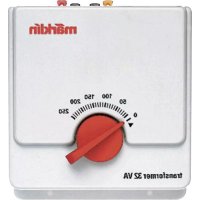
Transformer + Controller
Transformer
- Safety Information 10
- Connecting the Transformer 11
- Technical Data 11
- Short Circuit or Overload 12
- Connections for the Controller 12
- Operation 13
1. Safety Information
Read the following safety information before using a Marklin transformer for the first time:
- All transformers must be plugged only into an outlet with the household current indicated on the face plate of the transformer.
Example:
Identification plate for the 230 volt transformer.
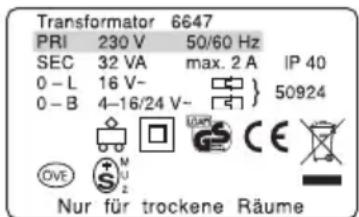
- This transformer is designed exclusively to be used indoors.
-
Mount the transformer on a sturdy base. Never operate the transformer on a base that is wet or that is readily flammable.
-
This transformer is not a toy. It is designed for the control of a model railroad layout.
- The transformer must be unplugged from the electrical outlet before being moved. If the transformer has been in operation, let it cool off before moving it.
- Inspect the condition of the power cord and the transformer housing at regular intervals for damage. This visual inspection should only be done when the power cords for all of the transformers being used are unplugged from the household current. If you have the least suspicion that the transformer is damaged, you should not use it again until it has been thoroughly inspected and repaired by an authorized service organization (example: Märklin Service Department). The power cord for the transformer must never be replaced. In this instance dispose of the transformer in an authorized manner, or send it to the Märklin Service Department for exchange.
- The permanently attached connector cable from the power pack to the layout may not be changed. The use of an extension cable or a distribution strip is not permitted.
Dear Parents,
Transformers for toys are not suitable to be used as toys. Parents should monitor their use constantly. Point out to your children that the transformer is to be used only as a means of operating the trains. The transformer must not be moved while the train is being operated. After the transformer has been turned off, it must never be carried by holding it by its power cord. Make sure that your children are aware of the dangers of the electricity from the electrical outlets in your home.
As already discussed above, examine the transformer and its power cord and other connections at regular intervals (at least once a week depending on the how often the trains are being operation) for damages. Be sure the transformer is unplugged from the power outlet before examining it. If you have the least suspicion that the transformer may be damaged, do not use it again until it has been repaired by the Märklin Repair Department.
Make children aware that changes in the wiring must never be done without adult supervision. Transformers must always be connected to or disconnected from the household current by plugging or unplugging the power cord for the distribution strip!
2. Connecting the Transformer
Make sure that the power cords for all of the transformers used with your layout are disconnected from the household current before connecting a transformer to the layout!
The power pack is solely designed for supplying power to the Controller. No other users may be connected to this power pack.
To make connections, simply insert the jack plug from the connecting cable into the right socket on the connector box.
Caution! Two power packs and 2 Controllers may not be connected simultaneously to a layout.
3.Technical Data
| Input Voltage 230 V ( ) | 50/60 Hz |
| Output Voltage | 18 V (=) |
| Output Current < 1 A | |
| Output Power max. 18 VA | |
4. Short Circuit or Overload
Overload protection
A built-in thermal switch protects the Transformer from damage in case of an overload or a short circuit. Locomotives on the layout will come to a stop, accessories cannot be operated and all lamps connected to the Transformer will go out.
The following procedure is recommended:
- Unplug the power cords for all transformers from their outlets.
- Look for the cause of the short circuit on the layout and correct it.
- After about 1 minute the thermal switch will go back to being on. After this amount of time has passed, all Transformers can be placed in operation again.
If the Transformer should shut off again and you are unable to locate a short circuit, then the Transformer is overloaded. In this case the number of users connected to the Transformer must be reduced.
5. Connections for the Controller
The controller requires the transformer included with the set as a power source.
Important Information:
The controller is to be connected only to the transformer. No other transformer may be used with this controller!
5.1 Connecting the Controller to the Transformer.
The controller requires the transformer only as a source of power. Therefore, only the black connecting plug (2) must be plugged into the socket (3) on the controller - see Figure ③.
5.2 Connecting a Model Railroad Layout to the Controller
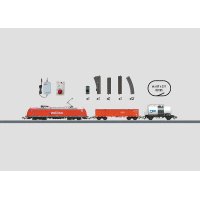
The red and the brown connecting wires on the controller can only be connected to Märklin C Track. C Track is also included in this starter set.
Connect the red wire (4) with the spade connector from the Controller to the contact finger on the underside of the track, which is connected to the center conductor. Connect the brown wire (5) with the spade connector from the Controller to the contact finger on the underside of the track,
which is connected to the running rails - see Figure 2. You can use any piece of C Track as the feeder track.
Plug the power cord (1) for the transformer into the wall outlet for your household current.
6. Operation
6.1 Delta Addresses
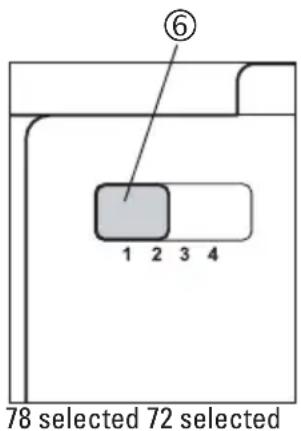
The controller can identify a total of 4 addresses.
1 = 78
2 = 72
3 = 60
4=24
2 Locomotive Address
The locomotive addresses are set at the factory. The addresses are given in the instructions for each locomotive. These addresses are not binding; they can be changed by following the instructions for the locomotive. If you want to control a locomotive with the controller in this set, an address must be set for the locomotive, which can be selected with the controller. These addresses are:
| Setting on the Address Selection Switch | Locomotive Address |
| 1 | 78 |
| 2 | 72 |
| 3 | 60 |
| 4 | 24 |
6.3 Selecting a Locomotive
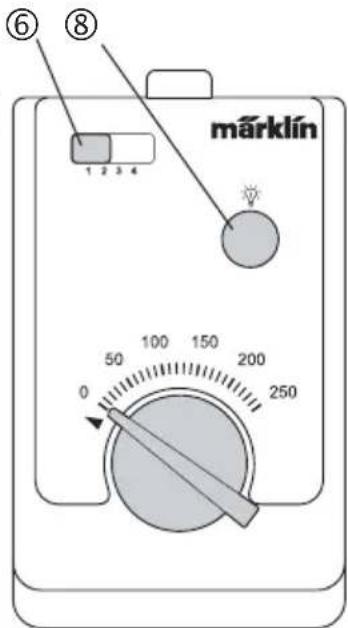
You look for the locomotive that you want to control on the address selector switch (6).
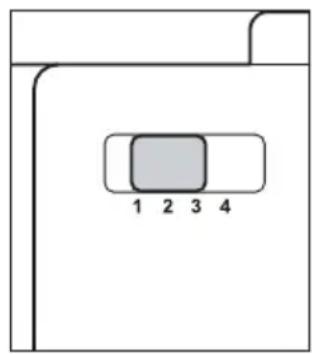
6.4 Controlling the Locomotive
The control knob (7) for operating locomotives always controls only the locomotive that has just been selected with the address selector switch. All other locomotives or powered rail cars continue to run at the speed last set for them.
Important: When a new address is selected and the control knob is already set at a speed position (any speed position), the locomotive just selected will immediately run at this speed. You must select this locomotive address a second time, before you can control the locomotive.
After you switch to a new address, it takes a moment before the newly selected locomotive can actually be controlled. This feature makes it possible for you to skip over other addresses when switching to a new address, without the locomotives assigned to these addresses being affected by the current setting for the control knob. You can use this short period of time to set the control knob in such a way after selecting the address that it is at approximately the same speed as the newly selected locomotive or is at the desired speed of the locomotive.
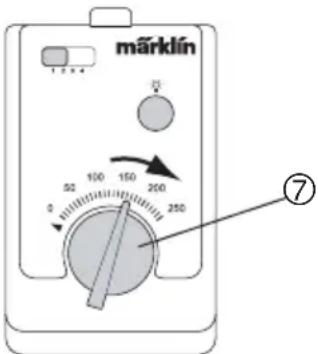
Turning the control knob to the right (until it comes up against the stop): Locomotive goes faster
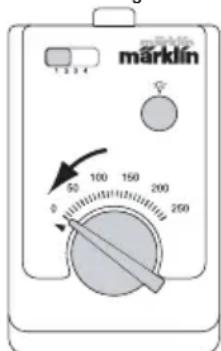
Control knob at "0" position (left stop):Locomotive comes to a stop
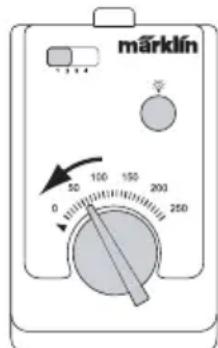
Turning the control knob to the left: Locomotive goes slower
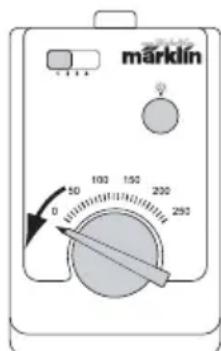
Turning the control knob past the left stop to the left: Reverses the direction of the locomotive
6.5 Function switch
The controller can activate one function on digital locomotives. It is the same function that is controlled on the 6021 Control Unit with the button "function", on the 60652 Mobile Station with the "light button", and on the 60212 Central Station with the button "f0".
Step 1:
Select the locomotive with the address selector switch (6), in case the desired locomotive with the controllable function has not been selected yet.
Step 2: Press the function button (8). If the function is turned off, it is now turned on. If the function is turned on, it is now turned off.
6.2 Adresse de locomotive
This device complies with Part 15 of the FCC Rules.
Operation is subject to the following two conditions:
(1) This device may not cause harmful interference, and
(2) this device must accept any interference received, including interference that may cause undesired operation.