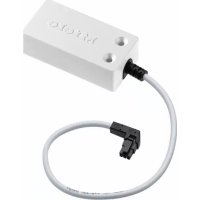
XKS 3130 W - Fridge MIELE - Free user manual and instructions
Find the device manual for free XKS 3130 W MIELE in PDF.



| Product type | Built-in refrigerator |
| Brand | Miele |
| Model | XKS 3130 W |
| Energy class | E |
| Total volume (net) | 286 L |
| Dimensions (H x W x D) | 177.0 x 54.6 x 54.8 cm |
| Net weight | 55 kg |
| Cooling type | Ventilated (No Frost) |
| Noise level | 35 dB(A) |
| Connectivity | Wi-Fi via XKS 3130 W module, Miele@mobile app |
| Special functions | SuperCool, digital display, door alarm, time synchronization |
| Wi-Fi module installation | By customer service for some models, self-installation possible for K3XXXXX, KF(N)3XXXX, F(N)3XXXX, KWT 6422 i(G), KWT 6722 i(G)S |
| Power supply | Mains (refrigerator), Wi-Fi module via internal socket |
| Safety | Automatic shutdown in case of fault, child lock |
| Maintenance | Clean with a soft cloth and soapy water, automatic defrosting |
| Spare parts | Available online at Miele |
Frequently Asked Questions - XKS 3130 W MIELE
User questions about XKS 3130 W MIELE
0 question about this device. Answer the ones you know or ask your own.
Ask a new question about this device
Download the instructions for your Fridge in PDF format for free! Find your manual XKS 3130 W - MIELE and take your electronic device back in hand. On this page are published all the documents necessary for the use of your device. XKS 3130 W by MIELE.
USER MANUAL XKS 3130 W MIELE
en Fitting and installation instructions for
Miele@home
fr Miele@home
WiFiadaptererXKS3130W. 6
InstalaceWiFiadaptéru 7
na pristroji 7
na vinotéce 8
WiFi adaptor XKS 3130 W
Warning and Safety instructions 38
Caring for the environment 40
Description and fitting 41
WiFi stick XKS 3130 W. 41
42
... on the refrigeration appliance. 42
on the wine unit 43
Signing a household appliance onto the WiFi network via smartphone/tablet 44
Signing on using the Miele@mobile App. 44
Technical data 47
Conformity declaration 47
This WiFi stick complies with current safety requirements. Inappropriate use can, however, lead to personal injury and damage to property.
Please read these fitting and installation instructions before using the WiFi stick. They contain important information on installation, safety and use of the WiFi stick. This is to protect yourself from injury, and from damaging the stick and your appliance.
Keep these fitting and installation instructions in a safe place and pass them on to any future owner.
These fitting and installation instructions describe the scope of function of the WiFi stick.
Correct application
The WiFi stick has the sole function of establishing a WiFi connection between a Miele domestic appliance and a WiFi network within a building.
WiFi technology, as supported by the WiFi module, can be intermittently or completely disrupted. For this reason availability of featured functions cannot always be guaranteed. The range of the wireless connection can be increased by using a commercially available WiFi repeater. For more information please consult your Miele dealer or Miele Service.
Technical safety
-
Check the WiFi stick for any visible damage before installation. Do not install and use a damaged WiFi stick.
The WiFi stick is only disconnected from the mains electrical supply if: -
the mains fuses are switched off, or
- the screw-out fuse is removed (where applicable), or
- the mains cable has been disconnected from the power supply. If the cable is fitted with a plug, pull on the plug and not the cable when disconnecting it from the power supply.
- the residual current device (RCD) has been activated.
Disconnect the Miele appliances from the mains power supply before installing or removing the WiFi stick.
- Miele can only guarantee the safety of the appliance when genuine original Miele replacement parts are used. Faulty components must only be replaced by Miele spare parts.
Disposal of the packing material
The packaging is designed to protect the appliance from damage during transportation. The packaging materials used are selected from materials which are environmentally friendly for disposal and should be recycled.
Recycling the packaging reduces the use of raw materials in the manufacturing process and also reduces the amount of waste in landfill sites.
Disposing of your old appliance
Electrical and electronic appliances often contain valuable materials. They also contain specific materials, compounds and components, which were essential for their correct function and safety. These could be hazardous to human health and to the environment if disposed of with your domestic waste or if handled incorrectly. Please do not, therefore, dispose of your old appliance with your household waste.
Please dispose of it at your local community waste collection / recycling centre for electrical and electronic appliances, or contact your dealer or Miele for advice. You are also responsible (by law, depending on country) for deleting any personal data that may be stored on the appliance being disposed of. Please ensure that your old appliance poses no risk to children while being stored prior to disposal.
WiFi stick XKS 3130 W
To use the Miele@mobile app or Miele@home features such as SuperVision or time synchronisation, your Miele refrigeration appliance/wine unit must be connected to your WiFi network.
These instructions show you how to install the WiFi stick and how to connect to a WiFi network using a smartphone or tablet (iOS® and Android™ systems).
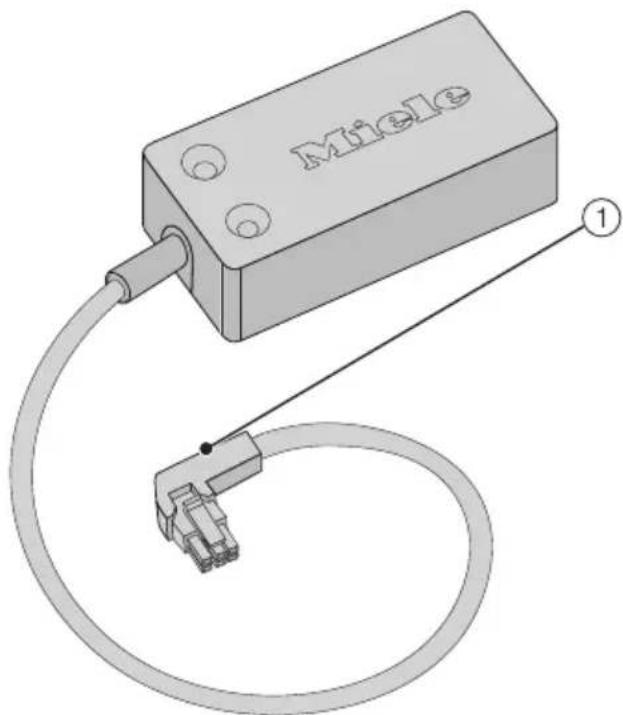
① Connection plug
The plug is used for connecting the stick to the refrigeration appliance or wine unit.
The WiFi stick must only be fitted by Miele Service in the following Miele Wine units:
-KWT6312UGS
-KWT6322UG
-KWT 6112 iG/KWT 7112 iG
Sign your wine unit into the WiFi network as described in the chapter "Signing a household appliance onto the WiFi network via smartphone/tablelet".
You can fit the WiFi stick into the following refrigeration appliances/wine units yourself:
-K3XXXXX
-KF(N)3XXXX
-F(N)3XXXXX
- KWT 6422 i(G); KWT 6722 i(G)S
Install the WiFi stick as described in the chapter "Installing the WiFi stick" and sign your refrigeration appliance/ wine unit into the WiFi network as described in the chapter "Signing a household appliance onto the WiFi network via smartphone/tablet".
Please read the operating and installation instructions supplied with your refrigeration appliance/wine unit carefully before using the refrigeration appliance/wine unit with the WiFi stick for the first time. They contain important information on safety, installation, use and maintenance. This is to protect yourself from injury, and from damaging your refrigeration appliance/wine unit.
The refrigeration appliance/wine unit must be disconnected from the power supply during installation work.
The refrigeration appliance/wine unit must not be built-in for the WiFi stick to be plugged in and fixed in position. If the refrigeration appliance/wine unit is built-in already, it must be taken out of the housing unit in order to fit the WiFi stick.
The WiFi stick has to be connected to the refrigeration appliance/wine unit before the refrigeration appliance/wine unit can be connected to the WiFi network.
... on the refrigeration appliance
- Disconnect the refrigeration appliance from the mains electricity supply.
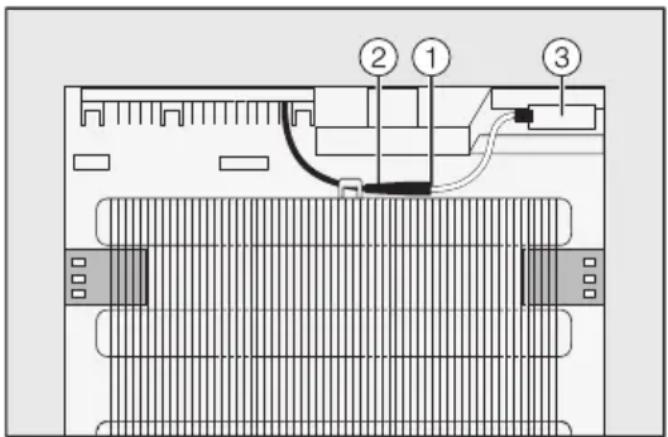
Fit the black plug ① on the WiFi stick into socket ② on the refrigeration appliance.
- Place the WiFi stick ③ in position and secure it using the adhesive tape supplied with it.
- Connect the refrigeration appliance to the mains electricity supply.
After approx. 60 seconds you can sign your refrigeration appliance onto your WiFi network.
... on the wine unit
- Disconnect the wine unit from the mains electricity supply.
The slot for the WiFi stick is located on the rear of the wine unit.
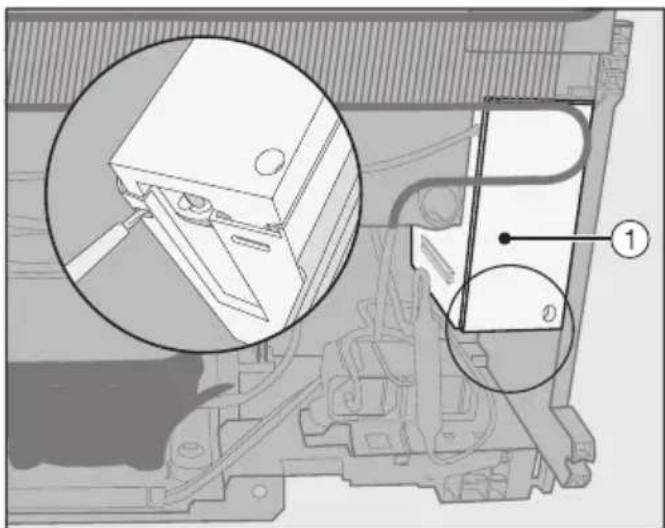
Loosen the lid ① from the slot by easing it open with a flat screwdriver from below.
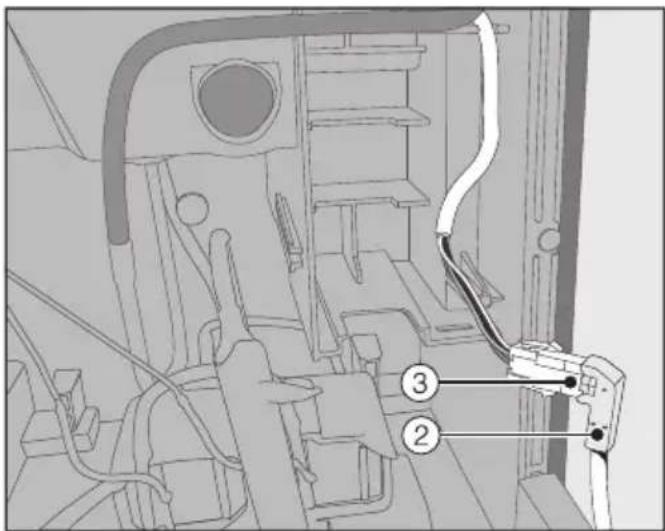
Fit the black plug ② on the WiFi stick into socket ③ on the wine unit.

Place the WiFi stick ④ together with the cable in the slot.
- Replace the lid ① on the slot and clip it into position.
Connect the wine unit to the mains.
After approx. 60 s you can sign the wine unit into your WiFi network.
en - Signing a household appliance onto the WiFi network via smartphone/tablet
Signing on using the Miele@mobile App
Do not change the Miele@home system settings @ in settings mode on your Miele household appliance.
You may no longer be able to connect your appliance to the WiFi network.
If in any doubt, call Miele Service.
Please note that the refrigeration appliance/wine unit can only be networked with a WiFi network of frequency 2.4 GHz (Standard b/g/n).
The WiFi stick must be fitted.
To connect via the app you will need:
- a smartphone or tablet with the Miele@mobile app installed on it
- the name of your local WiFi network and its password
- the serial number of your Miele refrigeration appliance/wine unit (you find it on the data plate; see the refrigeration appliance/wine unit operating instructions).
The password for signing on is the serial number of your refrigeration appliance/wine unit. The password consists of the last 9 digits of the serial number, excluding the "0" at the beginning.
Download the Miele@mobile app
You can download the appropriate Miele@mobile app for the WiFi module for free from the respective app stores.
Search in App Store or Google PlayTM for the Miele@mobile app.


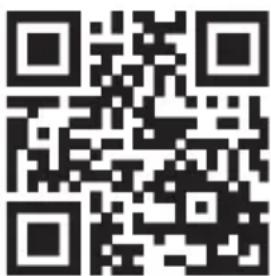
Download the app to your mobile device.
Start the Miele@mobile app and set up a Miele user account.
If you already have a Miele user account, you can use these details to log on to the app.
The logon process depends on the operating system of your smartphone or tablet.
en - Signing a household appliance onto the WiFi network via smartphone/tablet
Integrating a household appliance via a mobile device
You have logged on to your user account in the Miele@mobile app and your smartphone or tablet is using the WiFi network to which the household appliance is to be connected.
- Switch the household appliance off and then back on again.
The wireless access point (Soft access point) will start on the WiFi stick, and a direct connection will be established between your household appliance and your smartphone or tablet.
- Select "Add Miele appliance/gateway" from the app.
Select "Add new Miele appliance". - Select "Carry out WiFi connection via app".
- Follow the further instructions given by the app.
When successfully logged on you will see your household appliance displayed in the Miele@mobile app.
Tip: It can take a few seconds for your household appliance to show in the app.
- Select "Start Miele@mobile" to use the features of the Miele@mobile app for your household appliance.
Apple, the Apple Logo, iPhone and iPad are trademarks of Apple Inc., registered in the U.S. and other countries. App Store is a service mark of Apple Inc.
en - Signing a household appliance onto the WiFi network via smartphone/tablet
Settings on your refrigeration unit/ wine conditioning unit in the "Miele@home" sub menu
Do not change the Miele@home system settings @ in settings mode You may no longer be able to connect your appliance to the WiFi network. If in any doubt, call Miele Service.
We recommend signing on using the Miele@mobile App. WiFi network configuration via the Miele household appliance's "Miele@home" sub menu should only be done by people with the appropriate technical knowledge to do so.
| Display Function | |
| 0 | Signing the refrigeration appliance/wine unit off |
| 1 | Signing the refrigeration unit/wine unit on |
| 2 | Restart and reset WiFi stick |
| 3 | Restart and default settings, WiFi stick |
| 4 | Wireless access point (soft access point) |
| 5 | WPS pushbutton |
Sub menu
Miele@home system settings @
Signing the refrigeration appliance/ wine unit off
You can sign your appliance off directly from the Miele@mobile network.
/ Signing the refrigeration unit/wine unit on
You can sign your appliance on directly from the Miele@mobile network.
- Restart and reset WiFi stick
You can reset all entered settings and values for Miele@home to standard settings. All settings, which do not affect Miele@home will remain unchanged and the WiFi stick will be switched off.
3 - Restart and default settings, WiFi stick
If you wish to reset all entered settings and values for Miele@home, you can restore the factory default settings on your WiFi stick. All settings, which do not affect Miele@home will remain unchanged and the WiFi stick will be switched off.
4 - Wireless access point (soft access point)
You can create a direct link from your refrigeration appliance to your smartphone or tablet. This connection is necessary in order to create a network connection with the Miele@mobile app.
5 - WPS pushbutton
As an alternative to networking via the Miele@mobile app we recommend using WPS (Wireless Protected Setup). To do so you will need a WPS-compatible router.
Conformity declaration
Miele hereby declares that this XKS 3130 W complies with Directive 2014/53/EU.
The complete text of the EU declaration of conformity is available from one of the following internet addresses:
- Products, Download from www.miele.co.uk
- For service, information, operating instructions etc: go to www.miele.co.uk/domestic/customer-information-385.htm and enter the name of the product or the serial number
Frequency band of the WiFi module 2.412 GHz - 2.472 GHz
Maximum transmitting power of the < 100 mW WiFi module
fr - Table des matieres
5 - Bouton application push WPS
WiFi-stick XKS 3130 W
WLAN adapter XKS 3130 W
Download on the App Store

GET IT ON Google Play
Preuzmite aplikaciju na Vaš mobilni urežaj.
Pokrenite Miele@mobile aplikaciju i napravite Miele korisnički nalog.
Ukoliko već imate Miele korisnički na-log, ove podatke možete da koristite da se prijavite u aplikaciju.
Proces prijavljivanja se razlikuje, zavisno od toga koji operativni system koristi Vaš pametni Telefon ili tablet.
sr - Prijavljivanje kućnog ureža na WLAN mrežu preko pametnog Telefona/tableeta
Povezivanje kućnog ureža pomocu mobiltog ureža
Sa Vašim korisničkim nalogom ste prijavleni u Miele@mobile applikaciji, a Vaš pametni Telefon ili tablet koristi WLAN mrežu na kooj treba da bude prijavlenkućni uredaj.
- WiFi adaptor XKS 3130 W
- Correct application
- Technical safety
- Disposal of the packing material
- Disposing of your old appliance
- WiFi stick XKS 3130 W
- ... on the refrigeration appliance
- ... on the wine unit
- en - Signing a household appliance onto the WiFi network via smartphone/tablet
- Signing on using the Miele@mobile App
- Download the Miele@mobile app
- Integrating a household appliance via a mobile device
- Conformity declaration
- fr - Table des matieres
- - Bouton application push WPS
- WiFi-stick XKS 3130 W
- WLAN adapter XKS 3130 W
- sr - Prijavljivanje kućnog ureža na WLAN mrežu preko pametnog Telefona/tableeta
- Povezivanje kućnog ureža pomocu mobiltog ureža
Brand : MIELE
Model : XKS 3130 W
Category : Fridge