X702F - GPS device ALPINE - Free user manual and instructions
Find the device manual for free X702F ALPINE in PDF.



| Brand | Alpine |
| Model | X702F |
| Product type | GPS device with multimedia car radio |
| Screen size | 7 inches (transparent TN type) |
| Screen resolution | 800 × 480 pixels (1,152,000 elements) |
| Weight | 1.54 kg (for model X802D-U, indicative value) |
| Power supply | 14.4 V DC (11–16 V allowed) |
| Operating temperature | –20 °C to +60 °C |
| Maximum output power | 4 × 50 W |
| GPS receiver | Frequency 1,575.42 MHz, sensitivity –130 dB max. |
| FM tuner | Range 87.5–108.0 MHz, sensitivity 12 dBf |
| AM (MW/LW) tuner | MW 531–1,602 kHz, LW 153–281 kHz |
| DAB/DAB+ | Band III (174.93–239.2 MHz) and L band (1,452.96–1,490.6 MHz) |
| Bluetooth connectivity | Profiles OPP, PBAP, A2DP, AVRCP, SPP |
| USB port | USB 2.0 (mass storage), FAT16/32, up to 1,500 mA |
| HDMI input | Yes, compatible with optional DVD player |
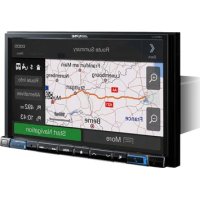
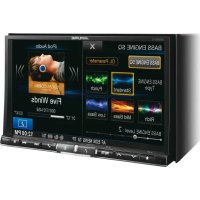
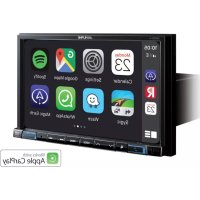
| Main functions | GPS navigation, Android Auto, Apple CarPlay, Alpine Connect, RDS/DAB radio, Bluetooth hands-free, USB/HDMI playback, iPod/iPhone |
| Care and cleaning | Wipe with a soft, dry cloth. Do not use abrasive products. |
| Safety | Do not watch video while driving. Installation by a professional. Use appropriate fuses. |
| General information | User manual included (165 pages). Compatible with iPod/iPhone and Android smartphones. |
Frequently Asked Questions - X702F ALPINE
User questions about X702F ALPINE
0 question about this device. Answer the ones you know or ask your own.
Ask a new question about this device
Download the instructions for your GPS device in PDF format for free! Find your manual X702F - ALPINE and take your electronic device back in hand. On this page are published all the documents necessary for the use of your device. X702F by ALPINE.
USER MANUAL X702F ALPINE
KPATKOE CIIPABOuHOE PYKOBOCTBO
SKROCONA INSTRUKCA JDA UZYTKOWNIKA
Made for

idiPhone

Works with
Apple CarPlay

Bluetooth
androidauto
HOMI
HIGH-DEFINITION MULTIMEDIA INTERFACE

Digital Audio Broadcasting

Spotify

(X902D/X802D-U/INE-W710D Only)
MP3 AAC

Contents
WARNING 2
CAUTION 3
Getting Started 4
Favourite Function 6
Registering Items 6
Android Auto (Optional) 7
Apple CarPlay (Optional) 7
Alpine Connect App (Optional) (X902D/X802D-U/INE-W710D only) 7
Radio/RDS Operation 8
DAB/DAB+/DMB Operation 9
USB Flash drive Operation (Optional) 10
HDMI Device (DVD Player) Operation (Optional) 11
iPod/iPhone Operation (Optional) 12
Hands-Free Phone Control 13
Map Functions (X902D/X802D-U/INE-W710D only) 14
Navigation Menu (X902D/X802D-U/INE-W710D only) 15
Setting a Destination (X902D/X802D-U/INE-W710D only) 16
Specifications 17
IMPORTANT
Please record the serial number of your unit in the space provided below and keep it as a permanent record.
SERIAL NUMBER:
ISO SERIAL NUMBER: AL
INSTALLATION DATE:
INSTALLATION TECHNICIAN:
PLACE OF PURCHASE:
For details on all functions, refer to the Owner's Manual stored in the supplied CD-ROM. (As it is data CD, the CD cannot be used for playing back music and images on the player.) If required, an ALPINE dealer will readily provide you with a print out of the Owner's Manual contained in the CD-ROM.

WARNING
This symbol means important instructions. Failure to heed them can result in serious injury or death.
INSTALL THE PRODUCT CORRECTLY SO THAT THE DRIVER CANNOT WATCH TV/VIDEO UNLESS THE VEHICLE IS STOPPED AND THE EMERGENCY BRAKE IS APPLIED.
It is dangerous for the driver to watch TV/Video while driving a vehicle. Installing this product incorrectly enables the driver to watch TV/Video while driving. This may cause a distraction, preventing the driver from looking ahead, thus causing an accident. The driver or other people could be severely injured.
DO NOT WATCH VIDEO WHILE DRIVING.
Watching the video may distract the driver from looking ahead of the vehicle and cause an accident.
DO NOT OPERATE ANY FUNCTION THAT TAKES YOUR ATTENTION AWAY FROM SAFELY DRIVING YOUR VEHICLE.
Any function that requires your prolonged attention should only be performed after coming to a complete stop. Always stop the vehicle in a safe location before performing these functions. Failure to do so may result in an accident.
DO NOT FOLLOW ROUTE SUGGESTIONS IF THE NAVIGATION SYSTEM INSTRUCTS YOU TO PERFORM AN UNSAFE OR ILLEGAL MANEUVER, OR PLACES YOU IN AN UNSAFE SITUATION OR AREA.
This product is not a substitute for your personal judgement. Any route suggestions by this system should never supersede any local traffic regulations or your personal judgement or knowledge of safe driving practise.
KEEP THE VOLUME AT A LEVEL WHERE YOU CAN STILL HEAR OUTSIDE NOISES WHILE DRIVING.
Excessive volume levels that obscure sounds such as emergency vehicle sirens or road warning signals (train crossings, etc.) can be dangerous and may result in an accident. LISTENING AT LOUD VOLUME LEVELS IN A CAR MAY ALSO CAUSE HEARING DAMAGE.
MINIMIZE DISPLAY VIEWING WHILE DRIVING.
Viewing the display may distract the driver from looking ahead of the vehicle and cause an accident.
DO NOT DISASSEMBLE OR ALTER.
Doing so may result in an accident, fire or electric shock.
USE ONLY IN CARS WITH A 12 VOLT NEGATIVE GROUND.
(Check with your dealer if you are not sure.) Failure to do so may result in fire, etc.
KEEP SMALL OBJECTS SUCH AS SCREWS OUT OF THE REACH OF CHILDREN.
Swallowing them may result in serious injury. If swallowed, consult a physician immediately.
USE THE CORRECT AMPERE RATING WHEN REPLACING FUSES.
Failure to do so may result in fire or electric shock.
DO NOT BLOCK VENTS OR RADIATOR PANELS.
Doing so may cause heat to build up inside and may result in fire.
USE THIS PRODUCT FOR MOBILE 12V APPLICATIONS.
Use for other than its designed application may result in fire, electric shock or other injury.
MAKE THE CORRECT CONNECTIONS.
Failure to make the proper connections may result in fire or product damage.
BEFORE WIRING, DISCONNECT THE CABLE FROM THE NEGATIVE BATTERY TERMINAL.
Failure to do so may result in electric shock or injury due to electrical shorts.
DO NOT ALLOW CABLES TO BECOME ENTANGLED IN SURROUNDING OBJECTS.
Arrange wiring and cables in compliance with the manual to prevent obstructions when driving. Cables or wiring that obstruct or hang up on places such as the steering wheel, shift lever, brake pedals, etc. can be extremely hazardous.
DO NOT SPLICE INTO ELECTRICAL CABLES.
Never cut away cable insulation to supply power to other equipment. Doing so will exceed the current carrying capacity of the wire and result in fire or electric shock.
DO NOT DAMAGE PIPE OR WIRING WHEN DRILLING HOLES.
When drilling holes in the chassis for installation, take precautions so as not to contact, damage or obstruct pipes, fuel lines, tanks or electrical wiring. Failure to take such precautions may result in fire.
DO NOT USE BOLTS OR NUTS IN THE BRAKE OR STEERING SYSTEMS TO MAKE GROUND CONNECTIONS.
Bolts or nuts used for the brake or steering systems (or any other safety-related system), or tanks should NEVER be used for installations or ground connections. Using such parts could disable control of the vehicle and cause fire etc.
DO NOT INSTALL IN LOCATIONS WHICH MIGHT HINDER VEHICLE OPERATION, SUCH AS THE STEERING WHEEL OR SHIFT LEVER.
Doing so may obstruct forward vision or hamper movement etc. and results in serious accident.

CAUTION
This symbol means important instructions. Failure to heed them can result in injury or material property damage.
HALT USE IMMEDIATELY IF A PROBLEM APPEARS.
Failure to do so may cause personal injury or damage to the product. Return it to your authorized Alpine dealer or the nearest Alpine Service Centre for repairing.
HAVETHEWIRINGANDINSTALLATIONDONEBYEXPERTS.
The wiring and installation of this unit requires special technical skill and experience. To ensure safety, always contact the dealer where you purchased this product to have the work done.
USE SPECIFIED ACCESSORY PARTS AND INSTALL THEM SECURELY.
Be sure to use only the specified accessory parts. Use of other than designated parts may damage this unit internally or may not securely install the unit in place. This may cause parts to become loose resulting in hazards or product failure.
ARRANGE THE WIRING SO IT IS NOT CRIMPED OR PINCHED BY A SHARP METAL EDGE.
Route the cables and wiring away from moving parts (like the seat rails) or sharp or pointed edges. This will prevent crimping and damage to the wiring. If wiring passes through a hole in metal, use a rubber grommet to prevent the wire's insulation from being cut by the metal edge of the hole.
DO NOT INSTALL IN LOCATIONS WITH HIGH MOISTURE OR DUST.
Avoid installing the unit in locations with high incidence of moisture or dust. Moisture or dust that penetrates into this unit may result in product failure.
- The following screen examples of X902D/X802D-U/INE-W710D used in this manual are for reference only. They may differ from the actual screen displays.
Getting Started
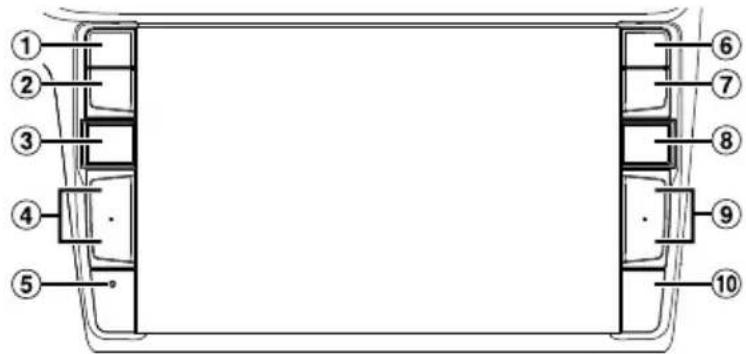
Location of Controls
The screen design used in the Owner's Manual may differ from the actual screen.
For X902D/i902D
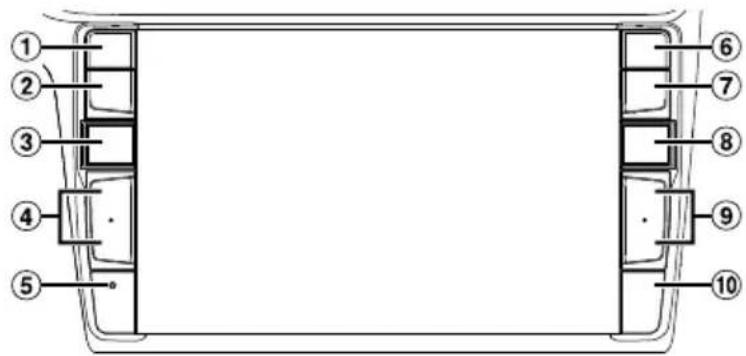
For X802D-U/INE-W710D/jLX-702D
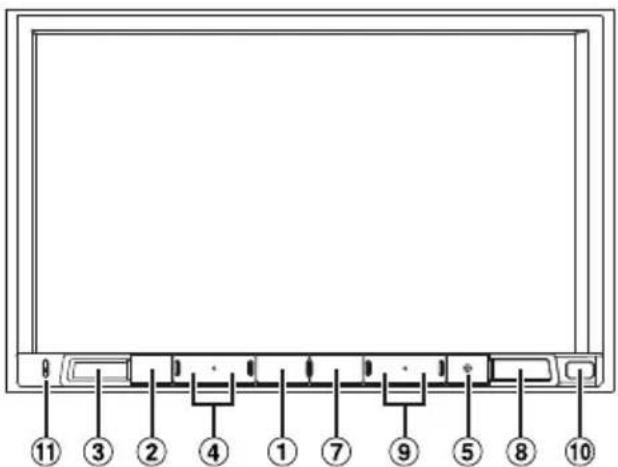
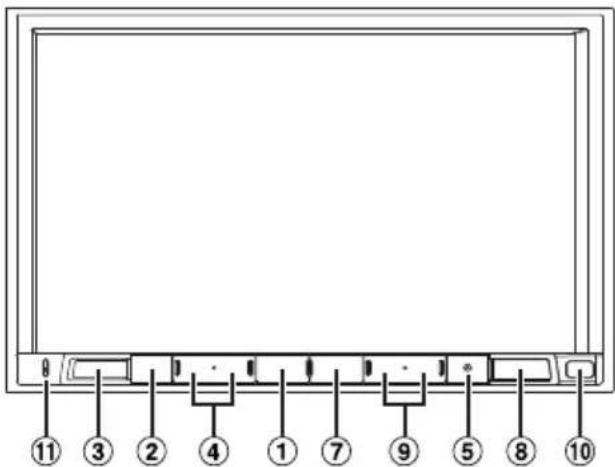
① or OICE button
Depending on the connected smartphone, press to recall Siri function or voice recognition mode.
(2) (MUTE) button
Press to activate/deactivate the mute mode.
(3) (AUDIO)/(Favourite) button
Displays the Audio/Visual screen. If the Audio/Visual screen is already displayed, changes the source. Press and hold for at least 2 seconds to recall the Favourite screen.
4 /drUPDOWN) button
Press to adjust the volume.
⑤ RESET switch
The system of this unit is reset.
(Phone) button (X902D/i902D only)
Recalls the Phone Menu screen.
Press to start a conversation when a call is incoming.
7 MENU/ (Power Off) button
Recalls the Menu screen.
Press and hold this button for at least 5 seconds to turn the power off.
8 (NA) button
For X902D/X802D-U/INE-W710D:
Recalls the navigation map screen.
Press again to switch to Navigation menu screen.
Press and hold this button for at least 2 seconds to change to Go Home route screen. (If Home is not set yet, it will change to the Home setting screen.)
For details of navigation operations, refer to "Navigation System OM" in the CD-ROM.
For i902D/iLX-702D:
Recalls the connected smartphone's map screen.
Depending on the smartphone, this function may not available.
9/ buk
Press to seek up/down a station in radio mode or up/ down a track, chapter, etc., in other audio/visual sources.
Remote Sensor
Point the remote control transmitter towards the remote sensor within a range of 2 metres.
① Microphone (X802D-U/INE-W710D/iLX702D only)
Used for Hands-free or Voice Control modes.
1 Turn the ignition key to the ACC or ON position.
The system is turned on.
2 Press and hold the MENU button for at least 5 seconds to turn the power off.
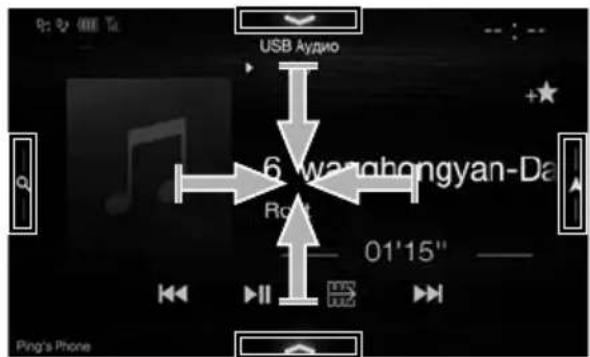
Switching the Audio Sources Screen to a Dedicated Screen
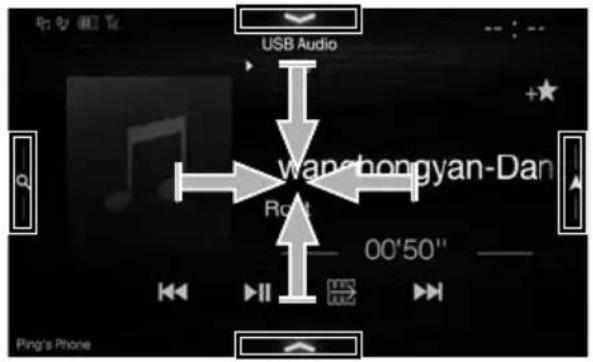
You can switch the Audio Sources screen to a dedicated screen by touching the icon on one of the four edges of the screen, or by swiping vertically or horizontally.
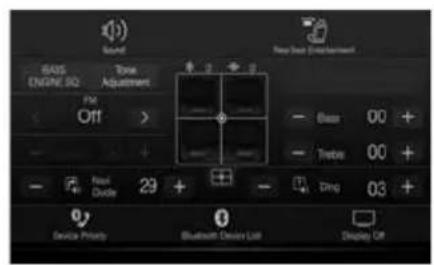
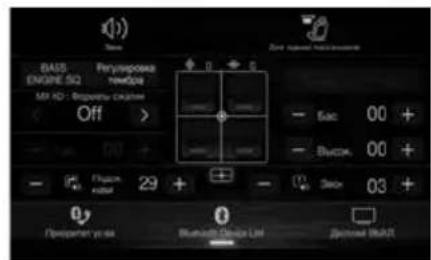
Shortcut Setup Screen
You can set the Sound Setup or Rear Seat Entertainment System.
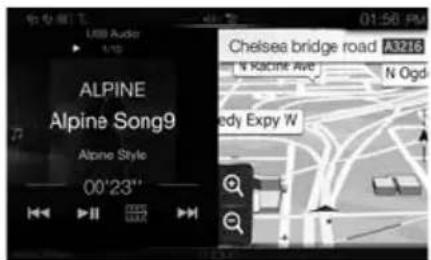
Dual Screen
(X902D/X802D-U/INE-W710D only)
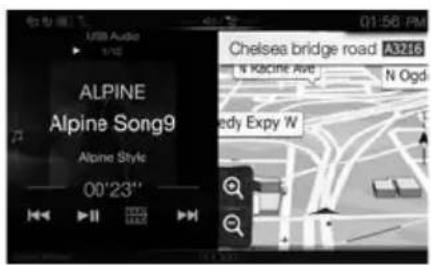
You can switch between the displayed screens on the Dual Screen.
(USB Audio)

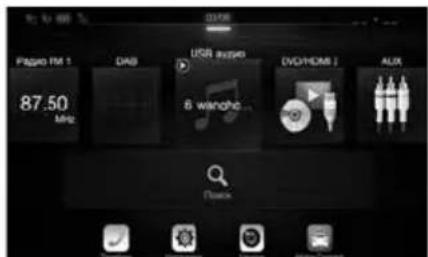
Audio Sources Screen
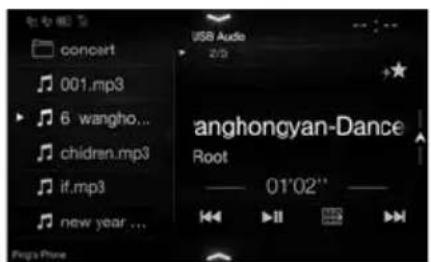
Preset button or Quick Search
mode Screen*
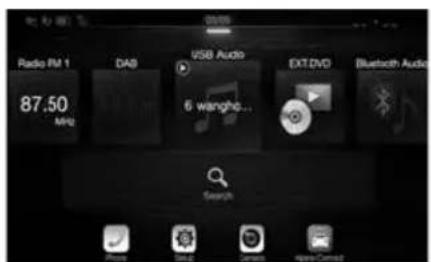
Menu Screen
You can make settings on the Menu Screen.
- The Search mode differs depending on the audio source. For details, see the operating instructions of the audio source.
Favourite Function
This unit enables you to recall functions easily by registering frequently used items such as the Audio source, the navigation search function, etc. to the Favourite screen. You can recall any of these items easily.
1 Press and hold the / (Favourite) button for at least 2 seconds.
The Favourite screen is displayed.
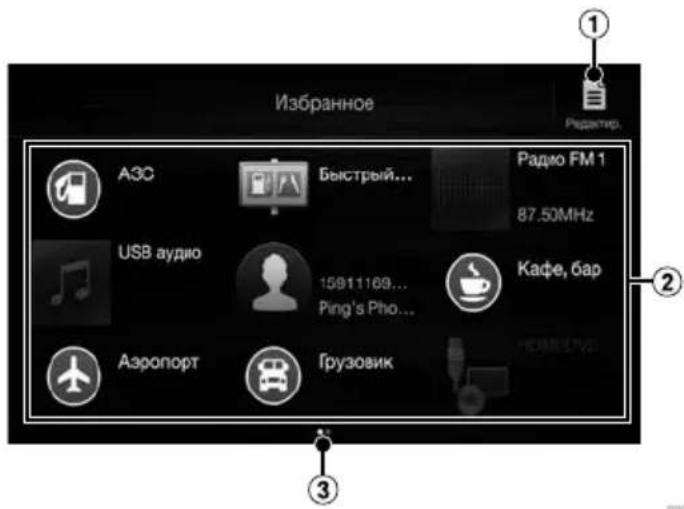
Favourite screen example
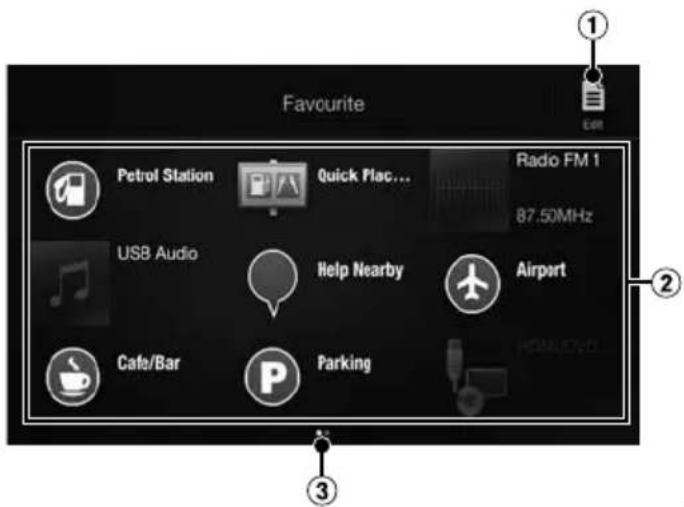
1 Changes to the Edit screen used for registering items or changing names.
2 Favourite registration item
3 Indicates the location of the currently displayed Favourite screen.
Swipe to the left and right to change the pages. You can add up to 6 pages.
Owner's manual Registering Items
Registering Items
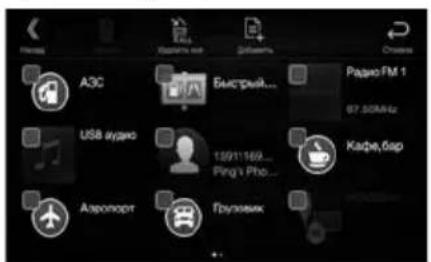
1 Touch [] Edit).
A checkbox is displayed on the upper left area of the registration icon and it changes to Edit mode.
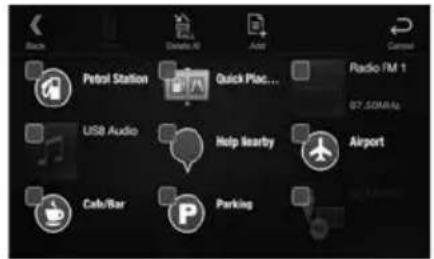
2 Touch[] Add).
The items to be added (categories) are displayed.
3 Touch the desired item to be added (category).
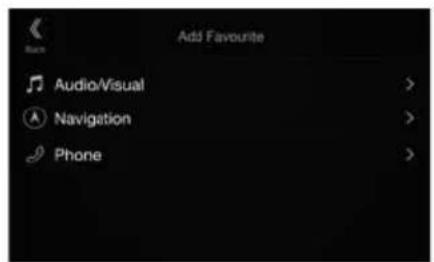
4 Choose the desired item to be added.
For details on the items to be added, refer to "Editing the Favourite Screen" in the Owner's Manual.
- You can add up to 54 items.
- You cannot register an item more than once.
5 After editing is complete, touch [ ] (Back).
6 After the caption for the confirmation is displayed, touch [OK].
7 Editing is complete and the screen switches to the Favourite screen.
- If you touch [ ] (Cancel) while editing, the screen switches to the previous Favourite Edit screen.
Android Auto (Optional)
Android Auto is designed to make it easier to use apps from your phone while you're on the road. Navigate with
Google Maps, listen to playlists or podcasts from your favourite apps, and more.
Download the Android Auto App from the Google Play store before continuing.
Connect your Android compatible Phone to begin using Android Auto.
1 Press the MENU button.
The Menu screen is displayed.
2 Touch [Android Auto].
The Android Auto screen is displayed.
- For details operation of Android Auto, refer to "Android Auto" in the Owner's Manual (CD-ROM).
Owner's manual Apple CarPlay (Optional)
Apple CarPlay (Optional)
Apple CarPlay is a smarter, safer way to use your iPhone in the car. Apple CarPlay takes the things you want to do with your iPhone while driving and puts them right on this unit. You can get directions, make calls, send and receive messages, and listen to music, all in a way that allows you to stay focused on the road. Just plug in your iPhone to this unit and go.
For details, refer to Owner's Manual (CD-ROM).
Press for VOICE to activate Siri function of the iPhone.
You can make a call, play music, etc., by using Siri function of the iPhone.
You can also control Apple CarPlay on touchscreen.
Owner's manual Alpine Connect App (Optional) (X902D/X802D-U/INE-W710D only)
Alpine Connect App (Optional) (X902D/X802D-U/INE-W710D only)
Download an app that supports Alpine Connect to your smartphone, and you can operate it from the unit.
Alpine Connect App is downloadable from Apple's App Store; the Android user can download it from Google Play.
For details, consult your Alpine dealer.
Before these operations, set Connectivity Setting or Alpine Connect to USB (iPhone) or Bluetooth (Android) depending on the connected Smartphone.
1 Launch Alpine Connect App.
2 Then connect the smartphone to this unit.
3 Press the MENU button.
The Menu screen is displayed.
4 Touch [Alpine Connect].
The Alpine Connect App select screen is displayed.
5 Select the desired App.
The selected App screen is displayed.
Spotify is a music streaming distribution service not affiliated with Alpine. More information is available at http://www.spotify.com.
The Spotify application is available for iPhone and Android phones, please visit https://support.spotify.com/ for the latest compatibility information.
To enjoy Spotify as you drive, first download the Spotify app to your iPhone or Android device. You can download it on the iTunes App Store or Google PlayTM. Choose a free account or a paid Premium account, either in the app or at Spotify.com. A Premium account gives you more features, like offline listening.
- This product incorporates Spotify software which is subject to 3rd party licenses found here: www.spotify.com/connect/third-party-licenses.
- For information on the countries and regions where Spotify can be used, take a look at https://www.spotify.com/us/select-your-country/.
Owner's manual Radio/RDS
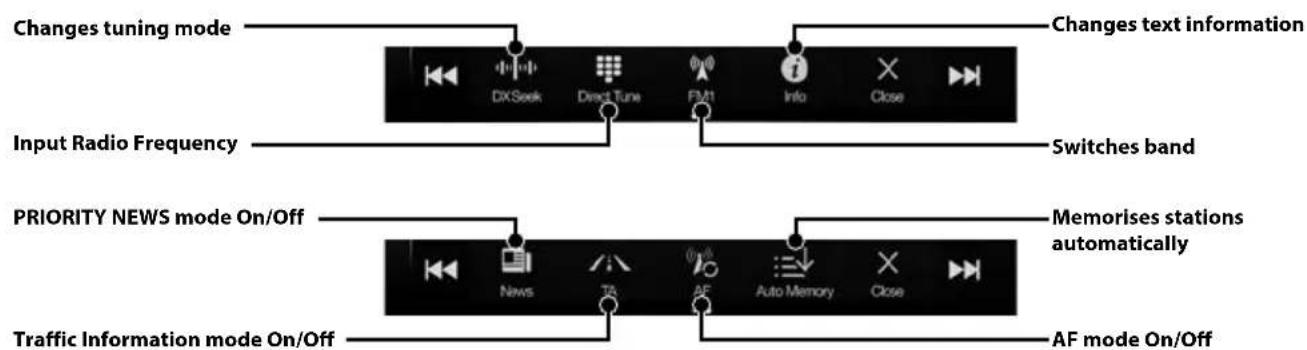
Radio/RDS Operation
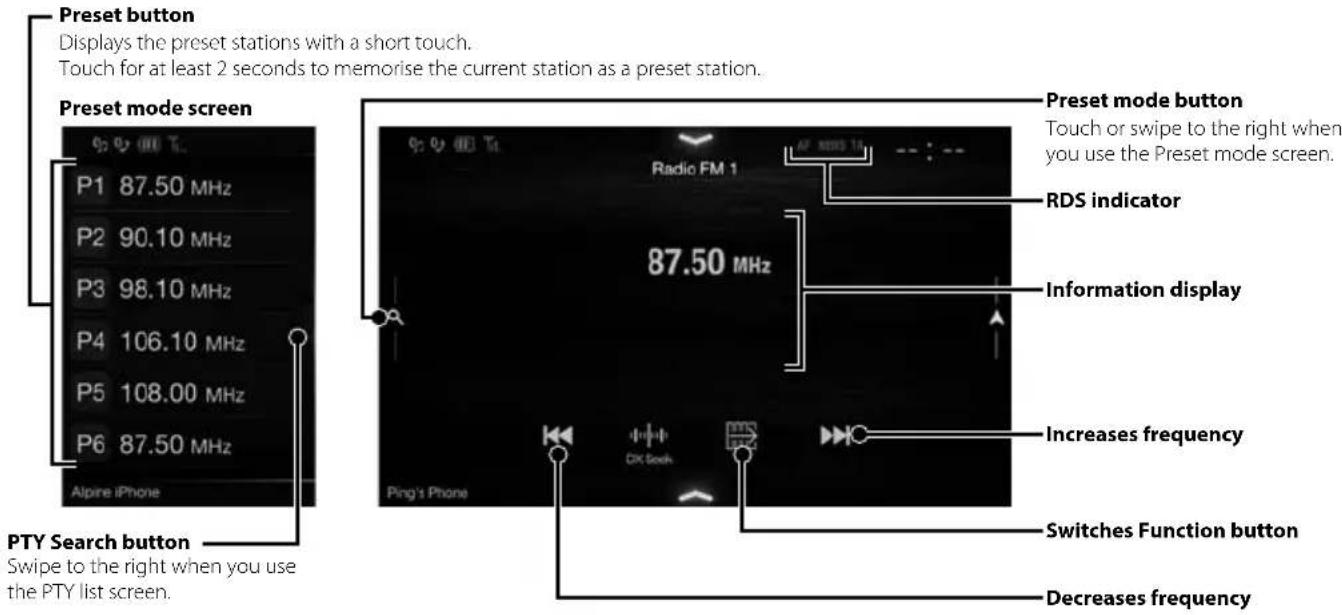
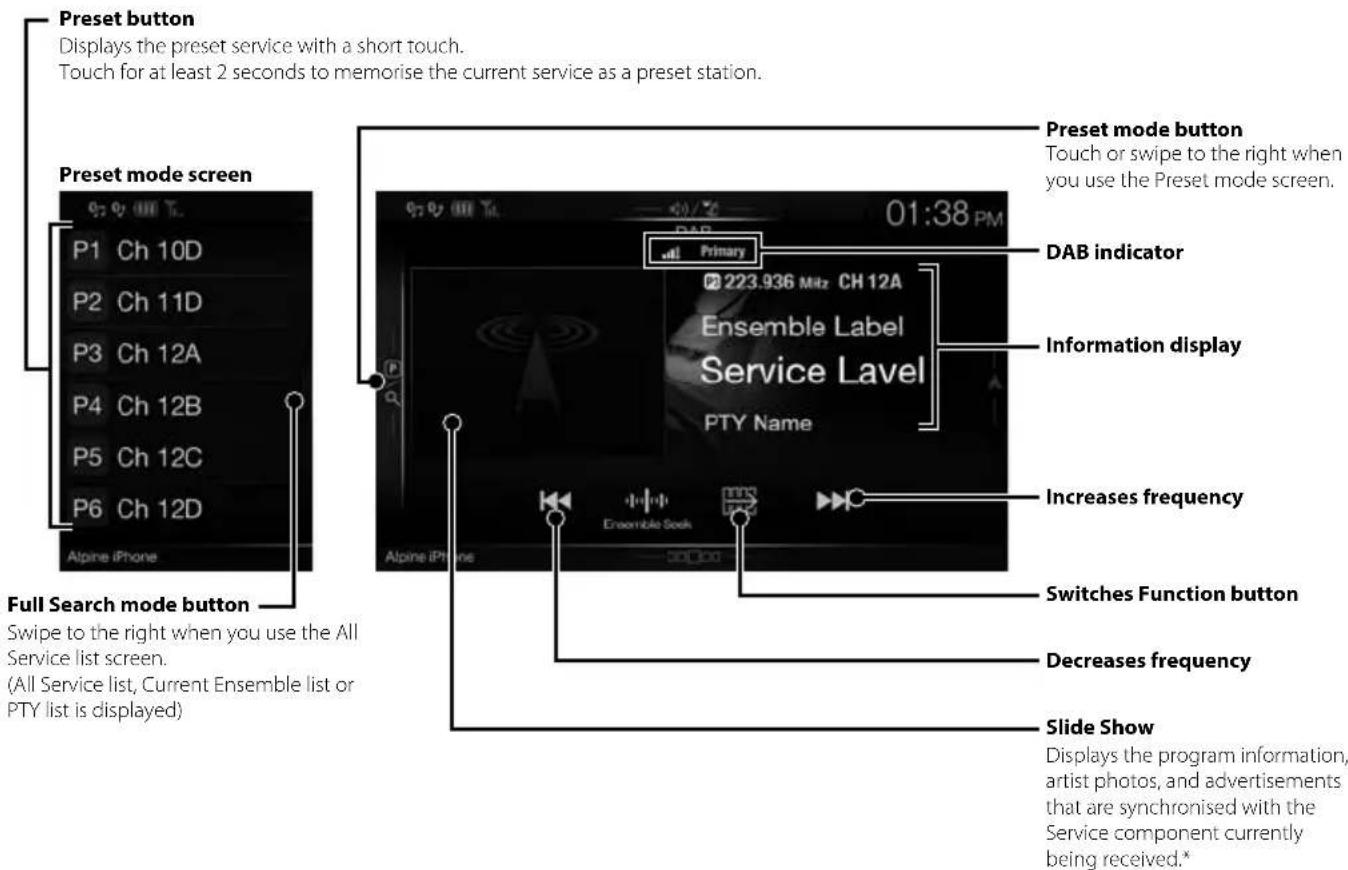
DAB/DAB+/DMB Operation
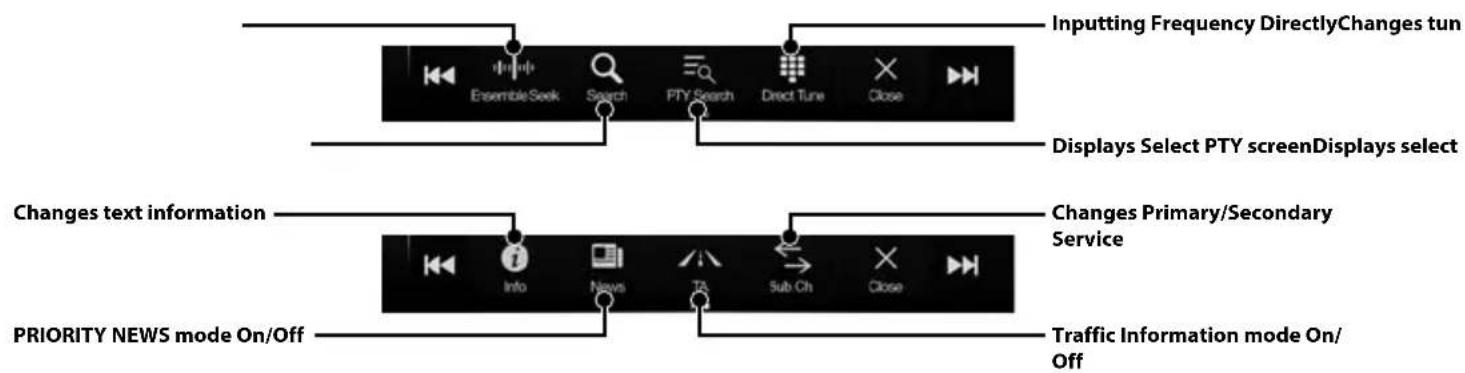
- They may not be displayed, depending on the Service component currently being received.
USB Flash drive Operation (Optional)
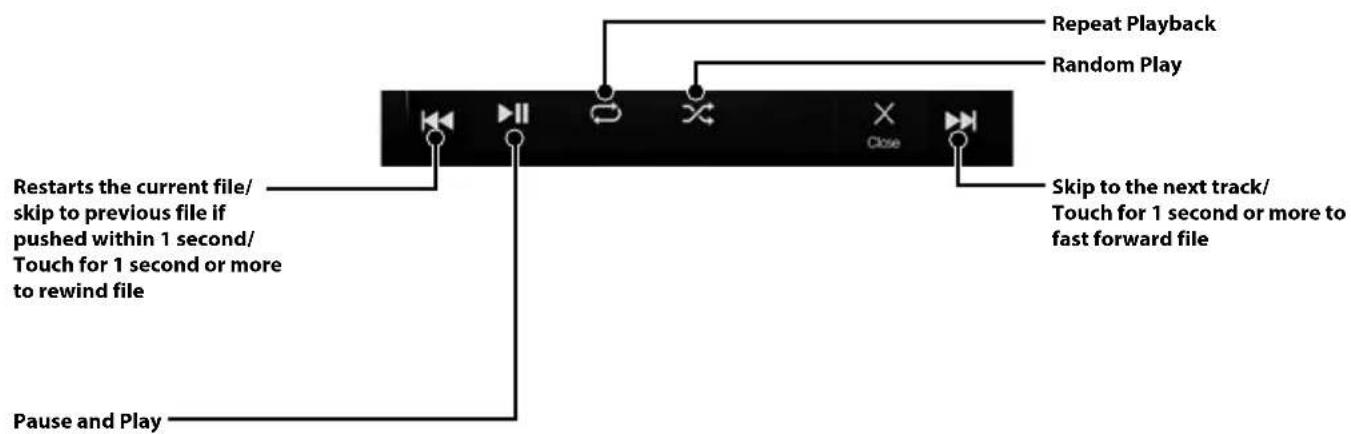
You can play back music files (MP3/WMA/AAC/FLAC) and video files (AVI/MKV/MP4) stored in a USB flash drive on the internal player of this system.
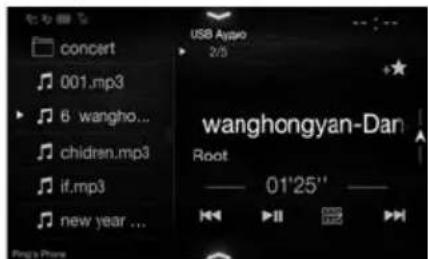
USB Audio main screen example
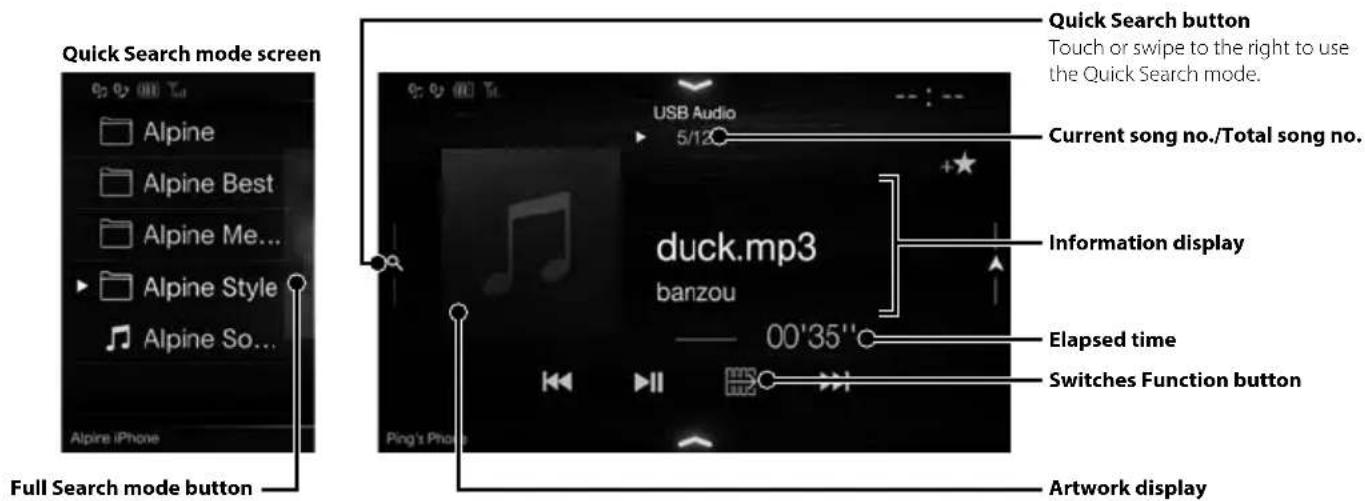
Swipe to the right when you use the Full Search mode screen.
HDMI Device (DVD Player) Operation (Optional)
When you connect an optional DVE-5300 (DVD Player), you can operate it from the unit.
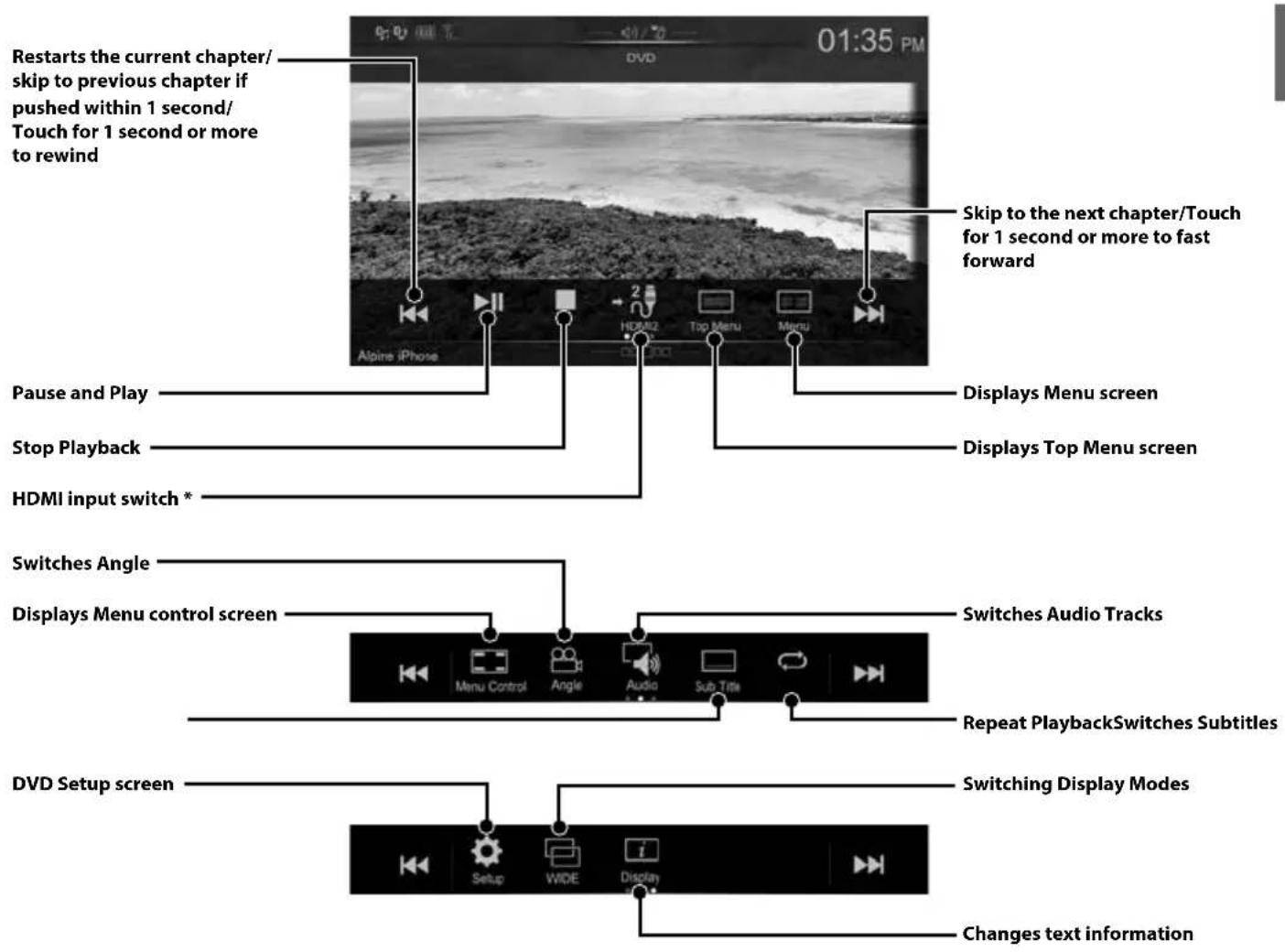
- If you connect an optional HDMI selector module, you can connect two HDMI devices. If the HDMI selector is set to "On" when two HDMI devices are connected, the HDMI input switch button is displayed. The displayed button differs depending on the settings and the HDMI input currently selected. For details, refer to "HDMI Setup" and "Setting the HDMI Selector On/Off" in the OWNER'S MANUAL (CD-ROM).
iPod/iPhone Operation (Optional)
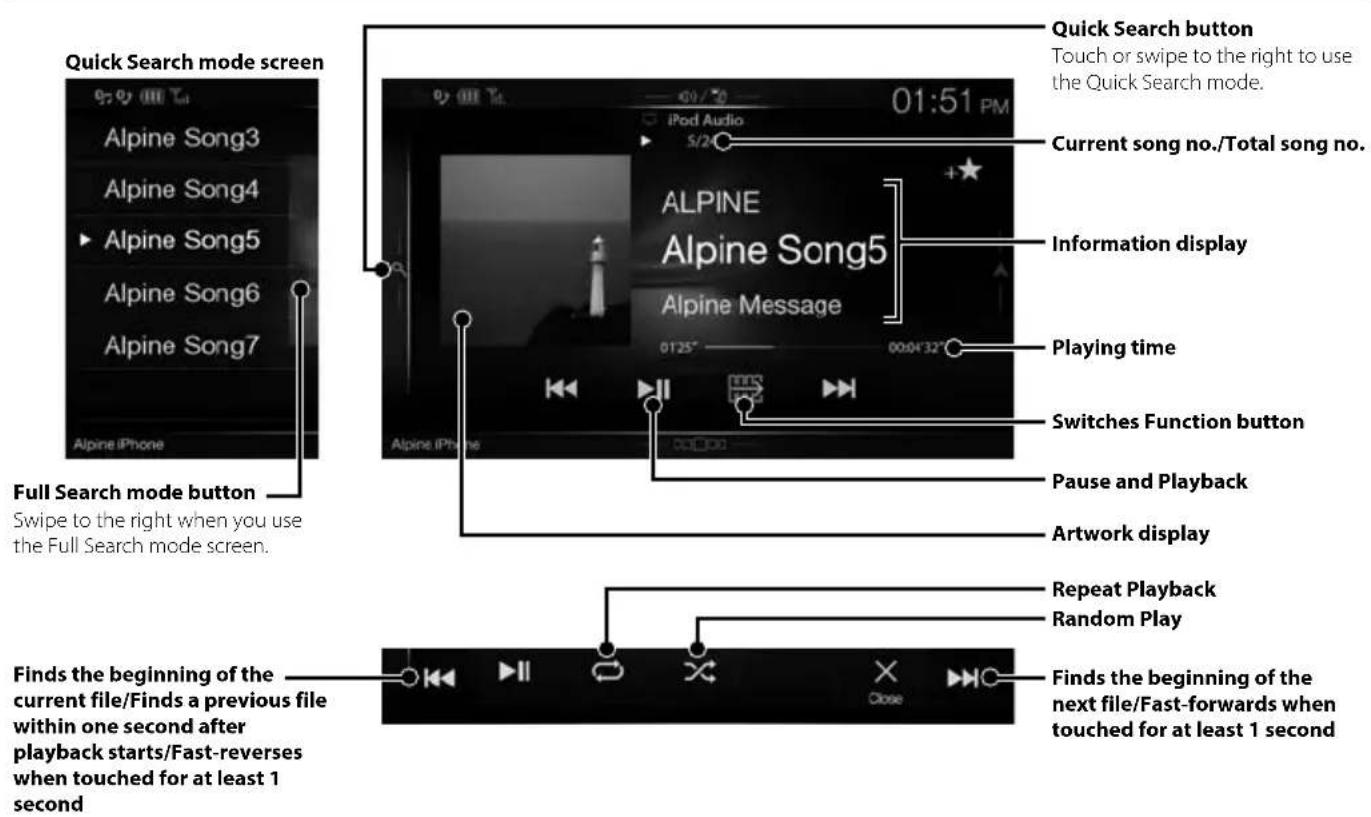
A separately sold Lightning to USB cable (KCU-471i), etc., is required depending on the type of iPod/iPhone.
Audio mode
Searching for a Music File (Full Search Mode)
For example: Searching by Artist name
1 Touch [Artists] in the Full Search mode screen.
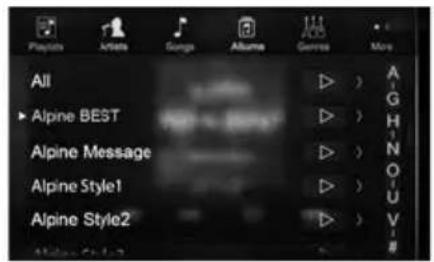
2 Touch the desired artist's name.
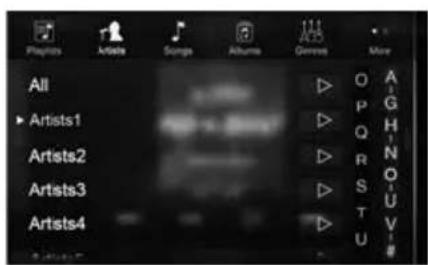
The Albu m search screen of the selected artist is displayed.
Touching [▶] of the desired artist will play back all songs of the selected artist.
3 Touch the desired album's name.
All songs of the selected album are displayed.
Touching [▶] of the desired album will play back all songs of the selected album.
4 Touch the desired song's name.
The selected song is played back.
Hands-Free Phone Control
The unit can connect with up to two hands-free phones.
If you connect two hands-free phones to the unit, select "Hands-free Device Priority" in "Bluetooth Setup" to set the order of precedence. For details, refer to OWNER'S MANUAL in the AUDIO VISUAL SECTION (CD-ROM).
How to connect to a Bluetooth compatible device (Pairing)
1 Touch [Setup] button on the Menu screen.
![ALPINE X702F - Touch [Setup] button on the Menu screen. - 1](/content/2026/03/518592/images/0f534262e74ece16ac8b6c8f3b84ba459086258438597b1a144ec501d8bab2b1.jpg)
2 Touch [Bluetooth].
- Make sure the "Bluetooth" setting is "On".
3 Touch [Set Bluetooth Device].
![ALPINE X702F - Touch [Setup] button on the Menu screen. - 2](/content/2026/03/518592/images/2a2464e337a15fc46e54f1e31e154a69bd5cd6916beb177dbc2762ce3b656db4.jpg)
4 Touch [] to search for a new device.
![ALPINE X702F - Touch [Setup] button on the Menu screen. - 3](/content/2026/03/518592/images/686f6c4d23abc4c6b775b81e279c788f2a82d08cd335390483f135c3b16c3f18.jpg)
5 Touch [ ] (Audio), [ ] (Hands-free) or [Both] for the device you want to connect from the list.
Audio: Sets for use as an Audio device.
Hands-free: Sets for use as a Hands Free Device.
Both: Sets for use as both an Audio device and Hands Free Device.
6 When the device registration is complete, a message appears and the device returns to normal mode.
- You can register up to 5 Bluetooth compatible mobile phones.
- The Bluetooth registration process differs depending on the device version and SSP (Simple Secure Pairing). If a 4 or 6 character Passcode appears on this device, enter the Passcode using the Bluetooth compatible device. If a 6 character Passkey appears on this device, make sure the same passkey is displayed on the Bluetooth compatible device and touch "Yes."
Answering a Call
1 An incoming call triggers the ringtone and an incoming call display.
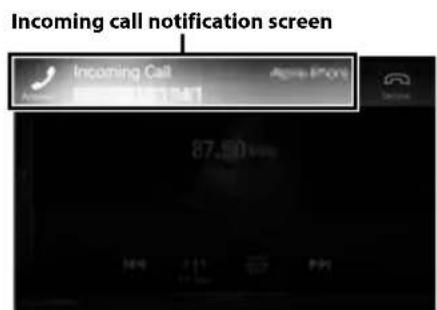
2 Touch incoming call notification screen.
The call starts.
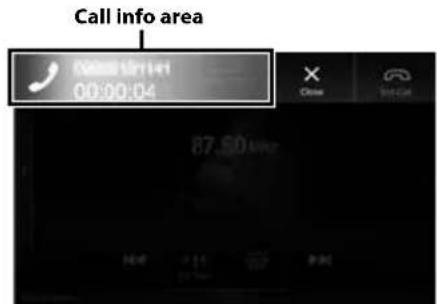
Touch the call info area during a call changes to the Phone Operation screen. Use this screen to adjust the speech volume, etc.
Hanging up the Telephone
1 Touch [ End Call).
The call finishes.
Map Functions (X902D/X802D-U/INE-W710D only)
Below is an overview of different buttons and icons on the map display. For more detailed information about this screen, please see the Owner's Manual.
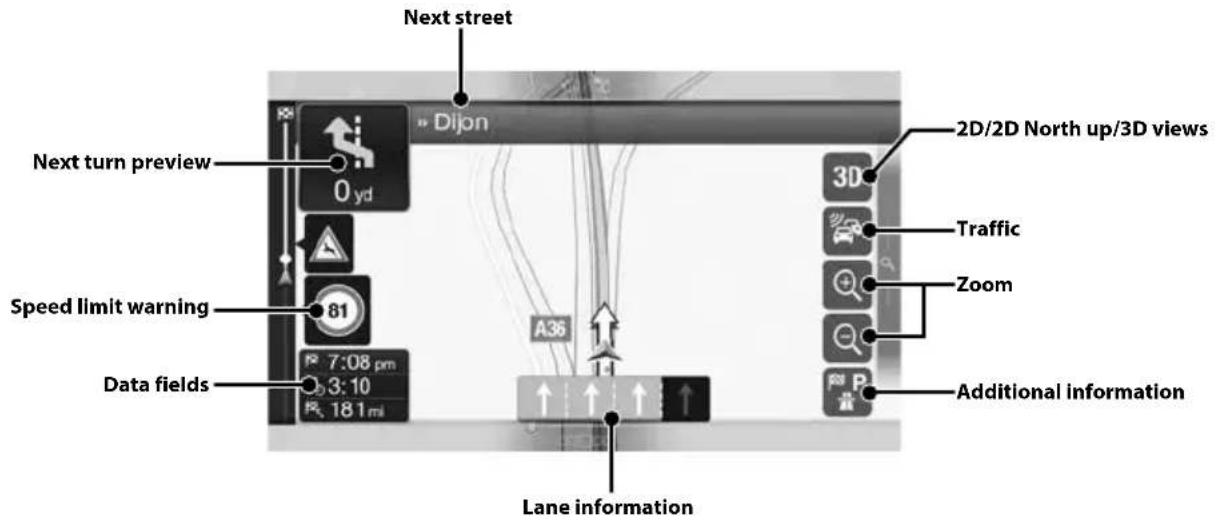
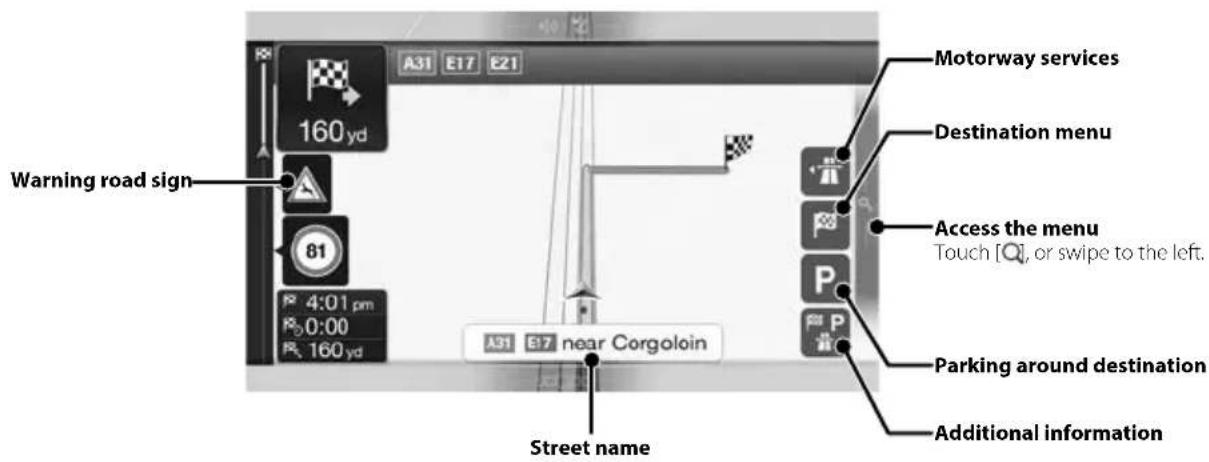
Navigation Menu (X902D/X802D-U/INE-W710D only)
To access the Navigation Menu, touch on the right edge of the map screen or swipe to the left. Alternatively, press the button.
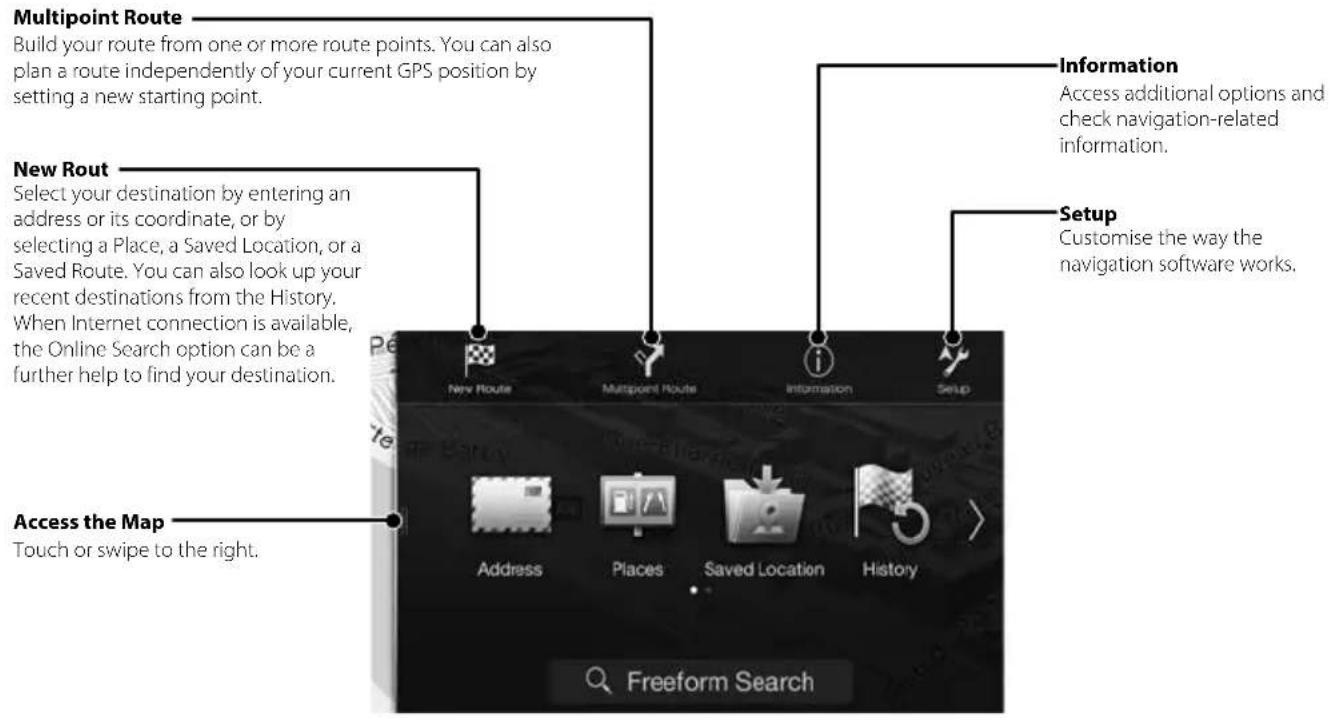
Setting a Destination (X902D/X802D-U/INE-W710D only)
The following example describes how to search for a destination when choosing [Town/Postcode] from [Address].
- You can search and narrow down the Country/State by starting from [Country/State].
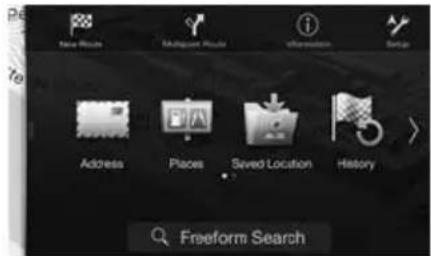
1 Touch [New Route] from the Navigation Menu.
2 Touch [Address].
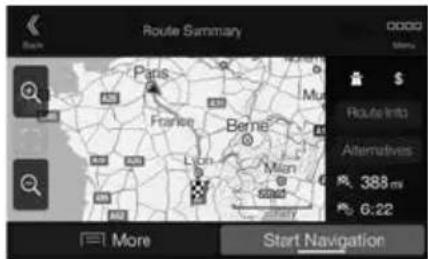
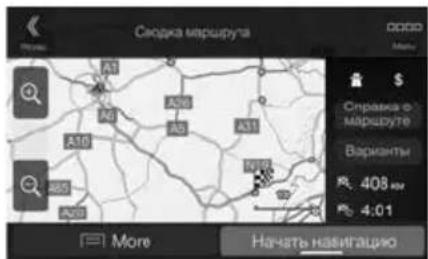
7 Touch [More] to modify the route parameters, or touch [Start Navigation] to start your journey.
3 Touch [Town/Postcode].
4 Enter the town name or postcode.
- Touch to play the candidate list.
5 Enter the desired street name.
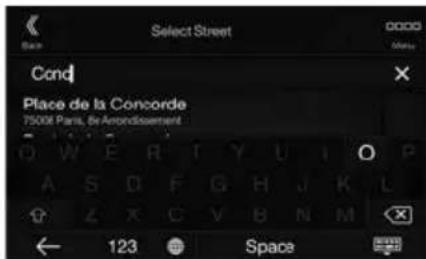
- Touch to play the candidate list.
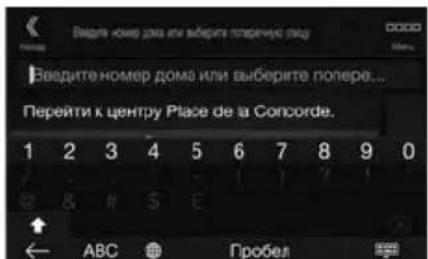
6 Enter the house number or crossing street.
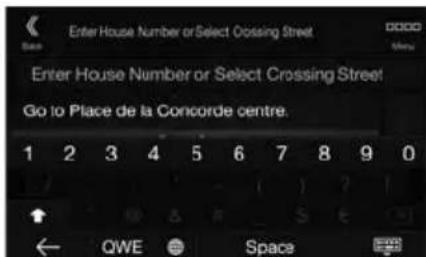
The route is calculated, and a map appears, showing the entire route. Here you can check route information and route alternatives.
Specifications
MONITOR SECTION
Screen Size 9" (X902D/1902D)
8"(X802D-U)
7"INE-W710D/iLX-702D)
LCD Type Transparent type TN LCD
Operation System TFT active matrix
Number of Picture Elements 1,152,000 pcs.
(800× 480× 3 RGB))
Effective Number of Picture Elements
99% or more
Illumination System LED
FM TUNER SECTION
Tuning Range 87.5 - 108.0 MHz
Mono Usable Sensitivity 8.1 dBf (0.7 μV/75 ohms)
50 dB Quieting Sensitivity 12 dBf (1.1 V/75 ohms)
Alternate Channel Selectivity 80 dB
Signal-to-Noise Ratio 65 dB
Stereo Separation 35 dB
Capture Ratio 2.0 dB
MW TUNER SECTION
Tuning Range 531-1,602 kHz
25.1 V / 28 dBf
Usable Sensitivity
LWTUNERSECTION
Tuning Range 153 - 281 kHz
31.6 V / 30 dBf
Sensitivity (IEC Standard)
DAB SECTION
Tuning Range BAND III
174.93-239.2MHz
Tuning Range L-BAND
1,452.96-1,490.6MHz
Usable Sensitivity
-103 dBm
Signal-to-Noise Ratio 95 dB
Stereo Separation 85 dB
USB SECTION
USB requirements USB 2.0
Max. Power Consumption
1,500 mA (CDP Support)
USB Class
USB (Mass Storage Class)
File System FAT16/32
Number of Channels
2-Channels (Stereo)
Frequency Response*
5-20,000 Hz (±1 dB)
Total Harmonic Distortion
0.008% (at 1 kHz)
Dynamic Range
95 dB (at 1 kHz)
Signal-to-Noise Ratio 100 dB
Channel Separation 85 dB (at 1 kHz)
*1 Frequency response may differ depending on the encoder software/bit rate.
HDMI SECTION
Input Format
720p/480p/480i/VGA
Output Format
480p
GPS SECTION
GPS Reception frequency
1,575.42±1MHz
GPS Reception sensitivity
-130 dB max.
Bluetooth SECTION
Bluetooth Specification
Frequency band
Output Power
Profile
Bluetooth v3.0
2,402-2,480MHz
+4 dBm Max. (Power class 2)
HFP (Hands-Free Profile)
OPP (Object Push Profile)
PBAP (Phone Book Access Profile)
A2DP (Advanced Audio
Distribution Profile)
AVRCP (Audio/Video Remote
Control Profile)
SPP (Serial Port Profile)
GENERAL
Power Requirement
Operating temperature
Maximum Power Output
Audio output level
Preout (Front, Rear):
Preout (Subwoofer):
Weight
14.4VDC
(11-16 V allowable)
-4°F to +140°F
(-20^ to +60^)
50W×4
2V/10k ohms (max.)
2V/10k ohms (max.)
1.54 kg (3 lbs. 6 oz) (X802D-U) 1.41
kg (3 lbs. 2 oz) (INE-W710D/
iLX-702D)
CHASSIS SIZE
Width
198 mm (7-13/16") (X802D-U) 178
mm (7^) (INE-W710D/ILX-702D) 125
Height
mm (4-15/16") (X802D-U) 100 mm
(3-15/16"INE-W710D/ILX-702D)
147 mm (5-3/4")
Depth
NOSE SIZE
Width
191 mm (7-1/2") (X802D-U)
171 mm (6-3/4") (INE-W710D/
ilX-702D)
121 mm (4-3/4") (X802D-U)
96 mm (3-3/4") (INE-W710D/
iLX-702D)
19mm (3 / 4^n)
Depth
- X902D/i902D is sized exclusively for a certain car model.
-
Due to continuous product improvement, specifications and design are subject to change without notice.
The LCD panel is manufactured using an extremely high precision manufacturing technology. Its effective pixel ratio is over 99.99% . This means that there is a possibility that 0.01% of the pixels could be either always ON or OFF. -
Windows Media, and the Windows logo are trademarks, or registered trademarks of Microsoft Corporation in the United States and/or other countries.
- Apple, iPhone, iPod, and iPod touch are trademarks of Apple Inc., registered in the U.S. and other countries. Apple CarPlay is a trademark of Apple Inc.
- Use of the Apple CarPlay logo means that a vehicle user interface meets Apple performance standards. Apple is not responsible for the operation of this vehicle or its compliance with safety and regulatory standards. Please note that the use of this product with iPhone, or iPod may affect wireless performance.
- "Made for iPod," and "Made for iPhone," mean that an electronic accessory has been designed to connect specifically to iPod, or iPhone, respectively, and has been certified by the developer to meet Apple performance standards. Apple is not responsible for the operation of this device or its compliance with safety and regulatory standards. Please note that the use of this accessory with iPod, or iPhone may affect wireless performance.
Android is a trademark of Google Inc. - The Android robot is reproduced or modified from work created and shared by Google and used according to terms described in the Creative Commons 3.0 Attribution Licence.
- SPOTIFY and the Spotify logo are among registered trademarks of Spotify AB.
- The Bluetooth® word mark and logos are registered trademarks owned by the Bluetooth SIG, Inc. and any use of such marks by Alpine Electronics, Inc. is under licence.
- The terms HDMI and HDMI High-Definition Multimedia Interface, and the HDMI Logo are trademarks or registered trademarks of HDMI Licensing, LLC in the United States and other countries.
- MPEG Layer-3 audio coding technology licensed from Fraunhofer IIS and Thomson. Supply of this product only conveys a licence for private, non-commercial use and does not convey a licence nor imply any right to use this product in any commercial (i.e. revenue-generation) real time broadcasting (terrestrial, satellite, cable and/or any other media), broadcasting/streaming via internet, intranets and/or other networks or in other electronic content distribution systems, such as pay-audio or audio-on-demand applications. An independent licence for such use is required. For details, please visit http://www.mp3licensing.com
- ©2006-2016 TomTom. All rights reserved. This material is proprietary and the subject of copyright protection, database right protection and other intellectual property rights owned by TomTom or its suppliers. The use of this material is subject to the terms of a license agreement. Any unauthorized copying or disclosure of this material will lead to criminal and civil liabilities.
About the Rules of Bluetooth Electromagnetic Radiation Regulation

Declaration of Conformity
Inhalt
Alpine Connect App (Option) (nur X902D/X802D-U/INE-W710D)
PBAP (Phone Book Access Profile)
A2DP (Advanced Audio
Distribution Profile
AVRCP (Audio/Video Remote
Control Profile)
SPP (Serial Port Profile)
ALLGEMEINES
Spannungsvorsorgung
Betriebstemperatur
178 mm (INE-W710D/iLX-702D)
Höhe 125 mm (X802D-U)
100 mm (INE-W710D/ILX-702D)
Tiefe 147 mm
VORSPRUNGGRösSE
Breite 191 mm (X802D-U)
171 mm (INE-W710D/ILX-702D)
Höhe 121 mm (X802D-U)
96 mm (INE-W710D/iLX-702D)
Tiefe 19 mm
About the Rules of Bluetooth Electromagnetic Radiation Regulation

Declaration of Conformity
Table des matieres
L'application Spotify est disponible pour les iPhones et les téléphones Android, veuillez consulter la page https://support).(https://support).(https://support).(https://support).(https://support).(https://support).(https://support).(https://support).(https://support).(https://support).(https://support).(https://support).(https://support).(https://support).(https://support).(https://support).(https://support).(https://support).(https://support).(https://support).(https://support).(https://support).(https://support).(https://support).(https://support).(https://support).( https://support.(https://support.(https://support.(https://support.(https://support.(https://support.(https://support.(https://support.(https://support.(https://support.(https://support.(https://support.(https://support.(https://support.(https://support.(https://support.(https://support.(https://support.(https://support.(https://support.(https://support.(https://support.(https://support.(https://support.(https://support.(https://support.( https://support.(https://support.(https://support.(https://support.(https://support.(https://support.(https://support.(https://support.(https://support.(https://support.(https://support.(https://support.(https://support.(https://support.(https://support.(https://support.(https://support.(https://support.(https://support.(https://support.(https://support.(https://support.(https://support.(https://support.(https://support.
8.1 dBf (0.7 V/75 ohms)
Specification Bluetooth
Bluetooth v3.0
Gamm de fréquences
2.402-2.480MHz
Puisance de sortie
+4 dBm Max. (classe 2)
Profil
HFP (profil mains libres)
1,41 kg (3 lbs. 2 oz) (INE-W710D/
iX-702D)
DIMENSIONS DU CHÄSSIS
Largeur
198 mm (7 - 13/16") (X802D-U)
178 mm (7") (INE-W710D/iLX-702D)
Hauteur
125 mm (4-15/16") (X802D-U)
100 mm (3 - 15/16") (INE-W710D/ iLX-702D)
Profondeur
147 mm (5 - 3/4")
DIMENSIONS DU NEZ
Largeur
191 mm (7 - 1/2") (X802D-U)
171 mm (6-3/4") (INE-W710D/
iLX-702D)
Hauteur
121 mm (4-3/4") (X802D-U)
96 mm (3 - 3/4") (INE-W710D/
iLX-702D)
Profondeur
19 mm (3/4")
About the Rules of Bluetooth Electromagnetic Radiation Regulation

Declaration of Conformity
Contenido
ADVERTENCIA 2
PRUDENCIA 3
Primeros pasos 4
Funcion Favoritos. 6
Registrar de elementos 6
Android Auto (optional) 7
Apple CarPlay (optional) 7
Alpine Connect App (optional) (X902D/X802D-U/INE-W710D solo) 7
Funcionamento de radio/RDS 8
Funcionamento de DAB/DAB+/DMB. 9
Funcionamento de unidad flash USB (Optional) 10
Funcionamento del dispositivo HDMI (reprodctor de DVD) (Optional) 11
Funcionamento de iPod/Phone (Optional) 12
Control del téléphone manos libres 13
Funciones de mapas (X902D/X802D-U/INE-W710D solo) 14
Menu de navigacion (X902D/X802D-U/INE-W710D solo) 15
Estabecer un destino (X902D/X802D-U/INE-W710D solo) 16
Especificationes. 17
IMPORTANT
Para X802D-U/INE-W710D/iLX-702D

① Botón o VOICE
Para X902D/X802D-U/INE-W710D:
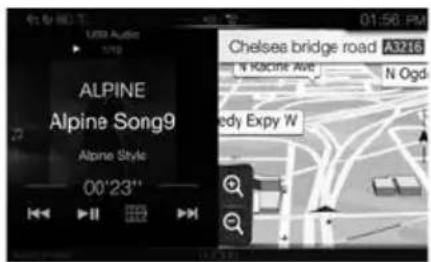
Pantalla dual (X902D/X802D-U/ INE-W710D solo)
Alpine Connect App (optional) (X902D/X802D-U/INE-W710D solo)
PBAP (Phone Book Access Profile)
A2DP (Advanced Audio
Distribution Profile)
AVRCP (Audio/Video Remote
Control Profile)
SPP (Serial Port Profile)
GENERAL
Alimentación
14.4VCC
(11-16 V margen permissible)
1,41 kg (INE-W710D/iLX-702D)
TAMANO DEL CHASIS
Anchura
198 mm (X802D-U)
178 mm (INE-W710D/iLX-702D)
Altura
125 mm (X802D-U)
100 mm (INE-W710D/iLX-702D)
Profundidad
147 mm
96 mm (INE-W710D/iLX-702D)
Profundidad
19 mm
About the Rules of Bluetooth Electromagnetic Radiation Regulation

Declaration of Conformity
Sommario
⑤ Interru tture RESET
Per X902D/X802D-U/INE-W710D:
PBAP (Phone Book Access Profile)
A2DP (Advanced Audio
Distribution Profile)
AVRCP (Audio/Video Remote
Control Profile)
SPP (Serial Port Profile)
SPECIFICHE GENERALI
1,41 kg (INE-W710D/iLX-702D)
DIMENSIONI DEL TELAIO
Ampiezza 198 mm (X802D-U)
178 mm (INE-W710D/iLX-702D)
100 mm (INE-W710D/iLX-702D)
Profondita 147 mm
About the Rules of Bluetooth Electromagnetic Radiation Regulation

Declaration of Conformity
Innehäll
For X802D-U/INE-W710D/iLX-702D
① Knappen eller VOICE
For X902D/X802D-U/INE-W710D:
Visa navigationskartan.
7 tum (INE-W710D/iLX-702D)
LCD-typ Genomskinlig typ TN LCD
Bluetooth-specification
Frekvensomfang
Uteffekt
Profil
Bluetooth v3.0
2.402-2.480MHz
+4 dBm Max. (effektklass 2)
HFP(Handsfree-Profil)
OPP (Object Push Profile)
PBAP (Phone Book Access Profile)
A2DP (Advanced Audio
Distribution Profile)
AVRCP (Audio/Video Remote
Control Profile)
SPP (Serieport-Profile)
ALLMÄNT
Ingangsspanning
Drifttemperatur
Maximal uteffekt 4× 50 W
Utmatingsniva for Ijud
Förforstärkarutgang (fram, bak): 2 V/10 kiloohm (max)
Förforstärkarutgang (subwoofer): 2V/10 kiloohm (max)
Vikt 1,54 kg (X802D-U)
1,41 kg (INE-W710D/ILX-702D)
CHASSISTORLEK
Bredd 198 mm (X802D-U)
178 mm (INE-W710D/ILX-702D)
About the Rules of Bluetooth Electromagnetic Radiation Regulation

Declaration of Conformity
Inhoud
4 +/of//OMHOOG/OMLAAG)-knop
(6) √ (PHONE) (alleen X902D/i902D)-knop
Alpine Connect App (Optioneel) (alleen X902D/X802D-U/INE-W710D)
USB (Mass Storage Class)
Bestandssysteme
FAT16/32
Aantal kanalen
2kanalen(stereo)
Frequentierespons
5-20.000 Hz (±1 dB)
PBAP (Phone Book Access Profile)
A2DP (Advanced Audio
Distribution Profile)
AVRCP (Audio/Video Remote
Control Profile)
SPP (Serial Port Profile)
ALGEMEEN
Stroomvereiste
14.4VDC
(11-16Vtoelaatbaar)
Bedrijsttemperatuur
-20°C tot +60°C
1,41kg (INE-W710D/iLX-702D)
FRAMEFORMAAT
Breedte
198 mm (X802D-U)
178 mm (INE-W710D/ILX-702D)
Hoopte
125 mm (X802D-U)
100 mm (INE-W710D/ILX-702D)
Diepte
147 mm
NEUSFORMAAT
Breedte
191 mm (X802D-U)
171 mm (INE-W710D/iLX-702D)
Hoopte
121 mm (X802D-U)
96 mm (INE-W710D/iLX-702D)
Diepte
19mm
About the Rules of Bluetooth Electromagnetic Radiation Regulation

Declaration of Conformity
CopepxaHne
PPEyPExKDeHNE 2
BHIMAHNE 3
PpncTynpaKa6oTe 4
Функця "Избранhoe" 6
Добавлике заименTOB 6
Android Auto (npno6peTaTcra donoHnTeNbHo) 7
Apple CarPlay (npno6peTaetcdoonHntelbHo) 7
Приложения Alpine Connect (принобразетаюдопонитьно) (Только X902D/X802D-U/ INE-W710D)
Pa6oTa c paIIO/RDS. 8
Pa6ota c DAB/DAB+/DMB. 9
Pa60Ta c Φιδιν-нakονиTeIeM USB (nprno6peTaεTcДоноHInTeIbHo) 10
Pa6oTa c yctpoiCTbOM HDMI (DVD-npOunrgpbIbATEJIeM) (npno6peTaeTcra
dOpONHITeJbHo) 11
Pa6ota c iPod/iPhone (npno6peTaetcdoonHnTeJbHo) 12
Функця телфona"Свобонье рук" 13
Функцин KapT (Toько X902D/X802D-U/INE-W710D) 14
MeHou Habnrau (ToIbKO X902D/X802D-U/INE-W710D) 15
UcTaHOBKa nyHKta Ha3HaueHnra (ToIbKO X902D/X802D-U/INE-W710D) 16
Texnueckne xapaKtepcntuKn 17
BAKHO
3aIIHITe cepnHbI HOpem cBOeO yCTPOcTBa B IpeIOCTaBHeHOM IaIee MeCe N coXpaHITe erO IIaJIbHeIWeO HcIOnb3OBaHn.
CEPNHbI HOMEP:
CEPNHbH HOMEP ISO: AL
IATA YCTAHOBKN:
KTOYCTAHABJIINBAJI:
MECTO IPIIOBPEHNA:
IopnoHyu HOpMaunO BExe FyHKnJx CM. BPyKoBOcTBe NOnb3OBaTeJIa, 3aNcaHOM Ha npnilaraemom KOMNaKT-dncke. (Tak KaK 3TO HOpMaunHOHHb CD-dnck, erO HeJIb3Y INCNoB3OBaTb dIra Bocpon3BeHnMy3bIKn IIN N3O6paXeHn Ha npOnrpbBaTeJe.) PpN Heo6xoImoctn dInep ALPINE Bcerda CMOKeT npedocTabtB Bam neaTHyIO BercnioPyKoBOcTBa NOnb3OBaTeJIa, 3aNcaHHOrHa KOMNaKT-dncke.

PPEyPExKdEHN
3TOT cIMBON 6Oo3Haaye TBaXHbIe NHCTpyKuIN.
IX Heco6nOJeHne MoKeT npUBeCTn K TpaBMe nn
CmeptelbHomy nCXOyD.
YCTAHABJINBAI TE DAHHbI IPOyKT TAKIM O6PA3OM, YTO6bl BOINTEJIb HE MOI BnDEtB 3KPAH, ECIN ABTOMOBINb HE OCTAHOBJIEN H HE 3AEDIECTBOBAH CTORHOCHbI TOPMO3.
Ipocmotp BOINTeJem TEeBnHIOIIbIX IpoPamM HIN BINO EBO IIPOUcCE BOKdEHN OINaceH. HeipabNbHaY yCTAHOBKa 3TOTO IPOyKTa IO3BOJIaC TBOINTEIO IPOCMATPNBaTB TeENB3HOHHBe IPOrpaMMbI HIN BUNEO B IPOUcCE BOKdEHN. TO MOXET OTBNEy BOINTEJIOT YIPABLIeHN ABTOMO6NIEM N IINPBecTN K HecuaCTHOM cyuAIO. BoINTEJB INI NaCCaKnpM MOrYT NOUYHTB cepbe3HMe TpaBMbl.
HE IPOCMATPUBAITE BUNDEO BO BPEM YIIPABJEHNA ABTOMOBNJEM.
IpocmToBnEoMOKeTOTBHeYBoINTeHOTyPiBaJIeHHABTOMO6HJEMIIpNBecTNKHeCuaTHOMyCJyAio.
HE IPREIINHMAITE HIKAKNX DEICTBNI, KOTOPbIE MOYT OTBJIeYb BAC OT 6E3ONACHOFO BOXJEHNA ABTOMOBUNIA.
JIIO6bIe IeHCTBnA,OTBIEKaIOIIHe BHNMaIIHe Ha IIPOIOJKNTeIbHbI cPOK,IOJIJKHb BYIOINHHTbcra TOJIbKO IOcIE IOIHOI OCTaHOBKn.IpeE bIIOINHeHMe TaKHX DeIcTBnB BcERda OCTaHaBnBaITe aBTOMo6NbB 6e3OiaHOM MecTe. Heco6IOJeHne 3TOrTOpe6oBAHHMOKeT IIpHBecTHK aABapHn.
HE CLEUYTE PEPJIOXEHNAM MAPUPYTA, ECINHABUNAQUOHNA CNTEMA PEPJIOXHT BbIIOJHHTBHE6E3ONACHBI INI 3APPEUEHBI MAHEBP, A TAKXE BCJYARX, ECINI PEPJIOXEHHBIM MAPUPYT OKAXETCNOTEHUJIbHO ONACHbIM INI INPUBEDT B ONACHYIO3OHY.
He cIeuyET IIOIHOCTbIO IIOIaTbCS Ha DaHHoe yCtPoIcTB0,3aMeHnHa mco6CTBeHHbe peIIeHHn. IIIO6bI IpeIIOXeHHn MapIpyTa daHHoINCTeMBI He IOIKHI 3aMeIIaTb IIIO6bI MeCTIIbE IpabNla IopOxHOrIOIBuKHeHHn Hn co6CTBeHHoe peIIeHHne H/IN 6eOIIacHyIO MahepyBOXJIeHHn.
IPOДЕРЖИBAITE RPMKOCTb HA YPOBHE, IIO3BOJIЯIOUcEM CJIbIaWAtb BHEUHHe 3BYKn BO BPEM JDNIXEHNJ.
Ye3MepHO BbCOKn yPOBeHb rPOMKcTn, 3aIyHuaOuHn TaKHe 3ByKn, KaK CHPcHb ABTOMO6NHe aBAPHHoH cNyK6bH NOpOxHbE IpEnyPiPeNTeJIbHe cHTHaJI (PiN PepeceeHNn K/II PyTe H T.D.) MoKET 6bTHb ONACbHM n PpNBecTN K aBapHH. NCIO/lb3OBAHNE BBICOKO YPOBHr IPMOKOCTN B ABTOMOBJIe MOKET TAKKE Bb3bBATb DEPEKT CJYXA.
KAK MOXHO MEHbIe OTBIEKAITEcB HA IPOCMOTP INCJIER BO BPEM BOXDEHNA.
Ipocmotr kpaHa MoKet OTBneb BoNTeTOnOT ynpaHnABTOMO6nIeM IINPBecTH KHeCuaCTHMy cIyauio.
HE PA36NPATb IN HE N3MEHRTb.
3TO MOKET Bb3bBaTb abapnHyIO cHTyaHIO, BO3rOpaHne nn yIap 3JIeKTPnueckHM TOKOM.
NCIOJIb3OBATb TOJIbKO B ABTOMO6NJX C NITAHNEBOPTOBO CETN +12 BOJbT IN 3A3EMJIeHNEOTPNUATEJIbHOI NOJI0CA HA KY3OB ABTOMO6NJIA.
(BcIyae comHeHH npokohcyIbIpyItecb y cBoeIO nInepa.)
Hec06IOeHHe 3TOI Tpe6oBAHH MOKeT IIpNBecTH K BO3HNKHOBeHHIO OIIH I.I.
XPAHNTE HEBOLIbIWE OBeKETbl, TAKNE KAK BATAPEN, B HEIOCTUINbIX DIIA DETEN MECTAX.
TIOrAHHe TaKHX O6BeKTOB MOKeT HaHeCT HaeCTHyTO TpaBMy. EClHpe6eHOK IPOrIOTnI POIOo6HbI O6BeKT, HcMeJIeHHO 06PaTITecb K BpaCy.
PNI 3AMEHE PNEOxPAHNTENE INCNOJIb3yIte TOJIbKO AHAIOIurHbIE IO HOMNHAJY.
Heco6JIIOJIeHHe 3TOI Tpe6OBaHN MoKET IIpNBECTN K BO3ROPaHIO I IopAKeHHIO 3JIeKTPnueckkIM TOKOM.
HE 3AKPbIBAITE BEHTUNLAIOHHBIE OTBEPCTNINI PAJNAATOPA.
B IIpoTUBHOM CNYae BO3MOKeH HArpeB BHyrpeHHx JEtaiJei, KOTOpbI MOKeT IpiNBecTH K BO3rOpaHHIO.
NCIOJIb3yIe 3OT TPOJyKT TOJIbKO JAB ABTOMOJIEN C BOPTOBO CETbIO HANPRXHEHEM 12 B.
HeipabHbHoe HcHOB3OBaHne MoKeT IIpNBeCTn K Bo3ropaHIO, IopapKeHHIO 3JIeKtpHueCKHM TOKOM HIN DpyTM TpaBMAM.
BbINOJIHAIte IPABABJIbHbIe IOJIKLIQUEHNA.
HeipabnibHoeIOIKIOueHeMe MoKeT IIpNBecTN K Bo3ropaHHIO HIOBpcKdEHNO IPOyKTA.
NEPEI NOIKLIQUEHNEM IPOBOIOB OTCOEINHITE KAEBJ OT OTPNUATEJIbHORO NOLKCA BATAPEI.
Heco6IIOJIeHHe 3TOI Tpe6OBaHHMOKET IINBecTH K IIOpaKeHHIO 3JIeKTpUeCKHM TOKOM HIN K TpaBMc BCJIeCTBHe KOPOTKO 3aMbKaHH.
HE DONYCKAITE CNIETEHNA KABENEIC HAXOJAUNMNCRA PADOM IPEMETAMN.
IpoBOJky N Ka6eHn Heo6xOJIMo pa3MeCTNb B COOTBeTcTBn C yKa3aHHMn B pyKOBODCTBE, YTO6b H36eKaTB Bo3MOKHBIX IIpeHHTCBn N IOMex BO BPem BOKJHeHN. Ka6eHn IpoBOJaK, KOTopA 6IoKpuyet IOctTyN K PyeBOMy KOlecy, PbHuary IpeKJIouHen H Ipeepa, IIeAaTNTopMo3a N T,I., MOY CTaTB IIpnHHOIIaCHOH cHTyaun 3a pyJEM.
HE CPALINBAITE C 3JEKTPUeCKIMN KABELIIMN.
HnKOrHa He cpeaIte Ka6eBHyIO H3OJIuIO IINIOKnIOueHHI
IIHTaIIH NpyTOMy 6OpUOBAHHIO.B IpOTNBIOHM Clyuae 6yIET
IpeBbIIHeA IOIpyCTHMaHarpY3Ka IIO TOKY IIN DaHHOR IOPOBOJa, IN B
pe3yIbTaTe BO3MOxHO BO3rOpAHne I NopAkeHne 3NKeKTPuueckHM
TOKOM.
HE IOBPEI NT E T P U B K N I N I P O BO D K Y I P N C B E P J E H M N OTBEPCTN.
Ipi CbepeHn yctaHOBOuHbIX OTBepcTHN B KOpNyce IpnMHTe MepB
IpeIOCTopOxKIOcTH, YTO6bH N36KaTb KOHTaKa, IOBpeKIIeHHN HIN
3aKyIOpHBHn Tpy6OK TOINHBOIPOBOJOB IN 3JeKTPoIPBOJKN.
Hec06JIIOHe Hne 3TOrTOpe6OBaHN MoKe IpnBeCTN K Bo3ROPaHIO.
HE NCIOJIb3YIte BOJITBI IIN TAIKNI TOPMO3HOI CNTEMbl NII CNCTEMbl PYJEBOTO YNPABLEHnA DIA 3A3EMLeHnI.
B0Tb HnraKn H3 TopMo3HOb CnCTeMb HnCnCTeMb pyNEBOrO yIpaBHeHH (nn IIO6oB npyro CB3aHHO C 6e30NaCHOCTbO cnCTeMb) nN 6akOB HNKOTDA He cneJyER nIONb3OBaTB npu ycTaHOBKe Hn3a3eMeHH. NcIOb3ObaHHe TaKHX JeTaJIe MOKe 6IOKHPoBaTB yIpaBHeNe ABTOMO6nEm n CTb IIpNUHOB BO3ROPaHH.
HE YCTAHABINBAIte YCTPOINCTBO B MECTAX, IDE OHO MOKET MEWATb PA5OTE ABTOMOBNIA, HANPUMEP, PADOM C PYJEBBIM KOJECOM NIN PbIYAROM PEPEKJIIOUeHnCKOPOCTEi.
BIpOHTNBHOMcIyAcycIpoIcTBMOKetco3aTbIOMeXnIII IpeJeHrOo63opaHIN3aTpUHNtBDbNKeHHe,HTO MOKeTpNBecTN K cepbe3HOaABAPu.

BHIMAHHE
3TOT CUMBOI 6O3Haayet BaxHbIe NHCTpyKcIM.
IX Heco6IIOJeHne MoKeT npVBcTeN K TpaBMe IIN
BbIXOy u3 CTPOr npOdykTa.
PNI BO3HNIKHOBEHNI PIO6JIEM HEMEJIENH0 NPEKPATNE IcNOJIb3OBAHNE IPOJYKTA.
B IIpoTUBHOM CNYae 3TO MOKeT IIpNBecTH K IIOJyueHHIO TpaBMbI HIN IOBpeKHeHHIO IPOJyKTa. BepHIte IPOJyKT CBOeMy aBTOpH3OBaHHOMY IIJIepy Alpine INN B 6IIHXaIIHN cepBHCbH IIeHTp Alpine IIN peMOHTa.
PPOKIAJKA PPOBOIOB N YCTAHOBKA DOJIKHbI BbITb BbINOJIHEHbI CNEUJAINCTAMN.
IIpaaiHecK Kn HIOB H yTaHOBKn DaHHoTO yCTPOHCTBa Tpe6yHTcneuaaHbHeTexHueckne HaBbIKn OIbT. B IeJnx 06ecNeHn630NaacHoCTN IIN BblIOHHeHn paObTb BcerJa 06paanAteCk K nHepy, y KOTpOTo 6bl npno6peTeH 3OT IpoDyKT.
NCIOJb3yIe TOJIbKO CNEUJAIN3NPOBAHHbie YCTAHOBOuHbIE KOMHOENTbI N TAUATEJIbHO IN 3AKPENJIaTE.
NcnoB3yTe ToIbKO CnEINΦHINPOBaHHHe BCNOMoTaJIbHBe KOMIOHOHTb. NcIOB3OBAHHe HEIPeYCMOTpeHHx KOMIOHOHTOB MOKET Bb3BaTb BHyTpEHHHe IOBpeXeHn yCtpoCTBa Hn CTaTb IIpyHnHO erO HeHaJeXHO YcTAHOBKn. B peYbTaTe MOKET HApYIIIbCk PKeIIeHHe TaHX KOMIOHOHTOB, IIpNbOdBn K BO3HNKHOBEHIO OAnCHocTH Nm C6OIO pOJyKta.
IPIABUNbHO IPOJIOXEHHAR IPOBOJKA HE DOLIXHA N3M6ATbCRA NIN 3AUEMJIaTbCRA OCTPbIMN METALJIYECKIMN KPARMI.
IpoklaibBaIte Ka6eHn I npOBky DaJIeKO O T DnKyUINxC JaCTe (HaIIpIMep, HApapBIAIOHx CInEhBJ) N OCTpbIX INN 3aoCTpeHHBX KpaEB.3To IO3BOHNET IpeOTBpATHTb 3aIeMJIeHne INN 3axKatHe IPOBOIOB.EcHn IpoBOJa IpoXOHTYpeE3 MetaIIINueCKoe OTBepCTHe, HCIOB3yIte Pe3HIOBOE yIIOITHNTbHOe KOJIbua, YTO6bI IpeOTBpATHTb IOBpeKJDeHne H30JIINm MetaIIINueCKHM KpaEM OTBepCTHJ.
HE YCTAHABJINBAIYE YCTPOICTBO B MECTAX C BbICOKIM YPOBHEM BIAJKHOCTN JIN 3ANbJIIEHHOCTN.
136eraIte yctHaabnBaTb yCTPOBCTBO B MeCTAX C BbICOKM yPOBHEB BlaXHOCTN HIN 3aHbIEHHOCTN. IIpoHNkaIOIIe B yCTPOBCTBO BlaRa I bIB MOYr TBb3BaTb erO HeCNIIpaBHOCtB.
Пристуная Кработе
PacnoonoxeHne 3JeMeHTOB ynpabNeHn
BHeuHn BnD 3KpaHOB, INoJIb3yEmbIX B pyKOBOdCTBE NOJIb3OBaTeJIa, MoKeT OTJNUaTBcR OT peJIbHbIX 3KpaHOB.
MödeNb X902D/i902D
MодьX802D-U/INE-W710D/iLX-702D

① KhonKa VOICE
B 3aBnCIMOCtN OT noKnHoueHHoro CMapTfoHa HaxMITE 3Ty KONKy IJRA Bb3Oba yHKcun Siri nn nepexoDa B pexm pacNo3HaBaHHraR oNoCA.
② Khonka (MUTE)
HaKMnTe, yTO6bI BKNIOuHTb/BbIKNIOuHTb peKIM OTKIOUeHn 3ByKa.
③ Khonka (AUDIO)/(M36paHHoe)
OTo6paKHe 3KpaHa ayDIO/BnDeo.EcIn 3KpaH ayDIO/BnDeo yKe OTo6paKaAetC,6yDet BbINOJIHeHa CmHe HACTOuHnKa.
HaxMnte uYdepXnBaIte 3Ty KHOJky He MeHee 2 cekyH, tTO6blpeenTn K 3KpaHy "U36paHHoe".
④ KhonKa+nnn个(UP/DOWN)
Perylnpobkra rpoMKoCTN.
⑤ Khonka RESET
BocctahOBJIeHHe cIcTeMbI 3TOrO yCTpOJCTBa.
6 Khonka (PHONE) (Tolbko Дя мodyени X902D/ i902D)
OTo6paKaet kpaH MeHIO TelefoHa.
HaKMTe dna Hauana pa3roBopa npn NOctynneHN BbI3OBA.
7 Khonka MENU/ (otknioeHne nntaHn)
IpeeknoueHne Ha 3kpaH MeHIO.
HaXMMte N ydepKnBaHTe 3Ty KHONKy He MeHee 5
cekyi, YTO6bI OTKnIOuHTb NTaHHe.
8 Khonka (NAV)
Moelb X902D/X802D-U/INE-W710D:
OTkpBtne kpaHa c KapToHabrAunn. Haxmnte eue pa3,HTo6bI nepeuTN KkpaHy MeHIO HABrAunn.
HaxMNTe u ydepKuBaIte 3Tu KONKy He MeHee 2
cekyH, YTO6bI nepeTn Ha 3KpaH MapWpyTOB "DOMOIN. (Ecn npaMetp "Dom" eue He yctahOBneH,
OTo6pa3ntcA kpaH yCTaHOBKn npaMetpa "Dom).
JnnoJnyeHn DOOnHnTeBHO HnΦopMaun o paBoTe
CnCTEmbHaBNrAun CM.PyKOBOCTBO NOJB3OBaTeN
CnCTEmbHaBNrAun"Ha DnCKe CD-ROM.
Modélb i902D/iLX-702D:
Bb3OB KApTbC NOKNoeHHOro CmApTfoHa. DcTHOCTb 3ToI cyHKnN 3abNCNT O CmApTfoHa.
⑨ Khonka
Haxmte, yTo6bI nepeTn no cncKy paNocTaHcN Bn3/BBepxB peKIMe paNIO nIu YTO6bI nepeTn Bn3/BBepxNo cncKy dopOKe, rnaB nT. d. B npYROM nCTOHHke ayDNO/BnDeo.
10 DaTukk
HanpaBbTe nepeDaTnK nybTa nCTaHcNOHHOR ynpabneHa daTnK Dc paCCTOARHnDo 2 MetpoB.
11 MmKpoΦoH (TOnbKO nJa MoDeneu X802D-U/ INE-W710D/iLX-702D)
Icnoj3yETcBpeKImax Cbo6oHbIe pykn"nnrOncOBOrO ynpaBHeHH.
BkIoueHne (On) n BbIKIOUeHne (Off) nTuHaHn
1 NobepnTe KIOU 3aXnraHnB nOLOxHeNc ACCnn ON.
CnCTema BKNIOUHTTCA.
2 Haxmte u ydepkua Te KhoNky MEnu B TeueHne He MeHee 5 cekyH, YTO6bl BbIKIOHTb ycTpoIcTBO.
IpeeknueHne 3KpaHa nCTOuHnKOB 3Byka Ha Heo6XoDmbl' 3KpaH
Moxno nepeKIOuHTb 3KpaH nCTOuyHKOB 3Byka Ha Heo6xOIMbI 3KpaH, KOCHyBnCb 3HaUka Ha OJHOM N3 YeTbipex KpaEB 3KpaHa HII NpeTaunB 3KpaH NO BepTNkAIN NII TROPNOI.
3KpaH hactpoiKn 6bictporo Bbl30Ba
Moxho yctahOBtB hAcTPOky 3Byka
nIN CNTEmy dIaHnx
naCCaxIpOB.
ДвонгЭКран(TолькO X902D/X802D-U/INE-W710D)
HaDBoHOM 3KpaHe MoXHo nepeKIOUaTbCmExy OTo6paKaEMbIMN 3KpaHaMn.

KpaH NCTOCHIKOB 3ByKa (USB Ayno)
KhoNka npeDbapntbHoi NaCTpoiKN nn 3KpaH pexMa 6bictporo noncka*
KpaH MeHIO
Ha 3KpaHe MeHIO MOXHO BbINOHrTa HAcTpoiKn.
- Pekum noucka pa3uuaemc8 3abucumocmu om ucmouhka 38yka. Дя поуеняdonohumelbhoi unfopmauu cm. uncmpykuuu no 3kcnnyamaauuu ucmouhka 38yka.
Функця"Избразноe"
JaHHOe yCTPOIcTBO NO3BOJRAET NOUYaTb IpOCToN DOCTyn K FyHKUaM, Do6abJra Ha 3KpaH "N36paHHoe" uacto IcNoJIb3yEmbIe 3JeMeHTbI, HApPIMep NCTOuHnK 3ByKa, FyHKUIO NOnCKa HABINaUN n T.D. 3TO NO3BOJRAET 6bICTPO BbIbPaTb HyKbIe JIeMeHT.
1 Haxmnte u yedepxuBaTe KhONky /(U36paHHoe) He MeHee 2 cekyHd.
Oro6pa3ntcəkpan "U36paHoe".
Ппимерэкрана"ИЗбраhhoe"
① NepexoHa 3KpaH"PeJaTnp."JnI Do6aBHeHnna JIeMeHTOB nIIN 3MeHeHnHa3BaHn.
2 3nementbI,do6abHHe Ha 3kpan "M36paHHoe"
3 Yka3aHHe NOJIOXeHnO OTO6paXaEMOROB HactoIIM MOMENT 3KpaHa "N36paHHoe".
PpOBeIe BnEBo HnBnpaBO, Yo6bI CmEHnTb CTpaHnUy. MoXHO Do6aBnTb Do 6 cTpaHnU.
PykoBOcTOIIOJIb3OBeTJIgIO6aJIeHHe 3JEMeHTOB
Добavenец лем entob
1 KocHTecb [] (PeJaKTnIp.).
OTo6pa3ntcA fnaKoB B cepxHneI neBoi o6nactn 3NaUka do6abNeHn I npOn3oJTe npeKeKnOueHne B pexm"Peaktnp."
2KocHTecb [] (Oo6aBNTb).
OTo6pa3rTaIooabJIaEMbIe 3IeMeHTbI (kAteOpIN).
3 KocHTecb Tpe6yemoro 3nemeHa, yTo6bI do6aBntb erO (kateropna).
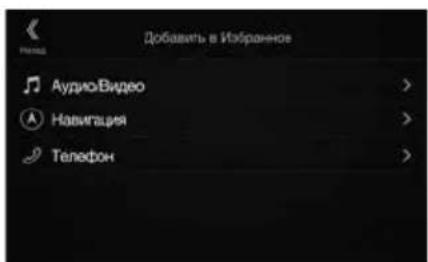
4 BbI6epnte Tpe6yembl 3JemeH, yTO6bl do6aBNTb erO.
Длп monуени дононтьн Ho nHфорmaци OdoabЯгьхлем entax cm. pa3delen "PekaTIpobAHne ekpaHa "N36paHnoe"ВpykoBOdCTBe NOlb3OBaTeIa.
MOxHOIO6aBnTbDO54JIeMeHToB.
-Добавиь слемentбогеоногopa3a He ydaCTca.
5 NocJIe 3aBepWeHnpeJaKTnpOBaHnKoCHNTEcb [ (Ha3aD).
6 Nocne oTo6paXeHnNoTBePxJaIoUeHnAaNcKoCHntecb [OK].
7 PedaKtpoBaHne 6ydt 3aBepseHo npoN30iTeT nepexoK kKpaHy "M36paHHoe".
- Ecnu 60 epe m pedakmupobahn kochymbca [] (Ommeha), npou3ouidem nepexod K npedbyuemy 3kpany pedakmupobahn 3IeMeHmOB 3Kpana "N36panhoe".
Pa6oTa C DAB/DAB+/DMB
KhONka npedBaPnteBHOH NaCTpoiKn
KopoTkoe KacaHne OTo6pa3NT PpeBaPteNbHO HAcTePoEHHy Cnyx6y.
KoCHITcB yyepkmbaTe B TeueHHe Me Hee 2 ckyu, uTo6b3aONMHb TekyuO Cnykby n DoabnBee B CNICOK npedBaPntbHO HAcTPOEHbIX.
3KpaHpeKmMa
PnpeBapntelbHoh HacTpOKn
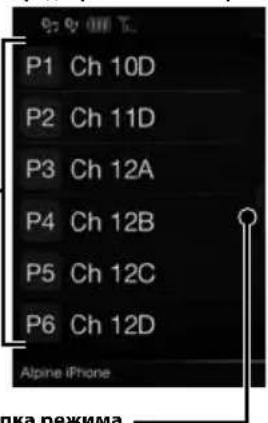
KhoNka peXHMa pacWnpeHHoro noncka
PpOBeIte BnPaBO, YoBbI nepeTNI K EkpAhy CnICKa BCex CnyX6 (OTobpaNTcR CnICOK BCex CnyX6, TeKyUH CNICOK UIN CNICOK PTY).
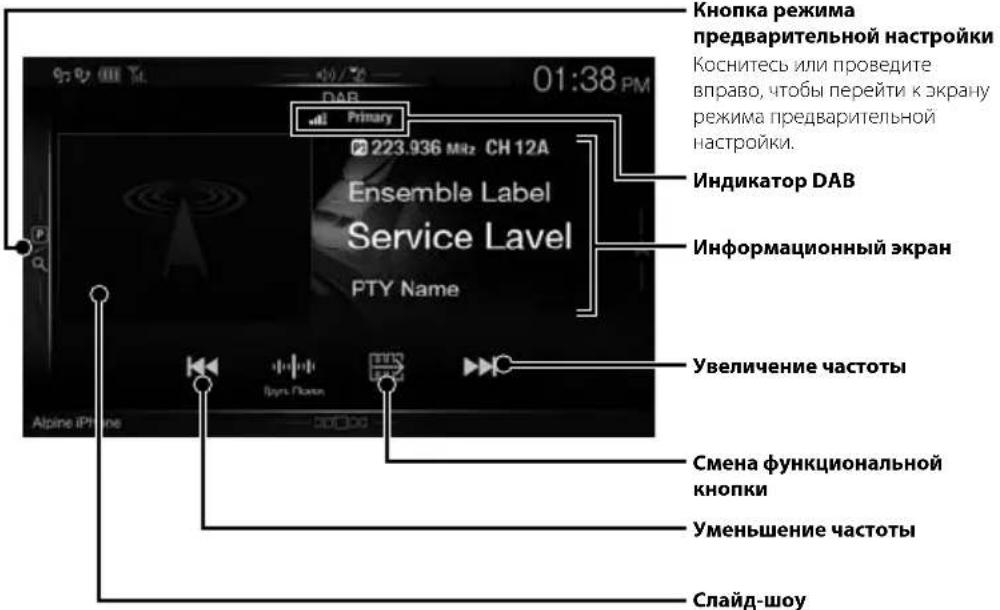
Khonnka pexkma
npeBapntbHoh HacTpoKN
Kochntecb m npoBeinte BnpaB,TO6bl npeTn K kpaHy pexmna PpeBaPteBHO Hacptpkn.
UHdikatop DAB
UHΦopMaunOHnBbI 3KpaH
yBennueHne yactoTbi
Cmeha yHKnHOHaIbHOn KHONK
ymeHbWeHne qaToTBI
Cnaa-woy
OTo6paKaTaTcHNoOpMaUaN O
IporpAmme,foTOrpaFm
NCnONHTeNnpeKnAMHbE
OsbAIBHeHH,CINXPOHnBnPyEmbE
CO CnyKeBbHM KOMNOHeHtOM
PnHNMaEmbM B HAcTOHm
MometH.*
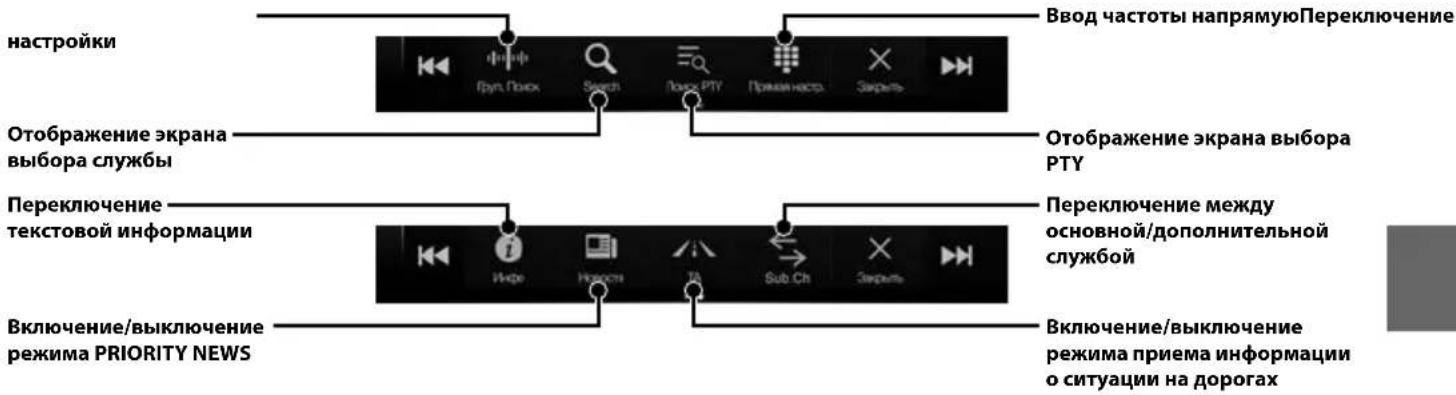
* Ohu Mozym He omobpaikambc8 3abucumocmu om cnyke6h0zo KomnoheHa, npuhmae0zo b hacmouu MomeHm.
7 KocHTecb [More], yTo6bl n3MeHHTb napaMeTpbl MapwpyTa, nn [Haayatb HABnraqiu], yTo6bl Haayatb Noe3kY.
3 KocHTecb [TopoJ/UnHeKc].
4 BBeIte Ha3BaHne ropoa mnn Hndekc.
KoCHNTecb 400 bI OTOBa3nTb CnUCOK NOxODAuNX Ha3BaHn.
5 BBeHnTe HxKHOe Ha3BaHne yInuIbI.
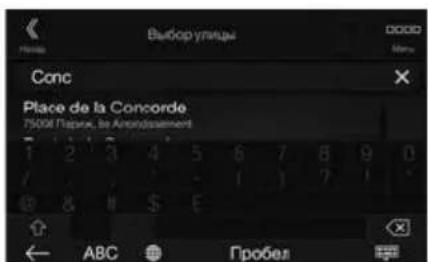
KoCHNTecb 0bOToOpbaNTb CnCOK NOxOJaNX Ha3BaHn.
6 BBeIte HOMep doma nnn nepecekaioyuynu.
Tin LCD npo3paHbI TIN TN LCD
CnCTema pa6oToI aKTHBHaMaTpuaTFT
KONUcTBO 3NEmeHToB N3O6paXeHn
1152000 nikceen
(800× 480× 3 RGB))
DAKTINUeCKOE KOJINuCECTBO 3JIeMeHToB N3O6paKeHnA
He MeHee 99%
CnCTema IODCBETKn LED
FM-TIOHEP
Duaanaoh HactpoKn 87,5-108,0 M
Npororbaa yBCTBnTebHOCTb OHoro KaHa
8,1DΦBΓ(0,7MKB/75OM)
IoporOBaYyBCTBnTeNbHocTb50dB
12D6ΦB(1,1MKB/75OM)
136npatenbHOCTaJIbTePHaTINBHOKaHAnla
80dB
OTHOWHNE CINHAN/65dB
Ipexohoe 3aTyxaHHe MeJy KaHaJaMaM Stereo
35dB
Ko3ΦΦnueH3axBaTa 2,0dB
MW-TIOHEP
Duaanaoh Hactpoyn 531-1602K
PpOPOBaa yBCTbntbHOCTb 25,1MKB/28d5bBT
LW-TIOHEP
UyBCTBnTeNbHOCTb (CTaHdapt IEC)
31.6MKB/30dBΦT
DAB
IloporobaruyBCTBNTbHOCtB-103dM
OTHoWeHHe CnHn/whm 95 db
IpehexoHoe 3atyXaHne 85d6
MEXNYCTepeOKaHaIaMI
USB
Tpe6oBaHnK USB 2.0
MaKcImaJIbHaI NITpe6JIeMaI MOUHOCt b
1500 mA (noideprkka CDP)
Knacc USB USB (Knacc MaccOBOn NaMAtN)
KoIueCTBO KaHao 2 KaHana (Ctepeo)
YachToTHaXapaKTepeNCTnKa*5-20000T(±1dB)
CymmaHbI KO300nHeHT rapMOHueCKnx NCKaKeHH
0.008% (npn 1 kT)
HnHaMueeckmDnana3OH 95dB(npn1KfU)
OTHOWeHnCnHn/um 100 dB
Pa3deneHne KaHaNoB 85dB (np1 KtU)
*1 YactOTTHaXapaKTePnCTKaMOKeT OTINuATbcB 3aBNCIMoCTN OT IpOrpaMMHO O6ccneHn yCTpoiCTBa KOIpOBAHn/CKOpocTN HepeJaun 6NT.
HDMI
BxodnoHΦopMaT
720p/480p/480i/VGA
BbIXOHNFOpmAT
480p
GPS
Yactota npnemGa GPS 1575,42±1M
UyBCTBnTeNbHOCTb npnema GPS
MaKc,-130dB
Bluetooth
Texnueckne xapakrepncnkn Bluetooth
Bluetooth Bepcn 2.1+EDR
2.402-2.480M
Hnana3OH hactOT
+4DMSMAKC.(KNaCCMOUHOCTN2)
BbIXOHaH MaOHOCtB
HFP (npoΦnIb rapHnTpybl)
PpOoNvIb
OPP (npofoJIbIJIpeJaH
ΦaHIOB)
PBAP (npoФиьДИО6MeHa
1,41 Kr (INE-W710D/iLX-702D)
PA3MEP KOPNYCA
UmpHa 198 mm (X802D-U)
178 mm (INE-W710D/ILX-702D)
BbICota
125 mm (X802D-U)
100 mm (INE-W710D/iLX-702D)
Iny6nHa
147 mm
PA3MEP BbICTyIaIOUeI YACTN
UmpuHa 191 mm (X802D-U)
171 mm (INE-W710D/iLX-702D)
BbICota
121 mm (X802D-U)
96 mm (INE-W710D/iLX-702D)
InybHa
19mm
Cpok cnjx6bl-3r0na.
- IIO cboum pa3mepam X902D/i902D nodxodum moIbko dna onpeidenenHou modeu aBmomo6uJia.
H3-3aHenpepbuBHOcoBepuehcmBoBaHua npodykma e20 mexnueckue xapakmepucmu u du3aun Moey mU3menmbc63 npedabapumelbHOzo ybedomenu.
IIaHEnb LCD u3zomobHeHa no cbepxmoHou mexHnoeuu. KOnuecmbo 366fekmuBnix nuKceneu np6buaem 99,99%. 3mo 03nauaem, umo cyuecmbyem bepoarnocmb hauuua 0,01% nuKceneu, komopbte bceda bknouenbu unu bceda bblknuenbl.

- Windows Media n Jorotn Windows JBnIOTc TOBaHbIMN 3HaKaMn nnn 3apeNCTpnpoBaHHbIMN TOBapHbIMN 3HaKaMn Microsoft Corporation B CUSA n/ nn npynx cTpaHax.
- Apple, iPhone, iPod and iPod touch rablaotc toBapHbIMN 3nakamn Kopnpaunn Apple Inc., 3apernctpnpoBaHHbIMN BCLA ndpyrnx cTpaHax. Apple CarPlay abnaetc toBapHbIM 3nakom Kopnpaunn Apple Inc.
-ПриименецлоготиappeCarPlay03haaet,чTo INHTeppeicnoB3OBateJIABTOMO6nIaCOOTBeCTByET 3KcNlyatauONHHbIMCTAHdaptAmApple.KopnpaIgA pIe He HecET OTBECTBEHHOCTN3a paBOTy daHORo ABTOMO6nIaIINEero COOTBeCTBNE CTAHdaptAM 6e3OnacHOCTINpeYJATNBbIM HopMaM.IMETe B BVny,уTO nCIOJIb3OBaHne DaHORO yCTPOIcTBa C iPhone IIIN iPod moKET NOBNIaTb Ha pa6Oty 6ecnpobODHO CB3N.
"Made for iPod" and "Made for iPhone" 03haaiot,уTo aJIeKtpoHHbI aKceccyap pa3pa6oTaH cneuaJIbHo dJIa noJKNIOUeHn K yCTpoiCTBy iPod nIIu iPhone COOTBeTCTBHeHNO,И cepTINuICUPOBaH pa3pa6oTuNKOM KaK yIOBJIETBOPAIOU NkCNIlyaTauIOHHbIM CTAHdApTAM Apple. KopNopaCnry Apple He Hecet OTBeTCTBeHHOCTN 3a pa6Otu DaHHoro yCTpoiCTBa nIIu ero COOTBeTCTBNE CTaHdApTAM 6e3OJaCHOCtN I peYJIaTINBHbIM HopMaM. ImeIte B BVny, UTO ncNoJIb3OBAHne daHHoro akceccyapa c iPod nIIu iPhone MOxET NOBInrTa Ha pa6Otu BecIpobODHOH CBa3N.
Android yBnEeTcTobapHbIM 3HaKoM Google Inc. - Po60T Android Bocnpo3BedeH nnn n3MeHeH n3 co3daHHo pa60tbl, npedocTabIeTcGoo1ge n IcNoIb3yETcB COOTBeTCTBn C yCNOBnMn IInCeH3nn aTp6bucn Creative Commons 3.0.
- SPOTIFY и логотин Spotify явсятая заразсгриповаим Toprobим МаркамSpotify AB.
CNoBecHbI 3HaK n JorOTnbl Bluetooth* ABNIAOTc3apeInCTpnpoBaHHbIMn TOBapHbIMn 3HaKaMn Kopnpaunn Bluetooth SIG, Inc. n cnoJIb3yIOTcKopnpaueeAlpine Electronics, Inc. no IinueH3nn. -
TepmnbH HDMI n HDMl High-Definition Multimedia Interface, a TaKke IorotnHDMI ABJIOTc TOBaphbIMn 3HaKaMn KOMpaHnHDMI Licensing LLC, 3apeNCTpnpoBaHHbIMn B CIIJA n npyrrnx cTpaHax.
-
LInueH3nHa TexHONoTNO KoINpOBAHn 3Byka MPEG Layer-3 NoIyeha ot Fraunhofer IIS u Thomson. Ppi NOCTBke 3TOrO npOdykTa npedocTabnEeTcLIneH3nHa Naacthoe, HeKOMMepueckoe NcNoIb3OBaHne u He npedocTabnEeTcLIneH3n u He NpOpa3ymeBaIOTCa KaKe-1N60 npaba Ha nCNoIb3OBaHne DaHHORo npOdykTa B cENx KOMpeUeCKoro (t.e. dNn POlyeHnna Prnbll) padnoBeuAHHBpealbHom BpeMeHN (Ha3emHOrO, cnyTHNKOBoro, Ka6JIbHOro u/nuNn HHO), WnpOKOrO BeuaHnN NnN NOTOKOBn nepeDaun daHHbIX uepe3 INThepHe, INTPacETn u/nuNn INhle CETn NnN DpyTne CETn pacPpeJeHnna 3NeKTPOHNO CODepKaHn, TaKne ka NpINOJKeHn 3ByKOBOcnpOn3BeDeHnna 3a nnAty NnN no Tpe6OBaHnIO. Dnra Takoro nCNoIb3OBaHn Tpe6yeTc ONdJIbHa NIneH3n. Dnra NoLyehn DOonOHnTeNbHOu INΦopMaun nocTeNTe Be6-caIT http://www.mp3licensing.com
- ©2006-2016 TomTom. All rights reserved. This material is proprietary and the subject of copyright protection, database right protection and other intellectual property rights owned by TomTom or its suppliers. The use of this material is subject to the terms of a license agreement. Any unauthorized copying or disclosure of this material will lead to criminal and civil liabilities.
OOO «KoMaHnBaBoHaH3a»
Hhopmaun o cepBnchbIX uehtpax
About the Rules of Bluetooth Electromagnetic Radiation Regulation

Declaration of Conformity
CdeNaHO BAnOnn

Spistresci
Dia X902D/X802D-U/INE-W710D:
7 cali (INE-W710D/iLX-702D)
1,41 kg (INE-W710D/iLX-702D)
WYMIARY KORPUSU
Szerokosc 198 mm (X802D-U)
178 mm (INE-W710D/iLX-702D)
Wysokość
125 mm (X802D-U)
100 mm (INE-W710D/ILX-702D)
Gebokosc
147 mm
WYMIARY PLYTY CZOLOWEJ
Szerokosc 191 mm (X802D-U)
171 mm (INE-W710D/iLX-702D)
96 mm (INE-W710D/iLX-702D)
Glebokosc
19mm
About the Rules of Bluetooth Electromagnetic Radiation Regulation

Declaration of Conformity
ALPINE
ALPINE ELECTRONICS MARKETING, INC.
1-7, Yukigaya-Otsukamachi, Ota-ku,
Tokyo 145-0067, JAPAN
Phone: 03-5499-4531
ALPINE ELECTRONICS OF AMERICA, INC.
19145 Gramercy Place, Torrance,
California 90501, U.S.A.
Phone 1-800-ALPINE-1 (1-800-257-4631)
ALPINE ELECTRONICS OF AUSTRALIA PTY. LTD.
161-165 Princes Highway,
Hallam Victoria 3803, Australia
Phone 03-8787-1200
ALPINE ELECTRONICS GmbH
Alpine House Fletchamstead Highway,
Coventry CV4 9TW, U.K.
www.alpine.co.uk
ALPINE ELECTRONICS France S.A.R.L.