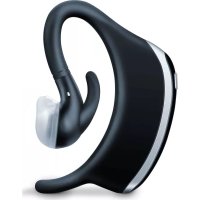
SL 70 - Alarm clock radio BEURER - Free user manual and instructions
Find the device manual for free SL 70 BEURER in PDF.


| Product type | Anti-snoring earpiece |
| Brand | Beurer |
| Model | SL 70 |
| Dimensions | 49 x 15 x 62 mm |
| Weight | 15 g (without ear tips) |
| Power supply | Lithium-polymer battery 80 mAh, micro-USB charging, 100-240 V power adapter |
| Battery life | Approximately 4 days (depending on use) |
| Main functions | Snoring detection by sound and vibration, emission of sound pulses or sound+vibration, beurer SleepQuiet app for analysis and settings, data recording, Bluetooth transfer |
| App compatibility | iOS ≥12, Android ≥8.0, Bluetooth 4.0 |
| Attachment | Left or right ear, silicone ear tips (3 sizes) |
| Max recorded volume | Measurement of maximum snoring volume |
| Statistics | Calculation of snoring per hour, recording duration, calendar with log, display by day/week/year |
| Care and cleaning | Clean periodically with a cotton swab soaked in 70% isopropyl alcohol; do not use chemical or abrasive detergents |
| Safety | Splash-proof; operating temperature: 0 °C to 60 °C; do not expose to water or excessive heat |
| Spare parts | Ear tip kit (3 sizes, silicone): ref. 163.910 |
| Warranty | 3 years (excluding normal wear and accessories) |
| Package contents | 1 anti-snoring earpiece, 3 ear tips, 1 micro-USB charging cable, 1 power adapter |
Frequently Asked Questions - SL 70 BEURER
User questions about SL 70 BEURER
0 question about this device. Answer the ones you know or ask your own.
Ask a new question about this device
Download the instructions for your Alarm clock radio in PDF format for free! Find your manual SL 70 - BEURER and take your electronic device back in hand. On this page are published all the documents necessary for the use of your device. SL 70 by BEURER.
USER MANUAL SL 70 BEURER
$$ \text {rot} = \text {Akku} 0 - 40 \% $$
https://www.beurer.com/web/we-landingpages/de/cdeclarationofconformity.php
13. Garantie / Service
Read these instructions for use carefully and keep them for later use, be sure to make them accessible to other users and observe the information they contain.
Dear customer,
Thank you for choosing a product from our range. Our name stands for high-quality, thoroughly tested products for applications in the areas of heat, weight, blood pressure, body temperature, pulse, gentle therapy, massage, beauty, air and baby.
With kind regards
Your Beurer team
Getting to know your device
A restorative night's sleep is of huge importance for our physical and psychological well-being; after all, it is during sleep that we process things such as new experiences and improve our mental and physical fitness. If you snore during your sleep, however, then the quality of your sleep is impaired considerably. The beurer SL 70 snore stopper was developed to reduce snoring, and to increase sleep quality as well as your well-being, for a restful night.
How does the snore stopper work?
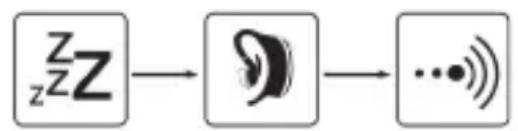
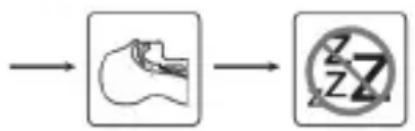
The snore stopper is attached to the left or right ear. The snore stopper checks for snoring noises during use. In addition, snoring produces vibrations which are transmitted via the cranial bones and which are also detected by the snore stopper. As soon as the snore stopper detects noises and vibrations, it starts sending impulses to the ear. These impulses consist of tone or tone and vibration. The intensity of these impulses increases from a low level un
til the desired success is achieved. The throat muscles become firm and the airways open as a reaction to the impulses. Breathing is calmed and the snoring decreases. You may also change your lying position. In the long term, there is a lasting reduction in snoring through the training of
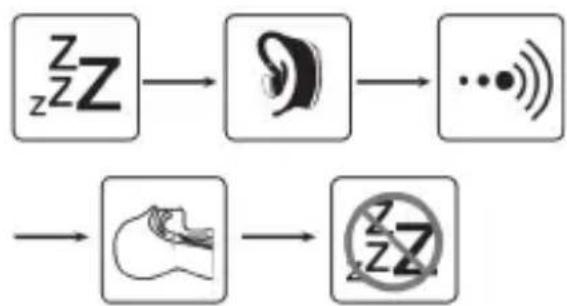
the muscles in the throat. Initially, it may take up to 7 days until you are accustomed to the device.
The „beurer SleepQuiet“ app provides the following functions:
- Detailed snoring analysis including snores per hour, recording duration and determination of the maximum snoring volume
- Calendar with snoring diary
- Evaluation view (in days/weeks/year)
- Adjustable impulse intensity and sensitivity
System requirements:
iOS ≥ 12 ;Android TM≥ 8.0 ;Bluetoothab4.0
List of supported devices:
Table of contents
- Included in delivery 13
- Signs and symbols 14
- Intended use 14
4.Warnings and safety notes ....14 - Device description. 15
- Initial use 15
-
Usage 17
-
Cleaning and maintenance ...17
- Accessories and replacement parts 18
- What if there are problems?.18
- Disposal 18
- Technical specifications......18
- Warranty / Service 19
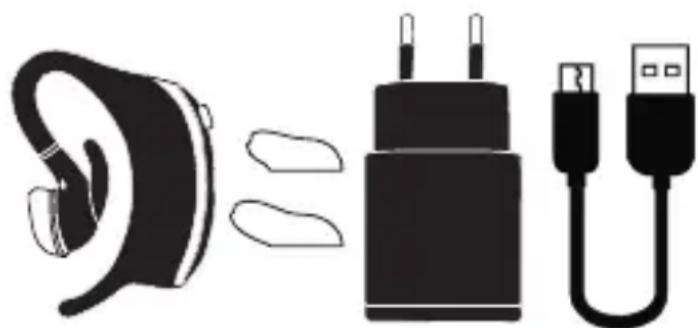
1. Included in delivery
Check that the delivery has not been tampered with and make sure that all components are present. Before use, ensure that there is no visible damage to the device or accessories and that all packaging material has been removed. If you have any doubts, do not use the device and contact your retailer or the specified Customer Services address.
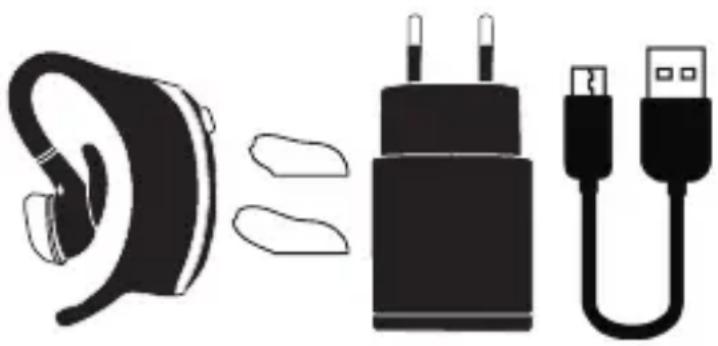
1x snore stopper
3x earplugs (small, medium, large)
1x micro USB charging cable
1x mains adapter
2. Signs and symbols
The following symbols are used on the device, in these instructions for use, on the packaging and on the type plate for the device:
| ! | Warning Warning instruction indicating a risk of injury or damage to health |
| ! | Important Safety note indicating possible damage to the device/accessory |
| i | Product information Note on important information |
| Disposal in accordance with the Waste Electrical and Electronic Equipment EC Directive – WEEE | |
| Manufacturer | |
| CE | CE labelling This product satisfies the requirements of the applicable European and national directives. |
| Disposition of packaging in an environmentally friendly manner | |
| EAC | The products demonstrably meet the requirements of the Technical Regulations of the EAEU. |
3. Intended use
The device may only be used for the purpose for which it is designed and in the manner specified in the instructions for use. Any form of improper use can be dangerous. The manufacturer is not liable for damage resulting from improper or incorrect use.
4.Warnings and safety notes

WARNING
- Protect the snore stopper from impacts, humidity, dirt, marked temperature fluctuations and direct sunlight.
-
Keep packaging material and the snore stopper away from children. Choking hazard!
-
Keep the snore stopper away from heat sources and do not use it near ( 1m ) shortwave or microwave devices.
- Use and store the snore stopper at an ambient temperature between 0^ and 60^ . Higher or lower temperatures may damage the snore stopper.
- The snore stopper is only splash-proof.
- Keep the snore stopper away from water.
- Do not use any chemical or abrasive cleaning agents. Clean the snore stopper occasionally with a 70% isopropyl alcohol pad.
- If your skin or eyes come into contact with fluid from a rechargeable battery cell, flush out the affected areas with water and seek medical assistance.
- Protect batteries from excessive heat.
- Risk of explosion! Never throw batteries into a fire.
- Do not disassemble, split or crush the rechargeable batteries.
- Fully charge the battery prior to initial use.
- Fully charge the battery at least every 3 months.
- Batteries must be charged correctly prior to use. The instructions from the manufacturer and the specifications in these instructions for use regarding correct charging must be observed at all times.
5. Device description
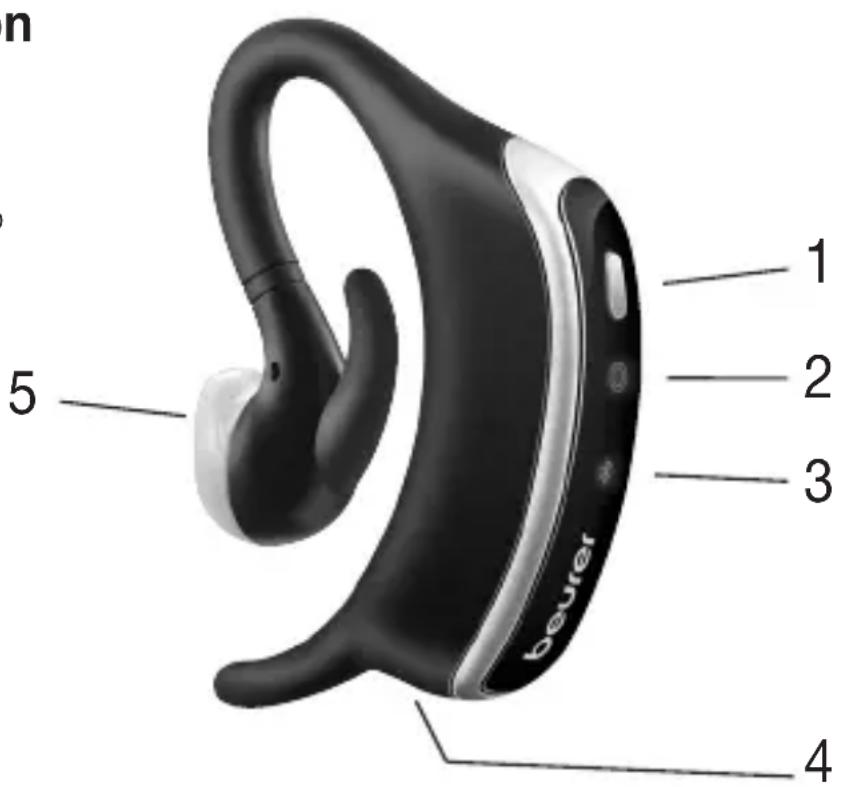
1 ON/OFF button
2 Operation light
Green = battery at 41 - 100%
Red = battery at 0 - 40%
3 Bluetooth® light
4 Micro USB connection
5 Earplugs
6. Initial use
Connecting the snore stopper to the "beurer SleepQuiet" app
You can also use the basic functions of the snore stopper without the "beurer SleepQuiet" app. The additional features such as recording, statistics, calendar and settings are only available in conjunction with the "beurer SleepQuiet" app.
To connect your snore stopper with the "beurer SleepQuiet" app, please proceed as follows:
- Ensure that your smartphone is connected to the internet.
- Activate Bluetooth® on your smartphone.
- Download the free "beurer SleepQuiet" app from the Apple App Store (iOS) or at Google Play (Android).

Depending on the settings for your smartphone, additional charges may be incurred for connecting to the Internet or transferring data.
- Start the "beurer SleepQuiet" app and follow the instructions.
Attaching the snore stopper
You can attach the snore stopper to the left or right ear.
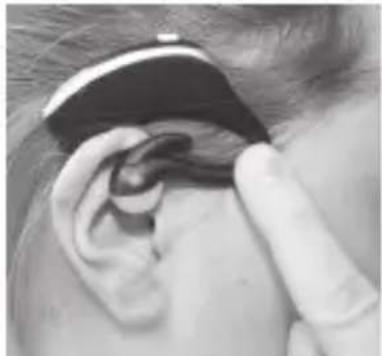
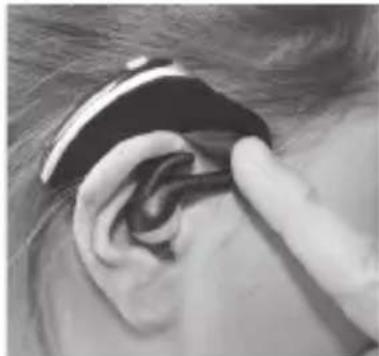
Here, it is important to turn the earplug [5] so that the opening is facing the direction of the ear canal once attached.
- Attach the snore stopper to your ear as shown. Do not bend the upper clip on the snore stopper too strongly as it may become damaged.
1.2.
3.
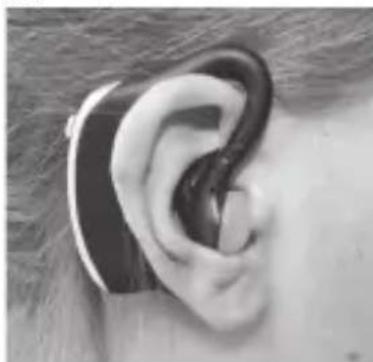
If the earplug easily moves in your ear, try one of the other earplugs included in delivery for optimum fit.
For individual adjustment there is the option of carefully shortening the small
hook on the device using a pair of scissors. When doing so, it is important to only cut off a small amount at a time and to repeat this, if necessary, until you have made the hook the right size. Check whether it is a good fit after each cut. To make it comfortable to wear, please ensure that the cuts are even and round off the corners.
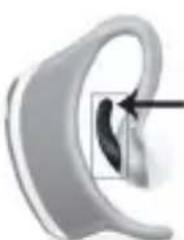
Please ensure that the hook is securely connected to the device and note that it cannot be replaced.
7. Usage
- Press and hold the ON/OFF button on the snore stopper for three seconds. The operation light begins to light up. The snore stopper is now switched on. If the snore stopper cannot be switched on, the battery in it is flat. Recharge the battery as described in Chapter "7.1 Charging the battery". After a short time, the operation light switches off so that it does not disturb you in the night.
- Attach the snore stopper to your left or right ear as shown.
- Go to bed.
- As soon as you get up, switch off the snore stopper. To do this, press and hold the ON/OFF button on the snore stopper for three seconds. A short vibration confirms that the snore stopper has been successfully switched off.
Initially, it may take up to 7 days until you are accustomed to the device.
Charging the battery
- Open the cover on the micro USB connection of the snore stopper.
- Connect the charging cable included in delivery to the snore stopper and a computer that is switched on. Alternatively, connect the charging cable with the snore stopper and the mains adapter. Insert the mains adapter into a suitable socket.
- Whilst charging, the operation light flashes green. As soon as the battery is fully charged, the operation light will remain green.
- It usually takes approx. 3 hours to fully charge the battery. As soon as the battery is completely charged, remove the charging cable from the computer or the socket and the mains adapter and the snore stopper.
- When the battery is fully charged, the battery life is approx. 4-5 days. The operation light turns red as soon as the battery capacity is below 41% .
Transferring data to your smartphone
To transfer the recorded data from your snore stopper to the "beurer SleepQuiet" app, proceed as follows:
- Activate Bluetooth® on your smartphone.
- Open the "beurer SleepQuiet" app. Press the ON/OFF button on the snore stopper. The recorded data is now transferred to the smartphone. For a large volume of data, this may take some time.
8. Cleaning and maintenance
Do not use any chemical or abrasive cleaning agents. Clean the snore stopper occasionally with a 70% isopropyl alcohol pad.
9. Accessories and replacement parts
To purchase accessories and replacement parts, please visit www.beurer.com or contact the corresponding service address (according to the service address list) in your country. Accessories and replacement parts are also available from retailers.
| Designation | Item number and/or order number |
| Set of earplugs (3 sizes, silicone) 163.910 | |
10. What if there are problems?
| Problem Possible cause | Solution | |
| Device does not switch on | Battery dead Charge the | battery |
| Device does not switch on and battery is fully charged | Device defective Contact Customer Services | |
11. Disposal
For environmental reasons, do not dispose of the device in the household waste at the end of its useful life.
Dispose of the device at a suitable local collection or recycling point. Dispose of the device in accordance with EC Directive - WEEE (Waste Electrical and Electronic Equipment).
If you have any questions, please contact the local authorities responsible for waste disposal.
12. Technical specifications
| Dimensions 49 x 15 x 62 mm | |
| Weight 15 g (without earplugs) | |
| Connection Micro USB connection | |
| Mains adapter voltage supply | Input: 100-240 V~; 50/60 Hz; 0.3 A Output: 5 V =1000 mA |
| Mains adapter protection class | □ double-protected |
| Battery 80 mAh lithium polymer | polymer |
| Battery life Approx. 4 days (depending on use) | depending on use) |
| Memory 1 night for heavy snoring | snoring |
| Material Silicone | |
| Data transfer Bluetooth | ® low energy technology |
| Permissible operating conditions | 0°C to 60°C, 30 to 75 % RH860 to 1060 hPa ambient pressure |
| Permissible transport and storage conditions | -20°C to 60°C, < 75 % RH860 to 1060 hPa ambient pressure |
| Frequency band 2402 – 2480 MHz | |
| Transmission power 3.7 dBm | |
Subject to technical changes.
We hereby confirm that this product complies with the European RED Directive 2014/53/EU.
The CE Declaration of Conformity for this product can be found under:
https://www.beurer.com/web/we-landingpages/de/cdeclarationofconformity.php
13. Warranty / Service
Beurer GmbH, Söflinger Straße 218, 89077 Ulm, Germany (hereinafter referred to as "Beurer") provides a warranty for this product, subject to the requirements below and to the extent described as follows.
The warranty conditions below shall not affect the seller's statutory warranty obligations which ensue from the sales agreement with the buyer. The warranty shall apply without prejudice to any mandatory statutory provisions on liability.
Beurer guarantees the perfect functionality and completeness of this product.
The worldwide warranty period is 3 years, commencing from the purchase of the new, unused product from the seller.
The warranty only applies to products purchased by the buyer as a consumer and used exclusively for personal purposes in the context of domestic use. German law shall apply.
During the warranty period, should this product prove to be incomplete or defective in functionality in accordance with the following provisions, Beurer shall carry out a repair or a replacement delivery free of charge, in accordance with these warranty conditions.
If the buyer wishes to make a warranty claim, they should approach their local retailer in the first instance: see the attached "International Service" list of service addresses.
The buyer will then receive further information about the processing of the warranty claim, e.g. where they can send the product and what documentation is required.
A warranty claim shall only be considered if the buyer can provide Beurer, or an authorised Beurer partner, with
- a copy of the invoice/purchase receipt, and
- the original product.
The following are explicitly excluded from this warranty:
- deterioration due to normal use or consumption of the product;
- accessories supplied with this product which are worn out or used up through proper use (e.g. batteries, rechargeable batteries, cuffs, seals, electrodes, light sources, attachments and nebuliser accessories);
- products that are used, cleaned, stored or maintained improperly and/or contrary to the provisions of the instructions for use, as well as products that have been opened, repaired or modified by the buyer or by a service centre not authorised by Beurer;
-
damage that arises during transport between manufacturer and customer, or between service centre and customer;
-
products purchased as seconds or as used goods;
- consequential damage arising from a fault in this product (however, in this case, claims may exist arising from product liability or other compulsory statutory liability provisions).
Repairs or an exchange in full do not extend the warranty period under any circumstances.
FRANÇAIS

Chere cliente, cher client,
https://www.beurer.com/web/we-landingpages/de/cedeclarationofconformity.php
13. Garantie / Maintenance
https://www.beurer.com/web/we-landingpages/de/cedclarationofconformity.php
https://www.beurer.com/web/we-landingpages/de/cdeclarationofconformity.php
13. Garanti / Servi
C HannyuHMMN NOXeJaHnA M N,
Bawa komaHa Beurer
Дя Oзнakомленья
Houho OTbIX CO CHOM DOCTaTOUHOI pOdoJXITeJIbHOCTN Upe3BbIaHOBaxhen IJxOPOWeRo 0n3nueCKOrO n DyUSeBHOrO cAmOuyBCTBn; NOTOMUYTO BO CHe Mbl, NOMMO IpoUero, NepeOCMbICJINBaEM npNo6peTeHHbI ONblTIn yKpePJIaEM HaSe yMCTBeHHoe n 0n3nueCKoe 3dOpOBbe. EcIn Bbl xpaNTeBO Bpemr ChA, KaueCTBO BaIero ChA 3HaunTeJIbHO cHIXKaETcra.
UcTpoIcTBo npOTnB xpana SL 70 6bIIO pa3pa6OtaHO dIy UMeHbSeHnA xpa- n yIyUWeHnRA KaueCTBa cHa I CaMOuyBCTBnA, YTO6bl ObecneuHTb Bam HOuHOn OTDbIX.
Kak pa6oTaET yCtpoiCtBO npOTnB xpana?
UcTPOICTBO npOTnB xpana qKcnpyETcHa JEBOM nIN npabOM yxe. Bo BpeMnCNOJb3OBaHnY cTPOICTBO npOBepRe T haINuYe 3ByKO bXpana. DOnONHHTeJIbHO XpaN Bbl3bIBaEt KOle6aHn, KOtOpbIe NpePaHTcY cepE3 KocTN UpePnA IN TakXe paCNo3HaOTcY cTPOICTBOM npOTnB xpana. KaT ToJIbKO UcTPOICTBO npOTnB xpana paCNo3Haet 3ByKn I KOle6aHn, OHO OTnpaBJIeT NmNpyIbCbI B yxo. 3TN NmNpyIbCbI COCTOAT N3 3ByKa nIN 3ByKa n BV6paCnn.
IHTeHcNBHOCTb 3Tnx IMnylcoB HaunHaetc C MInImaJIbHOrO yPOBn, 3aTeM
yBeHnBaeTcdoDCTNXeHnHeo6XoMOro pe3yIbTaT. B OTBet Ha mNpyIbCbi MyCKyIaTypa Wen HapraeTc, a DbIXaTeNbHbIe NytN OTKpbIBaOTc. DbIXaHne ycNOKaNBaETc, n 3ByKn Xpana yMehbuaOTc. DOnOHNTeNbHO BO3MOxHo N3MeHeHne NOLOXeHn.
B daIbHeIeM xpan yMeHbIaETc8 6laIogApra TpeHnpOBKe MysKyIaTypbI rIoTKn. YTo6bl npINbIKHyTb K npIbOpy, MoXeT noTppe6oBaTbcra Do 7 dHei.
PpIIOxKeHne ,beurer SleepQuiet" ochaueHo cJeDuOuIMN fynKcnaMn.
- Поробный сдаха, вклоча InteHCBHOCTb (KOLIYeCTBO BCXpa-biBaHn B yac), ДInteJbHOCTb 3aIINcN IN OnpedeJIeHne MaKcIMaJIbHOr rpoMkoCTn xpana
- KaJIeHapb c JyurHaIom XpaIa.
- OTyET (npoCmOTp B dHax/HeJeIax/roaX).
- PerynipyeMaI INTeHCINBHOCTb IMnYlbCa N YyBCTBNTeJIbHOCTb.
CnCTeMHbIe Tpe6OBaHnA
iOS≥12;AndroidTM≥8.0;Bluetooth®ab4.0
Cnncok noDnepXnBaembIX moJeIe CmapTfoHOB:
Copepkanhe
- Komnlekt noctabkn 63
2.Погеняксимволam...64 - Исторьагаиме по Нашаши.
64
4. Празостеожения уka3ани по Тхике 6e3oNaChocTu.....65
5. OnscaHne np6opa.. 66
6. Побrotовka к paбote... 66
7.Приименени.. 67
- OuNTka n yxod 68
- Akceccyapbl n 3aapanhble deTann 69
10.Что делаты ри ВОЗнкоовецни пробlem? ...69 - Ytnn3a.. 69
- TexHnueckne daHHbIe 70
13.「apaHTn/cepBnchoe 06cIyXnBaHne.71
1. KompaneKT NOCTABKN
Пюверы TE KOMпг�нocь NOCTaBKN I yбeNTecb B TOM, YTO Ha KapToHOnу naKOBKe HET BHeUHnx NOBpeXdEHN. Перд ИспОльЗОВанeМ EMy6eNTecb B TOM, YTO npIbOp I erO pRnHaJIeJxHOCTHn He IMeHT BnIMMbIX IOBpeXdEHN, I ydaJIte BCE ynaKOBoUHbIe MaTePnAJIbI. Пр nHaIuHn ComHeHn He INcNoIb3yIte npIbOp I OБpaTntEcB K npOdaBuy IIN B cepBnCHyIO Cnyx6y ITO yKa3aHHOMy aDpecy.
1xUcTpoIcTBO npOTnB xpana
3xIpoTnBOUyMhBIE BkJaDbIuN (MaJIbI, CpeHnI, 6OJbWoI)
1x3apnHykabeB Micro-USB
1xceTeBOaanTep
Electrical and Electronic Equipment).
https://www.beurer.com/web/we-landingpages/de/cedclarationofconformity.php
The Bluetooth® word mark and logos are registered trademarks owned by Bluetooth SIG, Inc. and any use of such marks by Beurer GmbH is under license. Other trademarks and trade names are those of their respective owners.
Apple and the Apple logo are trademarks of Apple Inc., registered in the U.S. and other countries. App Store is a service mark of Apple Inc., registered in the U.S. and other countries.
Google Play and the Google Play logo are trademarks of Google LLC. Android is a trademark of Google LLC.