Maui P900 - Hi-fi system LD Systems - Free user manual and instructions
Find the device manual for free Maui P900 LD Systems in PDF.



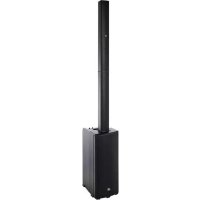
| Product type | Portable active column speaker |
| Brand | LD Systems |
| Model | MAUI P900 |
| Available colors | Cocoon White, Platinum Grey, Graphite Black |
| Total height | 2173 mm |
| Total weight | 46 kg |
| Subwoofer - Dimensions (W x H x D) | 400 x 745 x 470 mm |
| Subwoofer - Weight | 30.6 kg |
| Amplification | Class D 3-way, 1400 W RMS / 2800 W peak |
| Frequency response | 42 Hz – 20,000 Hz |
| Max SPL (peak) | 131 dB |
| Dispersion (H x V) | 140° x 15° |
| Power supply | 100-120 V~ / 200-240 V~ (auto-switching), 50-60 Hz, 1000 W max |
| Fuse | T10AL / 250 V |
| Audio inputs | 2 x XLR (L/R) balanced |
| Audio outputs | 2 x XLR (THRU L/R) balanced |
| Bluetooth | A2DP, aptX, AAC, SBC, range 70 m (theoretical) |
| Stereo Link function | True Wireless Stereo (TWS) up to 40 m between two speakers |
| DSP | 24-bit / 48 kHz, SNR 106 dB |
| Protections | Overheating, multiband limiter, short-circuit, DC |
| Subwoofer material | 15 mm plywood with HD aluminum coating |
| Column material | Aluminum with HD coating and multi-layer fabric mesh |
| Included accessories | Additional aluminum die-cast foot, 3 mm Allen key, IEC power cable |
| Maintenance | Clean with a dry, lint-free cloth |
| Safety | Do not expose to water, do not open, maintain 50 cm clearance at the rear |
Frequently Asked Questions - Maui P900 LD Systems
User questions about Maui P900 LD Systems
0 question about this device. Answer the ones you know or ask your own.
Ask a new question about this device
Download the instructions for your Hi-fi system in PDF format for free! Find your manual Maui P900 - LD Systems and take your electronic device back in hand. On this page are published all the documents necessary for the use of your device. Maui P900 by LD Systems.
USER MANUAL Maui P900 LD Systems
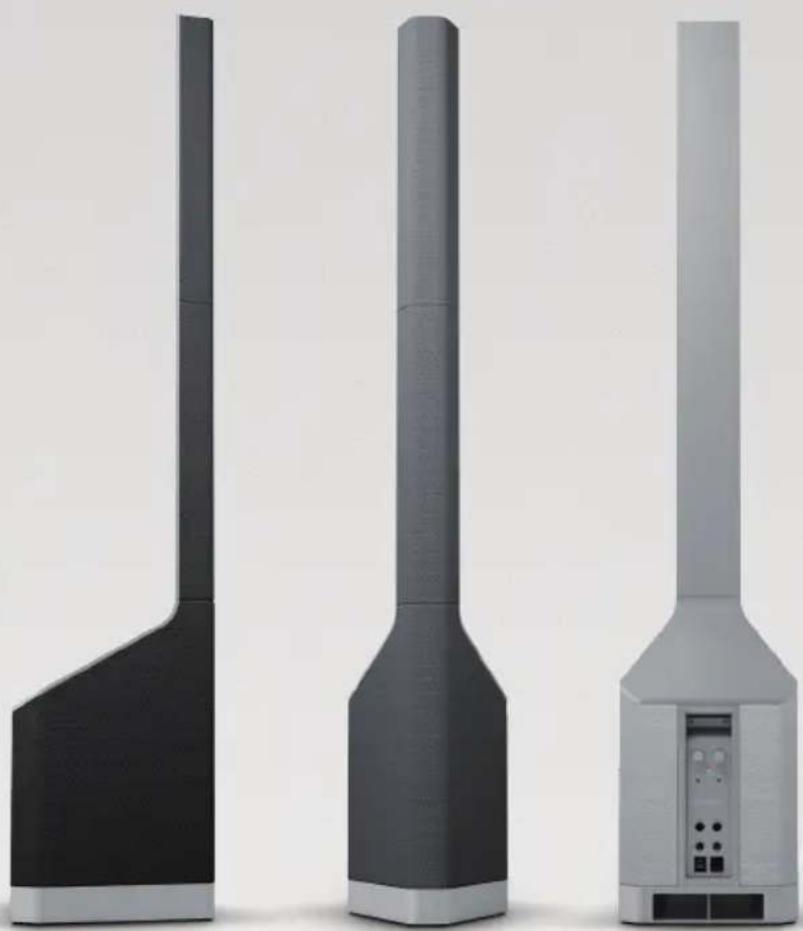
MAUI® P900
POWERED COLUMN PA SYSTEM BY PORSCHE DESIGN STUDIO
GRAPHITE BLACK PLATINUM GREY COCOON WHITE
LDMAUIP900B
LDMAUIP900G
LDMAUIP900W
CONTENTS / INHALTSVERZEICHNIS / CONTENU / CONTENIDO / TREŚĆ / CONTENUTO / 目录 / 目錄
ENGLISH
PREVENTIVE MEASURES 3-4
INTRODUCTION
ASSEMBLY
CONNECTIONS, OPERATING AND DISPLAY ELEMENTS 6-8
WIRING EXAMPLES 9
OPTIONAL ACCESSORIES 10
TECHNICAL DATA 10-12
MANUFACTURER'S DECLARATIONS 12
DEUTSCH
SICHERHEITSHINWEISE
EINFÜHRUNG
AUFBAU
ACCESSOIRE DISPONIBLE EN OPTION
CARACTÉRISTIQUES TECHNIQUES
DÉCLARATIONS DU FABRICANT
ESPAÑOL
CONNESSIONE E ACCENSIONE 56
CONNESSIONI, ELEMENTI DI COMANDO E VISUALIZZAZIONE 57-59
19 ESEMPI DI CABLAGGIO 60
We have designed this product to operate reliably over many years. LD Systems stands for this with its name and many years of experience as a manufacturer of high-quality audio products. Please read this User's Manual carefully, so that you can begin making optimum use of your LD Systems product quickly.
You can find more information about LD-SYSTEMS at our Internet site WWW.LD-SYSTEMS.COM
PREVENTIVE MEASURES
- Please read these instructions carefully.
- Keep all information and instructions in a safe place.
- Follow the instructions.
- Observe all safety warnings. Never remove safety warnings or other information from the equipment.
- Use the equipment only in the intended manner and for the intended purpose.
- Use only sufficiently stable and compatible stands and/or mounts (for fixed installations). Make certain that wall mounts are properly installed and secured. Make certain that the equipment is installed securely and cannot fall down.
- During installation, observe the applicable safety regulations for your country.
- Never install and operate the equipment near radiators, heat registers, ovens or other sources of heat. Make certain that the equipment is always installed so that is cooled sufficiently and cannot overheat.
- Never place sources of ignition, e.g., burning candles, on the equipment.
- Ventilation slits must not be blocked.
- Keep a minimum distance of 20 cm around and above the device.
- Do not use this equipment in the immediate vicinity of water (does not apply to special outdoor equipment - in this case, observe the special instructions noted below. Do not expose this equipment to flammable materials, fluids or gases. Avoid direct sunlight!
- Make certain that dripping or splashed water cannot enter the equipment. Do not place containers filled with liquids, such as vases or drinking vessels, on the equipment.
- Make certain that objects cannot fall into the device.
- Use this equipment only with the accessories recommended and intended by the manufacturer.
- Do not open or modify this equipment.
- After connecting the equipment, check all cables in order to prevent damage or accidents, e.g., due to tripping hazards.
- During transport, make certain that the equipment cannot fall down and possibly cause property damage and personal injuries.
- If your equipment is no longer functioning properly, if fluids or objects have gotten inside the equipment or if it has been damaged in another way, switch it off immediately and unplug it from the mains outlet (if it is a powered device). This equipment may only be repaired by authorized, qualified personnel.
- Clean the equipment using a dry cloth.
- Comply with all applicable disposal laws in your country. During disposal of packaging, please separate plastic and paper/cardboard.
- Plastic bags must be kept out of reach of children.
- Please note that changes or modifications not expressly approved by the party responsible for compliance could void the user's authority to operate the equipment.
FOR EQUIPMENT THAT CONNECTS TO THE POWER MAINS
- CAUTION: If the power cord of the device is equipped with an earthing contact, then it must be connected to an outlet with a protective ground. Never deactivate the protective ground of a power cord.
- If the equipment has been exposed to strong fluctuations in temperature (for example, after transport), do not switch it on immediately. Moisture and condensation could damage the equipment. Do not switch on the equipment until it has reached room temperature.
- Before connecting the equipment to the power outlet, first verify that the mains voltage and frequency match the values specified on the equipment. If the equipment has a voltage selection switch, connect the equipment to the power outlet only if the equipment values and the mains power values match. If the included power cord or power adapter does not fit in your wall outlet, contact your electrician.
- Do not step on the power cord. Make certain that the power cable does not become kinked, especially at the mains outlet and/or power adapter and the equipment connector.
- When connecting the equipment, make certain that the power cord or power adapter is always freely accessible. Always disconnect the equipment from the power supply if the equipment is not in use or if you want to clean the equipment. Always unplug the power cord and power adapter from the power outlet at the plug or adapter and not by pulling on the cord. Never touch the power cord and power adapter with wet hands.
- Whenever possible, avoid switching the equipment on and off in quick succession because otherwise this can shorten the useful life of the equipment.
- IMPORTANT INFORMATION: Replace fuses only with fuses of the same type and rating. If a fuse blows repeatedly, please contact an authorised service centre.
- To disconnect the equipment from the power mains completely, unplug the power cord or power adapter from the power outlet.
- If your device is equipped with a Volex power connector, the mating Volex equipment connector must be unlocked before it can be removed. However, this also means that the equipment can slide and fall down if the power cable is pulled, which can lead to personal injuries and/or other damage. For this reason, always be careful when laying cables.
- Unplug the power cord and power adapter from the power outlet if there is a risk of a lightning strike or before extended periods of disuse.

CAUTION:
To reduce the risk of electric shock, do not remove cover (or back). There are no user serviceable parts inside. Maintenance and repairs should be exclusively carried out by qualified service personnel.
The warning triangle with lightning symbol indicates dangerous uninsulated voltage inside the unit, which may cause an electrical shock.

The warning triangle with exclamation mark indicates important operating and maintenance instructions.

Warning! This symbol indicates a hot surface. Certain parts of the housing can become hot during operation. After use, wait for a cool-down period of at least 10 minutes before handling or transporting the device.

Warning! This device is designed for use below 2000 metres in altitude.

Warning! This product is not intended for use in tropical climates.
CAUTION! HIGH VOLUMES IN AUDIO PRODUCTS!
This device is meant for professional use. Therefore, commercial use of this equipment is subject to the respectively applicable national accident prevention rules and regulations. As a manufacturer, Adam Hall is obligated to notify you formally about the existence of potential health risks.
Hearing damage due to high volume and prolonged exposure: When in use, this product is capable of producing high sound-pressure levels (SPL) that can lead to irreversible hearing damage in performers, employees, and audience members. For this reason, avoid prolonged exposure to volumes in excess of 90 dB.
NOTE: This equipment has been tested and found to comply with the limits for a Class B digital device, pursuant to Part 15 of the FCC Rules. These limits are designed to provide reasonable protection against harmful interference in a residential installation. This equipment generates, uses and can radiate radio frequency energy and, if not installed and used in accordance with the instructions, may cause harmful interference to radio communications. However, there is no guarantee that interference will not occur in a particular installation. If this equipment does cause harmful interference to radio or television reception, which can be determined by turning the equipment off and on, the user is encouraged to try to correct the interference by one or more of the following measures:
- Reorient or relocate the receiving antenna.
- Increase the separation between the equipment and receiver.
- Connect the equipment into an outlet on a circuit different from that to which the receiver is connected.
- Consult the dealer or an experienced radio/TV technician for help.
IMPORTANT SAFETY NOTICE
The LD MAUI P900 speaker system is supplied with an additional foot made of die-cast aluminium, which must be attached to the underside of the subwoofer before using the system in order to ensure the necessary stability of the speaker system.
To do this, place the subwoofer on its back on a soft surface and remove the front rubber foot from the base with a 3 mm hex tool (3 mm hexagonal tool supplied). Now insert the additional foot in place of the rubber foot and attach it to the subwoofer using the supplied countersunk screws.
INTRODUCTION
Developed in collaboration with Porsche Design Studio, the LD Systems MAUI® P900 provides excellent reproduction clarity and outstanding high-definition sound. Combining state-of-the-art audio technology and eye-catching elegance, the MAUI® P900 is the perfect choice when your live events and installation environments call for stellar sonic performance and style. With a total of 50 neodymium transducers and 1,400 watts RMS of class D power, this groundbreaking column system delivers a maximum sound pressure of 131 dB and 42 to 20,000 Hz frequency response
GENERAL NOTES
The subwoofer of the MAUI P900 speaker system must be positioned vertically on a flat surface on its feet prior to operation. Never operate the system on a trolley, because there is a risk that the entire system may begin to move in an uncontrolled manner. This may result in accidents and damage. To ensure sufficient cooling during operation, a minimum distance of 50 cm must be maintained between the back of the subwoofer and other similar objects such as walls.
Please ensure that the system as well as any connected devices such as mixing consoles, CD players etc. are connected to the correct audio and power connections. Use only undamaged cables with a suitable diameter and always unroll cable reels fully. Use cable protectors to avoid tripping accidents caused by loose cables. Never position the device directly on an edge. Do not place the speaker system on a table. In order to eliminate unwanted noise when turning on connected devices, always switch the speaker system on last and switch it off first.
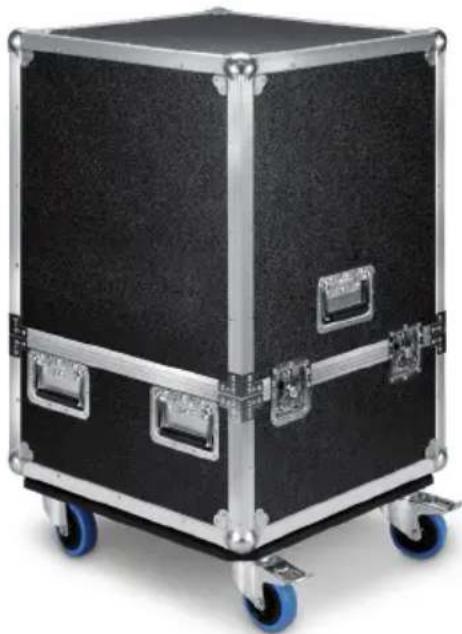
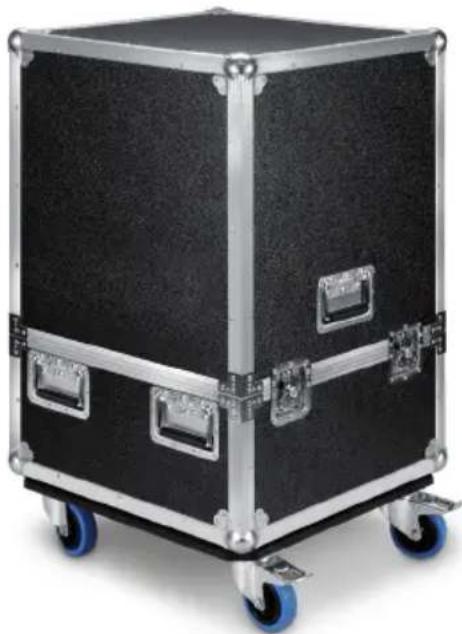
To ship the MAUI P900 speaker system, please use the original packaging or the optional flight case LDMP900FC.
ASSEMBLY
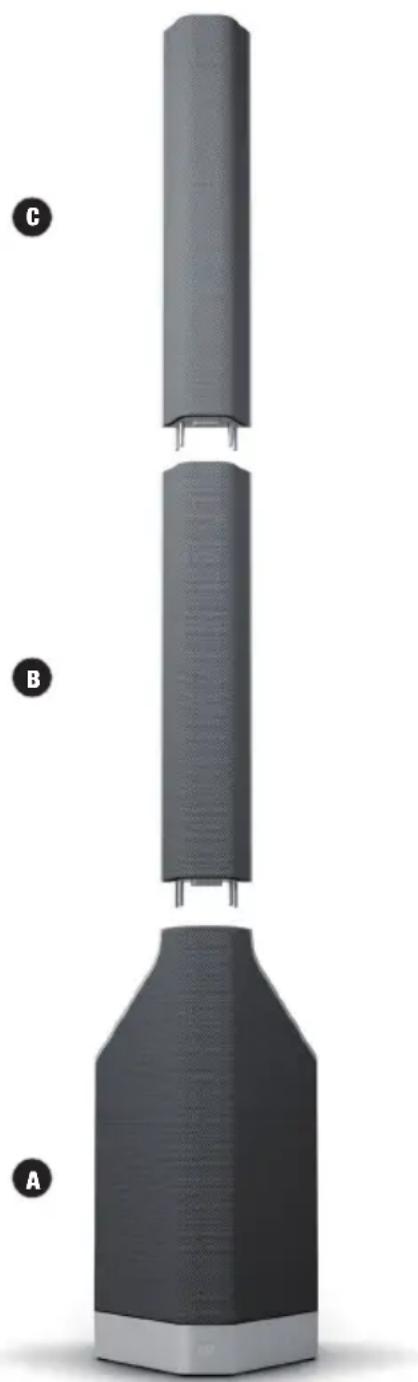
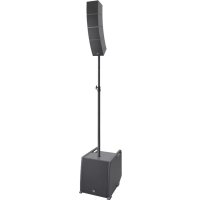
The MAUI P900 speaker system comprises three components:
A. Subwoofer with integrated electronics for all system components and a connection for the column sections on the top side.
B. Lower column section with connections on the underside and top side.
C. Upper column section with connector on the underside.
After the subwoofer has been placed in a suitable location, the lower column section is attached to it, then the upper column section is connected to the lower section. Steel pins simplify assembly and ensure secure connection.
Both the volume of the entire system as well as the volume of subwoofer relative to the overall volume can be adjusted on the device. Playback sources can be connected via balanced XLR cables. The MAUI P900 speaker system also features a Bluetooth® unit to facilitate playback of audio files via a Bluetooth-enabled playback device (such as a smartphone or tablet). To expand the system, the subwoofer is equipped with balanced line XLR outputs (THRU L/R) and a Bluetooth wireless STEREO LINK function (true wireless stereo™).
CONNECTIONS, OPERATING AND DISPLAY ELEMENTS
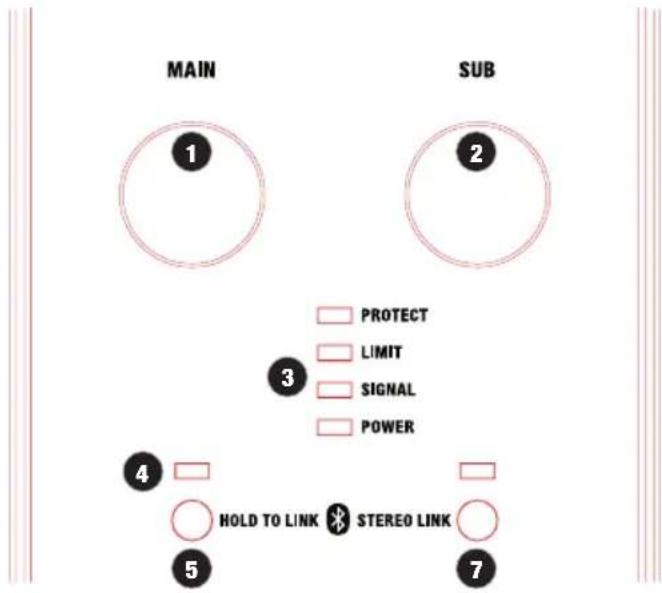
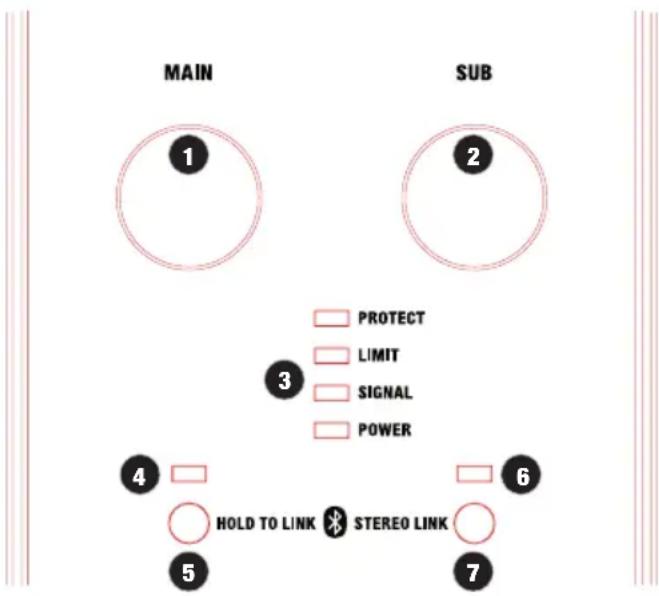
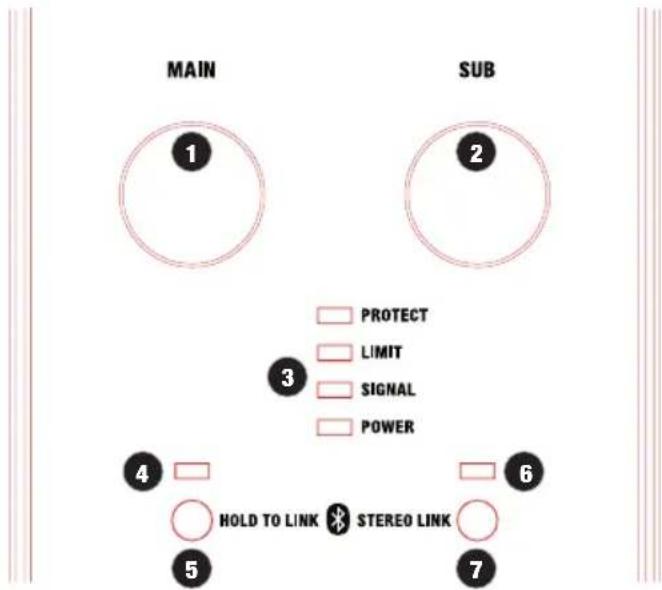
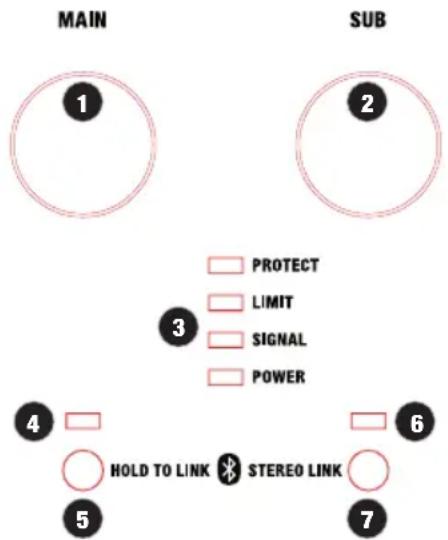
1 MAIN
Setting the overall volume level. The subwoofer volume level is controlled by adjusting the SUB level control accordingly.
2 SUB
Setting the volume balance between the subwoofer and the column loudspeakers.
3 DISPLAY LEDS
POWER: Lights up when the device is properly connected to the mains and switched on.
SIGNAL: Lights up when the device is receiving an audio signal. The signal is received before the MAIN level control.
LIMIT: Lights up when the speaker system is being operated in its upper limit range. Brief illumination of the LED is not critical. To protect the system, any excessive signal level is lowered smoothly by the integrated limiter. If the limiter LED remains lit for longer or permanently, reduce the volume level. Failure to do so may result in distorted sound reproduction and damage the speaker system.
PROTECT: Lights up if the system is overloaded/overheating. The amplifiers are automatically muted. After reaching normal operating conditions, the unit returns to the normal operating mode after a few minutes.
4 BLUETOOTH® LED
The MAUI P900 speaker system is equipped with Bluetooth technology, which means that audio files from another Bluetooth playback device (e.g. smartphone) can be played back on the MAUI P900 speaker (under optimal conditions, the maximum distance between the two devices is 70 metres). If there is no Bluetooth device connected to the internal Bluetooth unit, the blue Bluetooth LED will not indicate a signal. During pairing, the LED flashes rhythmically at a frequency of approximately 3 Hz. If the Bluetooth LED lights up permanently, there is a Bluetooth connection and playback can begin. The volume is controlled via the MAIN level or on the playback device.
5 HOLD TO LINK
To pair and connect the internal Bluetooth unit with a Bluetooth device, press and hold the HOLD TO LINK button for approximately 3 seconds until the Bluetooth LED flashes rhythmically (approx. 3 Hz). Enable Bluetooth on your playback device (e.g. smartphone) and search on the user interface for available devices. Select "MAUI P900" and pair your Bluetooth device with the Bluetooth unit. Playback can now be started. To end the connection, press and hold the HOLD TO LINK and the STEREO LINK buttons simultaneously for about 1 second. If the Bluetooth connection is interrupted (e.g. range is exceeded), the Bluetooth LED goes out. Connection can be restored automatically within approx. 90 seconds (Bluetooth device back in range). After 90 seconds, the connection can be restored with the Bluetooth playback device (connect paired device). When using a single MAUI P900 system, a digital stereo signal is automatically summed in the Bluetooth module.
6 STEREO LINK LED
The MAUI P900 speaker system is equipped with a Bluetooth stereo link function (true wireless stereo), which means that if two MAUI P900 systems are used, stereo audio signals transmitted via Bluetooth can also be played back in stereo without a cable connection between the two systems (the maximum distance between the two devices is 40 metres under optimal conditions). The system that is connected to the Bluetooth playback device is hereinafter referred to as the master unit, the stereo expansion as a slave unit. If the master unit with the Bluetooth playback device is connected to the slave unit, the blue Bluetooth LED and the green STEREO LINK LED on the master unit light up permanently.
If connection is successfully established between the slave unit and the master unit, the green STEREO LINK LED on the slave unit lights up permanently and the blue Bluetooth LED flashes slowly (approximately 0.3 Hz). During the pairing process, the green STEREO LINK LEDs of both systems flash rhythmically at a frequency of about 3 Hz. The left channel of the stereo signal is reproduced by the master unit and the right channel by the slave unit.
7 STEREO LINK
A. Stereo system with 2 x MAUI P900 and 1 x Bluetooth playback device: Pair the desired Bluetooth playback device with the left MAUI P900 system. The left system automatically becomes the master unit (press HOLD TO LINK for 3 seconds). If necessary, disconnect an existing Bluetooth connection with a Bluetooth playback device on the right MAUI P900 system (Press and hold HOLD TO LINK and STEREO LINK simultaneously for one second). To pair the right MAUI P900 system with the master unit, press and hold the STEREO LINK button on both devices for approximately 3 seconds within 30 seconds. The right system automatically becomes the slave unit (max. distance 15 m). The master unit transmits the left channel of the stereo signal from the Bluetooth device and the slave unit the right channel.
B. Stereo system with 2 x MAUI P900 without Bluetooth playback device: Disconnect any existing Bluetooth connection between the slave unit and a Bluetooth playback device by pressing and holding both buttons HOLD TO LINK and STEREO LINK on the slave unit simultaneously for approximately 1 second. When pairing two MAUI P900 systems, ensure that the distance between the systems is no more than 15 metres. Press and hold the STEREO LINK button on the master unit for approximately 3 seconds and press the STEREO LINK button twice in quick succession on the slave unit. Pairing occurs automatically within approximately 30 seconds. The master unit transmits the left channel of the stereo signal from a Bluetooth playback device and the slave unit the right channel. Pairing a Bluetooth playback device with the master unit can now be done later.
Please note:
- When the MAUI P900 systems have been switched off and back on, the Bluetooth playback device will pair automatically and the systems will connect with each other automatically.
- To cancel a Bluetooth connection between a Bluetooth playback device and a STEREO LINK connection, press and hold the HOLD TO LINK (No. 5) and STEREO LINK (No. 7) buttons simultaneously for about 1 second. This deletes the entire list of paired devices (factory setting).
- The maximum number of paired Bluetooth devices is 8 (including paired MAUI P900 systems). If another device is paired, the last entry from the list of stored devices will be deleted. A maximum of 1 playback device and 1 MAUI P900 system can be connected simultaneously with a Bluetooth unit as a stereo extension.
For information regarding the operation of the Bluetooth and stereo link module and the different Bluetooth and stereo link operating modes, please refer to the following tables.
| Operation of Bluetooth and stereo link module HOLD TO LINK STEREO LINK | ||
| Pair Bluetooth unit with playback device Press for 3 seconds | ||
| Pair stereo link – master unit Press for 3 seconds | ||
| Pair stereo link – slave unit ( playback device paired with master unit) | Press for 3 seconds | |
| Pair stereo link – slave unit (no playback device paired with master unit) | Press briefly twice | |
| Reset Press simultaneously for 1 second | ||
| Bluetooth and stereo link status Bluetooth LED (blue) STEREO LINK LED | (green) | |
| Pair Bluetooth unit with playback device Flashes (3 Hz) off | ||
| Bluetooth unit is paired and connected only with playback device on permanently off | ||
| Pair Bluetooth unit with playback device (as stereo link – master) Flashes (3 Hz) | on permanently | |
| Pair slave unit – stereo link to master unit Flashes (0.3 Hz) | Flashes (3 Hz) | |
| Slave unit – stereo link paired with master unit | Flashes (0.3 Hz) | on permanently |
| Slave unit – slave unit paired but not connected | Flashes (0.3 Hz) | off |
| Master unit – stereo link pairing without Bluetooth connection to playback device | off | Flashes (3 Hz) |
| Master unit connected to slave unit but without Bluetooth connection to playback device | off | on permanently |
| Master unit – stereo link pairing with Bluetooth connection to playback device | on permanently | Flashes (3 Hz) |
| Master unit connected to slave unit with Bluetooth connection to playback device | on permanently on permanently | |
| Neither Bluetooth nor stereo link connection | off | off |
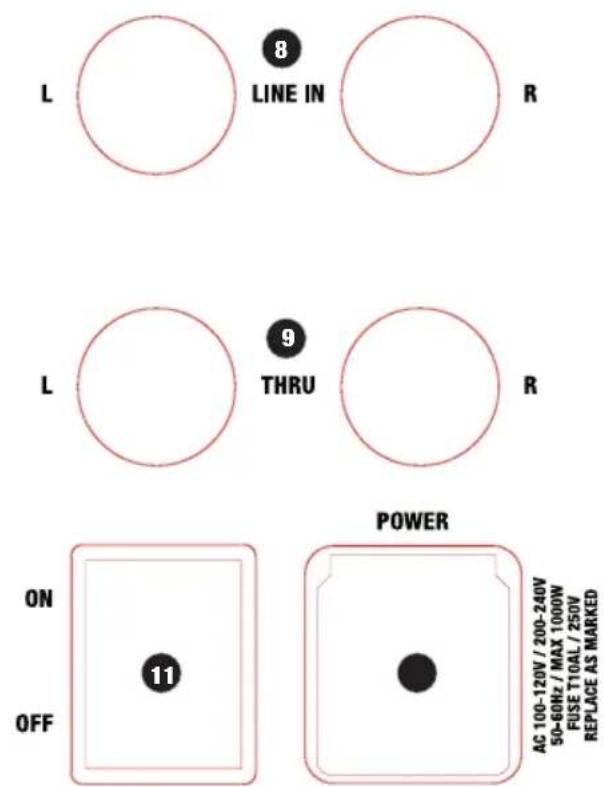
8 LINE IN L/R
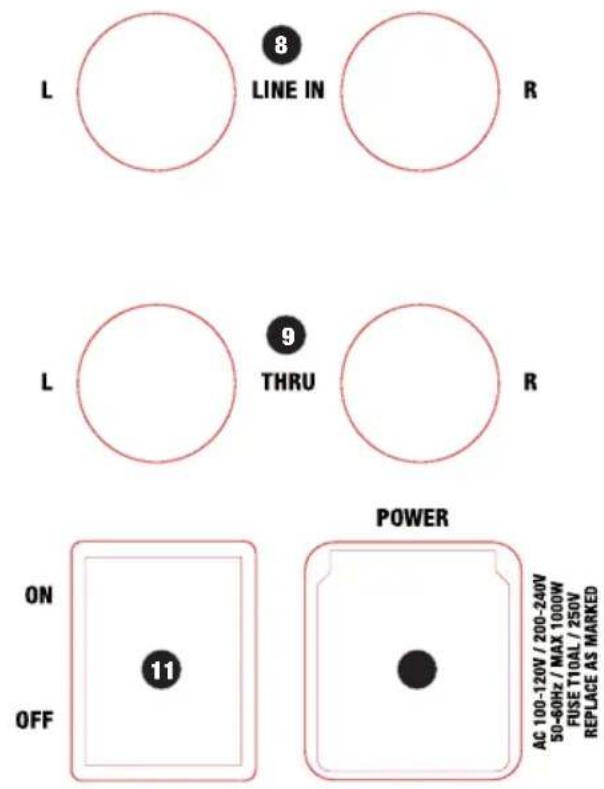
Balanced line input with XLR sockets (left/right) to connect a playback device (such as a mixer, keyboard). When both input sockets are used, the signals are summed internally to a mono signal.
9 THRU L/R
Balanced line output with male XLR sockets for direct routing of the input signal.
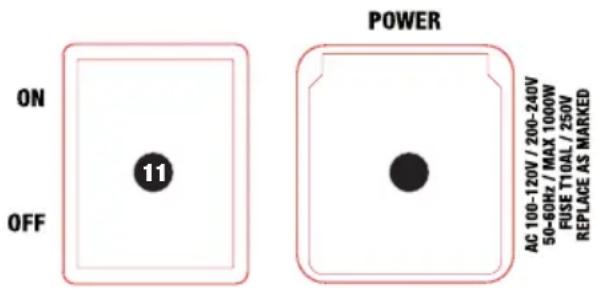
10 POWER SOCKET AND FUSE HOLDER
IEC mains socket with built-in fuse holder. A suitable power cable is included. IMPORTANT: Replace the fuse only with a fuse of the same type and value. Follow the instructions printed on the housing. In the event of repeated fuse failure, please contact an authorised service centre.
11 POWER ON/OFF
On-off switch for power supply to the device. Safe disconnection from the power supply is achieved only by pulling the mains plug.
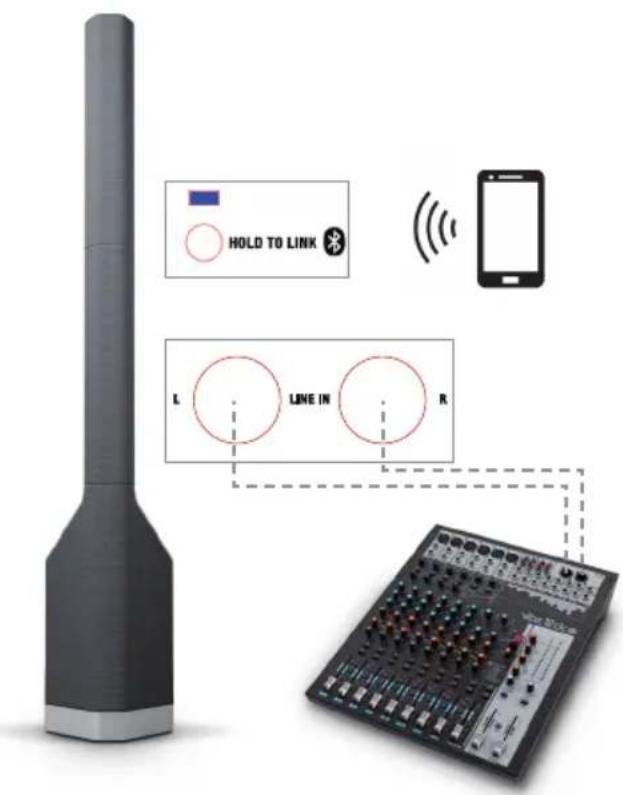
Examples of cabling and system expansion can be found in this manual under WIRING EXAMPLES.
WIRING EXAMPLES
Example of mono operation
Example of stereo operation
![graph TD A["Master unit Slave unit"] --> B["Master unit"] B --> C["Device with L, LINE IN, R signals"] C --> D["STEREO LINK"] D --> E["HOLD TO LINK"] E --> F["Mobile Device"] style A fill:#999,stroke:#333 style B fill:#ccc,stroke:#333 style C fill:#fff,stroke:#333 style D fill:#fff,stroke:#333 style…](/content/2026/03/515818/images/5acf43d263657965459830b9db9f95a85f1650d8d6d192586558d1c158a4c0f1.jpg)
Same settings as main unit
OPTIONAL ACCESSORIES
LDMP900FC
Flightcase for a LDMAUIP900 speaker system
TECHNICAL DATA
| Item number: LDMAUIP900 | |
| Product type PA Complete Systems | |
| Type active | |
| Colour LDMAUIP900W - cocoon white | LDMAUIP900G - platinum greyLDMAUIP900B - graphite black |
| Max. SPL (continuous) 121 dB | |
| Max. SPL (peak) 131 dB | |
| Frequency response 42 - 20.000 Hz | |
| Dispersion (H x V) 140 x 15 ° | |
| Total Height 2173 mm | |
| Weight 46 kg | |
| Features | Mono/ Stereo Application, Bluetooth Audio Streaming, DSP-based Signal Processing, Excel-lent Sound Dispersion |
| Subwoofer | |
| Woofer size 2 x 10 ", 2 x 254 mm | |
| Woofer magnet | Neodymium |
| Woofer brand | Custom-made |
| Woofer voice coil | 3 ", 76.2 mm |
| Cabinet construction | vented |
| Housing material | 15 mm Plywood |
| Cabinet surface | HD coated aluminum, multi layer mesh (cloth) |
| Subwoofer weight | 30.6 kg |
Mid/Hi System
| Midrange size 16 x 2.8 ", 16 x 71,1 mm | |
| Midrange magnet Neodymium | |
| Midrange brand Custom-made | |
| Midrange voice coil 0.75 ", 20 mm | |
| Tweeter dimensions 32 x 1", 25.4 mm | |
| Tweeter magnet Neodymium | |
| Tweeter brand Custom-made | |
| Tweeter voice coil 1", 25.4 mm | |
| Wave Guide SonicGuide® Technology | |
| MF / HF Transducer Arrangement Patented WaveAhead® Technology | |
| Loudspeaker inputs 1 | |
| Speaker input connections | Custom-made multipin |
| Cabinet construction mid/high | Closed |
| Mid/Hi system cabinet material | aluminium |
| Mid/Hi system cabinet surface | multi layer mesh (cloth), HD coated aluminum |
| Mid/Hi system width | 157 mm |
| Mid/Hi system height | 1428 (2 x 714) mm |
| Mid/Hi system depth | 91 mm |
| Mid/Hi system weight | 2 x 7.7 kg |
Amplifier Module (integrated in Subwoofer)
| Amplifier | 3 x class D |
| System output (RMS): | 1400 W |
| System output (Peak) | 2800 W |
| Protection circuits short circuit, thermal protection, DC protection, Multiband limiter | |
| Cooling | Convection |
| Controls | Bluetooth HOLD TO LINK button, Bluetooth STEREO LINK button, Main level, Sub level, Power On/Off |
| Indicators | Bluetooth, Bluetooth STEREO LINK, Power, Signal, Limit, Protect (protection circuit engaged) |
| Mains connector | IEC power cable (included) |
| Operating voltage 200 V AC - 240 V AC, 50 - 60 Hz (Automatic conversion), 100 V AC - 120 V AC, 50 - 60 Hz, Switching power supply | |
| Power Consumption (On / Off / Max.) | 0 W / 11 W / 1000 W |
| Ambient Temperatur (operating) | 0 - 40 °C |
| Relative Humidity: 10 % - 80 % | |
| Line Inputs | 1 x stereo |
| Line Input Connectors | Neutrik XLR |
| Line Outputs | 1 x Stereo Thru |
| Line Output Connectors | Neutrik XLR |
| Number of speaker outputs | 1 |
| Loudspeaker Output Connectors | Custom-made multipin |
| Bluetooth Standard | A2DP |
Bluetooth Audio Decoder SBC, AAC, aptX
DSP characteristics
Bit depth AD/DA converter 24 bit
Sampling frequency 48 kHz
Signal-to-noise ratio 106 dB
MANUFACTURER'S DECLARATIONS
MANUFACTURER'S WARRANTY & LIMITATIONS OF LIABILITY
You can find our current warranty conditions and limitations of liability at: https://cdn-shop.adamhall.com/media/pdf/MANUFACTURERS-DECLARATIONS_LD_SYSTEMS.pdf. To request warranty service for a product, please contact Adam Hall GmbH, Adam-Hall-Str. 1, 61267 Neu Anspach / Email: Info@adamhall.com / +49 (0)6081 / 9419-0.

CORRECT DISPOSAL OF THIS PRODUCT
(valid in the European Union and other European countries with a differentiated waste collection system)
This symbol on the product, or on its documents indicates that the device may not be treated as household waste. This is to avoid environmental damage or personal injury due to uncontrolled waste disposal. Please dispose of this product separately from other waste and have it recycled to promote sustainable economic activity. Household users should contact either the retailer where they purchased this product, or their local government office, for details on where and how they can recycle this item in an environmentally friendly manner. Business users should contact their supplier and check the terms and conditions of the purchase contract. This product should not be mixed with other commercial waste for disposal.
FCC STATEMENT
This device complies with Part 15 of the FCC Rules. Operation is subject to the following two conditions:
(1) This device may not cause harmful interference, and
(2) This device must accept any interference received, including interference that may cause undesired operation
CE Compliance
Adam Hall GmbH states that this product meets the following guidelines (where applicable):
R&TTE (1999/5/EC) or RED (2014/53/EU) from June 2017
Low voltage directive (2014/35/EU)
EMV directive (2014/30/EU)
RoHS (2011/65/EU)
The complete declaration of conformity can be found at www.adamhall.com.
Furthermore, you may also direct your enquiry to info@adamhall.com.
DEUTSCH
| Bluetooth and stereo link status Bluetooth LED (blue) STEREO LINK LED | (green) | |
| Pair Bluetooth unit with playback device Flashes (3 Hz) off | ||
| Bluetooth unit is paired and connected only with playback device on permanently off | ||
| Pair Bluetooth unit with playback device (as stereo link – master) Flashes (3 Hz) | on permanently | |
| Pair slave unit – stereo link to master unit Flashes (0.3 Hz) Flashes (3 Hz) | ||
| Slave unit – stereo link paired with master unit Flashes (0.3 Hz) on permanently | ||
| Slave unit – slave unit paired but not connected Flashes (0.3 Hz) off | ||
| Master unit – stereo link pairing without Bluetooth connection to playback device | off Flashes (3 Hz) | |
| Master unit connected to slave unit but without Bluetooth connection to playback device | off on permanently | |
| Master unit – stereo link pairing with Bluetooth connection to playback device on permanently Flashes (3 Hz) | ||
| Master unit connected to slave unit with Bluetooth connection to playback device | on permanently on permanently | |
| Neither Bluetooth nor stereo link connection off off | ||
AC 100-120V / 200-240V
50-60Hz / MAX 1000W
FUSE T10AL / 250V
REPLACE AS MARKED
8 LINE IN L / R
TECHNISCHE DATEN
APPAREILS RELIÉS AU SECTEUR
RACCORDEMENTS, ÉLÉMENTS DE COMMANDE ET D'AFFICHAGE
1 MAIN
ACCESSOIRE DISPONIBLE EN OPTION
LDMP900FC
CARACTÉRISTIQUES TECHNIQUES
(Valid in the European Union and other European countries with waste separation)
DATOS TÉCNICOS
PRZYŁĄCZA, ELEMENTY OBSŁUGI I WSKAŹNIKI
1 MAIN
DANE TECHNICZNE
CONNESSIONE E ACCENSIONE
CONNESSIONI, ELEMENTI DI COMANDO E VISUALIZZAZIONE
1 MAIN

8 LINE IN L / R
DATI TECNICI
接口、操作和显示元件
① MAIN(总音量)
立体声运行方式示例
![graph TD A["主单元"] --> B["从属单元"] B --> C["STEREO LINK"] C --> D["HOLD TO LINK"] D --> E["0.3 Hz"] E --> F["STEREO LINK"] F --> G["HOLD TO LINK"] G --> H["L LINE IN R"] H --> I["STEREO LINK"] I --> J["L LINE IN R"] J --> K["STEREO LINK"] K --> L["HOLD TO LINK"] style A fill:#999,stroke:#333 style B fi…](/content/2026/03/515818/images/fcd61a7b85d6a521471795df962db27256dbd5d65225b30304355803b9c6bb0b.jpg)
与主单元设置相同
可选配件
LDMP900FC
技术参数
連接器、操縱及顯示元件
① 主體
立體身歷聲模式示例
![graph TD A["主控单元"] --> B["從屬單元"] B --> C["主控单元"] C --> D["從屬單元"] D --> E["主控单元"] E --> F["從屬單元"] F --> G["主控单元"] G --> H["從屬單元"] H --> I["主控单元"] I --> J["從屬單元"] J --> K["主控单元"] K --> L["從屬單元"] L --> M["主控单元"] M --> N["從屬單元"] N --> O["主控单元"] O --> P["從屬單元"] P --> Q["主控单元"] Q --> R["從屬單元"] R --> S["主控…](/content/2026/03/515818/images/ccb6860298a93fd3a0253ef5b5e9b0c2a44a41e67c64d5192b8609f0ee1b8dce.jpg)
與主控單元相同的設置
可選配件
LDMP900FC
LDMAUIP900揚聲器系統的飛行箱
技術數據
- MAUI® P900
- CONTENTS / INHALTSVERZEICHNIS / CONTENU / CONTENIDO / TREŚĆ / CONTENUTO / 目录 / 目錄
- ENGLISH
- DEUTSCH
- ESPAÑOL
- PREVENTIVE MEASURES
- FOR EQUIPMENT THAT CONNECTS TO THE POWER MAINS
- CAUTION
- CAUTION! HIGH VOLUMES IN AUDIO PRODUCTS
- IMPORTANT SAFETY NOTICE
- INTRODUCTION
- GENERAL NOTES
- ASSEMBLY
- CONNECTIONS, OPERATING AND DISPLAY ELEMENTS
- 1 MAIN
- 2 SUB
- 3 DISPLAY LEDS
- 4 BLUETOOTH® LED
- 5 HOLD TO LINK
- 6 STEREO LINK LED
- 7 STEREO LINK
- PLEASE NOTE
- 8 LINE IN L/R
- 9 THRU L/R
- 10 POWER SOCKET AND FUSE HOLDER
- 11 POWER ON/OFF
- WIRING EXAMPLES
- OPTIONAL ACCESSORIES
- LDMP900FC
- DSP CHARACTERISTICS
- MANUFACTURER'S DECLARATIONS
- MANUFACTURER'S WARRANTY & LIMITATIONS OF LIABILITY
- CORRECT DISPOSAL OF THIS PRODUCT
- FCC STATEMENT
- CE COMPLIANCE
- 8 LINE IN L / R
- APPAREILS RELIÉS AU SECTEUR
- RACCORDEMENTS, ÉLÉMENTS DE COMMANDE ET D'AFFICHAGE
- ACCESSOIRE DISPONIBLE EN OPTION
- CARACTÉRISTIQUES TECHNIQUES
- DATOS TÉCNICOS
- PRZYŁĄCZA, ELEMENTY OBSŁUGI I WSKAŹNIKI
- CONNESSIONE E ACCENSIONE
- CONNESSIONI, ELEMENTI DI COMANDO E VISUALIZZAZIONE
- 接口、操作和显示元件
- ① MAIN(总音量)
- 可选配件
- 連接器、操縱及顯示元件
- ① 主體
- 可選配件
Brand : LD Systems
Model : Maui P900
Category : Hi-fi system