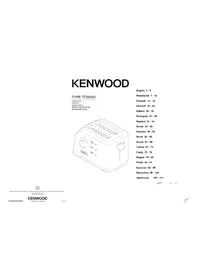
TFM400 - Toaster KENWOOD - Free user manual and instructions
Find the device manual for free TFM400 KENWOOD in PDF.



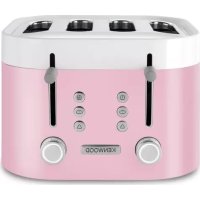
| Product type | Toaster |
| Brand | Kenwood |
| Model | TFM400 |
| Number of slots | 4 |
| Functions | Toasting, Defrost, Reheat, Bagel, EcoSlot (1 slot) |
| Removable warming rack | Yes (if provided) |
| Preview lever with Hi-Rise | Yes |
| Indicator lights | Cancel, EcoSlot, Bagel, Reheat |
| Removable crumb tray | Yes |
| Integrated cord storage | Yes |
| Cleaning | Wipe with a damp cloth; tray hand washable (not dishwasher) |
| Power supply | Mains |
| Energy saving | EcoSlot: up to 50% savings |
| Safety | Automatic shutdown at end of cycle; automatic ejection; Cancel button |
| Warranty | According to the legal provisions of the country of purchase |
| After-sales service | Kenwood or authorized repairer |
| Country of manufacture | China |
| Compliance | CE, food contact (regulation 1935/2004) |
Frequently Asked Questions - TFM400 KENWOOD
User questions about TFM400 KENWOOD
0 question about this device. Answer the ones you know or ask your own.
Ask a new question about this device
Download the instructions for your Toaster in PDF format for free! Find your manual TFM400 - KENWOOD and take your electronic device back in hand. On this page are published all the documents necessary for the use of your device. TFM400 by KENWOOD.
USER MANUAL TFM400 KENWOOD
HEAD OFFICE: Korwood Limited, 1-3 Korwood Stuckoes Park, Now Lane, Harport, Hampshire POE 2NH
kerwoodworld.com
English
safety
- Read these instructions carefully and retain for future reference.
- Remove all packaging and any labels.
- Burnt food can catch fire, so:
never leave your toaster on unattended; - keep your toaster away from anything (e.g. curtains) that could catch fire;
set the browning control lower for thin or dry bread;
never warm food with a topping or filling (e.g. pizza): if it drips into the toaster, it could catch fire.
Clean the crumb tray regularly: crumbs can smoke or burn. - To avoid electric shocks, never:
- let the toaster, cord or plug get wet; or
- put your hand or anything metal, e.g. a knife or foil, into the toaster.
Always unplug the toaster when not in use, before cleaning or attempting to clear jammed bread. - Never cover your toaster with a plate or anything else - it could overheat and catch fire.
- Never let the cord hang down where a child could grab it.
- We recommend that you do not use your toaster directly under wall cupboards.
- Do not move the toaster whilst it is in operation.
-
External metal surfaces are liable to get hot especially the top area.
-
Never use an unauthorised attachment or accessory.
- We do not recommend using the toaster for non bread items. For non bread items that are specifically recommended for use in a toaster follow the manufacturer's guidelines and cooking instructions. Remove loose crumbs and clean the crumb tray before and after use.
- Never use a damaged toaster. Get it checked or repaired: see 'Service & Customer Care'.
- This appliance is not intended to be operated by means of an external timer or separate remote-control system.
- Misuse of your appliance can result in injury.
Children from 8 years and above can use, clean and perform user maintenance on this appliance in accordance with the User Instructions provided they are supervised by a person responsible for their safety and have been given instruction concerning the use of the appliance and are aware of the hazards - Persons with reduced physical, sensory or mental capabilities or lack of knowledge using this appliance must have been given supervision or instruction on its safe use and are aware of the hazards
Children must not play with the appliance and both appliance and cord must be out of reach of children less than 8 years. -
Wipe the outside of the toaster with a damp cloth, then dry. Do not use abrasives.
-
Only use the appliance for its intended domestic use. Kenwood will not accept any liability if the appliance is subject to improper use, or failure to comply with these instructions.
before plugging in
- Make sure your electricity supply is the same as the one shown on the underside of your toaster.
WARNING: THIS APPLIANCE MUST BE EARTHED.
- This appliance conforms to EC Regulation 1935/2004 on materials and articles intended to come into contact with food.
before using for the first time
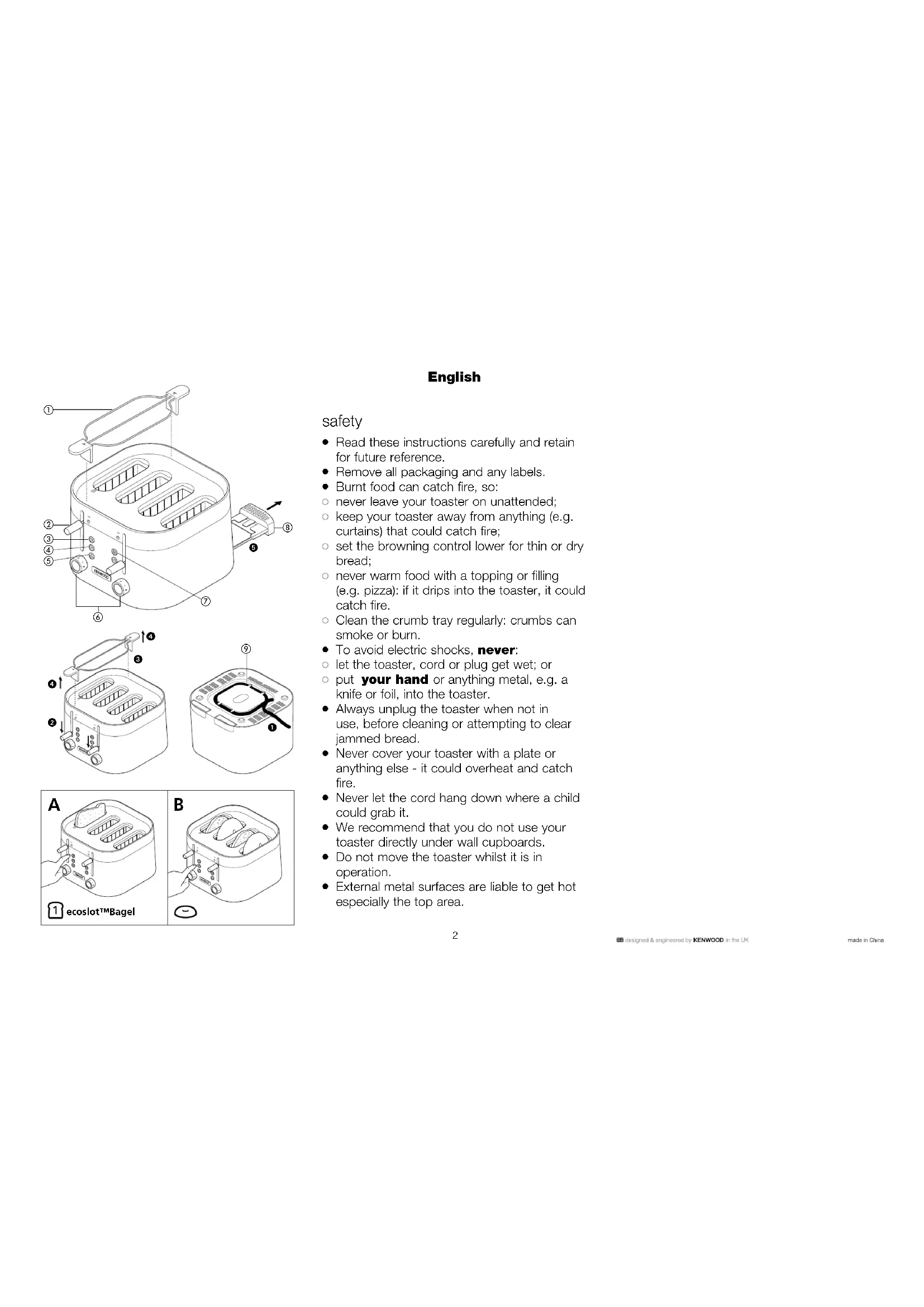
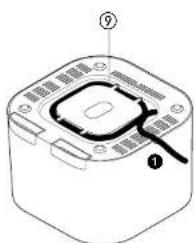
- Clip excess cord into the cord storage clips in the base ①.
- Operate the toaster once on a medium setting without bread. (The lever will not stay down unless the toaster is plugged in).
- As with all new heating elements, your toaster may emit a slight burning smell when it is first switched on. This is normal and not a cause for concern.

PREVIEW
Use the carriage lever to lift the toast to Preview' at any time without cancelling theasting cycle.
ecoslotTM
1 slot setting, only heats what you need, saving 50% energy.
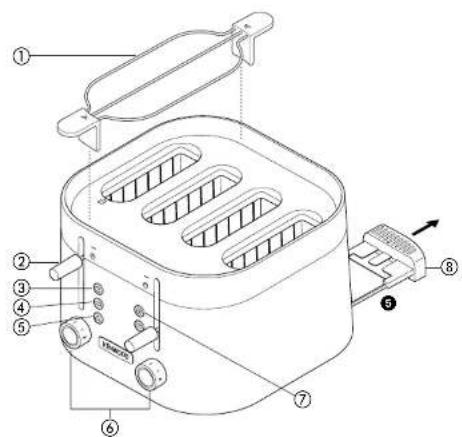
key
① removable warming rack (if supplied)
② Preview' carriage levers (with Hi-RiseTM' for extra lift)
③ ecoslof™ button with indicator light
④ bagel buttons with indicator lights
⑤ cancel buttons with indicator lights
⑥ browning controls
⑦ reheat button with indicator light
⑧ crumb trays
⑨ cord storage
to use your toaster
1 Plug the toaster into the power supply.
2 Turn the browning controls until the desired setting aligns with the line up mark on the body of the toaster. Use a lower setting for light toasting and for thin or dry bread.
3 Insert the bread, muffins, bagels etc.
4 Lower the lever 2 until it locks. (The lever will not stay down unless the toaster is plugged in). The 'cancel' button will illuminate.
- Use the carriage lever to lift the toast to 'Preview' at any time without cancelling theasting cycle.
- To stop toasting during the cycle, press the 'cancel' button, the toast will pop up and the 'cancel' button light will go off.
5 Your toast will pop up automatically, to raise it higher, lift the lever.
Defrost position
- To defrost frozen bread, select the defrost position on the browning control.
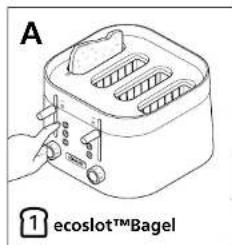
① ecoslot™ (A)
- To toast a single slice of bread, place the bread into the ecoslot™. Select the desired browning setting and lower the carriage lever. Press the ecoslot™ button and it will illuminate.
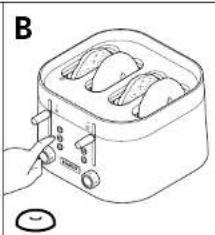
Bagel (B)
- To toast bagels the cut face should be facing the centre elements. Select the desired browning setting and lower the carriage lever. Press the 'Bagel' button and it will illuminate.
Note: when toasting using the bagel button, the centre elements will toast with a higher heat than the element at the front and back of the toaster.
This will result in only one side of the item being toasted.
Reheat
- To warm toast that has popped up but gone cold, lower the toast then press the 'reheat' button. The 'reheat' button will illuminate.
hintson using yourtoaster
- Select a lower setting for light browning or for dry bread.
- When toasting a single slice of bread, you may notice a variation in toast colour from one side to the other - this is normal.
- Dry/stale bread toasts more quickly than fresh bread and thinly sliced bread toasts more quickly than thickly sliced bread. Therefore the browning control should be set at a lower setting than usual.
- For best results ensure that the bread slices are of an even thickness, freshness and size.
- In order to achieve uniform browning we recommend you wait a minimum of 30 seconds between each toasting so that the control can automatically reset. Alternatively select a lower setting when additional toasting is carried out.
warming rack safety
- Never touch hot surfaces especially the metal top area.
1 Never set the browning control higher than when using the warming rack.
2 Never completely cover the warming rack.
3 When using the warming rack, never wrap the food up. Plastic wrapping will melt and could catch fire. Foil will reflect heat, damaging the toaster.
4 If you are using the toaster slots, always remove the warming rack so it cannot burn you.
to use the warming rack (if supplied)
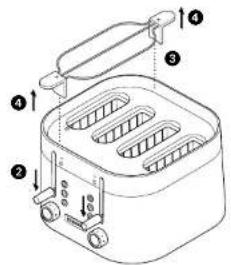
1 Place the warming rack on top of toaster 3. It must be fitted either over the two left hand slots or two right hand slots, never in the middle.
2 Put your bread items on top of the rack (slicing thick items in half will speed up the warming process).
3 Set the browning control no higher than . Lower the lever.
4 The lever will automatically rise at the end of the warming cycle. Turn the items over and repeat the operation. Watch to make sure they do not burn.
5 To remove the warming rack, allow the toaster to cool and unplug. Lift off the warming rack 4.
care and cleaning
1 Before cleaning, unplug your toaster and let it cool down.
2 Slide out the crumb tray ⑤ Clean, then replace. Do this regularly: crumbs can smoke or even burn. Do not dishwash the crumb tray.
3 Wipe the outside of the toaster and the warming rack with a damp cloth, then dry. Do not use abrasives.
service and customer care
- If the cord is damaged it must, for safety reasons, be replaced by KENWOOD or an authorised KENWOOD repairer.
- If you experience any problems with the operation of your appliance, before requesting assistance refer to the "troublesheathing guide" section in the manual or visit www.kenwoodworld.com.
- Please note that your product is covered by a warranty, which complies with all legal provisions concerning any existing warranty and consumer rights in the country where the product was purchased.
If your Kenwood product malfunctions or you find any defects, please send it or bring it to an authorised KENWOOD Service Centre. To find up to date details of your nearest authorised KENWOOD Service centre visit www.kenwoodworld.com or the website specific to your Country. - Designed and engineered by Kenwood in the UK.
Made in China.
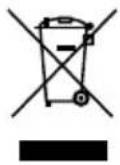
IMPoRANT INfoRMAtIoN foR CoRRECT DISPoSAL of THE PRODUCT IN ACCoRDANCE WITH THE EUROPEAN DIRECTIVE on WASTE ELECTRICAL AND ELECTRONIC EQUIPMENT (WEEE)
At the end of its working life, the product must not be disposed of as urban waste.
It must be taken to a special local authority differentiated waste collection centre or to a dealer providing this service.
Disposing of a household appliance separately avoids possible negative consequences for the environment and health deriving from inappropriate disposal and enables the constituent materials to be recovered to obtain significant savings in energy and resources. As a reminder of the need to dispose of household appliances separately, the product is marked with a crossed-out wheeled dustbin.
troubleshooting guide
| Problem Cause Solution | ||
| Toaster does not operate. | No power. Check toaster is plugged in. Check the fuse/circuit breaker in your home. | |
| Carriage lever not staying down | Toaster not plugged in. The lever will not stay down unless the toaster is plugged in. | |
| Uneven Browning. 1 Slice | of bread being toasted.Bread slices of different size, freshness or thickness being toasted at same time. | For best results ensure that the bread slices are of an even thickness, freshness and size.In order to achieve uniform browning we recommend you wait a minimum of 30 seconds between each toasting so that the control can automatically reset.Alternatively select a lower setting when additional toasting is carried out. |
| Toast colour too light or too dark. | Wrong browning setting used. | Select a higher or lower browning setting.Refer to "hint" section. |
| Burning smell or smoke from slots. | Crumb tray full.Food particles stuck to element or loose in toasting slots. | Unplug before checking the slots.Remove any loose food particles.Remove and clean the crumb tray. |
| If none of the above see "Service & Customer Care". | ||