BDL100AV - Laser pointer BLACK & DECKER - Free user manual and instructions
Find the device manual for free BDL100AV BLACK & DECKER in PDF.


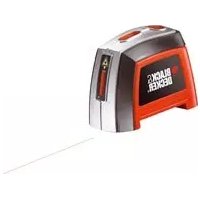
| Product Type | Single-Line Laser Level |
| Brand | Black & Decker |
| Model | BDL100AV |
| Power Supply | 2 AAA 1.5 V alkaline batteries |
| Laser Wavelength | 633 - 670 nm (red) |
| Laser Class | Class IIa |
| Operating Range | Up to 4.6 m (15 ft) |
| Leveling Accuracy | ± 6 mm at 3 m (1/4 in at 10 ft) |
| Operating Temperature | 10 °C to 40 °C (50 °F to 104 °F) |
| Intended Use | Indoor only |
| Wall Mounting | Temporary suction cup, magnet, thumbtack (optional) |
| Main Functions | Horizontal laser leveling, visual level indicator (bubble with red/green color change), leveling audible signal, bubble backlight |
| Batteries Included | No (2 AAA batteries required) |
| Cleaning and Maintenance | Damp cloth with mild detergent; do not immerse |
| Safety | Avoid direct eye exposure to laser beam; do not disassemble |
| Warranty | 2 years (domestic use) |
| Country of Origin | Imported by Black & Decker (USA) |
Frequently Asked Questions - BDL100AV BLACK & DECKER
User questions about BDL100AV BLACK & DECKER
0 question about this device. Answer the ones you know or ask your own.
Ask a new question about this device
Download the instructions for your Laser pointer in PDF format for free! Find your manual BDL100AV - BLACK & DECKER and take your electronic device back in hand. On this page are published all the documents necessary for the use of your device. BDL100AV by BLACK & DECKER.
USER MANUAL BDL100AV BLACK & DECKER
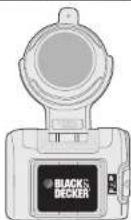
Catalog No. BDL100AV
Thank you for choosing Black & Decker! Go to www.BlackandDecker.com/NewOwner to register your new product.
PLEASE READ BEFORE RETURNING THIS PRODUCT FOR ANY REASON:
If you have a question or experience a problem with your Black & Decker purchase, go to HTTP://WWW.BLACKANDDECKER.COM/INSTANTANSWERS
for instant answers 24 hours a day.
If you can't find the answer or do not have access to the internet, call 1-800-544-6986 from 8 a.m. to 5 p.m. EST Mon. -- Fri. to speak with an agent. Please have the catalog number available when you call.
SAVE THIS INSTRUCTION MANUAL FOR FUTURE REFERENCE
VEA EL ESPANOL EN LA CONTRAPORTADA.
INTRUCTIVO DE OPACACION, CENTROS DE SERVICIO Y POLIZA DE GARANTIA. ADVERTENCIA: LEASE ESTE INTRUCTIVO ANTES DE USAR EL PRODUCTO.
Cat No BDL100AV
Form # 90560476
JUNE 2011
Copyright © 2011 Black & Decker
Printed in China
WARNING: Read and understand all instructions. Failure to follow all instructions listed below may result in electric shock, fire and/or serious personal injury.
SAVE THESE INSTRUCTIONS
SAFETY GUIDELINES - DEFINITIONS
It is important for you to read and understand this manual. The information it contains relates to protecting YOUR SAFETY and PREVENTING PROBLEMS. The symbols below are used to help you recognize this information.
DANGER: Indicates an imminently hazardous situation which, if not avoided, will result in death or serious injury.
WARNING: Indicates a potentially hazardous situation which, if not avoided, could result in death or serious injury.
CAUTION: Indicates a potentially hazardous situation which, if not avoided, may result in minor or moderate injury.
NOTICE: Used without the safety alert symbol indicates a potentially hazardous situation which, if not avoided, may result in property damage.
Safety Instructions
DANGER: Laser Radiation, avoid direct eye exposure, serious eye injury can result.
- Do not use optical tools such as a telescope or transit to view the laser beam.
- Do not place the laser in a position which may cause anyone to intentionally or unintentionally stare into the laser beam. Serious eye injury could result
- Do not operate the laser around children or allow children to operate the laser.
- WARNING: DO NOT DISASSEMBLE THE LASER. There are no user serviceable parts inside. Disassembling the Laser will void all warranties on the product. Do not modify the product in any way. Modifying the tool may result in Hazardous Laser Radiation Exposure.
- A. WARNING: Use of controls or adjustments or performance of procedures other than those specified in this manual may result in hazardous laser radiation exposure.
- Do not operate in explosive atmospheres, such as in the presence of flammable liquids, gases, or dust.
- Use only with the specifically designated batteries. Use of any other batteries may create a risk of fire.
- Store idle product out of reach of children and other untrained persons. Lasers are dangerous in the hands of untrained users.
- Use only accessories that are recommended by the manufacturer for your model. Accessories that may be suitable for one laser, may create a risk of injury when used on another laser.
- Repairs and servicing MUST be performed by a qualified repair facility. Repairs performed by unqualified personnel could result in serious injury.
- Do not remove or deface warning labels. Removing labels increases the risk of exposure to radiation.
- Turn the laser off when it is not in use. Leaving the laser on increases the risk of staring into the laser beam.
- Position the laser securely. Damage to the laser or injury could result if the laser falls.
For indoor use only. - This product is intended for use in a temperature range of 50^ ( 10^ ) - 104^ ( 40^ ). ^16 CAUTION: The wall mounting suction cup is a temporary device that will lose suction over varying amounts of time depending on the material it is attached to. It should not be left unattended for extended periods of time.
CAUTION: Use caution when drilling, nailing or cutting into walls, floors and ceilings which may contain electrical wiring or pipes. Always turn off the power when working near electrical wires.
First Aid Measures for Bubble Vial Content
In case of skin contact, flush with soap and water. In case of eye contact, flush with flowing water. If swallowed, get medical help. Material Safety Data Sheet (MSDS) available from 1-800-544-6986.
The label on your tool may include the following symbols:
V. volt h/w. . . . . . . . . . . . . . . . . . . . . . . . . . . . . . . . . . . . . . . . . . . . . . . . . . . . . . . . . . . . . . . . . . . . . . . . . . . . . . . . . . . . . . . . . . . . . . . . . . . nm wavelength in nanometers lla .. .. .. .. .. .. .. .. .. .. .. .. .. .. .. .. .. .. .. .. .. .. .. .. .. .. .. .. .. .. .. .. .. .. .. .. .. .. .. .. .. .. .. .. .. .. .. .. .. .. .. .. .. .. .. .. .. ... Class lla Laser
Functional Description
A.) Battery Door
B.) Laser Line
C.) On / Off Switch
D.) Audio On/Off Button
E.) Color Changing Bubble Vial
F} Wall Suction Cup Button
G.) Wall Mounting Suction Cup
H.) Magnet
1.) Pin (optional)
J.) Release Tab
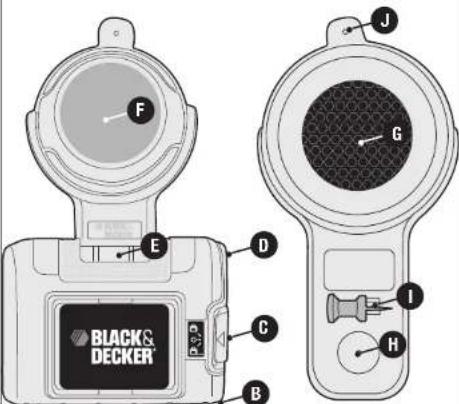
FRONT
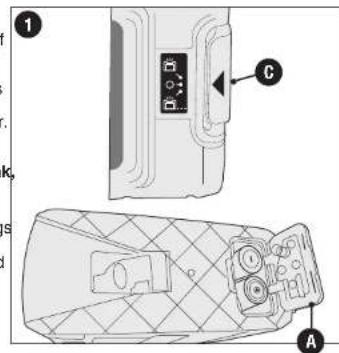
Replacing the Batteries - Figure 1
Ensure laser on/off switch (C) is in the full off position by moving switch actuator to center position "O". Remove the battery door (A). Insert 2 fresh 1.5 volt AAA alkaline batteries making sure to match (+) and (-) terminals correctly as marked on inside of battery door. Close battery door.
WARNING: Batteries can explode, or leak and can cause injury or fire.
To reduce this risk:
- Carefully follow all instructions and warnings on the battery label and package.
- Always insert batteries correctly with regard to polarity (+ and -), marked on the battery and the equipment.
- Do not short battery terminals.
- Do not charge batteries.
- Remove dead batteries immediately and dispose of per local codes.
- Do not dispose of batteries in fire.
- Keep batteries out of reach of children.
- Remove batteries if the device will not be used for several months.
- "Transporting batteries can possibly cause fires if the battery terminals inadvertently come in contact with conductive materials such as keys, coins, hand tools and the like. The US Department of Transportation Hazardous Material Regulations (HMR) actually prohibit transporting batteries in commerce or on airplanes (i.e. packed in suitcases and carryon luggage) UNLESS they are properly protected from short circuits. So when transporting individual batteries, make sure that the battery terminals are protected and well insulated from materials that could contact them and cause a short circuit."
Operating Instructions
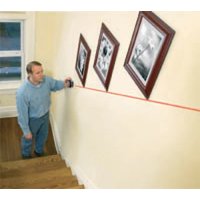
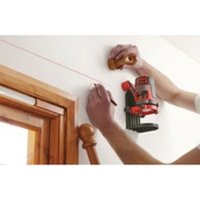
The BDL100AV is a versatile tool which allows you to level and align shelves, pictures, large appliances and more. It is designed to work on painted drywall vertical surfaces (semi-gloss, satin, egg shell and matte). Also primed drywall, glass and most plastic and metal.
USING THE TEMPORARY WALL MOUNTING SUCTION CUP
- The laser level can be attached to a wall using either the temporary wall mounting suction
Supp (G) or (Hare circuit) smooth surfaces) pin (I).
CAUTION: Temporary wall mounting suction cup should only be used on smooth impermeable surfaces such as painted drywall vertical surfaces (semi-gloss, satin, egg shell and matte), primed drywall, glass and most plastic and metal.
-
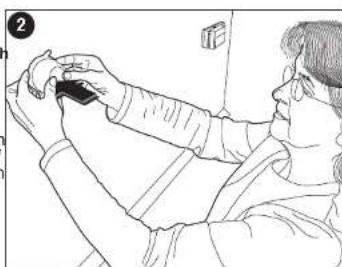
To use the temporary wall mounting suction cup, place on wall in approximate location of item to be leveled and push in on the suction cup button (F).
-
Release temporary wall mounting suction cup button and check to make sure that the wall attachment is firmly seated on the wall.
NOTE: In the rare instance when the temporary wall mounting suction cup is left on the wall for an extended period of time, any resulting marks can be removed with warm soapy water and a damp cloth.
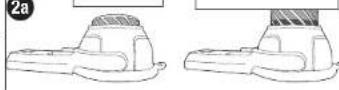
- Multilevel suction scale shown in figure 2a provides information about vacuum inside cup. When red color bar appears suction is low. Press button again or unit will fall soon.
Full suction
Low suction
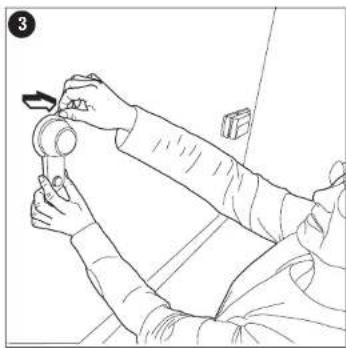
To remove the temporary wall mounting suction cup, pull the rubber release tab (J) straight out as shown in figure 3.
USING THE PIN (OPTIONAL)
CAUTION: Pin is sharp and should be handled with care.
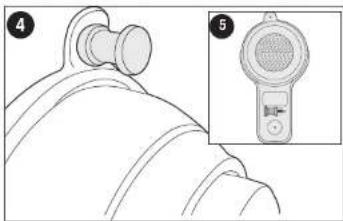
- Insert pin straight and seat firmly against surface as shown in figure 4. The pin should always be pushed in by hand and never driven by a hammer.
To remove pin from the wall, pull straight out.
CAUTION: Always store pin as shown in figure 5 when not in use.
LASER LEVEL FUNCTION
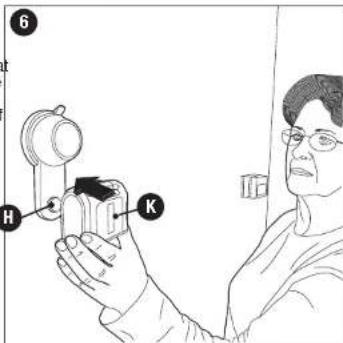
Connect the laser level to th attachment as shown in figure
Wall attachment has a strong magnet (H) that attracts to metal plates (K) located under the label on both sides of the laser allowing for easy up and down adjustment for about 14 of an inch (19 mm).
NOTE: Laser can be flipped to project a horizontal laser line in either direction.
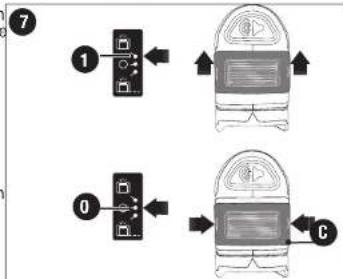
- Move on/off switch actuator (C) to position "1" to activate the color change on the bubble vial. - figure 7.
- Move on/off switch actuator (C) to position "0" to turn off the laser.
- Move on / off switch actuator (C) to position "2" to project the laser line and activate the color change on the bubble vial.
DANGER: Laser Radiation, avoid direct eye exposure.
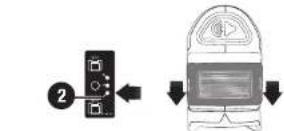
AUDIO VISUAL LEVEL FUNCTION
If the device is not level, the bubble vial will be "RED".
To level the device, rotate it in either direction until the bubble vial turns "GREEN
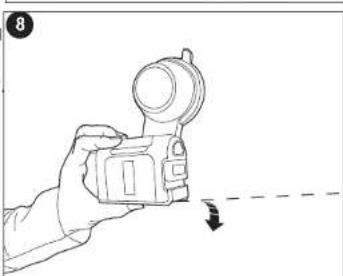
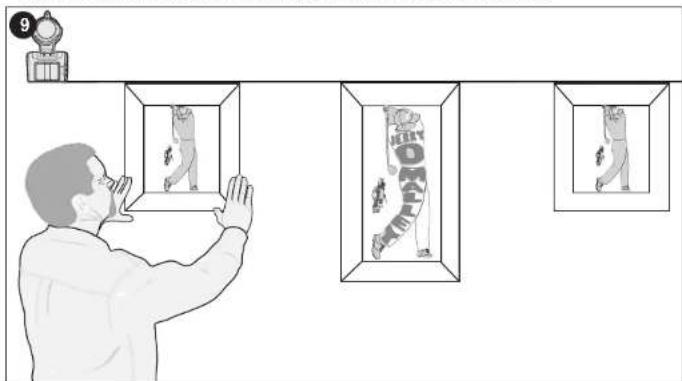
Figure 9 depicts using the laser to hang several pictures in a straight line.
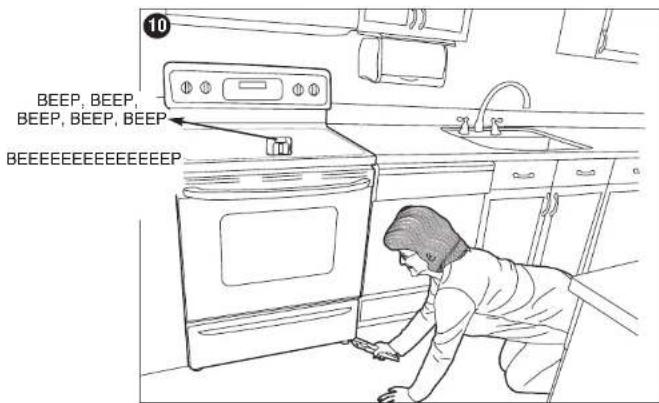
- There is also an audio button (D) which can be used to signal when an item is level that is out of sight as shown in figure 10.
- To use the audio leveling feature, turn the device on by moving the switch (C) to position "2" shown in figure 7.
- Push in on the audio On/Off button (D). The device will begin to "beep" on and off.
- Place the device on top of the item that you are leveling
- Begin leveling. The beeping speed will increase when the item is near level. When the item is leveled the signal will become continuous and stop.
If you have gone past level the beeping tone will noticeably change.
Helpful Hints
- The laser line is only level on the wall against which the unit is held or hung. The short line visible on any adjacent wall is not level. The same is true for straight line projection on a floor or wall, the short line on any adjacent wall is not level.
- The laser unit only generates a level line when held or hung against a vertical surface.
- Make sure laser is as square as possible to flat surface to ensure proper line projection.
Storage
Always store the laser level indoors.
Maintenance
Use only mild soap and damp cloth to clean the tool. Never let any liquid get inside the tool; never immerse any part of the tool into a liquid.
IMPORTANT: To assure product SAFETY and RELIABILITY, repairs, maintenance and adjustment (other than those listed in this manual) should be performed by authorized service centers or other qualified service organizations, always using identical replacement parts.
Accessories
WARNING: The use of any accessory not recommended for use with this tool could be hazardous.
Service Information
All Black & Decker Service Centers are staffed with trained personnel to provide customers with efficient and reliable power tool service. Whether you need technical advice, repair, or genuine factory replacement parts, contact the Black & Decker location nearest you. To find your local service location, refer to the yellow page directory under "Tools—Electric" or call: 1-800-544-6986 or visit www.blackanddecker.com
Full Two-Year Home Use Warranty
Black & Decker (U.S.) Inc. warrants this product for two years against any defects in material or workmanship. The defective product will be replaced or repaired at no charge in either of two ways.
The first, which will result in exchanges only, is to return the product to the retailer from whom it was purchased (provided that the store is a participating retailer). Returns should be made within the time period of the retailer's policy for exchanges (usually 30 to 90 days after the sale). Proof of purchase may be required. Please check with the retailer for their specific return policy regarding returns that are beyond the time set for exchanges.
The second option is to take or send the product (prepaid) to a Black & Decker owned or authorized Service Center for repair or replacement at our option. Proof of purchase may be required. Black & Decker owned and authorized Service Centers are listed under "Tools-Electric" in the yellow pages of the phone directory.
This warranty does not apply to accessories. This warranty gives you specific legal rights and you may have other rights which vary from state to state or province to province. Should you have any questions, contact the manager of your nearest Black & Decker Service Center. This product is not intended for commercial use.
FREE WARNING LABEL REPLACEMENT: If your warning labels become illegible or are missing, call 1-800-544-6986 for a free replacement.
LATIN AMERICA: This warranty does not apply to products sold in Latin America. For products sold in Latin America, check country specific warranty information contained in the packaging, call the local company or see the website for warranty information.
TECHNICAL SPECIFICATIONS OF LASER LEVEL:
Laser diode wavelength: 633 - 670 nm (red color)
Laser Class: Class IIa
Working range: Up to 15 feet (depends on light conditions)
Leveling accuracy:
Projecting Horizontal ±1/4 inch (6 mm) @ 10 feet (3 m)
Batteries: 2 AAA (included)
Voltage: 3 Volts
Operating temperature: 50^ (10^) - 104^ (40^)
Troubleshooting
Problem Possible Cause Possible Solution
- Unit does not work. - Weak batteries. - Replace if needed.
- Level blinking red. - Weak batteries. - Replace batteries.
- No audio signal. - Audio button not pushed. - Push audio button.
- Level blinking randomly - Restart software. - Turn unit OFF and after 5
with different colors.
seconds turn unit ON.
- Suction cup will not hold - Wall surface too porous. on wall.
Try another location or use push pin. - No laser line - Switch in wrong position.
- Move switch to lowest position.
- Level won't stay steady - Out of height adjustment range, when on wall mount.
- Headjust height position of suction cup).
For assistance with your product, visit our website www.blackanddecker.com for the location of the service center nearest you or call the BLACK & DECKER help line at 1-800-544-6986.
Imported by
Black & Decker (U.S.) Inc.
701 E. Joppa Rd.
BlackandDecker.com
1,800,544,6986
See 'Tools
ctric
Yellow Pages
for Service &
Sales
图
NIVEAU LASER
MODE D'EMPLOI
N^ de catalogue BDL100AV
Piles: 2 AAA (incluses)
Tension:3V
& Decker Canada 108 Centre, L
100 Central Ave. Brockville (Ontario) K6V 5W6
Visite www.BlackandDecker.com/NewOwner
Invoice No. No. de factura
PRODUCT INFOMATION · IDENTIFICACION DEL PRODUCTO
Cat. No. Catalogo o Modelo
Col. Americana, S. Juarez
Guadalajara, Jalisco
Tel. 01 33 38 25 69 78
Herramientos y Equipos Professionales
Av. Colón 2915 Ote
Col. Francisco I. Madero
Department of Mathematics, University of California, Los Angeles
Monterrey,Nvo,Leon T. H. J. 2003. 51-69.
Tel. 01 81 83 54 60 06
Htas. Portatiles de Chihuahua,
S.A.de C.V
Av. Universidad No. 2903
Col. Fracc. Universidad
Chihuahua, Chihuahua
Tel. 01 614 413 64 04
Fernando González Armenta
Bolivia No. 605
Col. Felipe Carrillo Puerto
Cd.Madero,Tampico 10000-2107
Tel.018332213450
Perfiles y Herramentas de Morelia
Gertrudis Bocanegra No. 898
Col. Ventura Puente
Morelia, Michoacan
Tel. 01 443 313 85 50
Enrique Robles
Av. de la Solidaridad No. 12713
Col. La Pradera
Irapuato, Guanajuato
Tel. 014626266739
Hernández Martinez Jeanette
Prolongacion Corregidora Nte. No. 1104
Col. Arboledas
Queretaro, Qro. Tel: 01-110-815-25-29
161.014422452580
BOSQUES DE CIDROS ACCESO RADIATAS NO.42
COL. BOSQUES DE LAS LOMAS
05120 MEXICO, D.F.
TEL.(0155)5326710001-0000-17-0000-28-017-29-10
Epecificaciones