DC380K - Saw DEWALT - Free user manual and instructions
Find the device manual for free DC380K DEWALT in PDF.


User questions about DC380K DEWALT
0 question about this device. Answer the ones you know or ask your own.
Ask a new question about this device
Download the instructions for your Saw in PDF format for free! Find your manual DC380K - DEWALT and take your electronic device back in hand. On this page are published all the documents necessary for the use of your device. DC380K by DEWALT.
USER MANUAL DC380K DEWALT
DeWALT Industrial Tool Co., 701 East Joppa Road, Baltimore, MD 21286 (MAY03-CD-1) Form No. 619185-00 DW937, DW938, DC380 Copyright © 2003
The following are trademarks for one or more DeWALT power tools: the yellow and black color scheme; the "D" shaped air intake grill; the array of pyramids on the handgrip; the kit box configuration; and the array of lozenge-shaped humps on the surface of the tool.
Questions? See us in the World Wide Web at www.dewalt.com
INSTRUCTION MANUAL GUIDE D'UTILISATIONMANUAL DE INSTRUCCIONES
INSTRUCTIVO DE OPERACION, CENTROS DE SERVICIO Y POLIZA DE GARANTIA. ADVERTENCIA: LEASE ESTE INSTRUCTIVO ANTES DE USAR EL PRODUCTO.

DW937, DW938, DC380
Heavy Duty Cordless Reciprocating Saws
Scies alternatives industrielles sans fil
Sierras代替as inalámbricas para trabajo pesado
IF YOU HAVE ANY QUESTIONS OR COMMENTS ABOUT THIS
OR ANY DEWALT TOOL, CALL US TOLL FREE AT:
1-800-4-DeWALT (1-800-433-9258)
English
IF YOU HAVE ANY QUESTIONS OR COMMENTS ABOUT THIS OR ANY DEWALT TOOL, CALL US TOLL FREE AT: 1-800-4-DEWALT (1-800-433-9258)
General Safety Rules - For All Battery Operated Tools
WARNING! Read and understand all instructions. Failure to follow all instructions listed below may result in electric shock, fire and/or serious personal injury.
SAVE THESE INSTRUCTIONS
WORK AREA
- Keep your work area clean and well lit. Cluttered benches and dark areas invite accidents.
- Do not operate power tools in explosive atmospheres, such as in the presence of flammable liquids, gases, or dust. Power tools create sparks which may ignite the dust or fumes.
- Keep bystanders, children, and visitors away while operating a power tool. Distractions can cause you to lose control.
ELECTRICAL SAFETY
- Do not abuse the cord. Never use the cord to carry the tool. Keep cord away from heat, oil, sharp edges or moving parts. Replace damaged cords immediately. Damaged cords may create a fire.
- A battery operated tool with integral batteries or a separate battery pack must be recharged only with the specified charger for the battery. A charger that may be suitable for one type of battery may create a risk of fire when used with another battery.
- Use battery operated tool only with the specifically designed battery pack. Use of any other batteries may create a risk of fire.
PERSONAL SAFETY
- Stay alert, watch what you are doing and use common sense when operating a power tool. Do not use tool while tired or
under the influence of drugs, alcohol, or medication. A moment of inattention while operating power tools may result in serious personal injury,
- Dress properly. Do not wear loose clothing or jewelry. Contain long hair. Keep your hair, clothing, and gloves away from moving parts. Loose clothing, jewelry, or long hair can be caught in moving parts. Air vents often cover moving parts and should also be avoided.
- Avoid accidental starting. Be sure switch is in the locked or off position before inserting battery pack. Carrying tools with your finger on the switch or inserting the battery pack into a tool with the switch on invites accidents.
- Remove adjusting keys or wrenches before turning the tool on. A wrench or key that is left attached to a rotating part of the tool may result in personal injury.
- Do not overreach. Keep proper footing and balance at all times. Proper footing and balance enables better control of the tool in unexpected situations.
- Use safety equipment. Always wear eye protection. Dust mask, non-skid safety shoes, hard hat, or hearing protection must be used for appropriate conditions.
TOOL USE AND CARE
- Use clamps or other practical way to secure and support the workpiece to a stable platform. Holding the work by hand or against your body is unstable and may lead to a loss of control.
- Do not force tool. Use the correct tool for your application. The correct tool will do the job better and safer at the rate for which it is designed.
- Do not use tool if switch does not turn it on or off. Any tool that cannot be controlled with the switch is dangerous and must be repaired.
- Disconnect battery pack from tool or place the switch in the locked or off position before making any adjustments,
changing accessories, or storing the tool. Such preventative safety measures reduce the risk of starting the tool accidentally.
- Store idle tools out of reach of children and other untrained persons. Tools are dangerous in the hands of untrained users.
- When battery pack is not in use, keep it away from other metal objects like: paper clips, coins, keys, nails, screws, or other small metal objects that can make a connection from one terminal to another. Shorting the battery terminals together may cause sparks, burns, or a fire.
- Maintain tools with care. Keep cutting tools sharp and clean. Properly maintained tools, with sharp cutting edges are less likely to bind and are easier to control.
- Check for misalignment or binding of moving parts, breakage of parts, and any other condition that may affect the tool's operation. If damaged, have the tool serviced before using. Many accidents are caused by poorly maintained tools.
- Use only accessories that are recommended by the manufacturer for your model. Accessories that may be suitable for one tool, may become hazardous when used on another tool.
SERVICE
- Tool service must be performed only by qualified repair personnel. Service or maintenance performed by unqualified personnel could result in a risk of injury.
- When servicing a tool, use only identical replacement parts. Follow instructions in the Maintenance section of this manual. Use of unauthorized parts or failure to follow Maintenance Instructions may create a risk of electric shock or injury.
Additional Specific Safety Rules
-
Hold tool by insulated gripping surfaces when performing an operation where the cutting tool may contact hidden wiring. Contact with a "live" wire will make exposed metal parts of the tool "live" and shock the operator.
-
Keep hands away from moving parts. Never place your hands near the cutting area.
- Use extra caution when cutting overhead and pay particular attention to overhead wires which may be hidden from view.
CAUTION: When sawing into walls, floors or wherever "live" electrical wires may be encountered, DO NOT TOUCH ANY METAL PARTS OF THE TOOL! Hold the tool only by the plastic handle and housing to prevent electric shock if you saw into a "live" wire.
CAUTION: Wear appropriate personal hearing protection during use. Under some conditions and duration of use, noise from this product may contribute to hearing loss.
CAUTION: A dust mask or respirator should be worn by all persons entering the work area. The filter should be replaced daily or whenever the wearer has difficulty breathing. See your local hardware store for the proper NIOSH/OSHA approved dust mask.
CAUTION: When not in use, place tool on its side on a stable surface where it will not cause a tripping or falling hazard. Some tools with large battery packs will stand upright on the battery pack but may be easily knocked over.
WARNING: Some dust created by power sanding, sawing, grinding, drilling, and other construction activities contains chemicals known to cause cancer, birth defects or other reproductive harm. Some examples of these chemicals are:
- lead from lead-based paints,
crystalline silica from bricks and cement and other masonry products, and -
arsenic and chromium from chemically-treated lumber (CCA). Your risk from these exposures varies, depending on how often you do this type of work. To reduce your exposure to these chemicals: work in a well ventilated area, and work with approved safety equipment, such as those dust masks that are specially designed to filter out microscopic particles.
-
Avoid prolonged contact with dust from power sanding, sawing, grinding, drilling, and other construction activities. Wear protective clothing and wash exposed areas with soap and water. Allowing dust to get into your mouth, eyes, or lay on the skin may promote absorption of harmful chemicals.
- The label on your tool may include the following symbols. The symbols and their definitions are as follows:
V.....volts A. amperes
Hz.....hertz W.....watts
min.....minutes.....alternating current
----.direct current no load speed
Class II Construction ...earthing term
...safety alert symbol ../min...revolutions per minute
Important Safety Instructions for Battery Packs
The battery pack is not fully charged out of the carton. Before using the battery pack and charger, read the safety instructions below. Then follow charging procedures outlined.
READ ALL INSTRUCTIONS
- Do not incinerate the battery pack even if it is severely damaged or is completely worn out. The battery pack can explode in a fire.
- A small leakage of liquid from the battery pack cells may occur under extreme usage or temperature conditions. This does not indicate a failure. However, if the outer seal is broken and this leakage gets on your skin:
a. Wash quickly with soap and water.
b. Neutralize with a mild acid such as lemon juice or vinegar.
c. If battery liquid gets into your eyes, flush them with clean water for a minimum of 10 minutes and seek immediate medical attention. (Medical note: The liquid is 25 - 35% solution of potassium hydroxide.)
- Charge the battery packs only in DE WALT chargers.
DO NOT splash or immerse in water or other liquids.
NOTE: Your tool uses a 7.2-18 Volt DEWALT battery pack. When ordering DEWALT replacement battery packs, be sure to include catalog number and voltage.
- Do not store or use the tool and battery pack in locations where the temperature may reach or exceed 105^ (such as outside sheds or metal buildings in summer).
ADANGER: Never attempt to open the battery pack for any reason. If battery pack case is cracked or damaged, do not insert into charger. Electric shock or electrocution may result. Damaged battery packs should be returned to service center for recycling.
NOTE: Battery storage and carrying caps are provided for use whenever the battery is out of the tool or charger. Remove cap before placing battery in charger or tool.
WARNING: Do not store or carry battery so that metal objects can contact exposed battery terminals. For example, do not place battery in aprons, pockets, tool boxes, product kit boxes, drawers, etc. with loose nails, screws, keys, etc. without battery cap. Without cap in place, battery could short circuit causing fire or burns or damage to battery.
The RBRC™ Seal
The RBRC™ (Rechargeable Battery Recycling
Corporation) Seal on the nickel-cadmium battery (or battery pack) indicates that the costs to recycle the battery (or battery pack) at the end of its useful life have already been paid by DEWALT. In some areas, it is illegal to place spent nickel-cadmium batteries in the trash or municipal solid waste stream and the RBRC program provides an environmentally conscious alternative.
RBRC™ in cooperation with DeWALT and other battery users, has established programs in the United States to facilitate the collection of


English
spent nickel-cadmium batteries. Help protect our environment and conserve natural resources by returning the spent nickel-cadmium battery to an authorized DeWALT service center or to your local retailer for recycling. You may also contact your local recycling center for information on where to drop off the spent battery.
RBRC™ is a registered trademark of the Rechargeable Battery Recycling Corporation.
Important Safety Instructions for Battery Chargers
SAVE THESE INSTRUCTIONS: This manual contains important safety instructions for battery chargers.
- Before using charger, read all instructions and cautionary markings on charger, battery pack, and product using battery pack.
CAUTION: To reduce the risk of injury, charge only DeWALT nickel cadmium rechargeable batteries. Other types of batteries may burst causing personal injury and damage.
CAUTION: Under certain conditions, with the charger plugged in to the power supply, the exposed charging contacts inside the charger can be shorted by foreign material. Foreign materials of a conductive nature such as, but not limited to, steel wool, aluminum foil, or any buildup of metallic particles should be kept away from charger cavities. Always unplug the charger from the power supply when there is no battery pack in the cavity. Unplug charger before attempting to clean.
DANGER: 120 volts are present at charging terminals. Do not probe with conductive objects. Electric shock or electrocution may result.
WARNING: Do not allow any liquid to get inside charger. Electric shock may result.
DO NOT attempt to charge the battery pack with any chargers other than the ones in this manual. The charger and battery pack are specifically designed to work together.
- These chargers are not intended for any uses other than charging DEWALT rechargeable batteries. Any other uses may result in risk of fire, electric shock or electrocution.
- Do not expose charger to rain or snow.
- Pull by plug rather than cord when disconnecting charger. This will reduce risk of damage to electric plug and cord.
- Make sure that cord is located so that it will not be stepped on, tripped over, or otherwise subjected to damage or stress.
- Do not use an extension cord unless it is absolutely necessary. Use of improper extension cord could result in risk of fire, electric shock, or electrocution.
An extension cord must have adequate wire size (AWG or American Wire Gauge) for safety. The smaller the gauge number of the wire, the greater the capacity of the cable, that is 16 gauge has more capacity than 18 gauge. When using more than one extension to make up the total length, be sure each individual extension contains at least the minimum wire size.
Recommended Minimum Wire Size for Extension Cords
Total Length of Cord
25 ft. 50 ft. 75 ft. 100 ft. 125 ft. 150 ft. 175 ft.
7.6 m 15.2 m 22.9 m 30.5 m 38.1 m 45.7 m 53.3 m
Wire Size AWG
| 16 | 14 | 14 | 12 |
- Do not place any object on top of charger or place the charger on a soft surface that might block the ventilation slots and result in excessive internal heat. Place the charger in a position away from any heat source. The charger is ventilated through slots in the top and the bottom of the housing.
- Do not operate charger with damaged cord or plug — have them replaced immediately.
- Do not operate charger if it has received a sharp blow, been dropped, or otherwise damaged in any way. Take it to an authorized service center.
-
Do not disassemble charger; take it to an authorized service center when service or repair is required. Incorrect reassembly may result in a risk of electric shock, electrocution or fire.
-
Disconnect the charger from the outlet before attempting any cleaning. This will reduce the risk of electric shock. Removing the battery pack will not reduce this risk.
NEVER attempt to connect 2 chargers together. - The charger is designed to operate on standard household electrical power (120 Volts). Do not attempt to use it on any other voltage. This does not apply to the vehicular charger.
Battery Performance
Some chargers have a Tune-UpTM feature that optimizes battery pack performance. Your charger may provide automatic Tune-UpTM mode or manual (i.e., push button) Tune-UpTM mode. For information on this feature, please see the appropriate section below. Because batteries slowly lose their charge when they are not on the charger, the best place to keep your battery pack is on the charger at all times.
USING AUTOMATIC TUNE-UPTM MODE
The automatic Tune-Up™ Mode equalizes or balances the individual cells in the battery pack allowing it to function at peak capacity. Battery packs should be tuned up weekly or after 10 charge/discharge cycles or whenever the pack no longer delivers the same amount of work. To use the automatic Tune-Up™, place the battery pack in the charger and leave it for at least 8 hours. The charger will cycle through the following modes.
-
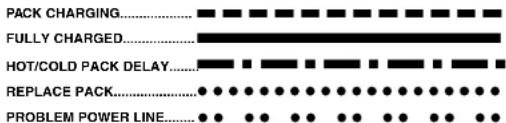
The red light will blink continuously indicating that the 1-hour charge cycle has started.
-
When the 1-hour charge cycle is complete, the light will stay on continuously and will no longer blink. This indicates that the pack is fully charged and can be used at this time.
-
Whenever the pack is left in the charger after the initial 1-hour charge, the charger will begin the automatic Tune-UpTM Mode. This mode continues up to 8 hours or until the individual cells in the battery pack are equalized. The battery pack is ready for use and can be removed at any time during the Tune-UpTM Mode.
-
Once the automatic Tune-UpTM Mode is complete the charger will transition to a maintenance charge; the indicator light shuts off when the automatic Tune-UpTM Mode is complete.
USING THE MANUAL TUNE-UPTM MODE
The manual Tune-Up™ mode equalizes or balances the individual cells in the battery pack allowing it to function at peak capacity. This mode takes up to 8 hours to complete. Battery packs should be tuned up weekly or after 10 charge/discharge cycles or whenever the pack no longer delivers the same amount of work.
- To tune up your battery pack, place the battery in the charger as usual. The red light will blink continuously indicating that the charge cycle has started.
- Press the Tune-UpTM Mode button any time after the charge cycle has started. The red light will stop blinking momentarily, blink quickly 3 times, and then resume blinking continuously. The charger is now tuning up the cells in your battery.
- When the Tune-UpTM mode cycle is complete, the light will stay on continuously. The pack is fully charged and may be used at this time or left in the charger.
- If you select Tune-Up™ Mode and then change your mind, remove the battery from the charger. After 5 seconds, insert the battery into the charger. The normal charge cycle will begin.
SAVE THESE INSTRUCTIONS FOR FUTURE USE
Charging Procedure
- Plug the charger into an appropriate outlet as shown in Figure 1.
- Insert the battery pack into the charger. The red (charging) light will blink continuously indicating that the charging process has started.
- The completion of charge will be indicated by the red light remaining ON continuously. The pack is fully charged and may be used at this time or left in the charger.
CAUTION: 120 volts present at charging terminals. Do not probe with conductive objects. Danger of electric shock or electrocution. Keep battery door closed and latched at all times.
Indicator Light Operation
Charge Indicators
Some chargers are designed to detect certain problems that can arise with battery packs. Problems are indicated by the red light flashing at a fast rate. If this occurs, re-insert battery pack into the charger. If the problem persists, try a different battery pack to determine if the charger is OK. If the new pack charges correctly, then the original pack is defective and should be returned to a service center or other collection site for recycling. If the new battery pack elicits the same trouble indication as the original, have the charger tested at an authorized service center.
HOT/COLD PACK DELAY
Some chargers have a Hot/Cold Pack Delay feature: when the charger detects a battery that is hot, it automatically starts a Hot Pack Delay, suspending charging until the battery has cooled. After the battery has cooled, the charger automatically switches to the Pack Charging mode. This feature ensures maximum battery life. The red light flashes long, then short while in the Hot Pack Delay mode.
PROBLEM POWER LINE
Some chargers have a Problem Power Line indicator. When the charger is used with some portable power sources such as generators or sources that convert DC to AC, the charger may temporarily suspend operation, flashing the red light with two fast blinks followed by a pause. This indicates the power source is out of limits.
LEAVING THE BATTERY PACK IN THE CHARGER
The charger and battery pack can be left connected with the red light, glowing indefinitely. The charger will keep the battery pack fresh and fully charged.
NOTE: A battery pack will slowly lose its charge when kept out of the charger. If the battery pack has not been kept on maintenance charge, it may need to be recharged before use. A battery pack may also slowly lose its charge if left in a charger that is not plugged into an appropriate AC source.
WEAK BATTERY PACKS: Chargers can also detect a weak battery. Such batteries are still usable but should not be expected to perform as much work. In such cases, about 10 seconds after battery insertion, the charger will beep rapidly 8 times to indicate a weak battery condition. The charger will then go on to charge the battery to the highest capacity possible.
Important Charging Notes
- Longest life and best performance can be obtained if the battery pack is charged when the air temperature is between 65^ and 75^ (18^ - 24^) . DO NOT charge the battery pack in an air tem
perature below +40^(+4.5^) , or above +105^(+40.5^) . This is important and will prevent serious damage to the battery pack.
- The charger and battery pack may become warm to touch while charging. This is a normal condition, and does not indicate a problem.
- If the battery pack does not charge properly:
a. Check current at receptacle by plugging in a lamp or other appliance
b. Check to see if receptacle is connected to a light switch which turns power off when you turn out the lights.
c. Move charger and battery pack to a location where the surrounding air temperature is approximately 65^ - 75^ (18^ - 24^)
d. If charging problems persist, take the tool, battery pack and charger to your local service center.
- The battery pack should be recharged when it fails to produce sufficient power on jobs which were easily done previously. DO NOT CONTINUE to use under these conditions. Follow the charging procedure. You may also charge a partially used pack whenever you desire with no adverse effect on the battery pack.
-
Under certain conditions, with the charger plugged into the power supply, the exposed charging contacts inside the charger can be shorted by foreign material. Foreign materials of a conductive nature such as, but not limited to, steel wool, aluminum foil, or any buildup of metallic particles should be kept away from charger cavities. Always unplug the charger from the power supply when there is no battery pack in the cavity. Unplug charger before attempting to clean.
-
Do not freeze or immerse charger in water or any other liquid. WARNING: Don't allow any liquid to get inside charger. Electric shock may result. To facilitate the cooling of the battery pack after use, avoid placing the charger or battery pack in a warm environment such as in a metal shed, or an uninsulated trailer.
CAUTION: Never attempt to open the battery pack for any reason. If the plastic housing of the battery pack breaks or cracks, return to a service center for recycling.
Motor
- Your DEWALT tool is powered by a DEWALT-built motor. Be sure your power supply agrees with the nameplate markings.
Voltage decrease of more than 10% will cause loss of power and overheating. All DEWALT tools are factory tested; if this tool does not operate, check your battery pack.
OPERATION
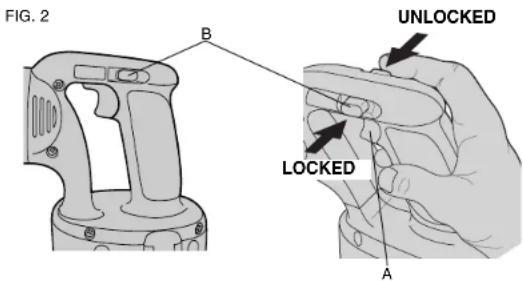
Switch (Variable Speed) (Fig. 2)
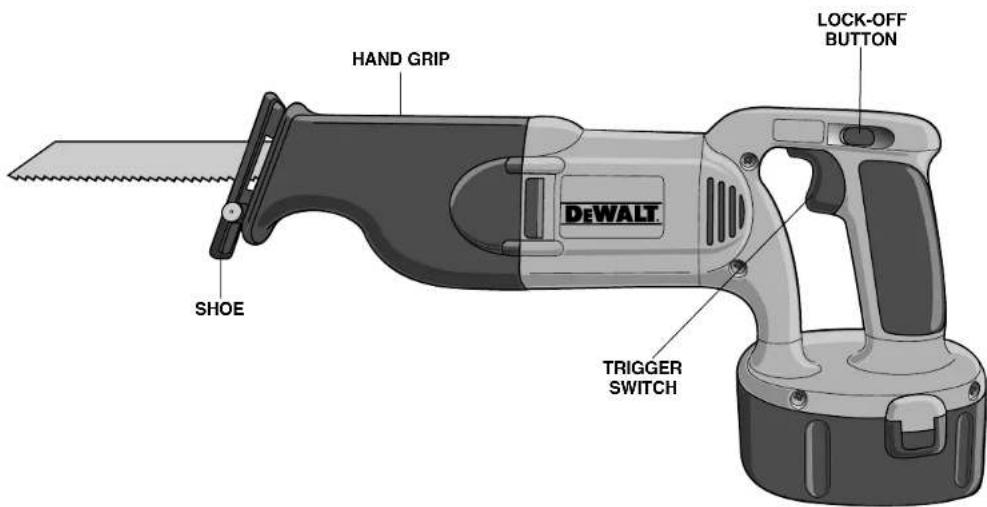
LOCK-OFF BUTTON AND TRIGGER SWITCH
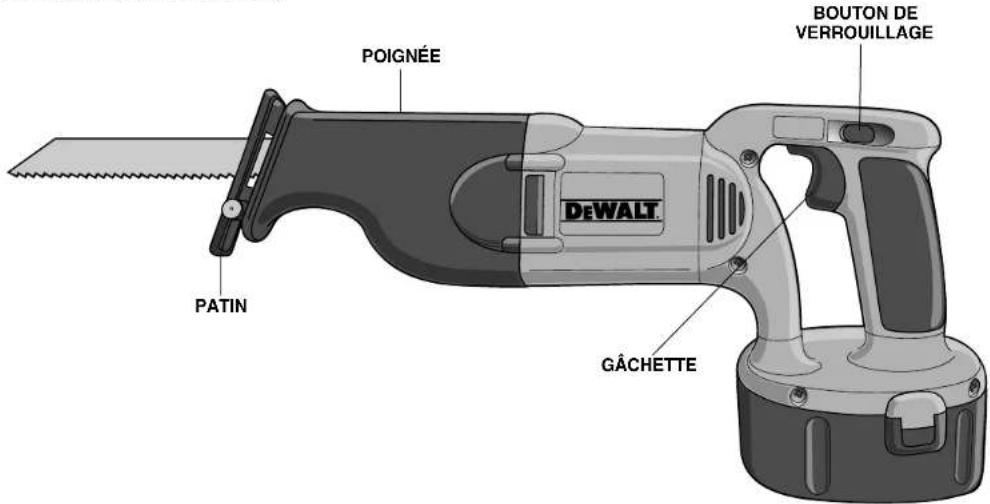
Your saw is equipped with a lock-off button (B).
To lock the trigger switch, press the lock-off button as shown in Figure 2. Always lock the trigger switch (A) when carrying or storing the tool to eliminate unintentional starting. The lock-off button is colored red to indicate when the switch is in its unlocked position.
English
To unlock the trigger switch, press the lock-off button as shown in Figure 2. Pull the trigger switch to turn the motor ON. Releasing the trigger switch turns the motor OFF.
NOTE: This tool has no provision to lock the switch in the ON position, and should never be locked ON by any other means.
The variable speed trigger switch will give you added versatility. The further the trigger is depressed the higher the speed of the saw.
CAUTION: Use of very slow speed is recommended only for beginning a cut. Prolonged use at very slow speed may damage your saw.
Installing and Removing the Battery Pack
NOTE: Make sure your battery pack is fully charged.
CAUTION: Lock trigger switch before removing or installing battery.
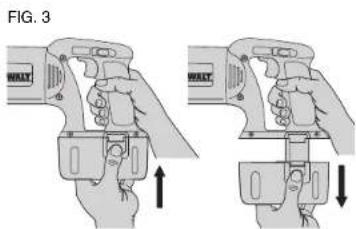
To install the battery pack into the tool handle, align the base of the tool with the notch inside the tool's handle and slide the battery pack firmly into the handle until you hear the lock snap into place as shown in Figure 3.
To remove the battery pack from the tool, press the release buttons and firmly pull the battery pack out of the tool handle. Insert it into the charger as described in the charger manual.
Blade Installation and Removal
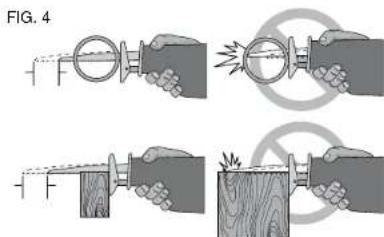
Different blade lengths are available. Use the appropriate blade for the application. The blade should be longer than 31/2^ and should extend past the shoe and the thickness of the workpiece during the cut. Do not use jigsaw blades with this tool.
WARNING: Blade breakage may occur if the blade does not extend past the shoe and the workpiece during the cut (Fig. 4). Increased risk of personal injury, as well as damage to the shoe and workpiece may result.
CAUTION: LOCK TRIGGER SWITCH AND REMOVE BATTERY PACK.
TO INSTALL BLADE INTO SAW
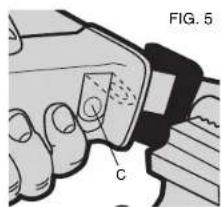
- Open blade clamp release lever (C) up (Fig. 5).
- Insert blade shank from the front.
- Close blade clamp release lever down.
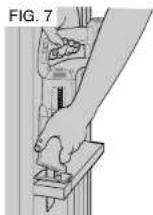
- Note blade can be installed upside-down to assist in flush-to cutting, see Figure 7.
TO REMOVE BLADE FROM SAW
-
Open up blade clamp release lever.
-
Remove blade.
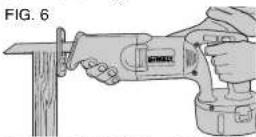
Cutting (Figure 6)
CAUTION: Always wear eye protection while operating this power tool.
CAUTION: Exercise extra caution when cutting towards operator. Always hold saw firmly with both hands while cutting.
Before cutting any type of material, be sure it is firmly anchored or clamped to prevent slipping. Place blade lightly against work to be cut, switch on saw motor and allow it to obtain maximum speed before applying pressure.
Whenever possible, the saw shoe must be held firmly against the material being cut. This will prevent the saw from jumping or vibrating and minimize blade breakage. Any cut which puts pressure on the blade such as angle or scroll cuts increase potential for vibration, kickback, and blade breakage.
CAUTION: Use extra caution when cutting overhead and pay particular attention to overhead wires which may be hidden from view. Anticipate the path of falling branches and debris ahead of time. FIG.7
CAUTION: Inspect work site for hidden gas pipes, water pipes, or electrical wires before making blind or plunge cuts. Failure to do so may result in explosion, property damage, electric shock, and/or serious personal injury.
FLUSH-TO CUTTING (FIGURE 7)
The compact design of the saw motor housing and spindle housing permits extremely close cutting to floors, corners and other difficult areas.
POCKET/PLUNGE CUTTING - WOOD ONLY (FIG. 8)
The initial step in pocket cutting is to measure the surface area to be cut and mark clearly with a pencil, chalk or scriber. Use the appropriate blade for the application. The blade should be longer than 31/2" and should extend past the shoe and the thickness of the workpiece during the cut. Insert blade in blade clamp. Next, tip the saw backward until the back edge of the shoe is resting on the work surface and the blade clears the work surface. Now switch motor on, always permitting blade to attain maximum
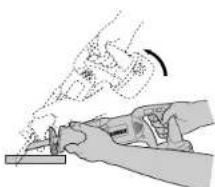
FIG.8
ROCK TOOL UP TO NORMAL CUTTING POSITION AFTER BLADE HAS CUT THROUGH MATERIAL
STARTING POSITION FOR POCKET CUTTING
speed. Grip handle steadily and begin a slow, deliberate upward swing with the handle of the saw. Blade will begin to feed into material. Always be sure blade is completely through material before continuing with pocket cut.
NOTE: In areas where blade visibility is limited, use the edge of the saw shoe as a guide. Lines for any given cut should be extended beyond edge of cut to be made.
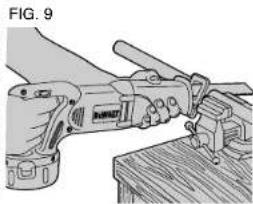
METAL CUTTING (FIGURE 9)
This unit has different metal cutting capacities depending upon type of blade used and the metal to be cut. Use a finer blade for ferrous metals and a coarse blade for nonferrous materials. In thin gauge sheet metals it is best to clamp wood to both sides of sheet. This will insure a clean cut without excess vibration or tearing of
English
metal. Always remember not to force cutting blade as this reduces blade life and causes costly blade breakage.
NOTE: It is generally recommended that when cutting metals you should spread a thin film of oil or other lubricant along the line ahead of the saw cut for easier operation and longer blade life.
MAINTENANCE
Lubrication
Your tool was properly lubricated before leaving the factory. In two to six months, depending upon use, take or send your tool to a Service Center, or authorized service station, for a complete cleaning, inspection and lubrication. Tools used constantly on production jobs will need relubrication more often. Also, tools "out of service" for long periods should be relubricated before being put back to work.
Repairs
To assure product SAFETY and RELIABILITY, repairs, maintenance and adjustment (including brush inspection and replacement) should be performed by authorized service centers or other qualified service personnel, always using identical replacement parts.
Accessories
Recommended accessories for use with your tool are available at extra cost from your local dealer or authorized service center. If you need assistance in locating any accessory for your tool, contact: DEWALT Industrial Tool Co., 701 East Joppa Road, Baltimore, MD 21286.
CAUTION: The use of any other accessory not recommended for use with this tool could be hazardous.
Full Warranty
DeWALT heavy duty industrial tools are warranted for one year from date of purchase. We will repair, without charge, any defects due to faulty materials or workmanship. For warranty repair information, call 1-800-4-DeWALT. This warranty does not apply to accessories or
damage caused where repairs have been made or attempted by others. This warranty gives you specific legal rights and you may have other rights which vary in certain states or provinces. In addition to the warranty, DEWALT tools are covered by our:
30 DAY NO RISK SATISFACTION GUARANTEE
If you are not completely satisfied with the performance of your DeWALT heavy duty industrial tool, simply return it to the participating seller within 30 days for a full refund. Please return the complete unit, transportation prepaid. Proof of purchase may be required.
FREE WARNING LABEL REPLACEMENT: If your warning labels become illegible or are missing, call 1-800-4-DeWALT for a free replacement.
POUR TOUTE QUESTION OU REMARQUE AU SUJET DE CET OUTIL OU DE TOUT AUTRE OUTIL DEWALT, COMPOSER LE NUMERO SANS FRAIS :
18004-DEWALT(1800433-9258)
Tranacis
DECOUPE DU METAL (FIGURE 9)
RBRC™ es unamarca registrada de Rechargeable Battery Recycling Corporation.
DW938 18,0 volts 0-2800 rpm
DC380 18,0 volts 0-2900 rpm
IMPORTADOR: DEWALT S.A. DE C.V.
BOSQUES DE CIDROS ACCESO RADIATAS NO.42
COL BOSQUES DE LAS LOMAS, 3A. SECCION, CP 05120
Blvd. Manuel J. Clouther 3027
Col. Lomas del Blvd. 667-717-89-99
SAN LUIS POTOSI