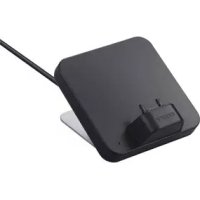
TDMMP10 - Music receiver SONY - Free user manual and instructions
Find the device manual for free TDMMP10 SONY in PDF.


| Product type | Music receiver |
| Brand | Sony |
| Model | TDMMP10 |
| Dimensions (W/D/H) | 80 × 90 × 58 mm |
| Weight | 230 g (cable included) |
| Power supply | DC 5 V, 0.7 A (via DIGITAL MEDIA PORT connector) |
| Cable length | Approx. 1.5 m |
| Operating temperature | 10 °C to 35 °C |
| Main functions | Audio playback from Sony Ericsson mobile phone, control via AV system or remote control, battery charging |
| Compatibility | Sony Ericsson phones with Fast port connector |
| Interface | DIGITAL MEDIA PORT (DMPORT) |
| Maintenance and cleaning | Clean with a soft cloth slightly dampened with a mild detergent solution |
| Safety | Do not install in a confined space; disconnect in case of trouble; avoid humidity, dust, vibrations |
| Supplied parts | Unit, instruction manual, cushion stickers (3 mm and 6 mm) |
| Repairability | Contact your Sony dealer for any repairs |
Frequently Asked Questions - TDMMP10 SONY
User questions about TDMMP10 SONY
0 question about this device. Answer the ones you know or ask your own.
Ask a new question about this device
Download the instructions for your Music receiver in PDF format for free! Find your manual TDMMP10 - SONY and take your electronic device back in hand. On this page are published all the documents necessary for the use of your device. TDMMP10 by SONY.
USER MANUAL TDMMP10 SONY
DIGITAL MEDIA PORT Adapter
GB Operating Instructions
FR Mode d'emploi
Do not install the appliance in a confined space, such as a bookcase or built-in cabinet.
The nameplate is located on the bottom exterior.
Install this system so that the power cord can be unplugged from the wall socket immediately in the event of trouble.
Notice for the customers in the U.S.A.
The following FCC statement applies only to the version of this model manufactured for sale in the USA.
Other versions may not comply with FCC technical regulations.
WARNING
This equipment has been tested and found to comply with the limits for a Class B digital device, pursuant to Part 15 of the FCC Rules. These limits are designed to provide reasonable protection against harmful interference in a residential installation. This equipment generates, uses, and can radiate radio frequency energy and, if not installed and used in accordance with the instructions, may cause harmful interference to radio communications. However, there is no guarantee that interference will not occur in a particular installation. If this equipment does cause harmful interference to radio or television reception, which can be determined by turning the equipment off and on, the user is encouraged to try to correct the interference by one or more of the following measures:
– Reorient or relocate the receiving antenna.
- Increase the separation between the equipment and receiver.
- Connect the equipment into an outlet on a circuit different from that to which the receiver is connected.
- Consult the dealer or an experienced radio/TV technician for help.
CAUTION
You are cautioned that any changes or modifications not expressly approved in this manual could void your authority to operate this equipment.
Notice for the customers in Canada
This class B digital apparatus complies with Canadian ICES-003.
For the customers in Europe

The validity of the CE marking is restricted to only those countries where it is legally
enforced, mainly in the countries EEA (European Economic Area).
The manufacturer of this product is Sony Corporation, 1-7-1 Konan Minato-ku Tokyo, 108-0075 Japan. The Authorized Representative for EMC and product safety is Sony Deutschland GmbH, Hedelfinger Strasse 61, 70327 Stuttgart, Germany. For any service or guarantee matters please refer to the addresses given in separate service or guarantee documents.
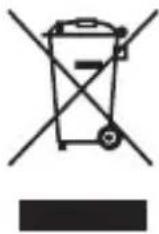
Disposal of Old Electrical & Electronic Equipment (Applicable in the European Union and
other European countries with separate collection systems)
This symbol on the product or on its packaging indicates that this product shall not be treated as household waste. Instead it shall be handed over to the applicable collection point for the recycling of electrical and electronic equipment. By ensuring this product is disposed of correctly, you will help prevent potential negative consequences for the environment and human health, which could otherwise be caused by inappropriate waste handling of this product. The recycling of materials will help to conserve natural resources. For more detailed information about recycling of this product, please contact your local Civic Office, your household waste disposal service or the shop where you purchased the product.
On copyrights
- All other trademarks and registered trademarks are of their respective holders. In this manual, ^TM and ^® marks are not specified.
- The Bluetooth word mark and logos are owned by the Bluetooth SIG, Inc. and any use of such marks by Sony Corporation is under license.
Compatible Sony Ericsson mobile phones
Check the website below for information on Sony Ericsson mobile phones that are compatible with this unit. Update your mobile phone to use the latest software before you use it.
For customers in the U.S.A.: http://www.sony.com/support For customers in Canada: http://www.sony.ca/ElectronicsSupport For customers in Europe: http://support.sony-europe.com For customers in Asia and Oceania: http://www.sony-asia.com/support For customers in Latin America: http://www.sony-latin.com/index.crp
Notes
• This unit is designed for Sony Ericsson mobile phone only. You can not connect any other mobile phones.
- Sony cannot accept responsibility in the event that data recorded to mobile phone is lost or damaged when using a mobile phone connected to this unit.
• This product has been designed specifically to work with Sony Ericsson mobile phones that have Fast port.
- Hereafter in this manual, Sony Ericsson mobile phones are referred to simply as “mobile phone”.
Table of Contents
Overview......5
Getting Started
1: Checking supplied items...6
2: List of parts locations......6
3: Installing the TDM-MP10 ....7
Controlling the mobile phone
Performing basic operations....10
Additional Information
Troubleshooting ....11
Precautions ......12
Specifications......13
Overview
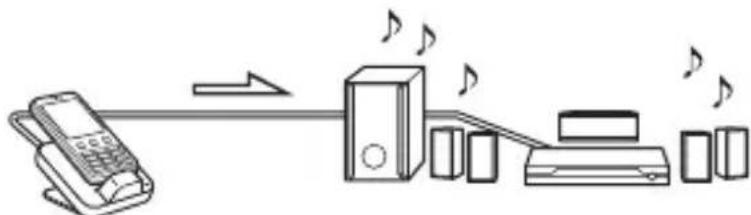
You can enjoy Sony Ericsson mobile phone audio content by connecting this unit to an AV system with a DIGITAL MEDIA PORT interface (Sony DAV series, etc.).
- You can operate your mobile phone by its control buttons, the control buttons of the AV system, and the remote supplied with the AV system (page 10).
- You can also use this unit as a battery charger (page 9).
flowchart
graph LR
    A["Telephone"] --> B["Speaker"]
    B --> C["Printer"]
    C --> D["Address"]
    style A fill:#f9f,stroke:#333
    style B fill:#ccf,stroke:#333
    style C fill:#cfc,stroke:#333
    style D fill:#fcc,stroke:#333
mobile phone and TDM-MP10
AV system (Sony DAV series, STR series, etc.)
Notes
• DIGITAL MEDIA PORT is occasionally abbreviated as DMPORT.
- TDM-MP10 does not support video output. Even if your mobile phone has video/photo capability, you cannot view video or photo contents on the TV or other video devices.
- You cannot listen to FM radio on your mobile phone using the TDM-MP10, even if the mobile phone has an FM radio feature.
- Make sure to turn off the Bluetooth™ function of the mobile phone before placing the mobile phone on the TDM-MP10.
Getting Started
1: Checking supplied items
Unit (1)
Operating Instructions (1)
Padding stickers (3 mm thick (2)/ 6 mm thick (2)) (page 8)
2: List of parts locations
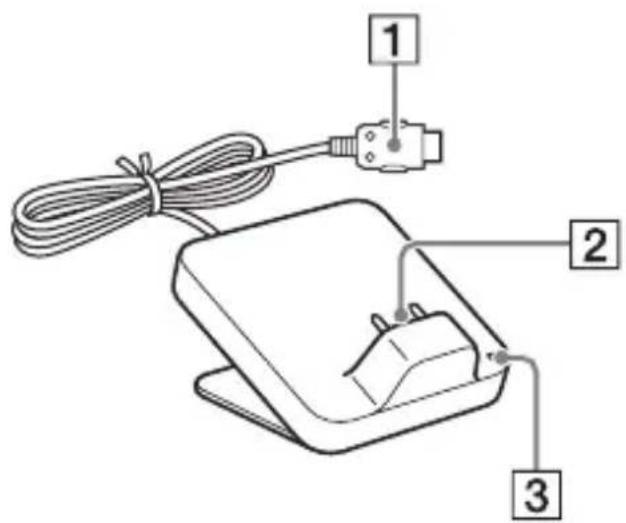
① DIGITAL MEDIA PORT cable (page 7)
2 Connector (page 8)
3 Power indicator:
- Lights up in green while the power is supplied (page 9).
- Flashes when the remote is operated.
3: Installing the TDM-MP10
Connect and position the TDM-MP10 as illustrated below.
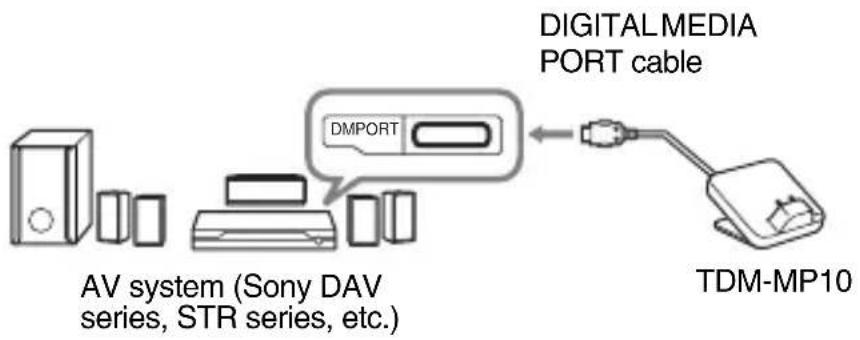
flowchart
graph LR
    A["AV system (Sony DAV series, STR series, etc.)"] --> B["Digital Media Port cable"]
    B --> C["TDM-MP10"]
Note
This unit turns on/off automatically whenever the connected AV system (DAV series, etc.) turns on/off.
To connect/disconnect the unit
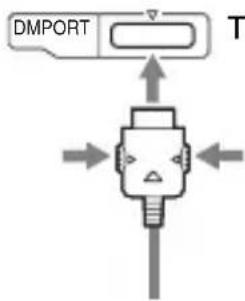
flowchart
graph TD
    A["DMPORT"] --> B["Central Robot"]
    B --> C["Arrow Left"]
    B --> D["Arrow Right"]
    B --> E["Arrow Down"]
    B --> F["Arrow Up"]
    style A fill:#f9f,stroke:#333
    style B fill:#ccf,stroke:#333
To DMPORT jack
Connect the cable so that both marks are aligned.
To remove the DIGITAL MEDIA PORT cable from the DMPORT jack, press both side buttons.
Connecting
1 Connect the DIGITAL MEDIA PORT cable of this unit to the DIGITAL MEDIA PORT jack of an AV system (DAV series, etc.). Make sure the AV system is turned off before connecting.
2 Turn on the AV system with a DIGITAL MEDIA PORT jack connected to this unit, and select the DIGITAL MEDIA PORT function.
Disconnecting
Before disconnecting, turn off the AV system.
To adjust the unit's connector position
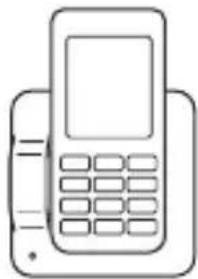
This unit can be rotated 90 degrees to the left or right according to the position of the connector on the mobile phone.
For a mobile phone with the connector on the bottom
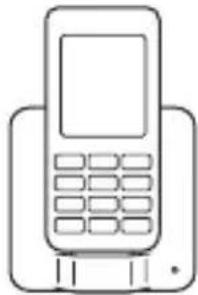
natural_image
Line drawing of a mobile phone with keypad and front panel (no text or symbols)For a mobile phone with the connector on the right side
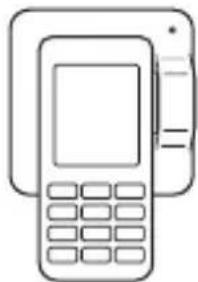
natural_image
Line drawing of a mobile phone with keypad and front panel (no text or symbols)For a mobile phone with the connector on the left side
natural_image
Line drawing of a classic mobile phone with keypad and front panel (no text or symbols)Note
Do not excessively rotate the unit. Doing so may damage the unit.
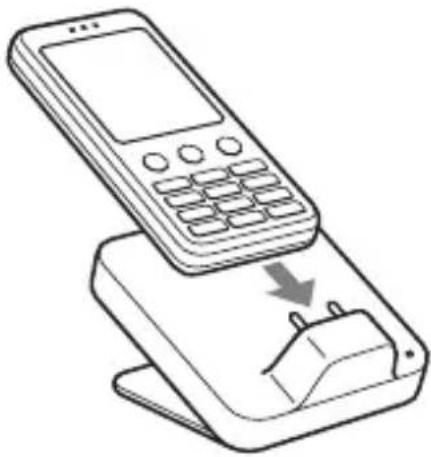
To put the mobile phone into the unit's connector
Put the mobile phone into the unit's connector.
natural_image
Line drawing of a mobile phone with a power button and a downward arrow indicating download or change (no text or symbols)Tip
Depending on the type of mobile phone, there may be a gap between the back of the mobile phone and the unit. If this gap is large and the mobile phone is unstable, use the supplied padding stickers to fill the gap.
Notes
- When placing or removing the mobile phone, do not twist or sway the mobile phone, keeping it aligned with the unit, to prevent connector damage.
- Do not carry the unit with a mobile phone set on the connector. Doing so may cause a malfunction.
- When placing or removing the mobile phone, brace the unit with one hand and take care not to press the controls of the mobile phone by mistake.
- When placing the mobile phone, pause playback.
To use the unit as a battery charger
You can use the unit as a battery charger. While the power indicator lights up, the battery is charging. The charging status appears in the mobile phone display. For details, see the user's guide of your mobile phone.
Controlling the mobile phone
Performing basic operations
You can operate your mobile phone by its control buttons, the control buttons of a connected AV system with a DIGITAL MEDIA PORT interface (Sony DAV series, etc.), and the remote supplied with the AV system.
Notes
- To use a mobile phone, refer to the user's guide of your mobile phone.
- Before disconnecting the mobile phone, pause playback.
Basic Operations
The following operations are available with the AV system or the remote.
Press To
▶ Start play.
■Pause play.
■Stop play.
◀◀/▶◀Skip to the next (previous) track.
◀◀/▶▶Fast-forward (fast-rewind) play.
VOLUME +/- Adjust the volume level.
Notes
- Point the remote at the AV system.
- Depending on the connected AV system or mobile phone, operational procedures or buttons may differ or not work.
- To change the volume level, use the volume controls on the connected AV system or the remote, and not those on the mobile phone.
- It may take time to start playback depending on the contents.
- The indicator on the unit flashes when the unit is receiving a remote operation signal. This is not a malfunction.
- When listening to music on the mobile phone with headphones after using this unit, be sure to check the volume before playback.
- If you receive a call during playback, playback will pause and you can take an incoming call.
Additional Information
Troubleshooting
Should you encounter a problem with your unit, find your problem in the troubleshooting checklist below and take the indicated corrective action. If the problem persists, contact your Sony dealer. Note that if service personnel changes some parts during repair, these parts may be retained. When bringing the system in for repairs, be sure to bring in the entire system.
This product is a system product, and the entire system is needed to determine the location requiring repair.
The remote does not function.
- Remove any obstacles.
- Point the remote at the AV system (DAV series, etc.)'s sensor.
- The distance between the remote and the AV system is too far.
- Replace the battery.
- Make sure the mobile phone* is securely connected.
- Select the DMPORT function on the AV system.
- Turn on and off the AV system.
- Start up the music player of the mobile phone.
The mobile phone screen turns off.
- The mobile phone backlight automatically turns off after a certain amount of time has passed. To turn on the backlight, press any button on the mobile phone that is not related to music playback operation.
Video/photo image from the mobile phone does not appear on the TV screen.
- The unit does not support video output. Even if your mobile phone has video/photo capability, you cannot view video or photo content on the TV or other video devices.
There is no sound.
- Check the connections.
- Make sure the unit is securely connected.
- Make sure the mobile phone* is securely connected.
- Make sure the mobile phone* is playing music.
- It may take time to start playback depending on the contents.
- Disconnect any Bluetooth device (headset, etc.) that is being used with the mobile phone.
- Start up the music player of the mobile phone.
There is severe hum or noise.
- Move the unit away from the source of noise.
The sound is distorted.
- Reduce the volume of the connected AV system.
- Set the equalizer setting of the mobile phone to OFF.
* See “Compatible Sony Ericsson mobile phones” (page 3).
Precautions
On safety
Should any solid object or liquid fall into the system, unplug the system and have it checked by qualified personnel before operating it any further.
On placement
- Do not place the unit in an inclined position.
- Do not place the unit in locations where it is;
- Extremely hot or cold
– Dusty or dirty - Very humid
– Subject to vibrations
– Subject to direct sunlight.
- Use caution when placing the unit on surfaces that have been specially treated (with wax, oil, polish, etc.) as staining or discoloration of the surface may result.
On heat buildup
- Although the unit heats up during operation, this is not a malfunction.
- Place the unit in a location with adequate ventilation to prevent heat buildup in the unit.
If you have any questions or problems concerning your unit, please consult your nearest Sony dealer.
Cleaning the unit
Clean the unit with a soft cloth slightly moistened with mild detergent solution. Do not use any type of abrasive pad, scouring powder or solvent such as thinner, benzine or alcohol.
Specifications
General
Power requirements:
DC 5 V, 0.7 A (via
DIGITAL MEDIA
PORT)
Dimensions (w/d/h):
Approx. 80 × 90 ×
58 mm (3 1/4 ×
3 5/8 × 2 3/8 inch)
Mass: Approx. 230 g
(8.1 oz) (includes
cable)
Cable length: Approx. 1.5 m
(5 ft)
Operating temperature:
10^ to 35^ (50°F
to 95°F)
Design and specifications are subject to change without notice.
AVERTISSEMENT
natural_image
Line drawing of a mobile phone with keypad and front panel (no text or symbols)natural_image
Line drawing of a mobile phone with keypad and front panel (no text or symbols)natural_image
Line drawing of a mobile phone with keypad and front panel (no text or symbols)Remarque
natural_image
Line drawing of a mobile phone with a downward arrow indicating a change or download (no text or symbols present)Astuce
(3 1/4 × 3 5/8 × 2 3/8
pouces)
natural_image
Line drawing of a mobile phone with keypad and front panel (no text or symbols)natural_image
Line drawing of a mobile phone with keypad and front panel (no text or symbols)natural_image
Line drawing of a classic mobile phone with keypad and front panel (no text or symbols)Nota
natural_image
Line drawing of a mobile phone with a downward arrow indicating compression or disassembly (no text or symbols present)Sugerencia
(3 1/4 × 3 5/8 × 2 3/8
pulgadas)
Peso: Aprox. 230 g (8,1 oz)
(incluido el cable)
Longitud del cable:
Aprox. 1,5 m (5 ft)
natural_image
Line drawing of a mobile phone with keypad and front panel (no text or symbols)natural_image
Line drawing of a mobile phone with keypad and front panel (no text or symbols)natural_image
Line drawing of a classic mobile phone with keypad and front panel (no text or symbols)Hinweis
natural_image
Line drawing of a mobile phone with a power button, showing its screen and base (no text or symbols)Tipp
flowchart
graph LR
    A["Telephone"] --> B["Audio Station"]
    B --> C["Physical Device"]
    C --> D["Printer"]
    D --> E["Physical Cells"]
mobiele telefoon en TDM-MP10
AV-systeem (Sony DAV-serie, STR-serie, enz.)
Opmerkingen
natural_image
Line drawing of a mobile phone with keypad and front panel (no text or symbols)natural_image
Line drawing of a mobile payment terminal with keypad and front panel (no text or symbols)natural_image
Line drawing of a classic mobile phone with keypad and front panel (no text or symbols)Opmerking
natural_image
Line drawing of a mobile phone with a downward arrow indicating a change or download (no text or symbols present)Tip
natural_image
Line drawing of a mobile phone with keypad and front panel (no text or symbols)natural_image
Line drawing of a mobile phone with keypad and front panel (no text or symbols)natural_image
Line drawing of a classic mobile phone with keypad and front panel (no text or symbols)Nota
natural_image
Line drawing of a mobile phone with a power button and a downward arrow indicating download or change (no text or symbols)Suggerimento
Circa 80 × 90 × 58 mm
① DIGITAL MEDIA PORT-kabel (sid. 7)
2Kontakt (sid. 8)
3 Strömindikator:
natural_image
Line drawing of a mobile phone with keypad and front panel (no text or symbols)natural_image
Line drawing of a mobile phone with keypad and front panel (no text or symbols)natural_image
Line drawing of a classic mobile phone with keypad and front panel (no text or symbols)Obs!
natural_image
Line drawing of a mobile phone with a hand inserting a plug into its base (no text or symbols)Tips
flowchart
graph LR
    A["Telephone"] --> B["Audio Station"]
    B --> C["Physical Device"]
    C --> D["Printer"]
    D --> E["Physical Cells"]