DUO D30 - Hi-fi system Bluesound - Free user manual and instructions
Find the device manual for free DUO D30 Bluesound in PDF.



User questions about DUO D30 Bluesound
0 question about this device. Answer the ones you know or ask your own.
Ask a new question about this device
Download the instructions for your Hi-fi system in PDF format for free! Find your manual DUO D30 - Bluesound and take your electronic device back in hand. On this page are published all the documents necessary for the use of your device. DUO D30 by Bluesound.
USER MANUAL DUO D30 Bluesound
SAFETY INSTRUCTIONS AND
QUICK START GUIDE
DUO D30
High Performance Sub/Sat System

natural_image
Abstract black curved line design resembling a stylized number or symbol (no text or symbols present)Welcome
Welcome to Bluesound, Hi-Fi for the Wi-Fi generation.
The Bluesound Duo speakers are designed to deliver high performance in many uses, and we hope they add much enjoyment to your listening life.
I. IMPORTANT SAFETY INSTRUCTIONS
SAVE THESE INSTRUCTIONS FOR LATER USE. FOLLOW ALL WARNINGS AND INSTRUCTIONS MARKED ON THE AUDIO EQUIPMENT.
- Read instructions - All the safety and operating instructions should be read before the product is operated.
- Retain instructions - The safety and operating instructions should be retained for future reference.
- Heed Warnings - All warnings on the product and in the operating instructions should be adhered to.
- Follow Instructions - All operating and use instructions should be followed.
- Cleaning - Unplug this product from the wall outlet before cleaning. Do not use liquid cleaners or aerosol cleaners. Clean only with dry cloth.
- Attachments - Do not use attachments not recommended by the product manufacturer as they may cause hazards.
- Water and Moisture - Do not use this product near water-for example, near a bath tub, wash bowl, kitchen sink, or laundry tub; in a wet basement; or near a swimming pool; and the like.
- Accessories - Do not place this product on an unstable cart, stand, tripod, bracket, or table. The product may fall, causing serious injury to a child or adult, and serious damage to the product. Use only with a cart, stand, tripod, bracket, or table recommended by the manufacturer, or sold with the product. Any mounting of the product should follow the manufacturer's instructions, and should use a mounting accessory recommended by the manufacturer.
- A product and cart combination should be moved with care. Quick stops, excessive force, and uneven surfaces may cause the product and cart combination to overturn.
- Ventilation - Slots and openings in the cabinet are provided for ventilation and to ensure reliable operation of the product and to protect it from overheating, and these openings must not be blocked or covered. The openings should never be blocked by placing the product on a bed, sofa, rug, or other similar surface. This product should
not be placed in a built-in installation such as a bookcase or rack unless proper ventilation is provided or the manufacturer's instructions have been adhered to.
- Power Sources - This product should be operated only from the type of power source indicated on the marking label. If you are not sure of the type of power supply to your home, consult your product dealer or local power company.
The primary method of isolating the device from the mains supply is to disconnect the mains plug. Ensure that the mains plug remains accessible at all times. Unplug the AC power cord from the AC outlet if the unit will not be used for several months or more. The socket-outlet shall be installed near the equipment and shall be easily accessible.
-
Grounding or Polarization - This product may be equipped with a polarized alternating-current line plug (a plug having one blade wider than the other). This plug will fit into the power outlet only one way. This is a safety feature. If you are unable to insert the plug fully into the outlet, try reversing the plug. If the plug should still fail to fit, contact your electrician to replace your obsolete outlet. Do not defeat the safety purpose of the polarized plug.
-
Power Cord Protection - Power-supply cords should be routed so that they are not likely to be walked on or pinched by items placed upon or against them, paying particular attention to cords at plugs, convenience receptacles, and the point where they exit from the product.
-
Outdoor Antenna Grounding - If an outside antenna or cable system is connected to the product, be sure the antenna or cable system is grounded so as to provide some protection against voltage surges and built-up static charges. Article 810 of the National Electrical Code, ANSI/NFPA 70, provides Information with regard to proper grounding of the mast and supporting structure, grounding of the lead-in wire to an antenna discharge unit, size of grounding conductors, location of antenna discharge unit, connection to grounding electrodes, and requirements for the grounding electrode.
-
Lightning - For added protection for this product during a lightning storm, or when it is left unattended and unused for long periods of time, unplug it from the wall outlet and disconnect the antenna or cable system. This will prevent damage to the product due to lightning and power line surges.
-
Power Lines - An outside antenna system should not be located in the vicinity of overhead power lines or other electric light or power circuits, or where it can fall into such power lines or circuits. When installing an outside antenna system, extreme care should be taken to keep from touching such power lines or circuits as contact with them might be fatal.
-
Overloading - Do not overload wall outlets, extension cords, or integral convenience receptacles as this can result in a risk of fire or electric shock.
-
Object and Liquid Entry - Never push objects of any kind into this product through openings as they may touch dangerous voltage points or short out parts that could
result in a fire or electric shock. Never spill liquid of any kind on the product.
WARNING:
THE APPARATUS SHOULD NOT BE EXPOSED TO DRIPPING OR SPLASHING, AND OBJECTS FILLED WITH LIQUIDS, SUCH AS VASES, SHOULD NOT BE PLACED ON THE APPARATUS. AS WITH ANY ELECTRONIC PRODUCTS, USE CARE NOT TO SPILL LIQUIDS INTO ANY PART OF THE SYSTEM. LIQUIDS CAN CAUSE A FAILURE AND/OR A FIRE HAZARD.
-
Damage Requiring Service - Unplug this product from the wall outlet and refer servicing to qualified service personnel under the following conditions:
-
When the power supply cord or plug is damaged.
- If liquid has been spilled, or objects have fallen into the product.
- If the product has been exposed to rain or water.
- If the product does not operate normally by following the operating instructions. Adjust only those controls that are covered by the operating instructions as an improper adjustment of other controls may result in damage and will often require extensive work by a qualified technician to restore the product to its normal operation.
- If the product has been dropped or damaged in any way.
-
When the product exhibits a distinct change in performance – this indicates a need for service.
-
Replacement Parts - When replacement parts are required, be sure the service technician has used replacement parts specified by the manufacturer or have the same characteristics as the original part. Unauthorized substitutions may result in fire, electric shock, or other hazards.
-
Safety Check - Upon completion of any service or repairs to this product, ask the service technician to perform safety checks to determine that the product is in proper operating condition.
- Heat - The product should be situated away from heat sources such as radiators, heat registers, stoves or other products (including amplifiers) that produce heat.
WARNING
TO REDUCE THE RISK OF FIRE OR ELECTRIC SHOCK, DO NOT EXPOSE THIS PRODUCT TO RAIN OR MOISTURE.
CAUTION
TO PREVENT ELECTRIC SHOCK, MATCH WIDE BLADE OF PLUG TO WIDE SLOT, FULLY INSERT.
WARNING
Changes or modifications to this unit not expressly approved by the party responsible for compliance could void the user's authority to operate the equipment.
NOTE
This equipment has been tested and found to comply with the limits for a Class B digital device, pursuant to Part 15 of the FCC Rules. These limits are designed to provide reasonable protection against harmful interference in a residential installation. This equipment generates, uses and can radiate radio frequency energy and, if not installed and used in accordance with the instructions, may cause harmful interference to radio communications. However, there is no guarantee that interference will not occur in a particular installation. If this equipment does cause harmful interference to radio or television reception, which can be determined by turning the equipment off and on, the user is encouraged to try to correct the interference by one or more of the following measures:
• Reorient or relocate the receiving antenna.
- Increase the separation between the equipment and receiver.
- Connect the equipment into an outlet on a circuit different from that to which the receiver is connected.
- Consult the dealer or an experienced radio/TV technician for help.
CAN ICS-3 (B)/NMB-3(B)
This device complies with Industry Canada license-exempt RSS-210. Operation is subject to the following two conditions: (1) this device may not cause Interference, and (2) this device must accept any interference, including interference that may cause undesired operation of the device.
- no naked flame sources such as lighted candles should be placed on the apparatus;
• the use of apparatus in tropical climate
This device complies with Part 15 of the FCC rules. Operation is subject to the following two conditions: (1) This device may not cause harmful interference, and (2) This device must accept any interference received, including interference that may cause undesired operation.

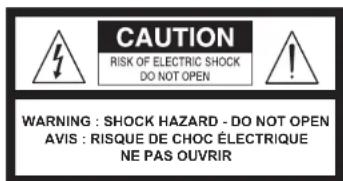
THE LIGHTNING FLASH WITH ARROWHEAD SYMBOL, WITHIN AN EQUILATERAL TRIANGLE, IS INTENDED TO ALERT THE USER TO THE PRESENCE OF UNINSULATED "DANGEROUS VOLTAGE" WITHIN THE PRODUCT'S ENCLOSURE THAT MAYBE OF SUFFICIENT MAGNITUDE TO CONSTITUTE A RISK OF ELECTRIC SHOCK TO PERSONS.

THE EXCLAMATION POINT WITHIN AN EQUILATERAL TRIANGLE IS INTENDED TO ALERT THE USER TO THE PRESENCE OF IMPORTANT OPERATING AND MAINTENANCE (SERVICING) INSTRUCTIONS IN THE LITERATURE ACCOMPANYING THE APPLIANCE.
text_image
CAUTION RISK OF ELECTRIC SHOCK DO NOT OPEN WARNING : SHOCK HAZARD - DO NOT OPEN AVIS : RISQUE DE CHOC ÉLECTRIQUE NE PAS OUVRIRWARNING
If this product is used at 240VAC, a suitable attachment plug should be used.
APPLIES ONLY TO POWERNODE N150, NODE N100 AND PULSE P300
EUROPEAN UNION NOTICE FOR WIRELESS PRODUCT
C€ 0979 Hereby, Lenbrook Industries Limited, declares that this Wireless Streaming Music Player/System is in compliance with the R&TTE Directive (1999/5/EC), Low Voltage Directive (2006/95/EC) and other essential requirements. The declaration of conformity may be consulted at www.lenbrook.com/DoC.
NOTES ON ENVIRONMENTAL PROTECTION

At the end of its useful life, this product must not be disposed of with regular household waste but must be returned to a collection point for the recycling of electrical and electronic equipment. The symbol on the product, owner's manual and packaging, point this out.
The materials can be reused in accordance with their markings. Through re-use, recycling of raw materials or other forms of recycling of old products, you are making an important contribution to the protection of our environment. Your local administrative office can advise you of the responsible waste disposal point.
INFORMATION ABOUT COLLECTION AND DISPOSAL OF WASTE BATTERIES (DIRECTIVE 2006/66/EC OF THE EUROPEAN PARLIAMENT AND THE COUNCIL OF EUROPEAN UNION) (FOR EUROPEAN CUSTOMERS ONLY)
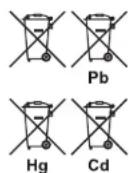
Batteries bearing any of these symbols indicate that they should be treated as "separate collection" and not as municipal waste. It is encouraged that necessary measures are implemented to maximize the separate collection of waste batteries and to minimize the disposal of batteries as mixed municipal waste.
End-users are exhorted not to dispose of waste batteries as unsorted municipal waste. In order to achieve a high level of recycling waste of batteries, discard waste batteries separately and properly through an accessible collection point in your vicinity. For more information about collection and recycling of waste batteries, please contact
your local municipality, your waste disposal service or the point of sale where you purchased the items.
By ensuring compliance and conformance to proper disposal of waste batteries, potential hazardous effects on human health is prevented and the negative impact of batteries and waste batteries on the environment is minimized, thus contributing to the protection, preservation and quality improvement of the environment.
RECORD YOUR MODEL NUMBER (NOW, WHILE YOU CAN SEE IT)
The model and serial number are located on the back of the cabinet. For your future convenience, we suggest that you record these numbers here:
Model no: ____
Serial no.:
II. QUICK START
a. Attach the supplied adhesive backed bumpers near the corners of the speaker's bottom surface to protect the finish of speakers and furnishings.
b. Position D20 speakers as symmetrically as possible, at a comfortable distance from your seating position—slightly closer to each other than they are to you.
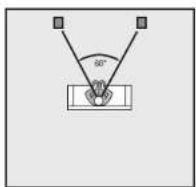
Ideal Speaker Placement: 2.1
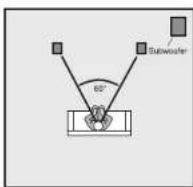
One of possible subwoofer locations
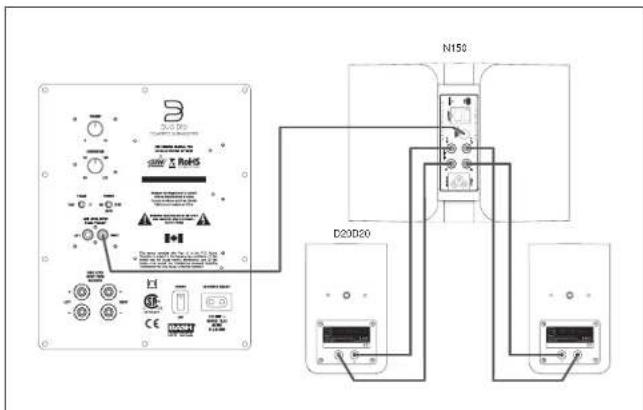
c. Using standard two-conductor (18 gauge/1.0mm dia) speaker wire or better, connect the Red (positive) binding post of each speaker to the Red speaker connector of your Bluesound Powernode. Similarly, connect the Black (negative) binding post on each speaker to the Black speaker connector of your Bluesound Powernode. Be sure to follow color-coding to make sure that your speakers are "in phase" for smoothest sound with deepest bass.
d. The loudest bass output from a subwoofer will come from corner placement. As you position the subwoofer outward from the corner along one wall or another, bass output diminishes somewhat, it also becomes more uniform throughout the room, with fewer of the "standing waves" that produce peaks and nulls at various points. Select the AC Power Cord appropriate for your region and plug it into the subwoofer, and then into your wall outlet. Using a subwoofer cable (not supplied) plug one
text_image
B D20D20 N150 D20D20end into either of the Low Level Inputs of the D10 Subwoofer. Plug the other end of the subwoofer cable into the subwoofer output of the Bluesound Powernode. Set the subwoofer's crossover control to the 12 o'clock position, set the phase switch to O° and volume control to the 12 o'clock position. Flip the Power Switch to the on position.
e. Ensure that the Bluesound Powernode is configured for the D30 Sub/Sat System by opening the Bluesound App on your control device and selecting the Powernode (right-hand Slide-out Menu Drawer). Once selected, navigate to "Control Panel/Speaker setup" (using Navigation Menu Drawer) and select Bluesound D30.
III. TROUBLESHOOTING
a. If a speaker begins to sound distorted, or seems to be missing certain frequencies, check first to see whether playing at a lower volume seems to clear up the problem. It can be especially important to turn down the volume right away if you have pushed an amplifier or receiver past its comfortable limits.
b. Determine if the problem is the speakers, the Bluesound Powernode, or the wire connections. If a problem on one speaker doesn't go away, interchange the speaker wire connections on your Bluesound Powernode, so that the left speaker is connected to the right channel, and vice versa. If the problem shifts to the other speaker, the problem is not in the speaker (Another component-or, very often, a cable or connection problem between components-may be at fault.) If the problem slays in the same speaker, swap the speaker cables next. If the problem remains in the same speaker, irrespective of the channel to which it's connected and the connecting wire used, the speaker itself probably needs service.
IV. TROUBLESHOOTING—SUBWOOFER
| SymptomNo sound/power indicator not lit | ActionEnsure the main power switch is toggled to the “Power” position. This switch is located at the back of the subwoofer.Ensure the power cord is connected to the subwoofer and plugged into a live AC outlet. |
| No sound/power Indicator remains red | The Bluesound D10 subwoofer utilizes signal sensing auto on/off circuitry. If no signal is sent to the subwoofer, it will not power up and the front panel power indicator will remain red. When using the subwoofer output of the Bluesound Powernode, no signal may be immediately present in this output. The subwoofer will only power up when a signal appears at the subwoofer Input.If the signal cable connection is poor or has been severed, the subwoofer will not power up. Swap cables to determine if this is the source of the problem.To ensure the problem is not associated with the subwoofer, rapidly disconnect and connect the subwoofer input signal. If the subwoofer power indicator color changes to green, the Bluesound Powernode may not be sending a signal to the subwoofer. Ensure the Bluesound Powernode is correctly configured to provide signal at the subwoofer output (see Quick Start Section E). |
| Sounds distorted | Lower volume if the subwoofer begins to sound distorted to determine if playback at a lower level solves the problem. If a slight reduction in level solves the problem, your subwoofer volume level was too high. If the distorted sound remains at a low level, the woofer may be damaged. |
| Hum | Hum is usually caused by using an inferior, damaged, exceptionally long signal cable or cables routed near high current wiring/appliances. Replace/shorten the cable connecting the subwoofer to the Bluesound Powernode. Cable runs of longer than 20 feet may require the use of a line driver (not available from Bluesound). |
See your dealer if you require service. Most Bluesound dealers are equipped to handle almost all problems. If you have moved since your purchase, the nearest authorized Bluesound dealer should be able to help you. If the problem is not resolved, please contact us at www.bluesound.com, providing the Model name, Serial Number, date of purchase, dealer name, and a full description of the problem.
©2013 Bluesound International. Bluesound, the stylized wordmark and "B" logotype, the phrase "HIFI for a wireless generation", NODE and all other Bluesound product names and taglines are trademarks or registered trademarks of Bluesound International, a division of Lenbrook Industries Limited. All other logos and services are trademarks or service marks of their respective owners.
CONSIGNES DE SÉCURITÉ IMPORTANTES ET
GUIDE DE MISE EN ROUTE RAPIDE
CAN ICS-3 (B)/NMB-3(B)
CAN ICS-3 (B)/NMB-3(B)
CAN ICS-3 (B)/NMB-3(B)
CAN ICS-3 (B)/NMB-3(B)
CAN ICS-3 (B)/NMB-3(B)
KENNISGEVING VOOR DRAADLOOS PRODUCT EUROPESE UNIE