Pulse 2 - Hi-fi system Bluesound - Free user manual and instructions
Find the device manual for free Pulse 2 Bluesound in PDF.


| Product type | Wireless hi-fi system |
| Brand | Bluesound |
| Model | Pulse 2 |
| Dimensions (W x D x H) | 23.5 x 14.5 x 18.0 cm |
| Weight | 3.6 kg |
| Power supply | AC power adapter (included) |
| Wireless connections | Wi-Fi 802.11 b/g/n, Bluetooth |
| Wired connections | Ethernet RJ45, USB (for service) |
| Supported audio formats | MP3, AAC, WMA, FLAC, ALAC, WAV, AIFF |
| Streaming services | Spotify, Tidal, Qobuz, internet radio |
| Multi-room compatibility | Yes, via the Bluesound app |
| Control | Mobile app (iOS/Android), infrared remote control (optional) |
| Audio input | 3.5 mm auxiliary input |
| Audio features | Digital amplifier, wide-range speakers, built-in subwoofer |
| Maintenance and cleaning | Dust with a soft, dry cloth. Do not use abrasive products |
| Safety | Do not expose to moisture or heat sources. Unplug before cleaning |
| Spare parts and repairability | Contact Bluesound customer service for any repairs |
| General information | User manual available for download on the manufacturer's website |
Frequently Asked Questions - Pulse 2 Bluesound
User questions about Pulse 2 Bluesound
0 question about this device. Answer the ones you know or ask your own.
Ask a new question about this device
Download the instructions for your Hi-fi system in PDF format for free! Find your manual Pulse 2 - Bluesound and take your electronic device back in hand. On this page are published all the documents necessary for the use of your device. Pulse 2 by Bluesound.
USER MANUAL Pulse 2 Bluesound
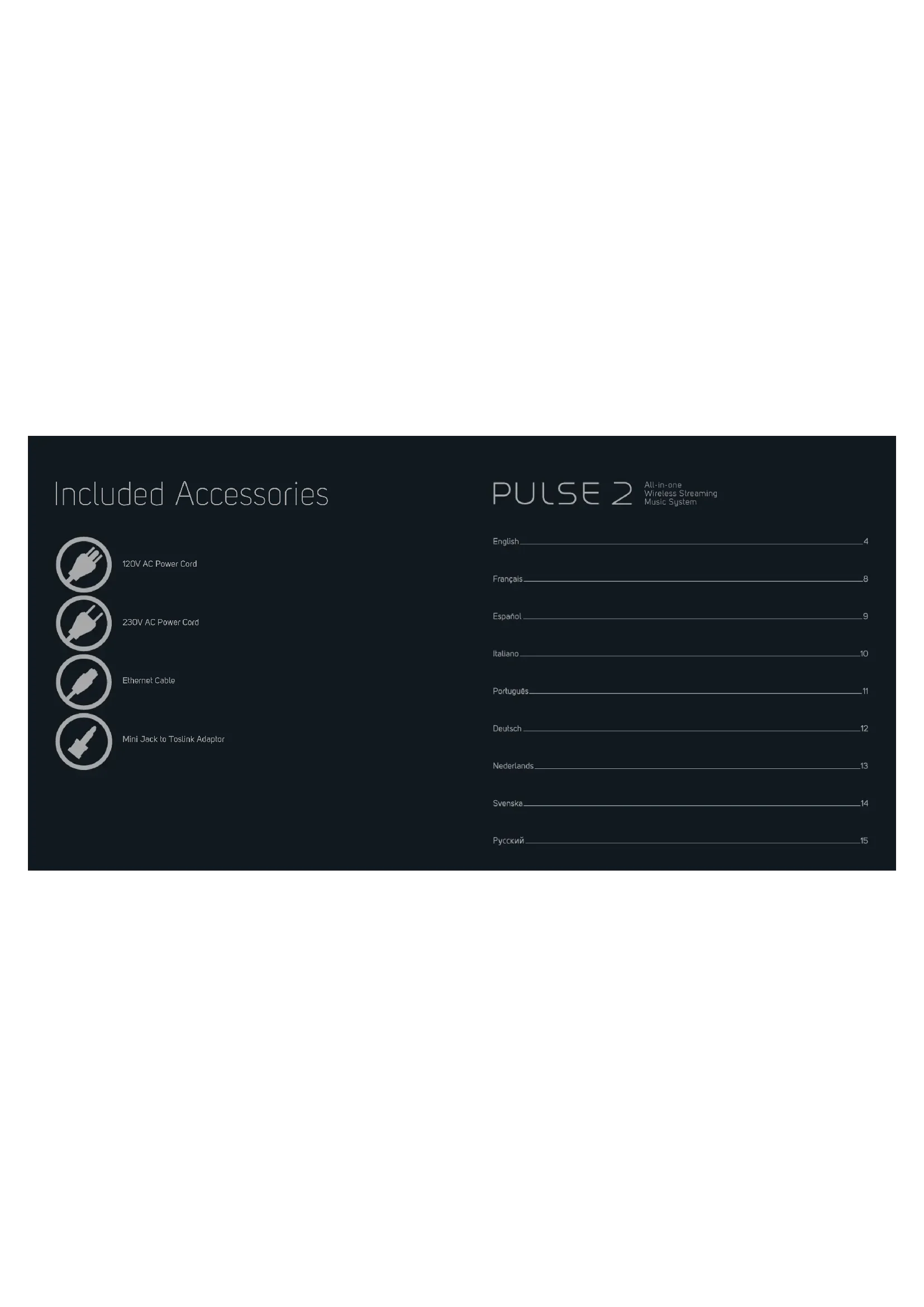
Included Accessories

120V AC Power Cord

23DV AC Power Cord

Ethernet Cable

Mini Jack to Toslink Adaptor
PULSE 2
All-in-one
Wireless Streaming
Music System
English 4
Français 8
Espanol 9
Italiano 10
Portugues 11
Deutsch 12
Nederlands 13
Svenska 14
Pycckn 15
1
CONNECT ZO POWER
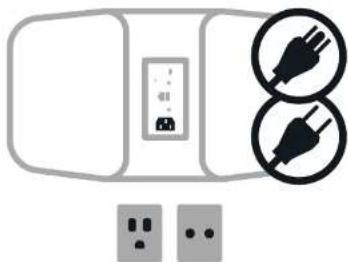
A. Select the AC Power Cord appropriate for your region and plug it into the Player, and then into your wall outlet.
B The PULSE 2's LED button should turn Solid Green, indicating that the player is in Hotspot Mode and ready to be added to your home WiFi network.
Never force a power cord into a wall outlet. An adaptor may be necessary in certain regions.
2
CONNECT TO WiFi
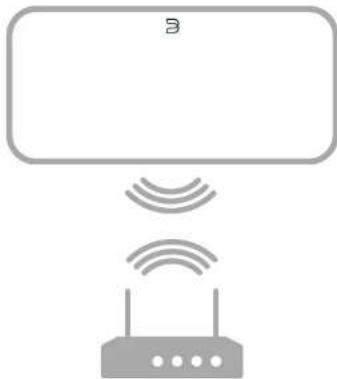
To see an Instructional video on WIFI Setup, please vslift www.bluesound.com
A On your tablet or smartphone, look for the WIFI network (hotspot) matching your PULSE 2's unique network ID, and join it! The network ID is listed as the product name (i.e. PULSE 2) immediately followed by the last four digits in the MAC (Machine Access Control) address (example: PULSE2-C01A). The full 12-digit MAC address is printed on a sticker on the back panel of your Player.
B Open a web browser on your tablet or smartphone and enter setup.bluesound.com, and press "Go". A control panel page should then appear.
C. From the main menu displayed, select Configure WiFi.
- Select your home WiFi Network from the Configure Wireless drop down menu.
E Enter your home network's Wireless Password in the field provided if it is a protected network).
F Select a Room Name from the drop down list, or create a customized Room name in the field provided.
G Press Update and wait for the Player's light to turn solid blue, indicating the player has successfully joined your home WiFi network.
H Repeat steps A-G for each additional Bluesound Player.
1. Select your home WIFI network from your tablet or smartphone's main network settings.
Alternatively, the PULSE 2 can be connected directly to your wired home network or router using the Ethernet cable provided.
3
All Bluesound Controller Apps for Apple iOS devices (iPhone, iPad, iPod), Android devices, Kindle Fire, and Windows or Mac desktops are available for download at www.bluesound.com/downloads
Congratulations, your Player setup is complete!
It's time to connect your music. Launch the App for the following playback options.


Your Music : To play music stored on a computer or NAS device, open the Navigation Driver by tapping! in the App, choose Configure Player from the menu, and select Configure Network Shares. Follow the screen prompts, and open every Room in your home to your entire digital music library.
Internet Radio: Simply select Tuneln from the Music Services menu, and find your favorite radio station. Or, explore and discover the thousands of radio stations streaming live 24/7 from anywhere on the planet via Tuneln.
For detailed Information, please visit www.bluesound.com
François
1 CONNEXION D'ALIMENTATION
This app uses the command p1000148 to install iOS OS, iPad, and PC. This application also supports Android and iOS. The following instructions are available for this application:
COO codework is used to work on a skeleton of the problem. It is used to compute the optimal geodesic curvature and momentum in another coordinate system.
Go near www.bisque.com at 10:00 a week instructricle video over WIFI Setup will begin.
3 DE APP DOWNLOAD
Is he held in court or the court granted to him to do the appropriate work of evidence?
4 AANSLUITEN OP MUZIEK
Uw Muzek: Selectee, as u muzek o0 en computer of en
e
Configure Network Shares (Network iden configures), Vlog n
anawipjpon op hot schem an stell hoder vork in uw hull apn oov ow cehalite datle mokkibilathex.
Intarnb-rodie Sociclae gacn Tunen In hot mcu Music Servlt
MIDAK DEPOW BY 98070546123456789000000000000000000000000000000000000000000000000
7 day period every year for worldwide live programme'shopping
Tinga 10th in an oolabel /en viggoutg. Det can be used in oolabel if you're going to
2 ANSLUT TILL ETT TRADLOST NATVERK
A P3 in subpuliculi after saccogonion after p 10 d. bilobius nubilifer after d. pilus P52 uinabies och ani tifl. hontment on pahaket Useae sem producuntom (exceplous PULS F) 9 by da lata glia allfremal apparatus MAC adhes (Machine Access Control) (11 cemale PULS-ODII). Apparatus bilaterraga MAC corssst (12 bockens) fns ag on eefikat y anaerost.
El enpaa an webthiatp a n spurotioe or smantletof an cchag setup, bluesound.com. Tropic sone p a "Ba" An konlrompanizdatis vissi visiting.
CvalConfigureWIFXconfiguraadibalnatverkunmer
Vdji tki kniokn kuiuagauon ngin Cngiure Wreiss Cngiurea hiai nai
E Maiia in di Wireless Password (nivikiseldicord) for di: le bilatrez nivikiseldicord i ami: [am di e tesso unieknt]
F Vaild Reem Namna (nunmra) rilgndrnrnne nlae slapaegnurnnernn Hafar
5 Trojct of Uplada I. hospesal och aiei olena anna uuril yibit bui, wist usr all monekana anduila tii dttinatn pitvuk.
H Upppeag A-G for va jy fllggea Bluesound enet
VUJ (zijl dit hemma WIF network for a surputa siter cemaree houne alweficnizHuaingar
Abnormal n ion PU.52 2 insidus did Hill d'absturation nettoer au erer malat le manfesantie nettozerkiale.
For alt se an Instruetionsvideo am WIFI Setup, besdkwww.bluesound.com
3 LADDA NER APPEN
A. Buxson and Controller app for Apple iDi电台: iPhone, iPad, iPhone X, Kindle, Kono, Kono X, Vodafone, M2, MediaTek, MediaTek X, MediaTek X2, MediaTek X3, MediaTek X4, MediaTek X5, MediaTek X6, MediaTek X7, MediaTek X8, MediaTek X9, MediaTek X10, MediaTek X11, MediaTek X12, MediaTek X13, MediaTek X14, MediaTek X15, MediaTek X16, MediaTek X17, MediaTek X18, MediaTek X19, MediaTek X20, MediaTek X21, MediaTek X22, MediaTek X23, MediaTek X24, MediaTek X25, MediaTek X26, MediaTek X27, MediaTek X28, MediaTek X29, MediaTek X30, MediaTek X31, MediaTek X32, MediaTek X33, MediaTek X34, MediaTek X35, MediaTek X36, MediaTek X37, MediaTek X38, MediaTek X39, MediaTek X40, MediaTek X41, MediaTek X42, MediaTek X43, MediaTek X44, MediaTek X45, MediaTek X46
Gratular, din spalae InstIningar 3darn
No or def aigs aff insulse din musk. Sotto appee for folfende appoeingisgeltemely.
A. Rneprebe Kedon, milius, nnoaouzai Dae bure perehna, H noekoo hte 0x cypoxcty03, a stbtem Bokm03 oBt96y2
HnHnHnHnHnHnHnHnHnHnHnHnHnHnHnHnHnHnHnHnHnHnHnHnHnHnHnHnHnHnHnHnHnHnHnHnHnHnHnHnHnHnHnHnHnHnHnHnHnHnH n HN H N H N H N H N H N H N H N H N H N H N H N H N H N H N H N H N H N H N H N H N H N H N H N H N H N H N H N H N H N H N H N H N H N H N H N H N H N H N H N H N H N H N H N H N H N H N H N H N H N H N HN HN HN HN HN HN HN HN HN HN HN HN HN HN HN HN HN HN HN HN HN HN HN HN HN HN HN HN HN HN HN HN HN HN HN HN HN HN HN HN HN HN HN HN HN HN HN HN HN HN H
No nmehmeHnne 10p 10n pnnn nn nnnn nn nnnn nn nnnn nn nnnn nn nnnn nn nnnn nn nnnn nn nnnn nn nnnn nn nnnn nn nnnn nn nnnn nn nnnn nn nnnn nn nnnn nn nnnn nn nnnn nn nnnn nn nnnn nn nnnn nn nnnn nn nnnn nn nnnn nn nnnn nn nnnn nn
2 NOAKAIOUeyHNE K CETN WIFI
A BHTATRIOH NCTC CHTW (TNOK ACTNY) NO YHKANAMPOY HAIHTHMTKATOPY CHTPULSE 2 COEOTB KHAHLEMAY ENIAPITOP KIAOHNKOTKET ECK TICIK OAK. AHOHPKKTOTCET EBAHNIK KAOHNKOTKET (PULSE 2), NOOK OTKOTKET WAAHINN KAOHNKOTKET (PULSE 2). AHOHPKKTOTCET PUSKOPA (HARAPKET). PULSE 2011, NOOK OTKOTKET MAJIM. AHOHPKKTOTCET PUSKOPA (HARAPKET). PULSE 2011, NOOK OTKOTKET MAJIM. AHOHPKKTOTCET PUSKOPA (HARAPKET). PULSE 2011, NOOK OTKOTKET MAJIM. AHOHPKKTOTCET PUSKOPA (HARAPKET). PUSKOPA (HARAPKET).
I Cnepaagaaagaaagaaagaaagaaagaaagaaagaaagaaagaaagaaagaaagaaagaaagaaagaaagaaagaaagaaagaaagaaagaaagaaagaaagaaagaaagaaagaaagaaagaaagaaagaaagaaagaaagaaagaaagaaagaaagaaagaaagaa
C. BANBANGYIN HUWEI SHENDEPATE RY-NT COnfugure WNF1 (HCTPODA NWF)
D BuaaBIO 10000000000000000000000000000000000000000000000000000000000000000000000000000000000
E: USB4 Wireless Password (PON100A2H3A8607B) B
C: 100A2H3A8607B
C: 100A2H3A8607B
C: 100A2H3A8607B
F- Eoepoee Roome Name (HABHHHOKHOH) 93 Bn13a00000000000000000000000000000000000000000000000000000
G Maiaetra Echino. Update (DnOthria) in Nodostrea, nov. 2013-04-04 Nodostrea pachypterus. danaerata. coccinatus. Cyn. cyanea. 2013-04-04
H Paeepn A aA G aann axacno yocypoea Bluesound.
Bépèrate d'améliomnoi cêts ViFiH àtabrçai kau beraio nanaerua aIaIaIaIaIaIaIaIaIaIaIaIaIaIaIaIaIaIaIaIaIaIaIaIaIaIaIaIaIaIaIaIaIaIaIaIaIaIaIaIaIaIaIaIaIaIaIaIaIaIaIaa
TACKLE FULVE LIOO OPOLO POMOLOK K AVOVVAH BAOOBOA CENI HONO HONO NODA EVOE TELN DIAO RAYO AOKYAN
BHAOPAOAKC NCHCTYKUHMH NO HCTPOKHE YMF MOHNO BAHTM H3 TAPTMW vww.bufoondish.com
3 3AΓPY3NTE ΠPIMAOXJEHNE
BRIE PIRIENKHEA KIAA KHOTKOMBI BIBUSDIN KIAA KITCHETTA
APPENDIX OLYTIPHE (P.O.D.) ANDRELL SIOLO KHAHMOOQAD (P.O.D.)
BRIE PIRIENKHEA KIAA KHOTKOMBI BIBUSDIN KIAA KITCHETTA
No3ApBnAEM, HAcTPOKa npOrrpBbATEA 3epeHai
FENIX MEDICOMEDICALS IN FINANCE MEASURES 2017-2018: THE FUNDING AND FINANCIAL ASSETS OF CHINA SECURITIES (FINANCIAL DATA) IN INDUSTRY (INDUSTRY INDEX)
Bauja MyaNBA-DAI ECECCBEEE6HbMnYHKXZKHPW2H
HA KMOHOMN 1A B CETBCB XANHUMILN (NAS) HJMMKITE EMHN
(3g) A TCMONKHM 8A BAPMTYNT KHTFConty Pnager
TATNNOTNNNTNNNTNNNTNNNTNNNTNNNTNNNTNNNTNNNTNNNTNNNTNNNTNNNTNNNTNNNTNNNTNNNTNNNTNNNTNNNTNNNTNNNTNNNTNNNTNNNTNNNTNNNTNNNTNNNTNNNTNNNTNNNTNNNTNNNTNNNTNNNTNNNTNNNTNNNTNNNTNNNTNNNTNNNTNNNTNNNTNNNTNNNTNNNTNNNTNNNTNNCTNNNTNNCTNNNTNNCTNNNTNNCTNNNTNNCTNNNTNNCTNNNTNNCTNNNTNNCTNNNTNNCTNNNTNNCTNNNTNNCTNNNTNNCTNNNTNNCTNNNTNNCTNNNTNNCTNNNTNNCTNNNTNNCTNNNTNNCTNNNTNNCTnn
MInnepHpa-1000C BcOeTpe Tunelin 3 HMO Music Services (Pysics Yocci) in a houy Aoooyo oohy eahh.
Tae Dae baoaee rereaae ae aie aoeae aae Hxry
Hxry aae aae aae aae aae aae aae aae aae aae aae aae aae aae aae aae aae aae aae aae aae aae aae aae aae aae aae aae aae aae aae aae aae aae aae aae aae aae aae aae aae aae aae aae aae aae aae aae aae aae aee CEEETB Tuna
Ebone noapodhynoHmnpoMaioNo moKHO naHn no apecy www.bleuesound.com
BLUESOUND
© Bluesound International. Bluesound, the stylized wordmark and "B" logotype, the phrase "HiFi for a wireless generation", PULSE 2 and all other Bluesound product names and taglines are trademarks or registered trademarks of Bluesound International, a division of Lenbrook Industries Limited. All other logos and services are trademarks or service marks of their respective owners.