Light - Dimmer SONORO - Free user manual and instructions
Find the device manual for free Light SONORO in PDF.



User questions about Light SONORO
0 question about this device. Answer the ones you know or ask your own.
Ask a new question about this device
Download the instructions for your Dimmer in PDF format for free! Find your manual Light - SONORO and take your electronic device back in hand. On this page are published all the documents necessary for the use of your device. Light by SONORO.
USER MANUAL Light SONORO
This manual and the safety instructions provide all the information required for trouble-free and safe operation of the device.
- Read these operating instructions and the safety instructions in their entirety before using the device.
- Keep this manual for future reference.
If you pass the device on to a third party, please provide them with the manual as well.
The images in this manual are intended for illustration purposes.
Enjoy your device!
Contact data
sonoro audio GmbH
Nordkanalallee 94
41464 Neuss
Germany
Phone: +49 2131 88 34 141
Fax: +49 8000 76 66 76
E-mail: support@sonoro.de
1 Description of device
1.1 Overview
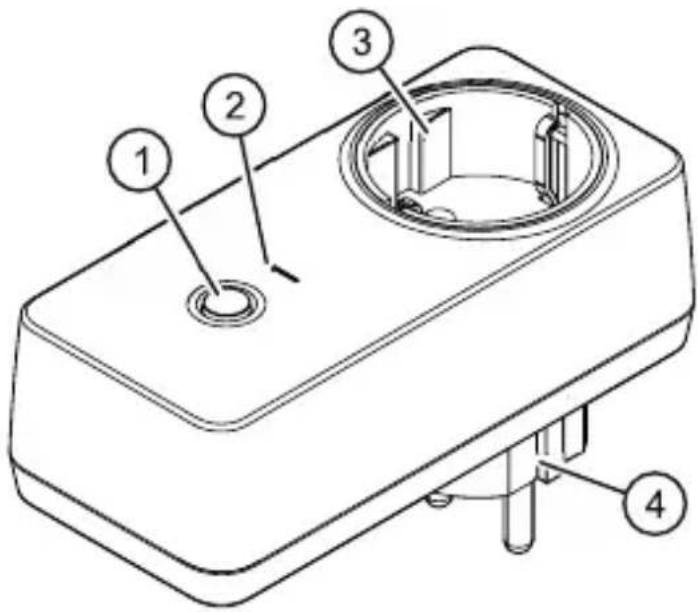
Fig. 1: Overview (taking Europe as an example, type F)
| Item Component and function |
| 1 Button:Press:Switching dimmer function on/offPress and hold:Pair with sonoroCD 2 |
| 2 LEDWhen lit up in red:Dimmer function switched off; n control by sonoroCD 2Flashing white:Dimmer function switched on; device is being connectedLit up in white:Dimmer function switched on, device connected |
| 3 Socket for the lamp connection (country-specific design) |
| 4 Plug (country-specific design) |
EN
If the dimmer function is switched off, the socket offers full power for the lamp connection.
1.2 Scope of delivery
sonoroLIGHT
Operating manual
1.3 Technical data
| Europe (EU) | GB Southern Europe | CH | ||
| Socket type Type F | Type G Type | Type E Type | J | |
| Input voltage 220 – | 240 V AC 50 Hz | |||
| Power, max. 150 W | ||||
| Standby power consumption | < 0.5 W | |||
| Bluetooth® version 3.0 + EDR | ||||
| Communication range, approx. | 10 m | |||
| Frequency 2.4 GHz | ||||
| Height, approx. 118 mm | ||||
| Width, approx. 55 mm | ||||
| Depth, approx. 77 mm | 69 mm | 80 mm | 77 mm | |
| Weight, approx. 160 g | ||||
2 For your own safety
2.1 Symbols in this manual
Safety instructions
WARNING!
Indicates a potentially hazardous situation that may result in death or serious injury.
▲ NOTICE!
Indicates a potentially hazardous situation that may result in material and environmental damage.
Helpful tips and recommendations

Highlights information and useful recommendations.
2.2 Intended use
The device is only intended to dim a connected light source in conjunction with sonoroCD 2. The connection to sonoroCD 2 is via Bluetooth®.
The device is for personal use only. It is not intended for commercial use.
Any other function is considered improper use and is prohibited. We assume no liability for damages from improper use.
EN
2.3 Safety instructions
WARNING!
Risk of death if used incorrectly
Comply with the following instructions and only use the device as intended.
Children and persons with limited cognitive abilities
- Do not leave the device unattended and do not use it when children or persons who cannot estimate the associated risks are nearby.
- Persons (including children) who are not able to safety operate the device due to their physical, sensory or mental capabilities or lack of experience or knowledge regarding the device, should not operate this device without proper supervision or instruction by a responsible person. Please keep it safely out of their reach.
Power supply
The device is electric powered, so there is always a risk of electric shock. Therefore pay particular attention to the following:
Never touch the contacts with wet hands.
- Keep the device away from rain and moisture and any heat sources.
- Only operate the device if the electrical voltage indicated on the device matches the voltage of your power outlet. Incorrect voltage may destroy the device.
- To avoid a fire hazard, disconnect the device completely from the power supply when you are not using the device for a long time.
Ambient conditions
Safe operation of the device implies maintaining appropriate ambient conditions for the device. Please observe the following:
- Protect the device from the elements. Never use it outdoors and never use it in areas with increased exposure to sunlight.
- Protect the device from splashing or dripping water. Never place objects containing liquids above or next to the device.
Defects
Should the device be defective, do not attempt to repair it on your own. In the event of a defect, contact customer service (see "Contact data" on page 12).
Cleaning
Clean the device only from the outside with a soft, dry cloth. Never use abrasive or solvent-based cleaning agents as these may damage the surface of the device.
If the device is extremely dirty, wipe it with a slightly damp cloth and dry it with a soft, dry cloth.
EN
3 Suitable bulbs

Fig. 2: Suitable bulbs
All dimmable bulbs without a cut-in unit are suitable for the lamp attached to the device if they bear the correct symbol (Fig. 2) on their packaging, e.g.:
Halogen bulbs
Dimmable LED bulbs
Conventional light bulbs

The dimmer function may be restricted depending on the technical design of the bulb. This is due to the bulb and is not a fault in the device.
4 Unpacking the device and commencing operation
- Unpack the device and all accessories, and check the contents for completeness and integrity.

Should you detect any damage, contact your dealer or our customer support immediately (see "Contact data" on page 12).
▲ NOTICE!
Risk of damage to property due to incorrect voltages
Connection values that exceed the maximum allowable values of the device can irreparably damage the device.
-Only operate the device if the voltage indicated on the device matches the voltage of your power outlet.
- Plug the device into a socket.
- Ensure that sonoroLIGHT and sonoroCD 2 are no more than 10m away from one another. Otherwise, no connection can be established.
- Press the push-button (Fig. 1/1) until the LED (Fig. 1/2) flashes.
The device searches for another Bluetooth device.
- Switch off your sonoroCD 2.
- Press the button on your sonoroCD 2 and hold it for 3 seconds.
The devices are connected to one another. No password needs to be entered. Once the devices are successfully connected, the LED (Fig. 1/2) lights up in white.
- Connect a lamp to the socket on the device (Fig. 1/3).
5 Disposal
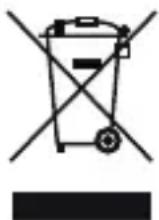
Fig. 3: Do not dispose of in household waste
Devices that are marked with this symbol should not be disposed of in household waste. They must be returned to a collection point for recycling of electrical and electrotechnical devices.
Information regarding the disposal of old equipment can be obtained at your municipality, local waste disposal company and the store where you purchased this device. Proper disposal of old devices prevents environmental damage and does not jeopardise your health.
6 Declaration of Conformity
CE
Fig. 4: EC marking
Manufacturer: sonoro audio GmbH
We hereby declare that sonoroLIGHT meets the essential requirements of the EMC Directive 2004/108/EC, the Low Voltage Directive 2006/95/EC and the R & TTE Directive 1999/5/EC, including changes valid at the time of the declaration, due to its design, engineering and build.
7 Warranty
When submitting warranty claims, the following applies without restricting your legal rights:
Warranty claims can only be asserted within a period of max. 2 years (1 year in North America and Australia), calculated from the date of purchase.
■ sonoro audio GmbH shall, at its own discretion, repair or replace the device free of charge any defects caused by material or manufacturing defects within the warranty period.
In case of a complaint, please contact our customer service department. You can find contact details under "Contact data" on page 12 or at www.sonoro.de.
No new warranty period begins following repair or replacement of the device. The warranty period of 2 years (1 year in North America and Australia) from date of purchase remains applicable.
Excluded from the warranty are batteries, damage caused by improper use, normal wear and tear, as well as defects which only minimally affect the value or usability of the device. The warranty also expires for any modifications not made by our authorised service centre.
EN
21