AU-5000BL OR - Radio SONORO - Free user manual and instructions
Find the device manual for free AU-5000BL OR SONORO in PDF.


User questions about AU-5000BL OR SONORO
0 question about this device. Answer the ones you know or ask your own.
Ask a new question about this device
Download the instructions for your Radio in PDF format for free! Find your manual AU-5000BL OR - SONORO and take your electronic device back in hand. On this page are published all the documents necessary for the use of your device. AU-5000BL OR by SONORO.
USER MANUAL AU-5000BL OR SONORO
natural_image
White electronic device with black ventilation slots and a vertical handle, no visible text or symbols on the device itself.sonoro
sonoro audio GmbH
Unter Goldschmied 6
50667 Köln
Germany
info@sonoro-audio.com
www.sonoro-audio.com
11/10
The manufacturer continuously works on the further development of all types and models.
We ask for your understanding that changes of the scope of delivery in regard to form, components and technology are therefore possible at any time. The information, illustrations and descriptions in this manual therefore shall not constitute an entitlement to any claims.
Replication, copying or translation, even in parts, is not permitted without the written consent of the manufacturers.
The manufacturer explicitly reserves all rights pursuant to the law governing the copyright.
Subject to changes.
Contents
1. Introduction 4
2. Safety Instructions 5
2.1 Symbols in this Operating Manual 5
2.2 Intended Use 5
2.3 Children and Persons with Limited Cognitive Abilities …… 6
2.4 Power Supply 6
2.5 Battery 7
2.6 Transport 8
2.7 Environmental Conditions 8
2.8 Operation 9
2.9 Defect 9
2.10 Cleaning 10
2.11 Disposal 10
3. Scope of Delivery 11
4. Unpack Device and Start Operation 12
4.1 Unpack Device 12
4.2 Batteries 13
4.3 Establish Power Supply 13
5. Technical Data 21
6. Warranty 22
1. Introduction
Congratulations on purchasing a sonoro cuboGo.
This operating manual provides you with all information concerning the correct and safe operation of the device.
Please read this operating manual in its entirety before using the • device.
Keep these instructions at a safe place.
In case you pass this device on to a third party, please also include • the operating manual.
Non-compliance with this manual may lead to serious injuries and • damage to the device.
We may not be held liable for damage that was caused due to non-• compliance with this operating manual.
Please take special note of the chapter „Safety Instructions“.
The illustrations in this operating manual serve the purpose to visualize processes.
Enjoy your device!
2. Safety Instructions
2.1 Symbols in this Operating Manual
Important information relative to your safety is especially marked. It is imperative that you adhere to this information to avoid accidents and damage to the device:

text_image
! ! iRISK!
Warning concerning risks to your health and indication of potential risk of injury.
WARNING!
Indicates potential risks for the device and other objects.
NOTE!
Highlights tips and information for you.
2.2 Intended Use
The device is only for private use. It is not suitable for commercial use. The device is exclusively intended for the following tasks:
Play FM radio•
Play audio for external devices that are connected via AUX. Any other use is not intended and is prohibited. We may not be held liable for damage caused through unintended use.
2.3 Children and Persons with Limited Cognitive Abilities
Do not leave the device unattended and do not use it if children • or people are in close range who may not be able to assess the associated risks.
Persons (including children) who based on their physical, sensory or mental capacities or their inexperience or lack of knowledge are not able to safely use this device may not use this device without supervision or without instructions provided by a responsible person. Please store this device at an inaccessible location.
Packaging material may not be used for playing. It presents a • suffocation risk.
2.4 Power Supply
The device is powered by electricity; therefore there is always a risk of an electric shock. For this reason, especially adhere of the following instructions:
Never touch the power plug with wet hands.
If you want to pull the plug from the power outlet, always pull directly on the plug. Never pull on the cable, it may rip.
Please ensure unobstructed access to the utilized power outlet at all times, so that the plug can be pulled immediately in case of an emergency.
Please ensure that the electric cord is not bent, wedged or rolled • over. Install the electric cord so that it cannot become a tripping
hazard and so that it is out reach for children.
Only use extension cords that are designed to handle the power • input of the device.
Keep the device away from rain and moisture as well as from any • heat sources
Only operate the device when the electric voltage on the type label • of the device and on the plug match the voltage of your electrical outlet. An incorrect voltage can destroy the device.
If you will not use the device for a longer period of time, separate • the device completely from the power supply system to prevent a potential fire hazard. For that, pull the plug from the electrical outlet.
2.5 Battery
Your cuboGo comes with a sealed pack of high performance NiMH cells. These cells have no memory effect, however, when used for the first time or after a longer period of non-use it may take up to 5 full charge/discharge cycles until they reach its full capacity. In any case, please allow 24 hours charging time for the first use. Though we deliver every cuboGo with a pack of high performance cells, the lifetime of these cells might be shorter than the lifetime of your radio. In this case please refer to your authorized dealer. Never try to open or exchange the pack yourself!
Do not throw the batteries in a fire and never make them subject to • high temperatures.
Liquid that leaks during the incorrect use of the batteries may cause • skin irritations. In the event of direct contact with the liquid, wash it
off with plenty of water. When the liquid gets into the eyes, do not rub the eyes. Flush the eyes with water for 10 minutes and immediately seek medical assistance.
2.6 Transport
Store the device during the transport in a vehicle in such a fashion • that the occupants are not endangered.
If you ship the device, pack it in the original packaging. Therefore, • keep the packaging.
2.7 Environmental Conditions
The safe operation of the device requires appropriate environmental conditions. Therefore, please adhere to the following:
Protect the device from exposure to effects imposed by the weather.
Never place the device on or in immediate proximity of fire or heat • sources such as for example burning candles, stove tops, ovens etc.
Set up the device so that sufficient air supply is guaranteed. This will avoid heat accumulation on the inside of the device. Always keep a minimum distance of 10 cm to other devices or walls.
Protect the device from strong mechanical vibrations and place it • on solid surfaces.
Protect the device from splashing or dripping water. Never place a • container filled with liquid next to or onto the device.

RISK!
Never install/ remove the batteries that came with the device in an environment that bears the potential risk of explosions (e. g. gas station areas, fuel lines, gasoline storage areas, areas where the air may contain chemicals or explosive particles/dust (e. g. flour dust or metal powder) or areas in which you have been instructed to turn off the engine of your vehicle). This may present an explosion hazard.
2.8 Operation
Put your cuboGo on a stable ground to enjoy the full sound without • vibration noises.
2.9 Defect
Never try to fix your device on your own if it becomes defective. If the power plug, the adapter or the power cord of this device is damaged, they must be replaced by the manufacturer or the manufacturer's customer service to avoid the risk of electric shock. If liquid gets into the device or if the device was dropped or otherwise damaged, it must be checked by an authorized dealer. Separate the device from the power supply and contact an authorized dealer.
2.10 Cleaning
Only use a dry, soft cloth to clean the exterior surfaces of the device. Never use any abrasive or dissolvent cleaning agents, because these may damage the surface of the device.
If the device is extremely dirty, it may also be wiped down with a • slightly moist cloth and dried with a dry, soft cloth.
2.11 Disposal
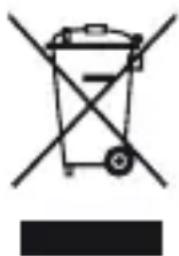
Devices that are marked with the symbol on the right may not be disposed of with the regular household trash, but must be dropped off at a recycling center for electric and electronic devices.
natural_image
Symbol of a trash bin with crossed lines indicating no waste or discharge (no text or labels)Batteries/ rechargeable batteries may contain toxic heavy metals and are subject to special refuse treatment. Drop off the batteries/ rechargeable batteries at a communal collection site or bring them to a specialized store for disposal.
Please consider that your electronic entertainment device is subject to the European guideline 2002/96/EC for the reduction of electronic waste.
Therefore please note that you are not permitted to dispose of your • device in your household waste.
You can receive information regarding the disposal of old devices at •
the municipal administration, the waste disposal administration and the store where your purchased this product
You can drop off your device free of charge at communal collection points.
With the proper disposal of old devices you prevent environmental damage and don't damage your health.
3. Scope of Delivery
sonoro cuboGo including sleeve●
Power adapter•
Built-in high performance battery pack (NiMH)•
AUX-cable•
Instruction manual•
4. Unpack Device and Start Operation
You may only use connecting cables and external devices that comply with this device in regard to electromagnetic compatibility and insulation quality. This device fulfills all relevant standards and guidelines in conjunction with US and European regulation. In the event of a device change that has not been coordinated with the manufacturer, the compliance with the standards and guidelines is no longer guaranteed. Only use the accessories listed by the manufacturer.

RISK!
Playing with packaging material presents a suffocation risk!
Playing with packaging material presents a suffocation risk. Keep the packaging material out of the reach of children and persons who may not be able to assess the risks.
4.1 Unpack Device
- Unpack the device and all accessories and check the content for completeness and proper condition.

NOTE!
In case you detect damage due to transportation or if parts of the packet are missing, contact your dealer immediately.
- Set up the device at a suitable location. Adhere to the security instructions concerning the environmental conditions.
4.2 Batteries

RISK!
Injury hazard due to incorrect handling of batteries!
Battery must be treated with special care.
- Do not throw battery into a fire and never make them subject to high temperatures.
- Leaking liquid in conjunction with an incorrect use of batteries may cause skin irritations. In the event of contact with the liquid, wash it off with plenty of water. If the liquid gets into the eyes, do not rub the eyes. Flush the eyes with water for 10 minutes and immediately seek medical assistance.
4.3 Establish Power Supply
The device is powered via the power supply unit that comes with the packet.

RISK!
Injury hazard due to inappropriate handling!
Improper handling of the power supply unit may result in the risk of an electric shock.
- Pull the power supply from the outlet in a strait motion so that the adapter will not break off the mounting.

WARNING!
Property damage due to incorrect voltage connection
Connection values that exceed the permissible maximum values of the device can destroy the device.
- Only use the power supply unit that came with the device.
- Only operate the device when the voltage indicated on the power supply unit matches the voltage on your electrical outlet.
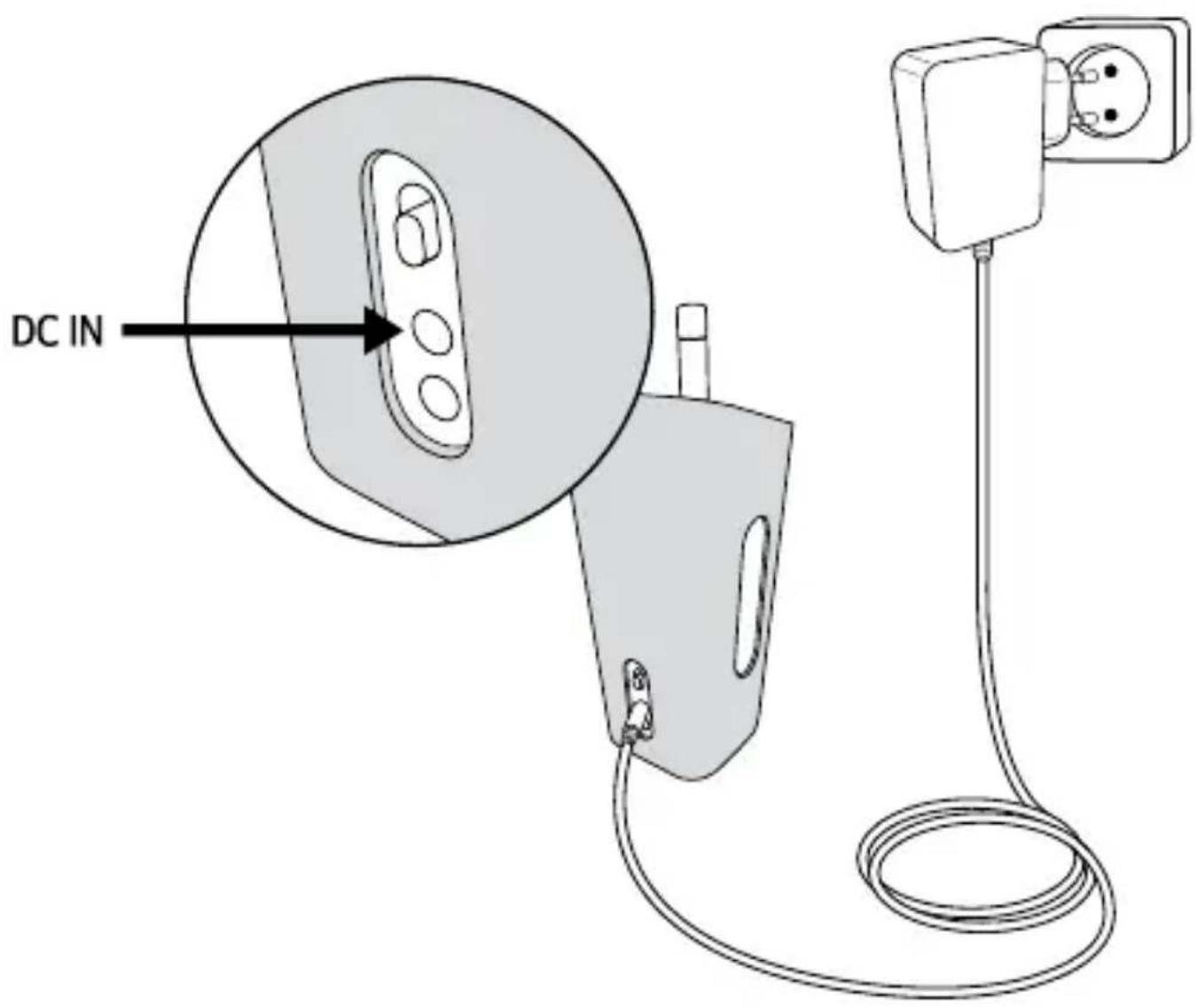
- Slide the adapter onto the power supply unit until it has snapped into position.
- Plug the connecting plug of the power supply into the 12V = 1.2A DC port on the back of the device.
- Plug the power plug into an electrical outlet.
Figure 1 - Charge
text_image
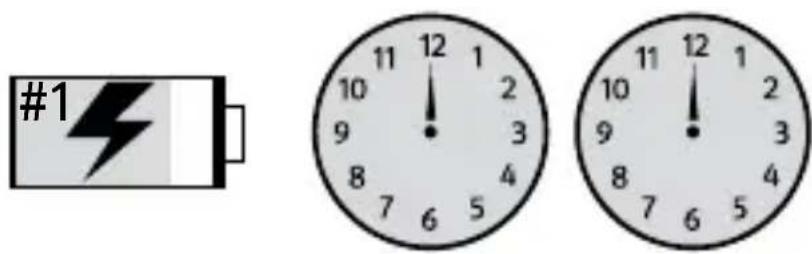
DC INFigure 2 - Charging and playing times
Charge cuboGo for 24 hours before first use.
text_image
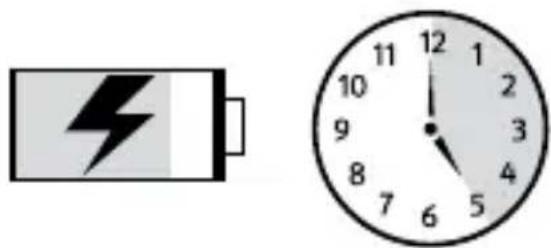
#1 12 1 11 12 10 2 9 3 8 4 7 6 5 10 12 9 2 8 3 7 6 5After first use, charge cuboGo for approx. 5 hours.
natural_image
Battery and analog clock showing 12:00 (no text or symbols on the devices)When battery is fully charged, cuboGo plays for approx. 18-20 hours.

natural_image
Two analog clocks: one with a hand gesture and the other with musical notes (no text or symbols)Figure 3 - Switch on unit and turn up volume
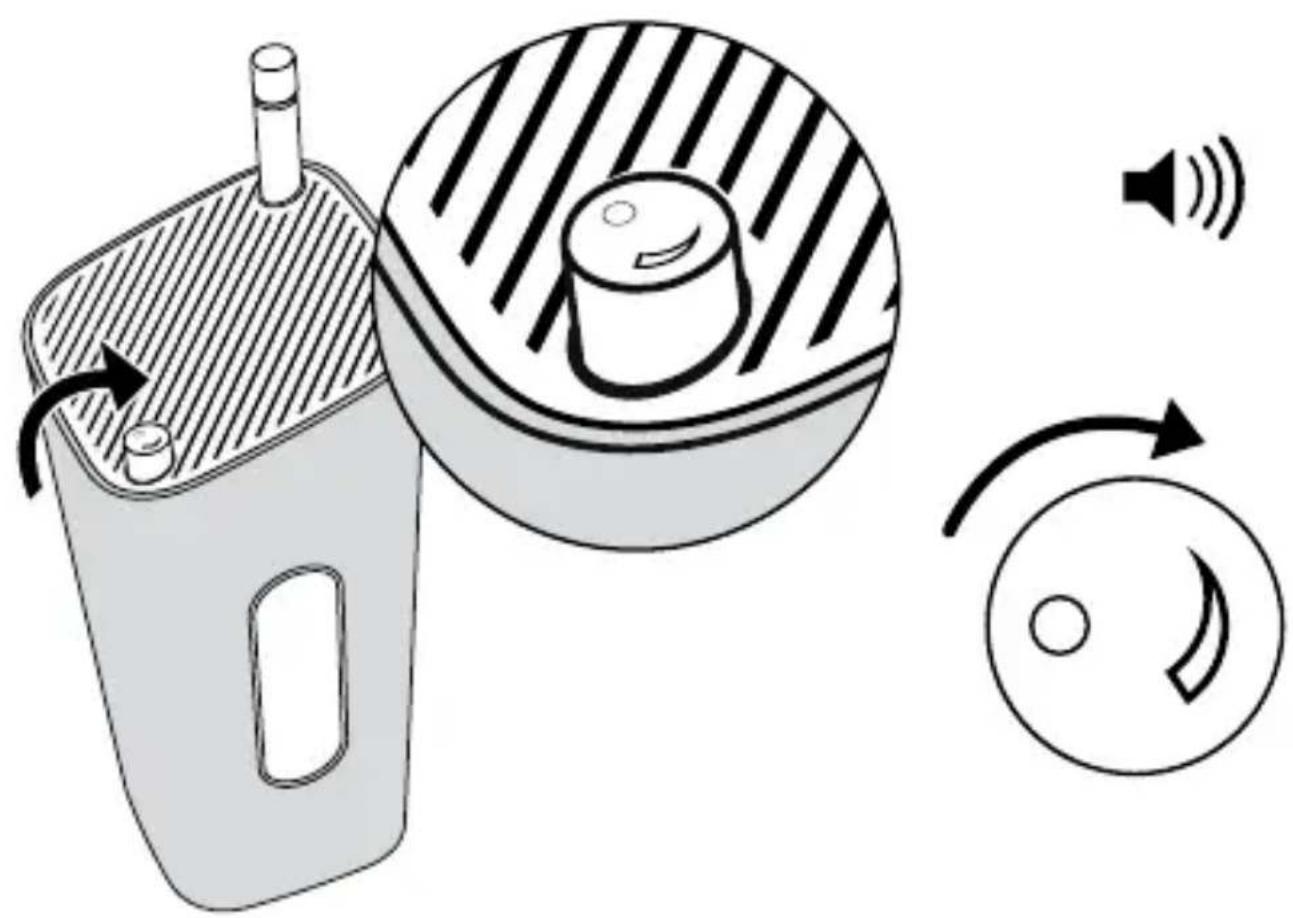
natural_image
Diagram showing a device with a speaker emitting sound waves, alongside its circular component and directional arrows (no text or symbols)Figure 4 - Antenna
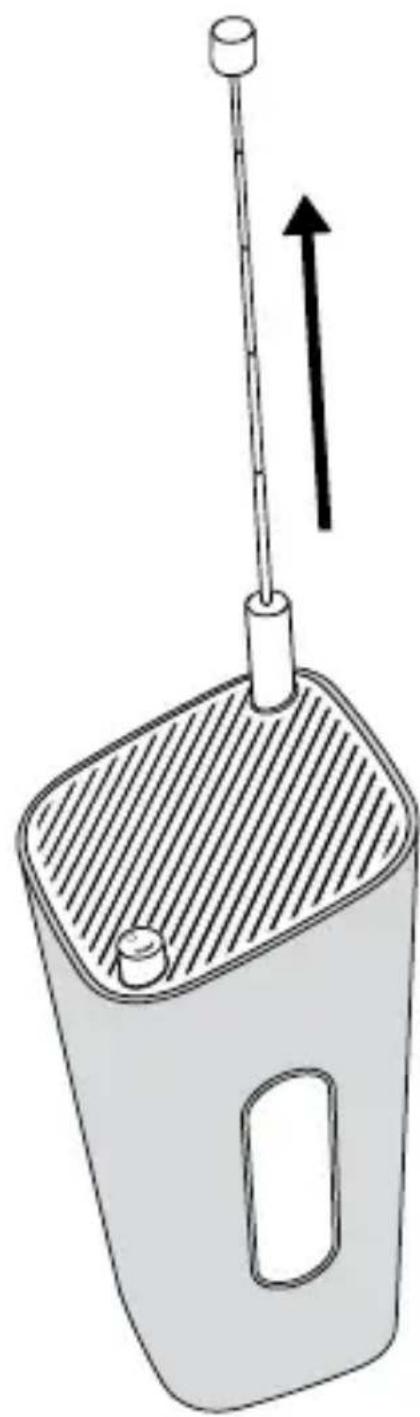
natural_image
Diagram of a mechanical device with a lever and handle, showing an upward arrow indicating motion (no text or symbols present)Figure 5 - Turn to adjust radio station
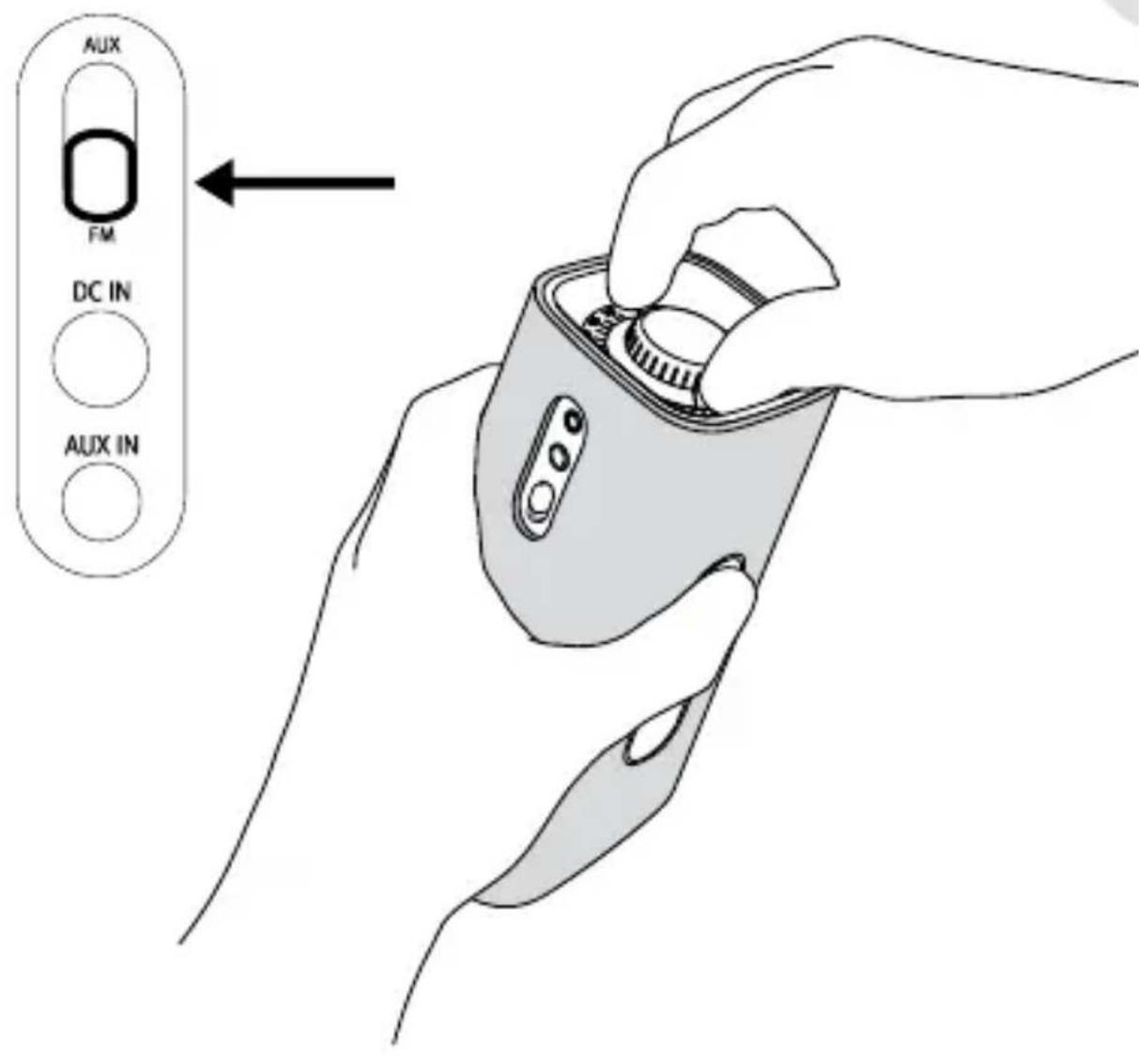
text_image
AUX FM DC IN AUX INFigure 6 - AUX

text_image
AUX IN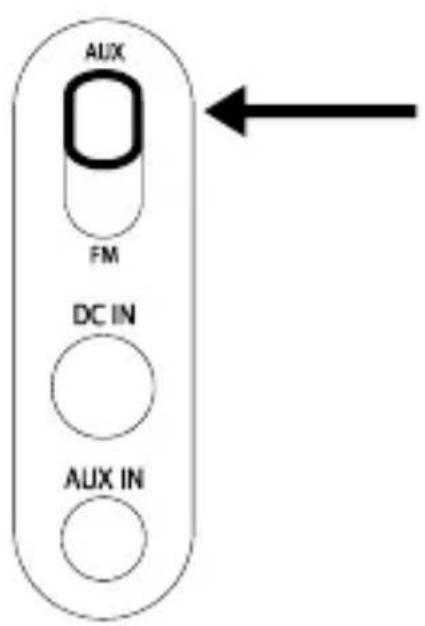
text_image
AUX FM DC IN AUX INDeclaration of Conformity
Manufacturer: sonoro audio GmbH
We herewith declares that the sonoro cuboGo is in conformity with the EMC directive 2004/108/EC and the LVD directive 2006/95/EC; with respect to its conception and style of construction as well as its performance as issued by us.

text_image
C€In the case of a modification, unauthorized by sonoro audio GmbH being made to the device, the declaration looses its validity automatically.
The full description of conformity can get from support@sonoro-audio.com
5. Technical Data
Power Adapter: DVE:DSA-15P-12EU120144
Input: 100\~240V \~ 50/60Hz 0.5A
Output: 12V = 1.2A - +
FM Frequency : 87.5 MHz – 108.0MHz
AUX input: 3.5mm stereo jack
Battery pack: BP-5000, NiMH 7.2V 2200mAh
6. Warranty
The following applies to the filing of warranty claims - without thereby limiting your legal rights:
Warranty claims may only be asserted within a time period of no • more than two years (one year for North America) starting with the date of purchase.
Within the warranty period we will rectify all defects that are based • on material or manufacturing defects at our discretion either through repair or a replacement of the device.
Please contact your authorized dealer or send the defective device • together with the warranty card and the proof of purchase to the service address. The repair or replacement of the device will not start a new warranty period. The warranty period of 2 years (one year for North America) from the purchase date remains the deciding factor.
Damages due to improper use, normal wear and tear as well as • defects that impact the value or the usability of the device only insignificantly are excluded from the warranty. Procedures that were performed by any unauthorized agent will also terminate the warranty.
Warranty for the battery pack is limited to 12 months.
Warranty card
AU-5000
Last name
Serial number
First name
Street address
City / State/ ZIP
Phone
Statement of defect
Signature of customer
0999-611-10
sonoro
www.sonoro-audio.com