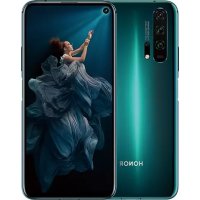
Honor 20 Pro - Phone HUAWEI - Free user manual and instructions
Find the device manual for free Honor 20 Pro HUAWEI in PDF.



| Brand | HUAWEI |
| Model | Honor 20 Pro |
| Product Type | Smartphone (Phone) |
| Model Number | YAL-L41 |
| Power Adapter | HW-050450X01 or HW-050450X00 mains adapter (depending on plug) |
| Battery | HB436486ECW (built-in Li-ion) |
| Connectivity | Wi-Fi 2.4/5 GHz, Bluetooth, NFC, GSM, WCDMA, LTE |
| Dual SIM | Yes, dual standby dual SIM |
| Fingerprint Sensor | Integrated into power button |
| Operating System | Android with EMUI (version 9.1.0.119) |
| Head SAR (EU) | 0.83 W/kg |
| Body distance (EU) | 0.50 cm |
| Frequency Bands | GSM 900/1800, WCDMA 900/2100, LTE bands 1/3/7/8/20/28/38/40, Wi-Fi 2.4/5 GHz, Bluetooth, NFC |
| Max Transmission Power | GSM 900: 35 dBm, GSM 1800: 32 dBm, WCDMA: 25.7 dBm, LTE: 25.7 dBm, Wi-Fi 2.4G: 20 dBm, Bluetooth: 20 dBm, Wi-Fi 5G: up to 23 dBm (depending on band) |
| Operating Temperature | 0°C to 35°C |
| Storage Temperature | -20°C to +45°C |
| Care and Cleaning | Avoid dust, humidity, smoke. Clean with a soft, dry cloth. |
| Safety | Complies with EU/FCC directives. Head SAR 0.83 W/kg (EU). Keep at distance from implants (min 15 cm). Do not use while driving. |
| Spare Parts / Repairability | Non-removable battery. Replacement only at an authorized Huawei service center. |
| Included Accessories | Mains adapter, USB Type-C cable, earphones, eject pin |
| Recycling | Complies with WEEE. Do not dispose of with household waste. Deposit at a collection point. |
Frequently Asked Questions - Honor 20 Pro HUAWEI
User questions about Honor 20 Pro HUAWEI
0 question about this device. Answer the ones you know or ask your own.
Ask a new question about this device
Download the instructions for your Phone in PDF format for free! Find your manual Honor 20 Pro - HUAWEI and take your electronic device back in hand. On this page are published all the documents necessary for the use of your device. Honor 20 Pro by HUAWEI.
USER MANUAL Honor 20 Pro HUAWEI
KpaTKoe pyKOBoDcTBO NOIb3OBaTeJIa
KbIJaM 6aTay HyckayJbIfbl
Contents
English (United Kingdom) 1
Francais. 12
Deutsch. 26
Italiano 38
Espanol. 50
Portugues 62
Nederlands 74
yKpaHcbKa. 86
Pycckn 99
Ka3ak tili. 133
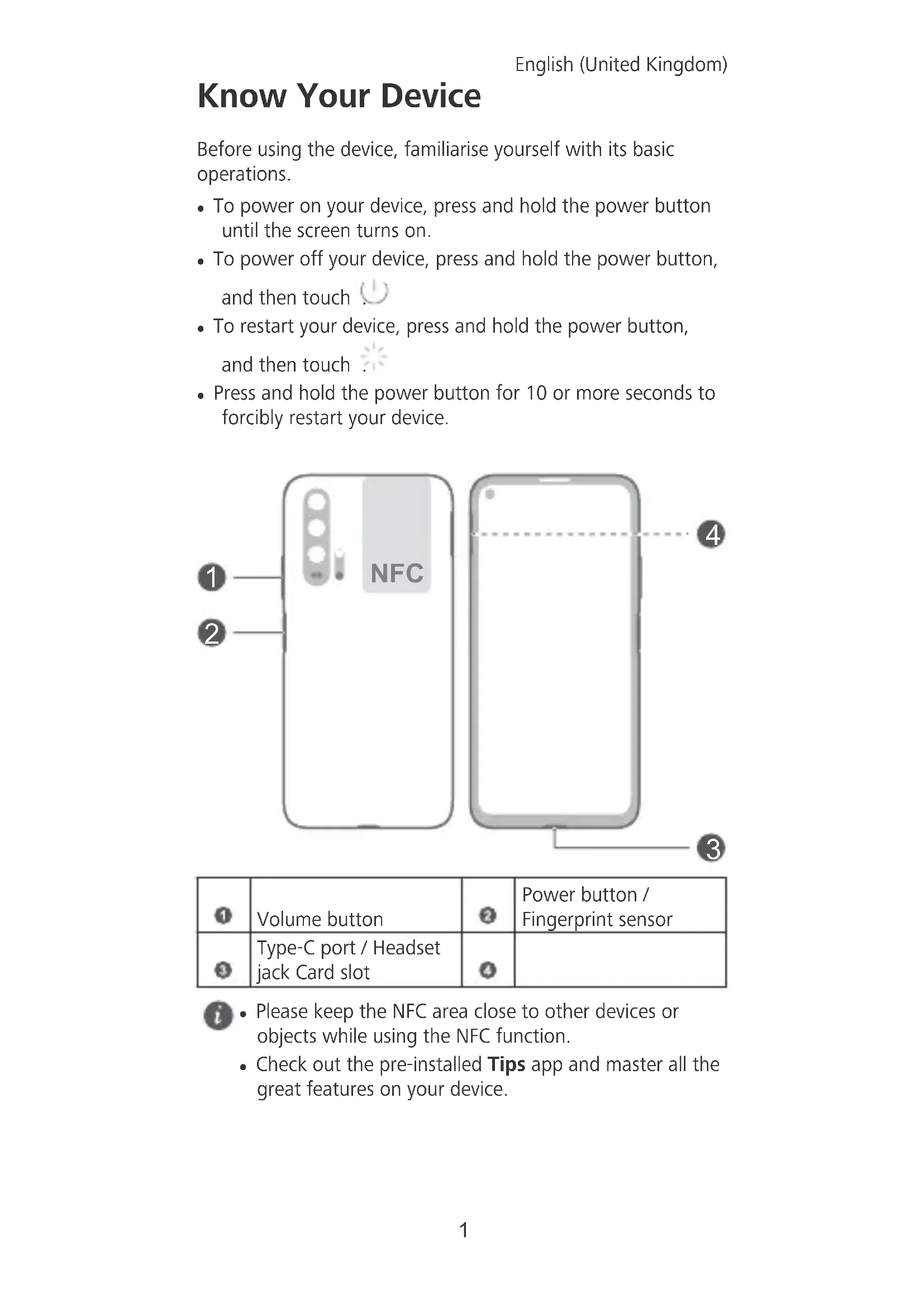
Know Your Device
Before using the device, familiarise yourself with its basic operations.
- To power on your device, press and hold the power button until the screen turns on.
- To power off your device, press and hold the power button, and then touch
- To restart your device, press and hold the power button, and then touch
- Press and hold the power button for 10 or more seconds to forcibly restart your device.
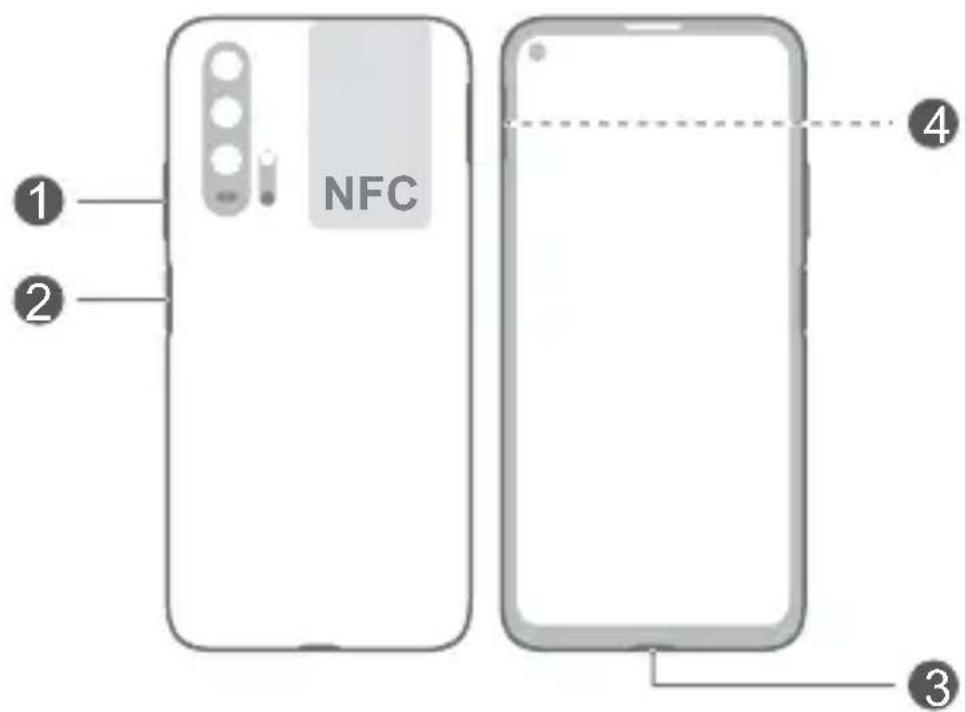
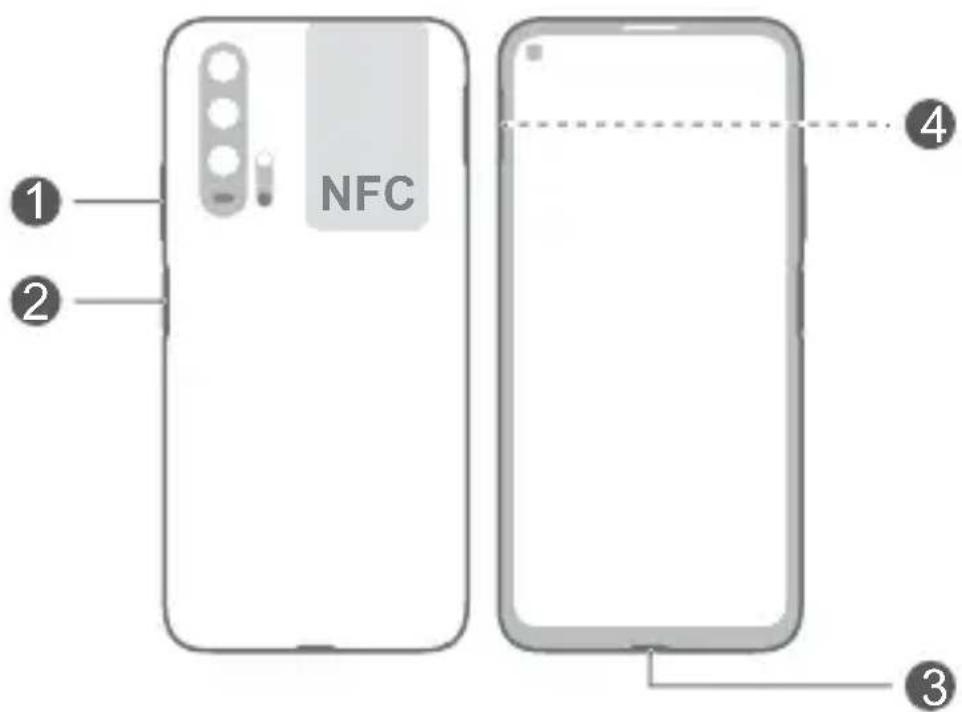
| Volume button | Power button / Fingerprint sensor |
| Type-C port / Headset jack Card slot |
-
Please keep the NFC area close to other devices or objects while using the NFC function.
-
Check out the pre-installed Tips app and master all the great features on your device.
Getting Started

-
Do not insert or remove the SIM card when your device is powered on.
-
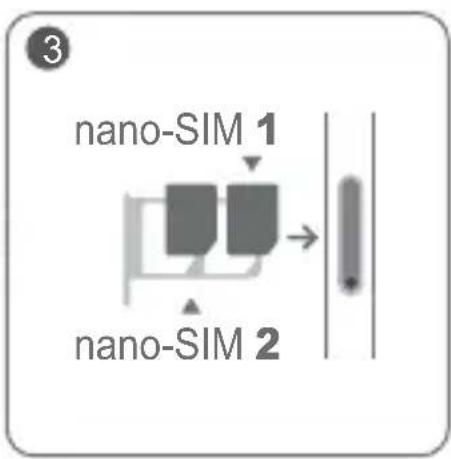
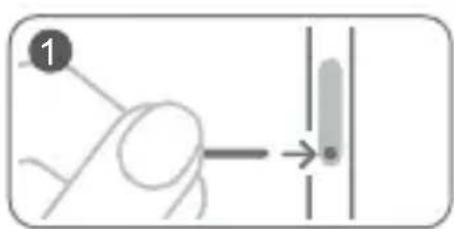
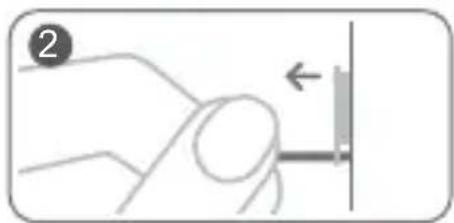
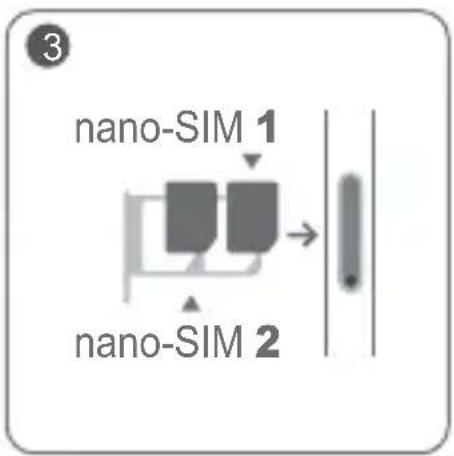
Ensure that the card is correctly aligned and that the card tray is level when you insert it into your device.

-
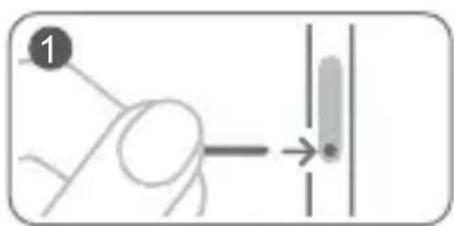
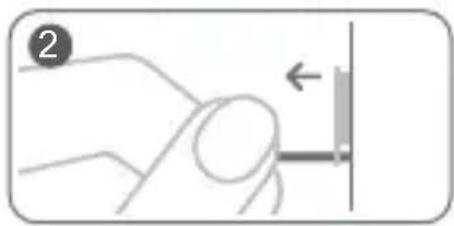
Be careful not to scratch your device or hurt yourself when using the eject pin.
-
Store the eject pin out of the reach of children to prevent accidental swallowing or injury.

-
Do not use cut or modified SIM cards with your device as these may not be recognised and could damage the card tray (slot).
-
If your SIM card does not match your device, please contact your network provider.
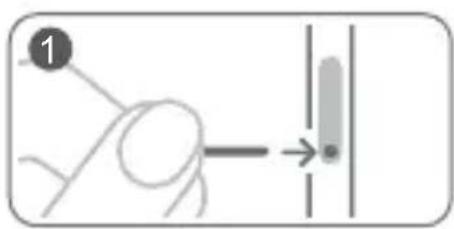
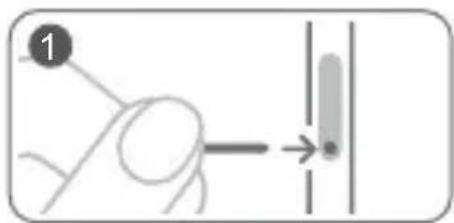
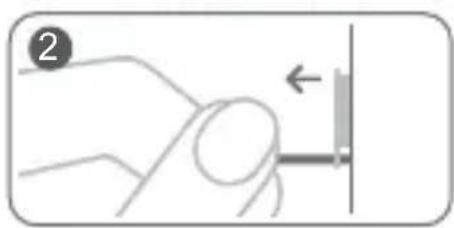
Follow the instructions in the following figures to set up your device. Please use the eject pin included.
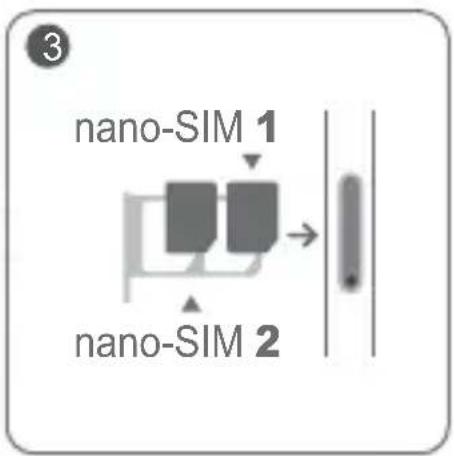
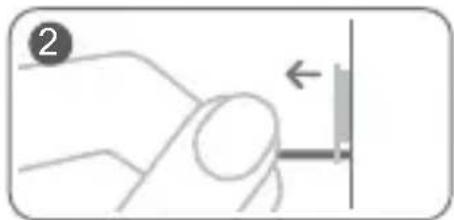
Dual SIM Card Management
Your device supports dual card dual standby. Under Settings > Wireless & networks > Dual SIM settings, select the default mobile data card and calling card as needed.
Dual 4G
- If both of your SIM cards support 4G services, when one of them is active on a 4G voice call, you will be prompted to handle any new call to the other SIM card. Answering the new call will automatically end the active call.
- The default mobile data SIM card can still be used for Internet surfing on a 4G network when the other card is on a 4G voice call.

- Some of the aforementioned features may be unavailable in certain areas due to network interference.
4G voice services require the support of your network provider and the deployment of relevant services. Contact your network provider to activate 4G services. - If this guide is inconsistent with the description on the official website, the latter prevails.
For More Information
If you encounter any problems whilst using your device, you can get help from the following resources:
- Visit http://www.hihonor.com to view device information and other information.
- Visit http://consumer.huawei.com/en/support for the most up-to-date contact information for your country or region.
- You can find service hotlines, retailer addresses, service policies and more information for your local region in HiCare.
Go to Settings and touch System > About phone > Legal to view legal information for your product.
Go to Settings and touch System > About phone > Legal > Safety information to view safety information for your product.
Go to Settings and touch System > About phone > Authentication info to view regulatory information for your product.
Go to Settings and touch System > Certification logos to view more information on certification logos for your product.

All pictures and illustrations in this guide, including but not limited to the device colour, size, and display content, are for your reference only. The actual device may vary. Nothing in this guide constitutes a warranty of any kind, express or implied.
Safety Information
Please read all of the safety information carefully before using your device to ensure its safe and proper operation and to learn how to dispose of your device properly.
Operation and Safety
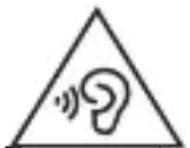
- To prevent possible hearing damage, do not listen at high volume levels for long periods.
- Using an unapproved or incompatible power adapter, charger or battery may damage your device, shorten its lifespan or cause a fire, explosion or other hazards.
- Ideal operating temperatures are 0^ to 35^ . Ideal storage temperatures are -20^ to +45^ .
- Pacemaker manufacturers recommend maintaining a minimum distance of 15cm between a pacemaker and a wireless device to prevent potential interference with the pacemaker. If using a pacemaker, hold the device on the side opposite the pacemaker and do not carry the device in your front pocket.
- Keep the device and the battery away from fire, excessive heat and direct sunlight. Do not place them on or in heating devices, such as microwave ovens, water heaters, stoves or radiators.
- Adhere to local laws and regulations while using the device. To reduce the risk of accidents, do not use your wireless device while driving. If you must make or answer a call, stop your vehicle at a safe location first.
- While flying in an aircraft or immediately before boarding, ensure that you use your device according to the instructions provided. Using a wireless device in an aircraft may disrupt wireless networks, present a hazard to aircraft operations or be illegal under law.
- To prevent damage to your device's parts or internal circuits, do not use it in dusty, smoky, damp or dirty environments or near magnetic fields.
- When charging the device, make sure the power adapter is plugged into a socket near the devices and is easily accessible.
-
Unplug the charger from the electric socket and from the device when not in use.
-
Do not use, store or transport the device where flammables or explosives are stored (e.g. in a petrol station, oil depot or chemical plant). Using your device in these environments increases the risk of explosion or fire.
- Dispose of this device, the battery and accessories according to local regulations. They should not be disposed of in normal household waste. Improper battery use may lead to fire, explosion or other hazards.
- Please consult your doctor and the device manufacturer to determine if operation of your device may interfere with the operation of your medical device.
Adhere to any rules or regulations set forth by hospitals and health care facilities. - This device contains a built-in battery. Do not attempt to replace the battery by yourself. Otherwise, the device may not run properly or it may damage the battery. For your personal safety and to ensure that your device runs properly, you are strongly advised to contact a Huawei authorised service centre for a replacement.
Potentially Explosive Atmosphere
Power off your device in any area with a potentially explosive atmosphere, and comply with all signs and instructions. Areas that may have potentially explosive atmospheres include the areas where you would normally be advised to turn off your vehicle engine. Triggering of sparks in such areas could cause an explosion or a fire, resulting in bodily injuries or even deaths. Do not power on your device at refueling points such as service stations. Comply with restrictions on the use of radio equipment in fuel depots, storage, and distribution areas, and chemical plants. In addition, adhere to restrictions in areas where blasting operations are in progress. Before using the device, watch out for areas that have potentially explosive atmospheres that are often, but not always, clearly marked. Such locations include areas below the deck on boats, chemical transfer or storage facilities, and areas where the air contains chemicals or particles such as grain, dust, or metal powders. Ask the manufacturers of vehicles using liquefied petroleum gas (such as propane or butane) whether this device can be safely used in their vicinity.
Disposal and recycling information
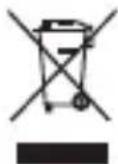
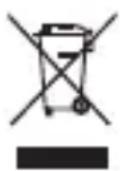
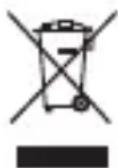
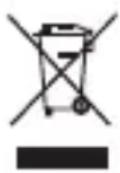
The crossed-out wheelie bin symbol on your product, battery, literature or packaging reminds you that all electronic products and batteries must be taken to separate waste collection points at the end of their working lives; they must not be disposed of in normal household waste. It is the responsibility of the user to dispose of the equipment using a designated collection point or service for separate recycling of waste electrical and electronic equipment (WEEE) and batteries according to local laws.
Proper collection and recycling of your equipment helps ensure EEE waste is recycled in a manner that conserves valuable materials and protects human health and the environment. Improper handling, accidental breakage, damage, and/or improper recycling at the end of its life may be harmful for your health and the environment. For more information about where and how to drop off your EEE waste, please contact your local authorities, retailer or household waste disposal service or visit the website http://consumer.huawei.com/en/.
Reduction of hazardous substances
This device and any electrical accessories are compliant with local applicable rules on the restriction of the use of certain hazardous substances in electrical and electronic equipment, such as EU REACH, RoHS and Batteries (where included) regulations, etc. For declarations of conformity about REACH and RoHS, please visit our web site http:// consumer.huawei.com/certification.
EU Regulatory Conformance
Body worn operation
The device complies with RF specifications when used near your ear or at a distance of 0.50cm from your body. Ensure that the device accessories, such as a device case and device holster, are not composed of metal components. Keep the device away from your body to meet the distance requirement.
The highest SAR value reported for this device type when tested at the ear is
YAL-L41 0.83 W/kg
And when properly worn on the body is
Statement
Hereby, Huawei Technologies Co., Ltd. declares that this device YAL-L41 is in compliance with the essential requirements and other relevant provisions of Directive 2014/53/EU.
The most recent and valid version of the DoC (Declaration of Conformity) can be viewed at http://consumer.huawei.com/ certification.
This device may be operated in all member states of the EU. Observe national and local regulations where the device is used.
This device may be restricted for use, depending on the local network.
Restrictions in the 2.4 GHz band:
Norway: This subsection does not apply for the geographical area within a radius of 20km from the centre of Ny-Alesund.
Restrictions in the 5 GHz band:
According to Article 10 (10) of Directive 2014/53/EU, the packaging shows that this radio equipment will be subject to some restrictions when placed on the market in Belgium (BE), Bulgaria (BG), the Czech Republic (CZ), Denmark (DK), Germany (DE), Estonia (EE), Ireland (IE), Greece (EL), Spain (ES), France (FR), Croatia (HR), Italy (IT), Cyprus (CY), Latvia (LV), Lithuania (LT), Luxembourg (LU), Hungary (HU), Malta (MT), Netherlands (NL), Austria (AT), Poland (PL), Portugal (PT), Romania (RO), Slovenia (SI), Slovakia (SK), Finland (FI), Sweden (SE), the United Kingdom (UK), Turkey (TR), Norway (NO), Switzerland (CH), Iceland (IS), and Liechtenstein (LI).
The WLAN function for this device is restricted to indoor use only when operating in the 5150 to 5350 MHz frequency range.
Frequency Bands and Power
(a) Frequency bands in which the radio equipment operates: Some bands may not be available in all countries or all areas. Please contact the local network provider for more details.
(b) Maximum radio-frequency power transmitted in the frequency bands in which the radio equipment operates: The maximum power for all bands is less than the highest limit value specified in the related Harmonised Standard.
The frequency bands and transmitting power (radiated and/or conducted) nominal limits applicable to this radio equipment are as follows:
YAL-L41 GSM 900:35dBm, GSM 1800:32dBm, WCDMA
900/2100:25.7dBm, LTE Band
1/3/7/8/20/28/38/40:25.7dBm, Wi-Fi 2.4G;
20dBm,Bluetooth:20dBm,Wi-Fi 5G:
5150-5250MHz:23dBm, 5250-5350MHz:
20dBm, 5470-5725MHz:20dBm,
5725-5850MHz:14dBm, NFC: 42 dBuA/m at
10m
Accessories and Software Information
Some accessories are optional in certain countries or regions. Optional accessories can be purchased from a licenced vendor as required. The following accessories are recommended:
Adapters: HW-050450X01, HW-050450X00 (X represents the different plug types used, which can be either C, U, J, E, B, A, I, R, Z or K, depending on your region)
Batteries: HB436486ECW
Earphones: 618017, MEND1632B729000, 1331-3301-6001-TC-296, Windy-C
The product software version is YAL-L41:
9.1.0.119(C900E119R1P2). Software updates will be released by the manufacturer to fix bugs or enhance functions after the product has been released. All software versions released by the manufacturer have been verified and are still compliant with the related rules.
All RF parameters (for example, frequency range and output power) are not accessible to the user, and cannot be changed by the user.
For the most recent information about accessories and software, please see the DoC (Declaration of Conformity) at http://consumer.huawei.com/certification.
FCC Regulatory Compliance
Body worn operation
The device complies with RF specifications when used near your ear or at a distance of 1.50cm from your body. Ensure that the device accessories, such as a device case and device holster, are not composed of metal components. Keep the device away from your body to meet the distance requirement.
Certification information (SAR)
This device is also designed to meet the requirements for exposure to radio waves established by the Federal Communications Commission (USA).
The SAR limit adopted by the USA is 1.6W / kg averaged over one gram of tissue. The highest SAR value reported to the FCC for this device type complies with this limit.
The highest SAR value reported to the FCC for this device type when using it at the ear is
YAL-L41 1.06 W/kg
And when properly worn on the body is
YAL-L41 0.37 W/kg
And when using the Wi-Fi hotspot function is
YAL-L41 1.05 W/kg
FCC statement
This device has been tested and found to comply with the limits for a Class B digital device, pursuant to Part 15 of the FCC Rules. These limits are designed to provide reasonable protection against harmful interference in a residential installation. This device generates, uses and can radiate radio frequency energy and, if not installed and used in accordance with the instructions, may cause harmful interference to radio communications. However, there is no guarantee that interference will not occur in a particular installation. If this device does cause harmful interference to radio or television reception, which can be determined by turning the equipment off and on, the user is encouraged to perform one or more of the following operations to try to correct the interference:
--Reorient or relocate the receiving antenna.
--Increase the separation between the equipment and receiver.
--Connect the device into an outlet on a circuit different from that to which the receiver is connected.
--Consult the dealer or an experienced radio/TV technician for help.
This device complies with Part 15 of the FCC Rules. Operation is subject to the following two conditions: (1) this device may not cause harmful interference, and (2) this device must accept any interference received, including interference that may cause undesired operation.
Caution: Any changes or modifications to this device not expressly approved by Huawei Technologies Co., Ltd. for compliance could void the user's authority to operate the device.
Legal Notice
Trademarks and Permissions


HONOR, HUAMEI and are trademarks
or registered trademarks of Huawei Technologies Co., Ltd.
Android™ is a trademark of Google Inc.
LTE is a trade mark of ETSI.
The Bluetooth® word mark and logos are registered trademarks owned by Bluetooth SIG, Inc. and any use of such marks by Huawei Technologies Co., Ltd. is under license. Wi-Fi®, the Wi-Fi CERTIFIED logo and the Wi-Fi logo are trademarks of Wi-Fi Alliance.
Privacy Policy
To better understand how we protect your personal information, please see the privacy policy at http:// consumer.huawei.com/privacy-policy.
Copyright © Huawei Technologies Co., Ltd. 2019. All rights reserved.
THIS DOCUMENT IS FOR INFORMATION PURPOSE ONLY, AND DOES NOT CONSTITUTE ANY KIND OF WARRANTY.
François
Copyright © Huawei Technologies Co., Ltd.
HONOR, HUANWEI SINGWANWEI

Copyright © Huawei Technologies Co., Ltd.
Copyright © Huawei Technologies Co., Ltd.
He BCTaBnIte Ta He BnMaIte SIM-kapTy, KOnn npucTpiy yBIMKHeHO.
KoII Bn BCTaBnaTe IOTOK dIy KapT y npncTpI, nepekoHaIteCra, 00 KapTy BnpiBnHO npaBnIbHO I NOTOK pO3MiueHo rOpN3OHTaIbHO.

BnKOpNCToBvOuH uINbky dIy BnMaHHa, 6yDbTe yBaXHMn, 06 He npDpaTn npncptpi a6o He TpaBMyBaTncb.
36epiraTe 7nnbky dny BnMaHnB HeoctynHX dIteMicx, 06 3anobirn BnnaKOBomy npOKOBtYBaHHO a6o TpaBMyBaHHO.

He BnKOpncToBnyTe B npncTpo'i o6pi3aHi a60 3mHeHi SIM-kapTu, ockIbKn npncTpim MoKe He po3ni3HaTu iX i BOHn MOKyTb NOsKOdHTN JOTOK (cnot) dner KapT.
- RaKuo SIM-kapTa He nixOoNTb dna BaWoOr npnCTpoH, 3BepHiTbCdo onepaTopa.
HanaTuYTe npncpti, doTpmyouncb iHctpykuin Ha MaIIOHKax HIXKue. BnKOpNCTOByte 7nnJbky dIra BnMaHHa, 10 BXODNTb DO KOMNJIeKTy.
KepyBaHHaDbOMa SIM-kaPtAmn
BnKOpNCtAHnHepeBipeHnx i HecymicnX 6IokiBXNBJIeHHa3apdHnx npncTpoIB iakymyIaTOPi BMOKe N0sKOJNTn npncTpi,CKOPOTHTn TpNbAICIb NOrO ekCnIyataci, cnpuHHTn NOxExy, Bn6yx a6o HeCTN IHsy 3arpo3y.
-
OntmalbHn diana3OH po6oHx tempeatyp cknadae 0-35 ^ C .OntmalbHn diana3OH tempeatyp 36epirAHncknaadae-20-+45 ^ C
-
Дялллгань можлньим пошковам у робoti karдioctиулгота вробнки karдioctиулготорв pekomehnyotb 3берети Вдстань сонаймени 15cm mixnpictpoem i kardioctmylrgopom.ЯкsoВИ корпстуется kardioctmylrgopom,Трmaite ппстpii i3 npotunlexного BiД kardioctmylrgopaa 6oky ta He Hocitb noro b harpydnii knwehi.
TpmaTe npucpti i akymyIop noaJI BiD Jxepen BOrHIO HaMipHoro Tenna Ta 3anobiraTe NotpanJHHo Ha HnX npamoro coHyrHoro Cbitna. He KlaITb npucpti Ha a6o B npucptoi dJa HarpiBaHHa, kOT MkpoxBnIbObi neyi, BoJIePN, KxOHHi PNTu Ta oBirpaui.
-ПдчаскористувашипсстpoemdoTPmmyteся Micceвix 3akOHIB i npabIN. Ⅲo6 3HN3NTn pN3NK DTП, He kopисту teся BaшIM 6e3npOBiDnHm псstpoem 3a KepMOM.Якso Bamnotpi6HO BIDNOBICTN Ha BnKlNk, cneprshy 3ynHITb abTomO6Ib y 6e3neuHx yMObax.
- Y nita k y a6o 6e3nocepEnHbO nepei nocaKoU ha nita K BnKOpncTOByIte npncTpii TInbKn y BiNobiDHOCTi Do HadaHnx iHcTpkyi. BnKOpncTaHHa 6e3dpoTOBux npncTpoB y nitaKy moKe 3aBaAnTu KopekThi po60ti
6e3dpoTOBnx MepeK, cTaHOBnTu He6e3neky dIra po6OTn NiTaka a6o 6yTu He3aKOHHm.
- Κοδ 3aπo6iRTn NOsKoJxHHeNHO DeTaJIeN a6o Mikpocxem npIcTPOU, He BnKOpNCTOBvIte NOrO B 3aIINeHOMy, 3aIMnEHomY, BOIOrOMy qN 6pydHOMy cepeDobuNi a6o No6n3y MaHiTHOrO nOJa.
-Пд уас заряжання пистpoю поpekoHAntecя,шо 6лok кИВпень BCTaBЛeно В розтку поч i3 пистpoem y ЛergкадocTyHOMy Micci.
-ЯкsoЗapядни npuctrpi He BnKOpncTOBBycTbCra, BnIMtB noTo 3 eJektpnuHoi po3eTKn Ta BiD'edHaHTe BiD npucTpoI.
He BnKOpncToBnyTe, He 36epiraTe Ta He TpaHcNoptTuIte npncTpii y Micx, De 3HaXoJaTbcj NereKo3aMncti a6o Bn6yXoBi peOBoHH (HaNPKnJa, Ha 6eH3OKoJOnHKax, HapTOCXOBuXax a6o XIMiHyN 3aBoJax). BnKOpncTaHH naPncTpoIO B TaKOMy cepeDoBnuNiPiDnUyE pN3NK Bn6yXy a6o NoKexi. - YtNi3yIte ue npncpti, akymyIaTOp i doaTKOBe 6bnadHaHnB BiINOBiIDHO Do MICeBHX HOpMaTHBHX nIOJxHe. Li npncTroI He MOxHa yTNI3yBaTu Jk 3BnuAHi no6yTOBi BIXoDi. HenpaBnIbHe BnKOpNCTaHHa akymyIaTopa MoKe cnpuHHTn NoXeKy, Bn6yx i cTaHOBNTn IHwi 3arpo3n.
- Κόδ 3'ясувати, чи може робота ппстpoю влльати
- На Функционуваня Baшого MeДчно ппстpoю,
- 3Вернітбаяdoes CBOTO Лікаря abo Виробнka MeДчно
- ппстpoю.
- DToPmUyIeCn npaBn i nOIOKeHb, BCTaHOBJIeHnx IikapHMy Ta 3aKnadAmN OxopoHn 3dOpOB'
- Ппсгрий обладно Вбудоваим akумлготор. He hamarajteca 3amihtna akymylgtop camoctiho. Lcemeохе пизвеси до пошковеня akymylgtopa abo He npoJaoK y po6oti npictropoI. Uo6 rapaHTyBaTN Bauy 6e3neky Ta Hanexkhy po6oty pinctropoI, pekomehdyEmo 3BepTaTnCЯdo ABTOPu3OBaHOrO cepBichoro ueHTpy Huawei Дя 3amHH akymylgTopa.
Bn6yxoHe6e3neuHc cepeObIue
BnMkaTe npncTpiy 6yd-b-akomy Bn6yxOhe6e3neuHOMy cepeoBuni Ta doTpmyTecb ycix 3HaKIB Ta iHCTpyKui. Bn6yxOhe6e3neuHMMN e 30HN, De 3a3Bnuay peKomeHdyE7bcr BnMkATn DBNYh TpaHCnOpTHoro 3ac06y. Ickpy TaKnx 3ohx MoKyTB CnpuHHn TB6yx a6o noxeky i, k HacniIDOK, TpaBMvBaHHa 6o HabiTb CmepTb.
He BMnkaIte npncTpiy Micx 3a npabEnH naIbHM, HnprNKlaHa ha aBTO3anpaBnHex cTahcx. DToPmYntecb 6mxeHb 0do KOpNCTyBaHH paioopnlaamn B Micx 36epirAHn, CKnaDyBaHH Ta po3noiNy naINBa, a TakoX Ha ximiuHnx 3aBodax. Kpim zuoro, DToPmYntecb 6mxeHb y 3oHax, De BVKOHyOTbcra B6yXOBi po6OtN. Iepw hIX BVKOpNCTOBvBATn npcTpi, po33npHiTbcR, Yn no6n3y HeMae 3OH i3 BV6yXoHe6e3neuHm ra3OBm cepeoBnueM, kki qactO (ane He 3aBXd) uITko nO3NaheHo. 3okpema, ce 30HN pnd naLyboo cydeH, no6n3y o6'ekTIB dIy nepeMiueHH a6o 36epirAHn XIMiunx peoBnH, a TAKOX 3OH, y kNX nobITpy MiCTNb XIMiKatn a6o Taki qactKn, kK 3epHO, nn a6o MeTaJIeBI nopoukN. 3aHTyTe y Bnpo6HnKiB TpaHCnoptTHx 3ac06iB, kki BVKOpNCTOBvOTb 3piJKeHn HaΦTobn ra3 (HanpNKlaD, nponah a6o 6ytah), cn MoKHa 6e3neuHO KOpNCyBatncr ZMM npncTPOEM NO6n3y TaKHX TpaHCnoptTHx 3ac06iB.
Biodomocti npo ytni3aio Ta nepepo6ky BixoDIB
IpeekpcJIeHn 3NaK CmITcBOrO KOHTeHepa Ha BaOMy npncTPOi, akymJrTopi, DOKymeHTaui a6o ynaKOBuHaHarayE, 10 Bci eNeKTPOHHi IpoDyKTn Ta aKymJrTopn Heo6xIDHO 3daBAtn B p3Hnx nyHKtax 3bOpy BiXODIB NO 3akInueHHI TepMHy ixhBoi ekCnPyataui. IX He MoKHa ytNl3yBaTu TAK CAMO, kR 3BnuAHI NObyTOBi BiXODIN. KopnCTyBauch 3obov'raHn yTNI3yBaTu OblaHaHHB CneiaJIbHOMy nYHKTI 3bOpy a6o 3a DonomOrIO cLyX6N OkpeMoI nepepo6Kn BiXdOIB eNeKTPnHoro i eNeKTPoHHORO o6laHaHHa (WEEE) i akymjrTopi B iDnOBiDNo do MicceBOrO 3aKOHODaBCTBa.
HaJIeKHi 36ip Ta yTnIi3auiy BaUoro oBlaIHaHHe 3a6e3neue nepepo6ky BiIXoDIB eJeKtpuHOrO i eJeKtpoHHOr ObIaNHaHHe (EEE), Ra daonomarae 36epeTn ciHHi MaTePiAII Ta 3axNCTHTN 3dOpOB'ra IHOeI i HABKOIIshCcePDoBnSe. HenpaBUNbHe BIKOpNCtAHnR, BnPaIDKOBA NOLOMKa, NOnKoJXeHNr Ta/a6o HeHaJIeXHa yTNIi3auiy B KInCi TepMHy BIKOpNCtAHnMoKyTb 3aWKoIITN 3dOpOB'IO IIODei HABKOIIShhOmy cepeoBnuSy. Uo6 Di3HaTncr DOKJaNDHiSe, De Ta B JKn cnoci6 yTnIi3yBatn BiIXoDn EEE, 3BepHiTbcr Do MiccEBrx
opraHIB BlaIaI, po3dpi6Horo npoDaBzra, cnyx6n yTuJIi3auii no6yTOBnx BiXoJIB a6o BiDbIaIte Be6-caIT http:// consumer.huawei.com/en/.
3MeHsEHHa Bmicty He6e3neuHX peoBnH
Ley npictpi i 6ydb-jaKe eJektpnue He odaTkoBe
OblaHaHH BIDIOBIDAOTb DlchNIM MlCueBIM npaBnlaM
IooO obMeXeHH BnKOpNCtAHH NEBHX He6e3neuHx
peoBnB EeJektpnUHOMy i eJeKtpOHHomy OblaHaHHi,
TaKIM YI NOJoxeHH EU REACH, npabnla RoHS i
IonoJHNN IPO BnKOpNCtAHH aKymyJIaTOPiB (3a
HaRBHOCTi) i T. d. 3aBn Ipo BiINOBiDHiCTb REACH Ta
RoHS nIB. Ha Hauomy Be6-caTi http://
consumer.huawei.com/certification.
BiDIOBIDHicTb HOpMaTHBnIM DOkymeHTam EC
Pobota npnctroo nid yac hociHHa tiJI
IpnctpiBIDnoBidae B4-xapakTepcntkam, kso BnKOpNCTOBvETbCnO6n3yByxa a6oHa BiDCTaHIO50cm BiTina. IpekeHaiTeCs, 0o akcecyapn npncTroHO, HApNKlaD cyTnp i OoxoJ, He MicTb MeTaJeBnx KOMNoHEnTIB. TpMaIte npncptiN noaJI BiD TiNa, 0o6 3aDOBOJbHHTN BIMOrn 0oDo BiDCTaHI.
MaKcImaJIbHe 3NaueHnRAr, 3a3NaueHe dIpy npncptoIB zuBO rTny, nId Yac TeCTyBaHHra 6e3nocepEnbO y Byci CTaHOBNTb
YAL-L41 0,83 W/kg
3haueHHy pa3i HanexHoro HocHHa TiJI cTaHOBnTb
YAL-L41 1,26 W/kg
3aYBa
LIM KOMPANIA Huawei Technologies Co., Ltd. 3a8BnE, 10eN npncptiY AL-L41 BiINOBiJaC OCHOBHm BnMOram Ta iHNMM BiINOBiIDHM NpOJKeHHaM DInpeKtNBn 2014/53/EU. HainHOiSy YHHy BepciO DeKnapaii npo BiINOBiHicTb MoXHa neperIHyTu Ha Be6-caiT http:// consumer.huawei.com/certification.
Ley npictpi npuaTHn dny ekcnnyatauii Bycix depkaBax-ynehax EC.
DotpmyTecaHaioHaBnix i MicceBnx 06OB'3KOBNX NOCTaHOB KpaIH, De BIKOpNCTOBycTbcr npunctpii.
3aIeXHo BiD MicueBoi Mepexi BnKOpncTaHnra 2b0rO npictpoMoKe 6yTu o6MeJeHo.
06mexeHHBnKOpncTaHHB diana3oHi yactot 2,4 Tt.
Hopberia. 1e iip03iH He cTocyEcra reorpaicuHoi Tepntopii B paici cy 20 km BiD ueHTpy M. HIO-OlecuHH.
06mexeHHaDiana3oHi 5Γu:
3riDHO 3i cTaTTeo 10 (10)ДиpeKtBn 2014/53/EU,Ha ynaKobuI noka3aHo, loe paioo6laadHannr niDnadae nId DeaKi obMeJcHnR, KOIN BOHO HAnXoHTb Ha pInKn BeIbII (BE), BoIraPi (BG), YecbkoI pecny6bnikn (CZ), DaHii (DK), HimeyuHH (DE), EctOnii (EE), IpNaHdi (IE), Tpeui (EL), IcnaHii (ES), Phanu (FR), XopBaTI (HR), Itani (IT), Kinpy (CY), NaTBI (LV), NITBn (LT), JIOKcem6bypry (LU), Yropunn (HU), MaIbTu (MT), HiepLaHndIB (NL), ABCTpii (AT), PoiBsu (PL), NopTyraJIi (PT), PymyHI (RO), CNoBeHii (SI), CnoBaUnn (SK), FiHnAHyI (FI), ShBeuII (SE), CnoLyueHoro KopolibCTBa (UK), Typui (TR), HopBerII (NO), ShBeuZapii (CH), IcnaHdi (IS) ta JixTeHsTeHy (LI).
Функця WLAN npnctropo obmexeHa do BnKOpncTaHHa TINbKn y npmiueHHx 3a yMOB po6OTy diana3OHi YacTOT BiD 5150 do 5350 M.
ДIANa3OHN paIIOUcaTOT Ta notyXHicTb
(a)ДIANa3OHNpaIOacTOT,yAKNXnpaIoeZe
paIOo6bnaHnHa:DeaIKdiana3OHmOxuytb 6yTu
HeIOcKHNmUdeKnxKpaIHax a6o oBnactyx.DeTaIbHy
iHOpMaIIO MoKe HAdATM MicueBn OepaTop.
(6)MacImaJIbHa NotyXnICTb paIOoAcTOTn,Io
nepeDaCTbcrydiana3OHax paIOoAcTOT,yAKNXnpaIOe
paIOo6bnaHaHHra:MacImaJIbHa NotyXnICTb y BCix
diAna3OHaX MeHsA 3a HaIBNtse rpaHnUHe 3NaueHnR,
Bn3NaueHe y BiIDNoBDHomy yHiΦikOBaHOMy cTaHapTi.
HomHaJIbHi rpaHnCi diana3OHIB paIOoAcTOT i NotyXnOCTi
nepeaui (ka BInpomHIOeTbcra Ta/a60 npOnyckaTbc),
Ioo 3aCTOCOByTObcr Ira zuBO paIOo6bnaHaHHra,Taki:
| YAL-L41 GSM 900:35dBm, GSM 1800:32dBm, WCDMA 900/2100:25.7dBm, LTE Band 1/3/7/8/20/28/38/40:25.7dBm, Wi-Fi 2.4G: 20dBm, Bluetooth:20dBm, Wi-Fi 5G: 5150-5250MHz:23dBm, 5250-5350MHz: 20dBm, 5470-5725MHz:20dBm, 5725-5850MHz:14dBm, NFC: 42 dB MKA/M ha viidctani 10 m |
Ihopmaizipno akcecyapn Ta nporpamHe 3a6e3neuHn
Дякakcecyapn He c obob'zkoBmN B DejKnx KpaHax
a6o periohax. Heobov'zkoBi akcescyapn moxHa npindbTu
y liueh30BaHOrO noCTaayabHnKa BiIDNoBiDHO Do BVMOr.
PekomeHdyetbcBvIKOpncTObyBatn Taki akcescyapn:
AanTeprn: HW-050450X01, HW-050450X00 (X
npedctabIe co6oIO p3Hi TnIu WTeKePIB, kki MOxTyb 6yTu
C, U, J, E, B, A, I, R, Z a6o K, 3aJeXHo BiD perioHy)
AkymyJrTopn: HB436486ECW
HabyuHnKn: 618017, MEND1632B729000,
1331-3301-6001-TC-296, Windy-C
Bercia nporpamHoro 3a6e3neUeHHn BInpo6y: YAL-L41:
9.1.0.119(C900E119R1P2). Picna BInycky BInpo6y
BInpo6nK BInyckae OHOBLeHHn PporpamHoro
3a6e3neUeHHn 3 MeTOU BInpabLHeHH NOMJIOK Ta
NOKpaUeHHn FyHKci. Bci Bepci II nporpamHoro
3a6e3neUeHHn, BInyuSeHi BInpo6nKOM nepeBipeni Ta
BIDNOBIAOTb 3B'raHIM npabINam.
Bci napametpn paioactot (HanpiKnaI, diana3OH
chaTOnTa BInxIDHa NotyxHicTB) HeDOcJXHi dIpy
KopNCtYBaCa i He MoxyTb Hm 3MiHIOBaTncb.
HaicBixiuy InΦopMaIIO npo akcesCyapn Ta nporpamHe
3a6e3neUeHHn DnB. B DeKnapaCi II BiINOBiDnocTi B http://consumer.huawei.com/certification.
BiДnobiДнICTb cTaHdapTam ΦeДepaJIbHoiI komicii 3B'ЯЗКу CUSA (FCC)
Po6ota npncptpoi npid yac hocinHa tiJI
Ppncptpi BIDNOBIAe B4-xapakTepcntkam, kIIO BnKOpNCTOBvETbCn no6n3y Byxa a6o Ha BiDCTaHI 1,50 cm BiTina. IpekoHaTecra, zo akcecyapn npnctpoU, HApNKlaId cyTnp iOxOJI, He MicTAY MeTaneBnx KOMNoHEnTIB. TpMaIte npncptpi nOaJIi BiD TiJa, 0o6 3aIOBOJbHHTN BIMORn 0DO BIDCTaHI.
Bidiomocti npo ceptnphiikaio 3a nITOMM KOeepiciEHTOM norInHaHHa (SAR)
Ley npicpti n CTBopeHO TaKo3 ypaXyBaHHm BnMOr 0do BNnpOMIHBOAHn paioacTOTHNX CnHaJIIB, BCTaHOBJIeHX FeepaIbHOIO KomicieIO 3B'ra3ky (CLSA).
Граниhe 3науенна коeфicientsa SAR, 3atBepdxe He y CIIA, y cepeHbomy ctaHOBnTB 1,6 Bt/Kr Ha Odn H raam TkaHH. 3riHNo 3i 3bitamn Komicii FCC, Дя пистpoIB zuboro TnIy haNBuIe 3нauhenna KoephiicHTa SAR BiINOBiJaE ζbOMy rpaHNUHOMy 3HaueHHIO.
HaBnue 3NaueHnRA, nobiOomne He Do FeepaIbHOI Komicii 3i 3B'3ky CUSA, nra cboRo Tny npncTroob niJ qac BnKOpNCtAHnry Ioro y Byci cTaHOBnTb
YAL-L41 1,06 W/kg
3haueHHy pa3i HanexHoro HocHHa TiJI cTaHOBTb
YAL-L41 0,37 W/kg
3naueHnIiD yac BnKOpncTaHHaYHKciTouKn DoCTyNy Wi-Fi cTaHOBntb
YAL-L41 1,05 W/kg
3aBaΦeepaIbHoI Komicii 3B'ay3ky CUSA (FCC)
Lc e obnaHaHn 3a pe3yIbTaTamn BInnpo6yBaHb 6yNo BN3HaHO TaKIM, 100 BiINOBiDaC o6MeJHnM dIg IuΦpOBrN x npinCTpoB kIacy B BiINOBiDnO do qacTHn 15 IpaBnI ΦeepaJIbHOI KOMicii 3B'3kY CUSA (FCC). Li O6MeJHnB BCTaHOBJIeHI dIg 3a6e3neueHHn HaJIeXHOrO 3axNCTy BiD WkIDINBOrO BnINBy pRn BnKOpNCtAHHi B XHTIOBx npMIeHHx. Lc e OblaHaHHraHepyE, BnKOpNCTOBye Ta MoKe BnIPomIHOBaTN paIOUacToTHy eHepri; RaIoo Ce OblaHaHHB BCTaHOBJIeHO N BnKOpNCTOByETbcR He y BiINOBiDHOCTi 3 IHCTpyKlIaMn, cE MoKe npIN3BeCTn Do WkIDINBx nepeShKOd paIO3B'3kY. YtIM, He MoXHa rapaHTyBaTN, 10 nepeShKOdi He BnHNKaTmMyTB B OKPemOMy BnPaIKy MOtAXy npINAdy. RaIoo ce OblaHaHHraCTBOPIOe WkIDINBi nepeShKOdi PaIO- Ch TeJIeBI3iHORO npINOMy, RKi MoXHa BnABNTN, YBIMKHyBUn Ta BVMKHyBUn OBlaHaHH, KOpNCTyBaU MoKe cnpo6yBaTn UcyHTN ci nepeShKOdi ODNHM qI DeKIbKOMa 3 HabeDeHnx HIXue cnOCoIB.
--3miHitb opieHTaciio a6o po3TaUyBaHHn npiMaJIbHOI aHTeHN.
--36iNbTe BiDcTaHb MIX OblaHaHHaM i npnMaayem.
--Пд'сдайтпрстрийdo eнкгчhoi po3etknВ Laanuory, BiMHHOMy BiToro,doяКOro niknOyeHO npnMaU.
--3BepHITbcra no donomory do npoabca a6o faxibc3 TeIeBi3iHoi a6o paioTexhikn.
Lcen npncptiB iDnOBiDaHOpMaM, BnKJaAeHm y uactNHi 15 PpaBnI FedepaBHOi Komicii 3B'ra3ky CUSA (FCC).
Eknpnyataia npnctpoMae BiDnOBiDaTn TaKIM DBOM yMOBaM: (1) ue npncptpi He NOBHeN CTBOPBOBatn shkndni nepewkoDi, i (2) cei npncptpi NobHeH BnTpmyBaTn 6yd-b-aki 3OBHiHi nepewkoDi, BKnIouaOuChi Ti, kki moxytb npuyntn HopmaIbHy po60Ty npnctpoIO.
Ybara. Byd'Як i 3miHn a6o moiФiKaui, kUO BOHn OKpeMo He cXBaJIeHi komnaHieHuawei Technologies Co., Ltd. BiNobIaIbHOu 3a DoTPmHaHHa BIMOr, MoKyTb CKacyBaTu npaBO KOpNCtYBaHa Ha ekCnIyaTaciIO UboRo npicrpoI.
Празова inhформaciaя
He BCTaBnIe n He n3BneKaaiTe SIM-kapTy, kOrda yCTpoiCTBO BKIOUyeHO.
- Y6eI NTecb, YTO KApTa KOppeKTHO pa3MeUeHa B CNoTe npN yCTaHOBKe CNoTa B yCTpOuCTBO.
He nouapanaTe c68 nnn yctpoiCTBO, nCnoB3y HnCTpyMeHT dIra n3BneueHnKapT.
XpaHnTe INHCTpymeHT dIy N3BneyeHnA KapT B HeIOCTynHom dIy dTei MeCTe.
He yctaHaBnBaIte 6pe3aHHbIe nIIN 3MeHHeBpyHyIO SIM-kapTbI Ha BaWeM yCTpOiCTBe. OHI He 6ydyT ONpeJeHbI, MOrY T NOBpeDntb CNOT dIy YCTaHOBKn KapT.
- Ecnn Ba7a SIM-kapTa He noDxOAnT K Ba7eMy yCTpoiCTBy, o6paTInTeCb K OpepatOpy dIJI ee 3aMeHbl.
IodroToBbTe yctpoNCTBO K pa6ote, cneDy INHCTpyKzmaM Ha HxKeepnBeDeHHbIX pncyHKax. NcNoJb3yIte INHCTpymeHT dIg N3BNeueHnA KapT, BXoJaU B KOMPJIeKT NOCTaBKn.

YnpaBJIeHne DBymJ SIM-kaPtaMn
3TO yCTpoIcTBO NOIDepKINBaET pa6Otu DByx SIM-kapT BpeKIMe OKnDaHnA. B pa3dJe HAcTpoiKn >
BecnpoBoHbIe cTeN > HacTpoiKn SIM-kaP r Bbl6epnTe
SIM-kaPty no yMoJuaHnO dIy Mo6IbHO npeJaU nnAHbIX I Bbl30BOB.
Dual 4G
- Ecnn o6e SIM-kaptbl noIepKnBaOT cTaHdapt 4G, KOrda OndHa n3 Hnx IcNoIb3yETcIЯ BblOnJIHeHnB bI3OBA no cetn 4G, Bbl 6yndeTe noIyuATb yBeOMneHnO noCTynpeHn N Bbl3OB Ha BtopyIO SIM-kapTy. OTBetHa HObbi BB13OB aBTOMaTnueCKn 3aBepuNT aKTINBHyBbI3OB.
- SIM-kapta Дяп посядддддддддддддддддддддддддддддддддддддддддддддддддддддддддддддддддддддддддддддддддддддддддддддддддддд徳 6ыть Incnoь30Ван Дя ДocTyиВ ИntepHET no cetn 4G, когда Дугая SIM-kapta Incnoь3уETся дя BblINONHeHЯ Bbl3OBA no cetn 4G.

HeKoTOpbIe n3 BblweOncaHHbIX yHKcIM MOryT 6bITb HeIOCTynHbIB ONpeJeHbIX MeCTax n3-3a NOMEX Bpa6ote cETn.
- Дя paбовы снгб 4G onи джнь
- подерхиBaTBс стю опатура,
- COOTBETCTByUOuNe yCnyr ndoJxHbI 6blTb
- полioчны.ОрразиТecьк Baшему опатур
- Дя akTиВaци уcnyr 4G.
- Ecnn nHOpMaunB DaHHOM pyKOBoDCTBe He COOTBETCTByeT npNBedeHNo HA OOnnauNbHOM Be6-caTe, nHOpMaunHa Be6-caTe 6yDet NMeTb IpeIMyUeCTBeHHoe 3HaueHne.
IHctpyKuNs no yTnJn3aCmN
3HaouK nepeuepkHytoro MycopHoro 6aka Ha yctpoiCTBe, erO aKKymyIaTOPHO 6aTapee,B DOkymeHTaUIMn Ha yNaKOBOuHbIX MaTePnaJax O3Haayet, YTO BCE 3JeKtpoHHbIe yCTPOIcTBa N aKKymyIaTOPHbIe 6aTapeN IO 3aBepWeHn Cpoka 3KcIIpyaTuIN DoJIKHbI NepeDaBaTbcra B CneuaJIbHbIe NyHKtbi c6opa N yTIIn3aUIMn I He DoJIxHbI yHNUToXaTbcRA BMeCTe C ObbyHbIMN 6blTOBbIMN OTXoDAMN. POnlb3OBaTeJIb 063ah yTIIn3nPoBaTb ONICAHHoe 06OpuyIOBaHHe B nyHKtax c6opa, CneuaJIbHO npedHa3HaueHHbIX dJa yTIIn3aUIMN OTPa6oTaHHoro
3JIeKtpnueckoro n 3JIeKtpoHNO o6OpydoBaHnI aKKymJrTophIx 6aTapei, B COOTBETCTBmN C MeCTHbIMN 3aKOHAMN I NOLOXeHNMAI.
HaJIeXaUcN c6op n yTuIN3aUcN OINCAHNO
3JIeKtpoHNO n 3JIeKtpuueckoro o6OpydoBaHnI N03BOJnE TOBTOPO HNCIOBAtb CEHHbIe MaTePnaIbI IN 3aUNITb
3dOpOBBe YeIOBeka N OkpykaIOU cypeDy. B To BpemK kA
HeHaJIeXaUee o6paUeHne, CnyuaHnA N0lOMKa,
IOBpeJxDeHne n (nII) HeHaJIeXaUaY TUnIN3aUcN
yKa3AHNO o6OpydoBaHnI NO NCTeUeHNn Cpoka
3KcPIyatauN MoKET npuHnITb BpeI OKpykaIOUeN CpeDe n 3dOpOBbIO YeIOBeka. DInr NOnUyeHNs BOJeE NODpo6HO INHΦopMaUcN O npaBnIax YTuIN3aUcN 3JIeKTPoHbIX N
3JIeKtpuuecknx yCTPOINCTB O6paUaNTecB MMeCTHyO
TROPockyU aDMNHnCTpaUH, Cnyk6y yHNUToxKeHN
6bITOBbIX OTXODOB INM MaRa3IN P03HnUHO TOpROBNI, B KOTOPOM 6blIO pnpO6PeTeHO yCTPOINCTBO, INI NOCETHTe Be6-caIT htp://consumer.huawei.com/en/.
CokpaueHne BbIbOcoB BpeHbIX BeueCTB
Даанhoe yctpoicTBOилобьie элкtpoHHbIe akceccyapbl OTBeuaOT npIMeHIMbIM 3aKOHAM NO ORpaHnueHIO NcNoJIb3OBaHnA ONaCHbIX BeIecTB B 3JIeKTPoHHom I 3JIeKTPuYeCKOM obOpudOBaHnA: Perlanent EC no pernCTpaun, ouenke, nOlyuHnIO pa3peuHnA n OrpaHnueHIO npIMeHENIA XmUneCKNX BeIecTB (REACH),ДиpeKTbBA EC ob orpaHnueHn COdepXaHnBpeINbIX BeIecTB (RoHS),ДиpeKTbBA ob nCnoJIb3OBaHnN yTuIN3aUnn AkkymyIaTOPbIX 6aTapei.ДЯ NOlyuHnE BoJee NOpObHO INΦopMaun O COOTBeTCTBUN yCTpoiCTBa Tpe6OBaHnAm perlanente REACH n DInpeKTbBi RoHS noceITe Be6-caIT http:// consumer.huawei.com/certification.
Декларачnia coOTbETCTBnE EC
HoueHne Ha TeJe
Даанhoe yctpoiCTBO OTBeuaet Tpe6oBaHnM no
paIIOuOaCTOTHO 6e3ONaChOCTN, ecIn NCNoJIb3YeTcR OKOJIO
yxa nIIHa pacCToAHn0 0,50 cm ot TeJa. Akceccyapbl
yCTPOICTBa, HApPIMep YexON, He DoJXHb COdepXaTb
MeTaNIIueCKNX DeTaJIeN. DEpXnTe yCTPOICTBO Ha
yKa3aHHOM pacCToAHnO t TeJa.
MaKcImaJIbHoe 3HaueHne SARДЯ yCTpoIcTB DaHHoro Tnna npN nCNOJb3OBaHnN yCTpoIcTBA OKOJ0 yXa COCTaBnAeT
YAL-L41 0,83 W/kg
Pn npabHOM HOseHn Ha TeJe
YAL-L41 1,26 W/kg
Декларачnia
HactoIIM KOMnHaHuaWei Technologies Co., Ltd. 3aBnEeT, YTO DaHHoe yCTpoiCtBO YAL-L41 coOTBeTCTByeT OCHOBhIM Tpe6OBAHnM I npOuHM NpOJKeHNm DInpeKTHBbI CoBeta EBponbl 2014/53/EU.
Aктуалыню Версаню DeКларци COOTBETCTBЯ CO BCEMN иЗмehеняMu N ДОпОЛненяMu CM. Ha Be6-caTe http:// consumer.huawei.com/certification.
Данhoe yctpoiCTBO MOKET NcNoIb3OBaTbcr BO BCEx CTpaHax EC.
Pn nCnoB3OBaHn yCTpoiCTBa co6IouaTe HaNoHaJIbHbIe I perNoHaJIbHbIe 3aKOHbl.
IcnoB3OBAHne daHHoro yCTpoiCTBa MOKeT 6bITb ORpaHnueHo (3aBNCNT OT MeCTHOcTeN).
OrpaHnueHnB dnaIa3OHe 2,4 Tt:
HopBerna:Даньи радрадел He npimeheTcK reorpaФчecко зоне paDnycom 20 KM ot ueHTpa HIOOlecyHH.
OrpaHnueHnB dHaNa3OHe 5 Tt:
B COOTBeTCTBnN CO CtaTbei 10 (10) DnpeKtNbbl
2014/53/EU Ha ynapokBe yka3aHOb, YTO Ha daHHoe
yctpoiCTBO MOrTy paCnpocTpaHrTaBcR OnPeDeJIeHNbIe
OrpaHnueHn Ipr peaIinau B BeIbIu (BE), BoIraPn (BG), Yexn (CZ), DaHn (DK), TepMaHn (DE), 3cToHn (EE), NpHaDIn (IE), Tpeu (EL), NcnaHn (ES),
ΦpaHn (FR), XopBaTn (HR), ITaIu (IT), KInpe (CY),
LaTBn (LV), NITBe (LT), LIOKcem6yprE (LU), BeHrpn (HU), MaIbTe (MT), HndepIaNdax (NL), ABcTpnn (AT),
PiNbIe (PL), NopTuRaIIu (PT), PymbIHn (RO),
CNoBENn (SI), CNoBakn (SK), FInHJnHdNn (FI), ShBeuN (SE), BeNIko6pItaHn (UK), TypuN (TR), HopBern (NO), ShBeuzaPn (CH), NcIaHdu (IS) n JnxTeHwTeiHe (LI).
Pn nCnoB3OBaHnn yHKcnn TocKn Doctyna Wi-Fi
YAL-L41 1,05 W/kg
3aBHeHne o co6JIOeHn HopMaTnBOB FCC
Данhoe obopydOBaHne 6blIO npoTeCTnpoBaHO n npu3HaHO COOTBeTCTBvUOIM HOpMaK Klacca B dIy cnpPoBbIX yCTpoiCTB, corlacHo Yactn 15 PerlanenteFCC. 3TN HOpMbI 6blIN pa3pa6OtaHbI dIy oBeCneueHn EΦΦeKTnBHOJ 3aunTbI OT BpeHoro 3JIeKTPomarHHTHOr O3JyuEHHN B DOMaUnHx ycNoBnx. DaHHOe yCTPOICTBO rHepePpyET, INcNoJIb3yET N MoXeT N3JyuAtb paAnOuaCTOTHyU OHeprnIO. PoTOMy B cnUyae
HecobJIOeHnI HCTpyKcIIN NO yCTaHOBKe I 3KcNJIyataCIn, DaHHoe yCTPOIcTBO MOXET Bbl3bIbATb NOMEXn paDNOCB3N. Ka6bI TO HN 6blIO, Het NIKAKoI rapaHTn, B KaXdOM KOHKpeTHOM cIyuae, YTO NOMEXn He 6yDet BO3HnKaTb. Ecnn 3TO yCTPOIcTBO Bbl3bIBaET HeONyCTMbIe NOMEXn npHema paINO- INI IN TeJIeBN3IOHNbIX CnIHaNOB (YTO MOXET 6blTb YCTAHOBJIeHO NITEM BblKNIOUeHn IN BKNIQUeHn YCTPOIcTBa), NOLb3OBaTeJIb MOXET NOnbITaTbcr N36aBNTbcr OT NOMEX NITEM BblIOJIHHeHn CNeDyIOuNX DeIcTBn:
--H3meHeHne HnpaBHeHnI nn nepMeueHne npHHMaIOseAHTeHHbl.
--YBeIiueHHe paCCToHnMexy yCTpoIcTBOM n npHMaIOuIM o6OpyIOBaHNem.
--IopKIOUeHne ycTPOJCTBa I npHmAoUeero 06OpyIOBaHnK pa3HbIM pO3ETkAm 3JIeKTpONITaHn.
--BbI3OB cneunacTa no paNIO-/TeJIeBN3NOHOMy o6OpydoBaHIO.
Данhoe yctpoiCTBO COOTBeTCTByeT qactn 15 PerlaMeNTa FCC. Pa6ota yctpoiCTBa CB3aHa co CneDyUOIMN DBYMЯ YcNoBnMa: (1) Данhoe yctpoiCTBO He MOxet YBJIaTBcR NCTOuHnKOM HeDOnyCTmblx NOMex n (2) ДaHhoe yctpoiCTBO DOJXHO NOrIooTaB BCE npHnMaembIe NOMEXN, BKNIOUaY Te, KOTOpbIe MOrYT OKa3aTb HeKeJaTeNbHO Bo3DeiCTBHe.
BHMaHne: IIO6bIe N3MeHEnr Nn MoNΦnKauN RAHHoro yCTpoiCTBa, He ODo6peHHbIe KOMpaHnei Huawei Technologies Co., Ltd. MoryT npNBecTn KaHnyIpOBaHIO pa3peSeHnHa 3KcPlyaTaUIO NOlb3OBaTeJem DaHHoro yCTpoiCTBa.
YBeDomJIeHnIa
TobapHbIe 3HaKn

HONOR, HUAWENHOJANEVI

TOBapHbIMN 3HaKaMn IJI N 3apeIncTpnpoBaHHbIMN TOBapHbIMN 3HaKaMn KOMNaHn Huawei Technologies Co., Ltd.
Copyright © Huawei Technologies Co., Ltd. 2019. Bce npaba 3aunuehbl.
DAHHbI JOKyMEHT PPEIOCTABJARETCa TOJIbKO B INHΦOPMAUHOHHbIX CEJAX BE3 KAKNX-JINBO RAHBix NII HEBhIX TAPAHn.
Последнио obновленяи adpec 3л. почы по CTpaHam илpenohamпразавелны на саite: http://consumer.huawei.com/en/support Иntер在网络-магандя Рочиckо Ф dedepaци: https://www.honor.ru/

BklaadbIw K KpaTKOMy pyKOBoDCTBY NOlb3OBaTeJIa
1.ИЗROTOВТЕЛь, aDPEC
XyabTeKHOJIOJHKo.,JIb.
KHP,518129,r. ⅢaHbUxHb,
IyHraH,BaHbTaNb,
AdMNHCtpaTHBHOe3dAHne
XyabTeKHOJIOJHKo.,JIb.
(Huawei Technologies Company Limited, Administration Building, Huawei Technologies Company Limited, Bantian, Longgang District, Shenzhen, 518129, Ktai)
Te.:+86-755-28780808
- HanmehoBaan He MeCTOHaXoXdHne yNoIHOmOueHHoro Inua (HMnopTeP - ecn npTna) B COOTBETCTBnC Tpe6OBaHnAmn TexHnuecknx perlaMeHTOB TamoxeHHoro co103a
BklaIbI W K KpaTKOMy pyKOBOdCTBY
Nolb30BaTeIa
(Huawei Technologies
Company Limited,
Administration Building,
Huawei Technologies Company
Limited, Bantian, Longgang
District, Shenzhen, 518129,
Knta)
Tei.: +86-755-28780808
- HanmehoBahnne
MeCTOHAXOxDeHne
ynoHOMOeHHoro
IInua (nMnpoptep
ecnn naptna)
B COOTBETCTBNN C
Tpe6oBaHnma
TEXHnuecknx
pernaMeHTOB
TamoxxehHoro co03a
TOO «XyaBey TeKHOJIOJxN3
Ka3axCTaH»
050059, npocneKT Doctbik 210
Bn3Hec 电Tp Grand
Koktem", 6LOK 1, 11-bI N 3TaJk
BocTaHdbikckn paHOH, r.
AImatbl, Pecny6nka
Ka3axCTaH
3.Инфорmaцьдя
CBA3N
mobile.kz@huawei.com
8-8000-801-777; mo6.: 6530
- Toprobaj Mapka
HONOR
- HanmehoBHeN
0603HaueHne
A6OHeTcKn TepmHaJ
HONOR (HONOR 20 PRO)
moJeYAL-L41
BlaXHOCTn He Bblwe 95%.
O6opyoBaHne He HxKaeTcA
B nepnoDnueckom
06cIyJXnBaHnB TeueHne
cpoKa cnyx6bl. Cpok cnyx6bl 3
roda.
12. ПравILA uyclo Bna MOHTaKa
MOnTaJxO6OpyIobAHn
PON3BOIDTCB COOTBETCTBHN
c KpaTKM pyKOBoDCTBOM
NoIb3OBaTeIa, npIunaraemOMK
daHHOMy o6OpyIOBaHnIO.
INcNoJIb3OBaHnB JXnJIbIX,
KOMMepuecknx
PpOu3BOoDCTBHeHHbIX 30Hax 6e3
BO3DeIcTBnOa CHbIXN
BpeHbIX PON3BOJCTBeHHbIX
aakTopoB.
06opydObaHne
npedHa3HaueHo nn
KpyTnocyToUHoi
HenpepbBHOJ KcnpIyatauIN
6e3 noCToHHoro npucytCBn
06cnykmbaiooero nepcoha
- HnΦopMaun o
Mepax npn
HEnCnpaBHOCTN
06opydObaHn
B clyuae o6hapykeHn
HEnCnpaBHOCTN
6opudobn:
BbIKIIOHTeO6OpyIOBaHHe,
OTKIOUHTeO6OpyIOBaHne
OT 3JIeKTpueecko CETn,
-06paTnTecbBcepBnchbl
UHTN
aBTopn3ObaHHOMy dNJIepy
JINI NOJUyeHnE
KOHcyIbTaUIMnn
peMOHTa o6OpydoBaHnA
- Mecau roa
N3ROTOBHeHn
(nn)HHΦopMaun
O MeCTe
HaHeceHnI cnocoe
onpeedeelenra roda
N3ROTOBLeHnA
Data n3roTOBLeHn yCTpoNCTBa
yKa3aHa Ha Kopo6Ke B
fopmateMM/Γ(MM-Mecu,
Γ-rod).
- 3HaK COOTBETCTBNA
EAC
Adanmep numaHua
HUAWEI MODEJEU
HW-050450E00, HW-050450E01
KpaTKoe pyKOBoIcTBO IOJIb3OBaTeJIa
Бларамза Вьборадапета ппаня HUAWEI модени HW-050450E00/HW-050450E01 (далee -адантep).
ДонолнITEльна Нформацья
IpoHTte pyKOBOCTBO NOJIb3OBaTeN, BXOJaUeB KOMnNEKT NoCTaBKn aAnTepa.
Nocette Be6-caNT
IpiO6peTeHHbI npOdyKT moKET OTJNUaTbcr OT n3o6paKeHHoro B daHHom pyKOBoDCTBe.HnTuB HactoIeM pyKOBOdCTBe He noOpda3yMeBaet rapaHTnn, YBHO nn HeBHO.
He donyckaTe naDeHnA aDantepa nHTaHnI He yaprTe erO.
He TporaTe aadTep nnn o6OpydoBaHne MOKpbIMn pykamn. 3To MoKet npNBecTn K KOPOTKOMy 3aMbIkaHIO, NOLOMkAm nII npaKeHIO 3JIeKTpNueCKM TOKOM.
Ipeed uicTkO aanTepa BbTaunTe n3 po3eKn IOTcoeHNHTe shyp.
He nCnoJb3yIte XIMnueckne MOUuIe CpeIcTBA, NopoOkoBIIe OUnCTInTeJIu IINu INHbIe XIMnueckne BeUeCTBa (HaNPmep, cNpT u 6eH3nH) dJa YnCTKn aAnTePa u erO akceccyapOB. 3To MoKet npNBecTN K NOBpeXdeHnIO IIN Bo3ropaHIO aAnTepa. NcNoJb3yIte BnaXHyIO MraKyIO aHTnCTaTnueckyU caIpETky dJa YnCTKn aAnTepa u erO akceccyapOB.
He npo3BOJTe camocToTaeIbHyO pa36Opky IJIpeMOHT aanTepa. B cnyae obHapyKeHn HeNCnPaBHOCTN, OTKnIOHTe aanTep ot 3neKtpuecko CeTN oT o6OpyIOBaHn, o6paTntecb B cepBnchbl ueHTp IJIu K aBTOPI3OBAHOMy dIInepy dIgNoJUyeHn KOHCyJIbTaucn IJIpeMOHTa aanTepa.
PekomeHnyetcra OTKnIOuHaTb aanTepeo 03eTKN BHeUHei 3neKtpnuecko cTe, ecnOobopyOBAHne, K KOtOpMy OH NOkIoueh, He NCNoJIb3yeTcra.
3JIeKtpoHnOe o6OpyDobAHne
BbiknouaTeBaaweobopyoBaHneBMeCTax,rgde
IcnoJb3OBaHHe NOo6HbIX ycTpoiCTB 3anpeucho.
He nCnoJb3yIte daHHbI aIaNTep, ecn 3TO MOKeT Bbl3BaTb NOMEXBpa6Ote dpyrOrO 3NeKtpoHOrO 6OpdyOBaHn.
MeiHcKoe o6OpyObaHne
Co6nOdaTe npabHna, npnHaTbIe B 60nbHuaX n MeDnUHcKnx yUpeJdeHnX. He nCnoJIb3yIte o6OpydoBaHne, ecn erO nCNoJIb3OBAHne 3aIpeSeHo.
Be3oNaChocTbJeTei
CobnoaTe Bce Mepbl npedoctoopxHocTn B OTHoWeHHn 6eOnacHOCTn DeTei. AanTp Eero shybp - He ngpyuKa! AanTp copexknt uHypb, KOtOpBie npedctabJIO T onachOCTb yduBj. XpaHnTe aanTp E MeCTax, HeodocTyNbIX dIra deTei. He pa3pewaite Detm obn3bBaTb aanTp n erO shHyp. DaHhbl aanTp Eero shHyp He npedHa3NaYeHbI dIra deTei.
YcIobnE 3KcIIyatauHn, XpaHeHnN TpaHcIopTnpoBaHn
CeptnoФнкaT COOTBETCTBnA: Ng TC RU C-
TW.A46.B.77068 nnn Nc TC RU C-CN.A46.B.86480
YBeOMJIeHnA
Copyright © Huawei Technologies Co., Ltd.
- Bce npaba 3aunueneHbI.
DAHHbI DOKyMEHT INPEAOCTABJRAETC TOnbKOB
INHΦOPMAUHOHHbIX UELJX BE3 KAKNX-JINBO
YBbIX NIIHEERBbIX TAPAHNTN.
KypbIINfbIHbI3dbI 6iInH3
KypblfblHbI naJaHaHy aIbIHda Heri3ri KymbICTapbImeHTaHbIC 60JIbIHbI3.
KypblfblbIKocy ywiH KyaT TyMecin 3KpaH KocblfHaHa deiH 6acbl TpyblbI3.
KypblfblbI eWipy ywiH KyaT TyMecin 6acbln TypbHb3, OdaH KeiH TVMecin TYPTiHi3.
KypbIfblHbI KaTaNocy ywiH Kyat TYMeciH 6acbln Typblb13, OdaH KeiH TYMEciH TypTiHi3.
KypblfblbI Kywnen KaTata icke Kocy ywiH KyaT TyMecIH 10 Hemece Ke6ipek cekyhd bacIn TypbHbI3.
| 1 | Дыбьс денгей Туймeeшiri | 2 | Куат түмeci/CaycaK i3i ceHcopbl |
| 3 | Type-C потbl / Кулakkan ушыflbl Kapraурbl |
NFC yHKcIcBIn naiJaIaHraH Ke3de NFC aMafbIH Kypblfblapfa Hemece 6acka 3aTTapFa KaKbIHbPaK YCTaHbI3.
AnbH ana opHaTbIraH KeHeCTep KOJaHa6acBt H TeKcePin, KypblfbldaftbI 6apblk JkaKcbI MymkiHdiKTePdi naDaJanaHbIHbI3.
KymbICTbi 6actay

KypbIIFbIKocbINFaH Ke3de SIM KapTaHbI caMaHbI3 Hemece aMaHbI3.
KypbIbIra cany ke3iHne KapTa dypbc TypaHaHaBIn XHe KapTa HayacbI DeHreJnecKeHH Tekcepin3.
- ьлару kaадаун падалану Ke3iHne KypblfblbI Cbl3bl anMaHbI Hemece e3iH3di JkapaKaTTamaHbI3.
Ke3deIcOK KytbIyBH HeMece JkapaATbI 6oJIbIPMay yuH uBIFapy KaayBuH banaIapdbIH KOJIbJxETneTihOpbIHda CaKTAHbI3.

SIM KaptaJapbH KIMaHbI3 Hemece 03repTneHi3, ce6e6i onap aHbIKaTmAm, KapTa HayacbHa (YacbHa) 3aKbIM KeJItipyIMyMKIH.
Erep SIM KapTaHbI3 KypblfblHbI3fa caiKece KeJIMeCe, onepaTopbIbI3ra xa6apJaacblbI3.
KypblfblOpHaTy ywiH KeNeci cypeTTepderi HycaynapdbI opbIHdaHb3. KInHaKa kipeTin shbIfapy TyIpeyiWn naJaIaNbHb3.
Koc SIM KapTaCbIn 6aCKapy
Kypblfblb3da Koc KapTaHbIH KOC KyTy peXIMiHe KOJday KepceTJIeDi. BanTaynap > CbIMcbI3 XeJIinep > Eki SIM napameTpia actbHaH aDenKi MoBnIbI depeKTeP KapTacbIH XeHe KObIPay wany KapTacbIH KaXeTIHwe TaHdaHbI3.
Koc 4G
Eki SIM KaptaHbI3da da 4G Kbl3MeTTepiHe KoIday KepcetIince XaHe 4G DaybIcTBk KOhbpay peXIMInDe OnapdbH bipeyi 6eIceHdi 6oJca, XaHa KOhbpaydbI 6acka SIM KapTacbHa Xi6epy cypaIaNbI. KaHa KOhbpayFa Xayan 6epy 6eIceHdi KOhbpayDbI ABTomATTbI TypDe aKaTaNbI.
- Baçka Kapta 4G DaybICTbIK KOHbIPay pexmɪnHe 6oɪfən Ke3nde, 4G JeicɪnDE nHTepHETTI ωonyra ādɛnKi MoBnIbdi āpekTep SIM KapTacbl naɪdaɪaHaɪnybl MymkiH.
i -Keepriche 6aHbictb6nriip aMaTapda Kofapda KepeTinreH MmKInDikTeepin KeB6ipi KonXeTImci3 6onybl MyMKiH.
4G DaybICTbIK Kbl3MeTepi ywiH onepaTop xeniciHH KondaBjXeHe 6aJnAhbCTbI Kb13MeTep opHaJacByI Tanan etineDi. 4G kbImETepin 6eNceHdipy ywiH, onepaTOPbIHb3ra xa6apnaCbIHb3.
OcbI HyckayIbIK peCMN Be6-caITTaIbI cInnattamameH caikec 6oImaca, coHfbICbl 6acMbipak 6oJaBl.
KocbIMwa aknapaT ywiH
Erep KypbIINfblHbI naIdaIaHy Ke3iHde MeceneJep opbI anca,KeNeci pecypctapdaH aHbIKTama ana anacbi3:
KypbIbI aKnapaTbIH 6aCKa aKnapaTTbIKepy ywiH http:// www.hihonor.com caTbHa KpiHi3.
- Eπihi3re Hemece aydaHbIbI3fa apHaIfah eH coHfbI 6aJIaHbIC aknapaTbI ywiH http:// consumer.huawei.com/en/support kipiHi3.
- Keprinikti aMafbIb3daIbKbI3MeT KepceTy IyfbIN KeiinepiH, catyBb MekeHkaIapbH XHe KocbIMwa aKnapaTbI HiCare iWHeH Taba anacbl3.
ΘHIMHI 3aHdbI aKnapaTbIH Kepy ywiH BanTaynap caHTbHa etin, Kyne > Tepeoh TypaJIbI aKnapaT > KyKbIKTBiK aKnapaT TypTiHi3.
ΘΗΜΗΝΚayiπci3ικaknapaTBiH KεργγιH BaNTaynap caHTbHa Θεπη > TeneΦoN typaMbIaknapaT > KyKbIKTBiKaNaP aT > Kayiπci3ιkaknapaTBi TyptiHi3.
KoHxHe KaI Ta eHdey aKnapaTbI
himderi,6atapeydaftbI,0e6neTihderiHemece
opaybIITaftbI ycti cbl3bIrfan 7eNEK TaH6acbl6aplbIK
3JIeKTPoHdbIK eHIMdepinXHe 6atapeynapdbIH
JapaMdbIbIK MEP3imi aAKTaIHaN Ke3de 6eNEk XnHay
HYKTeIepine anapy KepeKTirih 6ilipede; onapdbI
TyPMBICTbIK KOkbICNeH 6ipre KaIbINTbIK OKbIC peTINDe
TacTamayKepeK. Xa6DbIKtbl apNaBIs XnHay HYKTEciHE
Hemece 3JIeKtp JxHe 3JIeKTPoHdbIK Xa6DbIKtbl (WEEE)
XHe 6atapeynapdbI JxepriIikTi 3aHapfA caInkec 6eNEk
KaIbTa EHNDey KbI3MeTIHH KEMerImen Tactay
naJaIaNHyMbIH MInDeTI 6Obn TablaIaIbI.
Xa6DbIKtbl Dypbc xHnay XHe KaIta eHney EEE
KaIbIbIH KyHdbIMatepnaIadapDbI CaKlayfa XHe aDAM
DeHCaylbIFbIH XHe KOpwaFAn Optahbl KOPfayfa
KEmekTeCeDi, dypbc naiDaIaNbay, Ke3deNcoK 6y3bIpy,
3aKbIMdAnbyl XHe/Hemece JapamDbIBIK Mep3iMi 6itKeH
Ke3de Dypbc KaIta eHdEmy DeHCaybIKka XHe KOpwaFAn
optara 3nH KeNTipy IymkIn. EEE KaIbIBbIH KaJaXe He
KaIaN Tactay TypabI bIOKcbIMsa aknapat any ywiH
XepriIikTi AkimwiNilke, catyubifa Hemece TypmbICTbIK
KOKbICTbI XOIO KbI3MeTIhe xa6aplnacbIHbI3 Hemece http://
consumer.huawei.com/en/ Be6-Topa6bHa etHi3.
Kayinti 3aTTapdbla a3aIy
Бул Крьлгы Зане Ke3 KeIReH 3JeKTp KepeK-JkapaKTapbl EU REACH, RoHS ZanHe 6atapeJnap (Kocblnfah Zepe) peTteyJIepi, T.6. CnRAKTbI 3JeKTp ZAnHe 3JeKTPoHDbIK Za6DbIKTapdaFbI NaKTbI KayinTi 3aTTapDbI naДаЛану IWeKTeYiHe KOLdaHbIaTbIH XeprilikTi epEkeJIepre cAInKec. REACH ZanHe RoHS TypaIbI caiKeCTik MənIMdEmeci ywiH 6i3iH http://consumer.huawei.com/certification Be6-Topanka etiH3.
EO hopmatnbTik caikectiri
DeHere KnIO onepaunrcbI
KypbIbI KyJaBbIHb3DbIH KaCbIHda Hemece DeHeHi3DeH 0,50 cm KaWBk KOJdaHBiINFaHda RF texHnKaIbIK cInaTTapbHa caikec KeJeDi. Kypblfbi Kopnycbi XaHe Ka6bI CnRAKbI KypblfBiHbIH KepeK-JapaKTapbi Temip 6eJIkTePiHe JxacJMaFAhBaHa Ke3 JeTki3iH3. KaWBkTBiK TaIa6bHa caikec BoNy ywiH KypblfbiHbI DeHeHi3DeH aJIbIC YCTaHbI3.
Kynakka Tecen cbiHaIraH Ke3de, Ocbi Kypblfbl TypiHi eH XorapbSAR mHi MbHaFaH TeH
YAL-L41 0,83 W/kg
An Tnicti Typde KaIrara caIbIn KypreH Ke3e, MblHaH TeH
YAL-L41 1,26 W/kg
Mānimdeme
OcbimHe Huawei Technologies Co., Ltd. KompanHcbl 6yI Kypblfbl YAL-L41 2014/53/EU dInpeKTHBaCbIHn Heri3ri TaIaanTapbHa Jxhe backa KaTbICTb epexeJepHe caI eKeHH xapnaIbI.
Caikecik TypalbI DeeknapaunHbIH COHfbl XHe JapamdbI HycacbIH http://consumer.huawei.com/certification 6etinde Kepyre 6oJadbl.
BvI KypblfblbE O-TbIH Mywe eJepiHne naJaAnaHyra 6oanaBl.
KypbIbI naJaHaHbIaTbIH Xepderi YNTTBk XeHe XepriikTi epXeJepdi caKaTbI3.
Kepriikti Xenire 6aJnHaBicTbI 6yN KypblfblHbl naJaIahy WeKeTeyi MymKiH.
2,4 Tguc konafbIHdafbI weKteylep:
Hopberna: Byn 6eimwe OneCyHn opTaIbIbIHan 6actan 20 km paNycblHaBfI reorpaqnIbIK aIMaK ywiH KOJaHbllMaIdbI.
5 TgKoJafbIHdafbI weKeTeynep:
2014/53/EU Диркнвасьн 10-шы (10) 6abha caikec 6уma ocbl paDno Jka6dbfbl KeIeci HapbIKka eTKeH Ke3de Keibip ueKteyJep TbyHdaIbHbH KepceTeDi: BeIbIg (BE), BoJIrapnra (BG), Yexna (CZ),ДaHnra (DK), TepMaHnra (DE), 3ctOnnra (EE),ИрlaHdria (IE), Tpeknra (EL), IcnaHnra (ES),ФpaHcna (FR),XopBaTna (HR),ITaIIra (IT),Knnp CY),IaTBnra (LV),IITBa (LT),IIOKcem6Bypr (LU),BeHrpna (HU),MaIbTa (MT),TolIaHdria (NL),ABCTpna (AT), PoiIbHa (PL),NoptyraIIra (PT),PymbIHnra (RO), CNoBENr (SI),CNoBaknra (SK),ФинлЯHdria (FI),IWBeuzna (SE),Ynb6pntaHnra (UK),Typknra (TR),HopBerna (NO), IwBeuzaIapna (CH),IcnaHdria (IS) XeHe InxTeHsTeiH (LI). ByI KypblfbHbIH WLAN cyHKzua 5150-5350 MΓu JxNiIik aykbIMbIHda JxMbIC icTeReH Ke3de TeK iWki 6eIme iwiHne naJaIaNHy yiwH ueKteIreH.
Kniik kolaTapbl XaT
(a) PaJno Jka6dbIbI naJaIaHaHbIaTbIH KniIik JkoJaKTapbl: Kei6ip JcoJaKTap 6apIbIK eIepde Hemece 6apIbIK aImaKtapda KOJXeTImci3 6OlybIMyMkiN. KocBIMwa depeKtep any ywiH JepriNikTI TacyuBIfa Xa6apLnacBIs3. (e) PaJno Jka6dbIbI naJaIaHaHbIaTbIH KniIik JcoJaKTapblHa TacblMaIHaHFaH MaKcImaIbI paJNO KniIirH KyAbl: BapblIK JcoJaKTapbl, MaKcImaIbI KyAbl KaTbICTbl YInecimDi cTaHdApTTa KepCetiInreH eH Kofapbl WeKeTeH TeMeH. OcbIpaJNo Jka6dbIbHa KaTbICTbl KniIik JcoJaKTapbl KHe TaCbIMaIIay KyaTbIHbIH (cayneJIxHe/Hemece etKisitrReH) HOMHNaI WeKTEpi KeleciDei:
YAL-L41
SM 900:35dBm, GSM 1800:32dBm, WCDMA 900/2100:25.7dBm, LTE Band 1/3/7/8/20/28/38/40:25.7dBm, Wi-Fi 2.4G: 20dBm, Bluetooth:20dBm, Wi-Fi 5G: 5150-5250MHz:23dBm, 5250-5350MHz: 20dBm, 5470-5725MHz:20dBm, 5725-5850MHz:14dBm, NFC: 10 metp KaшьICTbIKTa 42 ДБмКА/M
KepeK-kaPaKTap XHe 6aFdapIaMaJIbIK XacaKTama TypaIbI aKnapaT
Benrini 6ip endephe Hemece aImakTapda Kei6ip KepeK- XapaKap 6ipre 6epimeyi MymkiH. Ohdai KepeK- XapaKap KaKeT 6oIraH KaFdaIa, NIneH3nrcbI 6ap KeTeKizyWideh CaTbIN anyFa 6oIaDbI. MbHa KepeK-XapaKap yCbIHbIaDbI:
AanTepnep: HW-050450X01, HW-050450X00 (X 6enrici aydaHf aaiNaHbictb C, U, J, E, B, A, I, R, Z hemec K 6onybl MymkiH backa TbIfbIH Typnepin KepceTeDi)
Баразецар: HB436486ECW
KynakkanTap: 618017, MEND1632B729000,
1331-3301-6001-TC-296,Windy-C
ΘHIM 6aFapJaMaJIbIK JacaKaTamaCbIHbIH HycKaCbI - YAL-
L41: 9.1.0.119(C900E119R1P2). ΘhimШыKKаHHaH KeiH
KaTeIepDi TY3eTy Hemece yHKUJapDbI KeHeiTy ywiH
6aFapnamabik xacaKaTama xHaHApTynapbl sbIfapblnaIbI.
OHHipyuImeH sbifapbIrfan 6apnbK 6aFapJaMaJIbIK
XacaKTama HycKaJapbl TeKcepInreH XaHe KaTbICTbI epExeIepMeH yInecimDi.
Baplbk RF napametpnepi (MbicaNbI, KniJIk ayKbIMbl JxHe SwbIfbc KyaTbI) naJdaJahUdbImeH Ka6blJaH6aJbI XHe naJdaJahUdbImeH e3reptiJMeiDi.
Kepek-kaapakap meh 6aapnamabik xacaKaTama Typalbe en coHfbl aknapaTTbI http://consumer.huawei.com/
certificationTopabHdaftbCM (Ceykectik mJImdemeci)
iWiiHeH KapaHbI3.
FCC HopMaTnBtik cənkectiri
IeHere KIO onepaunycbI
KypbIJIfBi KyIaFbIHb3DbH KacbIHHa Hemece DeHeHi3dE
1,50cmKaawbIK KOJaHaBInFaHda RFTexHkaJIbIK
cinnatapbHa caikec keeDi. Kypblfbl KopnycbI XaHe
Ka6bl CnAKTbI KypblfblHbIH KepeK-XapaKTapbl Temip
6eJIikTepiHeH XacaImaHaBbHa K93 XeTki3iHi3. KaIbIKTBiK
Tana6bHa caikec 6ony yuih KypblfblHbI DeHeHi3deH aNbc YCTaHbI3.
CeptnuKaTay aknapaTbI (SAR)
BvI KypblfblΦeepaIbIK 6aIhaHbIC KOMnccnrcbI (USA)
OPhaTKaH paIIOToJIbIHdap ecepHt TaIaNTapbHa cKeC KeLy yWIn XacalFaH.
AKU-ka 6eimdienreH SAR weri tiHHiH 6ip rpaMbHa
optawa 1,6 BTr/KeKypaaiDbI. OcbI Kypblfbl TypiH FCC
YiH YcblbIHaH eH Xofapbl SAR mHi ocbl WeKeNeH caiKeckenei.
KeNeci XaFdaJa KOnDaHbInFaH Ke3De, OcbI Kypblfbl
TypinH FCC ymbiHa ecen 6epinreH en xorapb SAR mHi
Ohbl Kylakka Tecen Kollanhy
YAL-L41 1,06 W/kg
An Tnicti Typde KaItaFa caIbIn KypreH Ke3De, MblHaFah
TeH
YAL-L41 0,37 W/kg
Wi-Fi xOTcNOTbI cyHKUcBi KOJaHbINFaH Ke3e, MbiHaHaTeH
YAL-L41 1,05 W/kg
FCC mənɪmdemeci
Бул кабдык сьиakтан etki3iin, FCC epexeleepiniH 15-6eimihderi B TObIHdaIb caHdbk Kypblfblnap WeKteyine caikec Keletini aHbIKtaIbI. ByI WekTeyep TpyfbIbIKtbi optanapda 3nHdbI KepeprilepeH yMmKIN DeHreJe kopfay ywiH xacalraH. ByI Kypblfbl paNIO XnIiKtepiH KyaTbIH Xacaybl, naДaHaHybl XHe WbIFapByI yMmKIN CoHdbkTaH, HycKaynapfa caiKeC opHaTbIMMaFah XeHe naJaHaBImaFah XafdaIda, paNIO baiNaHbICTapbHa 3nHdbI Kepeprilep KeNTipyI yMmKIN. DeReHMEn, Dypbc opHaTbIJFaH XaFdaIda Da Kepepri KeNTipinMeTInHe KeniDik 6epimeiDi. Erep 6yI Kypblfbl paNIO HeMece TeJeNiDap CnHaIpaBbIH, Ka6blIaHybHa 3nHNbI Kepeprilep KeNTipce (Ohbl Kypblfbl Kocbl, eWipy apKblbI Tekcepyre 6oIaBl), naJaHaNyBIfra TEmeHderi shapaLapdbH 6ipeyi HeMece 6ipHeweyi apKblbl Kepeprini HOU YCbIHbIaDbI:
--Ka6bIyay aHTeHHacbIH KaI Ta 6aftTay HeMeCe KaI Ta opHaTy.
--Ka6dbik neH pecnBepdiH apacbIHdafbI KaUbIKTbIKTbI ylnfay.
--Ka6bIKbI Ka6blnAfbl W Kocblfah p03eTKaHaH 6acaTi36ekteri po3eTKaFa Kocy.
--Komek any yushiin dnilepre Hemece Toxipnbeni paio/ TeJeIndapdbI XeHDey MaMaHbImeN 6aJNaHbIcy.
Бул Крьлгь FCC epexeilepiH 15-6eimime caikec keledi.ЖмblcMbHa eki xaftaiafra tayenDi 6oanaBbI: (1) 6yI Kpyblrlbl 3nHdbI Kepepri TydbIpMaByi MymKiH, XHe (2) 6yI Kpyblrlbl aNbIHFaH Ke3 KeIReH KepepriHi Ka6blndaybl Tnic, cohblH iWihde KpyblrlbIHbH KaNaH6araH apeketTepiH TydbipTaBH Kepeprinep.
CaK 60JbIHbI3: Caikectik XaFdaIapbl ywiH Huawei Technologies Co., Ltd. KomnaHnrcbl MaKyIaMaFaH e3repTyep naIdaIahyUbIHbIH Xa6dbIKTbI naIdaIaHy KykbIFbIH KApamCbI3 eTyI MymKiH.
3aHdbieeckeptne
Cayda 6enrinepi xhe pykcaTTap

HONOR, HUAMEI-HUWEI

Technologies Co., Ltd. kompanya cbyhbn, cayda 6eigrinepi Hemece Tipkeinre h cayda 6eigrinepi.
AndroidTM - Google Inc. KOMpanHnYcBnH, cayda 6enrici. LTE - ETSI KOMpanHnYcBnH, cayda 6enrici.
Bluetooth® ce3 6enrici meh norotntepi Bluetooth SIG, Inc. MeHwiirHderi TipkeIreH cayda 6enrinepi xHe ocbl 6enrinep Huawei Technologies Co., Ltd. KOMnHaNraCbIHbH, NInueH3nrcbl 6oBbHwa naJaHaNbIaDbI.
Wi-Fi, Wi-Fi CERTIFIED norotuni xene Wi-Fi norotuni Wi-Fi Alliance kompanhncbHcayda bengrinepi 6oIbIn Ta6blnabbl.
KynnayIbIbIK caIcTbI
XKeke aknapaTbIbI3dbI KaJaN KopFaIbIbIMbl3dbI XaKcbI TyciHy ywiH http://consumer.huawei.com/privacy-policy 6eJIiMHderi KynnAblbIK caIcATbI KePiH3.
ABTOPlbIK KykbIK © Huawei Technologies Co., Ltd. 2019. BaplbIK KykbIKTapbi KopfaiFaH.
БУЛ KУЖAT TEK AKПAPATTbIK MAKCATTAPFA APHAJIFAH XÖHE KAHДАй ДА БIP KEПДИК TYPIHE XATПАйды.
KoIdaHywbI XbIaM 6acTay HycKayIbIFbIH a KocbIMwa (TeK Ka3aKcTaH Pecny6nKacbl ywiH)
- Θндірушi, MeKeHжаŋ
Xyab3 TeKHOJodJnc Ko.,IITd.
KHP,518129,UaHbUck3Hb K.,
LynraH,BaHbTnHb,Xyab3
TeKHOJodJnc Ko.,IITd. 3KIMwiik
fMmTaPbl
(Huawei Technologies Company Limited, Administration Building, Huawei Technologies Company Limited, Bantian, Longgang District, Shenzhen, 518129, Kista)
Tei.:+86-755-28780808