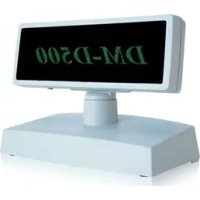
DMD500 - Floor display EPSON - Free user manual and instructions
Find the device manual for free DMD500 EPSON in PDF.



| Product Type | Pole Display (customer display) |
| Brand | Epson |
| Model | DMD500 |
| Display Technology | Vacuum Fluorescent Display (VFD) |
| Number of dots | 256 (W) × 64 (H) dots |
| Display Color | Green (505 nm) |
| Brightness | 300 cd/m² |
| Number of displayed characters | Up to 40 characters (20 columns × 2 lines) in DM-D110/210 emulation mode |
| Character size (Font A) | 4.4 × 8.8 mm |
| Character size (Font B) | 3.3 × 4.4 mm |
| Interface | RS-232C (RJ-45 connector) |
| Power Supply | 11.4 Vdc ~ 48 V |
| Power Consumption | Approx. 6 W |
| Dimensions (DM-D500 display unit) | 213 (W) × 51 (D) × 83 (H) mm |
| Weight (DM-D500 display unit) | Approx. 460 g |
| Dimensions of DP-501 stand | 200 (W) × 118 (D) × 65 (H) mm |
| Weight of DP-501 stand | Approx. 440 g |
| Tilt angle | Max. 48° (4 steps) |
| Rotation angle (DP-501) | Max. 90° |
| Rotation angle (DP-502) | Max. 330° |
| Reliability (lifetime) | 30,000 hours (before brightness half-life) |
| Operating temperature | Not specified (reasonable estimate: 0-40 °C) |
Frequently Asked Questions - DMD500 EPSON
User questions about DMD500 EPSON
0 question about this device. Answer the ones you know or ask your own.
Ask a new question about this device
Download the instructions for your Floor display in PDF format for free! Find your manual DMD500 - EPSON and take your electronic device back in hand. On this page are published all the documents necessary for the use of your device. DMD500 by EPSON.
USER MANUAL DMD500 EPSON
All of the illustrations are at the beginning of this manual. They are identified by letters (A, B, C ...). Some of the illustrations have numbers in them. See the list below for the meaning of the numbers.
Illustration A:
- DM-D500
- DIP switch DP-502: max. angle 330^ (rear side of the display)
- DP-501
- POWER switch 8. DIP Switch cover (bottom of the display) 9. DSW1
Illustration B:
- DP-502
Illustration C:
- 48^ (5 position)
Illustration D:
- DP-501: max. angle 90^
Illustration E:
- DSW2
All rights reserved. No part of this publication may be reproduced, stored in a retrieval system, or transmitted in any form or by any means, electronic, mechanical, photocopying, recording, or otherwise, without the prior written permission of Seiko Epson Corporation. No patent liability is assumed with respect to the use of the information contained herein. While every precaution has been taken in the preparation of this book, Seiko Epson Corporation assumes no responsibility for errors or omissions. Neither is any liability assumed for damages resulting from the use of the information contained herein.
Neither Seiko Epson Corporation nor its affiliates shall be liable to the purchaser of this product or third parties for damages, losses, costs, or expenses incurred by purchaser or third parties as a result of: accident, misuse, or abuse of this product or unauthorized modifications, repairs, or alterations to this product, or (excluding the U.S.) failure to strictly comply with Seiko Epson Corporation's operating and maintenance instructions.
Seiko Epson Corporation shall not be liable against any damages or problems arising from the use of any options or any consumable products other than those designated as Original Epson Products or Epson Approved Products by Seiko Epson Corporation.
EPSON is a registered trademark of Seiko Epson Corporation.
Exceed Your Vision and ESC/POS are registered trademarks or trademarks of Seiko Epson Corporation.
All other trademarks are the property of their respective owners and used for identification purpose only.
NOTICE:
The contents of this manual are subject to change without notice.
© Seiko Epson Corporation 2015. All rights reserved.
Restriction of Use
When this product is used for applications requiring high reliability/safety, such as transportation devices related to aviation, rail, marine, automotive, etc.; disaster prevention devices; various safety devices, etc.; or functional/precision devices, etc.; you should use this product only after giving consideration to including fail-safes and redundancies into your design to maintain safety and total system reliability. Because this product was not intended for use in applications requiring extremely high reliability/safety, such as aerospace equipment, main communication equipment, nuclear power control equipment, or medical equipment related to direct medical care, etc., please make your own judgment on this product's suitability after a full evaluation.
Safety Precautions
This section presents important information intended to ensure safe and effective use of this product. Please read this section carefully and store it in an accessible location.
WARNING:
Shut down your equipment immediately if it produces smoke, a strange odor, or unusual noise. Continued use may lead to fire. Immediately unplug the equipment and contact your dealer or a Seiko Epson service center for advice.
Never attempt to repair this product yourself. Improper repair work can be dangerous.
Never disassemble or modify this product. Tampering with this product may result in injury or fire.
Be sure to use the specified power source. Connection to an improper power source may cause fire.
Do not allow foreign matter to fall into the equipment. Penetration by foreign objects may lead to fire.
If water or other liquid spills into this equipment, unplug the power cord immediately, and then contact your dealer or a Seiko Epson service center for advice. Continued usage may lead to fire.
CAUTION:
Do not connect cables in ways other than those mentioned in this manual. Different connections may cause equipment damage and burning.
Be sure to set this equipment on a firm, stable, horizontal surface. The product may break or cause injury if it falls.
Do not use in locations subject to high humidity or dust levels. Excessive humidity and dust may cause equipment damage or fire.
Do not place heavy objects on top of this product. Never stand or lean on this product. Equipment may fall or collapse, causing breakage and possible injury.
Do not connect multiple extension struts. If the device topples over, there is a risk of damage or injury.
The horizontal rotating angle of the display unit is limited by a stopper. Do not apply excess force to rotate the display unit past the limit set by the stopper. Doing so may cause damage.
When you are attaching and detaching the cable, always check that the power switches of the customer display and the unit that it is connected to are turned off.
Take care when handling the customer display not to drop or knock it because it has a built-in fluorescent display tube.
If you do not use this product for an extended period of time, always disconnect the power cord for safety. If you move the product, ensure that the power cord is disconnected and that all of the cables are disconnected before moving it.
Do not use aerosol sprayers containing flammable gas inside or around this product. Doing so may cause fire.
Part Names
See Illustrations A through D.
Options
Each of the options are used depending on the way the product is installed.
□ Illustration A DM-D500+DP-501 (Stand)
□ Illustration B DM-D500+DP-502 (TM Printer Connection Option)
Unpacking
The following items are included with the standard specification Customer Display. If any item is damaged, contact your dealer.
□Customer Display DM-D500
User's Manual (this manual)
Downloading Drivers, Utilities, and Manuals
The latest versions of drivers, utilities, and manuals can be downloaded from one of the following URLs.
For customers in North America, go to the following web site: http://www.epsonexpert.com/ and follow the on-screen instructions.
For customers in other countries, go to the following web site:
https://download.epson-biz.com/?service=pos
Precautions on Installation
- Ensure that the power switches of the customer display and the device that is connected to are turned off before connecting the cable.
See the DM-D500 Installation Guide for information on how to install the device.
Precautions on Power-on
Turn on the power to the customer display before turning on the power of the computer, printer or other host devices.
Note:
If you are connecting to the USB model of the EPSON TM printer, always ensure that you turn on the power to the customer display first. If you turn on the power to the customer display too late, the system may not be able to detect the customer display.
Changing the Orientation of the Display Unit
The angle and direction of the display unit can be changed by pressing on the struts with your hand while moving the display unit. The display unit will move with only light pressure, so do not apply more pressure once the unit stops moving. Applying excess force to move the display unit may cause damage.
When installed in TM printer, there may be situations where the display unit cannot be turned to the desired direction. In these situations, remove the customer display and base unit, then adjust the position of the lug in the base unit before reattaching.
See Illustration C and Illustration D for the maximum angle of the display.
DIP Switches
The DIP switches configure the communication settings and whether a self-test is required.
CAUTION:
Do not remove the DIP switch cover until after turning the power off. Removing the cover while the power is turned on may damage the device.
DSW1
| DSW1 No. Function ON OFF Default Setting | ||||
| 1-1 Received Error Data Ignore “?” Display OFF | ||||
| 1-2 | Hand shaking XON/XOFF (*1) DTR/DSR | OFF | ||
| 1-3 Receive Data Length 7bit 8bit OFF | ||||
| 1-4 Parity | With Parity No Parity OFF | |||
| 1-5 Parity | Selection Even | Odd | OFF | |
| 1-6 Communication Speed Switching | See “Transfer Speed Switching.” | ON | ||
| 1-7 | OFF | |||
| 1-8 | ON | |||
(^*1) XON/XOFF is effective only when the DM-D500 is connected with a stand alone.
Transfer Speed Switching
| SW1-6 | SW1-67 | SW1-8 | Transfer Speed (bps) |
| ON | ON | ON | 2400 |
| OFF | ON | ON | 4800 |
| ON | OFF | ON | 9600 (Default) |
| OFF | OFF | ON | 19200 |
| ON | ON | OFF | 38400 |
| OFF | ON | OFF | 57600 |
| ON | OFF | OFF | 115200 |
DSW2
| DSW1 No. Function ON OFF Default Setting | ||||
| 2-1 | Y-connection (*1) Enable Disable | OFF | ||
| 2-2 | Self test selection (*2) | Perform self test | Do not perform | OFF |
| 2-3 | 20 column and 2 line mode selection (*3) | 20 column and 2 line mode | 256 x 64 dots mode | OFF |
| 2-4 | Device selection default setting (*4) | Printer is selected | Display is selected | OFF |
| 2-5 | Address 0 | The display device number (1-7) corresponds to Address number 0 to 2. (All OFF are regarded as no display number.) | OFF | |
| 2-6 | Address 1 | OFF | ||
| 2-7 | Address 2 | OFF | ||
| 2-8 | Reserved (*5) | - | Fixed to OFF | OFF |
() The "Y-connection enable" is set when a TM printer with no modular jack for the DM-D is connected with this product, using one COM port to connect both TM printer and DM display. In this case, an optional DM-D stand (DP-501) and a connecting cable are required. In the cases other than above, choose "Y-connection disable" (default setting).
(^2) This function can select whether or not you perform self test when turning on the power.
(3) When selecting "20 column and 2 line mode," this product can be used like the DM-D110/210. In this case, the graphic display and the original functions for the DM-D500 cannot be used, but when selecting "256 x 64 dots mode," they can be used.
(^4) When setting to "Printer is selected," data is sent to the TM printer, but is not displayed on the display. When setting to "Display is selected," data is displayed on the display but is not output from the TM printer. The selection can be changed using <ESC command.
(^*5) Stay at OFF setting.
Specifications
| Specification | ||
| Display type Fluorescent tube | display | |
| Total number of dots 256(W) x 64(H) dots | ||
| Number of characters displayed | 40 characters (20 columns x 2 rows, 5 x 7 dot matrix) 32 columns x 4 lines maximum (when Font A is used) 42 columns x 8 lines maximum (when Font B is used) 16 columns x 4 lines maximum (when Chinese character is used) 20 columns x 2 lines (mode for the DM-D110/210 emulation) | |
| Display color Green (505 nm) | ||
| Brightness 300 cd/m | 2 | |
| Character classes Alphanumeric | Eric: 95 characters International characters: 37 characters Graphic characters: 128 characters x 12 pages (including two user-defined pages) Chinese character | |
| Character composition Font | A 8 x 16 dots Font B 5 x 7 dots Chinese character 16 x 16 dots | |
| Character size FontA : 4.4 x 8 | 8 mm {0.17 x 0.35"} FontB : 3.3 x 4.4 mm {0.13 x 0.17"} Chinese character : 8.8 x 8.8 mm {0.35 x 0.35" | |
| Interface Standard RS232C Compliant | ||
| Connector RJ-45 | ||
| Reliability 30,000 hours (a half-value period of the brightness) | ||
| Power supply voltage DC 11 | 4 V ~ 48 V | |
| Power consumption Approx. | 6 W | |
| External dimensions / Weight (Mass) | DM-D500 | 213 (W) x 51 (D) x 83 (H) mm / Approximately 460 g {8.39 (W) x 2.01 (D) x 3.27 (H)" / Approximately 1.01 lb} |
| DP-501 | 200 (W) x 118 (D) x 65 (H) mm / Approximately 440 g {7.87 (W) x 4.65 (D) x 2.56 (H)" / Approximately 0.97 lb} | |
| DP-502 | 78 (W) x 164 (D) x 260 (H) mm / Approximately 264 g {3.07 (W) x 6.46 (D) x 10.24 (H)" / Approximately 0.58 lb} | |
| Tilt angle | Maximum 48° (4 steps) | |
| Horizontal rotation angle | DP-501: Maximum 90° DP-502: Maximum 330° | |
| Power supply | Supplied by the system | |
Français
DM-D500
https://download.epson-biz.com/?service=pos
48^ (5 posities)
https://download.epson-biz.com/?service=pos
https://download.epson-biz.com/?service=pos
Consulte as ilustracoes A a D.
Opçoes
© Seiko Epson Corporation 2015. All rights reserved.
ご使用の前に
CONBUN-UN-UN-UN-UN-UN-UN-UN-UN-UN-UN-UN-UN-UN-UN-UN-UN-UN-UN-UN-UN-UN-UN-UN-UN-UN-UN-UN-UN-UN-UN-UN-UN-UN-UN-UN-UN-UN-UN-UN-UN-UN-UN-UN-UN-UN-UN-UN-UN-UN-UN
