
RoboVac 12 - Robot vacuum eufy - Free user manual and instructions
Find the device manual for free RoboVac 12 eufy in PDF.



| Product type | Robot vacuum |
| Brand | Eufy |
| Model | RoboVac 12 (T2108/T2109/T2110) |
| Power supply | Power adapter 19 V ⎓ 6 A |
| Battery | Lithium-ion 14.4 V, 2600 mAh |
| Runtime | Up to 100 minutes |
| Charging time | 300 to 360 minutes |
| Dust collector capacity | 0.6 L |
| Cleaning modes | Auto, spot, edge, single room |
| BoostIQ™ Technology | Automatically adjusts suction power |
| Remote control | Yes, with AAA batteries (not included) |
| Scheduling | Adjustable cleaning timer |
| Sensors | Drop sensors, infrared, bumper |
| Brushes | Main spinning brush + 2 side brushes |
| Filters | High-performance filter + foam filter |
| Routine maintenance | Empty dust collector after each use; clean filters 1x/week; brushes 1x/month |
| Safety | Indoor use only; do not use on wet surfaces or to pick up burning objects |
| Weight (approx.) | Approx. 2.5 kg |
| Dimensions (approx.) | Approx. 33 cm diameter, 7.6 cm height |
| Suitable floor types | Hard floors and short-pile carpets (max 26 mm) |
Frequently Asked Questions - RoboVac 12 eufy
User questions about RoboVac 12 eufy
0 question about this device. Answer the ones you know or ask your own.
Ask a new question about this device
Download the instructions for your Robot vacuum in PDF format for free! Find your manual RoboVac 12 - eufy and take your electronic device back in hand. On this page are published all the documents necessary for the use of your device. RoboVac 12 by eufy.
USER MANUAL RoboVac 12 eufy
For FAQs and more information, please visit:
www.eufylife.com
Owner's Manual
RoboVac
T2108/T2109/T2110 51005001162 V02
Bedienungsanleitung | Manual del propietario
Manuel d'utilisation | Guida di Utilizzo | Handeiding
English 01
Deutsch 25
Español 49
Français 73
Italiano 97
Nederlands 121
Table of Contents
02 Important Safety Instructions
04 About Your RoboVac
What's in the Box
RoboVac Anatomy
LED Indication
09 Using Your RoboVac
Important Tips Before Use
Preparation
Charge Your RoboVac
Start / Stop Cleaning
Select a Cleaning Mode
Set Time and Scheduled Cleaning
17 Cleaning and Maintenance
Clean the Dust Collector and Filters
Clean the Rolling Brush
Clean the Side Brushes
Replace the Side Brushes
Clean the Sensors and Charging Pins
Clean the Swivel Wheel
22 Troubleshooting
24 Specifications
24 Customer Service
Thank you for purchasing RoboVac. Read all instructions before using this product, and keep it properly for future reference.
English
EnglishEng
Important Safety Instructions
To reduce the risk of injury or damage, read these safety instructions carefully and keep them at hand when setting up, using, and maintaining this device.

WARNING SYMBOLS USED
This is the safety alert symbol. This symbol alerts you to potential hazards that could result in property damage and/or serious bodily harm or death.
- This device can be used by children aged from 8 years and above and persons with reduced physical, sensory or mental capabilities or lack of experience and knowledge if they have been given supervision or instruction concerning use of this device in a safe way and understand the hazards involved.
• Children should be supervised to ensure they do not play with this device. - Cleaning and maintenance shall not be performed by children without adult supervision.
- This device is only to be used with the power supply unit provided.
- For the purposes of recharging the battery, only use the detachable power supply unit provided with this device.
- The battery must be removed from this device before this device is disposed of. To remove the battery from this device, first remove the screws on the bottom, then remove the main PCB and unscrew the battery cover using a screwdriver. Remove the battery by disconnecting the quick connector.
- The used battery should be placed in a sealed plastic bag and disposed of safely according to local environmental regulations.
- The external flexible cable or cord of the power supply unit cannot be replaced; if the cord is damaged, the power supply unit shall be disposed of.
• This device is for indoor use only. - This device is not a toy. Do not sit or stand on this device. Small children and pets should be supervised when this device is operating.
-
Store and operate this device in room temperature environments only.
-
Clean with a cloth dampened with water only.
- Do not use this device to pick up anything that is burning or smoking.
- Do not use this device to pick up spills of bleach, paint, chemicals, or anything wet.
- Before using this device, pick up objects like clothing and loose paper. Lift up cords for blinds or curtains, and move power cords and fragile objects out of the way. If this device passes over a power cord and drags it, an object could be pulled off a table or shelf.
- If the room to be cleaned has a balcony, a physical barrier should be used to prevent access to the balcony and to ensure safe operation.
- Do not place anything on top of this device.
- Be aware that this device moves around on its own. Take care when walking in the area where this device is operating to avoid stepping on it.
- Do not operate this device in areas with exposed electrical outlets on the floor.
- Do not expose the electronics of this device, its battery, or the integrated Charging Base. There are no user-serviceable parts inside.
- Do not use this device on an unfinished, unsealed, waxed or rough floor. It may result in damage to the floor and this device. Use only on hard floor surfaces or low-pile carpet.
- This device has been designed to be used on floors without scratching them. We still recommend that you test this device on a small area of the room to be cleaned to ensure no scratches are made before cleaning the whole room.
Notice

This symbol on the device or its packaging indicates: Do not dispose of electrical appliances as unsorted municipal waste; use separate collection facilities. Contact your local authority for information regarding the collection systems available. If electrical appliances are disposed of in landfills or dumps, hazardous substances can leak into the groundwater and get into the food chain, damaging your health and well-being. When replacing old appliances with new ones, the retailer is legally obliged to take back your old appliance for disposal at least free of charge.
EnglishEng
About Your RoboVac
What's in the Box
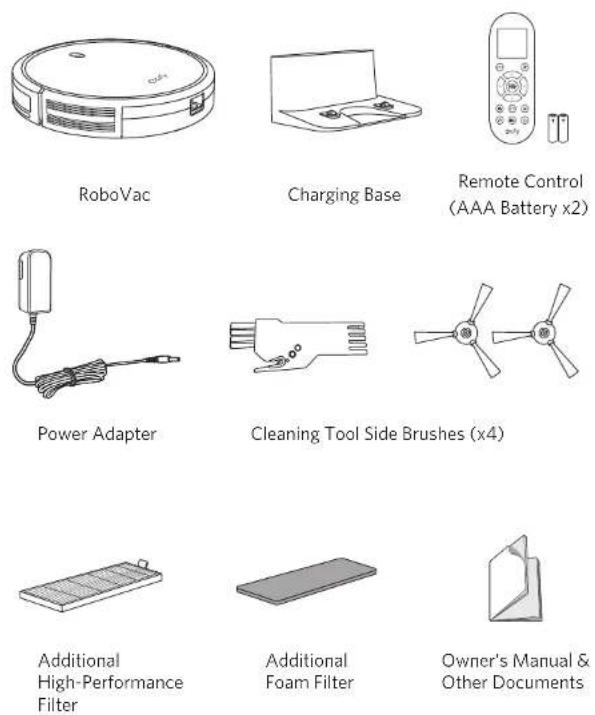
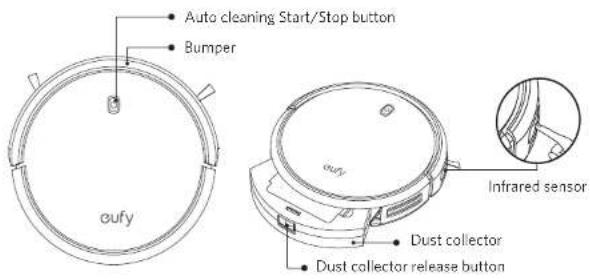
RoboVac Anatomy
Top & Side
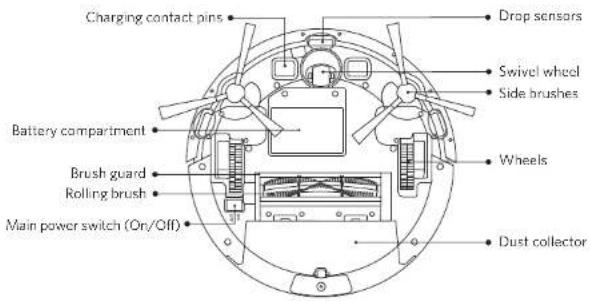
Bottom
EnglishEng
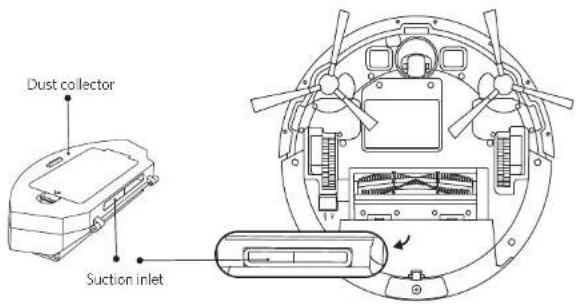
Dust Collector
Suction Inlet
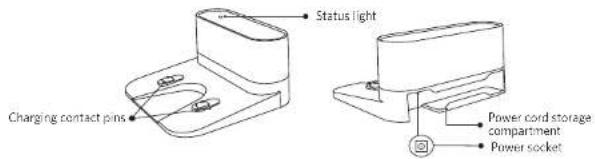
Charging Base
Remote Control
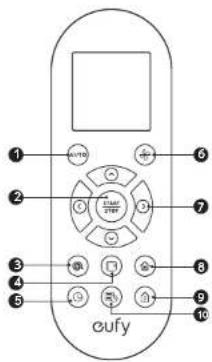
1 Start Auto cleaning
2 Start Auto cleaning Stop cleaning
3 Start Spot cleaning
4 Start Edge cleaning
5 Adjust time
6 Adjust suction power level in Auto/Single Room Cleaning mode
7 Control cleaning direction manually Adjust the hour and minute
8 Start Single Room cleaning
9 Return RoboVac to Charging Base
10 Schedule Auto cleaning start time
Remote Control Display
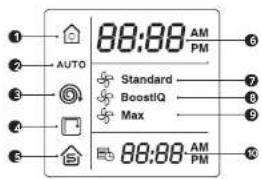
1 Returning to Charging Base
2 Auto cleaning mode selected
3 Spot cleaning mode selected
4 Edge cleaning mode selected
5 Single Room clearing mode selected
6 Clock
7 Standard suction power enabled
8 Boost Q ^™ dynamic suction power enabled
9 Max suction power enabled
10 Scheduled cleaning time

Install 2 AAA batteries before using the remote control for the first time. Make sure the positive and negative ends are facing the correct polarity direction as marked in the battery compartment.
EnglishEng
LED Indication
You can see the status of RoboVac from the LED indicator.
| Status | |
| Breaching orange Charging | |
| Solid blue Standay / Cleaning / Fully charged | |
| Solid orange Low power and returning to Charging Base | |
| Off | • RoboVac is off.• To conserve power, the light automatically turns off when RoboVac is not docked to the Charging Base and has been inactive for 1 minute. |
| Flashing / Solid red + Booping | RoboVac has an error.Refer to the "Troubleshooting>Error Tone" section in this manual for solutions. |
Using Your RoboVac
Important Tips Before Use
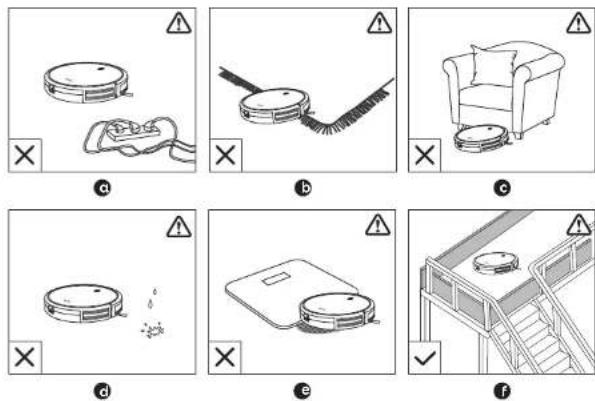
Remove power cords and small objects from the floor that may entangle RoboVac.
b Fold tasse ed edges of area rugs underneath to prevent tangling RoboVac. Avoid cleaning very dark-colored high-site rugs or rugs thicker than 102 in/26 mm as they may cause RoboVac to malfunction
- Keep RoboVac away from spaces lower than 2.87 in/73 mm to prevent RoboVac from getting stuck. If necessary, place a physical barrier to block off the problem areas.
d Keep RoboVac away from wet areas
e RoboVac may climb on top of objects less than 0.63 in/16 mm in height. Remove these objects if possible
Anti-crop sensors prevent RoboVac from tumbling down stairs and steep drops. They may work less effectively if dirty or used on reflective/very dark-colored floors. It is recommended to place physical barriers to block off areas where RoboVac may fall.

Place physical barriers in front of fireplaces and areas that may cause damage to RoboVac if entered.
EnglishEng
Preparation
1 Install the side brushes before use.
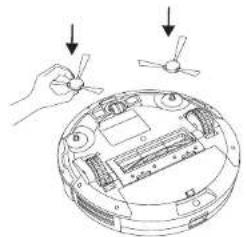
natural_image
Diagram showing a hand holding a small device next to a circular device with internal components and two arrows indicating motion (no text or symbols present)2 Turn on the main power switch on the bottom of RoboVac.
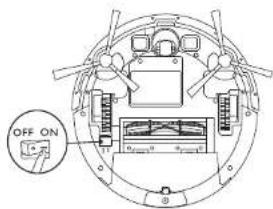
Remove the sticker next to the power switch, and the foam blocks beside the bumper before use
3 Place the Charging Base on a hard, level surface and against a wall.
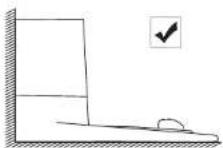
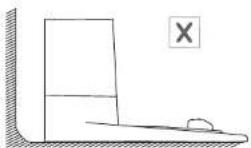
4 Remove objects within 3 ft/1 m of the left and right side and within 6 ft/2 m of the front of the charging base.
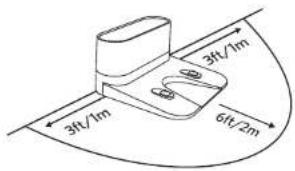
5 Connect the round connector of the adapter into the power socket on the Charging Base and the other end into a wall outlet.
- When the Charging Base connects to AC power, the LED indicator on the Charging Base is SOLID WHITE.
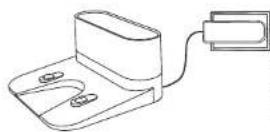
- Install the Charging Base in a loronias that RoboVac can easily access. It is recommended to place the Charging Base against a wall, and on a rare-level surface rather than on rags or carpets. - Always keep the Charging Base plugged in, otherwise RoboVac will not automatically return to it.
Charge Your RoboVac
- RoboVac has a pre-installed rechargeable battery that has to be fully charged before use.
- RoboVac returns to the Charging Base at the end of a cleaning cycle or when its battery is running low.
Method 1: Attach RoboVac to the Charging Base by aligning its charging pins with the charging pins on the base.
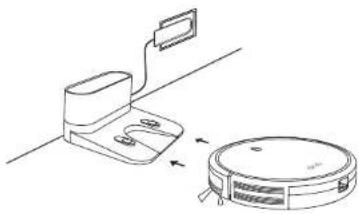
natural_image
Line drawing of a vacuum cleaner next to a mounted device (no text or symbols)EnglishEng
Method 2: Press In the remote control to return RoboVac to the Charging Base.
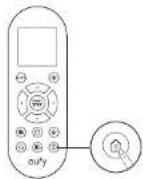

Turn off the main power switch if RoboVac will not be used for a long period of time. To preserve the battery's lifespan, recharge at least once every 6 months
Start / Stop Cleaning

Make sure the main power switch on the bottom of RoboVac is turned on before use.
- Press On RoboVac or /AUTO on the remote control to start cleaning in Auto Mode.
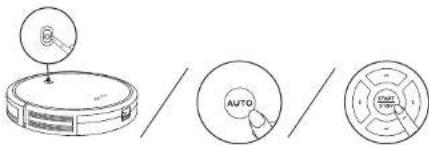
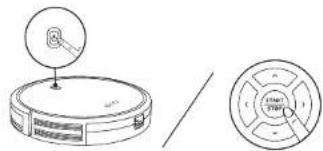
- Press On RoboVac or of the remote control to stop cleaning
Select a Cleaning Mode
1. Auto cleaning
RoboVac optimizes its cleaning path by selecting different cleaning modes automatically until cleaning is complete. This is the most commonly used cleaning mode.
Press On RoboVac or / on the remote control to start cleaning in Auto Mode.
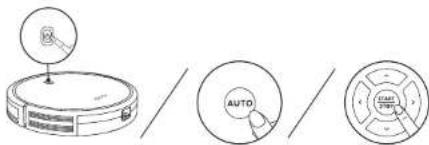

- RoboVac will return to the Charging Base automatically when the battery level becomes low or when RoboVac finishes cleaning.
- By default, RoboVac starts in Auto cleaning mode when it is turned on.
BoostIQ™ Feature
When the BoostIQ™ feature is enabled, RoboVac will automatically increase the suction power if it detects stronger power is needed to ensure the best clean. BoostIQ™ is ideal for cleaning thicker carpets and hard-to-sweep messes, which will reduce the total cleaning time, but increase the noise level. If the vacuuming noise caused by BoostIQ™ disturbs you, you can disable this feature. This feature only works in Auto and Single Room cleaning modes.
In Auto or Single Room cleaning mode, press on the remote control repeatedly to adjust the suction power level.
• The corresponding icon is displayed on the remote control.
| Icon Suction Power Level | |
| Standard | Standard power |
| BoostIQ | Automatically switches between Standard and Enhanced power (default) |
| Max | Maximum power |

When RobaVac starts cleaning in Auto or Single Room made the next time, it will clean according to the suction power level you previously selected.
EnglishEng
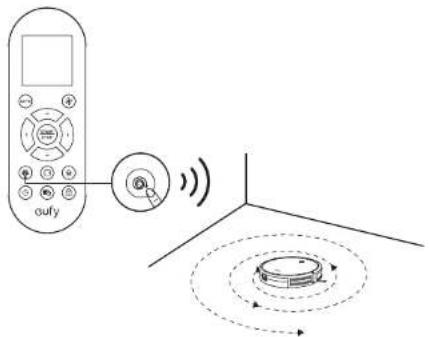
2. Spot cleaning
RoboVac intensively cleans a specific area in a spiral, useful if there is a concentrated area of dust or debris. In Spot mode, RoboVac will stop cleaning after 2 minutes.
Press 📄 on the remote control to start clearing in Spot mode.
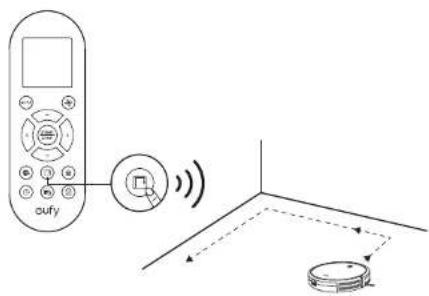
3. Edge cleaning
RoboVac reduces its speed when it detects a wall and then follows the wall to ensure the edge is cleaned thoroughly. In Edge mode, RoboVac will clean for 20 minutes and return to the Charging Base.
Press □ on the remote control to start clearing in Edge mode.
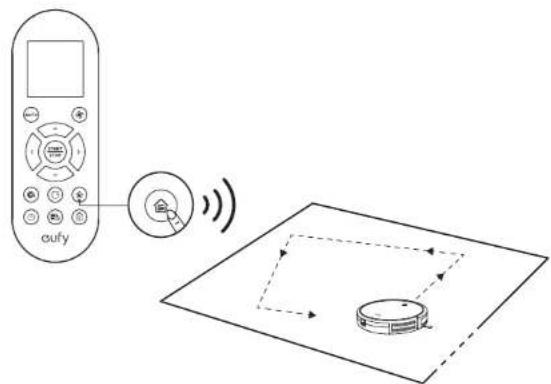
4. Single Room cleaning
RoboVac intensively cleans one single room and stops after 30 minutes. Select this mode only when one specific room needs to be cleaned. Make sure to confine RoboVac to the room by closing the door.
Press on the remote control to start cleaning in Single Room Mode.
5. Manual cleaning
You can direct RoboVac to clean a particular area by using the directional buttons on the remote control.
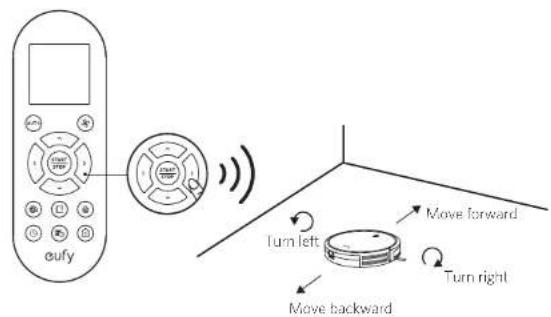
EnglishEng
Set Time and Scheduled Cleaning
Set Time

Make sure the time is set correctly to your local time before setting a scheduled cleaning.
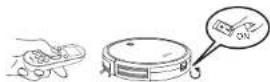
1 Make sure the main power switch on the bottom of RoboVac is turned on.
2 Press ☐ on the remote control. The time will blink on the display.
3 Press ▲▼□et the "hour" and "minute".
Note: Make sure AM/PM is set correctly.
4 Press 📊 or 🐎 to save the setting. RoboVac will BEEP ONCE to indicate the time has been set.
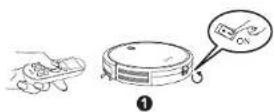

②

③
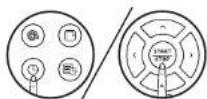
4
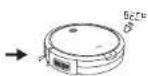

To ensure the time is set successfully, make sure RoboVac is turned on. You will hear a beep when the time has been set.
Set a Scheduled Cleaning
You can schedule RoboVac to start clearing at a specified time. To cancel a previously scheduled clearing press and hold 3 seconds until RoboVac beeps twice and disappears.
Note: Before setting a scheduled cleaning, make sure the time has been set correctly to your local time; refer to the previous section "Set Time" for how to set the time.
1 Make sure the main power switch on the bottom of RoboVac is turned on
2 Press 📄 on the remote control v-blink on the display.
3 Press ▲ set the "hour" and "minute". Note: Make sure AM/PM is set correctly.
4 Press or START to save the setting. RoboVac will BEEP ONCE to indicate the schedule has been set.
1

②

3

4



To ensure the schedule is set successfully, make sure RoboVac is turned on. You will hear a beep when the schedule has been set.
Cleaning and Maintenance
For optimal performance, follow the instructions below to clean and maintain RoboVac regularly. The cleaning/replacement frequency will depend on your usage habits of RoboVac.
Recommended cleaning/replacement frequency:
| RoboVac Part Cleaning Frequency Replacement Frequency | ||
| Dust Collector After each use | ||
| Filters Once every week Every 2 months | ||
| Rolling Brush | Once every weak | Every 6-12 months |
| Side Brushes | Once every month | Every 3-6 months (or when visibly worn) |
| Sensors | Once every month | - |
| Charging Pins | Once every month | - |
| Swivel Wheel | Once every month | - |
EnglishEng
Clean the Dust Collector and Filters
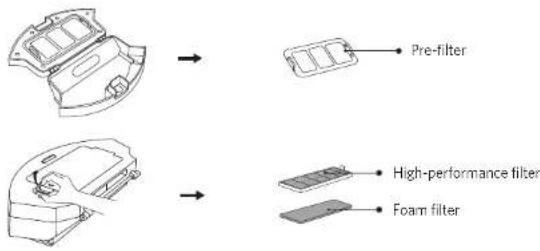
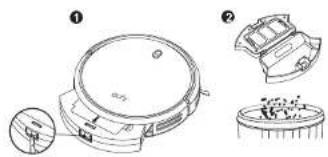
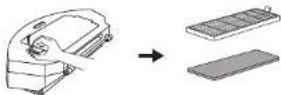
1 Press the dust collector release button to pull the dust collector out.
2 Open and empty the dust collector
natural_image
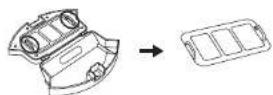
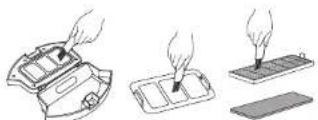
Technical line drawing of a mechanical device with exploded and assembled views (no text or symbols)3 Remove the pre-filter by pulling the hooks as shown.
4 Take out the foam filter and high-performance filter.
5 Clean the dust collector and filters with a vacuum cleaner or a clearing brush.
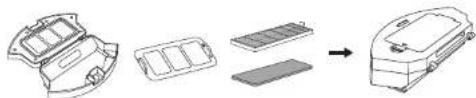
6 Put the filters and pre-filter back together in the dust collector.
natural_image
Diagram showing a vehicle battery pack assembly process with no text or symbols7 Push the dust collector back into the main unit.
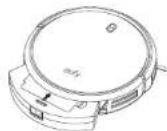

You can wash the dust collector, pre-filter and foam filter with water. Be sure to air-dry them thoroughly before reossembling. Do not wash the high-performance filter with water, as it may damage the filter and reduce the suction power.
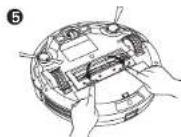
Clean the Rolling Brush
1 Pull on the release tabs to unlock the brush guard as shown.
2 Lift the rolling brush to remove.
3 Clean the rolling brush with the provided cleaning tool or a vacuum cleaner.
4 Reinstall the rolling brush by inserting the fixed protruding end first and then clicking into place.
5 Press down to snap the brush guard into place.
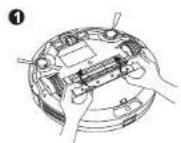
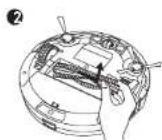
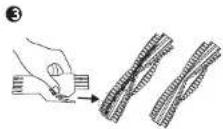
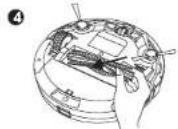
EnglishEng
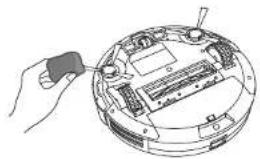
Clean the Side Brushes
Foreign substances, such as hair, can easily get tangled in the side brushes, and dirt may adhere to them. Be sure to clean them regularly.
1 Remove the side brushes.
2 Carefully unwind and pull off any hair or string that is wrapped between the main unit and the side brushes.
3 Use a cloth campened with warm water to remove dust from the brushes or to gently reshape them.
natural_image
Line drawing of a hand using a tool to adjust or install electronic components on a circular device (no text or symbols visible)
Only use the side brushes when they are completely dry.
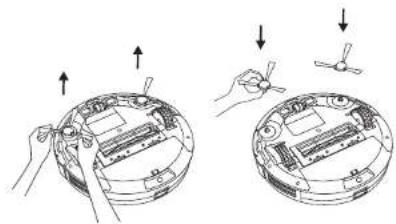
Replace the Side Brushes
The side brushes may become bent or damaged after being used for a period of time. Follow the instructions below to replace them.
Pull off the old side brushes and snap the new ones into place.
Clean the Sensors and Charging Pins
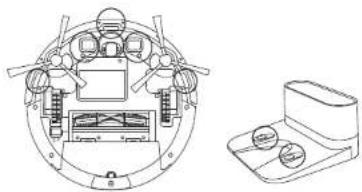
To maintain the best performance, clean the drop sensors and charging pins regularly.
- Dust off the drop sensors and charging contact pins using a cloth or cleaning brush.
natural_image
Technical line drawing of a circular mechanical component with internal components and a separate view of a device (no text or symbols)Clean the Swivel Wheel
Hair or cust particles can easily get entangled in the swivel wheel. Be sure to clean the swivel wheel periodically and as needed.
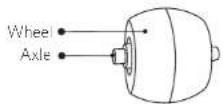
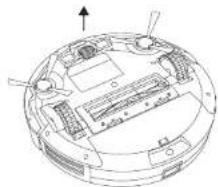
1 Pull out the swivel wheel.
natural_image
Technical line drawing of a circular mechanical or electronic component with internal components and an upward arrow indicator (no text or symbols present)2 Clean any hair or debris wrapped around the wheel or entangled inside the wheel cavity.
3 Reinstall the wheel and push in until it clicks into place.

- You can clean the swivel wheel with water.
Use the swivel wheel only when it is completely dry.
EnglishEng
Troubleshooting
Frequently asked questions
| Problems Solutions | |
| RoboVac cannot be activated. | Make sure the main power switch is in the ON position.Make sure the battery is fully charged.Replace the batteries (2 AAA) in the remote control.Make sure the remote control is within range (16 ft/5 m) of RoboVac.If you still have trouble, turn off the main power switch and then turn it back on. |
| The remote control does not work. | Replace the batteries in the remote control.Make sure RoboVac is turned on and fully charged |
| RoboVac stops working suddenly. | Check if RoboVac is trapped or stuck on an obstacle.Check if the battery level is too low.If you still have trouble, turn off the main power switch, wait for 2 seconds, and then turn it back on. |
| You cannot schedule cleanings. | Make sure the main power switch on the bottom of RoboVac is turned on.Make sure the time, time of day (AM/FM), and the scheduled time have been set correctly.Check if RoboVac's power is too low to start cleaning. |
| Suction power is weak. | Check if any ostructions are blocking the suction inlet.Empty the dust collector.Clean the filters with a vacuum cleaner or a clearing brush.Check if the filters are wet due to water or other liquid on the floor. Air-dry the filters completely before use. |
| RoboVac cannot be charged. | Check if the indicator on the Charging Base lights up. If not, contact the eufy service center to repair or replace the Charging Base.Dust off the charging contact pins with a dry cloth.Check if you can hear a beep when RoboVac is docked onto the Charging Base. If not, contact the eufy service center to repair or replace the Charging Base. |
| RoboVac cannot return to the Charging Base. | Remove objects within 3 ft/1 m to the left and right side and within 6 ft/2 m of the front of the Charging Base.When RoboVac is in the vicinity of the Charging Base, it will return more quickly. However, if the Charging Base is located far away, RoboVac will need more time to return. Please be patient as it works its way back.Clean the charging contact pins. |
| Problems Solutions | |
| The rolling brush does not rotate. | Clean the rolling brush.Check if the rolling brush and brush guard have been installed properly. |
| RoboVac's movements or travel path are abnormal. | Clean the sensors carefully with a dry cloth.Restart RoboVac by turning the power switch off and on. |
Error Tones
When RoboVac is in trouble, it will emit a series of short or long beeps and the red indicator on RoboVac will be solid or flashing.
Flashing red indicator light
| Error Tone Cause Solution | ||
| Two beeps RoboVac's bumper is stuck. | Iap RoboVac's bumper several times to dislodge any debris that may be trapped underneath. | |
| Three beeps | • RoboVac's drop sensors are dirty.• RoboVac is stuck on the ledge of a staircase and cannot reverse. | • Clean the drop sensors gently with a dry cloth• Place RoboVac in a new location.• Use a physical barrier to block off the problem area. |
| Four beeps | RoboVac's power level is too low. | Manually charge RoboVac for at least 5 hours. |
Solid red indicator light
| Error Tone Cause Solution | ||
| One beep | RoboVac's left/right wheel is stuck. | Turn off RoboVac and remove any hair or debris from the left/right wheel. |
| Two beeps | RoboVac's side brush is stuck. | Turn off RoboVac and remove any hair or debris from the side brush. |
| Three beeps | RoboVac's suction fan is stuck. | Turn off RoboVac, then remove and empty the dust collector.Make sure the suction inlet is not blocked by any hair or debris. |
| Four beeps | RoboVac's rolling brush is stuck. | Turn off RoboVac and remove any hair or debris from the rolling brush. |
English
Deutsch
Specifications
 | Product Model T2108/T2109/T2110 | |
| Input | 19 V=6 A | |
| Battery Voltage | DC 14.4 V | |
| Power Consumption 25 W | ||
| Battery Type | DC 14.4 VLi-ion 2603 mAn | |
| Dust Collector Capacity | 0.6 L | |
| Cleaning Time Max. 100 mins | ||
| Charging Time 300 - 360 mins | ||
 | Input | 19 V=6 A |
| Output | 19 V=6 A | |
Customer Service

support@eufylife.com

www.eufylife.com

| (US) +1 (800) 988 7973 Mon-Fri 9:00am - 5:00pm (PT) | (中国) +86 400 0550 036 周一至周五 9:00 - 17:30 |
| (UK) -44 (0) 1604 936200 Mon-Fri 6:00 - 11:00 (GMT) | (日本) +81 03 4455 7821 月-金 9:00 - 17:00 |
| (DZ) +49 (0) 69 9579 7960 Mon-Fri 6:00 - 11:00 |

@EufyOfficial

@EufyOfficial@©vOfficial

@EufyOfficial
Anker Innovations Limited
Room 1318-19, Hollywood Plaza, 610 Nathan Road, Mongkok, Kowloon, Hong Kong
Inhaltsverzeichnis
natural_image
Diagram showing a hand holding a small device next to an open circular device with internal components and two directional arrows indicating motion (no text or symbols present)natural_image
Diagram showing a vacuum cleaner next to a mounted device with a switch (no text or symbols present)DeutschDe
natural_image
Diagram showing a circular device with a handle and a separate circular component labeled 'START TWP' (no text or symbols on the device itself)
3. Eckenreinigung
natural_image
Technical line drawing of a mechanical device with labeled components (no text or symbols present)natural_image
Diagram showing a vehicle chassis with internal compartments and battery pack, no text or symbols presentnatural_image
Illustration of a hand inserting a component into a circular device (no text or symbols visible)
natural_image
Two-step diagram showing hands installing or adjusting a mechanical component in circular housing (no text or symbols)natural_image
Technical line drawing of a circular mechanical component with internal components and a separate view of a device (no text or symbols)natural_image
Technical line drawing of a circular mechanical or electronic component with internal components and an upward arrow indicator (no text or symbols present)support@eufylife.com
www.eufylife.com

| (US)·1(800)9887973 Mon-Fri 9:00cm-5:00pm (PT) | (中国)·864000550036 周一至周五9:00-17:30 |
| (UK)·44(0)1604936200 Mon-Fri 6:00-11:00 (OMT) | (日本)·810344557823 月-金9:00-17:00 |
| (D)·49(0)699579760 Mon-Fri 6:00-11:00 |
@EufyOfficial
@EufyOfficial@EufyOfficial_de
@EufyOfficial
Tabla de contenidos
natural_image
Diagram showing a hand holding a small device next to a circular device with internal components and two directional arrows indicating motion (no text or symbols present)natural_image
Line drawing of a vacuum cleaner next to a mounted device (no text or symbols)EspañolEsp
natural_image
Diagram showing a circular device mounted on top and a circular dial with 'START' label, both without any readable text or symbols.
5. Limpieza manual
natural_image
Technical line drawing of a mechanical device with labeled components (no text or symbols present)natural_image
Illustration of three-step cleaning process: pressing a device, applying paint to a tray, and adding a tool (no text or symbols)natural_image
Diagram showing a vehicle chassis with battery pack, battery pack, and battery casing (no text or symbols)natural_image
Line drawing of a hand inserting a component into a circular device (no text or symbols)
natural_image
Two-step diagram showing hands installing or adjusting a device on a circular base (no text or symbols present)natural_image
Technical line drawing of a circular mechanical component with internal components and a separate view of a cylindrical device (no text or symbols)natural_image
Technical line drawing of a circular mechanical or electronic component with internal components and an upward arrow indicator (no text or symbols present)
support@eufylife.com

www.eufylife.com

| (US) +1 (800) 988.7973 Mon-Fri 9:00am - 5:00pm (PT) |
| (UK) -44 (0) 1604 936200 Mon-Fri 6:00 - 11:00 (GMT) |
| (DE) +49 (0) 69 9579 7960 Mon-Fri 6:00 - 11:00 |
| (中国)·864000550036 周一至周五9:00-17:30 |
| (日本)·810344557823 月-金9:00-17:00 |

@EufyOfficial

@EufyOfficial@CvOfficial

@EufyOfficial
Français
Table des matières
natural_image
Diagram showing a hand holding a small device next to a circular device with internal components and two propellers (no text or symbols present)natural_image
Line drawing of a vacuum cleaner next to a mounted device (no text or symbols)FrançaisFra

5. Nettoyage manuel
natural_image
Technical line drawing of a mechanical device with exploded and assembled views (no text or symbols)natural_image
Diagram showing a vehicle chassis with battery pack and battery casing, no text or symbols presentnatural_image
Hand holding a small electronic device with internal components (no visible text or symbols)
natural_image
Two-step diagram showing hands installing or adjusting a device inside a circular housing (no text or symbols present)natural_image
Technical line drawing of a circular mechanical component with internal components and a separate view of a cylindrical housing (no text or symbols)natural_image
Technical line drawing of a circular mechanical or electronic component with internal components and an upward arrow indicator (no text or symbols present)support@eufylife.com

www.eufylife.com

| (US) +1 (800) 988 7973 Mon-Fri 9:00am - 5:00pm (PT) | (中国) -86 400 0650 036 周一至周五 9:00 - 17:30 |
| (UK) -44 (0) 1604 936200 Mon-Fri 6:00 - 11:00 (GMT) | (日本) -8103 4455 7823 月-金 9:00 - 17:00 |
| (DE) +49 (0) 69 95/9 7960 Mon-Fri 6:00 - 11:00 |

@EufyOfficial

@EufyOfficial@EufyOfficial

@EufyOfficial
Italiano
Sommario
natural_image
Diagram showing a hand holding a small device next to a circular device with internal components and two propellers (no text or symbols present)natural_image
Line drawing of a vacuum cleaner next to a mounted device (no text or symbols)Italianoltal

110 111
5. Modalità Manuale
natural_image
Technical line drawing of a mechanical device with exploded and assembled views (no text or symbols)natural_image
Diagram showing a vehicle chassis with battery pack, battery pack, and battery casing (no text or symbols)natural_image
Line drawing of a hand inserting a component into a circular device (no text or symbols)
natural_image
Two-step diagram showing hands installing or adjusting a device inside a circular housing (no text or symbols present)116 117
natural_image
Technical line drawing of a circular mechanical device with internal components and a separate view of a rectangular housing (no text or symbols)natural_image
Technical line drawing of a circular mechanical or electronic component with internal components and an upward arrow indicator (no text or symbols present)support@eufylife.com

www.eufylife.com

(US) +1 (800) 988.7973 Mon-Fri 9:00cm - 5:00pm (PT) (UK) -44 (0) 1604 936200 Mon-Fri 6:00 - 11:00 (GMT) (DE) +49 (0) 69 9579 7960 Mon-Fri 6:00 - 11:00
(中国)·864000550036 周一至周五9:00-17:30 (日本)·810344557823 月-金9:00-17:00

@EufyOfficial

@EufyOfficial@CvOfficial

@EufyOfficial
Inhoudsopgave
natural_image
Diagram of a hand holding a small object with arrows pointing to a device component (no text or symbols present)natural_image
Line drawing of a vacuum cleaner next to a mounted device (no text or symbols)Nederlands
natural_image
Diagram showing a circular component above a circular device and its cross-sectional view with a labeled knob (no text or symbols present)Schoonmaakmodus selecteren

5. Handmatig schoonmaken
Opmerking: Controller of AM/PM juist is ingesteld
natural_image
Technical line drawing of a mechanical device with two views (① and ②), no visible text or symbolsnatural_image
Diagram showing a vehicle chassis with internal compartments and battery pack, no text or symbols presentnatural_image
Line drawing of a hand using a tool to adjust or install electronic components on a circular device (no text or symbols visible)
natural_image
Two-step diagram showing hands installing or adjusting a device inside a circular housing (no text or symbols present)natural_image
Technical line drawing of a circular mechanical component with internal components and a separate view of a cylindrical device (no text or symbols)natural_image
Technical line drawing of a circular mechanical or electronic component with internal components and an upward arrow indicator (no text or symbols present)
support@eufylife.com

www.eufylife.com

| (US) -1 (800) 988 7973 Mon-Fri 9:00am - 5:00pm (PT) | (中国) -86 400 0550 036 周一至周五 9:00 - 17:30 |
| (UK) -44 (0) 1604 936200 Mon-Fri 6:00 - 11:00 (OMT) | (日本) -81 03 4455 7823 月-金 9:00 - 17:00 |
| (DE) -49 (0) 69.9579 7960 Mon-Fri 6:00 - 11:00 |

@EufyOfficial

@EufyOfficial@EufyOfficial

@EufyOfficial
