SHH 1200 A1 - Frying Pan SILVERCREST - Free user manual and instructions
Find the device manual for free SHH 1200 A1 SILVERCREST in PDF.



| Product type | Halogen supplementary heater for dry rooms |
| Brand | SilverCrest |
| Model | SHH 1200 A1 |
| Power supply | 220-240 V ~ 50/60 Hz |
| Power | 400 / 800 / 1200 W (3 levels) |
| Protection class | I |
| Heating elements | 3 halogen radiants (non-replaceable) |
| Swivel function | Yes, on/off by button |
| Safety switch | Anti-tip (automatic shut-off if overturned) |
| Overheat protection | Yes, automatic shut-off |
| Assembly | Removable base with 2 screws |
| Protection grille | Yes, fixed (non-removable) |
| Carrying handle | Yes, on top |
| Recommended location | Flat, dry, non-flammable floor, at least 0.5 m from walls and objects |
| Intended use | Indoors only, private household use |
| Cleaning | Dust with vacuum cleaner, exterior with damp cloth and mild detergent |
| Warranty | 3 years (offer from HOYER Handel GmbH) |
| Article number (IAN) | 114883 |
| Customer service France | 0800 919270 (toll-free) |
| Customer service Switzerland | 0842 665566 (0.08 CHF/min) |
Frequently Asked Questions - SHH 1200 A1 SILVERCREST
User questions about SHH 1200 A1 SILVERCREST
0 question about this device. Answer the ones you know or ask your own.
Ask a new question about this device
Download the instructions for your Frying Pan in PDF format for free! Find your manual SHH 1200 A1 - SILVERCREST and take your electronic device back in hand. On this page are published all the documents necessary for the use of your device. SHH 1200 A1 by SILVERCREST.
USER MANUAL SHH 1200 A1 SILVERCREST
natural_image
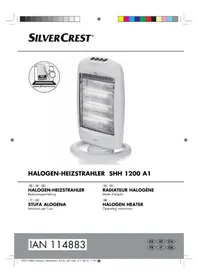
White portable electric heater with mesh grille and control panel (no visible text or symbols)HALOGEN-HEIZSTRAHLER SHH 1200 A1
DE AT CH
HALOGEN-HEIZSTRAHLER
Bedienungsanleitung
IT CH
STUFA ALOGENA
Operating instructions
IAN 114883
Deutsch....2
Français 14
Italiano 26
English.... 38
ID: SHH 1200 A1_15_V1.2
natural_image
Illustration of a portable electric heater with a black band indicating clockwise motion (no text or symbols)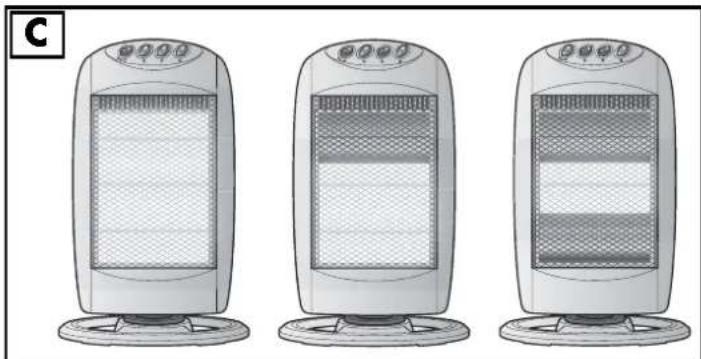
natural_image
Three identical electric heater models shown in side-by-side illustrations, no text or symbols present.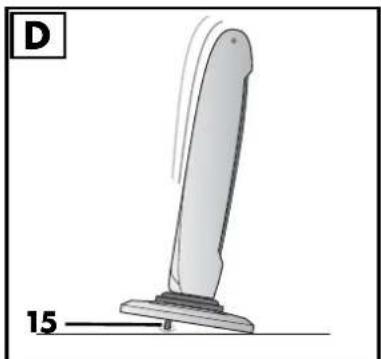
natural_image
Simple line drawing of a vertical support structure with base, no text or symbols presentInhalt
5.2 Montage (illustration A)
- Overview 38
- Intended purpose 39
- Safety information 40
- Items supplied 42
- How to use 43
5.1 Unpacking 43
5.2 Assembling (Figure A) 43
5.3 Setting up 43
- Operation 44
6.1 Switching the device on and off.... 44
6.2 Swivel function 44
6.3 Overheating protection.... 44
6.4 Safety switch 44
-
Cleaning 45
-
Troubleshooting 45
- Disposal 46
- Technical specifications 46
- Warranty of the HOYER Handel GmbH 46
1. Overview
1 Swivel function on/off
2 lower-radiant heater on/off
3 upper radiant heater on/off
4 POWER Switching the main switch of the device on and off
400 W= (middle radiant heater on/off)
5 Upper radiant heater
6 Middle radiant heater
7 Lower radiant heater
8 Base
9 Protective grid
10 Ventilation slots
11 Handle
12 Power cable with safety plug
13 Screws for attaching the base
14 Distance sleeves
15 Safety switch
16 Thread opening
17 Cable clamp and opening for power cable
Thank you for your trust!
Congratulations on your new halogen radiant heater.
For a safe handling of the device and in order to get to know the entire scope of features:
• Thoroughly read these operating instructions prior to initial commissioning.
- Above all, observe the safety instructions!
• The device should only be used as described in these operating instructions.
- Keep these operating instructions for reference, they are a part of the product.
- If you pass the device on to someone else, please include these operating instructions.
We hope you enjoy your new halogen radiant heater!
2. Intended purpose
The device is suitable as auxiliary heating for dry indoor spaces.
The device is designed for private home use and must not be used for commercial purposes. The device must only be used indoors.
The device must only be set up on the floor.
Foreseeable misuse

FIRE HAZARD!
- Never use the device to dry textile materials or other objects on, above or in front of the device.
- The device must only be operated with the base attached.
- The base must stand completely on the floor.
- The safety switch must not be disabled manually under any circumstances.
- The device must not be used in vehicles of any kind.
Symbols on your device
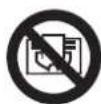
Do not cover up
The adjacent symbol warns against covering up the device, as the resulting heat accumulation could lead to damage and a fire hazard.
3. Safety information
Warnings
If necessary, the following warnings will be used in these operating instructions:

DANGER! High risk: failure to observe this warning may result in injury to life and limb.
WARNING! Moderate risk: failure to observe this warning may result in injury or serious material damage.
CAUTION: low risk: failure to observe this warning may result in minor injury or material damage.
NOTE: circumstances and specifics that must be observed when handling the device.
Instructions for safe operation
-Children under the age of 3 must be kept away, unless they are constantly being supervised.
- This device can be used by children from the age of 8 and people with restricted physical, sensory or intellectual abilities or people without adequate experience and/or understanding, if they are supervised or instructed on how to use this device safely and if they are aware of the resulting danger. Children must not play with the device. Cleaning and maintenance by the user must not be performed by children without supervision.
Children aged 3 and over, who are younger than 8 years old, may only switch the device on and off, if they are supervised or they have been instructed in the device's safe use and they have understood the resulting dangers, provided that the device is placed or installed in its normal operating position. Children aged 3 and over, who are younger than 8 years old, may not insert the plug into the wall socket, adjust the device, clean the device and/or carry out any maintenance work, which the user is required to carry out.
Some parts of the device may become very hot and may cause burns. Particular care is necessary, if children or vulnerable persons are present.
- This device is equally intended for use in the home and in applications similar to the home, such as for example...
...in kitchens for employees in shops, offices and other commercial areas;
...on agricultural estates;
...by customers in hotels, motels and other residential facilities;
...in bed-and-breakfast establishments.
- In order to prevent overheating of the heating device, the heating device must not be covered.
- The device must never be set up directly under a wall socket, as the forming heat may lead to damage to the electric system.
- Never use the device close to a sink, a bath tub, a shower or a swimming pool, as water splashes could enter the device.
- If the power cable of this device should become damaged, it must be replaced by the manufacturer, the manufacturer's customer service department or a similarly qualified specialist, in order to avoid any hazards.
- This heating device must not be used with a mode switch, a time switch, a separate remote control system or any other system, which automatically switches on the heating device, because this will lead to a fire hazard if the device is covered or positioned incorrectly.
- WARNING! This device is not equipped with a feature for regulating the room temperature. The heating device must not be used in small rooms, in which people not able to leave a room of their own accord live, unless permanent monitoring is in place.

DANGER for children
- Packing materials are not children's toys. Children should not be allowed to play with the plastic bags: There is a risk of suffocation!
- Keep the device out of the reach of children.

DANGER! Risk of electric shock due to moisture
The device, the power cable and the mains plug must not be immersed in water or any other liquids.
- Protect the device from moisture, water drops and water splashes.
- If liquid gets into the device, remove the mains plug immediately. Have the device checked before reusing.
- Never touch the device with wet hands.
- If the device falls into water, disconnect the mains plug immediately. Only then is it safe to retrieve the device.

DANGER! Risk of electric shock
- Only connect the mains plug to a properly installed and easily accessible wall socket whose voltage corresponds to the specifications on the rating plate. The wall socket must continue to be easily accessible after the device is plugged in.
- Ensure that the power cable cannot be damaged by sharp edges or hot points.
The device is not fully disconnected from the power supply, even after it is switched off. In order to fully disconnect it, pull out the mains plug. - When using the device, ensure that the power cable cannot be trapped or crushed.
- When removing the mains plug from the wall socket, always pull the plug and never the cable.
- Disconnect the mains plug from the wall socket,...
... if there is a fault, ... when you are not using the device, ... before you clean the device and ... during thunderstorms. - Never attempt to reach into the device interior by sticking your fingers or objects through the protective grids.
- To avoid any risk, do not make modifications to the device.
Do not use the device if there is visible damage to the device or the power cable.

FIRE HAZARD
- There must be no flammable objects (e.g. curtains, paper, etc.) in close proximity to the device during operation.
- Never use the device to dry textile materials or other objects on, above or in front of the device.
The device must only be set up on a solid, level, dry and non-flammable surface. - The device must only be operated under supervision.
- When setting up the device, keep a minimum distance of 0.5 m all around to other devices and walls.
- Never operate the device in a potentially explosive environment or close to flammable gases or liquids.
- Ensure at all times that the air can enter and exit freely. Otherwise, heat may accumulate in the device.
- If the device overheats, pull out the mains plug immediately.

DANGER! Risk of injury through burning
The protective grid of the device becomes very hot. For this reason, only touch the handle of the device.
The protective grid remains very hot after it is switched off, and must not be touched.
42
GB
- Prior to cleaning, let the device cool down until there is no longer a risk of burning.
- Only transport the device when it has cooled down, and when doing so only use the handle intended.

DANGER! Risk of injury
- Ensure that the mains power cable never develops into a trip hazard, and that nobody can get caught in or stand on it.
- Keep an appropriate distance to the device, in order to prevent hair or clothing from being sucked into the device fan.
WARNING! Risk of material damage
- Never try to use the swivel function manually, as this may damage the motor.
Do not use any astringent or abrasive cleaning agents.
4. Items supplied
1 Halogen radiant heater
1 Base 8
2 Screws 13
1 Operating instructions
5. How to use
5.1 Unpacking
-
Remove the device from the packaging.
-
Remove the transport packaging.
-
Check that the device shows no damage.
5.2 Assembling (Figure A)
- Place the device on its back in such a way that you can hold it secure while screwing on the base 8.
- Hold the base 8 with the top pointing upwards.
- Push the power cable 12 through the base 8 from above.
- Position the base 8 towards the lower end of the radiant heater in such a way that the power cable 12 fits through the recess and that the distance sleeves 14 lie above the thread openings 16.
- Screw the base 8 onto the radiant heater using the two screws 13.
- Press the power cable 12 into the cable clamp 17 and guide it through the opening in the base.
5.3 Setting up

FIRE HAZARD!
- Ensure that there is sufficient distance to the wall, furniture and fixtures or other devices. The distance should be at least 0.5 m, in order to exclude the risk of a fire hazard.
- Select a location which complies with the safety information.
- Select a location where people or animals will not come into contact with the protective grid 9 by accident.
- The radiant heater has to stand on a dry and level surface. The entire base has to touch the floor.
- Insert the mains plug 12 into a grounded power socket corresponding to the technical data.
6. Operation
NOTE: some parts of the device might be slightly greased when delivered, which is why slight smoke and odour formation might develop. This is harmless and stops after a short amount of time. Ensure sufficient ventilation in the meantime.
6.1 Switching the device on and off
-
Insert the mains plug into a grounded power socket corresponding to the technical data.
-
Switch the device on by setting the main switch 4 to 1. The middle radiant heater 6 always glows while the device is switched on.
-
Figure C: if needed, switch on the lower 7 and/or upper 5 radiant heater.
- By pressing button 2, you can switch the lower radiant heater 7 on and off. - By pressing button 3, you can switch the upper radiant heater 5 on and off.
- In order to completely switch off the device, set the main switch 4 to 0.
6.2 Swivel function
Figure B: the device has a swivel function. It causes the upper part of the device to swivel to and fro, thus distributing the heat more evenly in the room.
- By pressing button 1, you can switch the swivel function on and off.
6.3 Overheating protection

FIRE HAZARD!
- If the device overheats, pull out the mains plug 12 immediately.
This device possesses overheating protection for your safety. If the temperature inside the device becomes too high, it automatically switches off:
- Switch the device off by setting the main switch 4 to 0.
- Disconnect the mains plug 12 from the wall socket.
- Wait for the device to cool down.
- Check whether the device has a visible fault. If it is easy to repair (without opening the device), then repair it. If the cause cannot be found and the fault occurs repeatedly, have the device repaired or take it out of operation.
- Connect the mains plug 12 with the wall socket.
- Switch the device back on again by setting the main switch 4 to 1.
6.4 Safety switch
Figure D: a safety switch 15 protects the device against damage caused from falling over.
The safety switch 15 is positioned on the underside of the device and switches it off immediately in the even of it falling over.
- Place the device back into upright position. It automatically restarts with the last settings.
7. Cleaning
In order to enjoy your device for a long time, you should regularly clean it.

DANGER! Risk of electric shock!
- Disconnect the mains plug before any cleaning.

DANGER! Risk of injury through burning!
- Allow the device to cool down.
WARNING! Risk of material damage!
- Under no circumstances remove the protective grid.
-
Do not use any astringent or abrasive cleaning agents.
-
Carefully remove larger dust deposits from the protective grid 9 using a vacuum cleaner.
- Remove the residue with a soft brush. Ensure that no dust falls into the interior of the device. Therefore, hold the device in such a way that the protective grid 9 shows downwards.
- Clean the outside of the device with a damp cloth. You can also use some detergent.
- Use a cloth dampened in clear water for wiping afterwards.
- Do not use the device until it is completely dry again.
8. Troubleshooting
If your device fails to function as required, please try this checklist first. Perhaps there is only a minor problem, and you can solve it yourself.

DANGER! Risk of electric shock!
Do not attempt to repair the device yourself under any circumstances.
| Fault | Possible causes / Action |
| The device cannot be switched on. | Fuse or wall socket faulty? Choose a different wall socket.Defective device? Take it to a specialist workshop for repair, or dispose of the device.Is the base completely standing on the floor such that the safety switch is pressed in- wards? |
| The device cannot be switched off. | Electronic component faulty? Take it to a specialist workshop for re-pair, or dispose of the device. |
| Device switches off automatically. | Safety switch has triggered: put the device into its upright position (see “Safety switch” on page 44)Overheating protection has triggered: let device cool down and then clean it (see “Overheating protection” on page 44) |
9. Disposal
The symbol showing a wheelie bin crossed through indicates that the product requires separate refuse collection in the European Union. This applies to the
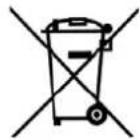
product and all accessories marked with this symbol. Products identified with this symbol may not be discarded with normal household waste, but must be taken to a collection point for recycling electric and electronic appliances. Recycling helps to reduce the consumption of raw materials and protect the environment.
Packaging
When disposing of the packaging, make sure you comply with the environmental regulations applicable in your country.
- Technical specifications
| Model: SHH 1200 A1 | |
| Mains voltage: 2 | 20-240 V ~ 50/60 Hz |
| Protection class: | + |
| Power rating: 40 | 0/800/1200 W |
| Heating elements: | 3x halogen emitters, not replaceable |
| Ambient conditions: | 0 °C to +40 °C, max. 85 % relative humidity |
Subject to technical modification.
CE
11. Warranty of the HOYER Handel GmbH
Dear Customer,
your device is provided with a 3 year warranty starting with the purchase date. In the event of product defects, you are entitled to statutory rights against the vendor. These statutory rights are not restricted by our warranty presented in the following.
Warranty conditions
The warranty period starts with the purchase date. Please keep the original purchase receipt in a safe place. This document is required to verify the purchase. If within three years from the purchase date of this product a material or factory defect occurs, the product will be repaired or replaced by us – at our discretion – free of charge to you. This warranty implies that within the period of three years the defective device and the purchase receipt are presented, including a brief written description of the defect and the time it occurred. If the defect is covered by our warranty, the repaired or a new product will be returned to you. No new warranty period starts with a repair or replacement of the product.
Warranty period and statutory claims for defects
The warranty period is not extended when the warranty has been claimed. This also applies to replaced and repaired parts. Any damages and defects already existing at the time of purchase must be reported immediately upon unpacking. Repairs arising after the expiration of the warranty period are subject to a charge.
Warranty coverage
The device was produced carefully according to strict quality guidelines and tested diligently prior to delivery.
The warranty applies to material or factory defects. This warranty does not include product parts that are subject to standard wear and therefore can be considered wear parts; the same applies to damages at fragile parts, e.g. switches, rechargeable batteries or parts made of glass.
This warranty expires if the product is damaged, not used as intended or not serviced. For the proper operation of the product, all instructions listed in the operating instructions must be observed carefully. Any form of use and handling that is advised against in the operating instructions or warned against must always be avoided.
The product is only intended for private and not for commercial use. In the case of incorrect and improper treatment, use of force and interventions not performed by our authorised Service Centre, the warranty shall cease.
Handling in case of a warranty claim
In order to ensure prompt processing of your matter, please observe the following notes:
- Please keep the article number
IAN: 114883 and the purchase receipt as a purchase verification for all inquiries. - If faulty operation or other defects occur, first contact the Service Centre listed in the following by telephone or email.
- Then, you are able to send a product reported as defective free of charge to the service address specified to you, including the purchase receipt and the information on the defect and when it occurred.

Please visit www.lidl-service.com to download this and many other manuals, product videos and software.

Service Centre
GB Service Great Britain Tel.: 0871 5000 720 (£ 0.10/Min.) E-Mail: hoyer@lidl.co.uk
IE Service Ireland Tel.: 1890 930 034 (0,08 EUR/Min., (peak)) (0,06 EUR/Min., (off peak)) E-Mail: hoyer@lidl.ie
IAN: 114883

Supplier
Please note that the following address is no service address. First contact the aforementioned Service Centre.



- HALOGEN-HEIZSTRAHLER SHH 1200 A1
- HALOGEN-HEIZSTRAHLER
- STUFA ALOGENA
- Inhalt
- Montage (illustration A)
- Overview
- Thank you for your trust!
- Intended purpose
- Foreseeable misuse
- FIRE HAZARD!
- Symbols on your device
- Do not cover up
- Safety information
- Warnings
- Instructions for safe operation
- DANGER for children
- DANGER! Risk of electric shock due to moisture
- DANGER! Risk of electric shock
- FIRE HAZARD
- DANGER! Risk of injury through burning
- DANGER! Risk of injury
- WARNING! Risk of material damage
- Items supplied
- How to use
- Unpacking
- Assembling (Figure A)
- Setting up
- Operation
- Switching the device on and off
- Swivel function
- Overheating protection
- Safety switch
- Cleaning
- DANGER! Risk of electric shock!
- DANGER! Risk of injury through burning!
- WARNING! Risk of material damage!
- Troubleshooting
- Disposal
- Packaging
- Warranty of the HOYER Handel GmbH
- Warranty conditions
- Warranty period and statutory claims for defects
- Warranty coverage
- Handling in case of a warranty claim
- Service Centre
- Supplier
Brand : SILVERCREST
Model : SHH 1200 A1
Category : Frying Pan