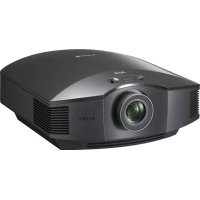
VPLHW45ES - Projector SONY - Free user manual and instructions
Find the device manual for free VPLHW45ES SONY in PDF.



| Product Type | Home Cinema LCD Projector |
| Brand | Sony |
| Model | VPLHW45ES |
| Display Technology | LCD 3-panel SXRD |
| Native Resolution | 1920 x 1080 (Full HD) |
| Brightness | 1800 lumens (estimation) |
| Lamp | LMP-H210 (optional, mercury) |
| Dimensions (W x H x D) | 407 x 179 x 463 mm |
| Weight | 9.5 kg |
| Power Supply | AC 100-240 V, 50/60 Hz |
| Power Consumption | Approx. 300 W (estimation) |
| Main Features | 2D/3D projection, optical zoom, manual focus, vertical/horizontal lens shift, preset calibrations (Cinema Film, TV, Photo, Game, etc.) |
| Connectivity | HDMI (x2), composite video input, LAN port (VPL-HW65 only) |
| Maintenance and Cleaning | Clean the air filter every 1500 hours; replace the lamp and air filter |
| Safety | Do not look into the beam (RG2 IEC 62471-5:2015); use a grounded power cord; do not block ventilation openings |
| Spare Parts and Repairability | Replacement lamp LMP-H210, air filter included with the lamp; remote control RM-PJ28; AA R6 batteries |
| General Information | Ceiling installation possible (call a professional); max altitude 1500 m without high altitude mode; condensation may occur; Sony limited warranty |
Frequently Asked Questions - VPLHW45ES SONY
User questions about VPLHW45ES SONY
0 question about this device. Answer the ones you know or ask your own.
Ask a new question about this device
Download the instructions for your Projector in PDF format for free! Find your manual VPLHW45ES - SONY and take your electronic device back in hand. On this page are published all the documents necessary for the use of your device. VPLHW45ES by SONY.
USER MANUAL VPLHW45ES SONY
KpaTkoe cnpabOohoe pykoBocdTB0 RU
快速参考手册
VPL-HW65 ES VPL-HW45
VPL-HW65 ES VPL-HW45

About the Quick Reference Manual
This Quick Reference Manual explains the installation and basic operations for projecting pictures. It also describes important notes and cautions to which you have to pay attention when handling and using this unit.
Refer to "Warning Indicators," "Replacing the Lamp," and "Cleaning the Air Filter" as necessary.
For details on the operations, refer to the Operating Instructions contained in the supplied CD-ROM.
Step 1
Preparing Page 12
Step 2
Installing the Unit.. Page 13
Step 3
Connecting the Unit...Page 15
Step 4
Selecting the Menu Language......Page 16
Step 5
Projecting.. Page 17
Error Handling Warning Indicators.. Page 19
Maintenance Replacing the Lamp.. Page 20
Cleaning the Air Filter.. Page 23
Before operating the unit, please read this manual thoroughly and retain it for future reference.
When using the product, do not use it for purposes other than those described in the instruction manual.
WARNING
To reduce the risk of fire or electric shock, do not expose this apparatus to rain or moisture.
To avoid electrical shock, do not open the cabinet. Refer servicing to qualified personnel only.
WARNING
THIS APPARATUS MUST BE EARTHED.
WARNING
When installing the unit, incorporate a readily accessible disconnect device in the fixed wiring, or connect the power plug to an easily accessible socket-outlet near the unit. If a fault should occur during operation of the unit, operate the disconnect device to switch the power supply off, or disconnect the power plug.
CAUTION
About the LAN connector (VPL-HW65 only)
For safety, do not connect the connector for peripheral device wiring that might have excessive voltage to this port.
WARNING
- Use the approved Power Cord (3-core mains lead) / Appliance Connector / Plug with earthing-contacts that conforms to the safety regulations of each country/ region if applicable.
- Use the Power Cord (3-core mains lead) / Appliance Connector / Plug conforming to the proper ratings (Voltage, Ampere).
If you have questions on the use of the above Power Cord / Appliance Connector / Plug, please consult a qualified service personnel.
CAUTION
- Danger of explosion if battery is incorrectly replaced. Replace only with the same or equivalent type recommended by the manufacturer.
- When you dispose of the battery or the product, you must obey the law in the corresponding area or country. Do not dispose of the battery or the product in a fire or a hot oven, or mechanically crush or cut the battery. It may explode or cause a fire. Do not subject the battery to extremely low air pressure that may result in an explosion or the leakage of flammable liquid or gas.
- Do not place the battery in a high temperature place, such as under direct sunlight or near fire. It may ignite, explode, or cause a fire. Do not immerse or wet the battery in water or seawater. This may cause an electric shock.
About 3D Glasses
The 3D Glasses communicate with the projector via Bluetooth technology to display 3D signals.
(a) frequency band(s) in which the radio equipment operates:
2.4 - 2.4835 GHz
(b) maximum radio-frequency power transmitted in the frequency band(s) in which the radio equipment operates:
4.30 dBm (E.I.R.P.)
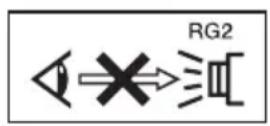
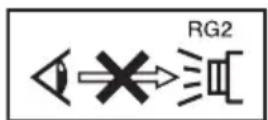
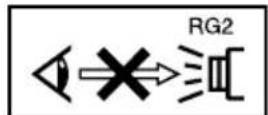
As with any bright light source, do not stare into the beam, RG2 IEC 62471-5: 2015.

This symbol is intended to alert the user to the presence of hot surfaces.
For the customers in the U.S.A.
This equipment has been tested and found to comply with the limits for a Class B digital device, pursuant to part 15 of the FCC Rules.
These limits are designed to provide reasonable protection against harmful interference in a residential installation. This equipment generates, uses and can radiate radio frequency energy and, if not installed and used in accordance with the instructions, may cause harmful interference to radio communications. However, there is no guarantee that interference will not occur in a particular installation. If this equipment does cause harmful interference to radio or television reception, which can be determined by turning the equipment off and on, the user is encouraged to try to correct the interference by one or more of the following measures:
- Reorient or relocate the receiving antenna.
- Increase the separation between the equipment and receiver.
- Connect the equipment into an outlet on a circuit different from that to which the receiver is connected.
- Consult the dealer or an experienced radio/TV technician for help.
You are cautioned that any changes or modifications not expressly approved in this manual could void your authority to operate this equipment.
All interface cables used to connect peripherals must be shielded in order to comply with the limits for a digital device pursuant to Subpart B of part 15 of FCC Rules.
This device complies with part 15 of the FCC Rules. Operation is subject to the following two conditions: (1) This device may not cause harmful interference, and (2) this device must accept any interference received, including interference that may cause undesired operation.
If you have any questions about this product, you may call;
Sony Customer Information Service Center 1-800-222-7669 or http://www.sony.com/
Declaration of Conformity
Trade Name: SONY
Model: VPL-HW65
VPL-HW45
Responsible party: Sony Electronics Inc.
Address: 16535 Via Esprillo,
San Diego, CA 92127
U.S.A.
Telephone Number:858-942-2230
This device complies with part 15 of the FCC Rules. Operation is subject to the following two conditions: (1) This device may not cause harmful interference, and (2) this device must accept any interference received, including interference that may cause undesired operation.
This transmitter must not be co-located or operating in conjunction with any other antenna or transmitter.
For the customers in Canada
This device complies with Industry Canada licence-exempt RSS standard(s). Operation is subject to the following two conditions: (1) this device may not cause interference, and (2) this device must accept any interference, including interference that may cause undesired operation of the device.
For the customers in the U.S.A. and Canada
Radiated Exposure Statement:
The product complies with the US/Canadian portable RF exposure limit set forth for an uncontrolled environment and is safe for intended operation as described in this manual. The further RF exposure reduction can be achieved if the product can be kept as far as possible from the user body or if the device is set to lower output power if such function is available.
For the customers in Canada
CANICES-3(B)/NMB-3(B)
For kundene i Norge
For the customers in Europe
Notice for customers: the following information is only applicable to equipment sold in Countries/Regions applying EU directives.
C
| Bulgarian | Спастоюно, Sony Corporation декларира, чу това оборуване в съответства с Д配电имba 2014/53/EU.ЦадостпгтTekst на EC деклараша за съответства може за с在这方面 на сладни и网络传播егадес: http://www.compliance.sony.eu/ |
| Croatian | Sony Corporation ovime izjavljupe da je ova oprema u skladu sDirektivom 2014/53/EU.Cjeloviti tekst EU izjave o sukladnosti dostupan je na sljedećoj internetskoj adresi: http://www.compliance.sony.eu/ |
| Czech | Sony Corporation tímto prohlasuje, ze toto zařizení je v souladu se směrnici 2014/53/EU.Uplné zněné EU prohlášení o shodě je k dispozici na těto internetové adrese: http://www.compliance.sony.eu/ |
| Danish | Herved erklærer Sony Corporation, at dette udstyr er i overensstemmelse med direktiv 2014/53/EU.Den fulde ordlyd af EU-overensstemmelseserklaeringen er tilgängelig på følgende internetadresse: http://www.compliance.sony.eu/ |
| Dutch | Hierbij verklaart Sony Corporation dat deze radioapparatuur conform is met Richtlijn 2014/53/EU.De volledige tekst van de EU-conformiteitsverklaring kan worden geraadpleegd op het volgende internetadres: http://www.compliance.sony.eu/ |
| English | Hereby, Sony Corporation declares that this equipment is in compliance with the UK relevant statutory requirements.The full text of the declaration of conformity is available at the following internet address:https://compliance.sony.co.ukHereby, Sony Corporation declares that this equipment is in compliance with Directive 2014/53/EU.The full text of the EU declaration of conformity is available at the following internet address:http://www.compliance.sony.eu/ |
| Estonian | Käesolevaga deklareerib Sony Corporation, et käesolev seade vastab direktiivi 2014/53/EL nõuetele.ELi vastavusdeklaratsiooni tãielik tekst on kättesaadav järgmisel internetiaadressil: http://www.compliance.sony.eu/ |
| Finnish | Sony Corporation vakuuttaa, että tämä laite on direktiivin 2014/53/EUMukainen.EU-vaatimustenmukaisuusvakuutuksen tãysimittainen teksti on saatavilla seuraavassa internetosoitteessa: http://www.compliance.sony.eu/ |
| Greek | Мe την παρούσα Sony Corporation δηλώνει στι, αυτή η συσκεύη πληροί τουςρούς της σδηγίας 2014/53/EU.To πλήρες κειμένον της δηλωσός συμμόρφωσός EE διατιθεται στην ακόλουθηιστοσελίδα στο διαδίκτυο: http://www.compliance.sony.eu/ |
| Hungarian | A Sony Corporation igazolja, hogy ez a készülék megfelel a 2014/53/EU irányelvnek. Az EU-megfelelőségi nyilatkozat teljes szövege elérhető a következő internetes címen: http://www.compliance.ory.eu/ |
| Latvian | Ar šo Sony Corporation deklare, ka ši iekárta atbilst direktīvai 2014/53/ES. Pilns ES atbilstibas deklarácijas teksts ir pieejams šādā interneta vietnē: http://www.compliance.ory.eu/ |
| Lithuanian | Mes, Sony Corporation, patvirtiname, kad šis i'renginys atitinka direktyvă 2014/53/ES. Visas ES atitikties deklaracijos tekstas pasiekiamas šiuo internetiniu adresu: http://www.compliance.ory.eu/ |
| Norwegian | Hered erklærer Sony Corporation at utstyrstypen er i samsvar med direktiv 2014/53/EU. EU-erklæring fulltekst finner du på Internett under: http://www.compliance.ory.eu/ |
| Polish | Sony Corporation niniejszym oświadcza, ze to urzadzenia jest zgodne z dyrektywa 2014/53/UE. Pełny tekst deklaracji zgodnosci UE jest dostepny pod nastepujacym adresem internetowym: http://www.compliance.ory.eu/ |
| Portuguese | O(a) abaixo assinado(a) Sony Corporation declara que o presente equipoamento está em conformidade com a Diretiva 2014/53/UE. O texto integral da declaração de conformidade está disponível no segunte endereço de Internet: http://www.compliance.ory.eu/ |
| Romanian | Prin preventa, Sony Corporation declara căarest echipament este în conformitate cu Directiva 2014/53/UE. Textul integral al declaratiei UE de conformitate este disponibil la următoarea adresă internet: http://www.compliance.ory.eu/ |
| Slovak | Sony Corporation támto vyhlasuje, ze zariadenie je v súlade so smernicou 2014/53/EU. Üplné vyhlásesenie EU o zhode je k dispozícii na tejto internetovej adrese: http://www.compliance.ory.eu/ |
| Slovenian | Sony Corporation potrjuje, da je ta oprema skladna z Direktivo 2014/53/EU. Celotno besedilo izjave EU o skladnosti je na voljo na naslednjem splletnem naslovu: http://www.compliance.ory.eu/ |
| Swedish | Härmed försakrar Sony Corporation attenna utrustning overensstämmer med direktiv 2014/53/EU. Den fullständiga texten till EU-försakran om overensstammelse finns på följande webbadress: http://www.compliance.ory.eu/ |
| Turkish | Sony Corporation, bu cihazın 2014/53/EU Direktifi ile uyumlu olduguṇu borian eder. AB uygunluk beyannın tam metni asağidaki internet adresinde mevcuttur: http://www.compliance.ory.eu/ |
For the Customers in Brazil only Apenas para clientes no Brasil
DESCARTE DE PILHAS E BATORIAS
For Customers in UAE (United Arab Emirates)
TRA
REGISTERED No: ER0115212/13
DEALER No: DA0065531/11
For the customers in the U.S.A.
SONY LIMITED WARRANTY - Please visit http://www.sony.com/psa/warranty for important information and complete terms and conditions of Sony's limited warranty applicable to this product.
For the customers in Canada SONY LIMITED WARRANTY - Please visit http://www.sonybiz.ca/pro/lang/en/ ca/article/resources-warranty for important information and complete terms and conditions of Sony's limited warranty applicable to this product.
For the customers in Europe
Sony Professional Solutions Europe - Standard Warranty and Exceptions on Standard Warranty. Please visit https://pro.sony/en_GB/support-services/warranty/support-professional-solutions-europe-standard-product-warranty for important information and complete terms and conditions.
For the customers in Korea
SONY LIMITED WARRANTY - Please visit http://bpeng.sony.co.kr/handler/ BPAS-Start for important information and complete terms and conditions of Sony's limited warranty applicable to this product.
Precautions
On safety
- Check that the operating voltage of your unit is identical with the voltage of your local power supply.
- Should any liquid or solid object fall into the cabinet, unplug the unit and have it checked by qualified personnel before operating it further.
- Unplug the unit from the wall outlet if it is not to be used for several days.
- To disconnect the cord, pull it out by the plug. Never pull the cord itself.
- The wall outlet should be near the unit and easily accessible.
- The unit is not disconnected to the AC power source (mains) as long as it is connected to the wall outlet, even if the unit itself has been turned off.
- Do not look into the lens while the lamp is on.
- Do not place your hand or objects near the ventilation holes. The air coming out is hot.
- Make sure to remove the protective packaging lens cap before projection. Projection with the cap attached may melt the cap by heat.
- Do not place any object just in front of the lens that may block the light during projection. Heat from the light may damage the object. Use the picture muting function to cut off the picture.

On preventing internal heat buildup
After you turn off the power with the I/ (ON/STANDBY) button, do not disconnect the unit from the wall outlet while the cooling fan is still running.
Caution
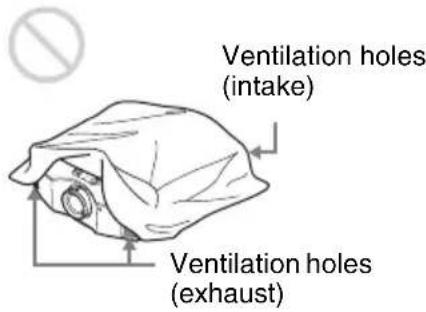
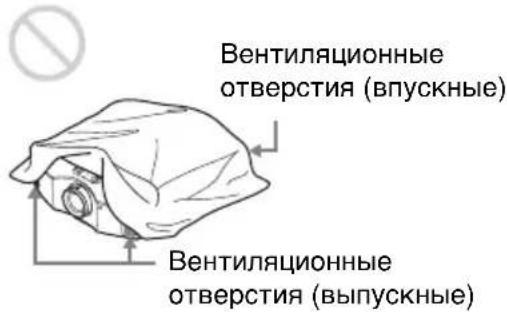
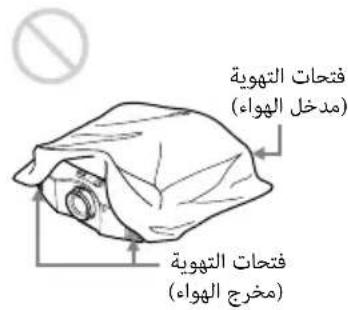
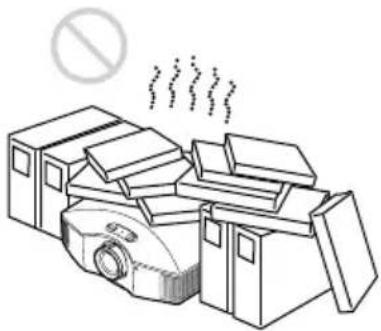
This unit is equipped with ventilation holes (intake) and ventilation holes (exhaust). Do not block or place anything near these holes, or internal heat build-up may occur, causing picture degradation or damage to the unit.
On repacking
Save the original shipping carton and packing material; they will come in handy if you ever have to ship your unit. For maximum protection, repack your unit as it was originally packed at the factory.
On watching 3D video images
Safety precautions
- You should only use the 3D glasses for watching 3D video images.
- If you observe flickering or flashing, turn off the lighting in the room.
- Not for use by children without proper adult supervision.
- Be careful not to pinch your fingers in hinges of the 3D glasses when bending the temple frames.
- Do not drop or modify these 3D glasses.
- If these glasses are broken, keep broken pieces away from your mouth or eyes.
On LCD Projector
The LCD projector is manufactured using high-precision technology. You may, however, see tiny black points and/or bright points (red, blue, or green) that continuously appear on the LCD projector. This is a normal result of the manufacturing process and does not indicate a malfunction. Also, when you use multiple LCD projectors to project onto a screen, even if they are of the same model, the color reproduction among projectors may vary, since color balance may be set differently from one projector to the next.
On condensation
If the room temperature where the projector is installed changes rapidly, or if the projector is moved suddenly from a cold to a warm place, condensation in the projector may occur. As the condensation may cause malfunction, be careful in adjusting
temperature settings of the air conditioner. If condensation occurs, leave the projector turned on for about two hours before use.
Notes on security (VPL-HW65 only)
- SONY WILL NOT BE LIABLE FOR DAMAGES OF ANY KIND RESULTING FROM A FAILURE TO IMPLEMENT PROPER SECURITY MEASURES ON TRANSMISSION DEVICES, UNAVOIDABLE DATA LEAKS RESULTING FROM TRANSMISSION SPECIFICATIONS, OR SECURITY PROBLEMS OF ANY KIND.
Depending on the operating environment, unauthorized third parties on the network may be able to access the unit. When connecting the unit to the network, be sure to confirm that the network is protected securely. - From a safety standpoint, when using the unit connected with the network, it is strongly recommended to access the Control window via a Web browser and change the access limitation settings from the factory preset values (refer to "Using Network Features" in the Operating Instructions).
Changing the password regularly is also recommended.
- Do not browse any other website in the Web browser while making settings or after making settings. Since the login status remains in the Web browser, close the Web browser when you complete the settings to prevent unauthorized third parties from using the unit or harmful programs from running.
Note
SONY WILL NOT BE LIABLE FOR DAMAGES OF ANY KIND RESULTING FROM THE USE OF THIS UNIT FOR PURPOSES OTHER THAN GENERAL HOME USE, EITHER DURING THE WARRANTY PERIOD OR AFTER EXPIRATION OF THE WARRANTY.
Notes on Installation and Usage
Unsuitable installation
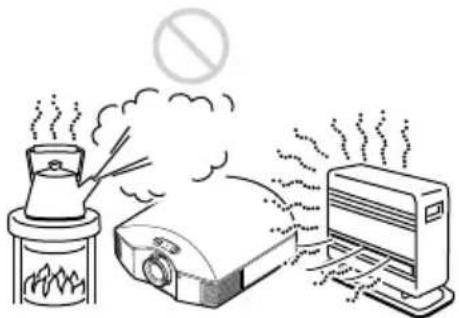
Do not place the unit in the following situations, which may cause malfunction or damage to the unit.
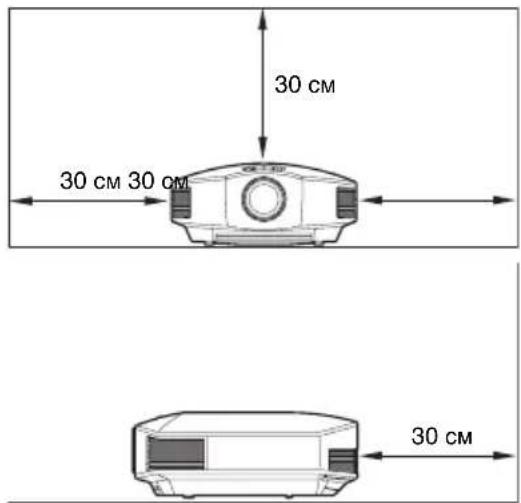
Near walls
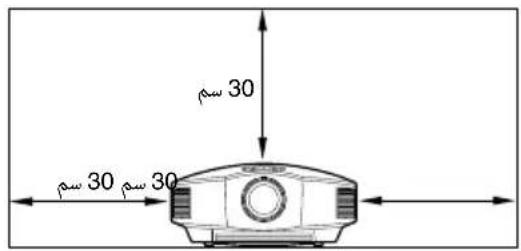
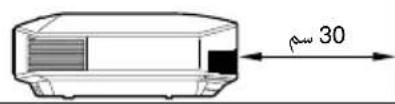
To maintain the performance and reliability of the unit, leave space between walls and the unit as illustrated.
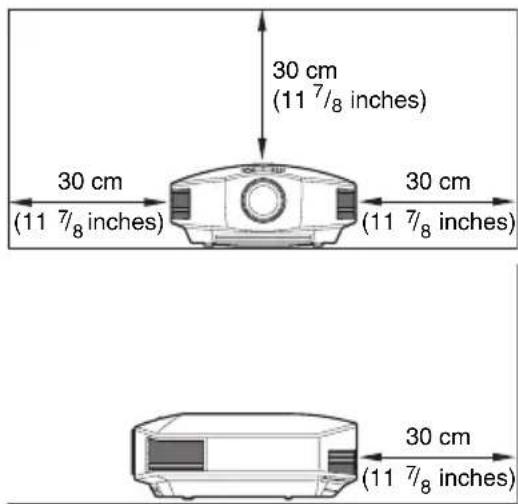
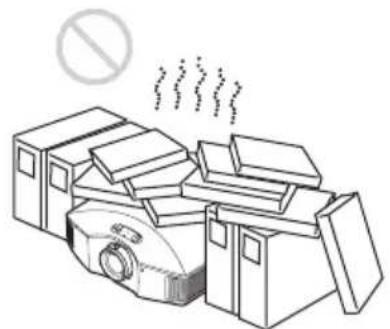
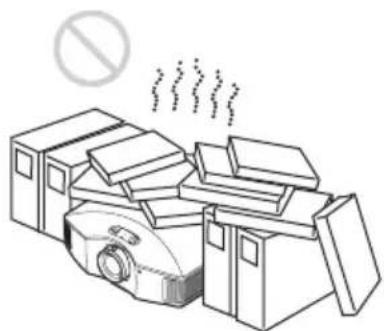
Poorly ventilated location
Leave space of more than 30cm (11^-7 / 8 inches) around the unit.
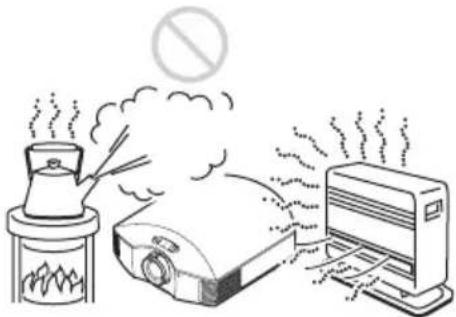
Hot and humid
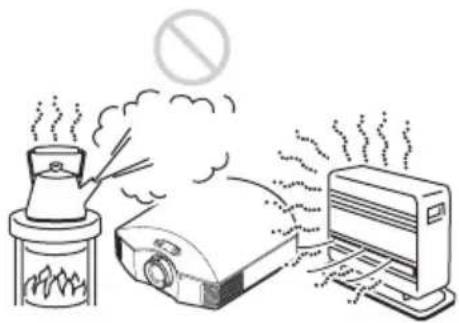
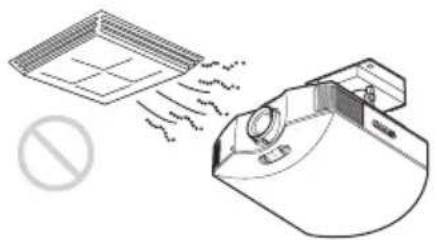
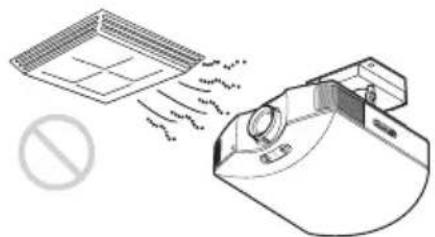
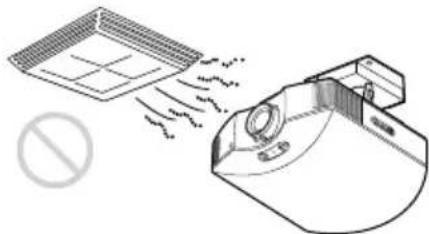
Locations subject to direct cool or warm air from an air-conditioner
Installing the unit in such a location may cause a malfunction of the unit due to moisture condensation or rise in temperature.
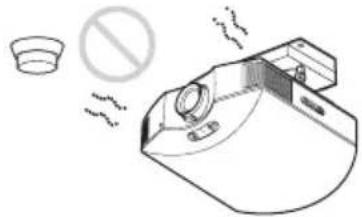
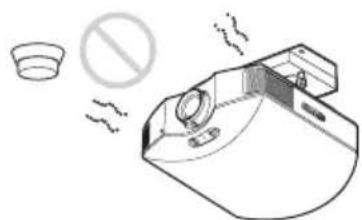
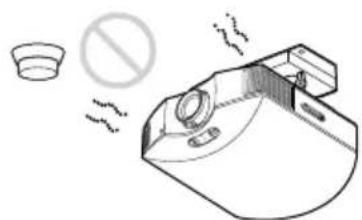
Near a heat or smoke sensor
Malfunction of the sensor may occur.
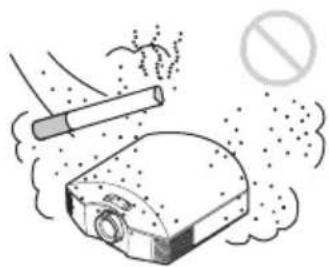
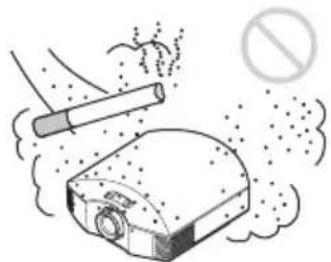
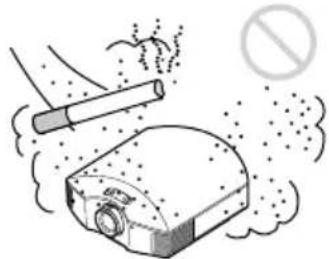
Very dusty and extremely smoky locations
Unsuitable Conditions
Do not do any of the following while using the unit.
Blocking the ventilation holes (intake or exhaust)
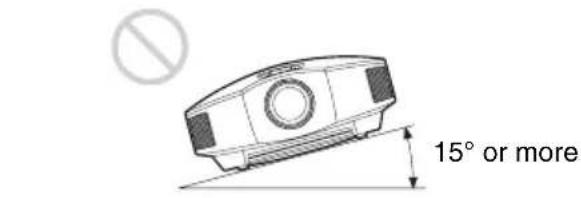
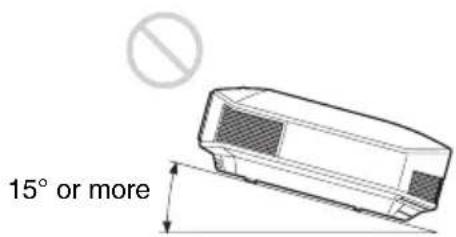
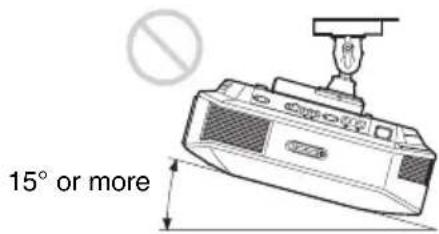
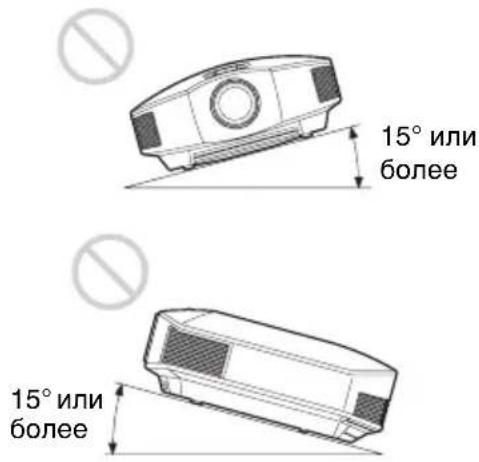
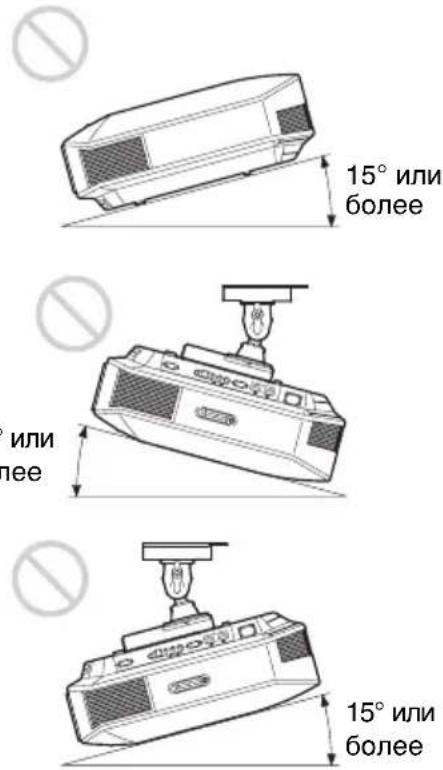
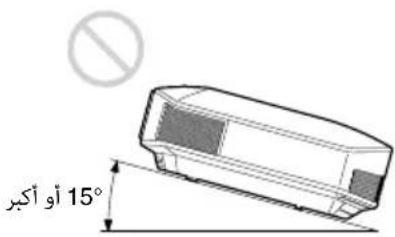
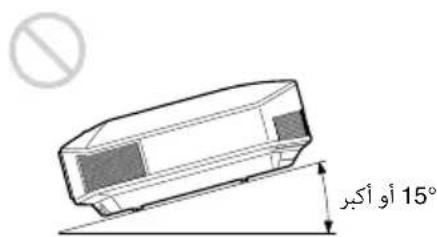
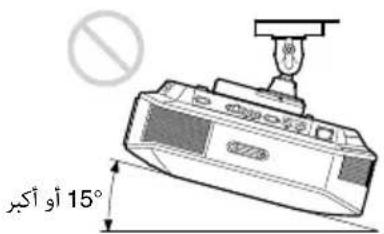
Tilting front/rear and left/right
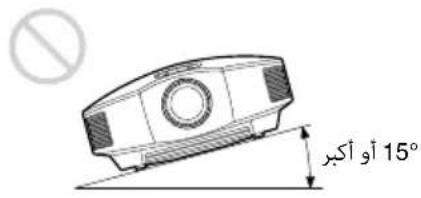
Avoid using the unit tilted at an angle of more than 15 degrees.
Do not install the unit anywhere other than on a level surface or on the ceiling. Installing the unit in such a location may result in uneven color uniformity or reduce the reliability of the effects of the lamp.
If the unit is tilted up or down, the image on the screen may be trapezoidal.
Position the unit so that the lens is parallel to the screen.


When installing the unit at high altitudes
When using the unit at an altitude of 1,500m (approx. 4,900 ft) or higher, set "High Altitude Mode" on the Setup menu to "On". Failing to set this mode when using the unit at high altitudes could have adverse effects, such as reducing the reliability of certain components.
Safety precautions for installing the unit on a ceiling
- Never mount the projector on the ceiling or move it by yourself. Be sure to consult with qualified Sony personnel (charged).
- When installing the unit on a ceiling, be sure to use a safety wire, etc., to prevent the unit from falling. Entrust the installation to an experienced contractor or installer.
For dealers
- When the projector is mounted on the ceiling, a Sony bracket or recommended equivalent must be used for installation.
- Be sure to secure the cabinet cover firmly when installing to the ceiling firmly.
Checking the Supplied Accessories
Check the carton to make sure it contains the following items:
Remote control RM-PJ28 (1)
Size AA (R6) batteries (2)
- AC power cord (1)
- Lens cap (1)
When you have purchased the projector, the lens cap is put onto the lens. Remove this lens cap when you use the projector.
- Quick Reference Manual (this manual) (1)
- Operating Instructions (CD-ROM) (1)
Inserting the Batteries into the Remote Control
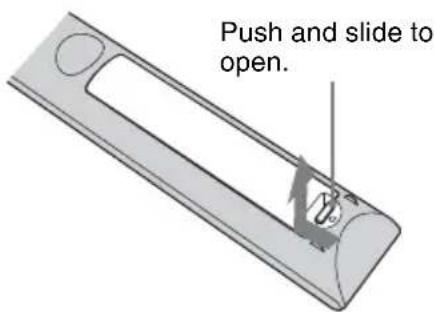
Insert the batteries side first.
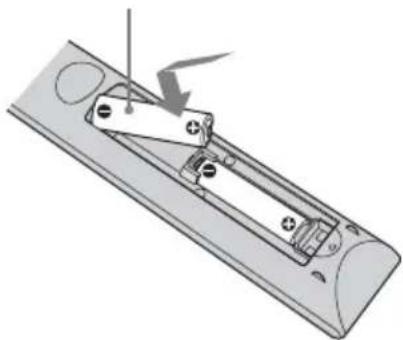
Caution
Two size AA (R6) batteries are supplied for Remote Control.
To avoid risk of explosion, use size AA (R6) manganese or alkaline batteries.
Caution about handling the remote control
- Handle the remote control with care. Do not drop or step on it, or spill liquid of any kind onto it.
- Do not place the remote control in a location near a heat source, a place subject to direct sunlight, or a damp room.
Using the CD-ROM manual
The manual can be read on a computer with Adobe Reader installed.
You can download Adobe Reader free from the Adobe website.
1 Open the index.html file in the CD-ROM.
2 Select and click on the manual that you want to read.
Note
If you have lost or damaged the CD-ROM, you can purchase a new one from your Sony dealer or Sony service counter.
1 Position the unit so that the lens is parallel to the screen.
2 After connecting the AC power cord to the unit, plug the AC power cord into a wall outlet.
Top of the unit
ON/STANDBY

Lights in red.
Note
After connecting the AC power cord to the unit, the ON/STANDBY indicator may blink in orange.
You may not be able to control the unit while the indicator is blinking, but this is not a malfunction. Wait until it stops blinking and remains lit in red.
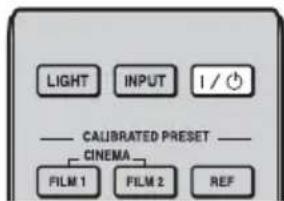
3 Press the I/ (ON/STANDBY) button to turn on the unit.
Top of the unit
ON/STANDBY
Flashes in green for a while (tens of seconds) and then lights in green.
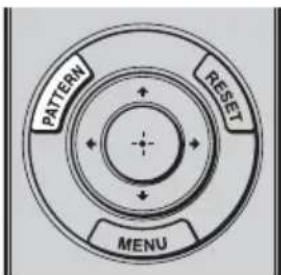
4 Press the PATTERN button to display a test signal for performing adjustments.
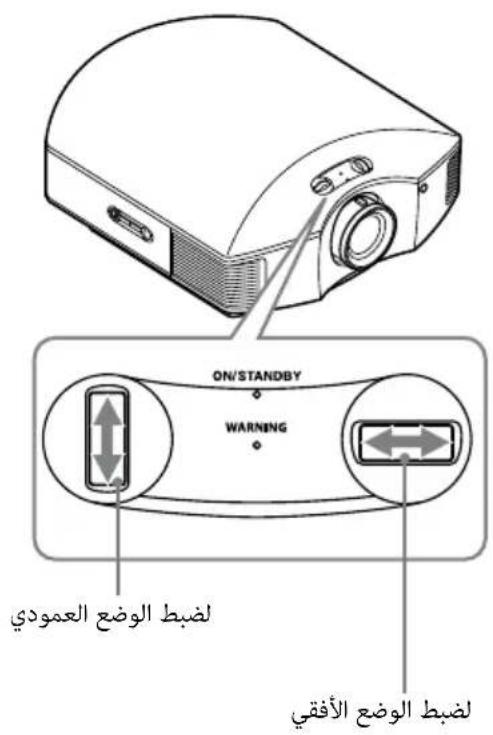
1Move both lens shift dials to adjust the picture position.
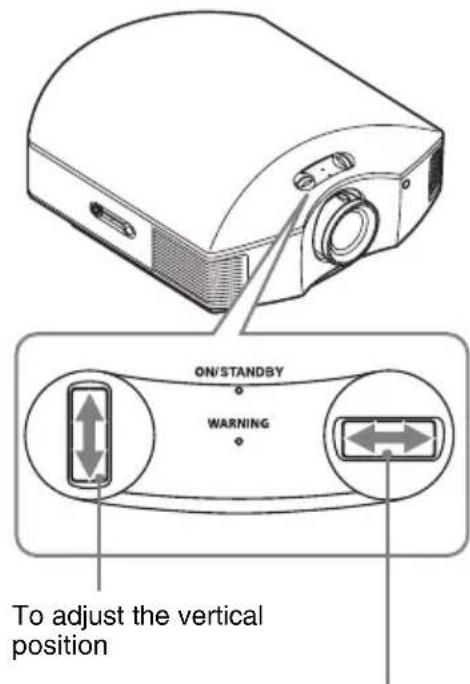
To adjust the horizontal position
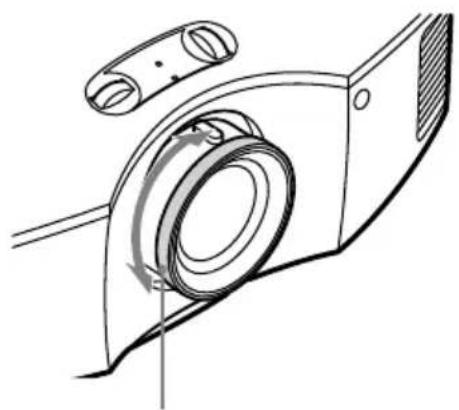
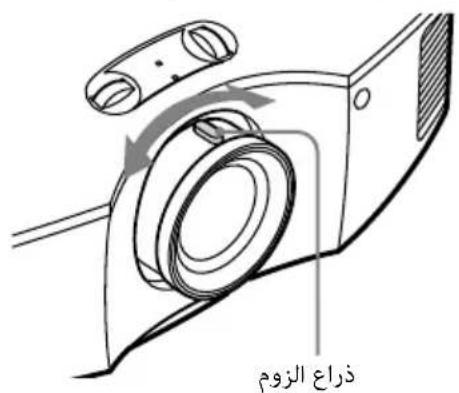
Adjust the picture size using the zoom lever.
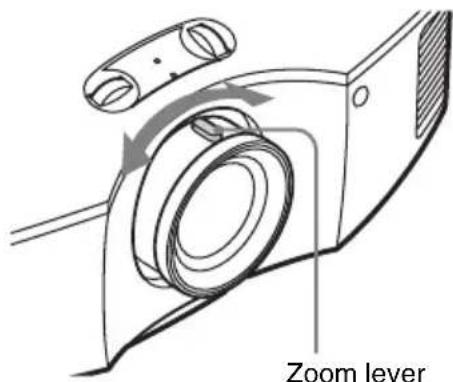
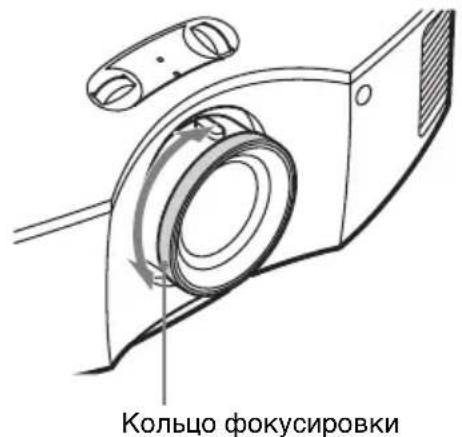
Adjust the focus using the focus ring.
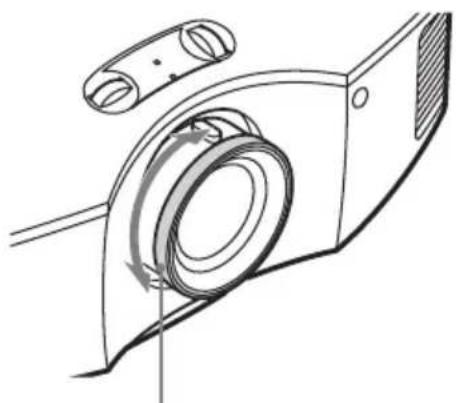
Focus ring
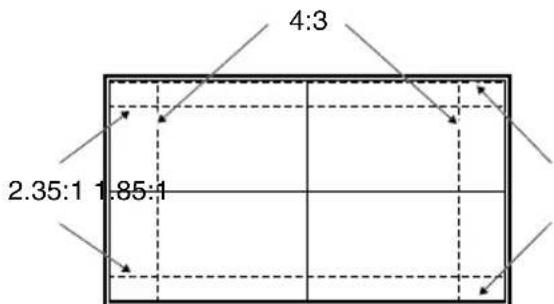
Lens adjustment window (test pattern)
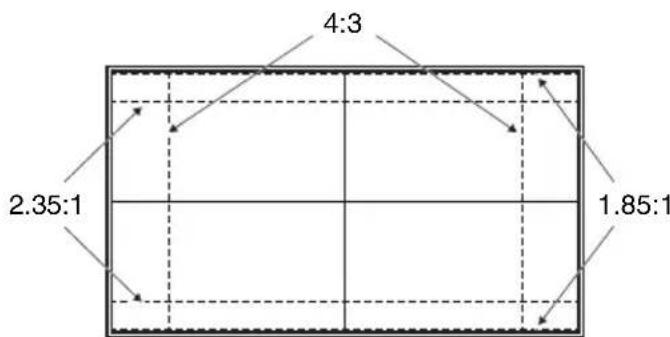
The dashed lines show the screen sizes of each aspect ratio.
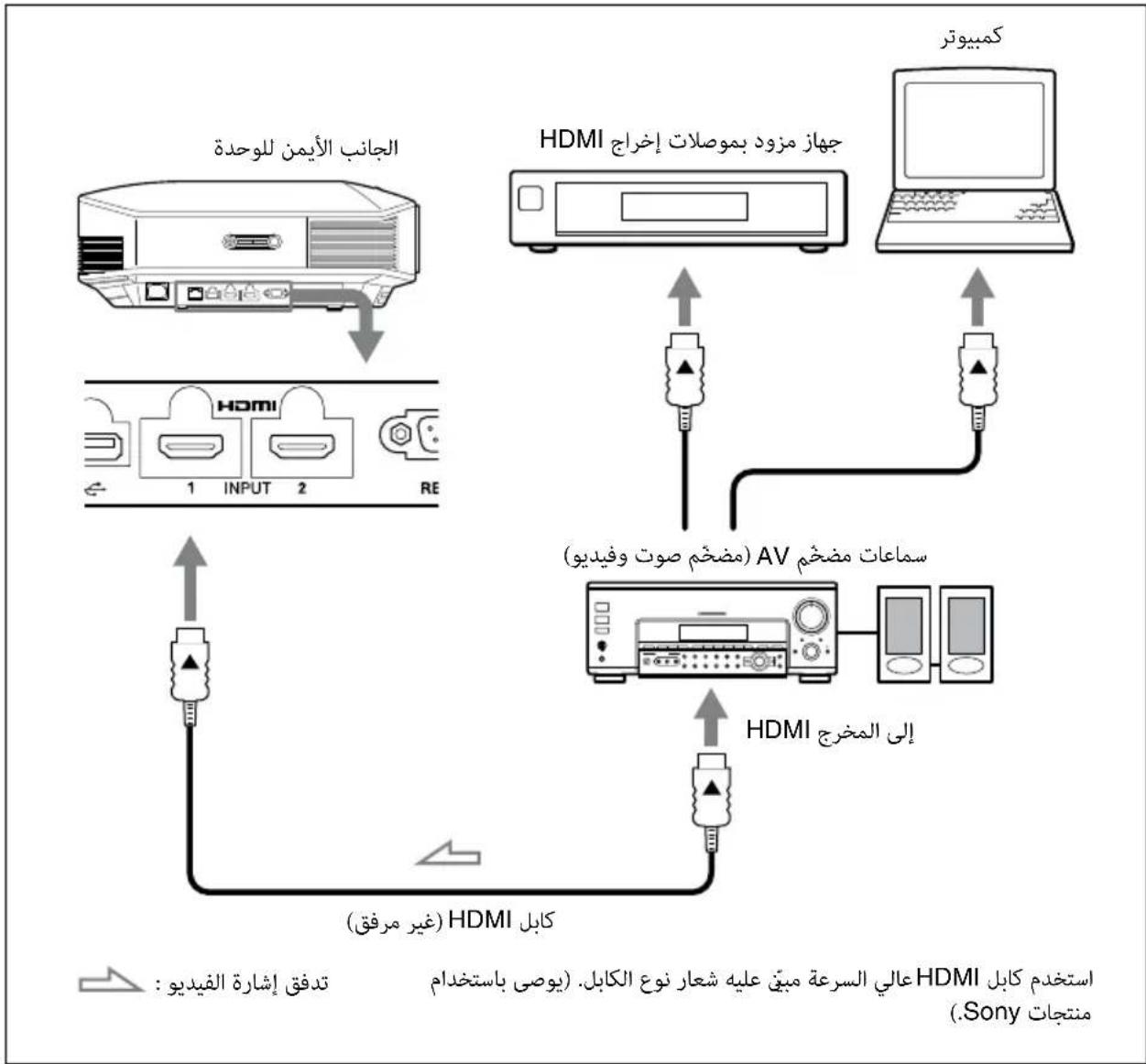
For more information, refer to "Connections and Preparations" in the Operating Instructions contained in the supplied CD-ROM.
When making connections, be sure to do the following:
- Turn off all equipment before making any connections.
- Use the proper cables for each connection.
- Insert the cable plugs properly; poor connection at the plugs may cause a malfunction or poor picture quality. When pulling out a cable, be sure to pull it out from the plug, not the cable itself.
Refer to the operating instructions of the connected equipment.
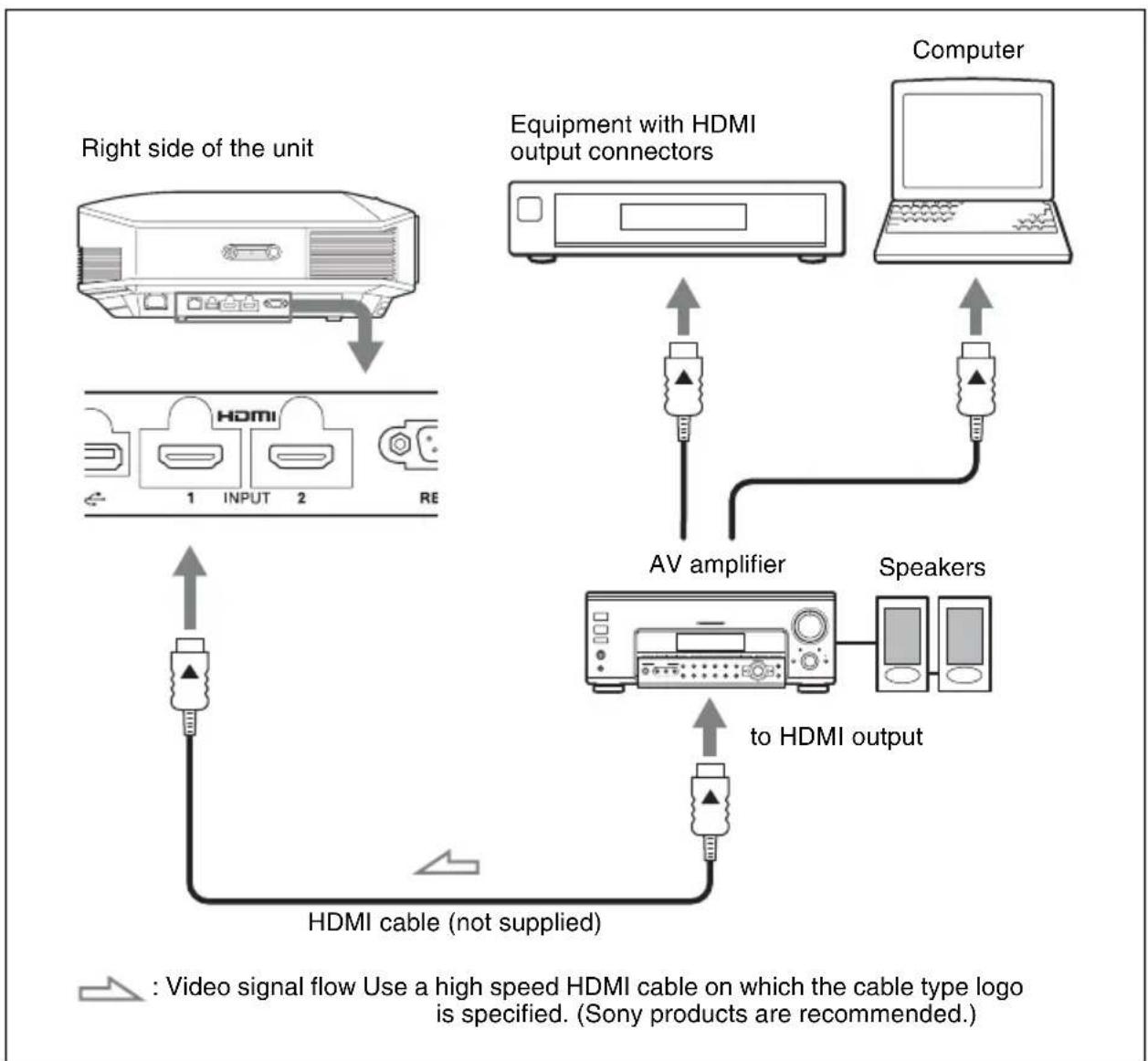
For more information, refer to "Connections and Preparations" in the Operating Instructions contained in the supplied CD-ROM.
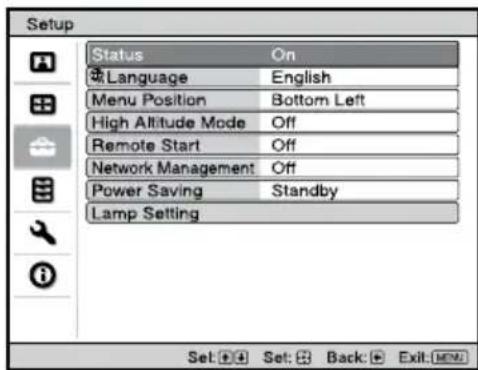
Step 4
Selecting the Menu Language
You can select the language for displaying the menu and other on-screen displays. The factory default setting is English. To change the current menu language, set the desired language with the menu screen.
1 Press MENU.
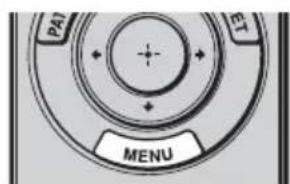
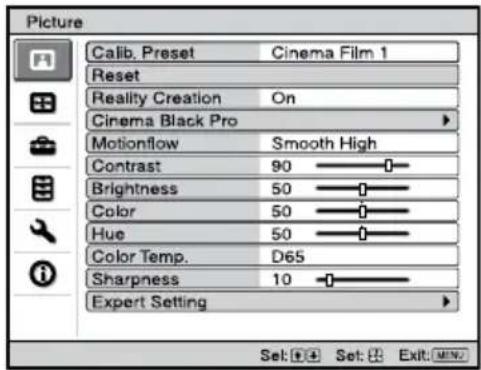
The menu appears.
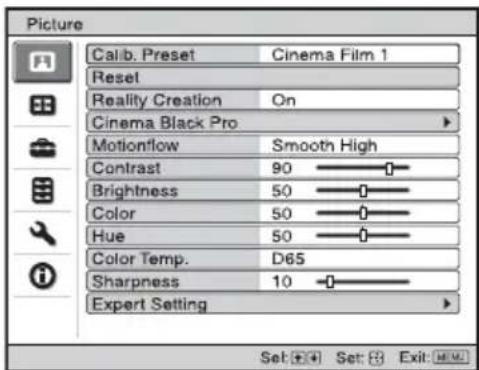
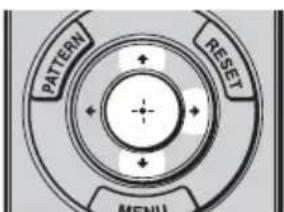
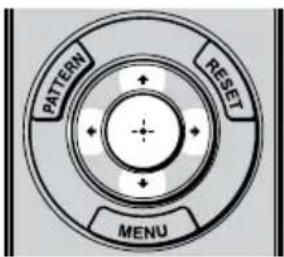
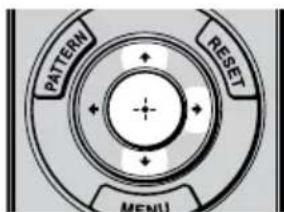
2 Press / to select the Setup menu, and press or
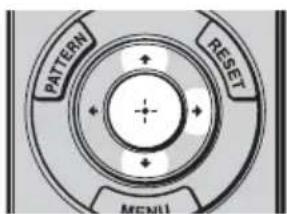
The setting items of the selected menu appear.
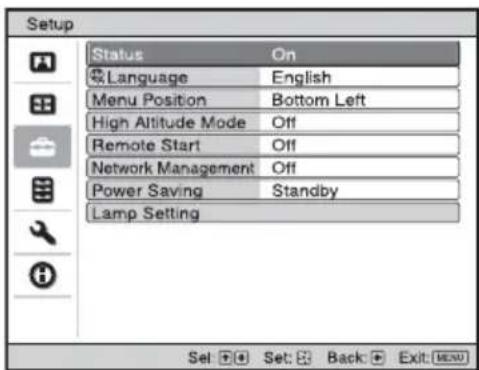
3 Press / to select "Language," and press or
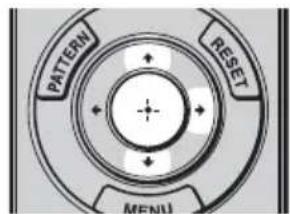
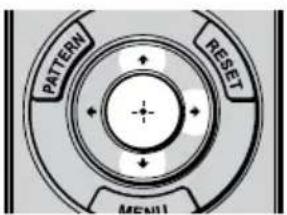
4 Press / / / to select a language, and press
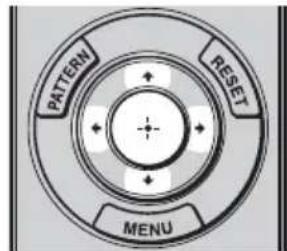
The menu changes to the selected language.
To clear the menu
Press MENU.
Projecting the Picture
1 Turn on both the unit and the equipment connected to the unit.
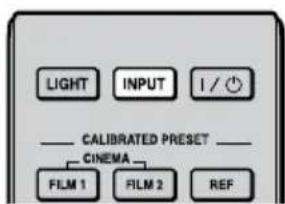
2 Press INPUT to display the input palette on the screen.
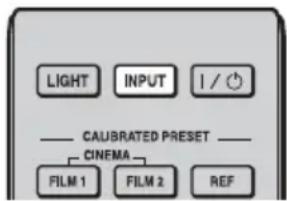
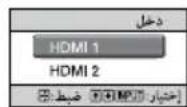
3 Select the equipment from which you want to display images. Press INPUT repeatedly or press / . (enter) to select the equipment from which to project.
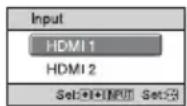
Example: To view the picture from the video equipment connected to the HDMI 1 connector of this unit.
Turning Off the Power
1 Press the I/O (ON/STANDBY) button.
A message "POWER OFF?" appears on the screen.
2 Press the I/ (ON/STANDBY) button again before the message disappears.
The ON/STANDBY indicator flashes in green and the fan continues to run to reduce the internal heat.
The fan stops and the ON/STANDBY indicator changes from flashing green to remaining red.
The power is turned off completely, and you can disconnect the AC power cord.
Note
Never disconnect the AC power cord while the indicator is flashing.
You can turn off the unit by holding the l / O ON/STANDBY) button for about 1 second, instead of performing the above steps.
For more information, refer to "Projecting" in the Operating Instructions contained in the supplied CD-ROM.
Selecting the Picture Viewing Mode
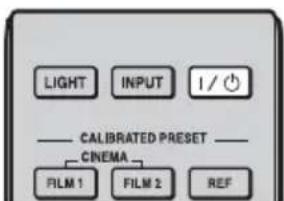
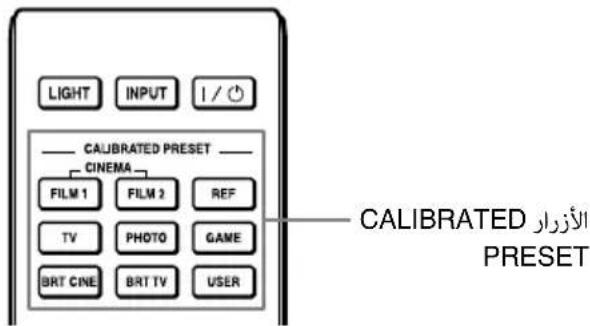
Press one of the CALIBRATED PRESET buttons.
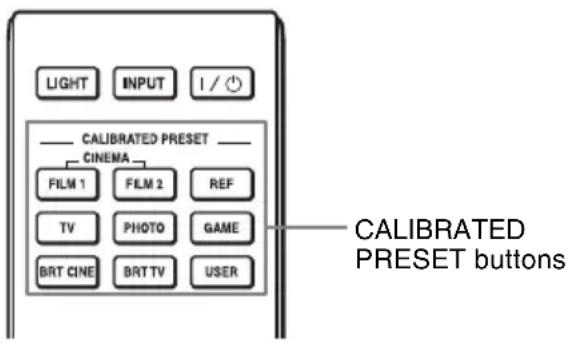
| Setting items Description | |
| CINEMA FILM 1 Picture quality | suited to reproducing the highly dynamic and clear images typical of master positive film. |
| CINEMA FILM 2 Picture quality | suited to reproducing the rich tone and color typical of a movie theater. |
| REF A picture quality setup suitable for when you want to reproduce faithfully the original image quality, or for enjoying image quality, without any adjustment. | |
| TV Picture quality suited for watching TV programs, sports, concerts, etc. | |
| PHOTO Ideal for projecting still images taken with a digital camera. | |
| GAME Picture quality suited to gaming, with well-modulated colors and fast response. | |
| BRT CINE Picture quality suited for watching movies in a bright environment, such as a living room. | |
| BRT TV Picture quality suited for watching TV programs, sports, concerts, and other video images in a bright environment, such as a living room. | |
| USER Adjusts the picture quality to suit your taste then saves the setting. The factory default setting is the same as “REF.” | |
For more information, refer to "Projecting" in the Operating Instructions contained in the supplied CD-ROM.
Error Handling
Warning Indicators
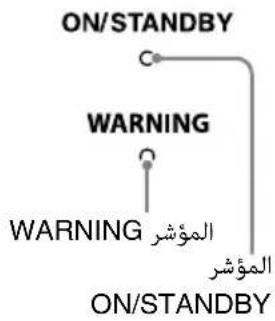
The ON/STANDBY or WARNING indicator lights up or flashes if there is any trouble with your projector.
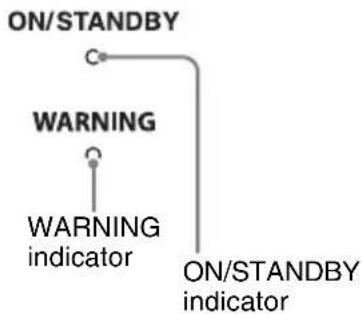
| Flashing/Lighting indicators The number of flashes | Cause and Remedy |
| ON/STANDBY ○ | Twice Close the lamp cover securely, then tighten the screws securely. Close the filter holder securely. |
| WARNING (Flashes in red) | Three times The temperature of lamp is unusually high. Turn off the power and wait for the lamp to cool, then turn on the power again. If the symptom persists, the lamp may be at the end of its service life. In this case, replace the lamp with a new one. |
| ON/STANDBY (Flashes in red) | Twice The internal temperature is unusually high. Check to ensure that if nothing is blocking the ventilation holes or whether or not the unit is being used at high altitudes. |
| WARNING (Flashes in red) | Three times The fan is broken. Consult with qualified Sony personnel. |
| Both indicators flash |
Note
When a warning indicator other than the above starts flashing, and the symptom persists even after carrying out the above methods, consult with qualified Sony personnel.
If there is any problem or an error message appears on the screen, refer to "Troubleshooting" in the Operating Instructions contained in the supplied CD-ROM.
Replacing the Lamp
Tools you need to get started:
- Projector Lamp LMP-H210 (optional)
- Standard Phillips screwdriver
- Cloth (for scratch protection)
The lamp used for the light source has a certain lifespan. When the lamp dims, the color balance of the picture becomes strange, or "Please replace the Lamp/Filter." appears on the screen, the lamp may be exhausted. Replace the lamp with a new one without delay.
Use an LMP-H210 Projector Lamp as the replacement lamp.
The air filter is supplied with the LMP-H210 Projection Lamp. When you replace the lamp, it is also time to replace the air filter.
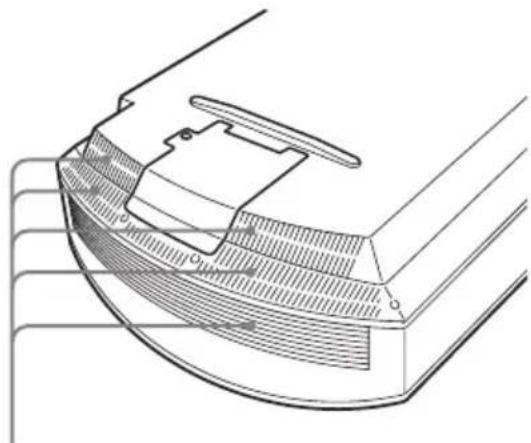
Whenever you replace the lamp, be sure to replace the air filter with a new one. Also clean the ventilation holes (intake).
Tip
The lifespan of the lamp used for the light source changes depending on the installation environment or use conditions. You can use the lamp longer by avoiding turning the lamp off until several minutes pass after turning the lamp on.
Caution
- The lamp remains hot after the unit is turned off with the I/ON/STANDBY button. If you touch the lamp, you may burn your fingers. When you replace the lamp, wait for at least 1 hour for the lamp to cool.
- Do not touch the surface of the lamp. If you touch it, wipe off the fingerprints with a soft cloth.
- Pay special attention to replacing the lamp when the unit is installed on the ceiling.
-
When removing the lamp unit, make sure it remains horizontal, then pull straight up. Do not tilt the lamp unit. If you pull out the lamp unit while tilted and if the lamp breaks, the pieces may scatter, causing injury.
-
When you remove the air filter, be careful not to let any dust fall into the projector.
- Replacing the air filter is crucial to maintain the good performance of the projector or to prevent malfunction to it. When a warning message for replacing the air filter appears, replace the air filter immediately.
Notes
- Be sure to use an LMP-H210 Projector Lamp for replacement. If you use lamps other than the LMP-H210, the unit may malfunction.
- Be sure to turn off the unit and unplug the power cord before replacing the lamp, then check the ON/STANDBY indicator has already been turned off.
1 Turn off the projector and unplug the AC power cord.
2 When setting the projector on a flat surface such as a desk etc., put a cloth to prevent the surface from being scratched. Reverse the projector as illustrated, then place it on the cloth.
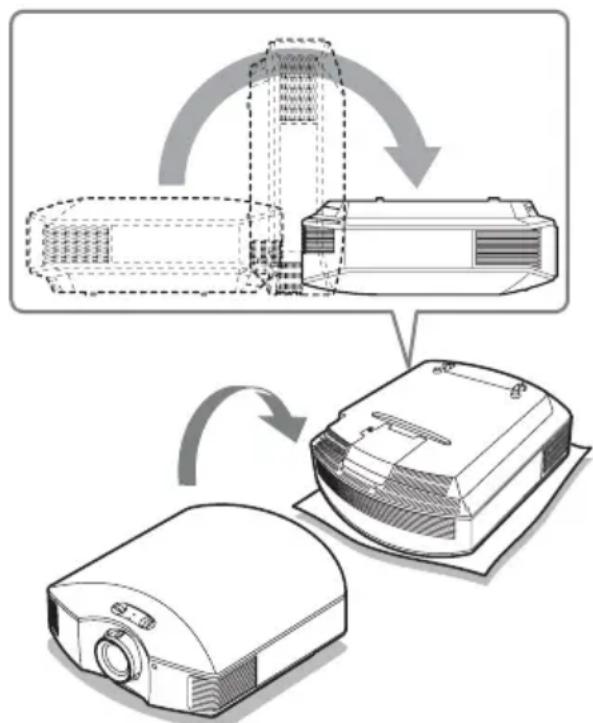
Notes
-
When the lamp is damaged the broken pieces of the lamp may become scattered, if you do not reverse the projector. This may cause injury.
-
Be sure that the projector is placed on a stable surface.
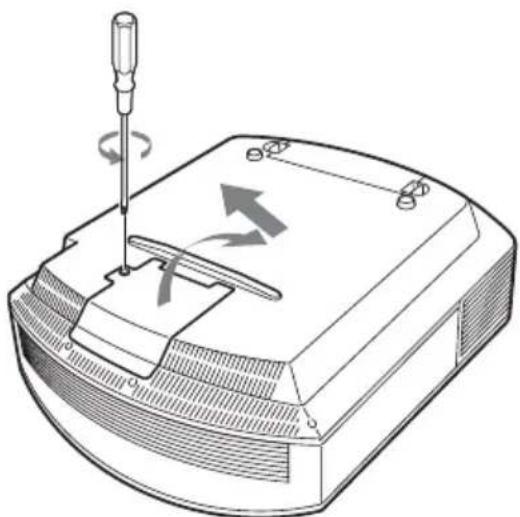
3 Loosen the screw on the lamp cover with a Philips screwdriver, and then open the lamp cover.
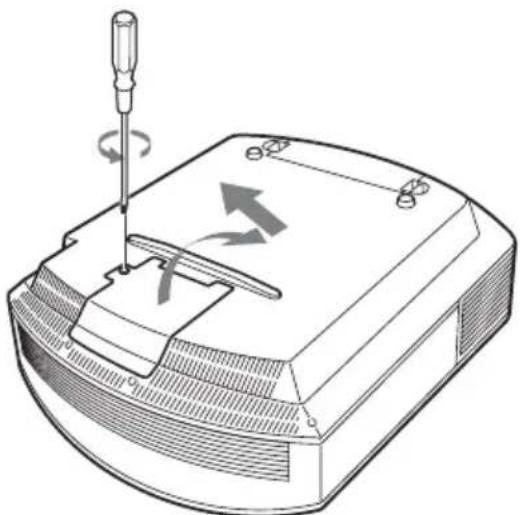
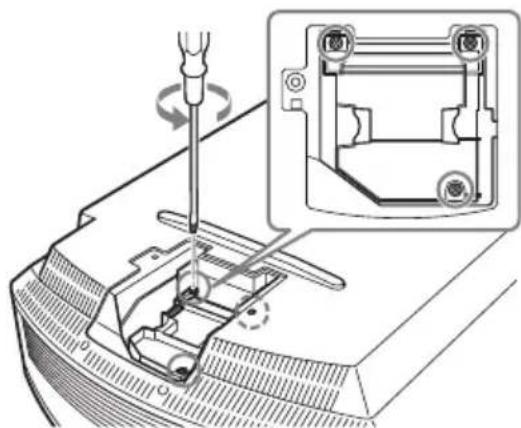
4 Loosen the 3 screws on the lamp with the Phillips screwdriver. Hold up the handle, then pull the lamp straight out.
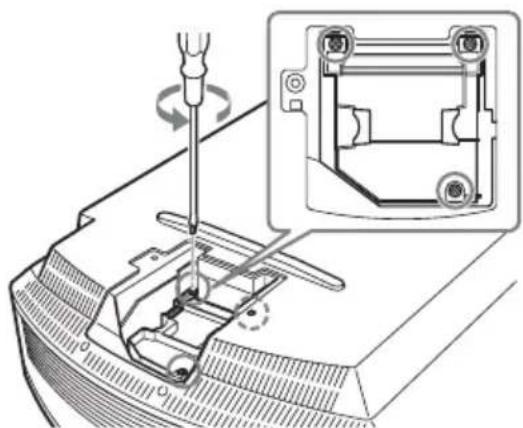
5 Hold the handle of the new lamp and push it in securely until it reaches the end, and then tighten the 3 screws.
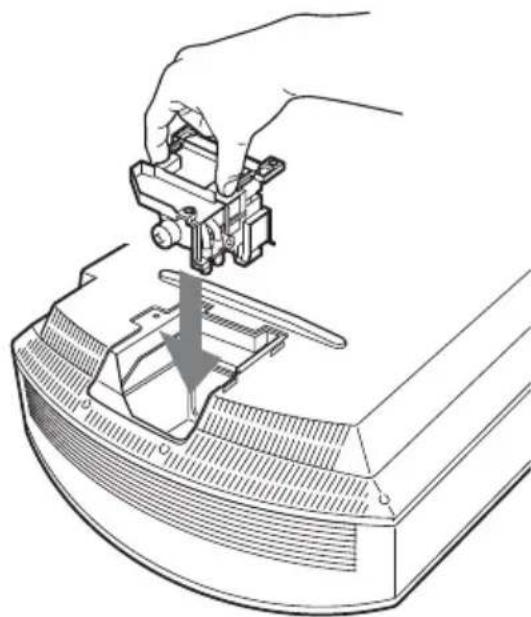
Note
Be careful not to touch the optical block inside the unit.
6 Close the lamp cover, then tighten the screws.
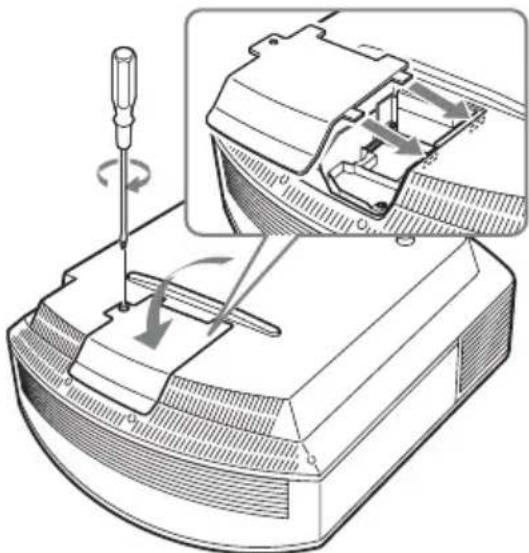
7 Remove the filter holder.
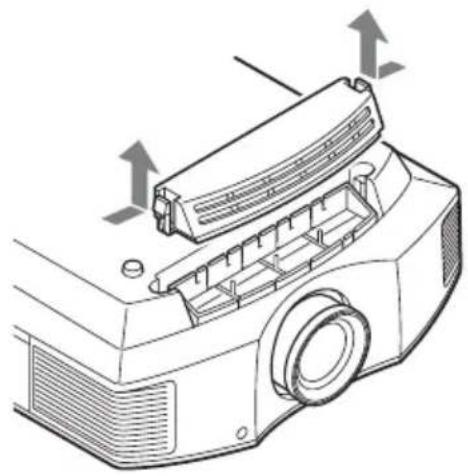
8 Remove the air filter.
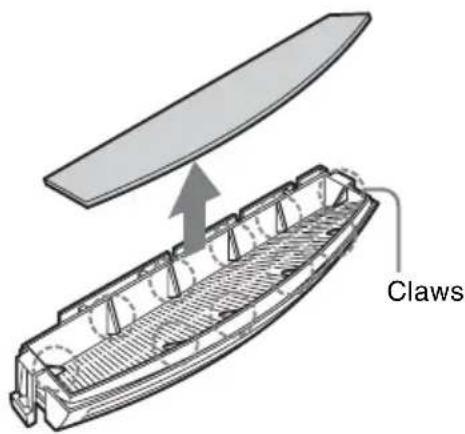
9 Attach the new air filter so that it fits into each claws (10 positions) on the filter holder.
Note
Attach the air filter aligning it with the shape of the filter holder.
Also, do not touch the fan after removing the air filter that is set deep inside the projector.
10 Attach the filter holder.
Note
The projector will not turn on unless the filter holder is securely closed.
11 Wipe dust off the ventilation holes (intake) with a soft cloth.
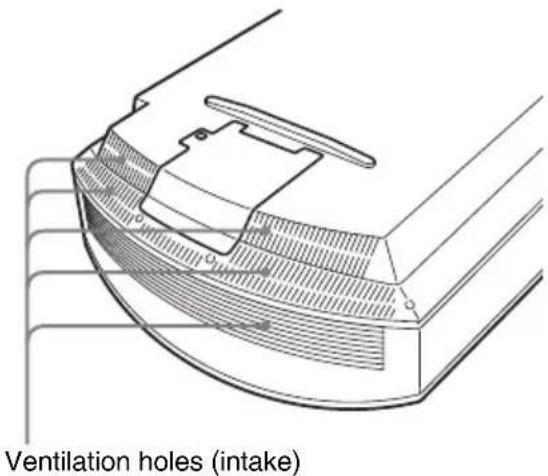
12 Place the unit back on its original position.
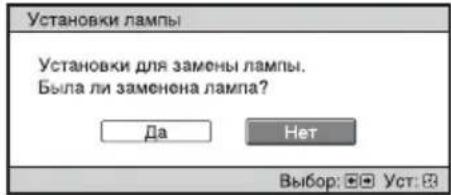
13Turn on the unit, then select the lamp setting item on the Setup menu. The menu screen below will be appeared.
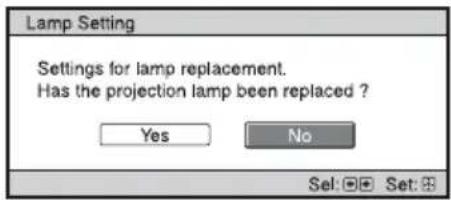
Tip
If "Settings Lock" is set to "Level B," set to "Off" once.
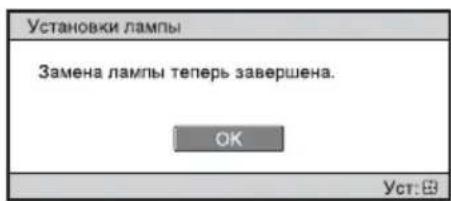
14Select "Yes."
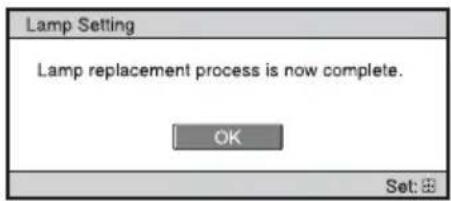
Caution
Do not put your hands into the lamp replacement slot, and do not allow any liquid or other objects into the slot to avoid electrical shock or fire.
Notes
-
The unit will not turn on unless the lamp is securely installed in place.
-
The unit will not turn on unless the lamp cover are securely closed.
- To clear a message displayed on the screen, press any button either on the remote control or the control panel of the unit once.
Note
The lamp contains mercury. The disposal rules for used fluorescent tubes depend on where you live. Follow the waste disposal policy in your area.
Disposal of the used lamp
For the customers in the U.S.A. and Canada
Hg Lamp contains mercury. Dispose according to applicable local, state/province and federal laws. For additional information, see www.sony.com/ mercury
Cleaning the Air Filter
When "Please clean the filter." appears on the screen, you should clean the air filter. The air filter should be cleaned every 1,500 hours. This value varies depending on the environment or how the projector is used. 1,500 hours are approximate. After washing the air filter with a mild detergent solution, dry it in a shaded place.
Notes
- When you clean the air filter, make sure you do not damage it.
For details on how to attach and remove the air filter, see "Replacing the Lamp" Steps 7 to 10 (page 22). - When you remove the air filter, be careful not to let any dust fall into the projector.
- Cleaning the air filter is crucial to maintain the good performance of the projector or to prevent malfunction to it. When a warning message for cleaning the air filter appears, clean the air filter immediately.
Projection.. Page 14
Gestion des erreurs
- Cuando la lampara se daña, los fragmentosSEOSEOSEOSEOSEOSEOSEOSEOSEOSEOSEOSEOSEOSEOSEOSEOSEOSEOSEOSEOSEOSEOSEOSEOSEOSEOSEOSEOSEOSEOSEOSEOSEOSEOSEOSEOSEOSEOSEOSEOSEOSEOSEOSEOSEOSEOSEOSEOSEOSEOSEOSEOSEOSEOSEOSEOSEOSEOSEOSEOSEOSEOSEOSEOSEOSEOSEOSEOSEOSEOSEOSEOSEOSEOSEOSEOSEOSEOSEOSEOSEOSEOSEOSEOSEOSEOSEOSEOSEOSEOSEOSEOSEOSEOSEOSEOSEOSEOSEOSEO SEOEEOSEEOSEOO
- Asegürese de que el projector seswanae en una superficie estable.
OdoKymeHTe KpaTkoe cnpaBOuHOe pyKOBoDCTBO
BДaHHOMДOKyMeHTe KpaTkoe cIpaBOUHOe pyKOBoCTBO OIIncaHa yCTaHOBka H OCHOBHbIe OIIepaUNn IJIpyoeunpOBAHNn I3O6paXKeHn. B 3tOM pyKOBoCTBe TaKKe COJepKaTcB BaxHbIe IIpIMeuaHNn IIpEduPexJeHn, KOToPbIM CJIeDyET YdeJIrTB Oco6oE BHNMaHHe IIpy O6paUeHNn c aIIIapaTOM n erO 3KcIIJyaTaUNn.
Пи Heo6xOIMOCTHcM. "IpeyIpeJkaIOIIne HnIKAToPbI", "3aMeHa JIaMIbI" N "OuHCTKa BO3dYHOrO 0JIbTpA".
JIyIOJyueHnI IOIOJIHHTeJIbHO HhOpaHn O6 OIEpaHnx CM. JOKyMeHT
HctpyKIIHnIO 3KcIIyatauHn, coepKaHnCnHa IIpHJaRaemOM KOMNaKT-INCKe.
War 1.
IopdrotOBka...Ctp.10
War 2.
YctaHObKa yCTpoiCTBa Ctp.11
War 3.
Подклочене устpoиства.....Ctp.13
War 4.
Bb6op Ra3bika MeHIO.....Ctp. 14
War 5.
Прoeцироване...Ctp.15
YcTpaHHeOuN6ok
PpeDynpexkaioune HndnKaTOpbl ..Ctp.17
TexHnueckoe o6cIyXnBaHne
3aMeHa IaMnbl. Ctp. 18
OuNTka BO3dUshoro pIbTpTa ..Ctp.22
BndeOpoeKTop VPL-HW65/VPL-HW45
IpeiHcIOJIb3OBAHNem yCTpOInCTBa BHHMaTeJIbHO IIPOuHTaInTe HAcTOrIeepyKOBOJCTBO IN COxpaHInTe eRO IJIa IIOJIyuEHHaHEo6XOnmOINHΦOpMaIIINB 6yDyIeM.
PPEДУПЕЖDEHNE
Длг chнжehн риcka BO3ropaHnИ NopaxeHn 3ЛeKtpnuecknM TOKOM He DoNYcKaIte BO3dIeCTBnHa aannapat BnIu n CbIpocTn. ЧтобИ NCKJIIOUHTb pUCK nopaxeHnI 3ЛeKtpnuecknM TOKOM, He ВСКрьIBAIte KOpNyc. ОБслуЖиBaHne annapaTa DOJXHbl ВыINOLHЯТ bTOJbKO КВаПиФицЮВаHHbie СпeциАЛиNTbl.
ПЕДУПЕЖDEHNE DAHHOE YCTPOICTBO DOJXHO BbITb 3A3EMJIENO.
NPEdynPExKeHne
Ipn yctaHOBKe ycTpoNCTBa
HcIOJIb3yIte JleKoIOCTUHHbI
IIpepbIbATEJIb IINTaHnA C
ΦHKcnpOBAHHo IIPOBOJKO HIN
IOJKJIIOChTE IIPOBOJ IINTaHHa K
JIeKoIOCTUHHo HaCTeHHo PO3ETKa,
pacIOJOKeHHo PAnOM C ycTPOCTBOM.
EcIn B IIpocece 9KcIIJaYatauH N6IOka
BO3HNKHET HeICIIpaBHOCtB, C IOMOIIbIO
IIpepbIbATEJIa OTKJIIOHTe IINTaHne, HIN
OTCOeINHHTe IIPOBOJ IINTaHHa.
OCTOPOXHO
Pa3bem LAN (ToIbKO dJa MoJeN VPL-HW65)
BueJx oBeCneuHn 6e3oIacHOCTn He IIOKJIIOUaHTe K OToM y IOpTy COeINHITeJIbHbIe pa3beMBI 3JIeKTPOIIpOBOIK NepHΦcpHueCKNX ycTPOIcTB, KOTOpBIE, BO3MOXHO, IMeIOT Ype3MePHO BbICOKOE HaIIpJKeHHe.
PPEdynpeXdeHne
1.ИсIOЛьзуTe pa3peIIeHHbIe K IIpIMHeHNU IHHyp IITaHnA (c 3-ЖИЛьнБIM cNJOBbIM IPOBOJOM) / pa3'beM IJIЯ IIOJKJIIOUeHnRA 6bITOBbIX IIpHOBOPB/IIITeIICeJIbHyIO BNIJKy C 3a3cMJIIOIIHMK OHTaKTaMn, COOTBeTCTByIOUHe JeIcTBYIOUHM HOpMaM TexHnKn 6e3OIIaCHOCTN KaJIOJ OTJeJIbHOI cTpaHbI/KaJIOTO OTJeJIbHOrO peHNoHa.
2.ИсIOJIb3yIte IHHyp IIITaHnI (c 3-ЖИЛьНБIM cIJOBBIM IIPOBOIOM)/ pa3bem IJIЯ IIOДКЛIOUeHnI 6bITOBbIX Iprb6OpOB / IITeIceJIbHyIO BNIJKY, COOTBETCTBYIOIIne IOIpyCTHMbIM HOMHaJIbHbIM XapaKTepNCTHKaM (HaIIpJxKeHNe, cIIa TOKa).
B cIyuae BOIIpOCOB OTHOCHTeJIbHO
HCIOJIb3OBAHHaYIOMaHYtBX BbIIIE
IIIHypa IIITaHHa / pa3bema IJIa
IIOKJIIOUcEHn6bITOBbIX IIpHbOpOB /
IIITeIICeJIbHOBnBNIK,IOXKaJIyNCTa,
O6paIaNTecb K KBaJINΦHIIpOBaHHbIM
CIIeIIHaJInCTaM IO cepBnCHOMy
O6cJIyXnBaHHIO.
BHIMAHNE
-Прн HeIIpaBnIbHOn 3aMeHe ΘJIeMeHTOB IITaHn BO3HnKaeT OIIacHOCTb B3pblBa.ИcIOJIb3yIteДJIa 3aMeHbI TOJIbKO IJDeHTNtHbIe NJIH 3KBnBaJIeHTHbIe ΘJIeMeHTbI IITaHn, peKOMeHdYemblE H3rOTOBNTeJIeM.
-ПриуTNJIIN3aIaN aKKMyJIrTOpa HIN 3IeJIINcJIeIyET CO6JIIOJATb 3aKOHbI COOTBeTCTByIOJIeN cTpaHbI IN H COOTBeTCTByIOJIeR o peHOna. He yTNJIIN3npyIte aKKMyJIrTOp IN IN 3IeJIIne B ONGHe ININ B rOpYeN IIeHN, He yHNHTOJaTe INX MEXAHUYeCKHM IyTEM IN He pa3pe3aIte aKKMyJIrTOp. OH MOKeT B3OPBaTbCra ININ IIp INBecTH K IIoKApY. He IIOBepraIte aKKMyJIrTOp BO3JeNCTBINO Upe3BBiHaIHO HN3KOFO aTMOCΦepHOrO IaBJIeHHN, KOTOpOE MoKeT IIprNBecTH K B3PbIBy ININ YTeUKe BOCIIJaMeHRAIOIIeIcRA KNIJKOCTN ININ BOCIIJaMeHRAIOIIeROcRA3a.
- He pa3MeIaIte aKKyMyJIaTOp B MeCTax c BBICOKO TeMIIpepaTypoN,
HaIIpHmep IOI BO3JeIcTBHeM IIPaMbIX COJIHeuHbIX JIyueN IIIN BO3JIe OrH. OH MOKeT 3aRopeTbcS, B3OpBaTbcS IJIIN IIpNBecTN K IIOxApy. He IIOJBePraIte aKKyyJIaTOP BO3JeIcTBnIO BOJbI. 3TO MOKeT IIpNBecTN K IIOpaXeHHIO 3JIeKTpnuYeCKHM TOKOM.
O 3D-oukax
3D-ouKn B3aHMOeIcTByIOT c IIpoekTopo IIO TexHOJIOrHiu Bluetooth ⅡIA OTO6paKeHHaN3D-cnHaJIOB.
a) pa6oTaIOuINB IuaIa3OHe 2400-2483.5 MΓι
b) MaKcHMaJIbHyIO BbIXOJHyIO MOIIHOCTb 4.30 dBm (E.I.R.P.)
SONY
CoHH KopnopeHIN
1-7-1, KoHaH, MnHaTo-Ky, TokNo, YIIOHNs, 108-0075
CnJaHO B KHTae
IIMnOpTeP Ha TeppHTopHcTpaH TaMOxKeHHoro coIO3a
AO «CoHn ΘJIeKTpOHHKc», Pocchn, 123103, MockBa, KapaMbIeBckn IIpoe3u,6
3TO yCTPOIcTBO YABJIeTcI IIPOEKTOpOM IJII IIPOEIIINPOBAHnI N3O6paKeHN C IOKJIIOUeHHORO KOMIIbIOTepa HJN BUNDEOO6OpyIOBAAHnI.
OpraHn3aIIy, yIOJIHOMoUeHHaI pINHMaTb IIpeTeH3nn OT IIOJIb3OBaTeJIeHa TeppHTOpHn Ka3axCTaHa:
AO «CoHn 3JIeKtpoHnKc»
IpeIcTaBnTeJIbCTBO Ka3axCTaHe
050059 AJIMaTbI, yJIuca IBaHHIOBa, I. 58
IaTa H3rOToBJIeHnHa YKa3aHa Ha H3JeJIHH
H yIIaKOBKe Ha 3THKeTKe CO IIITpHX- KOJOM B cJIeIyIOIeM fOpMaTe:YYYYMM, rIe MM-Mecu, YYYYY -rOJ
H3rOToBJIeHn.
3TO yCTPOIcTBO IOIIepKINBaET TexHOIOrH6ecIpOBoIHOn CB83N IJIa YacToTHOro IIHaIIa3OHa 2,4 _
KaK IN B CJIyuae c
JIIO6bIM
HCTOuHNKOM
ApKOro CBeTa, He
CMOTpIte IprMo Ha
JIyu, RG2 IEC
62471-5:2015.

TOT CnMBOJI HcIOJIb3yeTcIJIa IIpeDyIIpeXJdeHnIIOJIb3OBaTeJIa O TOpAUXIOBepxHOCTax.
YcIOBnXpaHeHn:
XpaHHTbByIaKOBaHHOM BnIe B TcMHbIX, cyHX, NcCTbIX, BeHTNIpyEmbIX IOMeIIeHNIX, H3OJIIpOBaHHbIMN OTMeCT XpaHeHnKnCJOT IIeJIooey. XpaHHTb IIpH TempeType ot-20C lo +60CNOTHOCTeJIbHOB BJaJHKoCTH He 6oJIee <90%, 6e3 oBaOHn KOHeHcTa.CpOK XpaHeHn He yCTaHOBJeH.
TpaHcIopTHPOBaTb B opHrHaJIbHOyIIaKOBKe, BO BpeMa TpaHCIOpTHPOBKn He 6pOcaTb, oBepeRaTb OT IIaJeHN, yIapOB, He IIOBBePraTb N3JINiHei BN6paIIN.
EcHHeHCnPaBHOCTb He ydaeTcra
yCTpaHHTb cJIeIyraaHHoH INCtpyKuHN -
06paHTteCB 6JIHXaIIH
aBTOpH3OBaHHbI SONY IeHTp IIO
peMOHTy H O6cJIyXHBaHHIO.
PeaJIN3aUHIO OcyIeCTBJIaTb B COOTBeTCTBHH CJeIcTBYIOUHMN Tpe6OBaHHMaM 3aKOHOJaTeJIbCTBa. OTCJyKHBIIeE H3JeJIne yTHJIN3HnPOBaTb B COOTBeTCTBHH C JeIcTBYIOUHMN Tpe6OBaHHMaM 3aKOHOJaTeJIbCTBa.
HeDOnyCTnMbIe BapnaHTbI yCTaHOBKn
He pa3MeIaIte yctpoIcTBO B cJeIyIOIIx ycIOBHX, KOTOpbIe MOYr IINBecTn K HeHcIIpaBHOCTn HJIN IOBpeKdEHHIO yCTPOIcTBA.
PraomcoCTehamn
IIra 06ccneHn HPOH3BOJNTeJIbHOCTn HnHaJeXHOCTn yCTPOIcTBA OCTaBBTe MeCTo MExNy CTeHaMn H yCTPOIcTBOM, KaK IOKa3aHO Ha pncyHke.
PomeueHne c pIoXoB BeHTnJaCnei
OcTaBbTe BOKpyr ycTpoNCTBa MHHMaJIbHOe IPOcTppaHCTBO B 30 cm.
Xapkoe n BlaJxHoe nomeueHne
PomeuHn, NOBepXeHHbIe BO3dEiCTBnIO NOTOKa XoJIoHOrO nIIN TEPINO BO3dUxa n3 KOHNzHOhepa
YCTaHOBka B TaKOM McTe MoXeT IIpNBecTH K HeNCIIpaBHOCTN YcTpOINCTBa BCJIeICTBHe KOHJeHcaIIHN BJIaH NJI IOBbIIIEHn TeMIIepaTypbI.
PraOM c DaTcNKOM TeNla Hn Dbima To MoKet IIpNBecTH K JIOXHOMy cpaBaTBaHHO JaTcNKa.
CnIbHo 3aIbIeHHbIe IIN CnIbHO 3aIbIMJIeHHbIe NOMEueHnA
HeDOnyCTnMbIe ycNoBna 3KcPnyatauN
Pn HcIOJIb3OBAHH JaHHORO yCtpoIcTBa 3aIIpeIaEcTcBbIOJIHrTb cJeIyIOUHe OIIepaUN.
БлOKирВka BeHTNJIaCNoHHbIX OTBepCTn(BnyCKHbIe N BblNyCKHbIe)
HaKIOH BnpeI/Ha3aI IN BnpaBO/BNeBO
H36eraIte HcIOJIb3OBaHHy ycTPOINCTBa cHaKJIOHOM IOJ yrJOM 6oJIee 15 rpaIycob.
YcTaHaBJIbBaIte YcTPOINCTBO TOJbKO Ha POBHO IIOBepXHOCTN HJH HA IIOTOJIke.
YcTaHOBka ycTpoIcTBa B TaKOM MeCTe MOKeT IIpNBecTN K NCKaXKeHHIO IBeTOB HJIN CHNXKeHHIO HaJeXHOCTN pa6OTbI JAmIIbl.
EcJIN yCTPOCTBO HaKJOHeHO BBepx HIN BHN3, H3O6paXeHHe Ha 3KpaHe MOXeT 6bITb TpaneEuaJIbHbIM.
PacIOJIOKHTe ycTPOINCTBO TaKHM 06pa3OM, YTO6bI O6BeKTHB HAXOJIICn IapaJIJIeJIbHO 3KpaHy.
YcTaHOBka yCTpoiCTBa Ha 60nbwo BBICOTE HAD yPOBHeM MOpA
IIpn HcIOJIb3OBAHn yCTPOINCTBa Ha BbICote 1500 M nJIn BBIe yCTaHOBNTe IJII npAmeTp a "PexHM Bbc.IoJI" B MeHIO "HacTPOINKa" NaYeHne "BKJI".EcJIn He ycTaHOBNTb eTOTpeXHM IIpN HCIOJIb3OBAHn yCTPOINCTBa BBICOKO HaI yPOBHeM MOp, eTO MOKeT IIpNBecTN K He6JIaRrPNrTHbIM IOcJIeIDCTBnM, HAIIpHmep KymeHbIeHHIO HaJeKHOCTH HeKOTOpBX KOMIOHEHTOB.
Mepbl npedocTopoXHocTn npu yctahOBKe yctpoiCTBa Ha notolke
He IIbItaTecb yctaHOBHTb IpOeKTop Ha IIOToJIke HJIN IepEMecTHTb eRO camOCToTeJIbHO. O6raTeJIbHO IPOKOHcyJIbTHpyItec b c KBaJIHΦHIIpOBaHHbIM IepCOHaJIOM KOMIIaHHN SONY, KOMIeTeHTHBIM B DaHHOM BOIIpoCe.
- YcTaHaBJIHbA yCTPOINCTBO Ha IIOTOJIke, O6a3aTeJIbHO HcIOJIb3yInTe CTPaXOBOuHbI INHyp INJn dpyrHe cpeIcTBA JIIa IIpeIoTbPaIeHnI NaJeHnY yCTPOINCTBa. IOBepbTe
yCTaHOBky ONbITHOMy CNEIHaJIHCTy IIO MOHTaKy.
HΦopMaunIaIepeOB
-Дя yctaHOBKn IIpoeKTopa Ha IIOTOJIke Heo6XOJIMO HcIIb3OBaTb KPOHHTeIN IIpON3BOJCTBa KOMIIaHHN Sony IIIN aHaJIOrnHoe peKOMeHNIOBAHHOE KpeIJIeHHe.
-Пиустановке Ha NOTOJIOK ПJOTOH0 3aKpbIbAaTe KpbIuKy KopnYca.
Пюверka akceccyapов n3 KOMпл ekт a NOCTaBKN
IpoBepbTe yNaKOBky HaHaJIuHne cJeDyIOxN X JIeMeHTOB.
-ПиJBtДиСТаHиОнHOrOуПpaBJIeHHRA RM-PJ28(1)
- BaTapeu pa3Mepa AA (R6) (2)
Ka6eJIb IepemEHOro ToKa (1)
- KpbIIIIka 06beKTnBa (1) _P IIOKyIke IIpoeKTopa KpbIIIIka 06beKTnBa HaTeHa 06beKTnB. IJIa
HcIOJIb3OBaHHI IIpoeKTopa CHHMITE
KpbIIIKY 06beKTnBa.
KpaTKoe cnpaBOuHoe pyKOBoCTBO (JaHHoe pyKOBoCTBO) (1)
- INHcTpkyKIIyI IO 3KcIIyAtaIHH (KOMIIaKT-ⅡNCK) (1)
YcTaHOBKa 6aTapeB NyIbT DnCTaHcNoHHOrO ynpabJIeHnA
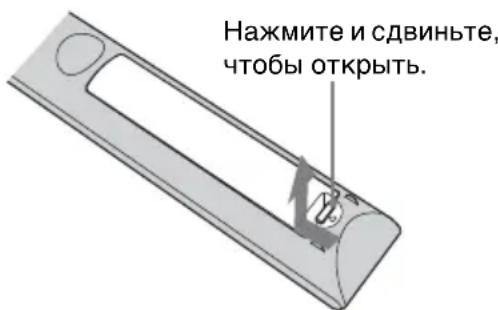
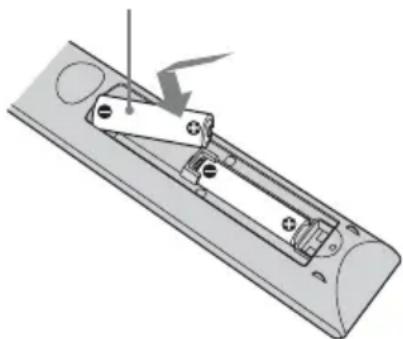
BcTaBbTe 6aTapen CTOpHOH
OctopoxHo
K IIyIbTy IINCTaHIOHO HOrO yIIpaBJIeHN IIPJIaIaIOTcI Be 6aTapeN pa3Mepa AA (R6).
YTO6bI H36eKaTb OIIaCHOCTH B3pB1Ba, HcIOJIb3yIte MapraHIIeBBIE HJIN IIeJOUHbIe 6aTapen pa3Mepa AA (R6).
IpeDynpexKdEHe OTHOCHTeJIbHO nCNoIb3OBaHnI pyIbTa dNCTaHcNOHHOrO ynpabLeHnI
- BcpeKHo 6paIaHTeCb c NyJIbTOM IInCTaHIOHO r yIpaBJIeHn. He 6pocaiTe erO, He HAcTyIIaHTe Ha Hero H He IIPOJIbAHTe Ha HeFo HnKaKHe KnIKoCTn.
He octabJIaTe IyIbT
HCTaHIIOHOYIIpaBJIeHNBA6JIN3H
HCTOHHKOB TeJIa HIN B MeCTe,
IOIBePKeHHOM IIpMOMy
BO3JeICTBnHO COJIHeuHbIX JIyE, HJN
BOBJaXHOM IOMeIeHH.
Испобь3OBанhoe pyкobODCTBaHa KOMnaKT-ДиСke
PyKOBOCTBO MOxHOb OTKpbITb c IOMOUIIO KOMIIbIOTepa,Ha KOTOpOM ycTaHOBJIeHa IIporpaMma Adobe Reader. IIporpaMMy Adobe Reader MoxHo 6ecIIaTHo cKaaTb c Be6-caHTa Adobe.
1OTKpoIte paI index.html Ha KOMIIaKT-ⅡNCKe.
2BbI6epHTe HxKHOe pyKOBOCTBO II IeJIKNITE IIO HeMy.
PpMmeyaHne
B cIyae yTepr HIN IOBpeJdeHnKOMIIaKT-ⅡNcKa HObI HINCK MOxHO IIpno6peTn y 6JIHXaIIero IINJIepa Sony HIN B cepBnCHOM IeHTpe Sony.
1PacIOJIOKHTe yCTpOINCTBO TaK, YTO6bI O6BeKTnB HaxoJIICn IapaJIJIeJIbHO 3KpaHy.
2IocJIe IIOKJIIOueHnKa6eJIa IHTaHnI IepMeHHORo TOka K yCTPOHCTBy IIOKJIIOHTe Ka6eJIb IHTaHnI IepMeHHORo TOka K cTeBOH pO3eTKe.
BepxHra Yactb yctpoCTBa
ON/STANDBY

Topnt KpaChbIM LCBETOM.
PpimmeuHne
IocJIIOJKJIIOUeHnKa6eJIa
IepemeHHoro TOKa K yCTPOINCTBy
HHNKaTOP ON/STANDBY MoKeT MHaTaB
opAHKeBBIM.
YIIpaJIeHHe ycTPOINCTBOM MOKeT 6bITb
HEBO3MOXHBIM,ecJIN HHNKAtop Mmraet,
OJHaKO 3TO He JABJIeTcR HeHCIIpaBHOCTbIO.
IoXHTecb,IOKA HNNKaTOP IpepctaHET
MnRaTB N HaHHT RoPeT KbapChbIM.
3 HaKMITE KHOIIky I/ (ON/ STANDBY),TO6bI BKJIIOHTb ycTpoIcTBO.
BepxHra yacb yctpoNCTBa

Muraet 3eJehbIM HeKOTOpoe BpeMa (DecATKn CekyHd), 3aTEM RopNT 3eJehbIM.
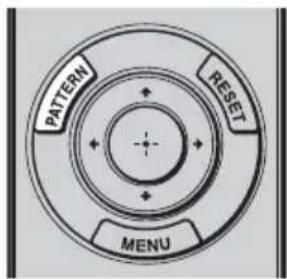
4HaXMMTe KHOIIKy PATTERN, YTO6bI OTO6pa3HTb TeCTOBbI CNrHaJI IJIa BbIIIOJIHeHnpeRyJInpOBOK.
1PepemeaTe o6a Dncka cDnra obBeKTnBa, YTO6bl OTpeRyInpoBaTb NIOJXeHne n3O6paXeHn.
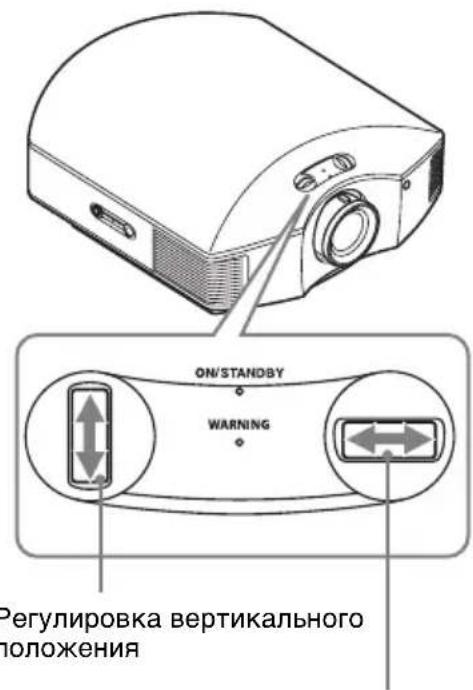
Perynpobka ropn3oHTaIbHoro nOIOKeHHA
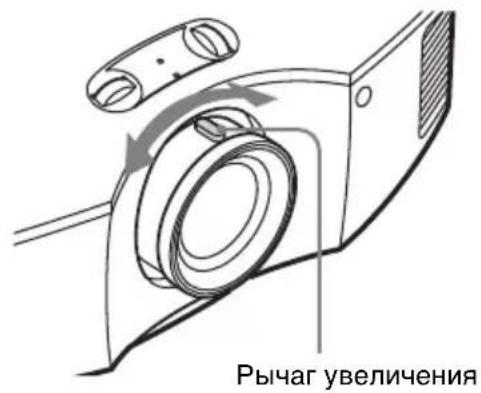
OTperpynpyTe pa3mep n3o6paXeHnC nOMOuIOp pbIurapa yBelenueHn.
OTperpyInpuYTe foKyc c NOMOUsbIO KOJbua fokycnpoBKN.
Okho perylnpoBkn obekTnBa (TeCTOBbl 6pa3e)
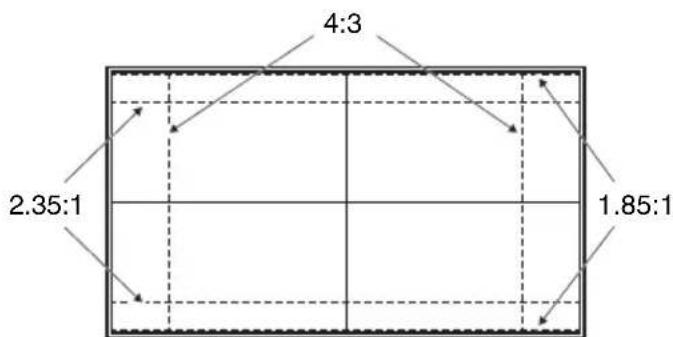
NyHKtnpHbIe NHHN yKa3bIbaIOT Ha pa3Mepbl 3KpaHa KaKdOro fOpMaTHoro COOTHOHeHn.
Iia noLyueHua donoHumeIbHO uHOpMaauu cM. pa3deJ "Coedunehua u nodzomobka" b DokyMeHme Hcmpykuua no eknayamauu, codepaueemHa npua2aemom KOMnakm-ducke.
Pn noKIOeHn BbINOHnte cIeDyOuNe DeiCTBna.
- BbIKJIIOHTc BCE O6OpUIOBaHnE IpeIi BBIOJIHeHnEM JIO6bIX IOJIKJIIOUChnI.
- IcnoJIb3yIte COOTBETCTBYIOUIN Ka6eJIb IIЯ KaKJIOrO CoeHHeHnA.
BCTaBBTe IITeKepeI Ka6eJIHaJIeKaIIM O6pa3OM; HeHaJIeKHOe COeINHeHne IITeKePOB MoKeT IIpNBecTH K HeHCIIpaBHocTH HJIN HN3KOMy KaueCTBy H3O6paKeHn. IIpn OTcoeINHeHH N Ka6eJIra TAHHTe 3a IITeKeP, a He 3a caM Ka6eJIb. - CM. HNCTpyKuH NIO 3KcJIyAtaUHN NOKJIIOueHHORO O6OpYIOBAHn.
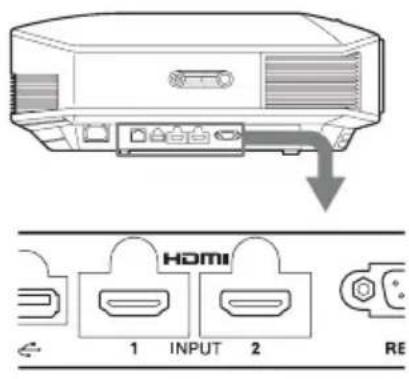
IpaBaCToPOHa yCTpoNCTBa
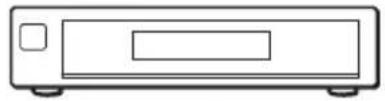
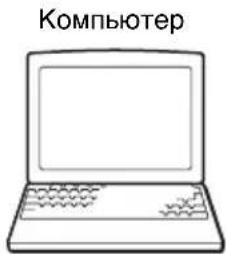
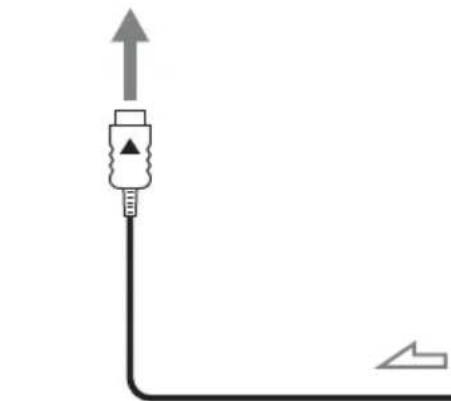
O6opydOBaHne c BbIXoNbIMpa3beMaHn HDMI
2 HaXMHTe ↑/↓, YTO6bIBbI6paTb MeHIO Setup TaTeM HaXMHTe → HJN
OTo6pa3rTcHacTpOnKn 3JIeMeHTOB BbI6paHHOro MeHIO.
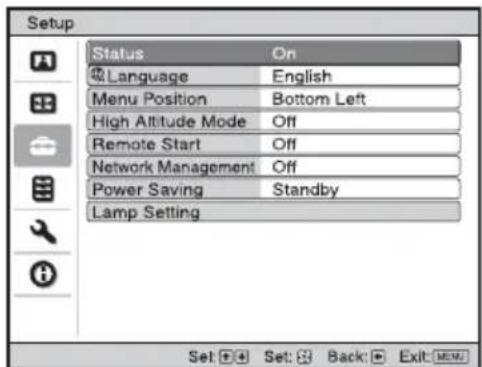
3 HaXMMTe / , YTO6bIBBbI6paTb "Language", 3aTeM HaXMMTe HJIN
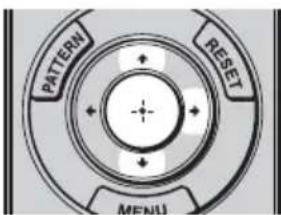
4 HaKMnTe / / / ,TO6bI BbIpaTb 3bIK, 3aTeM HaKMnTe
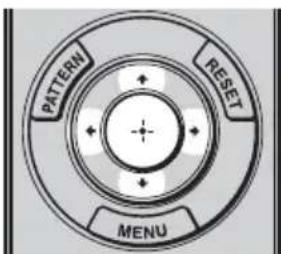
3bIK MeHIO H3MeHHTcHa BBI6paHHbIY3bIK.
3aKpbItne MeHIO HaxmTe KhoNky MENU.
3OcJa6bTe BnHT Ha KpbIIKe JIaMIIbIKpeCToo6pa3HOJ OTBepTKoJ,3aTeM OTKpOIte KpbIIkUy JIaMIIbl.
4OcIa6bTe 3 BnHTa Ha JIaMIIe KpeCToo6pa3HOJ OTBepTKoJ. YIepXINBaJ 3axIM, H3BJeKHTe JIaMIIy 6e3 Ipekeoca.
5yJepKHBa 3axHM HOBO JAmNbI, IIOTHO BCTaBbTe ee IO KOHua, a 3aTeM 3aTaNHTe 3 BNHTa.
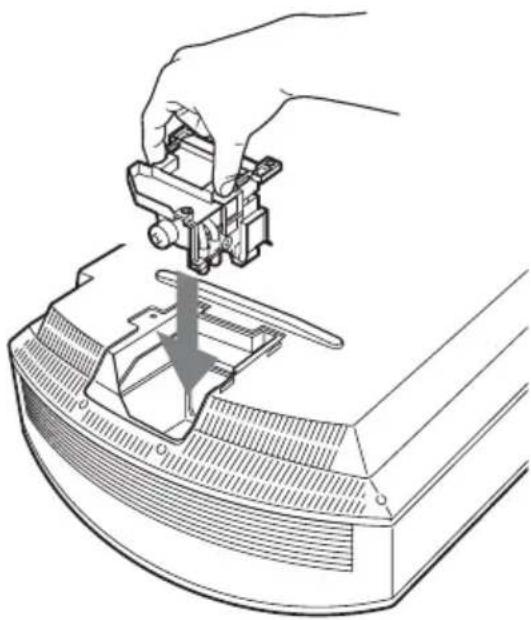
PpmeaHne
Co6JIIOJaITe ocTOpOxHocTb, He IpiKacaiTeCb K OIITHueCKOMy 6JIOky BHyTpHu yCTpOInCTBa.
63aKpoIte KpbIIky JaAMIIbI, 3aTeM 3aTAHHTe BINTbI.
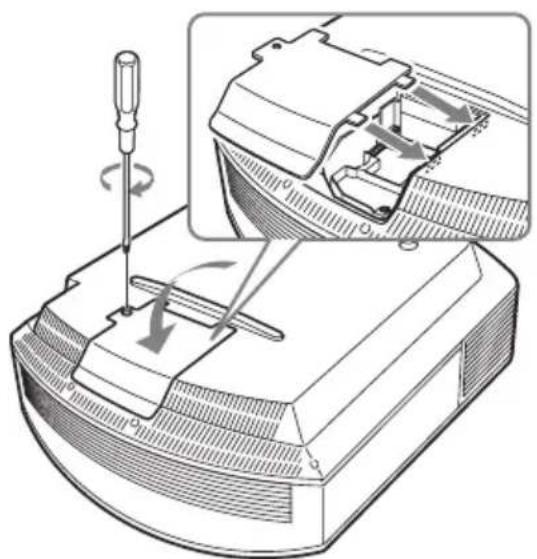
7CHHMMTe IepXkaTeJb qHJIbTpa.
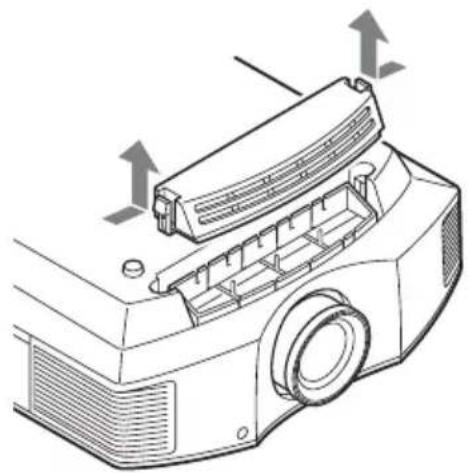
8N3BJIeKHTe BO3dYHbI ΦJIbTp.
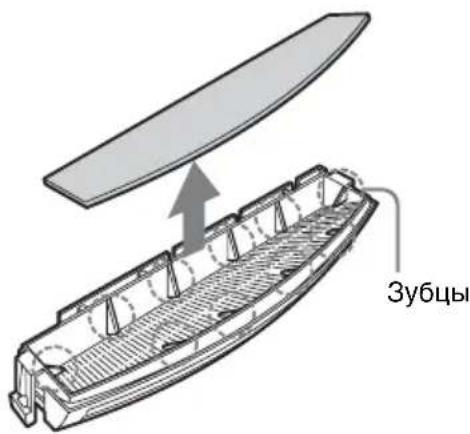
9YcTaHOBHTc HOBbI BO3NyIHbI HJIbTp TaK, YTO6bI OH BXOJI B0 BCE 3y6u (10 IOJIOKeHn) Ha IepKaTeJe HJIbTp a.
PpimMeaHne
YcTaHOBHTe BO3IyHbI HJIbTp, BbIPAHbBa eO IIO φOpMe IepXaTeJIA φHJIbTpa.
Kpome TOrO, He npkacaTecb K BeHTnJIaTOpy IocJIe N3BJIeYHeHH BO3dUHoro HJbTp a, ycTaHOBJeHHoro rIy6OKo B IIpoekTope.
10Пикрппт eржаTeJB phЛьТра.
PpimMeaHne
IpoekTop He BKJIOHTc, IOKa He 6yJeT NaJeXHO 3aKpbIT IepKaTeJIb NJIbTpTa.
11CoTpHrTe IIbIb CBeHTNJIaIOHHbIX OTBepCTn(BIyCKHbIe) MraKoT KHaHbIO.
BentnlaHnhbE oTbepctna (Bnyckhble)
12BepHnTe ycTpoIcTBo B erO opHnHaJIbHoE IIOJoxKeHne.
13BKnHouHTe yCTpOncTBO, 3aTeM BbI6epHTe Tpe6yeMbI IN JJIeMeHT HaCTPOKIN JaAMII B MeHIO HAcTpoKa
OTo6pa3nTc sJeIyUoIuN 3KpaH.
COBET
EcJINIJII IapameTpapBIOK.
HaCTpoeK" BbIbpaHO 3HaueHne
"YpOBeHbB",ycTaHOBHTe 3HaueHne
"BbIKJ" OHH pa3.
14BbI6epHrTe“Ja".
OctopoxHo
He 3acOBbIbAte pyKn BHyTpB Ia3a, CJyKaIeRo JJIra 3aMeHbI JAmIIbI, H He IOIyckaTe IIOIaHaNn B IIa3 KInKoCTe HIN HHOpOJbIX IIpeIMeTOB, YTO6bl HCKJIIOHTb PnCK BO3rOpAHn H IopajEHH NJIeKTPnueCKM TOKOM.
PpMMeaHnA
- YcTpoIcTBO He BKJIIOuHTcra, IOKa JIaMIIa He 6yIeT HaJeXHO yCTaHOBJeHa.
- YcTpoHCTBO He BKJIIOUHTcra, IOKa He 6yIeT HaJeXHO 3aKpbIta KpbIIka JAmIIbI.
- ydaJeHnco6eHn, OTO6paKaemOrHaKpaHe,OHOKpaTHo HaKMITE JIO6yIO KHOIKy HaIyJIbTe IINCTaHIOHHORO ynpabJeHn HnHa IIaHeJYNypabJIeHn ycTPOcTba.
PpimmeaHne
JAmna coepKHT pTyb. IpaBnJa yTHJIN3aHn HcIOJIb3OBaHHbIX JHMNHecIeHTHBIX JAMII 3aBNCrT OT MeCTa IIPOXKBaHn. CJIeIyTe IOJIHTKe yTHJIN3aHn OTXOIOB, IIpIMHeMeoB O6JIacTH IIPOXNBaHn.
OuNTka BO3dUshHOro ФильТра
Ipi IIOBJIeHn Ha 3KpaHe coo6IeHnA "OuNCTHTe, IooKaJyNCTa, fNJIbTp." Heo6XoJIMO OUHCTNTb BO3JyIHbI h NJIbTp.
Bo3nyHHbHnJIbTp cJeIyET OHNHaTb KaKJbIe 1500 YacOB. 3To 3NaueHne 3aBNCHT OT OKpyKaIOUeH cpebl H cIOco6a 3KcIIyatauH INpoEKTopa.1500 YacOB - Pn6JIIN3HTeJIbHa IuΦpa. IocJIe IpombIKN cJa6bIM pactBOPOM OUYHIOIeTO cpeCTBa BbICyIHNTe BO3NyHHbHn FNIbTp B 3aTeMHeHHOM MecTe.
PnmuMeaHnA
- Pn ONUCTKe BO3dYIIIHOrO fHJIbTpapocTapaNTecb eRO He IOBpeINtB.IIa IIOJyueHHIIOJIHHTeJIbHOHNHΦopMaunu 6 yCTaHOBKe H3BJIeueHHN BO3dYIIIHOrO fHJIbTpacm.pa3JeJ“3aMeHa JAmIbI”, IIIaH 7-10 (cTp.20).
- Pn 3aMeHe BO3NyIHHoro NJIbTpacJIeIHTe 3a TeM, YTO6bIB IIpoEKTOp He IIOIIa IIbIJb.
OuHCTKa HJIbTpRaBJIaETCKa pAaHe BaKHOI IPOUeIpyo JIA IOJIepKaHnBaICOKo IPOIN3BOJNTeJIbHOCTN IPOeKTopa IIpeIOTbpaIeHNr erO HeHCIIpaBHocTH. Ipr NIOBJIeHNn IpeIyIpexJaIOUeRO COOOJIeHNr 06 OcHCTKe BO3dYIIIHOrO HJIbTpA OChCTnTe BO3dYIIIbI HJIbTp HeMeJIeHHO.
關於快速參考手冊
dd = 19 0. 又 O 是 AQ GL
#
a
a aaiiiaai iaaaiiaai
aaii iin aiee
dabio
152
.4501 p 20 20 20 20 20 20 20 20 20 20
20 2
aagglgag gagag aallll
10 7 1 (o)
.(18do)
- 10gssd
4
1 LwJy
J ON/STANDBY) I/0
JU W. 1
J U J
J U J
J U J
J U J
J U J
J U J
J U J
J U J
J U J
J U J
aag aol y. 1uU aolw ly g wai p .
laay eal uog cawl l. gauall
gba jui g . gauall gil o s
. g
( x + 1) ( y - 1) = 0
Sb
y
.
| ### | ### | ### |
| ### | ### | ON/STANDBY |
| ### | ### | O |
| ### | ### | WARNING |
| ### | ### | ### |
| ### | ### | ### |
| ### | ### | ### |
| ### | ### | ### |
| ### | ### | ### |
| ### | ### | ### |
| ### | ### | ### |
| ### | ### | ### |
| ### | ### | ### |
| ### | ### | ### |
| ### | ### | ### |
| ### | ### | ### |
| ### | ### | ### |
| ### ### | ### | ### ### |
| ### | ### | ### ### |
| ### | ### | ### ### |
| ### | ### | ### ### |
| ### | ### | ### ### |
| ### | ### | ### ### |
| ### | ### | ### ### |
| ### | ### | ### ### |
| ### | ### | ### ### |
| ### | ### | ### ### |
| ### | ### | ### ### |
| ### | ### | ### ### |
| ### ### | ### | ### ### |
| ### | ### | ### ### |
| ### | ### | ### ### |
| ### | ### | ### ### |
| ### | ### | ### ### |
| ### | ### | ### ### |
| ### | ### | ### ### |
| ### | ### | ### ### |
| ### | ### | ### ### |
| ### | ### | ### ### |
| ### | ### | ### |
| ### | ### | ### ### |
| ### | ### | ### ### |
| ### | ### | ### ### |
| ### | ### | ### ### |
| ### | ### | ### ### |
| ### | ### | ### ### |
| ### | ### | ### ### |
| ### | ### | ### ### |
| ### | ### | ### ### |
| ### | ### | ### ### |
| ### | ### | ### ### ### |
| ### | ### | ### ### |
| ### | ### | ### ### |
| ### | ### | ### ### |
| ### | ### | ### ### |
| ### | ### | ### ### |
| ### | ### | ### ### |
| ### | ### | ### ### |
| ### | ### | ### ### |
| ### | ### | ### ### |
| ### | ### | ### ### |
| ### | ### | ### |
| ###. | ###. | ### ### |
o ool o g s ioll ogl bll i aai y aikal lall oai wg . jaoagly oel 1a jia jia jia jia jia Jy loi.
L 1
.CALIBRATED PRESET
| الله��ة الحرفية | |
| الله��ة الحرفية بधانسcury وعربية حيرد نور ملاين رسمان ملاين رسمان ملاين رسمان ملاين رسمان ملاين رسمان ملاين رسمان ملاين رسمان ملاingen نور ملاingen نور ملاingen نور ملاingen نور ملاingen نور ملاingen نور ملاingen نور ملاingen نور ملاingen نور ملاingen نور ملاingen نور ملاingen نور ملاingen نور ملاingen نور ملاingen نور ملاingen نور ملاingen نور ملاingen نور ملاingen نور ملاingen نور ملاingen نernal نور ملاingen نernal نور ملاingen نernal نernal نernal نernal نernal نernal نernal نernal نernal نernal نernal نernal نernal نernal نernal نernal نernal نernal نernal نernal نernal نernal نernal نernal نernal نernal نernal نernal نernal نernal نernal نernal نernal نernal نernal نernal نernal نernal نernal نernal نernal نernal نernal نernal نernal نernal نernal نernal نernal نernal نerral نernal نernal نernal نernal نernal نernal نernal نernal نernal نernal نernal نernal نernal نernal نernal نernal نernal نernal نernal نernal نernal نernal نernal نernal نernal نernal نernal نernal نernal نernal نernal نernal نernal نernal نernal نernal نernal نernal نernal نernal نernal نernal نernal نernal نernal نernal نernal نernal نernal نenal نernal نernal نernal نernal نernal نernal نernal نernal نernal نernal نernal نernal نernal نernal نernal نernal نernal نernal نernal نernal نernal نernal نernal نernal نernal نernal نernal نernal نernal نernal نernal نernal نernal نernal نernal نernal نernal نernal نernal نernal نernal نernal نernal نernal نernal نernal نernal نernal نernal نeral نeral نeral نeral نeral نeral نeral نeral نeral نeral نeral نeral نeral نeral نeral نeral نeral نeral نeral نeral نeral نeral نeral نeral نeral نeral نeral نeral نeral نeral نeral نeral نeral نeral نeral نeral نeral نeral نeral نeral نeral نeral نeral نeral نeral نeral نeral نeral نeral نeral نerals نerals نerals نerals نerals نerals نerals نerals نerals نerals نerals نerals نerals نerals نerals نerals نerals نerals نerals نerals نerals | |
| الله��ة الح註冊ية | CINEMA FILM 1 |
| الله��ة الح註冊ية ملاingen نور ملاingen نور ملاingen نور ملاingen نور ملاingen نور ملاingen نور ملاingen نور ملاingen نور ملاingen نernal نور نور نور نور نور نور نور نور نور نور نور نور نور نernal نور نور نernal نernal نernal نernal نernal نernal نernal نernal نernal نernal نernal نernal نernal نernal نernal نernal نernal نernal نernal نernal نernal نernal نernal نernal نernal نernal نernal نernal نernal نernal نernal نernal نernal نernal نernal نernal نernal نernal نernal نernal نernal نernal نernal نernal نernal نernal نernal نernal نernal نrial نidal نidal نidal نidal نidal نidal نidal نidal نidal نidal نidal نidal نidal نidal نidal نidal نidal نidal نidal نidal نidal نidal نidal نidal نidal نidal نidal نidal نidal نidal نidal نidal نidal نidal نidal نidal نidal نidal نidal نidal نidal نidal نidal نidal نidal نidal نidal نidal نidal نidal نidel نidal نidal نidal نidal نidal نidal نidal نidal نidal نidal نidal نidal نidal نidal نidal نidal نidal نidal نidal نidal نidal نidal نidal نidal نidal نidal نidal نidal نidal نidal نidal نidal نidal نidal نidal نidal نidal نidal نidal نidal نidal نidal نidal نidal نidal نidal نidal نidal نidal نandal نidal نidal نidal نidal نidal نidal نidal نidal نidal نidal نidal نidal نidal نidal نidal نidal نidal نidal نidal نidal نidal نidal نidal نidal نidal نidal نidal نidal نidal نidal نidal نidal نidal نidal نidal نidal نidal نidal نidal نidal نidal نidal نidal نidal نidal نidal نidal نidal نidal نdal نidal نidal نidal نidal نidal نidal نidal نidal نidal نidal نidal نidal نidal نidal نidal نidal نidal نidal نidal نidal نidal نidal نidal نidal نidal نidal نidal نidal نidal نidal نidal نidal نidal نidal نidal نidal نidal نidal نidal نidal نidal نidal نidal نidal نidal نidal نidal نidal نidal نidaر رسمان ملاingen ملاingen ملاingen ملاingen ملاingen ملاingen ملاingen ملاingen ملاingen ملاingen ملاingen ملاingen ملاingen ملاingen ملاingen ملاingen ملاingen ملاingen ملاingen ملاingen ملاingen ملاingen ملاingen ملاingen ملاingen ملاingen ملاingen ملاingen ملاingen ملاingen ملاingen ملاingen ملاingen ملاingen mlaingen ملاingen ملاingen mlaingen ملاingen mlaingen mlaingen mlaingen mlaingen mlaingen mlaingen mlaingen mlaingen mlaingen mlaingen mlaingen mlaingen mlaingen mlaingen mlaingen mlaingen mlaingen mlaingen mlaingen mlaingen mlaingen mlaingen mlaingen mlaingen mlaingen mlaingen mlaingen mlaingen mlaingen mlaingen mlaingen mlaingen mlaingen mlalingen mlaingen mlaingen mlaingen mlaingen mlaingen mlaingen mlaingen mlaingen mlaingen mlaingen mlaingen mlaingen mlaingen mlaingen mlaingen mlaingen mlaingen mlaingen mlaingen mlaingen mlaingen mlaingen mlaingen mlaingen mlaingen mlaingen mlaingen mlaingen mlaingen mlaingen mlaingen mlaingen mlaingen | |
| الله��ة الح註冊ية ملاingen ملاingen ملاingen ملاingen مleaingen مleaingen مleaingen مleaingen مleaingen مleaingen مleaingen مleaingen مleaingen mleaingen mleaingen mleaingen mleaingen mleaingen mleaingen mleaingen mleaingen mleaingen mleaingen mleaingen mleaingen mleaingen mleaingen mleaingen mleaingen mleaingen mleaingen mleaingen mleaingen mleaingen mleaingen mleaingen mleaingen mleaingen mleaingen mleaingen mleaingen mleaingen mleaingen mleaingen mleaingen mleaingen meaingen meaingen meaingen meaingen meaingen meaingen meaingen meaingen meaingen meaingen meaingen meaingen meaingen meaingen meaingen meaingen meaingen meaingen meaingen meaingen meaingen meaingen meaingen meaingen meaingen meaingen meaingen meaingen meaingen meaingen meaingen meaingen meaingen mea ingen meaingen meaingen meaingen meaingen meaingen meaingen meaingen meaingen meaingen meaingen meaingen meaingen meaingen meaingen meaingen meaingen meaingen meaingen meaingen meaingen meaingen meaingen meaingen meaingen meaingen meaingen meaingen meaingen meaingen meaingen meaingen meaingen meaingen | |
| الله��ة الح註冊ية ملاingen مleaingen مleaingen مleaingen مleaingen مleaingen مleaingen مleaingen mleaingen mleaingen mleaingen mleaingen mleaingen mleaingen mleaingen mleaingen mleaingen mleaingen mleaingen mleaingen mleaingen mleaingen mleaingen mleaingen mleaingen mleaingen mleaingen mleaingen mleaingen mleaingen mleaingen mleaingen mleaingen mlearogen mleaingen mleaingen mleaingen mleaingen mleaingen mleaingen mleaingen mleaingen mleaingen mleaingen mleaingen mleaingen mleaingen mleaingen mleaingen mleaingen mleaingen mleaingen mleaingen mleaingen mleaingen mleaingen mleaingen mleaingen mleaingen mleaingen mleaingen mleaingen mleaingen mleaingen mleaingen mleaingen mleaingen | |
| "REF" √مانيم | |
Lae 1e 10
四边形 AOBC 为正方形
J 1
1/()jzjg jzjg jzjg jzjg jzjg jzjg jzjg jzjg jzjg jzjg jzjg jzjg jzjg jzjg jzjg jzjg jzjg jzjg jzjg jzjg jzjg jzjg jzjg jzjg jzjg jzjg
a
0gJgljg 1.
1.
2
.
3.
120 11 11
.
Jaiall gduell jag no aoalll ojgall jol: Jio .dgl0o 1000HDM1 Logao
aI 1
.(ON/STANDBY)I/
1
1e «fOJJI JIgJ IJ» JIJIJI
L
(ON/STANDBY)I/(Jz
JUyIeJg
ON/STANDBY
a
ON/STANDBY
jUy aL oL! JrJy jUy yogol no
y1 = - 98x1
Jg jy Jc logzao Jy Jo Jg 10000000000000000000000000000000000000000
.
Jlll Jss sckg. lalj jzjj
.00
"Language" 3
+g→ 1c b201
- b20g.4jL 1/↓/←/→b204
.0jaiJdJI JdJIJI
aolal
.MENU
sIy Ii logzalg aaiall jai Ujia 15k
go gaiall y waiall uay. AaiuUe aby
pAaiall aaiall ax J English ayjzjny Aai
aaii AaiLw pduwly aegrll aai
1.MENU
aolalj
Setup 4/2 2
.0jxssal aoslaa bdo yolie yab
:JUULpLgOJU.
.
.
10
aJbJn no sJg Jn 4Jn Jn Jn Jn Jn Jn Jn Jn Jn Jn Jn Jn Jn
. algoJI 0j
Lglll> 1111111111111111111111111111
3
.
(3) 1,2,3 , 1,3,4
(jjy j) aJzll J
.5eJ 1sJUdAolJI pao JaaabaiI bghll
1
gogolj klll lalge g 11slae yllg oogil
.
ggo bduuullll 1
gjEjds pluxwly oogall 2
1 2wJJIgS
.aaLaaJg0
2 0 .
.1
oo
ON/STANDBY
y

四边形 AOBC 为正方形
a.0gll bga zai I log aolal lal 1
.00g1 5 p
x1 = 2,x2 = - 4
- pluuljus
Jolal jao dllo lo g Sony 5o Jolo
.
L
.
(g)j0g1ggljdo)ygy
aBg 0J1 J5
[{\left( \frac{1}{2}\right) }^{2} - 1 = \frac{1}{2} \cdot {\left( 1 - x\right) }^{2} + {x}^{2}]
15 j 15j 15j 15j 15j 15j 15j 15j 15j 15j 15j 15j 15j 15j 15j 15j 15j
.4
j 1 j 1 j 1 j 1 j 1 j 1 j 1 j 1 j 1 j 1 j 1 j 1 j 1 j 1 j 1 j 1 j 1 j 1 j 1 j 1 j 1 j 1 j 1 j 1 j 1 j 1 j 1 j 1 j 1 j 1 j 1 j 1 j 1 j 1 j
J 15
JL 1111111111111111111111111111111
gJ 1000000000000000000000000000000
cgo 5o
yla! g y bgs 100000000000000000000000000000000000000000000000000000
J 1
J 1
J 150
aLio 0ylo
.0001 1
cwww w
pUdsWg
wio
g C 1y.
.
Jn Jnn
jil 1dcl slaoiy jolg oogll 1sgl dslal
JL
.
4g 00
.00030 000
(VPL-HW65)
SONY
aLl 1 j 1 a 1 1 1 1 1 1 1 1 1
aaii iililil 1jg.0jyI Jia xiaxlal
Joo 1
.
JUUGGIOA 2
j15b.4s.ally oogll oia jogii ie.oogill
jolai aaoa 45
aJl Jgogll 0y y
10 1015u! uusg uug uus
()Laaabgauagaiu
()
p 1
.1s|y| 1r|g| 1s|y| 1r|g|
ygl 1g 1j
gaii iaiy laa laie gaii
gloogllpduw joaouzoll
.0Jolol
四边形 AOBC 为正方形
j 1 j 1 j 1 j 1 j 1 j 1 j 1 j 1 j 1 j 1 j 1 j 1 j 1 j 1 j 1 j 1 j 1 j 1 j 1 j 1 j 1 j 1 j 1 j 1 j 1 j 1 j 1 j 1 j 1 j 1 j 1 j 1 j 1 j 1 j
jlaal afo 1
aJyIg yI g IyIyIyIyIyIyIy
aill ooljogaa
Lgaii. daiyill oog aol 1 jaoai yjkiy 1
Jn Jd Gaoai. dao gll Jn Crrp 13!
Gd olco L5 lo5 dio g ao 0a .laal
.
JyIgill bAs pduaiu Jiaayi ydsal .a
·jUJ:UJU
Jgoggl JsJg jgs.ooJgll B Sdd
dall sLg y g 1 Cttll llll 1g
.00gll noBjRjll Ugogll Jgss sS
Jgss p .00gll JsJg 1 lo 1g g g
Jgss Jg 1 dall 1o! Jgss fayy Jg
jio
·
()3D
Jg j 3D Jn .Jl j t! j 1j 1j 1j 1j 1j 1j 1j 1j 1j 1j 1j 1j 1j 1j 1j 1j 1j 1j 1j 1j 1j 1j 1j 1j 1j 1j 1j 1j 1j 1j 1j 1j 1j 1j
S L = S1
()2.4835-2.4
()
:
(E.I.R.P) (Joo 4.30
Joo 50 Joo Joo Joo Joo Joo Joo Joo Joo Joo
RG2 IEC 62471-5: .2015
p 1 a 10000000000000000000000000000000000000000000000000

a 1
TRA
REGISTERED No: ER0115212/13
DEALER No: DA0065531/11
4
LAN
slll jll lglal llogo Iy Axlal Jy
3 (yj) 1000 / jg/ (ggl /jgo jy
/(3 3 )jlll 2
8
.
Jogo/ jLJIJIeUw pluIcWJgAaI W JILIS! aIygi oJraIauWJyRjGJQJlJI / jlgJg
4
J 1 J 1 J 1 J 1 J 1 J 1 J 1
.
8 1
1 p
9 1
2 pddg
11 1
3 pddgbs
12 1
4 pddg
13 2
5 pddgbs
15 0
1
16 1
a
19 1