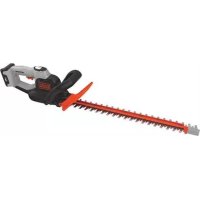
GTC5455PCB - Hedge trimmers BLACK & DECKER - Free user manual and instructions
Find the device manual for free GTC5455PCB BLACK & DECKER in PDF.


| Product type | Cordless hedge trimmer |
| Brand | Black & Decker |
| Model | GTC5455PCB |
| Battery voltage | 54 V DC |
| Battery type | Lithium-ion (Li-Ion) |
| Battery capacity | 1.5 Ah |
| Charger | BDC2A (220-230 V AC, 2000 mA) |
| Approximate charging time | 2.75 hours |
| Blade length | 60 cm |
| No-load speed | 2600 min⁻¹ |
| Maximum cutting capacity (branch diameter) | 19 mm |
| Weight (without battery) | 2.775 kg |
| Weight (with battery) | 3.83 kg |
| Sound pressure level (LpA) | 78 dB(A), uncertainty 3 dB(A) |
| Sound power level (LWA) | 92.5 dB(A), uncertainty 2.5 dB(A) |
| Vibration emission (ah) | 2.7 m/s², uncertainty 1.5 m/s² |
| POWERCOMMAND function | Yes (slow and powerful movement for tough branches) |
| Integrated saw blade | Yes (for thick branches) |
| Blade protection | Removable blade guard supplied |
| Warranty | 24 months |
| Intended use | Consumer use for trimming hedges, bushes and brambles |
| Safety | Double insulation, safety lock, insulated gripping surfaces |
| Maintenance | Regular cleaning of ventilation slots and blades, lubricating blades after cleaning |
| Spare parts and repairability | Use only original replacement parts, contact an authorized service center |
Frequently Asked Questions - GTC5455PCB BLACK & DECKER
User questions about GTC5455PCB BLACK & DECKER
0 question about this device. Answer the ones you know or ask your own.
Ask a new question about this device
Download the instructions for your Hedge trimmers in PDF format for free! Find your manual GTC5455PCB - BLACK & DECKER and take your electronic device back in hand. On this page are published all the documents necessary for the use of your device. GTC5455PCB by BLACK & DECKER.
USER MANUAL GTC5455PCB BLACK & DECKER
Your BLACK+DECKER™ GTC5455PC, GTC5455PCB hedge trimmers have been designed for trimming hedges, shrubs and brambles. These tool are intended for consumer use only.
Safety instructions
General power tool safety warnings

Warning! Read all safety warnings and all instructions. Failure to follow the warnings and instructions listed below may result in electric shock, fire and/or serious injury.
Save all warnings and instructions for future reference. The term "power tool" in the warnings refers to your mains operated (corded) power tool or battery operated (cordless) power tool.
1. Work area safety
a. Keep work area clean and well lit. Cluttered or dark areas invite accidents.
b. Do not operate power tools in explosive atmospheres, such as in the presence of flammable liquids, gases or dust. Power tools create sparks which may ignite the dust or fumes.
c. Keep children and bystanders away while operating a power tool. Distractions can cause you to lose control.
2. Electrical safety
a. Power tool plugs must match the outlet. Never modify the plug in any way. Do not use any adapter plugs with earthed (grounded) power tools. Unmodified plugs and matching outlets will reduce risk of electric shock.
b. Avoid body contact with earthed or grounded surfaces such as pipes, radiators, ranges and refrigerators.
There is an increased risk of electric shock if your body is earthed or grounded.
c. Do not expose power tools to rain or wet conditions.
Water entering a power tool will increase the risk of electric shock.
d. Do not abuse the cord. Never use the cord for carrying, pulling or unplugging the power tool. Keep cord away from heat, oil, sharp edges or moving parts. Damaged or entangled cords increase the risk of electric shock.
e. When operating a power tool outdoors, use an extension cord suitable for outdoor use. Use of a cord suitable for outdoor use reduces the risk of electric shock.
f. If operating a power tool in a damp location is unavoidable, use a residual current device (RCD) protected supply.
Use of an RCD reduces the risk of electric shock.
3. Personal safety
a. Stay alert, watch what you are doing and use common sense when operating a power tool. Do not use a power tool while you are tired or under the influence of drugs, alcohol or medication. A moment of inattention while operating power tools may result in serious personal injury.
b. Use personal protective equipment. Always wear eye protection. Protective equipment such as dust mask, non-skid safety shoes, hard hat, or hearing protection used for appropriate conditions will reduce personal injuries.
c. Prevent unintentional starting. Ensure the switch is in the off-position before connecting to power source and/or battery pack, picking up or carrying the tool. Carrying power tools with your finger on the switch or energising power tools that have the switch on invites accidents.
d. Remove any adjusting key or wrench before turning the power tool on. A wrench or a key left attached to a rotating part of the power tool may result in personal injury.
e. Do not overreach. Keep proper footing and balance at all times. This enables better control of the power tool in unexpected situations.
f. Dress properly. Do not wear loose clothing or jewellery. Keep your hair, clothing and gloves away from moving parts. Loose clothes, jewellery or long hair can be caught in moving parts.
g. If devices are provided for the connection of dust extraction and collection facilities, ensure these are connected and properly used. Use of dust collection can reduce dust-related hazards.
4. Power tool use and care
a. Do not force the power tool. Use the correct power tool for your application. The correct power tool will do the job better and safer at the rate for which it was designed.
b. Do not use the power tool if the switch does not turn it on and off. Any power tool that cannot be controlled with the switch is dangerous and must be repaired.
c. Disconnect the plug from the power source and/or the battery pack from the power tool before making any adjustments, changing accessories, or storing power tools. Such preventive safety measures reduce the risk of starting the power tool accidentally.
d. Store idle power tools out of the reach of children and do not allow persons unfamiliar with the power tool or these instructions to operate the power tool. Power tools are dangerous in the hands of untrained users.
e. Maintain power tools. Check for misalignment or binding of moving parts, breakage of parts and any other condition that may affect the power tools operation. If damaged, have the power tool repaired before use. Many accidents are caused by poorly maintained power tools.
f. Keep cutting tools sharp and clean. Properly maintained cutting tools with sharp cutting edges are less likely to bind and are easier to control.
g. Use the power tool, accessories and tool bits etc. In accordance with these instructions, taking into account the working conditions and the work to be performed. Use of the power tool for operations different from those intended could result in a hazardous situation.
5. Battery tool use and care
a. Recharge only with the charger specified by the manufacturer. A charger that is suitable for one type of battery pack may create a risk of fire when used with another battery pack.
b. Use power tools only with specifically designated battery packs. Use of any other battery packs may create a risk of injury and fire.
c. When battery pack is not in use, keep it away from other metal objects, like paper clips, coins, keys, nails, screws, or other small metal objects, that can make a connection from one terminal to another. Shorting the battery terminals together may cause burns or a fire.
d. Under abusive conditions, liquid may be ejected from the battery; avoid contact. If contact accidentally occurs, flush with water. If liquid contacts eyes, additionally seek medical help. Liquid ejected from the battery may cause irritation or burns.
6. Service
a. Have your power tool serviced by a qualified repair person using only identical replacement parts. This will ensure that the safety of the power tool is maintained.
Additional power tool safety warnings

Warning! Additional safety warnings for hedge trimmers
Keep all parts of the body away from the cutter blade. Do not remove cut material or hold material to be cut when blades are moving. Make sure the switch is off when clearing jammed material. A moment of inattention while operating the tool can result in serious personal injury.
Carry the hedge trimmer by the handle with the cutter blade stopped. When transporting or storing the hedge trimmer always fit the cutting device cover. Proper handling of the hedge trimmer will reduce possible personal injury from the cutter blades.
Hold the power tool by insulated gripping surfaces only, because the cutter blade may contact hidden wiring. Cutter blades contacting a "live" wire may make exposed metal parts of the power tool "live" and could give the operator an electric shock.
The intended use is described in this instruction manual. The use of any accessory or attachment or performance of any operation with this tool other than those recommended in this instruction manual can present a risk of personal injury and/or damage to property.
- Do not carry the tool with your hands on the front handle, switch or the trigger switch unless the battery has been removed.
If you have not used a hedge trimmer before, preferably seek practical instruction by an experienced user in addition to studying this manual.
Never touch the blades while the tool is running.
ENGLISH
(Original instructions)
Never attempt to force the blades to come to a standstill.
Do not put the tool down until the blades have come to a complete standstill.
Regularly check the blades for damage and wear. Do not use the tool when the blades are damaged.
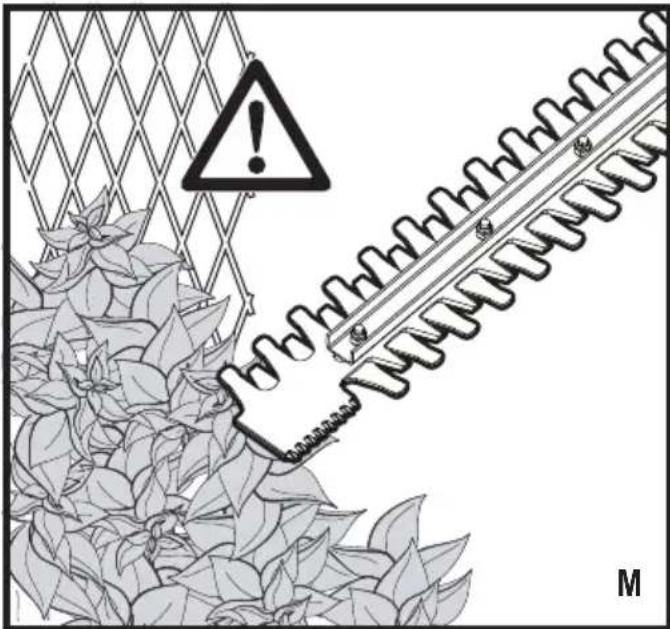
Take care to avoid hard objects (e.g. metal wire, railings) when trimming. Should you accidentally hit any such object, immediately switch the tool off and check for any damage.
Should the tool start to vibrate abnormally, immediately switch it off and remove the battery then check for any damage.
If the tool stalls, immediately switch it off. Remove the battery before attempting to remove any obstructions.
After use, place the blade sheath supplied over the blades. Store the tool, making sure that the blade is not exposed.
Always ensure that all guards are fitted when using the tool. Never attempt to use an incomplete tool or a tool with unauthorised modifications.
Never allow children to use the tool.
Be aware of falling debris when cutting the higher sides of a hedge.
Always hold the tool with both hands and by the handles provided.
Safety of others
This appliance is not intended for use by persons (including children) with reduced physical, sensory or mental capabilities, or lack of experience and knowledge, unless they have been given supervision or instruction concerning use of the appliance by a person responsible for their safety.
Children should be supervised to ensure that they do not play with the appliance.
Residual risks.
Additional residual risks may arise when using the tool which may not be included in the enclosed safety warnings. These risks can arise from misuse, prolonged use etc.
Even with the application of the relevant safety regulations and the implementation of safety devices, certain residual risks can not be avoided. These include:
Injuries caused by touching any rotating/moving parts.
Injuries caused when changing any parts, blades or accessories.
Injuries caused by prolonged use of a tool. When using any tool for prolonged periods ensure you take regular breaks.
Impairment of hearing.
Health hazards caused by breathing dust developed when using your tool (example:- working with wood, especially oak, beech and MDF.)
Vibration
The declared vibration emission values stated in the technical data and the declaration of conformity have been measured in accordance with a standard test method provided by EN 60745 and may be used for comparing one tool with another. The declared vibration emission value may also be used in a preliminary assessment of exposure.
Warning! The vibration emission value during actual use of the power tool can differ from the declared value depending on the ways in which the tool is used. The vibration level may increase above the level stated.
When assessing vibration exposure to determine safety measures required by 2002/44/EC to protect persons regularly using power tools in employment, an estimation of vibration exposure should consider, the actual conditions of use and the way the tool is used, including taking account of all parts of the operating cycle such as the times when the tool is switched off and when it is running idle in addition to the trigger time.
Labels on tool
The following pictograms are shown on the tool along with the date code:

Warning! To reduce the risk of injury, the user must read the instruction manual.

Wear safety glasses or goggles when operating this tool.

Wear ear protection when operating this tool.

Do not expose the tool to rain or high humidity.

Directive 2000/14/EC guaranteed sound power.
Additional safety instructions for batteries and chargers
Batteries
Never attempt to open for any reason.
Do not expose the battery to water.
Do not store in locations where the temperature may exceed 40^
Charge only at ambient temperatures between 10^ and 40^ .
Charge only using the charger provided with the tool.
When disposing of batteries, follow the instructions given in the section "Protecting the environment".
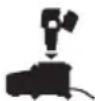
Do not attempt to charge damaged batteries.
Chargers
Use your BLACK+DECKER charger only to charge the battery in the tool with which it was supplied. Other batteries could burst, causing personal injury and damage.
Never attempt to charge non-rechargeable batteries.
Have defective cords replaced immediately.
Do not expose the charger to water.
Do not open the charger.
Do not probe the charger.

The charger is intended for indoor use only.

Read the instruction manual before use.
Important: Only the following chargers should be used to charge the 54v battery BL1554 & BL2554:
90589867, 90621477, 90590287-01, 90590289-01, 90602042-01, 90590287-02, 90590289-02, 90599854-02, 90599854-06, 90599853-05, 90634971, 90634972, 90634973, 90642266, 90642264, 90642265, BDC2A
Electrical safety

Your charger is double insulated; therefore no earth wire is required. Always check that the mains voltage corresponds to the voltage on the rating plate. Never attempt to replace the charger unit with a regular mains plug.
- If the supply cord is damaged, it must be replaced by the manufacturer or an authorised BLACK+DECKER Service Centre in order to avoid a hazard.
Features
This tool includes some or all of the following features.
- Trigger switch
-
Lock off switch
-
Handle
- POWERCOMMAND button
5.Blade guard - Bail handle
- Blade
- Saw blade
-
Saw blade shoe
-
Dualvolt battery pack (Only with GTC5455PC unit)
- Dualvolt panel (Only with GTC5455PC unit)
- Charger (Only with GTC5455PC unit)
Assembly
Warning! Before assembly, remove the battery from the tool fit the blade sheath over the blades.
Warning! Before assembly, make sure that the tool is switched off and unplugged and that the blade sheath is fitted over the blades.
Warning! Never use the tool without the guard.
Charging procedure
BLACK+DECKER chargers are designed to charge BLACK+DECKER battery packs.
Plug the charger (12) into an appropriate outlet before inserting the battery pack.
Insert the battery pack into the charger as shown in figure A.
The green LED (12a) will flash indicating that the battery is being charged.
- The completion of charge is indicated by the green LED (12a) remaining on continuously. The pack is fully charged and may be used at this time or left on the charger.
Note: Recharge discharged batteries as soon as possible after use or battery life may be greatly diminished. For longest battery life, do not discharge batteries fully. It is recommended that the batteries be recharged after each use.
Leaving the battery in the charger
The charger (12) and battery pack (11) can be left connected with the LED glowing indefinitely. The charger will keep the battery pack fresh and fully charged.
Important charging notes
Longest life and best performance can be obtained if the battery pack is charged when the air temperature is between 65^ and 75^ (18^ - 24^) . DO NOT charge the battery pack in an air temperature below +40^ (+4.5^) or above +105^ (+40.5^) . This is important and will prevent serious damage to the battery pack.
- The charger and battery pack may become warm to touch while charging. This is a normal condition, and does not indicate a problem. To facilitate the cooling of the battery pack after use, avoid placing the charger or battery pack in a warm environment such as in a metal shed, or an uninsulated trailer.
If the battery pack does not charge properly:
Check current at receptacle by plugging in a lamp or other appliance.
- Check to see if receptacle is connected to a light switch
ENGLISH
(Original instructions)
which turns power off when you turn out the lights.
Move charger and battery pack to a location where the surrounding air temperature is approximately 65^ - 75^ (18^ - 24^)
If charging problems persist, take the tool, battery pack and charger to your local service center.
- The battery pack should be recharged when it fails to produce sufficient power on jobs which were easily done previously. DO NOT CONTINUE to use under these conditions. Follow the charging procedure. You may also charge a partially used pack whenever you desire with no adverse effect on the battery pack.
- Foreign materials of a conductive nature such as, but not limited to, steel wool, aluminium foil, or any buildup of metallic particles should be kept away from charger cavities. Always unplug the charger from the power supply when there is no battery pack in the cavity. Unplug charger before attempting to clean.
Do not freeze or immerse charger in water or any other liquid.
Warning! Do not allow any liquid to get inside charger. Never attempt to open the battery pack for any reason. If the plastic housing of the battery pack breaks or cracks, return to a service center for recycling.
State of charge indicator (Fig.B)
The battery is equipped with a state of charge indicator. This can be used to display the current level of charge in the battery during use and during charging. It does not indicate tool functionality and is subject to variation based on product components, temperature and end-user application.
Checking state of charge during use
Press the state of charge indicator button (B1).
The three LEDs (B2) will illuminate, indicating the percent of charge in the battery. See chart in figure B.
If LED light does not illuminate, charge battery.
Charger Diagnostics (Fig.E)
Refer to the indicators in figure E for the charge status of the battery pack.
Bad Battery
If you see a bad battery blink pattern, do not continue to charge this battery. Return it to a service center or a collection site for recycling.
Hot/Cold Pack Delay
When the charger detects a battery pack that is too hot or too cold, it automatically starts a Hot/Cold Pack Delay, suspending charging until the battery pack has reached an appropriate temperature. The charger then automatically
switches to the pack charging mode.
This feature ensures maximum battery pack life. A cold battery pack will charge at a slower rate than a warm battery pack.
The pack will charge at that slower rate throughout the entire charging cycle and will not return to maximum charge rate even if the pack warms.
Installing and removing the battery pack from the tool
Warning! Make certain the lock-off button is engaged to prevent switch actuation before removing or installing battery.
To install battery pack Fig. C)
Insert battery (10) into tool until an audible click is heard (Figure. C)
Ensure battery pack is fully seated and fully latched into position.
To remove battery pack (Fig.D)
Depress the battery release button (10a) as shown in figure D and pull battery pack (10) out of tool.
Dualvolt 54V Battery Pack (Fig F.)
The Dualvolt 54V battery pack can be used on 54V & 18V Black+Decker Cordless tools. The battery can recognise the tool it is inserted into and will run at the relevant power, providing longer runtime in 18V tools. There is a State of charge button (11) which will indicate the level charge at both 54V & 18V
Operation
To turn the unit on, push the lock off button (2) down, squeeze the trigger (1) and depress the dual switch bail handle(6), as shown in figure G. Once the unit is running, you may release the lock-off button. In order to keep the unit running you must continue to squeeze the trigger.
Warning! Never attempt to lock a switch in the on position.
Trimming Instructions
Maintain proper footing and balance and do not overreach. Wear safety goggles, non-skid footwear when trimming. Hold the unit firmly in both hands and turn the unit ON. Always hold the trimmer, as shown in the illustrations in this manual, with one hand on the switch handle and one hand on the bail handle (figureG). Never hold the unit by the blade guard.
Trimming new growth (Fig. H)
A wide, sweeping motion, feeding the blade teeth through the twigs is most effective. A slight downward tilt of the blade, in the direction of motion gives the best cutting.
Warning! Do not cut stems greater than 19mm . Use the trimmer only for cutting normal shrubbery around houses and
buildings.
Level hedges (Fig.1)
To obtain exceptionally level hedges a piece of string can be stretched along the length of the hedge as a guide.
Side trimming hedges (Fig. J)
Hold the trimmer as shown and begin at the bottom and sweep up.
POWERCOMMAND (Fig.K)
If you encounter a jam, depress the POWERCOMMAND button (4) shown in figure K. The blades will move back and forth in a slower, more forceful rhythm to help cut through difficult branches. Release the button to return to normal hedge trimming usage.
Note: Once the button is released, the blades will immediately return to full speed.
Note: The blades will stop when the button is held for 15 seconds. To reengage the POWERCOMMAND feature, release the button and depress it again. DO NOT continuously hold the POWERCOMMAND button during normal hedge trimming.
Saw blade (Fig.L)
For branches too large for the blade (7) to cut, use the saw blade (8). Position the saw blade as close to the bottom of the branch as possible. Place the saw blade shoe (9) against the branch. Turn the hedge trimmer on as described above, allowing the tool to work at its own pace until the branch is fully cut.
Maintenance
Your BLACK+DECKER corded/cordless appliance/tool has been designed to operate over a long period of time with a minimum of maintenance. Continuous satisfactory operation depends upon proper tool care and regular cleaning.
Warning! Before performing any maintenance on corded/ cordless power tools:
Switch off and unplug the appliance/tool.
Or switch off and remove the battery from the appliance/ tool if the appliance/tool has a separate battery pack.
Or run the battery down completely if it is integral and then switch off.
Unplug the charger before cleaning it. Your charger does not require any maintenance apart from regular cleaning.
Regularly clean the ventilation slots in your appliance/tool/ charger using a soft brush or dry cloth.
- Regularly clean the motor housing using a damp cloth. Do not use any abrasive or solvent-based cleaner.
After use, carefully clean the blades. After cleaning, apply a film of light machine oil to prevent the blades from rusting.
The cutting blades are made from high quality, hardened steel and with normal usage, they will not require resharpening.
However, if you accidentally hit a wire fence, stones, glass or other hard objects, you may put a nick in the blade.
There is no need to remove this nick as long as it does not interfere with the movement of the blade. If it does interfere, remove the battery and use a fine toothed file or sharpening stone to remove the nick.
If you drop the trimmer, carefully inspect it for damage. If the blade is bent, housing cracked, or handles broken or if you see any other condition that may affect the trimmer's operation contact your local BLACK+DECKER Service Center for repairs before putting it back into use. Fertilizers and other garden chemicals contain agents which greatly accelerate the corrosion of metals. Do not store the unit on or adjacent to fertilizers or chemicals. With the battery removed, use only mild soap and a damp cloth to clean the unit. Never let any liquid get inside the unit; never immerse any part of the unit into a liquid. Prevent the blades from rusting by applying a film of light machine oil after cleaning.
Mains plug replacement (U.K. & Ireland only)
If a new mains plug needs to be fitted:
Safely dispose of the old plug.
Connect the brown lead to the live terminal in the new plug.
Connect the blue lead to the neutral terminal.
Warning! No connection is to be made to the earth terminal. Follow the fitting instructions supplied with good quality plugs. Recommended fuse: 5 A.
| Troubleshooting | ||
| Problem Poss | ble Cause Possible Solution | |
| Slow running, noisy or hot blades. | Dry, corroded blades. Lubricate blades. | |
| Blade or blade support bent. | Straighten blade or blade support. | |
| Bent or damaged teeth. | Straighten teeth. | |
| Loose blade bolts. Tighten blade bolts. | ||
| Unit will not start. | Battery not installed properly. | Check battery installation. |
| Battery not charged. Check battery charging requirements. | ||
| Lock off not fully operated. | Check lock off is fully depressed prior to moving main trigger. | |
| Battery won't charge | Battery not inserted into charger. | Insert battery into charger until green LED appears. Charge up to 8 hours if battery totally drained. |
| Charger not plugged in. | Plug charger into a working outlet. Refer to "Important Charging Notes" for more details. Check current at receptacle by plugging in a lamp or other appliance. Check to see if receptacle is connected to a light switch which turns power off when you turn out the light. | |
| Surrounding air temperature too hot or too cold. | Move charger and tool to a surrounding air temperature of above 40 degree F (4.5°C) or below 105 degree F (+40.5°C). | |
Protecting the environment

Separate collection. Products and batteries marked with this symbol must not be disposed of with normal household waste.
Products and batteries contain materials that can be recovered or recycled reducing the demand for raw materials. Please recycle electrical products and batteries according to local provisions.
Technical data
| GTC5455PC GTC | 455PCB | ||
| Voltage V | DC | 54 54 | |
| Blade strokes (no load) | min-1 | 2600 | 2600 |
| Blade length | cm | 60 | 60 |
| Blade gap | mm | 19 19 | |
| Weight | kg | 3.83 2.775 | |
| Battery | BL2554 Bare unit (no Battery) | ||
| Voltage V | DC | 54 | |
| Capacity | Ah 1.5 | ||
| Type | Li-lon | ||
| Charger | BDC2A | Bare unit (no Charger) | |
| Input voltage V | AC | 220 - 230 | |
| Output voltage | VDC | 2000mA | |
| Current | mA | 2000 | |
| Approx charge time | hrs 2.75 | ||
| Level of sound pressure according to EN 60745: |
| Sound pressure: (LpA) 78 dB(A), uncertainty (K) 3 dB(A) |
| Sound power: GTC18504PC (LwA) 92.5 dB(A) uncertainty (K) 2.5 dB(A) |
| Vibration total values (triax vector sum) according to EN 60745: |
| Vibration emission value: GTC18504PC (a) 2.7 m/s2, uncertainty (K) 1.5m/s2 |
EC declaration of conformity MACHINERY DIRECTIVE OUTDOOR NOISE DIRECTIVE

GTC5455PC, GTC5455PCB Hedge Trimmer
Black & Decker declares that these products described under "technical data" are in compliance with: 2006/42/EC, EN 60745-1:2009 + A11:2010, EN 60745-2-15:2009 +A1:2010
2000/14/EC, Hedge trimmer 1300min-1, Annex V
Measured sound power (LwA) 92.5? dB(A) Uncertainty (K) 2.5 dB(A) Guaranteed sound power (LwA) 92.5 dB(A)
These products also comply with Directive 2004/108/EC and 2011/65/EU. For more information, please contact Black & Decker at the following address or refer to the back of the manual.
The undersigned is responsible for compilation of the technical file and makes this declaration on behalf of Black & Decker.
Ray Laverick
Director of Engineering
Black & Decker Europe, 210 Bath Road, Slough,
Berkshire, SL1 3YD
United Kingdom
23/09/2016
Guarantee
Black & Decker is confident of the quality of its products and offers consumers a 24 month guarantee from the date of purchase. This guarantee is in addition to and in no way prejudices your statutory rights. The guarantee is valid within the territories of the Member States of the European Union and the European Free Trade Area.
ENGLISH
(Original instructions)
To claim on the guarantee, the claim must be in accordance with Black&Decker Terms and Conditions and you will need to submit proof of purchase to the seller or an authorised repair agent. Terms and conditions of the Black&Decker 2 year guarantee and the location of your nearest authorised repair agent can be obtained on the Internet at www.2helpU.com, or by contacting your local Black & Decker office at the address indicated in this manual.
Please visit our website www.blackanddecker.co.uk to register your new Black & Decker product and receive updates on new products and special offers.
DEUTSCH
Director of Engineering
Black & Decker Europe, 210 Bath Road, Slough,
Berkshire, SL1 3YD
Bath Road, Slough, Berkshire, SL1 3YD
Royaume-Uni
23/09/2016
Garantie
Black & Decker Europe, 210 Bath Road, Slough,
Berkshire, SL1 3YD
Regno Unito
23/09/2016
ITALIANO
Director of Engineering
Black & Decker Europe, 210 Bath Road, Slough,
Berkshire, SL1 3YD
Verenigd Koninkrijk
23-9-2016
Garantie
Black & Decker Europa, 210 Bath Road, Slough,
Berkshire, SL1 3YD
Reino Unido
23/09/2016
Garantía
Director de Engenharia
Black & Decker Europe, 210 Bath Road, Slough,
Berkshire, SL1 3YD
Reino Unido
23/09/2016
Garantia
Director of Engineering
Black & Decker Europe, 210 Bath Road, Slough,
Berkshire, SL1 3YD
Storbritannien
2016-09-23
Garanti
Ray Laverick
Director of Engineering
Black & Decker Europe, 210 Bath Road, Slough,
Berkshire, SL1 3YD
Storbritannia
23.09.2016
Garanti
Black & Decker er trygg pa kvaliteten av produitene sine og tilbyr en 24 maneders garanti fra kjopsdato. Denne garantierklageringen kommer i tilegg til dine lovbestemte rettigheter og er ici konflikt med disse. Garantien er gyldig innen omradyne tilhorende medlemslandene i den Europeiske Union (EU) og det Europeiske Frihandelsomraret (EFTA).
Black & Decker Europe, 210 Bath Road, Slough,
Berkshire, SL1 3YD
Storbritannien
23/09/2016
Garanti
Black & Decker Europe, 210 Bath Road, Slough,
Berkshire, SL1 3YD
Iso-Britannia
23.9.2016
Takuu
Evikc TpoeioToinoeic aqaaia c yia nEKTpika epyaia

Poeioooin! AiaBaoTE oAeTIC TPOeIOIOIooic aoaaleiac kai oAeTIC OOyieC. H un tnpon Tw vapakatwo PEOIDIOIOAEWv kai oyniwuTOpei va Tpokaeo1nEklqia, TUPKAYIA kAI/NoBapec OomegakeC BaeC.
Φuáξe 6εc TIC TPOEIOIoiOeic KAI TIG Odyiecs yia
μeλloVTIK Αvaopap. O opoc "nAektpiK epyaIeio" oE oIc TIG
TPOEIOITIOIoei, avapepaT aE epyaIeIO Tou TpoopodTeiTai
μe peua aTTO nAektpiK δiktuo (μe KaIwDIO) n e epyaIeIO
Tou λeioupyei μe μTatapia (xwpic KaIwDIO).
Black & Decker Europe, 210 Bath Road, Slough,
Berkshire, SL1 3YD
United Kingdom
23/9/2016
Eyyunon
H Black & Decker éivai oiyoupn yia tny tiOioTnTa twv
TpoioVTWv Tns kai Tpooqpei OTouc katavaawTeC EyyUnon
24 mnuw v anti tyuepounvia ayopac. Autn n EyyUnon
ouptnpwei kai me kaveva tpoTIO deV ppapBAtTTeI
ta vopiia dikaiomega taac. H EyyUnon IOxue I EVTOc TNS
ETIKpATEiAc TWv XwPwUeAWv Tnc Eupwnaikns Evwns KAI
tnc Eupwnaikns ZwVNC EAEuOePwV SuVaAayWv.
Tia va uiobaale aigwon baoi tnc eyyunons, n aigwon 0a
Tpeie va evai ouqown me touc Opouc kai Tpoitnoeoeic
tns Black&Decker kai 0a ta UTOBaaTe aTOOeigen
ayopac otov wanlntn n 0e eoouioobotnevo avitnpoawto
oepic. Mtopeite va atoktnote touc Opuoc kai TPOU
TIOEoeic ts Eyyunons 2Twv TNC Black&Decker kai va
muete tvttoeoiou Tou IAnoiotepou eoouioodetaevou
avitipooawiou ETIOKEuw vTo Internet oTo www.2helpu.com,
nETIKoivwuvvtac ME TO toTIKO aac ypaeeio Black & Decker
OTN dieuohuvon TPO UTODEVtai OTIapov Exyepidio.
Napakaoue EIOKEΦEITE Nv IOToeAIDA maC www. blackanddecker.gr yia va kataxwpioTe to veo oac Tpoiov Black & Decker kai yia va evnepwveTe yia ta vea TpoiovTa kai Tc EIDIKc TPOOOPcE.
| België/Belgique/Luxembourg Stanley Black & Decker Belgium BVBA Tel. NL +32 15 47 37 65www.blackanddecker.be Egide Walschaertsstraat 16 Tel. FR +32 15 47 37 66enduser.be@sbdinc.com 2800 Mechelen Fax. +32 15 47 37 99 | |||
| Danmark Black & Decker kundeservice.dk@sbdinc.comRoskildevej 22 www.blackanddecker.dk2620 Albertslund | |||
| Deutschlandwww.blackanddecker.deinfobfge@sdbinc.com | Stanley Black & Decker Deutschland GmbHBlack & Decker Str. 40, D - 65510 Idstein | Tel.Fax | 06126 21-006126 21-2980 |
| Ελλάδαwww.blackanddecker.grgreece.service@sbdinc.com | Stanley Black & Decker (ΕλλΑΕ) E.I.EΓΑΦΕΙΑΣΤράβωνος 7 & Bouλιαγμένης166 74 Γλυφάδα - Αθήνα | TηλФαξ | 210-8981616210-8983570 |
| SERVICE: | Ημερος Κότος 2-Xάνι Αδάμ193 00 Αστροτιρύγος - Αθήνα | Tηλ. ServiceΦαξ | 210-8985208210-5597598 |
| Espanawww.blackanddecker.esrespuesta(posventa@sdbinc.co | Stanley Black & Decker Ibérica, S.C.A.Parc de Negocis "Mas Blau"Edificio Muntadas, c/Bergadá, 1, Of. A608820 El Prat de Llobregat (Barcelona) | Tel.Fax | 934 797 400934 797 419 |
| Francewww.blackanddecker.fr | Black & Decker (France) S.A.S.5 allée des HétresB.P. 3008469579 Limonest Cédex | Tel.Fax | 04 72 20 39 2004 72 20 39 00 |
| Helvetiawww.blackanddecker.chservice@rofoag.ch | ROFO AGGewerbezone Seeblick3213 Kleinbosingen | Tel.Fax | 026-6749393026-6749394 |
| Italiawww.blackanddecker.itservice.italia@sdbinc.com | Stanley Black & Decker ItaliaVia Energypark 620871 Vimercante (MB) | Tel.Fax | 039-9590200939-9590313Numero verde 800-213935 |
| Nederlandwww.blackanddecker.nlenduser.nl@sdbinc.com | Stanley Black & Decker Netherlands BVHoltum Noordweg 35, 6121 RE BORNPostbus 83, 6120 AB BORN | Tel.Fax | +31 164 283 065+31 164 283 200 |
| Norge | Black & Decker kundeservice.no@sdbinc.comPostboks 4613, Nydalen0405 Oslo | www.blackanddecker.no | |
| Österreichwww.blackanddecker.atservice.austria@sdbinc.com | Stanley Black & Decker Austria GmbHOberlaaerstraße 248, A-1230 Wien | Tel.Fax | 01 66116-001 66116-614 |
| Portugalwww.blackanddecker.ptresposta(posventa@sdbinc.com | Black & Decker Limited SARLQuinta da Fonte - Edificio Q55 D. DinizRua dos Malhões, 2 e 2A - Piso 2 Esquerdo2770 - 071 Paço de Arcos | Tel.Fax | 214667500214667580 |
| Suomi | Black & DeckerPL4700521, Helsinki | asiakaspalvelu-fi@sdbinc.comwww.blackanddecker.fi | |
| Sverige | Black & Decker ABBox 94, 431 22 Möindal | kundservice.se/www.blackanddecker.se | |
| Türkijewww.blackanddecker.com.tr | KALE Hirdavat ve Makina A.§.Defterdar Mah. Savaklar Cad. No:15Edirnekapi / Eyüp / Istanbul 34050 | Tel.Fax | 0212 533 52 550212 533 10 05 |
| United Kingdom &Republic Of Irelandwww.blackanddecker.co.ukemeaservice@sdbinc.com | Black & Decker210 Bath RoadSlough, Berkshire SL1 3YD | Tel.Fax | 01753 51123401753 512365 |
| Middle East & Africawww.blackanddecker.eaeservice.mea@sdbinc.com | Black & DeckerP.O.Box - 17164Jebel Ali Free Zone (South), Dubai,UAE | Tel.Fax | +971 4 8863030+971 4 8863333 |

- Safety instructions
- General power tool safety warnings
- Work area safety
- Electrical safety
- Personal safety
- Power tool use and care
- Battery tool use and care
- Service
- Additional power tool safety warnings
- ENGLISH
- (Original instructions)
- Safety of others
- Residual risks.
- Vibration
- Labels on tool
- Additional safety instructions for batteries and chargers
- Batteries
- Chargers
- Electrical safety
- Features
- Assembly
- Charging procedure
- Leaving the battery in the charger
- Important charging notes
- State of charge indicator (Fig.B)
- Checking state of charge during use
- Charger Diagnostics (Fig.E)
- Bad Battery
- Hot/Cold Pack Delay
- Installing and removing the battery pack from the tool
- To install battery pack Fig. C)
- To remove battery pack (Fig.D)
- Dualvolt 54V Battery Pack (Fig F.)
- Operation
- Trimming Instructions
- Trimming new growth (Fig. H)
- Level hedges (Fig.1)
- Side trimming hedges (Fig. J)
- POWERCOMMAND (Fig.K)
- Saw blade (Fig.L)
- Maintenance
- Mains plug replacement (U.K. & Ireland only)
- Protecting the environment
- EC declaration of conformity MACHINERY DIRECTIVE OUTDOOR NOISE DIRECTIVE
- Guarantee
- DEUTSCH
- Garantie
- ITALIANO
- Garantía
- Garantia
- Garanti
- Takuu
- Eyyunon
Brand : BLACK & DECKER
Model : GTC5455PCB
Category : Hedge trimmers