GO XLR - Mixer TC HELICON - Free user manual and instructions
Find the device manual for free GO XLR TC HELICON in PDF.


User questions about GO XLR TC HELICON
0 question about this device. Answer the ones you know or ask your own.
Ask a new question about this device
Download the instructions for your Mixer in PDF format for free! Find your manual GO XLR - TC HELICON and take your electronic device back in hand. On this page are published all the documents necessary for the use of your device. GO XLR by TC HELICON.
USER MANUAL GO XLR TC HELICON
Revolutionary Online Broadcaster Platform with 4-Channel Mixer, Motorized Faders, Sound and Vocal Effects
EN
ES
FR
DE
PT
IT
NL
SE
PL
- Read these instructions.
- Keep these instructions.
- Heed all warnings.
- Follow all instructions.
- Do not use this apparatus near water.
- Clean only with dry cloth.
- Do not block any ventilation openings. Install in accordance with the manufacturer's instructions.
- Do not install near any heat sources such as radiators, heat registers, stoves, or other apparatus (including amplifiers) that produce heat. 9. Do not defeat the safety purpose of the polarized or grounding-type plug. A polarized plug has two blades with one wider than the other. A grounding-type plug has two blades and a third grounding prong. The wide blade or the third prong are provided for your safety. If the provided plug does not fit into your outlet, consult an electrician for replacement of the obsolete outlet.
- Protect the power cord from being walked on or pinched particularly at plugs, convenience receptacles, and the point where they exit from the apparatus.
- Use only attachments/accessories specified by the manufacturer.

- Use only with the cart, stand, tripod, bracket, or table specified by the manufacturer, or sold with
the apparatus. When a cart is used, use caution when moving the cart/ apparatus combination to avoid injury from tip-over.
13. Unplug this apparatus during lightning storms or when unused for long periods of time.
14. Refer all servicing to qualified service personnel. Servicing is required when the apparatus has been damaged in any way, such as power supply cord or plug is damaged, liquid has been spilled or objects have fallen into the apparatus, the apparatus has been exposed to rain or moisture, does not operate normally, or has been dropped.
- The apparatus shall be connected to a MAINS socket outlet with a protective earthing connection. 16. Where the MAINS plug or an appliance coupler is used as the disconnect device, the disconnect device shall remain readily operable.

- Correct disposal of this product: This symbol indicates that this product must not be disposed of with ste, according to the
WEEE Directive (2012/19/EU) and your national law. This product should be taken to a collection center licensed for the recycling of waste electrical and electronic equipment (EEE). The mishandling of this type of waste could have a possible negative impact on the environment and human health due to potentially hazardous substances that are generally
associated with EEE. At the same time, your cooperation in the correct disposal of this product will contribute to the efficient use of natural resources. For more information about where you can take your waste equipment for
recycling, please contact your local city office, or your household waste collection service.
- Do not install in a confined space, such as a book case or similar unit.
-
Do not place naked flame sources, such as lighted candles, on the apparatus.
-
Please keep the environmental aspects of battery disposal in mind. Batteries must be disposed-of at a battery collection point.
-
This apparatus may be used in tropical and moderate climates up to 45^
LEGAL DISCLAIMER
Music Tribe accepts no liability for any loss which may be suffered by any person who relies either wholly or in part upon any description, photograph, or statement contained herein. Technical specifications, appearances and other information
are subject to change without notice. All trademarks are the property of their respective owners. Midas, Klark Teknik, Lab Gruppen, Lake, Tannoy, Turbosound, TC Electronic, TC Helicon, Behringer, Bugera, Oberheim, Auratone and Coolaudio are trademarks or registered trademarks of Music Tribe Global Brands Ltd. © Music Tribe Global Brands Ltd. 2021 All rights reserved.
LIMITED WARRANTY
For the applicable warranty terms and conditions and additional information regarding Music Tribe's Limited Warranty, please see complete details online at musictribe.com/warranty.

BESCHRANKTE GARANTIE
Turbosound, TC Electronic, TC Helicon, Behringer, Bugera, Oberheim,
This Quick Start Guide will help you set up, connect and begin operating your G0 XLR.
GO XLR App
The GO XLR app is REQUIRED to operate your GO XLR.
GO XLR app key features include:
EO, Compress and Gate your mic
- Set up and define mixer controls
- Change button/screen colors
Create and manage samples
Save voice FX settings
- Direct access to product manuals
Access to TC Helicicon support
| Processing | |
| PC-based Hardware | -Core 2 DUD CPU -Ethernet port T6RAM |
| Recommended Operating Systems: | |
| Windows® | -Windows 7, 32-bit or 64-bit -Windows 8, 32-bit or 64-bit -Windows 10, 32-bit or 64-bit |
Download the app
-
Download the GO XLR app:
a. Go to the GO XIR product page at tc-helicon.com/
products/qoxlr.
b. Click on the Downloads tab.
c. Click on the download icon for the latest version of the
GOXRapp.
d. Follow the onscreen installation instructions. -
You may be asked to reboot your computer.
- Connect the GO XLR USB cable to your computer when app installation is complete.
- Power up GO XLR.
- Dominate the Interwebs!
Get the Reference Manual
A full reference manual for GO XLR is also available on the Minimum Hardware: downloads tab at cc-helican.com/ products/gqxir.
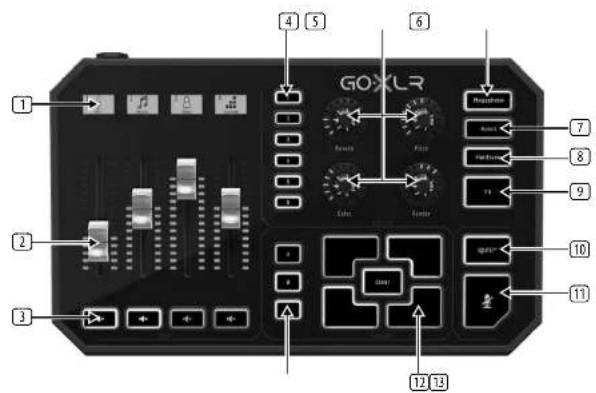
Controls
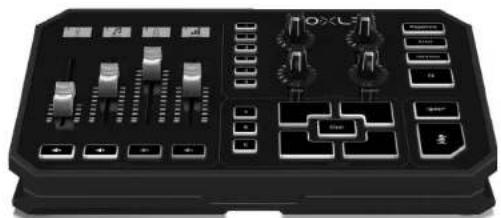
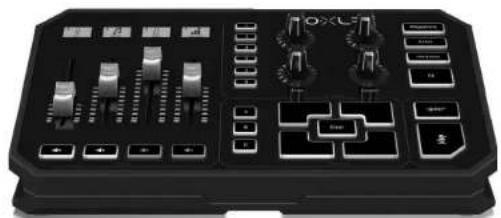
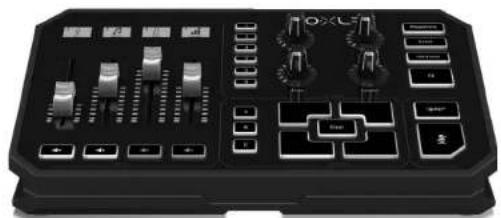
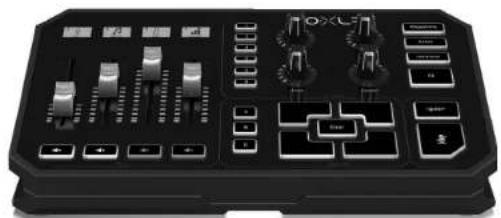
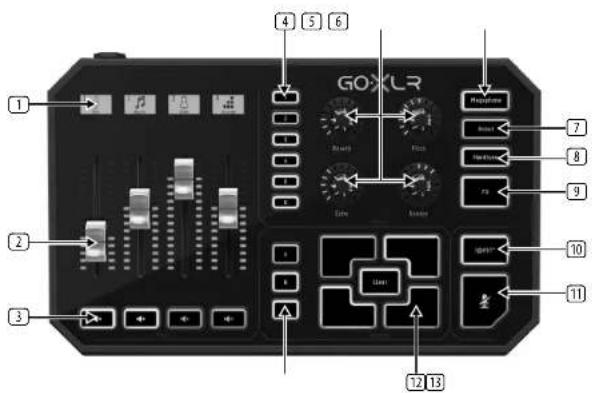
SCRIBBLE STRIPS for naming channels.
121 CHANNEL FADERS control individual channel levels in your mix.
[3] CHANNEL MUTE switches of the matching channel in the mixer.
VOICEFX PRESETS allow you to store up to six effects presets.
VOICE FX CONTROLS allow real-time control of the assigned effects parameter.
[8] MEGAPHONE button adds distortion to your voice like a megaphone.
31 ROBOT button transforms your voice into a machine-like robot.
HARDTUNE tunes your voice to the sound of your music or game.
FX turns on or of all voice FX.
(16) 12 × 5^ S^2 button lets you instantly censor and "bleep out" your mix.
COUGH' mutes your microphone while the button is held.
SAMPLE PADS hold selected samples and bumpers for instant recall. Hold a button to record a new sample, and then press to play back. Press CLEAR and then one of the four sample pads to clear that sample.
13 SAMPLE BANK organizes samples and bumpers into groups for instant recall.
16 17Quick Start Guide CXLR
Controls
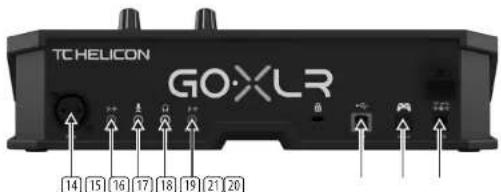
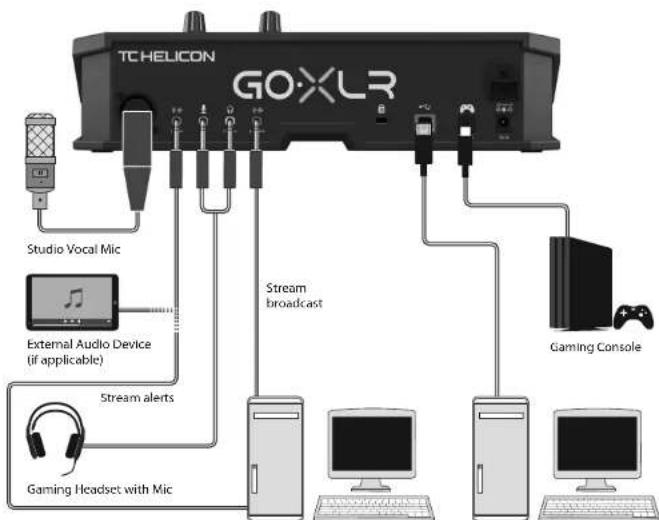
[11] XLR MICROPINT for audio input from professional microphones. For condenser-style microphones that require "phantom power", go to the AUDIO tab in the GO.XLR App and activate the "Condenser" setting under MICRO TYPE.
LINE IN for audio input from devices such as phones, tablets, computers, etc.
MIC input for connection to headset microphones. Typically, this headset connection will be a pin connector.
NOTE: If you intend to use the popular Blue Yeti® microphone, which has its own built-in headphones output, you should run that built-in headphones output into the GO XL's MIC Input. For Blue Yeti mics powered via USB, plug the USB connector directly into your computer for power, but do not select the Blue Yeti as an audio source on the computer. Instead, the Blue Yeti's headphones output will be the audio source for mixing inside GO XLR.
PHONES output jack for your headphones. Typically, the headphone connector will be a green connector.
LINEOUT contains an exact copy of your broadcast stream audio. This connection can be used to connect to a dedicated streaming computer or other devices like speakers.
USB input for PC connection, firmware updates and remote control with GO 9LRAp.
20 OPTICAL input for connection to SONY PlayStation 1 or Microsoft Xbox™ engines.
DC IN accepts power connection through the included 12V adapter.
Yes is a registered trademark of Buttkorphonics
"Transaction is a registered trademark or trademark of Sony Interactive Entertainment Inc. 2014" is a registered trademark of Sony Corporation.
Ripple is either a recognized trademark or a trademark of Microsoft Corporation in the United States and/or other countries.
EN
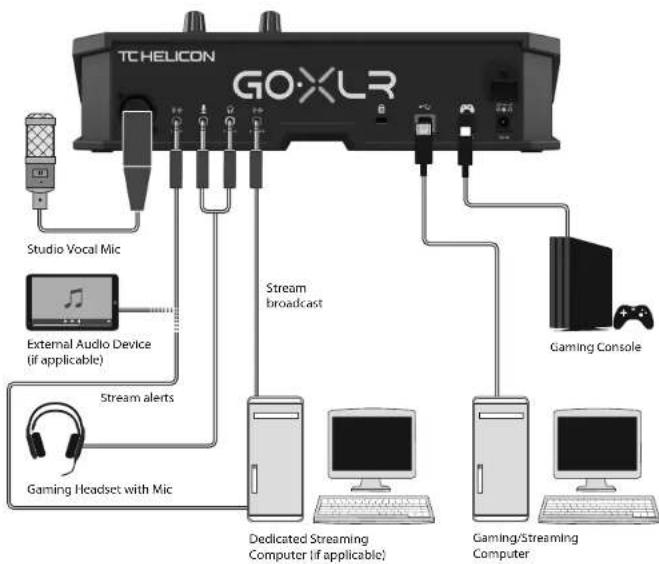
Connection Diagram
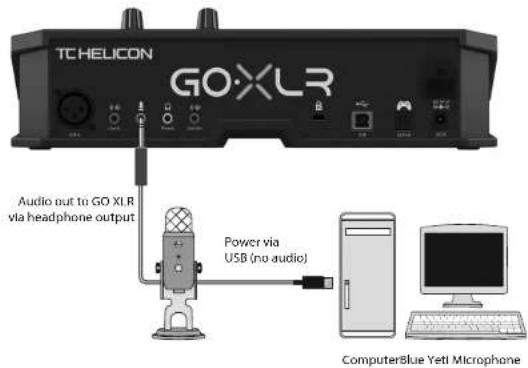
Blue Yeti Mix Recommended Connection
Please register your GO XLR
To register your GO XLR using the GO XLR app, launch GO XLR and click on the ACCOUNT button.
Registration of your product is NOT required to use GO XLR, update Firmware or contact support.
Getting support
If you still have questions about GO XLR after ter reading this Quick Start Guide and the Reference Manual, please get in touch with TC Helicon:

@Helicon_Gaming

TC Helicon Gaming

DISCORS
TC_Helicon_Gaming https://discord.og/8Ebg3Sp

TC_Helicon_Gaming
tc-helicon.com/brand/tchelon/support
Quick Start Guide

Specifications
| Analog Connections | |
| XLR In 1 x XLR, balanced | |
| Phantom power +48 V, swtchable via control app | |
| Line in 1 x 1/4 TBS, stereo | |
| Mic 1 x 1/4 TBS, biased for computer microphone input | |
| Phones 1 x 1/4 TBS, stereo | |
| Line Out 1 x 1/4 TBS, stereo | |
| Digital Connections | |
| USB 1 x USB 2.0, type B | |
| Optical 1 x Iodine | |
| Controls | |
| Machined faders 4 | |
| Backlit LCD scrltable strips 4 | |
| Rotational encoders 4 | |
| Lighting RGB | |
| Buttons 24 | |
| System / Processing | |
| A/D - D/A conversion 24-bit @ 48kHz | |
| Effects | Reverb, echo, pitch shifting, gender (fomant shifting), megaphone, robot, hardwire, sampler |
| Frequency response | 10 Hz to 20 kHz, 10/2 dB |
| Dynamic range | >118 dB |
| S/N ratio | >101 dB |
| Power Supply / Voltage | |
| Power input | Standard 12 VDC, center negative < 1 A (power supply included) |
| Adapter | 12 V DC / 1 A |
| Power consumption | 10 W |
| Dimensions / Weight | |
| Dimensions (3 x 6 x 5 D) | 82 x 285 x 170 mm [3.2 x 11.2 x 6.9"] |
| Weight 1.55 kg (3.41 lbs) | |
2021Quick Start Guide GoXLB
Bienvenido
Acerca de este documento
Esta Guia de inico ripo do yaydar a configurar, connectar y comenizar a operar su GO XLB.
Aplicación GO XLR
Yeh is a registered trademark of Blue Starphors
Physiology is a registered trademark in the form of Sony Interactive Entertainment Inc. SDRP is a registered trademark of Sony Corporation.
this is either a registered trademark or trademark of Microsoft Corporation in the United States and/or other countries.
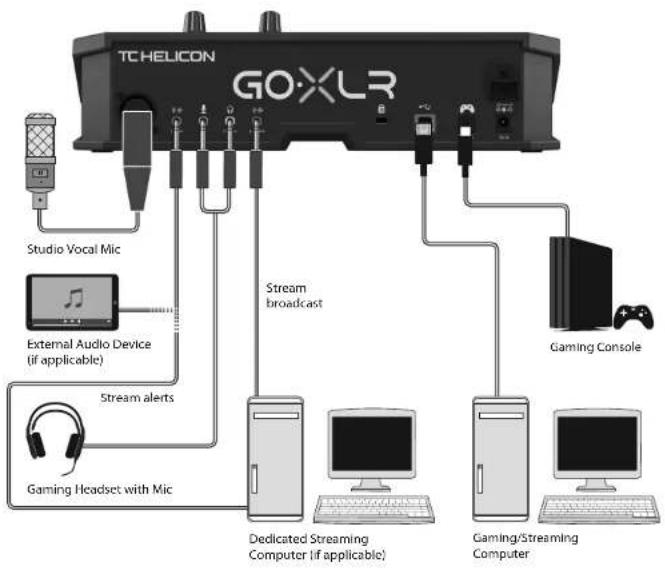
Diagrama de connexion
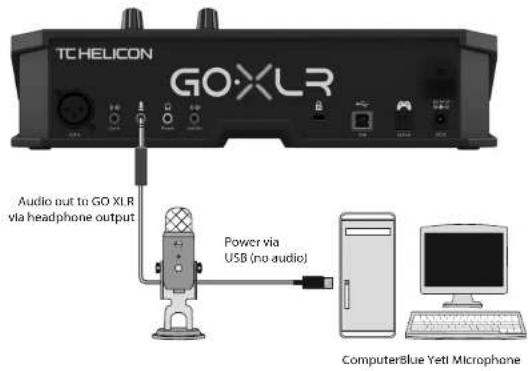
24 25Quick Start GuideGXL3
RegistresuG0XLR
ES
TC_Helicon_Gaming https://discord.og/8Ebg3Sp

TC_Helicon_Gaming
tc-helicon.com/brand/tchelicon/support
Bienvenue
TC_Hellican_Gaming https://discord.gg/8Ebg3Sp

edit
TC_Helicon_Gaming
tc-helicon.com/brand/tchelicon/support

30 31Quick Start GuideGO XLR
Willkommen
Uber这意味着 Dokument
This Quick Start Guide will help you set up, connect and begin operating your GO XLR.
GO XLR App
Schaltplan
Dedicated Streaming Computer if applicable)
Gaming/Streaming Computer
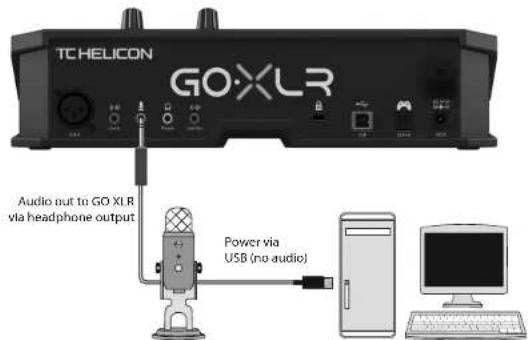
ComputerBlue Yeti Microphone
TC_Helicon_Gaming https://discord.og/8Ebg3Sp

TC_Helicon_Gaming
tc-helicon.com/brand/tchelicon/support
Bem-vinda
TC_Hellican_Gaming https://discord.gg/8Ebg35p

TC_Helicon_Gaming
tc-helicon.com/brand/tchelicon/support
4041OuK
Benvenuto
*Wavelength is an unit of regio-1000 units of molar mass of Microsoft Corporation (regi Scale Unit 7.0 in all pages).
Scarica l'app
TC_Helicon_Gaming https://discord.qq/8Ebg3Sp

TC Helicon Gaming
Ic-heliton.com/brand/tcheliton/support
Welkom
Over dit document
Blue Yeti Mic aaabevoien verbinding
Registraruw GO XLR
On um GW XLR to registreren met de G0 XR- app, start u G0 XRlen kiftk ut ap de ACCount-Knet.
TC_Hellican_Gaming https://discord.gg/8Ebg35p

TC_Helicon_Gaming
tc-helicon.com/brand/tchelicon/support
NL
50 51OuK Stur GueGxGXLH
Välkommen
Om detta dokument
TC_Helicon_Gaming https://discord.gg/8Ebq3Sp

TC Helicon Gaming
Ic-heliton.com/brand/tcheliton/support
Witamy
O tym dokumencie
Ta skrocona struktura obsglu pomo zamoekshuguroac, pedlazyckiy rozopocz struktura urzadzanka GO XLR.
GO XLR App
A full reference manual for GO XLR is also available on the Minimum Hardware: downloads tab at http://helican.com/products/gxpr.
Sterowanica
57Quick Start
TC_Hellicon_Gaming https://discord.gg/8Ebg3Sp

TC_Helicon_Gaming
tc-helicon.com/brand/tchelon/support
PL
60 61Quick Start GuideGO XLR
FEDERAL COMMUNICATIONS COMMISSION COMPLIANCE INFORMATION
Behringer
GO XLR
Responsible Party Name: Music Tribe Commercial NV Inc.
Address: 5270 Procyon Str
Las Vegas NV 89118,
United States
Phone Number: +17028008290
GO XLR
This equipment has been tested and found to comply with the limits for a Class 5 digital device, pursuant to part 15 of the FCC Rules. These limits are designed to provide reasonable protection against harmful interference in a residential installation. This equipment generates, uses and can radiate radio frequency energy and, if not installed and used in accordance with the instructions, may cause harmful interference to radio communications. However, there is no guarantee that interference will not occur in a particular installation. If this equipment does cause harmful interference to radio or television reception, which can be determined by turning the equipment off and on, the user is encouraged to try to correct the interference by one or more of the following measures:
Reorient or relocate the receiving antenna.
- Increase the separation between the equipment and receiver.
- Connect the equipment into an outlet on a circuit different from that to which the receiver is connected.
- Consult the dealer or an experienced radio/TV technician for help.
This device complies with Part 15 of the FCC rules. Operation is subject to the following two conditions:
(1) this device may not cause harmful interference, and (2) this device must accept any interference received, including interference that may cause undesired operation.
Important information:
Changes or modifications to the equipment not expressly approved by Music Tribe can void the user's authority to use the equipment.

Herby, Music Tribe declares that this product is in compliance with Directive 2014/35/EU, Directive 2014/30/EU, Directive 2011/65/EU and Amendment 2015/863/EU, Directive 2012/19/EU, Regulation 519/2012 BEACH SFHC and Directive 1907/2006/EC.
Full text of EU DoC is available at https://community.musictribe.com/
EU Representative: Music Trade Brands DK/AS
Address: Ilb Sparg Oles Gade 17, DK-8200 Arushur, Nzéthu