Mic Mechanic 2 - Hi-fi system TC HELICON - Free user manual and instructions
Find the device manual for free Mic Mechanic 2 TC HELICON in PDF.


| Product type | Vocal effects pedal / Hi-Fi system |
| Brand | TC Helicon |
| Model | Mic Mechanic 2 |
| Power supply | 9 V DC (300 mA min) or 4 AA batteries (LR6) |
| Power consumption | 2.7 W |
| Microphone input | Balanced XLR, impedance 2.68 kΩ, level -42 dBu to +1 dBu |
| Output | Balanced XLR, impedance 200/100 Ω, level +1 dBu |
| Frequency response | 20 Hz - 20 kHz (+0 / -0.3 dB) |
| Dynamic range | > 104 dB |
| Signal-to-noise ratio | > 104 dB |
| Effects | Echo (Tape, Digital, Slap), Reverb (Room, Hall), Pitch correction |
| Additional functions | Tone (adaptive EQ, de-essing, noise gate), Auto Gain, 24 V phantom power, Tap Tempo, Mic Control |
| Display | Battery LED (green/yellow/red), On/Off LED |
| Connectivity | Micro USB for firmware update |
| Operating temperature | 0 °C to 50 °C |
| Storage temperature | -30 °C to 70 °C |
| Maximum humidity | 90 % non-condensing |
| Safety | Safety instructions included, do not open |
| Cleaning | Dry cloth |
| Warranty | Limited warranty (see Music Tribe website) |
Frequently Asked Questions - Mic Mechanic 2 TC HELICON
User questions about Mic Mechanic 2 TC HELICON
0 question about this device. Answer the ones you know or ask your own.
Ask a new question about this device
Download the instructions for your Hi-fi system in PDF format for free! Find your manual Mic Mechanic 2 - TC HELICON and take your electronic device back in hand. On this page are published all the documents necessary for the use of your device. Mic Mechanic 2 by TC HELICON.
USER MANUAL Mic Mechanic 2 TC HELICON
Ultra-Simple Battery-Powered Vocal Effects Stompbox with Echo, Reverb and Pitch Correction User
EN
ES
EN
Important Safety
Instructions
CAUTION
RISK OF ELECTRIC SHOCK! DO NOT OPEN!
ATTENTION
RISQUE D' ELECTROCUTION!
NE PAS OUVRIR!
!
Terminals marked with this symbol carry electrical current of sufficient magnitude to constitute risk of electric shock.
Use only high-quality professional speaker cables with 14 "TS or twist-locking plugs pre-installed. All other installation or modification should be performed only by qualified personnel.
This symbol, wherever it appears, alerts you to the presence of uninsulated dangerous voltage inside the
enclosure - voltage that may be sufficient to constitute a risk of shock.

This symbol, wherever it appears, alerts you to important operating and maintenance instructions in the
accompanying literature. Please read the manual.

Caution
To reduce the risk of electric shock, do not remove the top cover (or the rear section).
No user serviceable parts inside. Refer servicing to qualified personnel.

Caution
To reduce the risk of fire or electric shock, do not expose this appliance to rain and
moisture. The apparatus shall not be exposed to dripping or splashing liquids and no objects filled with liquids, such as vases, shall be placed on the apparatus.

Caution
These service instructions are for use by qualified service personnel only.
To reduce the risk of electric shock do not perform any servicing other than that contained in the operation instructions. Repairs have to be performed by qualified service personnel.
- Read these instructions.
- Keep these instructions.
- Heed all warnings.
- Follow all instructions.
- Do not use this apparatus near water.
- Clean only with dry cloth.
- Do not block any ventilation openings. Install in accordance with the manufacturer's instructions.
-
Do not install near any heat sources such as radiators, heat registers, stoves, or other apparatus (including amplifiers) that produce heat.
-
Do not defeat the safety purpose of the polarized or grounding-type plug. A polarized plug has two blades with one wider than the other. A grounding-type plug has two blades and a third grounding prong. The wide blade or the third prong are provided for your safety. If the provided plug does not fit into your outlet, consult an electrician for replacement of the obsolete outlet.
-
Protect the power cord from being walked on or pinched particularly at plugs, convenience receptacles, and the point where they exit from the apparatus.
-
Use only attachments/accessories specified by the manufacturer.

- Use only with the cart, stand, tripod, bracket, or table specified by the manufacturer, or sold with the apparatus. When a cart is used, use caution when moving the cart/apparatus combination to avoid
injury from tip-over.
- Unplug this apparatus during lightning storms or when unused for long periods of time.
- Refer all servicing to qualified service personnel. Servicing is required when the apparatus has been damaged in any way, such as power supply cord or plug is damaged, liquid has been spilled or objects have fallen into the apparatus, the apparatus has been exposed to rain or moisture, does not operate normally, or has been dropped.
- The apparatus shall be connected to a MAINS socket outlet with a protective earthing connection.
- Where the MAINS plug or an appliance coupler is used as the disconnect device, the disconnect device shall remain readily operable.

- Correct disposal of this product: This symbol indicates that this product must not be disposed of with household waste, according to the WEEE Directive (2012/19/EU) and your national law. This product
should be taken to a collection center licensed for the recycling of waste electrical and electronic equipment (EEE). The mishandling of this type of waste could have a possible negative impact on the environment and human health due to potentially hazardous substances that are generally associated with EEE. At the same time, your cooperation in the correct disposal of this product will contribute to the efficient use of natural resources. For more information about where you can take your waste equipment for recycling, please contact your local city office, or your household waste collection service.
18. Do not install in a confined space, such as a book case or similar unit.
19. Do not place naked flame sources, such as lighted candles, on the apparatus.
- Please keep the environmental aspects of battery disposal in mind. Batteries must be disposed-of at a battery collection point.
- This apparatus may be used in tropical and moderate climates up to 45^ .
LEGAL DISCLAIMER
Music Tribe accepts no liability for any loss which may be suffered by any person who relies either wholly or in part upon any description, photograph, or statement contained herein. Technical specifications, appearances and other information are subject to change without notice. All trademarks are the property of their respective owners. Midas, Klark Teknik, Lab Gruppen, Lake, Tannoy, Turbosound, TC Electronic, TC Helicon, Behringer, Bugera, Aston Microphones and Coolaudio are trademarks or registered trademarks of Music Tribe Global Brands Ltd. © Music Tribe Global Brands Ltd. 2022 All rights reserved.
LIMITED WARRANTY
For the applicable warranty terms and conditions and additional information regarding Music Tribe's Limited Warranty, please see complete details online at community.musictribe.com/pages/support#warranty.
ES
BESCHRANKTE GARANTIE
Ultra-Simple Battery-Powered Vocal Effects Stompbox with Echo, Reverb and Pitch Correction User

1. Controls
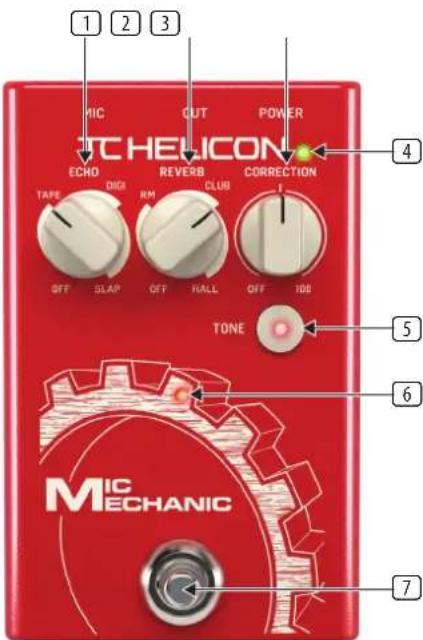
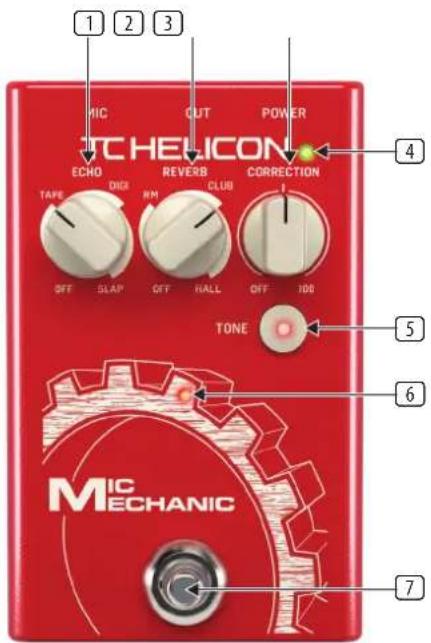
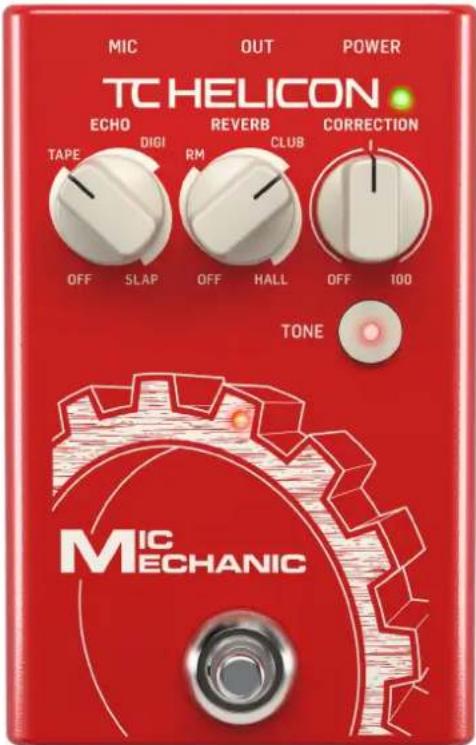
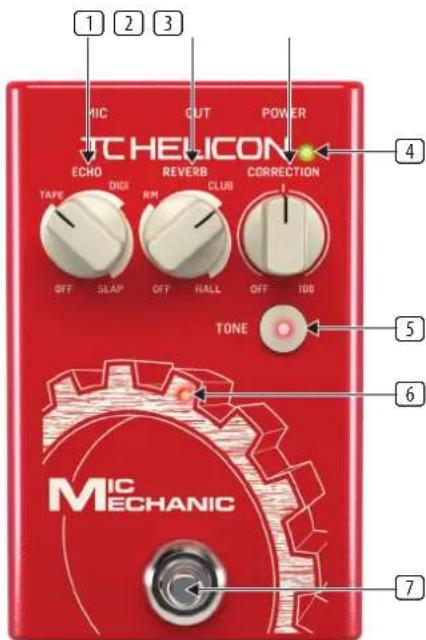
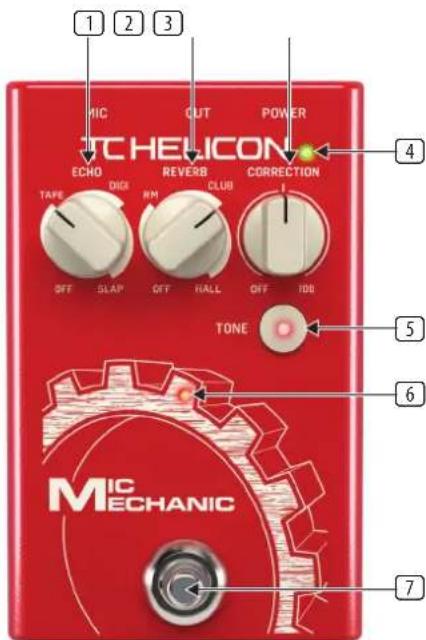
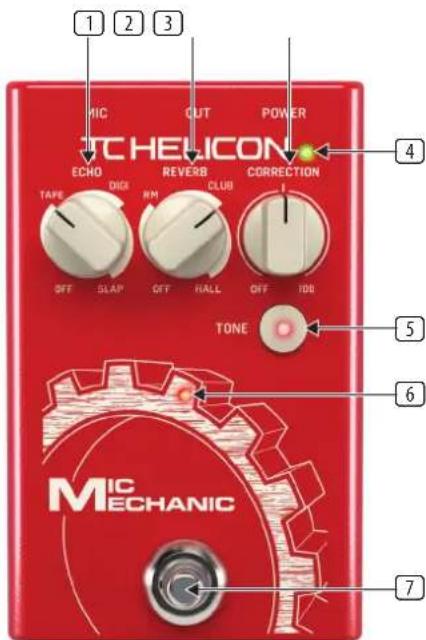
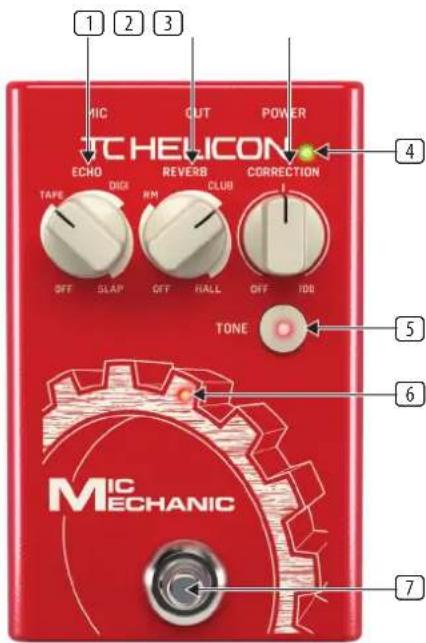
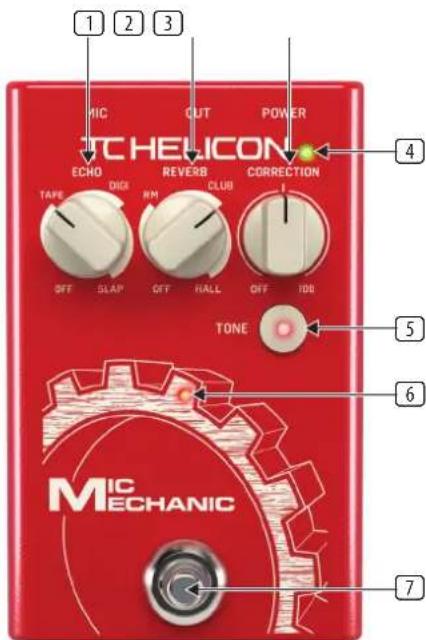
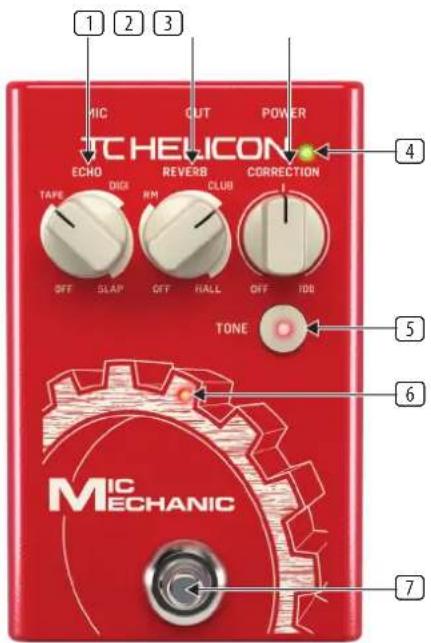
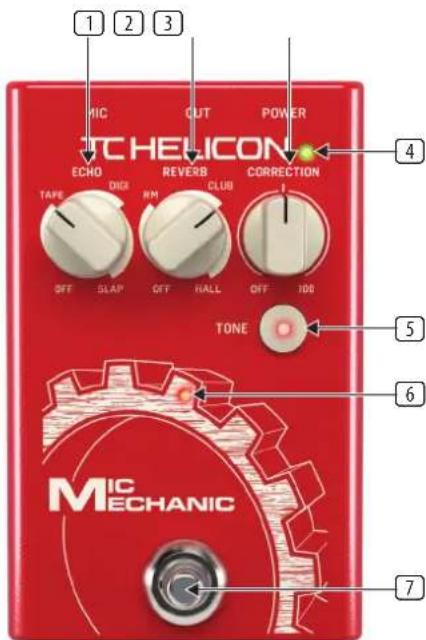
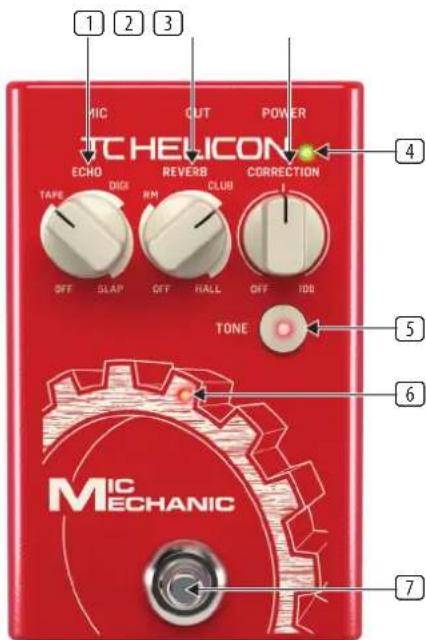
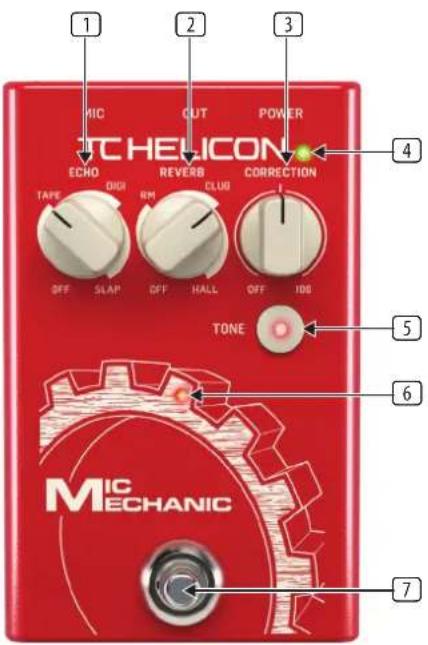
ECHO knob selects the type and amount of echo effect on your voice. Adjusting the knob within your preferred echo style determines how loud the echoes will be. Turning the knob fully counterclockwise turns the echo effect off. There are 3 types of echo available:
- Tape - simulates the warm sound of analog tape echo
Digital - creates a pristine, exact replication of the original signal - Slap - creates a single, quick echo effect
2 REVERB knob selects the type and amount of reverb effect on your voice. The 3 types of reverb appear in order from the smallest space (Room) to the largest (Hall). Adjusting the knob within your preferred reverb space determines how pronounced the effect will be. Turning the knob fully counterclockwise turns the reverb off.
3 CORRECTION knob adjusts the amount of pitch correction. With the knob at the center 12:00 position, the effect will provide subtle pitch support without noticeable or unnatural artifacts. Turn the knob all the way up for a more aggressive effect, or fully counterclockwise to turn the effect off.
4 BATTERY LED indicates the battery level, with green showing full life, yellow being partial life, and red to alert that the batteries should be changed.
TONE button engages a preset combination of adaptive EQ, de-essing, and noise gate. "Normal" and "Less Bright" settings can be toggled by holding the Tone button and pressing the footswitch.
ON/OFF LED lights when the effect is engaged, and flashes in rhythm to the delay tempo when using the tap tempo function.
7 FOOTSWITCH bypasses the Reverb, Echo and Correction effects, but does not affect the Tone status.
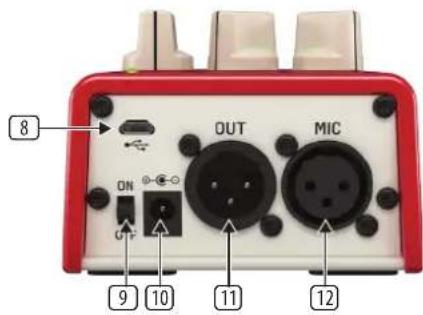
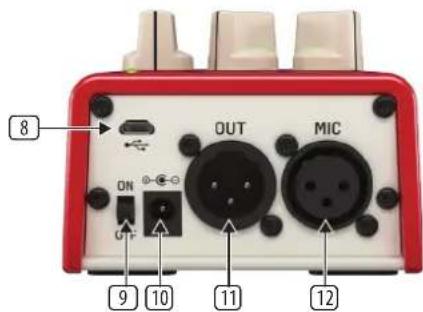
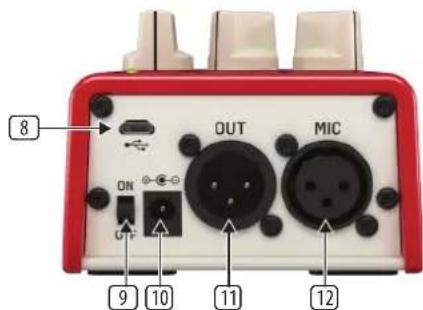
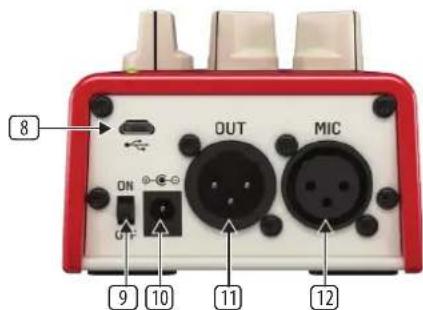
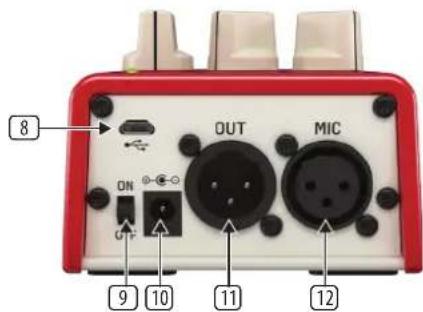
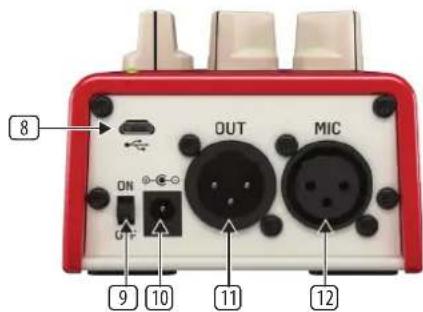
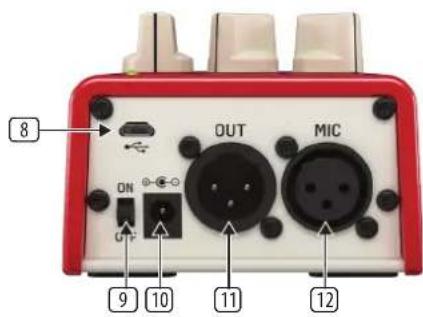
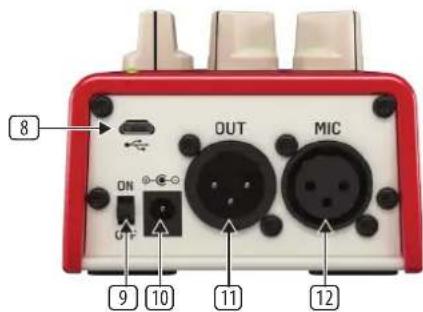
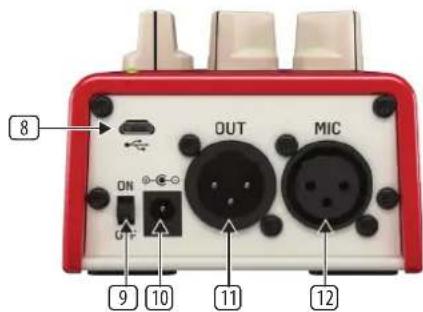
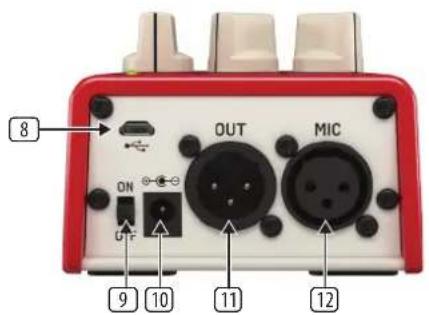
USB input accepts a micro USB cable for connection to a computer. Use the VoiceSupport 2 application to install firmware updates, and for other features depending on your product. Download VoiceSupport 2 from tc-helicon.com/p/POCMP
9 ON/OFF switch powers the pedal on and off.
10 POWER input accepts a 9 V power cable (not included).
11 OUT jack accepts a balanced XLR cable for connection to a mixer or active speaker.
MIC input jack accepts a balanced XLR cable to connect your microphone.
2. Operation

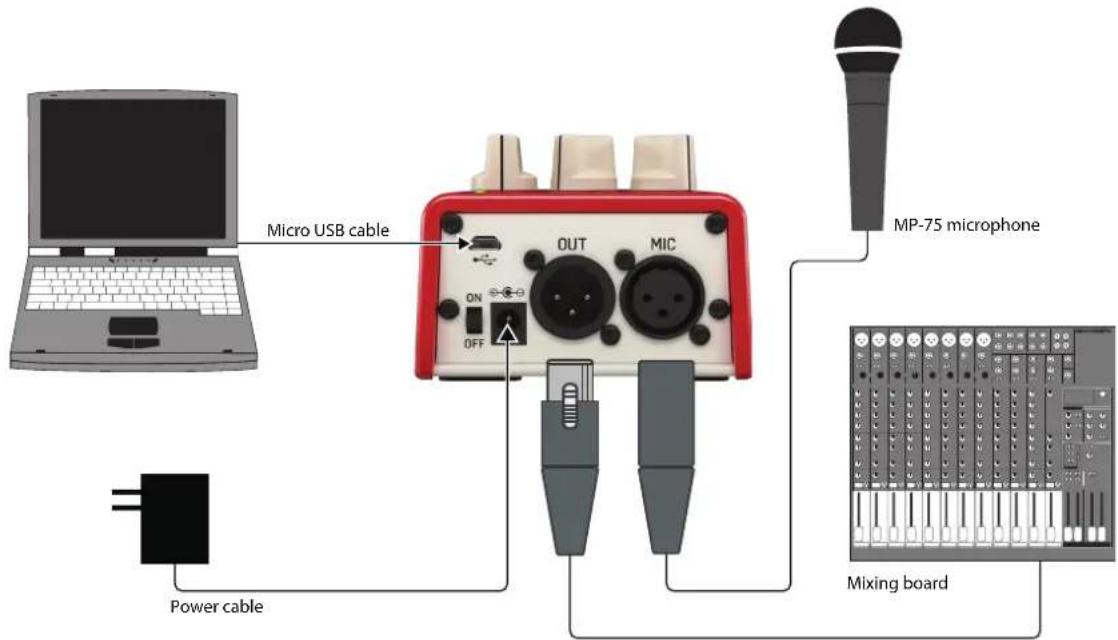
Connection
Connect a microphone to the MIC jack
- Connect the OUT jack to a mixer, interface or active speaker
Connect the power cable (optional)
Connect a micro USB cable to a computer (optional)
Tap Tempo
The echo tempo can be manually adjusted to match the song you're performing. Simply hold the Footswitch down for about 2 seconds to enter Tap Mode. The on/off LED will flash in rhythm with the current tempo. Tap the footswitch a few times in rhythm with your desired tempo, and on the last tap, hold your foot on the switch for around 2 seconds to exit Tap Mode.
Note - the pedal will not "time out" of Tap Mode, so you can keep this mode active if you intend to leave the effect on throughout a song or set, allowing you easier access to this function.
Adjusting Echo Feedback
Feedback is the parameter that controls how many repeats are heard in the echo effect. By holding the Tone button and turning the Correction knob, you can adjust the feedback length. As soon as you release the Tone button, the Correction knob will resume its normal function.
Changing the Batteries
The Mic Mechanic 2 can operate on 4 AA batteries. Remove the single screw on the bottom of the pedal to open the battery door. Make sure to observe correct polarity when inserting the batteries.
Auto Gain
Mic Mechanic 2 will automatically adjust the gain setting for your microphone, eliminating the need for manual adjustments and ensuring that a good signal is passed to the mixer without any unwanted distortion.
24 V Phantom Power
Phantom power is always active on the Mic Mechanic 2. This will power condenser microphones, but will not affect dynamic mics either.
Mic Control
Mic Control allows you to control the effect's on/off status via an MP-75 microphone. Press and hold the footswitch while powering up the unit to toggle Mic Control.
Note that when using a condenser microphone, Mic Control should be disabled to prevent unwanted on/off switching.
3. Specifications
Input Mic
Input Impedance: Balanced: 2.68 kOhm
Mic Input Level @ 0 dBFS: -42 dBu to +1 dBu
EIN @ Max Mic Gain Rg = 150 Ohm: -126 dBu
Mic input SNR: >104 dB
Output
Output Impedance, Bal./Unbal.: 200/100 Ohm
Power Consumption: 2.7 W
Requirements
Operating Temperature: 32^ to 122^ (0^ to 50^)
Storage Temperature: -22°F to 167°F (-30°C to 70°C)
Humidity Max.: 90% non-condensing
Size & Weight
Dimensions: 5.4^ × 3.5^ × 2.3^
(140× 90× 60mm)
Weight: 0.92 lb. (420 g)
Due to continuous development, these specifications are subject to change without notice.

Warning!
- As with all small batteries, the batteries used with this product should be kept away from small children who still put things in their mouths. If they are swallowed, promptly call your local poison control center.
Always purchase the correct size and grade of battery most suitable for intended use. - Replace all batteries of a set at the same time.
- Clean the battery contacts and also those of the device prior to battery installation.
-
Ensure the batteries are installed correctly with the regard to polarity (+ and -).
Always remove battery if consumed or if product is to be left unused for a long time. -
Replacement of a battery with an incorrect type that can defeat a safeguard! Replace only with the same or equivalent type!
- Risk of fire or explosion if the battery is replaced by an incorrect type.
- disposal of a battery into fire or a hot oven, or mechanically crushing or cutting of a battery, that can result in an explosion;
- Leaving a battery in an extremely high temperature surrounding environment that can result in an explosion or the leakage of flammable liquid or gas; and
- A battery subjected to extremely low air pressure that may result in an explosion or the leakage of flammable liquid or gas.
- Attention should be drawn to the environmental aspects of battery disposal.
Manual de uso
MIC MECHANIC 2
Ultra-Simple Battery-Powered Vocal Effects Stompbox with Echo, Reverb and Pitch Correction User
1. Controles
Ultra-Simple Battery-Powered Vocal Effects Stompbox with Echo, Reverb and Pitch Correction User
1. Réglages
EIN @ Max Mic Gain Rg = 150: -126 dBu
Dimensions: 5.4^ × 3.5^ × 2.3^
(140× 90× 60mm)
Poids: 0.92 lb. (420 g)
Ultra-Simple Battery-Powered Vocal Effects Stompbox with Echo, Reverb and Pitch Correction User
1. Bedienelemente
Ultra-Simple Battery-Powered Vocal Effects Stompbox with Echo, Reverb and Pitch Correction User
1. Controles

Ultra-Simple Battery-Powered Vocal Effects Stompbox with Echo, Reverb and Pitch Correction User
1. Controlli
Ultra-Simple Battery-Powered Vocal Effects Stompbox with Echo, Reverb and Pitch Correction User
1. Bediening
NL
Ultra-Simple Battery-Powered Vocal Effects Stompbox with Echo, Reverb and Pitch Correction User
1. Kontroller
Ultra-Simple Battery-Powered Vocal Effects Stompbox with Echo, Reverb and Pitch Correction User
1. Sterowanica
Ultra-Simple Battery-Powered Vocal Effects Stompbox with Echo, Reverb and Pitch Correction User
JP
1. メンロール
1 工一工一工一工一工一工一工一工一工一工一工一工一工一工一工一工一工一工一工一工一工一工一工一工一工一工一工一工一工一工一工一工一工一工一工一工一工一工一工一工一工一工一工一工一工一工一工一工一工一工一工一
Ultra-Simple Battery-Powered Vocal Effects Stompbox with Echo, Reverb and Pitch Correction User
1. 控制