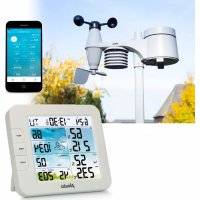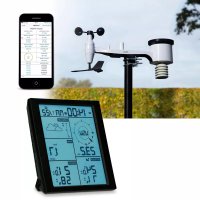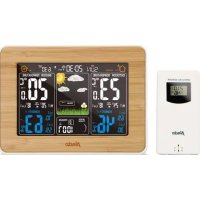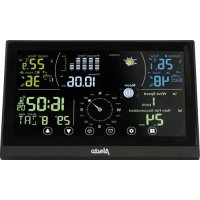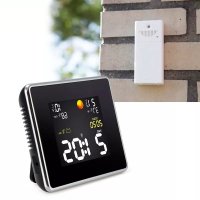
WS1550 - Weather Station ALECTO - Free user manual and instructions
Find the device manual for free WS1550 ALECTO in PDF.



User questions about WS1550 ALECTO
0 question about this device. Answer the ones you know or ask your own.
Ask a new question about this device
Download the instructions for your Weather Station in PDF format for free! Find your manual WS1550 - ALECTO and take your electronic device back in hand. On this page are published all the documents necessary for the use of your device. WS1550 by ALECTO.
USER MANUAL WS1550 ALECTO
measuring range air humidity:
25% 95% rel. air humidity
resolution: 1 %
power supply:
mains voltage, 230Volt
output 4,5 VDC, 200mA
Batteries:
3x 1,5V batterij, formaat AA, alkaline
connection of outdoor units:
max. 3
clock:
DCF-77 Time signal, Quartz backup
Outdoor unit:
measuring range:
$$ - 3 5 ^ {\circ} \mathrm {C} \text {t o} + 7 0 ^ {\circ} \mathrm {C} (- 3 1 ^ {\circ} \mathrm {F} \text {t o} + 1 5 7. 9 ^ {\circ} \mathrm {F}) $$
$$ - 2 0 ^ {\circ} \mathrm {C} - 0 ^ {\circ} \mathrm {C}: \pm 2 ^ {\circ} \mathrm {C} $$
$$ 0 ^ {\circ} \mathrm {C} - 4 0 ^ {\circ} \mathrm {C}: \pm 1 ^ {\circ} \mathrm {C} $$
$$ 4 0 ^ {\circ} \mathrm {C} - 6 0 ^ {\circ} \mathrm {C}: \pm 2 ^ {\circ} \mathrm {C} $$
$$ \text {r e s o l u t i o n :} 0. 1 ^ {\circ} \mathrm {C} $$
measuring range air humidity:
25% 95% rel. air humidity
resolution: 1 %
power supply:
2x 1,5V battery, format AAA, alkaline
transmit frequency / range:
433MHz / up to 30 meter.
data transmissie every 5 min.
INSTALLATION
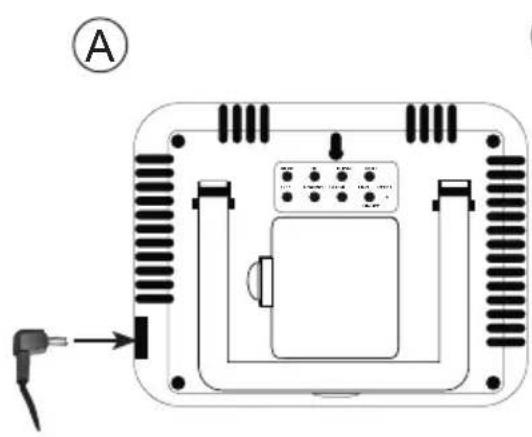
Connect the supplied 4.5VDC power adaptor (A) or insert the batteries according to the instructions below :
Indoor unit power supply:
Connect the supplied 4.5VDC power adaptor (A) or insert the batteries according to the instructions below:
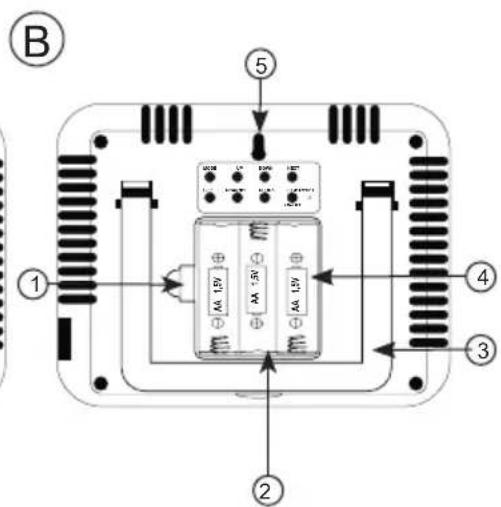
- Open the battery compartment of the indoor unit by carefully pushing the retaining clip at the rear downward (1).
- Remove the battery cover and insert 3 batteries, type alkaline, size AA, 1.5V (2), paying attention to the polarity. Batteries are not included.
- Click the battery cover back onto the weather station.
As soon as the indoor unit starts up, the weather icons start flashing in the display.
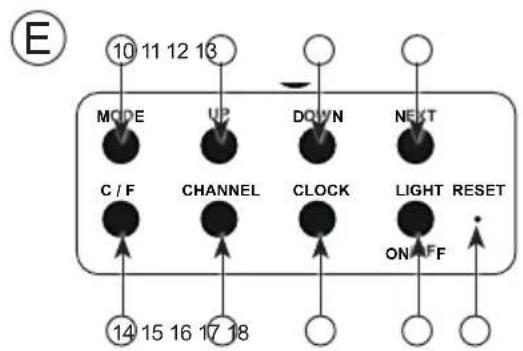
- Press the UP and DOWN (11 and 12) buttons to select the icon for the actual weather conditions. See also 'WEATHER FORECAST'.
- Press the "CLOCK" (16) button to confirm your selection.
Now the reception icon for the outdoor units starts flashing, while the receiver for the outdoor units starts receiving.
Outdoor unit power supply (D):
- Open the battery compartment by sliding the cover at the front downward.
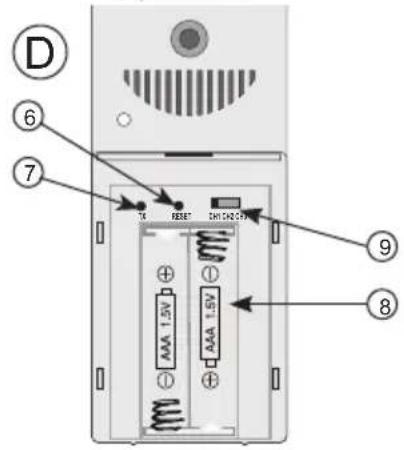
- Insert 2 batteries, type AAA, 1.5 Volt, as indicated inside the battery compartment (D8). Batteries are not included.
- Press the TX (7) button to register the outdoor unit. Upon leaving the factory, the outdoor unit is set to channel 1 (9).
- Replace the battery cover onto the outdoor unit.
Now press and hold the Channel button (15) for 3 seconds to start the reception of the DCF-77 clock signal; the icon (25) starts flashing. The number of arcs shown in the icon depends on how strong the signal reception is.
The receiver operates for 10 minutes and the unit then switches back to the reception of the outdoor unit.
Attention:
Alkaline batteries will power the WS-1550 approx. 4 months; that's why it's recommended to power the WS-1550 using the power adaptor and to insert the batteries only as a backup.
Positioning tips:
- Never place the indoor unit in direct sunlight and keep it away from heat radiating objects (lights, heaters, etc.)
- For a strong reception of the radio controlled time signals, never place the indoor unit next to large metal surfaces or devices with strong electromagnetic fields.
- The outdoor unit is not waterproof. Always place this unit on a spot protected against rain and wind.
- The distance between the indoor and outdoor unit should be no more than 30 meters
Mounting:
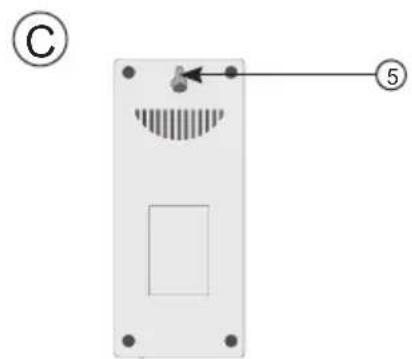
In case of wall-mounting, the indoor and outdoor unit may be suspended from a single screw (see B5 and C5).
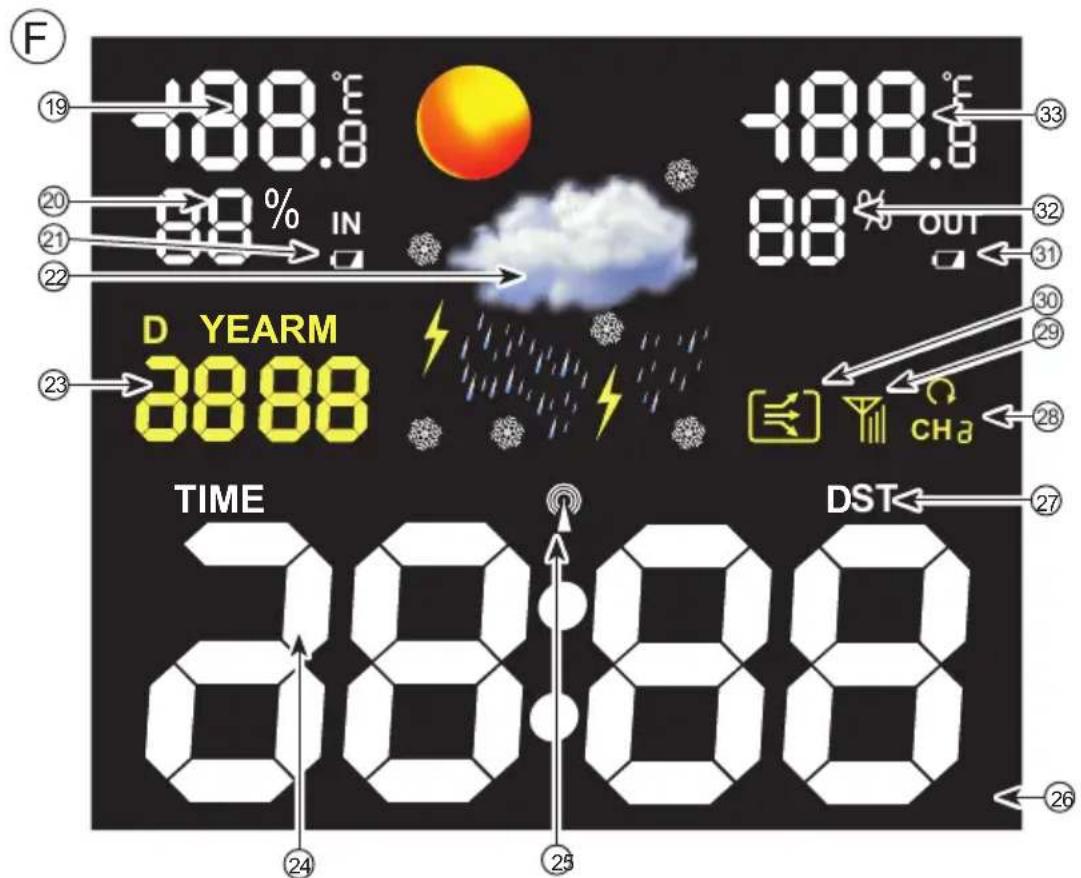
DISPLAYS (see fig. F)
General:
The actual indoor temperature with the humidity, the actual outdoor temperature with the humidity and the time are only displayed correctly after both the indoor and outdoor unit have been functional for several hours and have not been moved. The weather forecast will be displayed correctly after at least 24 hours.
Screen display:
The weather forecast in the display is represented by icons. The display can also show 4 main functions, namely: Indoor and outdoor temperature, indoor and outdoor humidity, date and time. You may use the "light on/off" (17) button of the WS-1550 to enable the background lighting and the "MODE" (10) button to first show the "date" function and then the "year" function. Upon receiving the DCF signal, the date will appear.
(DCF) time:
When the symbol is illuminated in the centre of the time (25), the clock is synchronised with the radio controlled atomic time signal sent by the 'DCF77' station. If this symbol is not illuminated, the time is displayed by the internal clock of the WS-1550. The DCF77 station is situated in Frankfurt, Germany. The reception of the DCF77 time is basically possible in the whole of Western Europe.
Temperature with humidity:
At (19) the indoor temperature is displayed.
At (20) the indoor humidity is displayed in %.
At (33) the outdoor temperature is displayed. At (32) the outdoor humidity is displayed in %
Press the C/F button (14) to switch the display between °Celsius and °Fahrenheit.
Weather forecast:
At (22) the weather forecast is displayed, represented by icons:
The WS-1550 calculates the weather for the coming 12-24 hours based on the temperature and humidity. The weather development is shown by the trend arrows (30).
After connecting the power adaptor or inserting the batteries, the actual weather condition must be set by selecting the correct icon. Choose the cloud in case of cloudy circumstances, the sun for sunny weather, etc.
TO ADJUST THE WEATHER ICONS:
Press and hold the NEXT (13) button for 3 seconds until the display starts flashing. Press the UP (11) or DOWN (12) button to adjust the weather icons to the actual weather conditions. Press the CLOCK (16) button to save your setting. The weather forecast is now set.
The weather forecast applies to an area of approx. 30-50km around the WS-1550. This weather forecast has an accuracy of 70 - 75% . Keep in mind a correct weather forecast display is not guaranteed.
The WS-1550 uses the following weather forecasts:

Sunny
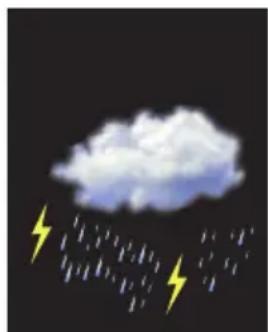
Storm

Snow


Rain
Cloudy
Outdoor unit display:
Press CHANNEL (15) to switch the display between the channels (CH1/2/3). Select the channel on which the outdoor unit is set (9). When selecting (28), the data displayed per channel changes. This is only useful when using multiple outdoor units.
Other:
Display lighting:
When the indoor unit is powered by the power adaptor, the display lighting is enables continuously. Press the On/Off (17) button to enable or disable the background lighting. When the indoor unit is powered only by the batteries, the display lighting only switches on by pressing the On/Off (17) button. To conserve battery power, the display lighting turns off after approx. 5 seconds.
Battery alert:
When the battery indication 'IN' (21) illuminates, the batteries of the indoor unit must be replaced. When the battery indication 'OUT' (31) illuminates, the batteries in the outdoor unit with the concerned number must be replaced. Additionally, the LED on the outdoor unit starts flashing when the battery capacity is too low.
Reception of radio time signals:
The antenna symbol (25) shows that the DC-77 receiver is enabled for reception. Upon start-up, the receiver will be enabled for 10 minutes. After that, the receiver switches on for time synchronization each day at 2am, 3am, 8am, 12pm, 2pm and 8pm.
You may also manually switch on the DC-77 receiver by pressing and holding the DOWN (12) button for 3 seconds.
To register outdoor units:
Now press and hold the CHANNEL (15) button for at least 3 seconds until the display icon 29) starts flashing. Set the outdoor unit to the desired channel (9) and then press the TX (7) button behind the battery cover. The measured value with the channel number appears in the display of the indoor unit. Now press and hold the CHANNEL (15) button for at least 3 seconds to confirm the input. The outdoor unit is now registered.
Display in ^ C or ^ F :
Briefly press the C/F (14) button on the indoor unit to display the temperature in Celsius or in Fahrenheit.
OTHER FUNCTIONS
To manually set the clock:
Only follow these instructions when the WS-1550 doesn't receive the DCF77 signal.
- Press and hold the CLOCK (16) button for at least 3 seconds until the year display starts flashing.
- Use the UP and DOWN (11 and 12) buttons to adjust the following settings one after the other and confirm each setting by briefly pressing the CLOCK (16) button:
year
- month
day
hours
- minutes
- After pressing the CLOCK button for the last time, the time and date are set.
To manually activate the DCF-77 receiver: With the WS-1550 in standby mode, press and hold the DOWN (12) button for 3 seconds to activate the radio receiver again for the reception of the atomic time. However, the receiver of the WS-1550 automatically checks whether the signal is being received. The daily synchronization with the DCF-77 station occurs at 2am, 3am, 8am, 12pm, 2pm and 8pm.
Around 2am and 3am the reception sensitivity is the highest.
EXPANSION
You may connect up to 3 outdoor units to the indoor unit. You can then read the temperature and humidity at 3 different locations on the indoor unit (e.g. in your greenhouse, in animal accommodations, in different bedrooms).
Additional outdoor units are available via the service department of Alecto: www.alecto.nl.
To register additional outdoor units:
- Insert 2 batteries into the new outdoor unit according to section INSTALLATION - Outdoor unit power supply.
- Slide the channel switch at the rear of the outdoor unit (9) to the desired position CH 1, 2 or 3, provided the position is not yet in use.
- Now press and hold the CHANNEL (15) button (indoor unit) for at least 3 seconds until the display icon 29 starts flashing.
- For each outdoor unit, now press the TX (7) button behind the battery cover. The measured value with the channel number appears in the display of the indoor unit.
- Now press and hold the CHANNEL (15) button to confirm the input. The outdoor unit is now registered.
ATTENTION: Don't use the same channel twice; the outdoor units will interfere with each other.
BATTERY REPLACEMENT
Indoor unit:
If you remove the batteries from the indoor unit while the adaptor is disconnected, all memories and settings will be erased. That's why it's recommended to connect the adaptor (or keep it connected) before removing the batteries from the indoor unit.
Outdoor unit:
After replacing the batteries in the outdoor unit(s), the outdoor unit must again be registered on the indoor unit.
To do this, follow the instructions in the section 'To register additional outdoor units'.
SYSTEMEEM FAILURE
In case of a possible system failure, the indoor and/or outdoor unit must be reset. Press the RESET (6) button of the outdoor unit. The indication LED on the front panel will illuminate for 1 second to inform you. The outdoor unit is now reset.
Use a paperclip to press the reset button of the indoor unit. This button is located behind the reset hole at the rear. RESET (18). The display will switch off and the indoor unit is restarted. All connection procedures must now be repeated.
If this doesn't solve the problem, please contact the Alecto service department: www. alecto.nl
ENVIRONMENT
At the end of its lifespan, this product should not be discarded as normal domestic waste, but is must be taken to a collection point for the recycling of electric and electronic equipment.
Don't throw away exhausted batteries, take them to your local depot for small chemical waste.

DECLARATION OF CONFORMITY
Hereby, Hesdo declares that the radio equipment type Alecto WS-1550 is in compliance with directive 2014/53/EU.
The full text of the EU declaration of conformity is available at the following internet address:
http://DOC.hesdo.com/WS-1550-DOC.pdf
Frequency: 433.950 MHz
Maximum Power:<-34.5 dBm
SPECIFICATIONS
Indoor unit:
measuring range:
-9.9 °C to +70 °C (-14.18 °F to +157.9 °F)
-5°C - 0°C ± 2°C
0^ - 40^ ± 1^
40^ - 50^:± 2^
resolution: 0.1^
measuring range air humidity:
25% 95% rel. air humidity
resolution: 1%
power supply:
mains voltage, 230Volt
output 4,5 VDC, 200mA, - - +
Batteries:
3x 1.5V battery, size AA alkaline
connection of outdoor units:
max. 3
clock:
DCF-77 Time signal, Quartz backup
Outdoor unit:
measuring range:
-35°C to +70°C (-31°F to +157.9°F)
-20°C - 0°C: ± 2°C
0^ - 40^:± 1^
40^ - 60^:± 2^
resolution: 0.1^
measuring range air humidity:
25% 95% rel. air humidity
resolution: 1%
power supply:
2x 1,5V battery, format AAA, alkaline
transmit frequency / range:
433MHz / up to 30 meter.
data transmission every 5 min.

ServiceHelp



HSC
WWW.ALECTO.NL
SERVICE@ALECTO.NL

Hesdo,Australielaan 1
5232 BB, 's-Hertogenbosch
The Netherlands
v3.0