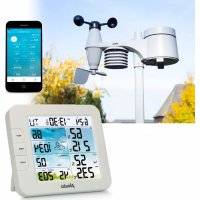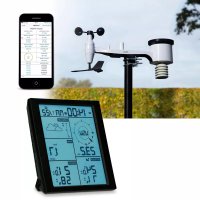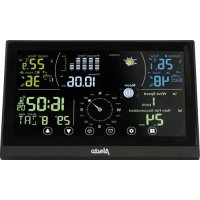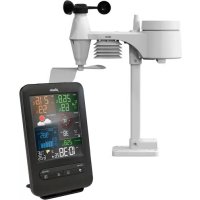
WS4900 - Weather Station ALECTO - Free user manual and instructions
Find the device manual for free WS4900 ALECTO in PDF.



User questions about WS4900 ALECTO
0 question about this device. Answer the ones you know or ask your own.
Ask a new question about this device
Download the instructions for your Weather Station in PDF format for free! Find your manual WS4900 - ALECTO and take your electronic device back in hand. On this page are published all the documents necessary for the use of your device. WS4900 by ALECTO.
USER MANUAL WS4900 ALECTO
Comfort-indications:
= te koud / te droog
= comfortabel
= te warm / te vochtig
resolution: 0.1^ of 0.1^
nauwkeurigheid: < 0^ of >40^ ± 2^ ( < 32^ of >104^ ± 3.6^ )
$$ 0 \sim 4 0 ^ {\circ} \mathrm {C} \pm 1 ^ {\circ} \mathrm {C} (3 2 \sim 1 0 4 ^ {\circ} \mathrm {F} \pm 1. 8 ^ {\circ} \mathrm {F}) $$
resolution: 0.1^ of 0.1^
nauwkeurigheid: -40^ -20^ ± 1.5^ (-40^ -4^ ± 2.7^)
$$ - 2 0 ^ {\circ} \mathrm {C} \sim 5 ^ {\circ} \mathrm {C} \pm 1 ^ {\circ} \mathrm {C} (- 3. 8 ^ {\circ} \mathrm {F} \sim 4 1 ^ {\circ} \mathrm {F} \pm 1. 8 ^ {\circ} \mathrm {F}) $$
$$ 5 ^ {\circ} \mathrm {C} \sim 6 0 ^ {\circ} \mathrm {C} \pm 0. 4 ^ {\circ} \mathrm {C} (4 1. 2 ^ {\circ} \mathrm {F} \sim 1 4 0 ^ {\circ} \mathrm {F} \pm 0. 7 ^ {\circ} \mathrm {F}) $$
$$ 6 0 ^ {\circ} \mathrm {C} \sim 8 0 ^ {\circ} \mathrm {C} \pm 0. 8 ^ {\circ} \mathrm {C} (1 4 0. 2 ^ {\circ} \mathrm {F} \sim 1 7 6 ^ {\circ} \mathrm {F} \pm 1. 4 ^ {\circ} \mathrm {F}) $$
resolution: 0.1 mph of 0.1 knot of 0.1 m/s
nauwkeurigheid: < 5m / s +/-0.5m / s
5m/s: +/- 6%
precision: < 5m/s: +/-0.5m/s
5m/s: +/- 6%
0~40°C ±1°C (32~104°F ± 1.8°F)
DECLARATION OF CONFORMITY
Hereby, Hesdo declares that the radio equipment type Alecto WS-4900 is in compliance with directive 2014/53/EU. The full text of the EU declaration of conformity is available at the following internet address: http://DOC.hesdo.com/ WS-4900-DOC.pdf
ENVIRONMENT
This product may not be discarded as normal household waste at the end of its life span, you must bring it to a collection point for the recycling of electric and electronic devices.
Don't throw away exhausted batteries, but bring them to your local depot for Small Chemical Waste (SCW).
SYSTEM FAULTS
In case of a supposed system error, please remove the batteries from the indoor unit and outdoor unit and disconnect the adaptor from the wall socket. Wait several minutes, replace the batteries en plug the adaptor back into the wall socket. If this doesn't resolve the problem, please contact Alecto Customer Service via internet www.alecto.nl
WARRANTY
For the Alecto WS-4900 you have a warranty of 24 months from the date of purchase. During this period, we guarantee the free repair of defects caused by material and workmanship errors. All this subjected to the final assessment of the importer.
HOW TO HANDLE:
If you notice any defect, first refer to the user's manual. If the manual provides no definite answer, please contact the supplier of this weather station.
In the event of a defect, you may return the weather station with a clear description of your complaint and a dated purchase receipt to your supplier who will ensure a quick repair or otherwise send the product to the importer.
THE WARRANTY BECOMES NULL AND VOID:
In case of improper use, incorrect connections, leaking and/or incorrectly installed batteries. In case of unauthorised modifications and/or repairs performed by third parties. In case of incorrect transportation of the device without adequate packaging and when the device is not accompanied by this warranty card and proof of purchase.
All further liability, especially concerning any consequential damages, is excluded.
About this user's manual

This symbol represents a warning. To ensure safe use, always adhere to the instructions described in this documentation.

This symbol is followed by a user's tip.
Always check the Alecto website for the most recent version of this user's manual. See the version number at the back of this user's manual.
1. TABLE OF CONTENT
2. OVERVIEW
2.1 Indoor unit 57
2.2 Outdoor unit 59
2.3 Rain meter 59
2.4 Temperature and humidity sensor 59
2.5 Wind sensor 59
3. INSTALLATION
3.1 Power supply 60
3.2 Pairing indoor unit / outdoor unit 60
3.3 Positioning 61
3.4Clock 61
3.5 To reset the rain data 62
4. DISPLAY
4.1 Time and date 63
4.2 Indoor temperature and humidity 63
4.3 Outdoor temperature and humidity 63
4.4 Weather forecast 63
4.5 Barometer (air pressure) 64
4.6 Rain 64
4.7 Wind (direction + speed) 65
4.8 Wind chill and dew temperature 65
4.8 Moon phase 66
4.9 Maximum / Minimum memory 66
4.10 Display lighting 66
4.11 Outdoor unit reception indication 66
5. MAX-MIN ALERT
5.1 Introduction 67
5.2 Hi-Lo limits setup 67
5.3 Hi-Lo alert function setup 67
5.4 Operation 67
6. ALARM CLOCK
6.1 Introduction 67
6.2 To set the alarm time 67
6.3 To set the alarm function 67
6.4 Operation 68
7. RELATIVE AIR PRESSURE
7.1 Introduction 68
7.2 To set the relative air pressure 68
8. MAINTENANCE
8.1 Rain meter 68
8.2 Outdoor temperature and humidity sensor 68
- TROUBLESHOOTING 69
- ORIENTING THE OURDOOR UNIT TO THE SOUTH 69
- SPECIFICATIONS 70
2. OVERVIEW
2.1 Indoor unit:
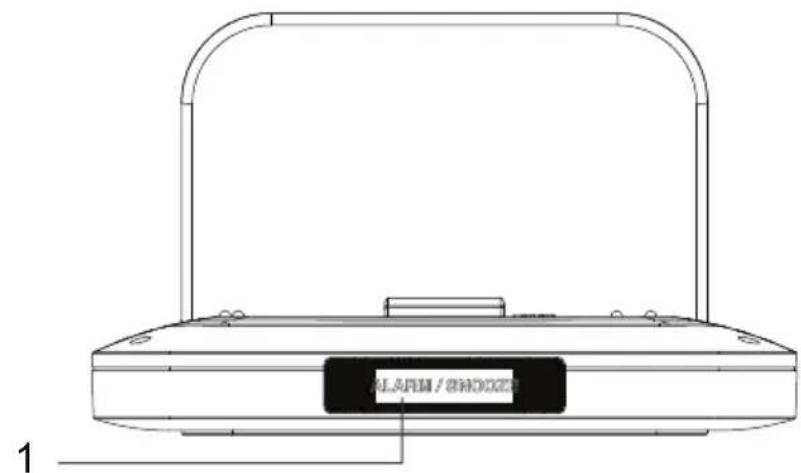
- SNOOZE / LIGHT button: snooze button for the alarm clock function and for switching on the display lighting
Attention: the light sensor for the automatic display lighting is also located here, see paragraph 4.10, so make sure not to cover this button.
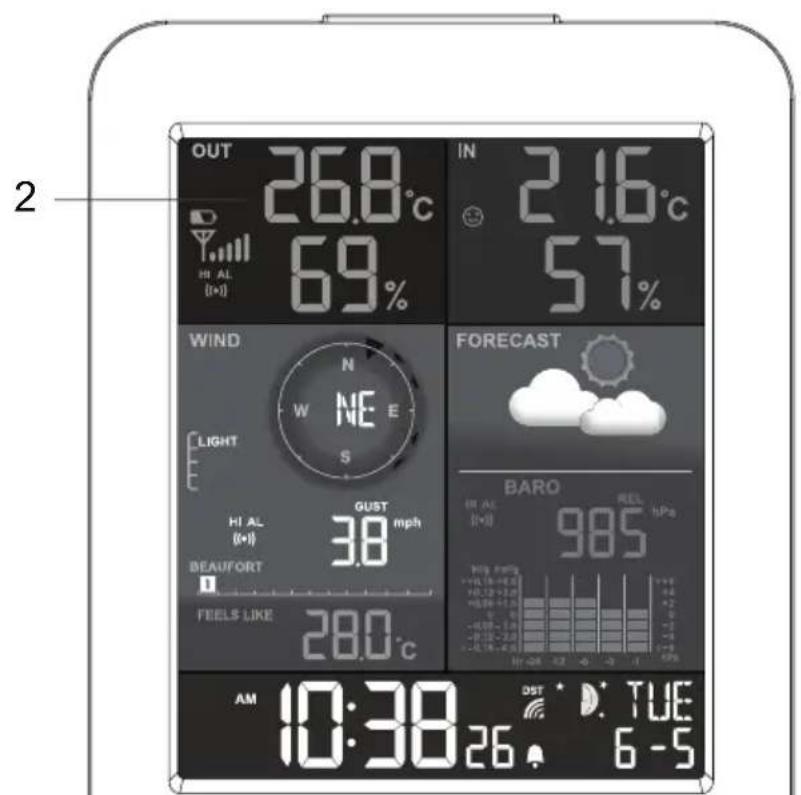
- Display (everything shown in the display is described on the next page)
- HISTORY button: shows the data of the past 24 hours
- Rain button, for displaying the various rain parameters
- Barometer button, for displaying the various barometer parameters
- MAX/MIN button: for displaying the measured minimum and maximum values, including the time and date this measurement was taken
- Index button, for displaying the various index parameters
- Wind button, for displaying the various wind parameters

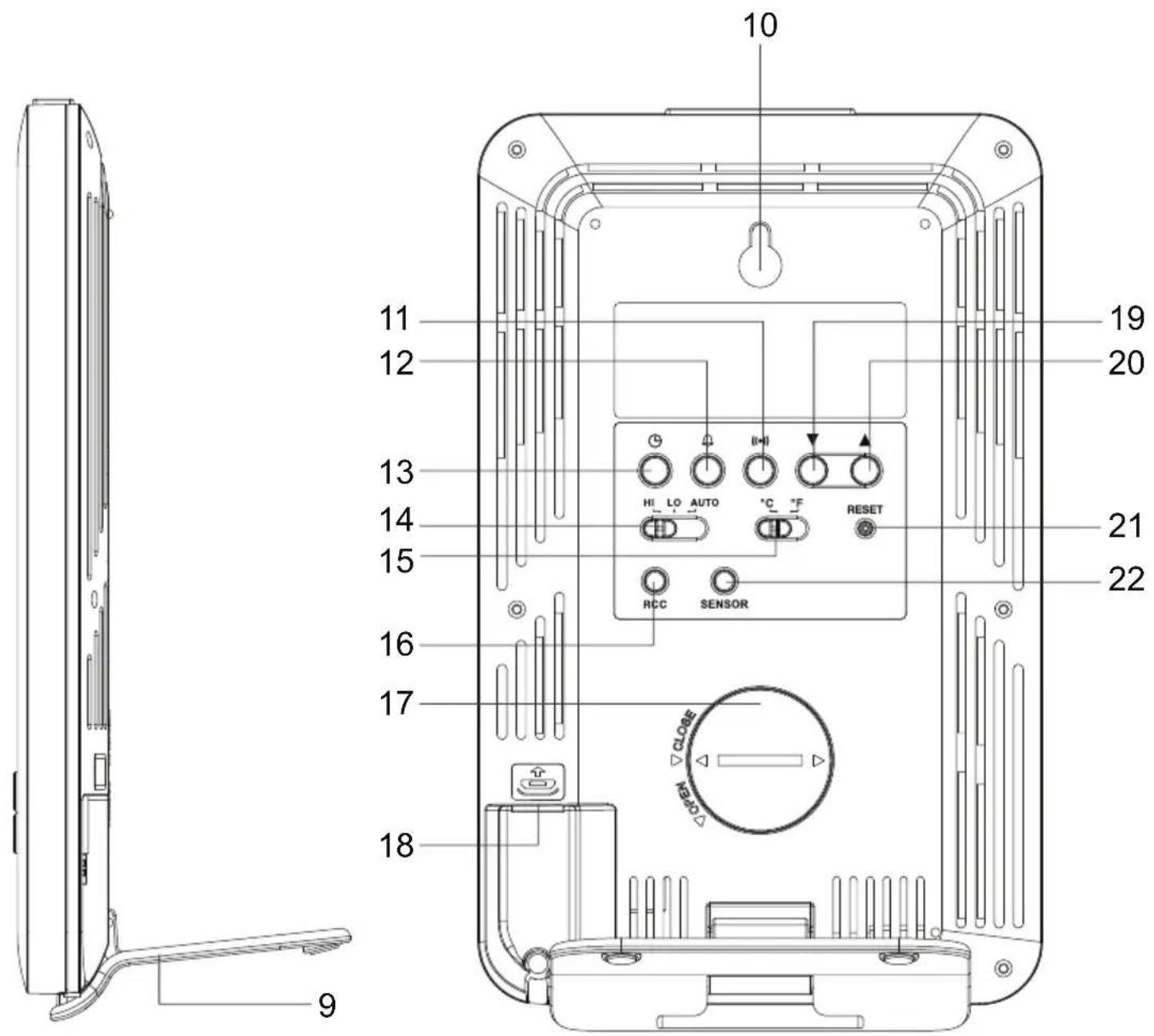
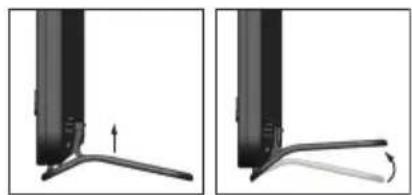
- Desk stand
- Suspension hole for wall-mounting
- Button () : alarm setup button
- Button 品 alarm clock setup button
- Button @: clock setup button
- HI-LO-AUTO: setup button for display lighting
- ^ C / ^ F switch: to switch the temperature display between degrees Celsius and degrees Fahrenheit
- RCC button: to enable or disable the DCF receiver
- Battery compartment for the backup battery
- Power adaptor input (micro USB plug)
- button: down button
- button: up button
- RESET button: to restart the indoor unit in case of a (possible) error
- SENSOR button: to make the outdoor unit search (again) for the indoor unit
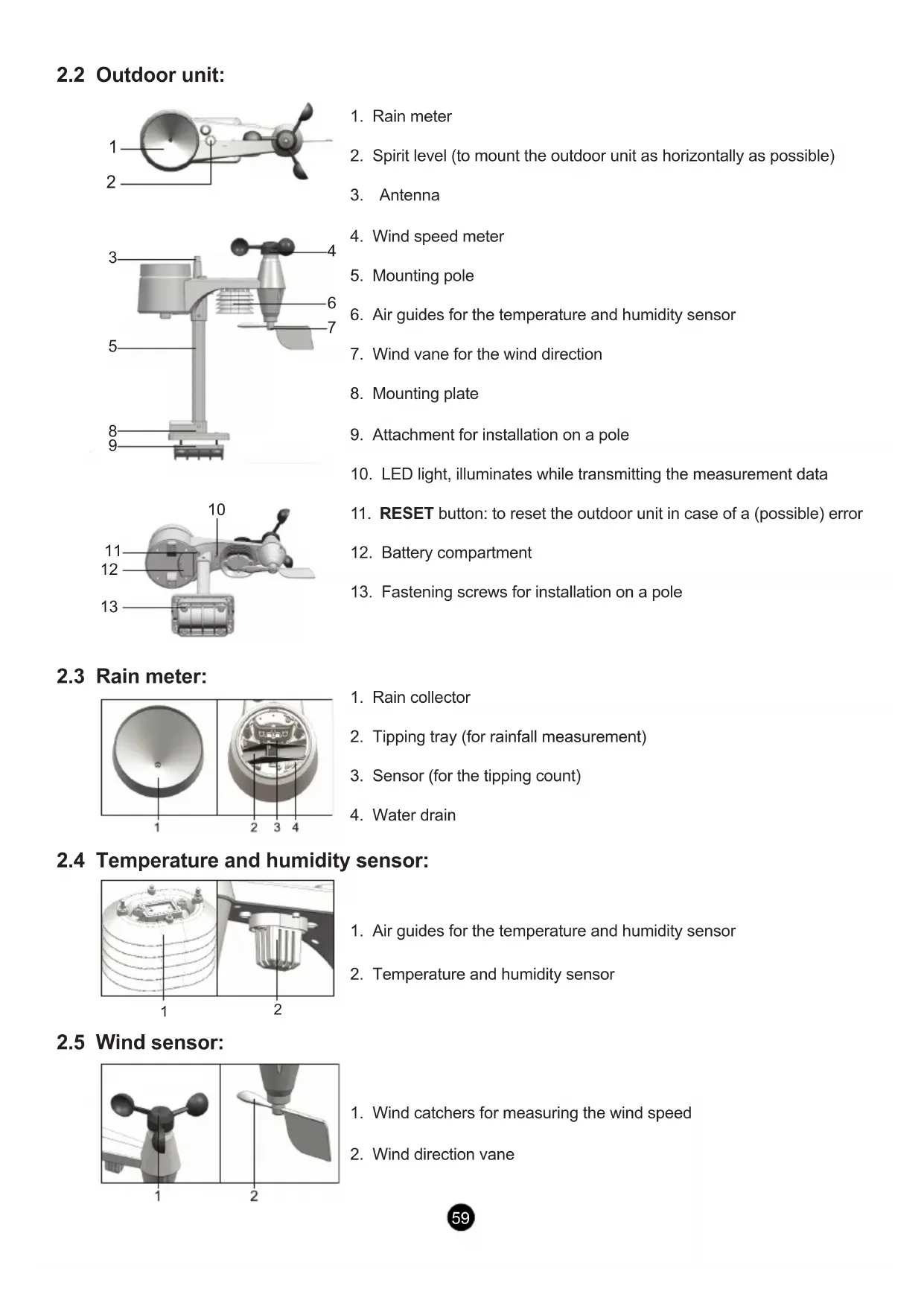
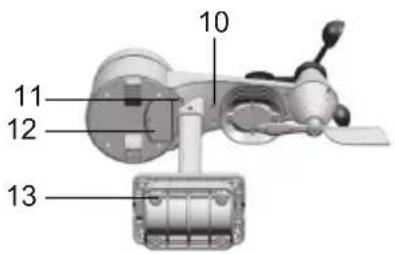
2.2 Outdoor unit:

- Rain meter
- Spirit level (to mount the outdoor unit as horizontally as possible)
- Antenna
- Wind speed meter
- Mounting pole
- Air guides for the temperature and humidity sensor
- Wind vane for the wind direction
- Mounting plate
- Attachment for installation on a pole
- LED light, illuminates while transmitting the measurement data
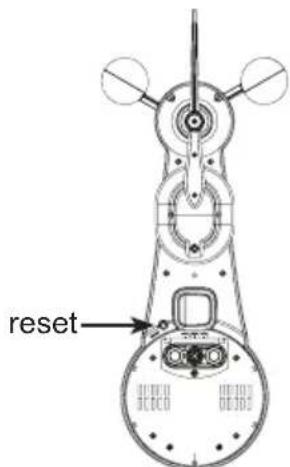
- RESET button: to reset the outdoor unit in case of a (possible) error
- Battery compartment
- Fastening screws for installation on a pole
2.3 Rain meter:
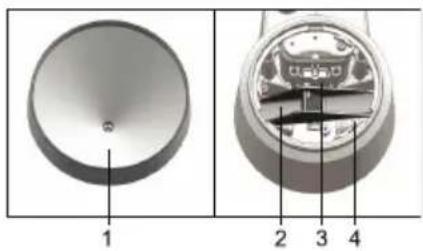
- Rain collector
- Tipping tray (for rainfall measurement)
- Sensor (for the tipping count)
- Water drain
2.4 Temperature and humidity sensor:
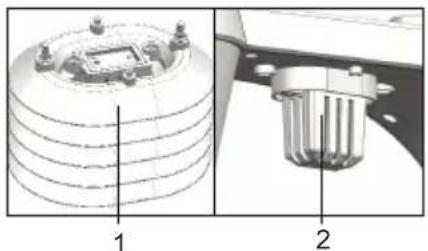
- Air guides for the temperature and humidity sensor
- Temperature and humidity sensor
2.5 Wind sensor:
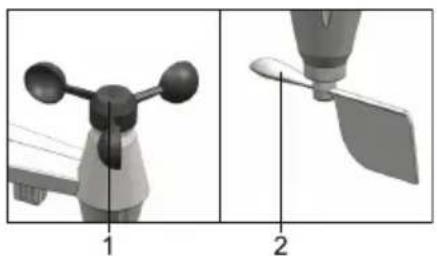
- Wind catchers for measuring the wind speed
- Wind direction vane
3. INSTALLATION

Attention: after the installation, it may take several hours up to a day before the correct values are displayed.

Attention: the indoor unit is powered by the supplied power adaptor. For backup power, you may insert the included 3V CR-2032 button cell.
3.1 Power supply:
Indoor unit:
The indoor unit is powered by the supplied power adaptor with micro USB plug. The model number of this adaptor is: HX12-0500500-AG. Only use this adaptor. Insert the plug of this adaptor into the rear of the indoor unit according to the picture below and insert the adaptor into a 230V wall socket.
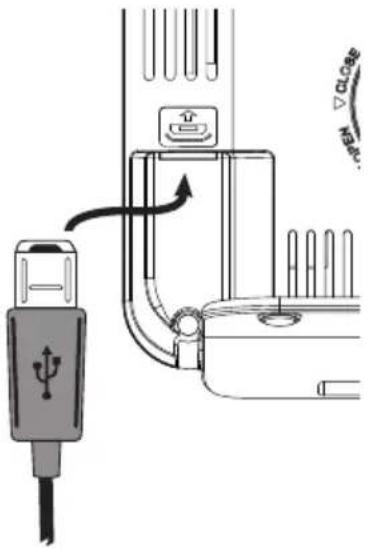

Use a coin to unscrew the battery cover for the backup battery by turning it anti-clockwise and insert a CR-2032 button cell battery (not
incl.) according to the markings inside the battery compartment (minus pole downwards). Replace the battery cover and lock it by using the coin and turning the battery cover a little clockwise. See also 'OPEN' and 'CLOSE' on the battery cover.
Outdoor unit:
Open the battery compartment by loosening the battery cover using a small crosshead screwdriver. Insert 3 × size AA 1.5V batteries according to the figure below, paying attention to the polarity (+ and -). Replace the cover (batteries are not included).
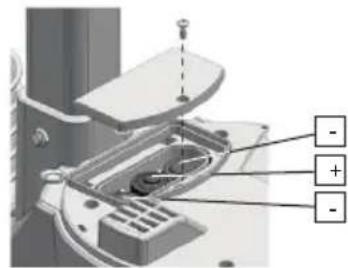
Advice regarding the batteries for the outdoor unit:
Because normal alkaline batteries do not perform or do not perform well at temperatures around or below 0^ , the use of standard alkaline batteries in the outdoor unit is not recommended. For the outdoor unit, we therefore recommend installing Lithium batteries that have been designed to function at a temperature range of -20^ to 60^ . These batteries are available through the service department of Alecto via internet www.alecto.info
The lifespan of Lithium batteries with a capacity of 2900mAh is well over a year.
3.2 Pairing indoor unit / outdoor unit:
Automatically:
As soon as the batteries are inserted into the indoor unit, the indoor unit starts searching for a signal from the outdoor unit for 1 minute. So, if you have installed batteries in the outdoor unit within that minute and these units 'find' each other, they will automatically connect with each other and the display of the indoor unit will show the temperature, humidity, rainfall amount, wind speed and the wind direction as the outdoor unit transmits this data.
Manually:
If the units cannot be paired automatically, or after replacing the batteries, you can pair the outdoor sensor (again) with the weather station unit as follows:
- Briefly press the SENSOR button at the rear of the indoor unit, the antenna symbol in the display starts flashing
- Briefly press the RESET button on the outdoor unit.
- The units will have found each other (again) after several seconds
3.3 Positioning:
Indoor unit:
You may choose to suspend the weather station from a wall using a simple screw or to use it as a desk model using the supplied table stand. In any case, never place the weather station in direct sunlight or nest to a heat-radiating lamp or stove.
Outdoor unit:
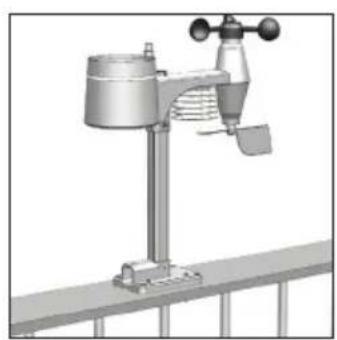
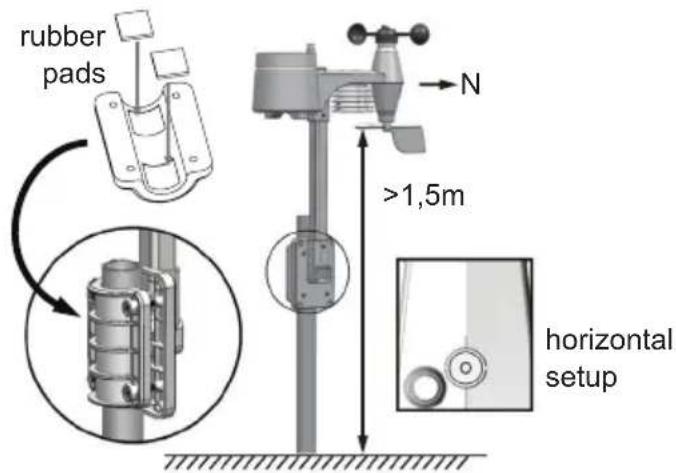
You may choose to place the outdoor unit onto a flat surface (e.g. a fence or railing) or to mount it on a pole (excluded). In any case, make sure to position the unit at least 1.5 meters above the ground, standing freely in the rain and wind.

General installation and placement tips:
- First check whether the outdoor unit is within range of the indoor unit before permanently installing it. Maintain a distance of a maximum of 30 meters between the outdoor unit and indoor unit.
- Make sure the outdoor unit is placed at least 1.5 meters above the ground and that the unit is openly standing in the rain and wind.
- For the rain meter to work as accurately as possible, the outdoor unit must be as horizontal as possible. To do this, use the built-in spirit level on top of the outdoor unit.
- To be able to indicate from which direction the wind is coming from, the outdoor unit must be oriented towards the north. See the indication N on top of the outdoor unit for this. Use a precise compass (excluded) to properly orientate the unit.
- Ensure that the outdoor unit is hanging or standing freely. Particularly the wind speed meter and wind vane must hang in direct wind.
- Find a location where the chance of blowing leaves is minimal. Leaves blown into the rain collector can block the rain meter or influence the measurement results. In any case, we recommend that you place the outdoor unit in such a way that it is fairly easy to remove any blown leaves and replace the batteries in the outdoor unit.
- Of course, you may first keep the outdoor unit within reach for a week to test all its functions. Only permanently install the outdoor unit after everything is functioning properly.
3.4Clock:
Introduction
The WS-4900 is provided with a built-in DCF receiver which receives the DCF time signal from Frankfurt. This signal ensures that the clock shows the time very accurately, provided a strong enough signal is being received.
Automatic:
As soon as you install the batteries into the indoor unit, the clock starts searching for the DCF radio signal to set the correct time and date while the antenna symbol flashes. After several seconds or minutes the WS-4900 will start showing the correct time. In extreme cases, it can take over a day before the DCF time is shown.
while searching for the radio signal, you cannot continuously switch on the display lighting. However by pressing the ALARM/SNOOZE button, the display lighting will switch on but switches off again after 5 seconds. As soon as the clock has found the radio signal, or when stopping the search by briefly pressing the RCC button, the display lighting switches on continuously.
Manually:
If the clock cannot receive the radio signal or cannot receive it well enough, you can set the clock manually as follows:
-
Press and hold the button for 2 seconds, 12Hr or 24Hr will appear in the display
-
Use / to set the time format, then briefly press the button
-
Use / to set the hours and then briefly press the button
-
Use / to set the minutes and then briefly press the button
-
Use / to set the seconds to 0 (this allows you to have the clock run synchronously with your own clock) and then briefly press the button
-
Use / to set the year and then briefly press the button
-
Use / to set the month and then briefly press the button
-
Use / to set the date and then briefly press the button
-
Use / to set the difference in hours as compared to the DCF time. For use in the Benelux, select '0' and briefly press the button
10.Use / to set the language for displaying the days, you may choose from: EN (English), FR (French), DE (German), ES (Spanish) or IT (Italian), briefly press the button
- Use / to determine whether the clock must automatically switch to daylight saving time (AUTO) or this must be done manually (OFF), briefly press the button
The clock is now set manually.
When the DCF receiver is enabled and a strong signal is being received, the receiver will overwrite the clock display.
To switch the DCF receiver on/off:
You may switch off the DCF receiver as follows to only display the time and date you've programmed yourself:
- to switch off: press and hold the RCC button at the rear of the weather station for 8 seconds until OFF illuminates and the antenna symbol disappears
You may switch the receiver back on as follows:
- to switch on: press and hold the RCC button at the rear of the weather station for 8 seconds until ON illuminates, the antenna symbol starts flashing and the display turns green.
The symbol in the upper part and in the middle of the display shows the status of the DCF clock: No symbol: the DCF receiver is switched off; the displayed time is determined by the internal clock of the weather station
■ flashing: the DCF receiver is switched on and is searching for the DCF signal; the displayed time is determined by the internal clock of the weather station
remains lit: the DCF receiver is switched on and is receiving the DCF signal; the displayed time and date are determined by the atomic DCF clock in Frankfurt
3.5 To reset the rain data:
After everything is installed, press and hold the HISTORY button for 10 seconds to delete all measurement data up to that moment. This prevents you from seeing measurement data at a later time that was caused by movements during the installation.
4. DISPLAY
4.1 Time and date:
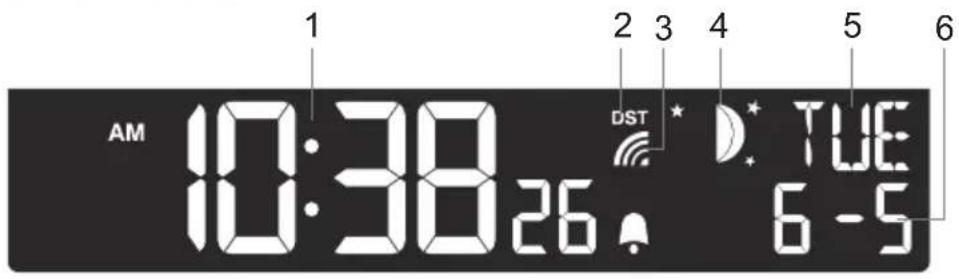
- Display of the actual time
- Illuminates when DST is enabled (DST = Daylight Saving Time)
- Illuminates when the DCF clock radio signal is being received and indicates the reception strength good signal strength
adptable signal strength
average signal strength
and no or very weak signal strength
- Display of the moon phase (*1)
- Display of the day of the week
- Display of the date
4.2 Indoor temperature and humidity:
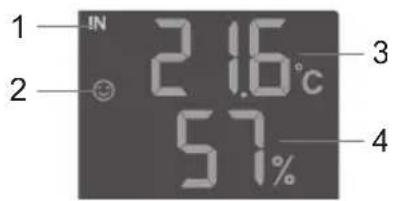
- 'indoor' indication
- Comfort icon, this is a combination of the temperature and humidity.
Comfort indications:
There's no comfort indication at temperatures < 0^ (32^) or >60^ (140^)
- Indoor temperature
- Relative indoor humidity
= too cold / too dry
=comfortable
= too warm / too humid
4.3 Outdoor temperature and humidity:
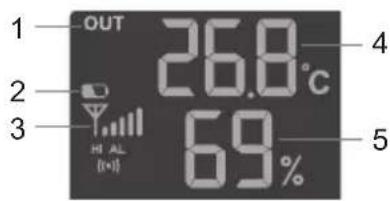
- 'outdoor' indication
- 'weak battery' indication in the outdoor unit
- Signal strength indication of the outdoor unit
- Outdoor temperature
- Relative outdoor humidity
4.4 Weather forecast:
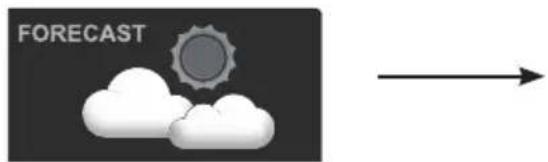

Sunny partially cloudy cloudy

rain storm
snow
Remarks:
- A weather forecast based on air pressure has an accuracy of 70% to 75% ; please keep in mind that a correct weather forecast cannot be guaranteed
The forecast is based on the upcoming 12 hours and may not represent the current situation - The 'snow' forecast is based in air pressure combined with the temperature: when the forecast is actually 'rain', but the outdoor temperature is below 26^ (-3^) , then 'snow' is expected
4.5 Barometer (air pressure):
If this screen isn't visible, first briefly press the button
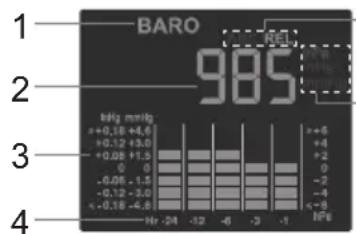
5 1. 'barometer' indication
2. Actual air pressure
6 3. This shows the air pressure trend over the last 24 hours.
4. Air pressure per hour over the last 24 hours
5. Indicates whether the relative or absolute air pressure is shown (see also * add 5)
-
Indicates whether the air pressure is shown in hPa (hectoPascal), in inHg (inch mercury pressure) or mmHg (millimeter mercury pressure) (see also * add 6)
-
add 5: An absolute air pressure indicates the air pressure that is present regardless of the altitude at which you measure the air pressure. A relative air pressure is the air pressure that is compensated for the altitude at which you measure the air pressure. For a correct weather forecast you need the relative air pressure. You may set the desired unit as follows:
-
Press and hold the button for 2 seconds
- Use / to select the desired unit: REL for relative, ABS for absolute
- Briefly press the 串 button (if the air pressure now starts flashing, press the 串 button again)
Refer to the chapter 7 for adjusting the relative air pressure display in case you're using the weather station somewhere a lot higher than sea level.
add 6: In the Benelux one uses the hectopascal notation. Before, the air pressure was sometimes also expressed in bars. 1 mbar equals 1 hPa. Briefly press the button to switch between these notations.
4.6 Rain:
If this screen isn't visible, first briefly press the button
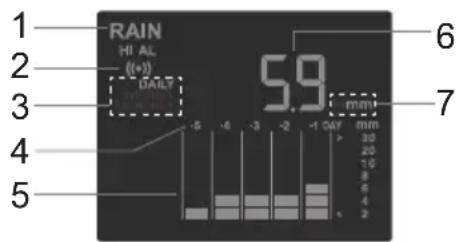
- 'rain' indication
- Illuminates when the max. rain alert is set
- Indicates over which period the displayed rainfall amount is measured (see also * add 3).
- Rainfall per day over the last 5 days
- Rainfall trend over the last 5 days
-
Today's rainfall amount
-
Indication of whether the amount of rainfall is displayed in "in" (inch) or in "mm" (millimetre). (see also * add 7)
-
add 3: No indication = : the rainfall during the past hour (this is updated every 6 minutes and shows the amount of rainfall during the past 60 minutes).
DAILY Y = : rainfall of today, calculated from midnight.
WEEKLY : rainfall from the beginning of the week (Monday)
MONTHLY = : rainfall in this month
Briefly press the button to switch between these indications.
-
add 7: You may set the desired unit as follows:
-
press and hold the button for 2 seconds
- use / to select the desired unit
- briefly press the buttons
4.7 Wind (direction + speed):
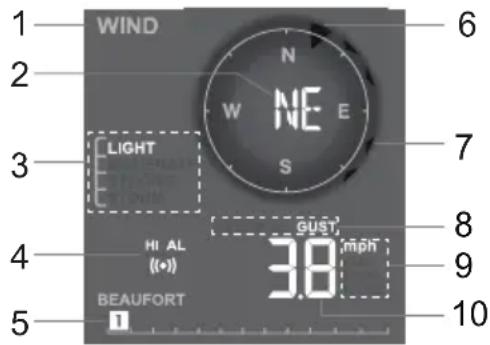
- Indication 'wind'
- Actual wind direction
- Wind speed, expressed in colloquial language (see also * add 3)
- Illuminates when the max. wind speed alert is set
- Wind speed, according to the Beaufort scale
- Wind direction at this moment (large arrow)
- Wind directions of the last 5 minutes, max. 6 small arrows that disappear after 5 minutes
-
Indication of whether the displayed wind speed is an average speed or a wind gust (see also * add 8)
-
Indication of whether the wind speed is displayed in mph (miles per hour), in m/s (meters per second), in km/h (kilometers per hour) or in Knots (1 KNOTS = 1.151 mph (1.852 km/h)) (see also * add 9)
-
Actual wind speed
-
add 3: LIGHT = 1-19km/h
MODERATE = 20 - 49km / h
STRONG = 50 - 88km / h
STORM 88 km/h
*add 8: AVERAGE = average speed
GUST = wind gust
Briefly press the button to switch between these indications.
-
add 9: You may set the desired unit as follows:
-
press and hold the button for 2 seconds
- use select the desired unit
- briefly press the button
4.8 Wind chill and dew temperature:
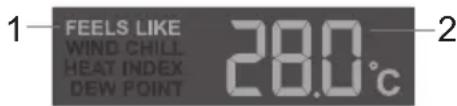
- Indication of whether this displayed temperature is the 'Feels like', the 'Wind chill', the 'Heat Index' or the 'Dew Point' (see also * add 1)
- Temperature according to the indication shown under 1 (see also * add 2)
*add 1: Feels like: temperature as you experience it
Wind Chill: combination of the measured temperature and the wind speed
Heat index: combination of the measured temperature and the humidity
Dewpoint (Dew point temperature): the temperature at which water vapour turns to water (mist, dew or frost). This temperature depends on the indoor temperature and the air pressure.
Briefly press the button to switch between these indications.
*add 2:At HEAT INDEX: the alert level is:
< 27^ C (display 'LO') no danger
80^ - 90^ (27^ - 32^) pay attention (risk of exhaustion due to heat)
91^ - 105^ (33^ - 40^) pay close attention (risk of dehydration due to heat)
106°F - 129°F (41°C - 54°C) danger (increased risk of exhaustion due to heat)
≥ 130^ (≥ 55^) extreme danger (high risk of dehydration / stroke)
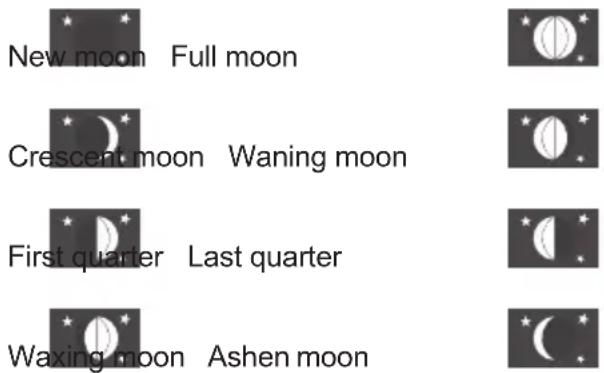
4.8 Moon phase:
The moon phase display is linked to the date, month and year setting. The following moon phases can be displayed:
4.9 Maximum / Minimum memory:
Use the MAX/MIN button to display the following maximum and minimum values one after the other: Max. outdoor temperature - Min. outdoor temperature - Max. outdoor humidity - Min. outdoor humidity - Max. indoor temperature - Min. indoor temperature - Max. indoor humidity - Min. indoor humidity - Max. 'Feels like' temperature - Min. 'Feels like' temperature - Max. 'Wind chill' temperature - Min. 'Wind chill' temperature - Max. 'Wind index' - Min. 'Wind index' - Max. 'Dew point' - Min. 'Dew point' - Max. air pressure - Min. air pressure - Max. average wind speed - Max. wind gust - Max. rainfall.
The lower part of the display shows the day and time at which the concerned maximum of minimum value was measured.
Press and hold the MAX/MIN for 2 seconds to reset the maximum and minimum values.
4.10 Display lighting:
Use the HI-LO-AUTO switch at the rear of the indoor unit to set the display lighting
AUTO: the display lighting follows the ambient light: at low ambient light the display lighting also decreases, at strong ambient light the display lighting increases.
Hi: display lighting set to maximum level
Lo: display lighting set to minimum level (press the ALARM / SNOOZE button on top of the indoor unit to set the display lighting to the maximum level. This light switches off again 5 seconds after releasing the button.
While the weather station is searching for the radio signal for the clock function, you cannot switch the display lighting on Hi continuously. When pressing the ALARM/SNOOZE button, the lighting does switch on, but will switch off again after 5 seconds. As soon as the clock has found the radio signal, or when stopping the search by briefly pressing the RCC button, the display lighting switches on continuously.
4.11 Outdoor unit reception indication:
The upper left part of the indoor unit's display shows the signal strength of the outdoor unit.

Upon receiving data from the outdoor unit, the antenna symbol Yflashes 2x.
5. MAX-MIN ALERT
5.1 Introduction:
You may set an alert for the following measurements when a maximum or minimum value is being exceeded: Indoor temperature min/max alert Indoor humidity min/max alert Outdoor temperature min/max alert Outdoor humidity min/max alert Rainfall max alert (only the actual amount of rainfall as off 12:00am is considered) Wind speed max alert
5.2 Hi-Lo limits setup:
- Press the () button once or repeatedly until the desired display starts flashing followed by 'HI AL' or 'LO AL' (whatever applies)
- Use to set the limit value
- Briefly press the button to save the value
- Press the button again to go to the next value or wait several seconds until the settings are closed automatically
5.3 Hi-Lo alert function setup:
- Press the () button once or repeatedly until the desired display starts flashing followed by 'HI AL' or 'LO AL' (whatever applies)
- Briefly press the button to switch this alert on or off.
5.4 Operation:
As soon as the set limit is exceeded, an alert will sound for up to 2 minutes while the concerned value starts flashing. You may stop the alert sound by briefly pressing the ALARM/ SNOOZE button. The concerned measurement value automatically stops flashing when it returns to within the set limit (or as soon as you adjust the limit or switch off the alert function for this measurement).
6. ALARM CLOCK
6.1 Introduction:
You may program an alarm (wake-up) time in the WS-4900.
You may then also enable a frost alert: when the outdoor temperature falls below -3^ , the wake-up signal will sound 30 minutes before the set wake-up time.
6.2 To set the alarm time:
- Press and hold the button at the rear of the weather station for 2 seconds until the hour digits start flashing
- Use / to set the hours and then briefly press , the minute digits start flashing
- Use / to set the minutes and then briefly press , the alarm time is now set
Attention: after setting the alarm time for the first time, this function is enabled directly.
6.3 To set the alarm function:
- Press the button once or several times to check the alarm or to switch it on/off
Only "AL" appears: the time being displayed is the set alarm time, but the alarm itself is switched off
"AL" + " appears: the alarm is switched on and the wake-up signal will sound at the set alarm time
"AL" + "..." + "..." appears: the frost alert is set
- Release the button, after several seconds the actual time is displayed and the alarm status, according to the above description, remains visible
6.4 Operation:
- At the set time, the alarm will sound for up to 120 seconds
- Press the button to stop the alarm signal beforehand or press the SNOOZE/LIGHT button on top of the indoor unit to enable the snooze function; the symbol will flash and the wake-alarm will then sound again after 5 minutes
The alarm is repeated daily unless you disable it according to the above instructions. - If you've enabled the frost alert and the outdoor temperature falls below -3^ , the wake-up signal will sound 30 minutes earlier than the time you've set. If the outdoor temperature is above -3^ , the alarm will sound at the set time.
7. RELATIVE AIR PRESSURE
7.1 Introduction:
If you're living in an area considerably higher than sea level, you'll experience a lower air pressure. To have the device calculate the weather forecast accurately, you must correct the air pressure for this altitude.
7.2 To set the relative air pressure:
- Refer to the internet or your local authorities for information regarding your local air pressure
- If the barometer data is not shown in the display, first briefly press the button
- Then make sure the correct notation hPa, inHg or mmHg is used by briefly and repeatedly pressing the button
- Press and hold the button for approx. 2 seconds until 'ABS' (absolute) or 'REL' (relative) starts flashing
- Use to ensure 'REL' (relative) is flashing
- Briefly press the air pressure display starts flashing
- Use to correct the display according to the information obtained via the internet or from your local authorities
- Briefly press to save the air pressure value
8. MAINTENANCE
8.1 Rain meter:
You may dismantle the rain meter as follows to remove any spiders or other insects:
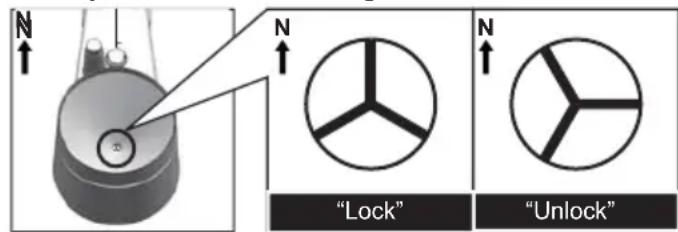
- Loosen the upper ring of the rain water collector by rotating it 30^ anti-clockwise until the star symbol at the bottom of the funnel is in the "Unlock" position. You may now remove this ring to have access to the
interior of the rain meter.
- Use a soft brush with long bristles to clean the rain meter.
- Replace the ring onto the rain meter and fasten it by rotating it clockwise until the star sign at the bottom of the funnel is in the "Lock" position
8.2 Outdoor temperature and humidity sensor:
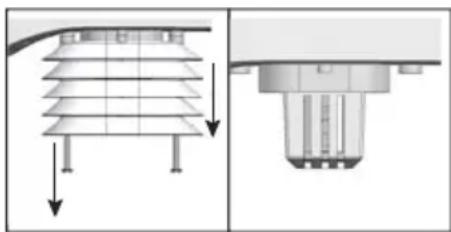
- Refer to the illustration and remove the wind guides from the outdoor unit.
- Blow into the holder containing the temperature and humidity sensor until clean and use a soft brush with long bristles to clean the wind guides. DO NOT USE WATER.
- Replace and fasten the wind guides.
9. TROUBLESHOOTING
| Problems Solutions | |
| No or strange measurement values from the rain sensor | ·Check the drainage hole in the rain meter. It must be open. ·Check whether the rain meter is placed horizontally. ·For as long as the weather station is searching for the correct time, no rain information is transmitted. This may take up to approximately 15 minutes. |
| No or strange measurement values of the thermometer and for the humidity. | ·Check whether the air grooves are open. ·Check the sensor housing. |
| No or strange measurremy values for wind speed and wind direction | ·Check the wind vane. ·Check the wind cups of the wind speed meter. |
| Y and - - - (reception signal lost for 15 minute) | ·Move the weather station closer to the outdoor unit. ·Ensure that the weather station is not located near other electronic devices that may cause interference because of wireless communication (TVs, PCs, microwaves). ·When this doesn't resolve the problems, please reset both the indoor and outdoor unit. |
| Y and E(reception signal lost for 1 hour) |
10. ORIENTING THE OURDOOR UNIT TO THE SOUTH:
If your situation doesn't allow the outdoor unit to be aimed at the North (N), but it can be aimed to the South (S), you may adjust the indoor unit's display as follows:
- Press and hold the button for 8 seconds, at the indoor unit 7 triangular indicators start flashing that indicate the current setting.
- Use or to indicate the correct setting of the outdoor unit
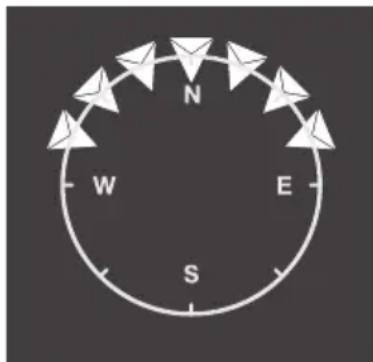
select this version when the N on the outdoor unit is oriented to the North
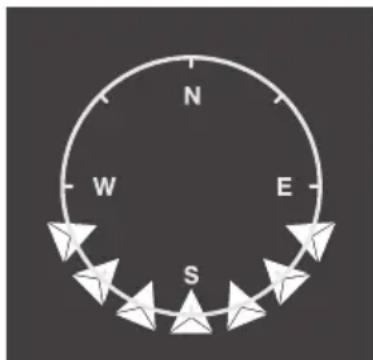
select this version when the N on the outdoor unit is oriented to the South
3. Briefly press the button to save your setting
Keep in mind that in the case of this last setting the moon phases are displayed in the way you'd view them from the southern hemisphere of the earth.
11. SPECIFICATIONS
Indoor unit:
dimensions 118× 192.5× 22mm (excl. desk stand)
weight: 260g
power 5V DC 500mA mains power adaptor, model number: HX12-0500500-AG, incl.
backup battery CR2032, incl.
Backup battery lifespan: 4 years (provided the power adapter is connected,
otherwise 2 months). The indoor unit provides no indication regarding this battery.
frequency: 868MHz
Outdoor sensor:
dimensions: 343.5 × 393.5 × 136 ~mm
weight: 673g (including batteries)
power 3x 1.5V AA battery, excl. (preferably install Lithium batteries)
frequency: 868MHz
RF Power: ≤6dBm
transmission: every 12 seconds
Indoor temperature:
units of measurement: ^ C or ^ F
display range: -40^ to 70^ (-40^ to 158^) (LO' at < - 40^, 'Hi' at >70^)
effective range: -10°C to 50°C (14°F to 122°F)
resolution: 0.1^ or 0.1^
accuracy: < 0^ or >40^ ± 2^ ( < 32^ or >104^ ± 3.6^ )
0~40°C ±1°C (32~104°F ± 1.8°F)
memory display: history of the past 24 hours, MIN/MAX temperature with time and date
Outdoor temperature:
units of measurement: ^ C or ^ F
display range: -40^ to 80^ (-40^ to 176^) ('LO' at < - 40^, 'Hi' at >80^)
effective range: -40°C to 60°C (-40°F to 140°F)
resolution: 0.1^ or 0.1^
accuracy: -40^ -20^ ± 1.5^ (-40^ -4^ ± 2.7^)
-20^ 5^ ± 1^ (-3.8^ 41^ ± 1.8^)
5^ 60^± 0.4^ (41.2^ 140^± 0.7^)
60^ 80^ ± 0.8^ (140.2°F ~ 176°F ± 1.4°F)
memory display: history of the past 24 hours, MIN/MAX temperature with time and date
Indoor humidity:
display range: 20% to 90% ('LO' at < 20% 'Hi' at >90%
(at temperatures between 0^ and 60^) effective range: 20% to 90% relative humidity
resolution:
accuracy: 20% 40% RH, ± 8% RH, at 25^ (77°F)
41% ~ 70% RH, ± 5% RH, at 25°C (77°F)
71% ~ 90% RH, ± 8% RH, at 25°C (77°F)
memory display: history of the past 24 hours, MIN/MAX humidity with time and date
Outdoor humidity:
display range: 1% to 99%
resolution: 1%
accuracy: 1% 20% RH ± 6.5% RH at 25^ (77°F)
20% 80% RH ± 3.5% RH at 25^ (77°F)
80% 99% RH ± 6.5% RH at 25^ (77°F)
memory display: history of the past 24 hours, MIN/MAX humidity with time and date
Air pressure:
units of measurement: hPa, inHg, mmHg
display range: 540 to 1100hPa
resolution: 1hPa, 0.01inHg, 0.1mmHg
accuracy: 540 696hPa± 8hPa / 700 1100hPa± 5hPa
15.95 ~ 20.55inHg ± 0.24inHg / 20.67 ~ 32.48inHg ± 0.15inHg
405 522mmHg± 6mmHg / 525 825mmHg± 3.8mmHg
At a temperature of 25^ (77^)
weather forecast: sunny, partially cloudy, cloudy, rain, storm, snow
memory display: history of the past 24 hours, MIN/MAX air pressure with time and date
Wind speed:
units of measurement: mph, m/s, km/h, knots
display range: 0~112mph, 50m/s, 180km/h, 97knots
resolution: 0.1mph or 0.1knot or 0.1m/s
accuracy: < 5m/s : +/- 0.5m/s
5m/s: +/- 6%
display units: average, gust
memory display: history of the past 24 hours, MAX wind gust with direction, time and date
Wind direction:
number of wind directions: 16
Rainfall:
units of measurement: mm, inch
display range: 0-9999mm (0~393.7inch)
resolution: 0.4mm (0.0157 in)
accuracy: ±7%
display units: actual rainfall, this day, this week, this month
memory display: history of the past 24 hours
DCF radio controlled clock:
synchronization: automatic or off
display: HH:MM:SS / day and date
clock format: 12 hours AM/PM or 24 hours
date format: DD/MM
languages for days of the week: EN, FR, DE, ES, IT
daylight saving time: automatically or off
Alecto


WWW.AECTO.NL SERVICE@AECTO.NL

Hesdo, Australielaan 1
5232 BB, 's-Hertogenbosch
The Netherlands