
Wii Fit (Wii) - Game NINTENDO - Free user manual and instructions
Find the device manual for free Wii Fit (Wii) NINTENDO in PDF.


User questions about Wii Fit (Wii) NINTENDO
0 question about this device. Answer the ones you know or ask your own.
Ask a new question about this device
Download the instructions for your Game in PDF format for free! Find your manual Wii Fit (Wii) - NINTENDO and take your electronic device back in hand. On this page are published all the documents necessary for the use of your device. Wii Fit (Wii) by NINTENDO.
USER MANUAL Wii Fit (Wii) NINTENDO
Nintendo Customer Service
SUPPORT.NINTENDO.COM or call 1-800-255-3700
Recorded tips for many titles are available on Nintendo's Power Line at (425) 885 7529. This may be a long-distance call, so please ask permission from whoever pays the phone bill. If the information you need is not on the Power Line, you may want to try using your favorite Internet search engine to find tips for the game you are playing. Some helpful words to include in the search, along with the game's title, are: "walk through," "FAQ," "codes," and "tips."
The Official Seal is your assurance that this product is licensed or manufactured by Nintendo. Always look for this seal when buying video game systems, accessories, games and related products.
natural_image
Person performing a leg exercise with white silhouettes of various activities in the background (no text or symbols)INSTRUCTION BOOKLET FOLLETO DE INSTRUCCIONESMODE D'EMPLOI
PLEASE CAREFULLY READ THE Wii™ OPERATIONS MANUAL COMPLETELY BEFORE USING YOUR Wii HARDWARE SYSTEM, GAME DISC OR ACCESSORY. THIS MANUAL CONTAINS IMPORTANT HEALTH AND SAFETY INFORMATION.
IMPORTANT SAFETY INFORMATION: READ THE FOLLOWING WARNINGS BEFORE YOU OR YOUR CHILD PLAY VIDEO GAMES.
WARNING - Seizures
- Some people (about 1 in 4000) may have seizures or blackouts triggered by light flashes or patterns, and this may occur while they are watching TV or playing video games, even if they have never had a seizure before.
- Anyone who has had a seizure, loss of awareness, or other symptom linked to an epileptic condition should consult a doctor before playing a video game.
- Parents should watch their children play video games. Stop playing and consult a doctor if you or your child has any of the following symptoms:
Convulsions Eye or muscle twitching Altered vision Loss of awareness Involuntary movements Disorientation
• To reduce the likelihood of a seizure when playing video games:
- Sit or stand as far from the screen as possible.
- Play video games on the smallest available television screen.
- Do not play if you are tired or need sleep.
- Play in a well-lit room.
- Take a 10 to 15 minute break every hour.
WARNING - Repetitive Motion Injuries and Eyestrain
Playing video games can make your muscles, joints, skin or eyes hurt. Follow these instructions to avoid problems such as tendinitis, carpal tunnel syndrome, skin irritation or eyestrain:
- Avoid excessive play. Parents should monitor their children for appropriate play.
Take a 10 to 15 minute break every hour, even if you don't think you need it. - If your hands, wrists, arms or eyes become tired or sore while playing, or if you feel symptoms such as tingling, numbness, burning or stiffness, stop and rest for several hours before playing again.
- If you continue to have any of the above symptoms or other discomfort during or after play, stop playing and see a doctor.
CAUTION - Motion Sickness
Playing video games can cause motion sickness in some players. If you or your child feel dizzy or nauseous when playing video games, stop playing and rest. Do not drive or engage in other demanding activity until you feel better.
IMPORTANT LEGAL INFORMATION
This Nintendo game is not designed for use with
any unauthorized device. Use of any such device will invalidate your Nintendo product warranty. Copying of any Nintendo game is illegal and is strictly prohibited by domestic and international intellectual property laws. "Back-up" or "archival" copies are not authorized and are not necessary to protect your software. Violators will be prosecuted.
REV-E
WARRANTY & SERVICE INFORMATION
REV-Q
You may need only simple instructions to correct a problem with your product. Try our website at support.nintendo.com or call our Consumer Assistance Hotline at 1-800-255-3700, rather than going to your retailer. Hours of operation are 6 a.m. to 7 p.m., Pacific Time, Monday - Sunday (times subject to change). If the problem cannot be solved with the troubleshooting information available online or over the telephone, you will be offered express factory service through Nintendo. Please do not send any products to Nintendo without contacting us first.
HARDWARE WARRANTY
Nintendo of America Inc. ("Nintendo") warrants to the original purchaser that the hardware product shall be free from defects in material and workmanship for twelve (12) months from the date of purchase. If a defect covered by this warranty occurs during this warranty period, Nintendo will repair or replace the defective hardware product or component, free of charge.* The original purchaser is entitled to this warranty only if the date of purchase is registered at point of sale or the consumer can demonstrate, to Nintendo's satisfaction, that the product was purchased within the last 12 months.
GAME & ACCESSORY WARRANTY
Nintendo warrants to the original purchaser that the product (games and accessories) shall be free from defects in material and workmanship for a period of three (3) months from the date of purchase. If a defect covered by this warranty occurs during this three (3) month warranty period, Nintendo will repair or replace the defective product, free of charge. ^8
SERVICE AFTER EXPIRATION OF WARRANTY
Please try our website at support.nintendo.com or call the Consumer Assistance Hotline at 1-800-255-3700 for troubleshooting information and repair or replacement options and pricing.*
*In some instances, it may be necessary for you to ship the complete product, FREIGHT PREPAID AND INSURED FOR LOSS OR DAMAGE, to Nintendo. Please do not send any products to Nintendo without contacting us first.
WARRANTY LIMITATIONS
THIS WARRANTY SHALL NOT APPLY IF THIS PRODUCT: (a) IS USED WITH PRODUCTS NOT SOLD OR LICENSED BY NINTENDO (INCLUDING, BUT NOT LIMITED TO, NON-LICENSED GAME ENHANCEMENT AND COPIER DEVICES, ADAPTERS, AND POWER SUPPLIES); (b) IS USED FOR COMMERCIAL PURPOSES (INCLUDING RENTAL); (c) IS MODIFIED OR TAMPERED WITH; (d) IS DAMAGED BY NEGLIGENCE, ACCIDENT, UNREASONABLE USE, OR BY OTHER CAUSES UNRELATED TO DEFECTIVE MATERIALS OR WORKMANSHIP; OR (e) HAS HAD THE SERIAL NUMBER ALTERED, DEFACED OR REMOVED.
ANY APPLICABLE IMPLIED WARRANTIES, INCLUDING WARRANTIES OF MERCHANTABILITY AND FITNESS FOR A PARTICULAR PURPOSE, ARE HEREBY LIMITED IN DURATION TO THE WARRANTY PERIODS DESCRIBED ABOVE (12 MONTHS OR 3 MONTHS, AS APPLICABLE). IN NO EVENT SHALL NINTENDO BE LIABLE FOR CONSEQUENTIAL OR INCIDENTAL DAMAGES RESULTING FROM THE BREACH OF ANY IMPLIED OR EXPRESS WARRANTIES. SOME STATES DO NOT ALLOW LIMITATIONS ON HOW LONG AN IMPLIED WARRANTY LASTS OR EXCLUSION OF CONSEQUENTIAL OR INCIDENTAL DAMAGES, SO THE ABOVE LIMITATIONS MAY NOT APPLY TO YOU.
This warranty gives you specific legal rights. You may also have other rights which vary from state to state or province to province.
Nintendo's address is: Nintendo of America Inc., P.O. Box 957, Redmond, WA 98073-0957 U.S.A.
This warranty is only valid in the United States and Canada.

© 2007-2008 Nintendo. TM, ® and the Wii logo are trademarks of Nintendo. © 2008 Nintendo. All rights reserved.
Contents

Menu Controls 4
What is Wii Fit? 5
Getting Started 6
Calendar Screen..11....
Body Test 13
Training..15
HEALTH AND SAFETY INFORMATION
To prevent injury and/or to prevent damage to the Wii Balance Board or surrounding objects, follow these guidelines during gameplay:
- Be aware of your balance so that you do not slip or fall from the board. Avoid more movement than is needed to operate the game you are playing.
- Do not wear shoes or socks while using the board. Playing barefoot should reduce the risk of slipping or falling. If your feet become damp during gameplay, stop and dry your feet and the board before continuing.
- No more than one person should use the board at a time.
- Make sure you have adequate space between you and any other objects or people during gameplay. Nintendo recommends at least 3 feet (1 meter).
- Avoid stepping or standing on the edges of the board.
- Always place the board on a flat, horizontal and stable surface. Do not use the board on slippery surfaces. If using on thick carpet, use the Wii Balance Board foot extensions included with the Wii Balance Board.
- Do not use the Wii Balance Board if you are under the influence of alcohol or any other substance which could affect your sense of balance or perception and cause you to slip or fall.
IMPORTANT PRECAUTIONS WHEN USED BY CHILDREN:
An adult must explain all Health and Safety Information and usage guidelines and instructions to all children who are going to use the Wii Balance Board. Failure to do so may result in injuries or damage to the system or other property. Observe children during gameplay for proper and safe use of the board.
An adult should assist young children when first playing to make sure they understand correct use.
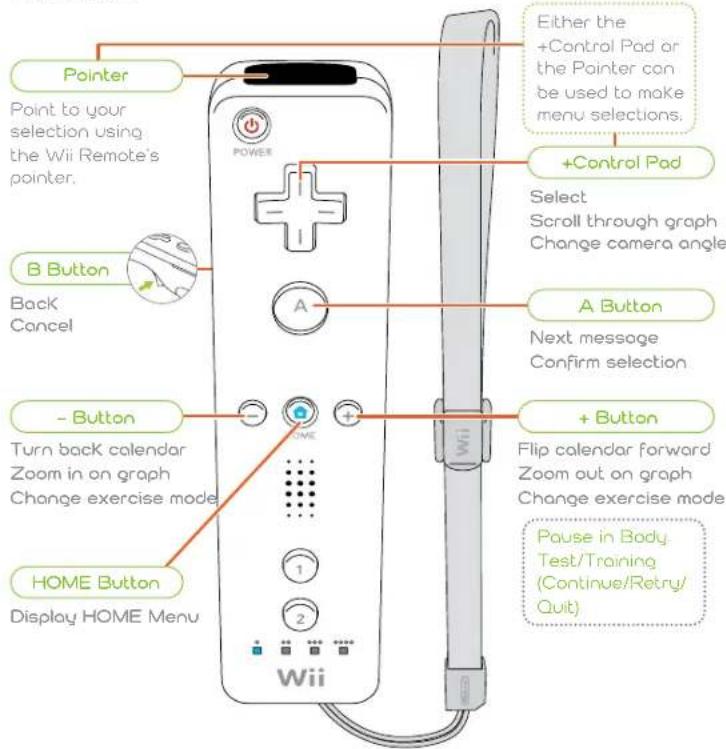
Menu Controls
You'll navigate the menus primarily using the Wii Remote™. During a Body Test and during Training, you'll be mainly using the Wii Balance Board™.
Wii Remote
To make menu selections, paint with the Wii Remote and press 📄 check the on-screen information for details on how to control specific activities and exercises.
text_image
Pointer Point to your selection using the Wii Remote's pointer. B Button Back Cancel - Button Turn back calendar Zoom in on graph Change exercise mode HOME Button Display HOME Menu Either the +Control Pad or the Pointer can be used to make menu selections. +Control Pad Select Scroll through graph Change camera angle A Button Next message Confirm selection + Button Flip calendar forward Zoom out on graph Change exercise mode Pause in Body Test/Training (Continue/Retry/ Quit) Wii
What is Wii Fit?
Wii Fit is a combination of fitness and fun. By playing Wii Fit a little every day, you, your friends, and your family can work toward personal goals of better health and fitness.
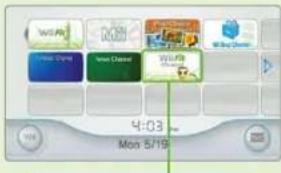
Keep Tabs on Your Fitness with the Wii Fit Channel
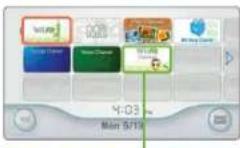
After you install the Wii Fit Channel on your Wii Menu, you can check on the progress of every Wii Fit profile and do a Body Test without having to insert the Wii Fit Game Disc.
text_image
WiFi Hi-Fi Prime New Cliner WiFi Hi-Bay Prime 4:03 Mon 5/19Wii Fit Channel
text_image
BM Fit Create WB 10.0 4.0 2.0 1.0 0.5 0.2 0.1 0.05 0.02 0.01 0.005 0.002 0.001y Test Daily with the Wii Balance Board
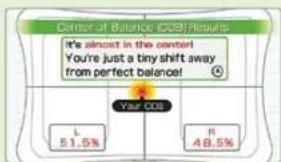
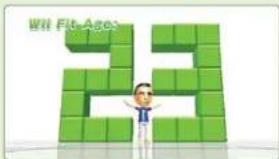
The Body Test in Wii Fit uses the Wii Balance Board to measure your center of balance. Body Mass Index (BMI), body control, and Wii Fit Age. Doing this test every day is the first step in Keeping track of your fitness.
text_image
Center of Balance (COS) Results It's almost in the center! You're just a tiny shift away from perfect balance! Your CDS L 51.5% R 48.5%■ BMI is a measure of body fat based on height and weight that is a standard used by many health organizations.
text_image
Wit Fit AgesAll About Balance
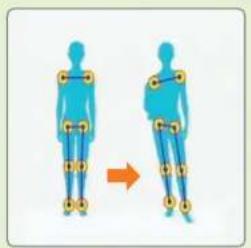
Your center of balance, the point between your left and right sides when you are standing upright, has a lot to do with your health. Those without an even center of balance will be unnaturally compensating for this imbalance, which causes their posture to become misaligned, increasing the possibility of putting unnecessary strain on their body.
text_image
Diagram showing human body positioning with orange arrow indicating movement or change, labeled with yellow circular markers on joints.Uneven Balance
Four Training Modes
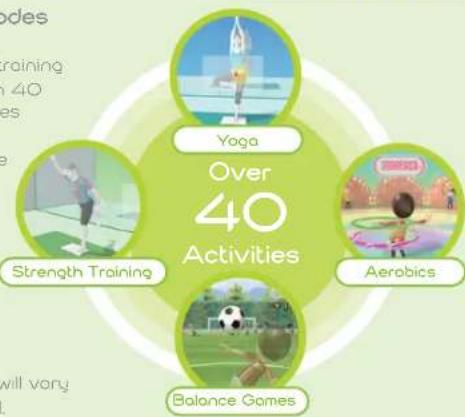
Wii Fit includes four training modes and more than 40 exercises and activities designed to help improve body balance and fitness.
text_image
Over 40 Activities Yoga Strength Training Aerobics Balance Games■ Results of training will vary with each individual.
Getting Started

Insert the Wii Fit Game Disc in the Wii system disc slot. The power on the Wii system will turn on and the screen on the right will display. After you have read it, press Ⓐ
- The screen on the right will display if you insert the Game Disc when the power on the Wii system is on.


6

2 Point to the Disc Channel (shown in the red box) on the Wii Menu and press Ⓐ
- If you install the Wii Fit Channel (shown in the green box) on the Wii Menu in Settings (see page 10), you can do the Body Test and check the progress of your training without having to insert the Game Disc.
■ For more information on the Wii Fit Channel, see pages 5 or 14.
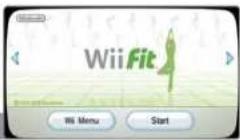
3 The Channel Preview Screen will display. Point to Start and press Ⓐ
Wii Fit Channel
Channel Preview Screen
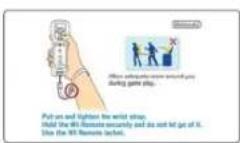
4 The Strap Usage screen will be displayed. Once you are ready, press Ⓐ
- The first time you play Wii Fit, you will have to create save data and register the Wii Balance Board (see steps 5–9).
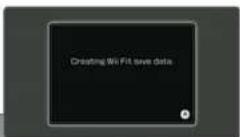
5 On the Wii Fit save-data creation screen, press A Once save data has been created, a confirmation screen will appear. Press A
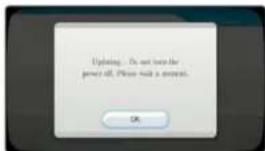
SYSTEM MENU UPDATE
Please note that when first loading the Game Disc into the Wii console, the Wii will check if you have the latest system menu, and if necessary a Wii system update screen will appear. Press OK to proceed.
text_image
Updating... Do not miss the password off. Please wait a purchase. OK6 You will need to register your Wii Balance Board to your Wii. Start by opening the SD Card Slot cover on the Wii system. Also remove the cover from the battery compartment on the Wii Balance Board.
- When removing the cover from the battery compartment of the Wii Balance Board, be careful not to drop the balance board or pinch your fingers.
■ Please make sure that the batteries are properly inserted in the Wii Balance Board.
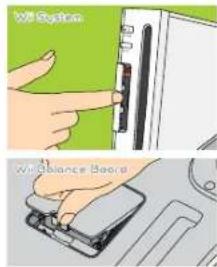
text_image
USB System Wi Balance Board7 Press ▶the Wii Balance Board. The power light will flash. Please do not press ▶on the balance board when the light is flashing
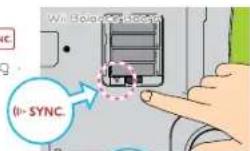
8 Press on the Wii system while the power light on the Wii Balance Board is flashing.
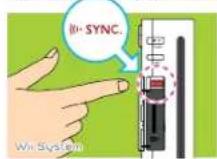
- Please do not press if more than 10 seconds. This will cause all of the Wii Remotes that are registered to that Wii system to become unregistered.
9 When the Wii Balance Board is registered to your Wii system, the power light on the balance board will stay on. Please return the cover on the Wii system SD Card Slot and battery compartment on the Wii Balance Board to their original positions.
Only one Wii Balance Board can be registered to a single Wii system, and a maximum of 10 balance board and Wii Remote combinations can be registered. If an 11th unit is registered, the oldest Wii Remote data will be erased. However, the Wii Balance Board data will not be erased.
- Only one Wii system can be registered with a Wii Balance Board. If a Wii Balance Board already registered to a Wii system is registered to another Wii system, it must be re-registered to the first Wii system in order to be used again.
The Wii Balance Board will be registered as Player 4. - If a Wii Remote is registered as Player 4, then that registration will be erased.
Playing for the First Time
After confirming the date and time on the Wii system, you will create your own personal profile where your BMI, Wii Fit Age, and training records will be saved.
- You can change your Mil. height, and other options in User Settings (see page 12).
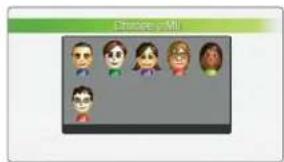
1 Choose a Mii
Choose a Mii from the selection of Miis saved on your Wii system.
■ For information on how to add a Mii. please refer to the Wii Operations Manual.
text_image
Grenore@mi2 Body Test
During Body Tests, you'll use the Wii Balance Board. First, enter your height and birth date. Point to the arrows and press ① enter your information. When you're done, you'll begin the test. Remember to not stand on the balance board until you are instructed to. During the Body Test, your center of balance, BMI, and Wii Fit Age will be revealed.
■ Please remove your shoes and socks and stand on the Wii Balance Board in your bare feet. Standing on the balance board with shoes or slippery socks can be dangerous.
■ Wii Fit Age is a measurement exclusive to Wii Fit. The Wii Fit Age ranges from 2 to 99 years old.
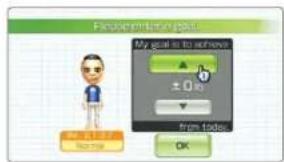
3 Set Your Goal
Once you view your current BMI, it's important to set a goal for what you want your BMI to be in two weeks...or longer. Then as you continue training, keep this BMI goal in mind.
text_image
Problem printing tool My goal is to achieve ±0% from today. OK4 PIN Settings
If you don't want others to see your data, you can protect it with a four-digit password. Once you have completed your settings, you will return to the calendar screen (page 11).
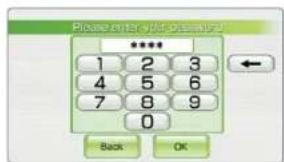
text_image
Please enter with quick access? **** 1 2 3 4 5 6 7 8 9 0 Back OKContinuing Your Profile
If you have already created a profile, the game will start at the Wii Fit Plaza. Simply point at your Mii and press 📀hen choose Start to go to the calendar screen (see page 11).
Change in BMI from Day 1
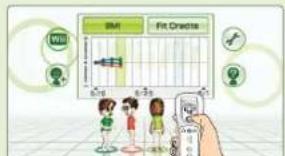
The orange line in the center of the graph represents your BMI the first time you checked it. The color of the dots matches the clothing color of the corresponding Miis. You can also toggle to the graph showing the Fit Credits each player has earned.
New Profile
Choose this option to create a new profile.
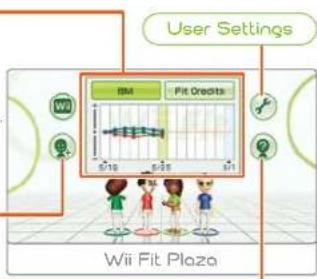
text_image
User Settings BM Fit Credits Wii Fit PlazaTrial
Trial mode allows players to do a Body Test or select from a limited list of activities and exercises without having to create a profile. However, your progress will not be saved, so it's best to create your own profile if you plan to train consistently.
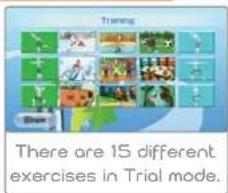
text_image
There are 15 different exercises in Trial mode.Settings
If you choose Settings in the Wii Fit Plaza, the following menu will appear.
Install Channel ...The Wii Fit Channel will be added to the Wii Menu.
Wil Balance Board Check ...This.will check if the Wil Balance Board is functioning correctly.
Wii Fit Credits ..View the staff, credits for Wii Fit.
Training Record
Your training record will automatically be saved to your personal profile. However, to save your records, you will need 8 or more blocks of open space on your Wii system memory. Up to eight people can create their own personal profiles. If you want to erase your save data, choose Delete User Data in User Settings (see page 12). Also, it's recommended to back up important information to an SD Card occasionally.
- Please refer to the Wii Operations Manual for more information on how to use on SD Card.
Calendar Screen
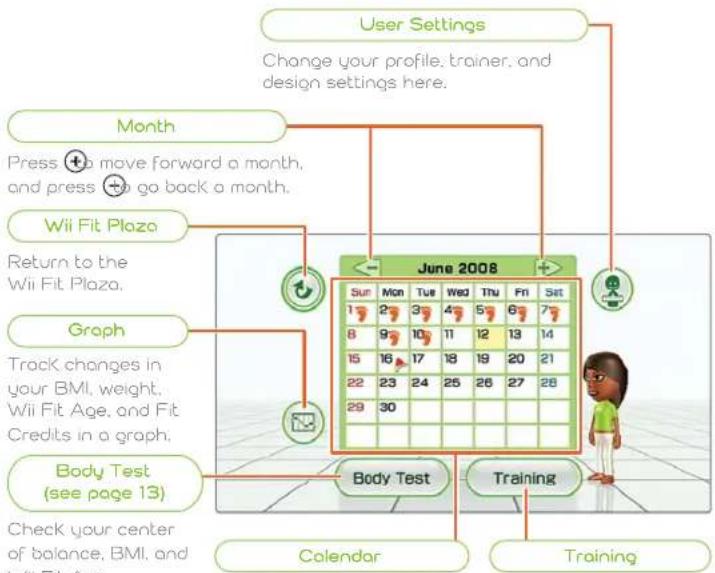
From the calendar screen, you can view your training calendar, check graphs, do a Body Test, or jump right into training.
Calendar Screen
Simply point at any option and press Ⓐ make a selection.
flowchart
graph TD
    A["User Settings"] --> B["Change your profile, trainer, and design settings here."]
    B --> C["Month"]
    C --> D["Press +to move forward a month, and press +to go back a month."]
    D --> E["Wii Fit Plaza"]
    E --> F["Return to the Wii Fit Plaza."]
    F --> G["Graph"]
    G --> H["Track changes in your BMI, weight, Wii Fit Age, and Fit Credits in a graph."]
    H --> I["Body Test (see page 13)"]
    I --> J["Check your center of balance, BMI, and fit data"]
    J --> K["Calendar"]
    K --> L["Training"]
    L --> M["June 2008"]
    M --> N["Training"]
Today's date is highlighted in yellow. The days that you performed a Body Test are marked with a stamp. If you select a date with a stamp, you can see detailed information on the Body Test you took that day. The red flag represents the date that you set as your goal deadline
Select this option to go directly to training activities and exercises.
Graph
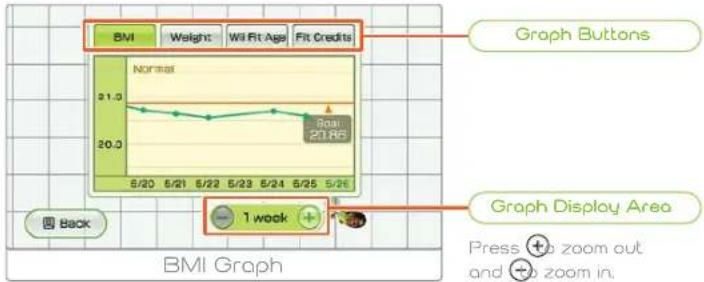
You can follow progress in your BMI, weight, Wii Fit Age, and Fit Credits (see page 15) with this easy-to-understand graph. Select the different buttons to swap through various graphs. Paint at a graph, press and hold 📐 and move the Wii Remote to scroll through information.
line
| Date | BMI | |---|---| | 5/20 | 21.0 | | 5/21 | 20.8 | | 5/22 | 20.6 | | 5/23 | 20.7 | | 5/24 | 20.9 | | 5/25 | 20.8 | | 5/26 | 20.7 |Activity Log
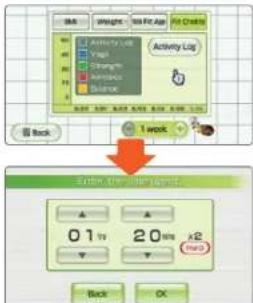
Record time you spend exercising outside of Wii Fit on the Fit Credits graph using the Activity Log. Simply select Activity Log and enter the amount of time you spent doing light, medium, or heavy exercise.
User Settings
You can change your own profile and software settings in User Settings.
text_image
Activity Log 1 week 0.1 tv 20 ms x2 Back OKEdit Profile Change your Mii, height, birth date, and password here. Simply point to the setting you would like to change and press ,
Change Design You can change the calendar color and stamp design here.
Change Trainer Change the gender of your trainer.
Delete User Data Select this option to delete your personal data. Remember, data that is erased can't be recovered, so be careful!

Body Test
In the Body Test, you use the Wii Balance Board to measure your center of balance. BMI, and body control. Based on these results, you can also determine your Wii Fit Age.
Doing a Body Test
1 Start the Body Test
First, turn on the Wii Balance Board and wait to stand on it until you're instructed to do so. Once it's ready, stand on the balance board and let it recognize your body. Enter the weight of the clothes you are wearing: light, heavy, or other (manually enter the weight of your clothes). Then follow the steps below.
2 Center of Balance and BMI
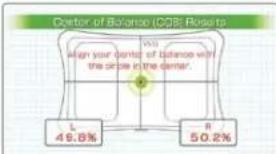
Stand on the balance board with your feet spread equally apart and your body straight. Wii Fit will then check the balance of your posture and your BMI. Once the measurement is complete, you will be able to see where your center of balance is located and what your BMI is. You can also check your weight if you'd like to see it.
bar
Center of Balance (COS) Results | Category | Value (%) | |---|---| | L | 49.8 | | R | 50.2 |Your center of balance is represented by the red dot. Try to keep the red dot in the center of the balance board.
■ Press ⚠ During the Body Test to access the pause menu.
For players under 20 years of age:
- BMI is a measurement typically used to assess fitness in adults, but Wii Fit was created so that players from ages 2-19 can get a BMI measurement as well. However, it's important to understand that there are differences in growth rates, so this data is for information only. If your height changes, it will affect your BMI, so please keep your User Settings (see page 12) up-to-date and make updates in the Edit Profile section regularly.
The BMI categories (underweight, normal, overweight, and obese) displayed by Wii Fit may be overestimated for people who have a heavy or muscular build, and may be underestimated for people who have a lighter build, or who are older adults.
3 Body Control
Your body control is measured using two randomly selected balance tests. Simply perform the tests by following the on-screen instructions.
■ The first time you do the Body Test, you will only do the Basic Balance Test.
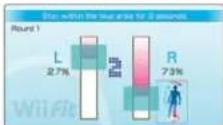
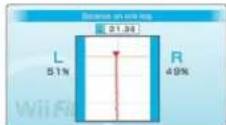
4 Wii Fit Age Announcement
Your Wii Fit Age will be calculated based on your balance-test results, taking into consideration your actual age. Your fitness goals may include working to lower your Wii Fit Age.
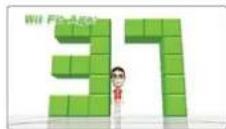
5 Stamp Your Calendar
Point at today's date and press 📄 go give yourself a stamp and end the test.


Fitness Tip: A Useful Weighing Method
After you've weighed yourself, why not try it again while holding something? By observing how much the weight differs, you can find out how much whatever you're holding weighs.
This feature only works when the object you're holding weighs 7 lbs. or more. Any weight difference under 7 lbs. will be treated as a natural fluctuation in the user's weight.
Wii Fit Channel
With Wii Fit, you can install a channel in the Wii Menu so that you can perform a Body Test and view your graph without having to insert the Game Disc. Select Install Channel from Settings (see page 10) to install the channel. Then just follow the instructions on the screen.
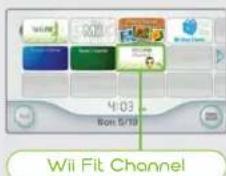
text_image
4:03 8:00 5/19 Wii Fit Channel- You will not be able to install this channel if you do not have enough available space in your Wii system memory and free channels on your Wii Menu.
Training
Wii Fit features four main categories to choose from: Strength Training, Aerobics, Yoga, and Balance Games. Choose the category you'd like to work on.
■ Individual results will vary.
- Don't overdo it. It's important not to train too much every day, so be conscious of how much time you're spending on your training.
- Depending on activity, you might need to attach the Nunchuk™ controller to the Wii Remote or connect two Wii Remotes to the Wii system. If you're asked to do this, just follow the on-screen instructions.
Start Training
To start training, select the training category and activity you want to do. Next, you may need to choose the difficulty level of the activity. Select Demo in Yoga or Strength Training to get a quick demo on how to do the activity. Choose Start to jump right into training. The first time you do an activity, you'll automatically watch a short demo.
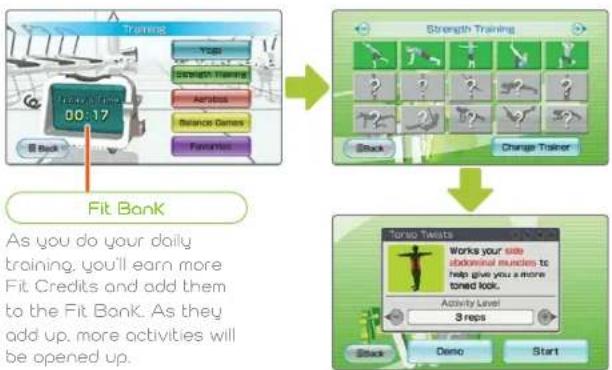
flowchart
graph TD
    A["Training"] --> B["Strength Training"]
    B --> C["Torsol Twists"]
    C --> D["Add up daily training to Fit Bank"]
    style A fill:#f9f,stroke:#333
    style B fill:#ccf,stroke:#333
    style C fill:#cfc,stroke:#333
    style D fill:#fcc,stroke:#333
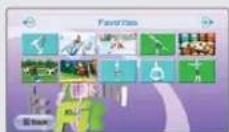
Favorites
In the Favorites section, you can select from a list of the 10 activities you choose most often.
Training Preparation
Start by powering on the Wii Balance Board, stand on it when instructed, and wait for it to recognize your body. In Yoga and Strength Training, you can follow along with your trainer while you perform the movements. Change the camera by pressing up and down on and find a view of the trainer that works best for you. Once you're ready, follow the instructions on the screen and begin training.
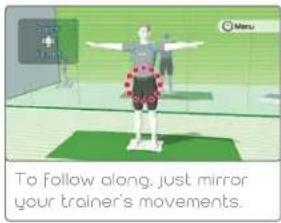
text_image
To follow along, just mirror your trainer's movements.■ Be sure to stretch and warm up before beginning these exercises.
■ Remember to wear comfortable clothes that are free of metal parts when you're training.
Pause Training
Press ☐ during an activity or exercise to access the pause menu and stop training for a bit. Press ☐ again or select Continue to resume training. Choose Restart to start the exercise over from the beginning and Quit to return to the training-selection screen.
Finish Training
When you complete an activity, you will be given a score based on your performance. If your score puts you in the Top 10 performances for that activity, you will be placed on the board. The Top 10 list is shared by every player with a profile on that Wii system. Once you've seen this, press Choose Retry to start the activity over again. Choose Quit to go back to the exercise-selection screen.
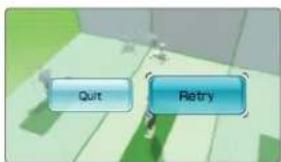
text_image
Quit RetryWARNING - Injury Due to Pre-existing Conditions
Gameplay with the Wii Balance Board may require varying amounts of physical activity. Consult a doctor before using the Wii Balance Board if:
- you are or may be pregnant,
- you have heart, respiratory, back, joint or other orthopedic conditions,
- you have high blood pressure,
- you have difficulty with physical exercise, or
- you have been instructed to restrict physical activity.
While using the Wii Balance Board, if you experience excessive fatigue, shortness of breath, chest tightness, dizziness, discomfort or pain, STOP USE IMMEDIATELY and consult a doctor.

text_image
Rocky Peak Summit Lake Mountain Tunnel Camel Rock Summit Falls White Sand Beach Crystal River Windmill Hill Harbor Bridge Seagull Point Wii Fit Town
Try to find all 15 of these marks scattered around the island.
Wii Fit Island Running Map
This is a map of the island you can explore while running in Wii Fit. Use this to imagine where you are running.
VEUILLEZ LIRE ATTENTIVEMENT L'INTÉGRALITÉ DU MODE D'EMPLOI DE LA Wii™ AVANT D'UTILISER VOTRE SYSTÈME, VOTRE DISQUE DE JEU, OU VOS ACCESSOIRES Wii. CE MODE D'EMPLOI COMPREND D'IMPORTANTES INFORMATIONS SUR VOTRE SANTÉ ET VOTRE SÉCURITÉ.
INFORMATIONS IMPORTANTES CONCERNANT VOTRE SÉCURITÉ : VEUILLEZ LIRE LES PRÉCAUTIONS SUIVANTES AVANT QUE VOUS OU VOTRE ENFANT NE JOUIEZ À VOS JEUX VIDÉO.
text_image
Center of Balance (COS) Results It's almost in the center You're just a tiny shift away from perfect balance! Your COS L 51.5% R 48.5%text_image
Diagram showing human body positioning with orange arrow indicating movement or change, labeled with yellow circular markers on joints.Équilibre inégal
text_image
How a test is correct. We must pay to consider or participate in course.text_image
Console Vcc Air Balance Boardtext_image
Open to Edit2 Test physique
text_image
Please identify your! My goal is to achieve ±0 id from today: OKtext_image
Please enter your phone to **** 1 2 3 4 5 6 7 8 9 0 Back OKtext_image
Weight Weight Gain Fit Create Activity Click 1 Week 0 10 20 30 40 50 60 70 80 90 Back OKbar
Center of Balance (CDS) Results | Category | Value (%) | |---|---| | L | 49.8 | | R | 50.2 |text_image
Center of Balance (COS) Results It's almost in the center! You're just a tiny shift away from perfect balance! Your COS L 51.5% R 48.5%text_image
Diagram showing human body positioning with orange arrow indicating movement or change, labeled with yellow circular markers on joints.Equilibrio irregular