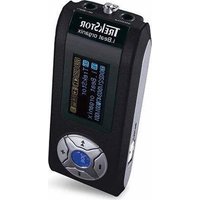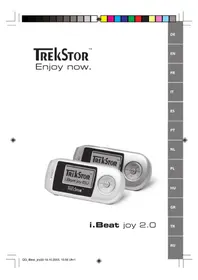
I.Beat joy 2.0 - Mp3 player TrekStor - Free user manual and instructions
Find the device manual for free I.Beat joy 2.0 TrekStor in PDF.



User questions about I.Beat joy 2.0 TrekStor
0 question about this device. Answer the ones you know or ask your own.
Ask a new question about this device
Download the instructions for your Mp3 player in PDF format for free! Find your manual I.Beat joy 2.0 - TrekStor and take your electronic device back in hand. On this page are published all the documents necessary for the use of your device. I.Beat joy 2.0 by TrekStor.
USER MANUAL I.Beat joy 2.0 TrekStor
text_image
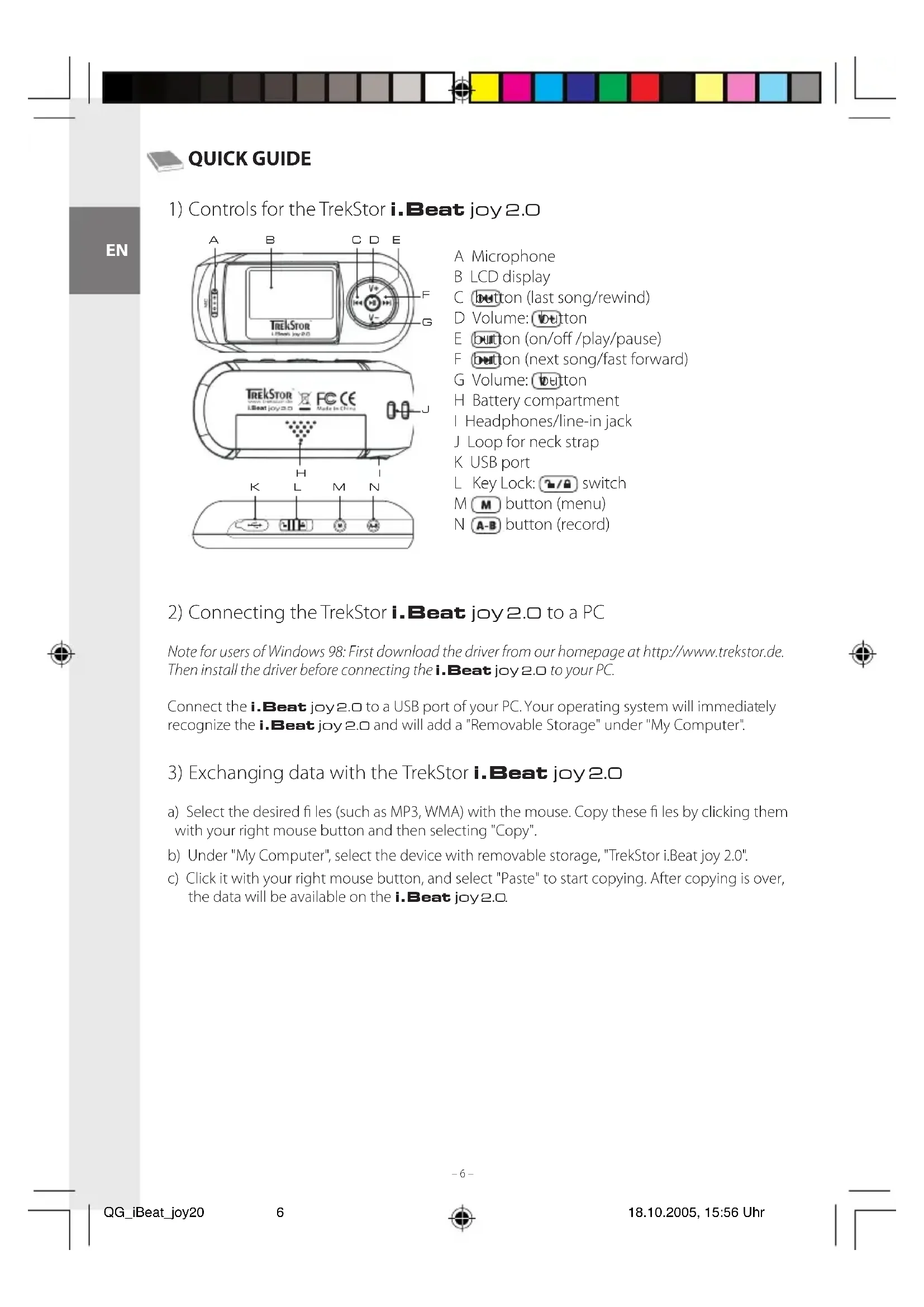
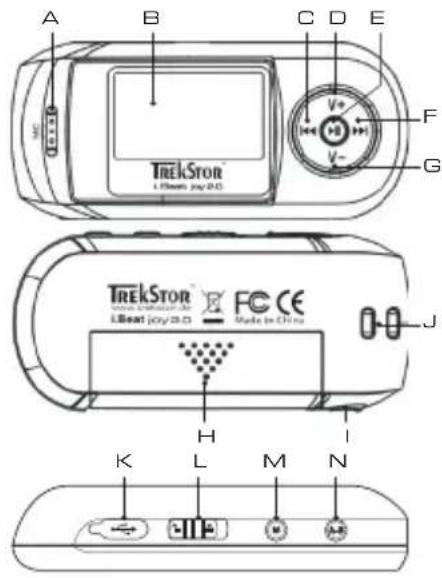
A B C D E TrekStor™ L Beat joy/2.0 V+ M F G TrekStor™ L Beat joy/2.0 FC CE Made in China J H K L M NA Microphone
B LCD display
C button (last song/rewind)
D Volume: button
E button (on/off /play/pause)
F button (next song/fast forward)
G Volume: button
H Battery compartment
1 Headphones/line-in jack
J Loop for neck strap
K USB port
L Key Lock: 📋/🔒 switch
M M button (menu)
N A-B button (record)
2) Connecting the TrekStor i.Beat joy 2.0 to a PC
Note for users of Windows 98: First download the driver from our homepage at http://www.trekstor.de. Then install the driver before connecting the i.Beat joy 2.0 to your PC.
Connect the i.Beat joy2.0 to a USB port of your PC. Your operating system will immediately recognize the i.Beat joy2.0 and will add a "Removable Storage" under "My Computer".
3) Exchanging data with the TrekStor i.Beat joy 2.0
a) Select the desired fi les (such as MP3, WMA) with the mouse. Copy these fi les by clicking them with your right mouse button and then selecting "Copy".
b) Under "My Computer", select the device with removable storage, "TrekStor i.Beat joy 2.0".
c) Click it with your right mouse button, and select "Paste" to start copying. After copying is over, the data will be available on the i.Beat joy2.0.
4) Logging off the TrekStor i.Beat joy 2.0 and disconnecting from the PC
Windows 98 (SE) Look for i.Beat joy2.0 under "Device Manager" (under "Drives"), and click the device with the left mouse button. Select the menu item "Remove". You can now disconnect the i.Beat joy2.0 from the PC.
Windows 2000/ME/XP At the bottom right on the task bar, click your right mouse button on the symbol "Safely remove hardware". In the context menu that appears, click the left mouse button on "Safely Remove Mass Storage Device - Drive" to select it. You can now disconnect the i.Beat joy 2.0 from the PC.
Note: Please follow the recommended logoff procedure to prevent damage to the device or data loss.
5) Using the TrekStor i.Beat joy 2.0
Turning the device on and off
Turn on the i.Beat joy 2.0 by pressing the ▶ button for 2 seconds. To turn off the i.Beat joy 2.0, hold the ▶ button for approximately 2 seconds.
Note: Make sure that the switch has been moved to the left, i.e., that the button lock is turned off. If the button lock is activated, the button lock symbol or a corresponding message will appear.
Folder navigation
Quickly press the button to go to Folder Navigation. Press the or button to select the next or prior file or folder. To play the selected file, press the button. To change to a subfolder, press the button if the folder is marked. To return to the main directory, press the button.
Delete a file
Quickly press the Button to go to Folder Navigation. Select the file to be deleted, and press the A-B button. Use the AND buttons to select "YES", and confirm the security prompt by pressing the Button.
Different modes
The i.Beat joy2.0 has different modes. To go to a mode, hold the M button for approximately 2 seconds. Push the K button to the right or left to select the desired mode, and confirm by pressing the button again.
Mode: Music
Switch to "Music" mode.
- Playback
Briefly press the button to start playing an audio file.
- Pause
Briefly press the button to stop playing the file. Repress the button to continue playing the file.
- Change song
You can change the current song by briefly pressing the button to the left or right.
Press the button to select the next song. Press the button to select the previous song.
- Rewind/fast-forward within a song
You can navigate within a song by holding down the 🎨 button in one direction or the other. Hold down the 🎨 button to fast forward or rewind.
- Increase/decrease volume
You can adjust the volume by briefly holding down the 📊+ button. Briefly press the or buttons to raise or lower the volume.
Note: If you hold down the 0V+ button, the volume changes gradually.
Mode: Playlist
The i.Beat joy2.0 plays playlists (M3U files), and you can determine the sequence of songs to be played.
Switch to "Playlist" mode.
Select the playlist you want from the appearing folder navigation. Start the playlist by pressing the button.
Note: M3U playlists can only be edited on a computer (for example using Winamp or text editors such as Notepad).
Mode: Record
Switch to "Record" mode.
Note: First select the recording source (either microphone or line-in) in "Record setting" modus under "Source".
- Voice recording
You can record your voice using the integrated microphone. Briefly press the A button to start recording. To stop recording, briefly press the button again.
Note: All voice recordings are saved in the "VOICE" folder.
- Line-in recording
You can connect an external device to the Line-In jack (such as a CD player) and directly record from it. Briefly press the button to start recording while you simultaneously turn on the external device. To stop recording, briefly press the button again.
Note: All line-in recordings are saved in the "LINE" folder.
Mode: Playback settings
Switch to the "Play Setting" mode.
You can set the equalizer and various repeat functions in this mode.
Press the button to select the desired setting, and confirm by pressing the button. Briefly press the button to return to the main menu.
Note: These user instructions also apply to the "Recording Settings" and "Settings" modes.
Mode: Recording settings
Switch to the "Record Setting" mode.
In this mode, you can set the recording source, the source quality, and the recording sensitivity (threshold of the recording).
Mode: Settings
Switch to the "Tools" mode.
In this mode, you can set the timer (sleep timer, eco mode), the length of illumination, the contrast, and the language of the i.Beat joy 2.0. You can also display the entire memory and remaining memory, and format the i.Beat joy 2.0.
Note: Remember that when the i.Beat joy 2.0 is formatted, it completely deletes all the data.
Note:
- This MP3 player is optimized for the provided earphones (32 Ohm impedance). Using other earphones with a lower impedance can damage the MP3 player or earphone, especially MP3 players with 2 earphone jacks.
- Note: This device can produce high volumes. To prevent hearing loss, do not listen to high volumes for long periods. Do not use in street traffic.
- Do not use USB cables longer than 3 meters.
The manufacturer retains the right to continuously improve the product. These changes may be made without being directly described in these brief instructions. For this reason, the information provided in these brief instructions may not reflect the current state of the art.
The manufacturer only guarantees suitability for the product's intended purpose. In addition, the manufacturer is not responsible for damages or loss of data and subsequent consequences.
Copyright © 2005 TrekStor GmbH & Co. KG. All rights retained. Other cited product or company names may be trademarks or brand names of the respective owner.

GUIDE ABRÉGÉ DE L'UTILISATEUR
text_image
A B C D E TrekStor L-Beat joy/2.0 V+ M F G TrekStor L-Beat joy/2.0 FC CE Made in China J H K L M Ntext_image
A B C D E TrekStor™ L-Beat joy/2.0 V+ M F G TrekStor™ L-Beat joy/2.0 FC CE Made in China J H K L M NA Micrófono
text_image
A B C D E TrekStor L-Beat joy/2.0 V+ M F G TrekStor L-Beat joy/2.0 FC CE Made in China J H K L M NA Microfone
B Visor LCD
C Tecla (retrocede faixa/retroceder)
D Tecla de volume v+
BEKNOPTE HANDLEIDING
1) Bedieningselementen van de TrekStor i.Beat joy 2.0
text_image
A B C D E TrekStor™ L Beat joy/2.0 V+ M F G TrekStor™ L Beat joy/2.0 FC CE Made in China J H K L M Ntext_image
A B C D E TrekStor™ L-Beat joy/2.0 V+ M F G TrekStor™ L-Beat joy/2.0 FC CE Made in China J H K L M NA mikrofon
text_image
A B C D E TrekStor L-Beat joy/2.0 V+ M F G TrekStor www.trekstor.com L-Beat joy/2.0 FC CE Made in China J H K L M Ntext_image
A B C D E TrekStor™ L-Beat joy/2.0 V+ M F G TrekStor™ L-Beat joy/2.0 FC CE Made in China J H K L M NΑ Μικρόφωνο
B 'Evδειξη LCD
text_image
A B C D E F G TrekStor™ L-Beat joy/2.0 TrekStor™ www.trekstor.com L-Beat joy/2.0 FC CE Made in China H I K L M Nnatural_image
Color palette bar with grayscale squares and a white square at center (no text or symbols)

natural_image
Color palette bar with grayscale squares and a white square at center (no text or symbols)
Support
Kastanienallee 8-10 · D-64653 Lorsch · Germany · www.trekstor.de
* 12 Cent/Min. aus dem deutschen Festnetz der DTAG ** Please check with your local telephone provider for connection costs.
UK
PT
PL
NL
LU
IT
HU
FR
ES
01805 - 87 35 78 67* support.de@trekstor.de German
01805 - TREKSTOR*
CH
BE
AT
Hotline E-Mail Language
+49 431 - 24 89 45 70** support.at@trekstor.de German
+49 431 - 24 89 45 80** support.en@trekstor.de English
+49 431 - 24 89 45 73** support.ch@trekstor.de German
+49 431 - 24 89 45 70** support.at@trekstor.de German
+49 431 - 24 89 45 80** support.en@trekstor.de English
+49 431 - 24 89 45 70** support.at@trekstor.de German
+49 431 - 24 89 45 80** support.en@trekstor.de English
+49 431 - 24 89 45 70** support.at@trekstor.de German
+49 431 - 24 89 45 80** support.en@trekstor.de English
+49 431 - 24 89 45 70** support.at@trekstor.de German
+49 431 - 24 89 45 80** support.en@trekstor.de English
+49 431 - 24 89 45 70** support.at@trekstor.de German
+49 431 - 24 89 45 80** support.en@trekstor.de English
+49 431 - 24 89 45 70** support.at@trekstor.de German
+49 431 - 24 89 45 80** support.en@trekstor.de English
+49 431 - 24 89 45 70** support.at@trekstor.de German
+49 431 - 24 89 45 80** support.en@trekstor.de English
+49 431 - 24 89 45 70** support.at@trekstor.de German
+49 431 - 24 89 45 80** support.en@trekstor.de English
+49 431 - 24 89 45 70** support.at@trekstor.de German
+49 431 - 24 89 45 80** support.en@trekstor.de English
+49 431 - 24 89 45 70** support.at@trekstor.de German
+49 431 - 24 89 45 80** support.en@trekstor.de English
+49 431 - 24 89 45 70** support.at@trekstor.de German
+49 431 - 24 89 45 80** support.en@trekstor.de English
+49 431 - 24 89 45 70** support.at@trekstor.de German
+49 431 - 24 89 45 80** support.en@trekstor.de English
+49 431 - 24 89 45 70** support.at@trekstor.de German
+49 431 - 24 89 45 80** support.en@trekstor.de English
+49 431 - 24 89 45 70** support.at@trekstor.de German
+49 431 - 24 89 45 80** support.en@trekstor.de English
+49 431 - 24 89 45 70** support.at@trekstor.de German
+49 431 - 24 89 45 80** support.en@trekstor.de English
+49 431 - 24 89 45 70** support.at@trekstor.de German
+49 431 - 24 89 45 80** support.en@trekstor.de English
+49 431 - 24 89 45 70** support.at@trekstor.de German
+49 431 - 24 89 45 80** support.en@trekstor.de English
+49 431 - 24 89 45 70** support.at@trekstor.de German
+49 431 - 24 89 45 80** support.en@trekstor.de English
+49 431 - 24 89 45 70** support.at@trekstor.de German
+49 431 - 24 89 45 80** support.en@trekstor.de English
+49 431 - 24 89 45 70** support.at@trekstor.de German
+49 431 - 24 89 45 80** support.en@trekstor.de English
+49 431 - 24 89 45 70** support.at@trekstor.de German
+49 431 - 24 89 45 80** support.en@trekstor.de English
+49 431 - 24 89 45 70** support.at@trekstor.de German
+49 431 - 24 89 45 80** support.en@trekstor.de English
+49 431 - 24 89 45 70** support.at@trekstor.de German
+49 431 - 24 89 45 80** support.en@trekstor.de English
+49 431 - 24 89 45 70** support.at@trekstor.de German
+49 431 - 24 89 45 80** support.en@trekstor.de English
+49 431 - 24 89 45 70** support.at@trekstor.de German
+49 431 - 24 89 45 80** support.en@trekstor.de English
+49 431 - 24 89 45 70** support.at@trekstor.de German
+49 431 - 24 89 45 80** support.en@trekstor.de English
+49 431 - 24 89 45 70** support.at@trekstor.de German
+49 431 - 24 89 45 80** support.en@trekstor.de English
+49 431 - 24 89 45 70** support.at@trekstor.de German
+49 431 - 24 89 45 80** support.en@trekstor.de English
+49 431 - 24 89 45 70** support.at@trekstor.de German
+49 431 - 24 89 45 80** support.en@trekstor.de English
+49 431 - 24 89 45 70** support.at@trekstor.de German
+49 431 - 24 89 45 80** support.en@trekstor.de English
+49 431 - 24 89 45 70** support.at@trekstor.de German
+49 431 - 24 89 45 80** support.en@trekstor.de English
+49 431 - 24 89 45 70** support.at@trekstor.de German
+49 431 - 24 89 45 80** support.en@trekstor.de English
+49 431 - 24 89 45 70** support.at@trekstor.de German
+49 431 - 24 89 45 80** support.en@trekstor.de English
+49 431 - 24 89 45 70** support.at@trekstor.de German
+49 431 - 24 89 45 80** support.en@trekstor.de English
+49 431 - 24 89 45 70** support.at@trekstor.de German
+49 431 - 24 89 45 80** support.en@trekstor.de English
+49 431 - 24 89 45 70** support.at@trekstor.de German
+49 431 - 24 89 45 80** support.en@trekstor.de English
+49 431 - 24 89 45 70** support.at@trekstor.de German
+49 431 - 24 89 45 80** support.en@trekstor.de English
+49 431 - 24 89 45 70** support.at@trekstor.de German
+49 431 - 24 89 45 80** support.en@trekstor.de English
+49 431 - 24 89 45 70** support.at@trekstor.de German
+49 431 - 24 89 45 80** support.en@trekstor.de English
+49 431 - 24 89 45 70** support.at@trekstor.de German
+49 431 - 24 89 45 80** support.en@trekstor.de English
+49 431 - 24 89 45 70** support.at@trekstor.de German
+49 431 - 24 89 45 80** support.en@trekstor.de English
+49 431 - 24 89 45 70** support.at@trekstor.de German
+49 431 - 24 89 45 80** support.en@trekstor.de English
+49 431 - 24 89 45 70** support.at@trekstor.de German
+49 431 - 24 89 45 80** support.en@trekstor.de English
+49 431 - 24 89 45 70** support.at@trekstor.de German
+49 431 - 24 89 45 80** support.en@trekstor.de English
+49 431 - 24 89 45 70** support.at@trekstor.de German
+49 431 - 24 89 45 80** support.en@trekstor.de English
+49 431 - 24 89 45 70** support.at@trekstor.de German
+49 431 - 24 89 45 80** support.en@trekstor.de English
+49 431 - 24 89 45 70** support.at@trekstor.de German
+49 431 - 24 89 45 80** support.en@trekstor.de English
+49 431 - 24 89 45 70** support.at@trekstor.de German
+49 431 - 24 89 45 80** support.en@trekstor.de English
+49 431 - 24 89 45 70** support.at@trekstor.de German
+49 431 - 24 89 45 80** support.en@trekstor.de English
+49 431 - 24 89 45 70** support.at@trekstor.de German
+49 431 - 24 89 45 80** support.en@trekstor.de English
+49 431 - 24 89 45 70** support.at@trekstor.de German
+49 431 - 24 89 45 80** support.en@trekstor.de English
+49 431 - 24 89 45 70** support.at@trekstor.de German
+49 431 - 24 89 45 80** support.en@trekstor.de English
+49 431 - 24 89 45 70** support.at@trekstor.de German
+49 431 - 24 89 45 80** support.en@trekstor.de English
+49 431 - 24 89 45 70** support.at@trekstor.de German
+49 431 - 24 89 45 80** support.en@trekstor.de English
+49 431 - 24 89 45 70** support.at@trekstor.de German
+49 431 - 24 89 45 80** support.en@trekstor.de English
+49 431 - 24 89 45 70** support.at@trekstor.de German
+49 431 - 24 89 45 80** support.en@trekstor.de English
+49 431 - 24 89 45 70** support.at@trekstor.de German
+49 431 - 24 89 45 80** support.en@trekstor.de English
+49 431 - 24 89 45 70** support.at@trekstor.de German
+49 431 - 24 89 45 80** support.en@trekstor.de English
+49 431 - 24 89 45 70** support.at@trekstor.de German
+49 431 - 24 89 45 80** support.en@trekstor.de English
+49 431 - 24 89 45 70** support.at@trekstor.de German
+49 431 - 24 89 45 80** support.en@trekstor.de English