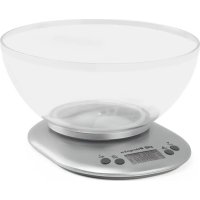
PC 2017 A - Kitchen scales Orbegozo - Free user manual and instructions
Find the device manual for free PC 2017 A Orbegozo in PDF.



| Brand | Orbegozo |
| Model | PC 2017 A |
| Product type | Kitchen scale |
| Power source | Batteries (not included) |
| Maximum capacity | 5 kg |
| Units of measurement | g, lb:oz, oz |
| Display | LCD |
| Tare function | Yes, incremental weighing |
| Timer function | Yes, with alarm (from 00:10 to 99:50 minutes) |
| Ambient temperature display | Yes, in °C |
| Auto shutdown | After 90 seconds of inactivity |
| Low battery indicator | Displays "Lo" |
| Overload indicator | Displays "Err" if > 5 kg |
| Material | Plastic and glass (estimate) |
| Care and cleaning | Damp cloth, do not immerse |
| Safety | Do not use near water, stable surface, avoid microwaves and mobile phones (minimum distance 1.5 m and 2 m respectively) |
| Warranty | Legal warranty in accordance with applicable legislation |
| Certifications | CE, compliant with EMC Directive 2014/30/EU and WEEE 2012/19/EU |
Frequently Asked Questions - PC 2017 A Orbegozo
User questions about PC 2017 A Orbegozo
0 question about this device. Answer the ones you know or ask your own.
Ask a new question about this device
Download the instructions for your Kitchen scales in PDF format for free! Find your manual PC 2017 A - Orbegozo and take your electronic device back in hand. On this page are published all the documents necessary for the use of your device. PC 2017 A by Orbegozo.
USER MANUAL PC 2017 A Orbegozo
Read the operating instructions carefully before putting the appliance into operation and keep the instructions including the warranty, the receipt and, if possible, the box with the internal packing.
General Safety Instructions
-
This appliance can be used by children aged from 8 years and above and persons with reduced physical, sensory or mental capabilities or lack of experience and knowledge if they have been given supervision or instruction concerning use of the appliance in a safe way and understand the hazards involved. Children must never play with the appliance. Cleaning and user maintenance must never be carried out by children without supervision.
-
Children should be supervised to ensure that they do not play with the appliance.
- Keep the appliance out of the reach of children less than 8 years old.
- WARNING: In order to ensure your children's safety, please keep all packaging (plastic bags, boxes, polystyrene etc.) out of their reach.
- Do not use the unit if it is not working properly.
- Do not handle the appliance with wet hands.
- Never immerse the appliance in water or any other liquid.
-
This appliance is for household use only.
-
In case that you need a copy of the instruction manual, you can find in our website: www.orbegozo.com
- WARNING: In case of misuse, there is a risk of possible injury.
Special Safety Instructions
- Use the device only for the intended purpose.
- Always place the appliance on a stable, level and horizontal surface when you use it.
- Make sure your hands and the appliance are dry when you insert the batteries.
- A microwave oven or a mobile phone may cause interference, which can lead to unreliable weighing results.
- Use the kitchen scales at a safe distance of at least 1.5 metres from a working microwave oven, or switch off the microwave oven.
- Keep a mobile phone that is switched on at a safe distance of at least 2 metres from the scales, or switch off the mobile phone.
Electromagnetic fields (EMF)
This appliance complies with all standards regarding electromagnetic fields (EMF). If handled properly and according to the instructions in this user manual, the appliance is safe to use based on scientific evidence available today.
CONTROL DESCRIPTION
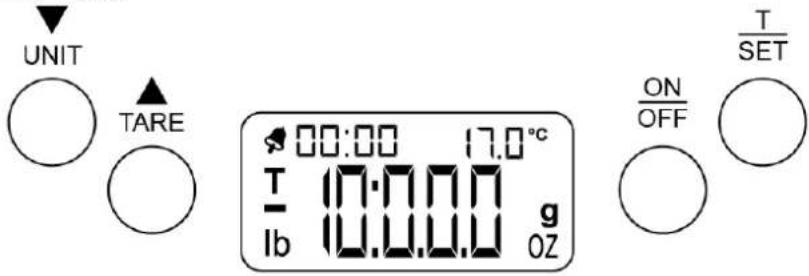
TARE: Tare button
UNIT: Change units button (g; lb:oz; oz)
ON/OFF: On/Off button
T-SET: Timer set button
TARE: Tare button
UNIT: Change units button (g; lb:oz; oz)
ON/OFF: On/Off button
T-SET: Timer set button
BATTERIES
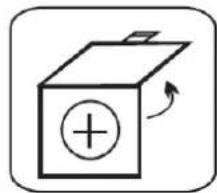
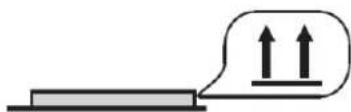
Before using the kitchen scale for the first time, check the battery socket and remove the plastic sheet from the contact.
If you're going to change the batteries, make sure that the negative and positive poles are correctly aligned.
FUNCTIONING
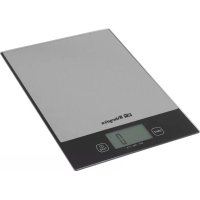
- The kitchen scale has been developed to show the food and ingredient weights.
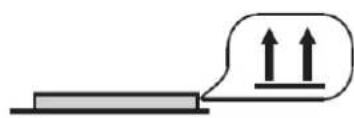
- Place the scale on a flat and stable Surface.
- Put the food in the scale bowl. Once the display's number stops, you can read the weightness.
- Please, don't submerge the kitchen scale in water.
- Use the kitchen scale with care, this is a measurement tool. Don't let it fall and don't overload it.
USE
Note 1: Even using the scale bowl, or without it, the scale always starts weighing in zero. The temperatura also will be shown in the display when it's turned on.
Note 2: The Reading means 0 in g or 0:00 in lb:oz or 0:00 in oz.
- Place the weighing recipient on the product (It also can be used directly to the kitchen scale).
- Press the ON/OFF button to turn on the device. The kitchen scale will beep.
- Wait until the display shows 0.
- Select the desired weight unit by pressing the UNIT button. The units will switch between: g; lb; oz; oz.
- Put the food to measure over the weighing surface or recipient.
- The LCD display will show the food weight in the selected unit.
IMPORTANT: Make sure not to never add more than the max weight to the weighing surface.
Overloading the device could cause damage to it.
Incremental weighing ("TARE" function)
- Touching the TARE button will change the actual reading to "0". Also the symbol "T" will appear in the display.
- Now, you can add another ingredient to the bowl to be measured and the screen will show the measure of this new ingredient.
If you remove this new ingredient, the screen will show "0" again. - If you remove all the ingredients from the scale, the screen will show a negative value with the symbol "-". This negative value will correspond to the weight of the first ingredient.
- To reset the weighing, press the TARE button again and the symbol "T" will disappear and the screen will show "0" again.
Timer/Alarm function
Note: The product timer has a range from 00:10 to 99:50 minutes. The setted time will countdown until "00:00". Once the countdown finishes, the alarm will start beeping and the " 品 " symbol will be shown on the screen.
- Press the ON/OFF button to turn on the device.
- Press the T-SET button, " " symbol will be shown on the screen.
- Adjust the time by pressing UNIT ( )▲r TARE ( ) buttons.
- Press the T-SET button again to confirm the setted time and start the countdown timer.
- Press again the T-SET button to stop the timer.
- Press the T-SET button for the third time to reset the timer to "00:00". The alarm symbol "8" will disappear.
Note: When the setted countdown timer finishes, the alarm will start beeping.
- Press the ON/OFF button to stop the beeping.
Ambient temperature function
When the device is turned on, the LCD screen will show the current ambient temperature. This temperature will be shown in ^ C .
Turning Off the device
- Press the button ON/OFF to turn off the scale manually.
The scale will turn off automatically after 90 seconds of inactivity to save power.
CAUTION INDICATORS
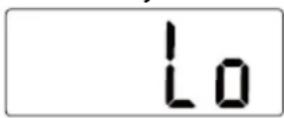
Low battery
The "Lo" indication in the screen means the battery is low.
Overload
The "Err" indication in the screen means the weight on the scale is over the maximum weight accepted by the scale (5 kg.).
MAINTENANCE
- Clean the device with a wet cloth. To remove hardened dirt, you can also wet the cloth by using lightly soaped water.
- Keep the kitchen scale far from water, corrosive substances and extreme hot or cold.
- The kitchen scale is a high precision measure device. Never hit the scale or try to disassemble it. Don't let it fall or break during its transport.
- This scale is suitable for home uses and it's not suitable for professional use.
- Please, check if the battery works correctly. Replace it for a new one if necessary.
DISPOSAL OF OLD ELECTRICAL APPLIANCES
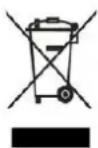
The European directive 2012/19/EU on Waste Electrical and Electronic Equipment (WEEE), requires that old household electrical appliances must not be disposed of in the normal unsorted municipal waste stream. Old appliances must be collected separately in order to optimize the recovery and recycling of the materials they contain, and reduce the impact on human health and the
environment. The crossed out "wheeled bin" symbol on the product reminds you of your obligation, that when you dispose of the appliance, it must be separately collected. Consumers should contact their local authority or retailer for information concerning the correct disposal of their old appliance.
DECLARATION OF CONFORMITY:
This device complies with the requirements of the EMC directive 2014/30/EU.
GUARANTEE
This appliance is covered and is entitled to the legal guarantee in accordance with the legislation in force from the date of purchase. Keep the purchase receipt to be able to claim your right to the guarantee. To find the closest service to your location, contact through the following web link: https://orbegozo.com/assistencia-technica/
For any type of query, doubt or incident, you can contact us through our email shown on the main page of this manual or through our technical assistance service at https://orbegozo.com/contacto/
Orbegozo is not responsible for components and accessories that are subject to wear and tear due to use, as well as perishable compounds or those that have deteriorated due to improper use. Nor will it be held responsible if the owner has technically modified the device. Check the legal conditions on our website.
FRANÇAISE
MESURES DE SECURITÉ IMPORTANTES
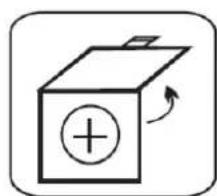
Before using the kitchen scale for the first time, check the battery socket and remove the plastic sheet from the contact.
If you're going to change the batteries, make sure that the negative and positive poles are correctly aligned.
FONCTIONNEMENT
DECLARATION DE CONFORMITE:
- General Safety Instructions
- Special Safety Instructions
- Electromagnetic fields (EMF)
- CONTROL DESCRIPTION
- BATTERIES
- FUNCTIONING
- USE
- Incremental weighing ("TARE" function)
- Timer/Alarm function
- Ambient temperature function
- Turning Off the device
- CAUTION INDICATORS
- Low battery
- Overload
- MAINTENANCE
- DISPOSAL OF OLD ELECTRICAL APPLIANCES
- DECLARATION OF CONFORMITY:
- GUARANTEE
- FRANÇAISE
- MESURES DE SECURITÉ IMPORTANTES
- FONCTIONNEMENT
- DECLARATION DE CONFORMITE:
Brand : Orbegozo
Model : PC 2017 A
Category : Kitchen scales