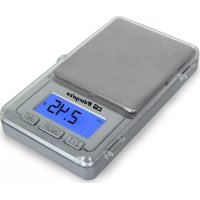
PC 3000 - Kitchen scales Orbegozo - Free user manual and instructions
Find the device manual for free PC 3000 Orbegozo in PDF.



| Product type | Kitchen scale |
| Brand | Orbegozo |
| Model | PC 3000 |
| Maximum capacity | 500 g (0.1 g division) |
| Units of measurement | g, oz, dwt, ozt |
| Power supply | 2 CR2032 batteries (3 V) or 2 AAA batteries (1.5 V) |
| Display | LCD with blue backlight |
| Functions | Weighing, piece counting, tare, reset, unit conversion |
| Auto-off | After 2 minutes of inactivity |
| Backlight | Automatic, turns off after 30 seconds of inactivity |
| Precision | High precision with strain gauge |
| Cleaning | Soft damp cloth, do not immerse |
| Safety | Do not use near microwaves or mobile phones |
| Indications | Low battery, overload |
| Spare parts | Batteries (standard CR2032 or AAA) |
| Repairability | Do not repair yourself, contact an authorized specialist |
| General information | Compliant with EMC standards (2004/108/EC) |
Frequently Asked Questions - PC 3000 Orbegozo
User questions about PC 3000 Orbegozo
0 question about this device. Answer the ones you know or ask your own.
Ask a new question about this device
Download the instructions for your Kitchen scales in PDF format for free! Find your manual PC 3000 - Orbegozo and take your electronic device back in hand. On this page are published all the documents necessary for the use of your device. PC 3000 by Orbegozo.
USER MANUAL PC 3000 Orbegozo
Read this manual carefully before running this appliance and save it for reference in order to obtain the best results and ensure safe use.
- This appliance can be used by children aged from 8 years and above and persons with reduced physical, sensory or mental capabilities or lack of experience and knowledge if they have been given supervision or instruction concerning use of the appliance in a safe way and understand the hazards involved. Children must never play with the appliance. Cleaning and user maintenance must never be carried out by children without supervision.
- Children should be supervised to ensure that they do not play with the appliance.
- Keep the appliance and the cable cord out of the reach of children less than 8 years old.
- WARNING: In order to ensure your children's safety, please keep all packaging (plastic bags, boxes, polystyrene etc.) out of their reach.
- Do not use the unit if it is not working properly.
-
Do not handle the appliance with wet hands.
-
Never immerse the appliance in water or any other liquid.
- This appliance is for household use only.
- In case that you need a copy of the instruction manual, you can ask for it writing an email to sonifer@sonifer.es
Special Safety Instructions
- Use the device only for the intended purpose.
- Always place the appliance on a stable, level and horizontal surface when you use it.
- Make sure your hands and the appliance are dry when you insert the batteries.
- A microwave oven or a mobile phone may cause interference, which can lead to unreliable weighing results.
-
Use the kitchen scales at a safe distance of at least 1.5 metres from a working microwave oven, or switch off the microwave oven.
-
Keep a mobile phone that is switched on at a safe distance of at least 2 metres from the scales, or switch off the mobile phone.
Before the first Using
Remove protective plastic before using the scale.
Electromagnetic fields (EMF)
This appliance complies with all standards regarding electromagnetic fields (EMF). If handled properly and according to the instructions in this user manual, the appliance is safe to use based on scientific evidence available today
Features and Specifications
- Equipped with high precision strain gauge sensor
- With piece counting calculation mode
- With blue LCD backlight
- Zero/Tare
- Low battery/Overload indication
- Auto zero/Auto off
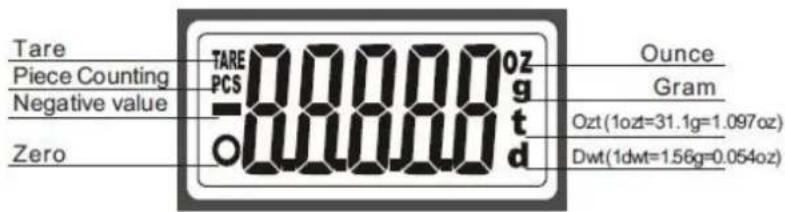
LCD icon/ illustration
Unit, Max. Capacity and Division
| Max. capacity | 100g/ 3.5 oz/ 64 dwt/ 3 ozt |
| Division | 0.01g/ 0.0005 oz/ 0.01 dwt/ 0.0005 ozt |
| Max. capacity | 200g/ 7 oz/ 128 dwt/ 6 ozt |
| Division | 0.02g/ 0.001 oz/ 0.02 dwt/ 0.001 ozt |
| Max. capacity | 500g/ 17.5 oz/ 321 dwt/ 16 ozt |
| Division | 0.1g / 0.005 oz/ 0.1 dwt/ 0.005 ozt |
Note: Max. weight capacity is indicated on the rating label of scale.
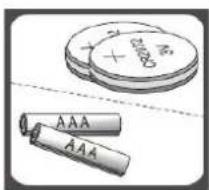
Battery
2x3V CR2032 lithium batteries or 2x1.5V AAA batteries (Indicated on rating label beneath the scale)
To Replace Battery
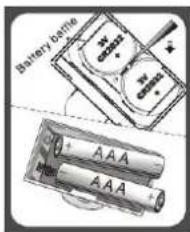
- Open the battery compartment located on the bottom of the scale.
- Take out the used battery (with the aid of a sharp object if needed).
- Install new battery to the compartment. Ensure to observe the polarity.
To Operate
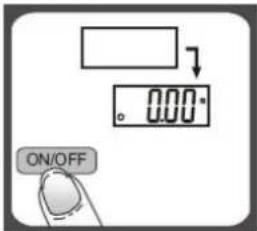
- Place the scale on a flat and solid surface. Avoid carpet or soft surface.
- Press and release ON/OFF button to switch on the unit.
- Wait until display prompts to 000 before starting weighing.
- Always place the weighing object in the center of the platform.
To Convert Weight Unit
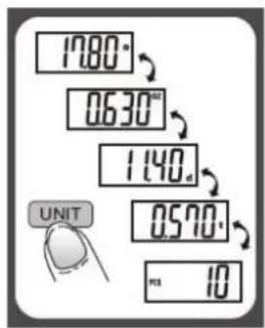
You can press UNIT button to convert weight unit between gram, ounce, dwt, ozt and to pre-set piece counting mode.
To conduct piece counting mode
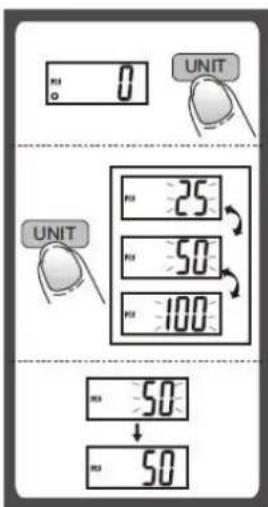
- Press UNIT to select piece counting mode 'PCS' when the scale is vacant (Scale is programmed to allow calibrating weights of 3 different pre-set quantities being 25 pcs, 50 pcs or 100 pcs).
- Press UNIT for 3 seconds to select pre-set quantity value either 25, 50 or 100. Consecutive pressing the UNIT will rotate around 25, 50, 100. Once selected the pre-set quantity, let's say 50, LCD will show 50, then place same quantity (50 pcs) of the object on the weighing platform, wait for LCD to flash '50' a few times. Scale now recognizes weight of 50 pcs object, also calculates & memorises the average single unit weight value.
- Next time weighing same object of different quantity. Turn on the scale, place X quantity of the object onto weighing platform. LCD will show the weight as normal, then press 'UNIT' to piece counting mode 'PCS', LCD will display the quantity placed
on the platform.
Remark: Repeat the above steps for conducting piece counting calculation of other different object. For calibration accuracy, pre-set quantity of 100 pcs is suggested. The object with unit weight less than 1 scale division is not able to be calibrated.
"Zero" or "Tare" function
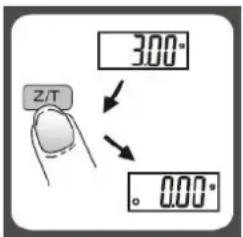
To weigh different loads consecutively without removing loads from the scale. Put first load on the scale, get weight reading. Press Z/T button to reset the LCD reading to "0.00" before adding next load. You can repeat this operation.
Condition 1: "ZERO" function
When total sum of all loads on scale 4% of scale's max capacity. (4% = 4 gram when capacity is 100 gram; = 8 gram when capacity is 200 gram; = 20 gram when capacity is 500 gram).
LCD shows "0.00g" each time Z/T is pressed. Icon "O" will appear on the lower left corner of LCD, indicating "ZERO" function is active..Max. Weight capacity remains unchanged.
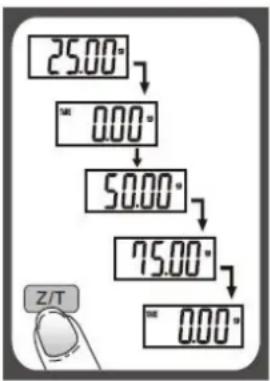
Condition 2: "TARE" function When total sum of all loads on scale >4% of scale's max capacity. (4% = 4 gram when capacity is 100 gram; = 8 gram when capacity is 200 gram; = 20 gram when capacity is 500 gram).
LCD shows "0.00g" each time Z/T is pressed. Icon "TARE" will appear on the upper left corner of LCD, indicating "TARE" function is active. Max. weight capacity is reduced by total weight of all loads on the scale.
Under this situation:
weigh more loads, just press Z/T to reset LCD reading to "0.00g" again.
LCD Backlight
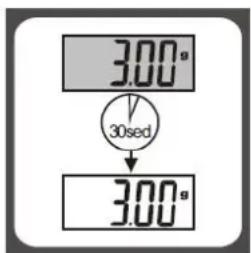
- LCD backlight will be activated when you switch on the scale. Backlight will automatically shut off after idling for 30 seconds.
- Backlight will light up again whenever scale is re-activated (if BL button is available, you can press it to turn the backlight on or off anytime).
Auto Shut Off
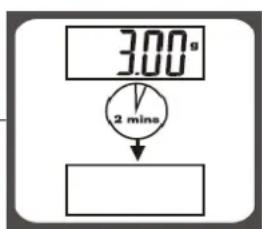
Auto shut-off occurs if display shows '0' or shows the same weight reading for 2 minutes.
Manual Shut Off
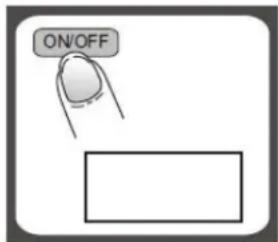
To maximize battery life, always press ON/OF Fto turn off the scale after using.
Warning Indicators
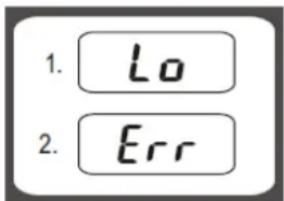
- Low battery power. Replace new battery.
- Scale over load. Remove item to avoid damage.
Max.weight capacity is indicated on the scale.
Cleaning and Care
- Clean the scale with a slightly damp cloth. DO NOT immerse the scale in water or use chemical/abrasive cleaning agents.
- The scale is high precision device. It is dedicated built and extremely sensitive. Please avoid dropping the unit or subject the unit to violent impact which will damage it.
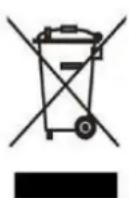
Disposal of old electrical appliances.
The European directive 2002/96/EC on Waste Electrical and Electronic Equipment (WEEE), requires that old household electrical appliances must not be disposed of in the normal unsorted municipal waste stream. Old appliances must be collected separately in order to optimize the recovery and recycling of the materials they contain, and reduce the impact on human health and the environment. The crossed out "wheeled bin" symbol on the product reminds you of your obligation, that when you dispose of the appliance, it must be separately collected. Consumers should contact their local authority or retailer for
information concerning the correct disposal of their old appliance.
Declaration of conformity:
This device complies with the requirements of the EMC directive 2004/108/EC.
- Special Safety Instructions
- Before the first Using
- Features and Specifications
- To Replace Battery
- To Operate
- To Convert Weight Unit
- To conduct piece counting mode
- "Zero" or "Tare" function
- Condition 1: "ZERO" function
- Under this situation:
- LCD Backlight
- Auto Shut Off
- Manual Shut Off
- Warning Indicators
- Cleaning and Care
- Disposal of old electrical appliances.
- Declaration of conformity:
Brand : Orbegozo
Model : PC 3000
Category : Kitchen scales