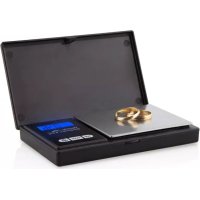
PC 3050 - Kitchen scales Orbegozo - Free user manual and instructions
Find the device manual for free PC 3050 Orbegozo in PDF.



| Brand | Orbegozo |
| Model | PC 3050 |
| Product Type | Precision kitchen scale |
| Maximum capacity | 500 g |
| Graduation | 0.01 g |
| Measurement units | Gram, Ounce, Grain, Carat, Tola, Troy ounce, Pennyweight |
| Power supply | 2 AAA batteries 1.5 V |
| Auto shut-off | After 60 seconds of inactivity |
| Tare function | Yes |
| Overload indicator | Yes |
| Low battery indicator | Yes |
| LCD screen | With icons for piece count, negative value, and units |
| Cleaning and maintenance | Wipe with a slightly damp cloth; do not immerse in water; do not use abrasive products |
| Safety precautions | Do not use with wet hands; do not immerse in water; keep out of reach of children under 8 years; avoid strong shocks |
| Operating environment | Place on a stable, flat, and horizontal surface; avoid carpets or soft surfaces |
| Electromagnetic compatibility | Compliant with EMC directive 2014/30/EU |
| Calibration | Possible via the MODE button and a calibration weight |
| Usage | Household use only |
| Warranty | Legal warranty according to applicable legislation; keep the purchase receipt |
Frequently Asked Questions - PC 3050 Orbegozo
User questions about PC 3050 Orbegozo
0 question about this device. Answer the ones you know or ask your own.
Ask a new question about this device
Download the instructions for your Kitchen scales in PDF format for free! Find your manual PC 3050 - Orbegozo and take your electronic device back in hand. On this page are published all the documents necessary for the use of your device. PC 3050 by Orbegozo.
USER MANUAL PC 3050 Orbegozo
Read this manual carefully before running this appliance and save it for reference in order to obtain the best results and ensure safe use.
- This appliance can be used by children aged 8 years and above and persons with reduced physical, sensory or mental capabilities or lack of experience and knowledge if they have been given appropriate supervision or training regarding use of the appliance in a safe manner and understand the dangers it entails. Children should not play with the device. Cleaning and maintenance to be carried out by the user should not be carried out by children without supervision.
- Children should be supervised to ensure that they do not play with this appliance.
- Keep the appliance out of the reach of children under 8 years of age.
- CAUTION: For the safety of your children, do not leave packaging material (plastic bags, cardboard, polyethylene, etc.) within their reach.
- Do not operate it if you notice that the appliance is not working properly.
- Do not handle the appliance with wet hands.
- Do not submerge the device in water or any other liquid.
- This appliance is for home use only.
- If you need a copy of the instruction manual, you can find it on our website www.orbegozo.com
SPECIFIC
- Use the device only for its intended purpose
- Always place the appliance on a stable, flat and horizontal surface when using it.
- When inserting batteries, make sure your hands and the device are dry.
- Microwaves and cell phones can cause interference and alter weight results.
- If the microwave is operating, use the kitchen scale at a safe distance of at least 1.5 meters from the microwave, or turn the microwave off.
- If your mobile phone is on, keep it at a safe distance of at least 2 meters from the scale, or turn it off.
Electromagnetic fields (EMF)
This device complies with all standards regarding electromagnetic fields (EMF). If used correctly and in accordance with the instructions in this manual, the appliance can be used safely according to the scientific knowledge available today.
Features and specifications
- Maximum capacity: 500g
- Graduation: 0.01g
- Overload: 501g
- Units of measurement: gram/ounce/grain/carat/tola/troy ounce/ Pennyweight
- Automatic shutdown after 60 seconds.
- Tare function
- Overload/low battery indicator
- Battery: 2 AAA 1.5V batteries
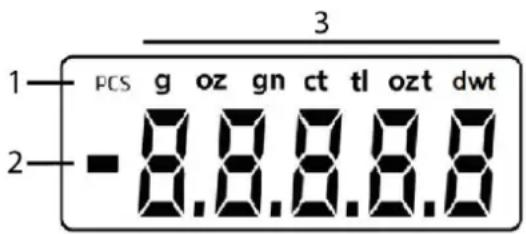
LCD screen icons
- Piece count
- Negative value
- Units of measurement (gram, ounce, grain, carat, tola, troy ounce, pennyweight)
OPERATION
- Place the weight on a flat, sturdy surface. Avoid carpets or soft surfaces.
- Press the ON/OFF button to turn on the unit.
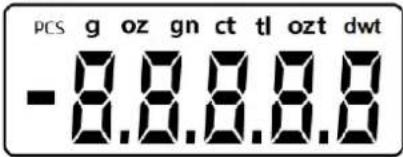
- Wait until the screen shows before starting to use it.
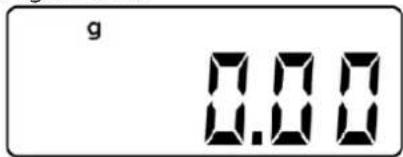
- Always place the object you want to weigh in the center of the platform.
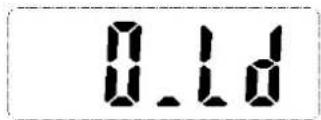
- If the device is overloaded, the image will be shown on the display.
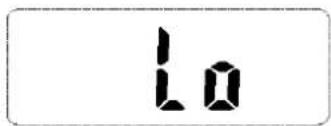
- When the device has low battery, it will notify you with the following message
- If the LCD screen does not display "0.0" before weighing, press "TARE" to set the LCD screen to "0.00".

Change of weight unit
Press the UNITS key to change the weight unit between Gram, Ounce, Grain, Carat, Tola, Troy Ounce and Pennyweight.
CALIBRATION
- Turn on the weight and press the "MODE" key for 3 seconds. "500.00" will appear on the screen

- With the "TARE" button change the calibration weight until you choose the calibration weight you have available. Then place it on the scale and press "MODE" again, the display will show "CAL". If the calibration is successful, the LCD screen will display "PASS". Otherwise, it will flash "50.00g" all the time. When this happens, recalibrate the scale and place it on a flat surface.

Manual disconnection
The display automatically turns off if the weight is not used for 60 seconds. It can also be turned off manually by pressing the ON/OFF button.
To get the most out of battery life, always press the ON/OFF key to turn off the weight after use.
Battery change
- Open the battery compartment located at the bottom of the weight.
- Remove the old battery.
- Place new batteries in the compartment. Note the polarity
Cleaning and maintenance
- Wipe the weight with a slightly damp cloth. DO NOT submerge the weight in water or use chemical/abrasive cleaning products.
- The weight is a high precision device. It is a delicate and extremely sensitive product. Avoid dropping the weight or subjecting it to violent impacts, as damage may occur.
DISPOSAL OF OLD ELECTRICAL APPLIANCES
The European directive 2012/19/EU on Waste Electrical and Electronic Equipment (WEEE), requires that old household electrical appliances must not be disposed of in the normal unsorted municipal waste stream. Old appliances must be collected separately in order to optimize the recovery and recycling of the materials they contain, and reduce the impact on human health and the environment. The crossed out "wheeled bin"
symbol on the product reminds you of your obligation, that when you dispose of the appliance, it must be separately collected. Consumers should contact their local authority or retailer for information concerning the correct disposal of their old appliance.
DECLARATION OF CONFORMITY:
This device complies with the requirements of the EMC directive 2014/30/EU.
GUARANTEE
This appliance is covered and is entitled to the legal guarantee in accordance with the legislation in force from the date of purchase. Keep the purchase receipt to be able to claim your right to the guarantee. To find the closest service to your location, contact through the following web link: https://orbegozo.com/asistencia-technica/
For any type of query, doubt or incident, you can contact us through our email shown on the main page of this manual or through our technical assistance service at https://orbegozo.com/contacto/
Orbegozo is not responsible for components and accessories that are subject to wear and tear due to use, as well as perishable compounds or those that have deteriorated due to improper use. Nor will it be held responsible if the owner has technically modified the device. Check the legal conditions on our website.
FRANÇAIS
CONSIGNES DE SECURITE
DECLARATION DE CONFORMITE:
- SPECIFIC
- Electromagnetic fields (EMF)
- Features and specifications
- LCD screen icons
- OPERATION
- Change of weight unit
- CALIBRATION
- Manual disconnection
- Battery change
- Cleaning and maintenance
- DISPOSAL OF OLD ELECTRICAL APPLIANCES
- DECLARATION OF CONFORMITY:
- GUARANTEE
- FRANÇAIS
- CONSIGNES DE SECURITE
- DECLARATION DE CONFORMITE:
Brand : Orbegozo
Model : PC 3050
Category : Kitchen scales