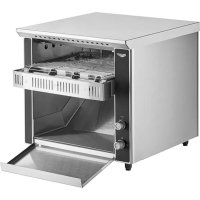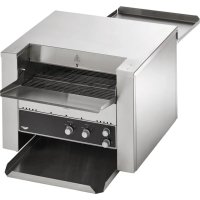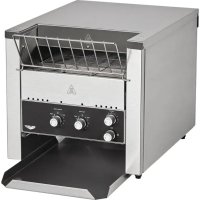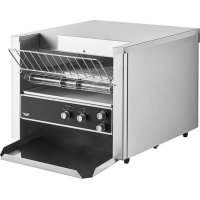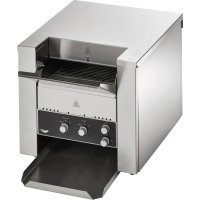
CVT4120300 - Toaster Vollrath - Free user manual and instructions
Find the device manual for free CVT4120300 Vollrath in PDF.


| Product type | Conveyor toaster |
| Model | CVT4120300 |
| Brand | Vollrath |
| Usage | Commercial (food service) |
| Supply voltage | 120 V |
| Frequency | 60 Hz |
| Maximum capacity | 300 slices per hour |
| Conveyor speed adjustment | Yes, from 1 to 7 |
| Thermostats | Upper and lower separately adjustable |
| Heat screen | Height adjustable |
| Catch plate | Included and removable |
| Crumb tray | Removable for cleaning |
| Sleep function | Yes, reduces power consumption by 75% |
| Conveyor | Belt |
| Reset button | Yes, for overload protection |
| Maintenance | Daily cleaning of trays and exterior |
| Parts warranty | 2 years |
| Labor warranty | 1 year |
| Heating tubes warranty | 1 year (glass damage not covered) |
| Plug type | NEMA 5-15P |
| Convertible to sandwich toaster | Yes (see manual) |
Frequently Asked Questions - CVT4120300 Vollrath
User questions about CVT4120300 Vollrath
0 question about this device. Answer the ones you know or ask your own.
Ask a new question about this device
Download the instructions for your Toaster in PDF format for free! Find your manual CVT4120300 - Vollrath and take your electronic device back in hand. On this page are published all the documents necessary for the use of your device. CVT4120300 by Vollrath.
USER MANUAL CVT4120300 Vollrath
ConvertibleConveyorToasters,300-900SlicesPerHour\*
ModelsJT2HCandJT3HC
ThankyouforpurchasingthisVollrathequipment.Beforeoperatingthe equipment,readandfamiliarizeyourselfwiththefollowingoperating andsafetyinstructions.SAVETHESEINSTRUCTIONSFORFUTURE REFERENCE.Savetheoriginalboxandpackaging.Usethispackaging toshiptheequipmentifrepairsareneeded.
SAFETYPRECAUTIONS
Toensuresafeoperation,readthefollowingstatementsandunderstand theirmeaning.Thismanualcontainssafetyprecautionswhichare explainedbelow.Pleasereadcarefully.

WARNING
Warningisusedtoindicatethepresenceofahazardthatwillorcan causeseverepersonalinjuryordeath.

CAUTION
Cautionisusedtoindicatethepresenceofahazardthatwillorcan causeminorormajorpersonalinjuryifthecautionisignored.
NOTICE: Notice is used to note information that is important but not hazard-related.
Toreduceriskofinjuryordamagetotheequipment
- Plugonlyintogroundedelectricaloutletsmatchingthevoltageon theratingplate.
• Usethisequipmentinaflat, levelposition. - Unplugequipmentandletitcoolbeforecleaningormoving. Equipmentremainshotafteritisturnedoff.
• Donottouchduringoperation. - Unplugwhennotinuse.
- Keepequipmentandpowercordawayfromopenflames,electric burnersorexcessiveheat.
- Donotoperateunattended.
- Closelysuperviseequipmentoperatinginpublicareasand/or aroundchildren.
- Donotoperateifequipmenthasbeendamagedorismalfunctioning inanyway.
FUNCTIONANDPURPOSE
This equipment is intended to toast bread, bagels and sandwiches; and melt cheese. It is intended for use in commercial food service operations only. It is not intended for household, industrial or laboratory use.
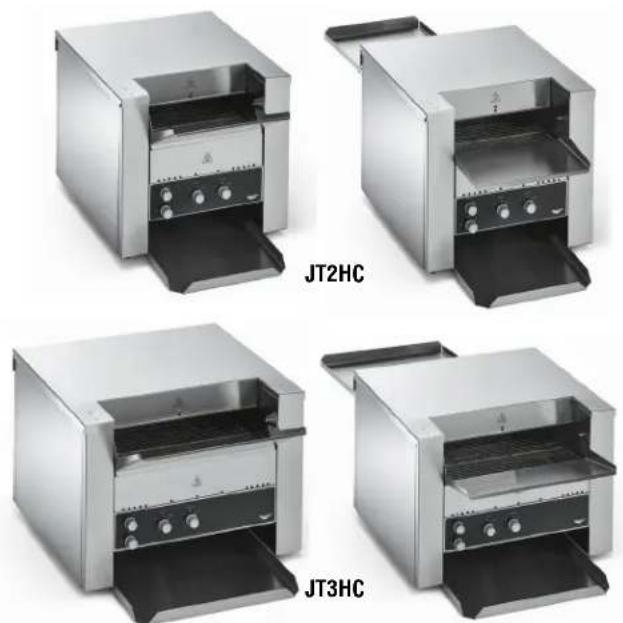
| ItemNo.ModelNo. | Voltage | SlicesPer Hour* (Upto) | Plug | |
| CVT4-120300 | JT2HC | 120300 | NEMA5-15P | |
| CVT4-208550208 | 550NEMA6-20PCVT4-220550220 | |||
| CVT4-240550240 | ||||
| CVT4-208900 | JT3HC | 208 | 900NEMA6-30PCVT4-220900220 | |
| CVT4-240900240 | ||||
*Slicesperhourisbasedonmaximumconveyorspeed.Conveyorspeeddeterminestoastingtimeandaffectscolorandtextureofthetoast.Resultsmay varybasedupontypeofbread,colorandtexturepreference.
CLEARANCEANDENVIRONMENTREQUIREMENTS
Donotplaceonsurfacesornearwalls, partitionsorkitchenfurniture unlesstheyaremadeofnon-combustiblematerialorcladwithnon-combustibleheat-insulatingmaterial. Toastersmustnotbeusednear orbelowcurtainsandothercombustiblematerials.
Donotplacethetoasteradjacenttoaheatproducingappliance.
SETUP
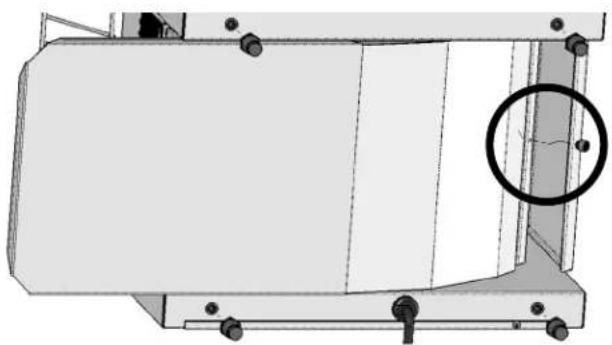
InstalltheCollectionPan
- Placethetoasteronahard, flat, stablesurface.
- Turnthetoasteronit'ssidewiththebottomfacingyou.
- Install the collection pan by placing the backed geofthepan on the lipat the back of the toaster. Line up the hole in the pan with the screw. Tightenthescrewtosecure the collection pan.
natural_image
Technical line drawing of a mechanical component with mounting holes and a highlighted circular feature (no text or symbols)InstalltheFeedRamp
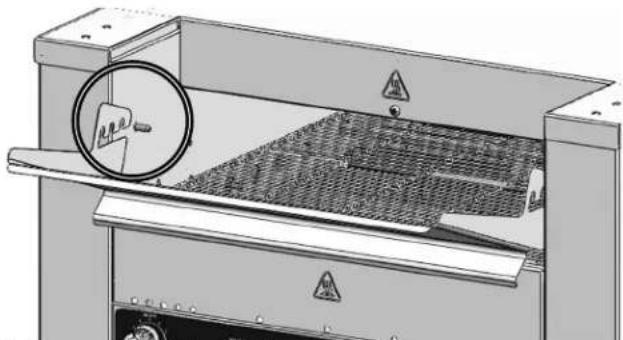
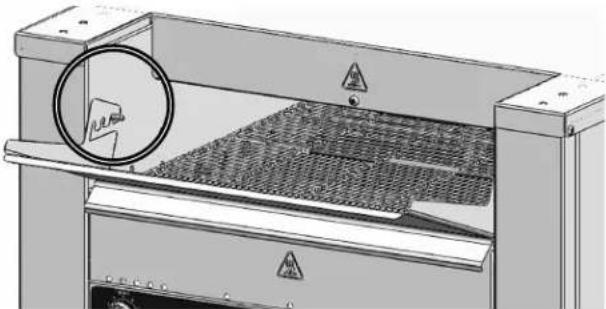
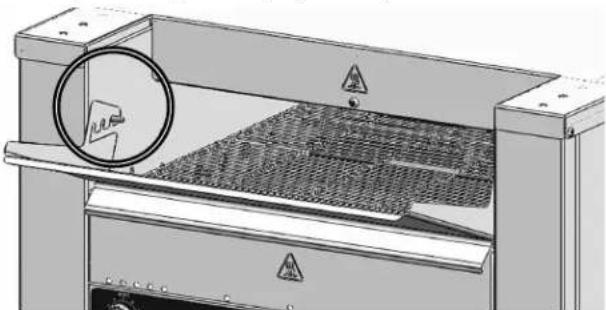
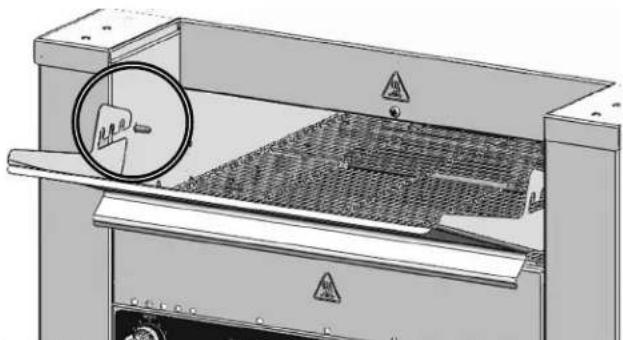
- Positionthetraysothattheopeninglinesupwiththestuds.
natural_image
Technical illustration of a mechanical device with a circular component and warning symbols (no readable text or labels)- Resttrayonstudsindesiredlocation.
natural_image
Technical illustration of a mechanical device with a circular component and warning symbols (no readable text or labels)FEATURES
text_image
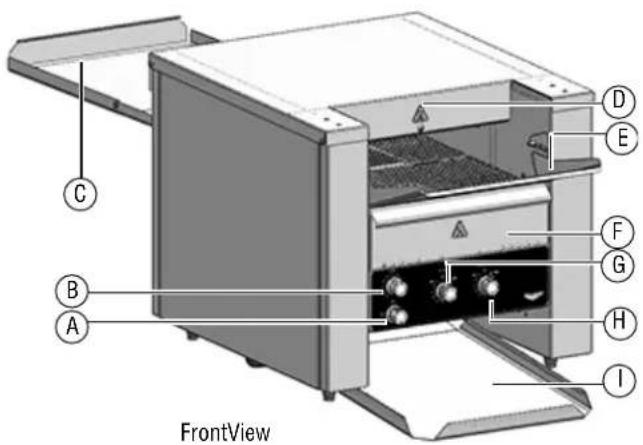
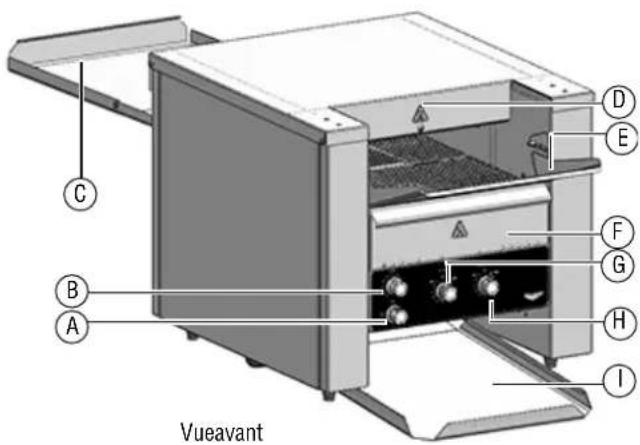
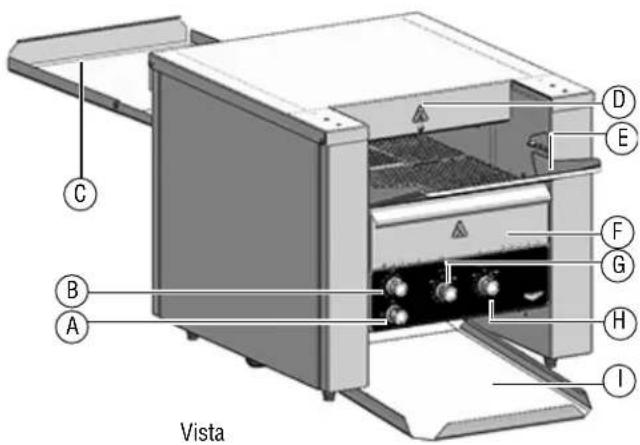
FrontView A B C D E F G H I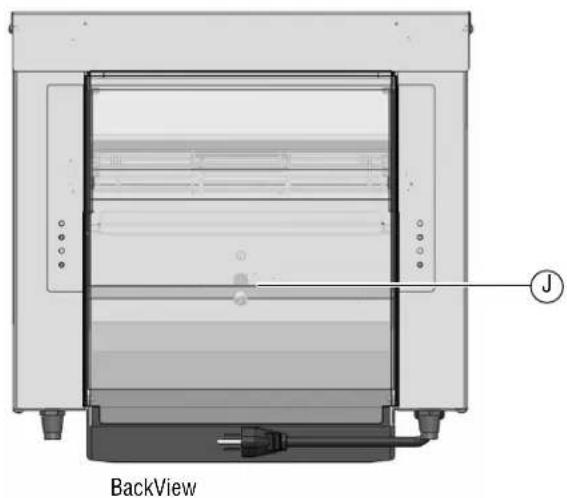
natural_image
Technical diagram of a back view of an industrial oven or storage unit with labeled component (no text or symbols beyond label)APowerKnob
FullPower-maximumheat
○ Off
Standby-reduceselectricalconsumptionby75%.
BConveyorSpeedControlKnob
CUnloadTray/BackPanel
DHeatShield
EFeedRamp
FCrumbTray
GTopHeatControlKnob
HBottomHeatControlKnob
ICollectionPan
JResetButton(Referenceonly.Accessisviathefrontofthe toasters.Seepage5.)
BEFOREFIRSTUSE
- Cleanthetoaster. See "Cleaning" on page 5.
OPERATION
Thistoastershipssetuptotoastbread.Totoastsandwiches,seeSee "ConverttoAPassthroughToaster"onpage4.

CAUTION
BurnHazard
Donottouchtheequipmentwhileitisheatingoroperating. Hotsurfacescanburnskin.
NOTICE: The crumb tray must be installed in the toaster during operation. Failure to install the crumb tray will cause the toaster to overheat.
AdjusttheHeatShield
Excessspaceabovetheproductwillcreateheatlossandmayreduce performance.
- Whentheequipmentiscooltothetouch, useascrewdriverto loosenthescrewontheheatshield.
- Grasptheshieldandpullitupordowntoadjusttheopeningsothe tallestproductscanpassthrough.Re-tightenthescrew.
Preheat
-
Plugthetoasterintoagroundedelectricaloutletthatmatchesthe ratingonthenameplatefoundonthesideofthetoaster. NOTICE: Usingavoltageotherthanthenameplateratedvoltage willcausedamagetotheunit.Incorrectvoltage, modificationtothepowercordorelectricalcomponents candamageunitandwillvoidthewarranty.
-
Rotatethepowerknob(s) tothefullpowerposition(l).
- Settheconveyorspeedcontrolknob(s) to 7.
- Rotatethetopandbottomheatcontrolknobstohigh.
- Wait 5 minutes forthetoastertopreheat.
Test
- Adjust the settings for the product to be toasted.
Tips
| ProductSuggestions | |
| Bagels,wheatorryebreador productswithhighmoisture content. | Useaslowerconveyorspeed. |
| Butteredorcoated,suchas pastries | Notrecommended. |
| FrozenMustbethawedbeforetoasting. | |
| Sandwiches | Useslowerconveyorspeedtoallow proteiningredientstoheat.Set bottomheatcontrollow. |
- Test the settings by placing a sample of the food to be toasted onto the feed ramp. Place bagelsorbuns onto the feed ramp with the cut side facing up.
ForOne-SidedToasting
TOPheatcontroltothedesiredsetting. BOTTOMheatcontroltotheOFFposition.
ToastBreadorSandwiches
- Adjust the top and bottom heat control settings and conveyors needed foreventoasting. Allow time for the toasterto adjust tonew heat settings before replacing breadors and wishes on the conveyor.
- For best performed on to overload the toaster. Wait a few seconds before loading a second row of bread or sandwiches into the toaster.
IfanItemBecomesStuck
- RotatethepowerknobtotheOFFposition(O)andunplugthe equipment.
- Let the equipment cool completely. Usetong store movethe item. Take care tonot bump the heating elements above and below the conveyor.
CONVERTTOAPASSTHROUGHTOASTER
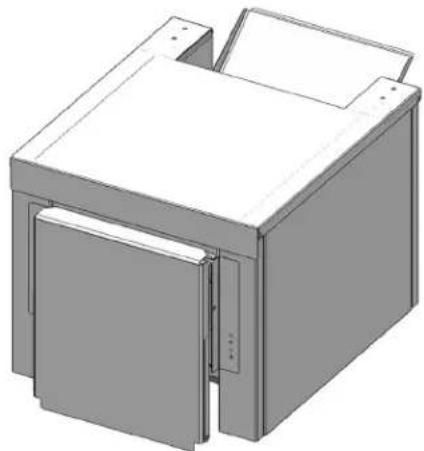
- Positionthetoastersoyouhaveaccesstotheunloadtray/back panel.
natural_image
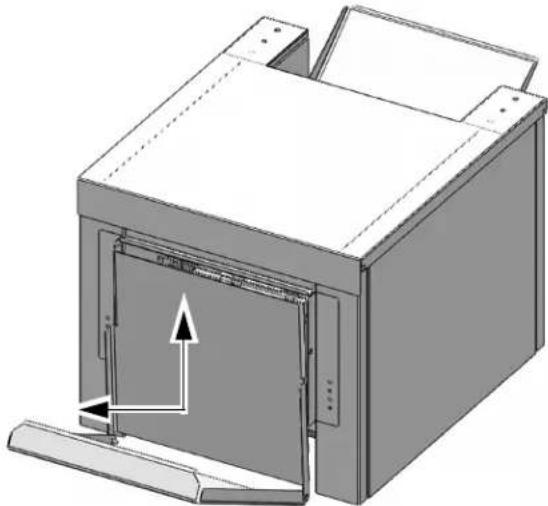
3D rendering of a mechanical housing or enclosure with a lid and mounting brackets (no text or symbols visible)- Lifttheunloadtraystraightupandtiltoutwardasshownbelow.
natural_image
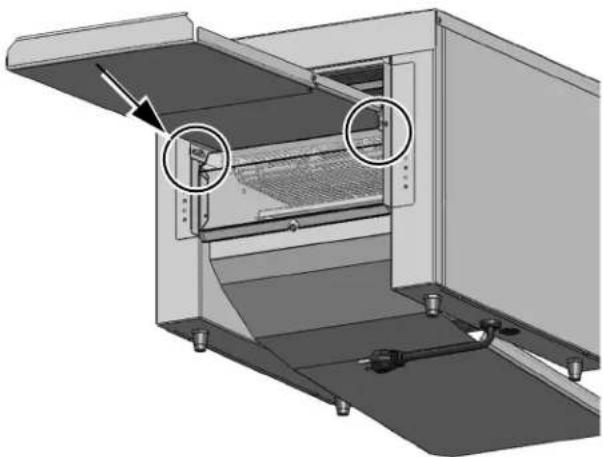
3D technical illustration of a mechanical device with an open door and internal structure, showing no text or symbols.- Notethetabsontheundersideofthebackpanel. Clipthetabsover thetwometalpinsundertheedgesofthepanel.
natural_image
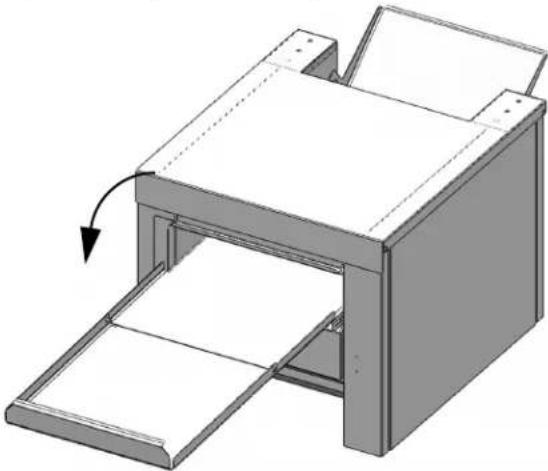
3D technical diagram of a mechanical device with internal components and mounting brackets (no text or symbols)- Droptheunloadtrayintothehorizontalposition.
natural_image
3D technical illustration of a printer or printer with an open lid and paper tray, showing internal structure and a directional arrow (no text or symbols)CLEANING


WARNING
ElectricalShockHazard
Donotspraywaterorcleaningproducts.Liquidcouldcontact theelectricalcomponentsandcauseashortcircuitoran electricalshock.


CAUTION
BurnHazard
Allowequipmenttocoolbeforemovingorcleaning.
NOTICE: Donotuseabrasivematerials, scratchingcleansersor scouringpadstocleantheexterioroftheequipment. Thesecandamagethefinish.
NOTICE: Heatingelementsdonotneedtobecleaned. Crumbsand fooddebriswillburnoff. Overtimethe heatingelements maydevelopachalkyappearance, but this will not impact performance.
DailyCleaning
- Before turning off the equipment and with the conveyor rotating, watch the conveyor belt for food debris.
- Whenthefooddebrisreachesthefrontoftheconveyor, rotatethe powerknobtotheOFFposition.
- Waitforthefantostoprunning.Unplugtheequipment.
- Let the equipment cool completely.
- Whentheequipmentiscool, useabrushorscrubpadtoremovethe fooddebris.
- Tocleantheexterior, useasoftclothdippedinhotsoapywaterto wipetheexteriorandfanairintakeundertheequipment. Ifneeded, wipethefanintakeareawithdegreasertopreventlongtermbuild up.
- Empty and clean the crumb tray(s).
PREVENTATIVEMAINTENANCE
Contactanauthorized service agent for a professional cleaning of the components.
TROUBLESHOOTING
| ProblemMightbeCausedByCourseofAction | ||
| Toasterdoesnotheatandthe conveyorbeltdoesnotmove. | Toasterisnotpluggedin.Pluginthetoaster. | |
| Powerknobsettingisincorrect.RotateethepowerknobtotheON(())position. | ||
| Thewallbreakermaybetripped. | 1.Inspectfortrippedbreaker.2.Resetthebreaker.3.Ifthebreakerwasnotripped,inspectthetoastingchamberfor brokenheattubes.Forbrokentubes,contactVollrathTechnicalServices. | |
Theresetmaybetripped.Lookunderthetoastertoseeifanobjectispreventingthefan bladesfromturning.1.RotatetheheatcontrolknobstotheOFFposition.2.RotatethepowerknobtotheOFF(O)position.3.Unplugthetoaster.4.Wait30minutesforthetoastercool.5.Removetheobject.6.Pluginthetoaster.7.RotatethepowerknobtotheON(())position.8.Presstheresetbutton.Youshouldhearandfeelthebutton reset.Thetoastershouldstarttooperate.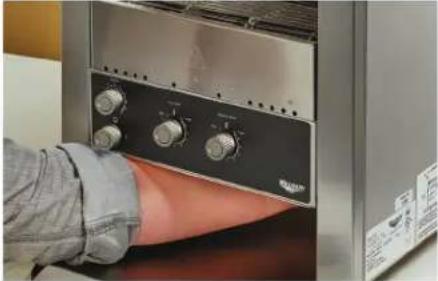 9.IftheproblempersistscallVollrathTechnicalServices. 9.IftheproblempersistscallVollrathTechnicalServices. | ||
| Theterheatsandtheconveyorbelt doesnotmove. | Theremaybeaproblemwiththemotor/speedcontrolordrivechain. | |
| Toporbottomheatertubesdonot heat. | Oneormoreheatertubesmayhave burnedout. | ContactVollrathTechnicalServices. |
| Heatcontrolswitchmaybebroken. | ||
| Toasterrepeatedlyoverheats. | Thecrumbtraymaynotbeinstalled.Verifythecrumbtrayisinstalled. | |
| Thefanmaybedirty. | Verifythefanbladesareclean.Seeinstructionaboveforinspecting andcleaningthefanblades. | |
| Theremaybeaproblemwiththefan. | Runthetoasterfor10minutes.Ifthefandoesnotrun,contact VollrathTechnicalServices. | |
| Thefanisnotrunning. | Theremaybeaproblemwiththefanor thefanswitch. | Runthetoasterfor10minutes.Ifthefandoesnotrun,contact VollrathTechnicalServices. |
| Thetoasteristurnedoffandthefan isrunning. | Normaloperation.Thefanturnsonas neededtocolthetoaster. | - |
Thispageintentionallyleftblank.
SERVICEANDREPAIR
Whenunderwarranty,repairisavailableforthisproduct.Tobegintheprocess:
- Contact Vollrath Technical Services at 1-800-309-2250. Please be ready with the item number, model number and serial number. You can find this information on the nameplate located on the side or back of the equipment. Also please provide a proof of purchase indicating the date the equipment was purchased.
- A technical services representativewill helpyoutroubleshoot the problem over the phone.
- If the representative determines the issue requires professional service, he or she will help you locate an authorized service center.
- Contact the authorized service center to make arrangements for the repair. Vollrath will cover the cost to repair and/or replace defective parts withintheequipmentwarrantyperiod.
WARRANTYSTATEMENTFORTHEVOLLRATHCO.L.L.C.
The Vollrath Company LLC warrants the products it manufactures or distributes against defects in materials and workmanship as specifically described in our full warranty statement. In all cases, the warranty runs from the date of the end user's original purchase date found on the receipt. Any damages from improper use, abuse, modification or damage resulting from improper packaging during return shipment for warranty repair will not be recovered under warranty.
The warranty does not apply to products purchased for personal, family or household use, and The Vollrath Company LLC does not offer a written warranty top purchasers for such uses.
WarrantiedParts: The warranty period is 2 years parts, 1 year labor.
HeaterTubes: The warranty period is 1 year, including labor. Heatertubeglass damage is not covered by this warranty.
Forcompletewarrantyinformation,productregistrationandnewproductannouncements,visitwww.vollrath.com.

www.vollrath.com
The VollrathCompany, L.L.C.
1236North18thStreet
Sheboygan, WI53081-3201U.S.A.
MainTel:800.624.2051or920.457.4851
MainFax:800.752.5620or920.459.6573
CustomerService:800.628.0830
CanadaCustomerService:800.695.8560
TechnicalServices
techservicereps@vollrathco.com
Toasters:1-800-309-2250
AllOtherProducts:800.628.0832
Grille-painsconvoyeursconvertibles,300-900tranchesparheure\*
ModèlesJT2HCetJT3HC
natural_image
Technical diagram of a mechanical assembly with a highlighted circular component (no text or symbols)Installationdelaramped'alimentation
natural_image
Technical illustration of an industrial machine with a circular component and warning symbols (no readable text or labels)2.Mettezleplateauenappuisurlesgoujonsàl'emplacementsouhaité.
natural_image
Technical illustration of a mechanical device with a circular component and warning symbols (no readable text or labels)CARACTÉRISTIQUES
text_image
C B A D E F G H I Vueavant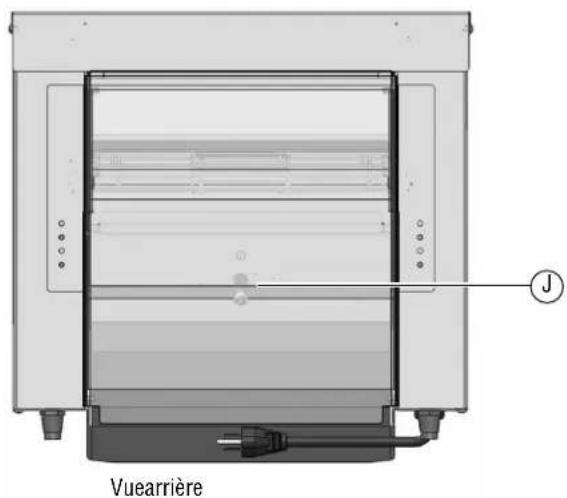
text_image
Vuearrière JPourfairegrillerlepainoulessandwichs
natural_image
3D rendering of a mechanical housing or enclosure with a lid and mounting brackets (no text or symbols visible)natural_image
3D technical illustration of a mechanical device with internal components and directional arrows (no text or symbols)natural_image
3D technical diagram of a mechanical device with internal components and mounting brackets (no text or symbols)natural_image
3D diagram of a printer with paper spread and paper holder, showing internal structure and page loading (no text or symbols)NETTOYAGE
Standard:800.624.2051ou920.457.4851
Télécopieur:800.752.5620ou920.459.6573
Serviceclientèle:800.628.0830
ServiceclientèleCanada:800.695.8560
Servicestechniques:
techservicereps@vollrathco.com
Grille-pains:800-309-2250
natural_image
Technical line drawing of a mechanical component with mounting holes and a circular detail (no text or symbols)Instalelarampadealimentación
- Coloquelabandejademodoquelaaberturasealineeconlos montantes.
natural_image
Technical illustration of a mechanical device with a magnified circular component and warning symbols (no readable text or labels)natural_image
Technical illustration of a mechanical device with a circular component and warning symbols (no readable text or labels)CARACTERÍSTICAS
text_image
C B A D E F G H I Vista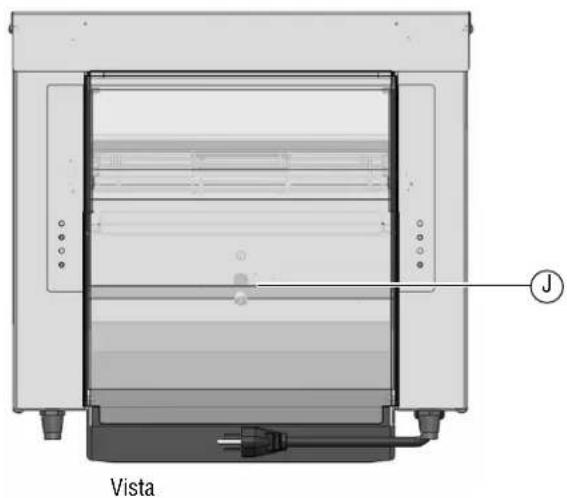
natural_image
Technical diagram of a portable oven or refrigerator unit labeled 'Vista', showing internal compartments and mounting points (no text beyond label)APerilladeencendido
natural_image
3D rendering of a mechanical housing or enclosure with a lid and mounting brackets (no text or symbols visible)natural_image
3D technical illustration of a mechanical device with internal components and directional arrows (no text or symbols)natural_image
3D diagram of a mechanical device with internal components and mounting brackets (no text or symbols)natural_image
3D diagram of a printer with an open lid and paper tray, showing internal structure and page loading (no text or symbols)LIMPIEZA