305021 - Thermometer Medicinalis - Free user manual and instructions
Find the device manual for free 305021 Medicinalis in PDF.



| Product type | Infrared thermometer |
| Brand | Medicinalis |
| Model | 305021 |
| Power supply | 2 AAA 1.5 V batteries |
| Temperature range (body) | 34 °C to 42.9 °C |
| Temperature range (surface) | 0 °C to 100 °C |
| Accuracy (35 °C to 42 °C) | ±0.2 °C |
| Accuracy (34 °C to 34.9 °C / 42.1 °C to 42.9 °C) | ±0.3 °C |
| Accuracy (0 °C to 33.9 °C / 43 °C to 100 °C) | ±2 °C |
| Measuring distance | ≤ 1 cm |
| Number of records | 34 |
| Measurement modes | Body temperature (Body) and surface temperature (Surface) |
| Display | LCD with backlight |
| Fever indicator | Green (no fever), Yellow (low fever), Red (high fever) |
| Laser indicator | Yes |
| Sound signal | Yes, adjustable (mute) |
| Cleaning | Soft, slightly damp cloth, do not immerse |
| Safety | Do not point the laser at eyes, keep out of reach of children |
| Repairability | Do not open, contact the distributor |
| Package contents | Thermometer, instruction manual |
| Use | Medical and domestic use |
Frequently Asked Questions - 305021 Medicinalis
User questions about 305021 Medicinalis
0 question about this device. Answer the ones you know or ask your own.
Ask a new question about this device
Download the instructions for your Thermometer in PDF format for free! Find your manual 305021 - Medicinalis and take your electronic device back in hand. On this page are published all the documents necessary for the use of your device. 305021 by Medicinalis.
USER MANUAL 305021 Medicinalis
INFRARED THERMOMETER, YK-IRT2
ENG: Current drivers, user manuals and other relevant documents for this product can be found on our homepage.
EC REP
Prolinx GmbH Brehmstr.56,40239,Duesseldorf Germany
CE0123
Temperaturkalibration
Important safety guidelines for this device
- Please keep the infrared thermometer out of reach of children.
- Using the infrared thermometer can not substitute medical treatment.
- Keep the batteries away from fire.
- Please do not point the laser beam at people (even class 1 lasers should not be pointed at people, since the glare may result in accidents).
- Please do not look at the direct or reflected beam.
- If a class 1M (if visible), class 2 or 2M laser beam hits the eye, close the eyes consciously and turn the head immediately away from the beam. Note: The findings presented below on studies of the eyelid closing reflex and preventive responses should be noted!
- When using class 1M and 2M laser equipment, optical instruments should not be used for viewing the beam source. This may result in exceeding the exposure limits.
- Manipulations (modifications) to the laser equipment are not permitted.
- This operating manual must be kept carefully and handed over immediately when the laser equipment is passed on.
- Please do not use the infrared thermometer for purposes for which the original product is not intended.
- This product can be used for professional or domestic purposes.
- Please do not immerse the infrared thermometer in water or other liquids since it is not waterproof.
-
For cleaning and disinfection, please follow the instructions given under the "Cleaning and Care" section.
-
The infrared thermometer should be kept in a clean, dry place, away from the sun, at a humidity below 85%.
- Please do not touch the lens with your finger.
- Obstacles such as sweat stains, hair, hats or scarves can lead to a lower temperature reading. Please remove any obstacles to obtain accurate results.
- Please do not drop the product, disassemble, repair, or reshape it.
- Please do not hold the device near strong electrostatic fields or high-intensity magnetic fields to prevent negative impact on the accuracy of the readings.
-
If you have problems, please stop using the product and contact the dealer. Do not attempt to rectify the problem yourself.
-
Dispose of the product and the battery in accordance with local laws and regulations.
- Remove the battery if the device is not being used to avoid leakage of fluid from an expired battery.
- Please do not use new batteries together with half-used batteries. This can result in risks or product damage due to inconsistent battery discharge characteristics.
Intended use
The infrared thermometer is used specifically for measuring body temperature, in particular the forehead temperature.
Suitable for medical facilities and domestic use.
Thank you for choosing a MEDICINALIS product. Please read the following user manual carefully so that you can get the most from the product you have purchased.
1. Scope of delivery
• Infrared thermometer
- User manual
2. Technical data
| Power supply 2x 1.5V AAA batteries | |
| Measuring distance ≤ 1 cm | |
| Accuracy • 0.0 - 33.9°C / | 43.0 - 100°C : ±2°C• 34.0 - 34.9°C / 42.1 - 42.9°C : ±0.3°C• 35.0 - 42.0°C: ±0.2°C |
| Temperature range • 34 | -42.9°C (body measurement)• 0-100°C (surface measurement) |
3. Product details
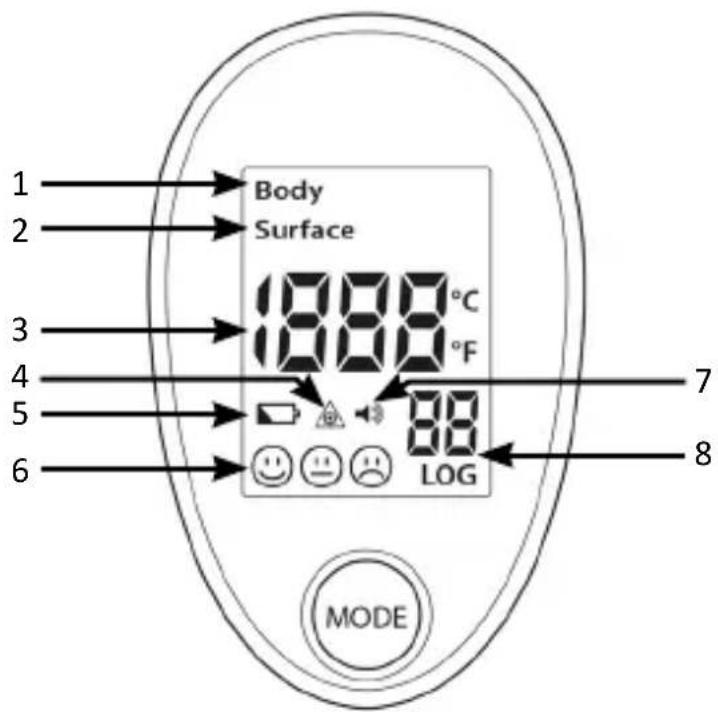
| 1 Body temperature measurement |
| 2 Surface temperature measurement |
| 3 Measured temperature |
| 4 Laser indicator |
| 5 Battery status |
| 6 Measurement results (no fever / slight fever / high fever) |
| 7 Beep / Mute (silent) |
| 8 Saved readings |
4. Intended use
The infrared thermometer is used specifically for measuring body temperature, in particular the forehead temperature. It is suitable for medical facilities and domestic use.
5. Initial use
Please read the user manual carefully before using the infrared thermometer and apply the thermometer in the proper way. Keep the user manual for future reference. Open the battery compartment below the device and insert two 1.5V AAA batteries. Always ensure that the polarity of the contacts is correct.
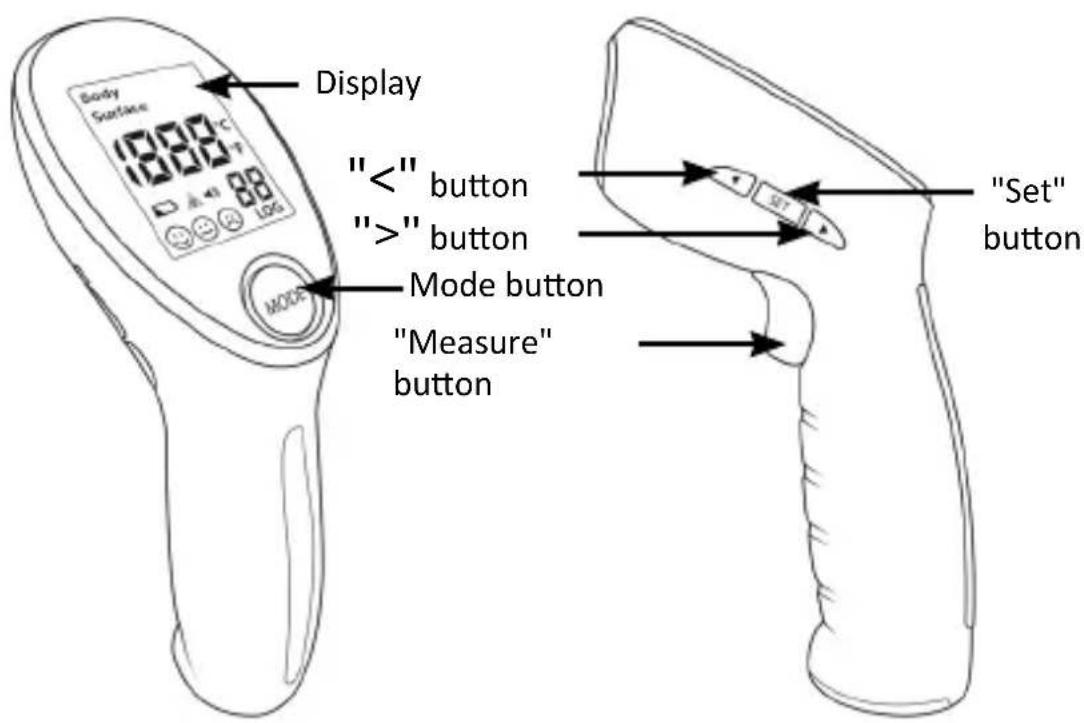
With the set button you can switch the laser and/or the sound of the unit on and off.
Short keystroke: Laser On/Off
Long keystroke: Sound On/Of
6 Measurement
6.1 Preparing the measurement
Follow these instructions to avoid incorrect readings:
- When measuring the body temperature, point the device at the centre of the forehead at a maximum distance of 1 cm - 1.5 cm.
- Keep the forehead free from obstructions such as hair, sweat, cosmetics, etc. before measuring.
- In patients having fever, the use of cold packs on the forehead and other cooling measures reduces the temperature readings.
- The ambient temperature should be stable when taking readings. Do not measure in places having a lot of air currents, such as near fans or air outlets of an air conditioner.
- If you want to measure the forehead temperature of a person, select the "Body temperature" (Body) mode. If you want to measure the temperature of objects or other liquids and, for example, food items, then select the "Surface temperature" (Surface) mode.
- Before taking readings, place the thermometer in the operating environment for 30 minutes so that the relative ambient temperature can be set.
- Do not use the device in the presence of strong sunlight.
6.1 Performing the measurement
- Point the device from about 1 cm - 1.5 cm away at the place to be measured and then press the "Measure" button. The LC display of the thermometer then shows the measured temperature. Since the infrared thermometer carries out a self-test when it is switched on, all the symbols light up on the display at the beginning for about 2 seconds.
- You hear a beep after completion of the self-test (only when sound is turned on). This means that the switching on and the measurement are completed. Now the LCD display shows the temperature reading of the measured object and the background lighting shows the colour green (no fever), yellow (slight fever) or red (high fever).
Caution!

If the temperature exceeds the value configured for slight fever, the LCD backlight turns yellow. If the temperature exceeds the value configured for high fever, the LCD backlight turns red and shows a sad face along with three quick beeps to warn the patient that he/she may have fever.
In order to ensure the measuring accuracy, it is necessary to wait for at least 30 seconds after measuring continuously for 5-times.
6.2 Changing the mode (Body / Surface)
When switching the device on, you can change between the "Body temperature" (Body) and the "Surface temperature" (Surface) mode by briefly pressing the "Mode" button. The "body temperature" mode is used for measuring the temperature of the human body. The "surface temperature" mode is used for measuring the temperature of object surfaces.
7. Saved readings
While the device is switched on, you can view the saved readings by briefly pressing the "<" or ">" button. You can navigate through the saved readings using the two buttons and view your previous readings.
Note: The greater the number of the reading, the older is the measured value. The smaller the number, the more recent is the measured value.
The thermometer can store a maximum of 34 readings.
7.1 Clearing the saved readings
When the device is switched off, press and hold the "Mode" and "Measure" buttons simultaneously. The display shows "CLr" and turns off after 2 seconds again.
Caution! This process deletes all the saved readings!
8. Default parameters
You default parameters can be changed. The default settings are configured before delivery. If any change is necessary, please check it using the following methods. But make changes only if you know exactly what you are doing.
Changing the display unit
With the device switched on, press and hold the "Mode" button until "F1" is shown on the display.
You can toggle between the temperature units °C and °F by pressing the ">" button.
Temperature calibration
With the device switched on, press and hold the "Mode" button until "F1" is shown on the display. Then press the "Mode" button once again. The screen then shows "F2".
Then press the "<" button and the "> " button to calibrate the temperature. To do this, use a calibrated thermometer as a temperature reference.
9. Replacing the batteries
If the thermometer shows that the battery is low, replace the batteries with new ones.
Open the battery compartment and remove the old batteries. Then insert two new 1.5V AAA batteries into the device. Pay attention to the correct polarity of the contacts.
If the device is not being used for extended periods, remove the batteries to prevent damage to the infrared thermometer caused by battery leakage.
10. Cleaning and Care
Please use a slightly damp cloth or cotton cloth to clean the surface of the infrared thermometer and prevent any liquid from entering the product. Never clean it using harsh cleaning agents, thinners or petrol and do not immerse it in water or other liquids.
Keep the infrared thermometer in a dry place and avoid dust, dirt and direct sunlight.
- Error codes
| Error Meaning / Rectification | |
| Display shows "HI" Measured temperature is too high;Body temperature mode: The measured temperature is above 42.9°C.Surface temperature mode: The measured temperature is above 100°C. | |
| Display shows "LO" | Measured temperature is too low;Body temperature mode: The measured temperature is below 34°C.Surface temperature mode: The measured temperature is below 0°C. |
| Battery status is flickering | Battery is very low;Switch off the device. Replace the batteries immediately. |
| Display is blank The batteries are dead or not inserted properly. The device goes to standby mode after some time;Switch on the device by pressing the trigger button.Check if the batteries are inserted according to the correct polarityContact our customer service in case of doubt. | |
12. General information about body temperature
The human body is a very complex system, and the body temperature is an extremely important vital parameter. Generally, we check our health by measuring the temperature on the forehead, in the ear, under the armpit, in the anus or in the oral cavity.
Different temperatures can be measured at the various points. The differences at the respective measuring points and age differences are shown as reference in the following tables.
The temperature of the human body varies throughout the day. The temperature is also influenced by other external conditions such as age, gender, skin colour and skin thickness. The body temperature of women is different from that of men. In general, the body temperature of women is higher than that of men by about 0.3^ C. The body temperature of women is, for example, also higher than usual by 0.3^ C- 0.5^ C during ovulation.

We do not assume responsibility for incorrect measurements or device errors, which are caused by not following the above mentioned precautions or not using the proper methods.
| Measured point Normal temperature reading | |
| Ear 35.8 - 38.0°C | |
| Forehead 34.7 - 37.8°C | |
| Mouth 35.5 - 37.5°C | |
| Armpit 34.7 - 37.3°C | |
| Anus 36.6 - 38.0°C | |
| Age Normal temperature reading | |
| 0-2 years 36.4 ~ 38.0°C | |
| 3-10 years 36.1 ~ 37.8°C | |
| 11-65 years 35.9 ~ 37.6°C | |
| >65 years 35.8 ~ 37.5°C | |
- Electromagnetic radiation
| Test Compliance | Environments | |
| RF interference CISPR 11 | Group 1 | The RF signal of the infrared thermometer is generated only by the internal function. Therefore, the RF interference is very low and not likely to cause any interference near electronic equipment. |
| RF interference CISPR 11 | Class B | The infrared thermometer is suitable for use in all environments, including domestic surroundings and environments that are directly connected to the public low-voltage network that supplies power to buildings used for domestic purposes. |
14. Safety instructions and disclaimer
Please do not try to open the device to carry out repairs or modifications by yourself. Avoid contact with the mains supply. The device does not carry current only when disconnected. Please do not short-circuit the product. Do not forget to disconnect the power cord when the device is not being used or during thunderstorms. The device is not approved for outdoor use. Therefore, please use it only in dry surroundings. Protect it from high humidity, water and snow. Never expose the device to high outside temperatures. Do not expose the device to sudden changes in temperature or strong vibrations, as this could damage the electronic components. Check the device for any damage before using it. The device should not be used if it has been subject to impact or has been damaged in any other way. Please follow the national regulations and restrictions. Do not use the device for purposes other than those described in this manual. This product is not a toy. Keep it out of the reach of children or mentally disabled persons. Any repair or modification to the device, which is not carried out by the original supplier, will void any warranty and guarantee claims. The device should only be used by those who have read and understood this user manual. The specifications of the device may be changed without any special prior notification. The device should only be used by those who have read and understood this user manual.
15. Disposal instructions
In line with the European WEEE directive, electrical and electronic devices should not be disposed of along with domestic waste. Their components must be sent separately for recycling or disposal, as improper disposal of toxic and dangerous components may permanently damage the environment. According to the Electronic Equipment Act (ElektroG), you are obliged (as a consumer) to return (free of charge) all electrical and electronic devices to the manufacturer, the point of sale or public collection points at the end of their service life. The relevant local laws regulate the details in this regard. The symbol displayed on the product, in the user manual or/and on the packaging refers to these regulations. With this manner of sorting, recycling and disposal of used devices, you make an important contribution towards protecting our environment.
16. Instructions for battery disposal
In conjunction with the sale of batteries along with the supply of devices that include batteries, the supplier is obliged to point out the following to the customer: The customer is legally obliged to return used batteries. He can return used batteries which the supplier offers or has offered as new batteries in his assortment free of charge to the supplier's dispatch warehouse (shipping address). The symbols shown on the batteries indicate the following: Pb = battery contains more than 0.004 percent lead by weight, Cd = battery contains more than 0.002 percent cadmium by weight, Hg = battery contains more than 0.0005 percent mercury by weight.

The symbol of the crossed-out dustbin means that the battery should not be disposed of in household waste.

CE
WEEE directive: 2012/19/EU WEEE Register no.: DE 67896761
The company WD Plus GmbH hereby certifies that the device 305021 complies with the fundamental requirements and all other relevant stipulations of the directive 93/42/EEC. A complete conformity statement can be obtained from: WD Plus GmbH, Wohlenbergstraße 16, 30179 Hannover, https://model.ganzeinfach.de/305021



Appui court : laser on/off
MO-FR 9:30am - 18pm CET

medicinalis.de