
305043 - Blood pressure monitor Medicinalis - Free user manual and instructions
Find the device manual for free 305043 Medicinalis in PDF.


User questions about 305043 Medicinalis
0 question about this device. Answer the ones you know or ask your own.
Ask a new question about this device
Download the instructions for your Blood pressure monitor in PDF format for free! Find your manual 305043 - Medicinalis and take your electronic device back in hand. On this page are published all the documents necessary for the use of your device. 305043 by Medicinalis.
USER MANUAL 305043 Medicinalis
ENG: Latest information, drivers, user manuals and data sheets can be found at www.ganzeinfach.de in our download area.
natural_image
Line drawing of a stylized object resembling a device or device with a handle, no text or symbols presentImportant safety instructions
- Read the user manual carefully. Use this device only if you have completely read and understood the user manual.
- Do not use the device near flammable or explosive gas mixes.
- This product is intended for personal use only!
- The device is not suitable for constant monitoring of blood oxygen saturation levels. The maximum usage duration should not exceed 30 minutes.
- Artificial fingernails, nail polishes, nail fungus, bandages or nail enamels can lead to erroneous readings!
- Do not use the device with / or near an MRI, CT or MRI equipment.
- Keep your body, hands and fingers calm during the measurement. The device is very sensitive to movements.
- If the measurement on one finger does not work, use another finger.
- It is necessary to have a good blood flow for correct measurement. Cold hands or blood flow that is not optimal for some other reason can affect the measurement. Compression bandages, blood pressure cuffs or other objects that affect the blood flow can result in incorrect readings.
- Always ensure that your fingers and the device are clean so that the measurement can be done properly.
- The following factors can result in inaccurate readings:
- Cardiac arrest or state of shock
- Artificial fingernails
-
heavy movements during the measurement
-
low haemoglobin levels
- Circulation problems
- A bright surrounding
- Simultaneous use of, for example, blood pressure cuffs or catheters
- Hypertension, vasoconstriction, anaemia or hypothermia
- The device is just a tool for evaluating a patient's condition. A full evaluation of the health condition is only possible if further clinical and professional tests are carried out by a doctor.
- The device is not suitable for cleaning with liquids or for sterilisation.
- The pulse oximeter should not be operated directly next to or in combination with other devices.
- The product should not be used with additional parts or attachments, accessories, or other devices which are not described in this manual.
- Never repair the device by yourself in case of malfunction or device fault. Stop using the device and contact our customer service.
- The materials used that come in contact with the skin have been tested for compatibility. If you still notice skin irritation or something similar, stop using the device and contact your doctor.
- The device should not be opened nor repaired, as the proper functioning cannot be guaranteed otherwise. Non-compliance will result in lapse of warranty.
- Swallowing small parts such as packaging material, battery, battery cover,
etc. can lead to suffocation.
- Do not allow children or infants to play with the device!
- Protect it from dust, vibration, moisture and extreme heat.
-
Please do not look directly inside the housing during the measurement process. The red light and the invisible infra-red light are harmful to the eyes.
Do not use the pulse oximeter -
if you are allergic to rubber products
- if the device or your finger is wet
- on fingers which are thick and cannot be inserted into the device (fingertip: Width approx > 20 mm, thickness approx > 15 mm)
- on fingers with anatomical changes, oedema, scars or burns
Thank you for choosing a MEDICINALIS product. Please read the following user manual carefully so as to get the most from the product you have purchased.
1. Scope of delivery
- Pulse oximeter
- User manual
2. Technical data
| Power supply Two 1.5 V batteries, Type AAA | |
| Electricity consumption < | 30 mA |
| Operating temperature 5°C to 40°C | |
| Storage temperature -10°C to 40°C | |
| Ambient Humidity | • 15% - 80% during operation• 10% - 80% during storage |
| Atmospheric pressure 70 kPa - 106 kPa | |
| Measurement ranges | • SpO2 (oxygen saturation level): 70%-99%• PR (Pulse rate) : 30 bpm - 240 bpm |
| Accuracy ± 1BPM or ± 2 % | |
3. Function
The fingertip pulse oximeter is a device for non-invasive and continuous determination of SpO2 (oxygen saturation level) and PR (heart rate / pulse). It can measure SpO2 and PR values quickly and accurately. Oxygen saturation level indicates the percentage of haemoglobin in the arterial blood carrying oxygen. It is therefore an important parameter for the evaluating the respiratory function. For measurement, the fingertip pulse oximeter uses light beams having different wavelengths which are incident on the inserted finger in the housing. The product is not suitable for continuously monitoring patients.
4. Product details
Front side Back side
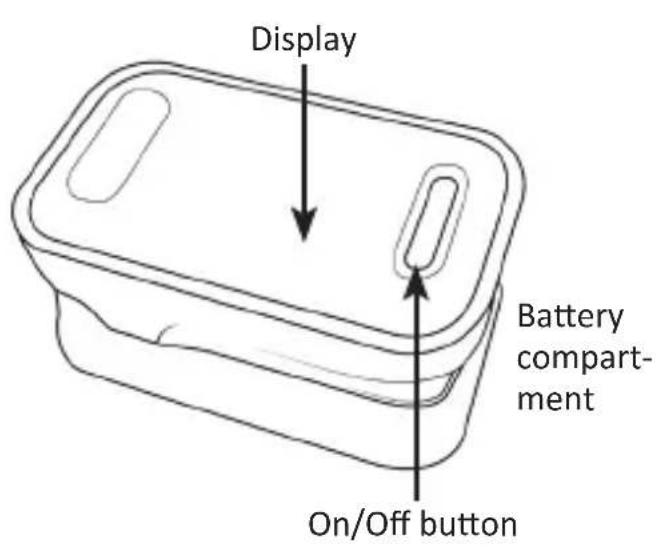
text_image
Display Battery compartment On/Off button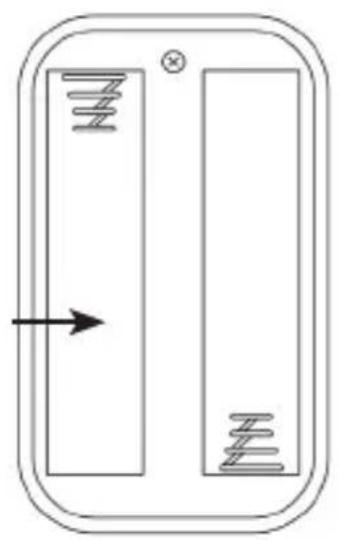
natural_image
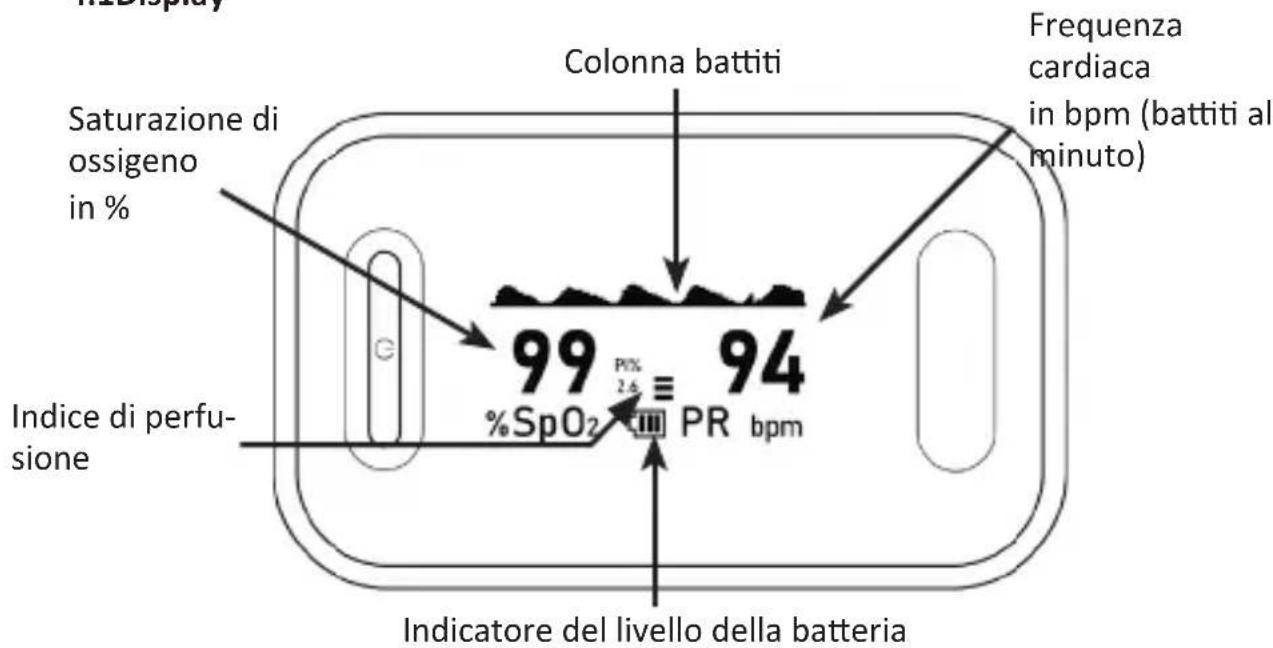
Pure electrical circuit lines without any symbols4.1 Display
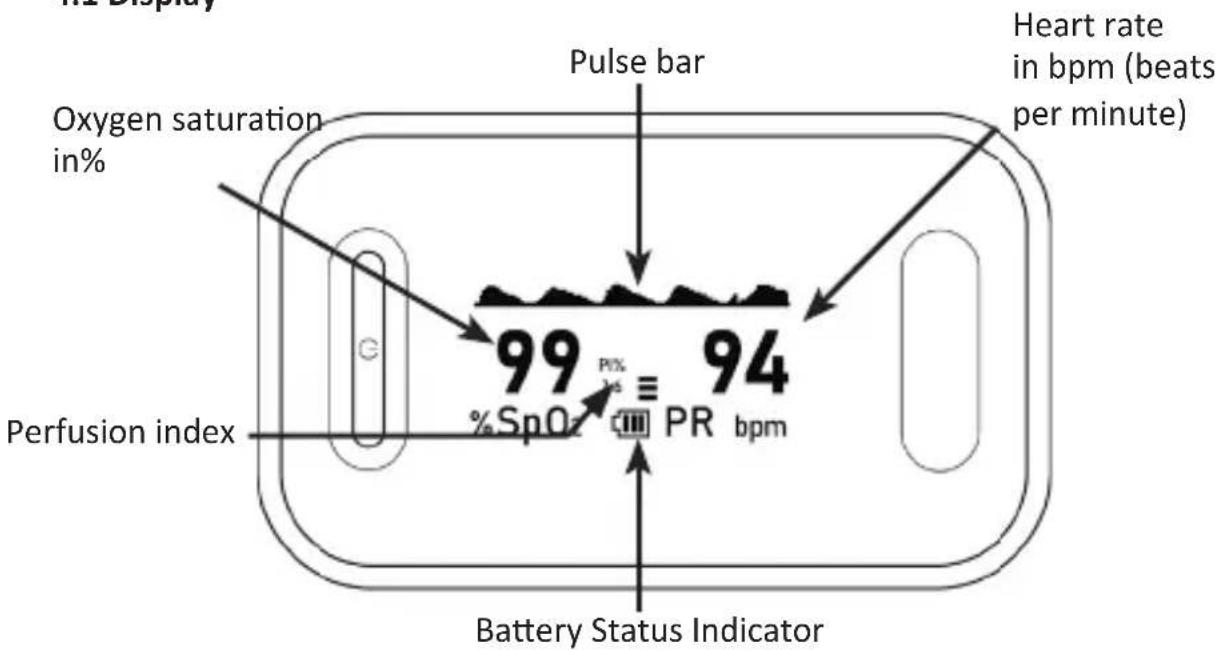
other
| Parameter | Value | |-------------------------|-------| | Oxygen saturation in% | 99 | | Heart rate in bpm (beats per minute) | 94 | | Perfusion index | | | Battery Status Indicator | |5. Initial use
Take the product out of the package and remove all the packaging material. Open the battery compartment at the back of the device and insert two 1.5 v AAA batteries. Pay attention to the correct polarity of the contacts. Check the pulse oximeter regularly to ensure that the device is not visibly damaged before use and the batteries are adequately charged. If desired, you can mount the included carrying strap to the appropriate holder and knot it firmly.
6. Operation
- Insert a finger, as shown below, into the opening of the pulse oximeter. Keep your body, hand and fingers always calm. Make sure that the fingernail is facing up towards the display.
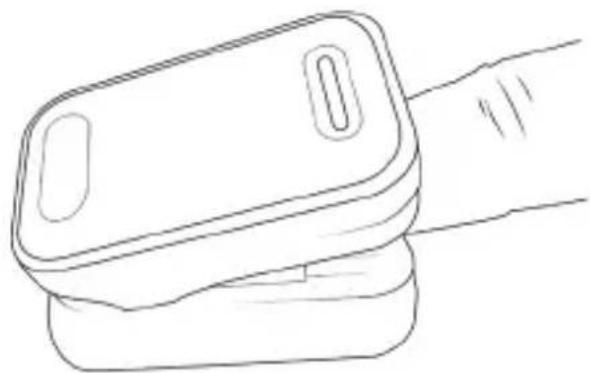
natural_image
Line drawing of a hand holding a rectangular device (no text or symbols)-
Press the "On/Off" button. The device starts the measurement. Do not move during the measurement.
-
The reading appears on the screen after a few seconds.
To change the direction of the display, press the "On / Off" button during measurement. There are 6 different display directions, which can be changed in sequence.
Note: After removing your finger from the device, the device switches to standby mode after about 6 seconds.
6.1 Parameter settings ("Sound Settings" / "Default Settings")
- Press and hold the "On/Off" button for about 3 seconds to access the parameter menu.
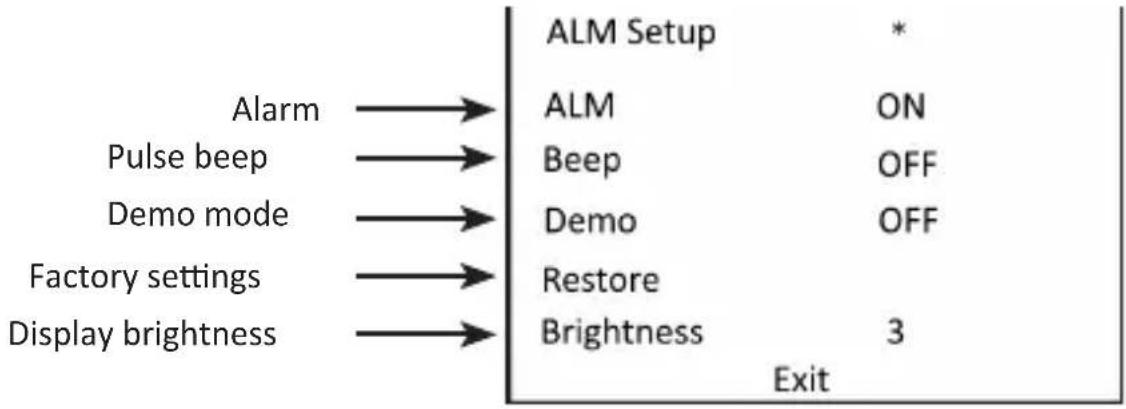
flowchart
graph LR
    A["Alarm"] --> B["ALM Setup"]
    C["Pulse beep"] --> D["ALM ON"]
    E["Demo mode"] --> F["Beep OFF"]
    G["Factory settings"] --> H["Demo OFF"]
    I["Display brightness"] --> J["Restore"]
    I --> K["Brightness 3"]
    L["Exit"] --> M["End"]
- Briefly press the "On / Off" button to scroll down. The "*" symbol moves down to the next line every time you press the "On / Off" button briefly and indicates which settings you can edit.
- Select press the desired setting option and press and hold the "On / Off" button for about 3 seconds to edit the corresponding settings.
6.2 Parameter settings (ALM Settings)
- Press and hold the "On/Off" button for about 3 seconds to access the parameter menu. Then press and hold the button again for 3 seconds to open the "ALM Setup"
- Briefly press the "On / Off" button to scroll down.
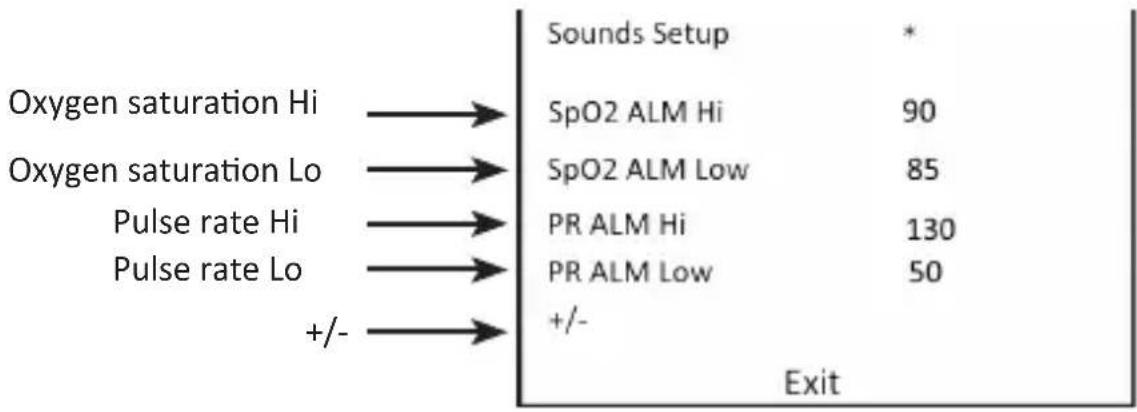
flowchart
graph LR
    A["Oxygen saturation Hi"] --> B["SpO2 ALM Hi"]
    C["Oxygen saturation Lo"] --> D["SpO2 ALM Low"]
    E["Pulse rate Hi"] --> F["PR ALM Hi"]
    G["Pulse rate Lo"] --> H["PR ALM Low"]
    I["+/-"] --> J["+/-"]
    B --> K["Exit"]
    D --> K
    F --> K
    H --> K
    J --> K
The "*" symbol moves down to the next line every time you press the "On / Off" button briefly and indicates which settings you can edit.
- Select press the desired setting option and press and hold the "On / Off" button for about 3 seconds to edit the corresponding settings. If you want to edit the values a little faster, keep the "On / Off" button pressed.
Note: If you configure the "+/-" function to "+", the values described in Section 3 can be increased. If the function is set to "-", the values can be decreased (as mentioned in Section 3).
- If the pulse oximeter now reaches the corresponding alarm value, a beep is heard as long as the alarm value is exceeded!
7. Evaluating the readings
The following table shows an approximate evaluation. This evaluation is just a help. You should consult your doctor for a more detailed evaluation.
| Oxygen saturation (SpO2) Evaluation | |
| 94 % - 99 % Normal range | |
| 90 % - 93 % Low range (better to consult a doctor) | |
| <90 % Critical range (consult a doctor immediately) | |
Note the high altitudes have a strong influence on the oxygen saturation level! Always check with your doctor beforehand.
The following table shows the effects of various altitudes. This table does not apply to individuals with pre-existing conditions, such as respiratory disease, heart insufficiency, etc. In such individuals, the disease symptoms can occur at much lower altitudes.
| Altitude | approximate oxygen saturation to be expected | Consequences |
| 1500-2500 m | >90 Usually no altitude sickness | |
| 2500-3500 m | ~90 | Altitude sickness, adjustment is recommended |
| 3500-5800 m | <90 | Very frequent occurrence of altitude sickness, adjustment absolutely necessary |
| 5800-7500 m | <80 | Can stay only for a short duration, severe hypoxia |
| 7500-8850 m | <70 Immediate danger to life |
8 Cleaning, care and maintenance
8.1 Cleaning
Clean the device housing after each use using a soft dry cloth. Clean the rubber pad in the "measuring area" using medical alcohol and a soft damp cloth.
8.2 Changing the battery
If the display of the device indicates low battery, you should immediately replace the batteries. Always pay attention to the correct polarity of the contacts.
If the product is not used for more than a month, remove the batteries from the device to avoid any leakage.
9. Safety instructions and disclaimer
Never try to open the device to repair or make modifications. Avoid contact with the mains voltage. The device does not carry current only when it is disconnected. Do not short-circuit the product. Please disconnect the power cord when not in use or during storms.
The device is not approved for outdoor use. Therefore please use it only in dry surroundings. Protect it from high humidity, water and snow. Keep the device away from high temperatures. Do not expose the device to sudden changes in temperature or strong vibrations, as this could damage the electronic components. Check the device for any damage before using it. The device should not be used if it was subject to impact or has been damaged in some other manner. Please comply with the local regulations and restrictions. Do not use the device for purposes other than those described in the user manual.
This product is not a toy. Keep it out of the reach of children or mentally disabled persons. Any repair or modification to the device, which is not carried out by the original supplier, will void any warranty and guarantee claims. The device should only be used by those who have read and understood this user manual. The specifications of the device may be changed without any special prior notification.
10. Disposal instructions
In line with the European WEEE directive, electrical and electronic devices should not be disposed of along with domestic waste. Their components have to be separately sent for recycling or disposal, because improper disposal of toxic and dangerous components may permanently damage the environment.
According to the electrical and electronic equipment act (ElektroG), you are obliged (as a consumer) to return (free of charge) electrical and electronic devices to the manufacturer, the point of sale or public collection points at the end of their service life. The relevant local laws regulate the details in this regard. The symbol displayed on the product, in the user manual or/and on the packaging refers to these regulations. With this manner of sorting, recycling and disposal of used devices, you make an important contribution towards protecting our environment.
11. Instructions for battery disposal
In conjunction with the sale of batteries along with the supply of devices that include batteries, the supplier is obliged to point out the following to the customer: The customer is legally obliged to return used batteries. He can return used batteries which the supplier offers or has offered as new batteries in his assortment free of charge to the supplier's dispatch warehouse (shipping address). The symbols shown on the batteries indicate the following: Pb = battery contains more than 0.004 percent lead by weight, Cd = battery contains more than 0.002 percent cadmium by weight, Hg = battery contains more than 0.0005 percent mercury by weight.
12. Manufacturer's declaration of conformity
The manufacturer solely confirms that this device meets the fundamental requirements of Directive 93/43/EEC on medical devices. The Finger Pulse Oximeter is classified under Class IIb according to Annex IX of Directive 93/42/EEC on medical devices. The electro-magnetic compatibility of this device corresponds to IEC60601-1-2.

The symbol of the crossed-out dustbin means that the battery should not be disposed of in household waste.


WEEE directive 2012/19/EU WEEE Register no.: DE 67896761
The company WD Plus GmbH hereby certifies that the device 305043/20201013JS006 complies with the fundamental requirements and all other relevant stipulations of the directive 93/42/EEC. A complete conformity statement can be obtained from: WD Plus GmbH, Wohlenbergstraße 16, 30179 Hannover, http://downloads.ganzeinfach.de/search/model/305043

natural_image
Line drawing of a handheld electronic device with a rectangular body and a handle (no text or symbols)natural_image
Pure electrical circuit lines without any symbols4.1Display
natural_image
Line drawing of a hand holding a rectangular device (no text or symbols)natural_image
Line drawing of a handheld electronic device with a rectangular body and a handle (no text or symbols)text_image
MEDICINALIS
text_image
QR code image containing encoded data, no visible human-readable textDOWNLOADS & MANUALS