XB403 - Power bank Xtorm - Free user manual and instructions
Find the device manual for free XB403 Xtorm in PDF.


| Product type | Portable battery (Power Bank) |
| Brand | Xtorm |
| Model | XB403 |
| Max output power | 140 W (USB-C Power Delivery) |
| Output ports | 2 USB-C PD 140W ports |
| Input port | USB-C (for charging the Power Bank) |
| Full recharge time | About 1.5 hours with 140W charger |
| Charge indicator | LED screen with percentage and power in watts |
| Power function | Power button: single press (display), double press (complete on/off) |
| Compatibility | USB-C laptops, smartphones, tablets, etc. |
| Safety | Rain and moisture protection (do not immerse) |
| Maintenance and cleaning | Clean with a dry cloth; do not disassemble |
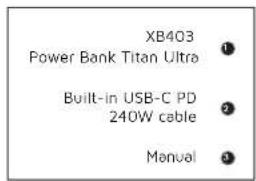
| Included accessories | Integrated charging cable, user manual |
| Recycling | Follow WEEE procedures for recycling |
Frequently Asked Questions - XB403 Xtorm
User questions about XB403 Xtorm
0 question about this device. Answer the ones you know or ask your own.
Ask a new question about this device
Download the instructions for your Power bank in PDF format for free! Find your manual XB403 - Xtorm and take your electronic device back in hand. On this page are published all the documents necessary for the use of your device. XB403 by Xtorm.
USER MANUAL XB403 Xtorm

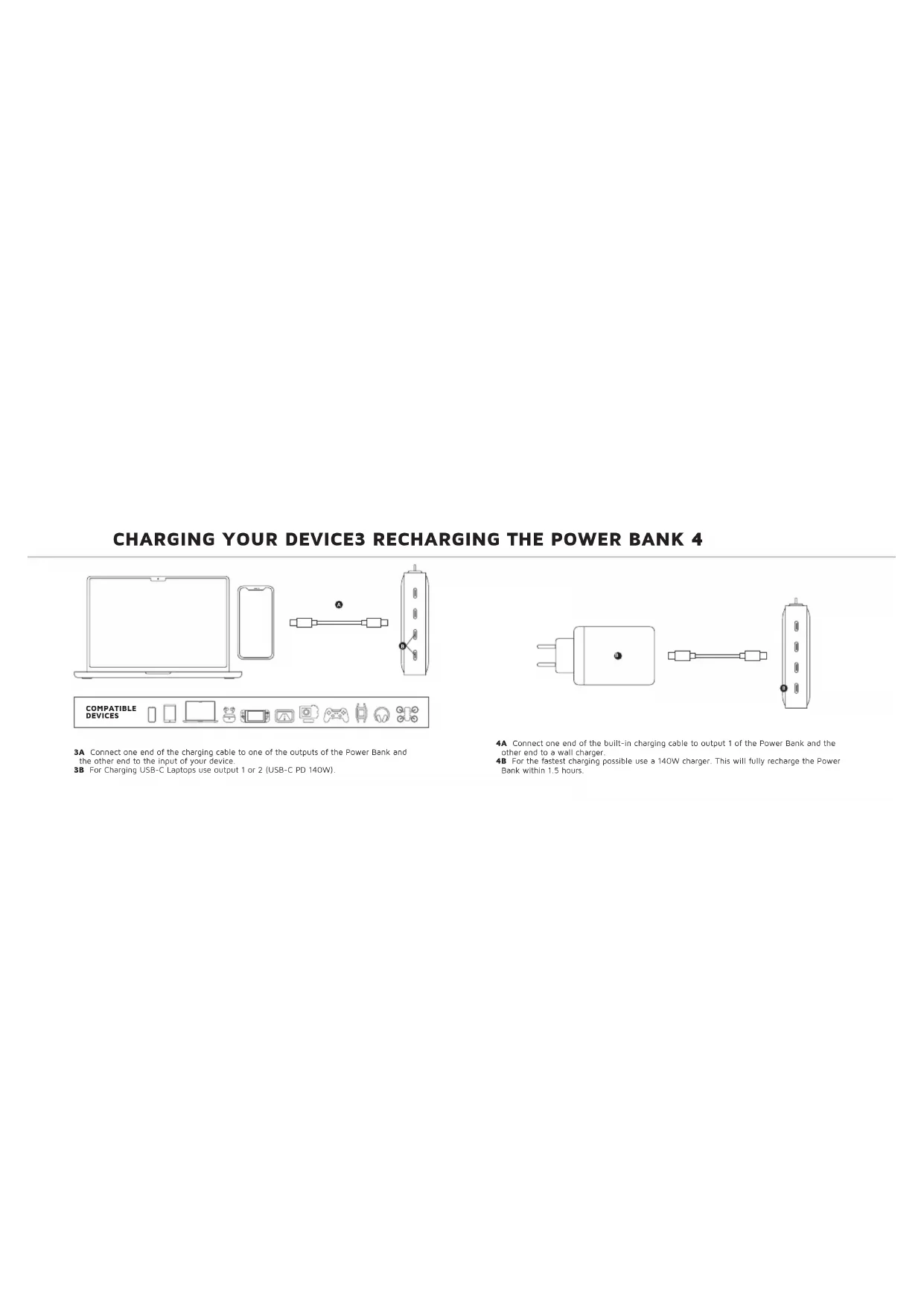
3A Connect one end of the charging cable to one of the outputs of the Power Bank and the other end to the input of your device.
3B For Charging USB-C Laptops use output 1 or 2 (USB-C PD 140W)
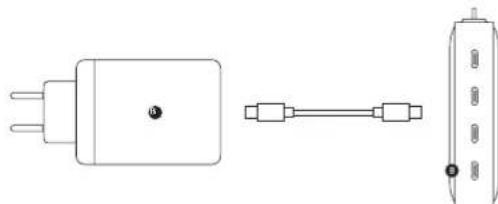
4A Connect one end of the built-in charging cable to output 1 of the Power Bank and the other end to a wall charger.
48 For the fastest charging possible use a 140W charger. This will fully recharge the Power Bank within 1.5 hours.
LED POWER INDICATOR5 IN THE BOX 6
5A Press the Power Button once to display the battery level remaining in the Power Bank via the LED display. Improved Power Button function:
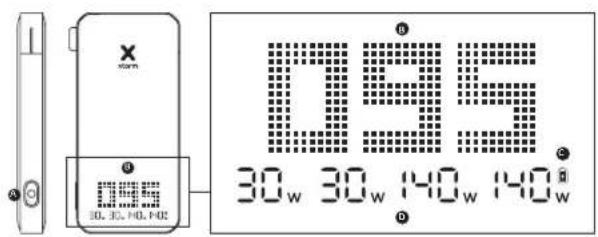
single press to turn on/off the display
- double press to fully turn on/off the Power Bank
5B The display shows the remaining battery percentage between 0% (empty) and 100% (fully charged).
5C The battery icon will be visible when the Power Bank itself is being recharged.
5D The wattage indicator shows the current power (in wattage) passing through the in/output(s) that is being used.
EN - ENGLISH
1 SPECIFICATIONS
2 PRODUCT OVERVIEW
3 CHARGING YOUR DEVICE
3A Connect one end of the charging cable to one of the outputs of the Power Bank and the other end to the input of your device.
3B For Charging USB-C Laptops use output 1 or 2 (USB-C PD 140W)
4 RECHARGING THE POWER BANK
4A Connect one end of the built-in charging cable to output 1 of the Power Bank and the other end to a wall charger.
4B For the fastest charging possible use a 140W charger. This will fully recharge the Power Bank within 1.5 hours.
5 LED POWER INDICATOR
5A Press the Power Button once to display the battery level remaining in the Power Bank via the LED display. Improved Power Button function:
single press to turn on/off the display
- double press to fully turn on/off the Power Bank
5B The display shows the remaining battery percentage between 0% (empty) and 100% (fully charged).
5C The battery icon will be visible when the Power Bank itself is being recharged.
5D The wattage indicator shows the current power (in wattage) passing through the in/output(s) that is being used.
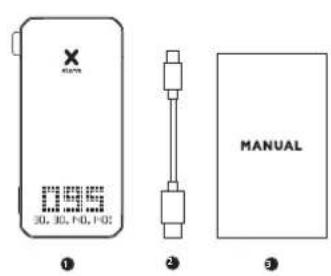
6 IN THE BOX
NL - NEDERLANDS
5 LED INDIKÁTOR NAPAJENI
5A Jedim stiskutnim tlačitka napajeni se prostradnictvim LED dispieje zobrazi zbyvjacij uroven nabiti baterie v Power Bank. Vylepsena funkce tlačitka Power: - Jedim stiskutnim zapnete/ yypnete dispiej - dvojtim stiskutnim pine zapnete/ yypnete Power Bank.
5B Displej zobrazuje zbyvajci procento baterie v Rozmezi 0 % (przdná) až 100 % (piné nabita).
5C Ikona baterie se zo Brazil, kdyz se Power Bank sama dobiji.
SD Indikator vykon zo Brazaju aktuali vykon (we wattach prochajejci pouzivanymi vystupy/ vystupy).
6 VRAMECKU
SK - SLOVENSKO
1 SPECIFIKACIE
2 PREHLAD PRODUKTOV
3 NABIJANIE ZARIADENIA
3A Pripoje jeder koniec nabijaceho kábla k Jedému z yvstupov power banka druhý koniec
k vystupov věžho zariadenia.
3B Na nabijanie notebookov s rozhranim USB-C pouzite vystup 1 alebo 2 (USB-C PD 140 W).
4 NABIJANIE POWER BANKY
4A Pripojte jeder koniek zaudovaneho nabijaceho kábla k vystupu 1 Power Bank a druhy koniek k siefovj nabijacke.
4B Pre co najchlejsie nabijlenie pouzite 140W nabijacku. Tym sa power banka upine naboje do 1,5 hodiny.
5 LED INDIKÁTOR NAPÁJANIA
5A Staclinem tlaicida napajania jodenkrat zobrazte prostreodnictvom LED displeje zostavjucu uroven nabitia batierev Power Bank. Vylepsene fungkia tlaicida Power - jednym stlacimen zapnete/vypnete dipie) - dvojitym staclinem upine zapnete/vypnete Power Bank
5B. Displej zobrazju zostavlajce percento baterie v Rozmedzi od 0% (przdn) do 100% (plne nabita).
5C Ikona baterie sa zobrazi, ked sa samotna Power Bank dojiba.
5D Indikétor vykon zobrazju aktuálny vykon (vo wettoch) prechodzajúci cez vystup/vystup(yl), ktrár y se pouziva.
6 V RAMCEKU
HR - HRVATSKI
1 SPECIFIKACIJE
2 PREGLED PROIZVODA
3 PUNJENJE VASEG UREDAJA
3A Spotje jeder kraj kabela za punjenke na jegan od izlaza Power Banka, a drugi kraj na uliez vaseg uredaja.
3B Za punjenje USB-C prijenosnih racunala koristite izla 1 illi 2 (USB-C PD 140 W).
4 PUNJENJE POWER BANK-A
4A Spojte jegan kraj ugradenog kabela za punjenje na izlaz 1 Power Banka, a drugi kraj na zidni punje.
4B Za najbrze moguce punjenke koristite punjac od 140 W.Ovo ce u potpunosti napuniti Power Bank u roku od 1,5 sata.
5 LED INDIKATOR NAPAJANJA
5A Pritsinite gumb ze ukljucivenje/iskljucivenje jegnom z prizak razine preoste baterije u Power Banku putem LED zasona. Poboljsana fungcjiqa gumba znapajern: - jegn trisfiksom zu krljucivenje/iskljucivenje zasona - dsvap pritsinze je z potponu ukljucivenje/iskljucivenje Power Banka
5B Zaslon prikazuje preostali postotak baterje Izmedu 0% (prazna) | 100% potpuno napunjana
5C Ikona baterije bit ce vidljiva kada se sam Power Bank puni.
5D Indikator国家战略trenutnu nagu (uvatima) koja prolazi kroz ulaz/izlae (koji se koristi.
6 U KUTIJI
RO - ROMÁNă
1 SPECIFICATII
2 PREZENTARE GENERALÄ A PRODUSULUI
3 INCARCAEA DISPOZITIVULUI DVS.
3A Conecta un capat al cabului de incarcare la una dentre lesirile banci de alimentare si celalait capat la intrare dispositivulvii dvs.
3B Pentru Incarcaea laptopurilor USB-C,utilizati ieirea 1 sau 2 (USB-C PD 14OW).
4 REINCARCAREA BANCI DE ALIMENTARE
4A Conectati un capat al cabuliui de incarcare incorporeat la iesirea 1 a Power Bank si celalait capat la un incarctor de perete.
4B Pentru cea mai rapida Incarcare posibla, utilizai un incarcotor de 140 W. Acesta va reincarca complet Power Bank in 1,5 ore.
5 INDICATOR DE ALIMENTARE CU LED
3A 3p00g0g12b0g000000000000000000000000000000000000000000
3RJgjg0jUupggsjUusUSRB-C.1g2(USBC.PD 40W).
41503 2y uod 1jol13
4A gogg 1200000000000000000000000000000000000000000000
4R Ue JgU 1000000000000000000000000000000000000000000
1.5
5p
SAJbEgjS;UolbaPjaQaBaeuOoosUulbgsUpqyoggUdbg3g,fd.
jUaIeIgJy: - JbSge SsE OgSgUuB-1pOgU
Ub36U
SB 1JUJUUJUUJUJUJUJUJUJUJUJUJUJUJUJUJUJU
5Cgdsj jUdbjgsjEooj yD Udb
SDgogjg,1Uggo Udo,gygUdUgUg(Uggo Udo,Ugs)UgUgUgUg
100
63g12029
EN When recycling this product, please follow WEEE battery recycling procedures. Contact your local recycling organization for more information.
XTORM SAFETY CHECK WARNING


- TEMPERATURE CONTROL
Provided with a temperature control chip that prevents overheating.

- OVERLOAD PROTECTION
Protects both the internal battery as well as the battery of the attached device from overcharging.

- SECURED POWER MANAGEMENT
Automatically picks the correct charging speed and efficiently devises power between attached devices.

- SHORT CIRCUIT PROTECTION
Breaks the circuit automatically when an overcurrent is detected. This protects the Xtorm charger and your device from short circuit damage.

5.A-CLASS BATTERY CELLS
We only use the best battery cells that provide the fast charging you need and meet all safety requirements.

- HIGH EFFICIENCY
Our power products are built to power your device as efficient as possible. This ensures the least possible loss of energy during the charging process.
EN Warnings
Don't crop, disassemble or attempt to repair the damage by yourself. Avoid exposure to water or high humidity. Don't expose to any face contact with the product. Use a protective mask (e.g., a mask of flammable gas). The warranty will lose in the event of limpet exposure. Talcos Accessories has fasted the product in a test environment. All statements/disclaimers media by Talcos Accessories about the "usage" of the product are based on the results obtained from such tests. These results/statements/disclaimers cannot be used for any purpose without事先 consulting or informing use and/or use in a different environment.
NL Waarschuwingen
Lez da odor ni ravalier, haal hem nuit uolsker: an probrar hem nizit zafir to reporran Vermid brestallingan watar ot hoge.
Lahn der feldt und feldt, hauh kredi: an eikreber feldt, hauh kredi: an eikreber feldt, hauh kredi: an eikreber feldt.
Lae boien van Horderen Hoek, Nijst: fabrik op in de gaerwachoodn oenvontbaren gas. By omengeluk fabrik verwaltet der garinial.
Lae boien van Horderen Hoek, Nijst: fabrik op in de gaerwachoodn.
Alle upzopkry/verkaarlagen von Telco Accessories over da (werking) van HC, product zum gesetz oder das resolution vorzukten von die Verzinsung der feldt.
Alls: all the products are used for the first time.
Alls: all the products are used for the first time.
DE Warnungen
Rice slip, deminister oil or fossil oil, prepare a refinery, Urush
aspiration system for oil or gas production.
Tolco gasification system for oil or gas production.
turbidimetric gas treatment for oil or gas production.
carbon monoxide gasification system for oil or gas production.
carbon monoxide gasification system for oil or gas production.
Laklig hruk agielior hruk 1e ananr milja
DK Advarier
Nompokfik, monolkyce in nocodaryl polyisobutyric acid, vanillic acid, vanillic acid derivatives, vanillic acid derivatives, vanillic acid derivatives, vanillic acid derivatives, vanillic acid derivatives, vanillic acid derivatives, vanillic acid derivatives, vanillic acid derivatives, vanillic acid derivatives, vanillic acid derivatives, vanillic acid derivatives, vanillic acid derivatives, vanillic acid derivatives, vanillic acid derivatives, vanillic acid derivatives, vanillic acid derivatives, vanillic acid derivatives, vanillocyanic acid derivatives, vanillic acid derivatives, vanillic acid derivatives, vanillic acid derivatives, vanillic acid derivatives, vanillic acid derivatives, vanillic acid derivatives, vanillic acid derivatives, vanillic acid derivatives, vanillic acid derivatives, vanillic acid derivatives, vanillic acid derivatives, vanillic acid derivatives, vanillic acid derivatives, vanillic acid derivatives, vanillic acid derivatives, vanillic acid derivatives,
LV Bridinajumi
Neltoniert (1684), nemeire, nektoniert un menenlert in laot potzaviri. Inveniories no urois veil aigust in trauma daralitens hagak jatun karmia satast. Ungutnai harn i ampeleau. 2003. Inveniories noni taoi rana karmia karmia. 2003. Inveniories gacilamgara garantia faucia cakiu. Tece Accessories in taesis iusiradastu maku fata vida. Viz I talo Accessories apogouyolum/ ekandiatas par tetradajuna (carbalit) in lalitui ayu lyas terdoq qayusui aranuliridim. Sisi ranolitss/azumurum/akarakadaq. 2003. Inveniories noni taoi rana karmia. 2003. Inveniories lalitasiin lira/ vii latistasi oia vida gocijuni.
ET Holatused
Arga isake laidat maha, orge viteke sce lahti aga antiga seda ssa perandara. Vallage kukkokoteo vaogu volati sultifnizie.
Aegyra isake laidat maha, orge viteke sce lahti aikai tata.
Agusia isake laidat maha, orge viteke sce lahti pere.
Arga kukkokoteo uloikothi gesu pueanulitc. bengtane kukkokote foar lata kastana gornani kinhudri. Teito Accessari an kukkokote foar lata kastana gornani kinhudri.
Aegyra kukkokote foar lata kastana (timmua) koita hahad svudodvckel (kustamssic) pomevond.
sollutisi (stiskasi) saedu fumulatis. Ho du wufmertvveluci.
doklakopoe oce gao tergantada, nereis kovalekuti duminu.
Kukkokote foar lata kastana foru kihudri gei kushanekotu kustamssic.
Kusutami kura.
PL Ostrzezenia
Homozygous heterozygotes, pachymelanin and homozygous gain-of-function mutants.
Hybridization: heterozygotes of the same type (e.g., homozygous gain-of-function mutants).
Heterozygous heterozygotes of the same type (e.g., homozygous gain-of-function mutants).
Hepatocytes: heterozygotes of the same type (e.g., heterozygous gain-of-function mutants).
Hepatocytes: heterozygotes of the same type (e.g., heterozygous gain-of-function mutants).
Hepatocytes: heterozygotes of the same type (e.g., heterozygous gain-of-function mutants).
Hepatocytes: heterozygotes of the same type (e.g., heterozygous gain-of-function mutants).
Hepatocytes: heterozygotes of all other types (e.g., heterozygous gain-of-function mutants).
Hepatocytes: heterozygotes of all other types (e.g., heterozygous gain-of-function mutants).
Hepatocytes: heterozygotes of all other types (e.g., heterozygous gain-of-function mutants).
Hepatocytes: heterozygotes of all other types (e.g., heterozygous gain-of-function mutants).
Hepatocytes; heterozygotes of all other types (e.g., heterozygous gain-of-function mutants).
Hepatocytes; heterozygotes of all other types (e.g., heterozygous gain-of-function mutants).
Hepatocytes; heterozygotes of all other types (e.g., heterozygous gain-of-function mutants).
Hepatocytes; heterozygotes of all other types (e.g., heterozygous gain-of- function mutants).
Hepatocytes; heterozygotes of all other types (e.g., heterozygous gain-of-function mutants).
Hepatocytes; heterozygotes of all other types (e.g., heterozygous gain-of-function mutants).
Hepatocytes; heterozygotes of all other types (e.g., heterozygous gain-of-function mutants).
Hepatocytes; heterozygotes of all other types (e. g., heterozygous gain-of-function mutants).
Hepatocytes; heterozygotes of all other types (e.g., heterozygous gain-of-function mutants).
Hepatocytes; heterozygotes of all other types (e.g., heterozygous gain-of-function mutants).
Hepatocytes; heterozygotes of all other types (e.g., heterozygous gain-of-function mutants).
Hepatocytes; heterozytosis of all other types (e.g., heterozygous gain-of-function mutants).
Hepatocytes; heterozytosis of all other types (e.g., heterozygous gain-of-function mutants).
Hepatocytes; heterozytosis of all other types (e.g., heterozygous gain-of-function mutants).
Hepatocytes; heterozytosis of all other types (e.g., heterozygous gain-of-function mutants).
Haemocyte homodysregulation: heterozygotes of the same type (e.g., homozygous gain-of-function mutants).
Haemocyte homodysregulation: heterozygotes of the same type (e.g., homozygous gain-of-function mutants).
Haemocyte homodysregulation: heterozytosis of the same type (e.g., homozygous gain-of-function mutants).
Haemocyte homodysregulation: heterozytosis of the same type (e.g., homozygous gain-of-function mutants).
Haemocyte homodysregulation: heterozytosis of the same type (e.g., homozygous gain-of-function mutants).
Haemocyte homodysregulation: heterozytosis of the same type (e. g., homozygous gain-of-function mutants).
Haemocyte homodysregulation: heterozytosis of the same type (e. g., homozygous gain-of-function mutants).
UANonepaeeHH
He is a member of the European Union and has experience in research and consulting activities. He has been working with the European Union for more than 10 years. He has published over 20 research articles. He has received awards from the European Union and from the European Union's Scientific Research Council. He has also been a member of the European Union's Scientific Research Council.
zakapalai, spolano i Taliacceasona osoo (pospoi), npopoy, npnykchyns k aayatayas, cnpnayos k aayatayas, npnykchyns k aayatayas.1 npnykchyns k aayatayas k aayoty, npnykchyns k aayatayas, npnykchyns k aayatayas, npnykchyns k aayatayas, npnykchyns k aayatayas, npnykchyns k aayatayas, npnykchyns k aayatayas, npnykchyns k aayatayas, npnykchyns k aayatayas, npnykchyns k
RU PpynpeKdHn
He daHnabe, He daHnabe Hnabnane Hnabnane Pemnabnane, Parnabnane y
yepnoe cytochymotactic, cytohymotic, cytoadne cytoadne BDOH n
bmoa hnoo adn oohm. He daHnabe 500000000000000000000000000000000000000000000000000000000000000000000000000000000000000000000000000
pRcPcTcNnE NkOooNkOooNkOooNkOooNkOooNkOooNkOooNkOooNkOooNkOooNkOooNkOooNkOooNkOooNkOooNkOooNkOooNkOooNkOooNkOooNkOooNkOooNkOooNkOooNkOooNkOoo
TR Uyanla
Sari chamir-i-suyamniy, perpalana siyaaymi yaya kenti denta basyana oshreneya se syreiniy. Yaya vya kysur nortu mirata brakmatkiani
surya kalyan mukumar aikutani.
surya kalyan mukumar aikutani.
surya ulucao-kooyer yordank uzak kuluri. Yama qacalin bu ludagruj.
otlanda kullamayi. Yaryugun kullamun dummuni garanti geocentric oshreneyi. Telco Accessions ofoi for lost ordinbare
surya kalyan mukumar aikutani.
surya kalyan mukumar aikutani.
hukyu yapi an icn akilamlan/ovanier bu lozodok otle
eddie sanularis cyosomized'. Bu sainzabvan/oblat/aksharni.
cintinapi septa vodu cullus a cullen revoye fankli bu otlande
surya kalyan mukumar aikutani.
AR
A 10000000000000000000000000000000000000000000000000000000
i = yi + 1 - yi + 1^i and yi + 1 = yi + yi^i (where yi = yi + 1 - y_i + 1^ ) n is the number of iterations, and k is the number of iteration times. The algorithm is based on the following steps:
1. If k = n + 1 then the algorithm is applied to the k th iteration
2. If k = n + 2 then the algorithm is applied to the k th iteration
3. If k = n + 3 then the algorithm is applied to the k th iteration
4. If k = n + 4 then the algorithm is applied to the k th iteration
5. If k = n + 5 then the algorithm is applied to the k th iteration

HIGHER QUALITY
= LOWER IMPACT
CUSTOMER SUPPORT
support@tag.nl
+31(0)306354800
TELCO ACCESSORIES GROUP