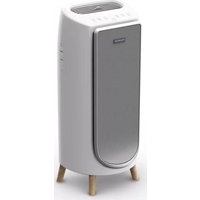
Pure Air City PU2840 - Air purifier ROWENTA - Free user manual and instructions
Find the device manual for free Pure Air City PU2840 ROWENTA in PDF.



| Product type | Air purifier |
| Brand | Rowenta |
| Model | Pure Air City PU2840 |
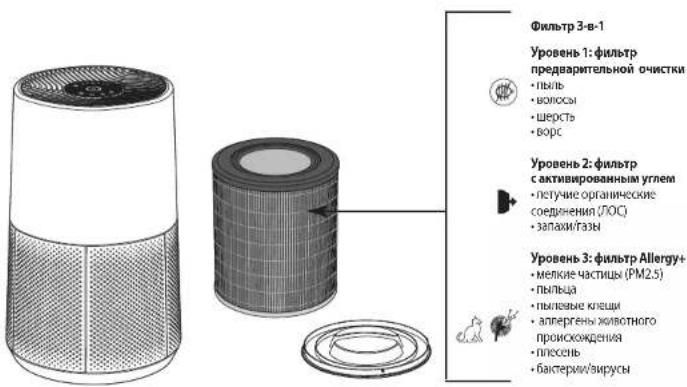
| Filtration levels | 3 (pre-filter, activated carbon filter, particle filter) |
| Main filter | 3-in-1 filter (pre-filter, Allergy+ filter, activated carbon) |
| Pre-filter cleaning frequency | Every 2 to 4 weeks |
| Main filter replacement frequency | Every 12 months or when indicator is on |
| Number of speeds | 6 manual speeds |
| Auto day mode | Yes, adjusts speed (2, 4 or 5) according to air quality |
| Auto night mode | Yes, adjusts speed (1, 2 or 3) with automatic lights off |
| Air quality indicator | Light ring around On/Off button (blue, green, yellow, red) |
| Connectivity | Wi-Fi 2.4 GHz, Bluetooth (via Pure Air by Rowenta app) |
| Child lock | Yes, activation by long press on button (3) |
| Particle sensor | Yes, with lens to clean every 2 months |
| Power supply | Class II power adapter, non-grounded plug |
| Minimum distance from wall | 60 cm on each side |
| Storage temperature | Max 35°C, 70% relative humidity |
| Radio frequency bands | 2400-2483.50 MHz (Wi-Fi & Bluetooth) |
| Max radio power | Wi-Fi: 18 dBm, Bluetooth: 8 dBm |
Frequently Asked Questions - Pure Air City PU2840 ROWENTA
User questions about Pure Air City PU2840 ROWENTA
0 question about this device. Answer the ones you know or ask your own.
Ask a new question about this device
Download the instructions for your Air purifier in PDF format for free! Find your manual Pure Air City PU2840 - ROWENTA and take your electronic device back in hand. On this page are published all the documents necessary for the use of your device. Pure Air City PU2840 by ROWENTA.
USER MANUAL Pure Air City PU2840 ROWENTA
SAFETY INSTRUCTIONS 4
VERY IMPORTANT 4
OPERATING PRINCIPLE 5
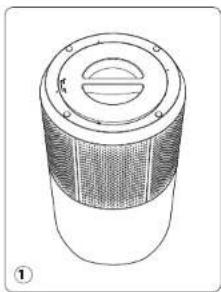
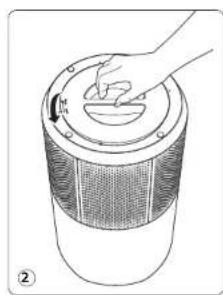
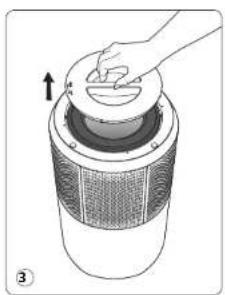
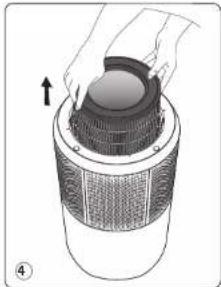
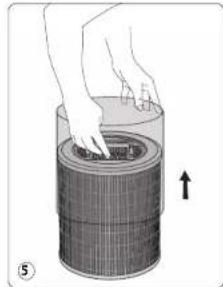
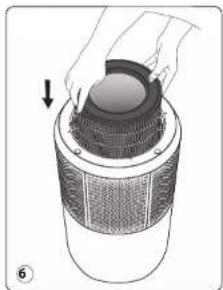
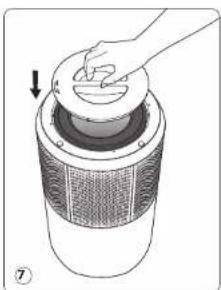
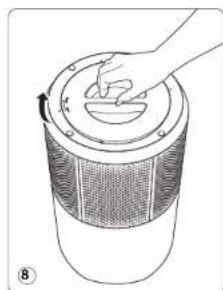
DISASSEMBLING/REASSEMBLING FILTERS 6
WHERE TO INSTALL THE APPLIANCE 7
BEFORE FIRST USE 7
HOW TO CONNECT YOUR PURIFIER TO INTERNET 7
OPERATION 8
CARE AND MAINTENANCE 8
STORAGE 10
IN THE EVENT OF A PROBLEM 10
WARRANTY 11
ENVIRONMENT PROTECTION FIRST! 11
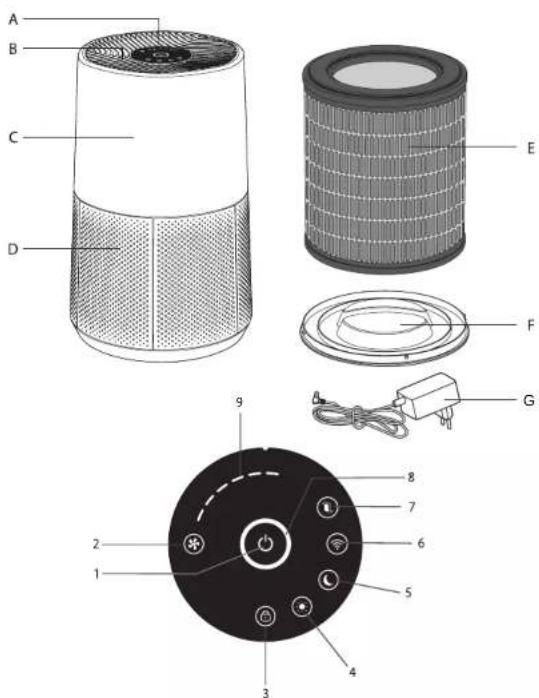
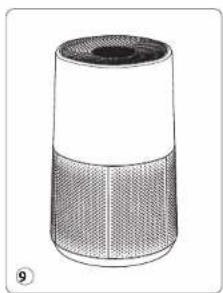
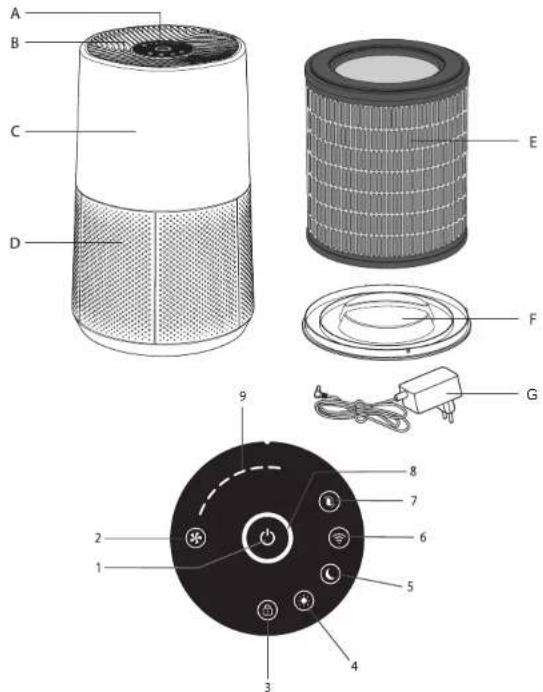
PRODUCT OVERVIEW
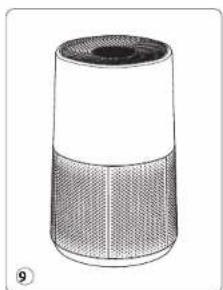
Accessories of Main Body Control buttons Control panel Lights
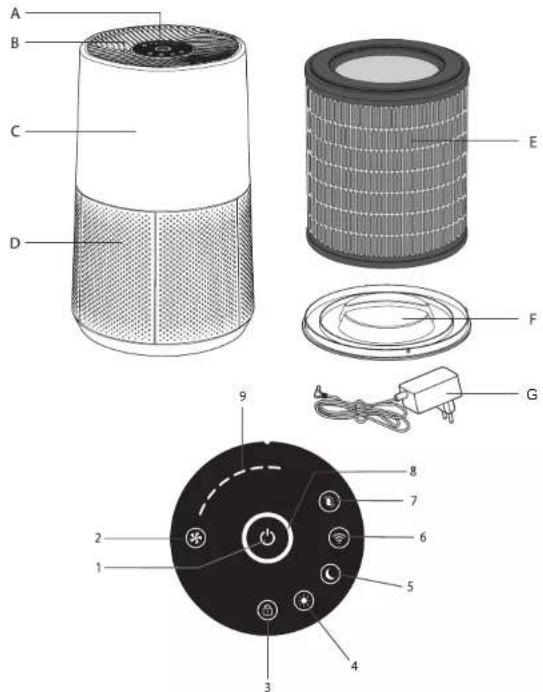
A. Control Panel
B. Air Outlet
C. Main Body
D. Air Inlet
E.Filter
F. Filter cover
G. Adapter
1.Start/Stop 8.Air quality indicator
2. Speed selection 9. Selected speed indicator
3. Child lock
4. Mode Auto Day
5. Mode Auto Night
6.Wifi Button
7. Filter change indicator
Read the instructions for use and safety carefully before use and keep them for future reference.
SAFETY INSTRUCTIONS
WARNING
It is essential that you read these instructions carefully and observe the following recommendations:
- For your safety, this appliance complies with the applicable standards and regulations (low voltage, electromagnetic compatibility, environmental directives, etc.).
- This appliance should not be used by persons (including children) with reduced physical, sensory or mental capacities or lack of experience and knowledge, unless they are supervised or have been given instructions beforehand concerning use of the appliance by a person responsible for their safety.
Children should be supervised to ensure they do not play with the appliance. - The appliance can be used by children aged 8 and over and persons with a lack of experience or knowledge or reduced physical, sensory or mental capacities, provided they are supervised, have been trained on the safe use of the appliance and are aware of the risks involved, children must not play with the appliance.
If the power cord is damaged, it must be replaced by the manufacturer, its after-sales service or a similarly qualified person so as to avoid any danger.
Children should not clean or perform maintenance on the appliance without being supervised. - For maintenance operations, please refer to the "maintenance" section.
- keep the appliance and its power cord out of the reach of children aged under 8.
This appliance is designed for domestic use only. It should not be used for industrial purposes.
The warranty will be invalidated if damage occurs due to incorrect use.
Do not operate this appliance in a very dusty and/or humid place or in a location with fire hazards. - Before use, always make sure that the appliance, plug and power cord are in good condition.
- Never insert objects into the appliance (e.g. needles, etc.).
- Do not pull on the power cord or the appliance, even to unplug it from the wall power outlet.
- Unroll the full length of the cord before use.
If the pins of the plug parts are damaged, the plug-in power supply shall be scarapped.
VERY IMPORTANT
- Do not cover the air inlets or the outlet grid.
- Do not touch the appliance with wet hands.
- Never allow any liquid to enter the appliance.
- Never use the appliance in a humid place.
- Never use the appliance close to a heat source.
- Never place anything on the appliance or insert anything into it.
- Do not use the appliance close to flammable objects or products (curtains, aerosols, solvents, etc.).
- Never use the appliance in an inclined or horizontal position. Place the appliance on a flat, stable surface.
- In the case of prolonged absence: switch the appliance off and unplug it.
- Switch off and unplug your appliance before moving it.
The air purifier must be unplugged during assembly and cleaning.
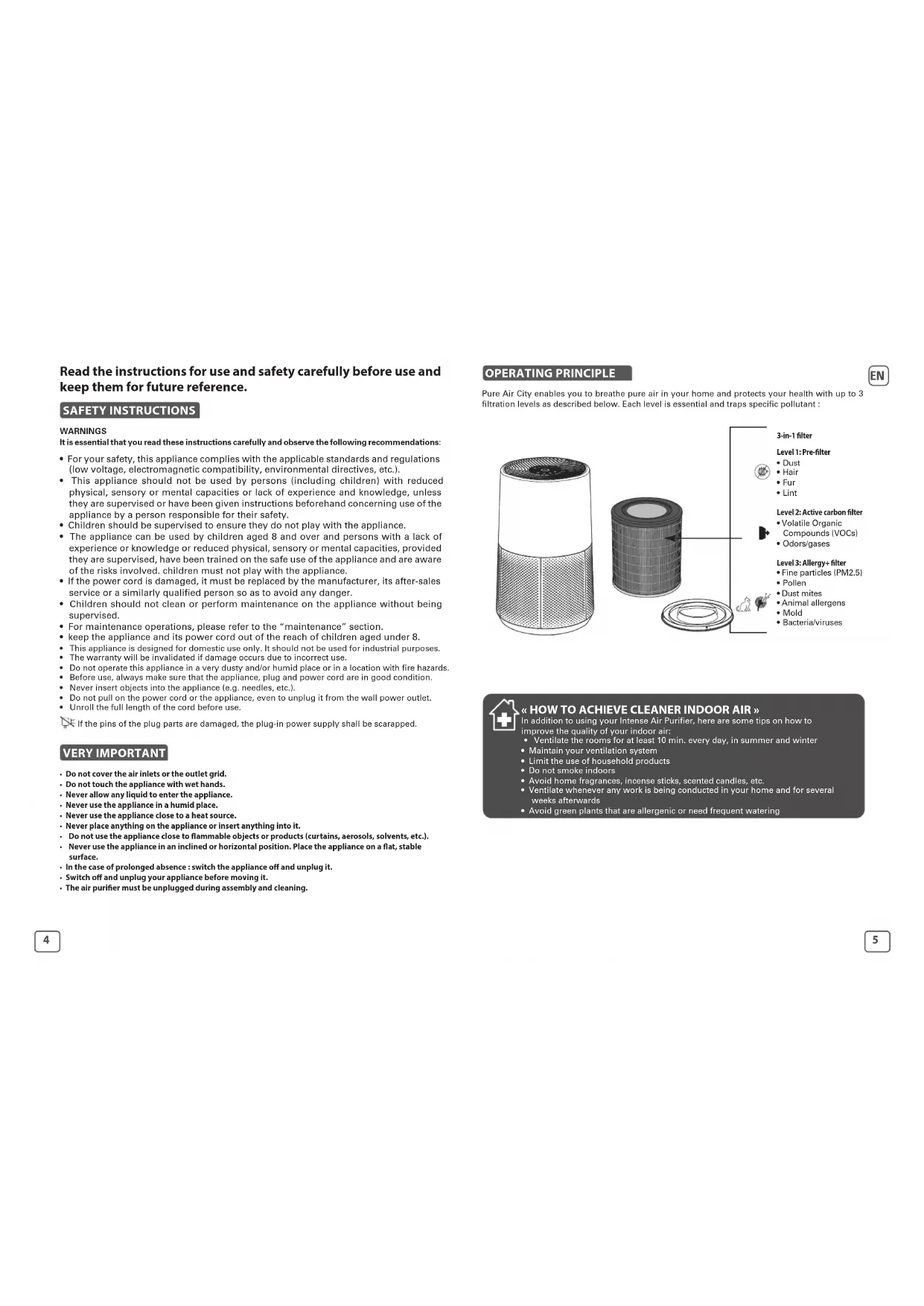
OPERATING PRINCIPLE
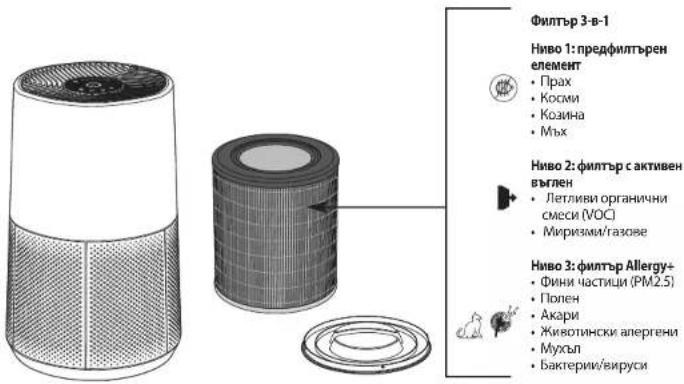
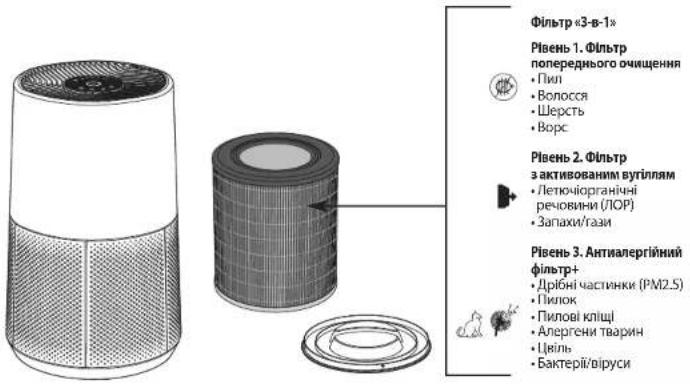
Pure Air City enables you to breathe pure air in your home and protects your health with up to 3 filtration levels as described below. Each level is essential and traps specific pollutant :
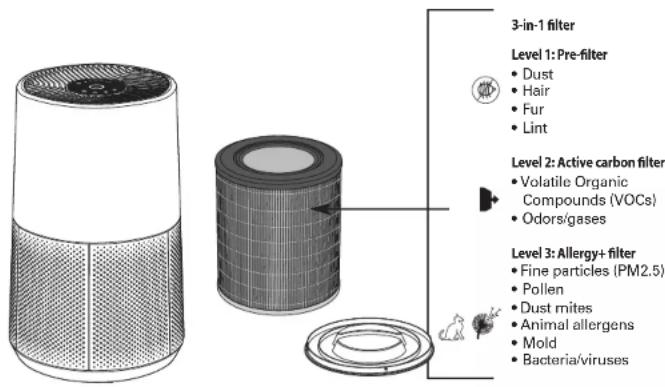

《HOW TO ACHIEVE CLEANER INDOOR AIR》
In addition to using your Intense Air Purifier, here are some tips on how to
improve the quality of your indoor air:
- Ventilate the rooms for at least 10 min. every day, in summer and winter
- Maintain your ventilation system
- Limit the use of household products
- Do not smoke indoors
- Avoid home fragrances, incense sticks, scented candles, etc.
- Ventilate whenever any work is being conducted in your home and for several
weeks afterwards
- Avoid green plants that are allergenic or need frequent watering
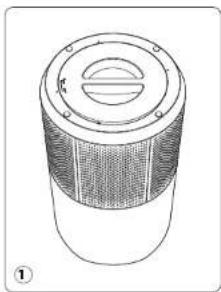
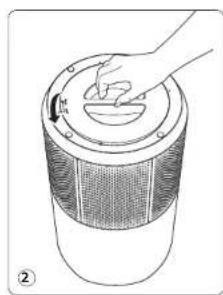
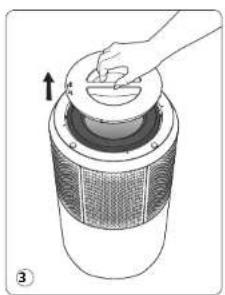
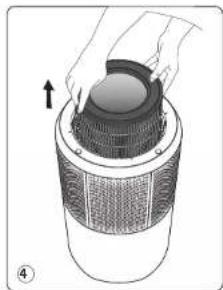
DISASSEMBLING/REASSEMBLING FILTERS
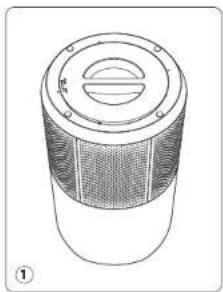
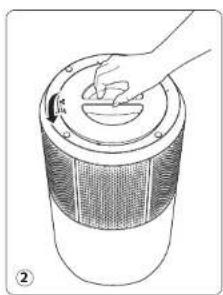
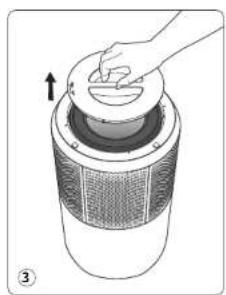
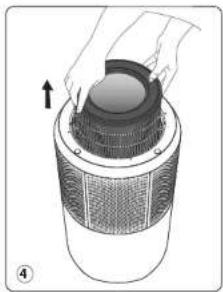
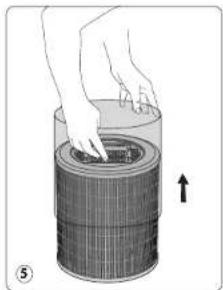
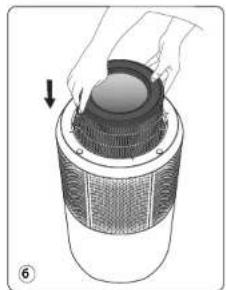
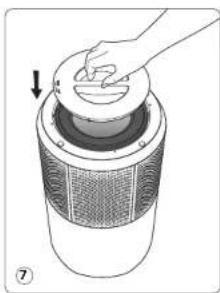
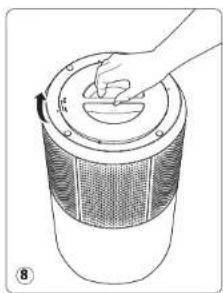
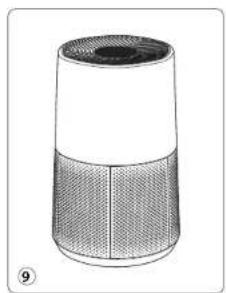
WHERE TO INSTALL THE APPLIANCE
Place the purifier on a flat, stable surface in the room requiring treatment. To allow the air to circulate freely, avoid placing the appliance behind curtains, below a window, or close to any other obstacle, and leave at least 60~cm of free space on each side of the appliance.
EN
BEFORE USING THE APPLIANCE FOR THE FIRST TIME
Make sure that the plastic packaging protecting the filters has been removed before using the appliance.
Before the first use, ensure the voltage, frequency and power of your appliance suit your electric supply.
Your appliance can operate using an unearthed plug. EPS is a class II (double electrical insulation). Before switching on your appliance, ensure that:
- the appliance is completely assembled as described in the safety instructions,
- the appliance is placed on a stable, horizontal surface,
the appliance is positioned in accordance with the instructions given in this manual,
the air inlets and the outlet grid are completely unobstructed,
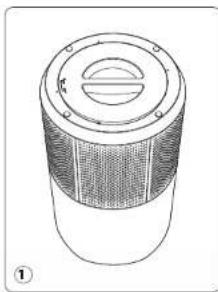
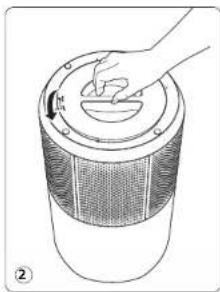
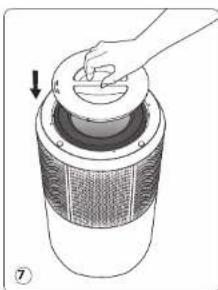
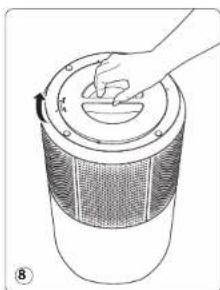
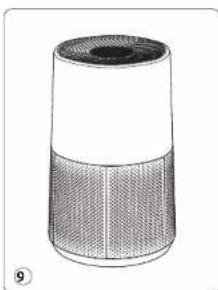
the filters and cover have been correctly installed (See section "Disassembling / Reassembling filter")
IMPORTANT: You are advised to switch off and unplug the appliance when not in use.
HOW TO CONNECT YOUR PURIFIER TO INTERNET
Download the app «Pure Air By Rowenta» /«Pure Air by Tefab» & follow the instructions on your smartphone :
- Sign in to create your Rowenta/Tefal account if you are new. Or log in the app if you already have an account.
- Make sure to stand close to the purifier during the pairing (2 meters maximum) and make sure the purifier is located near a strong Wi-Fi signal.
- Make sure your phone is connected to your local Wi-Fi network.
- Turn your purifier on & hold the Wi-Fi button for 5 seconds (you'll hear a × ding* sound and the Wi-Fi indicator will flash to indicate that your purifier is successfully connected to Wi-Fi.)
- Choose your Wi-Fi network and enter the network password to connect to your local Wi-Fi network.
- And you're done!
The Wi-Fi indicator lights to indicate that your purifier is successfully connected to your Pure Air app.
Wi-fi function
To launch a new pairing press the WIFI button for 5 seconds.
- When the light is on, the product is paired/connected.
- When the light is flashing quickly then slowly, the product is pairing/connecting to the WIFI/ servers.
- When the light is off, the product is not connected.
Connection issues
In case of pairing issues between the appliance and your domestic Wi-Fi network, refer to the information listed on the following link:
https://www.compatibility.groupeseb.com/CompatibilityList-Pureair-Rowenta.pdf
https://www.compatibility.groupe SB.com/CompatiblityList-Pureair-Tefal.pdf
OPERATION
In order to achieve the best purification effect, your purifier should be more than 60cm away from the wall.
Power 一 Start/Stop (1)

Press this button to turn the air purifier on/off.

- You can choose manually the purification speed from speed 1 to Speed 6.

« Auto day mode button (4) »
- The purification speed is set to speed 2, speed 4 or speed 5 according to air quality level.
If the air quality level is excellent then the device does not run.
Auto Night Mode 5) C
The purification speed is set to speed 1, speed 2 or speed 3 according to air quality level.
If the air quality level is excellent then the device does not run.
- The lights on the device turn off automatically after 5 seconds. To turn the control panel back on, press one of the buttons.
Child lock (3)
The lock system prevents the purifier from being accidentally mis-set during operation.
To activate it, press the button (3) for 3 sec until the locked control panel indicator turns on. To exit this mode, press the button (3) again for 5 seconds, until the indicator turns off. When selected, the other buttons are locked.
- Indication of air quality
Air quality indicator is the light celerse around start/stop button. Air quality indicator (7) is located at the « Control panel (A) » of the appliance. The LED will indicate the air quality level:
| Air Quality Air quality level color | |
| Excellent Blue | |
| Slight pollution Green | |
| Moderate pollution Yellow | |
| High pollution | Red |
CARE & MAINTENANCE
Before performing any maintenance work, always switch off the air purifier using the start/stop button (1) and unplig it. Use a damp cloth to clean the surface of the product.
Important: Do not use any abrasive materials, as these may damage the surface of the product.
FILTER
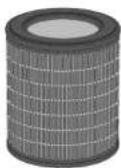
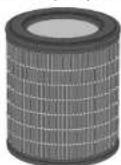
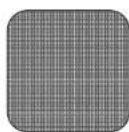
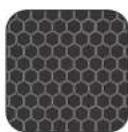
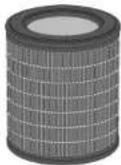
This appliance is equipped with 3 types of filters:
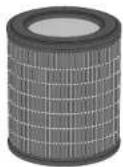
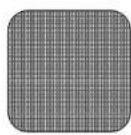
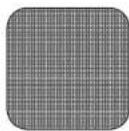
Prefilter
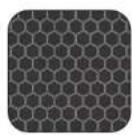
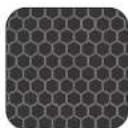
Active Carbon filter
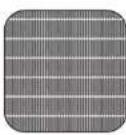
Particle filter
Frequency of cleaning/replacing the filter :
| Filter | Action | Cycles |
| Pre-filter | Clean (remove dust) | Every 2 to 4 weeks |
| 3-in-1 pre-filter, allergy+ filter and active carbon | Replace | Every 12 months or when the filter change indicator is lighted |
The recommended frequency for replacing the filter may vary depending on the duration of use and the operating environment.
IMPORTANT:
The filter change indicator (6) is lighted when the filter needs to be replaced. Once the filter has been replaced, hold down the button for 5 seconds.
Forced reset:
If you have replaced the filter before its end of life, force the reset of filter cycle:
- Hold the filter change indicator (6) for 5 seconds.
- The indicator is lighted. Hold down the button for 5 seconds, to reset the filter cycle.

TIPS FOR CHANGING FILTERS
Avoid handling used filters if you suffer from allergies or asthma.
Wear gloves when changing the filters, or wash your hands well afterwards.
- Put used filters directly into a closed, air-tight bag before throwing them away to avoid spreading pollutants.
POLLUTION SENSOR
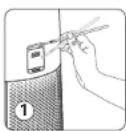
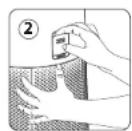
The particles sensor need to be cleaned regularly (every 2 months) and appropriately.
Make sure you turn off and unplug the appliance before cleaning the pollution sensors and follow the recommendations below:
- Clean the air inlet and outlet using a soft brush or cloth.
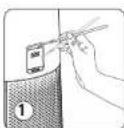
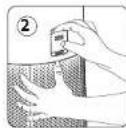
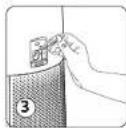
- Open the sensor cover located at the back of the appliance.
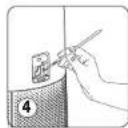
- Lightly wet a cotton swab and remove any dust from the lens and the inlet/outlet. Wipe using a dry cotton swab.
- Clean the sensor using a soft brush or vacuum cleaner.
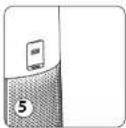
- Replace the sensor cover
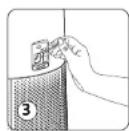
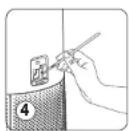
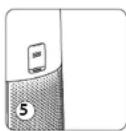
IMPORTANT:
- Never use a detergent or metal object to clean the sensors.
The efficiency of the sensors may be reduced if not cleaned regularly. - Cleaning frequency varies depending on the operating environment of the appliance. If it is used in a dusty environment, clean the sensors more frequently.
STORAGE
When you are not using the appliance, store it in a cool, dry place with ambient conditions no higher than 35^ 70% RH.
IN THE EVENT OF A PROBLEM
- Do not disassemble the appliance yourself. A poorly repaired appliance may be dangerous for the user.
- Check the troubleshooting table below before contacting an Approved Service Center:
Problem Check Solution
| The appliance does not switch on. | Is the power cord connected? | Connect the power cord to a plug with the correct voltage. |
| Are all the display elements off? | Press the on/off button and select the required function. | |
| Is these a power outage? | You can use your purifier once the power turns on again. | |
| Check that your appliance is not in Night auto mode | ||
| The air flow does not change automatically. | Is the appliance in manual mode? | Select the correct operating mode. |
| The flow is a lot weaker than before. | Does the filter need to be cleaned or replaced? | Check the filter replacement frequencies and replace the filter if necessary. |
| Check that the pre-filter is free of dust and clean it if necessary | ||
| There is an unpleasant smell coming from the air outlet. | Does the light still indicate poor air quality? | Check the filter replacement frequencies and replace the filter if necessary. |
| The air quality indicator does not change color. | Is the sensor lens covered with dust? | Clean the sensor lens with soft brush. |
| Problem Check Solution | ||
| The purifier doesn't connect | Is your phone connected to your personal Wi-Fi network at the beginning of the process? | Verify that you are connected to your personal Wi-Fi network. |
| The purifier doesn't seem to connect? | Check that your purifier is plugged in and turned on. | |
| The Wi-Fi led of your purifier is not flashing? | Hold the Wi-Fi button for 5 seconds. | |
| The first pairing didn't work? Start the product to retry. | ||
| My phone is connected to the Wi-Fi but not the purifier? | Make sure the two devices are in close enough proximity to one another and close to the WIFI router. | |
| My phone isn't connecting to the Wi-Fi? | • Check that your Wi-Fi router is connected to the Internet • Check that the Wi-Fi password didn't change | |
| Why did the pairing not work? | Check the compatibility : https://www compatibilty.groupeseb.com/CompatibilityList-Pureair-Rowenta.pdf | Supported encryption type : WPA_1/WPA_2,TIPK; PSK,AES Supported networks: 2,4 GHz |
IMPORTANT: IN CASE OF ANOMALY OR LOSS OF CONNECTION, PLEASE UNPLUG YOUR PURIFIER FOR A FEW MINUTES AND THEN PLUG IT BACK IN.
WARRANTY
Do not use the appliance and contact an Approved Service Centre if:
- Your appliance has been dropped;
- Your appliance or its power cord are damaged;
- Your appliance no longer functions properly.
- You can find a list of Approved Service Centres on the Rowenta international warranty card www.Rowenta.com and www.tefal.com
RECYCLING
ENVIRONMENT PROTECTION FIRST!

Your appliance contains valuable materials which can be recovered or recycled.
Leave it at a local civic waste collection point.
These instructions can also be found on our internet site, at www.rowenta.com and www.tefal.com

SOMMAIRE
PRÉSENTATION DU PRODUIT 13
CONSIGNES DE SECURITE 14
TRES IMPORTANT 14
PRINCIPLE DE FONCTIONNEMENT 15
DEMONTER/CHANGER LES FILTRES 16
OU INSTALLER L'APPAREIL 17
AVANT LA PREMIÈRE UTILISATION 17
COMMENT CONNECTER VOTRE
PURIFICATEUR A INTERNET 17
FONCTIONNEMENT 18
ENTRETIEN 18
RANGEMENT 20
https://www compatibility.groupseb.com/CompatibilityList-Pureair-Rowenta.pdf
https://www.compatibility.groupseb.com/CompatibilityList-Pureair-Tefal.pdf
FONCTIONNEMENT
https://www.compatibility.groupseb.com/CompatibilityList-Pureair-Rowenta.pdf
https://www.compatibility.groupseb.com/CompatibilityList-Pureair-Tefal.pdf
BETRIEB
https://www.compatibility.groupesb.com/CompatibilityList-Pureair-Rowenta.pdf
https://www.compatibility.groupseb.com/CompatibilityList-Pureair-Tefal.pdf
FUNCIONAMENTO
https://www.compatibility.groupseb.com/CompatibilityList-Pureair-Rowenta.pdf
https://www.compatibility.groupseb.com/CompatibilityList-Pureair-Tefal.pdf
FUNCIONAMENTO
https://www.compatibility.groupeseb.com/CompatibilityList-Pureair-Rowenta.pdf
https://www.compatibility.groupeseb.com/CompatibilityList-Pureair-Tefal.pdf
BEDIENING
https://www compatibility.groupesb.com/CompatibilityList-Pureair-Rowenta.pdf
https://www.compatibility.groupseb.com/CompatibilityList-Pureair-Tefal.pdf
FUNZIONAMENTO
https://www.compatibility.groupeb.com/CompatibilityList-Pureair-Rowenta.pdf
https://www.compatbilitygroupseb.com/CompatbilityList-Pureair-Tefal.pdf
PROVOZ
Abyste dosahl nejlepshio cistlho uclku, mela by byt vase cistka vzdalena vice ne60 cm od stny.
Napajeni Start/Stop (1)
Stiskutim tohoto tlaicita cistic vzduchu zapnete ci vypnete
https://www.compatibility.groupesb.com/CompatibilityList-Pureair-Rowenta.pdf
https://www.compatibility.groupesb.com/CompatibilityList-Pureair-Tefal.pdf
FUNCTIONARE
CBeTNHHHMHdNkAToPMHa
KoHTponnnahen
- VHdNKaTOp 3a KaueCTBOTo
HaBb3pyxa
9.ИндikKaTOp 3a N36paHaTa CkopoCT
Ipeynynotpe6a npoyetete BHIMATEHNO HNCTpyKUNTE 3a ynotpe6a n 6e3onachocT n Tn 3ana3e Te 3a 6bdeu cnPabKn.
MHCTPYKUN3A B3O1NACHOCT
IPEyIPEKDEHNA
OToco6eHaBaxHoCTe Da npOueTeTe3n HNCTpyKmBHNMaTeHNO Da CnA3BaTe CneHHTe npenOpbKn:
3a Baia 6e0nAChOCT To3n ypeD OTFOBAP Ha PnNIOXMMITE cTaNapTN n perIaMeHTN (DnpeKTHNBTE 3a HNCO HAnpeKeHne, eNEKTPoMaTHHTHa cBMBcETMOCCT, OKoHNaTa CpeJa nDp).
To3nypeHHeTp6BaCaENON3BaOTNtua(BKIOHOHTENHODea)C HAMANEH HNOUeCKCN,CETNBHN NIMCTBHeH CNOcObHOCTuNNiCINCAHOENTMHAHHN,OCEBAKOTE He CaNOHABNOJHEnMeHNCA NOYYNNHCTpykMN PEPBapNTIHOHTOCHOYNOTpeBaTaHypdeAOTNIUE,OTOBOPHO3aTRXHATA 6E0NAcHOCT.
- Deuata Tp6ba da ce Ha6koabaT, 3a da ce rapaHTnpa, He Te He cn HrpaT cypeda.
ToH ypeMoJe Da ce hOnonBa OT deua Ha bApact 8 rOHN H no-ROEmn, KaKTo H ot NIma C mNcA H ONIT Mn 3AHNAI IOT NIMC a HamaeneH pHmecKn, cTBMH INM YMCtBHeH CNOC6HOCTc CAMo Ako ca NoD haBNODEH Ma cNoPNNy MOn Ouyehne 3a 6e03oNa cpaOta cypea n a KOp p36upat CBb3pAHte C TOBA PNCOBE. DeuTa He Tp4Ba da cn Urrapc T cypeA.
Ako 3axpaHauauiH Kabe en e NIOpeH, 3a da n3eHTHe BCAAKBe OAnCHOT, TOn TpOBA da 6bde CmeHEn OT npn3BODmTeI, OT cneepnpdoaxkbeHMy ME cepBnI mN OIT Mue Cbc CXOHa KaANFKAUNIA.
- Deuata He Tpa6Ba Da NouchTbA WnN Da N3BbPwBt NpDpBxKa Ha ypeDa 6e3 HAp3Op.
- 3a onepaunno no npdpbkKaTa, MoJ, Hapabete cnpabka c pa3en, noDpbkKa.
- DpbkTe ypea n HerOBn 3axpaHbau Ka6en N3BbH o6cera Ha deua no8-roMnHa Bb3pact.
Toynyepcnpedhaaehn 3a ynoptpea cmoBdoaunynycnoBa He Tp6ba da ce nanaonaa a npoeoocnnaenHne
- 1apaHunratae6bde HeBaHnHa, aKO b3HmKHe noBpea npapn HnpabHnHa ynoTpe6a.
He IINIJIABJIe TAOYUPEI INIPEKOMEPHO IPIAIOHO IMIAI BIAJHO MCTO HAI HA MCTO, KcBETO HMA OIAOHOCIO TO NOKAP.
Ipya yonpt6baBHnHcyepeBaAHTeyepeBt.ueencbN 3axpaHbaaHnKabcnCaunpahBO CTBOHIO
Hrkora He BkapBaKte npEaMeTbypea (Hanp. mnnn np.)
He dbpnaTe aaxpaHbauaKaen nn ypeDa DOpn n 3a da Ro N3KnIOHTe OT KOHTaHa CTehata.
Pa3BbBaHTe Kabena DOKpan npdynynotpeba.
E Ako KIeMMTe Ha YaCTHHe HA ZENCeHa cNoBpeHn, ZIeNcHnHO To aXpaHbAe Tp8Ba Da bJe 6paKyaBaHO.
MHOTO BAXHO
- He nokpuBaIe 8xOoBete 3a 8b3ayx mnn peWetkata Ha n3xOda 3a 8b3dyx.
- He dokocbae typea c bnaHH pue
Hnkora He donyckaIe Bypeda da nonaHHe TeuhoCT.
Hnkora He m3non3BaIte ypea BbB BnAxxHO MxCTO.
HnKora He n3no3BaTe ypea B 6nn3oCT do n3ToCHK Ha TOnnHa. - Hnkora He noctabamte npedmet Bbpx Wn Bypeda.
He anon3aBte ypeBa BnO3c0d 3aanaHm npdpMa Hn npOyKtn (3abec, aepo3nn, HbapBoTneu n Dp).
HnKorHe mnoonBaTe yPeBa BnKIOHO HmXoPNOHTaHO NOnOKeHMe. NoCTabete ypeDaBbpyBaHa nCTa6MaHa NObPbXocr.
B CynuHn HnpDblKHTeHNO OtcbCTBHe: 3KIOUChTe ypeDa o8ToHa, CneD KOeTo ro 3KIOUChTe n ot KOHTAKa.
- Ppndn da MeCTNTe ypeDa, ro n3KnIOyTe O6yToHa N ot KOHTAKTA.
No peme HA cno6baHETO noocCTbAHETO npceCTBaTeNAT 3a b3dux Tp6Ba da e 3KKnHOEN OT KOHTAKTA.
PNIHcHn HA PABOTA
Pure Air City Ba Idaa Bamaokhoct da iiauatae mchb bya cboaon ma nip ennaaaba aapabe Bo Ta ncmouta Ha do 3n Haa hinnpinaepaek, KAKTO c onnaca no noyJ. BcKHO hBO e baxho IN yanbaa KOKHPTNAMbPCHTIN

«KAK DA NOCTI HETE NO-CHCT Bb3DUX HA 3AKPUTO»
B DoujHneKHe KbM paGorata C BaaWu IepnHCTaRan Pure Air City eto N HkOoiK DcbetA 3a Toba KaK da NoDopBaC KaeCHTOPO B aHduyka H aKzIpyo:
PObetBpAteTBe 10BnDcKHe HNaOe 10MmHTN BCEKn DeH Ppe3 JATOTIO Npe3MMATA
PnpDpKaTeBENTNAHNOHHa CnCtEMe
OrpahHwte ynotpe6aTa Hdomaknckn npodykTN
He nywete B cTante
- NáóBαβIe apOMaTHaTOpH 3a Bb3dIyX, apOMaTHI KNEUKN, apOMaTHNpaHn CBeuH n Iep.
IPOBETPRAEBA BKHAR KAFOTAO BHPUBA TAGEA DEMOHTHA PACOTAYOMA,KAKTOI M IPOJBDKCHINH AHRAKOTQ CEDMUMC CIECTTOR
IaBaeTe aeHHeMnCTHpaTcEHHa, KOHTO ca aJIeprenHMy IIN TaKbHA, KOHTO ce HyKdAaTOT HeTO cNOHBAe
PA3ΓIIO6BAHE/IOBTOPHO CΓIIO6BAHE HA ΦNJTPNTE
KbDE DA MOHTIPATE YPEDA
NocraBeTe npeMCTBaTEnHa paBnHa CTaBmHa NOBpXHOCT B cTAHTA, KOrTO HMa HxJaO t TpeTIpHae. 3a da noBaONiTe CboDgHOTo mKpykUmpHae Ha bBdPyKa, na6RaJIte NoCTaBnHTo HA yPeDa aAd, aBeecM, noD npO3opeu II IN B 6mNtOCT Do KaKBoTo I Da BNO pPyro npENITCTBE Hc OCTeBe NOHE 60 cm CboDhoHnpOCTPbACTBO TO BCnKa CTpaHa HA yPeDa.
PENEI DA 3NIOJ3BATE YPEDA 3A PpBb ITbT
Yepebe ce, ne IaactMacobata onaKOBka, 3auTtBaAa oHnTPTMe, e npemaxhata, npedn da n3no3BATEyepe.
Iepa npata ynpba ce ypepe, e Hapnepknehto, cctotata mauohocnta ha Bauu npyed ca nnoxdoanaa Bauatae enekpochabndtme Mpaoka.
BauHnT ypeN MOpE da paBoTH cBc 3axpaHbAe oHe hzaemeh uencen. EPS e ypeN oKn AC (JaoHa nekTePneckca Hnaaonai).
PepdaBKnIOHnTe ypeDa,ceybepeTe,he:
-ypebTe HAnbHIO CRNoBcH, KaKTo e OnMCaHO B INHCTpyKUHTte 38 BeoNaCHOCT,
-ypebnTe noctabeH Bbpxy CtaMnHa xOpu3oHTanHa nOBbpxHOCT,
-ypenbTe n03nIOHpaH cbnaCHO HCTpyKuHTe B TOBa pbkoBOJCTHO,
-8xOoBete 3a 8b3dynx pueWetkata Ha 3xOJa 3a 8b3dyX Ca HantnHO OTKpHTn,
ΦHNTPTEuKAPKaCaMOHTIPaHnIpaBnHO(BAKeTpeaDJePaITIO6BaHe/IOIETOPOCrIO6BaHeHa
BAKHO:cbBtBame Bn, Korato He n3non3BaTe ypeDa, da ro n3knIOyBaTe ot 6yToHa n OT KOHTAKTa.
KAK DA CbPjKETE INPEuNCTBATEJ KbM INHTEPHET
MaterneTe npnnoKemHeTo «Pure Air by Rowenta» nCneBaiTe HcHTpykUInTe Ha cMapTfoHa Bic
- Bne3e, 3a da 3b daetee cbaayht B Rowenta, ako cte hooh nortpe6hentenn. Hn ane3e B npinnokoeHHTO, ako bene imate ayakht.
- CnBtBe 6nHIO do npueChTBeTeN OIO BPEM HA CIOBHOBAETo HA MAKCHYM2 M metra) NcCte nOCTABINI npueChTBeTeN 6nHIO do cHNI Wi FI CnHrA
- YBepete ce,ue TeneoHbT Bn e Cbbpacn C BaWata nokanha Wi-Fi mpexa.
4B KIOHOTe CBOI pNcHCTBeTn 3aDpBkTe 6yToHa 3a WFi HATnCHAT B npOdJIhKeHHe HA 5 CckHyDn (ue 4YteA3bHn INHKnKatOpBt 3a WFi Iue 3aOnoHHe MnMra, 3a Da NOKaMe, 4e pNcHCTBatenBn E y cyeNeHo CBp2aH KbM WFi-1) - M6BepTe CBOrA Wi-Fi MPeKa H B8BeTe T aPnOaHa M PpeKa, 3a da ce CbPcKTe Km Bawata NokanH
- HCTe roTOBu
NINKATOPRT 3a Wi-Fi cBETBA, 3a da noKahe, 3e BauHr pneuHCTBaTe e yCneHNO CBpaH KMB npnOKeHHTe POure ABy ir Rowenta.
Wi-Fi yHKuia
3a da cTAPtPATE HOBO CBAONBaHE, HATMCHETe 6yToHa 3a WI-Fl B npOdbxKHeHnE Ha5 cekyHm.
KoratoCBETNHHHHTNHDKAToP CBETNPODyKTbTe CBOEH/CBp3AH
KoratoCBTINHHHHTNIMKATOPMRA6p3oNcEDToa6bAHO,npOyKTcCcBBOA/CbP3aC WFl/CpBp
KoratoCBETNNHHTNMDKAToPHeCBETn,poyktbHeeCbp3aH
Pp6m npn Cbbp3BaHe
B CnyuHn HpnoBmC hC DcbOaHbTeo Meky nppeK a BauWt DomaUHa Wi-F ImpeKea, HanpaBete cnpaKa C HnHOpMaPHTA, NocoucH a ChneJbRb3K:
https://www.compatibility.groupseb.com/CompatibilityList-Pureair-Rownenta.pdf
https://www.compatibility.groupseb.com/CompatibilityList-Pureair-Tefal.pdf
PABOTA
3a da noctHnre Hauoobp eeknt Hn peuehCTBaHe, BauHn peuehCTBaten Tp68a da e Ha noene 0T 60 cT 07e
《CraP/cton(1)》Ha3axpaHbAHTe
-3a da BKNIOHTe/HNKNIOHTe npeHCTBaTeTn 3a Bb3dyx, HATNCHeTe To3n 6yTOH
A360pHaCKoPcT(2)
- MoXeTe pBHyO da n36pePeTe ckopoCTT ha npEunCTBaH e ot ckopoCT 1 do ckopoCT 6.
5VTOH3AABTOMaTHUENHEDEBEPKMM(4)
- CkopoCCTHa NpIeNtCTaHae E3aAaDeHa ChKoPcT 2, CKoPcT 4 MmckoPocT 5 cOpEn HbNtO Ha KaHETO HA Bb3dYXa.
- Ako HbBOTo Ha KaueCTBO Ha Bb3pyXe OOTnHNO, toraba yCTPOBCTBOTo He pa60TN.
《PENIMHcBn(S)》
- CkopoCCTHa nI pIeXcIbTaBa He e3aJaeHa hckoPcT 1,ckoPocT 2 mHmCKoPocT 3 cnopeJI HnBtO ha KaHeCTBO Ha bIbIyXa.
- Ako HNBOTO Ha KaueCTBO Ha Bb3dyxa e OTINuHo, ToRaBa yCTPOHcBTO He paGToH.
- CEBTNIHHTA HcyTOPTBCTO CE I3KINHBT ABOTMANTHO CNEI5 5 cekyHd. 3a DA BKNIOHTE OTHOBKOHNPHNIAHEN, HATNCHE TcIMHOT6YOHNTHO
3aKnKoUbahe 3a npednaBaHn daeua (3)
- Cuntemata 3a 3aknHae npeoTbpaTaa cnuaHa rpeuHa hctpoika Ha npeuHCTbaTeaNo bpeMe ha pabota.
3a Da aKTHINAPATE, HATCHETE BSYTOH 3b PNOBbKHeHMe HA 5 CekYUN, DOKAKO CBEHTE MHIKKAKTOPT 3a
3aJa mHeaeote OTyam pexmH, HATACHeTe 6ytoHa (3) OTOHO BnOIOJIeHMe HA 5 CekHyD, JOKATO INIKAKOTPbI TACAE. KOTAO 6JbJe HApA, OCTAHAnIE 6yToHa CzAKINIOH.
MHINKaTOp 3a Ka4eCTBtOTo Ha Bb3Dyxa
HINKATOPBt 3a KauCTBOTo Ha BbDyAc ECBNTHHNHTPbCTEH OKOno 6yTOHa 3a CTPT/CTOn. INHkATOPBt 3a KaCCTBOTo Ha BbDyAc (7) Ce HAMpa Ha KooTHPOEn NaHeA HA ypeA. CBeTNOBt 8e NOKaBA HBOTO Ha KauCTBO Ha BbDyAc:
| Каческо Na Bb3d2yXu ICBAT Na HMBOTO Na Kaческо Na Bb3d2yXu | |
| Олmarно Син | |
| Леско замльразице | |
| Умени замльразице К��лт | |
| Синник замльразицеЧерень | |
TPNKNIPODIPbXKA
Pepa da 33btpwate KAKHTO na 6mo DeHOCTH no nappkata, bHHAR HKNHOBAITE npHCTBATEA 3a B3dyx on 忍 ToHa 3a cTAP/ton (1)n ro hKnHOBaTE OT KOHTAKTA. MnONBaTE enKaHs KaPna,3a da NOCHTE NoBpXoHcTA haNoPQyTA.
BANKH: He anon3BaIte 6pa3mHn npOyKTH, Tb kato Te moke da nobpeaT nobbpXoCTHa npOyKa.
ONITbP
Toa npaonana c 3 tina fmpn:
Pengnptbpeh enemaepht
ФИNTbРСАКТИВЕнВВБЛЕН
Ako cre CMeHHnHnHnTba npEn Kpa HnKaHnHEHnMy nKbJI, HnIpaTe npHnHTno nKbJaHa HnNTbaP:
1.3aIbKte HndkaTopa 3a CnHa Ha fHbpa (6) HAtncHAT BnpOdbLxckHe Ha S cekyHn
- INHnKaToptCBtN 3aDpBkTe ByToHa HAtncHb NpoDblKHeMe Ha 5 CekyHm, 3a Da HyInpaTe UkkbaHa

KoHTo He HnOJIaBae yepa, fo CbXpaHbAaTe Ha XnaHdo H cyxo MaTc o cynOBHn A okKnHt a cpE, he No BOKOn 035°C n 70% OBE.
B CNYUH HA IPOBJIEM
- He pasnobaae ypea cann. Ioo pemohtnpaanrty pe moke da 6bne oane h 3a notpe6nten.
Harpnabe cnpaaka c TaBnata aa oTcpanbaHa HnempanbaHocn no Jpy, npda Ja ce Bpkece c OtopanpaCepbniae qenTpO.
| Поблим Поберка Peшени | ||
| Урémonгп не се вklочь. | Зхраимашилт кабен сбьрдану e? | Свъжete зхраимашилкabел Кьм Кontамсспдзраллготи Halпожени. |
| Изковедил по са BCYЧИЕLEMENTS послел? | Натинete бухота за Akн./ИЗК. И Збөрете Neobexodmaatarу phynць. | |
| Има пл сиране в евектохарановето? | Можete ды плогалate Ваши пүчүстаген, садд Като Зхраимашилето blyde blystahobero. | |
| Поберетe дами Вашилт уретн e в авTomатчен hoшен реким. | ||
| Вьдуншит поок неб сpenomen авTomatчим. | Урémonгвь рьчен реким пи e? | Изberетe паримлrel реким на работа. |
| Повокгт eMHORO no- слб оtn рeding. | Фильъръ Има пи hyжda ot поч�стане пи CMнha? | Поберетe чеслота на CMнha на Фильър и Г сmedete, akо e Neobexodmio. |
| Поберетe дами р徳флрнат пemonent Нама радх и Г поочітete, akо e Neobexodmio. | ||
| Има helprathna MHRIHMA, ИДВАЦA от Изхда за Вьдун. | Сvetл�иншт Иndikатор ося п пokazba пою Каческо на bьздах? | Поберетe чеслота на CMнha на Фильър и Г сmedete, akо e Neobexodmio. |
| Индikatorрьт за Каческо на bьздах псименя цета си. | Има пл радх по leuzatura на сснзора? | Почuctete neuzatura на сснзора с мека etka. |
PpO6Jem PpOBepka PeSeHne
https://www.compatibilitygroupseb.com/CompatibilityList-Pureair-Rowenta.pdf
https://www.compatibililty.groupeseb.com/CompatibililityList-Pureair-Tefal.pdf
PREVÁDZKA
Aby ste dosiahli co najlepi cistaci ucinok, vasa cisticka by mala by od steny vzdialen viac ak 60 cm.
Napajanie<Start/Stop(1)
- Stlačenim toto tlacidla zapnete/vypnete Čisticku vzduchu


Frequency of cleaning/replacing the filter :
Filter Ukon Cykly
| Predfilter Čisteni (odstrănenie prachu) Každé 2 až 4 týždne | ||
| 3-v-1 predfilter, allergy + filter, aktivnív uhílk | Vymenit | Každych 12 mesiacov alebo po rozsviétrnì indikatóřa vymeny filtra |
Odporucana frekvencia yvmeny filtra sa moze lisit v zavislosti od dlzky trvania pouzita a prevadzkovhe prostredia.
DOLEZITE:
Indikator yemyniftra (6) svieti, kje potrebne vymenit filter. Po ymene filtra podr2te tlacidno 5 sekundy.
Nuteny reset:
Ak ste filter vymenill pred koncom Jeho zlvotnostl, vynutene resetujte cyklus filtra:
1. Podrzte indicator vymeny hltra (6) 5 sekundy.
2. Indikator svieti. Podrzanim tohto tlaiclda na 5 sekundy sa vynulje cyklus filtra.

YPA3IBINHKHEHHIPOBJIEM121
「APAHTIA 122
3AXIaIMO DOBkIIJIpaPA3OM! 122
OrrnBnPO6y
Axcceaynpkopnypnpnaady
A.Пань Керунов
B. Otsip noaui noitprn
C. Kopnyc npwnady
D.Bxiannooteipnnoibtpa
E.01n6Tp
F.KoHka qinbtpa
G.Apanrep
Khonkn KepybaHHa
1.3nyck/3ynnHk
2.Bw6ip wBnKoCTi
3.Pekm6nokybaHHIOCTynIaItei
4.PENKMxABTODeHbX
5.PekMMXABTOHIX
6.Khonka nqknnoeHHn do Wi-Fi
7.ндкаторзаминфпра
HdNkATOpHaHaaheniKepyBaHHa
- Inukatop kocti noitpr
9.BbpaHmIHnKATOp WbNkoCTi
Ybaxho npouhtaite hctpykui 3 ekcnnyatau ta 6e3neKe npei BnKOpuctaHHm i 36epexitb ix nnaanbwo O BNKOpuctaHH.
INPABNIA 6E3NEKIN
TIOPEDEXKEHH
BaKnBb yBaKNo npouHTaTn U HcTpkyuT Ta dOpmyBaTHc HabeDeHx peKomeHdaU:
JaBaaoiBe3neKnue npnana Bijnobinae 3aTbePdKeHm CtHaNapTaI npabnAm (DnpKtnaam npno HbkbOBonthe 6nbadHHna,eneKtpomafHTHYcMIChCTb, HABKOINHE cepedobniue ToO).
Ie npnnahe npnnnhaene HnBnKOpNCTAHHnOCo6aHm (y ToMY nCNI pTTMa) 3o6MeKHeHHMn
fHNNHm, CENcOPHNHm nn PO3yMOHNM MoKINIOBCTHMn ABOOCaAMn, MO MaOTb HeOCTaTHBo
DOCBiDy ta 3HaHB, OKPM INBnADKB, KOJI ON BOH NIKOPKCTOBYt BpNaHn PND HAHTNODM a60 Bynn
npnoHctpykTOBaH CTocOBHO IHO RnOBOPKCTAHnOCo6o, BiINOBIAaNHO IO 3xIHNO6eNKy
- CtrekIe, 0oo nn He rpaunca 3 npnlaqom.
Даггь Влим Вд 8 рokим Iocbн 3обжемимпддзссрсогшчу пуорьмимМоюнбостомТаocobm,июМоть HeDObTah6OBoDcBlyIбдzoMHaB,MOTyKbTOPCHYBATnCpnpAOnMПн导航HANDAO,ADOЯ BOU BynI pOINHCTpyKTOBAI CTOCBOHO BoRGeEnerHOROBIKOPKTACHTAЗТРОЗIMNPOB'8aHII pHaNKIM.Даггь Истони RPATCZ3 pRnJaONo.
3-MeTOO yHKHEHNEH HeBNEAeNIOI KIOJIHKHEH NIIH UHP XHNBEHNEH MAE 32AMHOHATHC BPOHNIKOM, OBO cNoJyKoHIO nicrnpndopakHO HOrO 6cNObpyBaHH oO abOcAm 3nOJHMMPBHEKaANIfkiAa.
He doBolnate qamHCTa npnaad 60 bKohoybaTn HII npouedpy 3 noro o6cyrobybHH 63e Hany
- Doknaihiwi Biomocti npo o6nyrobyBaHH npiay du. Y po3di nI TexHne 0cnyroByBaHH
- TpmaTe npnndi i noRup xHpy kunneHHB Mciu, HeoocTyHOMy dIte Monodue 8 pokib.
LipnnpaI npn3HaeHH TihkK JIN NIOBpTOBOI BOKpOCTAHN. NOFO HE MOKA HIKOPMTOBYAHTI INP pONCMOBHX NTPOB6.
- Akpo npnaad 6yde nowkoekhennepe3 noro Hnnpaunbhe BHKopncTAHRA rapaHTIR 6yde HeiiochoIO.
-He BIKOPKTOBTHcEue pnnnay yDyck3 aannnEHHX i (a60) BOONRi npmuaeHHX nY mUCXH 13 BOKKIM PANKOM BHNKHNHEH NOKEKI.
- PepenBnKOpNCTAHm 3aBxnnpepeblprrte npnna, Bnky Ta shy pknneHH Ha BlcyTHCTb nookjkeHs.
- 3abopoheHO BCTaBnATn Bydb-ki CTOPOHHI npedMeTH (HaipnKnad, ronkn) ycepeDvHy npnady.
He TnHb Hpy kRnEHH abo npna, Habit bKaIO hAM notpibHO BHTH HNY 3 pOeK.
+IpepaBnKOpNCTaHHMaP3MoTaTe WHyp KINBJIeHHHa BcIO DOBxHHy.

KIO KOHTAKTN BUNKN NOWKOJKeH, WTeCNcBnN 60NOK XMBNEHH NOTpioHO yTMl3yBaTIN.
DyXEBAXJIIMBAIHOPMAUIA
He hakpbae Bxidi OTBOPn Dn noBirpa Ta peWitky Ha oBopi nOa ni nobirtra.
- He topkaTecn npmny Mokpmm pykam.
- Ynkae noTpannnnH pDHH BCEpeHH npnaay.
HikonHe BnKOpctOsyTe npnay y Bonorux npumluenHex.
HikonHe BnKOpCTOByTe npnaI npaI3 dxpepenamu Tenna.
Hikon He Knaiditb Hicoro Ha npnad1 Hiqoro He Bctabnnte Hboro.
- He BHKOPKCTOBYTE nprrnAID NOIgI IER KOTaIMMHTMN PNDMETAMN ABO PEVOBHAMAM (zahabIKCTOBY, aepo3OJIAMN, po0yHHNKOMM TOIO).
Hikonai He BVKIOKOPCBOYE npnAa y kaxmehoMy a60 ropmaOHTaNbmy NOONeHH. - NoCTABTe npnAa Hpiy crIy NObEPHXo.
Akkuo Bn 6ydeTe bldcyTH npTAROM TpuBanoro yacy, BmKHTb npnaI BntarHtB uNKy 3 pozETKn.
- Nepu HIX nepeHocHTn npua, BMMKHITb Noro Ta BNTaRHTb BUNKy a po3eTKN.
-Ⅱd qaccknadaHnTa oounenHn ouuhyba nOBITpMae 6ytN bIDKnIOueHn BId Mepexl.
PNUHUNPOBOTN
3B4nHOnnCnHmNnKHe 3PiBnHnPhiIpaJI PureAirCityOuUyE NOBITPBOcENIaTaeXnuaeMeuKaHJIB BINNNBMy ukiDnBnxpeoHN. Koochen pibcn npnauechnn nouceHH NoBtpr BID neBHORoBDy 3abpydnoHNOHpeoHNH:

AKDOCAITN YIACTIWOTO NOBITP B NIPMIUEHHI
OxPMKOpKpIaTHH OOhMByaPure Air City,ocb KInbKa npad,IK noninuHTn JIcTb NoiITBaB pnniueHH:
- 云韵,yntky Ta BannKy, npoBtPioTne npmllueHH npotarom npnHaMH10 xnnnn
PpOBOBdtpeO6cnyrOByBaHHcHCTeMMBeHTmua
-06mEXTE BUKOPACTAHH NO6VTOBHX PNDYKTJ
He panin y noyMueHHI
He BnKOpNCTOByIe OCBiXyBAYIOBITpR, apOMaTuHNI naMnK Ta CBiKu Too
Pnnc3aBepenHHbdyb-axpeMOHTHXpoBtBOceni cniperynapHnpoBipTPOB
npmiueHH npotraK KINbKOHacTyNHXTHXH
He TPKMAIe B NPMiueHHIOPOCIMHAKIOTPbEyOHTbAcrTOPONBAHHa00MOXYTE
cnpnuHnTnanepruHPeaxu
DEMOHTAX/YCTAHOBKAΦIbTPIB
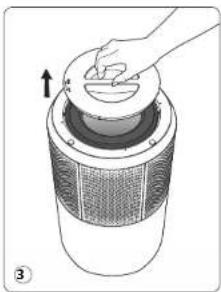
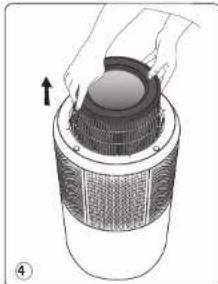
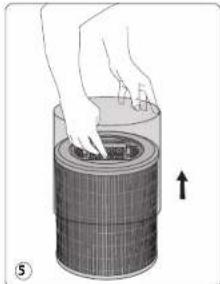
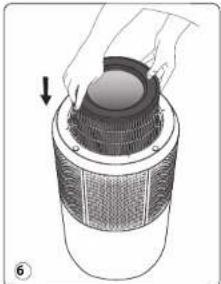
YAKNX MICLAX CNIID YCTAHOBNIOBATU PIPNJAD
Pomictb ouuyybaH a cIky nacky noBepxHO b npMlueHH I3 a6pydneHM nobITpam.
IaBn 63eepueuokoiHIO uKpynuiu NOBITRA 3 KOKHORO 60ky npunady Ma 6yTN He MEHUE 60 CM BInbHoro npoctopy. HcTaHOJIeTe PnipA 3a 3aaHbickAMN, pIN BIKHM, a TAKOX nporA iHMMnpedMa, kIK MOKYtepeKoDKPAnTH pyxH noTpa.
IIO NOTPIBHO 3POBNTI NEPEI NEPUIM BVKOPNUCTAHNIM PNILA
TepeBnKOpHCTAHm npnnay 3HImt b 3axnchny nactknoby ynakobky 3 fInbTpIb.
Ipeep BnKOpHCTAHm npnany 3himt baxnch ny nactNKOBy ynaKOBky 3 fInbTpiB.
Peped neppmBukopnataHHnepekoahTech, 0q dkepeo eneKTHPOHO KINHNNH BInnoHae HAnpy3i, cactoty nnyokochpi npnayia.
PpnaM oKHa niknouatn do pozetkn 6e3 aaeeneHH. EPS knacy II (npnaia 1 noaBmHO eektpuHoo 10anui
Pepd yBIMKHeHHnpekoHaTec, 10:
- npHnad nobHCTIO 316paHnH, Rk 3a3HaHeHO 8 HcTpyKuII 36e3neKi;
- npnla yctahOBneHn Ha CTiKIN Ropn3oHTaBHi nOBepxHI;
- npnna yctahOBHe B npaBnIbHomy nonoJehHI, Ra 3aHaHeHO B cboMy nociBnHy;
BxHnOeipnnoepra TapeuirtKaHa oTbopi noadui noBiprHe 3aropodkehi
-fnbtpn ta kpiuoka yctahOBneHO npabnBHO [mR. po3jin (EmoHTax / yctahOBka fnbtpi8].
BAKJIIVIHA IHOPMAJIUR. KOIN pRnJAD he BIKOPNCTOBYtCBN, PEKOMENHyETCBN BMNKATM IHO TBAHIMATBNNK 3poETKN.
AKIIKJIIOHTN OUYUBAU DO INTHEPHTY
3aabaTakTe nporpamy Pure Air by Rowenta Ta dOpymyIcB IHCTpykui HA cMaprFOHI.
- Kya o b a s me Hec o nbiokoro 3nacny Rowenta, 3apecctpytec B chteml. Ka yo b aoc yke c o nkiokobn 3anics,yiibtdy n porpamy.
2.Пдчспнгкгнгнгнгнгнгнгнгнгнгнгнгнгнгнгнгнгнгнгнгнгнгнгнгнгнгнгнгнгнгнгнгнгнгнгнгнгнгнгнгнгнгнгнгнгнгнгнгнгнгнгnngnngnngnngnngnngnngnngnngnngnngnngnngnngnngnngnngnngnngnngnngnngnngnngnngnngnngnngnngnngnngnngnngnngnngnngnngnngnngnngnngnngnngnngnngnngnngnngnngnngn - IpekoHaTeCA, 0o Baw TelefoH nIaKIOHeHH no oKaabHOI MepeXi Wi-Fi.
-
Yaimkhitohuyuhya, Hatachitb KHonky nijkiKouenHn do Wi-Fi aytprmyte npotrAm 5 cekyHn (nponyha) kopoktni Cunhain, nicna yoro noue CBtnttcns Indikatop nijkiKouenHn do Wi-Fi, jknn cnoBlaatme npocynlne nipkiKouenHn).
5.BBepb npoibipnokalhoMpexWi-Fi,06pNkouHOnuuyBa. -
Toto8ol
3acibitbcnHIOKATOP nkiKIOHEnI Do Wi-Fi, kAnCnOaIIaTmHe Ipo ycniHne nkiKIOHEnI OCHUbHaDo nporpamr Pkure AbyroWithRota.
Функця Wi-Fi
IINIILKIOUHHA HATNCHITb KHONky WI-FI IYTPMMyteI npOTARGM 5ceKYH.
Kuio HdkkaTOp CBITbca, Bnip 1nknoeHo.
Bepa. IINKATOP 6nMaac 6nIdko, a noITM nobIlnHo, BnIbIe nepe6yBaB n pnoeci ndkInouenHn Do Wi-Fi/ cepesbi.
KIOHnKATOp HCBITbC, Bpi6 He nkioueHO.
PpO6Jem3 nIiKJIIOueHHaM
y pasi BHHKHeHn npoBem i niknoeHnnpnady do domaHbOi Mepeki Wi-Fi DM. HFOpmaJIO, 10 HABeHa 3a 11Mn NOCnAHHM:
https://www.compatibility.groupeseb.com/CompatibilityList-Pureair-Rowenta.pdf
https://www.compatibility.groupeseb.com/CompatibilityList-Pureair-Tefal.pdf
EKCnnyATAU
106doaHTn haikpauoro efekty ouuenn H, ouchNk Ma 6yt Ha BicTahi 6inbue 60cmBid CTIN.
3aynck/3ytnnka(1)
-HaTmCHITbIO KONKy,IOO yBIMKHyTN / BIMKHyTN ONUYBaN noBtpr
Bw6ip wuokoc1(2)*
- Bn MoKTe BpyHv Bn6paTH WbNdkCTb OuHcHHeHr BID 1do6.
KhoNka pekmmy AToBeHb(4)
- YcTaHOBIOeTbc WbNdkctb OwUeHn 2,4 a6o 5 BiDnOBIHO do pIBH KocI nobITp.
- Raio pibehb kocnt nobitprBdminnHnn, npctpi He npaioe.
《PEKIMOKIKYARHH(S)》
- YctahOBIOeTbca WBNKICbOuWHeHHa 1,2 a6o3 bIDnOBInHO do pIBHra KocTI nobITpa.
- Raio pibeHb kocTIO nobITPRA BIDMINHH, npncTpiH He npauoc.
IbIKVATOPA Hn IINPCTO BATOAMNHO BIMNKAOCTC Hcpea 5 CScyHJL. IO6N TOBTOPO HBMKHYTN PAHJIEB, KEPYBAHHN, HATCHTb OJBY3 XCHOHK.
Pekim60kyabHnHOCTy
YPA3I BUNHKHEHHI PPOBJEM
He po36paepre npnnd camoctiHn. HnpaBnHb BldpeMoHOraHn npnnd moe 6yN He6esneHHM DnR KOHPCTyBuH.
NHKHe.
EcnnKoHTbBnNKnOBpeKdHb, hctOHTNHINaTHaONcHbMpaTbeomCneyETynHInpObaTb.
OUEHb BAXHO
- He 3akpbibaute BO3dyxo3a6OpHbIe OTBepCTn H BblnyckHypopeWtky.
He npnkaaTecb K npu6opy Mokpbmu pykam.
He donyckaiTe nonaHaHn JmKoctn BHytpb np6opa.
3anpeaertcncnonb308ab npn6op B Mectax c noBbiweHHo BNaxKoctbio.
3anpeaaetca nCnONb3OBaTb npu6op Bbnu3n NCTouHkoB Tennna.
3anpeaaertc nomeaatb Ha npubop mBCTabnB Hero KaKHe-NH6o noctopoHHne npedmetbl.
He IcnoBb3yIe np6oB P2OM C B0CTNMeHNOUMKNC pIepEMTAMn IINPi npOyKTAMn (aBaHEbAOM, a3OPOBAMP, PACTOBPTENMn T. d).
3AnePaeCTaH HCNOLSOBbPnN6Op B HAKNOHOM NIOI rOPMOHTANbHbMPOXENHO. Pn6Op HEO6OIMO YOTAHABMBN PA HOBNY, OCTUYNBOY NOEPBXHOCT.
B cnuyae dntenbHoro oTcYCTBn: bblKnOHTe np6Op nOTknOHTe erO t 3neKtpocetH.
- Npeep nepemeeHm np6opa bblknoHTe ern oTKIOHTe ot 3neKtpocetN.
BoBpemc6opknO4nCTKnHeo6xOaMMO OTKHOaTb O4nCTuTeNb Bo3dyxa.
PNIHUNPI PABOTBI
OcHTTEnB,BoaXyPaure Air City OuaHae BoaJyBaauMdoe HBeepKet Baue 3OpOBbe 6IapObaRbAp 3-ypoBHeBoi pmbpaKa KAKpokaa3HO Hnke. Kaekdy bpoeBbHmptpaunnr paet cOcbTeBHNO BaxHy

«KAK CDEPATb BO3dYX B NOMEUEHIN YIUE»
POMMOI KIOJILOBBOAHIN OOKHTETNAO B034xya Pure Air City, nppeprrnem 03HAKOMTCHC dekOMENLAHIMMAO NOVIXHHUANKHAETTA NOB34Xya B POMMOHIN
-Побетраьгпnomeшени He MeeHc 10MHHT kaxdI deHb,netOM mMmO.
PoeepdKXBAHTe BEHINLIOHNHO CY CTeMBy HnDNEkAaIe MoCOTOMN. 0000000000000000000000000000000
H
He kypnie a homeeien
He Mcnonb3yIteOCBExnTeHN BO3dyXa apOMaTHueckne nanoK, CBeH N T.
- Поветрmbaitе РOMEЕнке, КORDA в НEM робогдра СККМ-лбо работь в Бтугшем
- Нecким КСК И НEDьп пось зTOг.
HaeraaTe 3enehix pacteHH, KOtOpbIe BblbAoi TAnepnIO nnTpeBiot TaCToR ONonBa.
PA36OPKA IN C6OPKAФИbTPOB
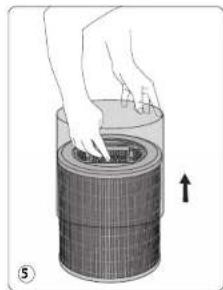
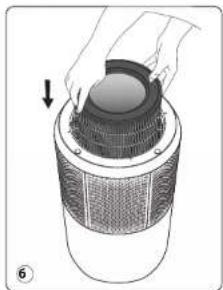
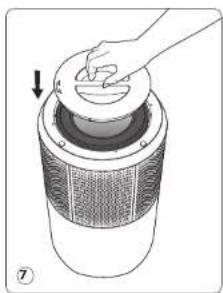
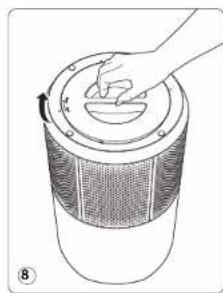
MECTO YCTAHOBKM IPIMBOPA
POMECTTEOCHTETELB0oDyHaNPOBHyIOYCTOHyIOBepxHOCTb8NOMEUCHH,JIpeTpe6cyTe6oBa6OtKa BOOyDa.
TOb6 ObecneHb Cbo6DHyu HpKpyMaIO B03dYha, He p3AeMaIyTe npIb6p 3a 3aHabeCKAMn, NOk OKOM, a TAKKe pIOM c DpyrIMM npenTCTBMyM N OCTaJIrTe He MeHee 60 cm Cbo6OIdoro npocTpcaHCTBa C kakdo t ctoPOnHnpOba.
PpO6nEmbIc coeMHeHnEM
B Cnhyae a nneepm c onpajekhenem pnpo a Hbnytpnnh eet Wi-Fi, noynyhte dononnhtenbHyu hnhfopmaikyo yka3aHHno npclnyoue cbzike:
https://www compatibility.groupseb.com/CompatibilityList-Pureair-Rowenta.pdf
https://www.compatibility.groupseb.com/CompatibilityList-Pureair-Tefal.pdf
3KCNYATALIN
JIOIOIOIOIOIOIOIOIOIOIOIOIOIOIOIOIOIOIOIOIOIOIOIOIOIOIOIOIOIOIOIOIOIOIOIOIOIOIOIOIOIOIOIOIOIOIOIOIOIOIOIOIOIOIOIOIOIOIOIOIOIOIOIOIOIOIOIOIOIOIOIOIOIOIOIOIOIOIOIOIOIO
KhoNka nHTaHnA 《Tcpt/cton(1)
- Haxmte 3ty KhoNky, yTO6bI BkIOuHTb/BoKIOuHTb ONUCTnTeB BO3nyx
《Bb6opCKoPcTn(2)》
-MoXHO BpyHyO yCTaHOBnTb CKOpocTB OuHcEHn BO3dyxA BnHaNa3OHe or 1 n6.
KHOJA ABOMATMNECKORO JHEBHROPEKMIA4]
- Ckopocb ouyctkn BO3dyxa yCTaHOBneHa Ha 3HaueHHe 2,4 mN 5 B COOTBeTCTBnC yypOBhem KauecTeBa BO3dyxa.
- Ecn KauecTBO Bo3nyx npBocxoHoe, npBop He 6ynt paBota.
Cnpaan peKMM (5)
-CKopoCTbOuHCTKNB03dyxayyCTaHOBnEHaHa3HaueHHe1,2WmN3BcooTBetCTBmCypOBhemKauectBaBO3dyxa.
- Ecnn KauecTBO Bo3dyxa npebocxoHoe, npnbop He 6ynd paobTaB.
- INDHKATOPBb HxCTPOBRE BxIKNHOACOTB ABOOMATNIHCEKNHEC35CEKYNLDHAKMNITEOHNKHONIOK,HTO6bCHOBAKINOHITNAHEBYPNABENHIE.
3aumtaotdetet(3)
-
BnoknpoBk npedotbpaaaet cnyaHoe n3MeHeHne HAcTpoek OHCTnteBa BO3dyxa Bo BpeMa erp aboTbi.
JINKHNJHENYFHKNHNKAMKHNEI yUeDPKBAJIe KHOKNY (3)B TceHNHE 5 CekyND, nOKa HE 3aTOPHTH NIKHADKOT BNOKIPOKNAM HANEIM YpNAJIbCNH.
IaBbXoHa IaTfOePcMHa ChOBa HAKMMe KHOYKe (I) uEpyKbAaBte B TEyEHMe 5 cekHyd, NOKA INHkDATOP He NAOCTHe. TnpBogoe JahnOH dyHKmAp DpyIR eKHOKnIKIOKpKytKT. -
HndnkaunKaueCTBa 603dyxa
INHINKATOP KANCTBA BO3DyXa — CBTBAMKPY BOKPY KONKN «CPTF/CTN」. INHINKATOP KANCTBA BO3DyX7 paacnonokem Ha naHenn ynpaaeneHHA (Apn60pa.CaetodmoYkaabBaETHa ypoBeHb KAnCTBA BO3DyXh:
| Качесва bo3dyaхla Zeet yoproBRA kaчесва bo3dyaхla | |
| Од��имно Слини | |
| Небол[b]оe заграаненime Зelen[b] | |
| Умерение заграаненime Кал'tb | |
| Сл[b]оe заграаненime Крас[b] | |
YXOJ N O6CNYXMBAHNE
NepoPoeDHEHmO6ChyMHNBBAE CBeTBA BmKHOHAEOTbHcIbAOMnOBu HOKNHcKTHaCTPTON 1) n OTKHNOHae er o TNeKTPOcETM. Dn OHTCKTNOBEPXHOCTYcPOBCTRAbNtBbAHOYKTHAe
Bakho! He nncnba3yate 6pa3aNBbme MATEPbAbi, TAK KAK OHN MOYr NOBPdNTb NOBEPXHOCTb yctpOCTBa.
OHLbTP
JaHHb np6op ochaueH 3 TnAMn ombltpoB:
ФньТр
псдВарNTeHбH
ФССКТ
ΦMnTpCAKTNIBPOBCHHBMVTJEM
Othbtp TOKHOM OHCTMQ
Yactota ouhctkn/3amehbi qnibTpaa:
3TN INHCTpyKcIM TaKKe npNBedeHb Ha Hauem Be6-caTe no aDpecy or www.tefal.com
SAZETAK
PREGLED PROIZVODA 134
SIGURNOSNAUPUTSTVA135
VEOMA VAZNO 135
PRINCIP RADA 136
RASTAVLJANJE / PONOVNO SASTAVLJANJE FILTERA 137
GDJE POSTAVITI APARAT 138
PRIJE PRVE UPOTREBE 138
KAKO POVEZATI PROČISTAC NA INTERNET 138
RAD 139
ČUVANJE I ODRŽAVANJE 139
SKLADIŠTENJE 141
U SLUÇAJU PROBLEMA 141
GARANCIJA 142
POMOZIMO U ZASTITI ZIVOTNE SREDINE! 142
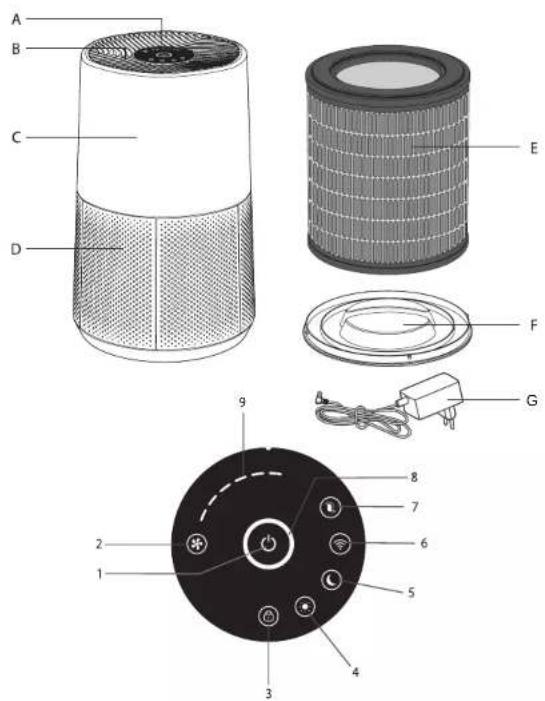
PREGLED PROIZVODA
Dodaci za glavno kucieste Kontrolne tipke Indikatori na kontrlnoj ploci
A. Kontrolna ploca
B. Izlaz zraka
C. Glavno kuciSTE
D. Ulaz zraka
E. Filter
F. Poklopac filtera
G. Adapter
- Start/Stop
- Izbor brzine
- Onemogucavanje pristupa za djecu
- Automatski dnevni nadin rada
- Automatski nochnaclin rada
- Wfl tipka
-
Indikator za zamjenu filtera
-
Indikator kvaliteta zraka
- Indikator Izabrane brzine
Prijepupotrebe paizljivo prociitajte upute za koriistenje i saucuvaje ih akobiyam zatrebaleubuducnosti.
SIGURNOSNA UPUTSTVA
UPOZORENJA
Od kljucnog je znacaja da pazljivo procitate ove upute i postujete sljedece preparuke:
- Zbog vase sgrumstoti, aparat je uskladen sie vazeim standardima i propisila (direktive o niskonapolskij oprorem, elektramagnetsko kompatilbilnosti, zaistiti okolisi itd.).
Ovaj aparat ne smju koristui osobe (uklu'cuji djecu) ograni'enih fiziikih, culnih ili mentalnih spoosbostni ili nedovoljon igiskustya i znanja, izuzev akih nadire zooba odgovorna za njihovu sigumost ili ako im je prethodno data upute o naclini koristjenka aparata. - Djecu je potrebno nadzirati kako blste bill sigurni da se ne igraju aparatom.
Aparat smju upotrebljavati djeca uzrasta 8 godina i vise te osobe s manjkom iskustva illi znanja illa sanjenim tjelesnim, culnim ill mentalinm sosobnostima pod uslovom da to cine pod nadzorod, rom pro sale obuku o sigurnom nacinu koristenja aparata i da su svjesne prisutnih rizika. Djeca se ne smjuigrati sa aparatum.
Ako je kabal za napanjane ostecen, mora ga zamjenil proizvoada, njegov ovlasteni protprodajni servis iii osoba slichni kvalifikacna kako bi se Izbjelega opasnost.
Djeca ne smiju cistiti aparat niti obavlji postupke odrzavanja aparata akn iusu pod nadzorom. - Informacije o odrzavanju potrazite u odjeliku Odrzavanje".
- Aparat i pripadajuči kabal za napajanje držite van domašaja djece mlade od 8 godina.
- Aparat je predviden samo za upotrebu u domacinstvu. Ne smije se konistiti u industrijske svrhe.
Garancija ce biti ponistena akdo dode do ostecenja zbog nepravilne upotrebe.
Nemojte rukovati ovm aparatom na jako prasnjavom i/ll vlaznom mjestu iln ma jmestu na kojem postojl opasnost od lubzjanja pozar. - Prije upotrebe provjerite jesu II aparat, prikljucak I kalab za napajanje u dobrom stanju.
- Ne gurajte predmete u aparat (npr. igle itd.).
- Ne povlačite za kabal za napajanje aparata Čak i kad gá iskopčavate iz zidne utlěnice.
Potpuno odmotaje kabal prije upotrebe.
https://www compatibility.groupeb.com/CompatibilityList-Pureair-Rowenta.pdf
https://www compatibility.groupeseb.com/CompatibilityList-Pureair-Tefal.pdf
OPERACIJA
USLUCAJU PROBLEMA 151
GARANCIJA 152
POMOZITE U ZASTITI ZIVOTNE SREDINE! 152
PREGLED PROIZVODA
Pribor za glavno telo Kontrolna dugmad Lampice na kontrlnoj tabli
A. Kontrolna tabla 1. Pokretanje / zaustavljane 8. Indikator kvaliteta vazduha
B. Izlaz vazduha 2. Izbor brzine 9. Izabrani Indikator brzine
C. Glavno telo 3. Slgurnosna brava
D. Ulaz za vazduh 4. Dnevni automatski rezim
E.Filter 5.Nochnautomatskirem
F. Poklopac filtera 6. Wif dugme
G. Adapter 7. Indikator zamene filtera
BEZBEDNOSNA UPUTSTVA
UPOZORENJA
Neophodno je da pažljivo pročitate ova uputstva i da se pridržavate sledecih preporuka:
https://www.compatibility.groupeb.com/CompatibilityList-Pureair-Rowenta.pdf
https://www.compatibility.groupseb.com/CompatibilityList-Pureair-Tefal.pdf
RAD
KADE DA TO IHCTAINPATE YPEOT IPEI
Noctabete ro npnoctybaot HA paMa, CTaBnHa NoBpwnHb BO npoctopnjata HA KoJa e noTpe6ho npnoctybahe. 3a Da OBOAMOXHTe cnooDha UkpynauHa H oBaDyXOT, He noCTaYBaJte ro anapatot 3ad 3abeC, noD npOzopeu INI B 6bn3nHa H KaKbA bIno Dpyra npeKHa N octabete Hajmanky 60 cm Cnoobodn npocstop od cekOja ctrpaHa an apatater.
IPEDIIPBATA YIOTPEBA HA ANAPATOT
Ppe da ro KOpHCTnTe anapatot,OTcPaHete Ja nactuHaTa 3aunTnHa foHTnPTte.
Ipnnpnptn npntpeba npoepetene daan Hanoht, pkehriu jata n Hanojybae hto h anapatot oJrOpaar ha haueto gneKTHNOHNOHbAe.
Bauhot anapat Moja de ydukyhnoKo co npriyuyuOe 6ez aemjyHnbe. EPS e Kna cia II (JboHa enEkrpnuHa nanaJIa). Pien kynhyaBte H ao anapat, YBvpeTe c ceJa:
- anapaTOT e HENOCHO CKNONEHN KAKO HTO e HABENEHO BO 6e36eHCHNTe VNaTCTBA.
anapatoT e noctabeh Ha cta6mHa, xopn3oHTaHa NOBpHnHa
- anapatot e noctabeh BO cornaCHOCT CO yyntbTa daeHN BO OBOJ npHpaHHK
- BNE30BNTe 3a BO3dyx IN peWETkATA 3a H3Ne3 HA BO3dyx BOONUTo He Ce 6nOKnpaHn,
- finptire n kanak ce nparinno HcTanipn (nortneHete ro denot, Ppacknnybae / cnnybae Ha finpenter)
BAKHO: IpnopauyBaMa 4o ro NcknyuHte anapatOt n Da ro hNbLeHcTe npKnkyOkt Od TEKEp KORA Hto KOIpMNTe.
KAKO DA TO IOBP3ETIPOUHCTYBAUYOT HA IMHTEPHET
PImeSetem je anlkaajata «Pure Air By Rowenta/«Pure Air by Tefaln CneIeTe rynatCTBATA HA BAIINOT nametem TenefoH:
1.AKO cte HOB KOPICHAK, Hajaberte ce 3a da co3aJADE C METKA ha Rowenta/Tefal. Ako BEke IMATE C METKA, Hajaberte ce KO aunikauMiaTtA.
2. 3actaHTe 6nKdy 0 npOHTyBaYoT pN BnApyBbHoro (HaJMHOr HA 2 Mptn pactoJaHne) npObopeTe da npoNCTyBaYoT ce Haofa 60 bnHsna Hcnnn HiF-
3. PpOBepeTe dAn TenefoHOT e noBp3aH co Baawata nokanHa Wi-Fi-Mpeka.
4. BknyheTc rno npnHcyBtavot nAaPxxTeJrMoNcTi Wi 0r Taephae o5 CekyHnn (Ke yueTre AyeHyCnHaHn I nIHKnATOPOT a3a da bna NOKAKDe kxa npOnTHyBAtov cYceHnuO nobpaan Hw FI-L)
5. Napepeje JAt Wf-Fl-Mpekata HBeceTe JAt MpeKhata NoAnHa Ka 3a da ce noepaete co bauata nokanha Wi-FiMpekza.
6. [O]oB0e!
UIMKATOPOT 3a Wi-IF c8eTHyBa 3a DA Bn NOKAKe DEKa IpoNcHcyBaHOT e YcneShO NOBpHaON o apINkAunjata Pure Air.
Функима за Wi-Fi
3a da noHHTe HOBO BnapyBaHe, npTnCHETe ro konTuTo WIFI BO TpaEbe o5 cekyni.
Kora cbETnOe eBknyueHo, npOn3BOoDor e BnapeH/nOBpaaH.
Kora cbTnOTo TpenKa 6p3o, a notoa 6abHNo, npounBODOT ce bnapyBa /noBp3yBa co WfI/cepBepute.
Kora cbTnTo e ncknyeHo, npOn3BODOT He nOBp3AH.
PpO6IeMn co NOBp3yBaHbETo
Bo cnya hna nploebmnpn npnapya-beto nmoer ypeoit n bauata domauna Hnnehner nHnnpbmahtne haneBnHnHnOHHNtHnK
https://www.compatibility.groupseb.com/CompatibilityList-Pureair-Rowenta.pdf
https://www.compatibility.groupeseb.com/CompatibilityList-Pureair-Tefal.pdf
PAKYBAHbE
3a Jn oonrHHehe HnOoepab eEKF Na pnoocHTybaHe, KaNtok npocHTybaTpe6a 6a 6nne OJdaneen HNOBek 06 CM ON NIOD.
Power×Start/Stop(1)×(Cramr/Cron ha hano ybaheo)
- PpHTncHe ro Oba Konhe 3a da ro BknyHte/ncknyHte npoHcTByaHOT ha BO3dyxO.
«Speed selection (2) «Wá6bρ ha δpaɪnha
- MoKe paHOn Da ja W36pePe 6p3nHa Tn npOuHCTyBaHe, OJ 6p3nHa 1 Do 6p3nHa 6.
«Konue Auto day mode (4)» (AHTOMATCKN JHEBEN pEXMM) - 5p3nHaTa Ha npOuHCTyBaHb e nOCTaBcHa Ha 6p3nHa 2,6p3nHa 4 mNn 6p3nHa 5,BO corlaCHOCT co HIBOTo Ha
KBAHNTHaBO3DyXOT.
Ako HMBOTo Ha KBaNTeT Ha BO3dyxOte OJnWHO, ypeDTo Hema Da Ce AKTNBnPa.
« Auto Night Mode (5) » (ABTomatckn HOKeH peKm
6p3nHa HbAe noctabHe ha 6p3nHa 1,6p3nHa 2 IIN 6p3nHa 3, BO corfnaoc CT co HNBOHO
Ako HnBOTO Ha KBaIITET Ha BO3dyxOT eOIMuH0,ypeoT HeMa da Ce akTNbpa.
3a Noopotrce da Jb KIyHnTe KOthpnHATA Ta6na, pnpHcTe eJHO oKoHnHbTa. CBeTnHa a HycEDOT ABOMATCKe cKcNHYBaTnO 5 cekHydn
Child lock (3) 3aKnyyBaBe aae
CnCTeMoT 3a 3aknyBaHbe cnpeyuB npouHcTyBaHOT da 6npe norpeuHo nocTaBeH no rpeKa doKeKa
- 3a Ja o kTtBNiPate, prrnTHCTe e KOfHTeO (3) Bo TpaHe b6d5 cckyHdy,doDEKa HE CE bKluyN HInDkApatOT 3a KaIyHyaBe h a KOnTPOHaHata Tabna. 3a Da nIaIeTe 0o oBq PEKM, NObTOpH oPiNtHcTe o KOnTFO (3) Bo TpaHe b6d5 cckyHdy nDoEKA INDkApatOT He c NKcyHny. Kora e M36paH oBOJ peKM, apyrTHe OCNHnHa e 3a KaIyHyaBe.
-MHdkatop3aKBaHTeTHaB03dyx
HUnkATOPoT 3a KaBNTER H aBO3yX eCBTOCHNOT Kpyr OKOY KONHTO Start/Stop (Crtp/CTOn). HUnkATOPoT 3a KaBNTER H aBO3yX (7) eoRcPah
HaKoHTponHata Ta6na(A)Ha anaparot.LED-cBETmkkata ro O3NaYBa HbOTo Ha KBaNTer HA Bo3dyXOT:
KbaNTET Ha BO3dyXOT BoJa 3a HmBO Ha KBaNTET Ha BO3dyXOT
| Одmarец | СиHA |
| Бларо загадуbaьe | Зelenа |
| Умереньо загадуbaьe | Жовта |
| Виско загадуbaьe | Црени |
TPNXAIOOPXYBABe
Ipea da ro 3aoohnee oopjxhybeto, cekoraiu KnkyybaJte ro npocrytbyauoHa BO3py co nomoi Ha konHETO « Start/Stop (1) (Crtap/Tron) n 3BaBete ro npknnyokot od wtekep. Kophctete bnaXha Kpn3a da ja cnhtme nobipnHATA naPnabOdt.
Bakho: He KopmcTeTe 6pa3mBnM Maepwn, 6mejkn TWE MOKe Ja ja oWTeT a nobpuHnHa hypeoT.
ΦNJITEP
Obojanapateonipemehco3Bwdaqnntpm
PntfumtnepOwnetcoaknben Jarnen
Фпntерза qe'tmukn
3auectehocHa uHCTeHe/3aMeHa Ha fntepot:
| Фиntер Достvo Lichnaya | ||
| Петфимер | Исторете (otstpanete ro npabot) | На секов 2 до 4 седшии |
| 3 в 1 петфимер, Фиntер за anegrшая + по akтуber јанnete | Замена | Секов 12 месени лим кога к с Bretпес Иndаторота римена на секут Бл |
Ipnopauahata 3aeechnoct 3a 3aeha Hnnept OMOe da ce paankyba 0o 3abHcOCT od tpaebeto HA ymnp6abe n paohtbcecpina.
BAXHO:
HnKApotop 3 npoMeHa h nIepot (6) cBteHyra Kora fApoT pTeBa da ce MAmHe. OTKaKe Ro T aMeneHf Iepot, INPcHcete An JauKepeo KO HHTe BO Tpaehb oE S CekyHk.
PncunHo pecetmpahe:
Ako cTe ro 3aMeHNHe pHInTePOT nped kpaJot HA HcEROBnT paOteh Bk, npiCINHO peCeTnpaTe Ro uKInyCOT ha pHInTePOT:
- Dpxkete ro nHnkaTopoT 3a npomHa Ha omTepeoT (6) BO Tpaiebe oJ S cekyHm.
- INHINKATOPOT K E CEBTNE. PINTNCHETE KO KONHEI N aADPMETe RO 5 cekyHn 3a da ro pecetnape uKnyCOT HA FNIIEPTOP.

COBETN3A IPOMEHA HA QNJTPN
NaeHgnaeJt paKaBHe co KOpKTHEni KInnIy Ako CptAdae Oa anepnrHnAactMa. Hocete paKaBauHn pnpomehaHa NpHnPrte NmdoBo NmNjTe rNa paueH nToa. CabeTe Tn KOpKTHEni PnnpmIprE KInnEHO BAtBOPHeA, XepMeTnKnBtAtpOBHeKA cepe Da Nt KcPpHn daAa He Nt WnIPmE aatAoayuAnr.
CEH3OPN 3A 3A7BAHbE
Cen3opOT 3a YecTnKn Tpe6a Da CE nCTn peoBHO (Ha ceKoN 2 Meceua) n cooDBeTHO.
Norpjkecte Ce da rO kncknuhtne aaparot Ato n da 13aBaaTpe npkHKOKOT od tWtke nped da rI NcHCTME cehopate z 3aaraDyBaHe, KAKoA da rN cIeNDte DOYNHABEDHMe pnenopAK.
- YHCTETE H NBE3OT H N3NE3OT HA B03pyx CO MEKA YETKA NN KPDNA
- OTBOPeTe ro KanaKoT Ha ceH3OpOT wTo ce Ha oHa Ha 3aHaTa cTpaHa oD anapatot.
- Manky NaIbAaKte CTane co namyH BpN o NTcPAnHeT Ja npAaHnata O od oBjEeKTHOT N od bNe2OT/ hNe3ot. NcHCTe Co cyo CTane co namyH BpN.
- Icunctere ro ceH3opOT co meKa YeTKa Hnn co npabocmykAnka.
- 3ameheTe ro kanaKoT Ha ceH3OpOT
BAKHO:
Hikorai He Kopuncte Deteprehtnnmetanen npdMet 3a da n qctteceH3opnte.
+EoKacOCTa Ha ceH3Opnte MoKe Ja Ce HAmn Ako He Tn UcTne peNoBHO.
3AHTECHOTCA HA HCTBE 3AANB O apoBHATA CpeIHHA AH aIAPATOT. Ako CE KOPMCIO BO IPAIBAO OKPKYBAHBE, MCTETE IN CENOHPITE NOCTEO.
CKLADINPAH
KORA He To KORCITNE Anapatot, YNAJTE Ro Ha NauHIO cyuMO cMeTO BO yUONBO He NOBMCOKO 0J35°C 70%RH.
BO CNYUJA HA IPOBJEM
- He packlonnybajre ro anapatot camite. loo nonpanbaehnnot ype moke da 6ne onaceh 3a kopncnKOT.
- PnornpheTae J taTabenata 3a otctpaHyaBHe npo6neMa NpOly npEJa KOHTAKMpaTe co OAnacteH cepBcHcN eIeHap
| Побемпоберете Рецени | ||
| Anapatrот не се вклuyы. | Далу кабent за наюйуань e поsprан? | Побразе то кабent за наюйуань bo utekр co coodbeteh Hanoh. |
| Далу сichte сlementгати на ekpaanot ce nckluyechen? | Причснete то кабent за вклuyыань / nckluyыань и наоберете ѳ са��аhtа Функуда. | |
| Далу Има пекин Ha наюйуаньeto? | Може ѳ на рokсинтete пrocimctуанит ведниш wotom nobotropno дбve Наюльдан. | |
| Апаatrот не Треба щс e Bo AVTomatckn Hooren pekim. | ||
| Tekot ha BO3dxyot He ce MeHyBA ATOMATcKN. | Далу anapatrот e Bo pahen pekim? | Изберете то павлинот равOTeh pekim. |
| Побокот ha BO3dxye mHorynoman od nopano. | Далу phintepot Tpe6a ѳ се Иснstяпи здamchen? | Поберете ѳ заоченoc'tа на заменhaфintepotи ДOKONky Toa e Notpsebno,Заменete ro phintepot. |
| Поберете далу Имра napв напретфintepotи Иснstete re Do dokonky eNotpebno. | ||
| Одиз�ет ot BAо3dxyнзэгува Нени差别а МИрИЗБ. | Далу с Bretnotо се ушte ознayувуНИЗOK KBANITET Ha BO3dxyot? | Поберете ѳ заочenoc'tа на заменhaфintepotи ДOKONky Toa e Notpsebno,Заменete ro phintepot. |
| ПюбLEM Пювере Тушени | ||
| Индikаторот за KBалитET на ВОздунов He мени воста 60ja. | Далу objekteВOT на сенztорот e порриен co прав? | Исучтete ro objekteВOT на сенztорot co Meka чека. |
| Пючесуваот не се порзува | Далу на почetedок на поцесот го порзавte вшиот телегон на вшиата линна Wi-Fi-mpexа? | Пюверete далу сtle порзану на вшиата линна Wi-Fi-mpexа. |
| Сe чини дка почесуваот не се порзува? | Пюверete далу anapatot e поклунец BOшт ekр и далу вьлунец. | |
| LED-s被告пека ТИ-FI на почесуваот не труpenka? | Заджete ro кочето Wi-Fi 5 секунд. | |
| Пробот варува ще не усан? Рécрпajte ro поизвodот за на се обидete посторно. | ||
| Телеговот ми e порзан на Wi-Fi, Не и почесуваот? | Пюверete далу двatable сеdoesobолно блиску[eeden do дуг и симскуdo WiFi-pутerot. | |
| Телеговот не се порзува на Wi-Fi-mржatinga? | • Пюверete далу Wi-Fi-pутerot e nobрзан на Иntер在网络• Пюверete далу поизнкatinga за Wi-Fi e npomeheta | |
| Зшто варувацеTo He усnea? | Пюверete ja komпатибилноста :https://www compatibility.groupeseb.com/CompatibilityList-Pureair-Rowenta.pdf | Пождраими вiodовишифрираль: WPA_1/WPA_2, TIPK; PSK, AESПождраими мржining: 2,4 GHz |
BAKHO: BO CJIyAJ HA HENPABUNHOCT JINI IYBEHbE HA BPCKATA, NCKJIyETE TO IPOUHCTYBAOT OJ WTEKEP HEKOJIky MInHTu, A NOTOA NOBTOPHO PNIKJIyETE FO.
TAPAHUNJA
He KopncTeTe ro anapaTOT N KOHTaKTIpajTe CO OBNaCTeH cepBnCeH ceHap aKO:
AnapatotBn naHaI;
Anapatot nn Ka6enot 3a HanojyBaHbe ce oWTeHn;
AnapaTOT NOBeKe He yHKUOHnpa npabuINHO.
- Moze da npohajdeTe cnucok Ha OBlaacteHn cepBnCHn ceHTpn BO KapTnUkKaTa 3a MeyHapOHa rapaHcjuHa Rowenta. www.rowenta.com n www.tefal.com
PEUKINPAHbE
ДА ПОМОГHEМЕ ДА СЕ 3АЛТИТУЖИВOTHATA CРЕДИHA!

① AnapaTOT coDpxN BpeHn MaTepnjann To MoKe NOBTOPOHa Ce NCKOPNCaT nn peuKlnpaaT.
OndecTe ro BO JOKaIe NyHKT 3a CO6npaHBe OTnad IIN OndHeCeTe ro BO OBNaCTeH cepBuceH ceHTap 3a da MoKe da 6uDe o6pa6oTeH.
Obne ynaTCTBa Moxe da rH npoHaJTe u Ha HauTa mHTepHeT cTpaHnua, Ha www. rowenta.com N www.tefal.com
ÖSSZEFOGLALÁS
A TERMÉK ATTEKINTÉSE 164
BIZTONSAGI UTASITASOK 165
NAGYON FONTOS 165
MUKODESIELV 166
ASZUROK KI-/BESZERELESE 167
A KESZULEK ELHELYEZESE 168
TEENDOK AZ ELSO HASZNALAT ELOTT 168
HOGYAN CSATLAKOZTATHATJA A LÉGTISZTÍTÔT AZ INTERNETHEZ 168
MUKÖDTÉS 169
https://www compatibility.groupseb.com/CompatibilityList-Pureair-Rowenta.pdf
https://www compatibility.groupeb.com/CompatibilityList-Pureair-Tefal.pdf